towing MERCEDES-BENZ C-CLASS SALOON 2018 Owner's Guide
[x] Cancel search | Manufacturer: MERCEDES-BENZ, Model Year: 2018, Model line: C-CLASS SALOON, Model: MERCEDES-BENZ C-CLASS SALOON 2018Pages: 609, PDF Size: 11.19 MB
Page 130 of 609
0007
Only use the cup holder when theve hi‐
cle is stationar y. 0007
Only use the cup holder for containers
of theright size. 0007
Alw ays close the conta iner, particularly
if th e liquid is hot. 0007
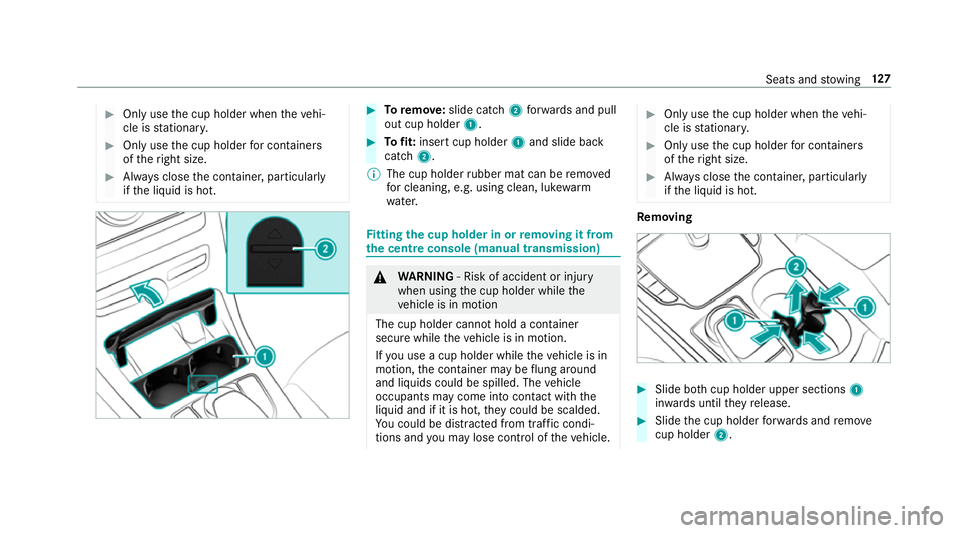
Toremo ve:slide catch 2forw ards and pull
out cup holder 1. 0007
Tofit: inse rtcup holder 1and slide ba ck
catch 2.
0009 The cup holder rubber mat can be remo ved
fo r cleaning, e.g. using clean, luk ewarm
wate r. Fi
tting the cup holder in or removing it from
the centre console (manual transmission) 000A
WARNING ‑ Risk of accident or inju ry
when using the cup holder while the
ve hicle is in motion
The cup holder cannot hold a container
secure while theve hicle is in motion.
If yo u use a cup holder while theve hicle is in
motion, the conta iner may be flung around
and liquids could be spilled. The vehicle
occupants may come into contact with the
liquid and if it is hot, they could be scalded.
Yo u could be distracted from traf fic condi‐
tions and you may lose cont rol of theve hicle. 0007
Only use the cup holder when theve hi‐
cle is stationar y. 0007
Only use the cup holder for containers
of theright size. 0007
Alw ays close the conta iner, particularly
if th e liquid is hot. Re
moving 0007
Slide bo thcup holder upper sections 1
in wa rds until they release. 0007
Slide the cup holder forw ards and remo ve
cup holder 2. Seats and
stowing 127
Page 131 of 609
Fi
tting 0007
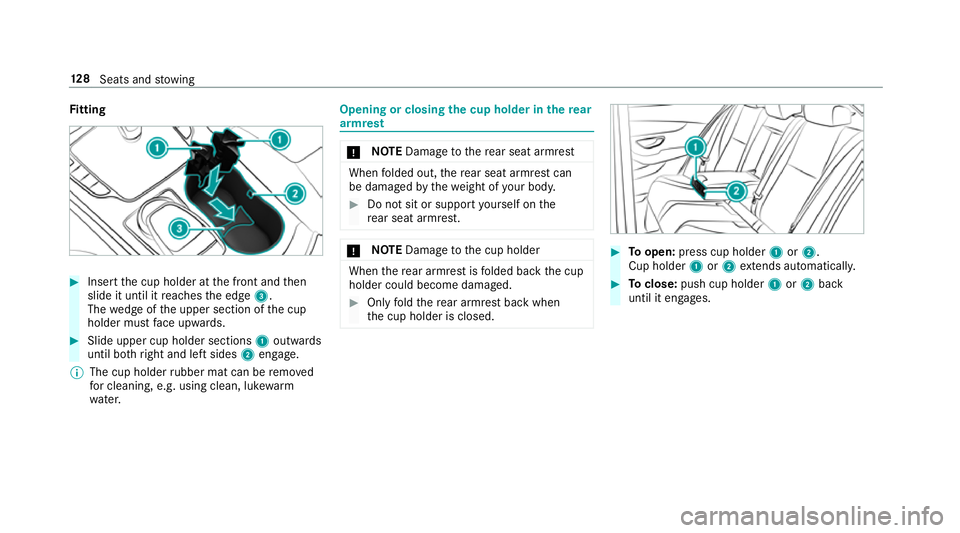
Inse rtthe cup holder at the front and then
slide it until it reaches the edge 3.
The wedge of the upper section of the cup
holder must face up wards. 0007
Slide upper cup holder sections 1outwards
until bo thright and left sides 2engage.
0009 The cup holder rubber mat can be remo ved
fo r cleaning, e.g. using clean, luk ewarm
wate r. Opening or closing
the cup holder in there ar
armrest 000E
NO
TEDama getothere ar seat armrest When
folded out, there ar seat armrest can
be damaged bythewe ight of your body. 0007
Do not sit or suppo rtyo urself on the
re ar seat armrest. 000E
NO
TEDama getothe cup holder When
there ar armrest is folded back the cup
holder could become damaged. 0007
Only fold there ar armrest back when
th e cup holder is closed. 0007
Toopen: press cup holder 1or2.
Cup holder 1or2 extends au tomatical ly. 0007
Toclose: push cup holder 1or2 back
until it engages. 12 8
Seats and stowing
Page 132 of 609
Asht
ray and cigar ette lighter Using
the ashtr ayinthe front centre console 000E
NO
TEDama getothestow age compart‐
ment under the ashtr ay The
stow age compartment under the ashtray
is not heat resis tant and could be damaged if
yo ure st lit cigar ette s on it. 0007
Ensure that the ashtr ayis fully engaged. 0007
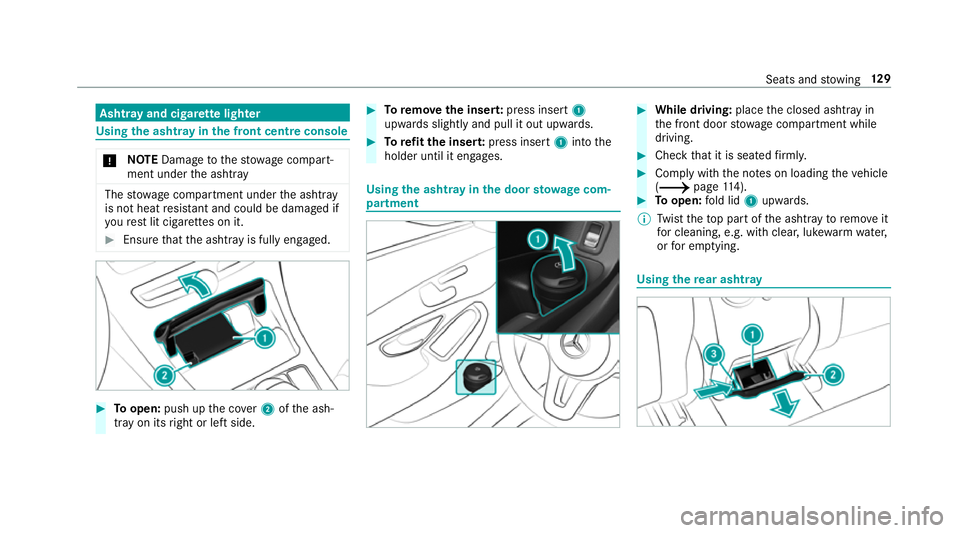
Toopen: push up the co ver2 ofthe ash‐
tray on its right or left side. 0007
Toremo vethe inser t:press insert 1
upwards slightly and pull it out upwards. 0007
Torefit the inse rt:press insert 1into the
holder until it engages. Using
the ashtr ayinthe door stow age com‐
partment 0007
While driving: placethe closed ashtray in
th e front door stowage compartment while
driving. 0007
Check that it is seated firm ly. 0007
Comply with the no tes on loading theve hicle
(0013 page114). 0007
Toopen: fold lid 1upwards.
0009 Twist theto p part of the ashtray toremo veit
fo r cleaning, e.g. with clea r,luk ewarm wate r,
or for em ptying. Using
there ar ashtr ay Seats and
stowing 12 9
Page 133 of 609
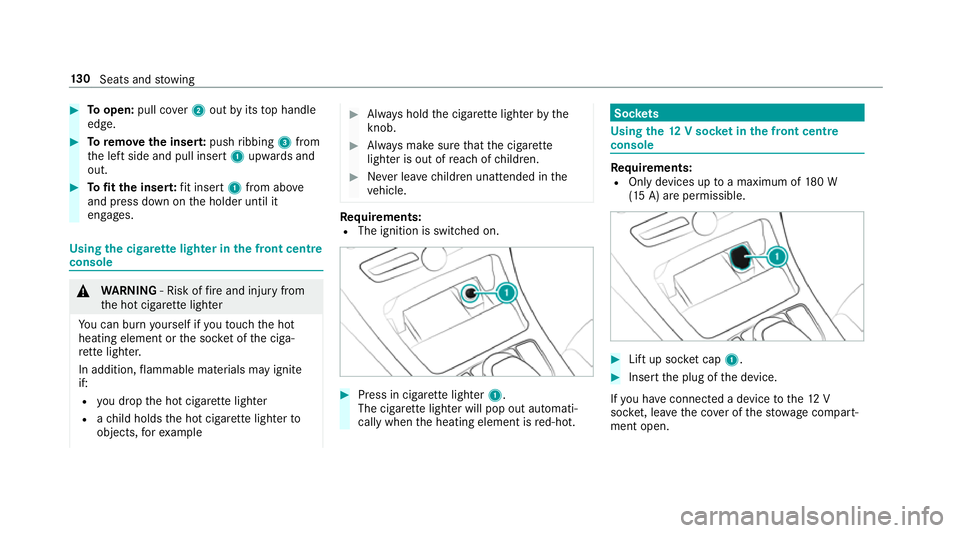
0007
Toopen: pull co ver2 out byits top handle
edge. 0007
Toremo vethe inser t:push ribbing 3from
th e left side and pull insert 1upwards and
out. 0007
Tofit the inse rt:fit insert 1from ab ove
and press down on the holder until it
engages. Using
the cigar ette lighter in the front centre
console 000A
WARNING ‑ Risk of fire and injury from
th e hot cigar ette lighter
Yo u can burn yourself if youto uch the hot
heating element or the soc ket of the ciga‐
re tte lighter.
In addition, flammable materials may ignite
if:
R you drop the hot cigar ette lighter
R ach ild holds the hot cigar ette lighter to
objects, forex ample 0007
Alw ays hold the cigar ette lighter bythe
knob. 0007
Alw ays make sure that the cigar ette
lighter is out of reach of children. 0007
Never lea vechildren unat tended in the
ve hicle. Re
quirements:
R The ignition is switched on. 0007
Press in cigar ette lighter 1.
The cigar ette lighter will pop out automati‐
cally when the heating element is red-hot. Soc
kets Using the
12V so cket inthe front centre
console Re
quirements:
R Only devices up toa maximum of 180 W
(15 A) are permissible. 0007
Lift up soc ket cap 1. 0007
Inse rtthe plug of the device.
If yo u ha veconnected a device tothe12 V
soc ket, le ave the co ver of thestow age compart‐
ment open. 13 0
Seats and stowing
Page 134 of 609
Using
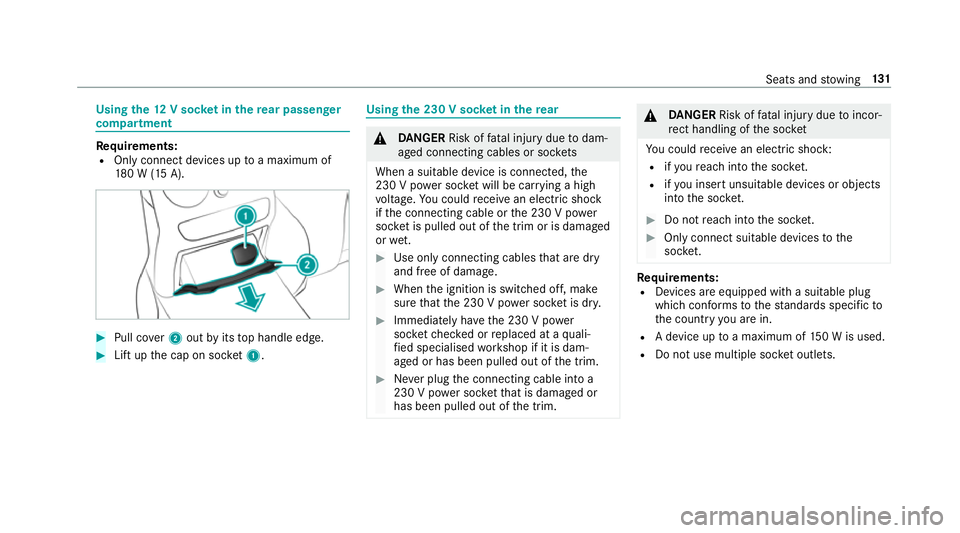
the12 V so cket inthere ar passenger
comp artment Re
quirements:
R Only connect devices up toa maximum of
18 0 W (15 A). 0007
Pull co ver2 out byits top handle edge. 0007
Lift up the cap on soc ket1. Using the 230 V so
cket inthere ar 000A
DANG ER Risk of fata l injury due todam‐
aged connecting cables or soc kets
When a suitable device is connected, the
230 V power soc ket will be car rying a high
vo ltage. You could recei vean electric shock
if th e connecting cable or the 230 V po wer
soc ket is pulled out of the trim or is damaged
or we t. 0007
Use only connecting cables that are dry
and free of damage. 0007
When the ignition is switched off, make
sure that the 230 V po wer soc ket is dr y. 0007
Immedia tely ha ve the 230 V po wer
soc ketch ecked or replaced at a quali‐
fi ed specialised workshop if it is dam‐
aged or has been pulled out of the trim. 0007
Never plug the connecting cable into a
230 V po wer soc ketth at is damaged or
has been pulled out of the trim. 000A
DANG ER Risk of fata l injury due toincor‐
re ct handling of the soc ket
Yo u could recei vean electric shock:
R ifyo ure ach into the soc ket.
R ifyo u insert unsuitable devices or objects
into the soc ket. 0007
Do not reach into the soc ket. 0007
Only connect suitable devices tothe
soc ket. Re
quirements:
R Devices are equipped with a suitable plug
which con form sto thest andards specific to
th e count ryyou are in.
R A device up toa maximum of 150 W is used.
R Do not use multiple soc ket outlets. Seats and
stowing 131
Page 135 of 609
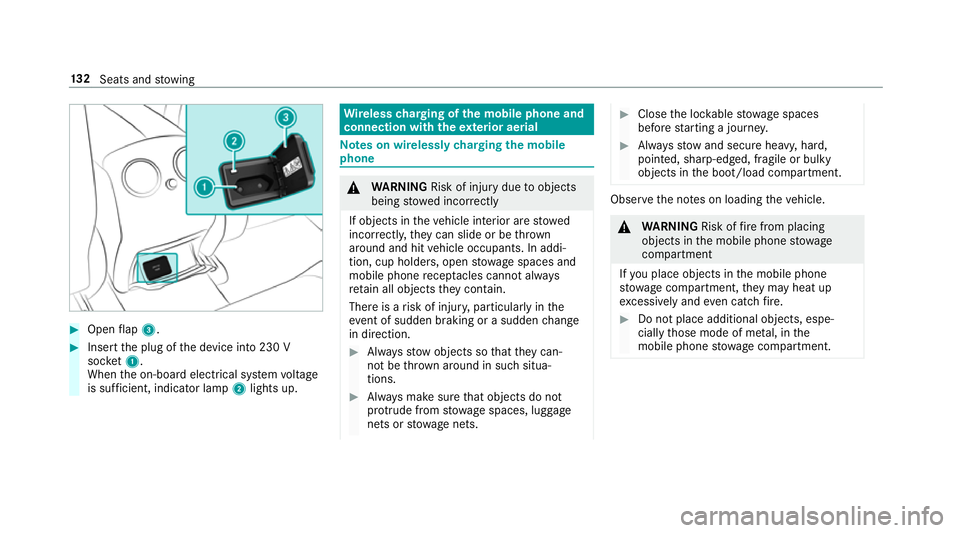
0007
Open flap 3. 0007
Insert the plug of the device into 230 V
soc ket1.
When the on-board electrical sy stem voltage
is suf ficient, indicator la mp2lights up. Wire
lesscharging of the mobile phone and
connection with theex terior aerial Note
s on wirelessly charging the mobile
phone 000A
WARNING Risk of inju rydue toobjects
being stowed incor rectly
If objects in theve hicle interior are stowed
incor rectly, they can slide or be thrown
around and hit vehicle occupants. In addi‐
tion, cup holders, open stowage spaces and
mobile phone recep tacles cannot al ways
re tain all objects they contain.
The reis a risk of injur y,particularly in the
ev ent of sudden braking or a sudden change
in direction. 0007
Alw aysstow objects so that they can‐
not be throw n around in su chsitua‐
tions. 0007
Alw ays make sure that objects do not
pr otru de from stowage spaces, luggage
nets or stowage nets. 0007
Close the loc kable stow age spaces
before starting a journe y. 0007
Alw aysstow and secure heavy, hard,
poin ted, sharp-edged, fragile or bulky
objects in the boot/load compartment. Obser
vethe no tes on loading theve hicle. 000A
WARNING Risk offire from placing
objects in the mobile phone stowage
compartment
If yo u place objects in the mobile phone
stow age compartment, they may heat up
exc essively and even catch fire. 0007
Do not place additional objects, espe‐
cially those mode of me tal, in the
mobile phone stowage compartment. 13 2
Seats and stowing
Page 136 of 609
000E
NO
TEDama getoobjects caused by
placing them in the mobile phone stow‐
age compartment If objects are placed in
the mobile phone
stow age compartment, they may be dam‐
aged byelectromagnetic fields. 0007
Do not place credit cards, storage
media or other objects sensitive to
electromagnetic fields in the mobile
phone stowage compartment. 000E
NO
TEDama getothe mobile phone
stow age compartment caused byliquids If liquids enter
the mobile phone stowage
compartment, the compartment may be
damaged. 0007
Ensure that no liquids enter the mobile
phone stowage compartment. R
Depending on theve hicle equipment, the
mobile phone is connected totheve hicle's
ex terior aerial via thech arging module. R
The charging function and wireless connec‐
tion of the mobile phone totheve hicle's
ex terior aerial are only available if the ignition
is switched on.
R Small mobile phones may not be able tobe
ch arge d in everyposition of the mobile
phone stowage compartment.
R Largemobile phones which do not rest flat in
th e mobile phone stowage compartment may
not be able tobe charge d or connec ted with
th eve hicle's exterior aerial.
R The mobile phone may heat up during the
ch arging process. This may also depend on
th e applications (apps) cur rently open.
R Toensure more ef ficient charging and con‐
nection with theve hicle's exterior aerial,
re mo vethe pr otective co ver from the mobile
phone. Pr otective co vers which are neces‐
sary for wireless charging are excluded. Wire
lesscharging of the mobile phone Re
quirements:
R The mobile phone is suitable for wireless
ch arging. You can find a li stof compatible
mobile phones at:
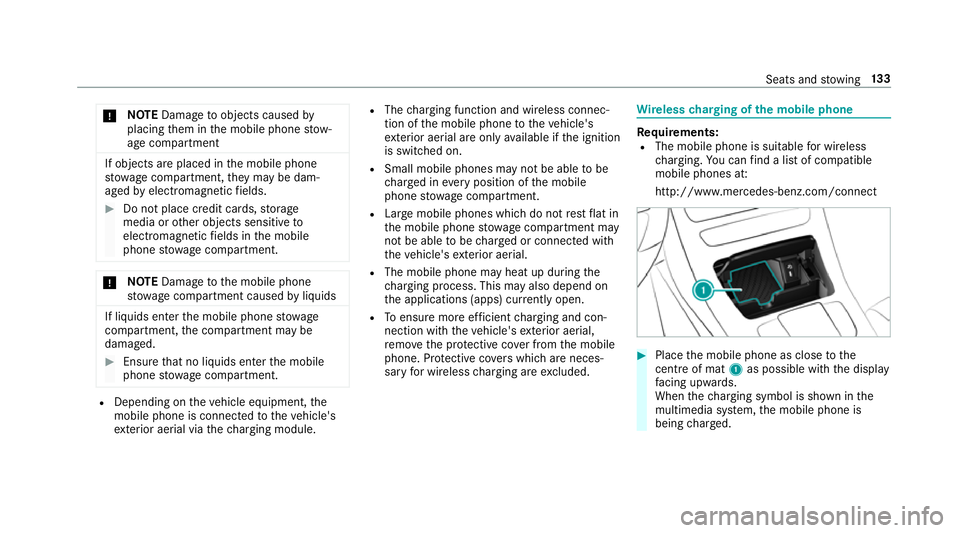
http://www.mercedes-benz.com/connect 0007
Place the mobile phone as close tothe
centre of mat 1as possible wi th the display
fa cing up wards.
When thech arging symbol is shown in the
multimedia sy stem, the mobile phone is
being charge d. Seats and
stowing 13 3
Page 137 of 609
Malfunctions during
thech arging process are
shown in the multimedia sy stem displa y.
0009 The mat can be remo vedby theta bfor
cleaning, e.g. using clean, lu kewa rm wate r. Fi
tting/ removing the floormats 000A
WARNING Risk of accident due to
objects in the driver's foot we ll
Objects in the driver's foot we ll may impede
pedal tr avel or block a depressed pedal.
This jeopardises the operating and road
saf ety of theve hicle. 0007
Stow all objects in theve hicle securely
so that they cannot getinto the driver's
fo ot we ll. 0007
Alw aysfit th efloor mats securely and
as prescribed in order toensure that
th ere is alw ays suf ficient room forthe
pedals. 0007
Do not use loose floor mats and do not
place floor mats on top of one ano ther. 0007
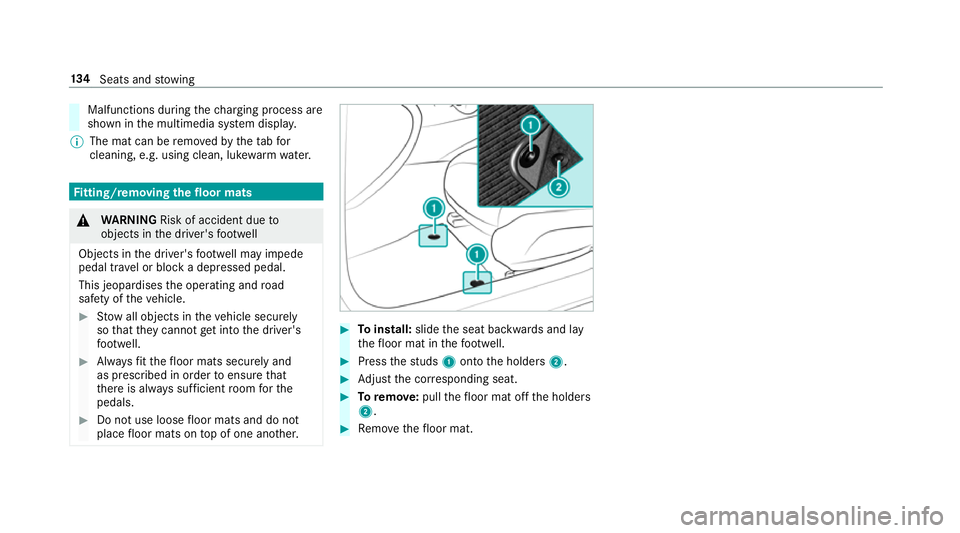
Toinstall: slidethe seat backwards and lay
th efloor mat in thefo ot we ll. 0007
Press thest uds 1onto the holders 2. 0007
Adjust the cor responding seat. 0007
Toremo ve: pull thefloor mat off the holders
2. 0007
Remo vethefloor mat. 134
Seats and stowing
Page 226 of 609

permitted within
the urban area. The speed limit
display in the instrument display is alw ays upda‐
te d when theve hicle is le vel with the tra ffic sign.
If th ere is no speed restriction on an unlimi ted
st re tch of road (e.g. on a mo torw ay),th ere com‐
mended speed is adop ted as thestored speed.
The sy stem uses the speed stored on an unlimi‐
te dstre tch of road as there commended speed.
If yo u do not alter thestored speed on an unlimi‐
te dstre tch of road, there commended speed is
13 0 km/h.
If Ac tive Dis tance Assi stDISTRONIC has been
put into passi vemode bypressing the accelera‐
to r pedal, only speed limits which are higher
th an the set speed are adop ted.
Ac tive Speed Limit Assi stis only an aid. The
driver is responsible forke eping a safe dis tance
to theve hicle in front, forve hicle speed and for
braking in good time. The maximum permissible
speed also depends on factors su chasthero ad
sur face and traf fic conditions.
Sy stem limitations
Te mp orary speed restrictions (e.g. for a cer tain
time or due towe ather conditions) cannot be proper
ly detected bythe sy stem. The maximum
permissible speed applying for a vehicle with a
trailer is not de tected bythe sy stem. In these sit‐
uations you must adjust your speed yourself. 000A
WARNING Risk of accident due toActive
Speed Limit Assi stadapting theve hicle's
speed
The speed adop tedby Active Speed Limit
Assi stmay be too high or incor rect in some
individual cases, su chas:
R Inthewe t or in fog
R When towing a trailer 0007
Ensure that the driven speed complies
with traf fic re gulations. 0007
Adjust the driving speed tosuit cur rent
traf fic and weather conditions. Fu
nction of route-based speed adaptation 0009
The following function is countr y-dependent
and only available in conjunction with the
Driving Assi stance Package. When Dis
tance Assi stDISTRONIC is acti ve,the
function adju ststh e speed depending on the
ro ute events ahead. Depending on the drive pro‐
gram selected, theve hicle negotiates thero ute
eve nt ahead in a fuel-s aving, com fortable or
dynamic manner. When thero ute event has been
passed, theve hicle accelerates again tothe
st ored speed. The set dis tance totheve hicle in
front, vehicles de tected ahead and speed restric‐
tions ahead are take n into account.
Ro ute-based speed adjustment can byconfig‐
ured in the multimedia sy stem
(0013 page 224).
Ro ute events ahead are:
R Bends
R T-junctions, roundabouts and tollst ations
R Turns and exits
R Traf fic jams ahead (only wi thLive Traf fic
( 0013 page 337))
0009 When theto llst ation is reached, Active Dis‐
ta nce Assi stDISTRONIC adopts the speed as
th estored speed. Driving and parking
223
Page 227 of 609
Also,
the speed is reduced if the turn signal to
ch ange lanes is swit ched on and one of thefo l‐
lowing situations is de tected:
R Turning off at junctions
R Driving on slowing-down lanes
R Driving on lanes adjacent toslowing-down
lanes
The driver is responsible forch oosing theright
speed and observing other road users. This
applies in particular tojunctions, roundabouts
and traf fic lights, as route-based speed adap ta‐
tion does not brake theve hicle toast andstill.
When route guidance is active, thefirs t speed
adjustment is car ried out automaticall y.Ifthe
turn signal indica tor is switched on, the selected
ro ute is confirmed and fur ther speed adjustment
is activated.
Speed adjustment is cancelled in thefo llowing
cases:
R Ifth e turn signal indicator is switched off
before thero ute event.
R Ifth e driver depresses the accelera tor or
brake pedal during the process. Sy
stem limitations
Ro ute-based speed adap tation does not take
ri ght of wayre gulations into account. The driver
is responsible for complying with road traf fic
re gulations and driving at a suitable speed.
In dif ficult conditions (e.g. unclear roads, nar row
lanes, wetro ad sur faces, snow or ice) or when
driving wi tha trailer, the speed adjustment made
by the sy stem may not alw ays be suitable. In
th ese situations the driver must inter vene
acco rding ly. 000A
WARNING Risk of accident in spi teof
ro ute-based speed adjustment
Ro ute-based speed adjustment might mal‐
function or be temp orarily una vailable in the
fo llowing situations:
R If map data is not up todate or available
R Ifyo u do not follow the selected route
guidance
R Ifth e set route is re-planned
R Inroad con stru ction areas R
When towing a trailer
R In bad weather or road conditions
R Ifth e accelera tor pedal is depressed 0007
Adjust the speed tothe traf fic situation. Setting
route-based speed adjustment Re
quirements:
R Active Dis tance Assi stDISTRONIC is acti va‐
te d.
Multimedia sy stem:
0018 Vehicle 0019
k Assistance
0019 Speed adjustment 0007
Activate 0073or deacti vate 0053 the function. Ac
tive Steering Assist Fu
nction of Active Steering Assist
0009 Active Steering Assist is count ry-dependent
and only available forve hicles with the Driv‐
ing Assis tance Package. 224
Driving and parking