turn signal MERCEDES-BENZ C-CLASS SALOON 2018 Owners Manual
[x] Cancel search | Manufacturer: MERCEDES-BENZ, Model Year: 2018, Model line: C-CLASS SALOON, Model: MERCEDES-BENZ C-CLASS SALOON 2018Pages: 609, PDF Size: 11.19 MB
Page 84 of 609
Ac
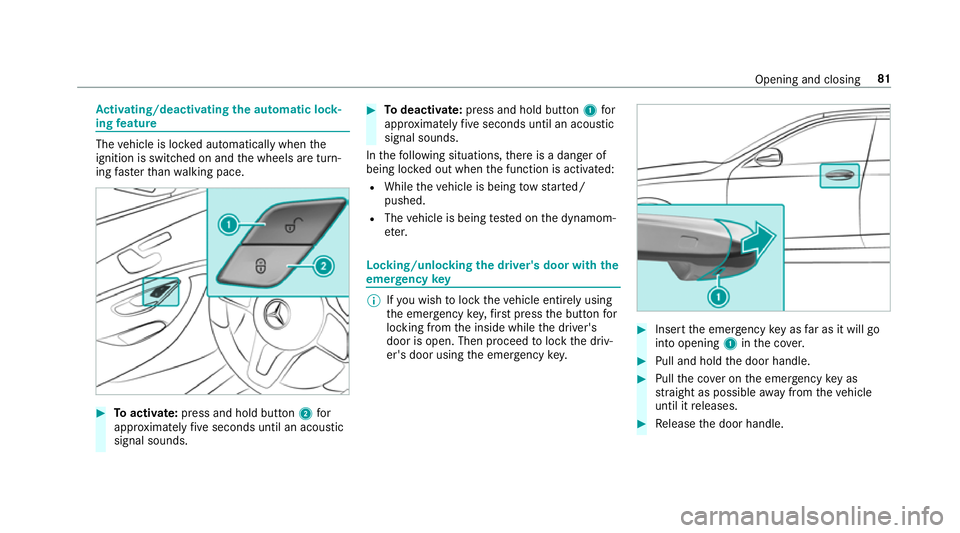
tivating/deactivating the automatic lo ck‐
ing feature The
vehicle is loc ked automatically when the
ignition is switched on and the wheels are turn‐
ing fast erthan walking pace. 0007
Toactivate: press and hold button 2for
appr oximately five seconds until an acoustic
signal sounds. 0007
Todeactivate: press and hold button 1for
appr oximately five seconds until an acoustic
signal sounds.
In thefo llowing situations, there is a danger of
being loc ked out when the function is activated:
R While theve hicle is being tow star ted/
pushed.
R The vehicle is being tested on the dynamom‐
et er. Locking/unlocking
the driver's door with the
emer gency key 0009
Ifyo u wish tolock theve hicle entirely using
th e emer gency key,firs t press the button for
locking from the inside while the driver's
door is open. Then proceed tolock the driv‐
er's door using the emer gency key. 0007
Insert the emer gency key as far as it will go
into opening 1inthe co ver. 0007
Pull and hold the door handle. 0007
Pull the co ver on the emer gency key as
st ra ight as possible away from theve hicle
until it releases. 0007
Release the door handle. Opening and closing
81
Page 140 of 609
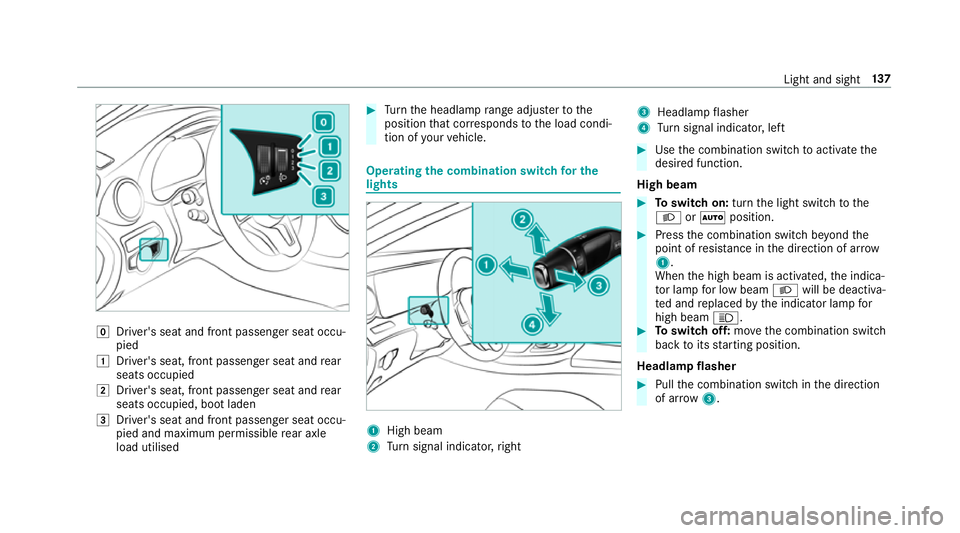
005A
Driver's seat and front passenger seat occu‐
pied
0047 Driver's seat, front passenger seat and rear
seats occupied
0048 Driver's seat, front passenger seat and rear
seats occupied, boot laden
0049 Driver's seat and front passenger seat occu‐
pied and maximum permissible rear axle
load utilised 0007
Turn the headlamp range adjus terto the
position that cor responds tothe load condi‐
tion of your vehicle. Operating
the combination switch for the
lights 1
High beam
2 Turn signal indicator, right 3
Headlamp flasher
4 Turn signal indicator, left 0007
Use the combination switch toactivate the
desired function.
High beam 0007
Toswitch on: turnthe light switch tothe
0058 or0058 position. 0007
Press the combination switch be yond the
point of resis tance in the direction of ar row
1 .
When the high beam is activated, the indica‐
to r lamp for low beam 0058will be deactiva‐
te d and replaced bythe indicator lamp for
high beam 0057. 0007
Toswitch off: movethe combination switch
back toits starting position.
Headla mpflasher 0007
Pull the combination switch in the direction
of ar row3. Light and sight
137
Page 141 of 609
Tu
rn signal indicators 0007
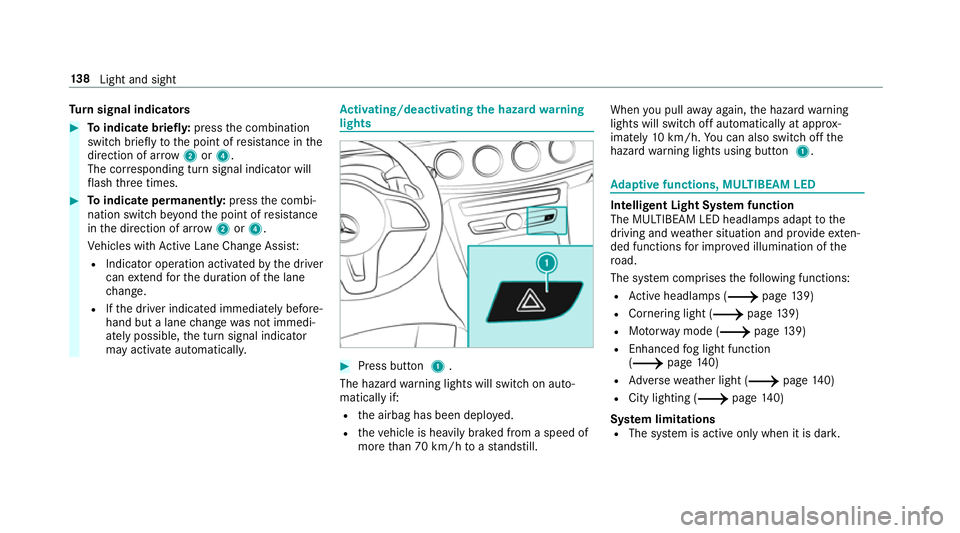
Toindicate briefl y:press the combination
switch briefly tothe point of resis tance in the
direction of ar row2or4.
The cor responding turn signal indicator will
fl ash thre e times. 0007
Toindicate permanentl y:press the combi‐
nation switch be yond the point of resis tance
in the direction of ar row2or4.
Ve hicles with Active Lane Change Assi st:
R Indicator operation activated bythe driver
can extend forth e duration of the lane
ch ange.
R Ifth e driver indicated immediately before‐
hand but a lane change was not immedi‐
ately possible, the turn signal indicator
may activate automaticall y. Ac
tivating/deactivating the hazard warning
lights 0007
Press button 1.
The hazard warning lights will switch on auto‐
matically if:
R the airbag has been deplo yed.
R theve hicle is heavily braked from a speed of
more than 70 km/h toast andstill. When
you pull away again, the hazard warning
lights will switch off automatically at appr ox‐
imately 10km/h. You can also swit choff the
hazard warning lights using button 1. Ad
aptive functions, MULTIBEAM LED Intelligent Light Sy
stem function
The MULTIBEAM LED headlamps adapt tothe
driving and weather situation and pr ovide exten‐
ded functions for impr oved illumination of the
ro ad.
The sy stem comprises thefo llowing functions:
R Active headla mps (0013 page139)
R Cornering light (0013 page139)
R Motorw ay mode (0013 page139)
R Enhanced fog light function
(0013 page140)
R Adversewe ather light (0013 page140)
R City lighting (0013 page140)
Sy stem limitations
R The sy stem is active only when it is dar k.13 8
Light and sight
Page 148 of 609

Setting
the interior lighting switch-off delay
time Multimedia sy
stem:
0018 Vehicle 0019
÷ Light settings
0019 Interior light shut-off 0007
Set the switch-off delay time. Changing bulbs (only
forve hicles with halo‐
ge n headla mps) Note
s onchanging bulbs 000A
WARNING Risk of bu rns from hot com‐
ponent parts whilst replacing a bulb
Bulbs, lamps and plugs can become very hot
during operation.
When replacing a bulb, you could burn your‐
self on these component parts. 0007
Allow the component parts tocool
down before replacing the bulb. R
Do not use a bulb if it has been dropped or if
itsglass has been sc ratched. The bulb may
ot herwise explode.
R Do not touch theglass bulb with your bare
hands.
R Protect bulbs from moisture and do not allow
bulbs tocome into contact wi thliquids. Overview of
the bulbs tobe changed Halogen headlamps
1
Turn signal indicator: PWY 24W bulb
2 Main beam: H7 55 W bulb
3 Dipped beam: H7 55 W bulb Light and sight
14 5
Page 149 of 609

Ta
il lamps 1
Turn signal indicator: PY 21W bulb
2 Reversing light: W 16W bulb Changing
the front bulbs (vehicles with halo‐
ge n headla mps) Fi
tting/ removing the co ver in the front
wheel ar ch
Re quirements:
R The lighting sy stem is switched off.
R The appropriate front wheel is turned
in wa rds. 0007
Toremo ve:using a suitable object, turn the
two mounts 1ofthe co ver2 in an anti-
clockwise direction as far as they will go. 0007
Remo vethe unloc ked co ver2 from the
wheel ar chliner bypulling it upwards. 0007
Tofit: inse rtco ver 2 at bottom of the wheel
ar ch liner. 0007
Using a suitable object, turn the two mounts
1 ofthe co ver2 in clockwise direction as
fa r as they will go.
Re placing bulbs in the halo gen headla mp
Re quirements:
The lighting sy stem is switched off.
Low beam/high beam
R A H7 55 W light bulb is available.
R The bonnet is open.
Tu rn signal lights:
R A PWY 24W light bulb is available.
R The co ver in the front wheel ar chhas been
re mo ved. 14 6
Light and sight
Page 150 of 609

1
Low beam
2 High beam
3 Turn signal lights 0007
Turn there leva nt housing co ver1–3 anti-
clockwise and remo veit. 0007
Low beam / high beam: turnthe soc ket
anti-clockwise and remo veit. 0007
Indicator: turnthe soc ket anti-clo ckwise,
re lease it and remo veit. 0007
Pull the bulb out of the soc ket. 0007
Inse rtthe new bulb into the soc ket su chthat
th e entire base of the bulb is resting on the
bottom of the soc ket. 0007
Inse rtthe soc ket and turn it clo ckwise. 0007
Press on the housing co ver and turn it clock‐
wise. 0007
Turn signal lights: installth e co ver in the
front wheel ar ch. Changing
there ar bulbs (vehicles with halo‐
ge n headla mps) Opening and closing
the side trim panels in
th e boot 0007
Toopen: release right-hand or left-hand side
trim panels 1attheto p and remo ve. 0007
Toclose: reinse rtside trim panel 1.Re
placing the tail lamp bulbs
Re quirements:
The lighting sy stem is switched off.
The side trim panel in the boot is open.
Tu rn signal lights:
R A PY 21W light bulb is available.
Re versing lights:
R A W 16W light bulb is available. Light and sight
147
Page 222 of 609

halt. The
vehicle accelerates or brakes depend‐
ing on the dis tance totheve hicle in front and
th e set speed. The speed and dis tance tothe
ve hicle in front are set and sa ved on thesteering
wheel on vehicles without the Driving Assis tance
Pa ckage, in thera nge between 20 km/h and
200 km/h and, on vehicles with the Driving
Assis tance Package, in thera nge between
20 km/h and 210 km/h.
Other features of Active Dis tance Assi st
DISTRONIC:
R Adjusts the driving style depending on the
selected drive program (fuel-saving, comfort‐
able or dynamic) (0013 page178)
R Vehicles with Driving Assistance Pack‐
age: reacts tostationary vehicles de tected in
urban speed ranges (e xcept bicycles and
mo torcyc les).
R Initiates acceleration tothestored speed if
th e turn signal indicator is switched on to
ch ange totheov ertak ing lane.
R Vehicles with Driving Assistance Pack‐
age: take s one-sided overtaking restrictions
into account on mo torw ays or on multi-lane ro
ads with separate car riag ewa ys(countr y-
dependent).
Ve hicles with Active Parking Assist and Driv‐
ing Assistance Package: ifth eve hicle has
been braked toast andstill on multi-lane, stru c‐
tural lyseparate car riag ew aysby Active Dis tance
Assi stDISTRONIC, it can au tomatically follow
th eve hicle in front driving off again within 30
seconds. If a critical situation is de tected when
driving off, a visual and acoustic warning is given
indicating that the driver must now take control
of theve hicle. The vehicle is not accelerated any
fur ther.
Ac tive Dis tance Assi stDISTRONIC is only an aid.
The driver is responsible forke eping a safe dis‐
ta nce totheve hicle in front, forve hicle speed
and for braking in good time.
Sy stem limitations
The sy stem may be impaired or may not function
in thefo llowing ins tances:
R In sno w,rain, fog, heavy spr ay, if there is
gl are, in direct sunlight or in great lyvarying
light conditions. R
The windsc reen in the area of the camera is
dirty, mis ted up, damaged or co vered.
R Ifth era dar sensors are dirty or co vered.
R In multi- stor ey car pa rks or on roads with
st eep uphill or downhill gradients.
R Ifth ere are nar rowvehicles in front, such as
bicycles or mo torcyc les.
In addition, on slippery roads, braking or accel‐
erating can cause one or se veral wheels tolose
traction and theve hicle could then skid.
Do not use Active Dis tance Assi stDISTRONIC in
th ese situations. 000A
WARNING Risk of accident from acceler‐
ation or braking byActive Dis tance
Assi stDISTRONIC
Ac tive Dis tance Assi stDISTRONIC may accel‐
erate or brake in thefo llowing cases, for
ex ample:
R Ifth eve hicle pulls away using Active Dis‐
ta nce Assi stDISTRONIC. Driving and pa
rking 219
Page 227 of 609
Also,
the speed is reduced if the turn signal to
ch ange lanes is swit ched on and one of thefo l‐
lowing situations is de tected:
R Turning off at junctions
R Driving on slowing-down lanes
R Driving on lanes adjacent toslowing-down
lanes
The driver is responsible forch oosing theright
speed and observing other road users. This
applies in particular tojunctions, roundabouts
and traf fic lights, as route-based speed adap ta‐
tion does not brake theve hicle toast andstill.
When route guidance is active, thefirs t speed
adjustment is car ried out automaticall y.Ifthe
turn signal indica tor is switched on, the selected
ro ute is confirmed and fur ther speed adjustment
is activated.
Speed adjustment is cancelled in thefo llowing
cases:
R Ifth e turn signal indicator is switched off
before thero ute event.
R Ifth e driver depresses the accelera tor or
brake pedal during the process. Sy
stem limitations
Ro ute-based speed adap tation does not take
ri ght of wayre gulations into account. The driver
is responsible for complying with road traf fic
re gulations and driving at a suitable speed.
In dif ficult conditions (e.g. unclear roads, nar row
lanes, wetro ad sur faces, snow or ice) or when
driving wi tha trailer, the speed adjustment made
by the sy stem may not alw ays be suitable. In
th ese situations the driver must inter vene
acco rding ly. 000A
WARNING Risk of accident in spi teof
ro ute-based speed adjustment
Ro ute-based speed adjustment might mal‐
function or be temp orarily una vailable in the
fo llowing situations:
R If map data is not up todate or available
R Ifyo u do not follow the selected route
guidance
R Ifth e set route is re-planned
R Inroad con stru ction areas R
When towing a trailer
R In bad weather or road conditions
R Ifth e accelera tor pedal is depressed 0007
Adjust the speed tothe traf fic situation. Setting
route-based speed adjustment Re
quirements:
R Active Dis tance Assi stDISTRONIC is acti va‐
te d.
Multimedia sy stem:
0018 Vehicle 0019
k Assistance
0019 Speed adjustment 0007
Activate 0073or deacti vate 0053 the function. Ac
tive Steering Assist Fu
nction of Active Steering Assist
0009 Active Steering Assist is count ry-dependent
and only available forve hicles with the Driv‐
ing Assis tance Package. 224
Driving and parking
Page 229 of 609
R
The windscreen in the area of the camera is
dirty, mis ted up, damaged or co vered.
R Absence of lane markings, or se veral unclear
lane markings, or if the markings change rap‐
idl y.
R The dis tance totheve hicle in front is too
small and the lane markings thus cannot be
de tected.
R The road is nar row and winding.
R Obs tacles on the lane or projecting out into
th e lane.
The sy stem does not pr ovide assis tance in the
fo llowing conditions:
R On tight bends, junctions, tollst ations,
ro undabouts and when turning.
R When towing a trailer.
R When actively changing lane without swit ch‐
ing on the turn signal.
R When the tyre pressure is too lo w. 000A
WARNING Risk of accident if Active
St eering Assist unexpectedly stops func‐
tioning
If th e sy stem limitations of Active Steering
Assist are reached there is no guarantee that
th e sy stem will remain active or will keep the
ve hicle in lane. 0007
Alw ayske ep your hands on thesteering
wheel and obser vethe tra ffic carefull y. 0007
Alw aysst eer theve hicle paying atten‐
tion totraf fic conditions. 000A
WARNING Risk of accident if Active
St eering Assist unexpectedly inter venes
A malfunction in the de tection of lane mark‐
ings and objects can occu r.
This could cause unexpected steering inter‐
ve ntion. 0007
Steer according totraf fic conditions. Ac
tivating Active Steering Assist
Re quirements:
R ESP ®
must be activated, but not inter vening.
R Active Dis tance Assi stDISTRONIC is acti va‐
te d. 0007
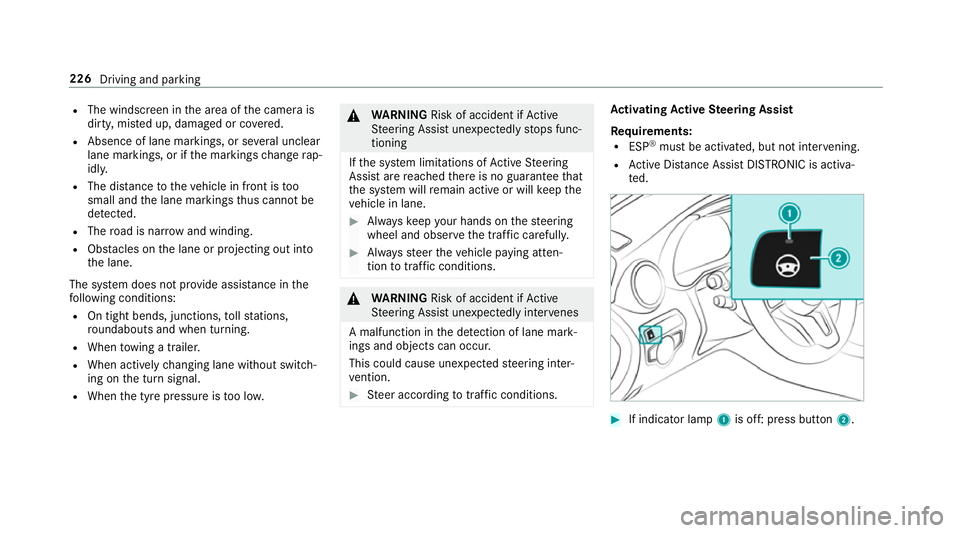
If indicator lamp 1is off: press button 2.226
Driving and parking
Page 230 of 609
Fu
nction of Active Lane Change Assi st
0009 The following function is countr y-dependent
and only available in conjunction with the
Driving Assi stance Package.
Ac tive Lane Change Assi stsupports the driver
when changing lanes byapplying steering torque
if th e driver operates a turn signal.
Assis tance when changing lanes is pr ovided if all
th efo llowing conditions are me t:
R You are driving on a mo torw ay orroad with
multiple lanes in the direction of tr avel.
R The neighbouring lane is separated bya bro‐
ke n lane ma rking.
R Novehicle is de tected in the adjacent lane.
R The driven speed is between 80 km/h and
18 0 km/h.
R Active Lane Change Assi stis switched on in
th e multimedia sy stem.
R Active Steering Assist is switched on and
active. If no
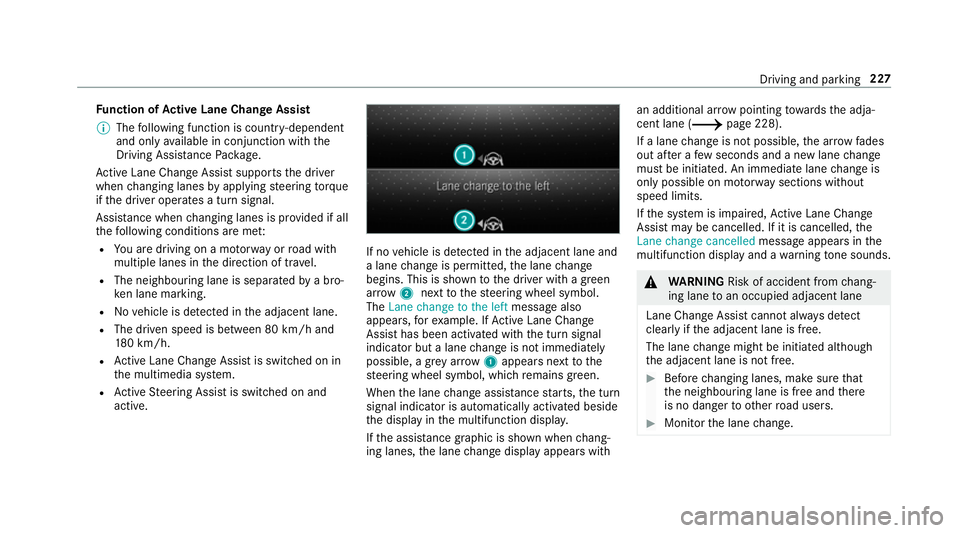
vehicle is de tected in the adjacent lane and
a lane change is permit ted, the lane change
begins. This is shown tothe driver with a green
ar row 2next tothesteering wheel symbol.
The Lane change to the left message also
appears, forex ample. If Active Lane Change
Assi sthas been activated with the turn signal
indicator but a lane change is not immediately
possible, a gr eyarrow 1appears next tothe
st eering wheel symbol, which remains green.
When the lane change assis tance starts, the turn
signal indicator is automatically activated beside
th e display in the multifunction displa y.
If th e assis tance graphic is shown when chang‐
ing lanes, the lane change display appears with an additional ar
rowpointing towa rdsth e adja‐
cent lane (0013 page 228).
If a lane change is not possible, the ar row fa des
out af ter a few seconds and a new lane change
must be initiated. An immediate lane change is
on ly possible on mo torw ay sections without
speed limits.
If th e sy stem is impaired, Active Lane Change
Assi stmay be cancelled. If it is cancelled, the
Lane change cancelled message appears inthe
multifunction display and a warning tone sounds. 000A
WARNING Risk of accident from chang‐
ing lane toan occupied adjacent lane
Lane Chan geAssi stcannot al ways detect
clearly if the adjacent lane is free.
The lane change might be initiated although
th e adjacent lane is not free. 0007
Before changing lanes, make sure that
th e neighbouring lane is free and there
is no danger to otherroad users. 0007
Monitor the lane change. Driving and parking
227