mirror MERCEDES-BENZ C-Class SEDAN 2012 W204 Owner's Guide
[x] Cancel search | Manufacturer: MERCEDES-BENZ, Model Year: 2012, Model line: C-Class SEDAN, Model: MERCEDES-BENZ C-Class SEDAN 2012 W204Pages: 356, PDF Size: 13.49 MB
Page 105 of 356
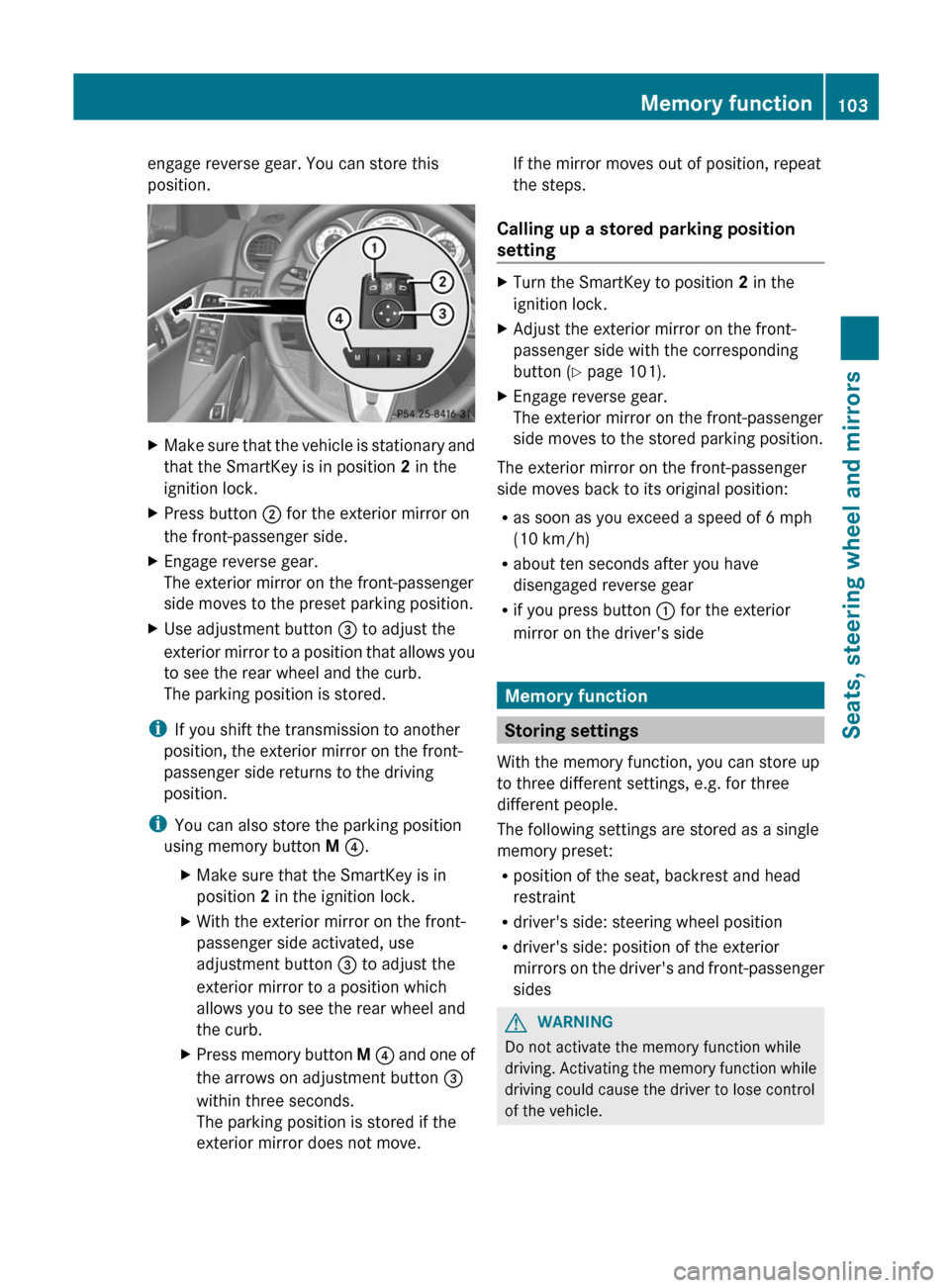
engage reverse gear. You can store this
position.XMake sure that the vehicle is stationary and
that the SmartKey is in position 2 in the
ignition lock.XPress button ; for the exterior mirror on
the front-passenger side.XEngage reverse gear.
The exterior mirror on the front-passenger
side moves to the preset parking position.XUse adjustment button = to adjust the
exterior mirror to a position that allows you
to see the rear wheel and the curb.
The parking position is stored.
i If you shift the transmission to another
position, the exterior mirror on the front-
passenger side returns to the driving
position.
i You can also store the parking position
using memory button M ? .
XMake sure that the SmartKey is in
position 2 in the ignition lock.XWith the exterior mirror on the front-
passenger side activated, use
adjustment button = to adjust the
exterior mirror to a position which
allows you to see the rear wheel and
the curb.XPress memory button M ? and one of
the arrows on adjustment button =
within three seconds.
The parking position is stored if the
exterior mirror does not move.If the mirror moves out of position, repeat
the steps.
Calling up a stored parking position
settingXTurn the SmartKey to position 2 in the
ignition lock.XAdjust the exterior mirror on the front-
passenger side with the corresponding
button ( Y page 101).XEngage reverse gear.
The exterior mirror on the front-passenger
side moves to the stored parking position.
The exterior mirror on the front-passenger
side moves back to its original position:
R as soon as you exceed a speed of 6 mph
(10 km/h)
R about ten seconds after you have
disengaged reverse gear
R if you press button : for the exterior
mirror on the driver's side
Memory function
Storing settings
With the memory function, you can store up
to three different settings, e.g. for three
different people.
The following settings are stored as a single
memory preset:
R position of the seat, backrest and head
restraint
R driver's side: steering wheel position
R driver's side: position of the exterior
mirrors on the driver's and front-passenger
sides
GWARNING
Do not activate the memory function while
driving. Activating the memory function while
driving could cause the driver to lose control
of the vehicle.
Memory function103Seats, steering wheel and mirrorsZ
Page 106 of 356
XAdjust the seat (Y page 94).XOn the driver's side, adjust the steering
wheel (Y page 100) and the exterior mirrors
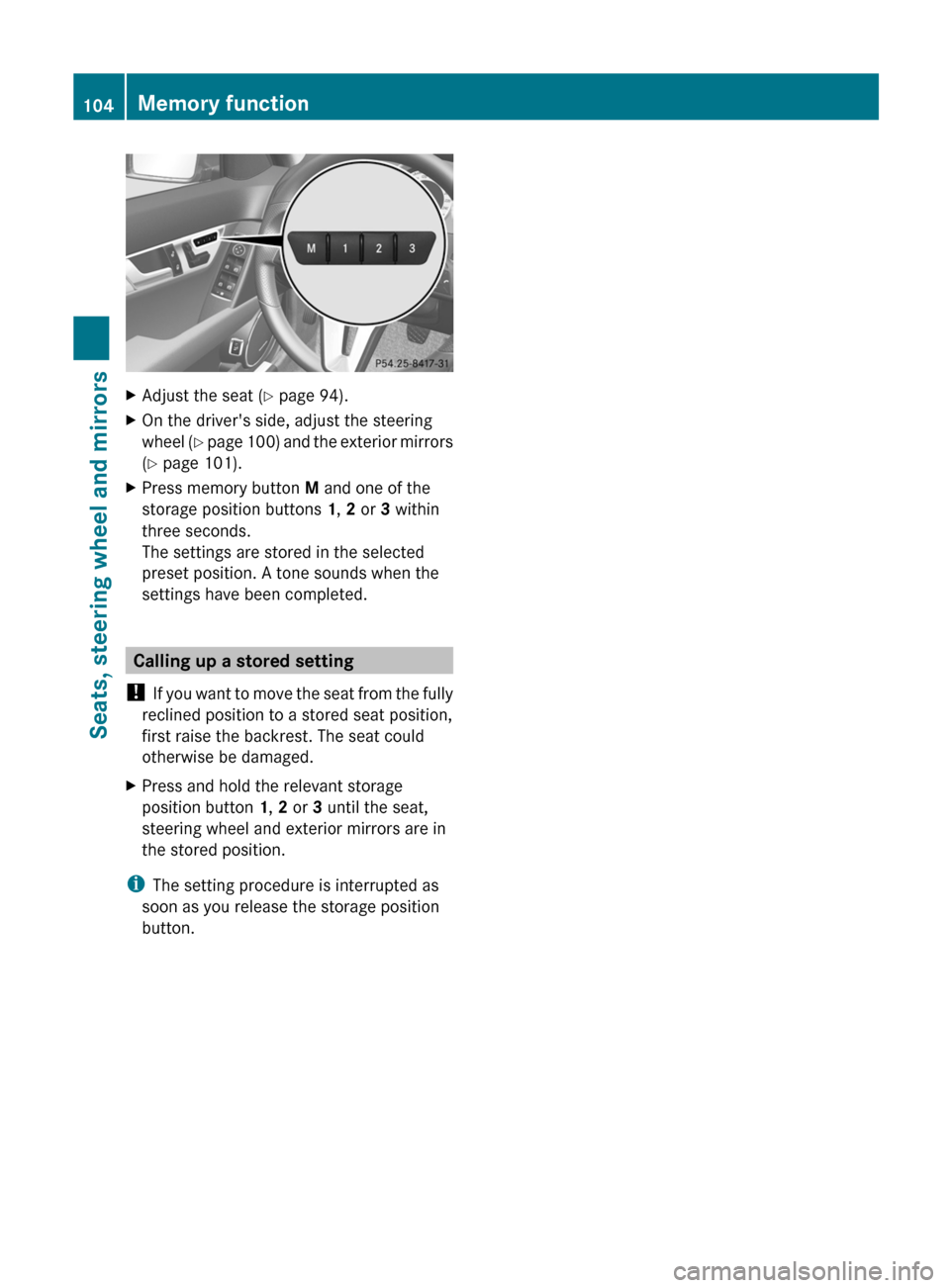
( Y page 101).XPress memory button M and one of the
storage position buttons 1, 2 or 3 within
three seconds.
The settings are stored in the selected
preset position. A tone sounds when the
settings have been completed.
Calling up a stored setting
! If you want to move the seat from the fully
reclined position to a stored seat position,
first raise the backrest. The seat could
otherwise be damaged.
XPress and hold the relevant storage
position button 1, 2 or 3 until the seat,
steering wheel and exterior mirrors are in
the stored position.
i The setting procedure is interrupted as
soon as you release the storage position
button.
104Memory functionSeats, steering wheel and mirrors
Page 183 of 356
XStop as soon as you hear a warning tone,
The vehicle has reached the position in
which you need to countersteer.
The Please steer to the left or
Please steer to the right message
appears in the multifunction display.XCountersteering: while the vehicle is
stationary, turn the steering wheel in the
specified direction until the arrow is white
and a warning tone sounds.XTo reverse into the parking space:
maintain the steering wheel angle and
reverse carefully.XStop as soon as you hear a warning tone,
at the latest when PARKTRONIC sounds the
continuous warning tone.
The Parking Guidance finished
message appears in the multifunction
display and a warning tone sounds. You
may be asked to steer in a different
direction and then change gear. In this
case, further displays in the multifunction
display will direct you to the final position.XManeuver if necessary.XAlways observe the warning messages
displayed by PARKTRONIC ( Y page 177).
Canceling Parking Guidance
XPress the PARKTRONIC button on the
center console ( Y page 177).
Parking Guidance is canceled immediately
and PARKTRONIC is deactivated.
Parking Guidance is canceled automatically if
it is no longer possible to guide you into the
parking space, or if a malfunction occurs.
The parking space symbol goes out and a
warning tone sounds. The Parking
Guidance Canceled message appears in the
multifunction display.
Rear view camera
Important safety notes
The rear view camera is an optical parking aid.
It shows the area behind your vehicle in the
COMAND display.
GWARNING
Make sure that no persons or animals are in
the maneuvering range. Otherwise, they
could be injured.
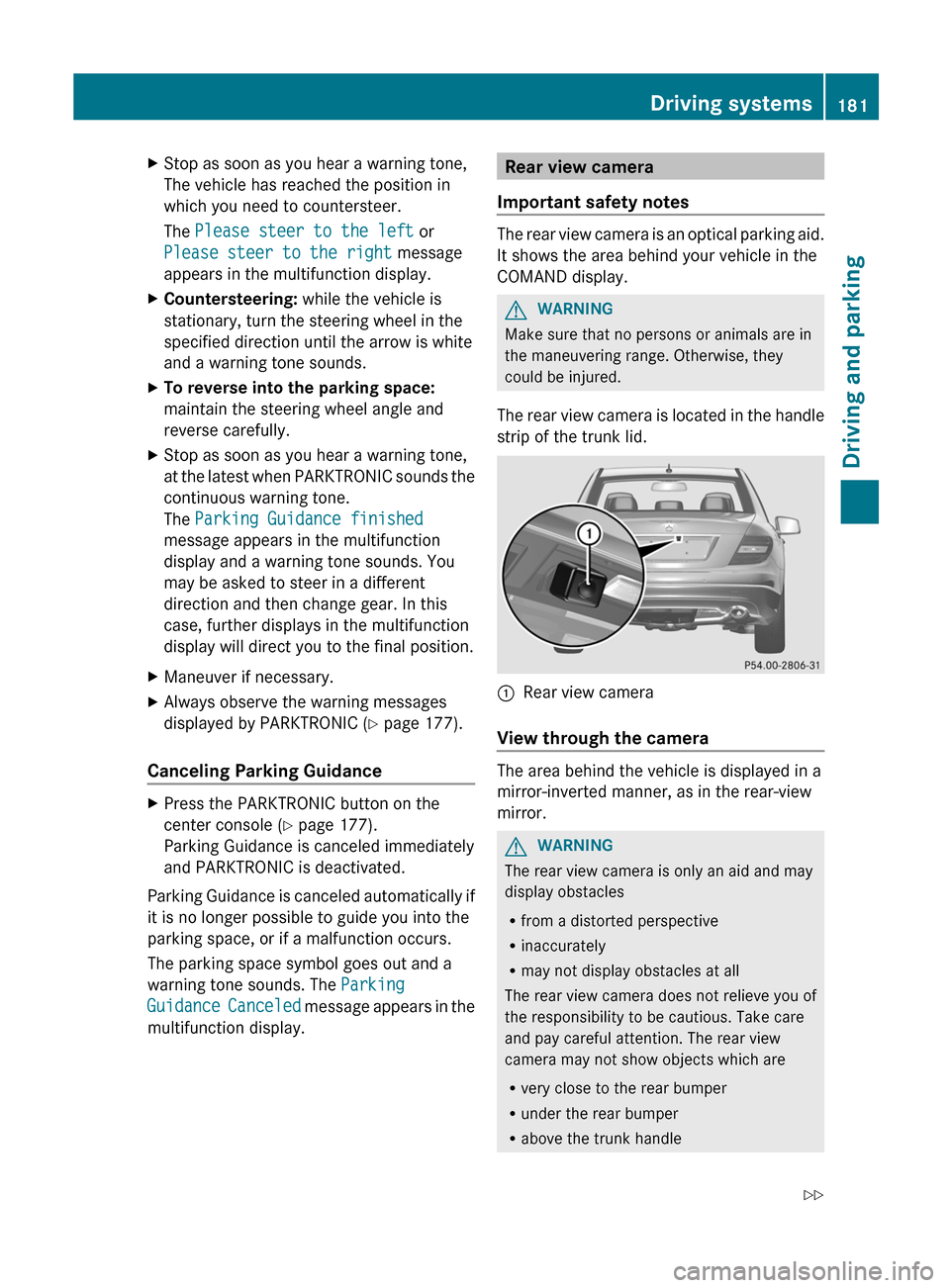
The rear view camera is located in the handle
strip of the trunk lid.
:Rear view camera
View through the camera
The area behind the vehicle is displayed in a
mirror-inverted manner, as in the rear-view
mirror.
GWARNING
The rear view camera is only an aid and may
display obstacles
R from a distorted perspective
R inaccurately
R may not display obstacles at all
The rear view camera does not relieve you of
the responsibility to be cautious. Take care
and pay careful attention. The rear view
camera may not show objects which are
R very close to the rear bumper
R under the rear bumper
R above the trunk handle
Driving systems181Driving and parkingZ
Page 185 of 356
The functionality of ATTENTION ASSIST is
restricted and warnings may be delayed or
not occur at all:
R if the road condition is poor, e.g. if the
surface is uneven or if there are potholes
R if there is a strong side wind
R if you have adopted a sporty driving style
with high cornering speeds or high rates of
acceleration
R if you predominantly drive at speeds under
50 mph (80 km/h) or over 112 mph
(180 km/h)
R if you are currently using COMAND or
making a telephone call with it
R if the time has been set incorrectly
R in active driving situations, such as when
you change lanes or change your speed
Warning and display messages in the
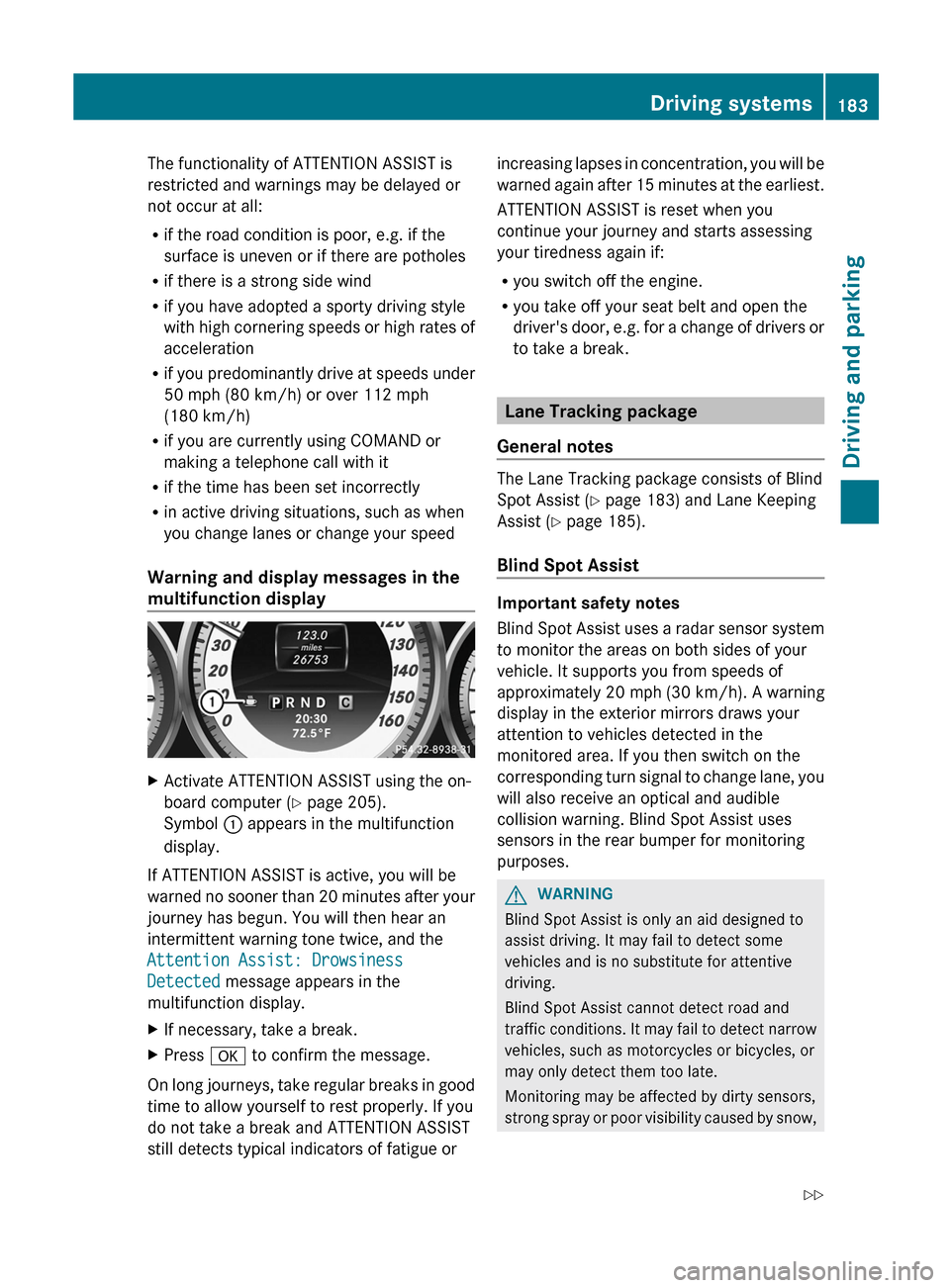
multifunction displayXActivate ATTENTION ASSIST using the on-
board computer ( Y page 205).
Symbol : appears in the multifunction
display.
If ATTENTION ASSIST is active, you will be
warned no sooner than 20 minutes after your
journey has begun. You will then hear an
intermittent warning tone twice, and the
Attention Assist: Drowsiness
Detected message appears in the
multifunction display.
XIf necessary, take a break.XPress a to confirm the message.
On long journeys, take regular breaks in good
time to allow yourself to rest properly. If you
do not take a break and ATTENTION ASSIST
still detects typical indicators of fatigue or
increasing lapses in concentration, you will be
warned again after 15 minutes at the earliest.
ATTENTION ASSIST is reset when you
continue your journey and starts assessing
your tiredness again if:
R you switch off the engine.
R you take off your seat belt and open the
driver's door, e.g. for a change of drivers or
to take a break.
Lane Tracking package
General notes
The Lane Tracking package consists of Blind
Spot Assist ( Y page 183) and Lane Keeping
Assist ( Y page 185).
Blind Spot Assist
Important safety notes
Blind Spot Assist uses a radar sensor system
to monitor the areas on both sides of your
vehicle. It supports you from speeds of
approximately 20 mph (30 km/h). A warning
display in the exterior mirrors draws your
attention to vehicles detected in the
monitored area. If you then switch on the
corresponding turn signal to change lane, you
will also receive an optical and audible
collision warning. Blind Spot Assist uses
sensors in the rear bumper for monitoring
purposes.
GWARNING
Blind Spot Assist is only an aid designed to
assist driving. It may fail to detect some
vehicles and is no substitute for attentive
driving.
Blind Spot Assist cannot detect road and
traffic conditions. It may fail to detect narrow
vehicles, such as motorcycles or bicycles, or
may only detect them too late.
Monitoring may be affected by dirty sensors,
strong spray or poor visibility caused by snow,
Driving systems183Driving and parkingZ
Page 187 of 356
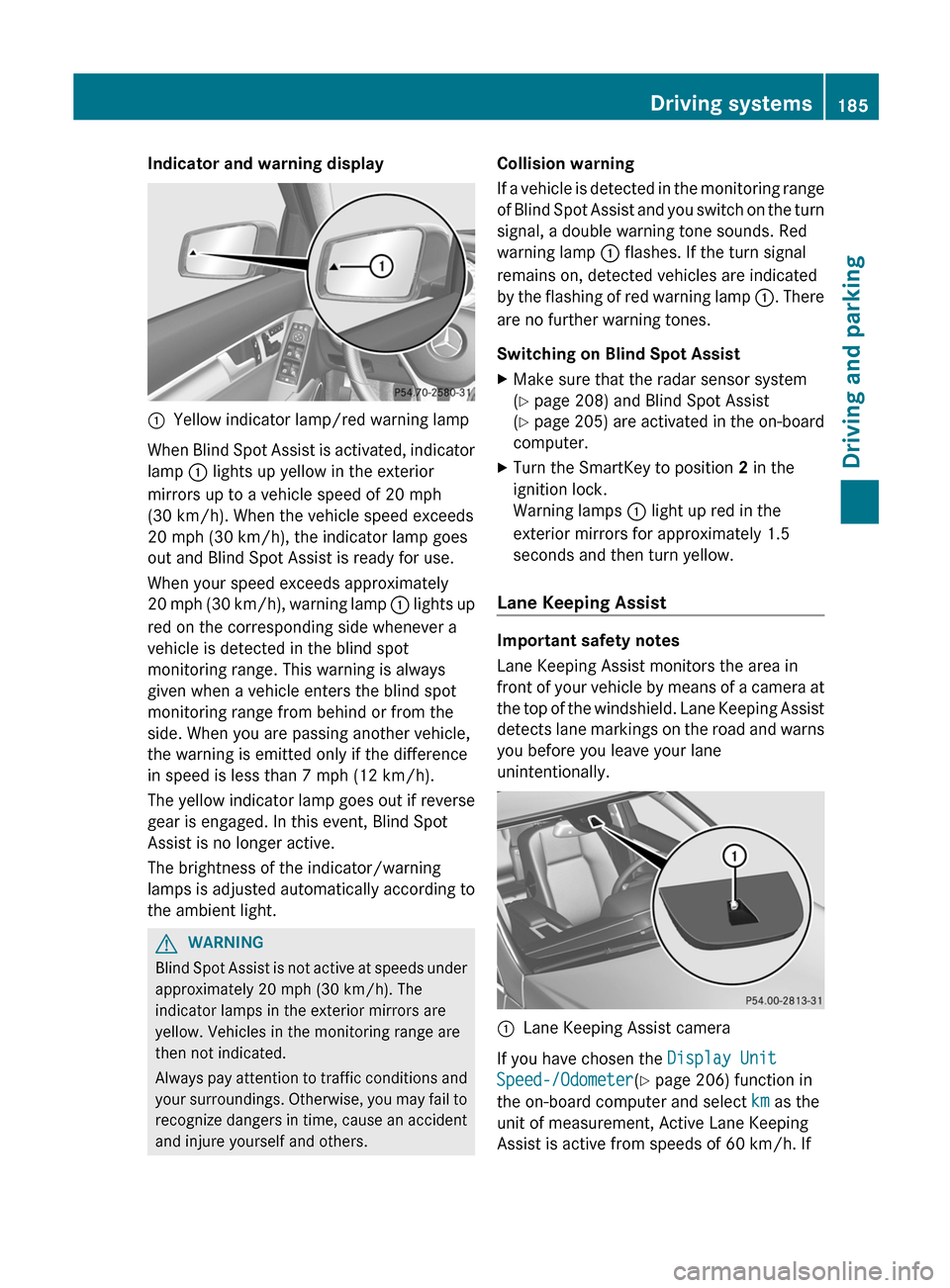
Indicator and warning display:Yellow indicator lamp/red warning lamp
When Blind Spot Assist is activated, indicator
lamp : lights up yellow in the exterior
mirrors up to a vehicle speed of 20 mph
(30 km/h). When the vehicle speed exceeds
20 mph (30 km/h), the indicator lamp goes
out and Blind Spot Assist is ready for use.
When your speed exceeds approximately
20 mph (30 km/h), warning lamp : lights up
red on the corresponding side whenever a
vehicle is detected in the blind spot
monitoring range. This warning is always
given when a vehicle enters the blind spot
monitoring range from behind or from the
side. When you are passing another vehicle,
the warning is emitted only if the difference
in speed is less than 7 mph (12 km/h).
The yellow indicator lamp goes out if reverse
gear is engaged. In this event, Blind Spot
Assist is no longer active.
The brightness of the indicator/warning
lamps is adjusted automatically according to
the ambient light.
GWARNING
Blind Spot Assist is not active at speeds under
approximately 20 mph (30 km/h). The
indicator lamps in the exterior mirrors are
yellow. Vehicles in the monitoring range are
then not indicated.
Always pay attention to traffic conditions and
your surroundings. Otherwise, you may fail to
recognize dangers in time, cause an accident
and injure yourself and others.
Collision warning
If a vehicle is detected in the monitoring range
of Blind Spot Assist and you switch on the turn
signal, a double warning tone sounds. Red
warning lamp : flashes. If the turn signal
remains on, detected vehicles are indicated
by the flashing of red warning lamp :. There
are no further warning tones.
Switching on Blind Spot AssistXMake sure that the radar sensor system
( Y page 208) and Blind Spot Assist
( Y page 205) are activated in the on-board
computer.XTurn the SmartKey to position 2 in the
ignition lock.
Warning lamps : light up red in the
exterior mirrors for approximately 1.5
seconds and then turn yellow.
Lane Keeping Assist
Important safety notes
Lane Keeping Assist monitors the area in
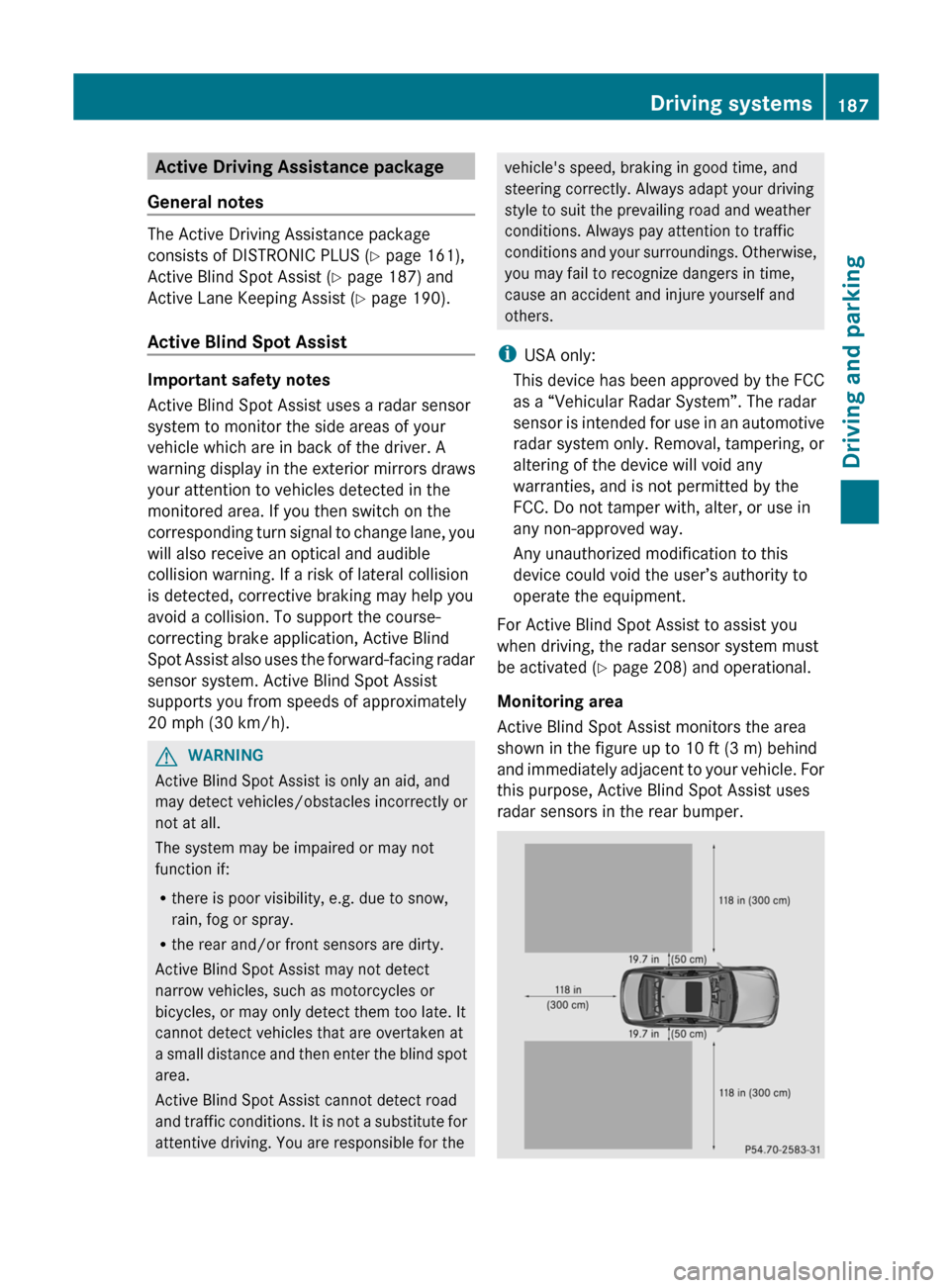
front of your vehicle by means of a camera at
the top of the windshield. Lane Keeping Assist
detects lane markings on the road and warns
you before you leave your lane
unintentionally.
:Lane Keeping Assist camera
If you have chosen the Display Unit
Speed-/Odometer (Y page 206) function in
the on-board computer and select km as the
unit of measurement, Active Lane Keeping
Assist is active from speeds of 60 km/h. If
Driving systems185Driving and parkingZ
Page 189 of 356
Active Driving Assistance package
General notes
The Active Driving Assistance package
consists of DISTRONIC PLUS ( Y page 161),
Active Blind Spot Assist ( Y page 187) and
Active Lane Keeping Assist ( Y page 190).
Active Blind Spot Assist
Important safety notes
Active Blind Spot Assist uses a radar sensor
system to monitor the side areas of your
vehicle which are in back of the driver. A
warning display in the exterior mirrors draws
your attention to vehicles detected in the
monitored area. If you then switch on the
corresponding turn signal to change lane, you
will also receive an optical and audible
collision warning. If a risk of lateral collision
is detected, corrective braking may help you
avoid a collision. To support the course-
correcting brake application, Active Blind
Spot Assist also uses the forward-facing radar
sensor system. Active Blind Spot Assist
supports you from speeds of approximately
20 mph (30 km/h).
GWARNING
Active Blind Spot Assist is only an aid, and
may detect vehicles/obstacles incorrectly or
not at all.
The system may be impaired or may not
function if:
R there is poor visibility, e.g. due to snow,
rain, fog or spray.
R the rear and/or front sensors are dirty.
Active Blind Spot Assist may not detect
narrow vehicles, such as motorcycles or
bicycles, or may only detect them too late. It
cannot detect vehicles that are overtaken at
a small distance and then enter the blind spot
area.
Active Blind Spot Assist cannot detect road
and traffic conditions. It is not a substitute for
attentive driving. You are responsible for the
vehicle's speed, braking in good time, and
steering correctly. Always adapt your driving
style to suit the prevailing road and weather
conditions. Always pay attention to traffic
conditions and your surroundings. Otherwise,
you may fail to recognize dangers in time,
cause an accident and injure yourself and
others.
i USA only:
This device has been approved by the FCC
as a “Vehicular Radar System”. The radar
sensor is intended for use in an automotive
radar system only. Removal, tampering, or
altering of the device will void any
warranties, and is not permitted by the
FCC. Do not tamper with, alter, or use in
any non-approved way.
Any unauthorized modification to this
device could void the user’s authority to
operate the equipment.
For Active Blind Spot Assist to assist you
when driving, the radar sensor system must
be activated ( Y page 208) and operational.
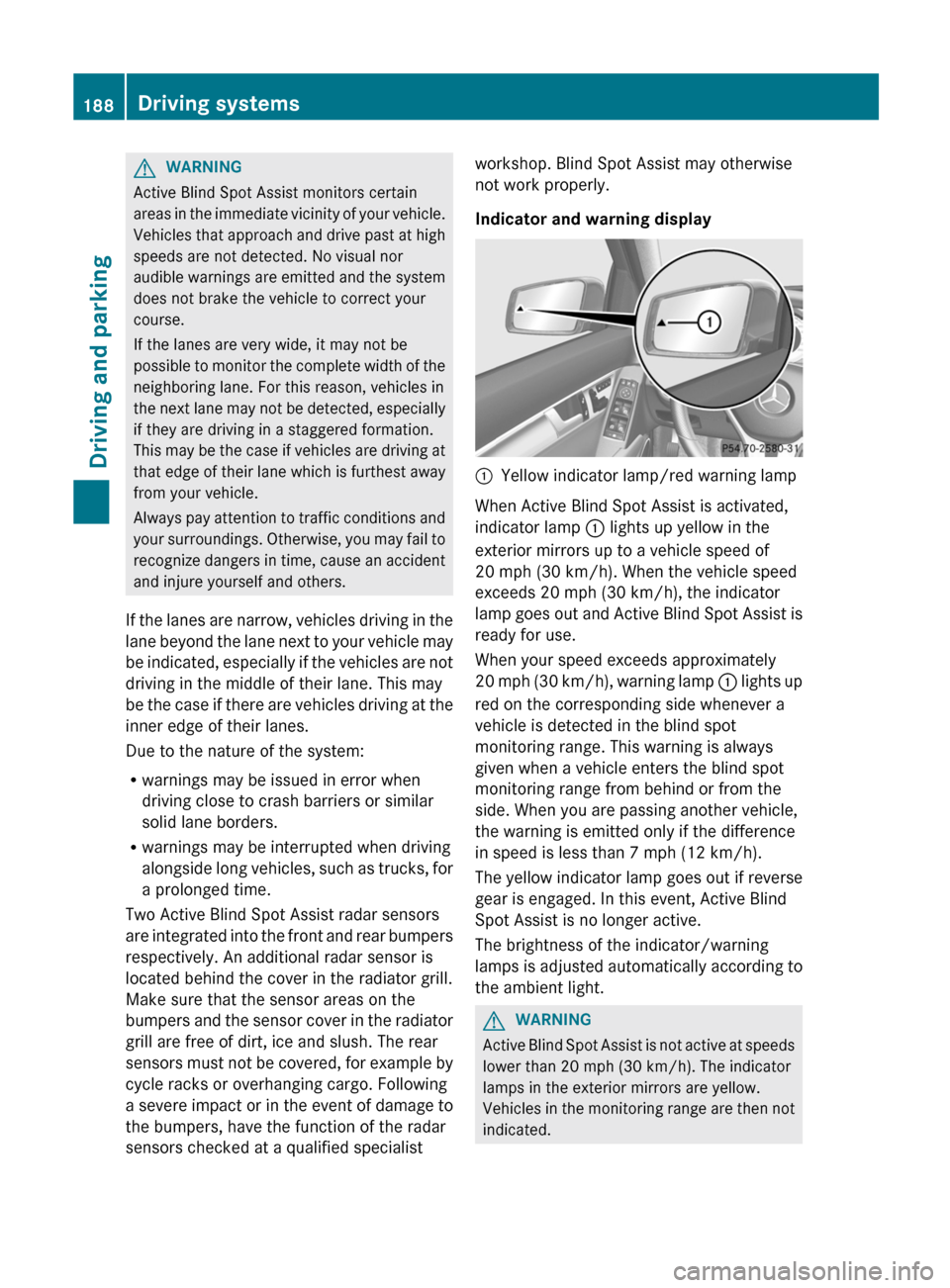
Monitoring area
Active Blind Spot Assist monitors the area
shown in the figure up to 10 ft (3 m) behind
and immediately adjacent to your vehicle. For
this purpose, Active Blind Spot Assist uses
radar sensors in the rear bumper.Driving systems187Driving and parkingZ
Page 190 of 356
GWARNING
Active Blind Spot Assist monitors certain
areas in the immediate vicinity of your vehicle.
Vehicles that approach and drive past at high
speeds are not detected. No visual nor
audible warnings are emitted and the system
does not brake the vehicle to correct your
course.
If the lanes are very wide, it may not be
possible to monitor the complete width of the
neighboring lane. For this reason, vehicles in
the next lane may not be detected, especially
if they are driving in a staggered formation.
This may be the case if vehicles are driving at
that edge of their lane which is furthest away
from your vehicle.
Always pay attention to traffic conditions and
your surroundings. Otherwise, you may fail to
recognize dangers in time, cause an accident
and injure yourself and others.
If the lanes are narrow, vehicles driving in the
lane beyond the lane next to your vehicle may
be indicated, especially if the vehicles are not
driving in the middle of their lane. This may
be the case if there are vehicles driving at the
inner edge of their lanes.
Due to the nature of the system:
R warnings may be issued in error when
driving close to crash barriers or similar
solid lane borders.
R warnings may be interrupted when driving
alongside long vehicles, such as trucks, for
a prolonged time.
Two Active Blind Spot Assist radar sensors
are integrated into the front and rear bumpers
respectively. An additional radar sensor is
located behind the cover in the radiator grill.
Make sure that the sensor areas on the
bumpers and the sensor cover in the radiator
grill are free of dirt, ice and slush. The rear
sensors must not be covered, for example by
cycle racks or overhanging cargo. Following
a severe impact or in the event of damage to
the bumpers, have the function of the radar
sensors checked at a qualified specialist
workshop. Blind Spot Assist may otherwise
not work properly.
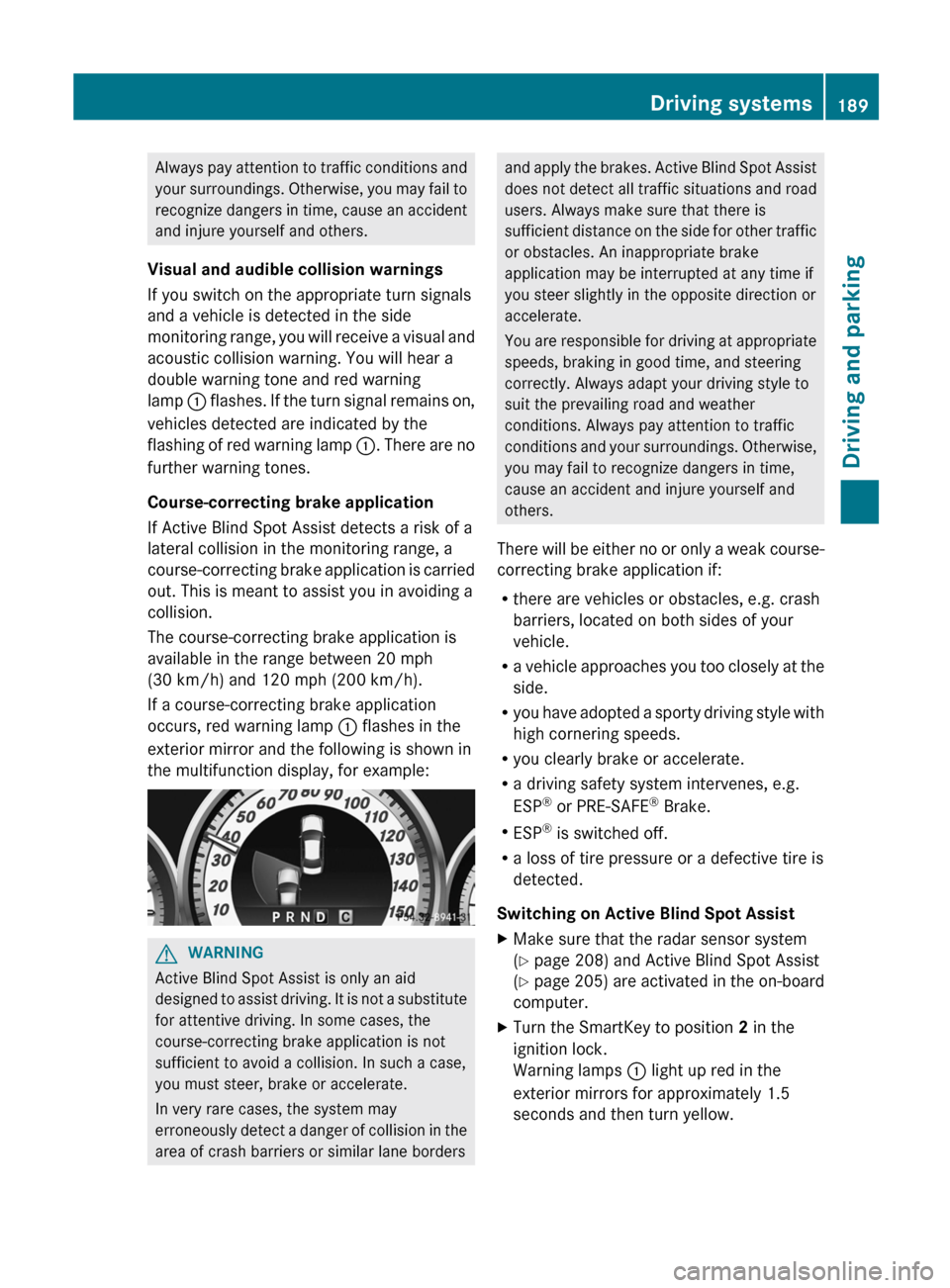
Indicator and warning display:Yellow indicator lamp/red warning lamp
When Active Blind Spot Assist is activated,
indicator lamp : lights up yellow in the
exterior mirrors up to a vehicle speed of
20 mph (30 km/h). When the vehicle speed
exceeds 20 mph (30 km/h), the indicator
lamp goes out and Active Blind Spot Assist is
ready for use.
When your speed exceeds approximately
20 mph (30 km/h), warning lamp : lights up
red on the corresponding side whenever a
vehicle is detected in the blind spot
monitoring range. This warning is always
given when a vehicle enters the blind spot
monitoring range from behind or from the
side. When you are passing another vehicle,
the warning is emitted only if the difference
in speed is less than 7 mph (12 km/h).
The yellow indicator lamp goes out if reverse
gear is engaged. In this event, Active Blind
Spot Assist is no longer active.
The brightness of the indicator/warning
lamps is adjusted automatically according to
the ambient light.
GWARNING
Active Blind Spot Assist is not active at speeds
lower than 20 mph (30 km/h). The indicator
lamps in the exterior mirrors are yellow.
Vehicles in the monitoring range are then not
indicated.
188Driving systemsDriving and parking
Page 191 of 356
Always pay attention to traffic conditions and
your surroundings. Otherwise, you may fail to
recognize dangers in time, cause an accident
and injure yourself and others.
Visual and audible collision warnings
If you switch on the appropriate turn signals
and a vehicle is detected in the side
monitoring range, you will receive a visual and
acoustic collision warning. You will hear a
double warning tone and red warning
lamp : flashes. If the turn signal remains on,
vehicles detected are indicated by the
flashing of red warning lamp :. There are no
further warning tones.
Course-correcting brake application
If Active Blind Spot Assist detects a risk of a
lateral collision in the monitoring range, a
course-correcting brake application is carried
out. This is meant to assist you in avoiding a
collision.
The course-correcting brake application is
available in the range between 20 mph
(30 km/h) and 120 mph (200 km/h).
If a course-correcting brake application
occurs, red warning lamp : flashes in the
exterior mirror and the following is shown in
the multifunction display, for example:GWARNING
Active Blind Spot Assist is only an aid
designed to assist driving. It is not a substitute
for attentive driving. In some cases, the
course-correcting brake application is not
sufficient to avoid a collision. In such a case,
you must steer, brake or accelerate.
In very rare cases, the system may
erroneously detect a danger of collision in the
area of crash barriers or similar lane borders
and apply the brakes. Active Blind Spot Assist
does not detect all traffic situations and road
users. Always make sure that there is
sufficient distance on the side for other traffic
or obstacles. An inappropriate brake
application may be interrupted at any time if
you steer slightly in the opposite direction or
accelerate.
You are responsible for driving at appropriate
speeds, braking in good time, and steering
correctly. Always adapt your driving style to
suit the prevailing road and weather
conditions. Always pay attention to traffic
conditions and your surroundings. Otherwise,
you may fail to recognize dangers in time,
cause an accident and injure yourself and
others.
There will be either no or only a weak course-
correcting brake application if:
R there are vehicles or obstacles, e.g. crash
barriers, located on both sides of your
vehicle.
R a vehicle approaches you too closely at the
side.
R you have adopted a sporty driving style with
high cornering speeds.
R you clearly brake or accelerate.
R a driving safety system intervenes, e.g.
ESP ®
or PRE-SAFE ®
Brake.
R ESP ®
is switched off.
R a loss of tire pressure or a defective tire is
detected.
Switching on Active Blind Spot AssistXMake sure that the radar sensor system
( Y page 208) and Active Blind Spot Assist
( Y page 205) are activated in the on-board
computer.XTurn the SmartKey to position 2 in the
ignition lock.
Warning lamps : light up red in the
exterior mirrors for approximately 1.5
seconds and then turn yellow.Driving systems189Driving and parkingZ
Page 209 of 356
Lights
Switching the daytime running lamps on/
off
This function is not available in Canada.
If you have activated the Day Lights
function and the light switch is in the c or
à position, the daytime running lamps are
switched on automatically during the day
when the engine is running.
In the dark, the following also light up:
R the low-beam headlamps
R the parking lamps
R the tail lamps
R the license plate lamp
R the side marker lamps
XPress the = or ; button on the
steering wheel to select the Sett. menu.XPress the : or 9 button to select the
Lights submenu.XPress the a button to confirm.XPress the : or 9 button to select the
Day Lights function.
If the Daytime Running Lights: function
has been switched on, the cone of light and
the W symbol in the multifunction
display are shown in red.XPress the a button to save the setting.
Switching Adaptive Highbeam Assist on/
off
XPress the = or ; button on the
steering wheel to select the Sett. menu.XPress the : or 9 button to select the
Lights submenu.XPress the a button to confirm.XPress : or 9 to select the Adapt.
Highbeam function.
If the Adapt. Highbeam function has been
switched on, the cone of light and the
_ symbol in the multifunction display
are shown in red.XPress the a button to save the setting.Activating/deactivating surround
lighting and exterior lighting delayed
switch-off
If you have activated the Surround
Lighting function and the light switch is in
the c or à position, the following
functions are active when it is dark:
R Surround lighting: the exterior lighting
remains lit for 40 seconds after unlocking
with the SmartKey. The exterior lighting
switches off when you open the driver's
door.
R Exterior lighting delayed switch-off: the
exterior lighting remains lit for 60 seconds
after the engine has been switched off. If
you close all the doors, the exterior lighting
goes off after 15 seconds.
If you activate the Surround Lighting
function, the following light up depending on
the vehicle's equipment:
R the parking lamps
R the fog lamps
R the daytime running lamps
R the side marker lamps
R the surround lighting in the exterior mirrorsXPress the = or ; button on the
steering wheel to select the Sett. menu.XPress the : or 9 button to select the
Lights submenu.XPress the a button to confirm.XPress the : or 9 button to select the
Surround lighting function.
When the Surround Lighting function is
activated, the light cone and the area
around the vehicle are displayed in red in
the multifunction display.XPress the a button to save the setting.Menus and submenus207On-board computer and displaysZ
Page 211 of 356
RBlind Spot Assist ( Y page 183)
R Active Blind Spot Assist ( Y page 187)
i USA only: This device has been approved
by the FCC as a "Vehicular Radar System".
The radar sensor is intended for use in an
automotive radar system only. Removal,
tampering, or altering of the device will void
any warranties, and is not permitted by the
FCC. Do not tamper with, alter, or use in
any non-approved way.
Any unauthorized modification to this
device could void the user's authority to
operate the equipment.
i Canada only:
This device complies with RSS-210 of
Industry Canada. Operation is subject to
the following two conditions:
1. This device may not cause harmful
interference, and
2. this device must accept any interference
received, including interference that may
cause undesired operation.
Any unauthorized modification to this
device could void the user's authority to
operate the equipment.XPress the = or ; button on the
steering wheel to select the Settings
menu.XPress the : or 9 button to select the
Vehicle submenu.XPress the a button to confirm.XPress the 9 or : button to select
Radar Sensor (See Oper. Manual): .
You will see the selected setting: Enabled
or Disabled .XPress the a button to save the setting.
Convenience
Activating/deactivating the EASY-
ENTRY/EXIT feature
You can use the Easy Entry/Exit: function
to activate or deactivate the EASY ENTRY/
EXIT feature ( Y page 100).
GWARNING
You must make sure no one can become
trapped or injured by the moving steering
wheel when the easy-entry/exit feature is
activated.
To stop steering wheel movement, move
steering wheel adjustment lever or press one
of the memory position buttons.
Do not leave children unattended in the
vehicle, or with access to an unlocked vehicle.
Children could open the driver's door and
unintentionally activate the easy-entry/exit
feature, which could result in an accident
and/or serious personal injury.
XPress the = or ; button on the
steering wheel to select the Sett. menu.XPress the : or 9 button to select the
Convenience submenu.XPress the a button to confirm.XPress the : or 9 button to select the
Easy Entry/Exit function.
If the Easy Entry/Exit function is
activated, the vehicle steering wheel is
displayed in red in the multifunction
display.XPress the a button to save the setting.
Switching the fold-in mirrors when
locking function on/off
This function is only available in Canada.
If you switch on the Auto. Mirror
Folding function, the exterior mirrors fold in
when you lock the vehicle. If you unlock the
vehicle and then open the driver's or front-
passenger door, the exterior mirrors fold out
again.
If you have switched the function on and you
fold the exterior mirrors in using the button
on the door ( Y page 101), they will not fold
out automatically. The exterior mirrors can
then only be folded out using the button on
the door.
Menus and submenus209On-board computer and displaysZ