instrument panel MERCEDES-BENZ C-Class SEDAN 2013 W204 Owner's Manual
[x] Cancel search | Manufacturer: MERCEDES-BENZ, Model Year: 2013, Model line: C-Class SEDAN, Model: MERCEDES-BENZ C-Class SEDAN 2013 W204Pages: 358, PDF Size: 4.85 MB
Page 8 of 358
Display
........................................... 291
Exterior lights ................................ 290
Gea rors electo rlever .................... 292
Interior ........................................... 291
Matte finish ................................... 289
Notes ............................................. 287
Paint .............................................. 289
Plastic trim .................................... 292
Power washer ................................ 288
Rea rview camera .......................... 291
Roof lining ...................................... 293
Seat bel t........................................ 293
Seat cover ..................................... 292
Sensors ......................................... 291
Steering wheel ............................... 292
Tai lpipes ....................................... 291
Trim pieces .................................... 292
Washing by hand ........................... 288
Wheels ........................................... 289
Windows ........................................ 290
Wiper blades .................................. 290
Wooden trim .................................. 292
Cargo tie down rings .........................259
Car wash (care) ................................. 287
CD player/CD changer (on-board
computer) .......................................... 204
Center console Lowe rsection .................................. 35
Uppe rsection .................................. 34
Central locking
Automatic locking (on-board
computer) ...................................... 211
Locking/unlocking (SmartKey) ........74
Changing bulbs
Brake lamps ................................... 120
Cornering light function .................119
High-beam headlamps ...................118
Important safety notes ..................116
Low-beam headlamps ....................118
Overview of bul btypes .................. 117
Parking lamps ................................ 119
Reversing lamps ............................ 120
Standing lamps (front) ...................119
Child-proof locks
Important safety notes ....................63
Rea rdoors ....................................... 63Children
In the vehicle ................................... 58
Restraint systems ............................ 58
Specia lseat belt retractor ...............61
Child seat
LATCH-type (ISOFIX) child seat
anchors ............................................ 61
Top Tether ....................................... 62
Cigarette lighter ................................ 264
Cleaning Mirro rturn signal ........................... 291
Climate control
Adjusting the airflow (AIR FLOW) ...132
Automatic climate control (3-zone) 130
Controlling automatically ...............132
Cooling with aird ehumidification..131
Defrosting the windows .................135
Defrosting the windshield ..............134
Dual-zone automatic climate
control ........................................... 127
Important safety notes ..................126
Indicator lamp ................................ 132
Maximum cooling .......................... 135
Notes on using automatic climate
control ................................... 128, 131
Overview of systems ......................126
Problems with cooling with air
dehumidification ............................ 132
Problem with the rear window
defroster ........................................ 136
Rea rcontrol panel ......................... 130
Refrigerant ..................................... 354
Refrigerant filling capacity .............354
Setting the aird istribution.............133
Setting the airflow .........................134
Setting the airv ents...................... 137
Setting the temperature ................133
Switching air-recirculation mode
on/off ............................................ 136
Switching on/off ........................... 131
Switching residual hea ton/off ......136
Switching the rear window
defroster on/off ............................ 135
Switching the ZONE function on/
off .................................................. 134
Cockpit
Overview .......................................... 30
see Instrument cluster 6
Index
Page 15 of 358
Mounting wheels
Lowering the vehicl e...................... 338
Mounting anew wheel ................... 337
Preparing the vehicle .....................334
Raising the vehicle .........................335
Removing awheel .......................... 337
Securing the vehicle against
rolling away ................................... 335
MP3
Operation ....................................... 204
see separate operating instructions
Multifunction display
Function/notes ............................. 200
Permanent displa y......................... 209
Multifunction steering wheel
Operating the on-board computer .199
Overview .......................................... 33N
Navigation Menu (on-board computer) ............203
see separate operating instructions
NECK-PRO head restraints
Operation ........................................ .52
Resetting after being triggered ........53
NECK-PRO luxury head restraints
Operation ........................................ .52
Resetting after being triggered ........53
Notes on breaking-in anew vehicle 140 O
Occupant Classification System
(OCS) Fault s............................................... 51
Operation ........................................ .47
System self-test ............................... 49
Occupant safety
Childre ninthe vehicle ..................... 58
System overview .............................. 40
OCS
Faults ............................................... 51
Operation ........................................ .47
System self-test ............................... 49
Odometer ........................................... 201
Oil see Engine oil On-board computer
AMG menu ..................................... 212
Assistance menu ........................... 206
Audi omenu ................................... 204
Convenience submenu ..................211
Displaying a service message ........282
Display messages ..........................216
DISTRONI CPLUS ........................... 173
Factory settings submenu .............212
Important safety notes ..................198
Instrument cluster submenu ..........209
Lighting submenu .......................... 209
Menu overview .............................. 201
Message memory .......................... 216
Navigation menu ............................ 203
Operation ....................................... 199
RACETIMER ................................... 213
Service menu ................................. 208
Settings menu ............................... 208
Standard displa y............................ 201
Telephone menu ............................ 205
Trip menu ...................................... 201
Vehicle submenu ........................... 211
Video DVD operatio n..................... 205
Opening and closing the side trim
panels ................................................. 119
Operating system see On-board computer
Outside temperature display ...........199
Overhead control panel ......................36
Override feature Rea rside windows ........................... 63 P
Pain tcode number ............................ 346
Paintwork (cleaning instructions) ...289
Panic alarm .......................................... 40
Panorama roof with power tilt/
sliding panel
Opening/closing .............................. 90
Opening/closing the roller
sunblind ........................................... 91
Problem (malfunction) .....................92
Resetting ......................................... 91
Panorama sliding sunroof
Important safety notes ....................88 Index
13
Page 18 of 358
Important safety notes
..................347
Refrigerant (air-conditioning
system) .......................................... 354
Washer fluid .................................. .353
Service work
see ASSYST PLUS
Settings
Factory (on-board computer) .........212
On-board computer .......................208
Setting the air distribution ...............133
Setting the airflow ............................134
SETUP (on-board computer) .............213
Side impact air bag .............................45
Side marker lamp (display
message) ............................................ 226
Side windows Cleaning ......................................... 290
Convenience closing feature ............87
Convenience opening feature ..........86
Important safety information ...........85
Opening/closing .............................. 86
Problem (malfunction) .....................88
Resetting ......................................... 88
Sliding sunroof
Important safety notes ....................88
Opening/closing .............................. 89
Problem (malfunction) .....................92
Resetting ......................................... 90
see Panorama roof with power
tilt/sliding panel
SmartKey
Changing the battery .......................77
Changing the programming .............75
Checking the battery .......................77
Convenience closing feature ............87
Convenience opening feature ..........86
Display message ............................ 240
Door central locking/unlocking .......74
Important safety notes ....................74
Loss ................................................. 78
Mechanical key ................................ 76
Positions (ignition lock) .................141
Problem (malfunction) .....................78
Starting the engine ........................143
Snow chains ...................................... 313
Sockets General notes ................................ 265
Rea rcompartmen t......................... 265Spare wheel
Notes/data .................................... 340
Storage location ............................ 343
Specialist workshop ............................ 25
Special seat bel tretractor .................. 61
Speed ,controlling
see Cruise control
Speedometer
Digital ............................................ 202
In the Instrument cluster .................31
Segments ...................................... 199
Selecting the unit of measurement 209
see Instrument cluster
SPORT handling mode
Activating/deactivating (AMG
vehicles) .......................................... 68
Warning lamp ................................. 247
SRS
see SRS (Supplemental Restraint
System)
SRS (Supplemental Restraint
System)
Display message ............................ 220
Introduction ..................................... 41
Warning lamp ................................. 249
Warning lamp (function) ................... 41
Standing lamps
Changing bulbs .............................. 119
Display message ............................ 226
Switching on/off ........................... 112
Start/stop function
see ECO start/stop function
Starting (engine) ................................ 143
Steering (display message) ..............240
Steering wheel Adjusting (electrically). ..................102
Adjusting (manually). .....................102
Button overview ............................... 33
Buttons (on-board computer) ......... 199
Cleaning ......................................... 292
Important safety notes ..................101
Paddle shifters ............................... 151
Storing settings (memory function) 106
Steering wheel paddle shifters ........151
Stopwatch (RACETIMER) ................... 213
Stowage areas ................................... 25616
Index
Page 31 of 358
Dashboard
........................................... 30
Instrument cluster ..............................31
Multifunction steering wheel .............33
Center console .................................... 34
Overhea dcontrol panel ...................... 36
Door control panel .............................. 37 29At a glance
Page 32 of 358
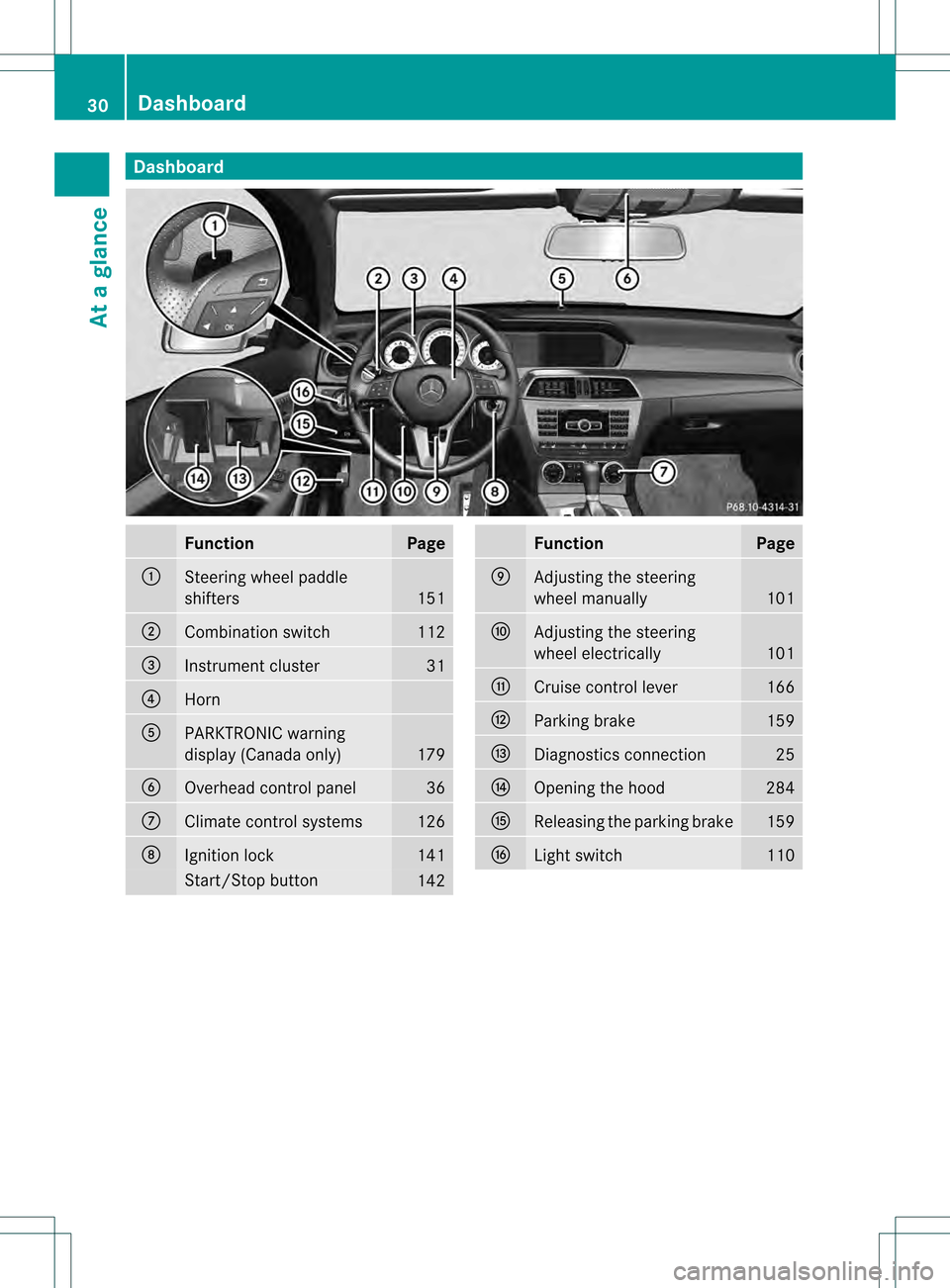
Dashboard
Function Page
0002
Steering wheel paddle
shifters
151
0003
Combination switch 112
0022
Instrument cluster 31
0021
Horn
001F
PARKTRONIC warning
display (Canada only)
179
0020
Overhead control panel 36
0012
Climate control systems 126
0013
Ignition lock 141
Start/Stop button
142 Function Page
0014
Adjusting the steering
wheel manually 101
0015
Adjusting the steering
wheel electrically 101
0016
Cruise control lever 166
0018
Parking brake 159
0019
Diagnostics connection 25
001A
Opening the hood 284
001B
Releasing the parking brake 159
001D
Light switch 11030
Dashboa
rdAt a glance
Page 44 of 358
R
Do not change or remove any component
or part of the SRS.
R Do not install additional trim material, seat
covers, badges, etc. ove rthe steering
wheel hub, front-passenger front air bag
cover, outer sides of the seat backrests,
door trim panels, or door frame trims.
R Do not install additional electrical/
electronic equipment on or near SRS
components and wiring.
R Keep area between air bags and occupants
free of objects (e.g. packages, purses,
umbrellas, etc.).
R Do not hang items such as coat hangers
from the coat hooks or handles over the
door. These items may be thrown around in
the vehicle and cause head and other
injuries when the window curtain air bag is
deployed.
R Air bag system components will be hot after
an air bag has inflated. Do not touch them.
R Never place your feet on the instrument
panel, dashboard, or on the seat. Always
keep both feet on the floor in front of the
seat.
R Improper repair work on the SRS creates a
risk of rendering the SRS inoperative or
causing unintended air bag deployment.
Work on the SRS must therefore only be
performed by qualified technicians.
Contact an authorized Mercedes-Benz
Center.
R For your protection and the protection of
others, when scrapping the air bag unit or
ETD, our safety instructions must be
followed. These instructions are available
from any authorized Mercedes-Benz
Center.
R Given the considerable deployment speed,
required inflation volume, and the material
of the air bags, there is the possibility of
abrasions or other, potentially more serious
injuries resulting from air bag deployment.
If you sell your vehicle, Mercedes-Benz
strongly recommends that you inform the subsequent owner that the vehicle is
equipped with SRS. Also, refer them to the
applicable section in the Operator's Manual. Air bags
Important safety notes G
WARNING
Air bags are designed to reduce the incidence
of injuries and fatalities in certain situations:
R frontal impacts (driver's and front-
passenger front air bags and driver's knee
bag)
R side impacts (side impact air bags, window
curtain air bags and pelvis air bags)
However, no system available today can
completely eliminate injuries and fatalities.
When the air bags are deployed, a small
amount of powder is released. The powder
generally does not constitute a health hazard
and does not indicate that there is a fire in the
vehicle. In order to prevent potential
breathing difficulties, you should leave the
vehicle as soon as it is safe to do so. If you
have any breathing difficulty but cannot get
out of the vehicle after the air bag inflates,
then get fresh air by opening a window or
door. G
WARNING
In order to reduce the potential danger of
injuries caused during the deployment of the
front air bags, the driver and front passenger
must always be correctly seated and wear
their seat belts.
For maximum protection in the event of a
collision, you must always be in the normal
seat position with your back against the
backrest. Fasten your seat belt and make sure
that it is correctly positioned on your body. 42
Occupant safetySafety
Page 57 of 358
be replaced and their anchoring points must
also be checked.
Only use seat belts which have been approved
by Mercedes-Benz.
Do not make any modifications to the seat
belts. This can lead to unintended activation
of the ETDs or to their failure to activate when
necessary.
Do not bleach or dye seat belts as this may
severely weaken them. In a crash they may
not be able to provide adequate protection.
Have all work carried out only by qualified
technicians. Contact an authorized
Mercedes-Benz Center.
Correct use of the seat belts G
WARNING
USE SEAT BELTS PROPERLY
R Seat belts can only work when used
properly. Never wear seat belts in any other
way than as described in this section, as
that could result in serious injuries in the
event of an accident.
R Each occupant should wear their seat belt
at all times, because seat belts help reduce
the likelihood of and potential severity of
injuries in accidents, including rollovers.
The integrated restraint system includes
SRS (driver fron tair bag, driver's side knee
bag, front-passenge rfront air bag, side
impact air bags, pelvis air bags, window
curtain air bags for the side windows),
Emergency Tensioning Devices, seat belt
force limiters, and front seat knee bolsters.
The system is designed to enhance the
protection offered to properly belted
occupants in certain frontal (front air bags,
driver's side knee bag, and ETDs) and side
(side impact air bags, pelvi sair bags,
window curtain air bags, and ETDs) impacts
which exceed prese tdeployment
thresholds.
R Never wear the shoulder belt under your
arm, across your neck or off your shoulder. In a frontal crash, your body would move
too far forward. That would increase the
chance of head and neck injuries. The seat
belt would also apply too much force to the
ribs or abdomen, which could severely
injure internal organs such as your liver or
spleen.
Adjust the seat belt so that the shoulder
section is located as close as possible to
the middle of the shoulder. It should not
touch the neck
.Never pass the shoulder
portion of the seat belt under your arm.
R Position the lap belt as low as possible on
your hips and not across the abdomen. If
the lap belt is positioned across your
abdomen, it could cause serious injuries in
a crash.
R Never wear seat belts over rigid or
breakable objects in or on your clothing,
such as eyeglasses, pens, keys etc., as
these might cause injuries.
R Make sure the seat belt is always fitted
snugly. Take special care of this when
wearing loose clothing.
R Never use a seat belt for more than one
person at a time. Do not fasten a seat belt
around a person and another person or
other objects at the same time.
R Seat belts should not be worn twisted. In a
crash, you would not have the full width of
the seat belt to distribut eimpact forces.
The twisted seat belt against yourb ody
could cause injuries.
R Pregnant women should also always use a
lap-shoulder belt. The lap belt portion
should be positioned as low as possible on
the hips to avoid any possible pressure on
the abdomen.
R Place the seat backrest in a position that is
as upright as possible.
R Check your seat belt during travel to make
sure it is properly positioned.
R Never place your feet on the instrument
panel, dashboard, or on the seat. Always Occupant safety
55Safety
Z
Page 117 of 358
X
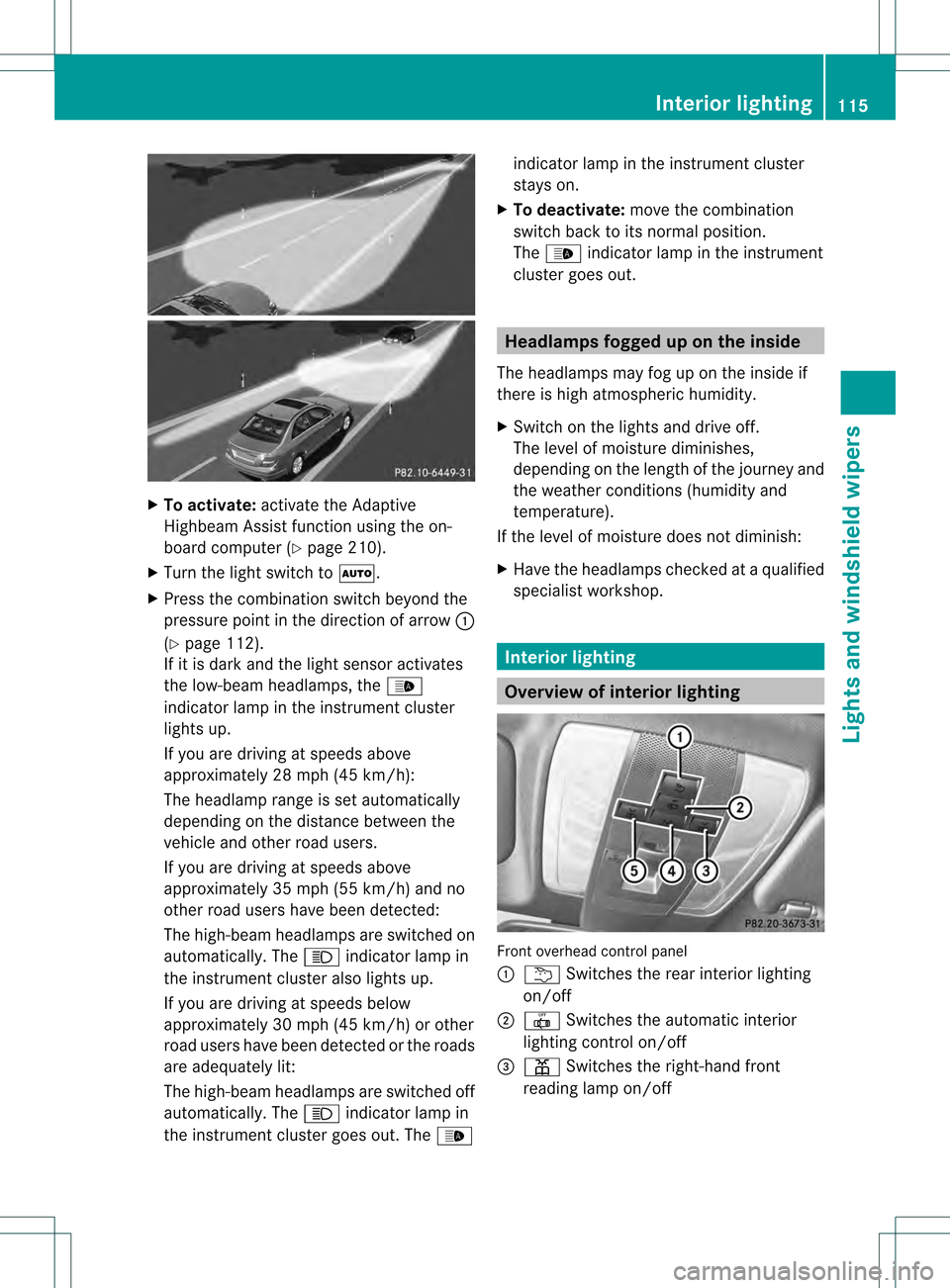
To activate: activate the Adaptive
Highbea mAssist function using the on-
board computer (Y page 210).
X Turn the light switch to 0004.
X Press the combination switch beyond the
pressure point in the direction of arrow 0002
(Y page 112).
If it is dark and the light sensor activates
the low-beam headlamps, the 0003
indicator lamp in the instrument cluster
lights up.
If you are driving at speeds above
approximately 28 mph (45 km/h):
The headlamp range is set automatically
depending on the distance between the
vehicle and other road users.
If you are driving at speeds above
approximately 35 mph (55 km/h) and no
other road users have been detected:
The high-beam headlamps are switched on
automatically. The 000Aindicator lamp in
the instrument cluster also lights up.
If you are driving at speeds below
approximately 30 mph (45 km/h) or other
road users have been detected or the roads
are adequately lit:
The high-beam headlamps are switched off
automatically. The 000Aindicator lamp in
the instrument cluster goes out. The 0003indicator lamp in the instrument cluster
stays on.
X To deactivate: move the combination
switch back to its normal position.
The 0003 indicator lamp in the instrument
cluster goes out. Headlamps fogged up on the inside
The headlamps may fog up on the inside if
there is high atmospheric humidity.
X Switch on the lights and drive off.
The level of moisture diminishes,
depending on the length of the journey and
the weather conditions (humidity and
temperature).
If the level of moisture does not diminish:
X Have the headlamps checked at a qualified
specialist workshop. Interior lighting
Overview of interior lighting
Front overhead control panel
0002
0001 Switches the rear interior lighting
on/off
0003 001C Switches the automatic interior
lighting control on/off
0022 0013 Switches the right-hand front
reading lamp on/off Interior lighting
115Lights and windshield wipers Z
Page 159 of 358

The position of the fuel filler cap is displayed
0010 in the instrument cluster. The arrow
next to the filling pump indicates the side of
the vehicle.
To open X
Switch the engine off.
X Remove the SmartKey from the ignition
lock.
X KEYLESS-GO: open the driver’s door.
This corresponds to key position 0: "key
removed".
The driver’s door can be closed again.
X Press the fuel filler flap in the direction of
arrow 0002.
The fuel filler flap opens slightly.
X Open the fuel filler flap fully.
X Turn the fuel filler flap counter-clockwise
and remove it.
X Insert the fuel filler cap into the holder
bracket on the inside of filler flap 0003.
X Completely insert the filler neck of the fuel
pump nozzle into the tank, hook in place
and refuel.
X Only fill the tank until the pump nozzle
switches off.
i Do not add any more fuel after the pump
stops filling for the first time. Otherwise,
fuel may leak out.
To close X
Replace the cap on the filler neck and turn
clockwise until it engages audibly.
X Close the fuel filler flap.
i Close the fuel filler flap before locking the
vehicle.
i If you are driving with the fuel filler cap
open, the 0010reserve fuel warning lamp
flashes. Amessage appears in the
multifunction display (Y page 230).
In addition, the 000ECheck Engine warning
lamp may light up (Y page 250). For further information on warning and
indicator lamps in the instrument cluster,
see (Y
page 250). Fuel filler flap emergency release
X Open the trun klid. X
Open the right-hand side trim panel
(Y page 308).
X Pull emergency release 0002in the direction
of the arrow.
The fuel filler flap is unlocked.
X Open the fuel filler flap. Refueling
157Driving and parking Z
Page 200 of 358
Useful information
i This Operator's Manual describes all
models and all standard and optional
equipment of your vehicle available at the
time of publication of the Operator's
Manual. Country-specific differences are
possible. Please note that your vehicle may
not be equipped with all features
described. This also applies to safety-
related systems and functions.
i Read the information on qualified
specialist workshops: (Y page 25).Important safety notes
G
WARNING
If you operate information systems and
communication equipment integrated in the
vehicle while driving, you will be distracted
from traffic conditions. You could also lose
control of the vehicle. There is a risk of an
accident.
Only operate the equipment when the traffic
situatio npermits .Ifyou are not sure that this
is possible, park the vehicle paying attention
to traffic conditions and operate the
equipment when the vehicle is stationary. G
WARNING
If the instrument cluster has failed or
malfunctioned, you may not recognize
function restrictions in systems relevant to
safety. The operating safety of your vehicle
may be impaired. There is a risk of an
accident.
Drive on carefully. Have the vehicle checked
at a qualified specialist workshop
immediately.
You must observe the legal requirements for
the country in which you are currently driving
when operating the on-board computer.
The on-board computer only shows messages
or warnings from certain systems in the multifunction display
.You should therefore
make sure your vehicle is operating safely at
all times. Otherwise, a vehicle that is not
operating safely may cause an accident.
For an overview, see the instrument panel
illustration (Y page 31). Displays and operation
Instrument cluster lighting
The lighting in the instrument cluster, in the
displays and the controls in the vehicle
interior can be adjusted using the brightness
control knob.
The brightness control knob is located on the
bottom left of the instrument cluster
(Y page 31).
X Turn the brightness control knob clockwise
or counter-clockwise.
If the light switch is set to 0004,0014or
000B, the brightness is dependent upon
the brightness of the ambient light.
i The light sensor in the instrument cluster
automatically controls the brightness of
the multifunction display.
In daylight, the displays in the instrument
cluster are not illuminated. Coolant temperature display
G
WARNING
Opening the hood when the engine is
overheated or when there is a fire in the
engine compartment could expose you to hot
gases or other service products. There is a
risk of injury.
Let an overheated engine cool down before
opening the hood. If there is a fire in the
engine compartment, keep the hood closed
and contact the fire department.
The coolant temperature gauge is in the
instrument cluster on the left-hand side. 198
Displays and operationOn-board computer and displays