display MERCEDES-BENZ C-Class SEDAN 2015 W205 Owner's Guide
[x] Cancel search | Manufacturer: MERCEDES-BENZ, Model Year: 2015, Model line: C-Class SEDAN, Model: MERCEDES-BENZ C-Class SEDAN 2015 W205Pages: 406, PDF Size: 7.62 MB
Page 77 of 406
At a speed of up to approximately 44 mph
(70 km/h), PRE-SAFE ®
Brake can also detect:
R stationary objects in the path of your vehi-
cle, e.g. stopped or parked vehicles
R pedestrians in the path of your vehicle G
WARNING
PRE-SAFE ®
Brake does not react:
R to small people, e.g. children
R to animals
R to oncoming vehicles
R to crossing traffic
R when cornering
As a result, PRE-SAFE ®
Brake may neither
give warnings nor intervene in all critical sit-
uations. There is a risk of an accident.
Always pay careful attention to the traffic sit- uation and be ready to brake.
In the event of snowfall or heavy rain, the rec-
ognition can be impaired.
Recognition by the radar sensor system is
also impaired in the event of:
R there is dirt on the sensors or anything else
covering the sensors
R there is interference by other radar sources
R there are strong radar reflections, for
example in parking garages
R a narrow vehicle traveling in front, e.g. a
motorbike
R a vehicle traveling in front on a different line
relative to the center of your vehicle
Recognition by the camera system is also
impaired in the event of:
R dirt on the camera or if the camera is cov-
ered
R there is glare on the camera system, e.g.
from the sun being low in the sky R
darkness
R if:
- pedestrians move quickly, e.g. into the
path of the vehicle
- the camera system no longer recognizes
a pedestrian as a person due to special
clothing or other objects
- a pedestrian is concealed by other
objects
- the typical outline of a person is not dis-
tinguishable from the background
Following damage to the front end of the vehi- cle, have the configuration and operation of
the radar sensors checked at a qualified spe-
cialist workshop. This also applies to colli-
sions at low speeds where there is no visible
damage to the front of the vehicle.
Following damage to the windshield, have the
configuration and operation of the camera
system checked at a qualified specialist work- shop.
Function X
To activate/deactivate: activate or deac-
tivate PRE-SAFE ®
Brake in the on-board
computer (Y page 245).
If the PRE-SAFE ®
Brake is not activated, the
00D4 symbol appears in the multifunction
display.
Starting at a speed of around 4 mph (7 km/h),
this function warns you if you rapidly
approach a vehicle in front. An intermittent
warning tone will then sound and the 00BA
distance warning lamp will light up in the
instrument cluster.
X Brake immediately to defuse the situation.
or X Take evasive action provided it is safe to do
so.
If there is an increased risk of collision, pre-
ventive passenger protection measures (PRE-
SAFE ®
) are activated.
If the risk of collision with the vehicle in front
remains and you do not brake, take evasive Driving safety systems
75Safety Z
Page 110 of 406
Useful information
i This Operator's Manual describes all
models and all standard and optional equip- ment of your vehicle available at the time of
publication of the Operator's Manual.
Country-specific differences are possible.
Please note that your vehicle may not be
equipped with all features described. This
also applies to safety-related systems and
functions.
i Read the information on qualified special-
ist workshops (Y page 26). Correct driver's seat position
G
WARNING
You could lose control of your vehicle if you do the following while driving:
R adjust the driver's seat, head restraint,
steering wheel or mirrors
R fasten the seat belt
There is a risk of an accident.
Adjust the driver's seat, head restraint, steer-
ing wheel and mirror and fasten your seat belt before starting the engine. X
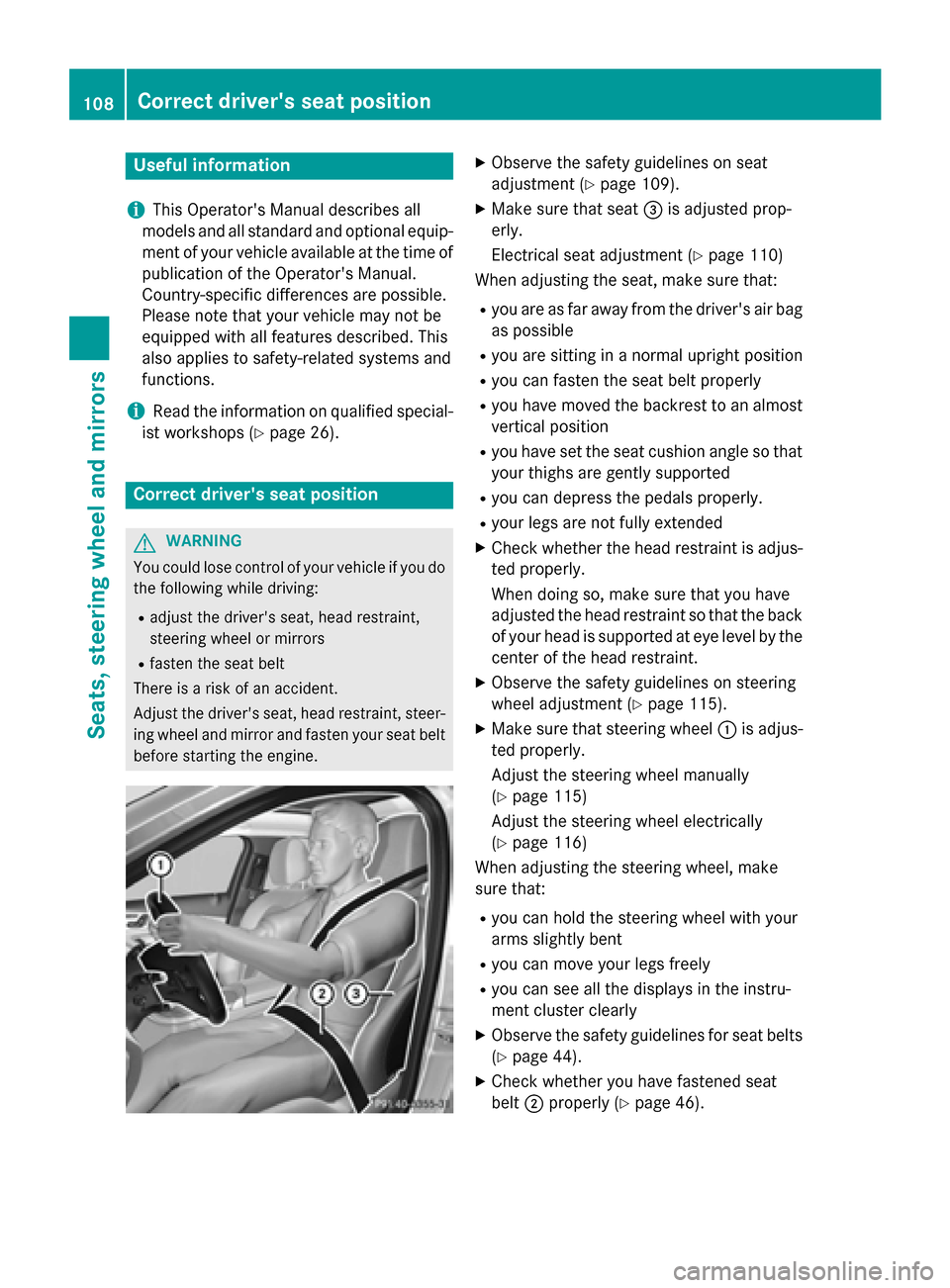
Observe the safety guidelines on seat
adjustment (Y page 109).
X Make sure that seat 0087is adjusted prop-
erly.
Electrical seat adjustment (Y page 110)
When adjusting the seat, make sure that:
R you are as far away from the driver's air bag
as possible
R you are sitting in a normal upright position
R you can fasten the seat belt properly
R you have moved the backrest to an almost
vertical position
R you have set the seat cushion angle so that
your thighs are gently supported
R you can depress the pedals properly.
R your legs are not fully extended
X Check whether the head restraint is adjus-
ted properly.
When doing so, make sure that you have
adjusted the head restraint so that the back
of your head is supported at eye level by the center of the head restraint.
X Observe the safety guidelines on steering
wheel adjustment (Y page 115).
X Make sure that steering wheel 0043is adjus-
ted properly.
Adjust the steering wheel manually
(Y page 115)
Adjust the steering wheel electrically
(Y page 116)
When adjusting the steering wheel, make
sure that:
R you can hold the steering wheel with your
arms slightly bent
R you can move your legs freely
R you can see all the displays in the instru-
ment cluster clearly
X Observe the safety guidelines for seat belts
(Y page 44).
X Check whether you have fastened seat
belt 0044properly (Y page 46).108
Correct driver's seat positionSeats, steering wheel and mirrors
Page 111 of 406
The seat belt should:
R fit snugly across your body
R be routed across the middle of your shoul-
der
R be routed in your pelvic area across the hip
joints
X Before starting off, adjust the rear-view mir-
ror and the exterior mirrors in such a way
that you have a good view of road and traf- fic conditions (Y page 118).
X Vehicles with memory function: you can
store the seat, steering wheel, exterior mir-
ror and head-up display settings with the
memory function (Y page 121). Seats
Important safety notes
G
WARNING
Children could become trapped if they adjust the seats, particularly when unattended.
There is a risk of injury.
When leaving the vehicle, always take the
SmartKey with you and lock the vehicle. Never leave children unsupervised in the vehicle.
The seats can still be adjusted when there is
no SmartKey in the ignition lock. G
WARNING
When you adjust a seat, you or other vehicle
occupants could become trapped, e.g. on the seat guide rail. There is a risk of injury.
Make sure when adjusting a seat that no one
has any body parts in the sweep of the seat.
Observe the safety notes on "Air bags"
(Y page 48) and "Children in the Vehicle"
(Y page 59). G
WARNING
If the driver's seat is not engaged, it could
move unexpectedly while the vehicle is in
motion. This could cause you to lose control of the vehicle. There is a risk of an accident. Always make sure that the driver's seat is
engaged before starting the engine.
G
WARNING
You could lose control of your vehicle if you do the following while driving:
R adjust the driver's seat, head restraint,
steering wheel or mirrors
R fasten the seat belt
There is a risk of an accident.
Adjust the driver's seat, head restraint, steer-
ing wheel and mirror and fasten your seat belt before starting the engine. G
WARNING
If you adjust the seat height carelessly, you or other vehicle occupants could be trapped andthereby injured. Children in particular could
accidentally press the electrical seat adjust-
ment buttons and become trapped. There is a
risk of injury.
While moving the seats, make sure that your
hands or other body parts do not get under the
lever assembly of the seat adjustment sys-
tem. G
WARNING
If head restraints are not installed and adjus-
ted correctly, they cannot provide protection
as intended. There is an increased risk of
injury in the head and neck area, e.g. in the
event of an accident or when braking.
Always drive with the head restraints instal-
led. Before driving off, make sure for every
vehicle occupant that the center of the head
restraint supports the back of the head at
about eye level. G
WARNING
The seat belt does not offer the intended level of protection if you have not moved the back-
rest to an almost vertical position. When brak-
ing or in the event of an accident, you could
slide underneath the seat belt and sustain
abdomen or neck injuries, for example. This Seats
109Seats, steering wheel and mirrors
Z
Page 123 of 406
G
WARNING
Children could become trapped if they acti-
vate the memory function, particularly when
unattended. There is a risk of injury.
When leaving the vehicle, always take the
SmartKey with you and lock the vehicle. Never leave children unsupervised in the vehicle. Storing settings
With the memory function, you can store up
to three different settings, e.g. for three dif-
ferent people.
The following settings are stored as a single
memory preset:
R position of the seat, backrest and head
restraint
R seat heating: cushion surfaces
R driver's side: position of the exterior mir-
rors on the driver's and front-passenger
sides
R position of the head-up display X
Adjust the seat accordingly (Y page 110).
X On the driver's side, adjust the steering
wheel (Y page 116) and the exterior mirrors
(Y page 118).
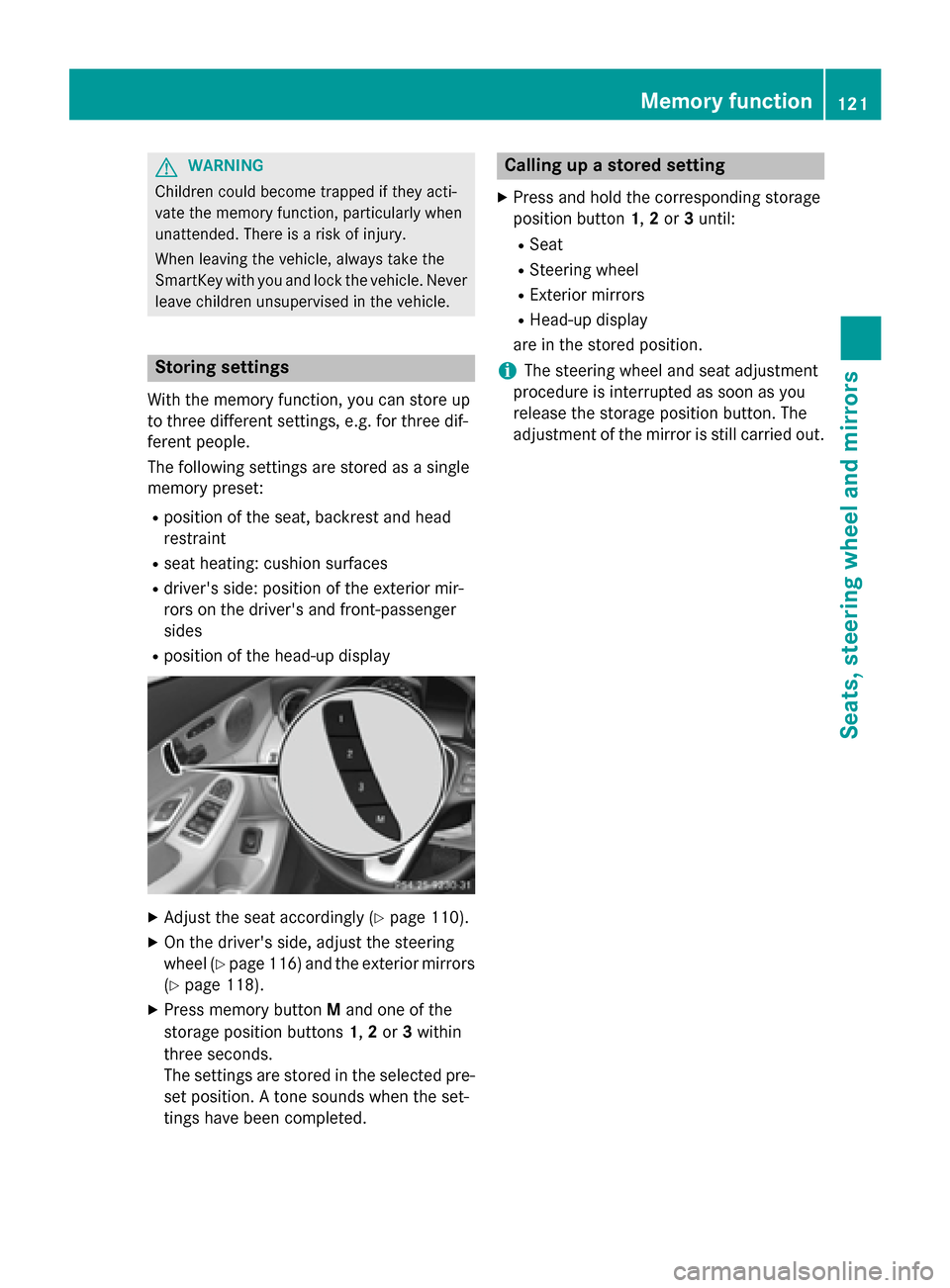
X Press memory button Mand one of the
storage position buttons 1,2or 3within
three seconds.
The settings are stored in the selected pre- set position. A tone sounds when the set-
tings have been completed. Calling up a stored setting
X Press and hold the corresponding storage
position button 1,2or 3until:
R Seat
R Steering wheel
R Exterior mirrors
R Head-up display
are in the stored position.
i The steering wheel and seat adjustment
procedure is interrupted as soon as you
release the storage position button. The
adjustment of the mirror is still carried out. Memory function
121Seats, steering wheel and mirrors Z
Page 130 of 406
The system automatically adapts the low-
beam headlamp range depending on the dis-
tance to the other vehicle. Once the system
no longer detects any other vehicles, it reac-
tivates the high-beam headlamps.
The system's optical sensor is located behind
the windshield near the overhead control
panel.
Important safety notes G
WARNING
Adaptive Highbeam Assist does not recognize road users:
R who have no lights, e.g. pedestrians
R who have poor lighting, e.g. cyclists
R whose lighting is blocked, e.g. by a barrier
In very rare cases, Adaptive Highbeam Assist
may fail to recognize other road users that
have lights, or may recognize them too late. In this or similar situations, the automatic high-
beam headlamps will not be deactivated or
activated regardless. There is a risk of an acci-
dent.
Always carefully observe the traffic conditions and switch off the high-beam headlamps in
good time.
Adaptive Highbeam Assist cannot take into
account road, weather or traffic conditions.
Adaptive Highbeam Assist is only an aid. You are responsible for adjusting the vehicle's
lighting to the prevailing light, visibility and
traffic conditions.
In particular, the detection of obstacles can
be restricted if there is:
R poor visibility, e.g. due to fog, heavy rain or
snow
R dirt on the sensors or the sensors are
obscured Switching Adaptive Highbeam Assist
on/off X
To switch on: turn the light switch to 0058.
X Press the combination switch beyond the
pressure point in the direction of arrow 0043.
The 00CE indicator lamp in the multifunc-
tion display lights up if it is dark and the
light sensor activates the low-beam head-
lamps.
If you are driving at speeds above 25 km/h:
If you are driving at speeds above approx-
imately 16 mph (25 km/h):
The headlamp range is set automatically
depending on the distance between the
vehicle and other road users.
If you are driving at speeds above approx-
imately 19 mph (30 km/h) and no other
road users have been detected:
The high-beam headlamps are switched on
automatically. The 0057indicator lamp in
the instrument cluster also lights up.
If you are driving at speeds below approx-
imately 16 mph (25 km/h) or other road
users have been detected or the roads are adequately lit:
The high-beam headlamps are switched off
automatically. The 0057indicator lamp in
the instrument cluster goes out. The 00CE
indicator lamp in the multifunction display
remains lit.
X To switch off: move the combination
switch back to its normal position or move
the light switch to another position.
The 00CE indicator lamp in the instrument
cluster goes out. Headlamps fogged up on the inside
Certain climatic and physical conditions may
cause moisture to form in the headlamp. This moisture does not affect the functionality of
the headlamp. 128
Exterior lightingLights and windshield wipers
Page 131 of 406
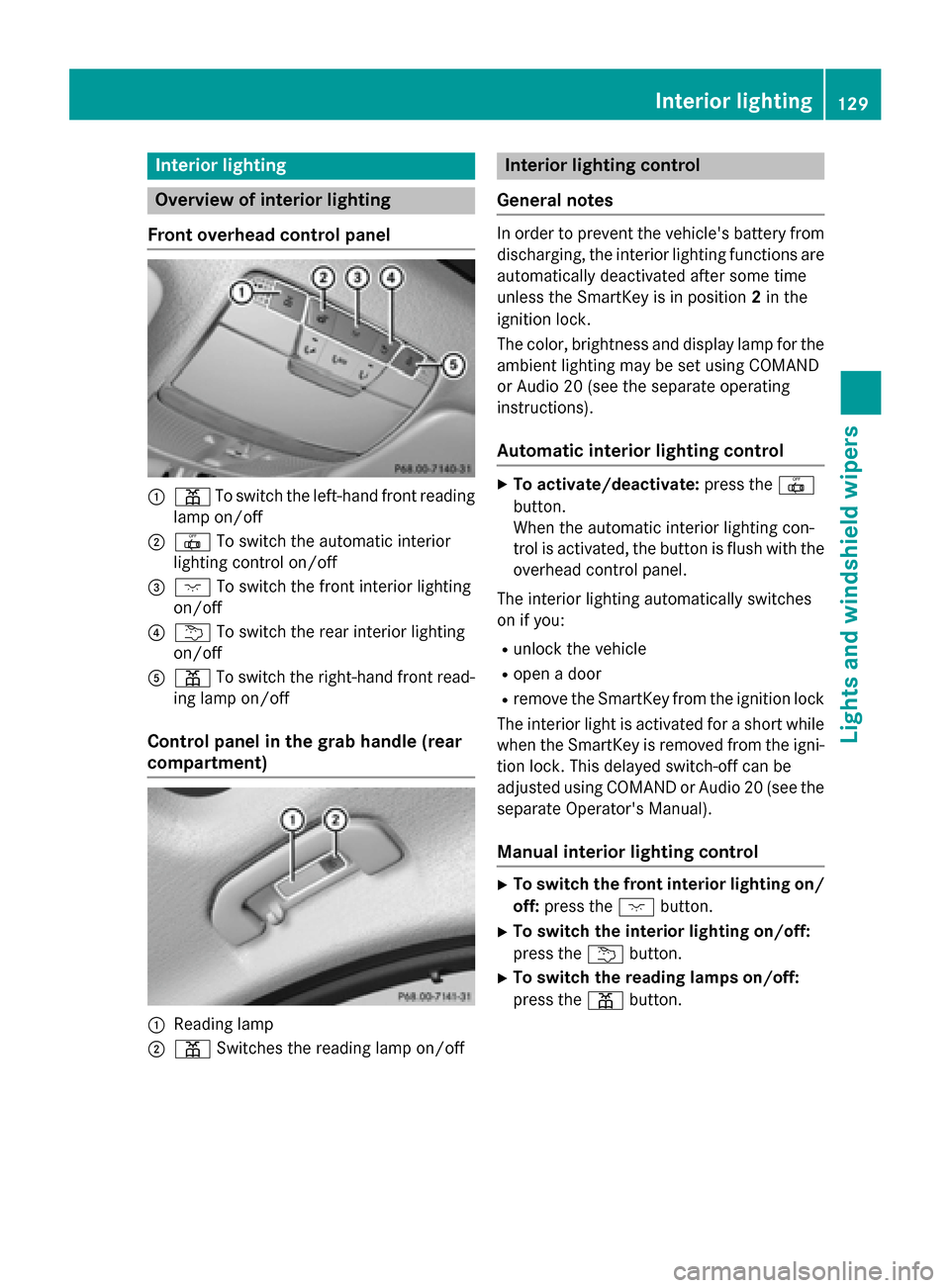
Interior lighting
Overview of interior lighting
Front overhead control panel 0043
003D To switch the left-hand front reading
lamp on/off
0044 0033 To switch the automatic interior
lighting control on/off
0087 004A To switch the front interior lighting
on/off
0085 0042 To switch the rear interior lighting
on/off
0083 003D To switch the right-hand front read-
ing lamp on/off
Control panel in the grab handle (rear
compartment) 0043
Reading lamp
0044 003D Switches the reading lamp on/off Interior lighting control
General notes In order to prevent the vehicle's battery from
discharging, the interior lighting functions are
automatically deactivated after some time
unless the SmartKey is in position 2in the
ignition lock.
The color, brightness and display lamp for the
ambient lighting may be set using COMAND
or Audio 20 (see the separate operating
instructions).
Automatic interior lighting control X
To activate/deactivate: press the0033
button.
When the automatic interior lighting con-
trol is activated, the button is flush with the
overhead control panel.
The interior lighting automatically switches
on if you: R unlock the vehicle
R open a door
R remove the SmartKey from the ignition lock
The interior light is activated for a short while when the SmartKey is removed from the igni-
tion lock. This delayed switch-off can be
adjusted using COMAND or Audio 20 (see the
separate Operator's Manual).
Manual interior lighting control X
To switch the front interior lighting on/
off: press the 004Abutton.
X To switch the interior lighting on/off:
press the 0042button.
X To switch the reading lamps on/off:
press the 003Dbutton. Interior lighting
129Lights and windshield wipers Z
Page 143 of 406
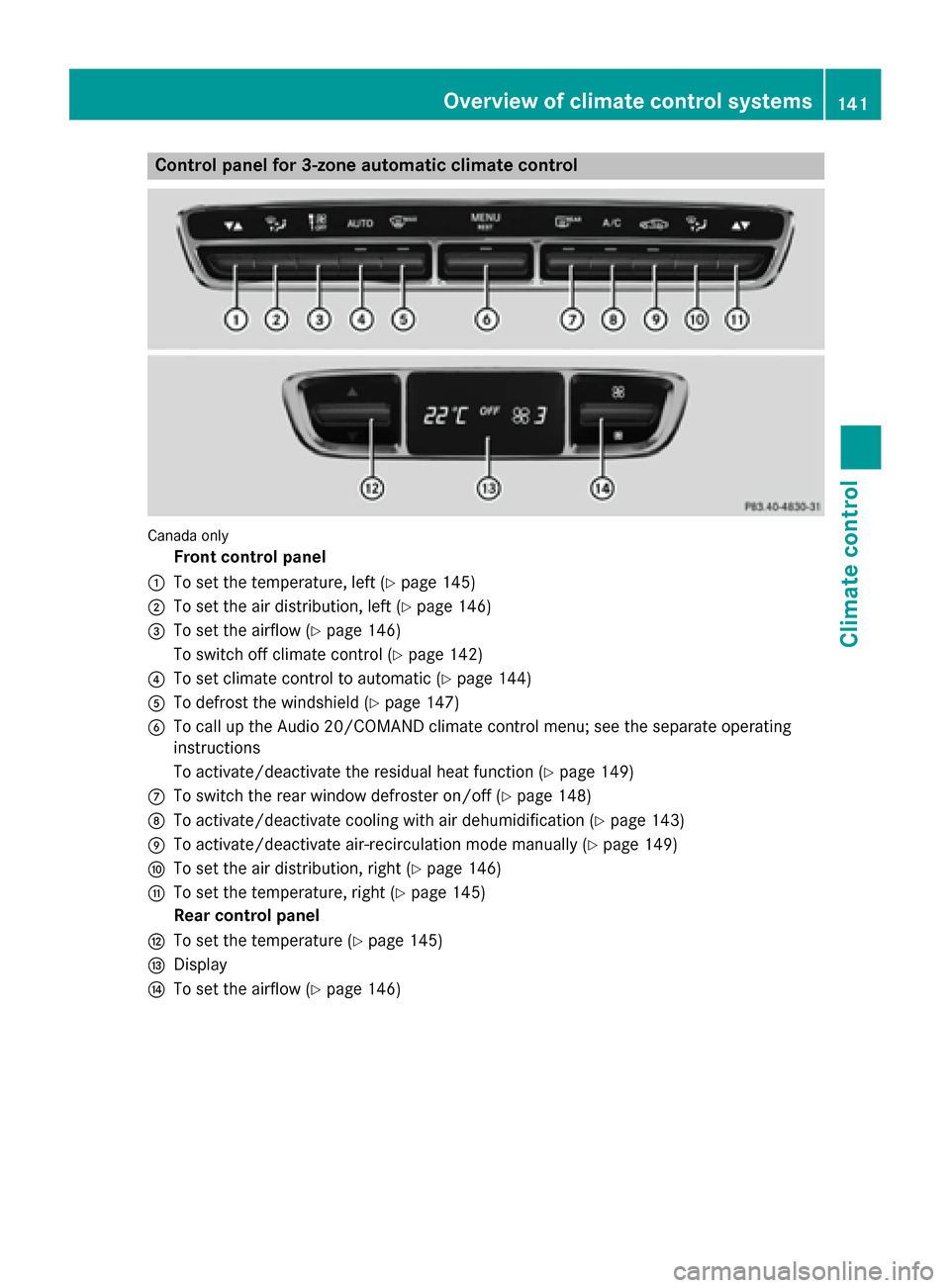
Control panel for 3-zone automatic climate control
Canada only
Front control panel
0043 To set the temperature, left (Y page 145)
0044 To set the air distribution, left (Y page 146)
0087 To set the airflow (Y page 146)
To switch off climate control (Y page 142)
0085 To set climate control to automatic (Y page 144)
0083 To defrost the windshield (Y page 147)
0084 To call up the Audio 20/COMAND climate control menu; see the separate operating
instructions
To activate/deactivate the residual heat function (Y page 149)
006B To switch the rear window defroster on/off (Y page 148)
006C To activate/deactivate cooling with air dehumidification (Y page 143)
006D To activate/deactivate air-recirculation mode manually (Y page 149)
006E To set the air distribution, right (Y page 146)
006F To set the temperature, right (Y page 145)
Rear control panel
0070 To set the temperature (Y page 145)
0071 Display
0072 To set the airflow (Y page 146) Overview of climate control systems
141Climate control
Page 148 of 406
X
Press the top or bottom section of the !
rocker switch.
The climate control menu in Audio 20/
COMAND opens.
X Select the "Synchronization" function; see
separate Audio 20/COMAND operating
instructions.
The temperature setting for the driver's
side is adopted for the front-passenger side
and the rear compartment.
Setting the temperature in the rear com-
partment using the rear control panel
X Turn the SmartKey to position 2in the igni-
tion lock (Y page 157).
X To increase/reduce: press the upper or
lower section of the 0082rocker switch on
the rear control panel (Y page 141).
Only change the temperature setting in
small increments. Start at 72 ‡ (22 †).
The set temperature appears on the rear-
compartment display. Setting the air distribution
Air distribution settings 0061
Directs air through the defroster vents
009C Directs air through the center and side
air vents
009B Directs air through the footwell air
vents
009F Directs air through the center, side and
footwell vents
0086 Directs air through the defroster and
footwell vents
008F Directs air through the defroster, cen-
ter, side and footwell vents
0087 Directs air through the defroster, cen-
ter and side air vents
00A2 Sets the air distribution to automatic Adjusting 3-zone automatic climate control: you can set
the air distribution separately for the driver's
and front-passenger side.
X Turn the SmartKey to position 2
(Y page 157).
X Press the 008Fbutton up or down.
The various air distribution settings appear
in Audio 20/COMAND.
X Press and hold the 008Fbutton upwards
until the desired position is reached.
or
X Set the air distribution using Audio 20/
COMAND; see the separate operating
instructions. Setting the airflow
Dual-zone automatic climate control X
Turn the SmartKey to position 2in the igni-
tion lock (Y page 157).
X To increase/reduce: press the upper or
lower section of the Hrocker switch.
or
X Set the airflow using Audio 20/COMAND;
see the separate operating instructions.
3-zone automatic climate control Adjusting the front-compartment airflow
You can set the airflow separately for the
front and rear compartment.
X Turn the SmartKey to position 2in the igni-
tion lock (Y page 157).
X To increase/reduce: press the upper or
lower section of the Hrocker switch.
or X Set the airflow using Audio 20/COMAND;
see the separate operating instructions. 146
Operating the climate control systemsClimate control
Page 149 of 406
Setting the rear compartment airflow
X Turn the SmartKey to position 2in the igni-
tion lock (Y page 157).
X Press the top or bottom section of the !
rocker switch.
The Audio 20/COMAND climate control
menu opens.
X Select the "Synchronization" function in
the climate control menu; see separate
Audio 20/COMAND operating instruc-
tions.
The airflow setting for the front area is
adopted for the rear compartment.
Setting the rear compartment airflow
using the rear control panel X Turn the SmartKey to position 2in the igni-
tion lock (Y page 157).
X To increase/reduce: press the upper or
lower section of the 0097/0095rocker
switch on the rear control panel.
The selected airflow level set is shown in
the rear-compartment display. Switching the synchronization func-
tion on/off
General notes Climate control can be set centrally using the
synchronization function. The temperature
setting is adopted for the front-passenger
side. For 3-zone automatic climate control,
the temperature setting is adopted for the
front-passenger side and rear compartment. Activating/deactivating Dual-zone automatic climate control
X Press the upper or lower section of the
0 rocker switch.
The indicator lamp in the 0rocker
switch lights up or goes out.
or
X Activate/deactivate the synchronization
function using Audio 20/COMAND; see the
separate operating instructions).
The synchronization function deactivates if
the settings for the front-passenger side are
changed.
3-zone automatic climate control
X Activate/deactivate the synchronization
function using Audio 20/COMAND; see the
separate operating instructions).
The synchronization function is deactivated:
R if the settings for the front-passenger side
are changed
R if the settings for the rear compartment are
changed Defrosting the windshield
General notes You can use this function to defrost the wind-
shield or to defrost the inside of the wind-
shield and the front side windows.
Switch off the "Windshield defrosting" func-
tion as soon as the windshield is clear again.
Activating/deactivating the defrosting
function for the windshield X
Turn the SmartKey to position 2in the igni-
tion lock (Y page 157).
X To activate: press the0064rocker switch
on the front control unit up or down.
The indicator lamp above the 0064rocker
switch lights up. The current climate con-
trol settings are deactivated. Operating the climate control systems
147Climate control
Page 161 of 406
Starting the engine
Important safety notes G
WARNING
If children are left unsupervised in the vehicle, they could:
R open the doors, thus endangering other
people or road users.
R get out and disrupt traffic.
R operate the vehicle's equipment.
Additionally, children could set the vehicle in
motion if, for example, they:
R release the parking brake.
R shifting the automatic transmission out of
park position P
R Start the engine.
There is a risk of an accident and injury.
When leaving the vehicle, always take the
SmartKey with you and lock the vehicle. Never
leave children or animals unattended in the
vehicle. Always keep the SmartKey out of
reach of children. G
WARNING
Combustion engines emit poisonous exhaust
gases such as carbon monoxide. Inhaling
these exhaust gases leads to poisoning. There is a risk of fatal injury. Therefore never leave
the engine running in enclosed spaces with-
out sufficient ventilation. G
WARNING
Flammable materials introduced through
environmental influence or by animals can
ignite if in contact with the exhaust system or parts of the engine that heat up. There is a risk
of fire.
Carry out regular checks to make sure that
there are no flammable foreign materials in
the engine compartment or in the exhaust
system.
! Do not depress the accelerator when
starting the engine. General notes The catalytic converter is preheated for up to
30 seconds after a cold start. The sound of
the engine may change during this time.
Automatic transmission X
Shift the transmission to position P
(Y page 164).
The transmission position display in the
multifunction display shows
P (Y page 166).
You can also start the engine when the trans- mission is in position N.
Starting procedure with the SmartKey To start the engine using the SmartKey
instead of the Start/Stop button, pull the
Start/Stop button out of the ignition lock.
X Turn the SmartKey to position 3in the igni-
tion (Y page 157) lock and release it as
soon as the engine is running.
If the engine will not start: X Remove the SmartKey from the ignition
lock.
X Reinsert the SmartKey into the ignition lock
after a short waiting period.
X Turn the SmartKey to position 2in the igni-
tion lock (Y page 157).
The indicator lamps in the instrument clus- ter light up (Y page 284).
X Turn the SmartKey to position 3in the igni-
tion lock (Y page 157) and release it as
soon as the engine is running.
Starting procedure with the Start/Stop button The Start/Stop button is only available on
vehicles with KEYLESS-GO or the KEYLESS-
GO start function.
The Start/Stop button can be used to start
the vehicle manually without inserting the
SmartKey into the ignition lock. The Start/
Stop button must be inserted in the ignition Driving
159Driving and parking Z