ESP MERCEDES-BENZ C-Class SEDAN 2015 W205 Owner's Manual
[x] Cancel search | Manufacturer: MERCEDES-BENZ, Model Year: 2015, Model line: C-Class SEDAN, Model: MERCEDES-BENZ C-Class SEDAN 2015 W205Pages: 406, PDF Size: 7.62 MB
Page 2 of 406
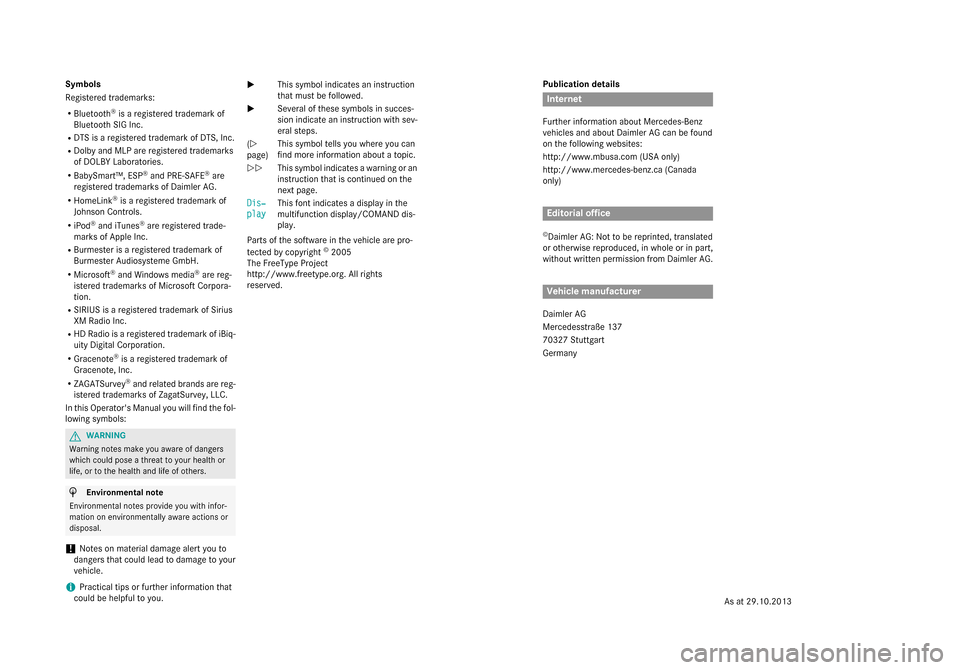
Publication details
Internet
Further information about Mercedes-Benz
vehicles and about Daimler AG can be found
on the following websites:
http://www.mbusa.com (USA only)
http://www.mercedes-benz.ca (Canada
only) Editorial office
© Daimler AG: Not to be reprinted, translated
or otherwise reproduced, in whole or in part,
without written permission from Daimler AG. Vehicle manufacturer
Daimler AG
Mercedesstraße 137
70327 Stuttgart
Germany
Symbols
Registered trademarks:
R Bluetooth ®
is a registered trademark of
Bluetooth SIG Inc.
R DTS is a registered trademark of DTS, Inc.
R Dolby and MLP are registered trademarks
of DOLBY Laboratories.
R BabySmart™, ESP ®
and PRE-SAFE ®
are
registered trademarks of Daimler AG.
R HomeLink ®
is a registered trademark of
Johnson Controls.
R iPod ®
and iTunes ®
are registered trade-
marks of Apple Inc.
R Burmester is a registered trademark of
Burmester Audiosysteme GmbH.
R Microsoft ®
and Windows media ®
are reg-
istered trademarks of Microsoft Corpora-
tion.
R SIRIUS is a registered trademark of Sirius
XM Radio Inc.
R HD Radio is a registered trademark of iBiq-
uity Digital Corporation.
R Gracenote ®
is a registered trademark of
Gracenote, Inc.
R ZAGATSurvey ®
and related brands are reg-
istered trademarks of ZagatSurvey, LLC.
In this Operator's Manual you will find the fol- lowing symbols: G
WARNING
Warning notes make you aware of dangers
which could pose a threat to your health or
life, or to the health and life of others. H
Environmental note
Environmental notes provide you with infor-
mation on environmentally aware actions or
disposal.
! Notes on material damage alert you to
dangers that could lead to damage to your
vehicle.
i Practical tips or further information that
could be helpful to you. X
This symbol indicates an instruction
that must be followed.
X Several of these symbols in succes-
sion indicate an instruction with sev-
eral steps.
(Y
page) This symbol tells you where you can
find more information about a topic.
YY This symbol indicates a warning or an
instruction that is continued on the
next page.
Dis‐
Dis‐
play play This font indicates a display in the
multifunction display/COMAND dis-
play.
Parts of the software in the vehicle are pro-
tected by copyright ©
2005
The FreeType Project
http://www.freetype.org. All rights
reserved.
As at 29.10.2013
Page 10 of 406
Cornering light function
Display message ............................ 264
Function/notes ............................ .127
Crash-responsive emergency light-
ing ....................................................... 130
Crosswind Assist ................................. 73
Cruise control Cruise control lever ....................... 184
Deactivating ................................... 185
Display message ............................ 276
Driving system ............................... 183
Function/notes ............................ .183
Important safety notes .................. 183
Setting a speed .............................. 185
Storing and maintaining current
speed ............................................. 184
Cup holder
Center console .............................. 307
Important safety notes .................. 306
Rear compartment ......................... 307
Customer Assistance Center
(CAC) ..................................................... 27
Customer Relations Department ....... 27D
Data see Technical data
Daytime running lamps
Display message ............................ 266
Function/notes ............................ .124
Switching on/off (on-board com-
puter) ............................................. 247
Declarations of conformity ................. 26
Diagnostics connection ......................26
Digital speedometer .........................237
DIRECT SELECT lever Automatic transmission ................. 164
Display
see Display messages
see Warning and indicator lamps
Display messages
ASSYST PLUS ................................ 328
Calling up (on-board computer) ..... 250
Driving systems ............................ .271
Engine ............................................ 267
General notes ................................ 250 Hiding (on-board computer) ........... 250
Introduction ................................... 250
Lights ............................................. 264
Safety systems .............................. 251
SmartKey ....................................... 282
Tires ............................................... 277
Vehicle .......................................... .280
Distance recorder .............................236
Distance warning (warning lamp) .... 293
Distance warning function Function/notes ................................ 69
DISTRONIC PLUS
Activating ....................................... 188
Activation conditions ..................... 188
Cruise control lever ....................... 187
Deactivating ................................... 192
Display message ............................ 274
Displays in the multifunction dis-
pla y................................................ 191
Driving tips .................................... 192
Function/note s............................. 185
Important safety notes .................. 186
Selecting ........................................ 187
Setting the specified minimum
distance ......................................... 191
Doors
Automatic locking (switch) ............... 88
Central locking/unlocking
(SmartKey) ....................................... 81
Control panel ................................... 39
Display message ............................ 281
Emergency locking ........................... 89
Emergency unlocking ....................... 88
Important safety notes .................... 87
Opening (from inside) ...................... 87
Drinking and driving ......................... 178
Drive program Automatic transmission ................. 168
Display (DIRECT SELECT lever) ...... 166
Driver's door
see Doors
Driving abroad
Mercedes-Benz Service ................. 329
Symmetrical low beam .................. 124
Driving Assistance package ............. 221
Driving on flooded roads .................. 1828
Index
Page 11 of 406
Driving safety system
BAS PLUS with Cross-Traffic
Assist .............................................. .67
Driving safety systems
ABS (Anti-lock Braking System) ...... .66
ADAPTIVE BRAK E............................. 74
Adaptive Brake Assist ...................... 70
BAS (Brake Assist System) .............. 67
COLLISION PREVENTION ASSIST
PLUS ................................................ 69
Distance warning function ............... 69
EBD (electronic brake force distri- bution) ............................................. 73
ESP ®
(Electronic Stability Pro-
gram) ............................................... 71
ETS/4ETS (Electronic Traction
System) ........................................... 72
Important safety information ........... 66
Overview .......................................... 66
PRE-SAFE ®
Brake ............................. 74
STEER CONTROL ............................. 76
Driving systems
360°camera .................................. 211
Active Blind Spot Assist ................. 221
Active Lane Keeping Assist ............ 224
Active Parking Assist ..................... 202
AIRMATIC ...................................... 197
ATTENTION ASSIST ........................ 216
Blind Spot Assist ............................ 217
Cruise control ................................ 183
Display message ............................ 271
DISTRONIC PLUS ........................... 185
DISTRONIC PLUS with Steering
Assist and Stop&Go Pilot ............... 194
Driving Assistance packag e........... 221
HOLD function ............................... 196
Lane Keeping Assist ...................... 219
Lane Tracking package .................. 217
PARKTRONIC ................................. 199
Rear view camera .......................... 207
Driving tips
Automatic transmission ................. 167
Brakes ........................................... 180
Break-in period .............................. 156
DISTRONIC PLUS ........................... 192
Downhill gradient ........................... 180
Drinking and driving ....................... 178 Driving abroad ............................... 124
Driving in winter ............................. 182
Driving on flooded roads ................ 182
Driving on wet roads ...................... 182
Exhaust check ............................... 178
Fuel ................................................ 178
General .......................................... 178
Hydroplaning ................................. 182
Icy road surfaces ........................... 182
Limited braking efficiency on sal-
ted roads ....................................... 181
Snow chains .................................. 361
Symmetrical low beam .................. 124
The first 1000 miles (1500 km) ..... 156
Wet road surface ........................... 181
DVD video
Operating (on-board computer) ..... 241 E
EASY-ENTRY feature Function/note s............................. 116
EASY-EXIT feature
Function/note s............................. 116
EASY-PACK trunk box ....................... 304
EBD (electronic brake force distri-
bution)
Display message ............................ 254
Function/note s................................ 73
ECO display
Function/note s............................. 179
On-board computer ....................... 236
ECO start/stop function
Climate control (dual-zone auto-
matic climate control ).................... 140
General information ....................... 161
Electronic Stability Program
see ESP ®
(Electronic Stability Program)
Emergency
Automatic measures after an acci-
dent ................................................. 59
Emergency release
Driver's door .................................... 88
Trunk ............................................... 97
Vehicle ............................................. 88
Emergency Tensioning Devices
Activation ......................................... 56 Index
9
Page 12 of 406
Emissions control
Service and warranty information .... 23
Engine
Check Engine warning lamp .......... .291
Display message ............................ 267
ECO start/stop function ................ 161
Engine number ............................... 397
Irregular running ............................ 163
Jump-starting ................................. 349
Starting problems .......................... 163
Starting the engine with the
SmartKey ....................................... 159
Starting with the Start/Stop but-
ton ................................................. 159
Switching off .................................. 175
Tow-starting (vehicle) ..................... 354
Engine electronics
Problem (malfunction) ................... 163
Engine oil
Adding .......................................... .326
Additives ........................................ 400
Checking the oil level ..................... 325
Checking the oil level using the
dipstick .......................................... 325
Display message ............................ 269
Filling capacity ............................... 400
Notes about oil grades ................... 400
Notes on oil level/consumption .... 325
Viscosity ........................................ 400
ESP ®
(Electronic Stability Pro-
gram) Characteristics ................................. 72
Deactivating/activating ................... 72
Display message ............................ 251
ETS/4ETS ........................................ 72
Function/notes ................................ 71
General notes .................................. 71
Important safety information ........... 72
Warning lamp ................................. 288
ETS/4ETS (Electronic Traction Sys-
tem) ...................................................... 72
Exhaust see Exhaust pipe
Exhaust check ................................... 178
Exhaust pipe Cleaning ......................................... 335 Exterior lighting
Cleaning ......................................... 333
see Lights
Exterior mirrors
Adjusting ....................................... 118
Dipping (automatic) ....................... 119
Folding in/out (automatically) ....... 118
Folding in/out (electrically) ........... 118
Out of position (troubleshooting) ... 119
Setting ........................................... 118
Storing settings (memory func-
tion) ............................................... 121
Storing the parking position .......... 119
Eyeglasses compartment ................. 299 F
Features ............................................. 306
Filler cap see Fuel filler flap
Flat tire
Changing a wheel/mounting the
spare whee l................................... 381
MOExtended tire s.......................... 341
Preparing the vehicle ..................... 341
TIREFIT kit ...................................... 342
Floormats ........................................... 322
Fording On flooded roads ........................... 182
Fuel
Additives ........................................ 399
Consumption information .............. 399
Consumption statistics .................. 237
Displaying the current consump-
tion ................................................ 236
Displaying the range ...................... 236
Driving tip s.................................... 178
Fuel gaug e....................................... 33
Grade (gasoline )............................ 398
Important safety notes .................. 398
Problem (malfunction) ................... 174
Refueling ........................................ 171
Tank content/reserve fue l............. 398
Fuel filler flap
Opening ......................................... 172
Fuel level
Calling up the range (on-board
computer) ...................................... 236 10
Index
Page 22 of 406
Trunk load (maximum)
...................... 403
Turn signals Changing bulbs (front) ................... 132
Changing bulbs (rear ).................... 132
Display message ............................ 264
Switching on/of f........................... 126
Type identification plate
see Vehicle identification plate U
Unlocking Emergency unlocking ....................... 88
From inside the vehicle (central
unlocking button) ............................. 87 V
Vanity mirror (in the sun visor) ........ 308
Vehicle Correct use ...................................... 27
Data acquisition ............................... 28
Display message ............................ 280
Equipment ....................................... 23
Individual settings .......................... 244
Limited Warranty ............................. 27
Loading .......................................... 369
Locking (in an emergency) ............... 89
Locking (SmartKey ).......................... 81
Lowering ........................................ 386
Maintenance .................................... 24
Operating safety .............................. 25
Parking for a long period ................ 177
Pulling away ................................... 160
Raising ........................................... 382
Reporting problems ......................... 27
Securing from rolling away ............ 382
Towing away .................................. 351
Transporting .................................. 353
Unlocking (in an emergency) ........... 88
Unlocking (SmartKey )...................... 81
Vehicle data ................................... 403
Vehicle data
Roof load (maximum) ..................... 403
Trunk load (maximum) ................... 403
Vehicle dimensions ........................... 403
Vehicle emergency locking ................ 89Vehicle identification number
see VIN
Vehicle identification plate .............. 396
Vehicle level AIRMATIC ...................................... 198
Display message ............................ 271
Vehicle maintenance
see ASSYST PLUS
Vehicle tool kit .................................. 340
Video Operating the DVD ......................... 241
VIN ...................................................... 396 W
Warning and indicator lamps ABS ................................................ 286
Brakes ........................................... 285
Check Engine ................................. 291
Coolant .......................................... 291
Distance warning ........................... 293
ESP ®
.............................................. 288
ESP ®
OFF ....................................... 289
Overview .......................................... 34
Parking brake ................................ 290
PASSENGER AIR BAG ...................... 43
Reserve fue l................................... 291
Restraint system ............................ 290
Seat belt ........................................ 284
Steering ......................................... 295
Tire pressure monitor .................... 294
Warranty .............................................. 23
Washer fluid Display message ............................ 282
Wheel and tire combination
see Tires
Wheel bolt tightening torque ........... 386
Wheel chock ...................................... 382
Wheels Changing a whee l.......................... 381
Checking ........................................ 359
Cleaning ......................................... 333
Important safety notes .................. 358
Interchanging/changing ................ 381
Mounting a new whee l................... 385
Mounting a whee l.......................... 381
Removing a whee l.......................... 385 20
Index
Page 24 of 406
Protection of the environment
General notes
H
Environmental note
Daimler's declared policy is one of compre-
hensive environmental protection.
The objectives are for the natural resources
that form the basis of our existence on this
planet to be used sparingly and in a manner
that takes the requirements of both nature
and humanity into account.
You too can help to protect the environment
by operating your vehicle in an environmen-
tally responsible manner.
Fuel consumption and the rate of engine,
transmission, brake and tire wear are affected by these factors:
R operating conditions of your vehicle
R your personal driving style
You can influence both factors. You should
bear the following in mind:
Operating conditions:
R avoid short trips as these increase fuel con-
sumption.
R always make sure that the tire pressures
are correct.
R do not carry any unnecessary weight.
R remove roof racks once you no longer need
them.
R a regularly serviced vehicle will contribute
to environmental protection. You should
therefore adhere to the service intervals.
R always have service work carried out at a
qualified specialist workshop.
Personal driving style:
R do not depress the accelerator pedal when
starting the engine.
R do not warm up the engine when the vehicle
is stationary.
R drive carefully and maintain a safe distance
from the vehicle in front.
R avoid frequent, sudden acceleration and
braking. R
change gear in good time and use each gear
only up to 00C3of its maximum engine speed.
R switch off the engine in stationary traffic.
R keep an eye on the vehicle's fuel consump-
tion. Environmental concerns and recom-
mendations
Wherever the operating instructions require
you to dispose of materials, first try to regen-
erate or re-use them. Observe the relevant
environmental rules and regulations when
disposing of materials. In this way you will
help to protect the environment. Genuine Mercedes-Benz parts
H
Environmental note
Daimler AG also supplies reconditioned major
assemblies and parts which are of the same
quality as new parts. They are covered by the same Limited Warranty entitlements as new
parts.
! Air bags and Emergency Tensioning Devi-
ces, as well as control units and sensors for these restraint systems, may be installed inthe following areas of your vehicle:
R doors
R door pillars
R door sills
R seats
R cockpit
R instrument cluster
R center console
Do not install accessories such as audio
systems in these areas. Do not carry out
repairs or welding. You could impair the
operating efficiency of the restraint sys-
tems.
Have aftermarket accessories installed at a qualified specialist workshop. 22
Introduction
Page 28 of 406
In situations like this, the body, the under-
carriage, chassis parts, wheels or tires
could be damaged without the damage
being visible. Components damaged in this way can unexpectedly fail or, in the case of
an accident, no longer withstand the strain
they are designed to.
If the underbody paneling is damaged,
combustible materials such as leaves,
grass or twigs can gather between the
underbody and the underbody paneling. If
these materials come in contact with hot
parts of the exhaust system, they can catch fire.
In such situations, have the vehicle
checked and repaired immediately at a
qualified specialist workshop. If on con-
tinuing your journey you notice that driving
safety is impaired, pull over and stop the
vehicle immediately, paying attention to
road and traffic conditions. In such cases,
visit a qualified specialist workshop. Declarations of conformity
Vehicle components which receive
and/or transmit radio waves USA:
"The wireless devices of this vehicle
comply with Part 15 of the FCC Rules. Oper-
ation is subject to the following two condi-
tions: 1) These devices may not cause harm-
ful interference, and 2) These devices must
accept any interference received, including
interference that may cause undesired oper-
ation. Changes or modifications not expressly approved by the party responsible for com-
pliance could void the user’s authority to
operate the equipment."
Canada: "The wireless devices of this vehicle
comply with Industry Canada license-exempt RSS standard(s). Operation is subject to the
following two conditions: (1) These devices
may not cause interference, and (2) These
devices must accept any interference, includ-
ing interference that may cause undesired
operation of the device." Diagnostics connection
The diagnostics connection is only intended
for the connection of diagnostic equipment at
a qualified specialist workshop. G
WARNING
If you connect equipment to the diagnostics
connection in the vehicle, it may affect the
operation of the vehicle systems. As a result, the operating safety of the vehicle could be
affected. There is a risk of an accident.
Do not connect any equipment to a diagnos-
tics connection in the vehicle. G
WARNING
Objects in the driver's footwell can restrict the pedal travel or obstruct a depressed pedal.
The operating and road safety of the vehicle is
jeopardized. There is a risk of an accident.
Make sure that all objects in the vehicle are
stowed correctly, and that they cannot enter
the driver's footwell. Install the floormats
securely and as specified in order to ensure
sufficient clearance for the pedals. Do not use loose floormats and do not place floormats on
top of one another.
! If the engine is switched off and equip-
ment on the diagnostics connection is
used, the starter battery may discharge.
Connecting equipment to the diagnostics
connection can lead to emissions monitoring information being reset, for example. This
may lead to the vehicle failing to meet the
requirements of the next emissions test dur-
ing the main inspection. Qualified specialist workshop
An authorized Mercedes-Benz Center is a
qualified specialist workshop. It has the nec-
essary specialist knowledge, tools and quali-
fications to correctly carry out the work
required on your vehicle. This is especially the case for work relevant to safety. 26
Introduction
Page 30 of 406
Data stored in the vehicle
Data recording
This vehicle is capable of recording diagnostic
information relating to vehicle operation, mal- functions, and user settings. This may include
information about the performance or status
of various systems, including but not limited
to, engine, throttle, steering or brake sys-
tems, that is stored and can be read out with suitable devices, particularly when the vehi-
cle is serviced. The data obtained is used to
properly diagnose and service your vehicle or
to further optimize and develop vehicle func-
tions. COMAND/mbrace
If the vehicle is equipped with COMAND or
mbrace, additional data about the vehicle’s
operation, the use of the vehicle in certain
situations, and the location of the vehicle may be compiled through COMAND or the mbrace system.
For additional information please refer to the
COMAND User Manual and/or the mbrace
Terms and Conditions. Event data recorders
This vehicle is equipped with an event data
recorder (EDR). The main purpose of an EDR
is to record data that will assist in under-
standing how a vehicle’s systems performed
in certain crash or near crash-like situations,
such as during air bag deployment or when
hitting a road obstacle. The EDR is designed
to record data related to vehicle dynamics
and safety systems for a short period of time, typically 30 seconds or less.
The EDR in this vehicle is designed to record
such data as:
R how various systems in your vehicle are
operating
R whether or not the driver and passenger
seat belts are fastened R
how far (if at all) the driver is depressing the
accelerator and/or brake pedal and
R how fast the vehicle is traveling
This data can help provide a better under-
standing of the circumstances in which
crashes and injuries occur. NOTE: EDR data is recorded by your vehicle only if a non-trivial
crash situation occurs; no data is recorded by
the EDR under normal driving conditions and no personal data (e.g., name, gender, age,
and crash location) are recorded. However,
other parties, such as law enforcement, can
combine the EDR data with the type of per-
sonal identification data routinely acquired
during a crash investigation.
To read data recorded by an EDR, special
equipment is required, and access to the vehi-
cle or the EDR is needed. In addition to the
vehicle manufacturer, other parties that have the special equipment, such as law enforce-
ment, can read the information by accessing
the vehicle or the EDR.
EDR data may be used in civil and criminal
matters as a tool in accident reconstruction,
accident claims, and vehicle safety. Since the Crash Data Retrieval CDR tool that is used to
extract data from the EDR is commercially
available, Mercedes-Benz USA, LLC
("MBUSA") expressly disclaims any and all lia- bility arising from the extraction of this infor-
mation by unauthorized Mercedes-Benz per-
sonnel.
MBUSA will not share EDR data with others
without the consent of the vehicle owners or,
if the vehicle is leased, without the consent of
the lessee. Exceptions to this representation
include responses to subpoenas by law
enforcement; by federal, state or local gov-
ernment; in connection with or arising out of
litigation involving MBUSA or its subsidiaries
and affiliates; or, as required by law.
Warning: The EDR is a component of the
Restraint System Module. Tampering with,
altering, modifying or removing the EDR com- ponent may result in a malfunction of the
Restraint System Module and other systems. 28
Int
roduction
Page 36 of 406
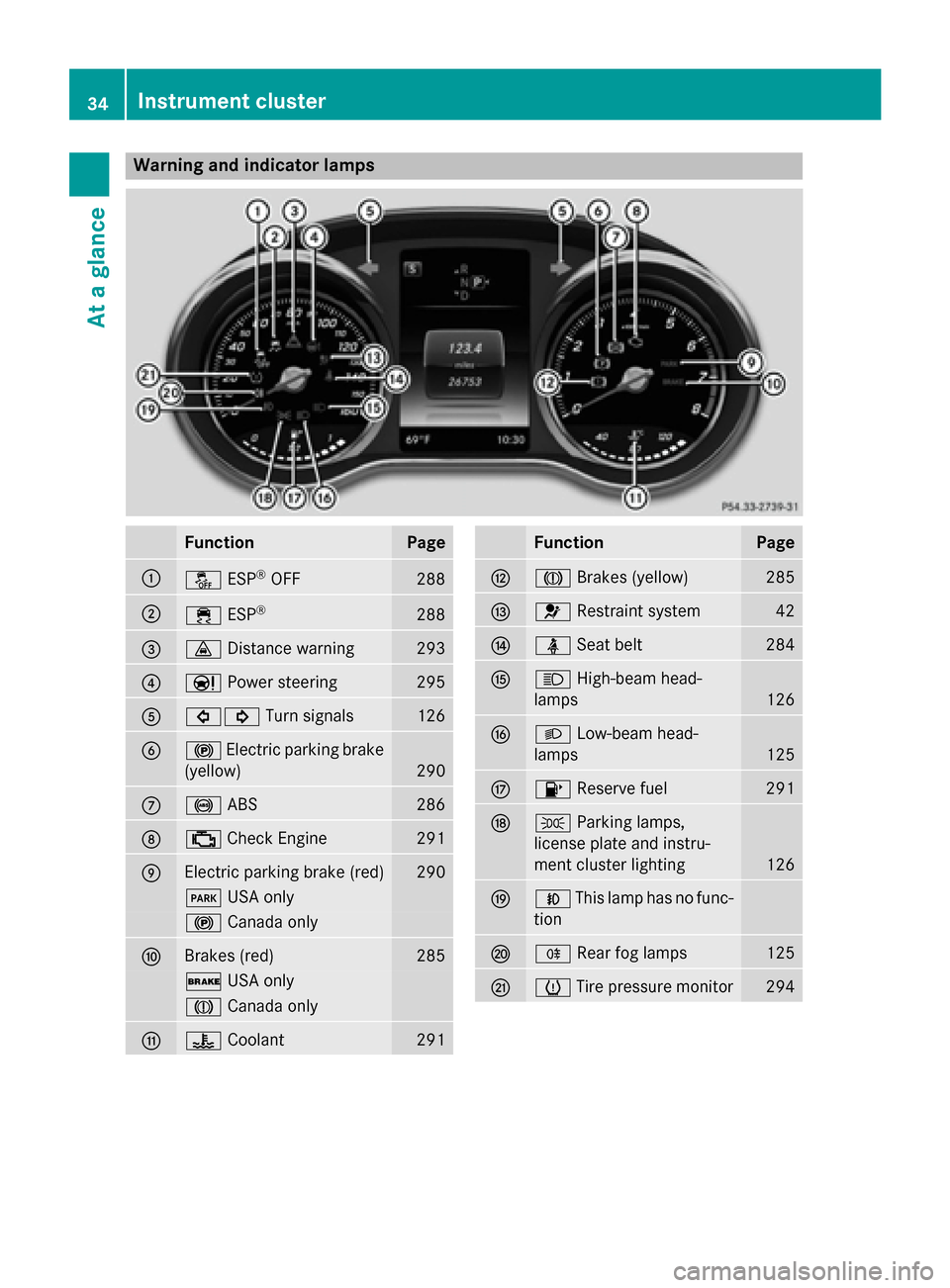
Warning and indicator lamps
Function Page
0043
00BB
ESP®
OFF 288
0044
00E5
ESP® 288
0087
00BA
Distance warning 293
0085
00CC
Power steering 295
0083
003E003D
Turn signals 126
0084
0024
Electric parking brake
(yellow) 290
006B
0025
ABS 286
006C
00B9
Check Engine 291
006D
Electric parking brake (red) 290
0049
USA only 0024
Canada only 006E
Brakes (red) 285
0027
USA only 004D
Canada only 006F
00AC
Coolant 291 Function Page
0070
004D
Brakes (yellow) 285
0071
0075
Restraint system 42
0072
00E9
Seat belt 284
0073
0057
High-beam head-
lamps 126
0074
0058
Low-beam head-
lamps 125
0075
00B6
Reserve fuel 291
0076
0060
Parking lamps,
license plate and instru-
ment cluster lighting 126
0077
005A
This lamp has no func-
tion 0078
005E
Rear fog lamps 125
0079
0077
Tire pressure monitor 29434
Instrument clusterAt a glance
Page 52 of 406
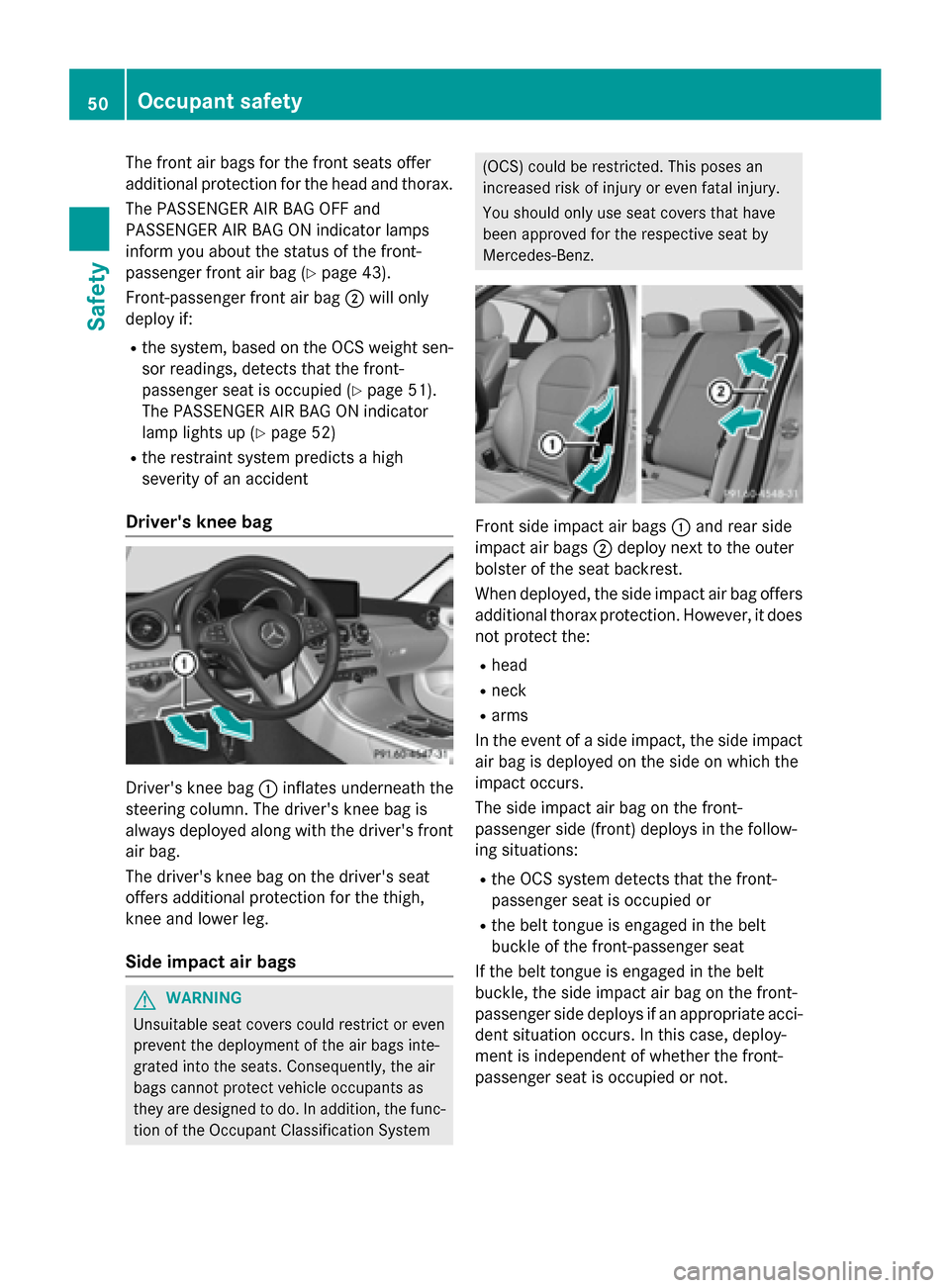
The front air bags for the front seats offer
additional protection for the head and thorax.
The PASSENGER AIR BAG OFF and
PASSENGER AIR BAG ON indicator lamps
inform you about the status of the front-
passenger front air bag (Y page 43).
Front-passenger front air bag 0044will only
deploy if:
R the system, based on the OCS weight sen-
sor readings, detects that the front-
passenger seat is occupied (Y page 51).
The PASSENGER AIR BAG ON indicator
lamp lights up (Y page 52)
R the restraint system predicts a high
severity of an accident
Driver's knee bag Driver's knee bag
0043inflates underneath the
steering column. The driver's knee bag is
always deployed along with the driver's front
air bag.
The driver's knee bag on the driver's seat
offers additional protection for the thigh,
knee and lower leg.
Side impact air bags G
WARNING
Unsuitable seat covers could restrict or even
prevent the deployment of the air bags inte-
grated into the seats. Consequently, the air
bags cannot protect vehicle occupants as
they are designed to do. In addition, the func- tion of the Occupant Classification System (OCS) could be restricted. This poses an
increased risk of injury or even fatal injury.
You should only use seat covers that have
been approved for the respective seat by
Mercedes-Benz.
Front side impact air bags
0043and rear side
impact air bags 0044deploy next to the outer
bolster of the seat backrest.
When deployed, the side impact air bag offers additional thorax protection. However, it doesnot protect the:
R head
R neck
R arms
In the event of a side impact, the side impact
air bag is deployed on the side on which the
impact occurs.
The side impact air bag on the front-
passenger side (front) deploys in the follow-
ing situations:
R the OCS system detects that the front-
passenger seat is occupied or
R the belt tongue is engaged in the belt
buckle of the front-passenger seat
If the belt tongue is engaged in the belt
buckle, the side impact air bag on the front-
passenger side deploys if an appropriate acci-
dent situation occurs. In this case, deploy-
ment is independent of whether the front-
passenger seat is occupied or not. 50
Occupant safetySafety