key battery MERCEDES-BENZ C-Class SEDAN 2015 W205 Owner's Manual
[x] Cancel search | Manufacturer: MERCEDES-BENZ, Model Year: 2015, Model line: C-Class SEDAN, Model: MERCEDES-BENZ C-Class SEDAN 2015 W205Pages: 406, PDF Size: 7.62 MB
Page 7 of 406
Armrest
Stowage compartment .................. 300
Ashtray .............................................. .309
Assistance display (on-board com-
puter) ................................................. .243
Assistance menu (on-board com-
puter) ................................................. .244
ASSYST PLUS Displaying a service message ....... .329
Hiding a service message .............. 328
Notes ............................................. 328
Resetting the service interval dis-
play ................................................ 329
Service message ............................ 328
Special service requirements ......... 329
ATA (Anti-Theft Alarm system)
Activating/deactivating ................... 76
Function .......................................... .76
Switching off the alarm .................... 76
ATTENTION ASSIST
Activating/deactivating ................. 246
Display message ............................ 271
Function/note s............................. 216
Authorized Mercedes-Benz Center
see Qualified specialist workshop
Authorized workshop
see Qualified specialist workshop
AUTO lights
Display message ............................ 266
see Lights
Automatic car wash (care) ............... 330
Automatic engine start (ECO start/
stop function) .................................... 161
Automatic engine switch-off (ECO
start/stop function) .......................... 161
Automatic headlamp mode .............. 124
Automatic transmission Accelerator pedal position ............. 167
AGILITY SELECT switch .................. 167
Changing gear ............................... 167
DIRECT SELECT lever ..................... 164
Display message ............................ 280
Drive program ................................ 168
Drive program display .................... 166
Driving tips .................................... 167
Emergency running mode .............. 171
Engaging drive position .................. 166 Engaging neutral ............................ 165
Engaging park position automati-
cally ............................................... 165
Engaging reverse gear ................... 165
Engaging the park position ............ 164
Kickdown ....................................... 167
Manual shifting .............................. 169
Overview ........................................ 164
Problem (malfunction) ................... 171
Pulling away ................................... 160
Starting the engine ........................ 159
Steering wheel paddle shifters ...... 169
Transmission position display
(DIRECT SELECT lever) ................... 166
Transmission positions .................. 166
Automatic transmission emer-
gency mode ....................................... 171 B
Backup lamp Changing bulb s.............................. 132
Bag hook ............................................ 304
BAS (Brake Assist System) ................. 67
BAS PLUS with Cross-Traffic Assist
(Brake Assist PLUS with Cross-
Traffic Assist)
Function/note s................................ 67
Important safety notes .................... 67
Battery (SmartKey)
Checking .......................................... 84
Important safety notes .................... 83
Replacing ......................................... 84
Battery (vehicle)
Charging ........................................ 347
Display message ............................ 268
Important safety notes .................. 345
Jump starting ................................. 349
Belt
see Seat belts
Blind Spot Assist
Activating/deactivating (on-
board computer) ............................ 246
Display message ............................ 273
Notes/function .............................. 217
see Active Blind Spot Assist
Box (trunk) ......................................... 304 Index
5
Page 19 of 406
Side marker lamp (display mes-
sage)
................................................... 266
Side windows Cleaning ......................................... 333
Convenience closing feature ............ 99
Convenience opening feature ..........98
Important safety information ........... 97
Opening/closing .............................. 98
Problem (malfunction) ................... 101
Resetting .........................................99
Sliding sunroof
Opening/closing ............................1 02
Resetting ....................................... 103
see Panorama roof with power
tilt/sliding panel
SmartKey
Changing the battery ....................... 84
Changing the programming ............. 82
Checking the battery ....................... 84
Convenience closing feature ............ 99
Convenience opening feature .......... 98
Display message ............................ 282
Door central locking/unlocking ....... 81
Important safety notes .................... 80
KEYLESS-GO start function .............. 82
Loss ................................................. 85
Mechanical key ................................ 83
Overview .......................................... 80
Positions (ignition lock) ................. 157
Problem (malfunction) ..................... 85
Starting the engine ........................ 159
Snow chains ...................................... 361
Sockets Center console .............................. 310
General notes ................................ 310
Rear compartment ......................... 310
Specialist workshop ............................ 26
Special seat belt retractor .................. 60
Speed, controlling see Cruise control
Speedometer
Activating/deactivating the addi-
tional speedometer ........................ 248
Digital ............................................ 237
In the Instrument cluster ................. 33 Segments ...................................... 231
Selecting the unit of measure-
ment .............................................. 248
see Instrument cluster
Standing lamps
Display message ............................ 266
Switching on/off ........................... 126
Start/Stop button
Starting the engine ........................ 159
Start/stop function
see ECO start/stop function
Starting (engine) ................................ 159
STEER CONTROL .................................. 76
Steering Warning lamps ............................... 295
Steering (display message) .............. 281
Steering Assist and Stop&Go Pilot
(DISTRONIC PLUS) Display message ............................ 276
Steering assistant STEER CON-
TROL
see STEER CONTROL
Steering wheel
Adjusting (electrically) ................... 116
Adjusting (manually) ...................... 115
Button overview ............................... 35
Buttons (on-board computer) ......... 231
Cleaning ......................................... 336
EASY ENTRY/EXIT feature ............. 116
Important safety notes .................. 115
Paddle shifters ............................... 169
Storing settings (memory func-
tion) ............................................... 121
Steering wheel paddle shifters ........ 169
Stowage areas ................................... 298
Stowage compartments Armrest (under) ............................. 300
Center console .............................. 299
Cup holders ................................... 306
Door ............................................... 300
Eyeglasses compartment ............... 299
Glove box ....................................... 299
Important safety information ......... 298
Map pockets .................................. 300
Rear ............................................... 300
Stowage net ................................... 300
Stowage net ....................................... 300 Index
17
Page 78 of 406
action or accelerate significantly, the vehicle
may perform automatic emergency braking,
up to the point of full brake application. Auto- matic emergency braking is not performed
until immediately prior to an imminent acci-
dent.
You can prevent the intervention of the PRE-
SAFE ®
Brake at any time by:
R depressing the accelerator pedal further.
R activating kickdown.
R releasing the brake pedal.
The braking action of PRE-SAFE ®
Brake is
ended automatically if:
R you maneuver to avoid the obstacle.
R there is no longer a risk of collision.
R there is no longer an obstacle detected in
front of your vehicle. STEER CONTROL
General information STEER CONTROL helps you by transmitting a
noticeable steering force to the steering
wheel in the direction required for vehicle
stabilization.
This steering assistance is provided in partic-
ular if:
R both right wheels or both left wheels are on
a wet or slippery road surface when you
brake.
R the vehicle starts to skid.
Important safety notes i
Observe the "Important safety notes" sec-
tion (Y page 66).
No steering support is provided from STEER
CONTROL, if:
R ESP ®
is malfunctioning.
R the lighting is faulty.
If ESP ®
is malfunctioning, you will be assisted
further by the electrical power steering. Protection against theft
Immobilizer
The immobilizer prevents your vehicle from
being started without the correct SmartKey. X To activate with the SmartKey: remove
the SmartKey from the ignition lock.
X To activate with KEYLESS-GO start-
function or KEYLESS-GO: switch the igni-
tion off and open the driver's door.
X To deactivate: switch on the ignition.
When leaving the vehicle, always take the
SmartKey with you and lock the vehicle. Any-
one can start the engine if a valid SmartKey
has been left inside the vehicle.
i The immobilizer is always deactivated
when you start the engine.
In the event that the engine cannot be star-
ted (yet the vehicle's battery is charged),
the system is not operational. Contact an
authorized Mercedes-Benz Center or call
1-800-FOR-MERCedes (in the USA) or
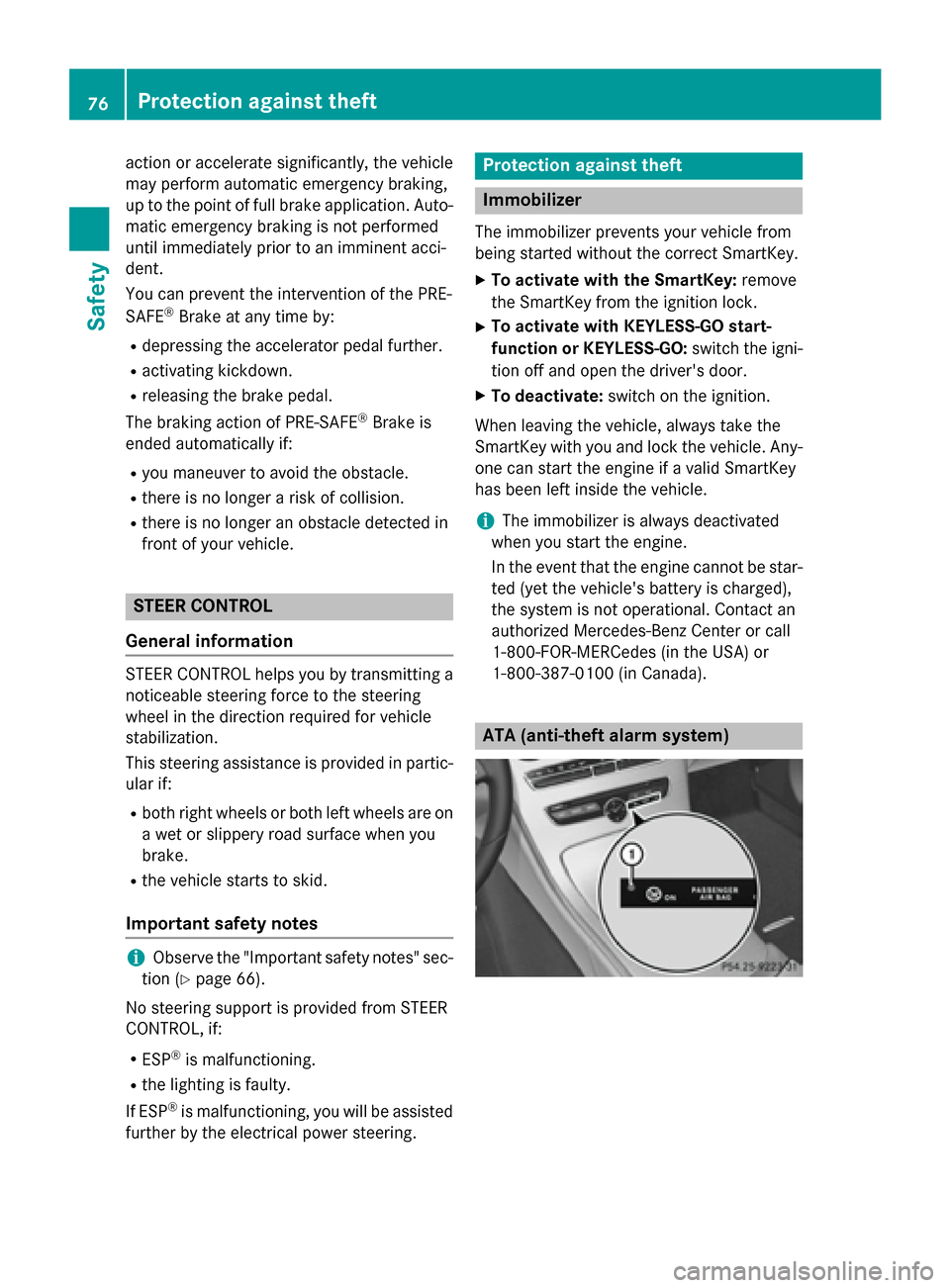
1-800-387-0100 (in Canada). ATA (anti-theft alarm system)76
Protection against theftSafety
Page 84 of 406
X
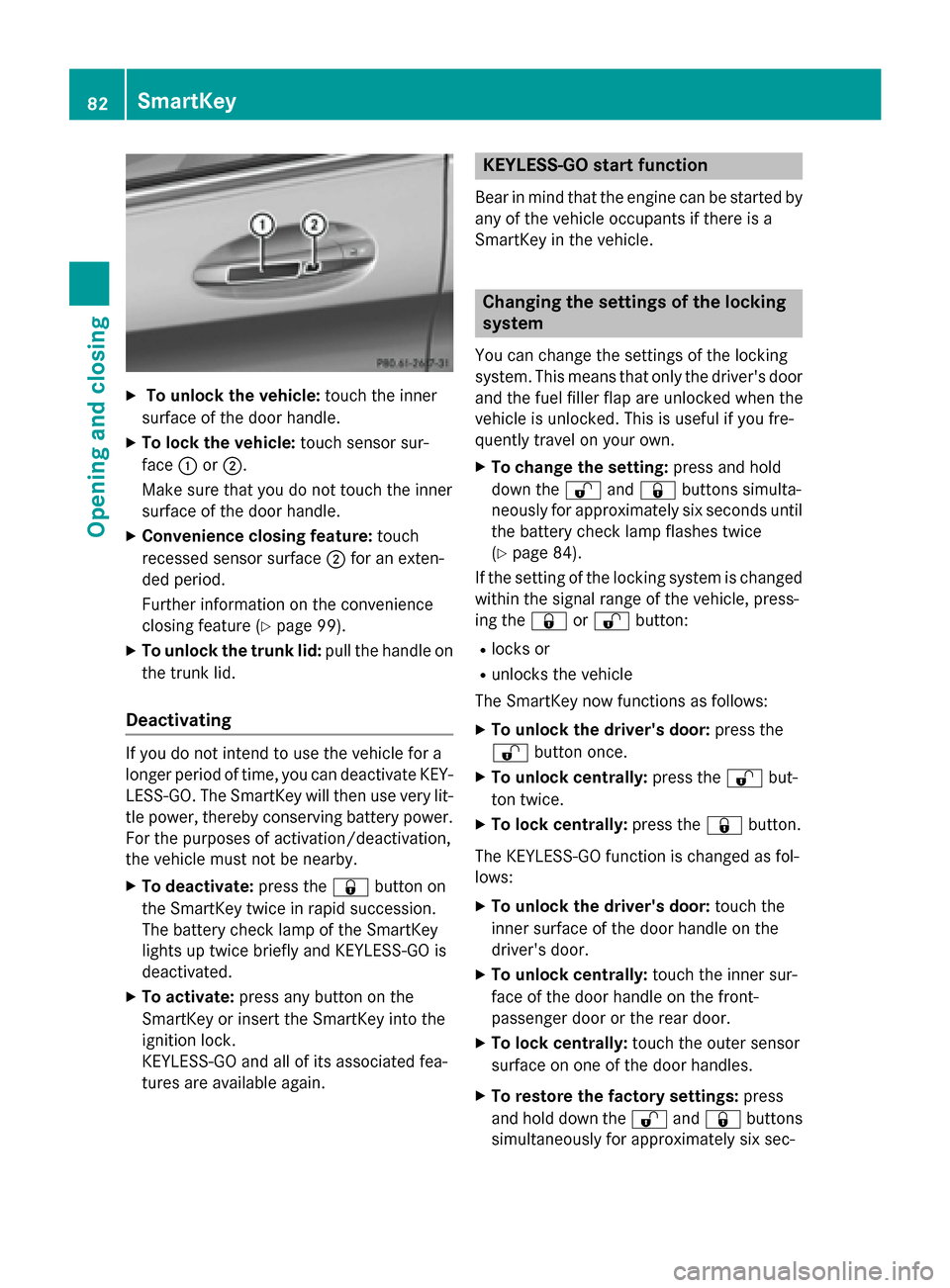
To unlock the vehicle: touch the inner
surface of the door handle.
X To lock the vehicle: touch sensor sur-
face 0043or0044.
Make sure that you do not touch the inner
surface of the door handle.
X Convenience closing feature: touch
recessed sensor surface 0044for an exten-
ded period.
Further information on the convenience
closing feature (Y page 99).
X To unlock the trunk lid: pull the handle on
the trunk lid.
Deactivating If you do not intend to use the vehicle for a
longer period of time, you can deactivate KEY- LESS-GO. The SmartKey will then use very lit-
tle power, thereby conserving battery power.
For the purposes of activation/deactivation,
the vehicle must not be nearby.
X To deactivate: press the0037button on
the SmartKey twice in rapid succession.
The battery check lamp of the SmartKey
lights up twice briefly and KEYLESS-GO is
deactivated.
X To activate: press any button on the
SmartKey or insert the SmartKey into the
ignition lock.
KEYLESS-GO and all of its associated fea-
tures are available again. KEYLESS-GO start function
Bear in mind that the engine can be started by any of the vehicle occupants if there is a
SmartKey in the vehicle. Changing the settings of the locking
system
You can change the settings of the locking
system. This means that only the driver's door and the fuel filler flap are unlocked when the
vehicle is unlocked. This is useful if you fre-
quently travel on your own.
X To change the setting: press and hold
down the 0036and0037 buttons simulta-
neously for approximately six seconds until
the battery check lamp flashes twice
(Y page 84).
If the setting of the locking system is changed
within the signal range of the vehicle, press-
ing the 0037or0036 button:
R locks or
R unlocks the vehicle
The SmartKey now functions as follows:
X To unlock the driver's door: press the
0036 button once.
X To unlock centrally: press the0036but-
ton twice.
X To lock centrally: press the0037button.
The KEYLESS-GO function is changed as fol-
lows:
X To unlock the driver's door: touch the
inner surface of the door handle on the
driver's door.
X To unlock centrally: touch the inner sur-
face of the door handle on the front-
passenger door or the rear door.
X To lock centrally: touch the outer sensor
surface on one of the door handles.
X To restore the factory settings: press
and hold down the 0036and0037 buttons
simultaneously for approximately six sec- 82
SmartKeyOpening and closing
Page 85 of 406
onds until the battery check lamp flashes
twice (Y
page 84). Mechanical key
General notes If the vehicle can no longer be locked or
unlocked with the SmartKey or KEYLESS-GO,
use the mechanical key.
If you use the mechanical key to unlock and
open the driver's door, the anti-theft alarm
system will be triggered. Switch off the alarm
(Y page 76).
If you unlock the vehicle using the mechanical key, the fuel filler flap will not be unlocked
automatically.
X To unlock the fuel filler flap: insert the
SmartKey into the ignition lock.
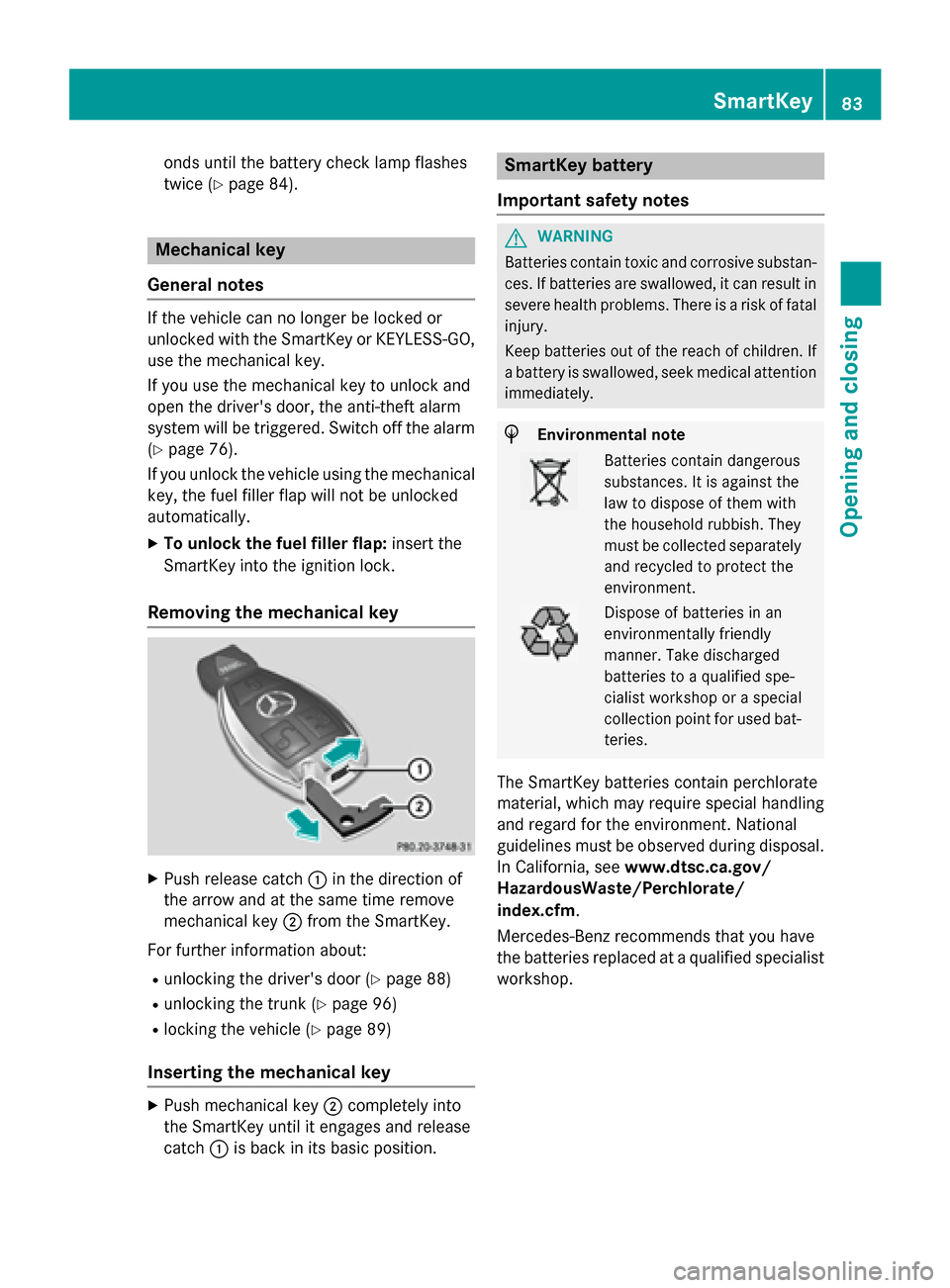
Removing the mechanical key X
Push release catch 0043in the direction of
the arrow and at the same time remove
mechanical key 0044from the SmartKey.
For further information about: R unlocking the driver's door (Y page 88)
R unlocking the trunk (Y page 96)
R locking the vehicle (Y page 89)
Inserting the mechanical key X
Push mechanical key 0044completely into
the SmartKey until it engages and release
catch 0043is back in its basic position. SmartKey battery
Important safety notes G
WARNING
Batteries contain toxic and corrosive substan- ces. If batteries are swallowed, it can result in
severe health problems. There is a risk of fatal injury.
Keep batteries out of the reach of children. If
a battery is swallowed, seek medical attention immediately. H
Environmental note Batteries contain dangerous
substances. It is against the
law to dispose of them with
the household rubbish. They
must be collected separately
and recycled to protect the
environment. Dispose of batteries in an
environmentally friendly
manner. Take discharged
batteries to a qualified spe-
cialist workshop or a special
collection point for used bat-
teries.
The SmartKey batteries contain perchlorate
material, which may require special handling
and regard for the environment. National
guidelines must be observed during disposal.
In California, see www.dtsc.ca.gov/
HazardousWaste/Perchlorate/
index.cfm.
Mercedes-Benz recommends that you have
the batteries replaced at a qualified specialist workshop. SmartKey
83Opening and closing Z
Page 86 of 406
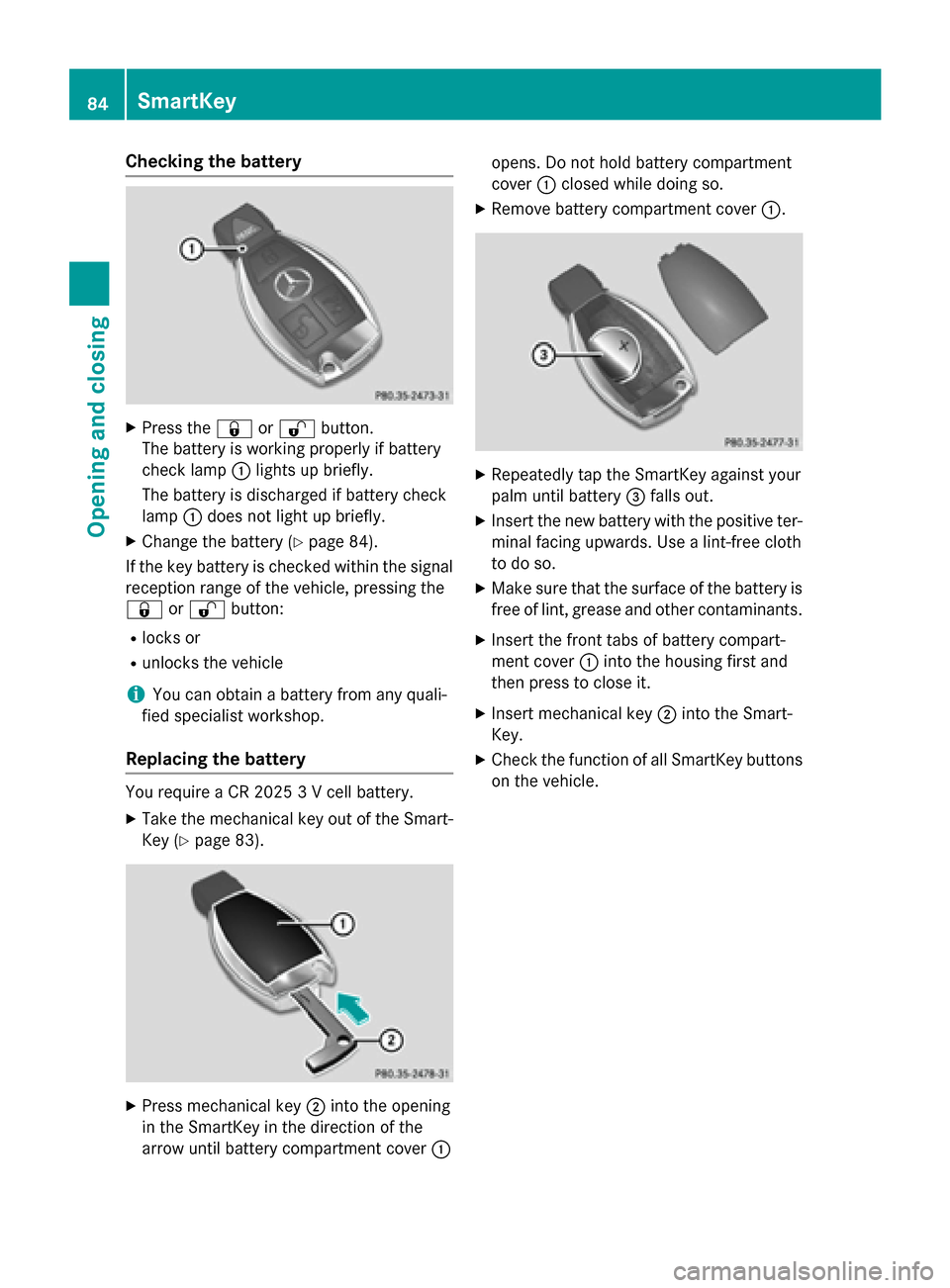
Checking the battery
X
Press the 0037or0036 button.
The battery is working properly if battery
check lamp 0043lights up briefly.
The battery is discharged if battery check
lamp 0043does not light up briefly.
X Change the battery (Y page 84).
If the key battery is checked within the signal
reception range of the vehicle, pressing the
0037 or0036 button:
R locks or
R unlocks the vehicle
i You can obtain a battery from any quali-
fied specialist workshop.
Replacing the battery You require a CR 2025 3 V cell battery.
X Take the mechanical key out of the Smart-
Key (Y page 83). X
Press mechanical key 0044into the opening
in the SmartKey in the direction of the
arrow until battery compartment cover 0043opens. Do not hold battery compartment
cover
0043closed while doing so.
X Remove battery compartment cover 0043. X
Repeatedly tap the SmartKey against your
palm until battery 0087falls out.
X Insert the new battery with the positive ter-
minal facing upwards. Use a lint-free cloth
to do so.
X Make sure that the surface of the battery is
free of lint, grease and other contaminants.
X Insert the front tabs of battery compart-
ment cover 0043into the housing first and
then press to close it.
X Insert mechanical key 0044into the Smart-
Key.
X Check the function of all SmartKey buttons
on the vehicle. 84
SmartKeyOpening and closing
Page 87 of 406
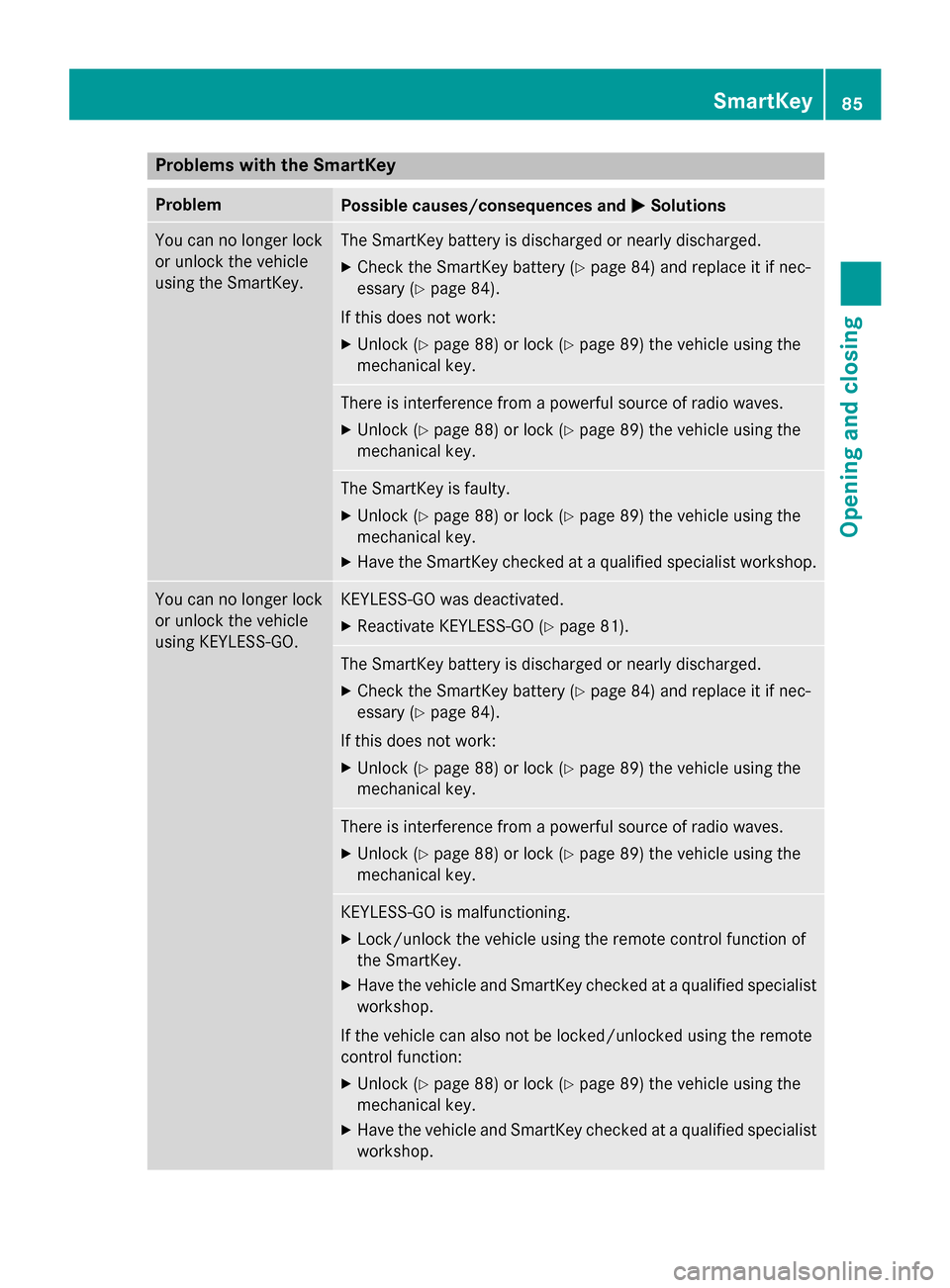
Problems with the SmartKey
Problem
Possible causes/consequences and
0050
0050Solutions You can no longer lock
or unlock the vehicle
using the SmartKey. The SmartKey battery is discharged or nearly discharged.
X Check the SmartKey battery (Y page 84) and replace it if nec-
essary (Y page 84).
If this does not work:
X Unlock (Y page 88) or lock (Y page 89) the vehicle using the
mechanical key. There is interference from a powerful source of radio waves.
X Unlock (Y page 88) or lock (Y page 89) the vehicle using the
mechanical key. The SmartKey is faulty.
X Unlock (Y page 88) or lock (Y page 89) the vehicle using the
mechanical key.
X Have the SmartKey checked at a qualified specialist workshop. You can no longer lock
or unlock the vehicle
using KEYLESS-GO. KEYLESS-GO was deactivated.
X Reactivate KEYLESS-GO (Y page 81). The SmartKey battery is discharged or nearly discharged.
X Check the SmartKey battery (Y page 84) and replace it if nec-
essary (Y page 84).
If this does not work:
X Unlock (Y page 88) or lock (Y page 89) the vehicle using the
mechanical key. There is interference from a powerful source of radio waves.
X Unlock (Y page 88) or lock (Y page 89) the vehicle using the
mechanical key. KEYLESS-GO is malfunctioning.
X Lock/unlock the vehicle using the remote control function of
the SmartKey.
X Have the vehicle and SmartKey checked at a qualified specialist
workshop.
If the vehicle can also not be locked/unlocked using the remote
control function:
X Unlock (Y page 88) or lock (Y page 89) the vehicle using the
mechanical key.
X Have the vehicle and SmartKey checked at a qualified specialist
workshop. SmartKey
85Opening and closing Z
Page 88 of 406
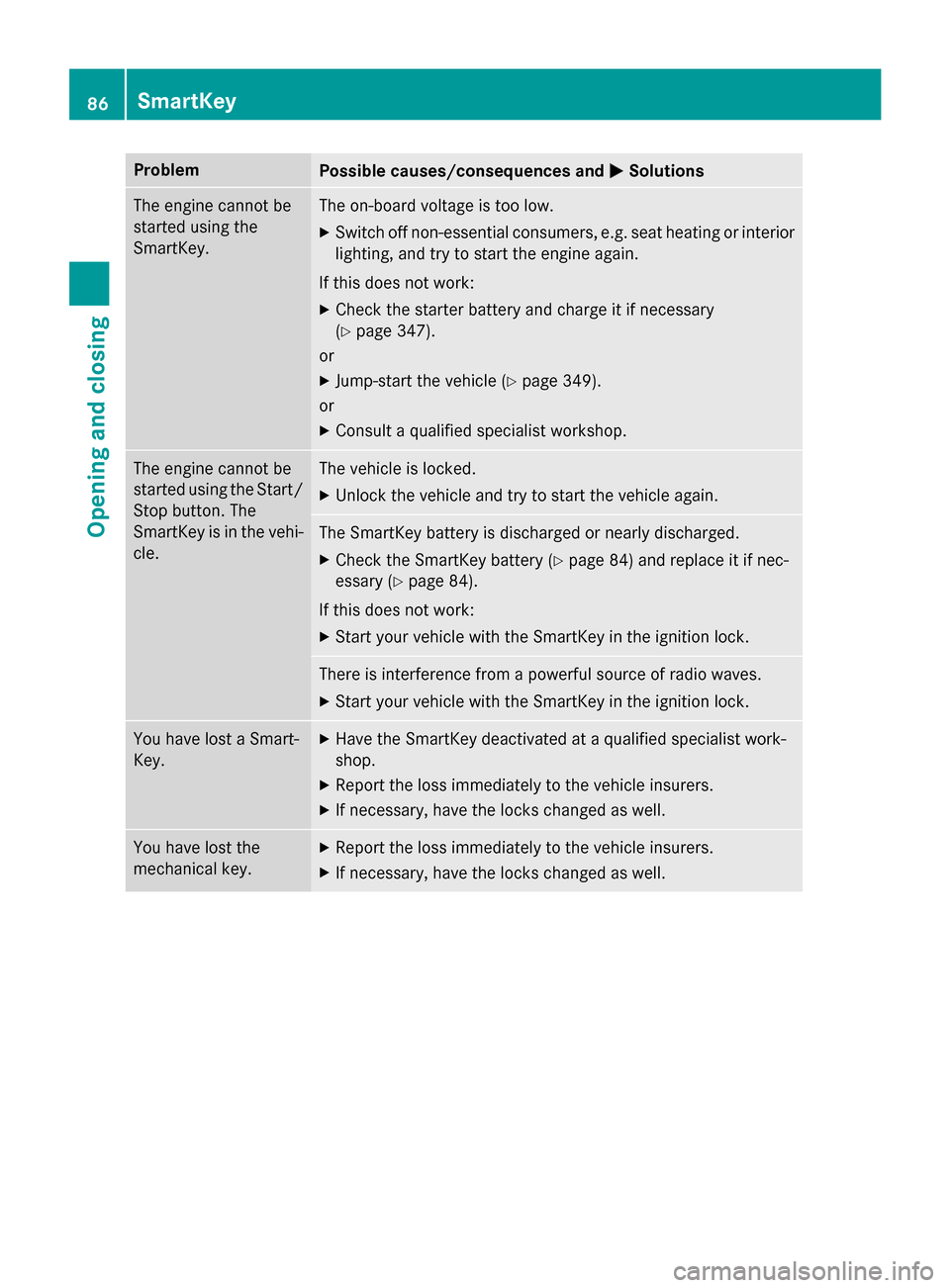
Problem
Possible causes/consequences and
0050
0050Solutions The engine cannot be
started using the
SmartKey. The on-board voltage is too low.
X Switch off non-essential consumers, e.g. seat heating or interior
lighting, and try to start the engine again.
If this does not work:
X Check the starter battery and charge it if necessary
(Y page 347).
or
X Jump-start the vehicle (Y page 349).
or
X Consult a qualified specialist workshop. The engine cannot be
started using the Start/
Stop button. The
SmartKey is in the vehi-
cle. The vehicle is locked.
X Unlock the vehicle and try to start the vehicle again. The SmartKey battery is discharged or nearly discharged.
X Check the SmartKey battery (Y page 84) and replace it if nec-
essary (Y page 84).
If this does not work:
X Start your vehicle with the SmartKey in the ignition lock. There is interference from a powerful source of radio waves.
X Start your vehicle with the SmartKey in the ignition lock. You have lost a Smart-
Key. X
Have the SmartKey deactivated at a qualified specialist work-
shop.
X Report the loss immediately to the vehicle insurers.
X If necessary, have the locks changed as well. You have lost the
mechanical key. X
Report the loss immediately to the vehicle insurers.
X If necessary, have the locks changed as well. 86
SmartKeyOpening and closing
Page 99 of 406
Trunk emergency release
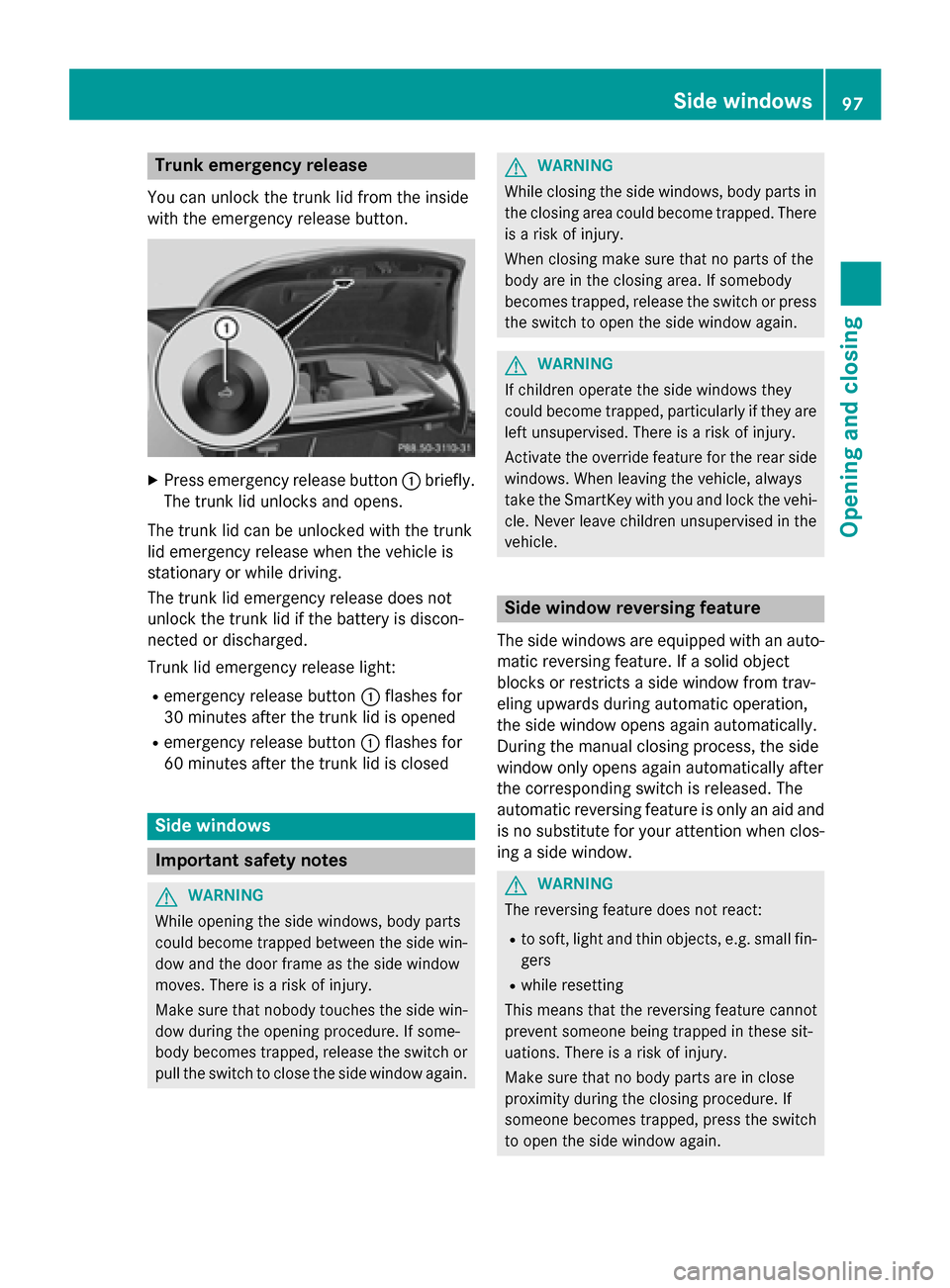
You can unlock the trunk lid from the inside
with the emergency release button. X
Press emergency release button 0043briefly.
The trunk lid unlocks and opens.
The trunk lid can be unlocked with the trunk
lid emergency release when the vehicle is
stationary or while driving.
The trunk lid emergency release does not
unlock the trunk lid if the battery is discon-
nected or discharged.
Trunk lid emergency release light:
R emergency release button 0043flashes for
30 minute s after the trunk lid is opened
R emergency release button 0043flashes for
60 minutes after the trunk lid is closed Side windows
Important safety notes
G
WARNING
While opening the side windows, body parts
could become trapped between the side win- dow and the door frame as the side window
moves. There is a risk of injury.
Make sure that nobody touches the side win-
dow during the opening procedure. If some-
body becomes trapped, release the switch or pull the switch to close the side window again. G
WARNING
While closing the side windows, body parts in the closing area could become trapped. There is a risk of injury.
When closing make sure that no parts of the
body are in the closing area. If somebody
becomes trapped, release the switch or press
the switch to open the side window again. G
WARNING
If children operate the side windows they
could become trapped, particularly if they are left unsupervised. There is a risk of injury.
Activate the override feature for the rear side
windows. When leaving the vehicle, always
take the SmartKey with you and lock the vehi-
cle. Never leave children unsupervised in the
vehicle. Side window reversing feature
The side windows are equipped with an auto- matic reversing feature. If a solid object
blocks or restricts a side window from trav-
eling upwards during automatic operation,
the side window opens again automatically.
During the manual closing process, the side
window only opens again automatically after
the corresponding switch is released. The
automatic reversing feature is only an aid and
is no substitute for your attention when clos- ing a side window. G
WARNING
The reversing feature does not react:
R to soft, light and thin objects, e.g. small fin-
gers
R while resetting
This means that the reversing feature cannot
prevent someone being trapped in these sit-
uations. There is a risk of injury.
Make sure that no body parts are in close
proximity during the closing procedure. If
someone becomes trapped, press the switch
to open the side window again. Side
windows
97Opening an d closing Z
Page 115 of 406
tures may be affected or they may even suffer
burn-like injuries. There is a risk of injury.
Therefore, do not switch the seat heating on
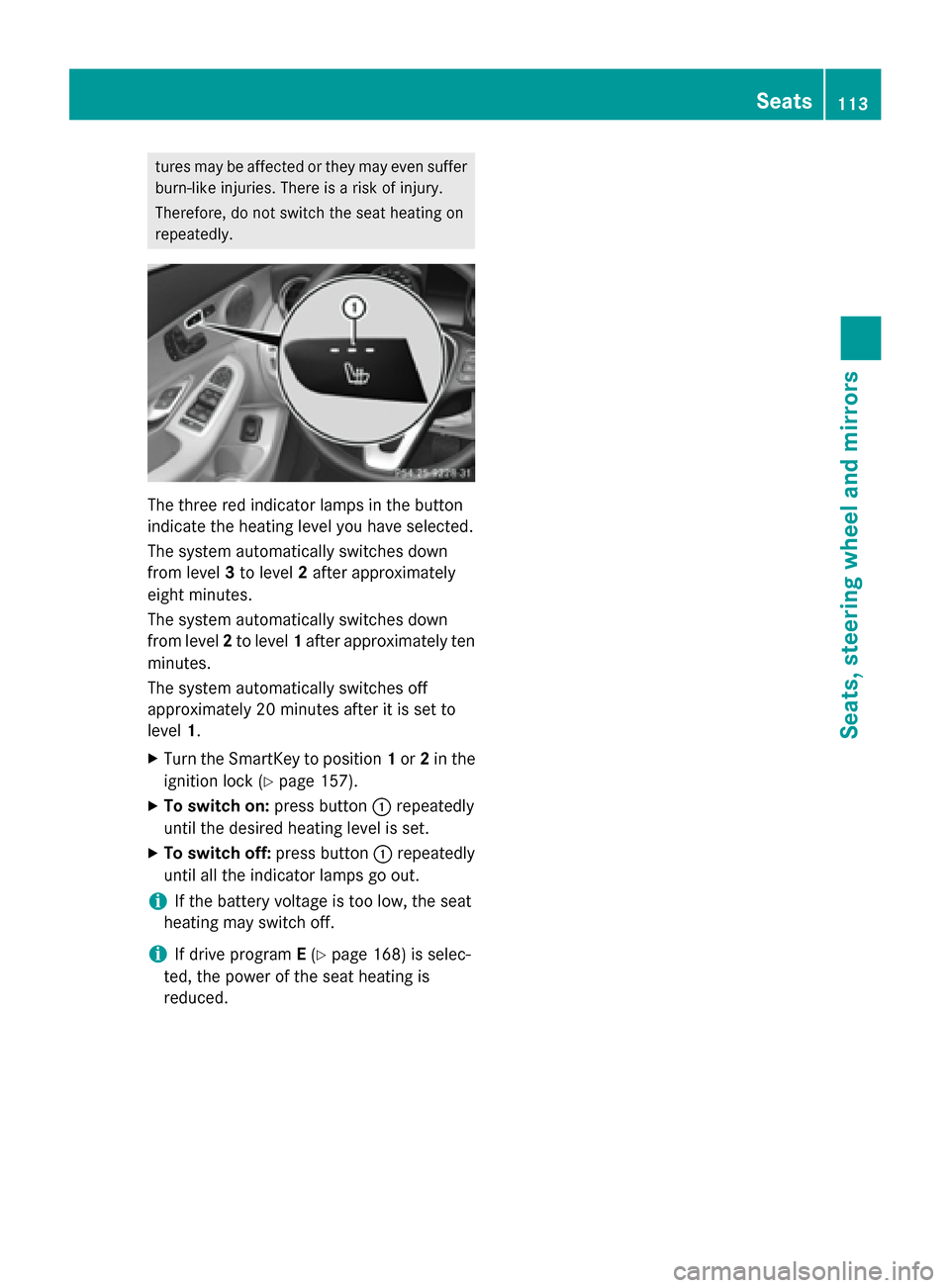
repeatedly. The three red indicator lamps in the button
indicate the heating level you have selected.
The system automatically switches down
from level 3to level 2after approximately
eight minutes.
The system automatically switches down
from level 2to level 1after approximately ten
minutes.
The system automatically switches off
approximately 20 minute s after it is set to
level 1.
X Turn the SmartKey to position 1or 2in the
ignition lock (Y page 157).
X To switch on: press button0043repeatedly
until the desired heating level is set.
X To switch off: press button0043repeatedly
until all the indicator lamps go out.
i If the battery voltage is too low, the seat
heating may switch off.
i If drive program
E(Y page 168) is selec-
ted, the power of the seat heating is
reduced. Seats
113Seats, steering wheel and mirrors Z