width MERCEDES-BENZ C-Class SEDAN 2015 W205 Owner's Manual
[x] Cancel search | Manufacturer: MERCEDES-BENZ, Model Year: 2015, Model line: C-Class SEDAN, Model: MERCEDES-BENZ C-Class SEDAN 2015 W205Pages: 406, PDF Size: 7.62 MB
Page 184 of 406
The use of brake disks other than those
approved by Mercedes-Benz can change the
track width and is subject to approval, if appli-
cable.
Shock-type loads when handling the brake
disks, such as when changing wheels, can
lead to a reduction in comfort when driving
with lightweight brake disks. Avoid shock-
type loads on the lightweight brake disks,
particularly on the brake plate.
Mercedes-Benz recommends that you only
use brake fluid that has been specially
approved for your vehicle by Mercedes-Benz, or which corresponds to an equivalent quality
standard. Brake fluid which has not been
approved for Mercedes-Benz vehicles or
which is not of an equivalent quality could
affect your vehicle's operating safety. Driving on wet roads
Hydroplaning If water has accumulated to a certain depth
on the road surface, there is a danger of
hydroplaning occurring, even if:
R you drive at low speeds.
R the tires have adequate tread depth.
For this reason, in the event of heavy rain or in conditions in which hydroplaning may occur,
you must drive in the following manner:
R lower your speed.
R avoid ruts.
R avoid sudden steering movements.
R brake carefully.
Driving on flooded roads !
Bear in mind that vehicles traveling in
front or in the opposite direction create
waves. This may cause the maximum per-
missible water depth to be exceeded.
Failure to observe these notes may result in damage to the engine, electrical systems
and transmission. If you have to drive on stretches of road on
which water has collected, please bear in
mind that:
R the water level, in the case of still water,
may not exceed a maximum point of the
lower edge of the vehicle body
R you should drive no faster than at a walking
pace Winter driving
G
WARNING
If you shift down on a slippery road surface in an attempt to increase the engine's braking
effect, the drive wheels could lose their grip.
There is an increased danger of skidding and
accidents.
Do not shift down for additional engine brak-
ing on a slippery road surface. G
DANGER
If the exhaust pipe is blocked or adequate
ventilation is not possible, poisonous gases
such as carbon monoxide (CO) may enter the vehicle. This is the case, e.g. if the vehicle
becomes trapped in snow. There is a risk of
fatal injury.
If you leave the engine or the auxiliary heating
running, make sure the exhaust pipe and area
around the vehicle are clear of snow. To
ensure an adequate supply of fresh air, open a window on the side of the vehicle that is not
facing into the wind.
Have your vehicle winter-proofed at a quali-
fied specialist workshop at the onset of win-
ter.
Drive particularly carefully on slippery road
surfaces. Avoid sudden acceleration, steering and braking maneuvers. Do not use the cruise
control or DISTRONIC PLUS.
If the vehicle threatens to skid or cannot be
stopped when moving at low speed:
X Shift the transmission to position N.182
Driving tipsDriving and parking
Page 195 of 406
R
Obstructions and stationary vehicles
R Crossing vehicles
In such situations, brake if necessary.
DISTRONIC PLUS is then deactivated.
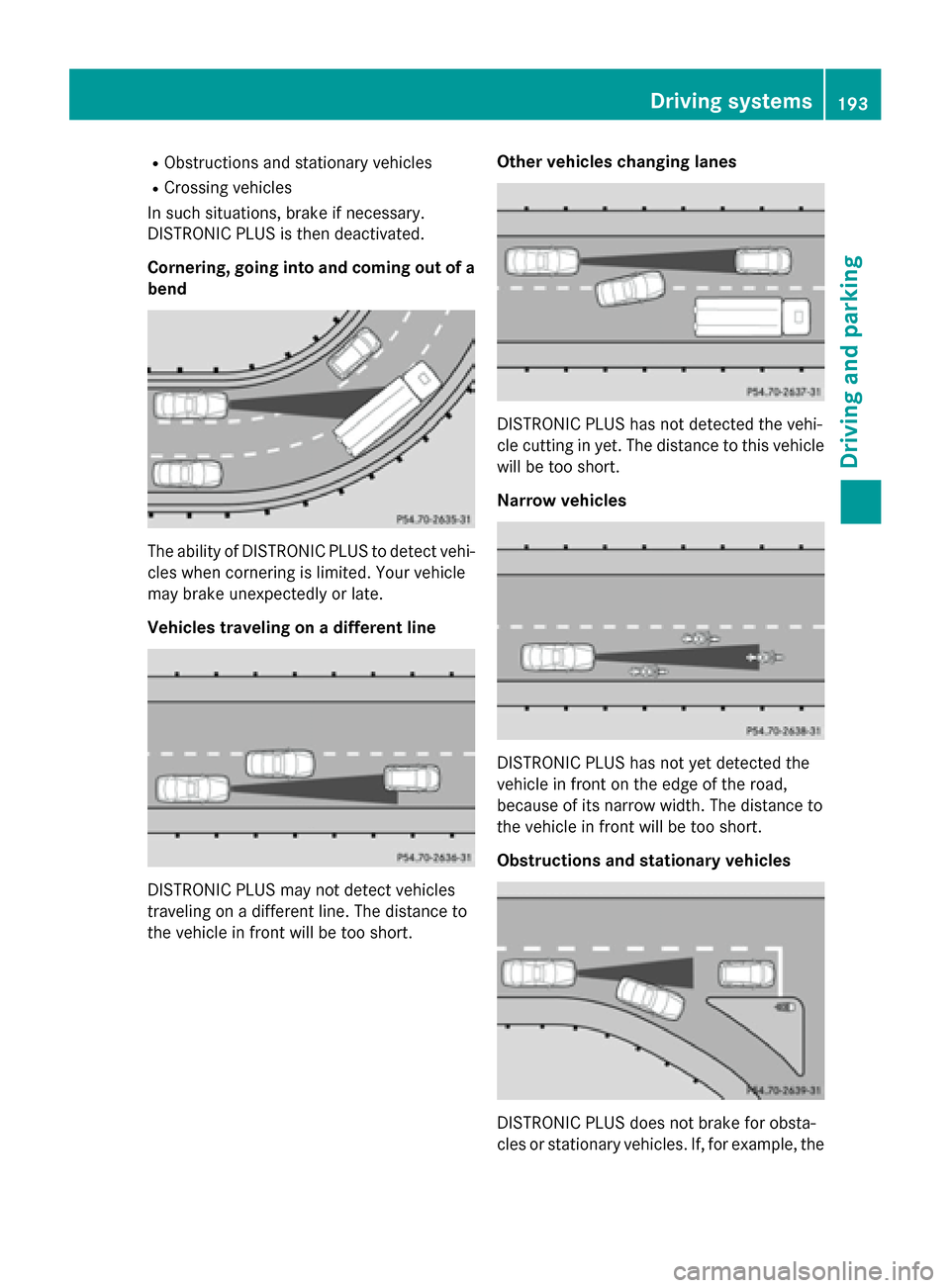
Cornering, going into and coming out of a bend The ability of DISTRONIC PLUS to detect vehi-
cles when cornering is limited. Your vehicle
may brake unexpectedly or late.
Vehicles traveling on a different line DISTRONIC PLUS may not detect vehicles
traveling on a different line. The distance to
the vehicle in front will be too short. Other vehicles changing lanes DISTRONIC PLUS has not detected the vehi-
cle cutting in yet. The distance to this vehicle
will be too short.
Narrow vehicles DISTRONIC PLUS has not yet detected the
vehicle in front on the edge of the road,
because of its narrow width. The distance to
the vehicle in front will be too short.
Obstructions and stationary vehicles
DISTRONIC PLUS does not brake for obsta-
cles or stationary vehicles. If, for example, the Driving systems
193Driving and parking Z
Page 210 of 406
Activating/deactivating the rear view
camera X
To activate: make sure that the SmartKey
is in position 2in the ignition lock.
X Make sure that the Activation by R
Activation by R
gear
gear function is selected in Audio 20/
COMAND; see the Digital Operator's Man-
ual.
X Engage reverse gear.
The rear view camera flap opens. The area
behind the vehicle is shown with guide lines
in the Audio 20/COMAND display.
The image from the rear view camera is
available throughout the maneuvering
process.
To deactivate: the rear view camera deacti-
vates if you shift the transmission to Por after
driving forwards a short distance.
Messages in the Audio 20/COMAND
display The rear view camera may show a distorted
view of obstacles, show them incorrectly or
not at all. The rear view camera does not show
objects in the following positions:
R very close to the rear bumper
R under the rear bumper
R in the area immediately above the tailgate
handle
! Objects not at ground level may appear to
be further away than they actually are, e.g.:
R the bumper of a parked vehicle
R the drawbar of a trailer
R the ball coupling of a trailer tow hitch
R the rear section of an HGV
R a slanted post
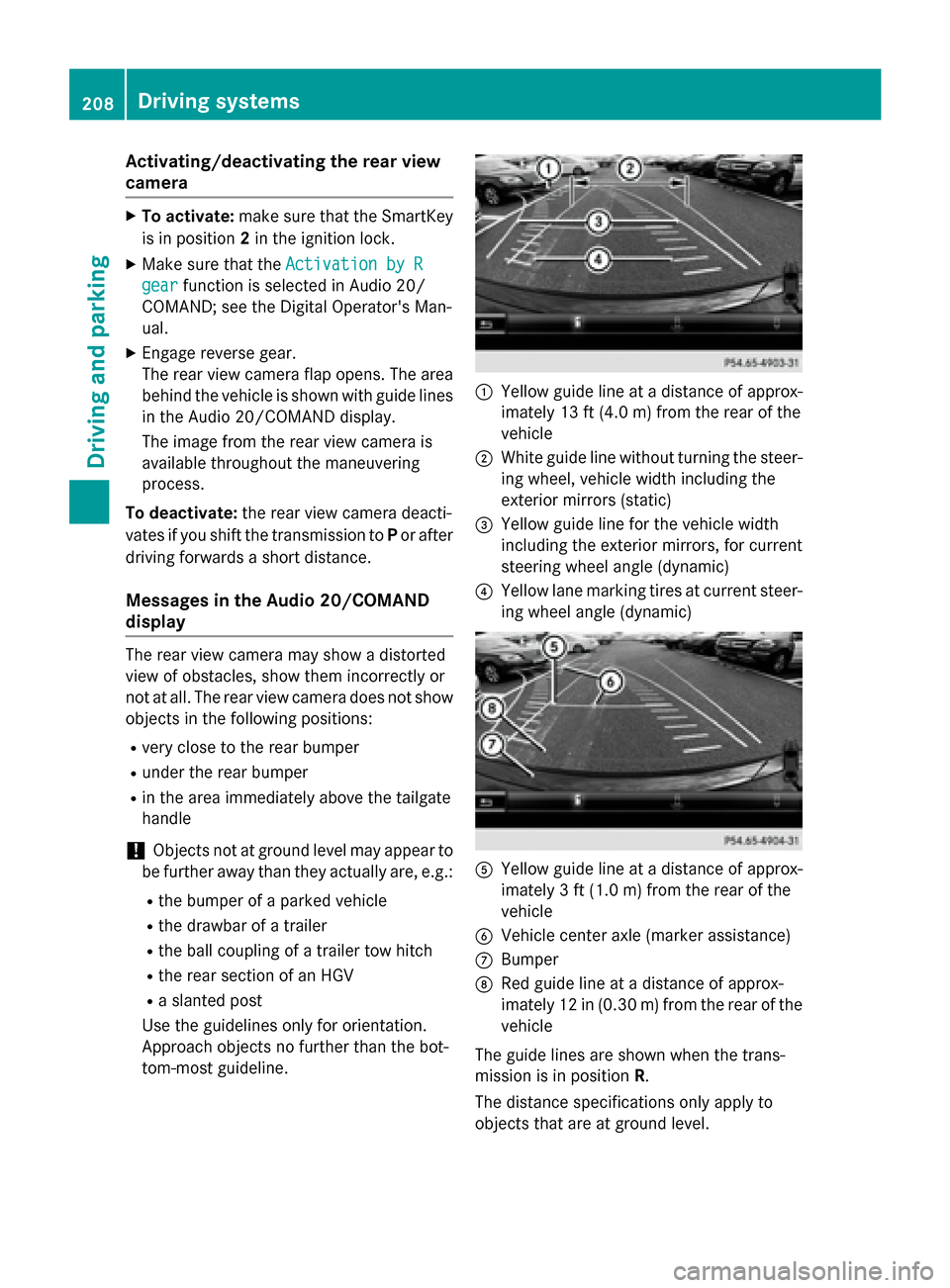
Use the guidelines only for orientation.
Approach objects no further than the bot-
tom-most guideline. 0043
Yellow guide line at a distance of approx-
imately 13 ft (4.0 m) from the rear of the
vehicle
0044 White guide line without turning the steer-
ing wheel, vehicle width including the
exterior mirrors (static)
0087 Yellow guide line for the vehicle width
including the exterior mirrors, for current
steering wheel angle (dynamic)
0085 Yellow lane marking tires at current steer-
ing wheel angle (dynamic) 0083
Yellow guide line at a distance of approx-
imately 3 ft (1.0m) from the rear of the
vehicle
0084 Vehicle center axle (marker assistance)
006B Bumper
006C Red guide line at a distance of approx-
imately 12 in (0.30 m) fromthe rear of the
vehicle
The guide lines are shown when the trans-
mission is in position R.
The distance specifications only apply to
objects that are at ground level. 208
Driving systemsDriving an
d parking
Page 211 of 406
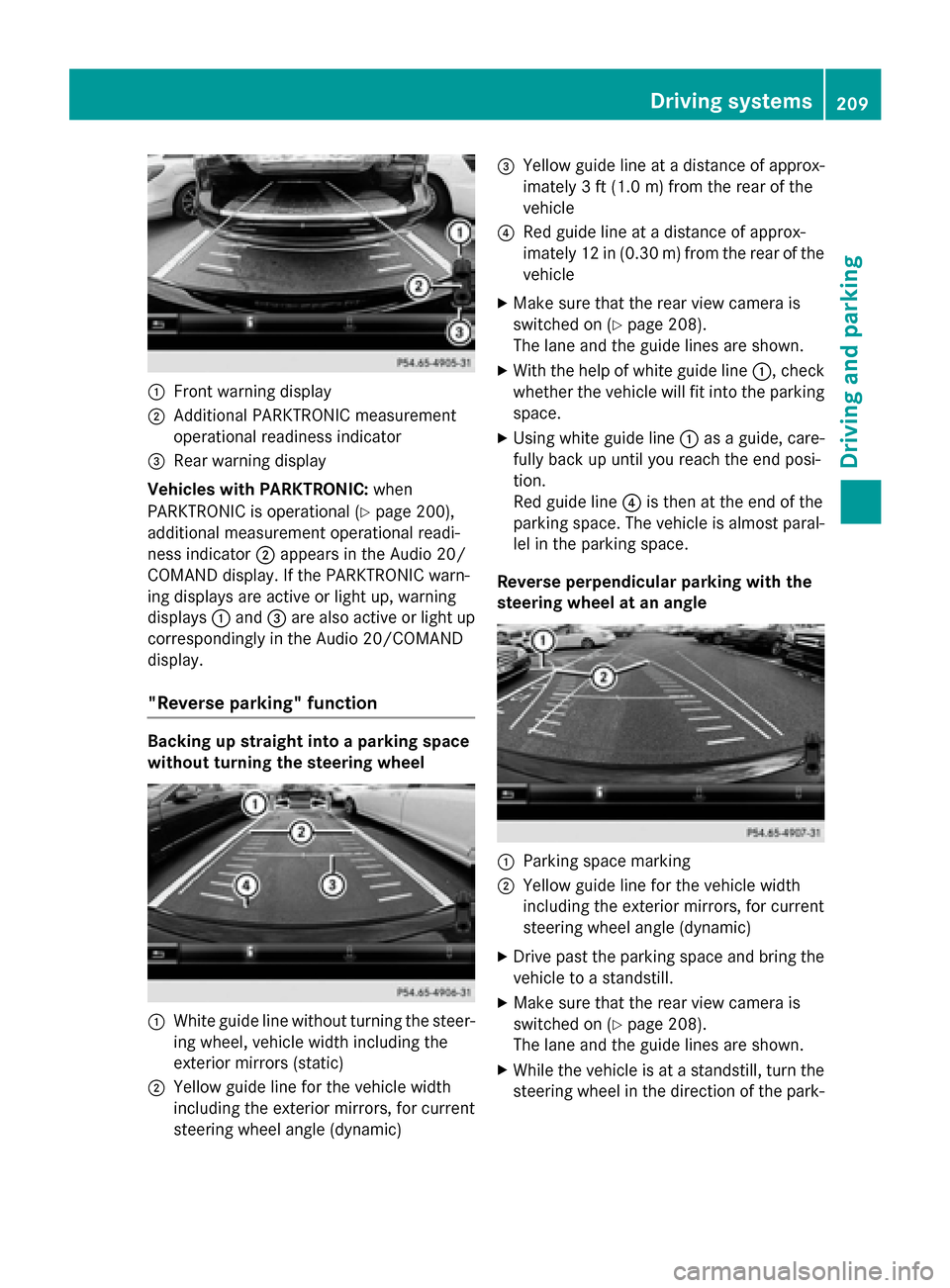
0043
Front warning display
0044 Additional PARKTRONIC measurement
operational readiness indicator
0087 Rear warning display
Vehicles with PARKTRONIC: when
PARKTRONIC is operational (Y page 200),
additional measurement operational readi-
ness indicator 0044appears in the Audio 20/
COMAND display. If the PARKTRONIC warn-
ing displays are active or light up, warning
displays 0043and 0087are also active or light up
correspondingly in the Audio 20/COMAND
display.
"Reverse parking" function Backing up straight into a parking space
without turning the steering wheel
0043
White guide line without turning the steer-
ing wheel, vehicle width including the
exterior mirrors (static)
0044 Yellow guide line for the vehicle width
including the exterior mirrors, for current
steering wheel angle (dynamic) 0087
Yellow guide line at a distance of approx-
imately 3 ft (1.0 m) fromthe rear of the
vehicle
0085 Red guide line at a distance of approx-
imately 12 in (0.30 m) fromthe rear of the
vehicle
X Make sure that the rear view camera is
switched on (Y page 208).
The lane and the guide lines are shown.
X With the help of white guide line 0043, check
whether the vehicle will fit into the parking space.
X Using white guide line 0043as a guide, care-
fully back up until you reach the end posi-
tion.
Red guide line 0085is then at the end of the
parking space. The vehicle is almost paral-
lel in the parking space.
Reverse perpendicular parking with the
steering wheel at an angle 0043
Parking space marking
0044 Yellow guide line for the vehicle width
including the exterior mirrors, for current
steering wheel angle (dynamic)
X Drive past the parking space and bring the
vehicle to a standstill.
X Make sure that the rear view camera is
switched on (Y page 208).
The lane and the guide lines are shown.
X While the vehicle is at a standstill, turn the
steering wheel in the direction of the park- Driving systems
209Driving and parking Z
Page 212 of 406
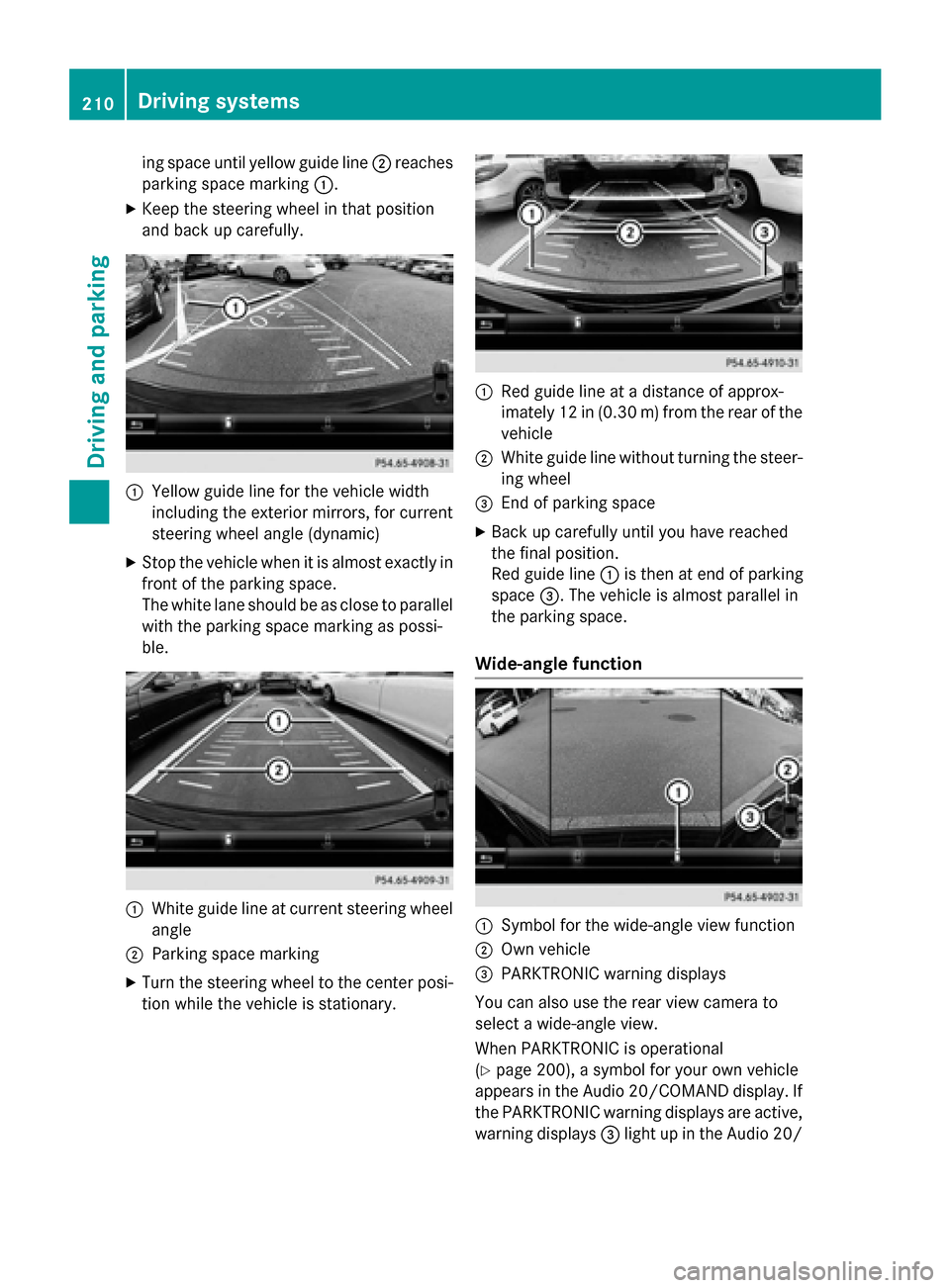
ing space until yellow guide line
0044reaches
parking space marking 0043.
X Keep the steering wheel in that position
and back up carefully. 0043
Yellow guide line for the vehicle width
including the exterior mirrors, for current
steering wheel angle (dynamic)
X Stop the vehicle when it is almost exactly in
front of the parking space.
The white lane should be as close to parallel
with the parking space marking as possi-
ble. 0043
White guide line at current steering wheel
angle
0044 Parking space marking
X Turn the steering wheel to the center posi-
tion while the vehicle is stationary. 0043
Red guide line at a distance of approx-
imately 12 in (0.30 m) from the rear of the
vehicle
0044 White guide line without turning the steer-
ing wheel
0087 End of parking space
X Back up carefully until you have reached
the final position.
Red guide line 0043is then at end of parking
space 0087. The vehicle is almost parallel in
the parking space.
Wide-angle function 0043
Symbol for the wide-angle view function
0044 Own vehicle
0087 PARKTRONIC warning displays
You can also use the rear view camera to
select a wide-angle view.
When PARKTRONIC is operational
(Y page 200), a symbol for your own vehicle
appears in the Audio 20/COMAND display. If
the PARKTRONIC warning displays are active, warning displays 0087light up in the Audio 20/ 210
Driving systemsDriving and parking
Page 215 of 406
X
Make sure that the SmartKey is in position
2 in the ignition lock.
X Make sure that the Activation by R
Activation by R
gear
gear function is selected in COMAND, see
the Digital Operator's Manual.
X To show the 360° camera image: engage
reverse gear.
The area behind the vehicle is shown in the
COMAND display in split-screen mode. You see the top view of the vehicle and the
image from the rear view camera.
Selecting the split-screen and full
screen displays Switching between split screen views:
X To switch to the line with the vehicle icons:
slide 00970052the controller.
X To select a vehicle icon: turn the controller.
Switching to full screen mode:
X 180° View 180° View Turn and press the controller.
i The full screen option is only available in
the following views:
R Top view with picture from the rear view
camera
R Top view with picture from the front cam-
era
Displays in the COMAND display Important safety notes
The camera system may show a distorted
view of obstacles, show them incorrectly or
not at all. Obstacles are not shown by the
system in the following locations:
R under the front and rear bumpers
R very close to the front and rear bumpers
R in close range above the handle on the
trunk lid
R very close to the exterior mirrors
R in the transitional areas between the vari-
ous cameras in the virtual top view !
Objects not at ground level may appear to
be further away than they actually are, e.g.:
R the bumper of a parked vehicle
R the drawbar of a trailer
R the ball coupling of a trailer tow hitch
R the rear section of an HGV
R a slanted post
Use the guidelines only for orientation.
Approach objects no further than the bot-
tom-most guideline.
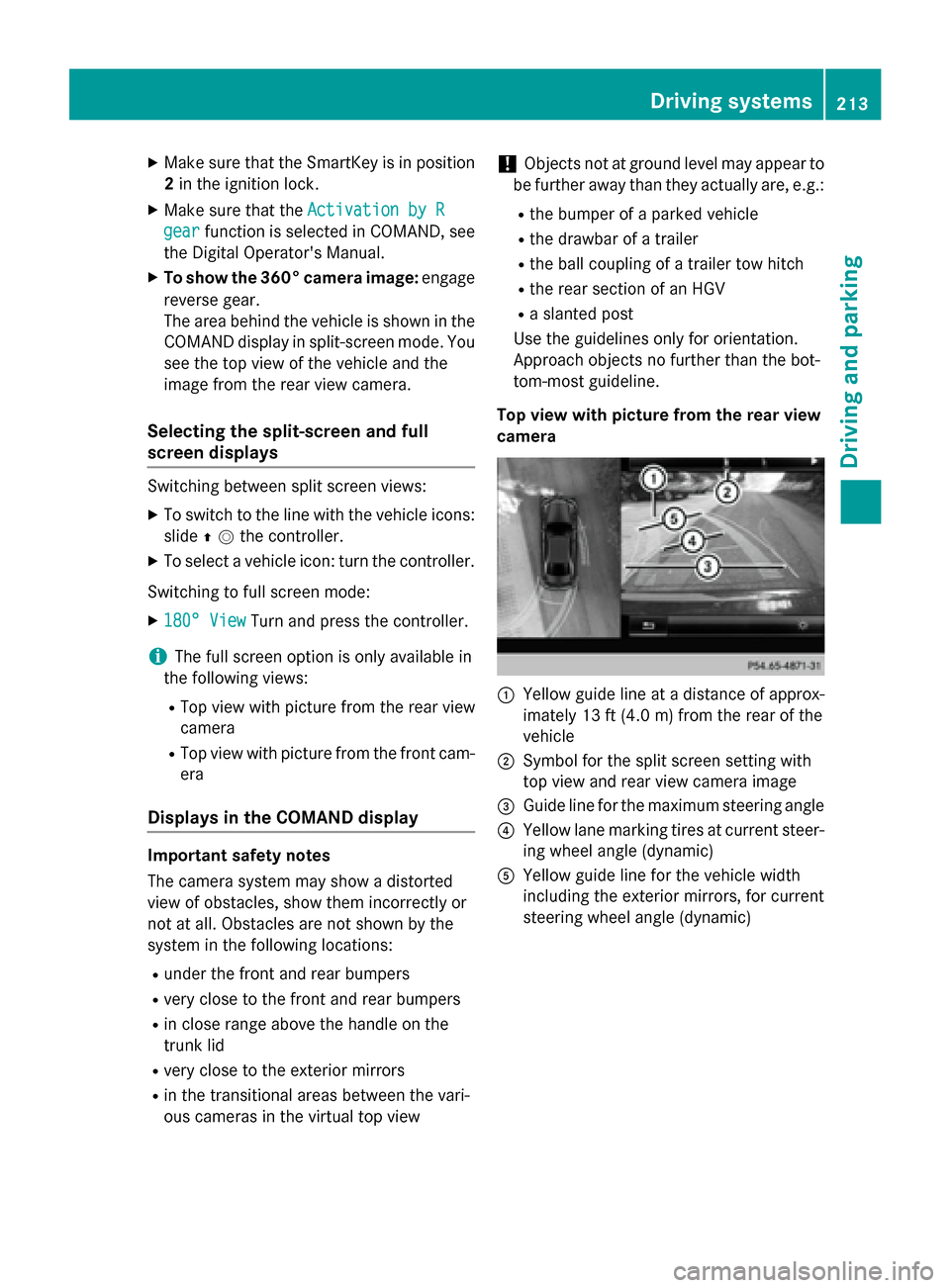
Top view with picture from the rear view
camera 0043
Yellow guide line at a distance of approx-
imately 13 ft (4.0 m) from the rear of the
vehicle
0044 Symbol for the split screen setting with
top view and rear view camera image
0087 Guide line for the maximum steering angle
0085 Yellow lane marking tires at current steer-
ing wheel angle (dynamic)
0083 Yellow guide line for the vehicle width
including the exterior mirrors, for current
steering wheel angle (dynamic) Driving systems
213Driving and parking Z
Page 216 of 406
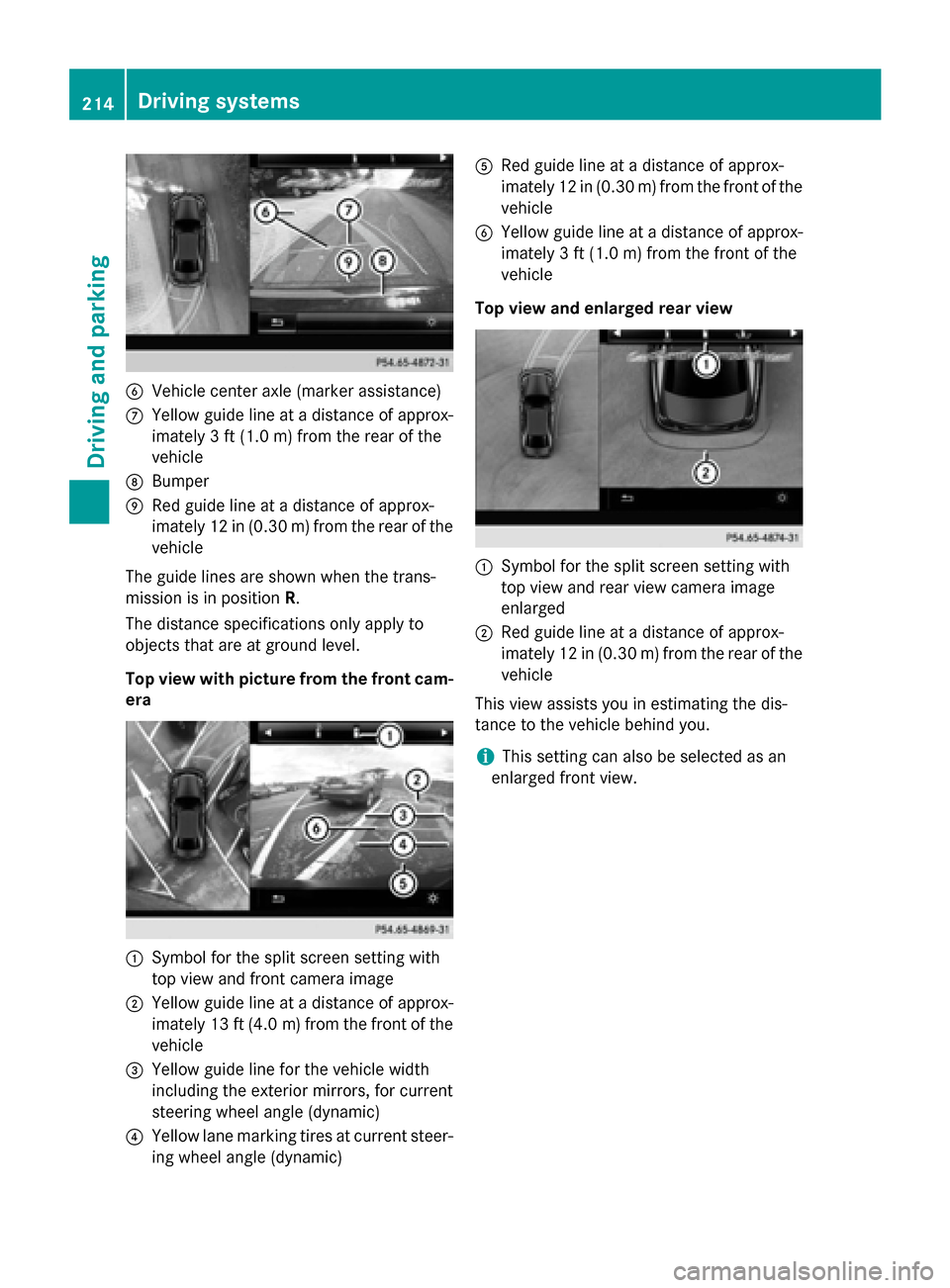
0084
Vehicle center axle (marker assistance)
006B Yellow guide line at a distance of approx-
imately 3 ft (1.0 m) from the rear of the
vehicle
006C Bumper
006D Red guide line at a distance of approx-
imately 12 in (0.30 m) from the rear of the vehicle
The guide lines are shown when the trans-
mission is in position R.
The distance specifications only apply to
objects that are at ground level.
Top view with picture from the front cam-
era 0043
Symbol for the split screen setting with
top view and front camera image
0044 Yellow guide line at a distance of approx-
imately 13 ft (4.0 m)from the front of the
vehicle
0087 Yellow guide line for the vehicle width
including the exterior mirrors, for current
steering wheel angle (dynamic)
0085 Yellow lane marking tires at current steer-
ing wheel angle (dynamic) 0083
Red guide line at a distance of approx-
imately 12 in (0.30 m) from the front of the
vehicle
0084 Yellow guide line at a distance of approx-
imately 3 ft (1.0 m) from the front of the
vehicle
Top view and enlarged rear view 0043
Symbol for the split screen setting with
top view and rear view camera image
enlarged
0044 Red guide line at a distance of approx-
imately 12 in (0.30 m) from the rear of the
vehicle
This view assists you in estimating the dis-
tance to the vehicle behind you.
i This setting can also be selected as an
enlarged front view. 214
Driving systemsDriving and parking
Page 217 of 406
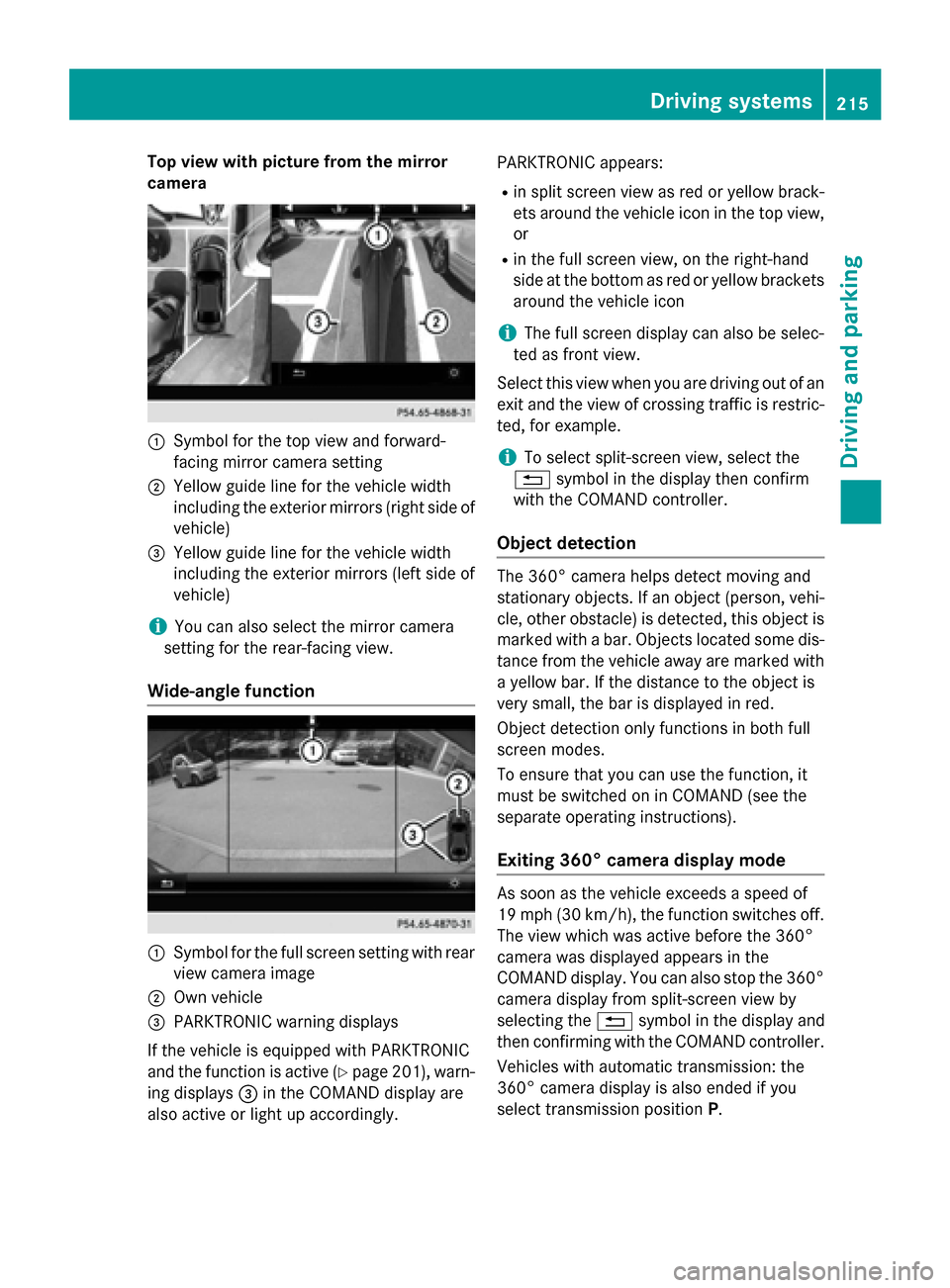
Top view with picture from the mirror
camera 0043
Symbol for the top view and forward-
facing mirror camera setting
0044 Yellow guide line for the vehicle width
including the exterior mirrors (right side of
vehicle)
0087 Yellow guide line for the vehicle width
including the exterior mirrors (left side of
vehicle)
i You can also select the mirror camera
setting for the rear-facing view.
Wide-angle function 0043
Symbol for the full screen setting with rear
view camera image
0044 Own vehicle
0087 PARKTRONIC warning displays
If the vehicle is equipped with PARKTRONIC
and the function is active (Y page 201), warn-
ing displays 0087in the COMAND display are
also active or light up accordingly. PARKTRONIC appears:
R in split screen view as red or yellow brack-
ets around the vehicle icon in the top view, or
R in the full screen view, on the right-hand
side at the bottom as red or yellow brackets
around the vehicle icon
i The full screen display can also be selec-
ted as front view.
Select this view when you are driving out of an exit and the view of crossing traffic is restric-
ted, for example.
i To select split-screen view, select the
0038 symbol in the display then confirm
with the COMAND controller.
Object detection The 360° camera helps detect moving and
stationary objects. If an object (person, vehi-
cle, other obstacle) is detected, this object ismarked with a bar. Objects located some dis-
tance from the vehicle away are marked with a yellow bar. If the distance to the object is
very small, the bar is displayed in red.
Object detection only functions in both full
screen modes.
To ensure that you can use the function, it
must be switched on in COMAND (see the
separate operating instructions).
Exiting 360° camera display mode As soon as the vehicle exceeds a speed of
19 mph (30 km/h), the function switches off.
The view which was active before the 360°
camera was displayed appears in the
COMAND display. You can also stop the 360°
camera display from split-screen view by
selecting the 0038symbol in the display and
then confirming with the COMAND controller.
Vehicles with automatic transmission: the
360° camera display is also ended if you
select transmission position P. Driving systems
215Driving and parking Z
Page 361 of 406
When parking your vehicle, make sure that
the tires do not get deformed by the curb or
other obstacles. If it is necessary to drive over
curbs, speed humps or similar elevations, try to do so slowly and at an obtuse angle. Oth-
erwise, the tires, particularly the sidewalls,
may be damaged. Regular checking of wheels and tires
G
WARNING
Damaged tires can cause tire inflation pres-
sure loss. As a result, you could lose control of your vehicle. There is a risk of accident.
Check the tires regularly for signs of damage
and replace any damaged tires immediately.
Regularly check the wheels and tires of your
vehicle for damage at least once a month, as well as after driving off-road or on rough
roads. Damaged wheels can cause a loss of
tire pressure. Pay particular attention to dam-
age such as:
R cuts in the tires
R punctures
R tears in the tires
R bulges on tires
R deformation or severe corrosion on wheels
Regularly check the tire tread depth and the
condition of the tread across the whole width of the tire (Y page 359). If necessary, turn the
front wheels to full lock in order to inspect the
inner side of the tire surface.
All wheels must have a valve cap to protect
the valve against dirt and moisture. Do not
mount anything onto the valve other than the standard valve cap or other valve caps
approved by Mercedes-Benz for your vehicle.
Do not use any other valve caps or systems,
e.g. tire pressure monitoring systems.
Regularly check the pressure of all the tires
particularly prior to long trips. Adjust the tire pressure as necessary (Y page 361).The service life of tires depends, among other
things, on the following factors:
R Driving style
R Tire pressure
R Distance covered Important safety notes on the tire
tread
G
WARNING
Insufficient tire tread will reduce tire traction.
The tire is no longer able to dissipate water.
This means that on wet road surfaces, the risk of hydroplaning increases, in particular where speed is not adapted to suit the driving con-
ditions. There is a risk of accident.
If the tire pressure is too high or too low, tires
may exhibit different levels of wear at differ-
ent locations on the tire tread. Thus, you
should regularly check the tread depth and
the condition of the tread across the entire
width of all tires.
Minimum tire tread depth for:
R Summer tires: 00CEin (3 mm)
R M+S tires: 00CFin (4 mm)
For safety reasons, replace the tires before
the legally prescribed limit for the minimum
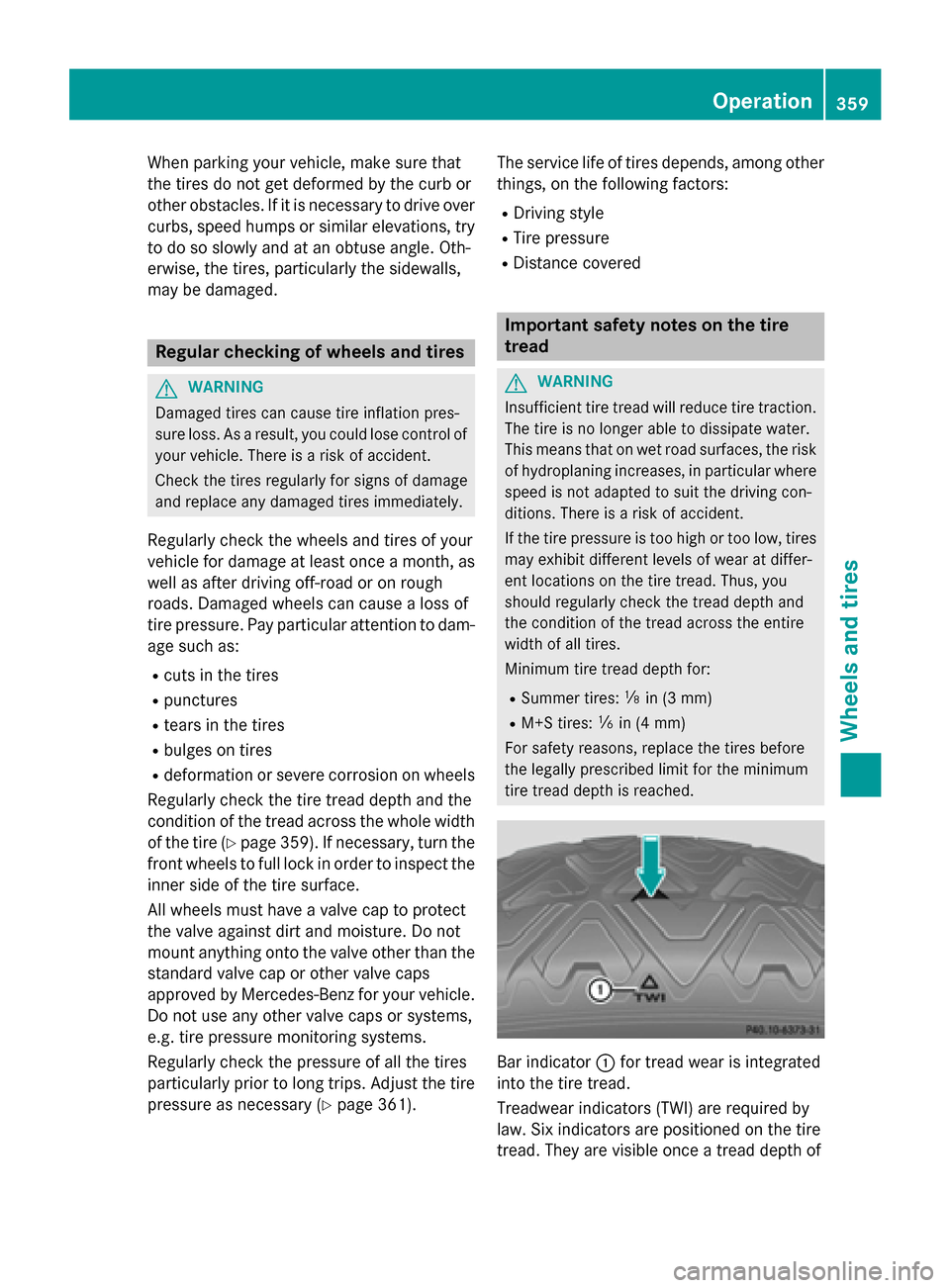
tire tread depth is reached. Bar indicator
0043for tread wear is integrated
into the tire tread.
Treadwear indicators (TWI) are required by
law. Six indicators are positioned on the tire
tread. They are visible once a tread depth of Operation
359Wheels and tires Z
Page 375 of 406
Step 3
Example 1 Example 2 Example 3
Permissible load
(maximum gross vehi-
cle weight rating from
the Tire and Loading
Information placard
minus the gross
weight of all occu-
pants) 1500 lbs (680 kg)
00F8
750 lbs (340 kg) =
750 lbs (340 kg) 1500 lbs (680 kg)
00F8
540 lbs (245 kg)
=960 lbs (435 kg) 1500 lbs (680 kg)
00F8
150 lbs (68 kg) =
1350 lbs (612 kg) Vehicle identification plate
Even if you have calculated the total cargo
carefully, you should still make sure that the
gross vehicle weight rating and the gross axle weight rating are not exceeded. Details can
be found on the vehicle identification plate on the B-pillar on the driver's side of the vehicle
(Y page 369).
Permissible Gross Vehicle Weight Rating
(GVWR): the gross weight of the vehicle, all
passengers, load and trailer load/noseweight (if applicable) must not exceed the permissi-
ble gross vehicle weight.
Gross Axle Weight Rating (GAWR): the
maximum permissible weight that can be car- ried by one axle (front or rear axle).
To ensure that your vehicle does not exceed
the maximum permissible values (gross vehi-
cle weight and maximum gross axle weight
rating), have your loaded vehicle (including
driver, occupants, cargo, and full trailer load if applicable) weighed on a suitable vehicle
weighbridge. All about wheels and tires
Uniform Tire Quality Grading Stand-
ards
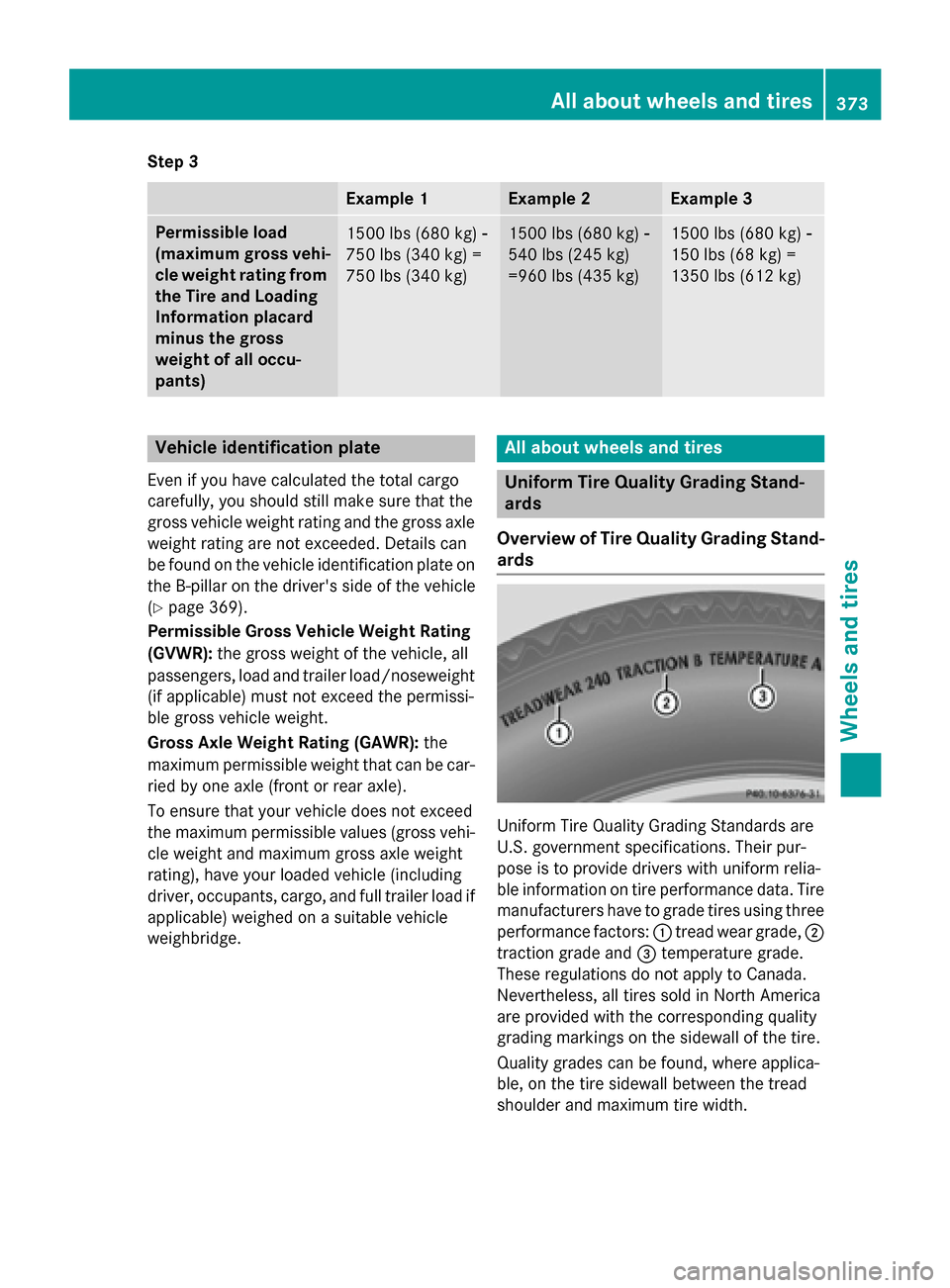
Overview of Tire Quality Grading Stand- ards Uniform Tire Quality Grading Standards are
U.S. government specifications. Their pur-
pose is to provide drivers with uniform relia-
ble information on tire performance data. Tire
manufacturers have to grade tires using three
performance factors: 0043tread wear grade, 0044
traction grade and 0087temperature grade.
These regulations do not apply to Canada.
Nevertheless, all tires sold in North America
are provided with the corresponding quality
grading markings on the sidewall of the tire.
Quality grades can be found, where applica-
ble, on the tire sidewall between the tread
shoulder and maximum tire width. All about wheels and tires
373Wheels and tires Z