light MERCEDES-BENZ C-Class SEDAN 2016 W205 User Guide
[x] Cancel search | Manufacturer: MERCEDES-BENZ, Model Year: 2016, Model line: C-Class SEDAN, Model: MERCEDES-BENZ C-Class SEDAN 2016 W205Pages: 398, PDF Size: 9.57 MB
Page 19 of 398
Pre-entry climate control via
SmartKeyActivating/deactivating ................. 141
PRE-SAFE
®(anticipatory occupant
protection)
Display message ............................2 62
Operation ......................................... 60
PRE-SAFE
®Brake
Activating/deactivating ................. 247
Display message ............................ 262
Function/notes ................................ 77
Important safety notes .................... 77
Warning lamp ................................. 295
PRE-SAFE
®PLUS (anticipatory
occupant protection PLUS)
Operation ......................................... 61
Protection against theft
ATA (Anti-Theft Alarm system) ......... 79
Immobilizer ...................................... 79
Protection of the environment
General notes .................................. 27
Pulling away
Automatic transmission ................. 149
General notes ................................ 149
Hill start assist ............................... 150
Q
QR codeMercedes-Benz Guide App ................. 1
Rescue card ..................................... 32
Qualified specialist workshop ........... 31
Quick access for audio and tele-
phone
Changing the station/music
track .............................................. 301
R
RACE START (Mercedes-AMG vehi-
cles) .................................................... 195
RACETIMER (on-board computer) .... 253
Radiator cover ................................... 331
Radio
Selecting a station ......................... 243
Radio mode
see also Digital Operator's Man-
ual ..................................................2 98Radio-wave reception/transmis-
sion in the vehicle
Declaration of conformity ................ 31
Rain closing feature (panorama
roof with power tilt/sliding panel) .. 101
RBS (Recuperative Brake System)
Warning lamp ................................. 288
Reading lamp ..................................... 121
Rear compartment
Setting the air vents ......................1 44
Setting the airflow ......................... 135
Setting the temperature ................ 134
Rear fog lamp
Display message ............................ 267
Switching on/off ........................... 119
Rear lamps
see Lights
Rear seat (folding the backrest for-
wards/back) ...................................... 311
Rear seats
Display message ............................ 284
Folding the backrest forwards/
back ............................................... 311
Rear view camera
Cleaning instructions ..................... 339
Display in the multimedia system .. 207
Function/notes .............................2 06
Switching on/off ........................... 207
Rear window blind ............................ 318
Rear window defroster
Problem (malfunction) ................... 137
Switching on/off ........................... 136
Rear-view mirror
Anti-glare (manual) ........................ 113
Dipping (automatic) ....................... 114
Recuperative Brake System
Driving safety systems ..................... 45
Important safety notes .................... 45
Reflective safety jacket .................... 342
Refrigerant (air-conditioning sys-
tem)
Important safety notes .................. 393
Refueling
Fuel gauge ....................................... 36
Important safety notes ....... ........... 164
R
efueling process .......................... 165
Index17
Page 22 of 398
SpeedometerActivating/deactivating the addi-
tional speedometer ........................ 251
Digital ............................................ 241
In the Instrument cluster ................. 36
Segments ...................................... 235
Selecting the display unit ............... 251
SPORT handling mode
Deactivating/activating
(Mercedes-AMG vehicles) ................7 4
Warning lamp ................................. 292
Sports exhaust system
see AMG sports exhaust system
Standing lamps
Display message ............................2 67
Switching on/off ........................... 119
Start/Stop button
Starting the engine ........................ 148
Start/stop function
see ECO start/stop function
Starting (engine) ................................ 148
STEER CONTROL .................................. 78
Steering
Display message ............................ 285
Warning lamps ............................... 297
Steering Assist and Stop&Go Pilot
(DISTRONIC PLUS)
Display message ............................ 279
Steering assistant STEER CON-
TROL
see STEER CONTROL
Steering wheel
Adjusting (electrically) ................... 111
Adjusting (manually) ...................... 110
Button overview ............................... 38
Buttons (on-board computer) ......... 236
Cleaning ......................................... 340
EASY ENTRY/EXIT feature ............. 112
Important safety notes .................. 110
Steering wheel heating .................. 111
Storing settings (memory func-
tion) ............................................... 116
Steering wheel heating
Problem (malfunction) ................... 112
Switching on/off ........................... 111
Steering wheel paddle shifters ........ 161
Stopwatch (RACETIMER) ................... 253Stowage areas
................................... 308
Stowage compartments
Armrest (under) ............................. 309
Center console .............................. 309
Cup holders ................................... 316
Door ............................................... 310
Eyeglasses compartment ............... 309
Glove box ....................................... 309
Important safety i
nformation ......... 308
Map pockets .................................. 310
Rear ............................................... 310
Stowage net ................................... 310
see Stowage areas
Stowage net ....................................... 310
Stowage well beneath the trunk
floor .................................................... 315
Summer tires
In winter ........................................ 362
Sun visor ............................................ 317
Suspension setting
AIRMATIC ...................................... 197
AMG adaptive sport suspension
system ........................................... 197
Switching air-recirculation mode
on/off ................................................. 137
Switching on media mode
Via the device list .......................... 307
T
Tachometer ........................................ 236
Tail lamps
Display message ............................ 267
see Lights
Tank content
Fuel gauge ....................................... 36
Technical data
Capacities ...................................... 388
Information .................................... 386
Tires/wheels ................................. 384
Vehicle data ................................... 394
Telephone
Accepting a call (multifunction
steering wheel) .............................. 245
Authorizing a mobile phone (con-
necting) ......................................... 306
Connecting a mobile phone (gen-
eral information) ............................ 305
20Index
Page 35 of 398
These data memories temporarily or perma-
nently store technical information about:
RVehicle's operating state
RIncidents
RMalfunctions
In general, this technical information docu-
ments the state of a component, a module, a
system or the surroundings.
These include, for example:
Roperating conditions of system components,
e.g. fluid levels
Rthe vehicle's status messages and those of its
individual components, e.g. number of wheel
revolutions/speed, deceleration in move-
ment, lateral acceleration, accelerator pedal
position
Rmalfunctions and defects in important system
components, e.g. lights, brakes
Rvehicle reactions and operating conditions in
special driving situations, e.g. air bag deploy-
ment, intervention of stability control sys-
tems
Rambient conditions, e.g. outside temperature
This data is of an exclusively technical nature
and can be used to:
Rassist in recognizing and rectifying malfunc-
tions and defects
Ranalyze vehicle functions, e.g. after an acci-
dent
Roptimize vehicle function
The data cannot be used to trace the vehicle's
movements.
When your vehicle is serviced, technical infor-
mation can be read from the event data memory
and malfunction data memory.
Services include, for example:
Rrepair services
Rservice processes
Rwarranties
Rquality assurance
The vehicle is read out by employees of the ser-
vice network (including the manufacturer) using special diagnostic testers. More detailed infor-
mation is obtained from it, if required.
After a malfunction has been rectified, the infor-
mation is deleted from the malfunction memory or is continually overwritten.
When operating the vehicle, situations are con-
ceivable in which this technical data, in connec- tion with other information (if necessary, under
consultation with an authorized expert), could
be traced to a person.
Examples include:
Raccident reports
Rdamage to the vehicle
Rwitness statements
Further additional functions that have been con-
tractually agreed upon with the customer allow
certain vehicle data to be conveyed by the vehi- cle as well. The additional functions include, for
example, vehicle location in case of an emer-
gency.
COMAND/mbrace
If the vehicle is equipped with COMAND or
mbrace, additional data about the vehicle's
operation, the use of the vehicle in certain sit-
uations, and the location of the vehicle may be
compiled through COMAND or the mbrace sys-
tem.
For additional information please refer to the
COMAND User Manual or the Digital Operator's
Manual and/or the mbrace Terms and Condi-
tions.
Event data recorders
This vehicle is equipped with an event data
recorder (EDR). This vehicle is equipped with an
event data recorder (EDR). The main purpose of
an EDR is to record, in certain crash or near
crash-like situations, such as an air bag deploy-
ment or hitting a road obstacle, data that will
assist in understanding how a vehicle's systems
performed. The EDR is designed to record data
related to vehicle dynamics and safety systems for a short period of time, typically 30 seconds
or less.
The EDR in this vehicle is designed to record
such data as:
RHow various systems in your vehicle were
operating
RWhether or not the driver and passenger
safety belts were buckled/fastened
RHow far (if at all) the driver was depressing theaccelerator and/or brake pedal and
RHow fast the vehicle was traveling.
Data stored in the vehicle33
Introduction
Z
Page 37 of 398
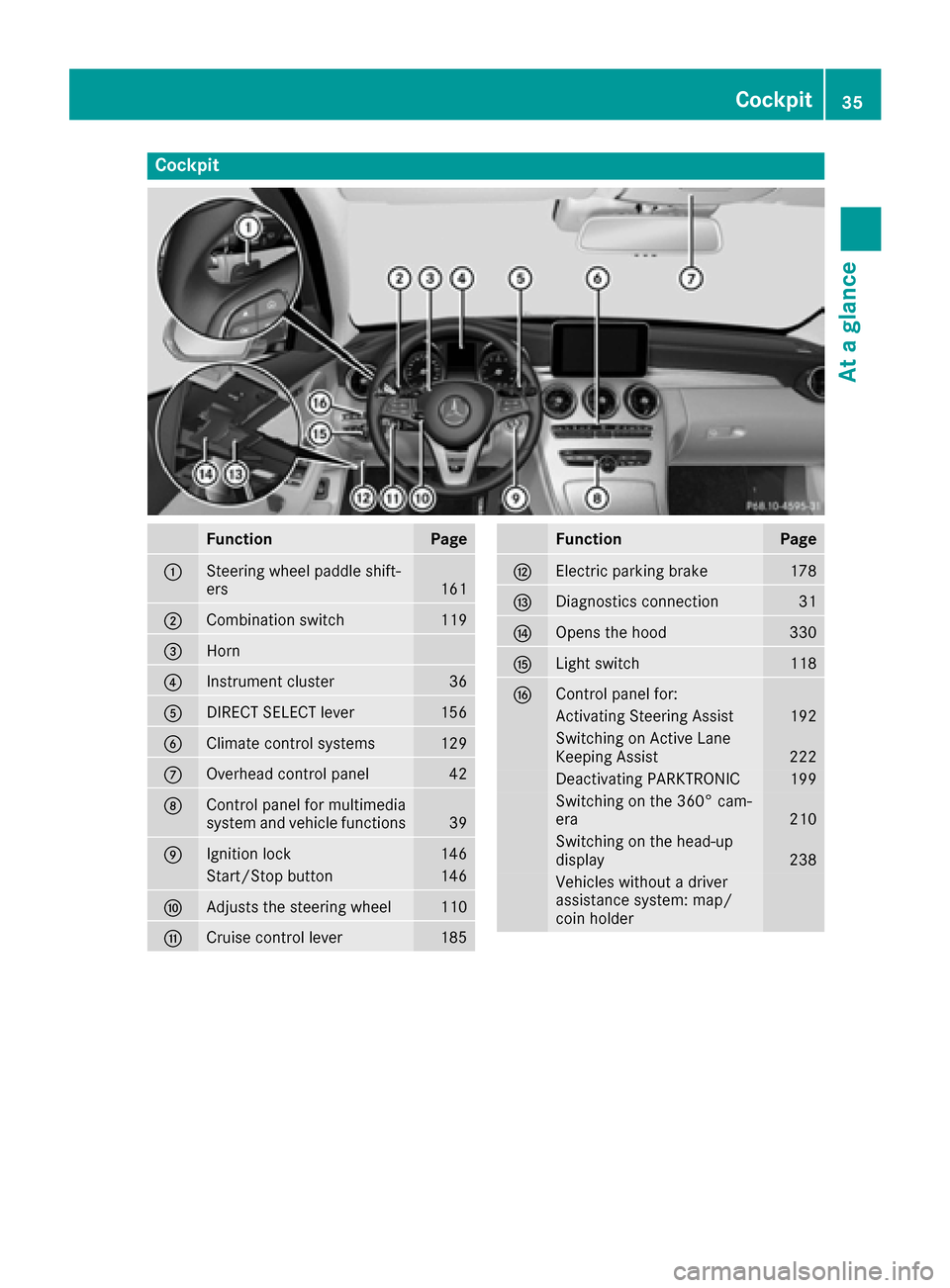
Cockpit
FunctionPage
:Steering wheel paddle shift-
ers161
;Combination switch119
=Horn
?Instrument cluster36
ADIRECT SELECT lever156
BClimate control systems129
COverhead control panel42
DControl panel for multimedia
system and vehicle functions39
EIgnition lock146
Start/Stop button146
FAdjusts the steering wheel110
GCruise control lever185
FunctionPage
HElectric parking brake178
IDiagnostics connection31
JOpens the hood330
KLight switch118
LControl panel for:
Activating Steering Assist192
Switching on Active Lane
Keeping Assist222
Deactivating PARKTRONIC199
Switching on the 360° cam-
era210
Switching on the head-up
display238
Vehicles without a driver
assistance system: map/
coin holder
Cockpit35
At a glance
Page 38 of 398
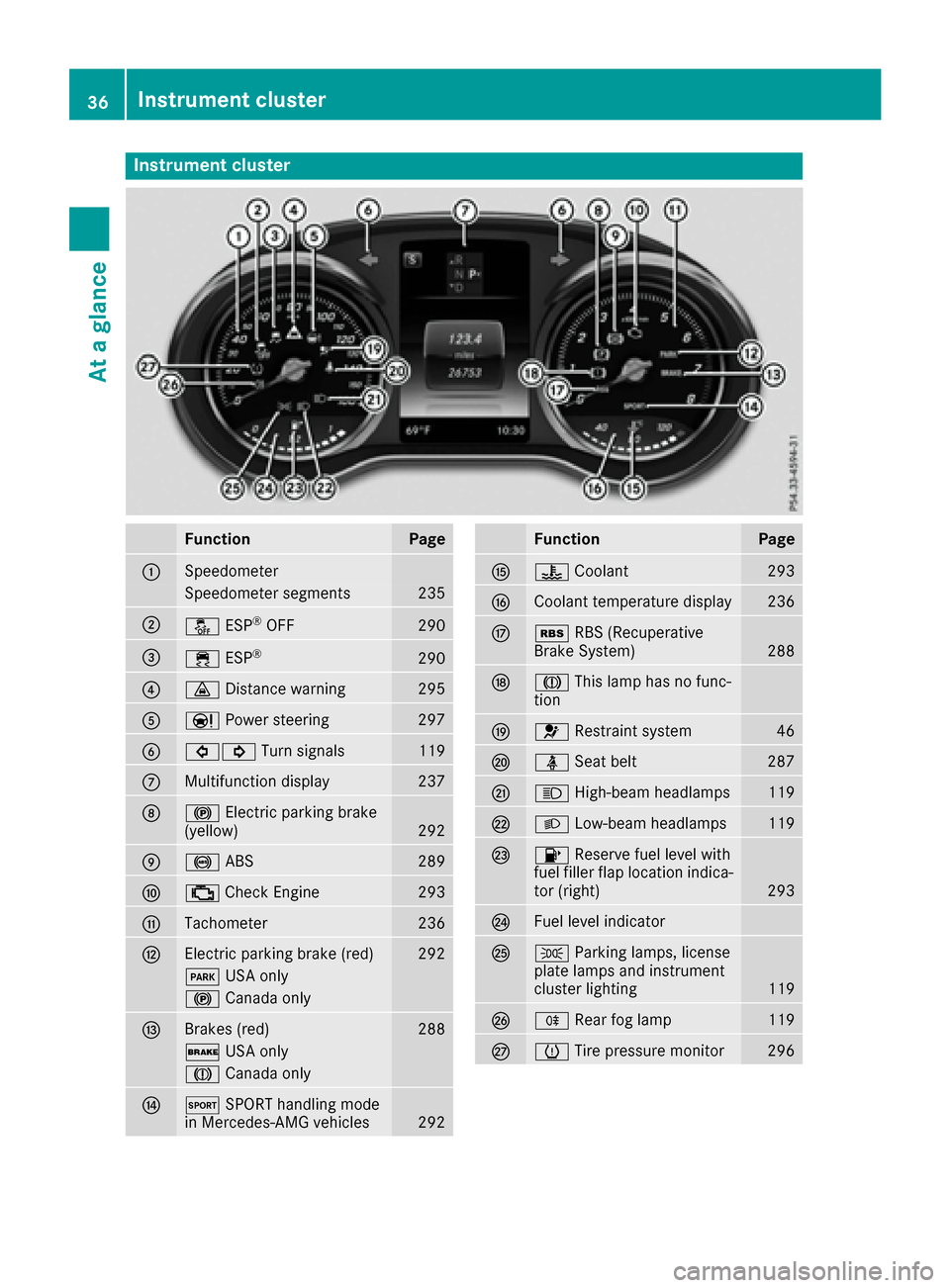
Instrument cluster
FunctionPage
:Speedometer
Speedometer segments235
;å ESP®OF F290
=÷ ESP®29 0
?· Distanc ewarning29 5
AÐ Powersteering29 7
B#! Turn signals119
CMultifunction display237
D! Electric parking brak e
(yellow)29 2
E! ABS289
F; CheckEngin e293
GTachometer236
HElectric parking brak e(red)29 2
F USAonly
! Canad aonly
IBrake s(red)28 8
$ USAonly
J Canad aonly
JM SPORT handlin gmod e
in Mercedes-AM Gvehicles29 2
FunctionPag e
K? Coolan t293
LCoolan ttemperature display23 6
Mé RBS (Recuperative
Brake System)28 8
NJ This lamp has no func-
tion
O6 Restrain tsystem46
Pü Seat belt287
QK High-beam headlamps119
RL Low-beam headlamps119
S8 Reserve fuel level wit h
fuel filler flap location indica-
to r(right )
293
TFue llevel indicator
UT Parking lamps, license
plat elamp sand instrumen t
cluste rlighting
11 9
VR Rear fog lamp119
Wh Tirepressur emonitor29 6
36Instrument cluster
At a glance
Page 42 of 398
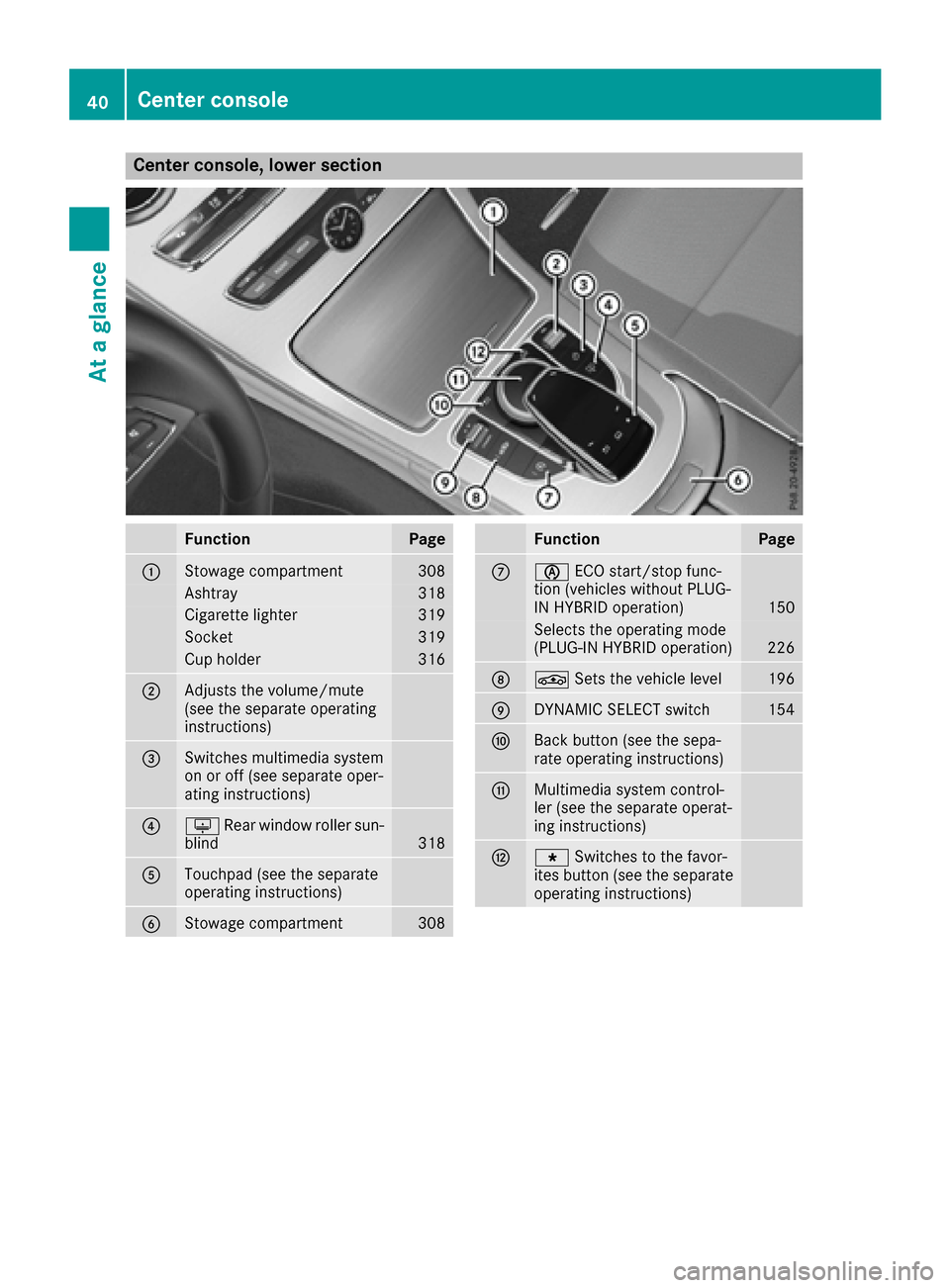
Center console, lower section
FunctionPage
:Stowage compartment308
Ashtray318
Cigarette lighter319
Socket319
Cup holder316
;Adjusts the volume/mute
(see the separate operating
instructions)
=Switches multimedia system
on or off (see separate oper-
ating instructions)
?uRear window roller sun-
blind318
ATouchpad (see the separate
operating instructions)
BStowage compartment308
FunctionPage
Cè ECO start/stop func-
tion (vehicles without PLUG-
IN HYBRID operation)
150
Selects the operating mode
(PLUG-IN HYBRID operation)226
DÉ Sets the vehicle level196
EDYNAMIC SELECT switch154
FBack button (see the sepa-
rate operating instructions)
GMultimedia system control-
ler (see the separate operat-
ing instructions)
HgSwitches to the favor-
ites button (see the separate
operating instructions)
40Center console
At a glance
Page 43 of 398
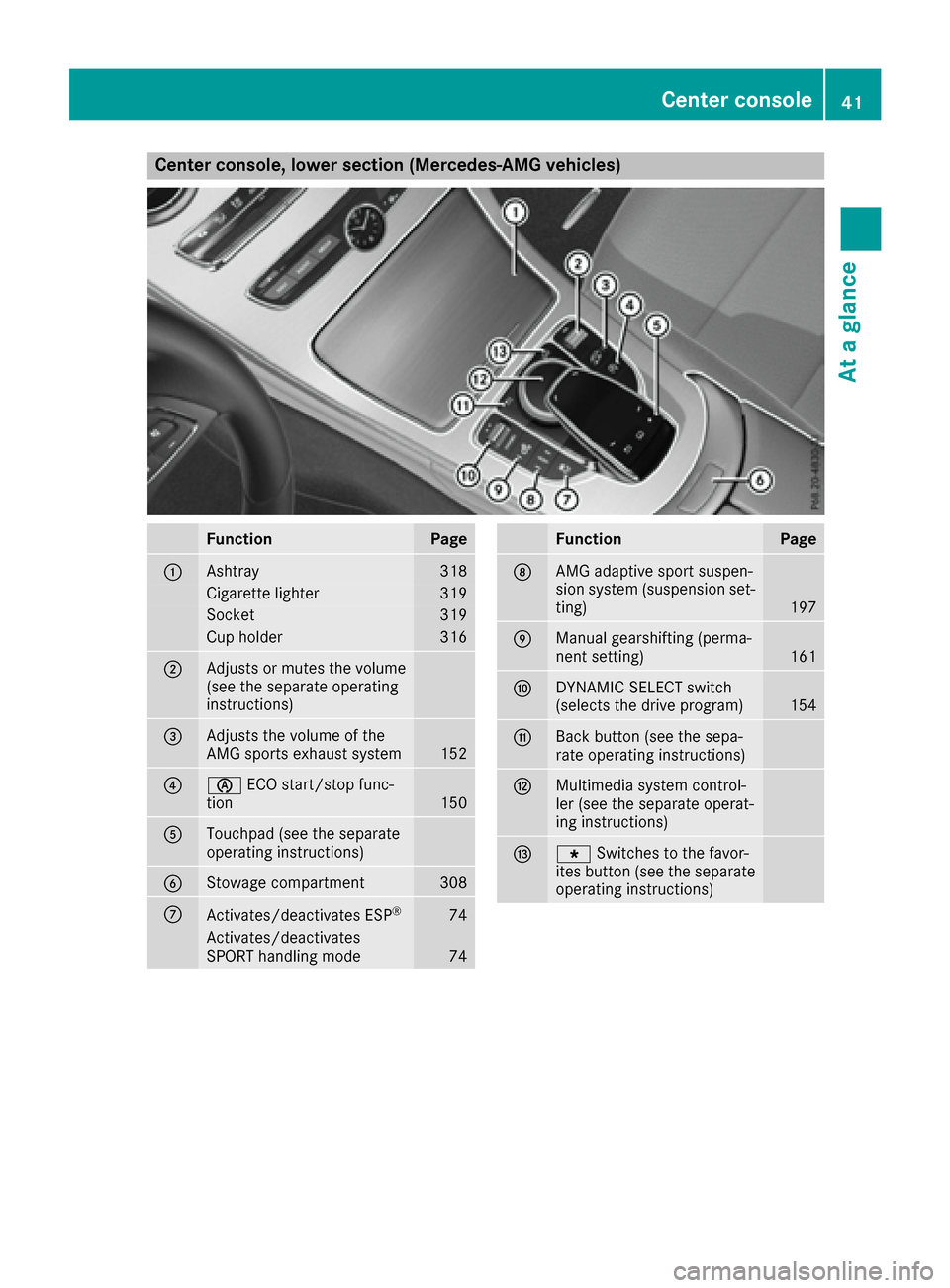
Center console, lower section (Mercedes-AMG vehicles)
FunctionPage
:Ashtray318
Cigarette lighter319
Socket319
Cup holder316
;Adjusts or mutes the volume
(see the separate operating
instructions)
=Adjusts the volume of the
AMG sports exhaust system152
?èECO start/stop func-
tion150
ATouchpad (see the separate
operating instructions)
BStowage compartment308
CActivates/deactivates ESP®74
Activates/deactivates
SPORT handling mode74
FunctionPage
DAMG adaptive sport suspen-
sion system (suspension set-
ting)
197
EManual gearshifting (perma-
nent setting)161
FDYNAMIC SELECT switch
(selects the drive program)154
GBack button (see the sepa-
rate operating instructions)
HMultimedia system control-
ler (see the separate operat-
ing instructions)
Ig Switches to the favor-
ites button (see the separate
operating instructions)
Center console41
At a glance
Page 44 of 398
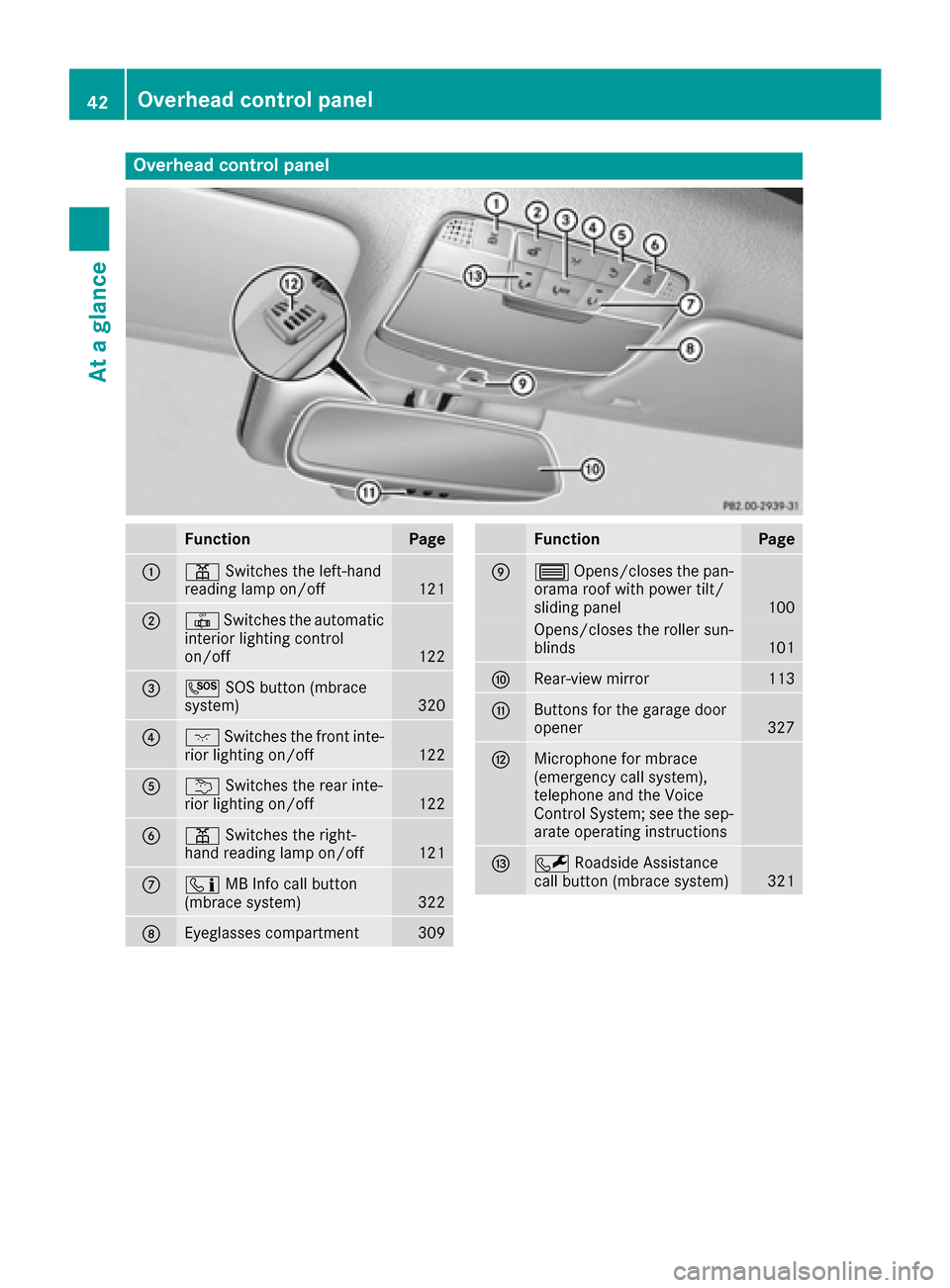
Overhead control panel
FunctionPage
:pSwitches the left-hand
reading lamp on/off121
;| Switches the automatic
interior lighting control
on/off
122
=G SOS button (mbrace
system)320
?c Switches the front inte-
rior lighting on/off122
Au Switches the rear inte-
rior lighting on/off122
Bp Switches the right-
hand reading lamp on/off121
Cï MB Info call button
(mbrace system)322
DEyeglasses compartment309
FunctionPage
E3 Opens/closes the pan-
orama roof with power tilt/
sliding panel
100
Opens/closes the roller sun-
blinds101
FRear-view mirror113
GButtons for the garage door
opener327
HMicrophone for mbrace
(emergency call system),
telephone and the Voice
Control System; see the sep-
arate operating instructions
IF Roadside Assistance
call button (mbrace system)321
42Overhead control panel
At a glance
Page 46 of 398
Hybrid vehicles
General notes
Hybrid technology combines a fuel efficient
internal combustion engine with a powerful
electric motor.
Important safety notes
Danger of electric shock
GDANGER
The vehicle's high-voltage electrical system is under high voltage. If you modify components
in the vehicle's high-voltage electrical system
or touch damaged components, you may be
electrocuted. The components in the vehi-
cle's high-voltage electrical system may be
damaged in an accident, although the damage
is not visible. There is a risk of fatal injury.
Following an accident, do not touch any high-
voltage components and never modify the
vehicle's high-voltage electrical system. Have
the vehicle towed away after an accident and
the vehicle's high-voltage electrical system
checked by a qualified specialist workshop.
When towing a vehicle after an accident, be sure
to observe the following sections:
RTransporting the vehicle (Ypage 356)
RTowing the vehicle with the rear axle raised
(Ypage 355)
RTowing a vehicle with both axles on the
ground (Ypage 356)
Read the safety instructions on towing and tow-
starting (
Ypage 354).
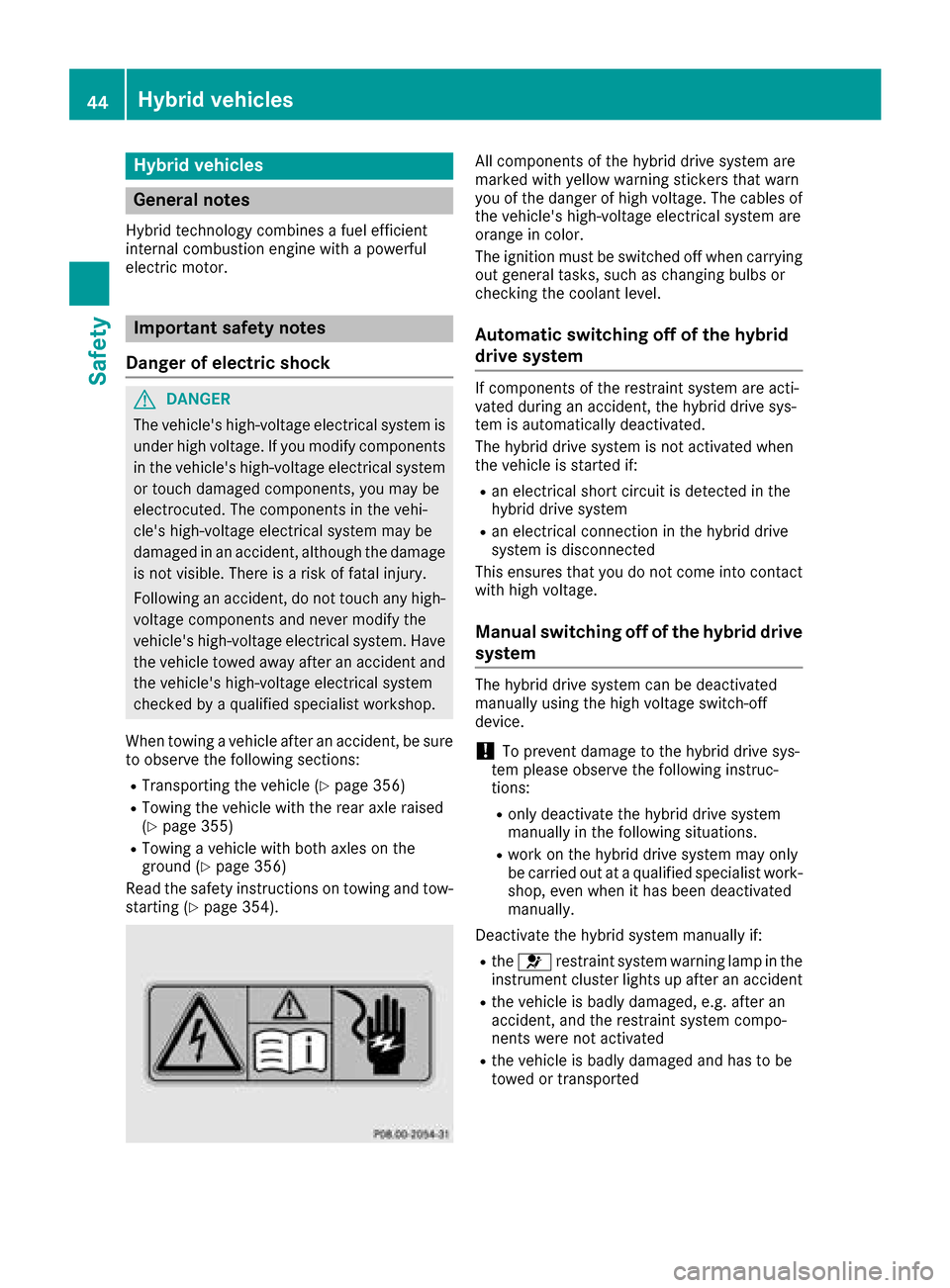
All components of the hybrid drive system are
marked with yellow warning stickers that warn
you of the danger of high voltage. The cables of
the vehicle's high-voltage electrical system are
orange in color.
The ignition must be switched off when carrying
out general tasks, such as changing bulbs or
checking the coolant level.
Automatic switching off of the hybrid
drive system
If components of the restraint system are acti-
vated during an accident, the hybrid drive sys-
tem is automatically deactivated.
The hybrid drive system is not activated when
the vehicle is started if:
Ran electrical short circuit is detected in the
hybrid drive system
Ran electrical connection in the hybrid drive
system is disconnected
This ensures that you do not come into contact
with high voltage.
Manual switching off of the hybrid drive
system
The hybrid drive system can be deactivated
manually using the high voltage switch-off
device.
!To prevent damage to the hybrid drive sys-
tem please observe the following instruc-
tions:
Ronly deactivate the hybrid drive system
manually in the following situations.
Rwork on the hybrid drive system may only
be carried out at a qualified specialist work-
shop, even when it has been deactivated
manually.
Deactivate the hybrid system manually if:
Rthe 6 restraint system warning lamp in the
instrument cluster lights up after an accident
Rthe vehicle is badly damaged, e.g. after an
accident, and the restraint system compo-
nents were not activated
Rthe vehicle is badly damaged and has to be
towed or transported
44Hybrid vehicles
Safety
Page 49 of 398
regular intervals while the engine is running.
Therefore, malfunctions can be detected in
good time.
The6 restraint system warning lamp in the
instrument cluster lights up when the ignition is
switched on. It goes out no later than a few sec-
onds after the vehicle is started. The compo-
nents of the restraint system are in operational
readiness.
A malfunction has occurred if the 6restraint
system warning lamp:
Rdoes not light up after the ignition is switched
on
Rdoes not go out after a few seconds with the
engine running
Rlights up again while the engine is running
All vehicles, except hybrid vehicles:
GWARNING
If restraint system is malfunctioning, restraint
system components may be triggered unin-
tentionally or might not be triggered at all in
the event of an accident with a high rate of
vehicle deceleration. This can affect the Emer- gency Tensioning Device or air bag, for exam-
ple. This poses an increased risk of injury or
even fatal injury.
Have the restraint system checked and
repaired in a qualified specialist workshop as
soon as possible.
Hybrid vehicles:
GDANGER
If the restraint system is malfunctioning, indi- vidual restraint system components may be
triggered unintentionally or might not be trig-
gered at all in the event of an accident with a
high rate of vehicle deceleration. This could
affect Emergency Tensioning Devices or air
bags, for example. The vehicle's high-voltage
electrical system may also not be deactivated
as intended in the event of an accident. You
could suffer an electric shock if you touch the
damaged components of the vehicle's high-
voltage electrical system. This poses an
increased risk of injury or even fatal injury.
Have the restraint system checked and
repaired immediately at a qualified specialist
workshop. Immediately switch off the ignitionand remove the SmartKey from the ignition
lock after an accident.
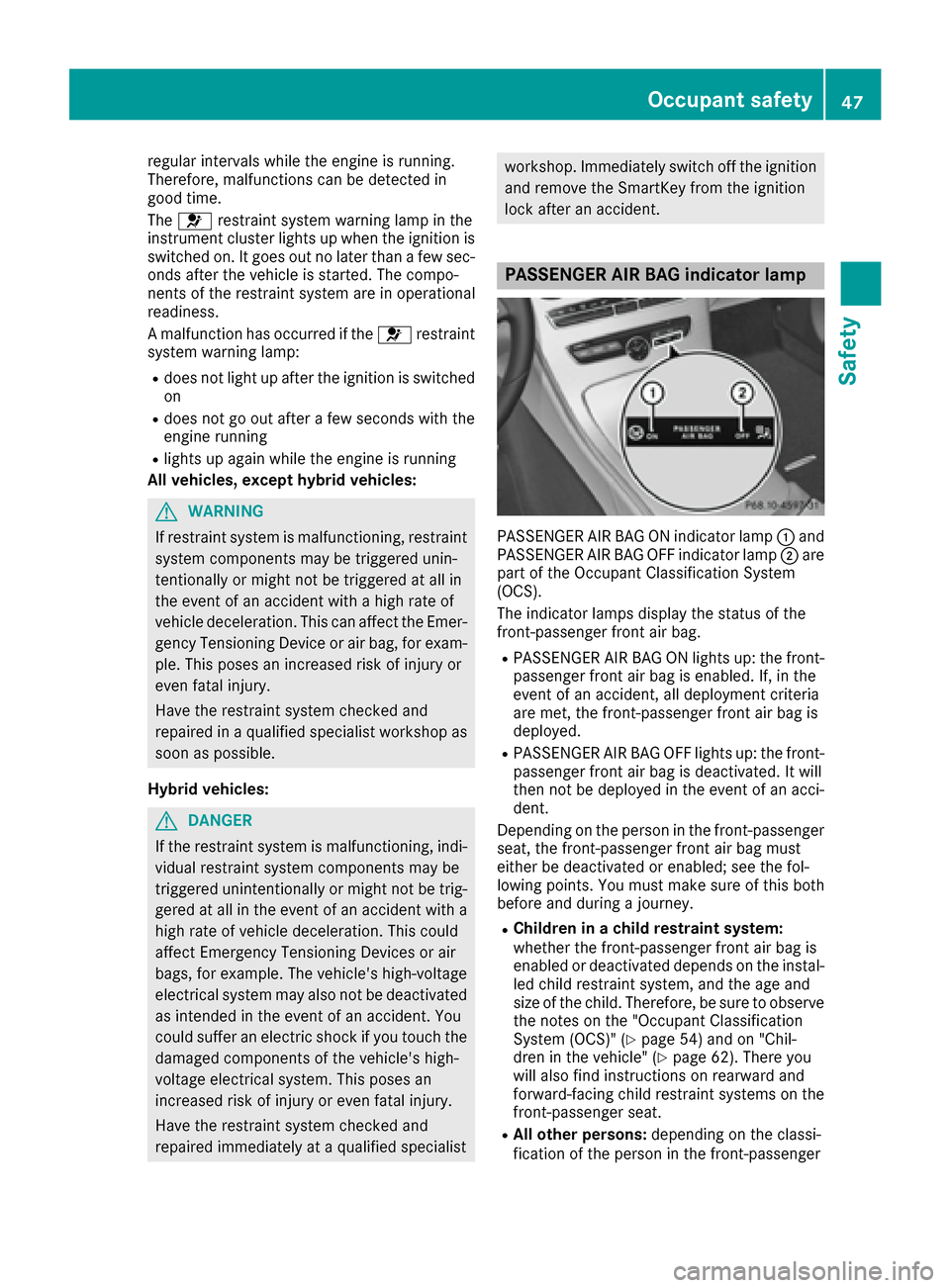
PASSENGER AIR BAG indicator lamp
PASSENGER AIR BAG ON indicator lamp :and
PASSENGER AIR BAG OFF indicator lamp ;are
part of the Occupant Classification System
(OCS).
The indicator lamps display the status of the
front-passenger front air bag.
RPASSENGER AIR BAG ON lights up: the front-
passenger front air bag is enabled. If, in the
event of an accident, all deployment criteria
are met, the front-passenger front air bag is
deployed.
RPASSENGER AIR BAG OFF lights up: the front-
passenger front air bag is deactivated. It will
then not be deployed in the event of an acci-
dent.
Depending on the person in the front-passenger
seat, the front-passenger front air bag must
either be deactivated or enabled; see the fol-
lowing points. You must make sure of this both
before and during a journey.
RChildren in a child restraint system:
whether the front-passenger front air bag is
enabled or deactivated depends on the instal-
led child restraint system, and the age and
size of the child. Therefore, be sure to observe
the notes on the "Occupant Classification
System (OCS)" (
Ypage 54) and on "Chil-
dren in the vehicle" (Ypage 62). There you
will also find instructions on rearward and
forward-facing child restraint systems on the
front-passenger seat.
RAll other persons: depending on the classi-
fication of the person in the front-passenger
Occupant safety47
Safety
Z