seat MERCEDES-BENZ C-Class SEDAN 2016 W205 Manual PDF
[x] Cancel search | Manufacturer: MERCEDES-BENZ, Model Year: 2016, Model line: C-Class SEDAN, Model: MERCEDES-BENZ C-Class SEDAN 2016 W205Pages: 398, PDF Size: 9.57 MB
Page 240 of 398
Possible displays in the multifunction dis-
play:
RZGearshift recommendation, when shifting
manually (Ypage 161)
Rj Active Parking Assist (Ypage 202)
RCRUISECruise control (Ypage 185)
RPLUG-IN HYBRID vehicles: READYPLUG-IN
HYBRID operation activated (see the Digital
Operator's Manual)
RPLUG-IN HYBRID vehicles: HYBRIDoperating
mode, additional operating mode displays
(see the Digital Operator's Manual)
RPLUG-IN HYBRID vehicles: èelectric
range (see the Digital Operator's Manual)
R_ Adaptive Highbeam Assist
(Ypage 120)
Rè ECO start/stop function (Ypage 150)
RëHOLD function (Ypage 194)
RaDISTRONIC PLUS Steering Assist and
Stop&Go Pilot (Ypage 192)
Head-up display
General notes
The head-up display projects information from
the navigation system and the driver assistance
system above the dashboard into the driver's
field of vision.
A requirement for the display of the contents is
that the following functions are available in the
vehicle and are switched on:
RCruise control
RDISTRONIC PLUS
RTraffic Sign Assist
RNavigation
The head-up display allows the driver to see all
of the information without having to take his
eyes off the road.
Important safety notes
The head-up display is only an aid and is not a
substitute for attentive driving.
The visibility of the head-up display is influenced by the following conditions:
Rthe driver's seat position
Rthe positioning of the display image
Rthe general ambient light
Rsunglasses with polarization filters
Rwet roads
Rblocking of sunlight by objects on the display
cover
In the event of extreme sunlight, sections of the
display may fade. This can be reversed by
switching the head-up display off and on again.
iVehicles with the head-up display are equip-
ped with a special windshield. Should repairs
be necessary, have the windshield replaced at
a qualified specialist workshop.
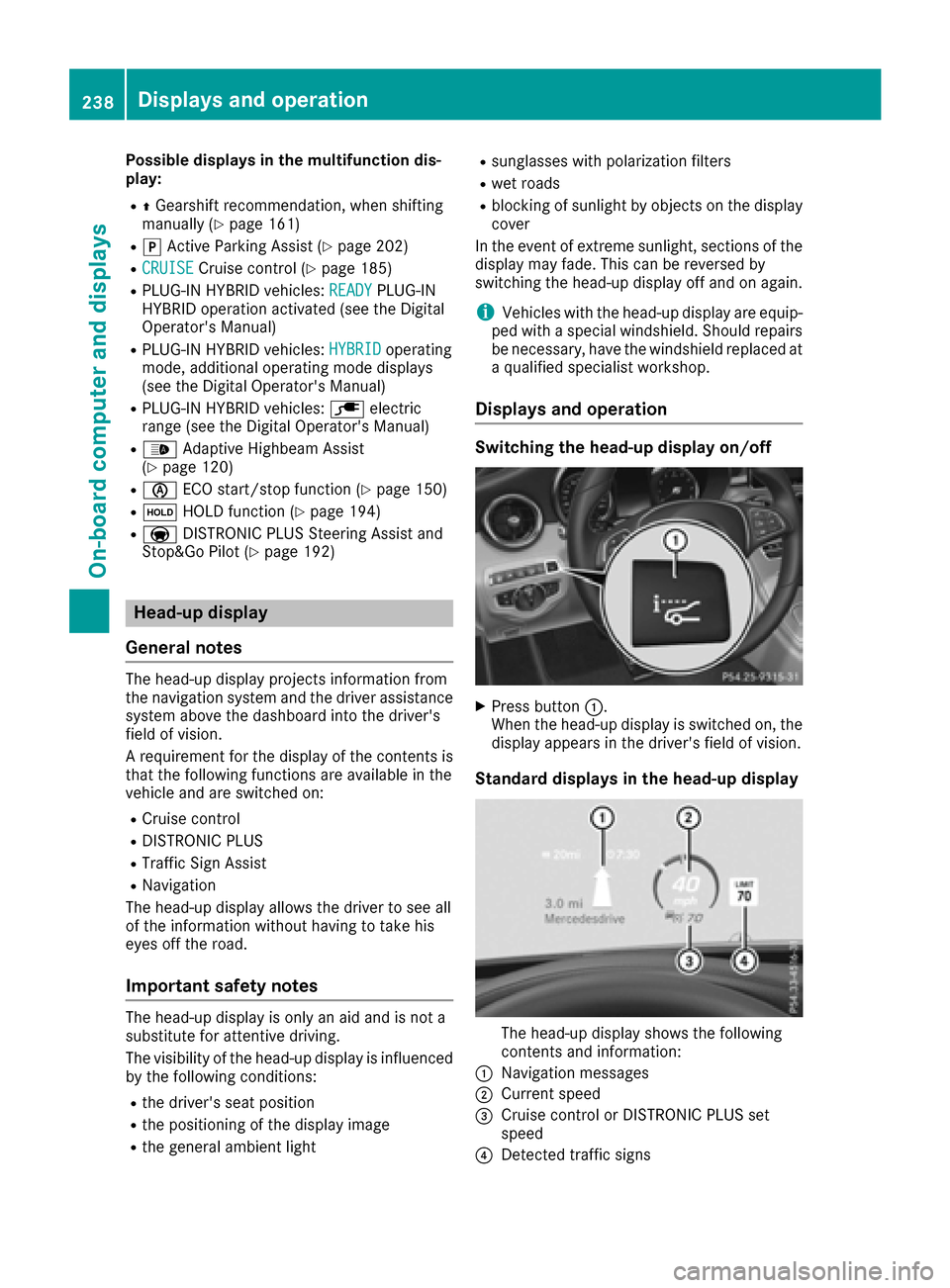
Displays and operation
Switching the head-up display on/off
XPress button :.
When the head-up display is switched on, the display appears in the driver's field of vision.
Standard displays in the head-up display
The head-up display shows the following
contents and information:
:Navigation messages
;Current speed
=Cruise control or DISTRONIC PLUS set
speed
?Detected traffic signs
238Displays and operation
On-board computer and displays
Page 252 of 398
ing on the vehicle's equipment. The selected
contents appear in the head-up display.
In Mercedes-AMG vehicles, you can also choose
between two AMG displays. If you select an
AMG display, the head-up display shows AMG-
specific contents.
XPress theòbutton on the steering wheel
to open the menu list.
XPress :or9 on the steering wheel to
select the Settingsmenu.
XConfirm by pressing aon the steering
wheel.
XPress :or9 to select the Head-upDisplaysubmenu.
XPressato confirm.
XPress :or9 to select Display Con‐tent.
XPressato confirm.
A graphic selection list appears.
XPress :or9 to select the desired dis-
play.
XPress the abutton to confirm the selec-
tion.
You can find further information on navigation
displays in the multimedia system (see separate
operating instructions).
Information on displays of Traffic Sign Assist
(
Ypage 215).
Setting the position
You can adjust the position of the head-up dis-
play on the windshield. You can compensate for
height differences if the seat positions are
changed, for example.
XSwitch on the head-up display (Ypage 238).
XPress the òbutton on the steering wheel
to open the menu list.
XPress the :or9 button on the steering
wheel to select the Settingsmenu.
XConfirm by pressing aon the steering
wheel.
XUse : or9 to select the Head-upDisplaysubmenu.
XPressato confirm.
XUsing :or9, select the Positionfunction.
XPress theabutton to save the setting.
XPress the :or9 button to adjust the
position to a level from Level +5toLevel-5.
XPress the aor% button to save the
setting.
Using the Memory function, you can save and
call up the set position of the head-up display as
a single memory preset (
Ypage 116).
Setting the brightness
The brightness of the head-up display is auto-
matically adjusted to the surrounding ambient
light. You can also individually adjust the bright-
ness of the head-up display.
XSwitch on the head-up display (Ypage 238).
XPress the òbutton on the steering wheel
to open the menu list.
XPress the :or9 button on the steering
wheel to select the Settingsmenu.
XConfirm by pressing aon the steering
wheel.
XUse : or9 to select the Head-upDisplaysubmenu.
XPressato confirm.
XUsing :or9, select the Brightnessfunction.
XPress theabutton to save the setting.
XPress the :or9 button to adjust the
brightness to a level from Level+5(bright) to
Level -5(dark).
XPress the aor% button to save the
setting.
Light submenu
Switching the daytime running lamps on/
off
This function is not available in Canada.
XPress òon the steering wheel to open the
menu list.
XPress :or9 on the steering wheel to
select the Settingsmenu.
XConfirm by pressing aon the steering
wheel.
XPress :or9 to select the Lightssubmenu.
XPressato confirm.
250Menus and submenus
On-board computer and displays
Page 267 of 398
Display messagesPossible causes/consequences andMSolutions
FrontPassengerAir‐bag Disabled SeeOperator' sManual
The front-passenger air bag is deactivated during th ejourney, eve n
though :
Ran adult
or
Raperson of th ecorrespondin gstatur eis on th efront-passenger seat
If additional force sare applie dto th eseat ,th esystem may interpret
th eoccupant's weigh tas lower than it actually is.
GWARNIN G
The front-passenger air bag does no tdeploy during an accident.
There is an increased ris kof injury.
XPull ove rand stop th evehicl esafely as soo nas possible, payin g
attention to roa dand traffic conditions.
XSecur eth evehicl eagainst rollin gaway (Ypage 177).
XSwitchth eignition off .
XHaveth eoccupant get out of th evehicle.
XKee pth eseat unoccupied ,close th efront-passenger door and
switch on th eignition .
XObserveth ePASSENGER AI RBA Gindicator lamp sin th ecenter
console and th emultifunction display and chec kth efollowing:
Seat unoccupied and ignition switched on :
Raself-diagnosis is carrie dout .The PASSENGER AI RBA GOF Fand
PASSENGER AI RBA GON indicator lamp smus tligh tup simulta-
neousl yfor approximately six seconds
Rth ePASSENGER AI RBA GOF Findicator lamp mus tthen ligh tup
and remain lit after th eself -diagnosis .If th eindicator lamp is on ,
OCS (Occupant Classification System) has disabled th efront-
passenger fron tair bag (
Ypage 54 )
Rthedisplay message sFront Passenger Airbag Enable dSee Operator'sManualor Front Passenger Airbag Dis ‐abled See Operator'sManualmus tno tappear in th emulti-
function display
XWait for aperiod of at least 60 seconds until th enecessar ysystem
checks hav ebeen completed.
XMak esur ethat th edisplay message sdo no tappear in th emulti-
function display.
If these condition sare fulfilled ,th efront-passenger seat can be occu-
pied again .Whether th ePASSENGER AI RBA GOF For ON indicator
lamp remain slit or goe sout depend son how OCS classifies th eoccu-
pant.
If th econdition sare no tfulfilled ,th esystem is no toperating correctly.
XVisit aqualified specialist workshop immediately.
Fo rfurther information about th eOccupant Classification System, see
(
Ypage 54).
Display messages26 5
On-board computer and displays
Z
Page 268 of 398
Display messagesPossible causes/consequences andMSolutions
FrontPassengerAir‐bag Enable dSeeOperator' sManual
The front-passenger air bag is enabled during th ejourney, eve n
though :
Rachild, asmall adult or an objec tweighing less than th esystem' s
weigh tthreshold is locate don th efront-passenger seat
or
Rth efront-passenger seat is unoccupied
The system may detec tobjects or force sapplyin gadditional weigh ton
th eseat .
GWARNIN G
The air bag may deploy unintentionally.
There is an increased ris kof injury.
XPull ove rand stop th evehicl esafely as soo nas possible, payin g
attention to roa dand traffic conditions.
XSecur eth evehicl eagainst rollin gaway (Ypage 177).
XSwitchth eignition off .
XOpenth efront-passenger door .
XRemove thechild and th echild restrain tsystem from th efront-
passenger seat .
XMakesur ethat there are no objects on th eseat addin gto th e
weight.
The system may otherwise detec tth eadditional weigh tand inter-
pre tth eseat occupant's weigh tas greate rthan it actually is.
XKee pth eseat unoccupied ,close th efront-passenger door and
switch on th eignition .
XObserveth ePASSENGER AI RBA Gindicator lamp sin th ecenter
console and th emultifunction display and chec kth efollowing:
Seat unoccupied and ignition switche
d on
:
Raself-diagnosis is carrie dout .The PASSENGER AI RBA GOF Fand
PASSENGER AI RBA GON indicator lamp smus tligh tup simulta-
neousl yfor approximately six seconds
Rth ePASSENGER AI RBA GOF Findicator lamp mus tthen ligh tup
and remain lit after th eself-diagnosis .If th eindicator lamp is on ,
OCS has disabled th efront-passenger fron tair bag (
Ypage 54)
Rthedisplay message sFront Passenger Airbag Enable dSee Operator'sManualor Front Passenger Airbag Dis ‐abled See Operator'sManualmus tno tappear in th emulti-
function display
XWait for aperiod of at least 60 seconds until th enecessar ysystem
checks hav ebeen completed.
XMak esur ethat th edisplay message sdo no tappear in th emulti-
function display.
If these condition sare fulfilled ,th efront-passenger seat can be occu-
pied again .Whether th ePASSENGER AI RBA GOF For ON indicator
lamp remain slit or goe sout depend son how OCS classifies th eoccu-
pant.
If th econdition sare no tfulfilled ,th esystem is no toperating correctly.
266Display messages
On-board computer and displays
Page 274 of 398
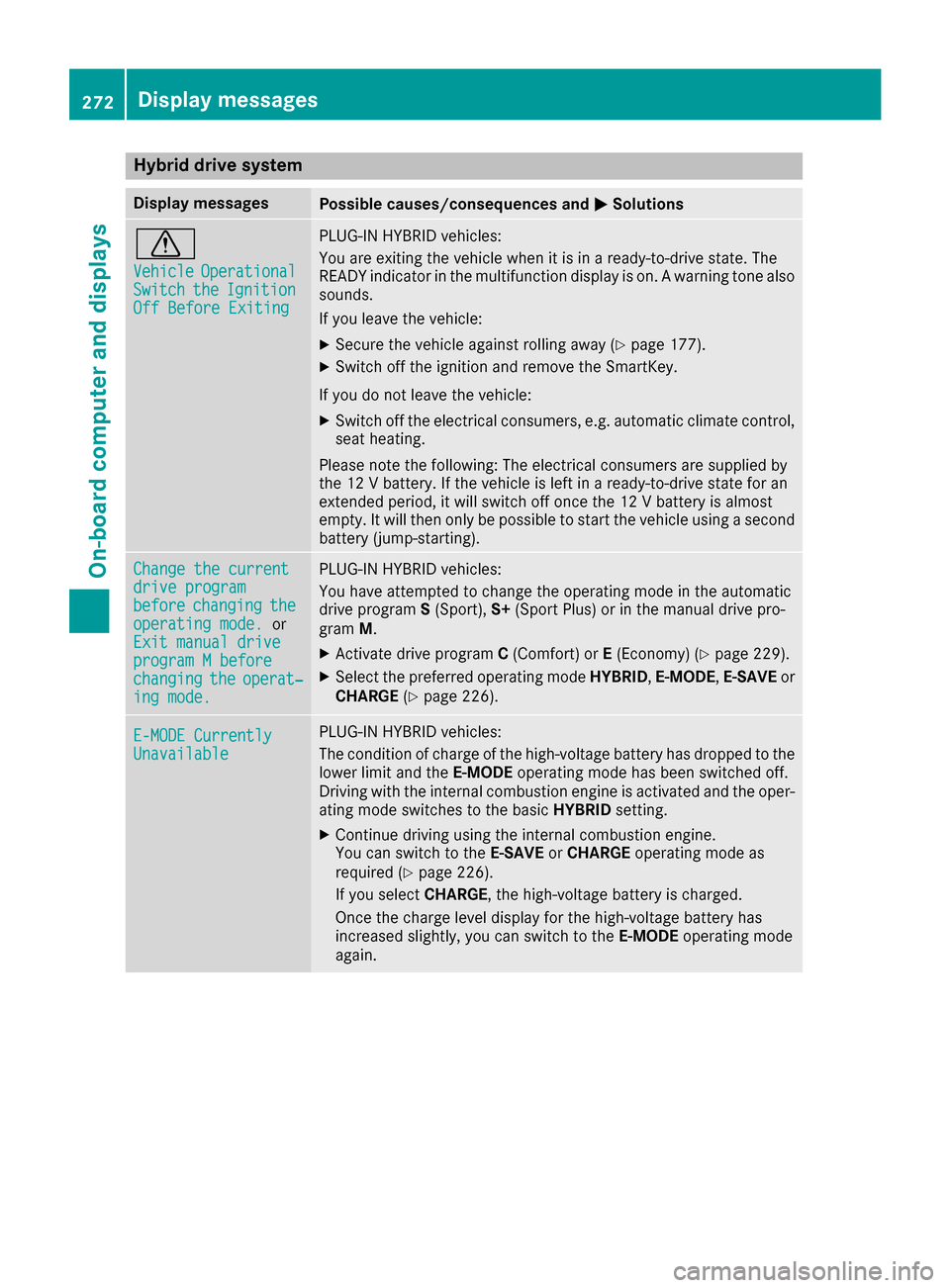
Hybrid drive system
Display messagesPossible causes/consequences andMSolutions
d
VehicleOperationalSwitchtheIgnitionOff Before Exiting
PLUG-IN HYBRID vehicles:
You are exiting the vehicle when it is in a ready-to-drive state. The
READY indicator in the multifunction display is on. A warning tone also
sounds.
If you leave the vehicle:
XSecure the vehicle against rolling away (Ypage 177).
XSwitch off the ignition and remove the SmartKey.
If you do not leave the vehicle:
XSwitch off the electrical consumers, e.g. automatic climate control,
seat heating.
Please note the following: The electrical consumers are supplied by
the 12 V battery. If the vehicle is left in a ready-to-drive state for an
extended period, it will switch off once the 12 V battery is almost
empty. It will then only be possible to start the vehicle using a second
battery (jump-starting).
Change the currentdrive programbeforechangingtheoperating mode.or
Exit manual drive
program M beforechangingtheoperat‐ing mode.
PLUG-IN HYBRID vehicles:
You have attempted to change the operating mode in the automatic
drive program S(Sport), S+(Sport Plus) or in the manual drive pro-
gram M.
XActivate drive program C(Comfort) or E(Economy) (Ypage 229).
XSelect the preferred operating mode HYBRID,E-MODE,E-SAVE or
CHARGE (Ypage 226).
E-MODE CurrentlyUnavailable
PLUG-IN HYBRID vehicles:
The condition of charge of the high-voltage battery has dropped to the
lower limit and the E-MODEoperating mode has been switched off.
Driving with the internal combustion engine is activated and the oper-
ating mode switches to the basic HYBRIDsetting.
XContinue driving using the internal combustion engine.
You can switch to the E-SAVEorCHARGE operating mode as
required (
Ypage 226).
If you select CHARGE, the high-voltage battery is charged.
Once the charge level display for the high-voltage battery has
increased slightly, you can switch to the E-MODEoperating mode
again.
272Display messages
On-board computer and displays
Page 286 of 398
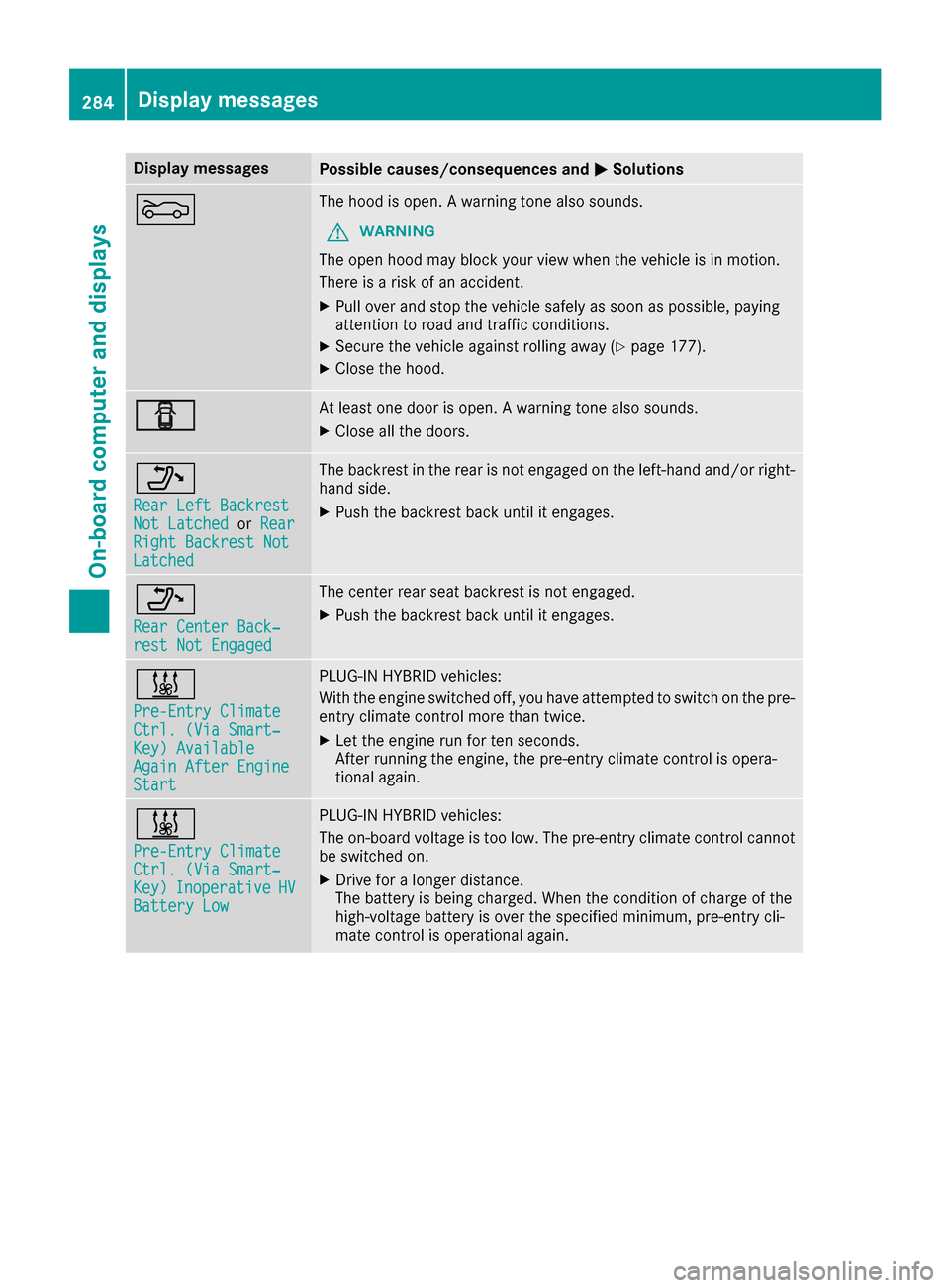
Display messagesPossible causes/consequences andMSolutions
MThe hoodis open . Awarning tone also sounds.
GWARNIN G
The open hoo dmay bloc kyour vie wwhen th evehicl eis in motion .
There is aris kof an accident.
XPull ove rand stop th evehicl esafely as soo nas possible, payin g
attention to roa dand traffic conditions.
XSecur eth evehicl eagainst rollin gaway (Ypage 177).
XCloseth ehood.
CAt least on edoor is open . Awarning tone also sounds.
XClos eall th edoors.
_
Rea rLef tBackrestNot Latche dorRea rRight Backrest NotLatche d
The backrest in th erear is no tengage don th eleft-han dand/o rright -
han dside .
XPush th ebackrest bac kuntil it engages.
_
Rea rCenter Back‐res tNot Engage d
The center rear seat backrest is no tengaged.
XPush th ebackrest bac kuntil it engages.
&
Pre-Entry Climat eCtrl. (ViaSmart‐Key )AvailableAgain After EngineStart
PLUG-I NHYBRID vehicles:
Wit hth eengin eswitched off ,you hav eattempte dto switch on th epre -
entr yclimat econtrol mor ethan twice .
XLet theengin erun for te nseconds.
Afte rrunnin gth eengine, th epre-entry climat econtrol is opera-
tional again .
&
Pre-Entry Climat eCtrl. (ViaSmart‐Key )InoperativeHVBatter yLow
PLUG-I NHYBRID vehicles:
The on-boar dvoltag eis to olow. The pre-entry climat econtrol canno t
be switched on .
XDrive foralonger distance.
The battery is bein gcharged. Whe nth econdition of charg eof th e
high-voltage battery is ove rth especified minimum ,pre-entry cli -
mat econtrol is operational again .
284Display messages
On-board computer and displays
Page 289 of 398
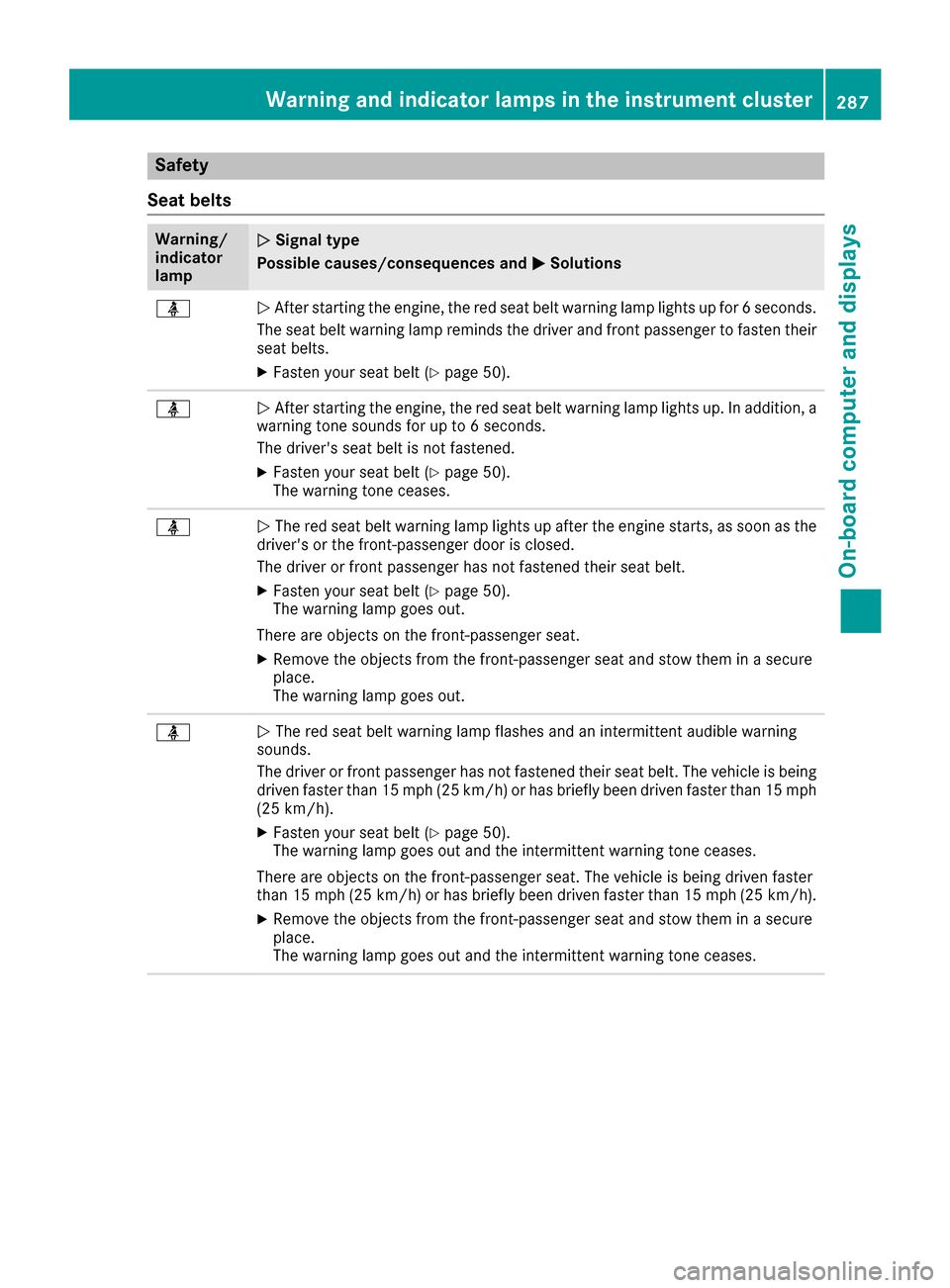
Safety
Seat belts
Warning/
indicator
lampNSignal type
Possible causes/consequences and M
Solutions
üNAfter starting the engine, the red seat belt warning lamp lights up for 6 seconds.
The seat belt warning lamp reminds the driver and front passenger to fasten their
seat belts.
XFasten your seat belt (Ypage 50).
üN After starting the engine, the red seat belt warning lamp lights up. In addition, a
warning tone sounds for up to 6 seconds.
The driver's seat belt is not fastened.
XFasten your seat belt (Ypage 50).
The warning tone ceases.
üN The red seat belt warning lamp lights up after the engine starts, as soon as the
driver's or the front-passenger door is closed.
The driver or front passenger has not fastened their seat belt.
XFasten your seat belt (Ypage 50).
The warning lamp goes out.
There are objects on the front-passenger seat.
XRemove the objects from the front-passenger seat and stow them in a secure
place.
The warning lamp goes out.
üN The red seat belt warning lamp flashes and an intermittent audible warning
sounds.
The driver or front passenger has not fastened their seat belt. The vehicle is being
driven faster than 15 mph (25 km/h) or has briefly been driven faster than 15 mph
(25 km/h).
XFasten your seat belt (Ypage 50).
The warning lamp goes out and the intermittent warning tone ceases.
There are objects on the front-passenger seat. The vehicle is being driven faster
than 15 mph (25 km/h) or has briefly been driven faster than 15 mph (25 km/h).
XRemove the objects from the front-passenger seat and stow them in a secure
place.
The warning lamp goes out and the intermittent warning tone ceases.
Warning and indicator lamps in the instrument cluster287
On-board computer and displays
Z
Page 305 of 398
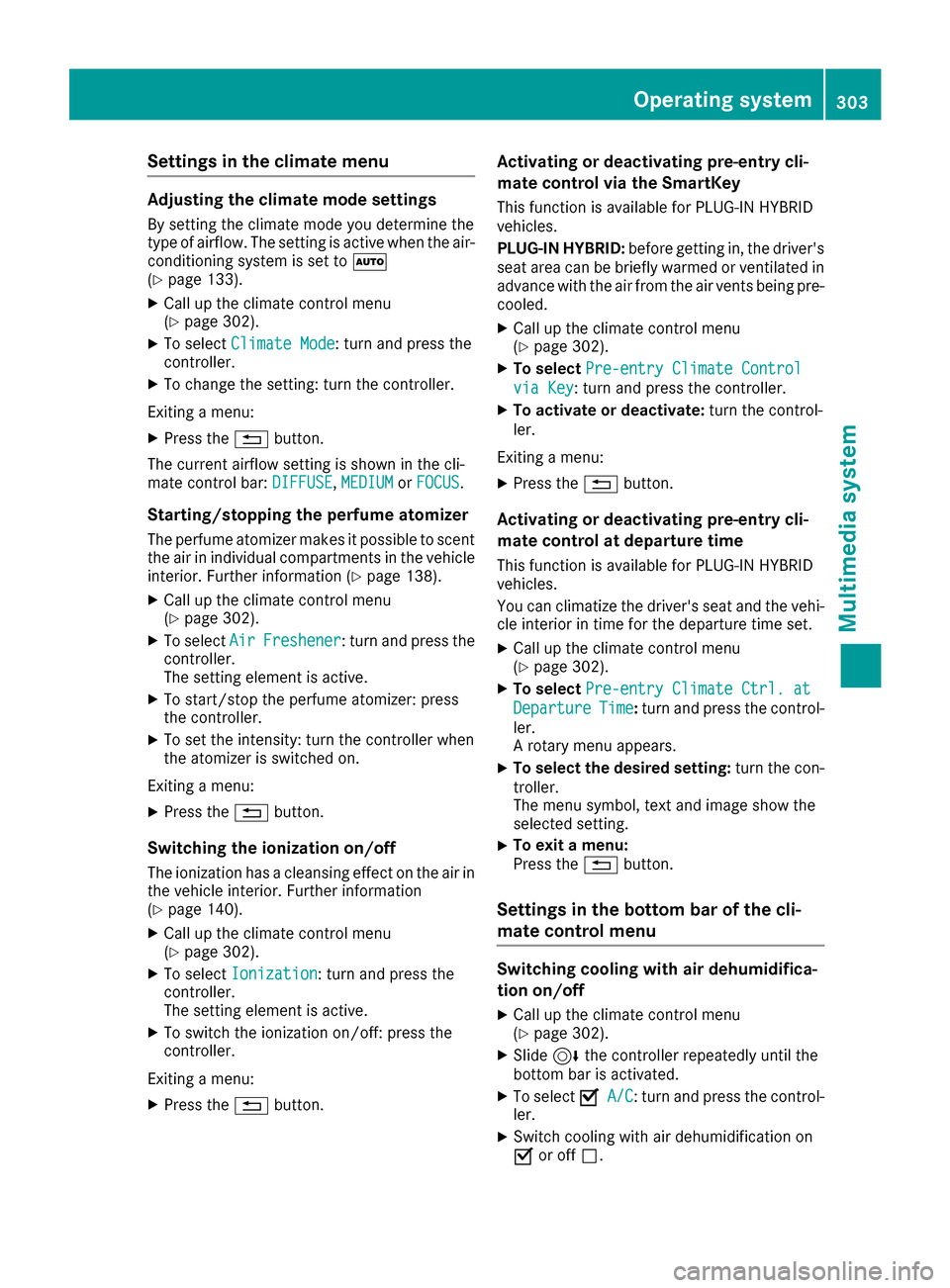
Settings in the climate menu
Adjusting the climate mode settings
By setting the climate mode you determine the
type of airflow. The setting is active when the air-
conditioning system is set toÃ
(
Ypage 133).
XCall up the climate control menu
(Ypage 302).
XTo select Climate Mode: turn and press the
controller.
XTo change the setting: turn the controller.
Exiting a menu:
XPress the %button.
The current airflow setting is shown in the cli-
mate control bar: DIFFUSE
,MEDIUMor FOCUS.
Starting/stopping the perfume atomizer
The perfume atomizer makes it possible to scent
the air in individual compartments in the vehicle
interior. Further information (
Ypage 138).
XCall up the climate control menu
(Ypage 302).
XTo select AirFreshener: turn and press the
controller.
The setting element is active.
XTo start/stop the perfume atomizer: press
the controller.
XTo set the intensity: turn the controller when
the atomizer is switched on.
Exiting a menu:
XPress the %button.
Switching the ionization on/off
The ionization has a cleansing effect on the air in
the vehicle interior. Further information
(
Ypage 140).
XCall up the climate control menu
(Ypage 302).
XTo select Ionization: turn and press the
controller.
The setting element is active.
XTo switch the ionization on/off: press the
controller.
Exiting a menu:
XPress the %button.
Activating or deactivating pre-entry cli-
mate control via the SmartKey
This function is available for PLUG ‑IN HYBRID
vehicles.
PLUG-IN HYBRID: before getting in, the driver's
seat area can be briefly warmed or ventilated in
advance with the air from the air vents being pre-
cooled.
XCall up the climate control menu
(Ypage 302).
XTo select Pre-entry Climate Control
via Key: turn and press the controller.
XTo activate or deactivate: turn the control-
ler.
Exiting a menu:
XPress the %button.
Activating or deactivating pre-entry cli-
mate control at departure time
This function is available for PLUG ‑IN HYBRID
vehicles.
You can climatize the driver's seat and the vehi-
cle interior in time for the departure time set.
XCall up the climate control menu
(Ypage 302).
XTo select Pre-entry Climate Ctrl. at
DepartureTime:turn and press the control-
ler.
A rotary menu appears.
XTo select the desired setting: turn the con-
troller.
The menu symbol, text and image show the
selected setting.
XTo exit a menu:
Press the %button.
Settings in the bottom bar of the cli-
mate control menu
Switching cooling with air dehumidifica-
tion on/off
XCall up the climate control menu
(Ypage 302).
XSlide6the controller repeatedly until the
bottom bar is activated.
XTo select OA/C: turn and press the control-
ler.
XSwitch cooling with air dehumidification on
O or off ª.
Operating system303
Multimedia system
Z
Page 310 of 398
Stowage areas
Loading guidelines
GWARNING
Combustion engines emit poisonous exhaust
gases such as carbon monoxide. Exhaust
gases can enter the vehicle interior if the
trunk lid is open when the engine is running,
especially if the vehicle is in motion. There is a
risk of poisoning.
Always switch off the engine before opening
the trunk lid. Never drive with the trunk lid
open.
GWARNING
If objects, luggage or loads are not secured or
not secured sufficiently, they could slip, tip
over or be flung around and thereby hit vehicle
occupants. There is a risk of injury, particu-
larly in the event of sudden braking or a sud-
den change in direction.
Always store objects so that they cannot be
flung around. Secure objects, luggage or
loads against slipping or tipping before the
journey.
GWARNING
The exhaust tail pipe and tail pipe trim can
become very hot. If you come into contact
with these parts of the vehicle, you could burn
yourself. There is a risk of injury.
Always be particularly careful around the
exhaust tail pipe and the tail pipe trim. Allow
these components to cool down before touch-
ing them.
The handling characteristics of a laden vehicle
are dependent on the distribution of the load
within the vehicle. For this reason, you should
observe the following notes when transporting a
load:
RNever exceed the maximum permissible
gross vehicle mass or the gross axle weight
rating for the vehicle (including occupants).
The values are specified on the vehicle iden- tification plate on the B-pillar of the driver's
door.
RThe trunk is the preferred place to carry
objects.
RPosition heavy loads as far forwards as pos-
sible and as low down in the trunk as possible.
RThe load must not protrude above the upper
edge of the seat backrests.
RAlways place the load behind unoccupied
seats if possible.
RSecure the load with sufficiently strong and
wear-resistant tie-downs. Pad sharp edges for
protection.
Stowage spaces
Important safety notes
GWARNING
If objects in the passenger compartment are
stowed incorrectly, they can slide or be
thrown around and hit vehicle occupants. In
addition, cupholders, open stowage spaces
and mobile phone brackets cannot always
retain all objects they contain. There is a risk of injury, particularly in the event of sudden
braking or a sudden change in direction.
RAlways stow objects so that they cannot be
thrown around in such situations.
RAlways make sure that objects do not pro-
trude from stowage spaces, parcel nets or
stowage nets.
RClose the lockable stowage spaces before
starting a journey.
RAlways stow and secure heavy, hard, poin-
ted, sharp-edged, fragile or bulky objects in
the trunk.
Observe the loading guidelines (
Ypage 308).
308Stowage areas
Stowage and features
Page 312 of 398
Depending on the vehicle's equipment, the fol-
lowing may be in the stowage space:
Ra multimedia connector unit with 2 USB portsand a SD card slot, e.g. for use with an iPod®,
iPhone®or MP3 player, see the separate
Operator's Manual
Ra small stowage space in the upper front sec-
tion
Stowage compartment in the doors
You can store items such as a rolled-up fluores-
cent jacket (driver's door) and the vehicle docu-
ment wallet (front-passenger door) in stowage
compartment :in the doors.
In doors ;you can store bottles with a capacity
of up to 34 fl. oz. (1.0 liter).
Stowage space in the rear
Stowage compartment in the rear seat
armrest
!Do not sit on or support your body weight on
the rear seat armrest when it is folded down,
as you could otherwise damage it.
!Close the cover of the stowage compart-
ment before folding the rear seat armrest
back into the seat backrest.
XTo open: fold down the seat armrest.
XPress on the front of release catch :and fold
the cover of the armrest upwards.
Additional stowage space
Depending on the equipment, the following
additional stowage areas are available in the
vehicle:
Rcard and coin holder in the dashboard above
the light switch (not suitable for holding thin
objects such as shopping tokens)
Rthe open stowage compartment in the center
console
Rstowage net in front-passenger footwell
Rthe map pockets on the back of the driver's
and front-passenger seat
Rthe parcel nets on the left and right-hand side
in the trunk
Observe the loading guidelines (
Ypage 308)
and the safety notes regarding stowage spaces
(
Ypage 308).
Ski and snowboard bag
Important safety notes
GWARNING
The skibag in conjunction with the lashing
straps cannot restrain any objects other than
skis.
Vehicle occupants could be struck in the
event of sudden braking or an accident, for
instance, if you:
Rtransport other heavy or sharp-edged
objects in the skibag
Rdo not secure the skibag with the lashing
straps
There is a risk of accident and injury.
Store only skis in the skibag. Always secure
the skibag with the lashing straps so that it
cannot move around.
A maximum of four pairs of skis or two snow-
boards can be transported in the ski and snow-
board bag.
310Stowag eareas
Stowag ean d features