363 MERCEDES-BENZ C-Class SEDAN 2016 W205 Owner's Manual
[x] Cancel search | Manufacturer: MERCEDES-BENZ, Model Year: 2016, Model line: C-Class SEDAN, Model: MERCEDES-BENZ C-Class SEDAN 2016 W205Pages: 398, PDF Size: 9.57 MB
Page 11 of 398
Driving systems360°camera .................................. 21 0
Active Blind Spot Assis t................ .219
Active Lane Keeping Assist ............ 222
Active Parking Assist ..................... 202
AIRMATIC ...................................... 196
AMG adaptive sport suspension
system ...........................................1 97
ATTENTION ASSIST ........................ 214
Blind Spot Assist ............................ 216
Cruise control ................................ 185
Display message ............................ 274
DISTRONIC PLUS ........................... 186
DISTRONIC PLUS with Steering
Assist and Stop&Go Pilot ...............1 92
Driving Assistance Plus package ... 219
HOLD function ............................... 194
Lane Keeping Assist ......................2 18
Lane Tracking package .................. 216
PARKTRONIC ................................. 199
Rear view camera .......................... 206
Traffic Sign Assist .......................... 215
Driving tips
AMG ceramic brakes ..................... 183
Automatic transmission ................. 158
Brakes ...........................................1 82
Break-in period .............................. 145
DISTRONIC PLUS ........................... 192
Downhill gradient ........................... 182
Drinking and driving ....................... 180
Driving in winter .............................1 84
Driving on flooded roads ................ 184
Driving on wet roads ......................1 84
Exhaust check ............................... 180
Fuel ................................................ 180
General .......................................... 179
Hydroplaning ................................. 184
Icy road surfaces ........................... 184
Limited braking efficiency on sal-
ted roads ....................................... 182
Snow chains .................................. 363
Subjecting brakes to a load ........... 182
The first 1000 miles (1500 km) ..... 145
Wet road surface .............. ............. 182
D
VD video
Operating (on-board computer) ..... 244
see also Digital Operator's Man-
ual ..................................................2 98DYNAMIC SELECT switch
Automatic transmission ................. 154
Climate control (dual-zone auto-
matic climate control) .................... 132
PLUG-IN HYBRID operation ............ 229
E
EASY-ENTRY featureFunction/notes .............................1 12
EASY-EXIT feature
Function/notes .............................1 12
EASY-PACK trunk box ....................... 314
EBD (electronic brake force distri-
bution)
Display message ............................ 258
Function/notes ................................ 76
ECO display
Function/notes .............................1 80
On-board computer ....................... 240
ECO start/stop function
Automatic engine start .................. 151
Automatic engine switch-off .......... 150
Deactivating/activating ................. 151
General information ....................... 150
Important safety notes .................. 150
Introduction ................................... 150
Electronic Stability Program
see ESP
®(Electronic Stability Program)
Emergency
Automatic measures after an acci-
dent ................................................. 61
Emergency release
Driver's door ....................................8 9
Trunk ............................................... 94
Vehicle ............................................. 89
Emergency Tensioning Devices
Activation ......................................... 58
Emissions control
Service and warranty information ....2 8
Engine
Check Engine warning lamp .......... .293
Display message ............................ 268
ECO start/stop function ................ 150
Engine number ............................... 388
Irregular running ............................ 153
Jump-starting ................................. 352
Starting (important safety notes) ... 148
Index9
Page 21 of 398
Storing settings (memory func-
tion) ............................................... 116
Switching seat heating on/off ....... 108
Switching seat ventilation on/
off .................................................. 109
Securing a load
see Securing cargo
Securing cargo .................................. 313
Selector lever
Cleaning ......................................... 340
see Automatic transmission
Sensors (cleaning instructions) ....... 339
Service menu (on-board com-
puter) .................................................. 246
Service message
see ASSYST PLUS
Service products
Brake fluid ..................................... 392
Coolant (engine) ............................ 392
Engine oil ....................................... 391
Fuel ................................................ 388
Important safety notes .................. 388
Refrigerant (air-conditioning sys-
tem) ............................................... 393
Washer fluid ................................... 393
Setting the charge current (on-
board computer) ............................... 248
Setting the date/time format
see also Digital Operator's Man-
ual .................................................. 298
Setting the departure time (on-
board computer) ............................... 249
Setting the language
see also Digital Operator's Man-
ual .................................................. 298
Setting the time
see also Digital Operator's Man-
ual .................................................. 298
Settings
Factory (on-board computer) ......... 252
On-board computer ....................... 247
SETUP (on-board computer) ............. 253
Side impact air bag ............................. 53
Side marker lamp (display mes-
sage) ................................................... 267
Side windows
Cleaning ......................................... 338 Convenience closing feature ............ 96
Convenience opening feature .......... 96
Important safety information ........... 94
Opening/closing .............................. 95
Problem (malfunction) ..................... 98
Resetting ......................................... 97
Reversing feature ............................. 95
SIRIUS services
see also Digital Operator's Man-
ual .................................................. 298
Ski and snowboard bag .................... 310
Sliding sunroof
Opening/ closi
ng .............................. 99
Resetting ....................................... 100
see Panorama roof with power
tilt/sliding panel
SmartKey
Changing the battery ....................... 84
Changing the programming ............. 83
Checking the battery ....................... 84
Convenience closing feature ............ 96
Convenience opening feature .......... 96
Display message ............................ 285
Door central locking/unlocking ....... 81
Important safety notes .................... 81
KEYLESS-GO start function .............. 83
Loss ................................................. 86
Mechanical key ................................ 83
Overview .......................................... 81
Positions (ignition lock) ................. 146
Problem (malfunction) ..................... 86
Starting the engine ........................ 148
Smartphone
Starting the engine ........................ 149
SMS
see also Digital Operator's Man-
ual .................................................. 298
Snow chains ...................................... 363
Socket (12 V)
Center console .............................. 319
General notes ................................ 319
Rear compartment ......................... 319
Sound
Switching on/off ........................... 299
Special seat belt retractor .................. 62
Specialist workshop ............................ 31
Speed, controlling
see Cruise control
Index19
Page 23 of 398
Display message ............................ 285
Introduction ................................... 245
Menu (on-board computer) ............ 245
Number from the phone book ........ 245
Redialing ........................................ 246
Rejecting/ending a call ................. 245
see also Digital Operator's Man-
ual .................................................. 298
Switching between mobile
phones ........................................... 306
Temperature
Coolant (display in the instrument
cluster) .......................................... 236
Coolant (on-board computer) ......... 246
Engine oil (on-board computer,
Mercedes-AMG vehicles) ............... 252
Outside temperature ...................... 236
Setting (climate control) ................ 134
Transmission oil (on-board com-
puter, Mercedes-AMG vehicles) ..... 252
Through-loading feature ................... 311
Timing (RACETIMER) .........................253
Tire pressure
Calling up (on-board computer) ..... 367
Checking manually ........................ 366
Display message ............................ 280
Maximum ....................................... 366
Not reached (TIREFIT) .................... 346
Notes ............................................. 365
Reached (TIREFIT) .......................... 346
Recommended ............................... 363
Tire pressure loss warning system
General notes ................................ 366
Important safety notes .................. 366
Restarting ...................................... 367
Tire pressure monitor
Checking the tire pressure elec-
tronically ........................................ 369
Function/notes .............................3 67
General notes ................................ 367
Important safety notes .................. 368
Restarting ...................................... 369
Warning lamp ................................. 296
Warning message ....... ................... 369
TI
REFIT kit .......................................... 344
Storage location ............................ 343
Tire pressure not reached .............. 346
Tire pressure reached .................... 346 Tires
Aspect ratio (definition) ................. 379
Average weight of the vehicle
occupants (definition) .................... 377
Bar (definition) ............................... 377
Changing a wheel .......................... 379
Characteristics .............................. 377
Checking ........................................ 361
Curb weight (definition) ................. 378
Definition of terms ......................... 377
Direction of rotation ...................... 380
Display message ............................ 280
Distribution of the vehicle occu-
pants (definition) ............................ 379
DOT (Department of Transporta-
tion) (definition) ............................. 377
DOT, Tire Identification Number
(TIN) ............................................... 377
GAWR (Gross Axle Weight Rating)
(definition) ..................................... 378
GVW (Gross Vehicle Weight) (def-
inition) ........................................... 378
GVWR (Gross Vehicle Weight Rat-
ing) (definition) .............................. 378
Important safety notes .................. 360
Increased vehicle weight due to
optional equipment (definition) ...... 378
Information on driving .................... 360
Kilopascal (kPa) (definition) ........... 378
Labeling (overview) ........................ 374
Load bearing index (definition) ...... 379
Load index ..................................... 376
Load index (definition) ................... 378
Maximum load on a tire (defini-
tion) ............................................... 378
Maximum loaded vehicle weight
(definition) ..................................... 378
Maximum permissible tire pres-
sure (definition) ............................. 378
Maximum tire load ......................... 376
Maximum tire load (definition) ....... 378
MOExte
nded tires .......................... 362
Optional equipment weight (defi-
nition) ............................................ 379
PSI (pounds per square inch) (def-
inition) ........................................... 379
Replacing ....................................... 379
Service life ..................................... 361
Index21
Page 24 of 398
Sidewall (definition) ....................... 379
Snow chains .................................. 363
Speed rating (definition) ................ 378
Storing ........................................... 380
Structure and characteristics
(definition) ..................................... 377
Summer tires in winter .................. 362
Temperature .................................. 374
TIN (Tire Identification Number)
(definition) ..................................... 379
Tire bead (definition) ...................... 379
Tire pressure (definition) ................ 379
Tire pressures (recommended) ...... 378
Tire size (data) ............................... 384
Tire size designation, load-bearing
capacity, speed rating .................... 374
Tire tread ....................................... 361
Tire tread (definition) ..................... 379
Total load limit (definition) ............. 379
Traction ......................................... 373
Traction (definition) ....................... 379
Tread wear ..................................... 373
Uniform Tire Quality Grading
Standards ...................................... 373
Uniform Tire Quality Grading
Standards (definition) .................... 378
Wear indicator (definition) ............. 379
Wheel and tire combination ........... 384
Wheel rim (definition) .................... 378
see Flat tire
Top Tether ............................................ 64
Touchpad
Changing the station/music
track .............................................. 301
Character suggestions ................... 300
Deleting characters ....................... 300
Entering a space ............................ 300
Entering characters ....................... 300
Gesture control .............................. 300
Handwriting recognition ................ 300
Operating the touchpad ................. 300
Overview ........................................ 300
Quick access for Audio .................. 301
Switching ....................................... 300
Switching input line ....................... 300
Tow-starting
Emergency engine starting ............ 357
Important safety notes .................. 354 Towing a trailer
ESP®(Electronic Stability Pro-
gram) ............................................... 76
Towing away
Important safety guidelines ........... 354
Insta
lling the towing eye ................ 355
Notes for 4MATIC vehicles ............ 356
Removing the towing eye ............... 355
Transporting the vehicle ................ 356
With both axles on the ground ....... 356
With the rear axle raised ................ 355
Towing eye ......................................... 343
Traffic reports
see also Digital Operator's Man-
ual .................................................. 298
Traffic Sign Assist
Display message ............................ 277
Function/notes ............................. 215
Important safety notes .................. 215
Instrument cluster display ............. 216
Transfer case ..................................... 164
Transmission
see Automatic transmission
Transmission position display ......... 157
Transmission position display
(DIRECT SELECT lever) ...................... 157
Transporting the vehicle .................. 356
Trim pieces (cleaning instruc-
tions) .................................................. 340
Trip computer (on-board com-
puter) .................................................. 240
Trip odometer
Calling up ....................................... 239
Resetting (on-board computer) ...... 241
Trunk
Important safety notes .................... 89
Locking separately ........................... 94
Opening/closing (automatically
from inside) ...................................... 93
Opening/closing (automatically
from outside) ................................... 91
Opening/closing (from outside,
HANDS-FREE ACCESS) .................... 92
Opening/closing (manually from
outside) ............................................ 90
Trunk lid
Display message ............................ 283
22Index
Page 26 of 398
Seat belt ........................................ 287
SPORT handling mode ................... 292
Steering ......................................... 297
Tire pressure monitor .................... 296
Warranty .............................................. 28
Washer fluid
Display message ............................ 285
Wheel and tire combinations
Tires ............................................... 384
Wheel bolt tightening torque ........... 384
Wheel chock ...................................... 380
Wheels
Changing a wheel .......................... 379
Checking ........................................ 361
Cleaning ......................................... 338
Important safety notes .................. 360
Information on driving .................... 360
Interchanging/changing ................ 379
Mounting a new wheel ................... 383
Mounting a wheel .......................... 380
Removing a wheel .......................... 383
Snow chains .................................. 363
Storing ........................................... 380
Tightening torque ........................... 384
Wheel size/tire size ....................... 384
Window curtain air bag
Display message ............................ 264
Operation ......................................... 54
Windows
see Side windows
Windshield
Defrosting ...................................... 135
Windshield washer fluid
see Windshield washer system
Windshield washer system
Adding washer fluid ....................... 333
Important safety notes .................. 393
Windshield wipers
Problem (malfunction) ................... 128
Replacing the wiper blades ............ 126
Switching on/off ........................... 125
Winter driving
Important safety notes .................. 362
Slippery road surfaces ................... 184
Snow chains .................................. 363
Winter operation
Radiator cover ............................... 331
Summer tires ................................. 362 Winter tires
M+S tires ....................................... 362
Wiper blades
Cleaning ......................................... 338
Important safety notes .................. 126
Replacing ....................................... 126
Replacing (windshield) ................... 126
Wooden trim (cleaning instruc-
tions) .................................................. 340
Workshop
see Qualified specialist workshop
24Index
Page 187 of 398
For more information on driving with snow
chains, see (Ypage 363).
For more information on driving with summer
tires, see (
Ypage 362).
Observe the notes in the "Winter operation" sec-
tion (
Ypage 362).
Driving systems
Mercedes-Benz Intelligent Drive
Mercedes-Benz Intelligent Drive stands for inno-
vative driver assistance and safety systems
which enhance comfort and support the driver in
critical situations. With these intelligent co-ordi- nated systems Mercedes-Benz has set a mile-
stone on the path towards autonomous driving.
Mercedes-Benz Intelligent Drive embraces all
elements of active and passive safety in one well thought out system – for the safety of the vehi-
cle occupants and that of other road users.
Further information on driving safety systems
(
Ypage 67).
Cruise control
General notes
Cruise control maintains a constant road speed
for you. It brakes automatically in order to avoid
exceeding the set speed. Change into a lower
gear in good time on long and steep downhill
gradients. This is especially important if the
vehicle is laden. By doing so, you will make use
of the braking effect of the engine. This relieves
the load on the brake system and prevents the
brakes from overheating and wearing too
quickly.
Use cruise control only if road and traffic con-
ditions make it appropriate to maintain a steady
speed for a prolonged period. You can store any
road speed above 20 mph (30 km/h).
Important safety notes
If you fail to adapt your driving style, cruise con-
trol can neither reduce the risk of an accident
nor override the laws of physics. Cruise control
cannot take into account the road, traffic and
weather conditions. Cruise control is only an
aid. You are responsible for the distance to the vehicle in front, for vehicle speed, for braking in
good time and for staying in your lane.
Do not use cruise control:
Rin road and traffic conditions which do not
allow you to maintain a constant speed, e.g. in
heavy traffic or on winding roads
Ron slippery road surfaces. Braking or accel-
erating could cause the drive wheels to lose
traction and the vehicle could then skid
Rwhen there is poor visibility, e.g. due to fog,
heavy rain or snow
If there is a change of drivers, advise the new
driver of the speed stored.
iThe speed indicated in the speedometer
may differ slightly from the speed stored.
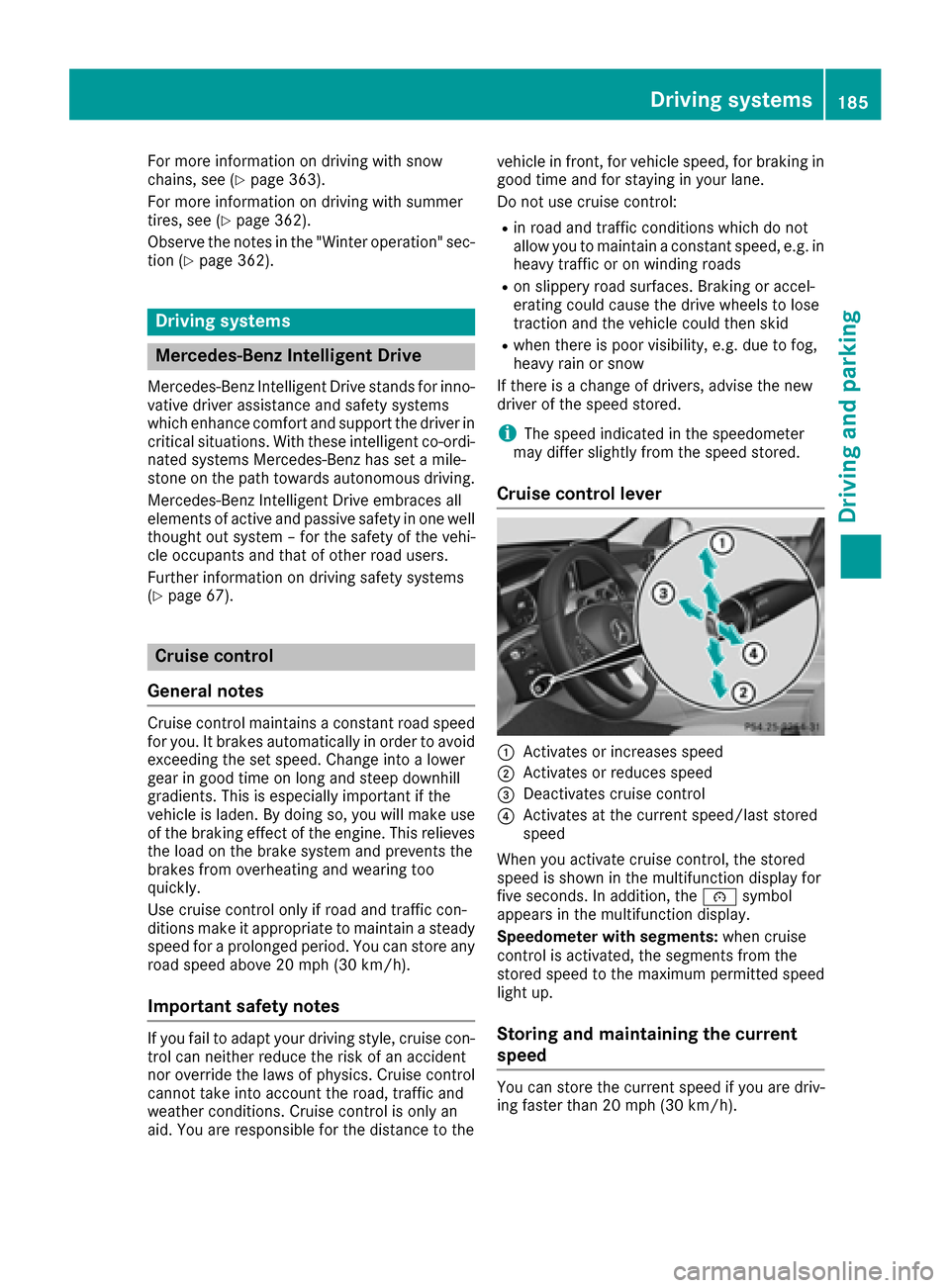
Cruise control lever
:Activates or increases speed
;Activates or reduces speed
=Deactivates cruise control
?Activates at the current speed/last stored
speed
When you activate cruise control, the stored
speed is shown in the multifunction display for
five seconds. In addition, the ésymbol
appears in the multifunction display.
Speedometer with segments: when cruise
control is activated, the segments from the
stored speed to the maximum permitted speed
light up.
Storing and maintaining the current
speed
You can store the current speed if you are driv-
ing faster than 20 mph (30 km/h).
Driving systems185
Driving and parking
Z
Page 362 of 398
Important safety notes
GWARNING
If wheels and tires of th ewrong siz eare used,
th ewhee lbrakes or suspension component s
may be damaged. Ther eis aris kof an acci-
dent.
Always replace wheels and tires wit hthose
that fulfill th especification sof th eoriginal
part .
When replacing wheels, mak esur eto use th e
correct:
Rdesignation
Rmodel
When replacing tires ,mak esur eto use th e
correct:
Rdesignation
Rmanufacturer
Rmodel
GWARNIN G
A flat tire severely impairs th edriving ,steer -
ing and braking characteristics of th evehicle.
Ther eis aris kof accident.
Tires without run-flat characteristics :
Rdo notdriv ewit h a flat tire.
Rimmediately replace th eflat tire wit hyour
emergenc yspar ewhee lor spar ewheel, or
consult aqualified specialist workshop.
Tires wit hrun-flat characteristics :
Rpay attention to theinformation and warn -
ing notice son MOExtended tires (tire swit h
run-flat characteristics).
Accessories that are no tapprove dfor your vehi-
cle by Mercedes-Ben zor are no tbein gused cor-
rectl ycan impair th eoperating safety.
Before purchasing and usin gnon-approve d
accessories, visit aqualified specialist work-
sho pand inquire about :
Rsuitability
Rlegal stipulation s
Rfactory recommendation sFurther information regarding wheels and tires
can be foun
dunder "Wheel/tire combinations"
(
Ypage 384).
You can ask for information regarding permitte d
wheel-tire combination sat an authorize d
Mercedes-Ben zCenter.
Information on tire pressur ecan be found:
Ron th eTir eand Loading Information placard
on th eB-pillar on th edriver' sside
(
Ypage 370)
Rin th etire pressur etable in th efuel filler flap
(Ypage 165)
Runder "Tir epressure" (Ypage 363)
Operation
Information on driving
Checkth etire pressur ewhen th evehicl eis
heavily laden and adjust prio rto atrip.
While driving ,pay attention to vibrations, noises
and unusual handlin gcharacteristics ,e.g. pull-
ing to on eside .This may indicat ethat th e
wheels or tires are damaged. If you suspec tthat
a tire is defective, reduce your spee dimmedi-
ately. Stop th evehicl eas soo nas possible to
chec kth ewheels and tires for damage. Hidden
tire damag ecould also be causing th eunusual
handlin gcharacteristics .If you fin dno sign sof
damage, hav eth etires and wheels checke dat a
qualified specialist workshop.
When parking your vehicle, mak esur ethat th e
tires do no tget deformed by th ecur bor other
obstacles. If they canno tbe avoided, driv eove r
obstacles suc has curbs slowly and at an obtuse
angle. Otherwise, you may damag eth ewheels
or tires .
Notes on high performance tires
GWARNIN G
Due to th especial tire tread in combination
wit hth eoptimized rubber compound ,there is
an increased ris kof hydroplaning and skid-
din gon adamp or wet road surface. tire gri pis
also noticeably reduce dat low outside tem-
peratures and low tire operating tempera-
tures. Ther eis aris kof an accident.
360Operation
Wheels and tires
Page 363 of 398
Turn on ESP®and adapt your driving style
accordingly. When the outside temperature
falls below 10 †, use M+S tires.
iDifferent driving styles may lead to high tire
wear and the tires may reach the minimum
tire tread depth after only a short time.
Regular checking of wheels and tires
GWARNING
Damaged tires can cause tire inflation pres-
sure loss. As a result, you could lose control of
your vehicle. There is a risk of accident.
Check the tires regularly for signs of damage
and replace any damaged tires immediately.
Check wheels and tires for damage at least once
a month. Check wheels and tires after driving
off-road or on rough roads. Damaged wheels
can cause a loss of tire pressure. Pay particular
attention to damage such as:
Rcuts in the tires
Rpunctures
Rtears in the tires
Rbulges on tires
Rdeformation or severe corrosion on wheels
Regularly check the tire tread depth and the
condition of the tread across the whole width of
the tire (
Ypage 361). If necessary, turn the
front wheels to full lock in order to inspect the
inner side of the tire surface.
All wheels must have a valve cap to protect the
valve against dirt and moisture. Do not mount
anything onto the valve other than the standard
valve cap or other valve caps approved by
Mercedes-Benz for your vehicle. Do not use any
other valve caps or systems, e.g. tire pressure
monitoring systems.
Regularly check the pressure of all the tires par-
ticularly prior to long trips. Adjust the tire pres-
sure as necessary (
Ypage 363).
The service life of tires depends, among other
things, on the following factors:
Rdriving style
Rtire pressure
Rdistance covered
Notes on tire tread
GWARNING
Insufficient tire tread will reduce tire traction.
The tire is no longer able to dissipate water.
This means that on wet road surfaces, the risk
of hydroplaning increases, in particular where speed is not adapted to suit the driving con-
ditions. There is a risk of accident.
If the tire pressure is too high or too low, tires
may exhibit different levels of wear at differ-
ent locations on the tire tread. Thus, you
should regularly check the tread depth and
the condition of the tread across the entire
width of all tires.
Minimum tire tread depth for:
RSummer tires: âin (3 mm)
RM+S tires: ãin (4 mm)
For safety reasons, replace the tires before
the legally prescribed limit for the minimum
tire tread depth is reached.
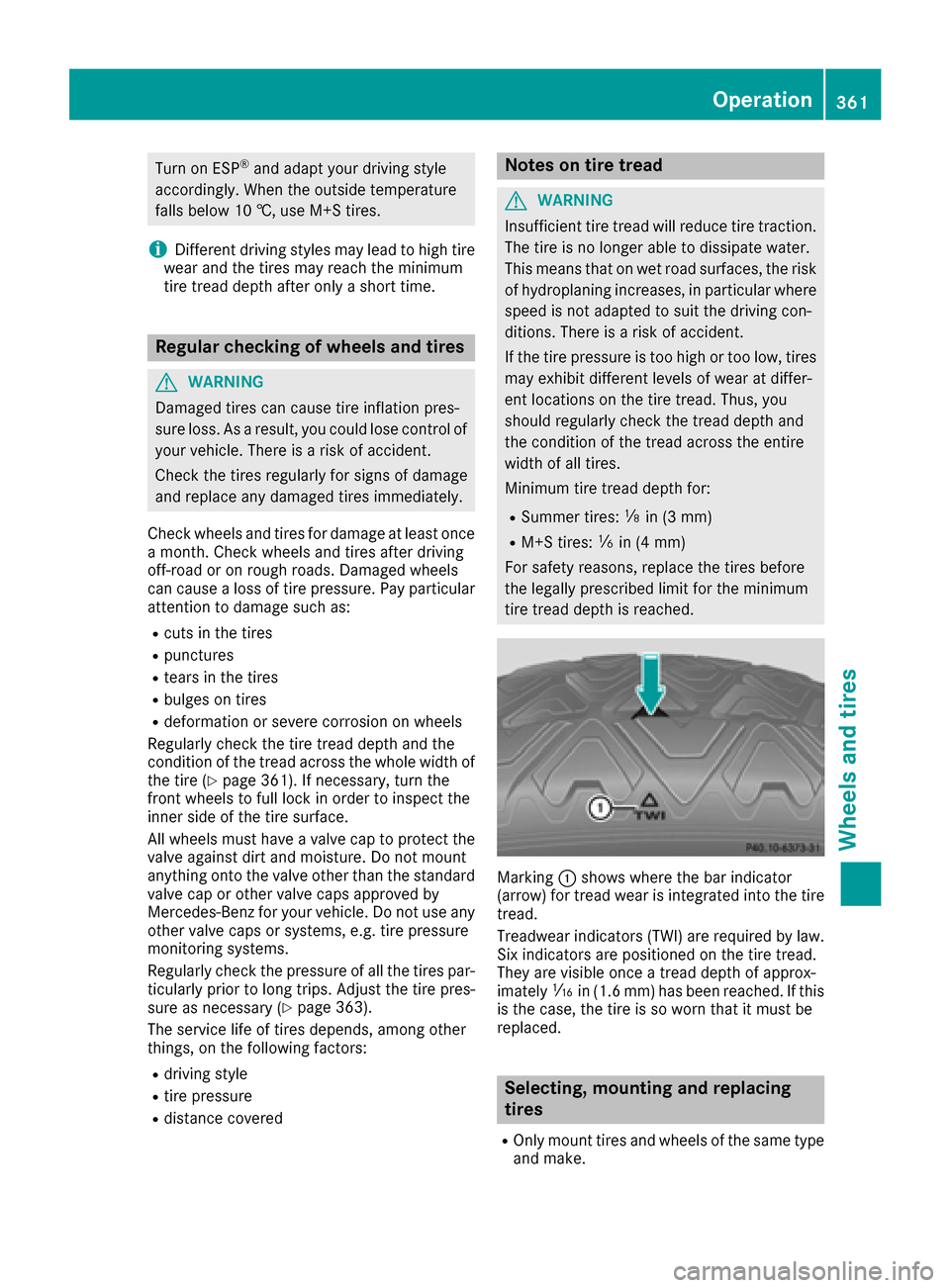
Marking :shows where the bar indicator
(arrow) for tread wear is integrated into the tire
tread.
Treadwear indicators (TWI) are required by law. Six indicators are positioned on the tire tread.
They are visible once a tread depth of approx-
imately áin (1.6 mm) has been reached. If this
is the case, the tire is so worn that it must be
replaced.
Selecting, mounting and replacing
tires
ROnly mount tires and wheels of the same type
and make.
Operation361
Wheels and tires
Z
Page 365 of 398
Snow chains
GWARNING
If snow chains are installed to the front
wheels, they may drag against the vehicle
body or chassis components. This could
cause damage to the vehicle or the tires.
There is a risk of an accident.
To avoid hazardous situations:
Rnever install snow chains to the front
wheels
Ralways install snow chains in pairs to the
rear wheels.
!Vehicles with steel wheels: if you mount
snow chains on steel wheels, you may dam-
age the hub caps. Remove the hub caps from
the relevant wheels before mounting the
snow chains.
For safety reasons, Mercedes-Benz recom-
mends that you only use snow chains that have
been specially approved for your vehicle by
Mercedes-Benz, or are of a corresponding
standard of quality. For more information,
please contact a qualified specialist workshop.
If you intend to mount snow chains, please bear
the following points in mind:
RSnow chains may not be mounted on all
wheel/tire combinations. Permissible wheel-
tire combinations (
Ypage 384).
ROnly use snow chains when driving on roads
completely covered by snow. Remove the
snow chains as soon as possible when you
come to a road that is not snow-covered.
RLocal regulations may restrict the use of snow
chains. Observe the appropriate regulations if
you wish to mount snow chains.
RDo not exceed the maximum permissible
speed of 30 mph (50 km/h).
ROn vehicles with AIRMATIC, you must drive at
raised vehicle level if snow chains have been
installed (
Ypage 196).
RWhen snow chains are installed, never use
Active Parking Assist (Ypage 202).
You may wish to deactivate ESP®when pulling
away with snow chains installed:
RAll vehicles (except Mercedes ‑AMG vehicles)
(Ypage 74)
RMercedes‑AMG vehicles (Ypage 74) You can thereby allow the wheels to spin in a
controlled manner, achieving an increased driv-
ing force (cutting action).
Tire pressure
Tire pressure specifications
Important safety notes
GWARNING
Underinflated or overinflated tires pose the
following risks:
Rthe tires may burst, especially as the load
and vehicle speed increase.
Rthe tires may wear excessively and/or
unevenly, which may greatly impair tire
traction.
Rthe driving characteristics, as well as steer-
ing and braking, may be greatly impaired.
There is a risk of an accident.
Follow recommended tire inflation pressures
and check the pressure of all the tires includ-
ing the spare wheel:
Rmonthly, at least
Rif the load changes
Rbefore beginning a long journey
Runder different operating conditions, e.g.
off-road driving
If necessary, correct the tire pressure.
The data on the Tire and Loading Information
placard and tire pressure table shown here are
examples. Tire pressure specifications are vehi-
cle-specific and may deviate from the data
shown here. The tire pressure specifications
that are valid for your vehicle can be found on
the Tire and Loading Information placard and
tire pressure table on the vehicle.
General notes
The recommended tire pressures for the tires
mounted at the factory can be found on the
labels described here.
Further information on tire pressures can be
obtained at a qualified specialist workshop.
Tire pressure363
Wheels and tires
Z
Page 368 of 398
Overinflated tires may:
Rincrease the braking distance
Radversely affect handling
Rwear excessively and/or unevenly
Rhave an adverse effect on ride comfort
Rbe more susceptible to damage
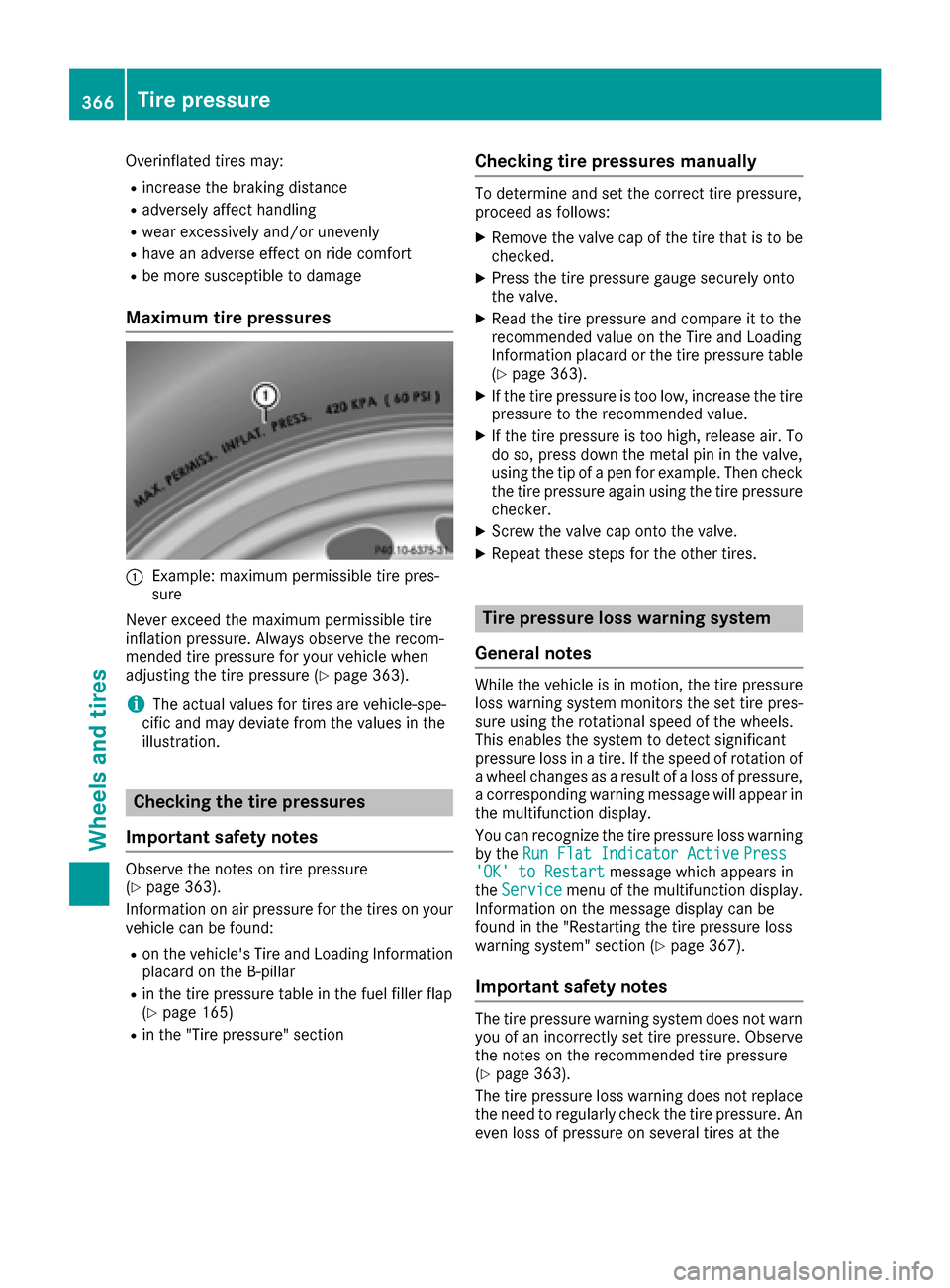
Maximum tire pressures
:Example: maximum permissible tire pres-
sure
Never exceed the maximum permissible tire
inflation pressure. Always observe the recom-
mended tire pressure for your vehicle when
adjusting the tire pressure (
Ypage 363).
iThe actual values for tires are vehicle-spe-
cific and may deviate from the values in the
illustration.
Checking the tire pressures
Important safety notes
Observe the notes on tire pressure
(Ypage 363).
Information on air pressure for the tires on your
vehicle can be found:
Ron the vehicle's Tire and Loading Information
placard on the B-pillar
Rin the tire pressure table in the fuel filler flap
(Ypage 165)
Rin the "Tire pressure" section
Checking tire pressures manually
To determine and set the correct tire pressure,
proceed as follows:
XRemove the valve cap of the tire that is to be
checked.
XPress the tire pressure gauge securely onto
the valve.
XRead the tire pressure and compare it to the
recommended value on the Tire and Loading
Information placard or the tire pressure table (
Ypage 363).
XIf the tire pressure is too low, increase the tire
pressure to the recommended value.
XIf the tire pressure is too high, release air. To
do so, press down the metal pin in the valve,
using the tip of a pen for example. Then check
the tire pressure again using the tire pressure
checker.
XScrew the valve cap onto the valve.
XRepeat these steps for the other tires.
Tire pressure loss warning system
General notes
While the vehicle is in motion, the tire pressure
loss warning system monitors the set tire pres-
sure using the rotational speed of the wheels.
This enables the system to detect significant
pressure loss in a tire. If the speed of rotation of
a wheel changes as a result of a loss of pressure,
a corresponding warning message will appear in
the multifunction display.
You can recognize the tire pressure loss warning
by the Run Flat Indicator Active
Press'OK' to Restartmessage which appears in
the Servicemenu of the multifunction display.
Information on the message display can be
found in the "Restarting the tire pressure loss
warning system" section (
Ypage 367).
Important safety notes
The tire pressure warning system does not warn you of an incorrectly set tire pressure. Observe
the notes on the recommended tire pressure
(
Ypage 363).
The tire pressure loss warning does not replace
the need to regularly check the tire pressure. An
even loss of pressure on several tires at the
366Tire pressure
Wheels and tires