Washer MERCEDES-BENZ C-Class SEDAN 2016 W205 Owner's Manual
[x] Cancel search | Manufacturer: MERCEDES-BENZ, Model Year: 2016, Model line: C-Class SEDAN, Model: MERCEDES-BENZ C-Class SEDAN 2016 W205Pages: 398, PDF Size: 9.57 MB
Page 7 of 398
Battery (SmartKey)Checking .......................................... 84
Important safety notes .................... 84
Replacing ......................................... 84
Battery (vehicle)
Charging ........................................ 350
Display message ............................ 269
Important safety notes .................. 347
Jump starting ................................. 352
Belt
see Seat belts
Blind Spot Assist
Activating/deactivating (on-
board computer) ............................ 248
Display message ............................ 276
Notes/function .............................. 216
see Active Blind Spot Assist
Bluetooth
®
Connecting another mobile
phone ............................................ 306
Searching for a mobile phone ........ 306
see also Digital Operator's Man-
ual .................................................. 298
Telephony ...................................... 305
Box (trunk) ......................................... 314
Brake Assist
see BAS (Brake Assist System)
Brake fluid
Display message ............................ 261
Notes ............................................. 392
Brake force distribution
see EBD (electronic brake force
distribution)
Brake pedal
Pedal resistance/pedal travel .......... 45
Brakes
ABS .................................................. 68
Adaptive Brake Assist ...................... 72
BAS .................................................. 68
BAS PLUS with Cross-Traffic
Assist ............................................... 69
Brake fluid (notes) ......................... 392
Display message ............................ 256
EBD .................................................. 76
High-performance brake system .... 183
Hill start assist ............................... 150
HOLD function ............................... 194
Important safety notes .................. 182 Maintenance .................................. 183
Parking brake ................................ 178
RBS warning lamp .......................... 288
Recuperative Brake System ............. 45
Riding tips ...................................... 182
Warning lamp ................................. 288
Breakdown
Where will I find...? ........................ 342
see Flat tire
see Towing away
Brightness control (instrument
cluster lighting) ................................... 35
Buttons on the steering wheel ......... 236
C
California
Important notice for retail cus-
tomers and lessees .......................... 28
Calling up a malfunction
see Display messages
Calling up the climate control bar
Multimedia system ........................ 302
Calling up the climate control
menu
Multimedia system ........................ 302
Car
see Vehicle
Care
360° camera ................................. 339
AIRPANEL ...................................... 339
Car wash ........................................ 335
Carpets .......................................... 341
Display ........................................... 340
Exhaust pipe .................................. 340
Exterior lights ................................ 338
Gear or selector lever .................... 340
General notes ................................ 335
Interior ........................................... 340
Matte finish ................................... 337
Paint .............................................. 337
Plastic trim .................................... 340
Power washer ................................ 336
Rear view camera .......................... 339
Roof lining ...................................... 341
Seat belt ........................................ 341
Seat cover ..................................... 341
Sensors ......................................... 339
Index5
Page 18 of 398
Parking lampsSwitching on/off ........................... 119
PARKTRONIC
Deactivating/activating ................. 201
Driving system ...............................1 99
Function/notes .............................1 99
Important safety notes .................. 199
Problem (malfunction) ................... 202
Range of the sensors ..................... 199
Warning display ............................. 200
PASSENGER AIR BAG
Display message ............................ 265
Indicator lamps ................................ 47
Problems (malfunction) .................. 265
Perfume atomizer
Operating ....................................... 138
Problem (malfunction) ................... 140
Setting the perfume intensity
(multimedia system) ...................... 303
Vial ................................................ 138
Pets in the vehicle ............................... 67
Phone book
see also Digital Operator's Man-
ual .................................................. 298
Plastic trim (cleaning instruc-
tions) .................................................. 340
PLUG-IN HYBRID operating
Electrical energy generated ........... 228
PLUG-IN HYBRID operation
Automatic engine start (ECO
start/stop function) ....................... 232
Automatic engine switch-off (ECO
start/stop function) ....................... 231
Charge level of the high-voltage
battery ........................................... 227
Displaying the total range and
electric range ................................. 228
Driving tips .................................... 230
DYNAMIC SELECT switch .............. 229
ECO start/stop function ................ 231
Electric motor (power display) ....... 225
Electrical energy generated
(Audio 20) ...................................... 228
Electrical energy generated
(COMAND) ..................................... 228
Energy flow display ........................ 227
Fuel consumption .......................... 228
Fuel consumption (Audio 20) ......... 228 Fuel consumption (COMAND) ........ 228
General notes ................................ 224
Haptic accelerator pedal ................ 230
High-voltage battery (condition of
cha
rge) .......................................... 227
HY
BRID menu ................................ 248
Important safety notes .................. 225
Instrument cluster (power dis-
play) ............................................... 225
Noiseless start ............................... 228
Operating (on-board computer) ..... 227
Operating mode ............................. 226
Overrun mode ................................ 232
Parking .......................................... 232
Power display (electric motor) ....... 225
Problems with SRS (supplemental
restraint system) ............................ 234
Problems with the combustion
engine ............................................ 233
Problems with the hybrid drive
system ........................................... 234
Problems with the Recuperative
Brake System ................................ 233
Pulling away ................................... 228
READY display ............................... 228
Recuperative Brake System ........... 225
Resetting the values (Audio 20) ..... 228
Resetting the values (COMAND) .... 228
Route-based operating strategy ..... 232
Shifting manually ........................... 229
Starting .......................................... 228
When the vehicle is stationary ....... 230
Power washers .................................. 336
Power windows
see Side windows
Pre-entry climate control (via
SmartKey)
Problems (malfunctions) ................ 142
Pre-entry climate control at depar-
ture time
General notes ................................ 142
Pre-entry climate control at time of
departure
Setting departure time ................... 143
Pre-entry climate control via key
General notes ................................ 141
16Index
Page 21 of 398
Storing settings (memory func-
tion) ............................................... 116
Switching seat heating on/off ....... 108
Switching seat ventilation on/
off .................................................. 109
Securing a load
see Securing cargo
Securing cargo .................................. 313
Selector lever
Cleaning ......................................... 340
see Automatic transmission
Sensors (cleaning instructions) ....... 339
Service menu (on-board com-
puter) .................................................. 246
Service message
see ASSYST PLUS
Service products
Brake fluid ..................................... 392
Coolant (engine) ............................ 392
Engine oil ....................................... 391
Fuel ................................................ 388
Important safety notes .................. 388
Refrigerant (air-conditioning sys-
tem) ............................................... 393
Washer fluid ................................... 393
Setting the charge current (on-
board computer) ............................... 248
Setting the date/time format
see also Digital Operator's Man-
ual .................................................. 298
Setting the departure time (on-
board computer) ............................... 249
Setting the language
see also Digital Operator's Man-
ual .................................................. 298
Setting the time
see also Digital Operator's Man-
ual .................................................. 298
Settings
Factory (on-board computer) ......... 252
On-board computer ....................... 247
SETUP (on-board computer) ............. 253
Side impact air bag ............................. 53
Side marker lamp (display mes-
sage) ................................................... 267
Side windows
Cleaning ......................................... 338 Convenience closing feature ............ 96
Convenience opening feature .......... 96
Important safety information ........... 94
Opening/closing .............................. 95
Problem (malfunction) ..................... 98
Resetting ......................................... 97
Reversing feature ............................. 95
SIRIUS services
see also Digital Operator's Man-
ual .................................................. 298
Ski and snowboard bag .................... 310
Sliding sunroof
Opening/ closi
ng .............................. 99
Resetting ....................................... 100
see Panorama roof with power
tilt/sliding panel
SmartKey
Changing the battery ....................... 84
Changing the programming ............. 83
Checking the battery ....................... 84
Convenience closing feature ............ 96
Convenience opening feature .......... 96
Display message ............................ 285
Door central locking/unlocking ....... 81
Important safety notes .................... 81
KEYLESS-GO start function .............. 83
Loss ................................................. 86
Mechanical key ................................ 83
Overview .......................................... 81
Positions (ignition lock) ................. 146
Problem (malfunction) ..................... 86
Starting the engine ........................ 148
Smartphone
Starting the engine ........................ 149
SMS
see also Digital Operator's Man-
ual .................................................. 298
Snow chains ...................................... 363
Socket (12 V)
Center console .............................. 319
General notes ................................ 319
Rear compartment ......................... 319
Sound
Switching on/off ........................... 299
Special seat belt retractor .................. 62
Specialist workshop ............................ 31
Speed, controlling
see Cruise control
Index19
Page 26 of 398
Seat belt ........................................ 287
SPORT handling mode ................... 292
Steering ......................................... 297
Tire pressure monitor .................... 296
Warranty .............................................. 28
Washer fluid
Display message ............................ 285
Wheel and tire combinations
Tires ............................................... 384
Wheel bolt tightening torque ........... 384
Wheel chock ...................................... 380
Wheels
Changing a wheel .......................... 379
Checking ........................................ 361
Cleaning ......................................... 338
Important safety notes .................. 360
Information on driving .................... 360
Interchanging/changing ................ 379
Mounting a new wheel ................... 383
Mounting a wheel .......................... 380
Removing a wheel .......................... 383
Snow chains .................................. 363
Storing ........................................... 380
Tightening torque ........................... 384
Wheel size/tire size ....................... 384
Window curtain air bag
Display message ............................ 264
Operation ......................................... 54
Windows
see Side windows
Windshield
Defrosting ...................................... 135
Windshield washer fluid
see Windshield washer system
Windshield washer system
Adding washer fluid ....................... 333
Important safety notes .................. 393
Windshield wipers
Problem (malfunction) ................... 128
Replacing the wiper blades ............ 126
Switching on/off ........................... 125
Winter driving
Important safety notes .................. 362
Slippery road surfaces ................... 184
Snow chains .................................. 363
Winter operation
Radiator cover ............................... 331
Summer tires ................................. 362 Winter tires
M+S tires ....................................... 362
Wiper blades
Cleaning ......................................... 338
Important safety notes .................. 126
Replacing ....................................... 126
Replacing (windshield) ................... 126
Wooden trim (cleaning instruc-
tions) .................................................. 340
Workshop
see Qualified specialist workshop
24Index
Page 94 of 398
Vehicles with trunk lid remote closing fea-
ture and KEYLESS-GO:when the driver's door
is closed you can simultaneously close the trunk
lid and lock the vehicle. The KEYLESS-GO key
must be in the rear detection range of the vehi-
cle.
XPress locking button ;in the trunk lid.
If KEYLESS-GO detects a SmartKey outside
the vehicle, the trunk lid closes. The vehicle is locked.
If KEYLESS-GO detects a SmartKey in the trunk,
the trunk lid opens again after it is closed.
If KEYLESS-GO detects a second SmartKey out-
side the vehicle, the trunk lid remains closed.
If KEYLESS-GO detects a SmartKey in the trunk
before the closing procedure starts, the trunk lid
remains open.
HANDS-FREE ACCESS
Important safety notes
GWARNING
The vehicle's exhaust system may be very hot. You could burn yourself by touching the
exhaust system if you use HANDS-FREE
ACCESS. There is a risk of injury. Always
ensure that you only make the kicking move-
ment within the detection range of sensors.
!If the SmartKey is within the rear detection
range of KEYLESS-GO, the following situa-
tions, for example, could lead to the uninten-
tional opening of the trunk:
Rusing a car wash
Rusing a power washer
Make sure that the SmartKey is at least 10 ft
(3 m) away from the vehicle.
General notes
With KEYLESS-GO and HANDS-FREE ACCESS,
you can open or close the trunk lid or stop the
procedure without using your hands. This is use- ful if you have your hands full. To do this, make
a kicking movement under the bumper with your
foot. Observe the following points:
RCarry your KEYLESS-GO key about your per-
son. The KEYLESS-GO key must be in the rear
detection range of the vehicle.
RWhen making the kicking movement, make
sure that you are standing firmly on the
ground and that there is sufficient clearance
to the rear of the vehicle. You could otherwise
lose your balance e.g. on ice.
RAlways ensure that you only make the kicking
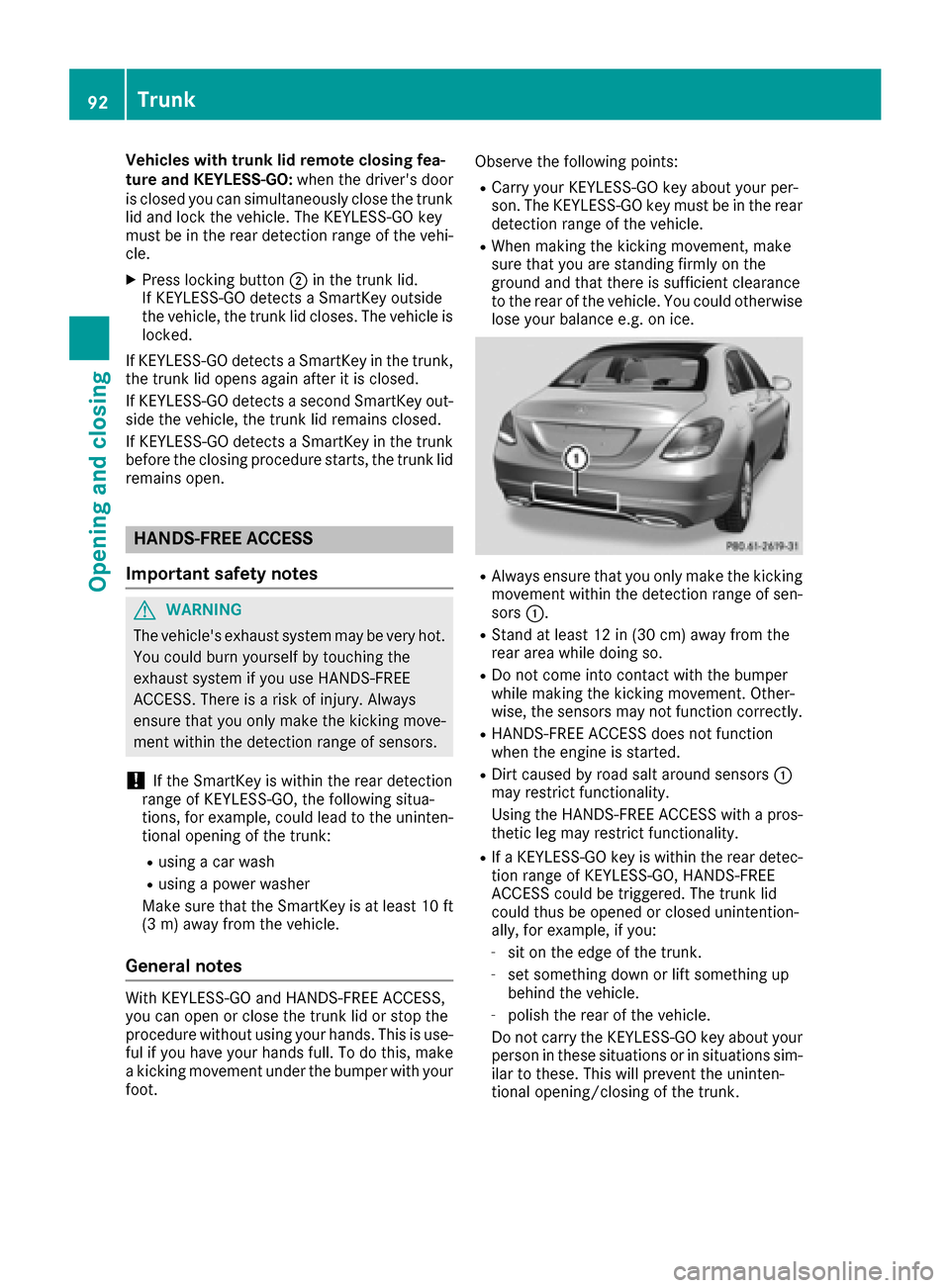
movement within the detection range of sen-
sors
:.
RStand at least 12 in (30 cm) away from the
rear area while doing so.
RDo not come into contact with the bumper
while making the kicking movement. Other-
wise, the sensors may not function correctly.
RHANDS-FREE ACCESS does not function
when the engine is started.
RDirt caused by road salt around sensors :
may restrict functionality.
Using the HANDS-FREE ACCESS with a pros-
thetic leg may restrict functionality.
RIf a KEYLESS-GO key is within the rear detec-
tion range of KEYLESS-GO, HANDS-FREE
ACCESS could be triggered. The trunk lid
could thus be opened or closed unintention-
ally, for example, if you:
-sit on the edge of the trunk.
-set something down or lift something up
behind the vehicle.
-polish the rear of the vehicle.
Do not carry the KEYLESS-GO key about your
person in these situations or in situations sim-
ilar to these. This will prevent the uninten-
tional opening/closing of the trunk.
92Trunk
Opening and closing
Page 127 of 398
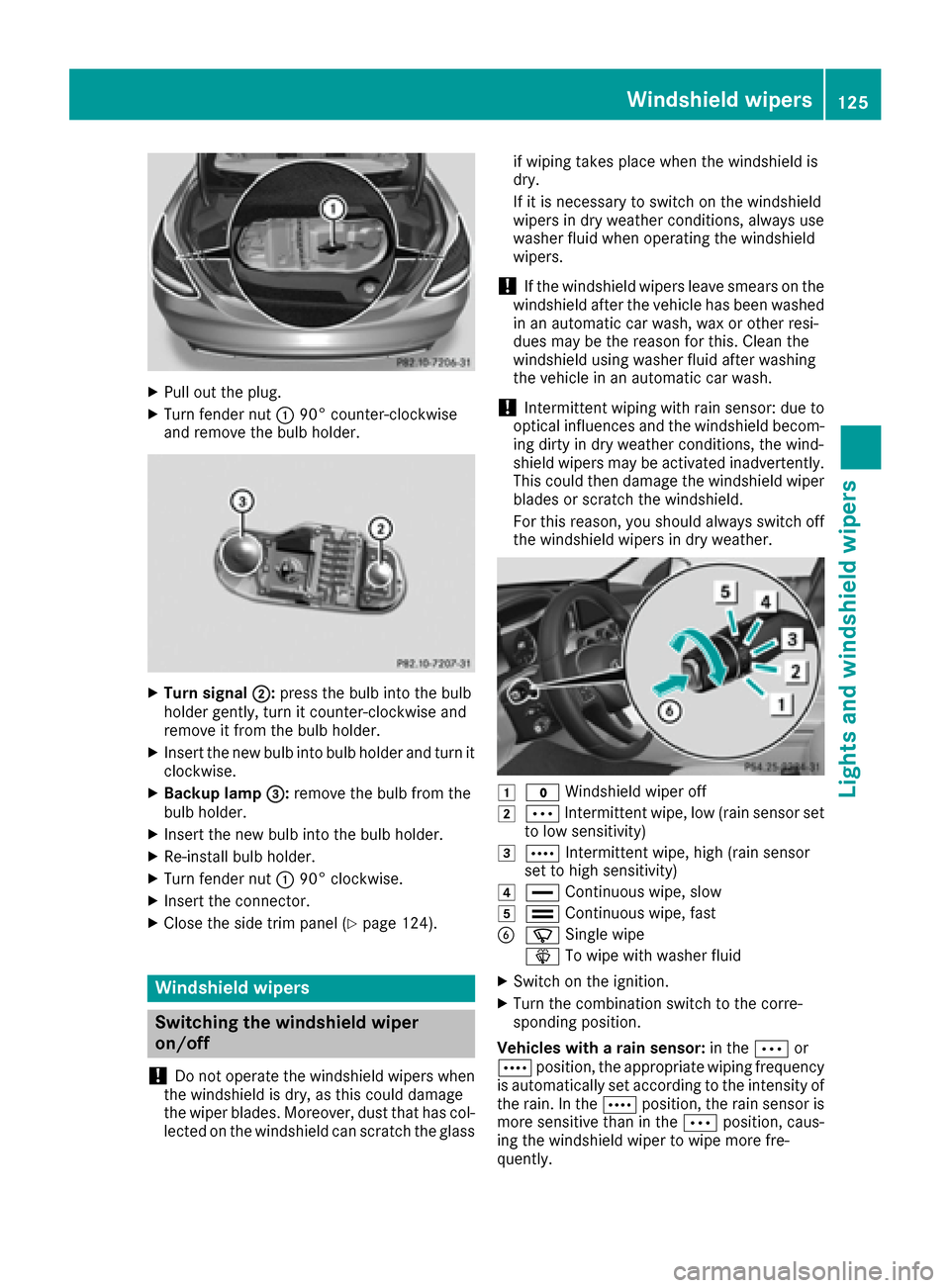
XPull out the plug.
XTurn fender nut:90° counter-clockwise
and remove the bulb holder.
XTurn signal ;:press the bulb into the bulb
holder gently, turn it counter-clockwise and
remove it from the bulb holder.
XInsert the new bulb into bulb holder and turn it
clockwise.
XBackup lamp =:remove the bulb from the
bulb holder.
XInsert the new bulb into the bulb holder.
XRe-install bulb holder.
XTurn fender nut :90° clockwise.
XInsert the connector.
XClose the side trim panel (Ypage 124).
Windshield wipers
Switching the windshield wiper
on/off
!
Do not operate the windshield wipers when
the windshield is dry, as this could damage
the wiper blades. Moreover, dust that has col-
lected on the windshield can scratch the glass if wiping takes place when the windshield is
dry.
If it is necessary to switch on the windshield
wipers in dry weather conditions, always use
washer fluid when operating the windshield
wipers.
!If the windshield wipers leave smears on the
windshield after the vehicle has been washed
in an automatic car wash, wax or other resi-
dues may be the reason for this. Clean the
windshield using washer fluid after washing
the vehicle in an automatic car wash.
!Intermittent wiping with rain sensor: due to
optical influences and the windshield becom-
ing dirty in dry weather conditions, the wind-
shield wipers may be activated inadvertently.
This could then damage the windshield wiper
blades or scratch the windshield.
For this reason, you should always switch off
the windshield wipers in dry weather.
1$ Windshield wiper off
2ÄIntermittent wipe, low (rain sensor set
to low sensitivity)
3Å Intermittent wipe, high (rain sensor
set to high sensitivity)
4° Continuous wipe, slow
5¯Continuous wipe, fast
BíSingle wipe
î To wipe with washer fluid
XSwitch on the ignition.
XTurn the combination switch to the corre-
sponding position.
Vehicles with a rain sensor: in theÄor
Å position, the appropriate wiping frequency
is automatically set according to the intensity of
the rain. In the Åposition, the rain sensor is
more sensitive than in the Äposition, caus-
ing the windshield wiper to wipe more fre-
quently.
Windshield wipers125
Lights and windshield wipers
Z
Page 130 of 398
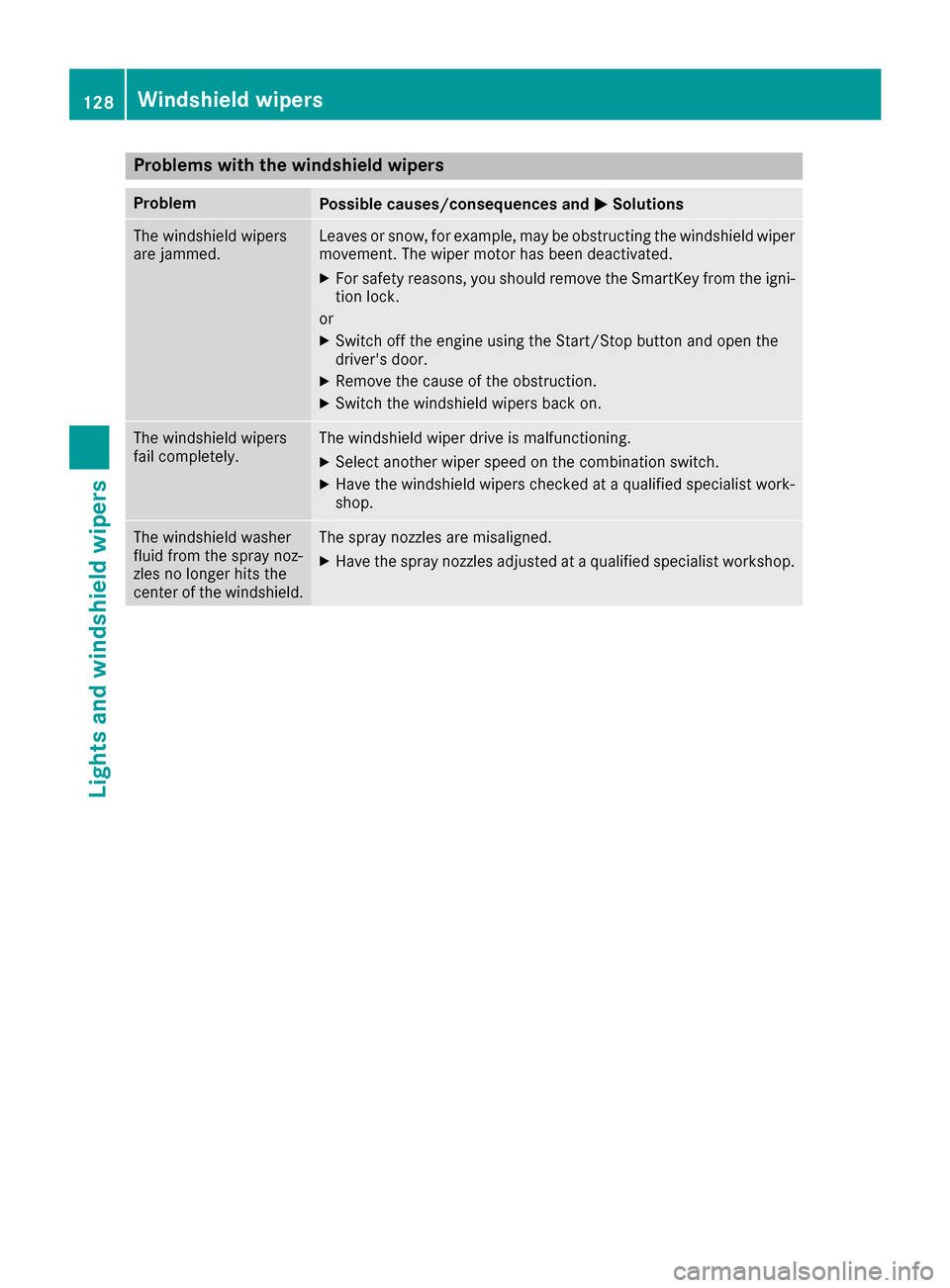
Problems with the windshield wipers
ProblemPossible causes/consequences andMSolutions
The windshield wipers
are jammed.Leaves or snow, for example, may be obstructing the windshield wiper
movement. The wiper motor has been deactivated.
XFor safety reasons, you should remove the SmartKey from the igni-
tion lock.
or
XSwitch off the engine using the Start/Stop button and open the
driver's door.
XRemove the cause of the obstruction.
XSwitch the windshield wipers back on.
The windshield wipers
fail completely.The windshield wiper drive is malfunctioning.
XSelect another wiper speed on the combination switch.
XHave the windshield wipers checked at a qualified specialist work-
shop.
The windshield washer
fluid from the spray noz-
zles no longer hits the
center of the windshield.The spray nozzles are misaligned.
XHave the spray nozzles adjusted at a qualified specialist workshop.
128Windshield wipers
Lights and windshield wipers
Page 287 of 398
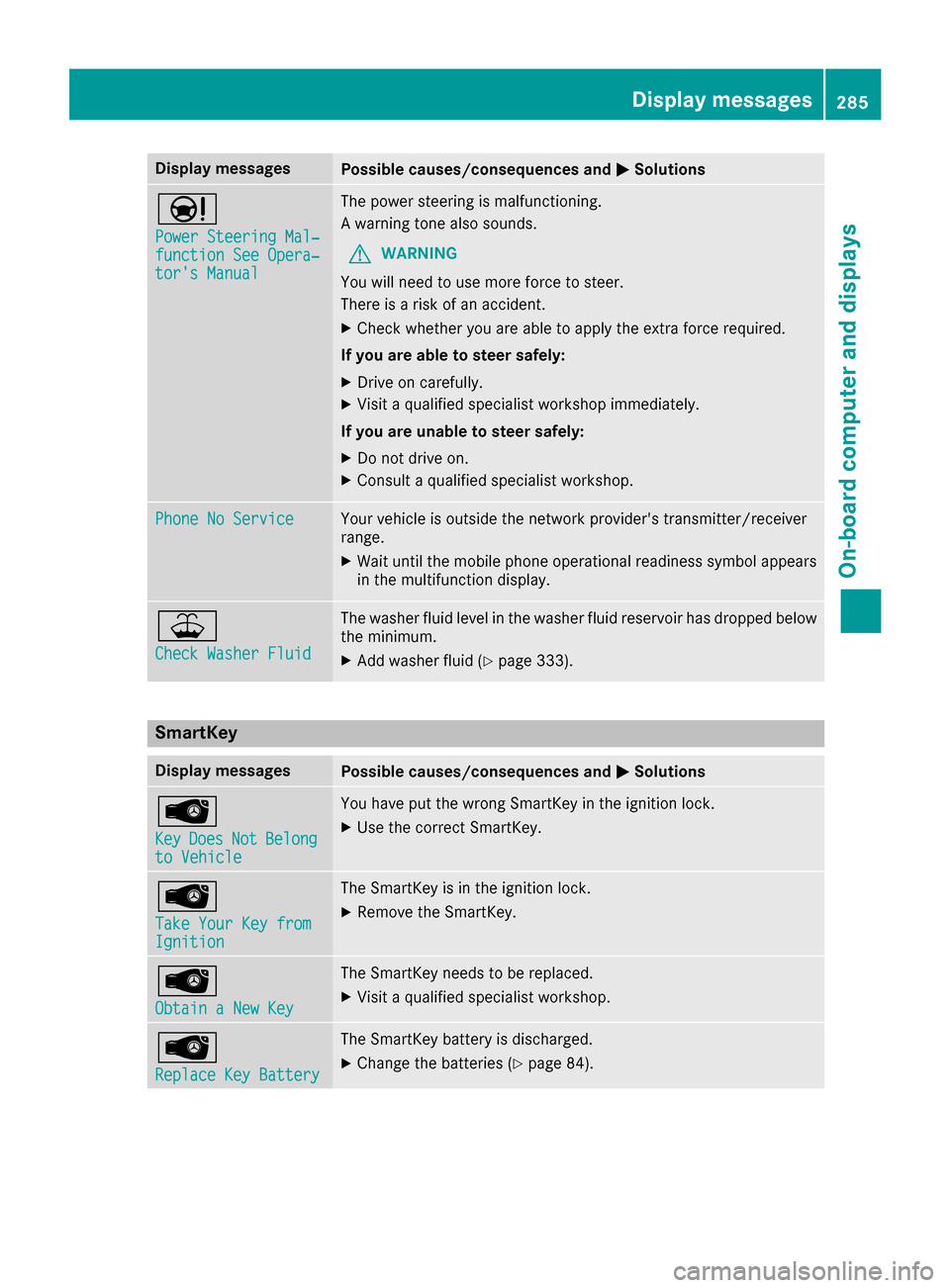
Display messagesPossible causes/consequences andMSolutions
Ð
Power Steering Mal‐function See Opera‐tor's Manual
The powersteering is malfunctioning .
A warning tone also sounds.
GWARNIN G
You will need to use mor eforce to steer .
There is aris kof an accident.
XChec kwhether you are able to apply th eextr aforce required.
If you ar eabl eto steer safely:
XDrive on carefully.
XVisit aqualified specialist workshop immediately.
If you ar eunable to steer safely:
XDo no tdrive on .
XConsult aqualified specialist workshop .
Phone No ServiceYour vehicleis outside th enetwork provider' stransmitter/receiver
range.
XWait until th emobile phone operational readiness symbol appear s
in th emultifunction display.
¥
Check Washer Fluid
The washer flui dlevel in th ewasher flui dreservoir has dropped belo w
th eminimum .
XAddwasher flui d (Ypage 333).
SmartKey
Display messagesPossible causes/consequences and MSolutions
Â
KeyDoesNotBelongto Vehicl e
You haveput th ewrong SmartKey in th eignition lock.
XUse th ecorrec tSmartKey.
Â
Tak eYou rKey fro mIgnition
The SmartKey is in th eignition lock.
XRemove th eSmartKey.
Â
Obtain aNew Key
The SmartKey needs to be replaced.
XVisit aqualified specialist workshop .
Â
ReplaceKey Batter y
The SmartKey battery is discharged.
XChange thebatterie s (Ypage 84) .
Display messages285
On-board computer and displays
Z
Page 335 of 398
Let the engine cool down before you open the
cap. Wear gloves and eye protection. Slowly
open the cap to relieve pressure.
GWARNING
Windshield washer concentrate could ignite if it comes into contact with hot engine compo-
nents or the exhaust system. There is a risk of
fire and injury.
Make sure that no windshield washer con-
centrate is spilled next to the filler neck.
Checking coolant level
XPark the vehicle on a level surface.
Only check the coolant level when the vehicle
is on a level surface and the engine has cooled
down.
XTurn the SmartKey to position 2in the ignition
lock (Ypage 146).
or
XOn vehicles with KEYLESS-GO, press the
Start/Stop button twice (Ypage 146).
XCheck the coolant temperature display in the
instrument cluster (Ypage 236).
The coolant temperature must be below
158 ‡ (70 †).
XTurn the SmartKey to position 0in the ignition
lock (Ypage 146).
or
XOn vehicles with KEYLESS-GO, pull the Start/
Stop button from the ignition lock
(
Ypage 146).
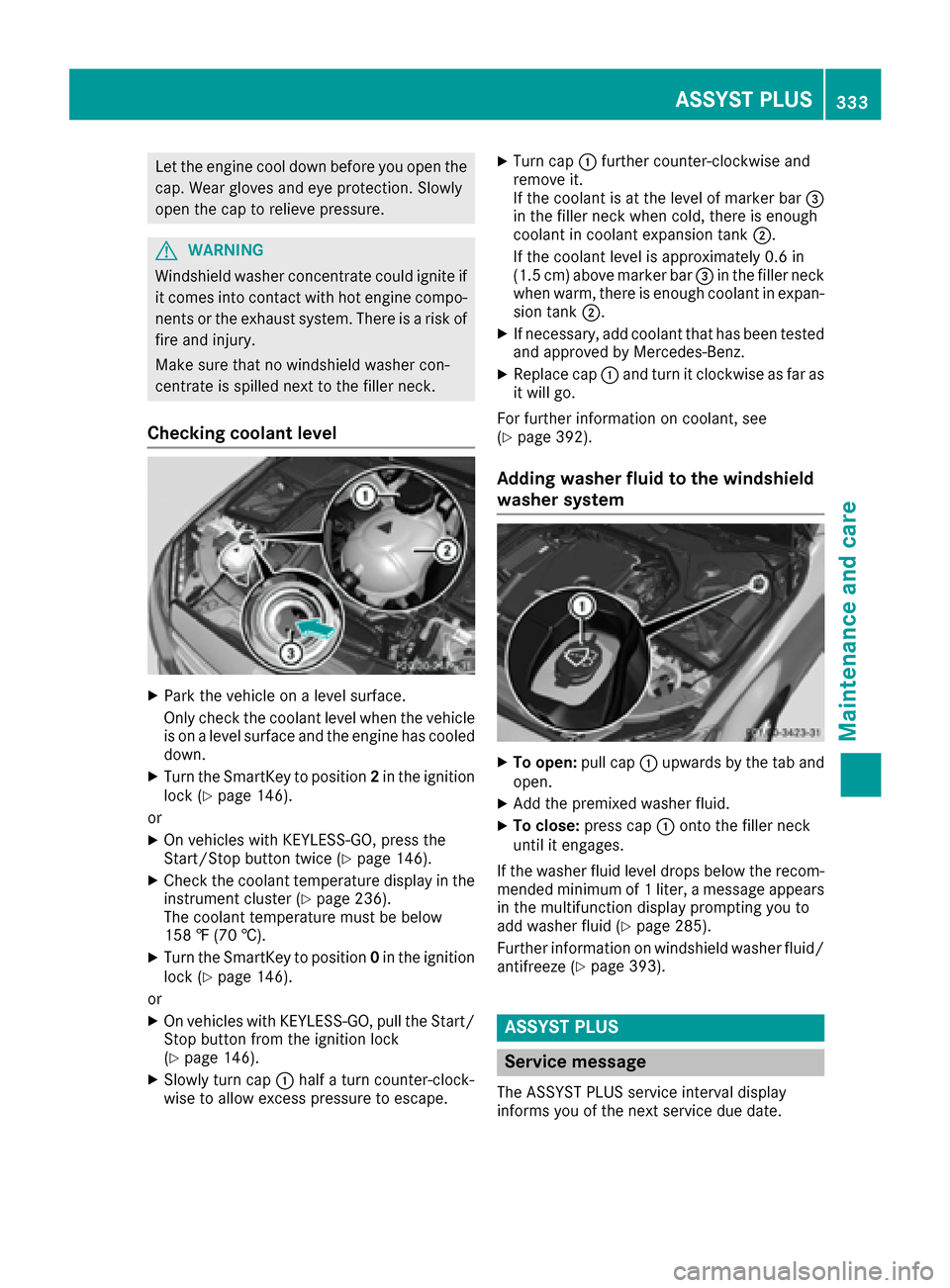
XSlowly turn cap :half a turn counter-clock-
wise to allow excess pressure to escape.
XTurn cap :further counter-clockwise and
remove it.
If the coolant is at the level of marker bar =
in the filler neck when cold, there is enough
coolant in coolant expansion tank ;.
If the coolant level is approximately 0.6 in
(1.5 cm) above marker bar =in the filler neck
when warm, there is enough coolant in expan-
sion tank ;.
XIf necessary, add coolant that has been tested
and approved by Mercedes-Benz.
XReplace cap :and turn it clockwise as far as
it will go.
For further information on coolant, see
(
Ypage 392).
Adding washer fluid to the windshield
washer system
XTo open: pull cap:upwards by the tab and
open.
XAdd the premixed washer fluid.
XTo close: press cap :onto the filler neck
until it engages.
If the washer fluid level drops below the recom-
mended minimum of 1 liter, a message appears
in the multifunction display prompting you to
add washer fluid (
Ypage 285).
Further information on windshield washer fluid/
antifreeze (
Ypage 393).
ASSYST PLUS
Service message
The ASSYST PLUS service interval display
informs you of the next service due date.
ASSYST PLUS333
Maintenance and care
Z
Page 337 of 398
Drivingabroad
An extensive Mercedes-Ben zServic enetwor kis
also available in other countries. You can obtain
further information from any authorized
Mercedes-Ben zCenter.
Car e
General notes
HEnvironmental not e
Dispose of empty packagin gand cleanin g
cloths in an environmentally responsible man -
ner.
!Fo rcleanin gyour vehicle, do no tuse any of
th efollowing:
Rdry, rough or har dcloths
Rabrasiv ecleanin gagents
Rsolvents
Rcleanin gagents containin gsolvents
Do no tscrub .
Do no ttouch th esurfaces or protective films
wit hhar dobjects ,e.g. arin gor ic escraper.
You could otherwise scratch or damage th e
surfaces and protective film.
!Do no tpar kth evehicle fo ran extended
period straight after cleanin git,particularly
after havin gcleaned th ewheels wit hwhee l
cleaner. Wheel cleaners could cause
increase dcorrosion of th ebrake discs and
brake pads/linings. Fo rthis reason ,you
should drive fo r afew minutes after cleaning.
Brakin gheat sth ebrake discs and th ebrake
pads/linings, thus drying them. The vehicle
can then be parked.
Regular car eof your vehicle is acondition fo r
retainin gth equalit yin th elon gterm .
Use car eproducts and cleanin gagents recom -
mended and approved by Mercedes-Benz.
Washing th evehicle an dcleaning th e
paintwor k
Automatic car was h
GWARNING
Brakin gefficiency is reduce dafter washin g
th evehicle. There is aris kof an accident.
Afte rth evehicle has bee nwashed, brake
carefully whil epayin gattention to th etraffic
condition suntil full braking powe ris restored .
!If DISTRONIC PLU Sor th eHOLD function is
activated, th evehicle brake sautomatically in
certain situations.
To preven tdamage to th evehicle, deactivat e
DISTRONIC PLU Sand th eHOLD function in
th efollowin gor other similar situations:
Rwhen towin gth evehicle
Rin th ecar wash
!Never clean your vehicle in aTouchless
Automatic Car Wash as these use special
cleanin gagents .These cleanin gagents can
damage th epaintwor kor plasti cparts .
!Makesur ethat :
Rthesid ewindows and th eslidin gsunroof
are full yclosed.
Rth eventilation/heatin gis switched of f(the
OF Fbutto nhas bee npressed).
Rth ewindshield wipe rswitch is at position 0.
Rthe360° camera or rea rvie wcamera is
switched off.
The vehicle may otherwise be damaged .
!If theSmartKey is within th erea rdetection
range of KEYLESS-GO ,th efollowin gsitua-
tions, fo rexample, co uld l
ead to th
euninten -
tional opening of th etrunk :
Rusing acar wash
Rusin g apowe rwasher
Mak esur ethat th eSmartKey is at leas t10 ft
(3 m) away from th evehicle.
!Mak esur ethat th eautomatic transmissio n
is in neutral position Nwhen washin gyour
vehicle in atow-through car wash .The vehicle
may otherwise be damaged .
ROperatingwit hth eSmartKey:
Do no tremov eth eSmartKey from th eigni-
tion lock. Do no tope nth edriver's doo r
Care335
Maintenance and care
Z