interior lighting MERCEDES-BENZ C-Class SEDAN 2016 W205 Owner's Manual
[x] Cancel search | Manufacturer: MERCEDES-BENZ, Model Year: 2016, Model line: C-Class SEDAN, Model: MERCEDES-BENZ C-Class SEDAN 2016 W205Pages: 398, PDF Size: 9.57 MB
Page 7 of 398
Battery (SmartKey)Checking .......................................... 84
Important safety notes .................... 84
Replacing ......................................... 84
Battery (vehicle)
Charging ........................................ 350
Display message ............................ 269
Important safety notes .................. 347
Jump starting ................................. 352
Belt
see Seat belts
Blind Spot Assist
Activating/deactivating (on-
board computer) ............................ 248
Display message ............................ 276
Notes/function .............................. 216
see Active Blind Spot Assist
Bluetooth
®
Connecting another mobile
phone ............................................ 306
Searching for a mobile phone ........ 306
see also Digital Operator's Man-
ual .................................................. 298
Telephony ...................................... 305
Box (trunk) ......................................... 314
Brake Assist
see BAS (Brake Assist System)
Brake fluid
Display message ............................ 261
Notes ............................................. 392
Brake force distribution
see EBD (electronic brake force
distribution)
Brake pedal
Pedal resistance/pedal travel .......... 45
Brakes
ABS .................................................. 68
Adaptive Brake Assist ...................... 72
BAS .................................................. 68
BAS PLUS with Cross-Traffic
Assist ............................................... 69
Brake fluid (notes) ......................... 392
Display message ............................ 256
EBD .................................................. 76
High-performance brake system .... 183
Hill start assist ............................... 150
HOLD function ............................... 194
Important safety notes .................. 182 Maintenance .................................. 183
Parking brake ................................ 178
RBS warning lamp .......................... 288
Recuperative Brake System ............. 45
Riding tips ...................................... 182
Warning lamp ................................. 288
Breakdown
Where will I find...? ........................ 342
see Flat tire
see Towing away
Brightness control (instrument
cluster lighting) ................................... 35
Buttons on the steering wheel ......... 236
C
California
Important notice for retail cus-
tomers and lessees .......................... 28
Calling up a malfunction
see Display messages
Calling up the climate control bar
Multimedia system ........................ 302
Calling up the climate control
menu
Multimedia system ........................ 302
Car
see Vehicle
Care
360° camera ................................. 339
AIRPANEL ...................................... 339
Car wash ........................................ 335
Carpets .......................................... 341
Display ........................................... 340
Exhaust pipe .................................. 340
Exterior lights ................................ 338
Gear or selector lever .................... 340
General notes ................................ 335
Interior ........................................... 340
Matte finish ................................... 337
Paint .............................................. 337
Plastic trim .................................... 340
Power washer ................................ 336
Rear view camera .......................... 339
Roof lining ...................................... 341
Seat belt ........................................ 341
Seat cover ..................................... 341
Sensors ......................................... 339
Index5
Page 14 of 398
Problems with the charging proc-
ess .................................................175
Terms of use .................................. 170
Vehicle fire ....................................... 45
Hill start assist .................................. 150
HOLD function
Activating ....................................... 195
Activation conditions ..................... 194
Deactivating ................................... 195
Display message ............................ 277
Function/notes .............................1 94
General notes ................................ 194
Home address
see also Digital Operator's Man-
ual ..................................................2 98
Hood
Closing ...........................................3 31
Display message ............................ 284
Important safety notes .................. 330
Opening ......................................... 330
Horn ...................................................... 35
HUD
see Head-up display
Hybrid drive system
Automatic switch off ........................ 44
Danger of electric shock .................. 44
Display message ............................ 272
General notes .................................. 44
High-voltage battery ........................ 45
Important safety notes .................... 44
Manual switch off ............................ 44
Opening the hood ............................ 45
Warning lamp ................................. 288
Hybrid vehicles
Important safety notes .................... 44
Hydroplaning ..................................... 184
I
Ignition lock
see Key positions
Immobilizer .......................................... 79
Indicator and warning lamps
COLLISION PREVENTION ASSIST
PLUS .............................................. 295
Indicator lamps
see Warning and indicator lamps Indicators
see Turn signals
Insect protection on the radiator .... 331
Instrument cluster
Overview .......................................... 36
Warning and indicator lamps ........... 36
Instrument cluster lighting .............. 235
Interior lighting ................................. 121
Control ...........................................1 22
Overview ........................................ 121
Reading lamp ................................. 121
iPod
®
see also Digital Operator's Man-
ual ..................................................2 98
J
Jack
Using ............................................. 381
Jump starting (engine) ......................352
K
Key positions
SmartKey ....................................... 146
Start/Stop button .......................... 146
KEYLESS-GO
Convenience closing feature ............ 97
Deactivation ..................................... 82
Locking ............................................ 82
Removing the Start/Stop button ... 147
Start function ................................... 83
Unlocking ......................................... 82
Kickdown
Driving tips ....................................1 59
Manual gearshifting ....................... 163
Knee bag .............................................. 53
L
Lamps
see Warning and indicator lamps
Lane Keeping Assist
Activating/deactivating ................. 219
Activating/deactivating (on-
board computer) ............................ 248
Display message ............................ 275
Function/information .................... 218
see Active Lane Keeping Assist
12Index
Page 15 of 398
Lane Tracking package.....................216
Lap time (RACETIMER) ......................253
LATCH-type (ISOFIX) child seat
anchors ................................................ 64
License plate lamp (display mes-
sage) ................................................... 267
Light function, active
Display message ............................ 267
Light sensor (display message) ....... 267
Lights
Adaptive Highbeam Assist ............. 120
Automatic headlamp mode ............ 118
Cornering light function ................. 120
Fogged up headlamps .................... 121
General notes ................................ 118
Hazard warning lamps ................... 120
High beam flasher .......................... 119
High-beam headlamps ................... 119
Light switch ................................... 118
Low-beam headlamps .................... 119
Parking lamps ................................ 119
Rear fog lamp ................................ 119
Setting exterior lighting ................. 118
Standing lamps .............................. 119
Switching the daytime running
lamps on/off (on-board com-
puter) ............................................. 250
Turn signals ................................... 119
see Interior lighting
Loading guidelines ............................ 308
Locking
see Central locking
Locking (doors)
Automatic ........................................ 89
Emergency locking ........................... 89
From inside (central locking but-
ton) ..................................................8 8
Locking centrally
see Central locking
Low-beam headlamps
Changing bulbs .............................. 123
Display message ............................ 267
Switching on/off .......................... .119
Lumbar support
Adjusting the 4-way lumbar sup-
port ....... ......................................... 108M
M+S tires
............................................ 362
Malfunction message
see Display messages
Matte finish (cleaning instruc-
tions) ..................................................3 37
Maximum charge current
Setting (charging cable) ................. 172
Setting (on-board computer) .......... 248
mbrace
Call priority ....................................3 23
Display message ............................ 261
Downloading destinations
(COMAND) ..................................... 323
Downloading routes ....................... 326
Emergency call .............................. 320
General notes ................................ 320
Geo fencing ................................... 326
Locating a stolen vehicle ...............3 25
MB info call button ........................ 322
Remote fault diagnosis .................. 325
Remote vehicle locking .................. 324
Roadside Assistance button .......... 321
Search & Send ............................... 323
Self-test ......................................... 320
Speed alert ....................................3 26
System .......................................... 320
Triggering the vehicle alarm ........... 326
Vehicle remote unlocking .............. 324
Mechanical key
Function/notes ................................ 83
General notes .................................. 83
Inserting .......................................... 83
Locking vehicle ................................ 89
Removing ......................................... 83
Unlocking the driver's door .............. 89
Memory card (audio) ......................... 244
Memory function
Seats, steering wheel, exterior
mirrors ...........................................1 16
Mercedes-Benz Intelligent Drive
360°camera .................................. 210
Active Blind Spot Assist ................. 219
Active Lane Keeping Assist ............ 222
Active Parking Assist ..................... 202
ATTENTION ASSIST ........................ 214
Blind Spot Assist ............................ 216
Index13
Page 44 of 398
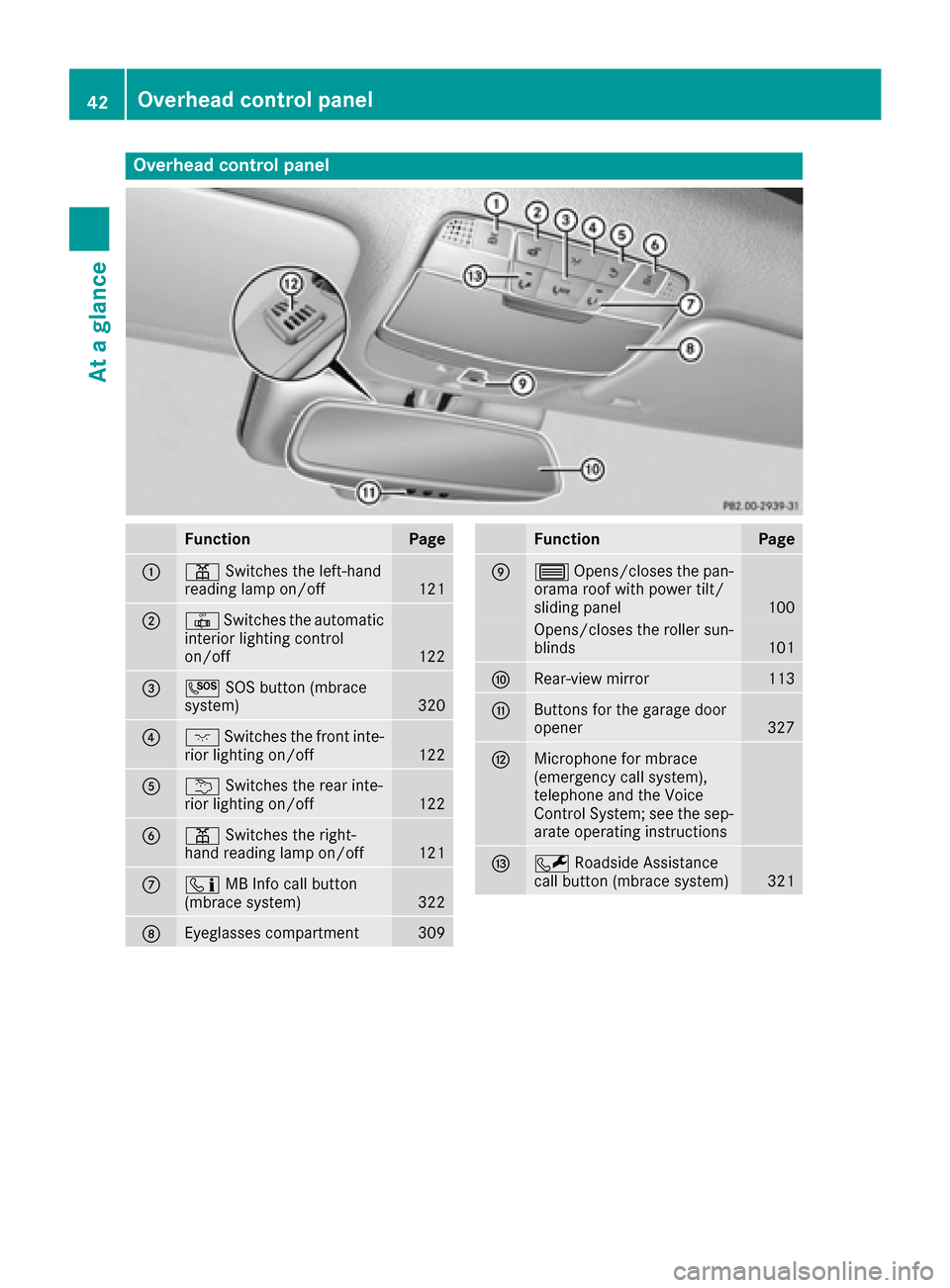
Overhead control panel
FunctionPage
:pSwitches the left-hand
reading lamp on/off121
;| Switches the automatic
interior lighting control
on/off
122
=G SOS button (mbrace
system)320
?c Switches the front inte-
rior lighting on/off122
Au Switches the rear inte-
rior lighting on/off122
Bp Switches the right-
hand reading lamp on/off121
Cï MB Info call button
(mbrace system)322
DEyeglasses compartment309
FunctionPage
E3 Opens/closes the pan-
orama roof with power tilt/
sliding panel
100
Opens/closes the roller sun-
blinds101
FRear-view mirror113
GButtons for the garage door
opener327
HMicrophone for mbrace
(emergency call system),
telephone and the Voice
Control System; see the sep-
arate operating instructions
IF Roadside Assistance
call button (mbrace system)321
42Overhead control panel
At a glance
Page 89 of 398
ProblemPossible causes/consequences andMSolutions
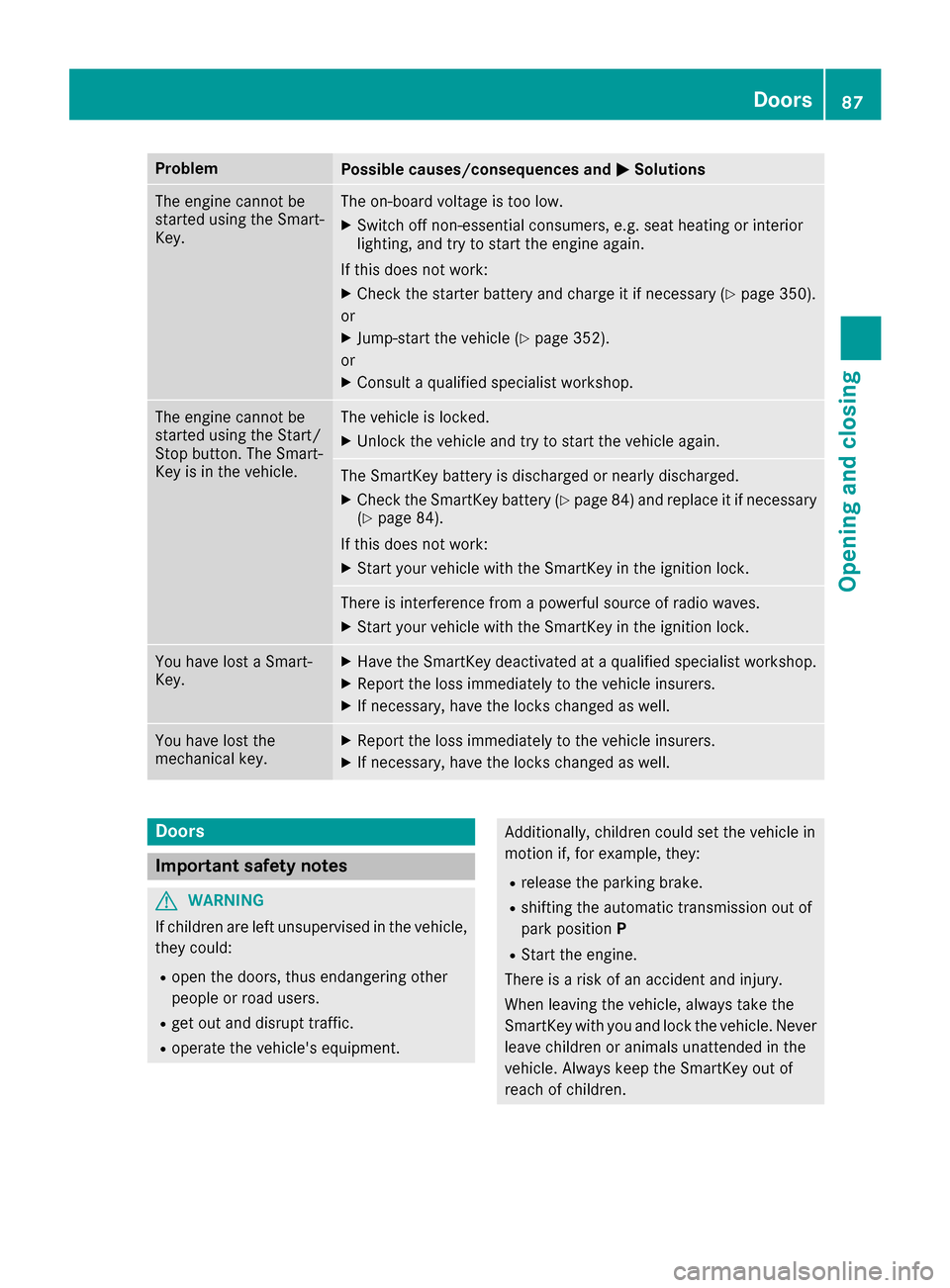
The engine cannot be
started using the Smart-
Key.The on-board voltage is too low.
XSwitch off non-essential consumers, e.g. seat heating or interior
lighting, and try to start the engine again.
If this does not work:
XCheck the starter battery and charge it if necessary (Ypage 350).
or
XJump-start the vehicle (Ypage 352).
or
XConsult a qualified specialist workshop.
The engine cannot be
started using the Start/
Stop button. The Smart-
Key is in the vehicle.The vehicle is locked.
XUnlock the vehicle and try to start the vehicle again.
The SmartKey battery is discharged or nearly discharged.
XCheck the SmartKey battery (Ypage 84) and replace it if necessary
(Ypage 84).
If this does not work:
XStart your vehicle with the SmartKey in the ignition lock.
There is interference from a powerful source of radio waves.
XStart your vehicle with the SmartKey in the ignition lock.
You have lost a Smart-
Key.XHave the SmartKey deactivated at a qualified specialist workshop.
XReport the loss immediately to the vehicle insurers.
XIf necessary, have the locks changed as well.
You have lost the
mechanical key.XReport the loss immediately to the vehicle insurers.
XIf necessary, have the locks changed as well.
Doors
Important safety notes
GWARNING
If children are left unsupervised in the vehicle,
they could:
Ropen the doors, thus endangering other
people or road users.
Rget out and disrupt traffic.
Roperate the vehicle's equipment.
Additionally, children could set the vehicle in
motion if, for example, they:
Rrelease the parking brake.
Rshifting the automatic transmission out of
park position P
RStart the engine.
There is a risk of an accident and injury.
When leaving the vehicle, always take the
SmartKey with you and lock the vehicle. Never
leave children or animals unattended in the
vehicle. Always keep the SmartKey out of
reach of children.
Doors87
Opening and closing
Z
Page 112 of 398
Problems with the seat heating or seat ventilation
ProblemPossible causes/consequences andMSolutions
Seat heating or seat ven-
tilation has been
switched off prematurely
or cannot be switched
on.The on-board voltage is too low because too many electrical consum-
ers are switched on.
XSwitch off electrical consumers that you do not need, such as the
rear window defroster or interior lighting.
Once the battery is sufficiently charged, the seat heating or seat
ventilation can be switched back on manually.
Steering wheel
Important safety notes
GWARNING
You could lose control of your vehicle if you do the following while driving:
Radjust the driver's seat, head restraint,
steering wheel or mirrors
Rfasten the seat belt
There is a risk of an accident.
Adjust the driver's seat, head restraint, steer-
ing wheel and mirror and fasten your seat belt before starting the engine.
GWARNING
Children could injure themselves if they
adjust the steering wheel. There is a risk of
injury.
When leaving the vehicle, always take the
SmartKey with you and lock the vehicle. Never
leave children unsupervised in the vehicle.
The electrically adjustable steering wheel can
still be adjusted when there is no key in the igni-
tion lock.
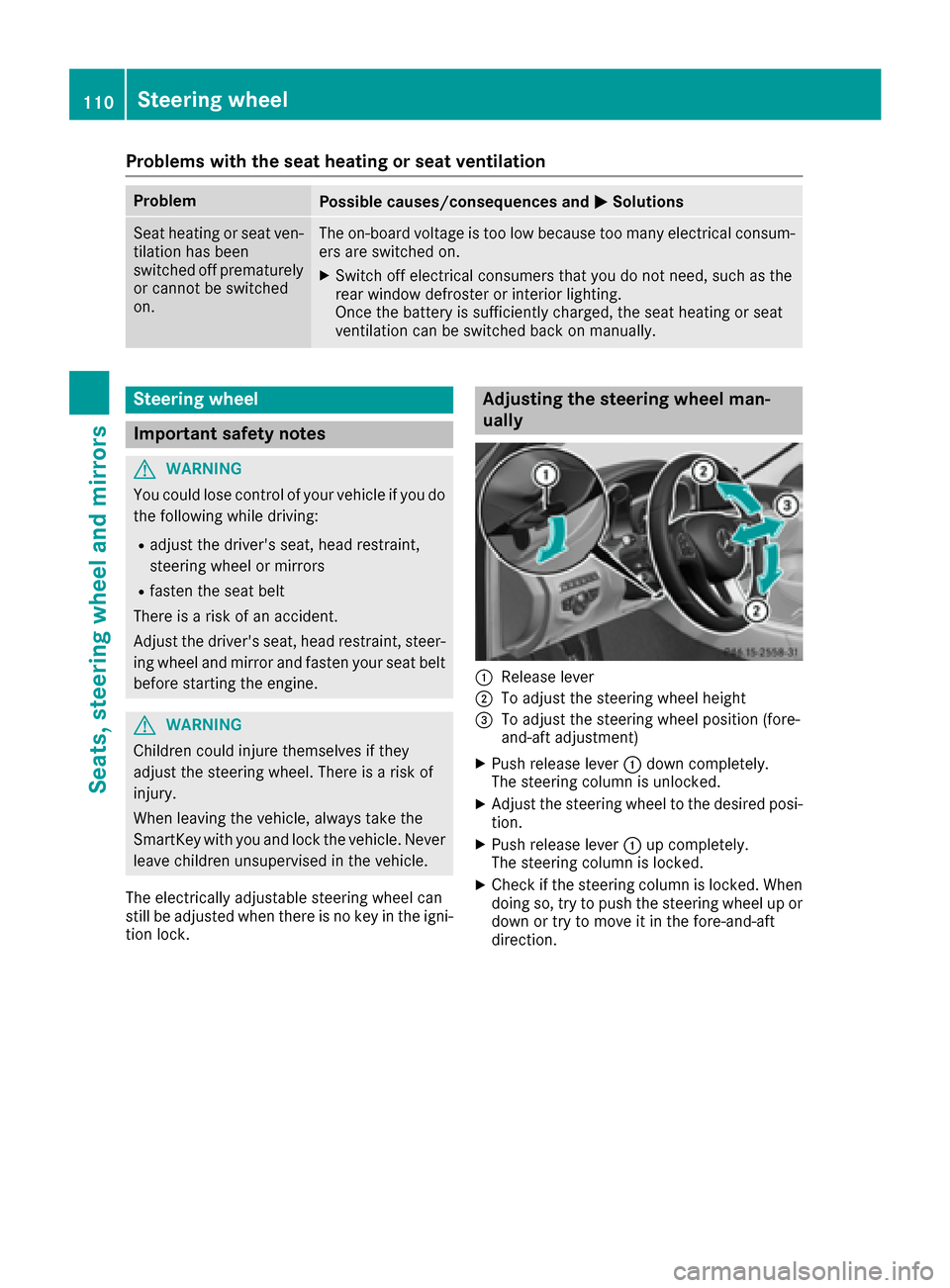
Adjusting the steering wheel man-
ually
:Release lever
;To adjust the steering wheel height
=To adjust the steering wheel position (fore-
and-aft adjustment)
XPush release lever :down completely.
The steering column is unlocked.
XAdjust the steering wheel to the desired posi- tion.
XPush release lever :up completely.
The steering column is locked.
XCheck if the steering column is locked. When
doing so, try to push the steering wheel up or
down or try to move it in the fore-and-aft
direction.
110Steering wheel
Seats, steering wheel and mirrors
Page 114 of 398
Problems with the steering wheel heating
ProblemPossible causes/consequences andMSolutions
The steering wheel heat-
ing has switched off pre-
maturely or cannot be
switched on.The on-board voltage is too low because too many electrical consum-
ers are switched on.
XSwitch off electrical consumers that you do not need, such as the
rear window defroster or interior lighting.
EASY-ENTRY/EXIT feature
Important safety notes
GWARNING
When the EASY-ENTRY/EXIT feature adjusts
the steering wheel, you and other vehicle
occupants – particularly children – could
become trapped. There is a risk of injury.
While the EASY-ENTRY/EXIT feature is mak-
ing adjustments, make sure that no one has
any body parts in the sweep of the steering
wheel.
Move the steering wheel adjustment lever if
there is a risk of entrapment by the steering
wheel. The adjustment process is stopped.
Press one of the memory function position but-
tons. The adjustment process is stopped. This
function is only available on vehicles with mem-
ory function.
GWARNING
If children activate the EASY-ENTRY/EXIT fea-
ture, they can become trapped, particularly
when unattended. There is a risk of injury.
When leaving the vehicle, always take the
SmartKey with you and lock the vehicle. Never
leave children unsupervised in the vehicle.
GWARNING
If you drive off while the EASY-ENTRY/EXIT
feature is making adjustments, you could lose
control of the vehicle. There is a risk of an
accident.
Always wait until the adjustment process is
complete before driving off. The EASY-ENTRY/EXIT feature makes getting in
and out of your vehicle easier.
You can activate and deactivate the EASY-
ENTRY/EXIT feature using the multimedia sys-
tem (see the separate operating instructions).
Position of the steering wheel when the
EASY-ENTRY/EXIT feature is active
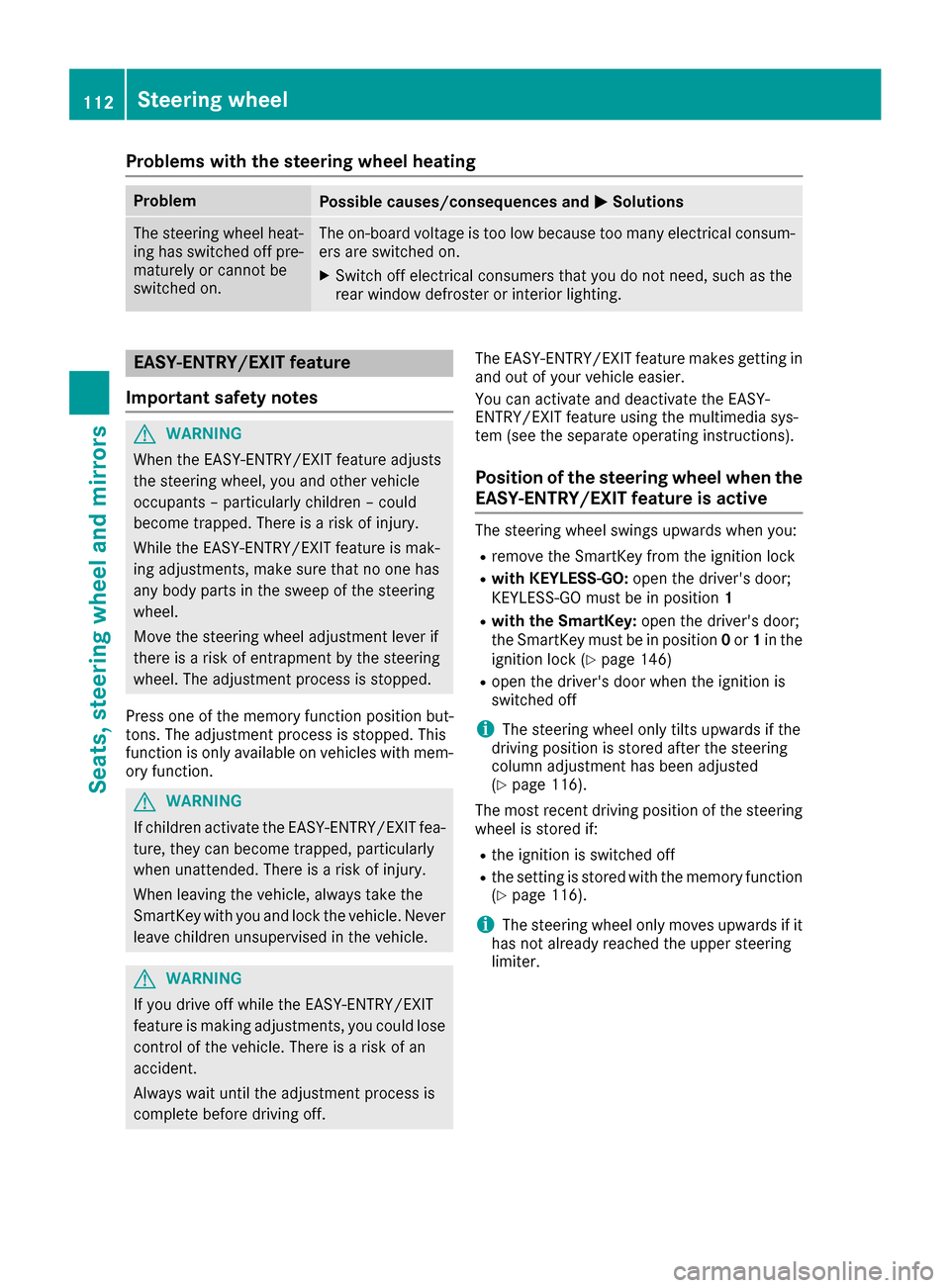
The steering wheel swings upwards when you:
Rremove the SmartKey from the ignition lock
Rwith KEYLESS-GO:
open the driver's door;
KEYLESS-GO must be in position 1
Rwith the SmartKey:open the driver's door;
the SmartKey must be in position 0or 1in the
ignition lock (
Ypage 146)
Ropen the driver's door when the ignition is
switched off
iThe steering wheel only tilts upwards if the
driving position is stored after the steering
column adjustment has been adjusted
(
Ypage 116).
The most recent driving position of the steering
wheel is stored if:
Rthe ignition is switched off
Rthe setting is stored with the memory function
(Ypage 116).
iThe steering wheel only moves upwards if it
has not already reached the upper steering
limiter.
112Steering wheel
Seats, steering wheel and mirrors
Page 117 of 398
If you come into contact with the electrolyte,
observe the following:
RRinse off the electrolyte from your skin
immediately with water.
RImmediately rinse the electrolyte out of
your eyes thoroughly with clean water.
RIf the electrolyte is swallowed, immediately
rinse your mouth out thoroughly. Do not
induce vomiting.
RIf electrolyte comes into contact with your
skin or hair or is swallowed, seek medical
attention immediately.
RImmediately change out of clothing which
has come into contact with electrolyte.
RIf an allergic reaction occurs, seek medical
attention immediately.
The rear-view mirror and the exterior mirror on
the driver's side automatically go into anti-glare
mode if the following conditions are met simul-
taneously:
Rthe ignition is switched on
Rincident light from headlamps strikes the sen-
sor in the rear-view mirror
The mirrors do not go into anti-glare mode if
reverse gear is engaged or if the interior lighting
is switched on.
Parking position for the exterior mir-
ror on the front-passenger side
Storing the parking position
You can position the front-passenger side exte- rior mirror in such a way that you can see the
rear wheel on that side as soon as you engage
reverse gear. You can store this position.
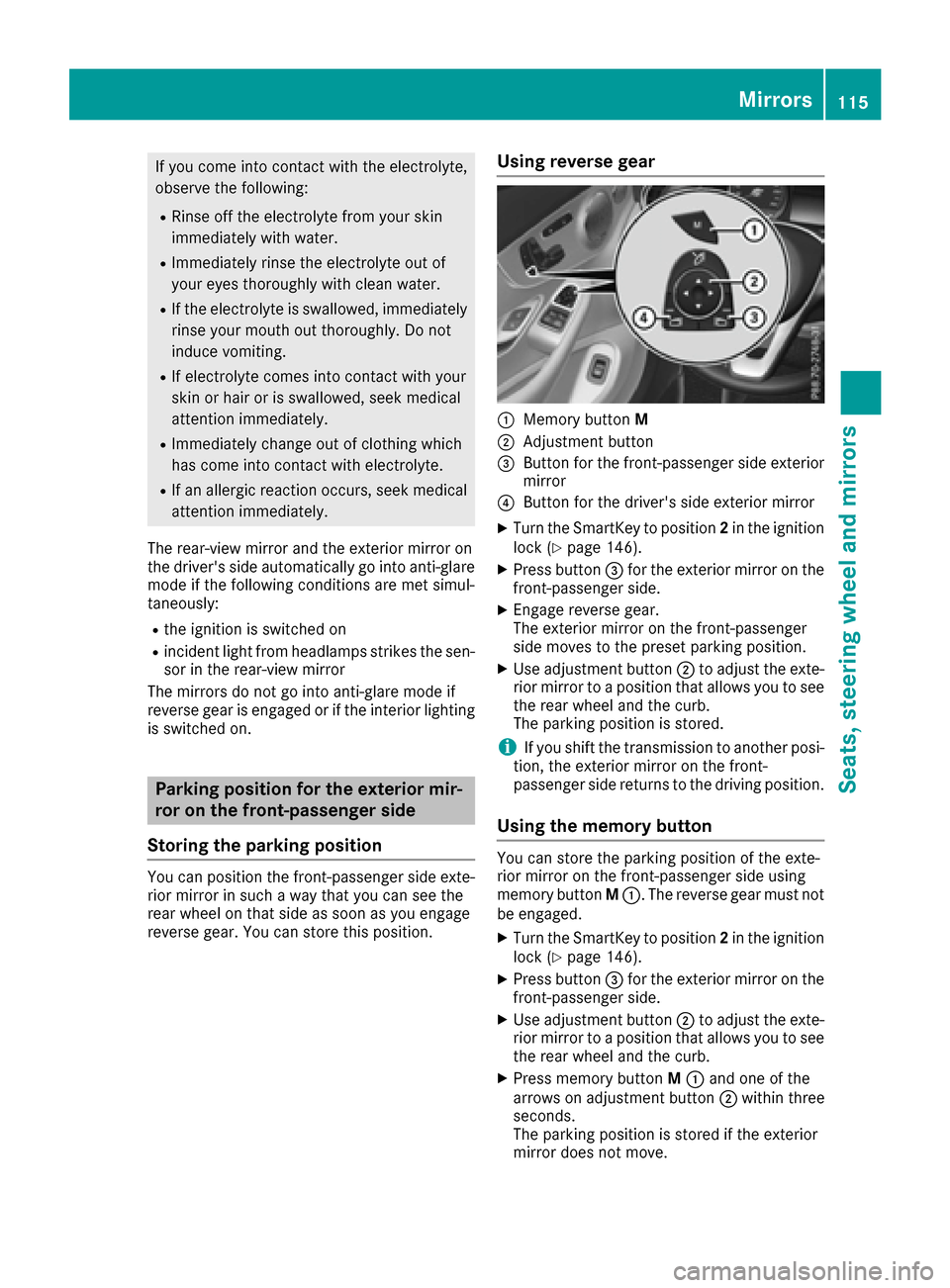
Using reverse gear
:Memory button M
;Adjustment button
=Button for the front-passenger side exterior
mirror
?Button for the driver's side exterior mirror
XTurn the SmartKey to position 2in the ignition
lock (Ypage 146).
XPress button =for the exterior mirror on the
front-passenger side.
XEngage reverse gear.
The exterior mirror on the front-passenger
side moves to the preset parking position.
XUse adjustment button ;to adjust the exte-
rior mirror to a position that allows you to see
the rear wheel and the curb.
The parking position is stored.
iIf you shift the transmission to another posi-
tion, the exterior mirror on the front-
passenger side returns to the driving position.
Using the memory button
You can store the parking position of the exte-
rior mirror on the front-passenger side using
memory button M:. The reverse gear must not
be engaged.
XTurn the SmartKey to position 2in the ignition
lock (Ypage 146).
XPress button =for the exterior mirror on the
front-passenger side.
XUse adjustment button ;to adjust the exte-
rior mirror to a position that allows you to see
the rear wheel and the curb.
XPress memory button M: and one of the
arrows on adjustment button ;within three
seconds.
The parking position is stored if the exterior
mirror does not move.
Mirrors115
Seats, steering wheel and mirrors
Z
Page 123 of 398
beam headlamps will not be deactivated or
activated regardless. There is a risk of an acci-dent.
Always carefully observe the traffic conditions
and switch off the high-beam headlamps in
good time.
Adaptive Highbeam Assist cannot take into
account road, weather or traffic conditions.
Adaptive Highbeam Assist is only an aid. You are responsible for adjusting the vehicle's lighting
to the prevailing light, visibility and traffic con-
ditions.
In particular, the detection of obstacles can be
restricted if there is:
Rpoor visibility, e.g. due to fog, heavy rain or
snow
Rdirt on the sensors or the sensors are
obscured
Switching Adaptive Highbeam Assist
on/off
XTo switch on: turn the light switch to Ã.
XPress the combination switch beyond the
pressure point in the direction of arrow :.
The _ indicator lamp in the multifunction
display lights up if it is dark and the light sen-
sor activates the low-beam headlamps.
If you are driving at speeds above 25 km/h:
If you are driving at speeds above approx-
imately 16 mph (25 km/h):
The headlamp range is set automatically
depending on the distance between the vehi-
cle and other road users.
If you are driving at speeds above approx-
imately 19 mph (30 km/ h)and no other road
users have been detected:
The high-beam headlamps are switched on
automatically. The Kindicator lamp in the
instrument cluster also lights up.
If you are driving at speeds below approx-
imately 16 mph (25 km/h)or other road users
have been detected or the roads are ade-
quately lit:
The high-beam headlamps are switched off
automatically. The Kindicator lamp in the
instrument cluster goes out. The _indi- cator lamp in the multifunction display
remains lit.
XTo switch off:
move the combination switch
back to its normal position or move the light
switch to another position.
The _ indicator lamp in the instrument
cluster goes out.
Headlamps fogged up on the inside
Certain climatic and physical conditions may
cause moisture to form in the headlamp. This
moisture does not affect the functionality of the
headlamp.
Interior lighting
Overview of interior lighting
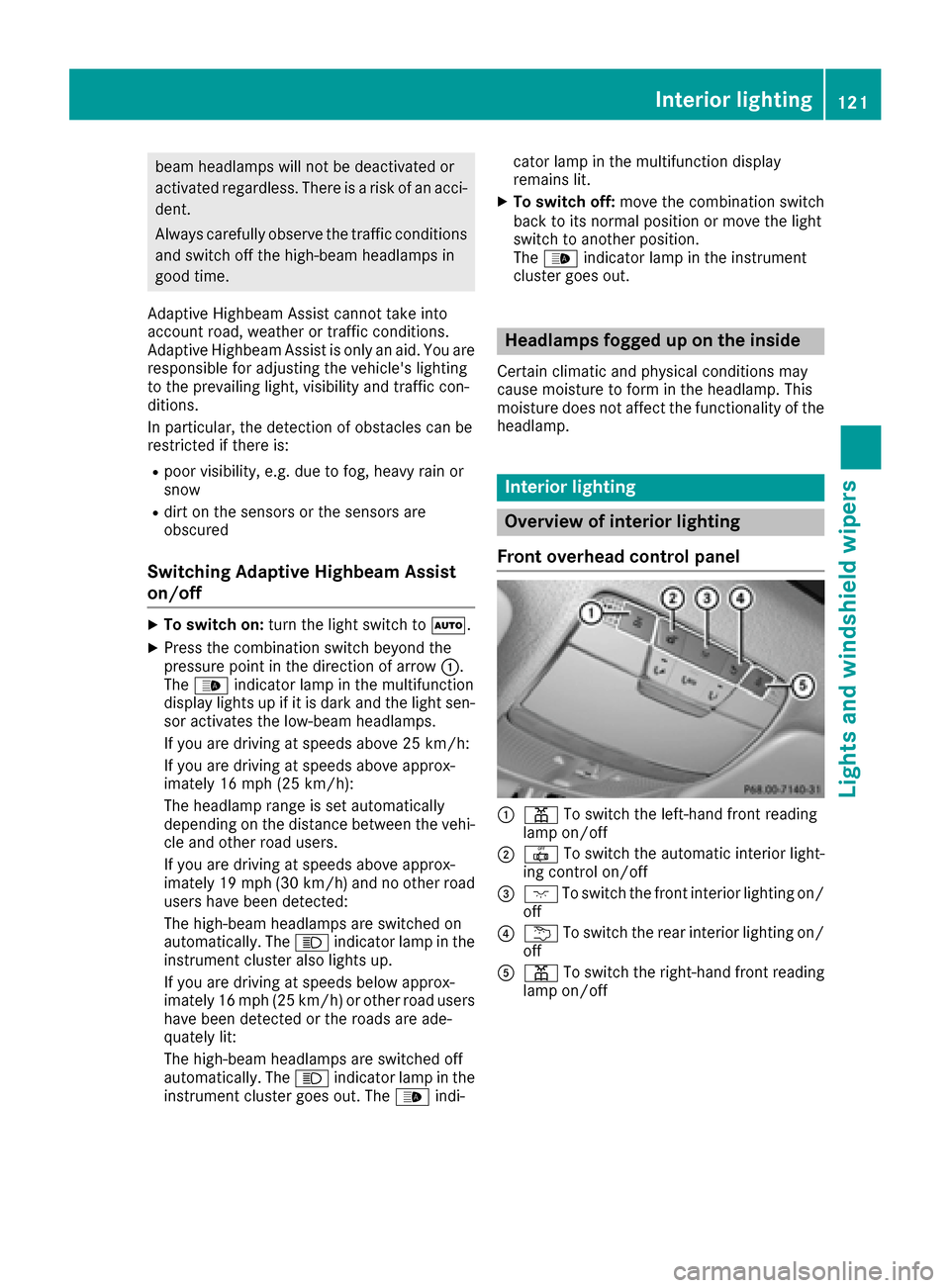
Front overhead control panel
:p To switch the left-hand front reading
lamp on/off
;| To switch the automatic interior light-
ing control on/off
=c To switch the front interior lighting on/
off
?u To switch the rear interior lighting on/
off
Ap To switch the right-hand front reading
lamp on/off
Interior lighting121
Lights and windshield wipers
Z
Page 124 of 398
Control panel in the grab handle (rear
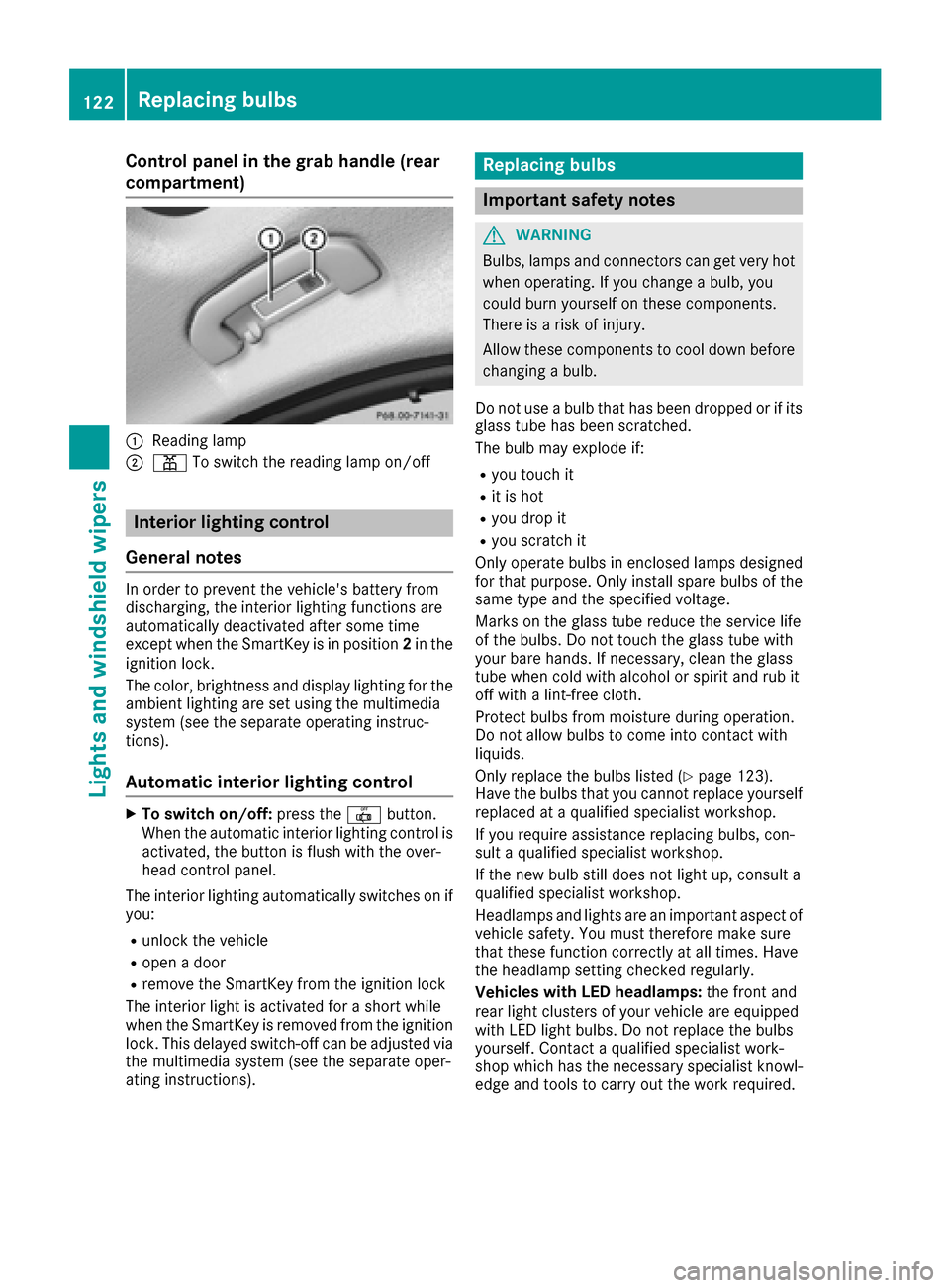
compartment)
:Reading lamp
;pTo switch the reading lamp on/off
Interior lighting control
General notes
In order to prevent the vehicle's battery from
discharging, the interior lighting functions are
automatically deactivated after some time
except when the SmartKey is in position 2in the
ignition lock.
The color, brightness and display lighting for the
ambient lighting are set using the multimedia
system (see the separate operating instruc-
tions).
Automatic interior lighting control
XTo switch on/off: press the|button.
When the automatic interior lighting control is
activated, the button is flush with the over-
head control panel.
The interior lighting automatically switches on if
you:
Runlock the vehicle
Ropen a door
Rremove the SmartKey from the ignition lock
The interior light is activated for a short while
when the SmartKey is removed from the ignition
lock. This delayed switch-off can be adjusted via
the multimedia system (see the separate oper-
ating instructions).
Replacing bulbs
Important safety notes
GWARNING
Bulbs, lamps and connectors can get very hot
when operating. If you change a bulb, you
could burn yourself on these components.
There is a risk of injury.
Allow these components to cool down before
changing a bulb.
Do not use a bulb that has been dropped or if its
glass tube has been scratched.
The bulb may explode if:
Ryou touch it
Rit is hot
Ryou drop it
Ryou scratch it
Only operate bulbs in enclosed lamps designed
for that purpose. Only install spare bulbs of the same type and the specified voltage.
Marks on the glass tube reduce the service life
of the bulbs. Do not touch the glass tube with
your bare hands. If necessary, clean the glass
tube when cold with alcohol or spirit and rub it
off with a lint-free cloth.
Protect bulbs from moisture during operation.
Do not allow bulbs to come into contact with
liquids.
Only replace the bulbs listed (
Ypage 123).
Have the bulbs that you cannot replace yourself
replaced at a qualified specialist workshop.
If you require assistance replacing bulbs, con-
sult a qualified specialist workshop.
If the new bulb still does not light up, consult a
qualified specialist workshop.
Headlamps and lights are an important aspect of
vehicle safety. You must therefore make sure
that these function correctly at all times. Have
the headlamp setting checked regularly.
Veh icles wit
h LED headlamps:
the front and
rear light clusters of your vehicle are equipped
with LED light bulbs. Do not replace the bulbs
yourself. Contact a qualified specialist work-
shop which has the necessary specialist knowl-
edge and tools to carry out the work required.
122Replacing bulbs
Lights and windshield wipers