page 14 MERCEDES-BENZ C320 2001 W203 Service Manual
[x] Cancel search | Manufacturer: MERCEDES-BENZ, Model Year: 2001, Model line: C320, Model: MERCEDES-BENZ C320 2001 W203Pages: 381, PDF Size: 19.92 MB
Page 120 of 381
111 Multifunction steering wheel, multifunction display
Te ch n i c a l
data Instruments
and controlsOperationDrivingInstrument
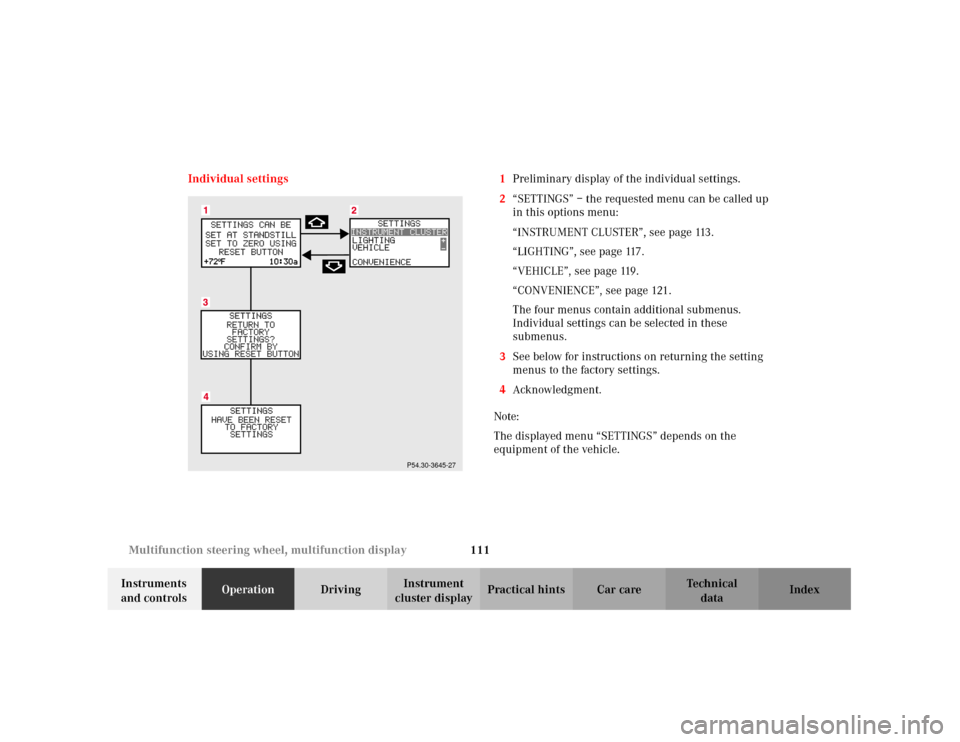
cluster displayPractical hints Car care Index Individual settings 1Preliminary display of the individual settings.
2“SETTINGS” – the requested menu can be called up
in this options menu:
“INSTRUMENT CLUSTER”, see page 113.
“LIGHTING”, see page 117.
“VEHICLE”, see page 119.
“CONVENIENCE”, see page 121.
The four menus contain additional submenus.
Individual settings can be selected in these
submenus.
3See below for instructions on returning the setting
menus to the factory settings.
4Acknowledgment.
Note:
The displayed menu “SETTINGS” depends on the
equipment of the vehicle.
P54.30-3645-27
Page 121 of 381
112 Multifunction steering wheel, multifunction display
Te ch n i c a l
data Instruments
and controlsOperationDrivingInstrument
cluster displayPractical hints Car care Index
Press the è or ÿ button repeatedly until the
individual setting preliminary display (1) appears.
Press the j or k button until the setting menu
“SETTINGS” (2) is displayed.
Pressing the æ or ç button controls the selection
marker in the setting menu.
“INSTRUMENT CLUSTER”, see page 113.
“LIGHTING”, see page 117.
“VEHICLE”, see page 119.
“CONVENIENCE”, see page 121
Pressing the è or ÿ button displays the next or
previous system.
Notes:
These settings may only be performed with the vehicle
at stan dstill an d wit h the elec tr on ic key in starter s witch
position 1 or 2.
The individual setting preliminary display (1) will
appear if you speed up.
The setting menu previously called up will reappear
when the vehicle stops, providing no other system has
been called up in the meantime.To return menu “SETTINGS” (2) to its factory
setting:
•Call up the individual setting preliminary
display (1) or display (2).
•Press the reset knob on the instrument cluster
(see page 88) for approximately 3 seconds.
Display (3) will appear.
•Press the reset knob on the instrument cluster once
more. The menu “SETTINGS” is reset to factory
settings, acknowledged by display (4).
The individual setting preliminary display (1) will
appear if you do not press the reset knob on the
instrument cluster within about 5 seconds. The
setting menus will not be reset.
Page 123 of 381
114 Multifunction steering wheel, multifunction display
Te ch n i c a l
data Instruments
and controlsOperationDrivingInstrument
cluster displayPractical hints Car care Index
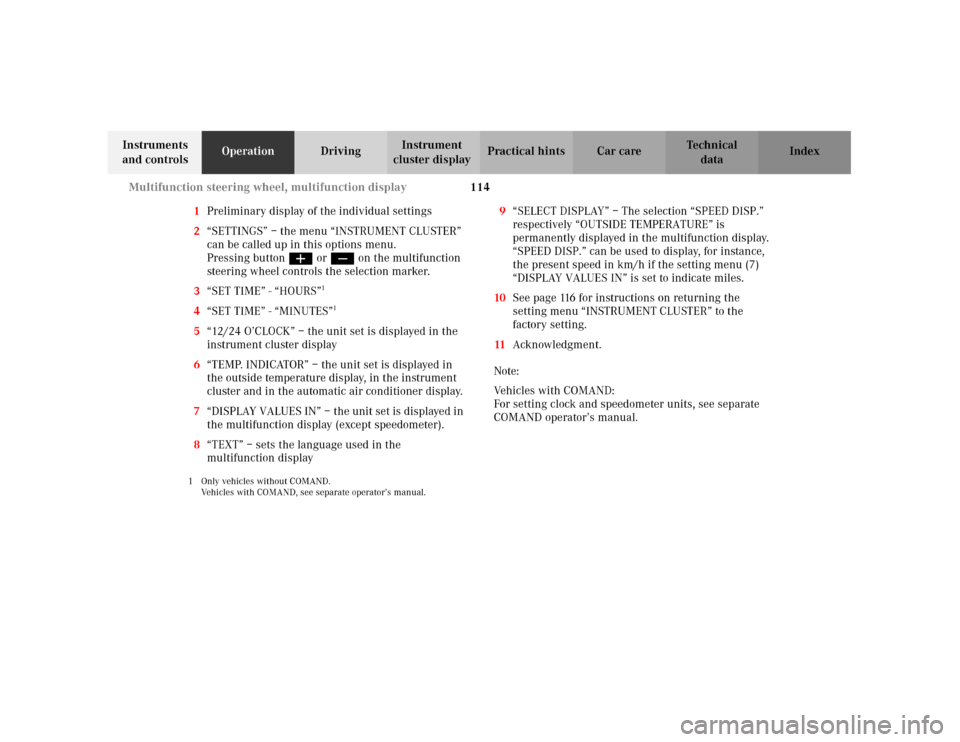
1Preliminary display of the individual settings
2“SETTINGS” – the menu “INSTRUMENT CLUSTER”
can be called up in this options menu.
Pressing buttonæ orç on the multifunction
steering wheel controls the selection marker.
3“SET TIME” - “HOURS”
1
4“SET TIME” - “MINUTES”
1
5“12/24 O’CLOCK” – the unit set is displayed in the
instrument cluster display
6“TEMP. INDICATOR” – the unit set is displayed in
the outside temperature display, in the instrument
cluster and in the automatic air conditioner display.
7“DISPLAY VALUES IN” – the unit set is displayed in
the multifunction display (except speedometer).
8“TEXT” – sets the language used in the
multifunction display1 Only vehicles without COMAND.
Vehicles with COMAND, see separate operator’s manual.
9“SELECT DISPLAY” – The selection “SPEED DISP.”
respectively “OUTSIDE TEMPERATURE” is
permanently displayed in the multifunction display.
“SPEED DISP.” can be used to display, for instance,
the present speed in km/h if the setting menu (7)
“DISPLAY VALUES IN” is set to indicate miles.
10See page 116 for instructions on returning the
setting menu “INSTRUMENT CLUSTER” to the
factory setting.
11Acknowledgment.
Note:
Vehicles with COMAND:
For setting clock and speedometer units, see separate
COMAND operator’s manual.
Page 125 of 381
116 Multifunction steering wheel, multifunction display
Te ch n i c a l
data Instruments
and controlsOperationDrivingInstrument
cluster displayPractical hints Car care Index
To return menu “INSTRUMENT CLUSTER” (5 to 9) to
its factory setting:
•Call up one of the setting menus(3 to 9).
•Press the reset knob on the instrument cluster, see
page 88, for approximately 3 seconds. Display (10)
will appear.•Press the reset knob on the instrument cluster once
more. The menu “INSTRUMENT CLUSTER” is reset
to factory settings, acknowledged by display (11).
The individual setting display “SETTINGS” (2) will
appear if you do not press the reset knob on the
instrument cluster within about 5 seconds. The
setting menus will not be reset.
Page 127 of 381
118 Multifunction steering wheel, multifunction display
Te ch n i c a l
data Instruments
and controlsOperationDrivingInstrument
cluster displayPractical hints Car care Index
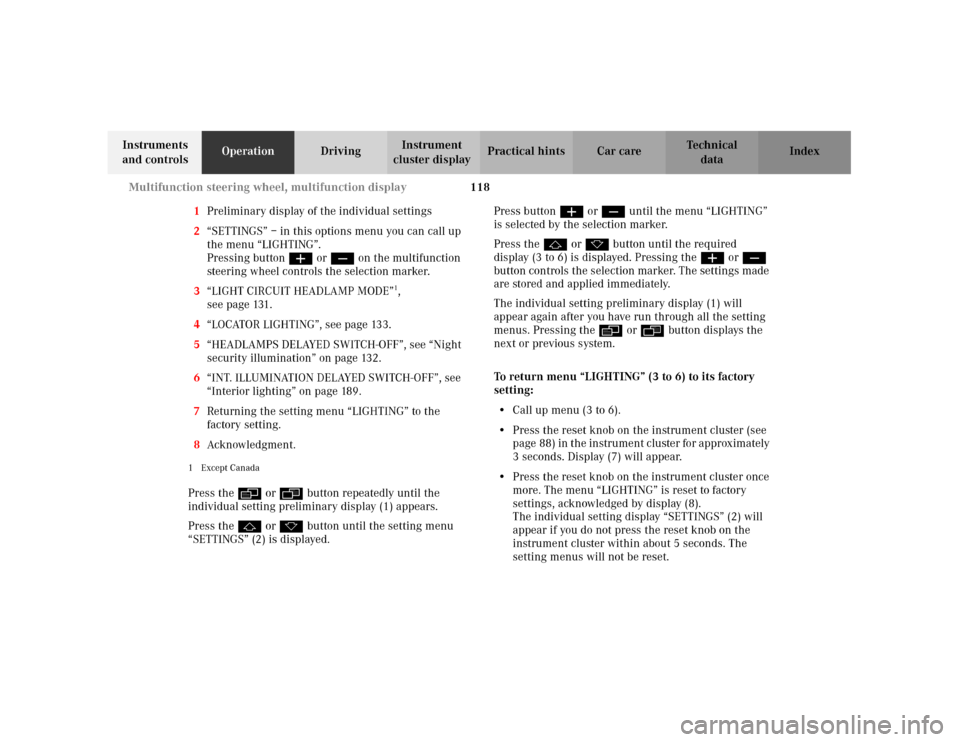
1Preliminary display of the individual settings
2“SETTINGS” – in this options menu you can call up
the menu “LIGHTING”.
Pressing buttonæ orç on the multifunction
steering wheel controls the selection marker.
3“LIGHT CIRCUIT HEADLAMP MODE”
1,
seepage131.
4“LOCATOR LIGHTING”, see page 133.
5“HEADLAMPS DELAYED SWITCH-OFF”, see “Night
security illumination” on page 132.
6“INT. ILLUMINATION DELAYED SWITCH-OFF”, see
“Interior lighting” on page 189.
7Returning the setting menu “LIGHTING” to the
factory setting.
8Acknowledgment.
1Except CanadaPress the è or ÿ button repeatedly until the
individual setting preliminary display (1) appears.
Press the j or k button until the setting menu
“SETTINGS” (2) is displayed.Press buttonæ orç until the menu “LIGHTING”
is selected by the selection marker.
Press the j or k button until the required
display (3 to 6) is displayed. Pressing the æ orç
button controls the selection marker. The settings made
are stored and applied immediately.
The individual setting preliminary display (1) will
appear again after you have run through all the setting
menus. Pressing the è or ÿ button displays the
next or previous system.
To return menu “LIGHTING” (3 to 6) to its factory
setting:
•Call up menu (3 to 6).
•Press the reset knob on the instrument cluster (see
p age 88 ) in t he in str umen t c luste r fo r app rox imately
3 seconds. Display (7) will appear.
•Press the reset knob on the instrument cluster once
more. The menu “LIGHTING” is reset to factory
settings, acknowledged by display (8).
The individual setting display “SETTINGS” (2) will
appear if you do not press the reset knob on the
instrument cluster within about 5 seconds. The
setting menus will not be reset.
Page 129 of 381
120 Multifunction steering wheel, multifunction display
Te ch n i c a l
data Instruments
and controlsOperationDrivingInstrument
cluster displayPractical hints Car care Index
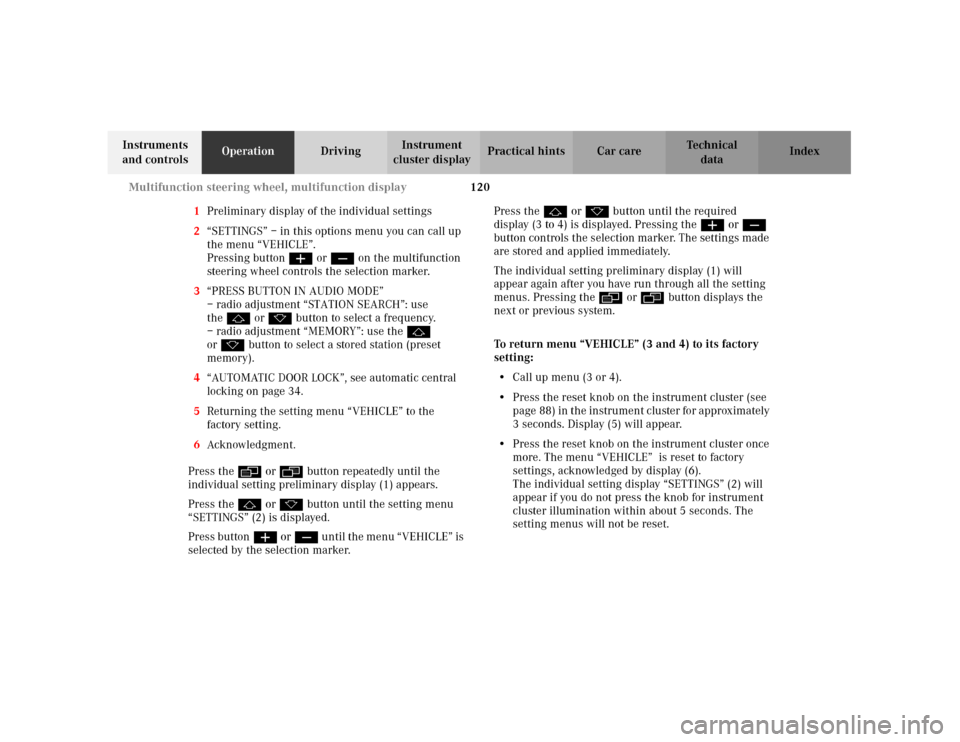
1Preliminary display of the individual settings
2“SETTINGS” – in this options menu you can call up
the menu “VEHICLE”.
Pressing buttonæ orç on the multifunction
steering wheel controls the selection marker.
3“PRESS BUTTON IN AUDIO MODE”
– radio adjustment “STATION SEARCH”: use
thej ork button to select a frequency.
– radio adjustment “MEMORY”: use the j
ork button to select a stored station (preset
memory).
4“AUTOMATIC DOOR LOCK”, see automatic central
locking on page 34.
5Returning the setting menu “VEHICLE” to the
factory setting.
6Acknowledgment.
Press the è or ÿ button repeatedly until the
individual setting preliminary display (1) appears.
Press the j or k button until the setting menu
“SETTINGS” (2) is displayed.
Press buttonæ orç un til the m en u “ VE HICLE” is
selected by the selection marker.Press the j or k button until the required
display (3 to 4) is displayed. Pressing the æ orç
button controls the selection marker. The settings made
are stored and applied immediately.
The individual setting preliminary display (1) will
appear again after you have run through all the setting
menus. Pressing the è or ÿ button displays the
next or previous system.
To return menu “VEHICLE” (3 and 4) to its factory
setting:
•Call up menu (3 or 4).
•Press the reset knob on the instrument cluster (see
p age 88 ) in t he in str umen t c luste r fo r app rox imately
3 seconds. Display (5) will appear.
•Press the reset knob on the instrument cluster once
more. The menu “VEHICLE” is reset to factory
settings, acknowledged by display (6).
The individual setting display “SETTINGS” (2) will
appear if you do not press the knob for instrument
cluster illumination within about 5 seconds. The
setting menus will not be reset.
Page 131 of 381
122 Multifunction steering wheel, multifunction display
Te ch n i c a l
data Instruments
and controlsOperationDrivingInstrument
cluster displayPractical hints Car care Index
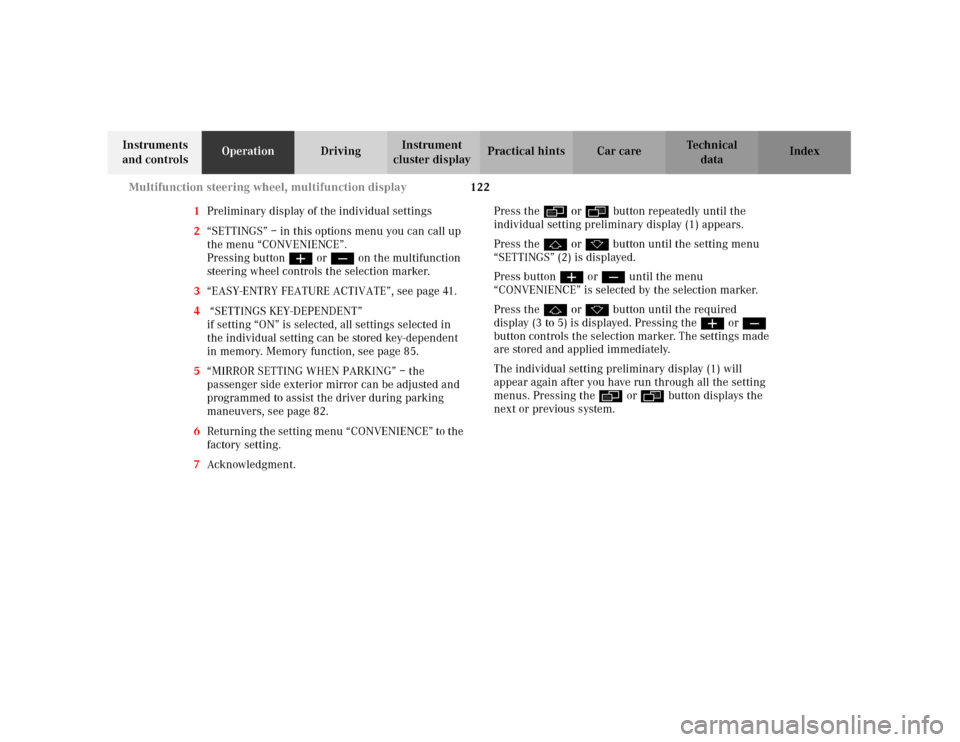
1Preliminary display of the individual settings
2“SETTINGS” – in this options menu you can call up
the menu “CONVENIENCE”.
Pressing buttonæ orç on the multifunction
steering wheel controls the selection marker.
3“EASY-ENTRY FEATURE ACTIVATE”, see page 41.
4 “SETTINGS KEY-DEPENDENT”
if setting “ON” is selected, all settings selected in
the individual setting can be stored key-dependent
in memory. Memory function, see page 85.
5“MIRROR SETTING WHEN PARKING” – the
passenger side exterior mirror can be adjusted and
programmed to assist the driver during parking
maneuvers, see page 82.
6Returning the setting menu “CONVENIENCE” to the
factory setting.
7Acknowledgment.Press the è or ÿ button repeatedly until the
individual setting preliminary display (1) appears.
Press the j or k button until the setting menu
“SETTINGS” (2) is displayed.
Press buttonæ orç until the menu
“CONVENIENCE” is selected by the selection marker.
Press the j or k button until the required
display (3 to 5) is displayed. Pressing the æ orç
button controls the selection marker. The settings made
are stored and applied immediately.
The individual setting preliminary display (1) will
appear again after you have run through all the setting
menus. Pressing the è or ÿ button displays the
next or previous system.
Page 132 of 381
123 Multifunction steering wheel, multifunction display
Te ch n i c a l
data Instruments
and controlsOperationDrivingInstrument
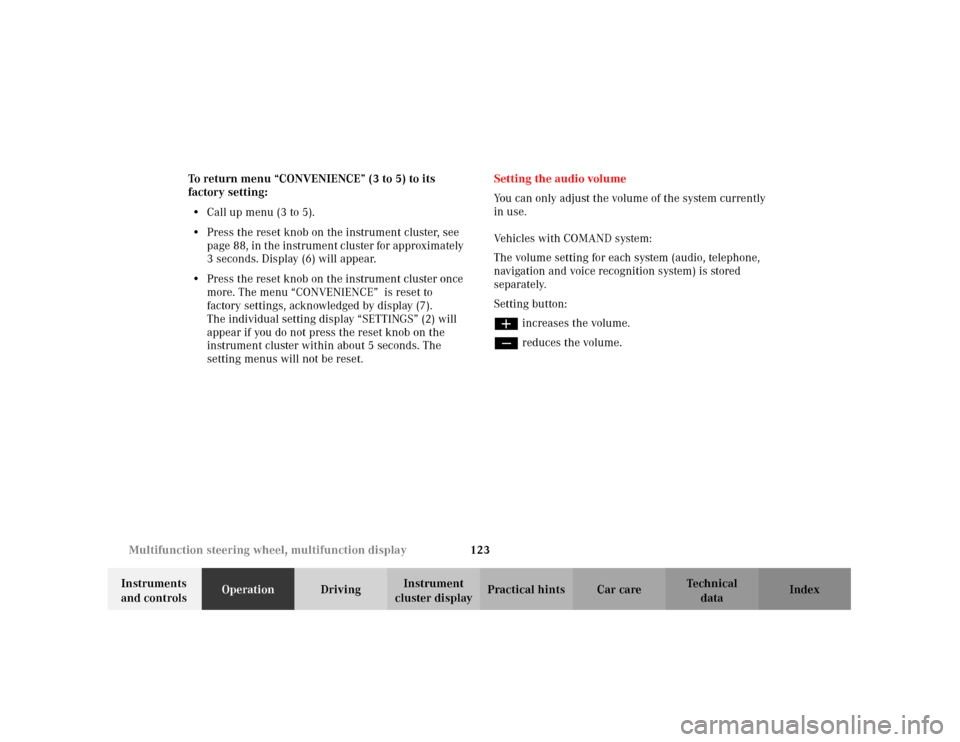
cluster displayPractical hints Car care Index To return menu “CONVENIENCE” (3 to 5) to its
factory setting:
•Call up menu (3 to 5).
•Press the reset knob on the instrument cluster, see
page 88, in the instrument cluster for approximately
3 seconds. Display (6) will appear.
•Press the reset knob on the instrument cluster once
more. The menu “CONVENIENCE” is reset to
factory settings, acknowledged by display (7).
The individual setting display “SETTINGS” (2) will
appear if you do not press the reset knob on the
instrument cluster within about 5 seconds. The
setting menus will not be reset.Setting the audio volume
You can only adjust the volume of the system currently
in use.
Vehicles with COMAND system:
The volume setting for each system (audio, telephone,
navigation and voice recognition system) is stored
separately.
Setting button:
æ increases the volume.
ç reduces the volume.
Page 133 of 381
124 Flexible service system
Te ch n i c a l
data Instruments
and controlsOperationDrivingInstrument
cluster displayPractical hints Car care Index
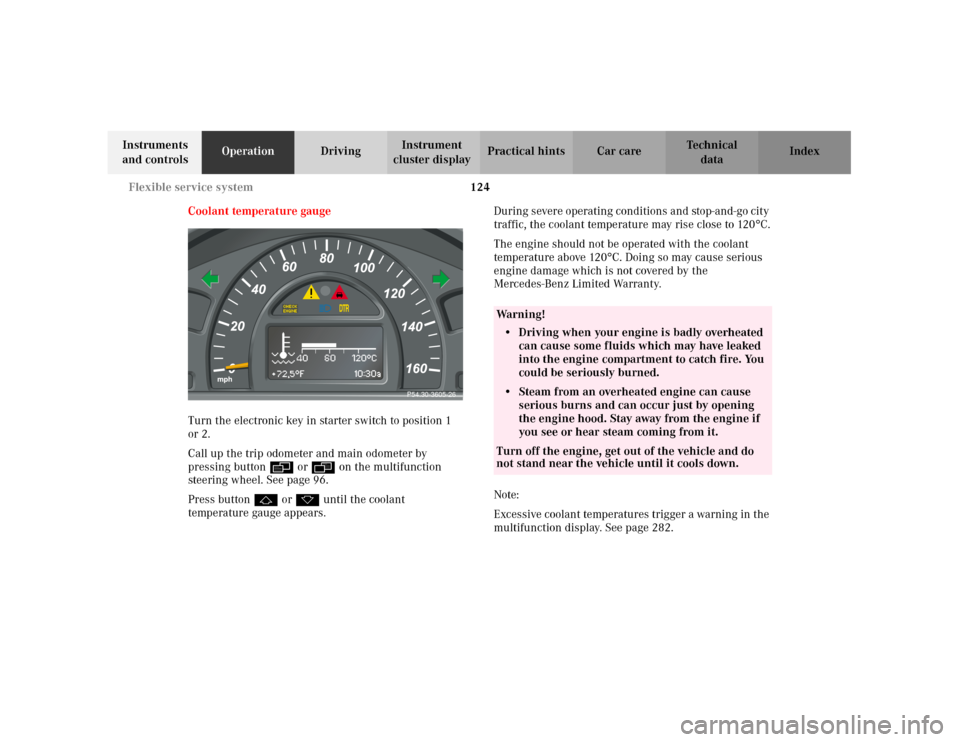
Coolant temperature gauge
Turn the electronic key in starter switch to position 1
or 2.
Call up the trip odometer and main odometer by
pressing button è or ÿ on the multifunction
steering wheel. See page 96.
Press button j or k until the coolant
temperature gauge appears.During severe operating conditions and stop-and-go city
traffic, the coolant temperature may rise close to 120
°C.
The engine should not be operated with the coolant
temperature above 120
°C. Doing so may cause serious
engine damage which is not covered by the
Mercedes-Benz Limited Warranty.
Note:
Excessive coolant temperatures trigger a warning in the
multifunction display. See page 282.
P54.30-3605-26
Wa r n i n g !
• Driving when your engine is badly overheated
can cause some fluids which may have leaked
into the engine compartment to catch fire. You
could be seriously burned.• Steam from an overheated engine can cause
serious burns and can occur just by opening
the engine hood. Stay away from the engine if
you see or hear steam coming from it.Turn off the engine, get out of the vehicle and do
not stand near the vehicle until it cools down.
Page 135 of 381
126 Flexible service system
Te ch n i c a l
data Instruments
and controlsOperationDrivingInstrument
cluster displayPractical hints Car care Index
The service indicator disappears automatically after
30 seconds or if the knob for instrument cluster
illumination, see page 88, in the instrument cluster is
pressed.
Calling up service indicator manually:
Turn the electronic key in starter switch to position 1.
Call up the trip odometer and main odometer by
pressing button è or ÿ on the multifunction
steering wheel until the display appears. See page 96.
Press button j or k until the FSS indicator
appears.
The next or previous system is displayed by pressing
button è or ÿ.
Important!
The FSS indicator is not an engine oil level indicator.
See page 128 for engine oil level indicator.Note:
When disconnecting vehicle battery for one or more
days at a time, such days will not be counted. Any such
days not counted by the FSS can be added by your
Mercedes-Benz Center.
The interval between services is determined by the type
of driving for which the vehicle is used. For example,
driving at extreme speeds, and cold starts combined
wi t h short di stan ce d r ivi ng in which the e ngin e d oes not
reach operating normal temperature, reduce the interval
between services.