door lock MERCEDES-BENZ C320 2001 W203 Owner's Manual
[x] Cancel search | Manufacturer: MERCEDES-BENZ, Model Year: 2001, Model line: C320, Model: MERCEDES-BENZ C320 2001 W203Pages: 381, PDF Size: 19.92 MB
Page 4 of 381

Contents
IntroductionProduct information .......................... 1
Operator’s manual ............................. 2
Where to find it .................................. 7
Reporting Safety Defects .................. 9Instruments and controlsInstruments and controls ............... 12
Door control panel ....................... 14
Overhead control panel ............... 15
Dashboard ..................................... 16
Center console .............................. 18OperationVehicle keys ...................................... 22
Start lock-out .................................... 24
General notes on the
central locking system ............... 24
Central locking system ................... 25
Radio frequency and
infrared remote control ............... 25
Locking and unlocking ................ 27Choosing global or selective
mode on remote control ............. 27
Opening the trunk ....................... 28
Opening and closing windows
and sliding / pop-up roof
from outside ................................. 29
Panic button ................................. 30
Mechanical keys .......................... 30
Doors ..................................................31
Central locking switch .................... 33
Automatic central locking .............. 34
Emergency unlocking
in case of accident ...................... 34
Trunk ................................................. 35
Trunk lid release switch ................ 37
Antitheft alarm system ................... 38
Tow-away alarm ............................... 39
Easy-entry/exit feature ................... 41
Front seat adjustment ..................... 42
Removal and installation of
front seat head restraints .......... 47
Multicontour seat ............................ 49
Heated seats ..................................... 50
Rear seat head restraints ............... 52Seat belts and integrated
restraint system .......................... 55
Seat belts ........................................... 55
Seat belt nonusage
warning system ........................... 56
BabySmart
TM airbag
deactivation system .................... 62
Supplemental Restraint
System (SRS) ............................... 63
Emergency tensioning
retractor (ETR) ............................. 64
Airbags .............................................. 65
Safety guidelines for the seat
belt, emergency tensioning
retractor and airbag .................... 72
Infant and child
restraint systems ......................... 73
Steering wheel adjustment
(manual) ....................................... 77
Steering wheel adjustment
(electrical) .................................... 79
Rear view mirrors ............................ 80
Instrument cluster ........................... 88
Multifunction steering wheel,
multifunction display ................. 92
Page 7 of 381

Contents
Malfunction and warning messages
in the multifunction display ... 274
DISPLAY DEFECTIVE ................275
BATTERY / ALTERNATOR ........ 276
ANTILOCK BRAKE SYSTEM .....277
BRAKE ASSIST ...........................277
BRAKE LINING WEAR ..............278
BRAKE FLUID .............................278
PARKING BRAKE .......................279
SEAT BELT SYSTEM ...................279
ELEC. STABIL. PROG.
(Electronic stability program) ..280
COOLANT (coolant level) .......... 281
COOLANT
(coolant temperature) ................282ENGINE OIL LEVEL ................... 283
LIGHTING SYSTEM ................... 284
LIGHT SENSOR .......................... 286
DOOR ........................................... 286
TRUNK OPEN ............................. 287
HOOD ........................................... 287
TELEPHONE – FUNCTION ....... 288
TELE AID ..................................... 288
WASHER FLUID ......................... 289
RESTRAINT SYSTEM ................ 290
KEY .............................................. 290
FUEL RESERVE .......................... 291
UNDERVOLTAGE ....................... 291
STEER. WHEEL ADJUST. .......... 292
ENTRANCE POSITION .............. 292
Practical hintsFirst aid kit .....................................294
Stowing things in the vehicle ......294
Fuses ................................................295
Hood .................................................297
Checking engine oil level .............300
Automatic transmission fluid
level ............................................. 301
Coolant level ................................... 301
Adding coolant ...........................302
Windshield and headlamp washer
system .........................................302
Spare wheel, vehicle tools, storage
compartment .............................304
Vehicle jack .....................................305
Page 29 of 381
20 Contents - Operation
Te ch n i c a l
data Instruments
and controlsOperationDrivingInstrument
cluster displayPractical hints Car care Index
OperationVehicle keys ...................................... 22
Start lock-out .................................... 24
General notes on the
central locking system ............... 24
Central locking system ................... 25
Radio frequency and
infrared remote control ............... 25
Locking and unlocking ................ 27
Choosing global or selective
mode on remote control .............. 27
Opening the trunk ....................... 28
Opening and closing windows
and sliding / pop-up roof
from outside .................................. 29
Panic button .................................. 30
Mechanical keys ........................... 30
Doors .................................................. 31
Central locking switch .................... 33
Automatic central locking .............. 34
Emergency unlocking
in case of accident ...................... 34
Trunk ................................................. 35
Trunk lid release switch ................. 37Antitheft alarm system ................... 38
Tow-away alarm ............................... 39
Easy-entry/exit feature ................... 41
Front seat adjustment ..................... 42
Removal and installation of
front seat head restraints .......... 47
Multicontour seat ............................ 49
Heated seats ..................................... 50
Rear seat head restraints ............... 52
Seat belts and integrated
restraint system .......................... 55
Seat belts .......................................... 55
Seat belt nonusage
warning system .......................... 56
BabySmart
TM airbag
deactivation system ................... 62
Supplemental Restraint
System (SRS) ............................... 63
Emergency tensioning
retractor (ETR) ............................ 64
Airbags .............................................. 65
Safety guidelines for the seat
belt, emergency tensioning
retractor and airbag ................... 72Infant and child
restraint systems ......................... 73
Steering wheel adjustment
(manual) ....................................... 77
Steering wheel adjustment
(electrical) .................................... 79
Rear view mirrors ............................ 80
Instrument cluster ........................... 88
Multifunction steering wheel,
multifunction display ................. 92
Trip and main odometer, FSS, coolant
temperature, vehicle speed,
engine oil level indicator ........... 96
Audio systems .................................. 98
Radio .............................................. 98
CD player ....................................... 99
Cassette player ........................... 100
Telephone ........................................ 101
Navigation system .......................... 106
Trip computer ................................. 107
Malfunction/warning
message memory ...................... 109
Individual settings .......................... 111
Setting the audio volume ............. 123
Page 32 of 381
23 Central locking system
Te ch n i c a l
data Instruments
and controlsOperationDrivingInstrument
cluster displayPractical hints Car care Index Electronic main key
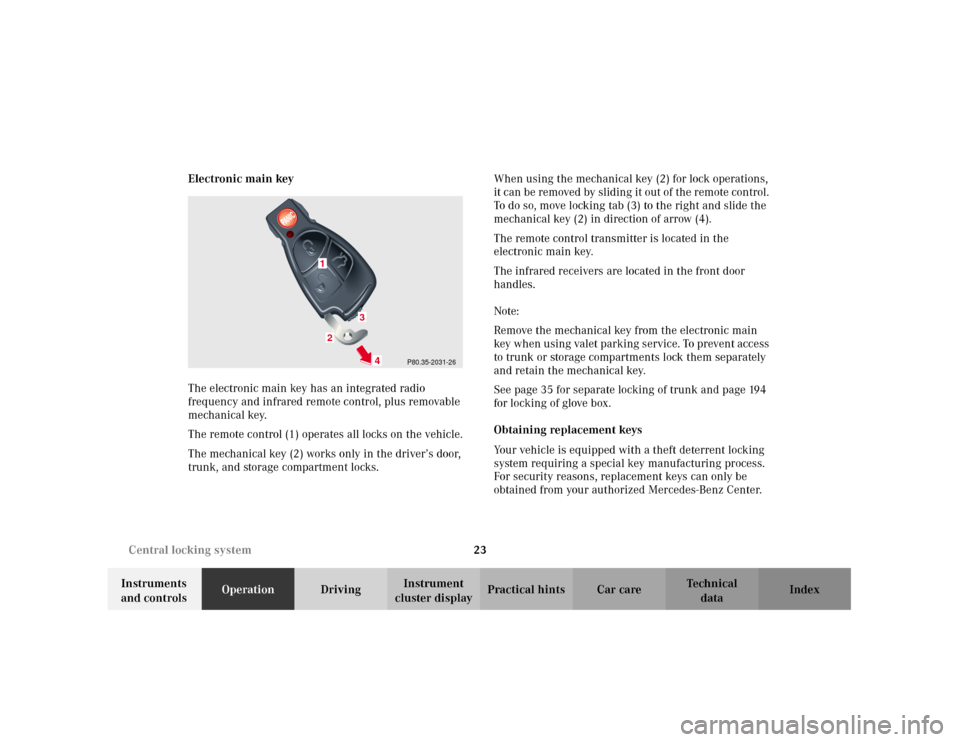
The electronic main key has an integrated radio
frequency and infrared remote control, plus removable
mechanical key.
The remote control (1) operates all locks on the vehicle.
The mechanical key (2) works only in the driver’s door,
trunk, and storage compartment locks.When using the mechanical key (2) for lock operations,
it can be removed by sliding it out of the remote control.
To do so, move locking tab (3) to the right and slide the
mechanical key (2) in direction of arrow (4).
The remote control transmitter is located in the
electronic main key.
The infrared receivers are located in the front door
handles.
Note:
Remove the mechanical key from the electronic main
key when using valet parking service. To prevent access
to trunk or storage compartments lock them separately
and retain the mechanical key.
See page 35 for separate locking of trunk and page 194
for locking of glove box.
Obtaining replacement keys
Your vehicle is equipped with a theft deterrent locking
system requiring a special key manufacturing process.
For security reasons, replacement keys can only be
obtained from your authorized Mercedes-Benz Center.
P80.35-2031-26
1
3
4
2
Page 33 of 381
24 Central locking system
Te ch n i c a l
data Instruments
and controlsOperationDrivingInstrument
cluster displayPractical hints Car care Index
Start lock-out
Important!
Removing the electronic key from the starter switch
activates the start lock-out. The engine cannot be
started.
Inserting the electronic key in the starter switch
deactivates the start lock-out.
Note:
In case the engine cannot be started (vehicle’s battery is
in order), the system is not operational. Contact an
authorized Mercedes-Benz Center or call 1-800-FOR-
MERCedes (in the USA), or 1-800-387-0100 (in Canada).General notes on the central locking system
•If the electronic key is inserted in the starter switch,
the vehicle cannot be locked or unlocked with the
remote control.
If the vehicle cannot be locked or unlocked:
•Aim transmitter eye at a receiver of either front door
handle. Check the batteries of the electronic main
key, see page 332, or synchronize the electronic
main key, see page 334.
•Use the mechanical key to unlock the vehicle. To
start engine, insert the electronic key in the starter
switch. There could be a slight delay until the
electronic key can be turned in the starter switch.
Important!
When unlocking the driver’s door with the mechanical
key, the exterior lamps will flash and the alarm will
sound.
To cancel the alarm, insert the electronic key in the
starter switch or press buttonŒ or‹ on the
electronic main key.
Page 34 of 381
25 Central locking system
Te ch n i c a l
data Instruments
and controlsOperationDrivingInstrument
cluster displayPractical hints Car care Index Central locking system
Radio frequency and infrared remote control
The electronic main key has an integrated radio
frequency and infrared remote control.
Due to the extended operational range of the remote
control, it could be possible to unintentionally lock or
unlock the vehicle by pressing the transmit button. If
one of the transmit buttons is pressed, the battery check
lamp lights up brief ly – indicating that the batteries are
in order. See page 332 for checking batteries.
The vehicle doors, trunk and fuel filler flap can be
centrally locked and unlocked via remote control.
Opening and closing the windows and sliding/pop-up
roof can only be done with the infrared portion of the
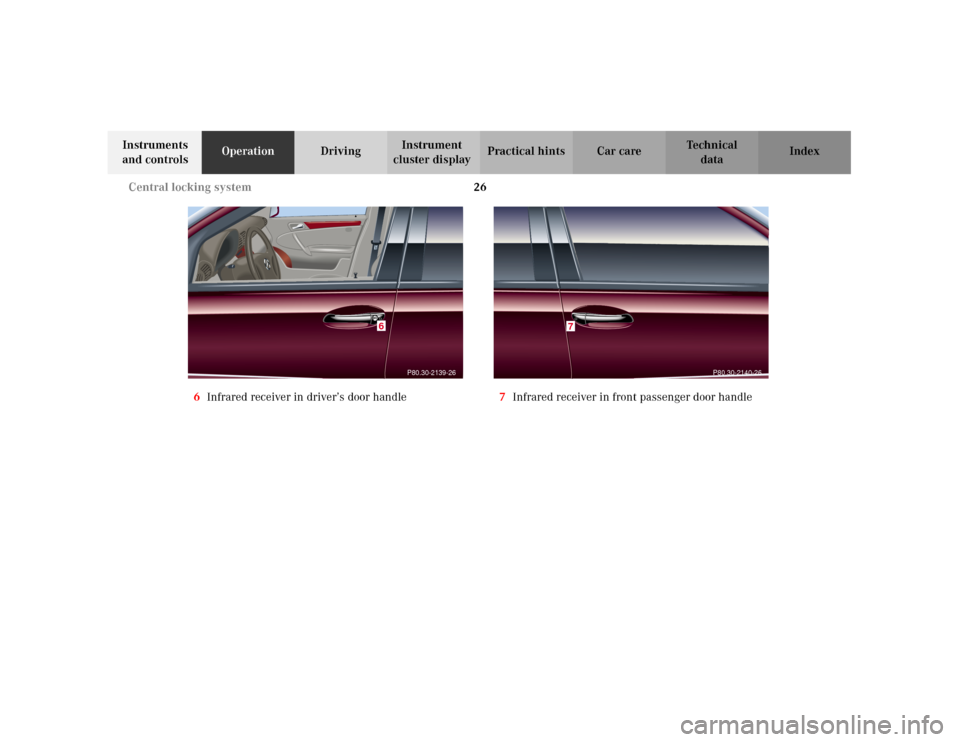
remote control. Aim transmitter eye at a receiver (6
or 7), press and hold transmit button Œ or ‹,
seepage29.
With vehicle centrally locked, the trunk can also be
opened by using the remote control.
If the electronic key is inserted in starter switch, the
vehicle cannot be locked or unlocked, and the trunk lid
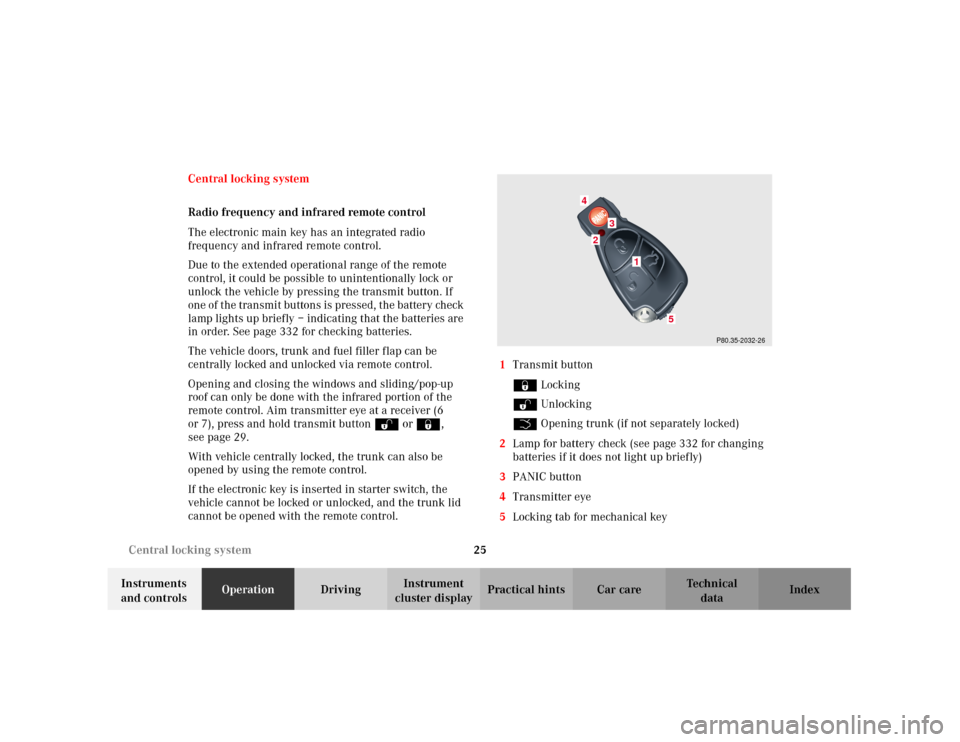
cannot be opened with the remote control.1Transmit button
‹ Locking
ΠUnlocking
Š Opening trunk (if not separately locked)
2Lamp for battery check (see page 332 for changing
batteries if it does not light up briefly)
3PANIC button
4Transmitter eye
5Locking tab for mechanical key
P80.35-2032-26
24
3
5
1
Page 35 of 381
26 Central locking system
Te ch n i c a l
data Instruments
and controlsOperationDrivingInstrument
cluster displayPractical hints Car care Index
6Infrared receiver in driver’s door handle7Infrared receiver in front passenger door handle
P80.30-2139-26
6
P80.30-2140-26
7
Page 36 of 381
27 Central locking system
Te ch n i c a l
data Instruments
and controlsOperationDrivingInstrument
cluster displayPractical hints Car care Index Locking and unlocking with remote control
Unlocking:
Press transmit button Œ. All turn signal lamps blink
once to indicate that the vehicle is unlocked.
The remote control can be programmed for two kinds of
unlocking modes (see below):
Selective unlocking mode –
Press transmit button Œ once to unlock driver’s door
and fuel filler flap.
Press transmit button Πtwice to unlock all doors,
fuel filler flap, and trunk.
Global unlocking mode –
Press transmit button Πonce to unlock all doors,
fuel filler flap, and trunk.
Notes:
If the trunk was previously locked separately, it will
remain locked, see page 35.
The presently active unlocking mode (selective or
global) can only be determined by unlocking the vehicle
with the remote control (see below for changing mode).If within 40 seconds of unlocking with the remote
control, neither door or trunk is opened, the electronic
key is not inserted in the starter switch, or the central
locking switch is not activated, the vehicle will
automatically lock.
Locking:
Press transmit button ‹ once. All turn signal lamps
blink three times to indicate that the vehicle is locked. If
they do not blink three times, a door or trunk is not
properly closed.
Note:
If the vehicle cannot be locked or unlocked by pressing
the transmit button, then it may be necessary to change
the batteries in the electronic main key (if ok, battery
check lamp in electronic main key will light briefly
when pressing transmit button) or to synchronize the
remote control, see pages 332 and 334.
Choosing global or selective mode on remote control
Press and hold transmit buttons‹ andŒ
simultaneously for five seconds to reprogram the
remote control. Battery check lamp will blink two times
indicating the completed mode change.
Page 38 of 381
29 Central locking system
Te ch n i c a l
data Instruments
and controlsOperationDrivingInstrument
cluster displayPractical hints Car care Index Opening and closing windows and
sliding / pop-up roof from outside
(summer opening / convenience feature)
Aim transmitter eye of remote control at the door
receiver.
Summer opening:
The sliding / pop-up roof and all side windows can be
opened automatically.
Continue to press transmit button Πafter unlocking
the vehicle.
The windows and sliding/pop-up roof begin to open
after approximately 1 second.
To interrupt opening procedure, release transmit
button.
Convenience feature:
The sliding / pop-up roof and the side windows can be
closed.
Continue to press transmit button ‹ after locking
the vehicle.
The windows and sliding / pop-up roof begin to close
after approximately 1 second.To interrupt closing procedure, release transmit button.
Ensure that all side windows and the sliding / pop-up
roof are properly closed before leaving the vehicle.
Note:
If the windows and sliding / pop-up roof cannot be
operated automatically by pressing the transmit button
of t he r emo te c ontr ol then it m ay be n ece ssar y to chan ge
the batteries in the electronic main key (if ok, battery
check lamp in electronic main key will light briefly
when transmitting), or to synchronize the remote
control, see page 332 and 334.
Wa r n i n g !
Never operate the windows or sliding / pop-up roof
if there is the possibility of anyone being harmed
by the opening or closing procedure.In case the procedure causes potential danger, the
procedure can be immediately halted by releasing
the remote control button. To reverse direction of
movement press Œ for opening or ‹ for
closing.
Page 39 of 381
30 Central locking system
Te ch n i c a l
data Instruments
and controlsOperationDrivingInstrument
cluster displayPractical hints Car care Index
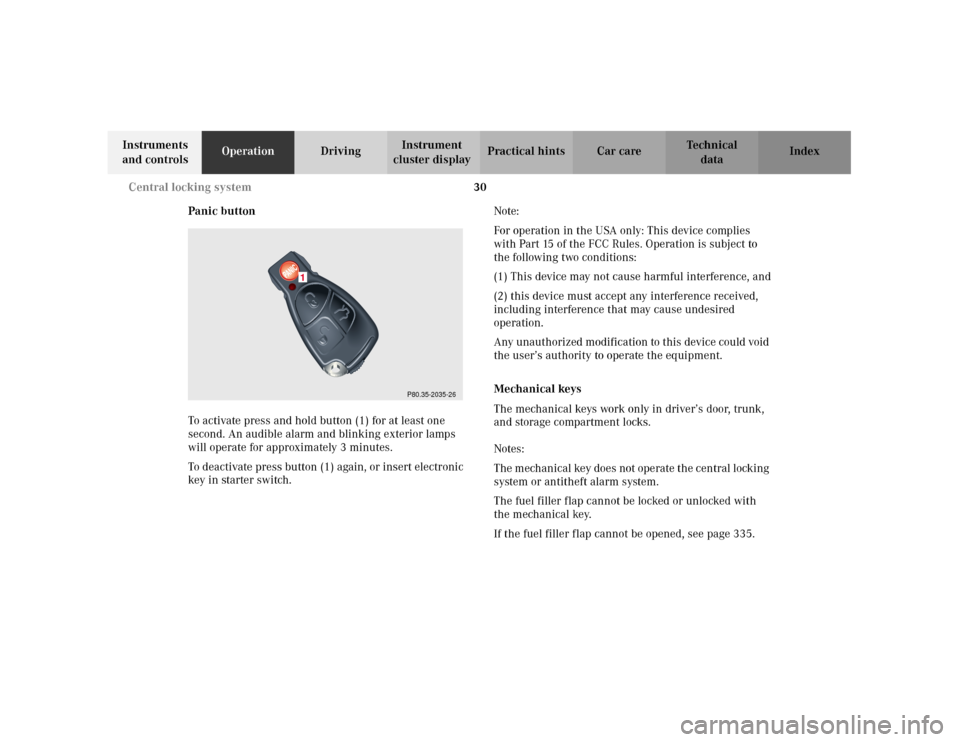
Panic button
To activate press and hold button (1) for at least one
second. An audible alarm and blinking exterior lamps
will operate for approximately 3 minutes.
To deactivate press button (1) again, or insert electronic
key in starter switch.Note:
For operation in the USA only: This device complies
with Part 15 of the FCC Rules. Operation is subject to
the following two conditions:
(1) This device may not cause harmful interference, and
(2) this device must accept any interference received,
including interference that may cause undesired
operation.
Any unauthorized modification to this device could void
the user’s authority to operate the equipment.
Mechanical keys
The mechanical keys work only in driver’s door, trunk,
and storage compartment locks.
Notes:
The mechanical key does not operate the central locking
system or antitheft alarm system.
The fuel filler flap cannot be locked or unlocked with
the mechanical key.
If the fuel filler flap cannot be opened, see page 335.
P80.35-2035-26
1