Doors MERCEDES-BENZ C320 2002 W203 User Guide
[x] Cancel search | Manufacturer: MERCEDES-BENZ, Model Year: 2002, Model line: C320, Model: MERCEDES-BENZ C320 2002 W203Pages: 406
Page 98 of 406
95 Memory function
Te ch n i c a l
data Instruments
and controlsOperationDrivingInstrument
cluster displayPractical hints Car care Index Memory function
(model C 320 only, optional on model C 240)
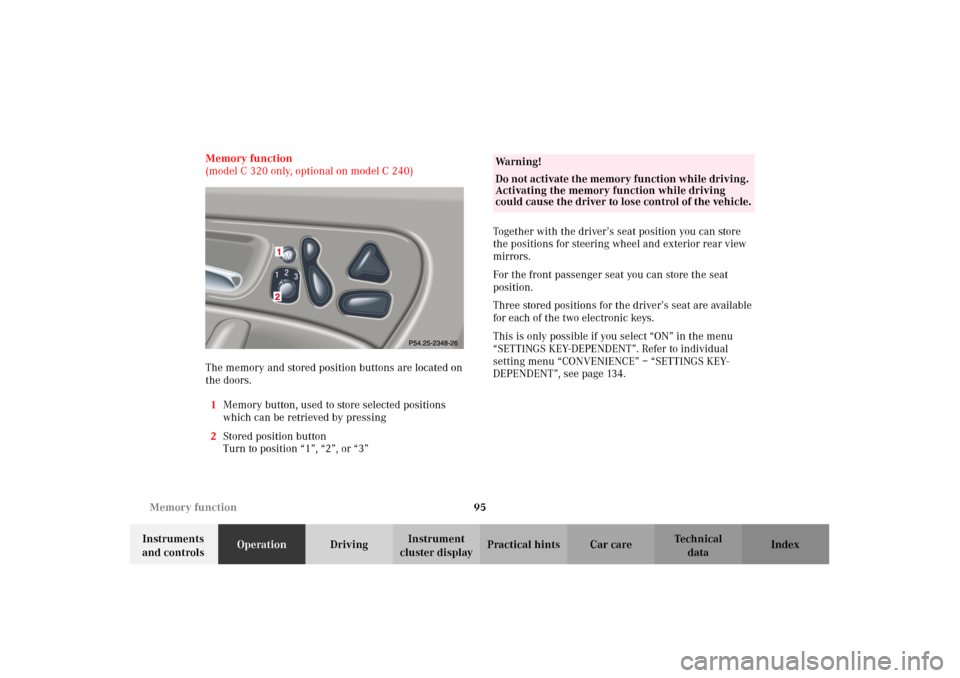
The memory and stored position buttons are located on
the doors.
1Memory button, used to store selected positions
which can be retrieved by pressing
2Stored position button
Turn to position “1”, “2”, or “3”Together with the driver’s seat position you can store
the positions for steering wheel and exterior rear view
mirrors.
For the front passenger seat you can store the seat
position.
Three stored positions for the driver’s seat are available
for each of the two electronic keys.
This is only possible if you select “ON” in the menu
“SETTINGS KEY-DEPENDENT”. Refer to individual
setting menu “CONVENIENCE” – “SETTINGS KEY-
DEPENDENT”, see page 134.
Wa r n i n g !
Do not activate the memory function while driving.
Activating the memory function while driving
could cause the driver to lose control of the vehicle.
OM_203.book Seite 95 Donnerstag, 31. Mai 2001 11:57 11
Page 149 of 406
146 Exterior lamp switch
Te ch n i c a l
data Instruments
and controlsOperationDrivingInstrument
cluster displayPractical hints Car care Index
Night security illumination
At low ambient light conditions and with the engine
having been switched off, the exterior lamps (fog lamps
and parking lamps) switch on for added illumination,
(except in daytime running mode). After the last door
has been closed the lamp-on time period commences.
See the individual setting menu “LIGHTING” –
“HEADLAMPS DELAYED SWITCH–OFF” on page 128,
for instructions on how to activate the function.
The lamp-on time period for night security illumination
can be set at several different timed levels from 0 (off) to
60 seconds, see the individual setting menu
“LIGHTING” – “HEADLAMPS DELAYED SWITCH–OFF”
on page 128.Notes:
Within 10 minutes after closing the last door the night
security illumination can be reactivated by opening a
door.
If after switching the engine off, no doors are opened or
if after opening the doors they are not closed, the night
security illumination will switch off automatically
after 60 seconds.
Deactivating night security illumination temporarily:
Turn the electronic key in starter switch to position 0
then to position 2 and back to position 0 again before
getting out of the vehicle. The night security
illumination will not be activated when the door is
opened.
OM_203.book Seite 146 Donnerstag, 31. Mai 2001 11:57 11
Page 200 of 406
197 Interior equipment
Te ch n i c a l
data Instruments
and controlsOperationDrivingInstrument
cluster displayPractical hints Car care Index Power windows
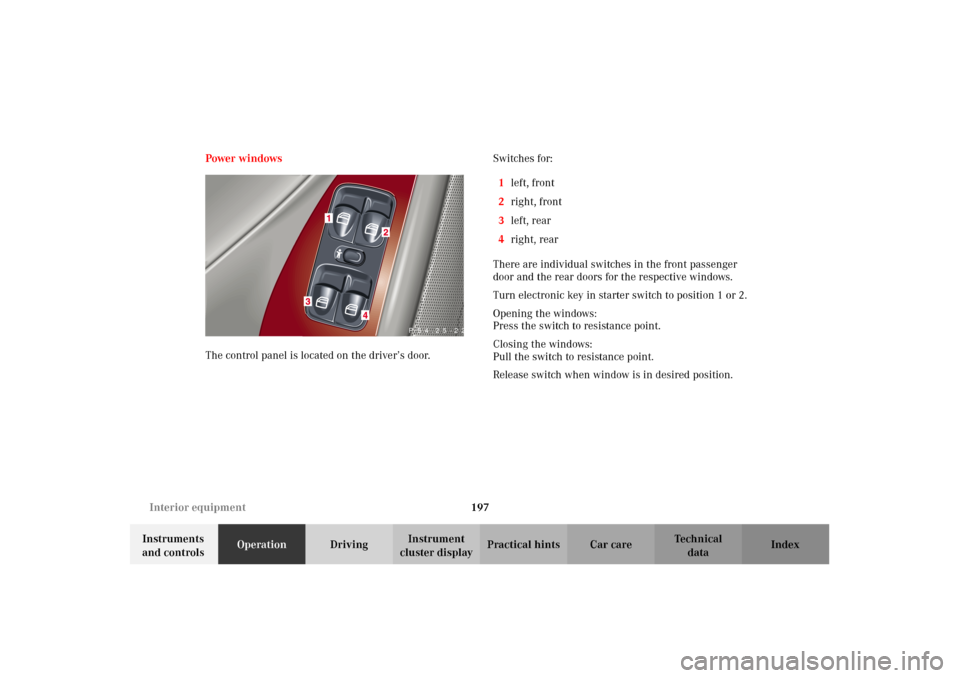
The control panel is located on the driver’s door. Switches for:
1left, front
2right, front
3left, rear
4right, rear
There are individual switches in the front passenger
door and the rear doors for the respective windows.
Turn electronic key in starter switch to position 1 or 2.
Opening the windows:
Press the switch to resistance point.
Closing the windows:
Pull the switch to resistance point.
Release switch when window is in desired position.
P 54.25-2259-26
OM_203.book Seite 197 Donnerstag, 31. Mai 2001 11:57 11
Page 206 of 406
203 Interior equipment
Te ch n i c a l
data Instruments
and controlsOperationDrivingInstrument
cluster displayPractical hints Car care Index Interior lighting
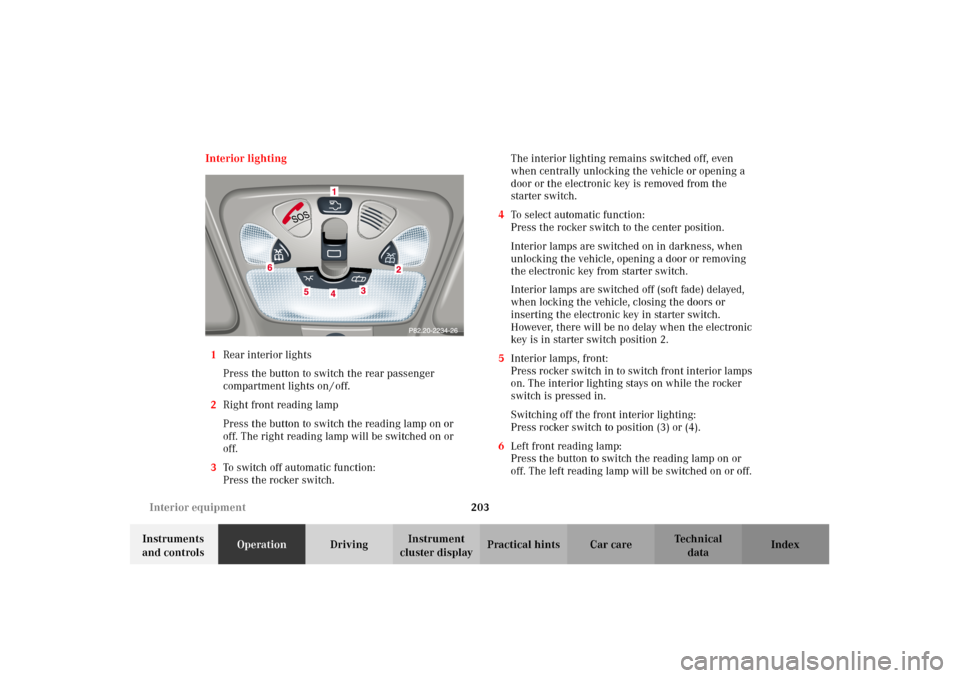
1Rear interior lights
Press the button to switch the rear passenger
compartment lights on / off.
2Right front reading lamp
Press the button to switch the reading lamp on or
off. The right reading lamp will be switched on or
off.
3To switch off automatic function:
Press the rocker switch.The interior lighting remains switched off, even
when centrally unlocking the vehicle or opening a
door or the electronic key is removed from the
starter switch.
4To select automatic function:
Press the rocker switch to the center position.
Interior lamps are switched on in darkness, when
unlocking the vehicle, opening a door or removing
the electronic key from starter switch.
Interior lamps are switched off (soft fade) delayed,
when locking the vehicle, closing the doors or
inserting the electronic key in starter switch.
However, there will be no delay when the electronic
key is in starter switch position 2.
5Interior lamps, front:
Press rocker switch in to switch front interior lamps
on. The interior lighting stays on while the rocker
switch is pressed in.
Switching off the front interior lighting:
Press rocker switch to position (3) or (4).
6Left front reading lamp:
Press the button to switch the reading lamp on or
off. The left reading lamp will be switched on or off.
OM_203.book Seite 203 Donnerstag, 31. Mai 2001 11:57 11
Page 207 of 406
204 Interior equipment
Te ch n i c a l
data Instruments
and controlsOperationDrivingInstrument
cluster displayPractical hints Car care Index
Notes:
The time delay for the interior light to switch off after
the electronic key is removed from the starter switch
can be adjusted in the individual setting menu
“LIGHTING” – “INT. ILLUMINATION DELAYED
SWITCH-OFF”. See page 128.
To prevent the vehicle battery from being discharged
with doors open, all interior lamps switch off after
approximately 5 minutes, when the electronic key
removed or in starter switch position 0.
An interior lamp switched on manually does not go out
automatically. Before leaving the vehicle, make sure that
all interior lamps are switched off.Door entry lamps
The appropriate entry lamp switches on if a door is
opened in darkness and if the interior lighting is
switched to automatic function.
The entry lamp switches off automatically when the
door is closed.
OM_203.book Seite 204 Donnerstag, 31. Mai 2001 11:57 11
Page 350 of 406
347 Towing the vehicle
Te ch n i c a l
data Instruments
and controlsOperation DrivingInstrument
cluster displayPractical hintsCar care Index Towing the vehicleImportant!
When towing the vehicle, please, note the following:
With the automatic central locking activated and the
electronic key in starter switch position 2, the vehicle
doors lock if the lef t front wheel as well as the right rear
wheel are turning at vehicle speeds of approximately
9 mph (15 km / h) or more.
To prevent the vehicle door locks from locking,
deactivate the automatic central locking. See the
individual setting menu “VEHICLE” – “AUTOMATIC
DOOR LOCK” on page 131.
Towing of the vehicle should only be done using the
properly installed towing eye bolt. Never attach tow
cable, tow rope or tow rod to vehicle chassis, frame
or suspension parts.
Notes:
The selector lever will remain locked in position “P” and
the electronic key cannot be turned in the starter switch
if the battery is disconnected or discharged. See battery
on page 342 or jump starting on page 344.
Transmission selector lever, manually unlocking, see
page 350.
Wa r n i n g !
Prior to towing the vehicle with all wheels on the
ground, make certain that the electronic key is in
starter switch position 2.If the electronic key is left in the starter switch
position 0 for an extended period of time, it can no
longer be turned in the switch. In this case, the
steering is locked. To unlock, remove electronic key
from starter switch and reinsert.When towing another vehicle, observe that the
gross vehicle weight of the vehicle being towed
does not exceed the towing capacity of your vehicle.
OM_203.book Seite 347 Donnerstag, 31. Mai 2001 11:57 11
Page 369 of 406
366 Cleaning and care of the vehicle
Te ch n i c a l
data Instruments
and controlsOperation DrivingInstrument
cluster displayPractical hintsCar careIndex
Cleaning and care of the vehicle
In operation, your vehicle is subjected to varying
external influences which, if gone unchecked, can
attack the paintwork as well as the underbody and
cause lasting damage.
Such damage is caused not only by extreme and varying
climatic conditions, but also by air polution, road salt,
tar, gravel and stone chipping. Grease and oil, fuel,
coolant, brake fluid, bird droppings, insects, tree resins
etc. should be removed immediately to avoid paint
damage. Frequent washing reduces and/or eli minates
the aggressiveness and potency of the above adverse
influences.More frequent washings are necessary to deal with
unfavorable conditions; for example, near the ocean, in
industrial areas (smoke, exhaust emissions), or during
winter operation.
You should check your vehicle from time to time for
stone chipping or other damage. Any damage should be
repaired as soon as possible to prevent the start of
corrosion.
In doing so, do not neglect the underside of the vehicle.
A prerequisite for a thorough check is a washing of the
underbody followed by a thorough inspection. Damaged
areas need to be reundercoated.
Your vehicle has been treated at the factory with a wax-
base rustproofing in the body cavities which will last for
the lifetime of the vehicle. Post-production treatment is
neither necessary nor recommended by Mercedes-Benz
because of the possibility of incompatibility between
materials used in the production process and others
applied later.
We have selected car-care products and compiled
recommendations which are specially matched to our
vehicles and which always reflect the latest technology.
You can obtain Mercedes-Benz approved car-care
products at your authorized Mercedes-Benz Center.
Wa r n i n g !
Many cleaning products can be hazardous. Some
are poisonous, others are flammable. Always follow
the instructions on the particular container.
Always open your vehicle’s doors or windows when
cleaning the inside.Never use fluids or solvents that are not designed
for cleaning your vehicle.
OM_203.book Seite 366 Donnerstag, 31. Mai 2001 11:57 11
Page 370 of 406
367 Cleaning and care of the vehicle
Te ch n i c a l
data Instruments
and controlsOperation DrivingInstrument
cluster displayPractical hintsCar careIndex Scratches, corrosive deposits, corrosion or damage due
to negligent or incorrect care cannot always be removed
or repaired with the car-care products recommended
here. In such cases it is best to seek aid at your
authorized Mercedes-Benz Center.
The following topics deal with the cleaning and care of
your vehicle and give important “how-to” information as
well as references to Mercedes-Benz approved car-care
products.
Ad d ition al in fo rm atio n can be foun d in t he boo klet titled
“Vehicle Care Guide”.
Power washer
When using a power washer for cleaning the vehicle
always observe manufacturer’s operating instructions.
Caution!
Never use a round nozzle to power wash tires. The
intense jet of water can result in damage to the tire.
Always replace a damaged tire.
Always keep the jet of water moving across the surface.
Do not aim directly at electrical parts, electrical
connectors, seals, or other rubber parts.Tar st ai ns
Quickly remove tar stains before they dry and become
more difficult to remove. A tar remover is
recommended.
Paintwork, painted body components
Mercedes-Benz approved Paint Care should be applied
when water drops on the paint surface do not “bead up”,
normally in 3 to 5 months, depending on climate and
washing detergent used.
Mercedes-Benz approved Paint Cleaner should be
applied if paint surface shows signs of dirt embedding
(i.e. loss of gloss).
Do not apply any of these products or wax if your
vehicle is parked in the sun or if the hood is still hot.
Use the appropriate MB-Touch-Up Stick for quick and
provisional repairs of minor paint damage (i.e. chips
from stones, vehicle doors etc.).
OM_203.book Seite 367 Donnerstag, 31. Mai 2001 11:57 11
Page 393 of 406
390 Index
Te ch n i c a l
data Instruments
and controlsOperation DrivingInstrument
cluster displayPractical hints Car careIndex
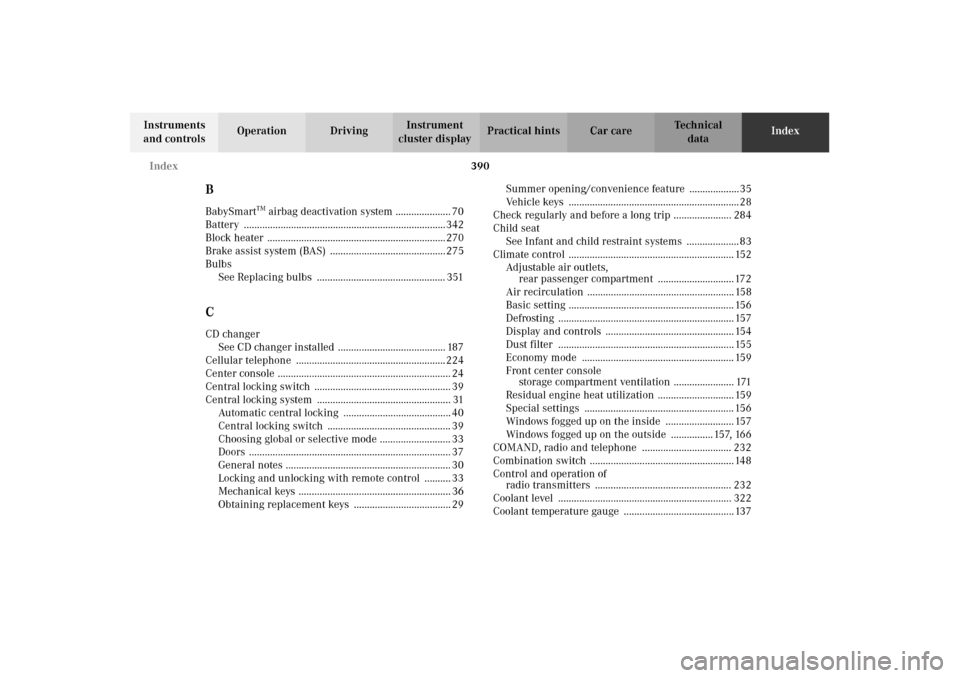
BBabySmart
TM airbag deactivation system ..................... 70
Battery .............................................................................342
Block heater .................................................................... 270
Brake assist system (BAS) ............................................ 275
Bulbs
See Replacing bulbs ................................................. 351
CCD changer
See CD changer installed ......................................... 187
Cellular telephone ......................................................... 224
Center console .................................................................. 24
Central locking switch .................................................... 39
Central locking system ................................................... 31
Automatic central locking ......................................... 40
Central locking switch ............................................... 39
Choosing global or selective mode ........................... 33
Doors ............................................................................. 37
General notes ............................................................... 30
Locking and unlocking with remote control .......... 33
Mechanical keys .......................................................... 36
Obtaining replacement keys ..................................... 29Summer opening/convenience feature ...................35
Vehicle keys ................................................................. 28
Check regularly and before a long trip ...................... 284
Child seat
See Infant and child restraint systems .................... 83
Climate control ............................................................... 152
Adjustable air outlets,
rear passenger compartment ............................. 172
Air recirculation ........................................................ 158
Basic setting ............................................................... 156
Defrosting ................................................................... 157
Display and controls ................................................. 154
Dust filter ................................................................... 155
Economy mode .......................................................... 159
Front center console
storage compartment ventilation ....................... 171
Residual engine heat utilization ............................. 159
Special settings ......................................................... 156
Windows fogged up on the inside .......................... 157
Windows fogged up on the outside ................ 157, 166
COMAND, radio and telephone .................................. 232
Combination switch ....................................................... 148
Control and operation of
radio transmitters .................................................... 232
Coolant level .................................................................. 322
Coolant temperature gauge .......................................... 137
OM_203.book Seite 390 Donnerstag, 31. Mai 2001 11:57 11