roof MERCEDES-BENZ CL CLASS 2010 User Guide
[x] Cancel search | Manufacturer: MERCEDES-BENZ, Model Year: 2010, Model line: CL CLASS, Model: MERCEDES-BENZ CL CLASS 2010Pages: 500, PDF Size: 9.32 MB
Page 258 of 500
i
You can obtain the required batteries at
any authorized Mercedes-Benz Center.
i If the batteries are checked within signal
range of the vehicle, pressing button
& or % will lock or unlock the vehicle
accordingly. Loss of the SmartKey
If you lose your SmartKey or mechanical key,
you should do the following:
X Have the SmartKey deactivated by an
authorized Mercedes-Benz Center.
X Report the loss of the SmartKey or the
mechanical key to your car insurance
company immediately.
X Have the mechanical lock replaced if
necessary.
Any authorized Mercedes-Benz Center will be
glad to supply you with a replacement. For
information on replacing the SmartKey, see
“Replacing the SmartKey” ( Y page 256).Replacing the SmartKey
Only you, or someone authorized by you can
order a replacement key from any Mercedes-
Benz Center. In order to do so, the Mercedes-
Benz Center will require proof of identity and
vehicle ownership with original documents,
including the following:
If you are the current owner of the vehicle:
R the vehicle’s current state registration
R a current identity card, passport, or drivers
license
If you are an authorized person:
R the vehicle’s current state registration
R a current identity card, passport, or drivers
license for the authorized individual
R signed and dated authorization from the
owner of the vehicle for which the key is
being requested i
Duplicated or photocopied
documentation will not be accepted.
Activating the key Once you, or an authorized person, has
provided the appropriate documents, the
Mercedes-Benz Center will need to
synchronize the key to your vehicle before it
can be used. In order to do so, the Mercedes-
Benz Center need access to your vehicle.
Opening the doors from the inside
You can open a locked door from the inside.
Open door only when conditions are safe to
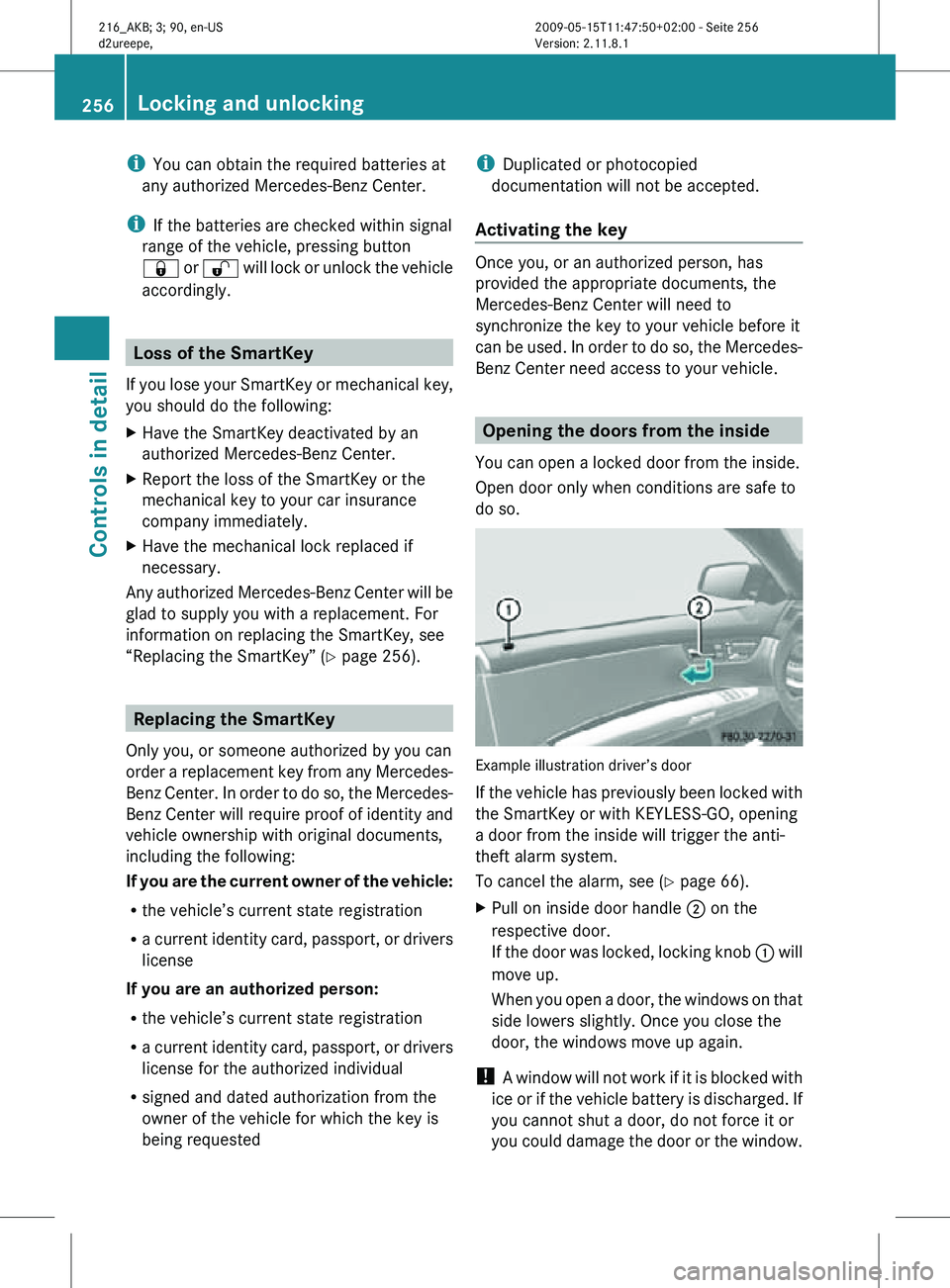
do so. Example illustration driver’s door
If the vehicle has previously been locked with
the SmartKey or with KEYLESS-GO, opening
a door from the inside will trigger the anti-
theft alarm system.
To cancel the alarm, see (Y page 66).
X
Pull on inside door handle ; on the
respective door.
If the door was locked, locking knob : will
move up.
When you open a door, the windows on that
side lowers slightly. Once you close the
door, the windows move up again.
! A window will not work if it is blocked with
ice or if the vehicle battery is discharged. If
you cannot shut a door, do not force it or
you could damage the door or the window. 256
Locking and unlockingControls in detail
216_AKB; 3; 90, en-US
d2ureepe,
Version: 2.11.8.1 2009-05-15T11:47:50+02:00 - Seite 256
Page 260 of 500
You can open the trunk when the vehicle is
stationary.
A minimum height clearance of 5.9 ft (1.80 m)
is required to open the trunk lid.
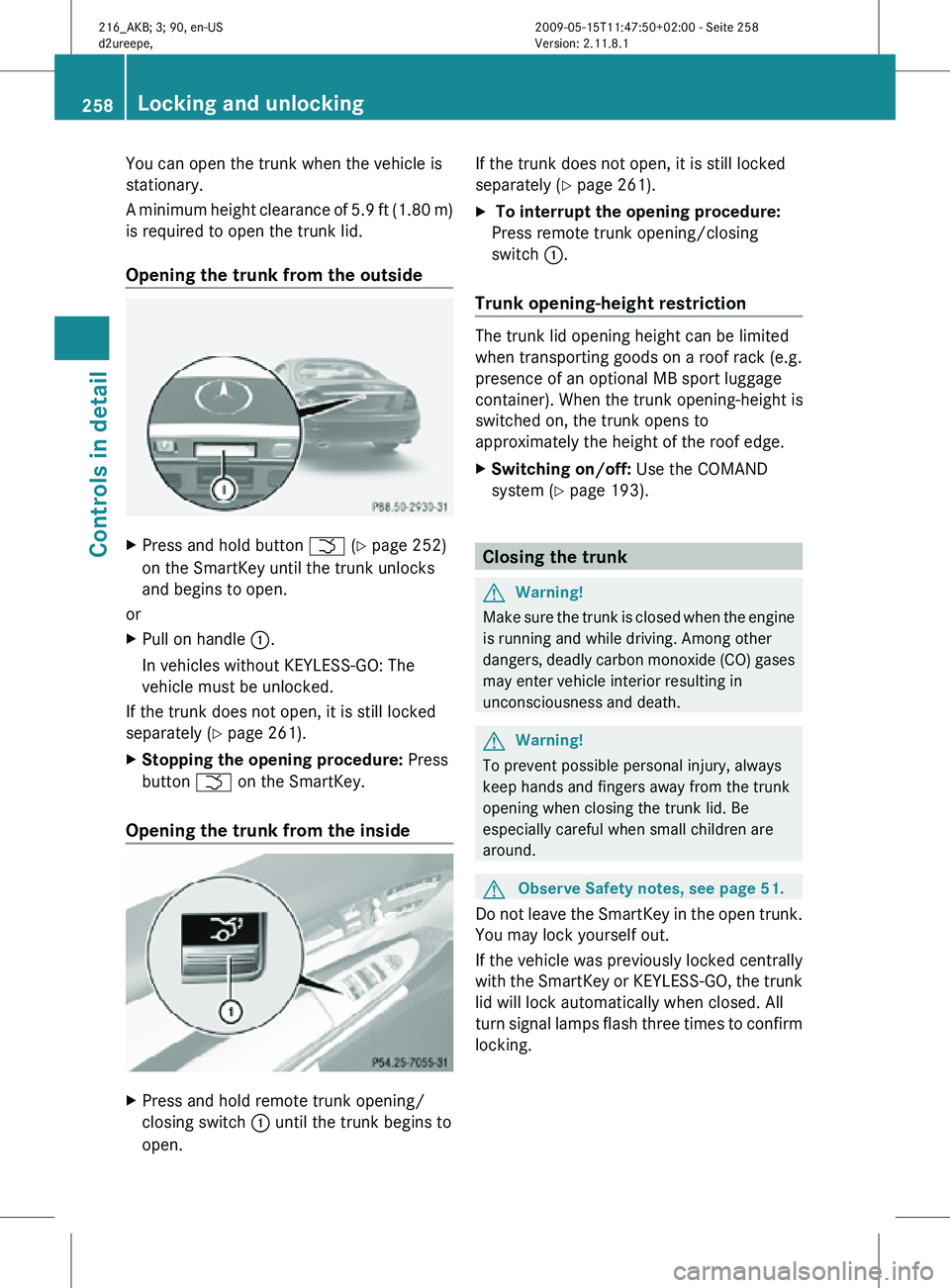
Opening the trunk from the outside
X
Press and hold button F (Y page 252)
on the SmartKey until the trunk unlocks
and begins to open.
or
X Pull on handle :.
In vehicles without KEYLESS-GO: The
vehicle must be unlocked.
If the trunk does not open, it is still locked
separately ( Y page 261).
X Stopping the opening procedure: Press
button F on the SmartKey.
Opening the trunk from the inside X
Press and hold remote trunk opening/
closing switch : until the trunk begins to
open. If the trunk does not open, it is still locked
separately (
Y page 261).
X To interrupt the opening procedure:
Press remote trunk opening/closing
switch :.
Trunk opening-height restriction The trunk lid opening height can be limited
when transporting goods on a roof rack (e.g.
presence of an optional MB sport luggage
container). When the trunk opening-height is
switched on, the trunk opens to
approximately the height of the roof edge.
X
Switching on/off: Use the COMAND
system (Y page 193). Closing the trunk
G
Warning!
Make sure the trunk is closed when the engine
is running and while driving. Among other
dangers, deadly carbon monoxide (CO) gases
may enter vehicle interior resulting in
unconsciousness and death. G
Warning!
To prevent possible personal injury, always
keep hands and fingers away from the trunk
opening when closing the trunk lid. Be
especially careful when small children are
around. G
Observe Safety notes, see page 51.
Do not leave the SmartKey in the open trunk.
You may lock yourself out.
If the vehicle was previously locked centrally
with the SmartKey or KEYLESS-GO, the trunk
lid will lock automatically when closed. All
turn signal lamps flash three times to confirm
locking. 258
Locking and unlockingControls in detail
216_AKB; 3; 90, en-US
d2ureepe,
Version: 2.11.8.1 2009-05-15T11:47:50+02:00 - Seite 258
Page 285 of 500
X
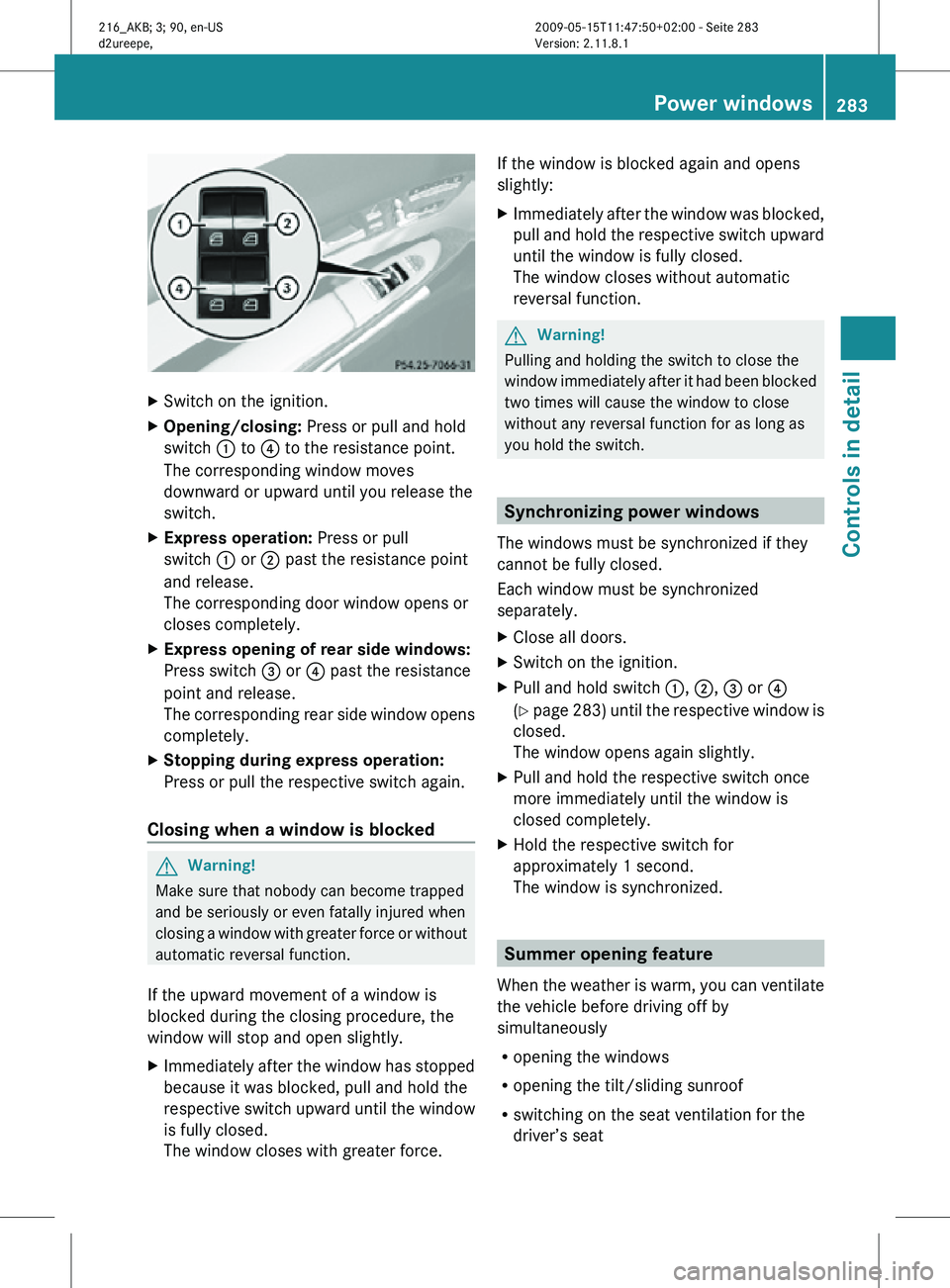
Switch on the ignition.
X Opening/closing: Press or pull and hold
switch : to ? to the resistance point.
The corresponding window moves
downward or upward until you release the
switch.
X Express operation: Press or pull
switch : or ; past the resistance point
and release.
The corresponding door window opens or
closes completely.
X Express opening of rear side windows:
Press switch = or ? past the resistance
point and release.
The corresponding rear side window opens
completely.
X Stopping during express operation:
Press or pull the respective switch again.
Closing when a window is blocked G
Warning!
Make sure that nobody can become trapped
and be seriously or even fatally injured when
closing a window with greater force or without
automatic reversal function.
If the upward movement of a window is
blocked during the closing procedure, the
window will stop and open slightly.
X Immediately after the window has stopped
because it was blocked, pull and hold the
respective switch upward until the window
is fully closed.
The window closes with greater force. If the window is blocked again and opens
slightly:
X
Immediately after the window was blocked,
pull and hold the respective switch upward
until the window is fully closed.
The window closes without automatic
reversal function. G
Warning!
Pulling and holding the switch to close the
window immediately after it had been blocked
two times will cause the window to close
without any reversal function for as long as
you hold the switch. Synchronizing power windows
The windows must be synchronized if they
cannot be fully closed.
Each window must be synchronized
separately.
X Close all doors.
X Switch on the ignition.
X Pull and hold switch :, ;, = or ?
(Y page 283) until the respective window is
closed.
The window opens again slightly.
X Pull and hold the respective switch once
more immediately until the window is
closed completely.
X Hold the respective switch for
approximately 1 second.
The window is synchronized. Summer opening feature
When the weather is warm, you can ventilate
the vehicle before driving off by
simultaneously
R opening the windows
R opening the tilt/sliding sunroof
R switching on the seat ventilation for the
driver’s seat Power windows
283Controls in detail
216_AKB; 3; 90, en-US
d2ureepe, Version: 2.11.8.1 2009-05-15T11:47:50+02:00 - Seite 283 Z
Page 286 of 500

The summer opening feature can only be
activated via the remote control of the
SmartKey. The SmartKey must be in close
proximity to the driver’s outside door handle.
X
Aim the transmitter eye of the SmartKey at
the driver’s outside door handle.
X Press and hold button % on the
SmartKey until the windows and the tilt/
sliding sunroof have reached the desired
position.
The vehicle unlocks.
X Release button % on the SmartKey to
interrupt the opening procedure. Convenience closing feature
When locking the vehicle, you can
simultaneously close the windows and the
tilt/sliding sunroof. G
Warning!
When closing the windows and the tilt/sliding
sunroof, make sure there is no danger of
anyone being harmed by the closing
procedure.
If potential danger exists, proceed as follows:
R Release button & to stop the closing
procedure. To open, press and hold button
%. To continue the closing procedure
after making sure that there is no danger of
anyone being harmed by the closing
procedure, press and hold button &.
Vehicles with KEYLESS-GO:
R Release the sensor surface on the outside
door handle to stop the closing procedure.
R Immediately pull on the same outside door
handle and hold firmly. The windows and
the tilt/sliding sunroof will open for as long
as the door handle is held but the door not
opened. With SmartKey The SmartKey must be in close proximity to
the driver’s outside door handle.
X
Aim transmitter eye of the SmartKey at the
driver’s outside door handle.
X Press and hold button & on the
SmartKey until the windows and the tilt/
sliding sunroof are closed completely.
The vehicle locks.
X Release button & on the SmartKey to
interrupt the closing procedure.
With KEYLESS-GO The SmartKey with KEYLESS-GO must be
located outside the vehicle within
approximately 3 ft (1 m) of a door.
X
Close all doors.
X Touch and hold sensor surface : on an
outside door handle until the windows and
the tilt/sliding sunroof are closed
completely.
i Make sure you are only touching sensor
surface :.
X Release sensor surface : to interrupt the
closing procedure. 284
Power windowsControls in detail
216_AKB; 3; 90, en-US
d2ureepe,
Version: 2.11.8.1 2009-05-15T11:47:50+02:00 - Seite 284
Page 341 of 500
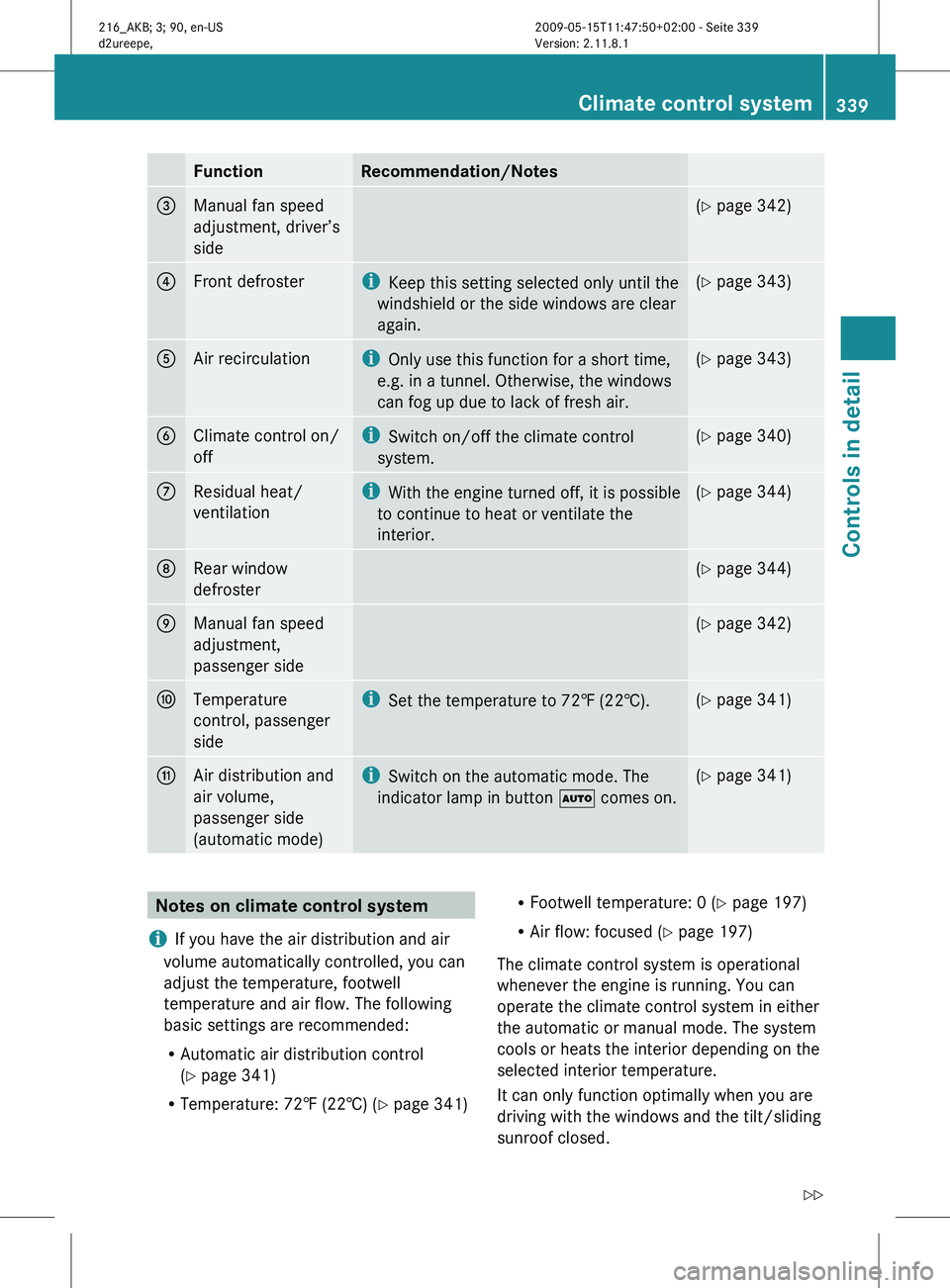
Function Recommendation/Notes
3
Manual fan speed
adjustment, driver’s
side (Y page 342)
4
Front defroster i
Keep this setting selected only until the
windshield or the side windows are clear
again. (Y page 343)
5
Air recirculation i
Only use this function for a short time,
e.g. in a tunnel. Otherwise, the windows
can fog up due to lack of fresh air. (Y page 343)
6
Climate control on/
off i
Switch on/off the climate control
system. (Y page 340)
7
Residual heat/
ventilation i
With the
engine turned off, it is possible
to continue to heat or ventilate the
interior. (Y page 344)
8
Rear window
defroster (Y page 344)
9
Manual fan speed
adjustment,
passenger side (Y page 342)
a
Temperature
control, passenger
side i
Set the temperature to 72 ‡ (22†). (Y page 341)
b
Air distribution and
air volume,
passenger side
(automatic mode) i
Switch on the automatic mode. The
indicator lamp in button à comes on. (Y page 341)
Notes on climate control system
i If you have the air distribution and air
volume automatically controlled, you can
adjust the temperature, footwell
temperature and air flow. The following
basic settings are recommended:
R Automatic air distribution control
(Y page 341)
R Temperature: 72‡ (22†) (Y page 341) R
Footwell temperature: 0 (Y page 197)
R Air flow: focused ( Y page 197)
The climate control system is operational
whenever the engine is running. You can
operate the climate control system in either
the automatic or manual mode. The system
cools or heats the interior depending on the
selected interior temperature.
It can only function optimally when you are
driving with the windows and the tilt/sliding
sunroof closed. Climate control system
339
Controls in detail
216_AKB; 3; 90, en-US
d2ureepe, Version: 2.11.8.1 2009-05-15T11:47:50+02:00 - Seite 339 Z
Page 345 of 500
Front defroster
You can use this setting to defrost the
windshield, for example if it is iced up.
You can also defog the windshield and the
door windows.
i Keep this setting selected only until the
windshield or the door windows are clear
again.
Activating X
Press rocker switch ¬ up or down.
The indicator lamp in the rocker switch
comes on.
The climate control switches to the following
functions automatically:
R most efficient blower speed and heating
power, depending on outside temperature
R air flows onto the windshield and the door
windows
R the air conditioning compressor switches
on at outside temperatures above
approximately 41‡ (5†) for air-drying
Adjustments
You can adjust the air volume and the
temperature when the front defroster is
switched on. The air flow will remain on the
windshield and door windows.
X Press rocker switch K up or down to
increase or decrease air volume to the
desired level.
The air
volume increases/decreases to the
next higher/lower blower speed and
heating switches to the temperature that
was set before the front defroster was
switched on.
The indicator lamp in rocker switch ¬
goes out.
or
X Press rocker switches w up or down.
Heating switches to the temperature that
was set before the front defroster was
switched on. The indicator lamp in rocker switch ¬
goes out.
i The air conditioning compressor remains
on even with the indicator lamp in button
¬ goes out. This helps to prevent
windshield from fogging.
Deactivating X
Press rocker switch ¬ up or down.
The indicator lamp in the rocker switch
goes out.
The previous settings are once again in
effect, except air recirculation mode stays
off.
Windshield fogged on the outside X
Switch the windshield wipers on
(Y page 280).
X Press rocker switch à up or down.
The indicator lamp in the rocker switch
comes on. Maximum cooling MAX COOL
MAX COOL is only available in U.S. vehicles.
MAX COOL is only operational when the
engine is running.
If à is selected on both the left and right
side and there is a high demand for cooling,
the display MAXCOOL
appears in the COMAND
display.
This provides the fastest possible cooling of
the vehicle interior (when windows and tilt/
sliding sunroof are closed). Air recirculation mode
Switch to air recirculation mode to prevent
unpleasant odors from entering the vehicle
from the outside (e. g. before driving through
a tunnel). This setting cuts off the intake of
outside air and recirculates the air in the
passenger compartment. Climate control system
343
Controls in detail
216_AKB; 3; 90, en-US
d2ureepe, Version: 2.11.8.1 2009-05-15T11:47:50+02:00 - Seite 343 Z
Page 347 of 500
The rear window defroster uses a large
amount of power. To keep the battery drain
to a minimum, switch off the defroster as
soon as the rear window is clear. The
defroster is switched off automatically after
approximately 6 to 17 minutes of operation
depending on the outside temperature.
X
Switch on the ignition.
X Switching on: Press rocker switch ¤
up or down.
The indicator lamp in the rocker switch
comes on.
X Switching off: Press rocker switch ¤
up or down.
The rear window defroster switches off when
the battery voltage is too low. Too many
electrical consumers may be operating
simultaneously.
X Switch off consumers that are currently not
needed if required. Power tilt/sliding sunroof
Opening and closing
G
Observe Safety notes, see page 51. G
Warning!
When opening or closing the tilt/sliding
sunroof, make sure there is no danger of
anyone being
harmed by the opening/closing
procedure.
The tilt/sliding sunroof is equipped with the
express operation and automatic reversal
function. If the movement of the tilt/sliding
sunroof is blocked during the closing
procedure, the tilt/sliding sunroof will stop
and open slightly.
The tilt/sliding sunroof operates differently
when the sunroof switch is pressed and held.
See the “Closing when the tilt/sliding sunroof
is blocked” section for details.
The opening/closing procedure of the tilt/
sliding sunroof can be immediately halted by
releasing the sunroof switch or, if the sunroof switch was moved past the resistance point
and
released,
by moving the sunroof switch in
any direction. G
Warning!
The tilt/sliding sunroof is made out of glass.
In the event of an accident, the glass may
shatter. This may result in an opening in the
roof.
In a vehicle rollover, occupants not wearing
their seat belts or not wearing them properly
may be thrown out of the opening. Such an
opening also
presents a potential for injury for
occupants wearing their seat belts properly as
entire body parts or portions of them may
protrude from the passenger compartment.
! To avoid damaging the seals, do not
transport any objects with sharp edges
which can stick out of the tilt/sliding
sunroof.
Do not open the tilt/sliding sunroof if there
is snow or ice on the roof, as this could
result in malfunctions.
If you cannot open or close the tilt/sliding
sunroof due to a malfunction contact
Roadside Assistance or an authorized
Mercedes-Benz Center.
! Please keep in mind that weather
conditions can sometimes change rapidly.
Make sure to close the tilt/sliding sunroof
when leaving the vehicle. If water enters
the vehicle interior, vehicle electronics
could be damaged which is not covered by
the Mercedes-Benz Limited Warranty.
i You can also open or close the tilt/sliding
sunroof using the SmartKey or the
KEYLESS-GO function, see “Summer
opening feature” ( Y page 283) and
“Convenience closing feature”
(Y page 284).
i After switching off the ignition or
removing the SmartKey from the starter
switch, you can operate the tilt/sliding Power tilt/sliding sunroof
345
Controls in detail
216_AKB; 3; 90, en-US
d2ureepe, Version: 2.11.8.1 2009-05-15T11:47:50+02:00 - Seite 345 Z
Page 348 of 500
sunroof until you open the driver’s or
passenger door. If no door was opened you
can operate the tilt/sliding sunroof for up
to 5 minutes.
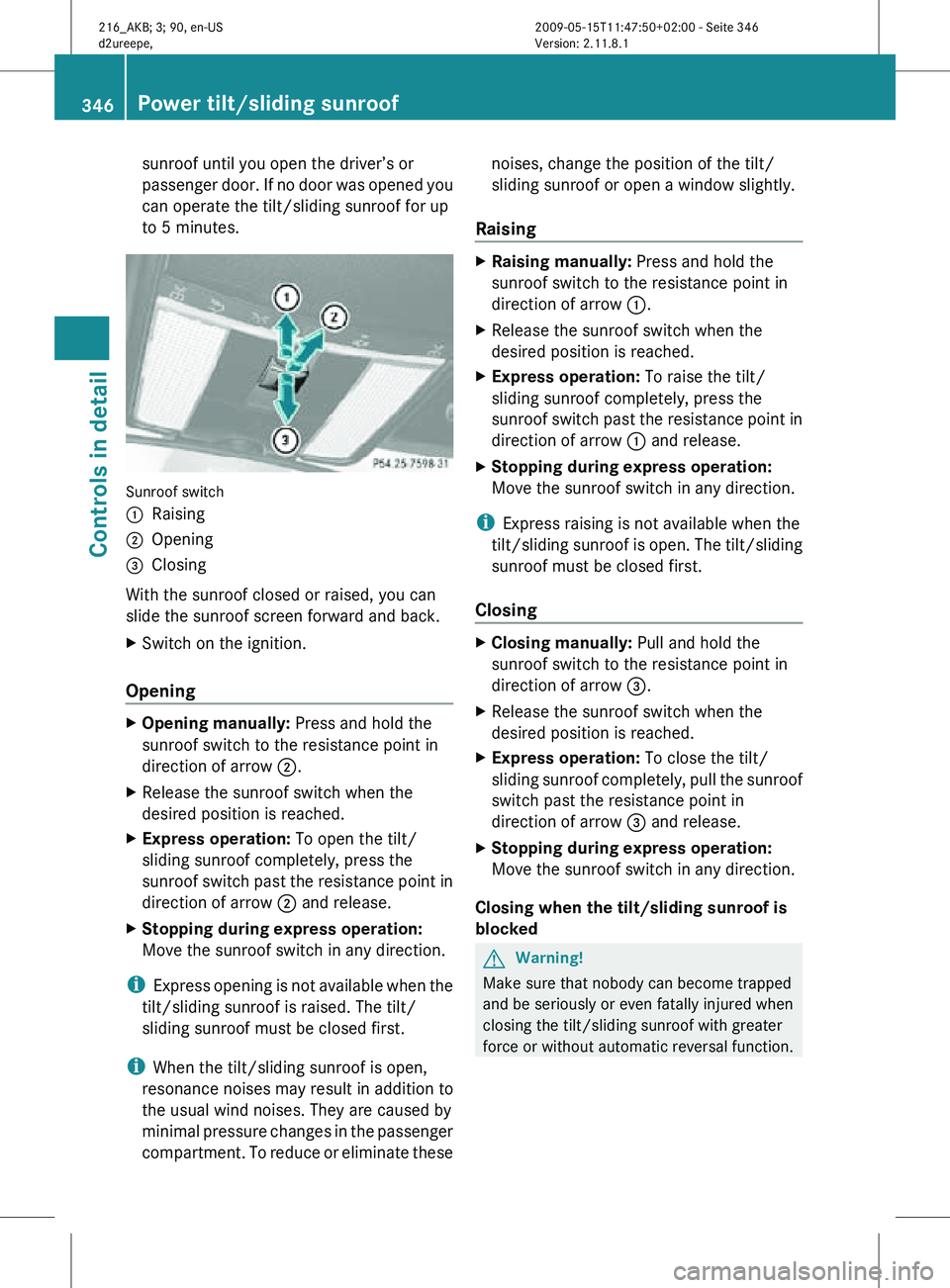
Sunroof switch
:
Raising
; Opening
= Closing
With the sunroof closed or raised, you can
slide the sunroof screen forward and back.
X Switch on the ignition.
Opening X
Opening manually: Press and hold the
sunroof switch to the resistance point in
direction of arrow ;.
X Release the sunroof switch when the
desired position is reached.
X Express operation: To open the tilt/
sliding sunroof completely, press the
sunroof switch past the resistance point in
direction of arrow ; and release.
X Stopping during express operation:
Move the sunroof switch in any direction.
i Express opening is not available when the
tilt/sliding sunroof is raised. The tilt/
sliding sunroof must be closed first.
i When the tilt/sliding sunroof is open,
resonance noises may result in addition to
the usual wind noises. They are caused by
minimal pressure changes in the passenger
compartment. To reduce or eliminate these noises, change the position of the tilt/
sliding sunroof or open a window slightly.
Raising X
Raising manually: Press and hold the
sunroof switch to the resistance point in
direction of arrow :.
X Release the sunroof switch when the
desired position is reached.
X Express operation: To raise the tilt/
sliding sunroof completely, press the
sunroof switch past the resistance point in
direction of arrow : and release.
X Stopping during express operation:
Move the sunroof switch in any direction.
i Express raising is not available when the
tilt/sliding sunroof is open. The tilt/sliding
sunroof must be closed first.
Closing X
Closing manually: Pull and hold the
sunroof switch to the resistance point in
direction of arrow =.
X Release the sunroof switch when the
desired position is reached.
X Express operation: To close the tilt/
sliding sunroof completely, pull the sunroof
switch past the resistance point in
direction of arrow = and release.
X Stopping during express operation:
Move the sunroof switch in any direction.
Closing when the tilt/sliding sunroof is
blocked G
Warning!
Make sure that nobody can become trapped
and be seriously or even fatally injured when
closing the tilt/sliding sunroof with greater
force or without automatic reversal function. 346
Power tilt/sliding sunroofControls in detail
216_AKB; 3; 90, en-US
d2ureepe,
Version: 2.11.8.1 2009-05-15T11:47:50+02:00 - Seite 346
Page 349 of 500
If the movement of the tilt/sliding sunroof is
blocked
during
the closing procedure (e.g. by
ice or pollution), the tilt/sliding sunroof will
stop and open slightly.
X Immediately after the tilt/sliding sunroof
has stopped and opened because it was
blocked, pull and hold the sunroof switch
in direction
of arrow = until the tilt/sliding
sunroof is fully closed.
The tilt/sliding sunroof closes with greater
force.
If the tilt/sliding sunroof is blocked again and
opens slightly:
X Immediately after the tilt/sliding sunroof
was blocked
and has opened, pull and hold
the sunroof switch in direction of arrow
= until the tilt/sliding sunroof is fully
closed.
The tilt/sliding sunroof closes without
automatic reversal function. G
Warning!
Pulling and holding the sunroof switch to
close the tilt/sliding sunroof immediately
after it
had been blocked two times will cause
the tilt/sliding sunroof to close without any
reversal function for as long as you hold the
sunroof switch. Synchronizing
The tilt/sliding
sunroof must be synchronized
after a malfunction or if it does not open
smoothly.
! If the tilt/sliding sunroof cannot be closed
or synchronized, contact an authorized
Mercedes-Benz Center or call Roadside
Assistance.
X Switch on the ignition.
X Press and hold the sunroof switch in
direction of
arrow : (Y page 346) until the
tilt/sliding sunroof is fully raised at the
rear. X
Keep holding the sunroof switch in
direction of arrow : for approximately
1 second.
X Check the express operation feature
(Y page 346).
If the
tilt/sliding sunroof opens and closes
completely, the roof is synchronized.
Otherwise repeat the above steps. Loading and storing
Loading instructions
G
Warning!
Always fasten items being carried as securely
as possible using fastening materials
appropriate for the weight and size of the
load.
In an
accident, during hard braking or sudden
maneuvers, loose items will be thrown around
inside the vehicle. This can cause injury to
vehicle occupants unless the items are
securely fastened in the vehicle.
To help avoid personal injury during a collision
or sudden maneuver, exercise care when
transporting cargo. Do not pile luggage or
cargo higher than the seat backrests.
The trunk is the preferred place to carry
objects. Do not place anything on the rear-
window shelf.
Never drive a vehicle with the trunk open.
Deadly carbon monoxide (CO) gases may
enter vehicle interior resulting in
unconsciousness and death.
Load distribution The total load weight including vehicle
occupants and luggage/cargo should not
exceed the total load limit indicated on the
corresponding Tire and Loading Information
placard located on the driver’s door
B-pillar
(
Y page 382).
The handling characteristics of a fully loaded
vehicle depends greatly on the load
distribution. It is therefore recommended to Loading and storing
347
Controls in detail
216_AKB; 3; 90, en-US
d2ureepe, Version: 2.11.8.1 2009-05-15T11:47:50+02:00 - Seite 347 Z
Page 396 of 500
GAWR (Gross Axle Weight Rating)
The GAWR is the maximum permissible axle
weight.
The
gross vehicle weight on each axle
must never exceed the GAWR for the front
and rear axle indicated on the certification
label located on the driver’s door B-pillar.
GVW (Gross Vehicle Weight) The GVW comprises the weight of the vehicle
including fuel, tools, spare wheel, installed
accessories, passengers and cargo and, if
applicable,
trailer
tongue load. The GVW must
never exceed the GVWR indicated on the
certification label located on the driver’s door
B-pillar.
GVWR (Gross Vehicle Weight Rating) This is the maximum permissible vehicle
weight of the fully loaded vehicle (weight of
the
vehicle
including all options, passengers,
fuel, and cargo and, if applicable, trailer
tongue load). It is indicated on the
certification label located on the driver’s door
B-pillar.
Kilopascal (kPa) Metric unit for air pressure. There are 6.9 kPa
to 1 psi; another metric unit for air pressure
is bar. There are 100 kilopascals (kPa) to
1 bar.
Load index
Numerical code associated with the
maximum load a tire can support.
Maximum load rating
The maximum load in kilograms and pounds
that can be carried by the tire.
Maximum loaded vehicle weight
The sum of curb weight, accessory weight,
total load limit, and production options
weight. Maximum permissible tire inflation
pressure This number is the greatest amount of air
pressure that should ever be put in the tire.
Normal occupant weight
The number of occupants the vehicle is
designed to seat, multiplied by 68 kilograms
(150 lb).
Occupant distribution
The distribution of occupants in a vehicle at
their designated seating positions.
Production options weight
The combined weight of those installed
regular production options weighing over
5 lbs (2.3 kilograms) in excess of those
standard items which they replace, not
previously considered in curb weight or
accessory weight, including heavy duty
brakes, ride levelers, roof rack, heavy duty
battery, and special trim.
PSI (Pounds per square inch)
A standard unit of measure for air pressure.
Recommended tire inflation pressure
The recommended tire inflation pressure for
normal
driving
conditions is listed on the Tire
and Loading Information placard located on
the driver’s door B-pillar. It provides best
handling, tread life and riding comfort.
Supplemental information pertaining to
special driving situations can be found on the
tire inflation pressure label on the inside of
the fuel filler flap.
Rim A metal support for a tire or a tire and tube
assembly upon which the tire beads are
seated.394
Tires and wheels
Operation
216_AKB; 3; 90, en-US
d2ureepe,
Version: 2.11.8.1 2009-05-15T11:47:50+02:00 - Seite 394