warning light MERCEDES-BENZ CL CLASS 2010 Owner's Guide
[x] Cancel search | Manufacturer: MERCEDES-BENZ, Model Year: 2010, Model line: CL CLASS, Model: MERCEDES-BENZ CL CLASS 2010Pages: 500, PDF Size: 9.32 MB
Page 282 of 500

R
unlock the vehicle
R remove the SmartKey from the starter
switch ( Interior Lighting Delayed
Switch-off must be switched on
(Y page 191))
R open a door
The interior lighting goes out after a short
time (Y page 191).
i If a door remains open, the interior lamps
go out automatically after approximately
5 minutes.
X Deactivating: Press button ~.
The OFF indicator lamp next to the button
comes on.
Manual control X
Switching front interior lighting on/
off: Press button c.
X Switching rear interior lighting on/off:
Press button s.
X Switching front reading lamps on/off:
Press respective button p.
i The brightness of the ambient lighting is
adjusted via COMAND ( Y page 192).
Emergency lighting The interior lighting comes on automatically
if the vehicle is involved in an accident.
Switching off:
X
Press hazard warning flasher switch
(Y page 278).
or
X Press switch ~.
or
X Unlock the vehicle with the SmartKey. Wipers
Notes
! Do not operate the wipers when the
windshield is dry. Dust that accumulates on
a windshield might scratch the glass and/
or damage the wiper blades when wiping
occurs on a dry windshield. If it is necessary
to operate the wipers in dry weather
conditions, always operate the wipers with
washer fluid.
! If the windshield wipers leave smears on
the windshield after the car has been driven
through an automatic car wash, then wax
or other residue is on the windshield.
Shortly after washing the car in an
automatic car wash, clean the windshield
with washer fluid. Windshield wipers
X Observe notes on page (Y page 280).
Switching on/off Combination switch
1
$ Windshield wipers off
2 Ä Slow intermittent wiping 31
3 Å Fast intermittent wiping 32
4 ° Slow continuous wiping
31 Rain sensor operation with low sensitivity.
32 Rain sensor operation with high sensitivity. 280
WipersControls in detail
216_AKB; 3; 90, en-US
d2ureepe,
Version: 2.11.8.1 2009-05-15T11:47:50+02:00 - Seite 280
Page 284 of 500

R
Turn off the engine by pressing the
KEYLESS-GO start/stop button and
open the driver’s door (with the driver’s
door open, starter switch is in position
0, same
as with SmartKey removed from
starter switch).
R Engage the parking brake.
R Remove blockage.
R Turn the windshield wipers on again.
If the windshield wipers fail to function at
all with the combination switch in position
Ä or Å,
R set the combination switch to the next
higher wiper speed
R have the windshield wipers checked at
the nearest authorized Mercedes-Benz
Center Power windows
Opening and closing
The windows are opened and closed
electrically. The switches for all windows are
located on
the driver’s door. The switches for
the respective windows are located on the
passenger door and the rear side trim panels.
i Operating the rear side windows from the
rear is not possible when you activate the
override switch ( Y page 55). G
Observe Safety notes, see page 51. G
Warning!
When opening or closing the windows, make
sure there is no danger of anyone being
harmed by the opening/closing procedure.
The door windows are equipped with the
express operation and automatic reversal
function. If
in express operation mode a door
window encounters an obstruction that
blocks its path, the automatic reversal
function will stop the door window and open
it slightly. The windows operate differently when the
switch is pulled and held. See the “Closing
when a window is blocked” section in this
chapter for details.
The closing of the door windows can be
immediately
halted
by releasing the switch or,
if the switch was pulled past the resistance
point and released, by either pressing or
pulling the respective switch.
The closing of the rear side windows can be
immediately halted by releasing the switch.
Activate the override switch when children
are riding in the back seats of the vehicle. The
children may otherwise injure themselves,
e.g. by becoming trapped in the window
opening. G
Warning!
Do not keep any part of your body up against
the window
pane when opening a window. The
downward motion of the pane may pull that
part of your body down between the window
pane and the door frame and trap it there. If
there is a risk of entrapment, release the
switch and pull it to close the window.
i You can also open or close the windows
using the SmartKey, see “Summer opening
feature” ( Y page 283) and “Convenience
closing feature” ( Y page 284).
i After switching off the ignition or
removing the SmartKey from the starter
switch, you can operate the windows until
you open a door. If no door was opened you
can operate the windows for up to
5 minutes. 282
Power windowsControls in detail
216_AKB; 3; 90, en-US
d2ureepe,
Version: 2.11.8.1 2009-05-15T11:47:50+02:00 - Seite 282
Page 285 of 500
X
Switch on the ignition.
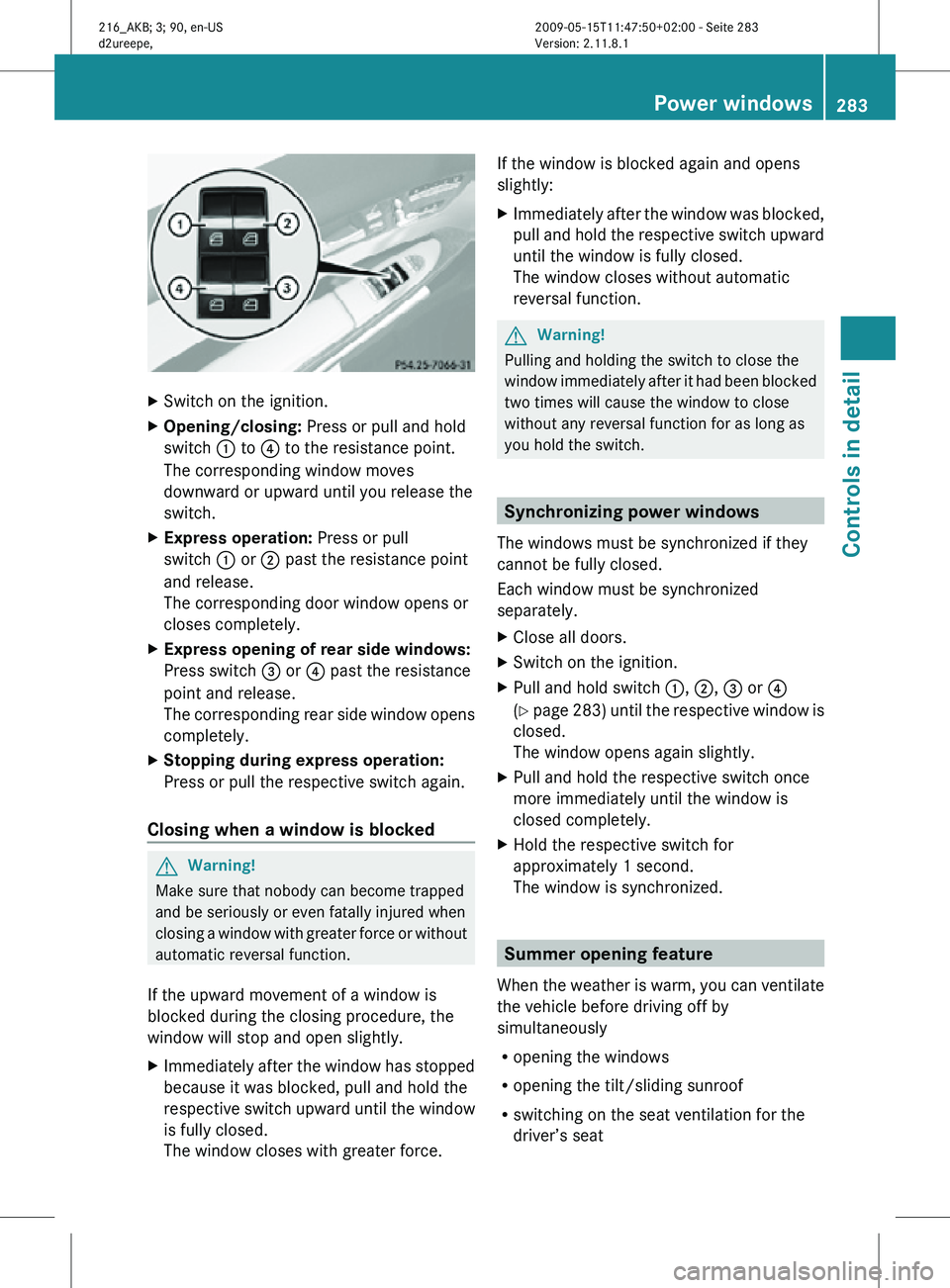
X Opening/closing: Press or pull and hold
switch : to ? to the resistance point.
The corresponding window moves
downward or upward until you release the
switch.
X Express operation: Press or pull
switch : or ; past the resistance point
and release.
The corresponding door window opens or
closes completely.
X Express opening of rear side windows:
Press switch = or ? past the resistance
point and release.
The corresponding rear side window opens
completely.
X Stopping during express operation:
Press or pull the respective switch again.
Closing when a window is blocked G
Warning!
Make sure that nobody can become trapped
and be seriously or even fatally injured when
closing a window with greater force or without
automatic reversal function.
If the upward movement of a window is
blocked during the closing procedure, the
window will stop and open slightly.
X Immediately after the window has stopped
because it was blocked, pull and hold the
respective switch upward until the window
is fully closed.
The window closes with greater force. If the window is blocked again and opens
slightly:
X
Immediately after the window was blocked,
pull and hold the respective switch upward
until the window is fully closed.
The window closes without automatic
reversal function. G
Warning!
Pulling and holding the switch to close the
window immediately after it had been blocked
two times will cause the window to close
without any reversal function for as long as
you hold the switch. Synchronizing power windows
The windows must be synchronized if they
cannot be fully closed.
Each window must be synchronized
separately.
X Close all doors.
X Switch on the ignition.
X Pull and hold switch :, ;, = or ?
(Y page 283) until the respective window is
closed.
The window opens again slightly.
X Pull and hold the respective switch once
more immediately until the window is
closed completely.
X Hold the respective switch for
approximately 1 second.
The window is synchronized. Summer opening feature
When the weather is warm, you can ventilate
the vehicle before driving off by
simultaneously
R opening the windows
R opening the tilt/sliding sunroof
R switching on the seat ventilation for the
driver’s seat Power windows
283Controls in detail
216_AKB; 3; 90, en-US
d2ureepe, Version: 2.11.8.1 2009-05-15T11:47:50+02:00 - Seite 283 Z
Page 302 of 500

otherwise seriously damage the brake
system or the transfer case which is not
covered by the Mercedes-Benz Limited
Warranty.
! Because the ESC operates automatically,
the engine and ignition must be shut off
(SmartKey in starter switch position 0 or
1 or KEYLESS-GO start/stop button in
position 0 or 1) when the electronic parking
brake is being tested on a brake test
dynamometer or when the vehicle is being
towed with one axle raised.
Active braking action through the ESC may
otherwise seriously damage the brake
system which is not covered by the
Mercedes-Benz Limited Warranty. Instrument cluster
Introduction
For a full view illustration of the instrument
cluster, see “Instrument cluster”
(Y page 29). G
Warning!
No messages will be displayed if either the
instrument cluster or the multifunction
display is inoperative.
As a result, you will not be able to see
information about your driving conditions,
such as
R speed
R outside temperature
R warning/indicator lamps
R malfunction/warning messages
R failure of any systems
Driving characteristics may be impaired.
If you must continue to drive, do so with added
caution. Contact an authorized Mercedes-
Benz Center as soon as possible.
The language setting for the multifunction
display can be changed via COMAND
(Y page 81). Activating the instrument cluster
The instrument cluster is activated when you
R open a door
R switch on the ignition
R switch on the exterior lamps Adjusting the instrument cluster
illumination
X
To brighten illumination: Turn knob :
clockwise.
X To dim illumination: Turn knob :
counterclockwise.
i The instrument cluster illumination is
dimmed or brightened automatically to suit
ambient light conditions.
The instrument cluster illumination will also
be adjusted automatically when you switch
on the vehicle’s exterior lamps. Coolant temperature gauge
The coolant temperature gauge is located on
the left side in the instrument cluster
(Y page 29). G
Warning!
Driving when your engine is overheated can
cause some fluids which may have leaked into
the engine compartment to catch fire. You
could be seriously burned. 300
Instrument clusterControls in detail
216_AKB; 3; 90, en-US
d2ureepe,
Version: 2.11.8.1 2009-05-15T11:47:50+02:00 - Seite 300
Page 303 of 500
Steam from an overheated engine can cause
serious
burns
which can occur just by opening
the engine hood. Stay away from the engine
if you see or hear steam coming from it.
Stop the vehicle in a safe location away from
other traffic. Turn off the engine, get out of the
vehicle and do not stand near the vehicle until
the engine has cooled down.
During severe operating conditions, e.g. stop-
and-go traffic, the coolant temperature may
rise close to 248‡ (120†), i.e close to the
red zone of the temperature gauge.
! Excessive coolant temperature triggers a
warning in the multifunction display.
The engine should not be operated with a
coolant temperature above 248‡ (120†),
i.e. in the red zone of the coolant
temperature gauge. Doing so may cause
serious engine damage which is not
covered by the Mercedes-Benz Limited
Warranty. Tachometer
The red marking on the tachometer
(Y page
29) denotes excessive engine speed.
! Avoid driving at excessive engine speeds,
as it may result in serious engine damage
that is not covered by the Mercedes-Benz
Limited Warranty.
To help protect the engine, the fuel supply is
interrupted if the engine is operated within
the red marking. Outside temperature indicator
The outside temperature indicator is on the
bottom left-hand side of the instrument
cluster (Y page 29). G
Warning!
The outside temperature indicator is not
designed to serve as an ice-warning device
and is therefore unsuitable for that purpose. Indicated temperatures just above the
freezing
point
do not guarantee that the road
surface is free of ice. The road may still be icy,
especially in wooded areas or on bridges. Fuel gauge
The fuel gauge is on the left-hand side of the
instrument cluster
(Y page 29). Once the fuel
level has fallen below the reserve mark, the
yellow segment indicator for the fuel reserve
comes on. Driving systems
Introduction
This section describes the following driving
systems of your vehicle:
R Cruise control
R DISTRONIC PLUS
R Hill-start assist system
R HOLD function
R AIRMATIC
R Active Body Control (ABC)
R All-wheel drive (4MATIC)
R Parktronic system
R Park Assist
R Advanced Parking Guidance
R Rear view camera
R Night View Assist
R Blind Spot Assist
The driving safety systems ABS, Adaptive
Brake, Adaptive Brake Lights, BAS, BAS
PLUS, EBP, ESC and PRE-SAFE ®
Brake are
described in
the “Safety and security” section
(Y page 56). Driving systems
301
Controls in detail
216_AKB; 3; 90, en-US
d2ureepe, Version: 2.11.8.1 2009-05-15T11:47:50+02:00 - Seite 301 Z
Page 317 of 500
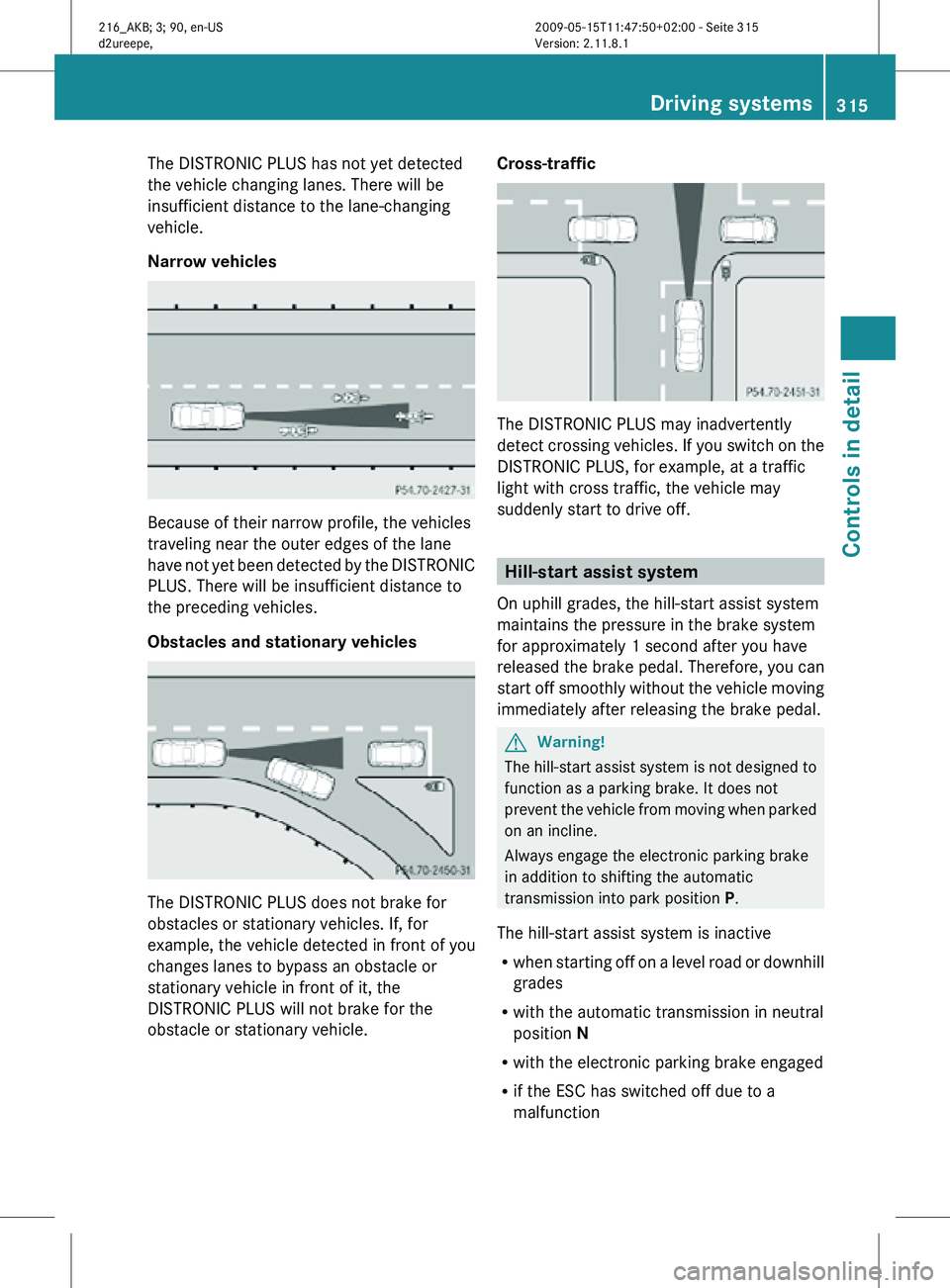
The DISTRONIC PLUS has not yet detected
the vehicle changing lanes. There will be
insufficient distance to the lane-changing
vehicle.
Narrow vehicles
Because of their narrow profile, the vehicles
traveling near the outer edges of the lane
have not yet been detected by the DISTRONIC
PLUS. There will be insufficient distance to
the preceding vehicles.
Obstacles and stationary vehicles
The DISTRONIC PLUS does not brake for
obstacles or stationary vehicles. If, for
example, the vehicle detected in front of you
changes lanes to bypass an obstacle or
stationary vehicle in front of it, the
DISTRONIC PLUS will not brake for the
obstacle or stationary vehicle. Cross-traffic
The DISTRONIC PLUS may inadvertently
detect crossing vehicles. If you switch on the
DISTRONIC PLUS, for example, at a traffic
light with cross traffic, the vehicle may
suddenly start to drive off.
Hill-start assist system
On uphill grades, the hill-start assist system
maintains the pressure in the brake system
for approximately 1 second after you have
released the brake pedal. Therefore, you can
start off smoothly without the vehicle moving
immediately after releasing the brake pedal. G
Warning!
The hill-start assist system is not designed to
function as a parking brake. It does not
prevent the vehicle from moving when parked
on an incline.
Always engage the electronic parking brake
in addition to shifting the automatic
transmission into park position P.
The hill-start assist system is inactive
R when starting off on a level road or downhill
grades
R with the automatic transmission in neutral
position N
R with the electronic parking brake engaged
R if the ESC has switched off due to a
malfunction Driving systems
315Controls in detail
216_AKB; 3; 90, en-US
d2ureepe, Version: 2.11.8.1 2009-05-15T11:47:50+02:00 - Seite 315 Z
Page 334 of 500
Canceling the Advanced Parking
Guidance
X
Press the Park Assist button (Y page 327).
The Advanced Parking Guidance is
canceled immediately and the Park Assist
is deactivated.
The Advanced Parking Guidance is canceled
automatically if guidance into the parking
space is no longer possible or if an error
occurs.
The parking
space symbol disappears and the
message Parking Guidance Canceled
appears in the multifunction display. Rear view camera
The rear
view camera is an optical parking aid.
The area behind the vehicle appears in the
COMAND system display as a mirror image,
like in the rear view mirror.
In addition, the rear view camera contains
guidelines to help you with driving in reverse. G
Warning!
Make sure no persons or animals are in or
near the area in which you are parking/
maneuvering. Otherwise, they could be
injured. G
Warning!
The rear view camera is only an aid and may
display obstacles
R from a distorted perspective
R inaccurately
R may not display obstacles at all
The rear view camera does not relieve you of
the responsibility to be cautious. Take care
and pay careful attention. The rear view
camera may not show objects which are
R very close to the rear bumper
R under the rear bumper
R above the trunk handle You are responsible for safety at all times and
must continue to pay attention to the
immediate surroundings when parking and
maneuvering. This includes the area behind,
in front of, and beside the vehicle. Otherwise
you could endanger yourself and/or others.
G
Warning!
The rear view camera either will not function
or will not function to its full capability if
R the trunk lid is open
R it is raining very hard, snowing or foggy
R it is night or you are parking/maneuvering
your vehicle
in an area where it is very dark
R the camera is exposed to a very bright white
light
R the immediate surroundings are
illuminated with fluorescent light (the
COMAND system display can flicker)
R there is a sudden change in temperature,
e.g. if you drive into a heated garage from
the cold (lens condensation)
R the camera lens is dirty or covered
R the rear of your vehicle is damaged
In this case, have the position and setting
of the camera checked by a qualified
specialist workshop. Mercedes-Benz
recommends that you contact a Mercedes-
Benz Center for this purpose.
Do not use the rear view camera in these
situations. Otherwise you could injure
yourself or others and/or damage property
including your vehicle while parking/
maneuvering. G
Warning!
Use of rear view camera can be dangerous if
you are color-blind or have impaired color
vision.
Only use
rear view camera if you can see and
distinguish all colored guidelines shown by
rear view camera on the COMAND system
display. 332
Driving systems
Controls in detail
216_AKB; 3; 90, en-US
d2ureepe,
Version: 2.11.8.1 2009-05-15T11:47:50+02:00 - Seite 332
Page 335 of 500
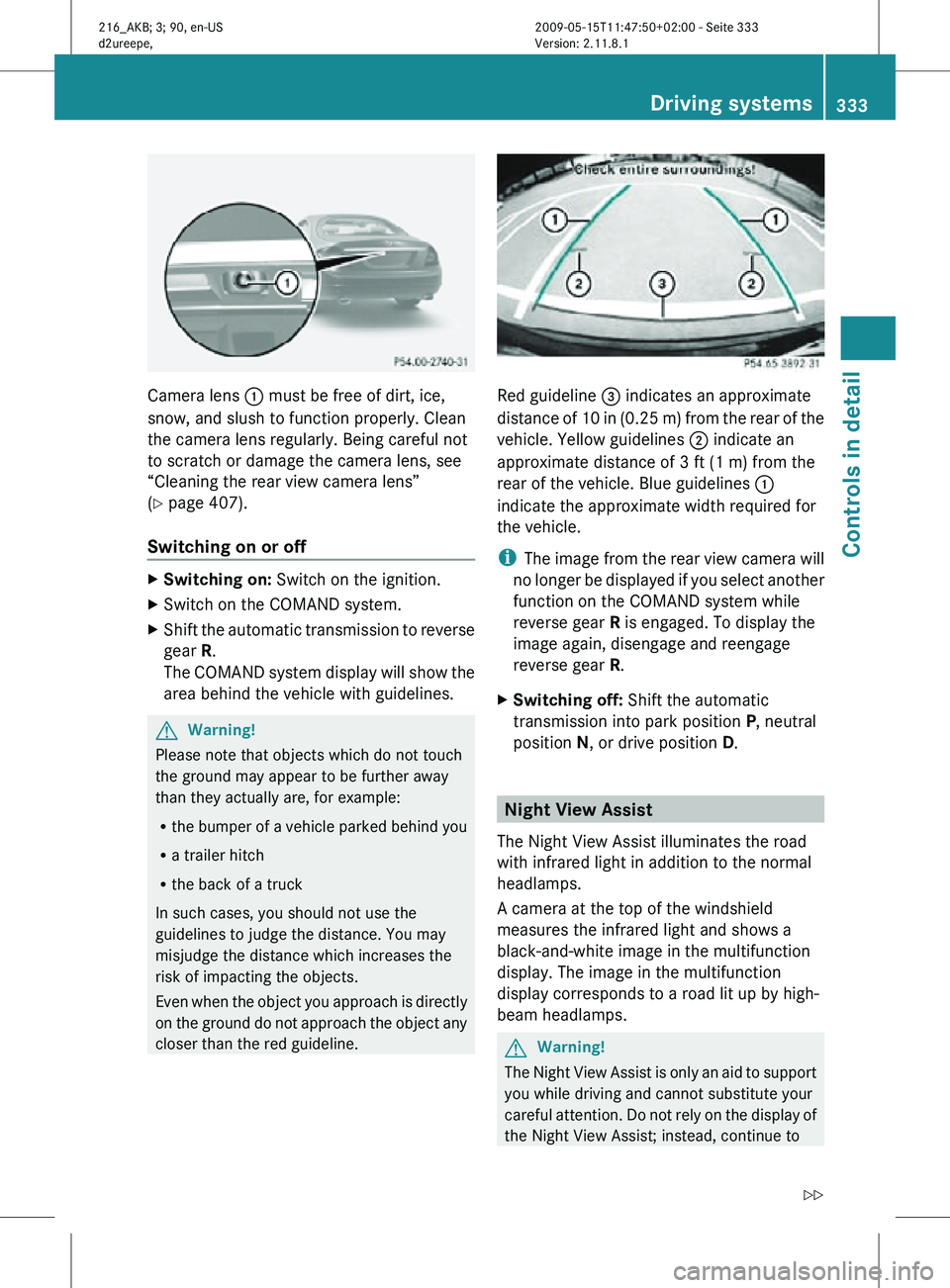
Camera lens
: must be free of dirt, ice,
snow, and slush to function properly. Clean
the camera lens regularly. Being careful not
to scratch or damage the camera lens, see
“Cleaning the rear view camera lens”
(Y page 407).
Switching on or off X
Switching on: Switch on the ignition.
X Switch on the COMAND system.
X Shift the automatic transmission to reverse
gear R.
The COMAND system display will show the
area behind the vehicle with guidelines. G
Warning!
Please note that objects which do not touch
the ground may appear to be further away
than they actually are, for example:
R the bumper of a vehicle parked behind you
R a trailer hitch
R the back of a truck
In such cases, you should not use the
guidelines to judge the distance. You may
misjudge the distance which increases the
risk of impacting the objects.
Even when the object you approach is directly
on the ground do not approach the object any
closer than the red guideline. Red guideline
= indicates an approximate
distance of 10 in (0.25 m) from the rear of the
vehicle. Yellow guidelines ; indicate an
approximate distance of 3 ft (1 m) from the
rear of the vehicle. Blue guidelines :
indicate the approximate width required for
the vehicle.
i The image from the rear view camera will
no longer be displayed if you select another
function on the COMAND system while
reverse gear R is engaged. To display the
image again, disengage and reengage
reverse gear R.
X Switching off: Shift the automatic
transmission into park position P, neutral
position N, or drive position D. Night View Assist
The Night View Assist illuminates the road
with infrared light in addition to the normal
headlamps.
A camera at the top of the windshield
measures the infrared light and shows a
black-and-white image in the multifunction
display. The image in the multifunction
display corresponds to a road lit up by high-
beam headlamps. G
Warning!
The Night View Assist is only an aid to support
you while driving and cannot substitute your
careful attention. Do not rely on the display of
the Night View Assist; instead, continue to Driving systems
333Controls in detail
216_AKB; 3; 90, en-US
d2ureepe, Version: 2.11.8.1 2009-05-15T11:47:50+02:00 - Seite 333 Z
Page 336 of 500
look through the windshield. You are always
responsible for safety and must drive in
accordance with traffic conditions.
Otherwise, you could endanger yourself and
others.
The system may be impaired or unavailable
when
R
visibility is poor, e.g. due to snow, rain, fog,
or heavy spray
R the camera area of the windshield is dirty,
fogged up or covered by a sticker for
example
R driving through curves or on inclines or
declines G
Warning!
The Night View Assist cannot record objects
immediately in front of or next to the vehicle.
When maneuvering, continue to look through
the windshield. Make sure no persons or
animals are in the area in which you are
maneuvering. You could otherwise injure
them.
The Night View Assist image in the
multifunction display is not impaired by the
headlamps of approaching vehicles.
As a result, you can better follow the course
of the road and detect obstacles earlier on.
i Infrared light is invisible to the human eye
and thus does not blind. The Night View
Assist can remain switched on
permanently even with oncoming traffic
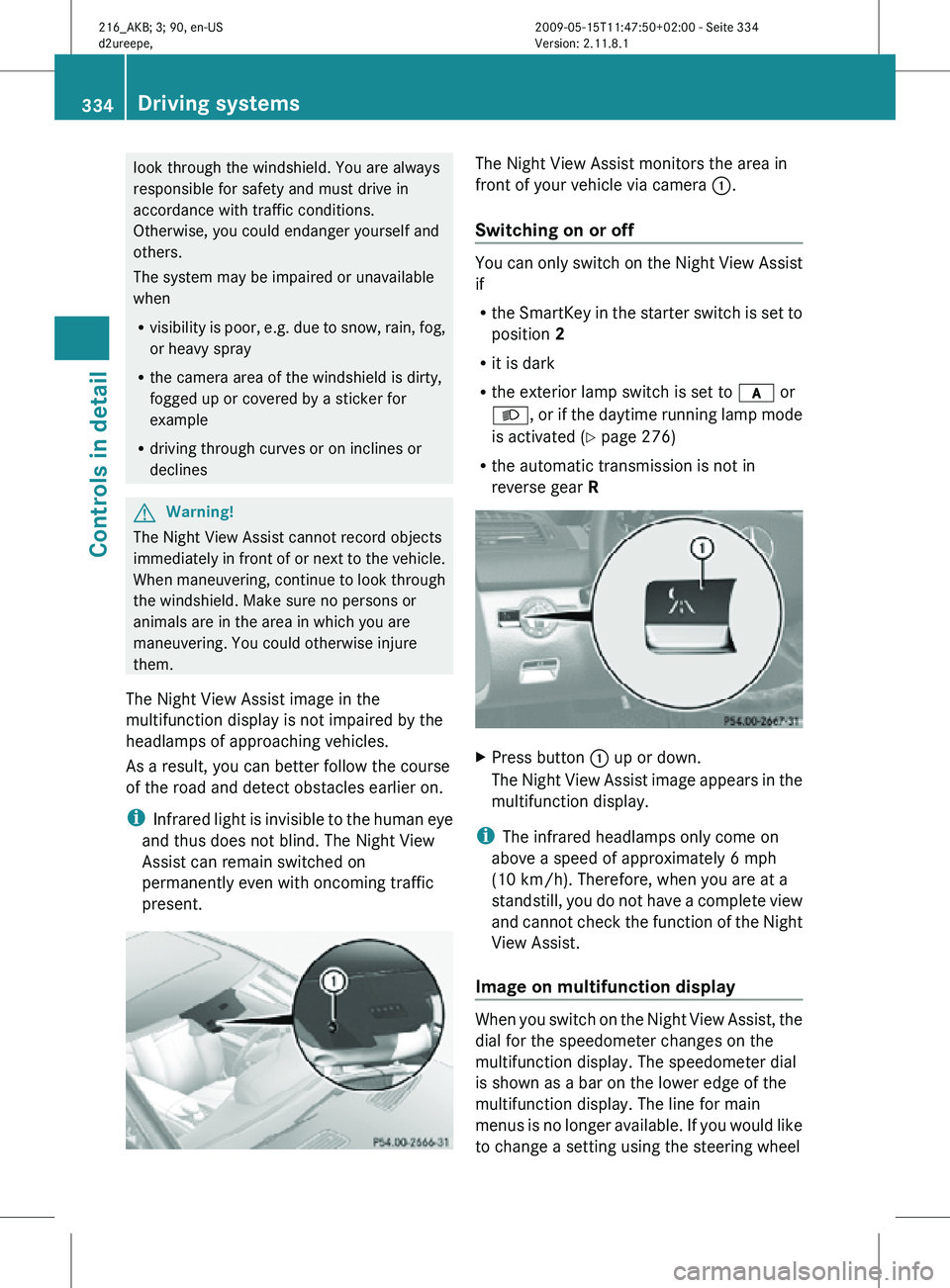
present. The Night View Assist monitors the area in
front of your vehicle via camera
:.
Switching on or off You can only switch on the Night View Assist
if
R
the SmartKey in the starter switch is set to
position 2
R it is dark
R the exterior lamp switch is set to c or
L, or if the daytime running lamp mode
is activated ( Y page 276)
R the automatic transmission is not in
reverse gear R X
Press button : up or down.
The Night View Assist image appears in the
multifunction display.
i The infrared headlamps only come on
above a speed of approximately 6 mph
(10 km/h). Therefore, when you are at a
standstill, you do not have a complete view
and cannot check the function of the Night
View Assist.
Image on multifunction display When you switch on the Night View Assist, the
dial for the speedometer changes on the
multifunction display. The speedometer dial
is shown as a bar on the lower edge of the
multifunction display. The line for main
menus is no longer available. If you would like
to change a setting using the steering wheel334
Driving systemsControls in detail
216_AKB; 3; 90, en-US
d2ureepe,
Version: 2.11.8.1 2009-05-15T11:47:50+02:00 - Seite 334
Page 340 of 500
The brightness of indicator lamps/warning
lamps
: is controlled automatically
depending on the brightness of the ambient
light. G
Warning!
The Blind Spot Assist is not active at speeds
below approximately 20 mph (30 km/h). The
yellow indicator lamps in the exterior rear
view mirrors are illuminated. You will not be
alerted to the presence of vehicles in the
monitored area at these speeds.
It is the driver’s responsibility at all times to
be attentive to road, weather and traffic
conditions and to provide the steering,
braking and other driving inputs necessary to
retain control of the vehicle. Failure to do so
could result in recognizing dangers too late,
possibly resulting in an accident and serious
injury to yourself and others. Collision warning If a vehicle is detected in the Blind Spot Assist
range and you activate the turn signal, a two-
tone warning will sound once. Red warning
lamp
: on the corresponding side of the
vehicle will flash. G
Warning!
Do not change lanes or make turns, while red
warning lamp : is flashing. Doing so could
result in an accident and serious injury to
yourself and others.
X Remain on the lane that you are currently
on until traffic conditions permit to change.
If the turn signal remains on, red warning
lamp : will flash to indicate that vehicles
have been detected. No further audible
warnings will sound. Climate control system
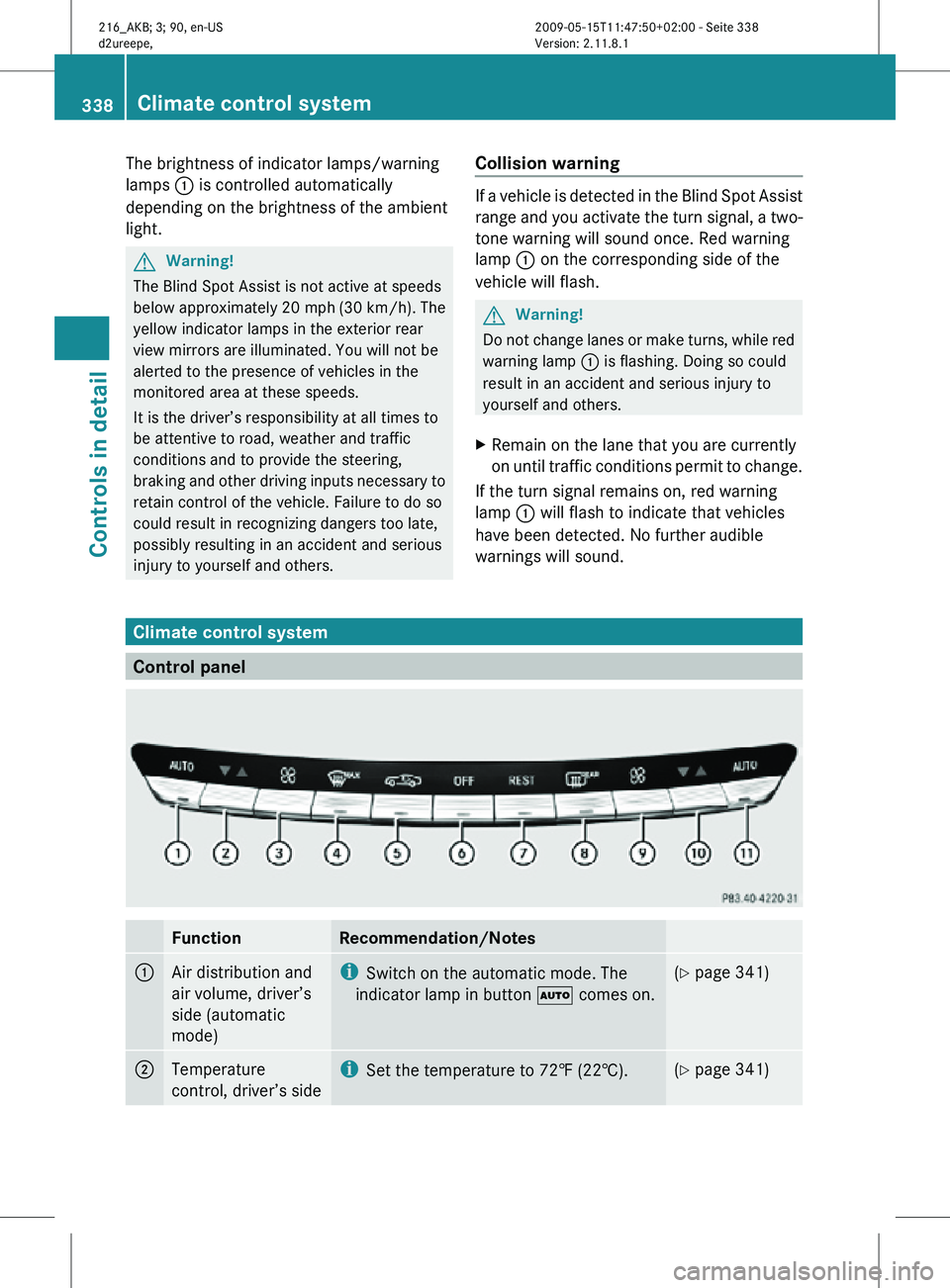
Control panel
Function Recommendation/Notes
1
Air distribution and
air volume, driver’s
side (automatic
mode) i
Switch on the automatic mode. The
indicator lamp in button à comes on. (Y page 341)
2
Temperature
control, driver’s side i
Set the temperature to 72‡ (22†). (Y page 341)338
Climate control systemControls in detail
216_AKB; 3; 90, en-US
d2ureepe,
Version: 2.11.8.1 2009-05-15T11:47:50+02:00 - Seite 338