ECU MERCEDES-BENZ CL CLASS 2010 Workshop Manual
[x] Cancel search | Manufacturer: MERCEDES-BENZ, Model Year: 2010, Model line: CL CLASS, Model: MERCEDES-BENZ CL CLASS 2010Pages: 500, PDF Size: 9.32 MB
Page 327 of 500

permitted. Do not tamper with, alter, or use
in any non-approved way.
Any unauthorized modification to this
device could void the user’s authority to
operate the equipment.
When traveling in Canada in a vehicle not
registered in Canada, you must switch off the
radar sensor system ( Y page 216). Canadian
law does not permit the use of the radar
sensor system for vehicles from outside of
Canada. When you switch off the radar sensor
system, the following functions are
deactivated:
R Park Assist
R BAS PLUS (Y page 57)
R PRE-SAFE ®
Brake (Y page 62)
R DISTRONIC PLUS (Y page 304)
R Advanced Parking Guidance ( Y page 327)
R Blind Spot Assist (Y page 335)
! The operational function of the Park
Assist can be affected by dirty sensors,
especially at times of snow and ice.
Make sure that the area on the bumpers
around the sensors is free of dirt, ice and/
or slush, otherwise the Park Assist may not
function properly.
For cleaning the driving systems sensors, see
(Y page 406).
! High-frequency sources such as toll
stations, speed measuring systems, etc.
can cause the Park Assist to malfunction.
You can switch off the Park Assist using the
Park Assist button or switch off the radar
sensors with the instrument cluster control
system to prevent possible malfunction.
The Park Assist is an electronic parking aid
with radar sensors that helps you while
parking. It visually and audibly indicates the
relative distance between the vehicle and an
obstacle.
The Park Assist is automatically activated
when the engine is running and the automatic transmission is in drive position D, reverse
gear
R or neutral position N.
The Park Assist deactivates at speeds over
approximately 10 mph (16 km/h). At lower
speeds the Park Assist turns on again.
The Park Assist is also switched off when you
set the automatic transmission into park
position P or switch off the engine.
While the automatic transmission is in neutral
position N, the Park Assist is switched off if
you secure the vehicle in place with the
electronic parking brake.
The Park Assist monitors the surroundings of
your vehicle with four sensors in the front
bumper and two sensors in the rear bumper.
Range of the sensors The sensors of the Park Assist are integrated
in the front and rear bumpers. Make sure that
the bumpers are clear of dirt, ice and slush in
the area of the sensors, as otherwise, the
Park Assist may not function properly, see
(Y page 406). Driving systems
325Controls in detail
216_AKB; 3; 90, en-US
d2ureepe, Version: 2.11.8.1 2009-05-15T11:47:50+02:00 - Seite 325 Z
Page 349 of 500
If the movement of the tilt/sliding sunroof is
blocked
during
the closing procedure (e.g. by
ice or pollution), the tilt/sliding sunroof will
stop and open slightly.
X Immediately after the tilt/sliding sunroof
has stopped and opened because it was
blocked, pull and hold the sunroof switch
in direction
of arrow = until the tilt/sliding
sunroof is fully closed.
The tilt/sliding sunroof closes with greater
force.
If the tilt/sliding sunroof is blocked again and
opens slightly:
X Immediately after the tilt/sliding sunroof
was blocked
and has opened, pull and hold
the sunroof switch in direction of arrow
= until the tilt/sliding sunroof is fully
closed.
The tilt/sliding sunroof closes without
automatic reversal function. G
Warning!
Pulling and holding the sunroof switch to
close the tilt/sliding sunroof immediately
after it
had been blocked two times will cause
the tilt/sliding sunroof to close without any
reversal function for as long as you hold the
sunroof switch. Synchronizing
The tilt/sliding
sunroof must be synchronized
after a malfunction or if it does not open
smoothly.
! If the tilt/sliding sunroof cannot be closed
or synchronized, contact an authorized
Mercedes-Benz Center or call Roadside
Assistance.
X Switch on the ignition.
X Press and hold the sunroof switch in
direction of
arrow : (Y page 346) until the
tilt/sliding sunroof is fully raised at the
rear. X
Keep holding the sunroof switch in
direction of arrow : for approximately
1 second.
X Check the express operation feature
(Y page 346).
If the
tilt/sliding sunroof opens and closes
completely, the roof is synchronized.
Otherwise repeat the above steps. Loading and storing
Loading instructions
G
Warning!
Always fasten items being carried as securely
as possible using fastening materials
appropriate for the weight and size of the
load.
In an
accident, during hard braking or sudden
maneuvers, loose items will be thrown around
inside the vehicle. This can cause injury to
vehicle occupants unless the items are
securely fastened in the vehicle.
To help avoid personal injury during a collision
or sudden maneuver, exercise care when
transporting cargo. Do not pile luggage or
cargo higher than the seat backrests.
The trunk is the preferred place to carry
objects. Do not place anything on the rear-
window shelf.
Never drive a vehicle with the trunk open.
Deadly carbon monoxide (CO) gases may
enter vehicle interior resulting in
unconsciousness and death.
Load distribution The total load weight including vehicle
occupants and luggage/cargo should not
exceed the total load limit indicated on the
corresponding Tire and Loading Information
placard located on the driver’s door
B-pillar
(
Y page 382).
The handling characteristics of a fully loaded
vehicle depends greatly on the load
distribution. It is therefore recommended to Loading and storing
347
Controls in detail
216_AKB; 3; 90, en-US
d2ureepe, Version: 2.11.8.1 2009-05-15T11:47:50+02:00 - Seite 347 Z
Page 350 of 500
load the vehicle accordingly with the heaviest
items being placed towards the front of the
vehicle.
Please pay attention to and comply with the
following instructions when loading the
vehicle and transporting cargo:
R
Always place items being carried against
front or rear seat backrests, and fasten
them as securely as possible.
R The heaviest portion of the cargo should
always be kept as low as possible against
front or rear seat backrests. Parcel nets
G
Warning!
Parcel nets are intended for storing light-
weight items only, such as road maps, mail,
etc.
Heavy objects, objects with sharp edges, or
fragile objects may not be transported in the
parcel nets. In an accident, during hard
braking, or sudden maneuvers, they could be
thrown around inside the vehicle and cause
injury to vehicle occupants.
Parcel nets cannot protect transported goods
in the event of an accident.
Parcel nets are located in the front passenger
footwell and on the right trunk side wall. Retaining hook
A retaining hook can be used to attach cargo
items such as bags.
! Do not use the retaining hook to tie down
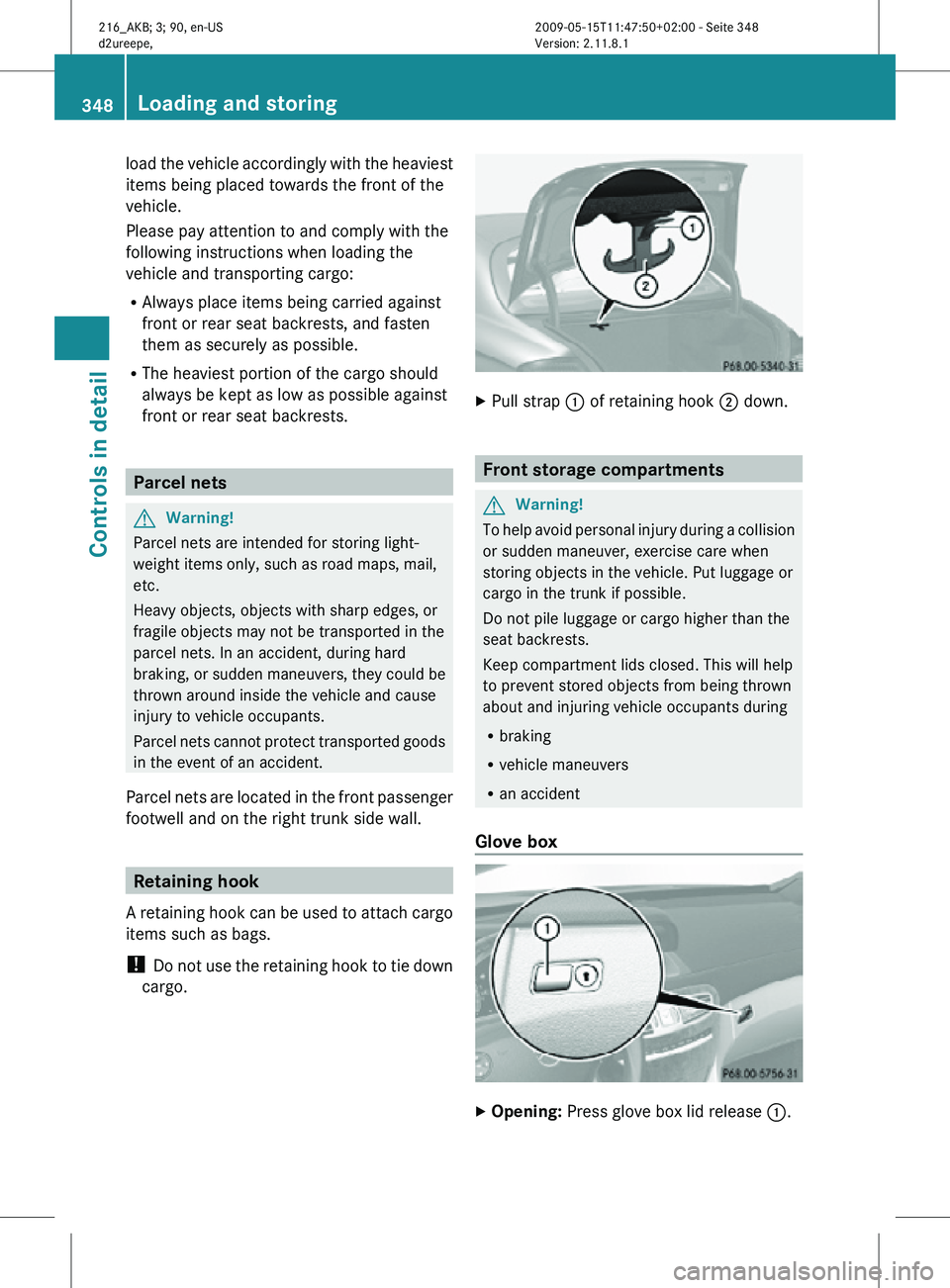
cargo. X
Pull strap : of retaining hook ; down. Front storage compartments
G
Warning!
To help avoid personal injury during a collision
or sudden maneuver, exercise care when
storing objects in the vehicle. Put luggage or
cargo in the trunk if possible.
Do not pile luggage or cargo higher than the
seat backrests.
Keep compartment lids closed. This will help
to prevent stored objects from being thrown
about and injuring vehicle occupants during
R braking
R vehicle maneuvers
R an accident
Glove box X
Opening: Press glove box lid release :.348
Loading and storingControls in detail
216_AKB; 3; 90, en-US
d2ureepe,
Version: 2.11.8.1 2009-05-15T11:47:50+02:00 - Seite 348
Page 365 of 500
Programming tips
If you are having difficulty programming the
integrated remote control, here are some
helpful tips:
R
Check the frequency of hand-held remote
control A (typically
located on the reverse
side of the remote). The integrated remote
control is compatible with radio-frequency
devices operating between 280-390 MHz.
R Put a new battery in hand-held remote
control A. This will increase the likelihood
of the hand-held remote control sending a
stronger and more accurate signal to the
integrated remote control.
R While performing step 3, hold hand-held
remote control A at different lengths and
angles from the signal transmitter button
(;, = or ?) you are programming.
Attempt varying angles at the distance of 2
to 12 inches (5 to 30 cm) away or the same
angle at varying distances.
R If another hand-held remote control is
available for the same device, try the
programming steps again using that other
hand-held remote control. Make sure new
batteries are in the hand-held remote
control before beginning the procedure.
R Straighten the antenna wire from the
garage door opener assembly. This may
help improve transmitting and/or receiving
signals.
i Certain types of garage door openers are
incompatible with the integrated remote
control. If you should experience further
difficulties with programming the
integrated remote control, contact an
authorized Mercedes-Benz Center, or call
the Mercedes-Benz Customer Assistance
Center (USA only) at
1-800-FOR-MERCedes, or the HomeLink ®
Hotline (USA only) at 1-800-355-3515, or
the Customer Service (Canada only) at
1-800-387-0100. i
USA only:
This device complies with Part 15 of the
FCC Rules . Operation is subject to the
following two conditions:
1.
This device may not cause harmfulinterference, and
2. this device must accept any interference received, including
interference that may cause undesired
operation.
Any unauthorized modification to this
device could void the user’s authority to
operate the equipment.
i Canada only:
This device complies with RSS-210 of
Industry Canada. Operation is subject to
the following two conditions:
1. This device may not cause interference, and
2. this device must accept any interference received, including
interference that may cause undesired
operation of the device.
Any unauthorized modification to this
device could void the user’s authority to
operate the equipment. Floormats
G
Warning!
Whenever you are using floormats, make sure
there is enough clearance and that the
floormats are securely fastened.
Floormats should
always be securely fastened
using the fastening equipment.
Before driving off, check that the floormats
are securely in place and adjust them if
necessary. A loose floormat could slip and
hinder proper functioning of the pedals.
Do not place several floormats on top of each
other as this may impair pedal movement. Useful features
363
Controls in detail
216_AKB; 3; 90, en-US
d2ureepe, Version: 2.11.8.1 2009-05-15T11:47:50+02:00 - Seite 363 Z
Page 371 of 500
Closing
G
Warning!
When closing the hood, use extreme caution
not to catch hands or fingers. Be careful that
you do not close the hood on anyone.
Make sure the hood is securely engaged
before driving off. Do not continue driving if
the hood can no longer engage after an
accident, for example. The hood could
otherwise come loose while the vehicle is in
motion and injure you and/or others.
X Let the hood drop from a height of
approximately 8 in (20 cm).
X Check to make sure the hood is fully
closed.
If you can raise the hood at a point above
the headlamps, then it is not properly
closed. Open it again and let it drop with
somewhat greater force. Engine oil
The amount of oil your engine consumes will
depend on a number of factors, including
driving style. Increased oil consumption can
occur when the vehicle is new or the vehicle
is driven frequently at higher engine speeds.
Engine oil consumption checks should only
be made after the vehicle break-in period.
! Do not use any special lubricant additives,
as these may damage the drive assemblies.
Using special additives not approved by
Mercedes-Benz may cause damage not
covered by the Mercedes-Benz Limited
Warranty.
For further information contact an
authorized Mercedes-Benz Center.
Notes on checking engine oil level When checking the oil level
R
the vehicle must be parked on level ground
R with the engine at operating temperature,
the vehicle must have been stationary for at least 5 minutes with the engine turned
off
R with the engine not at operating
temperature, the vehicle must have been
stationary for at least 30 minutes with the
engine turned off
Checking engine oil level with the oil
dipstick On the CL 550 4MATIC and CL 63 AMG you
can check the engine oil level with the oil
dipstick.
X
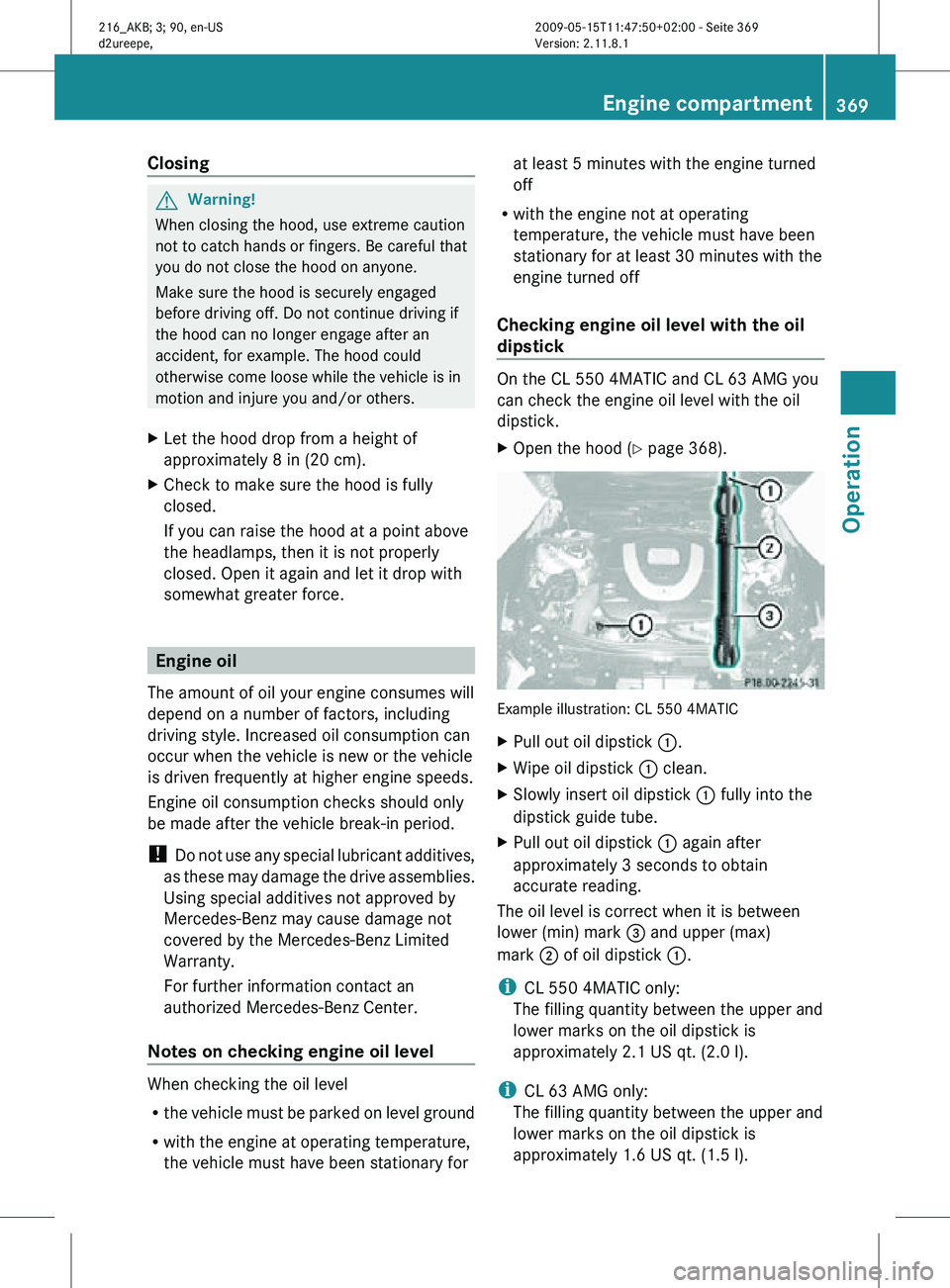
Open the hood (Y page 368). Example illustration: CL 550 4MATIC
X
Pull out oil dipstick :.
X Wipe oil dipstick : clean.
X Slowly insert oil dipstick : fully into the
dipstick guide tube.
X Pull out oil dipstick : again after
approximately 3 seconds to obtain
accurate reading.
The oil level is correct when it is between
lower (min) mark = and upper (max)
mark ; of oil dipstick :.
i CL 550 4MATIC only:
The filling quantity between the upper and
lower marks on the oil dipstick is
approximately 2.1 US qt. (2.0 l).
i CL 63 AMG only:
The filling quantity between the upper and
lower marks on the oil dipstick is
approximately 1.6 US qt. (1.5 l). Engine compartment
369Operation
216_AKB; 3; 90, en-US
d2ureepe, Version: 2.11.8.1 2009-05-15T11:47:50+02:00 - Seite 369 Z
Page 414 of 500

Vehicle equipment
i This Operator’s Manual describes all
features, standard or optional, potentially
available for your vehicle at the time of
purchase. Please be aware that your
vehicle might not be equipped with all
features described in this manual. Where will I find ...?
First aid kit
i Check expiration dates and contents for
completeness at least once a year and
replace missing/expired items.
The first aid kit is located in the trunk on the
right side storage pocket, secured by a
tensioning strap. X
Loosen tensioning strap :.
First aid kit ; can be removed. Vehicle tool kit
The vehicle tool kit is located in the space
underneath the trunk floor.
i Vehicles without spare wheel are not
factory-equipped with the tools required for
a wheel change such as a jack or a wheel
wrench. Some tools required for a wheel
change are specific to your vehicle.
Contact an authorized Mercedes-Benz Center to obtain the tools approved for
your vehicle.
The vehicle tool kit includes:
R Alignment bolt 35
R Collapsible wheel chock 35
R Fuse chart
R Jack 35
R Pair of gloves 35
R Towing eye bolt
R Wheel wrench 35
X Removing: Open the trunk (Y page 257).
X Lift the trunk floor using the floor handle.
X Engage the floor handle on the upper trunk
lip.
! To prevent damage, always disengage the
floor handle from the upper trunk lip and
lower the trunk floor before closing the
trunk. :
Collapsible wheel chock
; Vehicle tool kit box cover
= Tool bag
? Jack
X Open vehicle tool kit box cover ;.
Collapsible wheel chock The collapsible wheel chock serves to secure
the vehicle, e.g. while changing a wheel.
35 Vehicles with spare wheel only. 412
Where will I find ...?Practical hints
216_AKB; 3; 90, en-US
d2ureepe,
Version: 2.11.8.1 2009-05-15T11:47:50+02:00 - Seite 412
Page 416 of 500
lower the trunk floor before closing the
trunk.
X
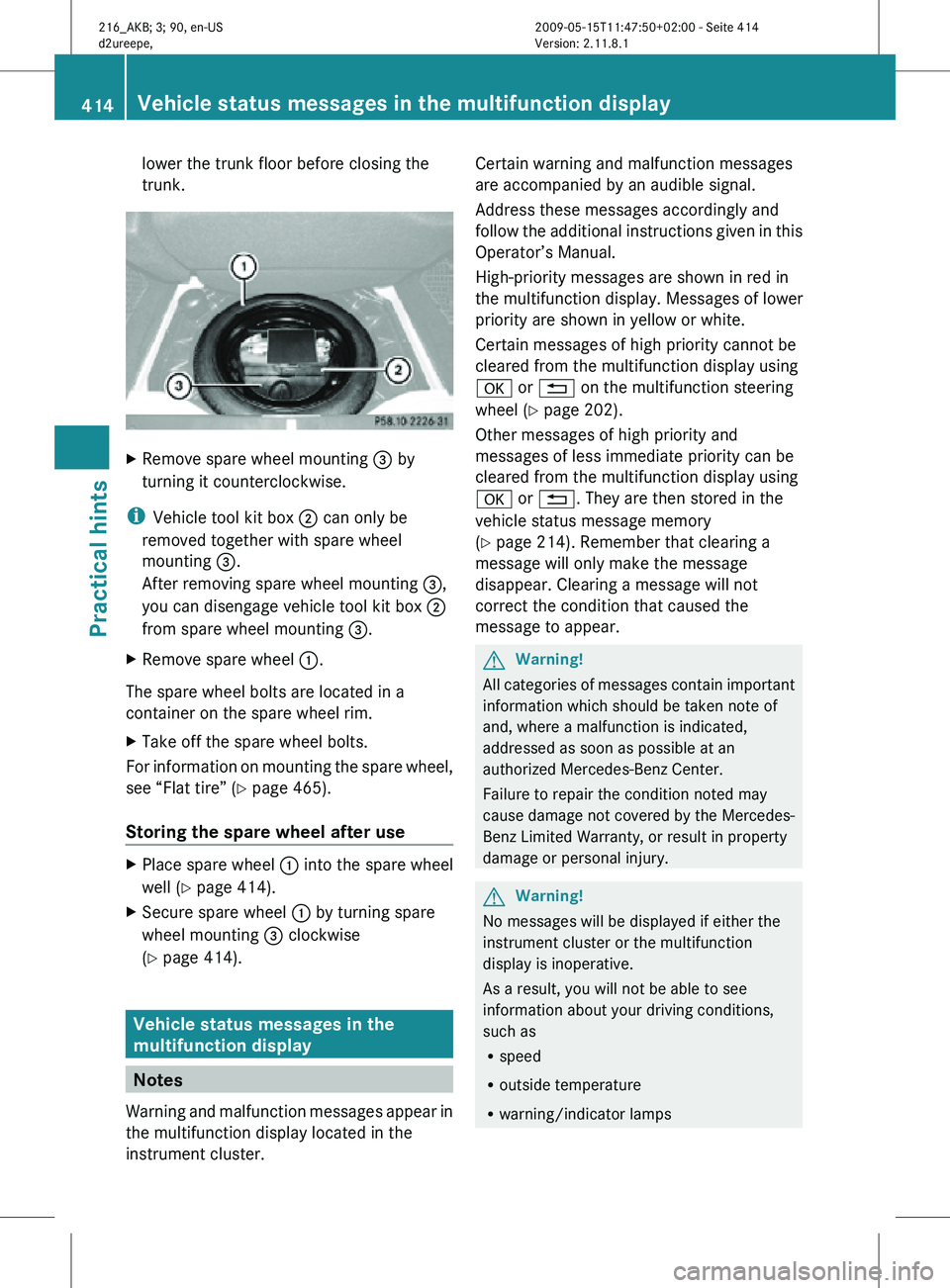
Remove spare wheel mounting = by
turning it counterclockwise.
i Vehicle tool kit box ; can only be
removed together with spare wheel
mounting =.
After removing spare wheel mounting =,
you can disengage vehicle tool kit box ;
from spare wheel mounting =.
X Remove spare wheel :.
The spare wheel bolts are located in a
container on the spare wheel rim.
X Take off the spare wheel bolts.
For information on mounting the spare wheel,
see “Flat tire” ( Y page 465).
Storing the spare wheel after use X
Place spare wheel : into the spare wheel
well (Y page 414).
X Secure spare wheel : by turning spare
wheel mounting = clockwise
(Y page 414). Vehicle status messages in the
multifunction display
Notes
Warning and malfunction messages appear in
the multifunction display located in the
instrument cluster. Certain warning and malfunction messages
are accompanied by an audible signal.
Address these messages accordingly and
follow the additional instructions given in this
Operator’s Manual.
High-priority messages are shown in red in
the multifunction display. Messages of lower
priority are shown in yellow or white.
Certain messages of high priority cannot be
cleared from the multifunction display using
a or % on the multifunction steering
wheel (Y page 202).
Other messages of high priority and
messages of less immediate priority can be
cleared from the multifunction display using
a or %. They are then stored in the
vehicle status message memory
(Y page 214). Remember that clearing a
message will only make the message
disappear. Clearing a message will not
correct the condition that caused the
message to appear.
G
Warning!
All categories of messages contain important
information which should be taken note of
and, where a malfunction is indicated,
addressed as soon as possible at an
authorized Mercedes-Benz Center.
Failure to repair the condition noted may
cause damage not covered by the Mercedes-
Benz Limited Warranty, or result in property
damage or personal injury. G
Warning!
No messages will be displayed if either the
instrument cluster or the multifunction
display is inoperative.
As a result, you will not be able to see
information about your driving conditions,
such as
R speed
R outside temperature
R warning/indicator lamps 414
Vehicle status messages in the multifunction displayPractical hints
216_AKB; 3; 90, en-US
d2ureepe,
Version: 2.11.8.1 2009-05-15T11:47:50+02:00 - Seite 414
Page 419 of 500
Display messages
Possible causes/consequences and
X SolutionsFront
Passenger
Airbag
Enabled
See Oper.
Manual The front passenger front air bag is activated while driving
even though a child, small individual, or object below the
system’s weight threshold is on the front passenger seat, or
the front passenger seat is empty. Objects on the seat or
forces acting on the seat may make the system sense
supplemental weight.
X
Stop the vehicle in a safe location as soon as possible.
X Engage the electronic parking brake.
X Switch off the ignition.
X Open the passenger door.
X Remove child and child restraint from front passenger seat
and properly secure the child in rear seat employing the
child restraint if necessary.
X Make sure no objects which apply supplemental weight to
the seat are present. The system may recognize such
supplemental weight and sense that an occupant on the
front passenger seat is of a greater weight than actually
present.
X Keep the seat unoccupied, close the passenger door and
switch on the ignition.
Monitor the 42 indicator lamp right of the
instrument cluster (
Y page 44) and the multifunction display
in the instrument cluster (Y page 29) for the following:
With the seat unoccupied and the ignition switched on,
R the message Front Passenger Airbag Enabled See
Oper. Manual or the message Front Passenger
Airbag Disabled See Oper. Manual should not appear
in the multifunction display at any time the seat is
unoccupied. Wait at least 60 seconds for the system to
complete the necessary check cycles and to make sure
neither message appears in the multifunction display.
If above conditions are met, you can occupy the front
passenger seat again. Depending on the front passenger
classification sensed by the OCS, the 42
indicator lamp will remain illuminated or go out.
If above conditions are not met, the system is not working
properly. Have the system checked at an authorized
Mercedes-Benz Center as soon as possible. Vehicle status messages in the multifunction display
417
Practical hints
216_AKB; 3; 90, en-US
d2ureepe,Version: 2.11.8.1 2009-05-15T11:47:50+02:00 - Seite 417 Z
Page 441 of 500
Display messages
Possible causes/consequences and
X SolutionsÁ Night
View
Assist
Lights ON
or AUTO,
Not in R
Gear You have tried to switch on Night View Assist, but the exterior
lamp switch is not set to c or L.
In addition, the automatic transmission is in reverse gear
R.
X Turn the exterior lamp switch to c or L
(Y page 275).
X Shift the automatic transmission to park position P, neutral
position N or drive position D (Y page 291). Á Night
View
Assist
Only When
It Is Dark You have tried to switch on Night View Assist by daylight.
You can only switch on Night View Assist when it is dark.
Vehicle
Display messages
Possible causes/consequences and
X Solutions: The trunk is open.
X
Close the trunk (Y page 258). M You are driving with the hood open.
X
Stop the vehicle in a safe location as soon as it is safe to
do so.
X Close the hood ( Y page 369).
There is otherwise danger of an accident. C You are driving with at least one door open.
The display symbol shows you which doors are open.
X
Close all doors. _ Lock Seat
Backrest
Front Left
or
Lock Seat
Backrest
Front
Right The driver or front passenger seat backrest is not engaged.
The
driver’s
or front passenger’s seat belt can not secure the
driver or passenger.
X Fold back and push the seat backrest until the seat cushion
and seat
backrest audibly engage into the driving position. Vehicle status messages in the multifunction display
439
Practical hints
216_AKB; 3; 90, en-US
d2ureepe,Version: 2.11.8.1 2009-05-15T11:47:50+02:00 - Seite 439 Z
Page 472 of 500
Recycling of the battery is the preferred
method of disposal. Many states (USA only)
or provinces (Canada only) require sellers of
batteries to accept the old battery for
recycling.
G
Warning!
Failure to follow these instructions can result
in severe injury or death.
Never lean over batteries while connecting.
You might get injured.
Battery fluid contains sulfuric acid. Do not
allow this fluid to come in contact with eyes,
skin or clothing. In case it does, immediately
flush affected area with water and seek
medical help if necessary.
A battery will also produce hydrogen gas,
which is flammable and explosive. Keep
flames or sparks away from battery, avoid
improper connection of jumper cables,
smoking etc. G
Warning!
Do not place metal objects on the battery as
this could result in a short circuit.
Use leak-proof
batteries only to avoid the risk
of acid burns in the event of an accident.
Take care that you do not become statically
charged, e.g. by wearing synthetic clothing or
rubbing against textiles. For this reason, you
also should not pull or push the battery over
carpets or other synthetic materials.
Never touch the battery first. First touch the
outside body of the vehicle in order to release
any possible electrostatic charges.
Do not rub the battery with rags or cloths. The
battery could explode if touched due to
electrostatic charge or due to spark
formation.
! The battery is a Valve- Regulated Lead
Acid (VRLA) battery, also referred to as
“fleece” battery.
Such
batteries
do not require topping-up of
the electrolyte level. VRLA batteries
therefore do not have cell caps and the battery cover is non-removable. Do not
attempt to open the battery as otherwise
the battery will be damaged.
VRLA batteries
do not require topping-up of
the electrolyte level. They cannot be
opened to check the electrolyte level.
However, the battery condition must be
checked periodically by performing a
battery conductance test. Refer to
Maintenance Booklet for battery condition
testing intervals.
The factory-equipped battery may only be
replaced with a battery that
R has the same security features
R is of identical size
R is of identical voltage
R is of identical capacity
! As any other battery, the battery may
discharge if you do not operate the vehicle
for an extended period of time. Have the
battery disconnected at a qualified
workshop or an authorized Mercedes-Benz
Center in such a case. You may also
connect an accessory battery charge unit
expressly approved by Mercedes-Benz for
your vehicle model to maintain the battery
charge. Contact an authorized Mercedes-
Benz Center for further information.
The battery, the battery ventilation hose
and the lateral plug must always be
securely installed when the vehicle is in
operation.
! Switch off the engine and switch off the
vehicle’s internal electrical functions
before you disconnect or remove the
battery’s terminal clamps. You could
otherwise destroy electronic assemblies
such as the generator.
Remove SmartKey from starter switch
(vehicles with KEYLESS-GO: Make sure the
vehicle’s on-board electronics have status 0)
when you turn off the engine and no longer
require any electrical consumers. The vehicle 470
Battery
Practical hints
216_AKB; 3; 90, en-US
d2ureepe,
Version: 2.11.8.1 2009-05-15T11:47:50+02:00 - Seite 470