ESP MERCEDES-BENZ CL-Class 2011 C216 Manual PDF
[x] Cancel search | Manufacturer: MERCEDES-BENZ, Model Year: 2011, Model line: CL-Class, Model: MERCEDES-BENZ CL-Class 2011 C216Pages: 480, PDF Size: 19.76 MB
Page 213 of 480
XSelect Group by turning cVd and press
W to confirm.
The list of available audio formats appears.
The # dot indicates the format currently
selected.XSelect the audio format by turning cVd
and press W to confirm.XTo exit the menu: slide XVY the COMAND
controller or press the % button.
Playback options
The following options are available to you:
R Normal track sequence
The tracks are played in the normal order
(e.g. track 1, 2, 3, etc.).
In MP3 mode, the track order is determined
by the order in which the tracks are written
to the MP3 data carrier when it is created.
Alphabetical order is the most common.
Once all the tracks in a folder have been
played, the tracks in the next folder are
played.
R Medium mix
All the tracks on the medium are played in
random order (e.g. track 3, 8, 5 etc.).
R Random tracks (MP3 mode only)
You hear the tracks in the current active
folder and any subfolders in random order.
XTo select options: switch on audio CD/
DVD or MP3 mode ( Y page 205).XSelect CD, DVD-A or MP3 by sliding VÆ and
turning cVd the COMAND controller and
press W to confirm.
The options list appears. The # dot
indicates the option selected.XSelect an option by turning cVd and press
W to confirm.
The option is switched on. For all options
except "Normal track sequence", you will
see a corresponding display in the display/
selection window. See the example of the
display in audio CD mode ( Y page 206).i
The "Normal track sequence" option is
automatically selected when you change
the medium you are currently listening to
or when you select a different medium. If
an option is selected, it remains selected
after COMAND is switched on or off.
Notes on MP3 mode
Permissible discs
R CD-R and CD-RW
R DVD-R and DVD-RW
R DVD+R and DVD+RW
R SD memory card:
Permissible file systems
R ISO 9660/Joliet standard for CDs
R UDF for audio and video DVDs
R FAT16 or FAT32 for PCMCIA memory cards
with storage medium
Multisession CDs
For multisession CDs, the content of the first
session determines how COMAND will
process the CD. COMAND plays only one
session and gives priority to the audio CD
session.
If possible, use COMAND to play only CDs
which have been written in one session.
File structure of a data carrier
When you create a disc with compressed
music files, the tracks can be organized in
folders. A folder can also contain subfolders.
A disc can contain a maximum of 255 folders.
Each folder can contain a maximum of
255 tracks and 255 subfolders.
The disc may contain no more than eight
directory levels. Files beyond the eighth level
will not be recognized by the system.
Track and file names
When you create a disc with compressed
music files, you can assign names to the
tracks and folders.
COMAND uses these names accordingly for
the display. Folders which contain data other
Audio211COMANDZ
Page 214 of 480
than MP3 or WMA tracks are not displayed by
COMAND.
If MP3 or WMA files are stored in the root
directory itself, the root directory will also be
treated as a folder. COMAND will then show
the name of the root directory as the folder
name.
You must observe the following when
assigning track names:
R track names must have at least one
character.
R track names must have the extension
"mp3" or "wma".
R there must be a full stop between the track
name and the extension.
Example of a correct track name:
"Track1.mp3".
i COMAND does not support ID3 tags.
Permissible formats
COMAND supports the following formats:
R Microsoft Windows Media Audio V2, V7, V8
and V9 (WMA)
Permissible bit and sampling rates
COMAND supports MP3 files of the following
types:
R constant and variable bit rates from
32 kbit/s to 320 kbit/s
R sampling rates of 8 kHz to 48 kHz
COMAND supports WMA files of the
following types:
R fixed bit rates of 5 kbit/s up to
384 kbit/s
R sampling rates of 8 kHz to 48 kHz
COMAND does not support WMA files of the
following types:
R DRM (Digital Rights Management)
encrypted files
i Only use tracks with a bit rate of at least
128 kbit/s and a sampling rate of at least
44.1 kHz. Lower rates can cause a
noticeable deterioration in quality. This isespecially the case if you have activated a
surround sound function.
Notes on copyright
MP3 or WMA tracks that you create or play
back are generally subject to copyright
protection in accordance with the applicable
international and national regulations.
In many countries, reproductions, even for
private use, are not permitted without the
prior consent of the copyright holder.
Make sure that you know about the applicable
copyright regulations and that you comply
with these.
If you own these rights yourself, e.g. for your
own compositions and recordings, or if the
copyright holder has granted you permission,
these restrictions do not apply.
Notes on CDs/DVDs
Discs with copy protection are not
compatible with the audio CD standard and
therefore may not be able to be played by
COMAND.
There may be playback problems when
playing copied discs. There is a wide range of
data carriers, burning software and burners
available. This variety means that there is no
guarantee that the system will be able to play
discs that you have copied yourself.
There may be playback problems if you play
CDs that you have copied yourself with a
storage capacity of more than 700 MB. CDs
of this type do not conform to the currently
applicable standards.
i On many DVD audio discs, the last track
does not contain any music. In such cases,
COMAND then switches to the next disc.
This is normal system behavior and does
not mean that there is a malfunction.
! Do not affix stickers or labels to the discs.
They could peel off and damage the drive.
The drive is designed to hold discs which
comply with the EN 60908 standard.
Therefore, you can only use discs with a
maximum thickness of 1.3 mm.212AudioCOMAND
Page 218 of 480
Playback options
The following options are available:
R Normal track sequence
The tracks are played in the normal order
(e.g. track 1, 2, 3, etc.).
R Medium mix
All the tracks on the medium are played in
random order.
R Random tracks (MP3 mode only)
The tracks in the currently active folder are
played in a random order.
XTo select options: switch on the MUSIC
REGISTER ( Y page 213).XSelect Music Register by sliding VÆ and
turning cVd the COMAND controller and
press W to confirm.
The options list appears. The # dot
indicates the option selected.XSelect an option and press W to confirm.
The option is switched on. All options
except Normal track sequence will be
indicated by a corresponding icon in the
display/selection window.
i The Normal track sequence option is
automatically selected when you change
the disc you are currently listening to or
when you select a different medium. If an
option is selected, it remains selected after
COMAND is switched on or off.
Media Interface mode
Connection options
Overview
You will find the connection sockets in the
glove box.
Device-specific adapter cables, included in
the Media Interface scope of delivery, are
required to connect external devices to the
Media Interface.
i Store individual parts in a safe place.
Use only genuine Mercedes-Benz
connecting cables.
You can connect the following data carriers
to COMAND via the Media Interface:
R iPod ®
R USB devices (USB sticks, USB hard drives)
i iPod ®
is a registered trademark of Apple
Inc., Cupertino, California, USA.
Supported iPod ®
variants
The following are examples of supported
iPod ®
variants:
R iPod ®
mini
R iPod ®
nano
R iPod ®
classic
R iPod ®
touch
Supported USB devices
The following USB devices are supported:
R USB sticks (flash memory)
R USB hard drives requiring a startup/
permanent current of a maximum of
800 mA (it may be necessary to connect a
separate power supply)
R certain MP3 players
i The Media Interface supports USB
storage media of "USB Device Subclass 6".
Information concerning USB Device
Subclass 6 is available from the equipment
manufacturer.
For more details and a list of supported
devices please visit http://www.mbusa-
mobile.com or call the Mercedes-Benz
Customer Assistance Center at
1-800-FOR-MERCedes (1-800-367-6372)
(US) or Customer Relations at
1-800-387-0100 (Canada).
Connecting an external device
i Do not store external devices in your
vehicle. Extreme temperatures can effect
functionality. (see the operating
instructions for the respective device).
216AudioCOMAND
Page 219 of 480
Mercedes-Benz USA, LLC does not take
responsibility for any damage to external
devices.
Never connect more than one device at a
time. You will otherwise not be able to play
back from the external device.
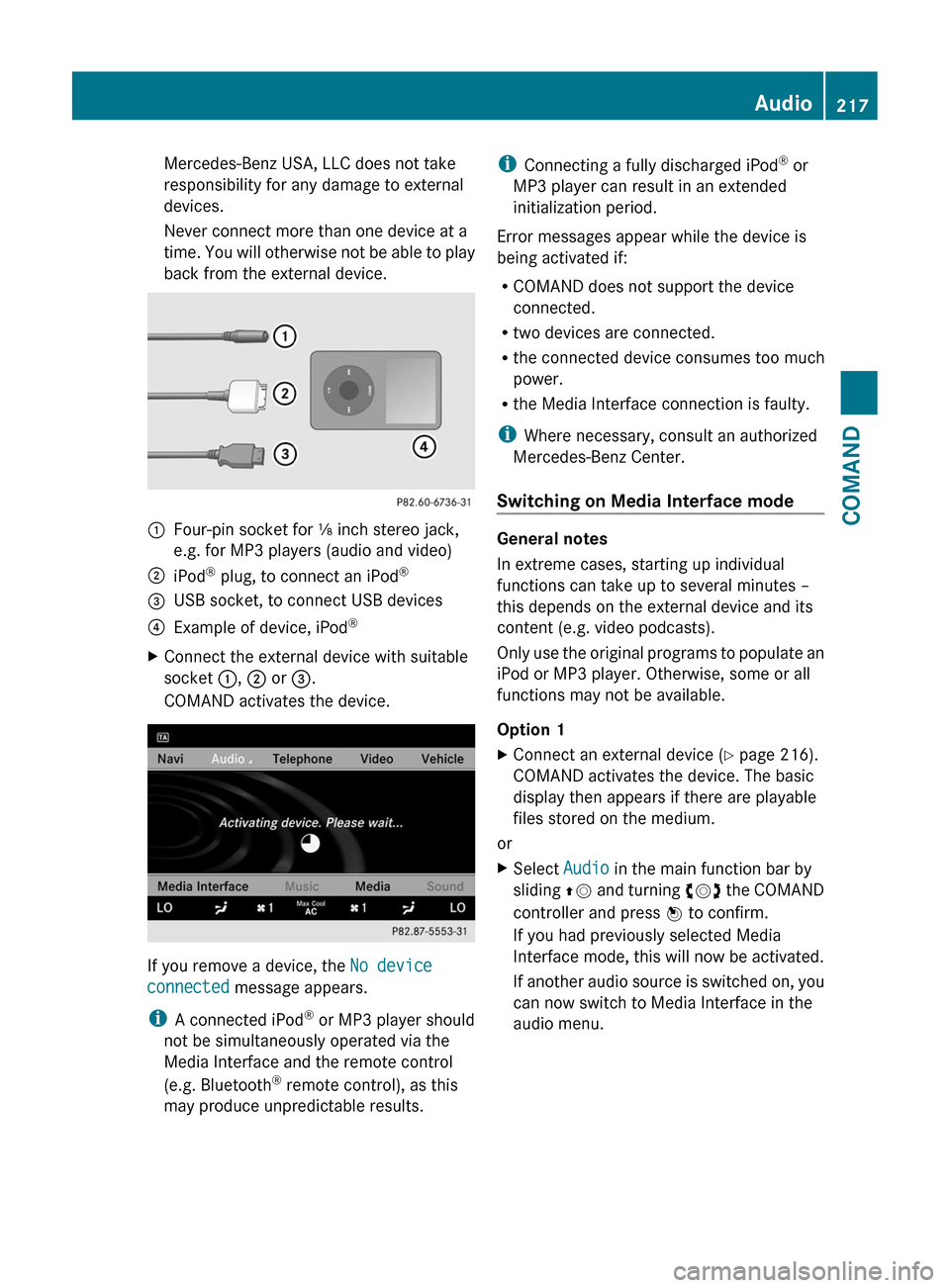
:Four-pin socket for ⅛ inch stereo jack,
e.g. for MP3 players (audio and video)
;iPod® plug, to connect an iPod®=USB socket, to connect USB devices?Example of device, iPod®XConnect the external device with suitable
socket :, ; or =.
COMAND activates the device.
If you remove a device, the No device
connected message appears.
iA connected iPod® or MP3 player should
not be simultaneously operated via the
Media Interface and the remote control
(e.g. Bluetooth® remote control), as this
may produce unpredictable results.
iConnecting a fully discharged iPod® or
MP3 player can result in an extended
initialization period.
Error messages appear while the device is
being activated if:
RCOMAND does not support the device
connected.
Rtwo devices are connected.
Rthe connected device consumes too much
power.
Rthe Media Interface connection is faulty.
iWhere necessary, consult an authorized
Mercedes-Benz Center.
Switching on Media Interface mode
General notes
In extreme cases, starting up individual
functions can take up to several minutes –
this depends on the external device and its
content (e.g. video podcasts).
Only use the original programs to populate an
iPod or MP3 player. Otherwise, some or all
functions may not be available.
Option 1
XConnect an external device (Y page 216).
COMAND activates the device. The basic
display then appears if there are playable
files stored on the medium.
or
XSelect Audio in the main function bar by
sliding ZV and turning cVd the COMAND
controller and press W to confirm.
If you had previously selected Media
Interface mode, this will now be activated.
If another audio source is switched on, you
can now switch to Media Interface in the
audio menu.
Audio217COMANDZ
Page 220 of 480
XSelect Audio by sliding ZV and turning
cVd the COMAND controller and press
W to confirm.
The audio menu appears.
XSelect Media Interface and press W to
confirm.
Option 2
XSelect Audio by sliding ZV and turning
cVd the COMAND controller and press
W to confirm.
The audio menu appears.
XSelect Media Interface and press W to
confirm.
Option 3
XIn the media list, (Y page 208) turn cVd
the COMAND controller to select the entry
under the corresponding position and
press W to confirm.
COMAND activates the connected device.
You will see a message to this effect. The
basic display then appears.
If no device is connected, you will see the
Media Interface entry instead of a
device name.
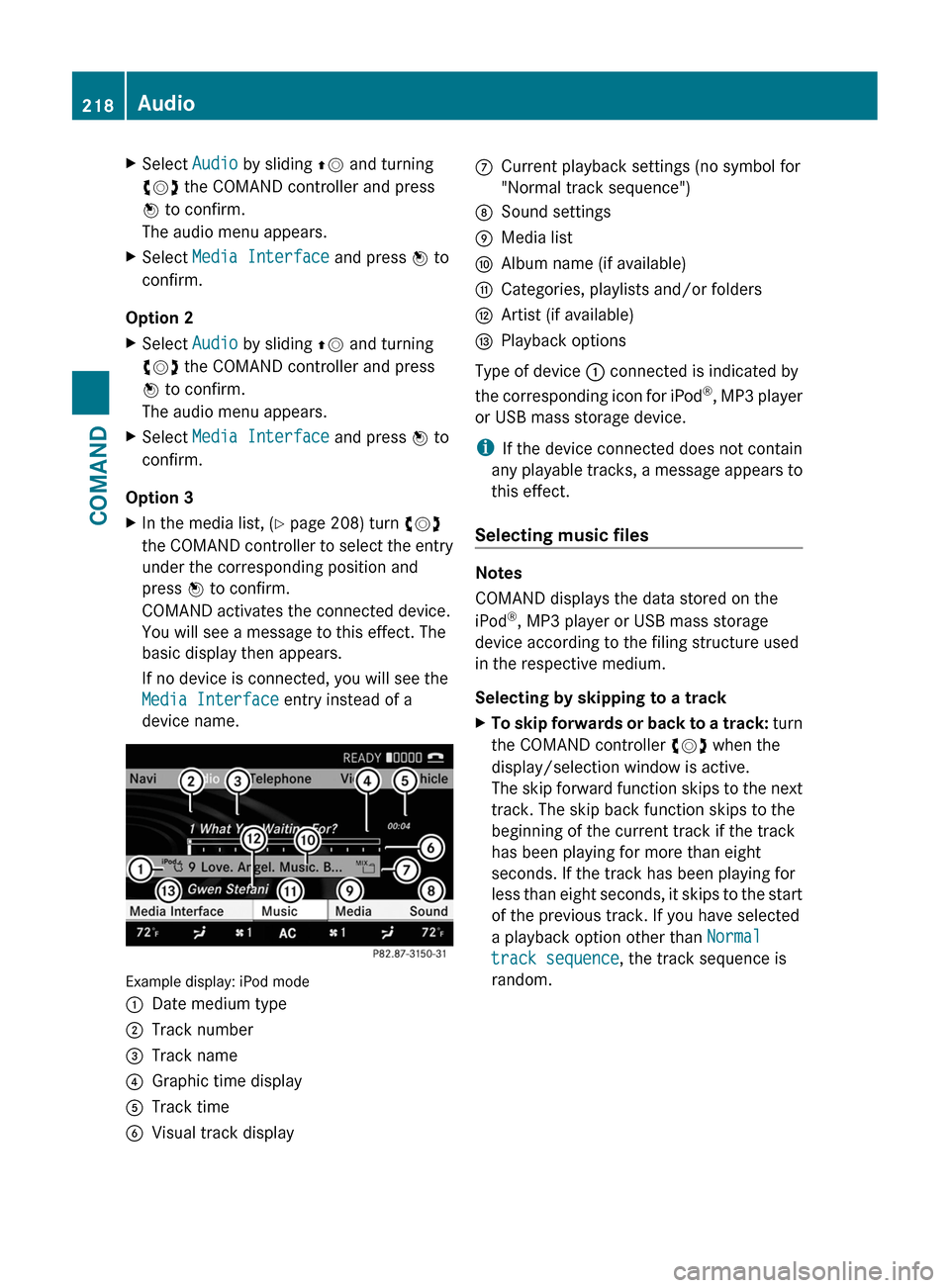
Example display: iPod mode
:Date medium type;Track number=Track name?Graphic time displayATrack timeBVisual track displayCCurrent playback settings (no symbol for
"Normal track sequence")
DSound settingsEMedia listFAlbum name (if available)GCategories, playlists and/or foldersHArtist (if available)IPlayback options
Type of device : connected is indicated by
the corresponding icon for iPod®, MP3 player
or USB mass storage device.
iIf the device connected does not contain
any playable tracks, a message appears to
this effect.
Selecting music files
Notes
COMAND displays the data stored on the
iPod®, MP3 player or USB mass storage
device according to the filing structure used
in the respective medium.
Selecting by skipping to a track
XTo skip forwards or back to a track: turn
the COMAND controller cVd when the
display/selection window is active.
The skip forward function skips to the next
track. The skip back function skips to the
beginning of the current track if the track
has been playing for more than eight
seconds. If the track has been playing for
less than eight seconds, it skips to the start
of the previous track. If you have selected
a playback option other than Normal
track sequence, the track sequence is
random.
218AudioCOMAND
Page 221 of 480
XOn the multifunction steering wheel:
switch on Media Interface mode in
COMAND ( Y page 217).XOn the multifunction steering wheel, press
the = or ; button to select the
Audio menu.XOn the multifunction steering wheel, press
9 or : to select a track.
Selecting using the number keypad
XTo make an entry: press the Ä button.
The input menu appears. The number of
characters available for input depends on
the number of stored tracks.XTo enter a track number: press a number
key, e.g. q.
The digit is entered in the first position in
the input line.
i COMAND will ignore and not display an
invalid digit.
XEnter more numbers if desired.
The selected track is played.
Fast forward/rewind
XWhile the display/selection window is
active, slide XVY and hold the COMAND
controller until the desired position has
been reached.
i On an iPod ®
, fast rewind only functions
within the current track.
Selecting a category/playlist/folder
iPod ®
and certain MP3 players
For an iPod ®
or MP3 player, you can select
tracks using categories or folders.
Depending on the device connected, the
following categories may be available, for
example:
R Current Track List
R Playlists (e.g. All)
R Artists
R Albums
R
Track
R Podcasts
R Genres
R Composers
R Audiobooks
i Some playback categories contain the
entry All. If this entry has been selected,
the entire content of the category selected
will be played.
USB devices
For USB mass storage devices, you can select
both folders as well as any existing playlists.
COMAND can also display the album name
and artist (metadata) during playback, if this
information has been entered into the
system.
Playlists are indicated in the display by a
special icon. When you open the playlist, the
corresponding tracks are opened and
playback begins. You can now select
Category mix instead of Random folder as
a playback option.
For USB mass storage devices, you can
choose to display the metadata contained in
the tags of the encoded music data, or to
display the file and directory names during
playback.XTo display the album and artist name:
select Media Interface in the basic
display by sliding VÆ and turning cVd the
COMAND controller and press W to
confirm.XSelect Display Metadata and press W to
confirm.
Selecting a category and opening a folder
XPress W the COMAND controller when the
display/selection window is active.XSelect Folder by sliding VÆ and turning
cVd the COMAND controller and press
W to confirm.
The available categories or the folder
contents (e.g. further folders) areAudio219COMANDZ
Page 222 of 480
displayed. The display's status bar shows
the selected category or the folder name.
i The Music menu item is not available until
the device has been activated.
XSelect the category/folder by turning
cVd the COMAND controller and press
W to confirm.
The contents of the selected category or
folder are displayed.
i If the data needs to be read from the
connected device, the Please wait...
message appears.
XIf necessary, repeat this step until the
tracks in the desired folder/album appear.XSelect the track by turning cVd the
COMAND controller and press W to
confirm.
The track is played back.XTo select one folder higher: select the
U icon and confirm with W.
i
The U icon is always shown at the top
of the respective folder.
Playing back the contents of a category
or folder
XSelect the category or folder by turning
cVd the COMAND controller.XPress W the COMAND controller for longer
than two seconds.
The content of the category or folder
selected is played in accordance with the
playback option ( Y page 211) selected.
Alphabetical track selection
iPod ®
and MP3 players
This function is available for alphabetically
sorted categories and folders. This function
is not available within albums or playlists, for
example.
XSelect a category, e.g. Artists, by turning
cVd the COMAND controller and press
W to confirm.
The available artists are displayed.XPress the corresponding number key once
or several times to select the first letter of
the artist's name (e.g. for an artist
beginning with the letter "C", press number
key l three times).
The available letters are listed at the lower
edge of the display.
After a message, the first entry in the list
which matches the letter entered is
highlighted.
i If no corresponding entry exists, the last
entry corresponding to a previous letter is
highlighted instead.
i For iPods ®
and MP3 players, the quality
of the search results is highly dependent on
the version and language variant of the
software (e.g. iTunes ®
version) used to
populate the device.
USB mass storage device
This function is available for alphabetically
sorted directories. This function is not
available within albums or playlists, for
example.
XIn a directory, press the corresponding
number key once or several times to select
the first letter of the artist's name (e.g. for
an artist beginning with the letter "C", press
number key l three times).
The available letters are listed at the lower
edge of the display.
If the directory only contains folders,
COMAND searches for folders. After a
message, the first entry which matches the
letter entered is shown at the top of the list.
If no entry matches the entered letter, the
first item in the list is the last entry to
correspond to a selection.220AudioCOMAND
Page 224 of 480
If COMAND is equipped with a Media
Interface, external audio sources are
connected using the associated cable set.
The audio cable set then replaces the audio
AUX socket.
iYou can find more information on the
Internet at http://www.mercedes-
benz.com/connect and in the "Media
Interface mode" section (Y page 216).
Activating audio AUX mode
When you connect an external audio source,
audio AUX is not selected automatically.
XSelect Audio in the main function bar by
sliding ZV and turning cVd the COMAND
controller and press W to confirm.
XSelect Aux using cVd and press W to
confirm.
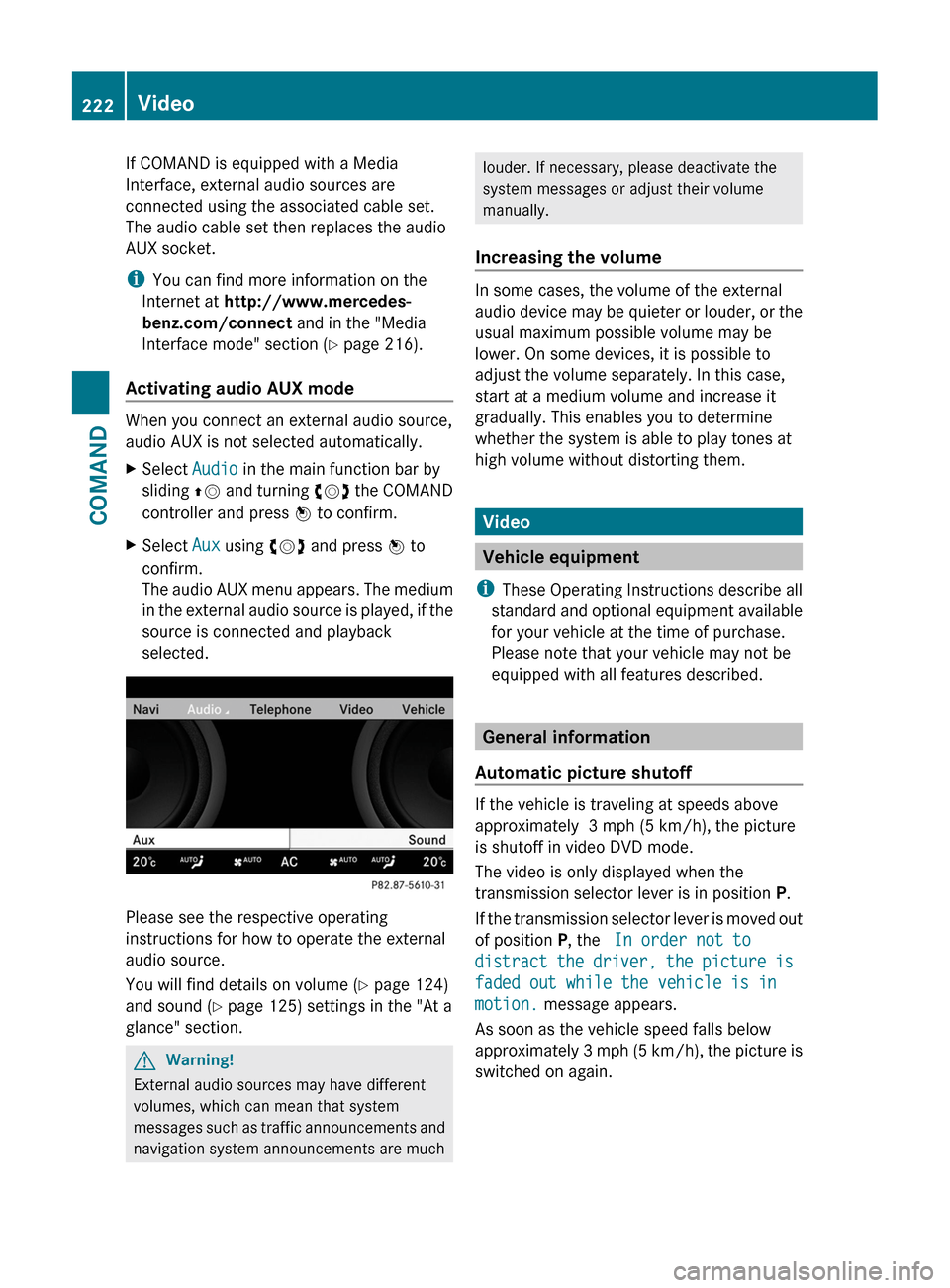
The audio AUX menu appears. The medium
in the external audio source is played, if the
source is connected and playback
selected.
Please see the respective operating
instructions for how to operate the external
audio source.
You will find details on volume (Y page 124)
and sound (Y page 125) settings in the "At a
glance" section.
GWarning!
External audio sources may have different
volumes, which can mean that system
messages such as traffic announcements and
navigation system announcements are much
louder. If necessary, please deactivate the
system messages or adjust their volume
manually.
Increasing the volume
In some cases, the volume of the external
audio device may be quieter or louder, or the
usual maximum possible volume may be
lower. On some devices, it is possible to
adjust the volume separately. In this case,
start at a medium volume and increase it
gradually. This enables you to determine
whether the system is able to play tones at
high volume without distorting them.
Video
Vehicle equipment
iThese Operating Instructions describe all
standard and optional equipment available
for your vehicle at the time of purchase.
Please note that your vehicle may not be
equipped with all features described.
General information
Automatic picture shutoff
If the vehicle is traveling at speeds above
approximately 3 mph (5 km/h), the picture
is shutoff in video DVD mode.
The video is only displayed when the
transmission selector lever is in position P.
If the transmission selector lever is moved out
of position P, the In order not to
distract the driver, the picture is
faded out while the vehicle is in
motion. message appears.
As soon as the vehicle speed falls below
approximately 3 mph (5 km/h), the picture is
switched on again.
222VideoCOMAND
Page 226 of 480
DVD playback conditions
If video DVDs do not correspond to the NTSC
or PAL TV playback standards, there may be
picture/sound interference or other playback
problems.
COMAND can play back video DVDs
produced according to the following
standards:
Rregion code 1 or region code 0 (no region
code)
iIf you insert a video DVD with a different
region code, you will see a message to this
effect.
RPAL or NTSC standard
You will generally find the relevant details
either on the DVD itself or on the DVD case.
iCOMAND is set to region code 1 at the
factory. This setting can be changed at an
authorized Mercedes-Benz Center. This will
allow you to play video DVDs with a
different region code, provided that they
are produced in accordance with the PAL
or NTSC standard. The region code can be
changed a maximum of five times.
Function restrictions
Depending on the DVD, it is possible that
certain functions or actions will be
temporarily blocked or may not function at all.
As soon as you try to activate these functions
or actions, you will see the K symbol in the
display.
Inserting and removing DVDs
XProceed as described in the "Inserting and
ejecting CDs and DVDs" section
(Y page 204).
Activating video DVD mode
Option 1
XInsert a video DVD.
COMAND loads the medium inserted and
starts to play it.
Option 2
XSelect Video in the main function bar by
sliding ZV and turning cVd the COMAND
controller and press W to confirm.
Video DVD mode is switched on.
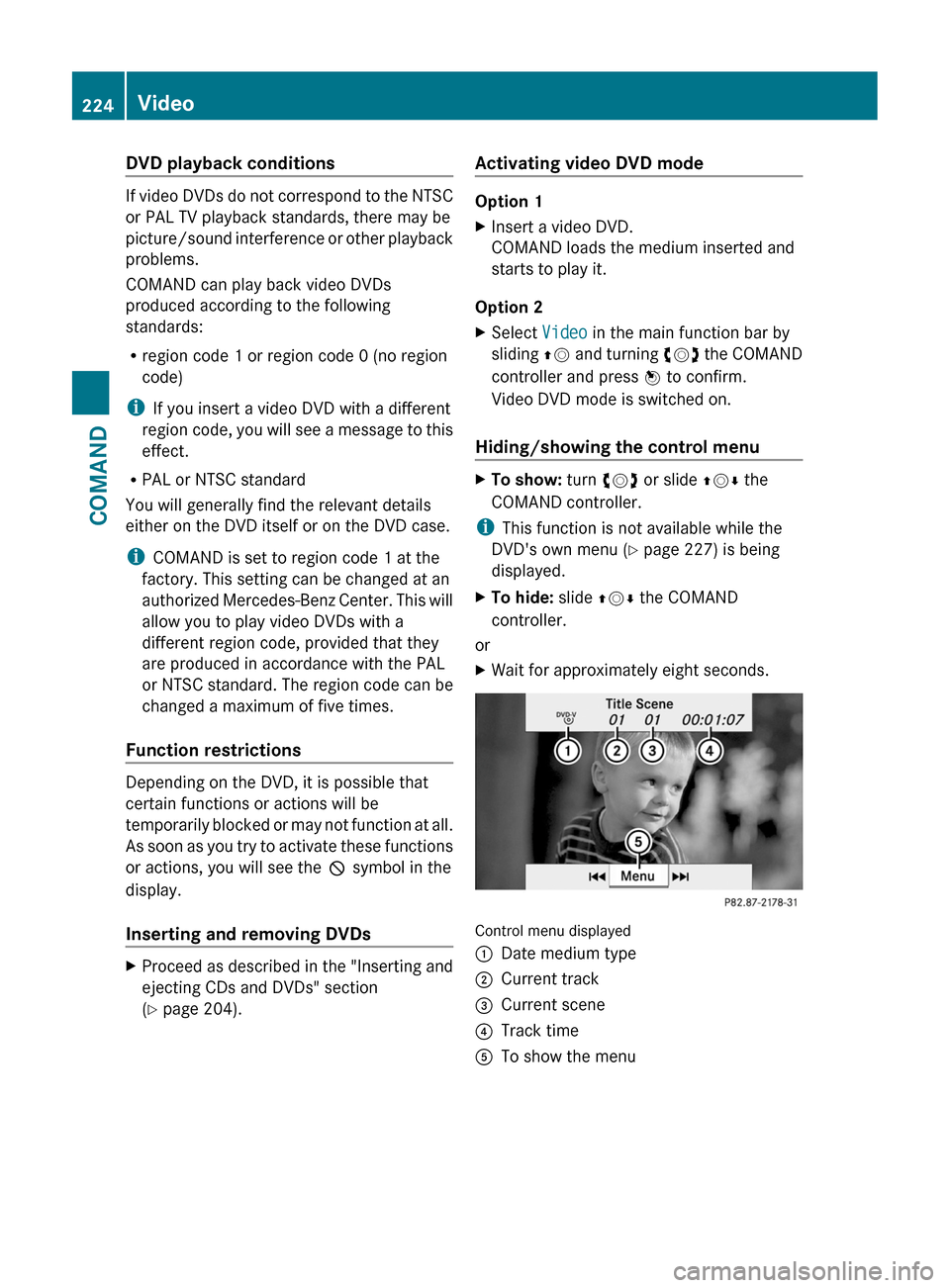
Hiding/showing the control menu
XTo show: turn cVd or slide ZVÆ the
COMAND controller.
iThis function is not available while the
DVD's own menu (Y page 227) is being
displayed.
XTo hide: slide ZVÆ the COMAND
controller.
or
XWait for approximately eight seconds.
Control menu displayed
:Date medium type;Current track=Current scene?Track timeATo show the menu224VideoCOMAND
Page 227 of 480
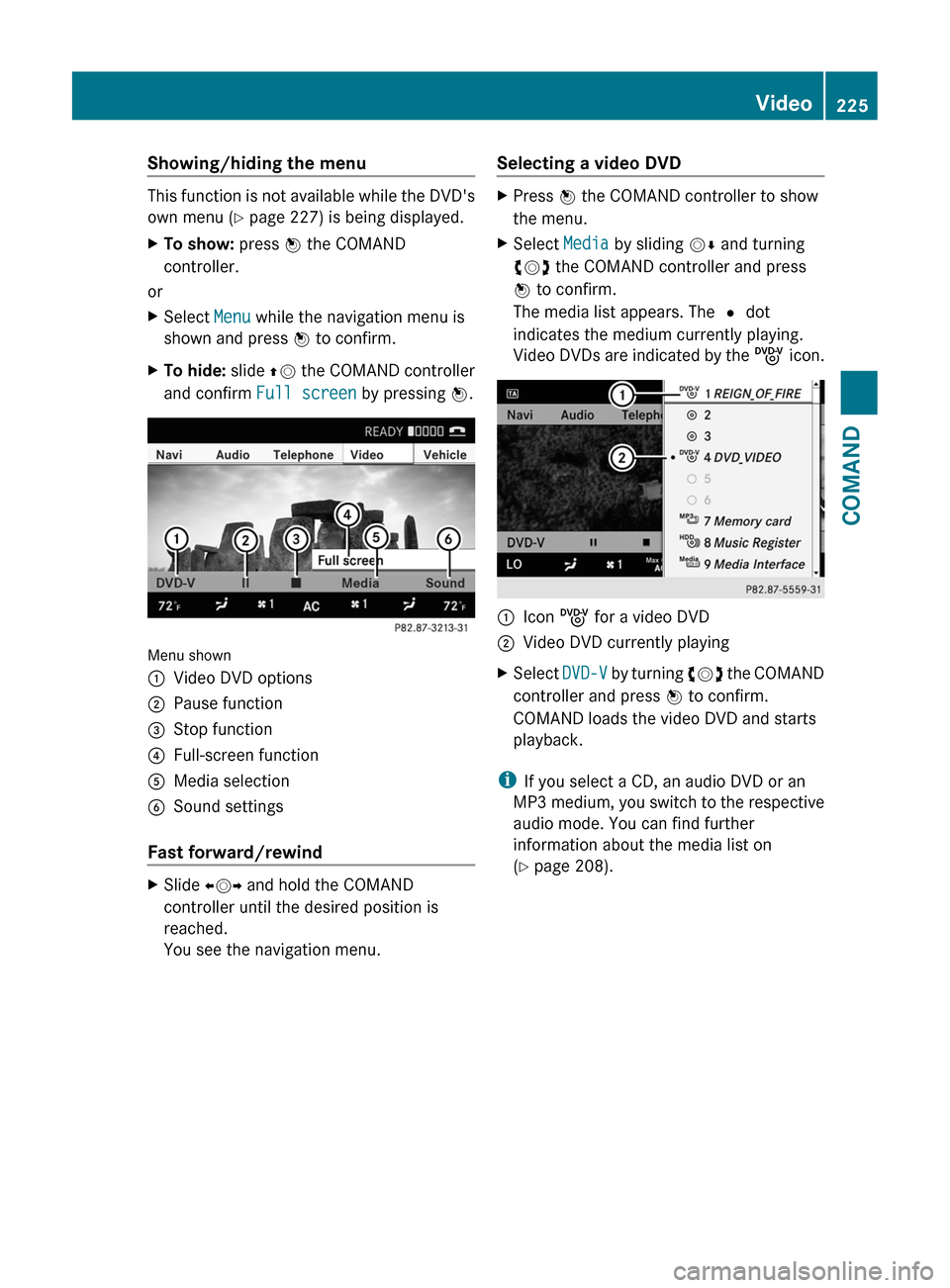
Showing/hiding the menu
This function is not available while the DVD's
own menu (Y page 227) is being displayed.
XTo show: press W the COMAND
controller.
or
XSelect Menu while the navigation menu is
shown and press W to confirm.
XTo hide: slide ZV the COMAND controller
and confirm Full screen by pressing W.
Menu shown
:Video DVD options;Pause function=Stop function?Full-screen functionAMedia selectionBSound settings
Fast forward/rewind
XSlide XVY and hold the COMAND
controller until the desired position is
reached.
You see the navigation menu.
Selecting a video DVDXPress W the COMAND controller to show
the menu.
XSelect Media by sliding VÆ and turning
cVd the COMAND controller and press
W to confirm.
The media list appears. The # dot
indicates the medium currently playing.
Video DVDs are indicated by the ý icon.
:Icon ý for a video DVD;Video DVD currently playingXSelect DVD-V by turning cVd the COMAND
controller and press W to confirm.
COMAND loads the video DVD and starts
playback.
iIf you select a CD, an audio DVD or an
MP3 medium, you switch to the respective
audio mode. You can find further
information about the media list on
(Y page 208).
Video225COMANDZ