alarm MERCEDES-BENZ CL-Class 2011 C216 Owner's Manual
[x] Cancel search | Manufacturer: MERCEDES-BENZ, Model Year: 2011, Model line: CL-Class, Model: MERCEDES-BENZ CL-Class 2011 C216Pages: 480, PDF Size: 19.76 MB
Page 6 of 480
1, 2, 3 ...
12 V socket ........................................ 390
4ETS see ETS/4ETS
4MATIC (permanent four-wheel
drive) .................................................. 306
A
ABC see Active Body Control
ABS (Anti-lock Braking System)
Display message ............................ 350
Function/notes ................................ 61
Warning lamp ................................. 377
Active Blind Spot Assist ................... 320
Activating/deactivating (on-
board computer) ............................ 340
Display message ............................ 366
Active Body Control (ABC) ................ 305
Active Driving Assistance package . 320
Active Lane Keeping Assist .............. 323
Activating/deactivating (on-
board computer) ............................ 340
Display message ............................ 366
Active light function (display
message) ............................................ 358
Active multicontour seat ............ 97, 240
Active partition (USB devices only) Selecting ........................................ 221
Active service system
see Service interval display
ADAPTIVE BRAKE ................................. 65
Adaptive brake lamps ......................... 63
Adaptive Damping System (ADS) ..... 304
Adaptive Highbeam Assist Display message ............................ 359
Switching on/off ........................... 247
Switching on/off (on-board
computer) ...................................... 341
Additional speedometer ................... 341
Address book Calling up ....................................... 188
Connecting a call ........................... 191
Creating an entry ........................... 190
Deleting an entry ........................... 191
Importing contacts ........................187
Introduction ................................... 187
Starting route guidance .................191
Voice tag ....................................... 192
Address book entry
Adopting as a home address .........162
Address entry menu .......................... 139
Air bags Display message ............................ 348
Front air bag (driver, front
passenger) ....................................... 44
Important safety notes ....................42
Knee bag .......................................... 44
Safety guidelines ............................. 41
Side impact air bag ..........................45
Window curtain air bag ....................46
Air-conditioning system
see Climate control
Air dehumidification
Activating/deactivating with
cooling ........................................... 258
Air distribution
Setting ........................................... 259
Setting (COMAND) .........................235
Airflow
Setting ........................................... 260
AIRMATIC ........................................... 304
AIRMATIC (display message) ............ 364
Air nozzles see Air vents .................................. 262
Air pressure
see Tire pressure
Air-recirculation mode
Activating/deactivating .................261
Air vent
Stowage compartment ..................263
Air vents ............................................. 262
Glove box ....................................... 263
Important safety information .........262
Rear ............................................... 263
Setting the center air vents ...........262
Setting the side air vents ...............262
Alarm system
see ATA
Alertness Assistant
see ATTENTION ASSIST
Alternative route ............................... 1564Index
Page 7 of 480
Ambient lightAdjusting (COMAND) .....................232
AMG menu (on-board computer) ..... 335
Anti-lock Braking System see ABS
Anti-Theft Alarm system
see ATA
Anti-theft system
ATA (Anti-Theft Alarm system) .........68
Ashtray ............................................... 389
Assistance menu (on-board
computer) .......................................... 339
ATA (Anti-Theft Alarm system) Activating/deactivating ...................68
Function ........................................... 68
Switching off the alarm ....................68
ATTENTION ASSIST ........................... 315
Activating/deactivating (on-
board computer) ............................ 340
Display message ............................ 363
Audio AUX jack .................................. 221
Audio CD/DVD or MP3 mode Switching to ................................... 205
Audio DVD
Stop function ................................. 207
Audio format
Setting (audio DVD mode) .............210
Audio menu (on-board computer) .... 334
AUTO lights see Light sensor
Automatic car wash .......................... 410
Automatic engine start Using the ECO start/stop
function ......................................... 271
Automatic engine stop
Using the ECO start/stop
function ......................................... 271
Automatic transmission
DIRECT SELECT lever .....................274
Display message ............................ 371
Driving tips .................................... 277
Emergency running mode ..............281
Kickdown ....................................... 277
Malfunction .................................... 281
Program selector button ................277
Pulling away ................................... 269
Starting .......................................... 269Autostore ........................................... 197
B
Back button ....................................... 109
Backrest Folding forward/back ......................96
Backrest (display message) ............. 372
Bag hook ............................................ 387
Bang & Olufsen sound system ......... 127
BAS (Brake Assist System) ................. 62
BAS PLUS (Brake Assist System
Plus*) .................................................... 62
Battery Charging ........................................ 428
Checking (SmartKey) .......................76
Display message ............................ 361
Important safety guidelines
(SmartKey) ....................................... 75
Jump-starting ................................. 429
Replacing (SmartKey) ......................76
Safety notes .................................. 426
Voltage (on-board computer) .........335
Belt
see Seat belts
Bird's-eye view .................................. 168
Blind see Roller sunblind
Bluetooth ®
Activating/deactivating .................133
Authorizing a device ......................134
Connecting devices .......................133
Devices .......................................... 133
External authorization ............134, 181
General information .......................132
Interface ........................................ 179
Revoking authorization ..................135
Settings ......................................... 132
Telephony .............................. 178, 179
Bluetooth ®
interface
Telephony ...................................... 178
Bluetooth ®
interface telephony
Conditions ..................................... 179
Bluetooth ®
telephone list ................. 180
Brake fluid Notes ............................................. 472
Brake fluid level ................................ 409
Brake lamp (display message) ......... 356
Index5
Page 16 of 480
Music RegisterCopying music data .......................213
MUSIC REGISTER
Deleting all music files ...................214
Memory space info ........................215
Playback options ........................... 216
Switching to ................................... 213
My address
see Home address
N
Navigation Installing map software .................. 173
On-board computer .......................333
Navigation (also see route
guidance) Traffic report .................................. 159
Navigation announcements
Switching off ......................... 124, 155
Navigation menu
Showing/hiding ............................. 224
Navigation mode
Switching to ................................... 137
Night View Assist Plus ...................... 316
Activating/deactivating .................317
Cleaning ......................................... 415
Display message ............................ 363
Malfunction .................................... 320
Problem ......................................... 320
North up orientation ......................... 168
Notes on breaking-in a new
vehicle ................................................ 266
O
Occupant Classification System
(OCS) Faults ............................................... 50
Operation ......................................... 46
System self-test ............................... 49
Occupant safety
Children in the vehicle .....................56
System overview .............................. 40
Octane number (fuel) ........................ 470
Odometer ........................................... 332
Off-map .............................................. 158
Off-road .............................................. 158
4MATIC .......................................... 306
Oil
see Engine oil
On-board computer
AMG menu ..................................... 335
Assistance menu ........................... 339
Audio menu ................................... 334
Display messages ..........................343
Important safety notes ..................328
Instrument cluster submenu ..........341
Lighting submenu .......................... 341
Message memory .......................... 343
Navigation menu ............................ 333
Operating video DVD .....................335
Operation ....................................... 329
Overview of menus ........................331
Service menu ................................. 340
Settings menu ............................... 341
Standard display submenu ............332
Telephone menu ............................ 338
Trip menu ...................................... 332
Opening height restriction for
trunk lid .............................................. 234
Operating system see On-board computer
Orientation in direction of travel ..... 168
Outside lighting Delayed switch-off (COMAND) .......232
Outside temperature
Display ........................................... 329
Overhead control panel
Overview .......................................... 36
Override feature
Rear side windows ...........................60
P
Paint code number ............................ 467
Paintwork (cleaning instructions) ... 412
Panic alarm .......................................... 60
Parking ............................................... 284
Parking aid Parking Guidance ........................... 310
PARKTRONIC ................................. 307
Rear view camera .......................... 314
14Index
Page 20 of 480
SpeedometerActivating/deactivating
additional speedometer (on-
board computer) ............................ 341
Additional speedometer (on-
board computer) ............................ 332
Setting the unit (on-board
computer) ...................................... 341
SPLITVIEW ......................................... 112
SRS (Supplemental Restraint
System) Display message ............................ 346
Introduction ..................................... 40
Warning lamp ................................. 379
Warning lamp (function) ................... 40
Standard display (on-board
computer) .......................................... 332
Starting the engine Important safety notes ..................268
State/province
Selecting ........................................ 139
Station
Selecting ........................................ 196
Storing ........................................... 197
see Radio
Station search ................................... 196
Steering (display message) .............. 373
Steering wheel Adjusting (electrically) .....................99
Buttons (on-board computer) ......... 329
Cleaning ......................................... 416
Important safety notes ....................98
Memory function (storing
settings) ........................................... 99
Steering wheel heating ....................99
Storing settings (memory
function) ........................................ 102
Steering wheel paddle shifters ........ 278
Storage options Selecting ........................................ 164
Stowage compartments
Armrest (under) ............................. 385
Glove box ....................................... 384
Rear ............................................... 385
Stowage space
Cup holders ................................... 387
Important safety information .........384Rear seat backrest ......................... 386
Rear seats (between) .....................386
Stowage well
Trunk floor (under) .........................387
Submenu (on-board computer)
Instrument cluster .........................341
Lights ............................................. 341
Standard display ............................ 332
Summer and standard time
Switching ....................................... 130
Summer opening
see Convenience opening feature
Sun visor ............................................ 388
Supplemental Restraint System see SRS
Surround sound ................................. 126
Suspension tuning ............................ 304
Active Body Control .......................306
Switching off the alarm (ATA) ............ 68
System language Setting ........................................... 135
System settings (COMAND)
Programmable button ....................109
T
Tachometer ........................................ 329
Tail lamp (display message) ............. 357
Taillight see Tail lamps
Tank content
Fuel gauge ....................................... 32
Technical data ................................... 466
CL 550 4MATIC BlueEFFICIENCY ... 474
CL 600 ........................................... 474
CL 63 AMG .................................... 474
CL 65 AMG .................................... 475
Tires/wheels ................................. 461
TELEAID
Automatic retrieval of vehicle data
(service due date) ..........................396
Call priority .................................... 395
Display message ............................ 345
Downloading destinations
(COMAND) ..................................... 395
Emergency call .............................. 392
Important safety notes ..................391
Locating a stolen vehicle ...............397
18Index
Page 41 of 480
Vehicle equipment ..............................40
Occupant safety .................................. 40
Children in the vehicle ........................56
Panic alarm .......................................... 60
Driving safety systems .......................61
Anti-theft systems .............................. 6839Safety
Page 62 of 480
installation instructions. Make sure that
Top Tether belt ? is taut.
The child restraint system with Top Tether
belt ? has been removed:
XSlide protective cap : onto Top Tether
anchorage ;.
Child-proof locks
Override feature for the rear side
windows
GWarning
Observe "Important safety notes"
(Y page 56).
GWarning
When children ride on the vehicle's rear seats,
activate the override switch. Otherwise the
children could be injured, e.g. by trapping
themselves in the rear side window.
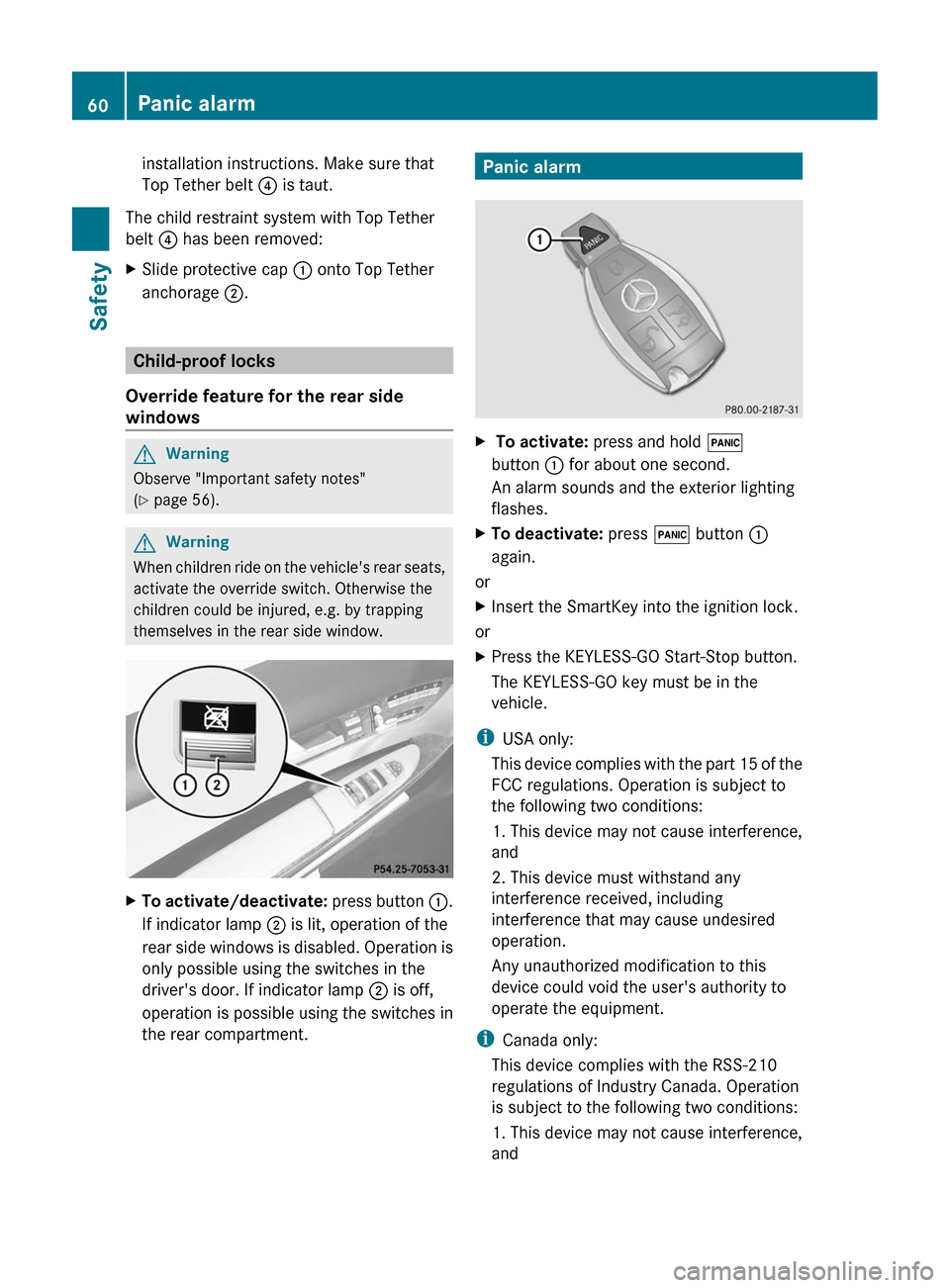
XTo activate/deactivate: press button :.
If indicator lamp ; is lit, operation of the
rear side windows is disabled. Operation is
only possible using the switches in the
driver's door. If indicator lamp ; is off,
operation is possible using the switches in
the rear compartment.
Panic alarmX To activate: press and hold !
button : for about one second.
An alarm sounds and the exterior lighting
flashes.
XTo deactivate: press ! button :
again.
or
XInsert the SmartKey into the ignition lock.
or
XPress the KEYLESS-GO Start-Stop button.
The KEYLESS-GO key must be in the
vehicle.
iUSA only:
This device complies with the part 15 of the
FCC regulations. Operation is subject to
the following two conditions:
1. This device may not cause interference,
and
2. This device must withstand any
interference received, including
interference that may cause undesired
operation.
Any unauthorized modification to this
device could void the user's authority to
operate the equipment.
iCanada only:
This device complies with the RSS-210
regulations of Industry Canada. Operation
is subject to the following two conditions:
1. This device may not cause interference,
and
60Panic alarmSafety
Page 70 of 480
Anti-theft systems
Immobilizer
The immobilizer prevents your vehicle from
being started without the correct key.
When leaving the vehicle, always take the
SmartKey with you and lock the vehicle. The
engine can be started by anyone with a valid
key that is left inside the vehicle.
XTo activate with the SmartKey: remove
the SmartKey from the ignition lock.
XTo activate with KEYLESS-GO: switch the
ignition off and open the driver's door.
XTo deactivate: switch on the ignition.
iThe immobilizer is always deactivated
when you start the engine.
In the event that the engine cannot be
started when the starter battery is fully
charged, the immobilizer may be faulty.
Contact an authorized Mercedes-Benz
Center or call 1-800-FOR-MERCedes (in
USA) or 1-800-387-0100 (in Canada).
ATA (Anti-Theft Alarm system)
A visual and audible alarm is triggered if the
alarm system is armed and you open:
Ra door
Rthe vehicle with the mechanical key
Rthe trunk lid
Rthe hood
The alarm is not switched off, even if you
close the open door that has triggered it, for
example.
iIf the alarm stays on for more than 30
seconds, the emergency call system
mbrace (USA only) or TELEAID (Canada
only) initiates a call to the Customer
Assistance Center automatically. The
emergency call system initiates the call
provided that:
Ryou have subscribed to the mbrace/
TELEAID service.
Rthe mbrace/TELEAID service has been
activated properly.
Rthe required mobile phone, power supply
and GPS are available.
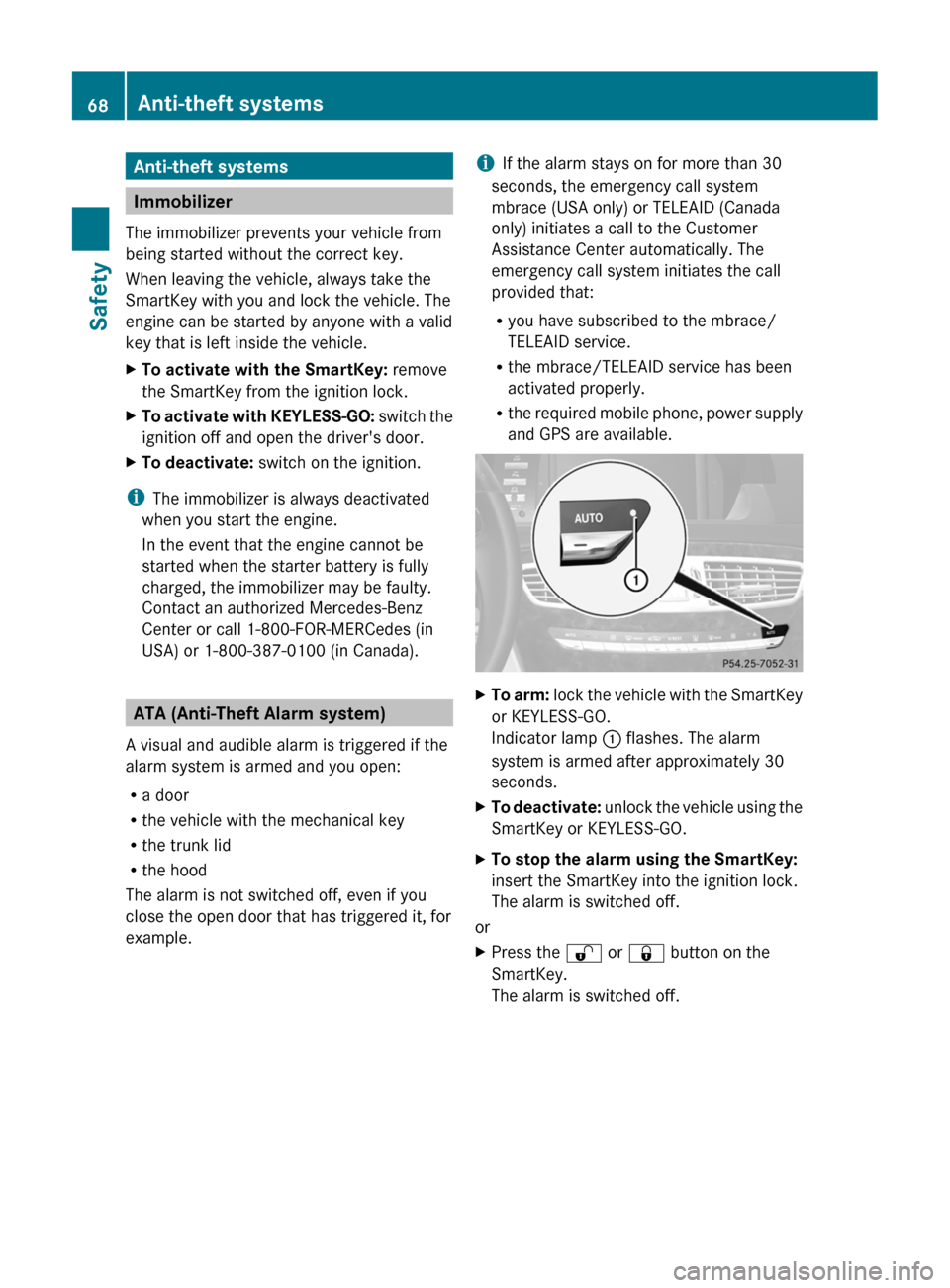
XTo arm: lock the vehicle with the SmartKey
or KEYLESS-GO.
Indicator lamp : flashes. The alarm
system is armed after approximately 30
seconds.
XTo deactivate: unlock the vehicle using the
SmartKey or KEYLESS-GO.
XTo stop the alarm using the SmartKey:
insert the SmartKey into the ignition lock.
The alarm is switched off.
or
XPress the % or & button on the
SmartKey.
The alarm is switched off.
68Anti-theft systemsSafety
Page 71 of 480
XTo stop the alarm using KEYLESS-GO:
grasp the outside door handle. The key
must be outside the vehicle.
The alarm is switched off.
or
XPress the Start/Stop button on the
dashboard. The key must be inside the
vehicle.
The alarm is switched off.Anti-theft systems69SafetyZ
Page 77 of 480
X To unlock the vehicle: pull the door
handle.XTo lock the vehicle: touch sensor
surface :.
If you pull on the handle of the trunk lid, only
the trunk of the vehicle is unlocked.
Changing the settings of the locking
system
You can change the setting of the locking
system in such a way that only the driver's
door and the fuel filler flap are unlocked. This
is useful if you frequently travel on your own.
XTo change the setting: press and hold
down the % and & buttons
simultaneously for approximately six
seconds until the battery check lamp
( Y page 76) flashes twice.
The SmartKey now functions as follows:
XTo unlock the driver's door: press the
% button once.XTo unlock centrally: press the %
button twice.XTo lock centrally: press the & button.
The KEYLESS-GO function is changed as
follows:
XTo unlock the driver's door : pull the door
handle on the driver's door.XTo unlock centrally: pull the front-
passenger door handle.XTo lock centrally: touch sensor
surface : on one of the door handles.
Restoring the factory settings
XPress the % and & buttons
simultaneously for approximately six
seconds until the battery check lamp
flashes twice.Mechanical key
General notes
If you use the mechanical key to unlock and
open the driver's door or the trunk lid, the
anti-theft alarm system will be triggered
( Y page 68).
There are several ways to turn off the alarm:
XPress the % or & button on the
SmartKey.
or
XInsert the SmartKey into the ignition lock.
or
XPress the Start/Stop button in the ignition
lock. The SmartKey must be in the vehicle.
or
XLock or unlock the vehicle using KEYLESS-
GO. The SmartKey must be outside the
vehicle.
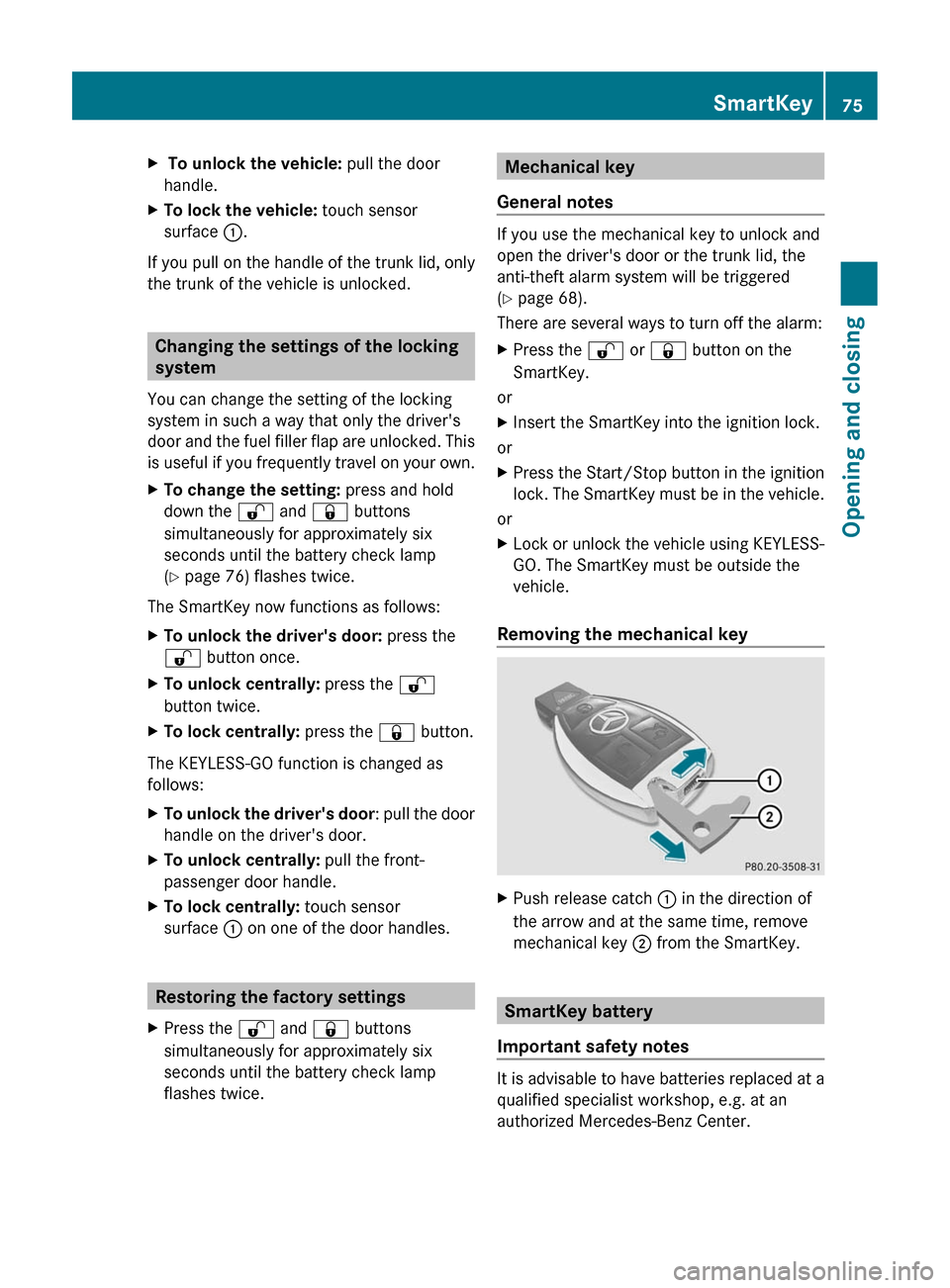
Removing the mechanical key
XPush release catch : in the direction of
the arrow and at the same time, remove
mechanical key ; from the SmartKey.
SmartKey battery
Important safety notes
It is advisable to have batteries replaced at a
qualified specialist workshop, e.g. at an
authorized Mercedes-Benz Center.
SmartKey75Opening and closingZ
Page 81 of 480
Unlocking and opening the doors
from the inside
You can open a door from inside the vehicle
even if it has been locked.
Open the door only when the traffic
conditions permit.
If the vehicle has been opened with the
SmartKey or KEYLESS-GO key, opening from
inside triggers the anti-theft alarm system.
Switch off the alarm (Y page 68).
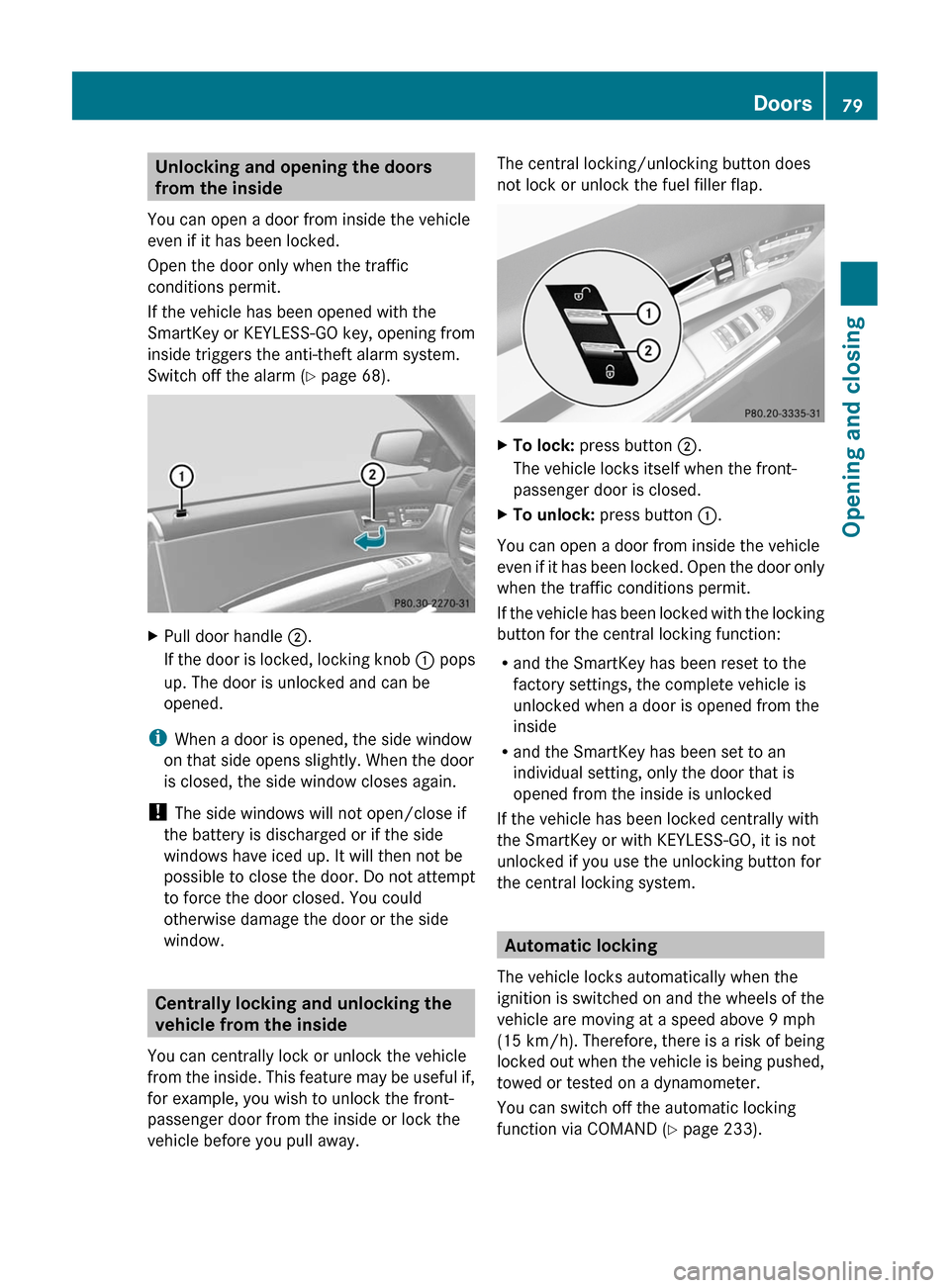
XPull door handle ;.
If the door is locked, locking knob : pops
up. The door is unlocked and can be
opened.
iWhen a door is opened, the side window
on that side opens slightly. When the door
is closed, the side window closes again.
! The side windows will not open/close if
the battery is discharged or if the side
windows have iced up. It will then not be
possible to close the door. Do not attempt
to force the door closed. You could
otherwise damage the door or the side
window.
Centrally locking and unlocking the
vehicle from the inside
You can centrally lock or unlock the vehicle
from the inside. This feature may be useful if,
for example, you wish to unlock the front-
passenger door from the inside or lock the
vehicle before you pull away.
The central locking/unlocking button does
not lock or unlock the fuel filler flap.
XTo lock: press button ;.
The vehicle locks itself when the front-
passenger door is closed.
XTo unlock: press button :.
You can open a door from inside the vehicle
even if it has been locked. Open the door only
when the traffic conditions permit.
If the vehicle has been locked with the locking
button for the central locking function:
Rand the SmartKey has been reset to the
factory settings, the complete vehicle is
unlocked when a door is opened from the
inside
Rand the SmartKey has been set to an
individual setting, only the door that is
opened from the inside is unlocked
If the vehicle has been locked centrally with
the SmartKey or with KEYLESS-GO, it is not
unlocked if you use the unlocking button for
the central locking system.
Automatic locking
The vehicle locks automatically when the
ignition is switched on and the wheels of the
vehicle are moving at a speed above 9 mph
(15 km/h). Therefore, there is a risk of being
locked out when the vehicle is being pushed,
towed or tested on a dynamometer.
You can switch off the automatic locking
function via COMAND (Y page 233).
Doors79Opening and closingZ