mirror MERCEDES-BENZ CL-Class 2012 C216 Owner's Guide
[x] Cancel search | Manufacturer: MERCEDES-BENZ, Model Year: 2012, Model line: CL-Class, Model: MERCEDES-BENZ CL-Class 2012 C216Pages: 488, PDF Size: 21.88 MB
Page 326 of 488

exterior mirror and the following is shown in
the multifunction display, for example:GWARNING
Active Blind Spot Assist is only an aid
designed to assist driving. It is not a substitute
for attentive driving. In some cases, the
course-correcting brake application is not
sufficient to avoid a collision. In such a case,
you must steer, brake or accelerate.
In very rare cases, the system may
erroneously detect a danger of collision in the
area of crash barriers or similar lane borders
and apply the brakes. Active Blind Spot Assist
does not detect all traffic situations and road
users. Always make sure that there is
sufficient distance on the side for other traffic
or obstacles. An inappropriate brake
application may be interrupted at any time if
you steer slightly in the opposite direction or
accelerate.
You are responsible for driving at appropriate
speeds, braking in good time, and steering
correctly. Always adapt your driving style to
suit the prevailing road and weather
conditions. Always pay attention to traffic
conditions and your surroundings. Otherwise,
you may fail to recognize dangers in time,
cause an accident and injure yourself and
others.
There will be either no or only a weak course-
correcting brake application if:
R there are vehicles or obstacles, e.g. crash
barriers, located on both sides of your
vehicle.
R a vehicle approaches you too closely at the
side.
R you have adopted a sporty driving style with
high cornering speeds.
R you clearly brake or accelerate.
R a driving safety system intervenes, e.g.
ESP ®
or PRE-SAFE ®
Brake.
R ESP ®
is switched off.
R a loss of tire pressure or a defective tire is
detected.
Switching on Active Blind Spot AssistXMake sure that the radar sensor system
( Y page 344) and Active Blind Spot Assist
( Y page 343) are activated in the on-board
computer.XTurn the SmartKey to position 2 in the
ignition lock.
Warning lamps : light up red in the
exterior mirrors for approximately 1.5
seconds and then turn yellow.
Active Lane Keeping Assist
Important safety notes
Active Lane Keeping Assist monitors the area
in front of your vehicle by means of a camera
at the top of the windshield. Active Lane
Keeping Assist detects lane markings on the
road and warns you before you leave your
lane unintentionally. If you do not react to the
warning, a lane-correcting application of the
brakes can bring the vehicle back into the
original lane.
:Active Lane Keeping Assist camera
If you have selected the Display Unit
Speed-/Odometer (Y page 344) function in
the on-board computer and select km as the
unit of measurement, Active Lane Keeping
324Driving systemsDriving and parking
Page 361 of 488
Lights
i Display messages about LEDs:
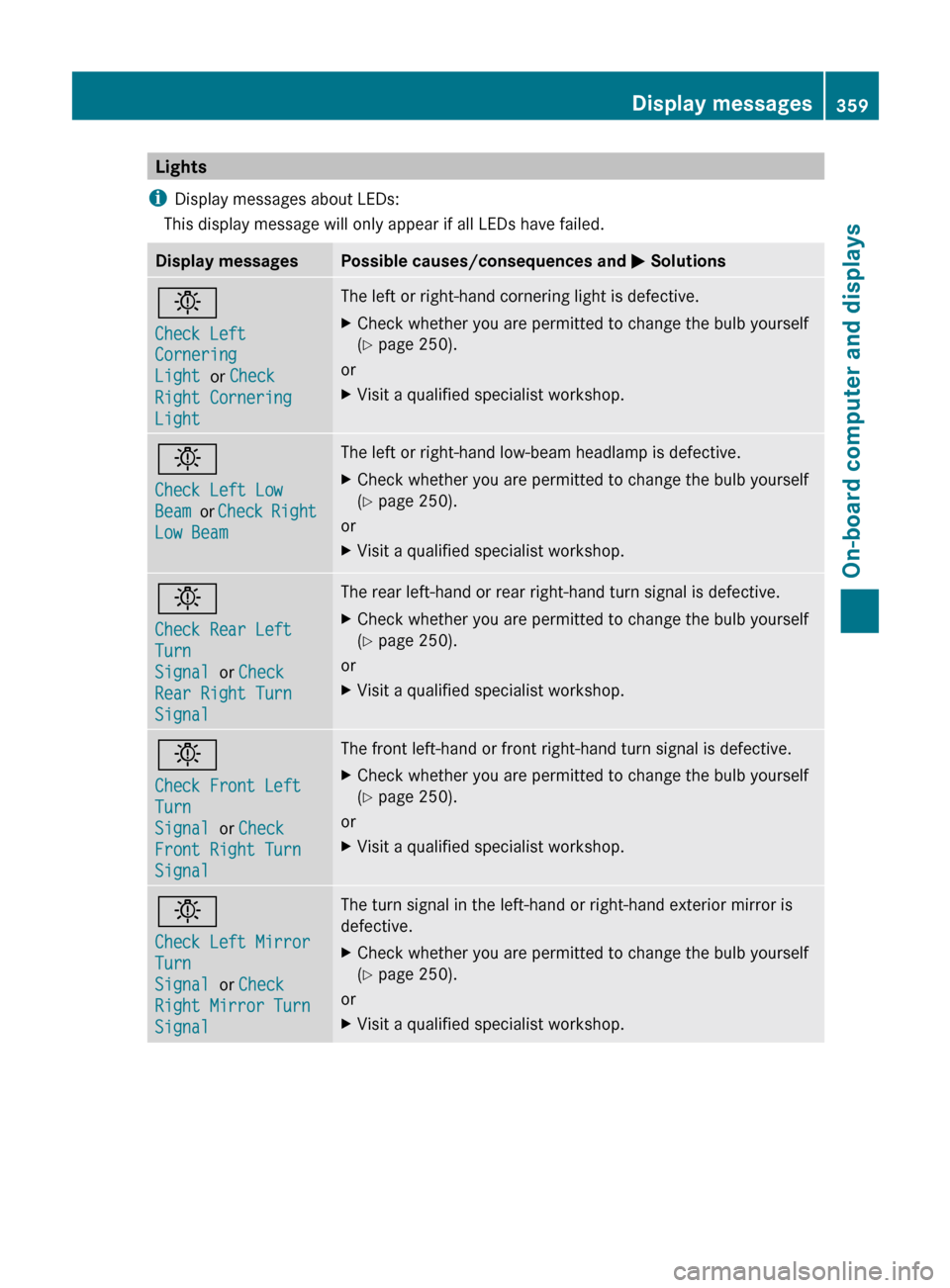
This display message will only appear if all LEDs have failed.Display messagesPossible causes/consequences and M Solutionsb
Check Left
Cornering
Light or Check
Right Cornering
Light The left or right-hand cornering light is defective.XCheck whether you are permitted to change the bulb yourself
( Y page 250).
or
XVisit a qualified specialist workshop.b
Check Left Low
Beam or Check Right
Low Beam The left or right-hand low-beam headlamp is defective.XCheck whether you are permitted to change the bulb yourself
( Y page 250).
or
XVisit a qualified specialist workshop.b
Check Rear Left
Turn
Signal or Check
Rear Right Turn
SignalThe rear left-hand or rear right-hand turn signal is defective.XCheck whether you are permitted to change the bulb yourself
( Y page 250).
or
XVisit a qualified specialist workshop.b
Check Front Left
Turn
Signal or Check
Front Right Turn
SignalThe front left-hand or front right-hand turn signal is defective.XCheck whether you are permitted to change the bulb yourself
( Y page 250).
or
XVisit a qualified specialist workshop.b
Check Left Mirror
Turn
Signal or Check
Right Mirror Turn
SignalThe turn signal in the left-hand or right-hand exterior mirror is
defective.XCheck whether you are permitted to change the bulb yourself
( Y page 250).
or
XVisit a qualified specialist workshop.Display messages359On-board computer and displaysZ
Page 371 of 488

Display messagesPossible causes/consequences and M SolutionsRadar Sensors
Deactivated See
Oper. ManualThe radar sensor system is deactivated.XSwitch on the radar sensor system ( Y page 344).Active Lane
Keeping Assist
Currently
Unavailable See
Oper. ManualActive Lane Keeping Assist is deactivated and temporarily
inoperative if:
R the windshield is dirty in the camera's field of vision.
R visibility is impaired due to heavy rain, snow or fog.
R there are no lane markings for a longer period.
R the lane markings are worn, dark or covered, for example by dirt
or snow.
Active Lane Keeping Assist is operational again and the display
message disappears if:
R the dirt (e.g. slush) drops away while the vehicle is in motion.
R the system recognizes that the camera is fully operational again.
If the display message continues to be displayed:XClean the windshield.Active Lane
Keeping Assist
InoperativeActive Lane Keeping Assist is defective.XVisit a qualified specialist workshop.Active Blind Spot
Assist
Currently
Unavailable, See
Oper. ManualActive Blind Spot Assist is temporarily inoperative if:
R the sensors are dirty.
R its function is impaired due to heavy rain or snow.
R the radar sensor system is outside the operating temperature
range.
R the radar sensor system is temporarily inoperative, e.g. due to
electromagnetic radiation emitted by nearby TV or radio
stations or other sources of electromagnetic radiation.
The yellow 9 indicator lamps also light up in the exterior
mirrors.
Active Blind Spot Assist is operational again and the display
message disappears if:
R the dirt (e.g. slush) drops away while the vehicle is in motion.
R the system detects that the sensors are fully available again.
R the radar sensor system is back within the operating
temperature range.
If the display message continues to be displayed:XClean the sensors ( Y page 418).XRestart the engine.Display messages369On-board computer and displaysZ
Page 372 of 488

Display messagesPossible causes/consequences and M SolutionsActive Blind Spot
Assist
InoperativeActive Blind Spot Assist is defective.
The yellow 9 indicator lamps also light up in the exterior
mirrors.XVisit a qualified specialist workshop.Parking Guidance
InoperativeParking Guidance is malfunctioning ( Y page 310).XRestart the engine.
If the display message continues to be displayed:
XVisit a qualified specialist workshop.Parking Guidance
CanceledParking Guidance has been deactivated because:
R the vehicle is skidding.
R the sensors are dirty.
R a malfunction has occurred.XReactivate Parking Guidance later ( Y page 310).
If the parking space symbol is not displayed in the multifunction
display when you are driving at a speed of less than 19 mph
(30 km/h):
XClean the sensors ( Y page 418).XRestart the engine.
If the parking space symbol is still not displayed in the
multifunction display when you are driving at a speed of less than
19 mph (30 km/h):
XVisit a qualified specialist workshop.Parking Guidance has been deactivated because you are no longer
following the recommended path.XPark again and, while doing so, observe the display messages
in the multifunction display.Parking Guidance
FinishedThe vehicle is parked. A warning tone also sounds.
The display message disappears automatically.DISTRONIC PLUS
OffDISTRONIC PLUS has been deactivated ( Y page 292). If it was
deactivated automatically, a warning tone also sounds.DISTRONIC PLUS
Available AgainDISTRONIC PLUS is operational again after having been
temporarily unavailable. You can now reactivate DISTRONIC PLUS
( Y page 292).370Display messagesOn-board computer and displays
Page 394 of 488
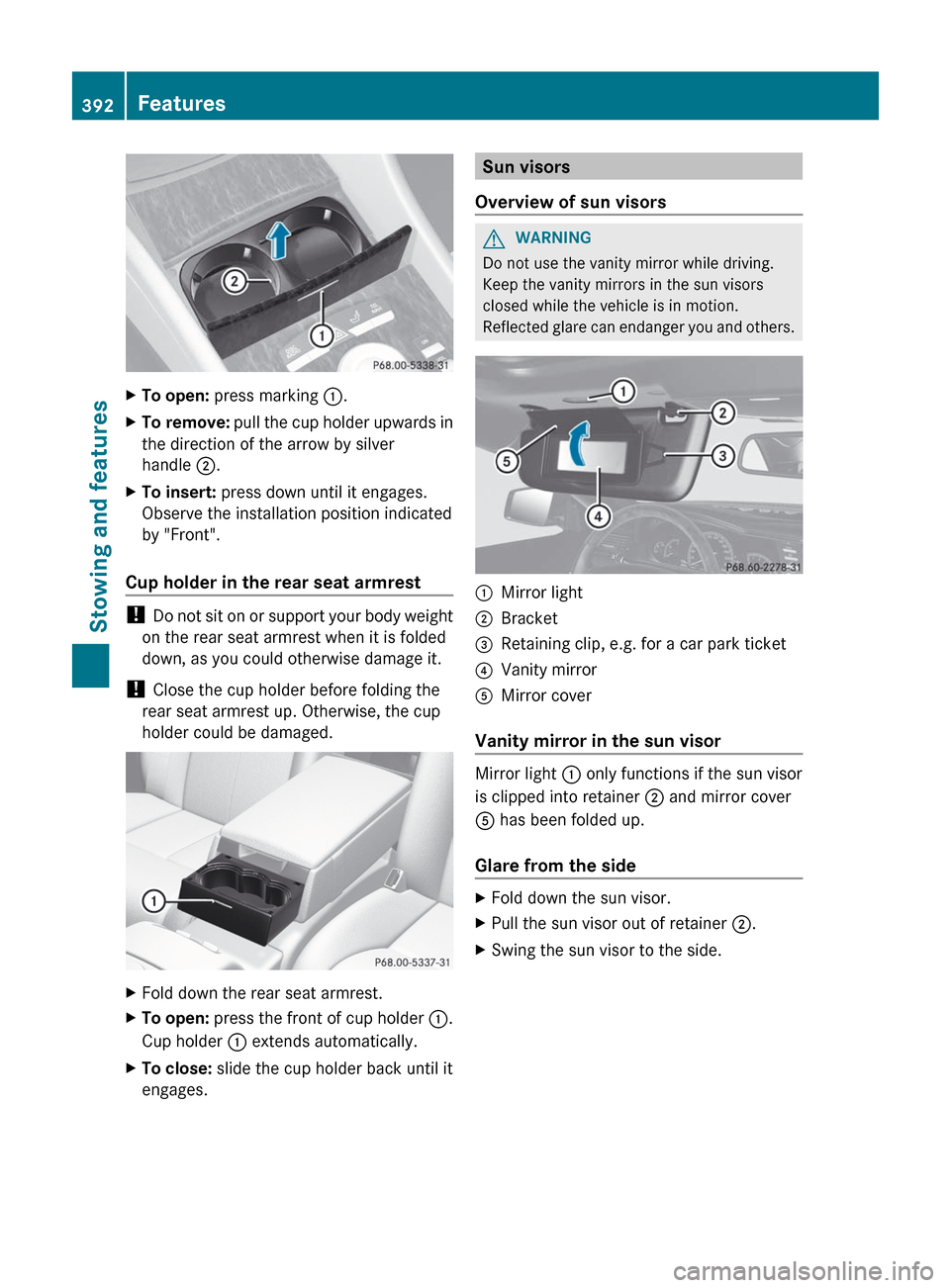
XTo open: press marking :.XTo remove: pull the cup holder upwards in
the direction of the arrow by silver
handle ;.XTo insert: press down until it engages.
Observe the installation position indicated
by "Front".
Cup holder in the rear seat armrest
! Do not sit on or support your body weight
on the rear seat armrest when it is folded
down, as you could otherwise damage it.
! Close the cup holder before folding the
rear seat armrest up. Otherwise, the cup
holder could be damaged.
XFold down the rear seat armrest.XTo open: press the front of cup holder :.
Cup holder : extends automatically.XTo close: slide the cup holder back until it
engages.Sun visors
Overview of sun visorsGWARNING
Do not use the vanity mirror while driving.
Keep the vanity mirrors in the sun visors
closed while the vehicle is in motion.
Reflected glare can endanger you and others.
:Mirror light;Bracket=Retaining clip, e.g. for a car park ticket?Vanity mirrorAMirror cover
Vanity mirror in the sun visor
Mirror light : only functions if the sun visor
is clipped into retainer ; and mirror cover
A has been folded up.
Glare from the side
XFold down the sun visor.XPull the sun visor out of retainer ;.XSwing the sun visor to the side.392FeaturesStowing and features
Page 404 of 488
happens automatically and does not require
any action from the driver. This function
allows the Mercedes-Benz Center to improve
appointment planning significantly and
ensures that your vehicle receives the best
service possible.
i The "Automatic retrieval of vehicle data
for the service due date" function is only
available if the relevant mobile phone
network is available and a data connection
is possible.
Service for recovering a stolen vehicle
If your vehicle has been stolen:
XNotify the police.
The police will issue a numbered incident
report.XThis number will be forwarded to the
Mercedes-Benz Customer Assistance
Center together with your PIN.
The Mercedes-Benz Customer Assistance
Center then attempts to locate the mbrace
system. The Mercedes-Benz Customer
Assistance Center contacts you and the
local law enforcement agency if the vehicle
is located. However, only the law
enforcement agency is informed of the
location of the vehicle.
i If the anti-theft alarm system is active for
longer than 30 seconds, mbrace
automatically informs the Mercedes-Benz
Customer Assistance Center.
Garage door opener
Important safety notes
The HomeLink ®
garage door opener
integrated in the rear-view mirror allows you
to operate up to three different door and gate
systems.
i Certain garage door drives are
incompatible with the integrated garage
door opener. If you have difficulty
programming the integrated garage door
opener, contact an authorized Mercedes-
Benz Center or call one of the following
telephone hotlines:
R USA: Mercedes-Benz Customer
Assistance Center at
1-800-FOR-MERCedes
R Canada: Customer Service at
1-800-387-0100GWARNING
Before programming the integrated remote
control to a garage door opener or gate
operator, make sure people and objects are
out of the way of the device to prevent
potential harm or damage. When
programming a garage door opener, the door
moves up or down. When programming a gate
operator, the gate opens or closes.
Do not use the integrated remote control with
any garage door opener that lacks safety stop
and reverse features as required by U.S.
federal safety standards (this includes any
garage door opener model manufactured
before April 1, 1982). A garage door that
cannot detect an object - signaling the door
to stop and reverse - does not meet current
U.S. federal safety standards.
When programming a garage door opener,
park vehicle outside the garage.
Do not run the engine while programming the
integrated remote control. Inhalation of
exhaust gas is hazardous to your health. All
exhaust gas contains carbon monoxide (CO),
and inhaling it can cause unconsciousness
and possible death. All exhaust gas contains
carbon monoxide (CO), and inhaling it can
cause unconsciousness and possible death.
i USA only:
This device complies with part 15 of the
FCC Rules. Operation is subject to the
following two conditions:
402FeaturesStowing and features
Page 405 of 488
1. This device may not cause harmful
interference, and
2. this device must accept any interference
received, including interference that may
cause undesired operation.
Any unauthorized modification to this
device could void the user's authority to
operate the equipment.
FCC ID: CB2HMIHL4
i Canada only:
This device complies with RSS-210 of
Industry Canada. Operation is subject to
the following two conditions:
1. This device may not cause interference,
and
2. this device must accept any interference
received, including interference that may
cause undesired operation of the device.
Any unauthorized modification to this
device could void the user's authority to
operate the equipment.
IC: 279B-HMIHL4
Programming the integrated garage
door opener on the rear-view mirror
Programming
GWARNING
Only press the transmitter button on the
integrated garage door opener if there are no
persons or objects present within the sweep
of the garage door. People could otherwise be
injured by the movement of the door.
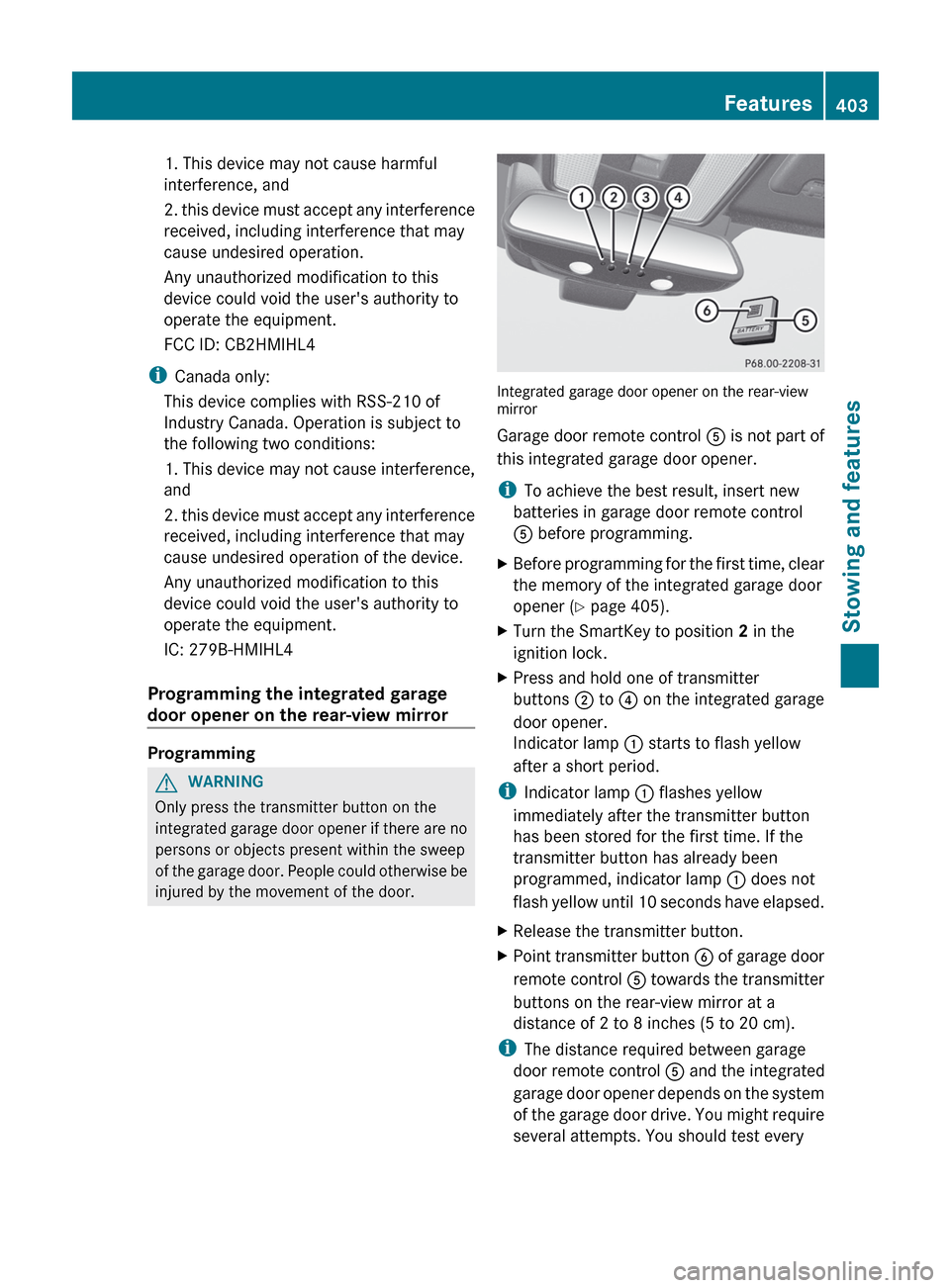
Integrated garage door opener on the rear-view
mirror
Garage door remote control A is not part of
this integrated garage door opener.
i To achieve the best result, insert new
batteries in garage door remote control
A before programming.
XBefore programming for the first time, clear
the memory of the integrated garage door
opener ( Y page 405).XTurn the SmartKey to position 2 in the
ignition lock.XPress and hold one of transmitter
buttons ; to ? on the integrated garage
door opener.
Indicator lamp : starts to flash yellow
after a short period.
i Indicator lamp : flashes yellow
immediately after the transmitter button
has been stored for the first time. If the
transmitter button has already been
programmed, indicator lamp : does not
flash yellow until 10 seconds have elapsed.
XRelease the transmitter button.XPoint transmitter button B of garage door
remote control A towards the transmitter
buttons on the rear-view mirror at a
distance of 2 to 8 inches (5 to 20 cm).
i The distance required between garage
door remote control A and the integrated
garage door opener depends on the system
of the garage door drive. You might require
several attempts. You should test every
Features403Stowing and featuresZ
Page 406 of 488
position for at least 25 seconds before
trying another position.XPress and hold transmitter button B on
garage door remote control A until
indicator lamp : lights up green.
Programming is complete if indicator
lamp : lights up or flashes green.XRelease transmitter button ;, = or ? on
the integrated garage door opener and the
transmitter button on garage door remote
control B.
If indicator lamp : lights up red:
XRepeat the programming procedure for the
transmitter button. When doing so, vary the
distance between the garage door remote
control and the rear-view mirror.
i If the indicator lamp flashes green after
successful programming, the garage door
system is operating on a rolling code. After
programming, you must synchronize the
garage door opener integrated in the rear-
view mirror with the receiver of the garage
door system.
Synchronizing the rolling code
Your vehicle must be within range of the
garage or gate opener drive. Make sure that
neither your vehicle nor any persons/objects
are present within the sweep of the door or
gate.
Observe the safety notes when performing
the rolling code synchronization.
XTurn the SmartKey to position 2 in the
ignition lock.XPress the programming button of the door
or gate drive (see the door or gate drive
operating instructions, e.g. under
"Programming of additional remote
controls").
i You now normally have 30 seconds to
initiate the next step.
XPress the previously programmed
transmitter button of the HomeLink ®integrated garage door opener repeatedly
in succession until the door opens.
The rolling code synchronization is then
complete.
Notes on programming the remote
control
Canadian radio frequency laws require a
"break" (or interruption) of the transmission
signals after broadcasting for a few seconds.
These signals may not therefore last long
enough for the integrated garage door opener
to recognize the signal during programming.
Comparable with Canadian law, some U.S.
garage door openers also have a built-in
"interruption".
If you live in Canada or have difficulties
programming the garage door opener
(regardless of where you live) when using the
programming steps (see above), proceed as
follows:
XPress and hold one of transmitter
buttons ; to ? of the integrated garage
door opener.
Indicator lamp : starts to flash yellow
after a short period.XRelease the transmitter button.XPress transmitter button B of the garage
door remote control and hold for two
seconds, then release for two seconds,
then press again and hold for two seconds.XRepeat this sequence on transmitter
button B of the garage door remote
control until indicator lamp : is green.
Repeat the process if indicator lamp :
turns red.XContinue with the other programming
steps (see above).
Problems when programming
If you are experiencing problems
programming the integrated garage door
opener on the rear-view mirror, take note of
the following instructions:
R check the transmission frequency of
garage door remote control A (usually
404FeaturesStowing and features
Page 407 of 488
found on the reverse side of the remote
control).
The integrated garage door opener is
compatible with devices that can be
operated with units in a frequency range of
280 to 390 MHz.
R change the batteries in garage door remote
control A. This increases the probability
that garage door remote control A will
send a strong and precise signal to the
integrated garage door opener on the rear-
view mirror.
R when programming, hold garage door
remote control A at different distances
and angles from the transmitter button that
you are programming. Try different angles
at a distance between 2 and 12 inches (5
to 30 cm) or the same angle at varying
distances.
R if another remote control for the same
garage door drive is available, repeat the
same programming steps with this remote
control. Before you perform the steps of the
operation, make sure that there are new
batteries in the garage door remote
control.
R note that some remote controls only
transmit for a limited amount of time (the
indicator lamp on the remote control goes
out). Press the remote control button again
before it stops transmitting.
R align the antenna cable of the garage door
opener unit. This can improve signal
reception/transmission.
Opening/closing the garage door
Once programmed, the integrated garage
door opener will assume the function of the
garage door system's remote control. Please
also read the operating instructions for the
garage door system.
XTurn the SmartKey to position 2 in the
ignition lock.XPress transmitter button ;, = or ? in the
overhead control panel that you have
programmed to operate the garage door.
Garage door system with a fixed code:
indicator lamp : lights up green.
Garage door system with a rolling code:
indicator lamp : flashes green.
i
The transmitter will transmit a signal for
as long as the transmitter button is being
pressed. After a maximum of ten seconds,
transmission is terminated and indicator
lamp : flashes yellow. Press the
transmitter button again, if necessary.
Clearing the memory of the integrated
garage door opener on the rear-view
mirror
XTurn the SmartKey to position 2 in the
ignition lock.XPress transmitter buttons ; and ?.
The indicator lamp lights up yellow.XPress and hold transmitter buttons ;
and ? until the indicator lamp turns green.
i
Make sure that you clear the memory of
the integrated garage door opener before
selling the vehicle.
Floormat on the driver's side
GWARNING
Whenever you are using a floormat, make sure
there is enough clearance and that the
floormat is securely fastened.
The floormat should always be securely
fastened using the fastening equipment.
Before driving off, check that the floormat is
securely in place and adjust it if necessary. A
loose floormat could slip and hinder proper
functioning of the pedals.
Do not place several floormats on top of each
other as this may impair pedal movement.
Features405Stowing and featuresZ
Page 482 of 488

protection and to provide protection from
overheating. In the Service Booklet, you can
find information on the intervals for renewal.
The renewal interval is determined by the
coolant type and the engine cooling system
design. The renewal interval in the Service
Booklet is only valid if the coolant is renewed
or filled up with Mercedes-Benz approved
products. Therefore, only use MB 325.0 or
326.0 anticorrosion/antifreeze or another
Mercedes-Benz approved product of the
same specification.
Information on other products with the same
specifications that are approved by
Mercedes-Benz can be obtained at an
authorized Mercedes-Benz Center or on the
Internet at http://bevo.mercedes-benz.com.
The coolant is checked at every maintenance
interval at an authorized Mercedes-Benz
Center.
The antifreeze/corrosion inhibitor
concentration in the engine cooling system
should:
R be at least 50%. This will protect the engine
cooling system against freezing down to
approximately -35 ‡ (-37 † ).
R not exceed 55% (antifreeze protection to
-49 ‡ [-45 † ]); otherwise, heat will not
dissipate as effectively.
If the coolant level is too low, MB 325.0 or
326.0 anticorrosion/antifreeze should be
added. Have the engine cooling system
checked for possible leaks.
Windshield/headlamp cleaning
system
GWARNING
Washer solvent/antifreeze is highly
flammable. Do not spill washer solvent/
antifreeze on hot engine parts, because it may
ignite and burn. You could be seriously
burned.
Use MB SummerFit windshield washer
concentrate at temperatures above freezing:XMix 1 part MB SummerFit with 100 parts
water.
Use MB WinterFit windshield washer
concentrate at temperatures below freezing:
XAt temperatures down to 14 ‡(Ò 10 †): mix
1 part MB WinterFit with 2 parts water.XAt temperatures down to Ò 4 ‡( Ò 20 †): mix
1 part MB WinterFit with 1 part water.XAt temperatures down to
Ò 20.2 ‡(Ò 29 †): mix 2 parts MB WinterFit
with 1 part water.
! Only SummerFit and WinterFit can be
mixed. Otherwise, the jets could become
blocked.
Vehicle data
For the specified vehicle data, please note
that:
R The heights specified may vary due to:
- tires
- load
- condition of the suspension
- optional equipment
All modelsVehicle length200.8 in (5099 mm)Vehicle width
including exterior
mirrors83.9 in (2130 mm)Vehicle height55.9 in (1419 mm)Wheelbase116.3 in (2955 mm)Front track63.0 in (1601 mm)Rear track63.3 in (1607 mm)Turning circle38.2 ft (11.63 m)Maximum trunk
loadMaximum 220 lb (100 kg)480Vehicle dataTechnical data