glove box MERCEDES-BENZ CL-Class 2012 C216 Owner's Manual
[x] Cancel search | Manufacturer: MERCEDES-BENZ, Model Year: 2012, Model line: CL-Class, Model: MERCEDES-BENZ CL-Class 2012 C216Pages: 488, PDF Size: 21.88 MB
Page 6 of 488
1, 2, 3 ...
12 V socket see Sockets
4ETS
see ETS/4ETS (Electronic
Traction System)
4MATIC (permanent four-wheel
drive) .................................................. 306
4MATIC off-road system ................... 306
A
ABC see Active Body Control (ABC)
ABS (Anti-lock Braking System)
Display message ............................ 347
Function/notes ................................ 62
Important safety notes ....................62
Warning lamp ................................. 380
Activating/deactivating cooling
with air dehumidification ................. 258
Activating/deactivating Night
View Assist Plus Without spotlight function .............319
With spotlight function ................... 318
Active Blind Spot Assist
Activating/deactivating (on-
board computer) ............................ 343
Display message ............................ 369
Function/information ....................321
Active Body Control (ABC)
Display message ............................ 368
Function/notes ............................. 305
Active Driving Assistance package . 321
Active Lane Keeping Assist Activating/deactivating (on-
board computer) ............................ 343
Display message ............................ 369
Function/information ....................324
Active Light System
Display message ............................ 361
Active multicontour seat ............ 97, 241
Active service system PLUS see ASSYST PLUS service interval
display
ADAPTIVE BRAKE ................................. 66
Adaptive Damping System (ADS) ..... 304
Adaptive Highbeam Assist
Display message ............................ 362
Function/notes ............................. 248
Switching on/off (on-board
computer) ...................................... 344
Additional speedometer ................... 344
Additives (engine oil) ........................ 478
Address Entering (example) .........................138
see Address book
Address book
Calling up ....................................... 189
Connecting a call ........................... 192
Creating an entry ........................... 190
Deleting an entry ........................... 191
Entering characters .......................122
Entry as a home address ...............162
Importing contacts ........................188
Introduction ................................... 187
Starting route guidance .................192
Voice tag ....................................... 192
Air bags
Display message ............................ 357
Front air bag (driver, front
passenger) ....................................... 44
Important safety notes ....................42
Knee bag .......................................... 44
PASSENGER AIRBAG OFF
indicator lamp .................................. 46
Safety guidelines ............................. 41
Side impact air bag ..........................45
Window curtain air bag ....................46
Air-conditioning system
see Climate control
Air distribution
Setting ........................................... 259
Setting (COMAND) .........................236
Airflow
Setting ........................................... 259
Setting (COMAND) .........................236
AIRMATIC
Display message ............................ 367
Function/notes ............................. 303
Air pressure
see Tire pressure
Air vents
Glove box ....................................... 263
Important safety notes ..................2614Index
Page 14 of 488
Preparing the vehicle .....................425
Raising the vehicle .........................426
Floormat ............................................. 405
Freeway information ......................... 171
Front fog lamps ................................. 246
Display message ............................ 360
Switching on/off ........................... 246
Front-passenger seat
Adjusting from the driver's seat .......94
Front windshield
see Windshield
Fuel
Additives ........................................ 477
Displaying the current
consumption .................................. 334
Displaying the range ......................334
Driving tips .................................... 286
Fuel gauge ....................................... 33
Important safety notes ..................477
Premium-grade unleaded gasoline . 477
Problem (malfunction) ...................283
Refueling ........................................ 280
Specifications ................................ 477
Tank content/reserve fuel .............476
Fuel filler flap, opening/closing ....... 281
Fuel level Calling up the range (on-board
computer) ...................................... 334
Fuel tank
Capacity ........................................ 476
Problem (malfunction) ...................283
Function buttons (COMAND) ............ 109
Fuses Allocation chart ............................. 438
Before changing ............................. 438
Dashboard fuse box .......................438
Engine emergency stop .................439
Fuse box in the engine
compartment ................................. 439
Fuse box in the rear compartment . 438
Important safety notes ..................437
G
Garage door opener Clearing the memory .....................405
Notes ............................................. 402
Opening/closing the garage door ..405
Programming (button in the rear-
view mirror) ................................... 403
Gasoline ............................................. 281
Gear indicator (on-board
computer) .......................................... 337
Gear or selector lever (cleaning
guidelines) ......................................... 420
Genuine Mercedes-Benz parts ......... 472
Glove box ........................................... 388
GPS reception .................................... 135
Gracenote Media Database .............. 210
H
Handbrake see Parking brake
Harman/kardon ®
Logic 7 ®
surround sound system see Surround sound (harman/
kardon ®
surround sound system)
Hazard warning lamps ...................... 247
HD Radio™ ......................................... 199
Heading up (navigation) ................... 168
Headlamp cleaning system Notes ............................................. 480
Headlamps
Adding fluid to cleaning system .....412
Cleaning system (function) ............246
Fogging up ..................................... 249
see Automatic headlamp mode
Head restraints
Adjusting ......................................... 95
Adjusting (electrically) .....................95
Adjusting (rear) ................................ 95
Heating
see Climate control
High-beam headlamps
Changing bulbs .............................. 251
Display message ............................ 360
Switching Adaptive Highbeam
Assist on/off ................................. 248
Switching on/off ........................... 247
Hill start assist .................................. 269
HOLD function Display message ............................ 368
Function/notes ............................. 302
12Index
Page 22 of 488
On-board computer .......................343
Picture (COMAND) .........................224
Sound settings ............................... 125
System settings ............................. 127
Setting the language
COMAND ....................................... 134
Setting the night design ................... 127
Setting the text reader speed .......... 129
Setting the vehicle level ................... 305
Setting the volume Telephone calls .............................. 124
Video AUX ..................................... 230
Side impact air bag ............................. 45
Side marker lamp (display
message) ............................................ 361
Side windows Convenience closing feature ............87
Convenience opening feature ..........87
Important safety information ...........86
Opening/closing .............................. 86
Problem (malfunction) .....................88
Resetting ......................................... 88
Sliding sunroof
Important safety notes ....................89
Opening/closing .............................. 89
Problem (malfunction) .....................90
Resetting ......................................... 90
SmartKey
Changing the battery .......................76
Changing the programming .............75
Checking the battery .......................76
Convenience closing feature ............87
Convenience opening feature ..........87
Display message ............................ 376
Door central locking/unlocking .......72
Important safety notes ....................72
Loss ................................................. 78
Mechanical key ................................ 75
Positions (ignition lock) .................267
Problem (malfunction) .....................78
Starting the engine ........................268
SMS message
see Text message
Snow chains ...................................... 445
Socket Glove box ....................................... 395Sockets
Points to observe before use .........394
Trunk ............................................. 395
Sound menu ....................................... 125
Sounds see Sound settings
Sound settings
Balance and fader ..........................125
Calling up the sound menu ............125
Surround sound ............................. 126
Treble and bass ............................. 125
Spare wheel
Notes/data .................................... 468
Storage location ............................ 424
see Emergency spare wheel
Specialist workshop ............................ 29
Speech control see Voice Control System
Speed, controlling
see Cruise control
Speed Limit Assist
see Speed Limit Assist
Speedometer
Activating/deactivating the
additional speedometer .................344
Digital ............................................ 334
In the Instrument cluster .................33
Selecting the unit of
measurement ................................ 344
see Instrument cluster
SPLITVIEW ......................................... 112
Spotlight function ............................. 317
SRS (Supplemental Restraint
System) Display message ............................ 355
Introduction ..................................... 40
Warning lamp ................................. 383
Warning lamp (function) ................... 40
Standing lamps
Display message ............................ 360
Switching on/off ........................... 244
Starting (engine) ................................ 268
Station memory ................................. 197
Steering (display message) .............. 376
Steering wheel Adjusting (electrically) .....................98
Button overview ............................... 3520Index
Page 23 of 488

Buttons (on-board
computer) ...................................... 331
Important safety notes ....................98
Paddle shifters ............................... 277
Steering wheel heating ....................99
Storing settings (memory
function) ........................................ 102
Steering wheel (cleaning
instructions) ...................................... 420
Steering wheel heating Switching on/off .............................. 99
Steering wheel paddle shifters ........ 277
Stop function Audio DVD ..................................... 207
Video DVD ..................................... 227
Stopwatch (RACETIMER) ................... 338
Storing stations Manually ........................................ 197
Storing stations (radio)
Automatically ................................. 197
Stowage compartments
Armrest (under) ............................. 389
Cup holders ................................... 391
Eyeglasses compartment ...............389
Glove box ....................................... 388
Important safety information .........388
Parcel net ...................................... 390
Rear ............................................... 389
Rear seat backrest ......................... 390
Rear seats (between) .....................390
Stowage well beneath the trunk
floor .................................................... 391
Summer opening see Convenience opening feature
Summer tires ..................................... 444
Sun visor ............................................ 392
Supplemental Restraint System see SRS (Supplemental Restraint
System)
Surround sound
see 3D sound (Harman Kardon ®
surround sound system)
Surround sound (harman/
kardon ®
surround sound system)
Notes ............................................. 126
Switching on/off ........................... 126Suspension tuning
Active Body Control .......................305
AIRMATIC ...................................... 304
Switching air-recirculation mode
on/off ................................................. 260
Switching between picture
formats (TV, video) ............................ 224
Switching between summer time
and standard time ............................. 129
Switching off the alarm (ATA) ............ 68
Switching the hands-free
microphone on/off ............................ 185
Switching wavebands (radio) ........... 196
System settings
Bluetooth ®
..................................... 131
Date ............................................... 128
Language ....................................... 134
Programmable button (COMAND) ..109
Text reader speed ..........................129
Time ............................................... 128
Time zone ...................................... 129
Voice Control System ....................129
T
TA (Traffic Announcements) see Traffic announcements
Tachometer ........................................ 331
Tail lamps Display message ............................ 360
Tank
see Fuel tank
Tank content
Fuel gauge ....................................... 33
Technical data
Notes ............................................. 472
Tires/wheels ................................. 466
Vehicle data ................................... 480
TELEAID
Automatic retrieval of vehicle data
(service due date) ..........................401
Call priority .................................... 399
Display message ............................ 354
Downloading destinations
(COMAND) ..................................... 399
Emergency call .............................. 396
Important safety notes ..................395
Locating a stolen vehicle ...............402
Index21
Page 46 of 488
belts regardless of whether your vehicle is
equipped with air bags or not.
It is important for your safety and that of your
passenger to have deployed air bags replaced
and to have any malfunctioning air bags
repaired. This will help to make sure the air
bags continue to perform their protective
function for the vehicle occupants in the
event of a crash.
Front air bags
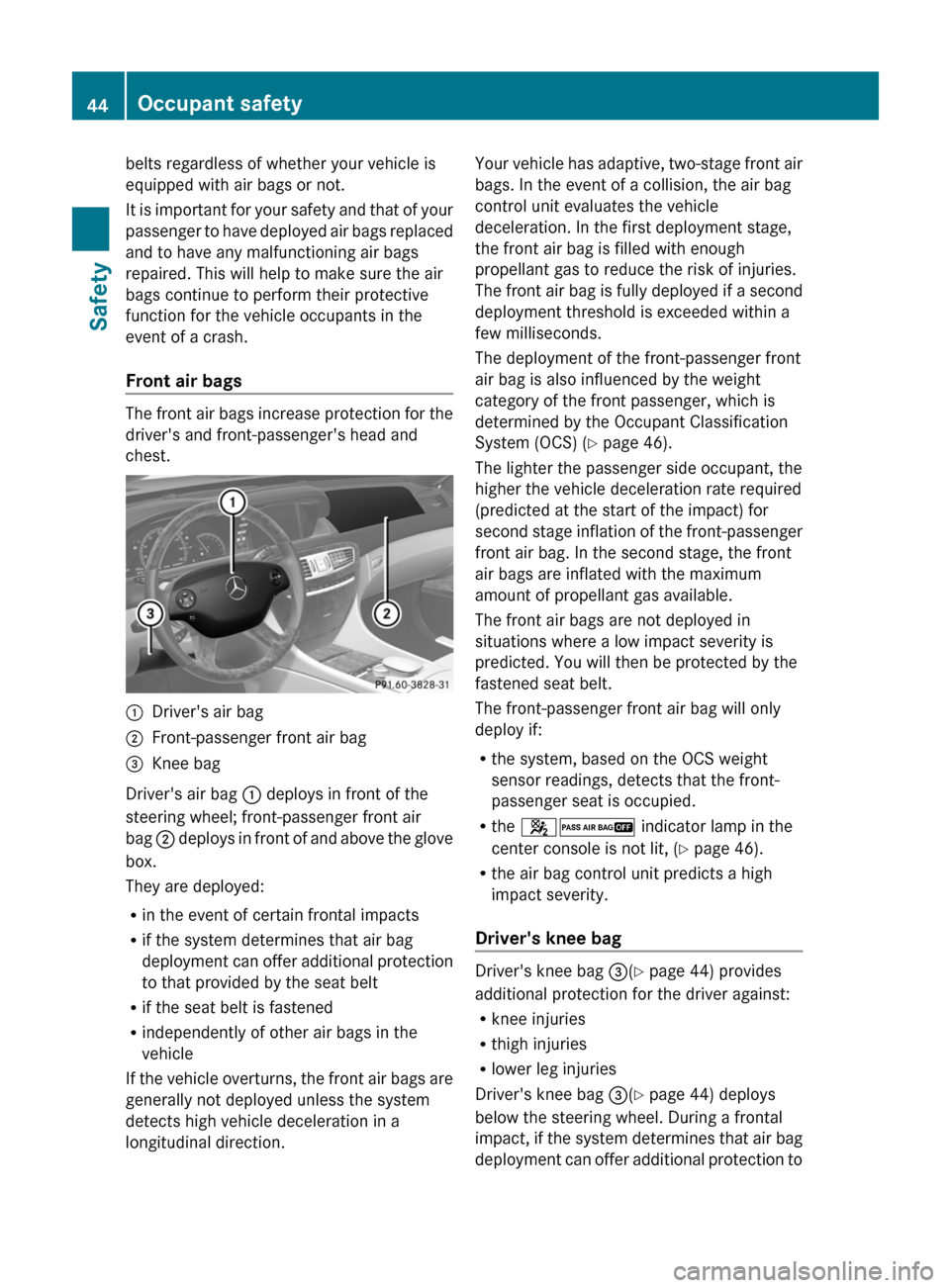
The front air bags increase protection for the
driver's and front-passenger's head and
chest.
:Driver's air bag;Front-passenger front air bag=Knee bag
Driver's air bag : deploys in front of the
steering wheel; front-passenger front air
bag ; deploys in front of and above the glove
box.
They are deployed:
R in the event of certain frontal impacts
R if the system determines that air bag
deployment can offer additional protection
to that provided by the seat belt
R if the seat belt is fastened
R independently of other air bags in the
vehicle
If the vehicle overturns, the front air bags are
generally not deployed unless the system
detects high vehicle deceleration in a
longitudinal direction.
Your vehicle has adaptive, two-stage front air
bags. In the event of a collision, the air bag
control unit evaluates the vehicle
deceleration. In the first deployment stage,
the front air bag is filled with enough
propellant gas to reduce the risk of injuries.
The front air bag is fully deployed if a second
deployment threshold is exceeded within a
few milliseconds.
The deployment of the front-passenger front
air bag is also influenced by the weight
category of the front passenger, which is
determined by the Occupant Classification
System (OCS) ( Y page 46).
The lighter the passenger side occupant, the
higher the vehicle deceleration rate required
(predicted at the start of the impact) for
second stage inflation of the front-passenger
front air bag. In the second stage, the front
air bags are inflated with the maximum
amount of propellant gas available.
The front air bags are not deployed in
situations where a low impact severity is
predicted. You will then be protected by the
fastened seat belt.
The front-passenger front air bag will only
deploy if:
R the system, based on the OCS weight
sensor readings, detects that the front-
passenger seat is occupied.
R the 42 indicator lamp in the
center console is not lit, ( Y page 46).
R the air bag control unit predicts a high
impact severity.
Driver's knee bag
Driver's knee bag =(Y page 44) provides
additional protection for the driver against:
R knee injuries
R thigh injuries
R lower leg injuries
Driver's knee bag =(Y page 44) deploys
below the steering wheel. During a frontal
impact, if the system determines that air bag
deployment can offer additional protection to
44Occupant safetySafety
Page 61 of 488
XFold upholstery cover = and the Velcro
fastener upwards.XTurn installation aid ? to a vertical position
to prevent upholstery cover = from folding
down.XInstall the LATCH-type (ISOFIX) child
restraint systems on both securing
rings ;. Comply with the manufacturer's
instructions when installing the LATCH-
type (ISOFIX) child restraint system.
Top Tether
Top Tether provides an additional connection
between the child restraint system secured
with ISOFIX and the rear seat. It helps reduce
the risk of injury even further.
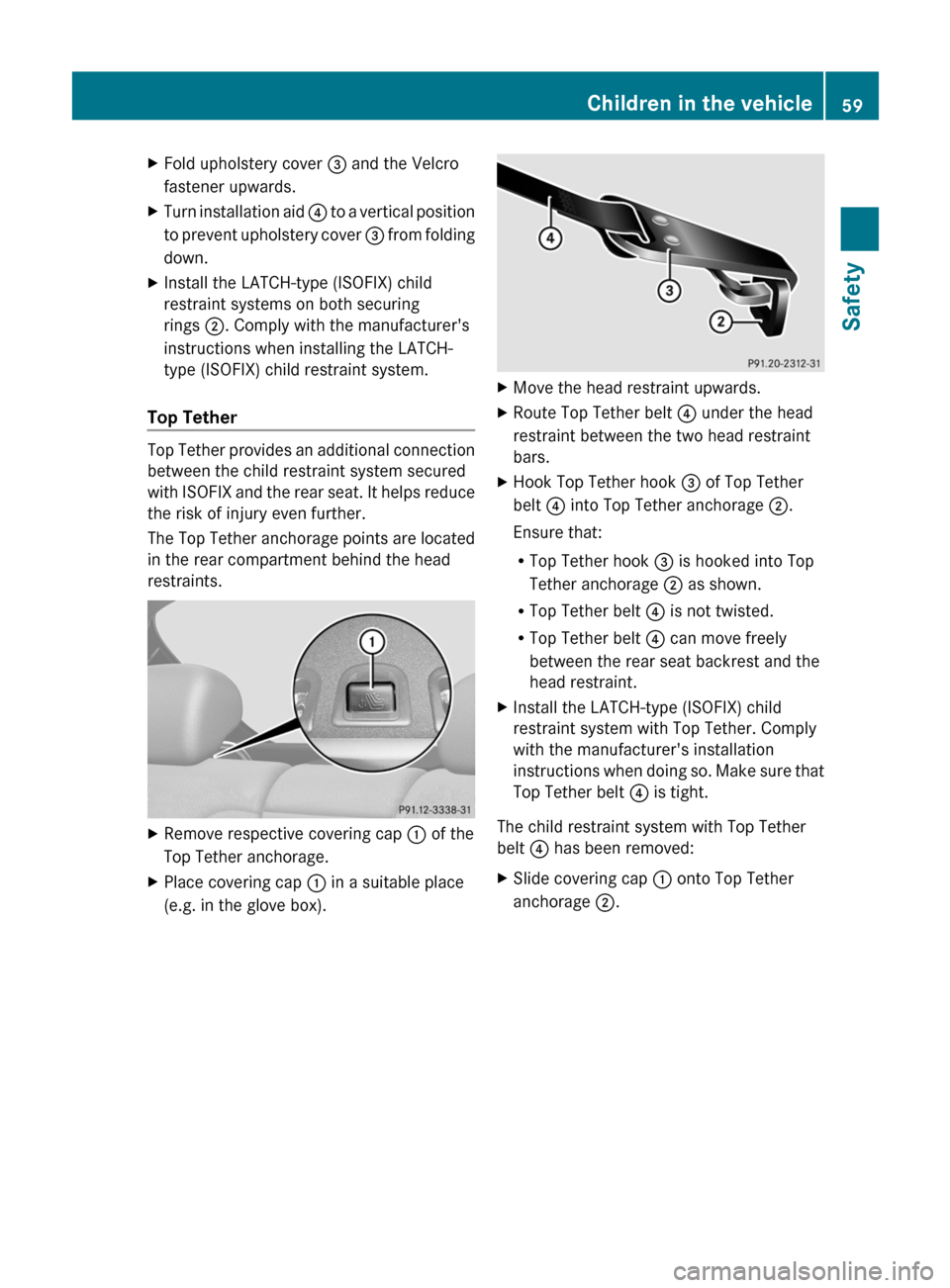
The Top Tether anchorage points are located
in the rear compartment behind the head
restraints.
XRemove respective covering cap : of the
Top Tether anchorage.XPlace covering cap : in a suitable place
(e.g. in the glove box).XMove the head restraint upwards.XRoute Top Tether belt ? under the head
restraint between the two head restraint
bars.XHook Top Tether hook = of Top Tether
belt ? into Top Tether anchorage ;.
Ensure that:
R Top Tether hook = is hooked into Top
Tether anchorage ; as shown.
R Top Tether belt ? is not twisted.
R Top Tether belt ? can move freely
between the rear seat backrest and the
head restraint.XInstall the LATCH-type (ISOFIX) child
restraint system with Top Tether. Comply
with the manufacturer's installation
instructions when doing so. Make sure that
Top Tether belt ? is tight.
The child restraint system with Top Tether
belt ? has been removed:
XSlide covering cap : onto Top Tether
anchorage ;.Children in the vehicle59SafetyZ
Page 110 of 488

At a glance
COMAND operating system
Overview
FunctionPage:COMAND display112;COMAND controller and
function buttons
108
=Telephone keypad110
Components of COMAND
COMAND consists of:
R the COMAND display/SPLITVIEW
R the DVD changer
R the COMAND controller
R the COMAND function buttons
R
the telephone keypad
R connections in the glove box (USB,
additional USB, jack plug and iPod ®
connection)
R a remote control for the front passenger
R cordless headphones for the front
passenger
You can use COMAND to operate the
following main functions:
R the navigation system
R the audio function with radio and satellite
radio modes, disk (audio CD/DVD and MP3
mode), memory card (MP3 mode), MUSIC
REGISTER, Media Interface and audio AUX
R the telephone and the address book
R the video function with video DVD and
video AUX modes
R the system settings
You can call up the main functions:
R using the corresponding function buttons
or
R using the main function bar in the COMAND
display
COMAND controller
You can use the COMAND controller to select
the menu items in the COMAND display.
You can call up menus or lists, scroll through
menus or lists and exit menus or lists.
108At a glanceCOMAND
Page 219 of 488
XEnter a name for the folder/track.XTo save the changes: select ¬ and
press W to confirm.
Deleting folders/tracks
XSelect Rename/Delete Files by sliding
V Æ and turning cVd the COMAND
controller and press W to confirm.XSelect the folder/track by turning cVd.XSelect Options by sliding VY and press
W to confirm.XSelect Delete and press W to confirm.
A query appears. No is highlighted.
If you select Yes, the folders/tracks are
deleted. You see the Please wait...
message. Then, you see the Deletion
Successful message.
If you select No, the process will be aborted.
Playback options
The following options are available:
R Normal Track Sequence
The tracks are played in the normal order
(e.g. track 1, 2, 3, etc.).
R Medium Mix
All the tracks on the medium are played in
random order.
R Track List Mix (MP3 mode only)
All the tracks that are listed in the current
track list are played in random order.
XTo select options: switch on the MUSIC
REGISTER ( Y page 214).XSelect Music Register by sliding VÆ and
turning cVd the COMAND controller and
press W to confirm.
The options list appears. The # dot
indicates the option selected.XSelect an option and press W to confirm.
The option is switched on. All options
except Normal Track Sequence will be
indicated by a corresponding icon in the
display/selection window.i The Normal Track Sequence option is
automatically selected when you change
the disc you are currently listening to or
when you select a different medium. If an
option is selected, it remains selected after
COMAND is switched on or off.
Media Interface mode
Connection options
Overview
You will find the connection sockets in the
glove box.
Device-specific adapter cables are required
to connect external devices to the Media
Interface. These cables are included in the
Media Interface scope of delivery.
i Store individual parts in a safe place.
Only use genuine Mercedes-Benz
connection cables.
You can connect the following data carriers
to COMAND via the Media Interface:
R iPod ®
R USB devices (USB sticks, USB hard drives,
MP3 players)
i iPod ®
is a registered trademark of Apple
Inc., Cupertino, California, USA.
Supported iPod ®
variants
The following are examples of supported
iPod ®
variants:
R iPod ®
nano
R iPod ®
classic
R iPod ®
touch
R iPhone ®
Supported USB devices
The following USB devices are supported:
R USB sticks (flash memory)
R USB hard drives requiring a startup/
permanent current of a maximum of
Audio217COMANDZ
Page 224 of 488
XIn a directory, press the corresponding
number key once or several times to select
the first letter of the artist's name (e.g. for
an artist beginning with the letter "C", press
number key l three times).
The available letters are listed at the lower
edge of the display.
If the directory only contains folders,
COMAND searches for folders. After a
message, the first entry which matches the
letter entered is shown at the top of the list.
If no entry matches the entered letter, the
first item in the list is the last entry to
correspond to a selection.
Selecting an active partition (USB mass
storage devices only)
You can select this function for USB mass
storage devices when the storage device is
partitioned. Up to four partitions (primary or
logical; FAT format) are supported.
i The Windows formatting program
supports FAT partitioning up to 32 GB as
standard.
XSelect Media Interface in the basic
display by sliding VÆ and turning cVd the
COMAND controller and press W to
confirm.XSelect Select Active Partition and
press W to confirm.
Playback options
The following options are available:
R Normal Track Sequence
Normal track sequence: you hear the
tracks in their normal order (e.g. numerical
or alphabetical).
R Random Tracks
All the tracks on the medium are played in
random order.
R Category Mix or Random Folder (for USB
devices if Folder has been selected)
The tracks in the currently active category
or folder, including any subfolders, are
played in random order.
i For USB devices, the random playlists
offer a maximum of 300 tracks chosen at
random.XTo select a playback option: select
Media Interface in the basic display by
sliding VÆ and turning cVd the COMAND
controller and press W to confirm.
The options list appears. The # dot
indicates the option selected.XSelect an option and press W to confirm.
Separate USB connection
In addition to the USB connection on the
Media Interface, there is another USB
connection in the glove box. This connection
can also be used to play audio files.
Electrical consumption at this connection
must not exceed a continuous current of
500 mA. If the electrical consumption is
higher, use a separate source to provide
power for the USB device (e.g.
12 V power supply).
XTo select music from the USB port as
the audio source: select Audio by sliding
ZV and turning cVd the COMAND
controller and press W to confirm.
The audio menu appears.XSelect USB and press W to confirm.
Notes on USB devices
Data formats
The following data formats are supported:
R MP3: CBR, VBR (up to 320 kbit/s)
R WMA: CBR, VBR (up to 320 kbit/s)
222AudioCOMAND
Page 225 of 488
Notes on USB devices
R In order to keep the initialization time to a
minimum, store only music data on a USB
device.
R Approximately 10,000 tracks are
supported. Multiple partitions should be
used for larger numbers of tracks.
R Do not use USB extension leads or
adapters. They can impair functionality.
R A background search of the USB device is
performed and any playlists found are
shown in a separate category in addition to
the folders. Initialization of larger USB mass
storage devices containing a large number
of files may take several minutes.
i DRM (Digital Rights Management)
protected files are not supported by the
Media Interface.
Audio AUX mode
Notes on audio AUX mode
You can connect an external audio source
(AUX) to COMAND. The socket for this is
located in the glove box.
If COMAND is equipped with a Media
Interface, external audio sources are
connected using the corresponding cable set.
An AUX socket is not provided.
i You can find more information on the
Internet at http://www.mercedes-
benz.com/connect and in the "Media
Interface mode" section ( Y page 217).
Activating audio AUX mode
When you connect an external audio source,
audio AUX is not selected automatically.
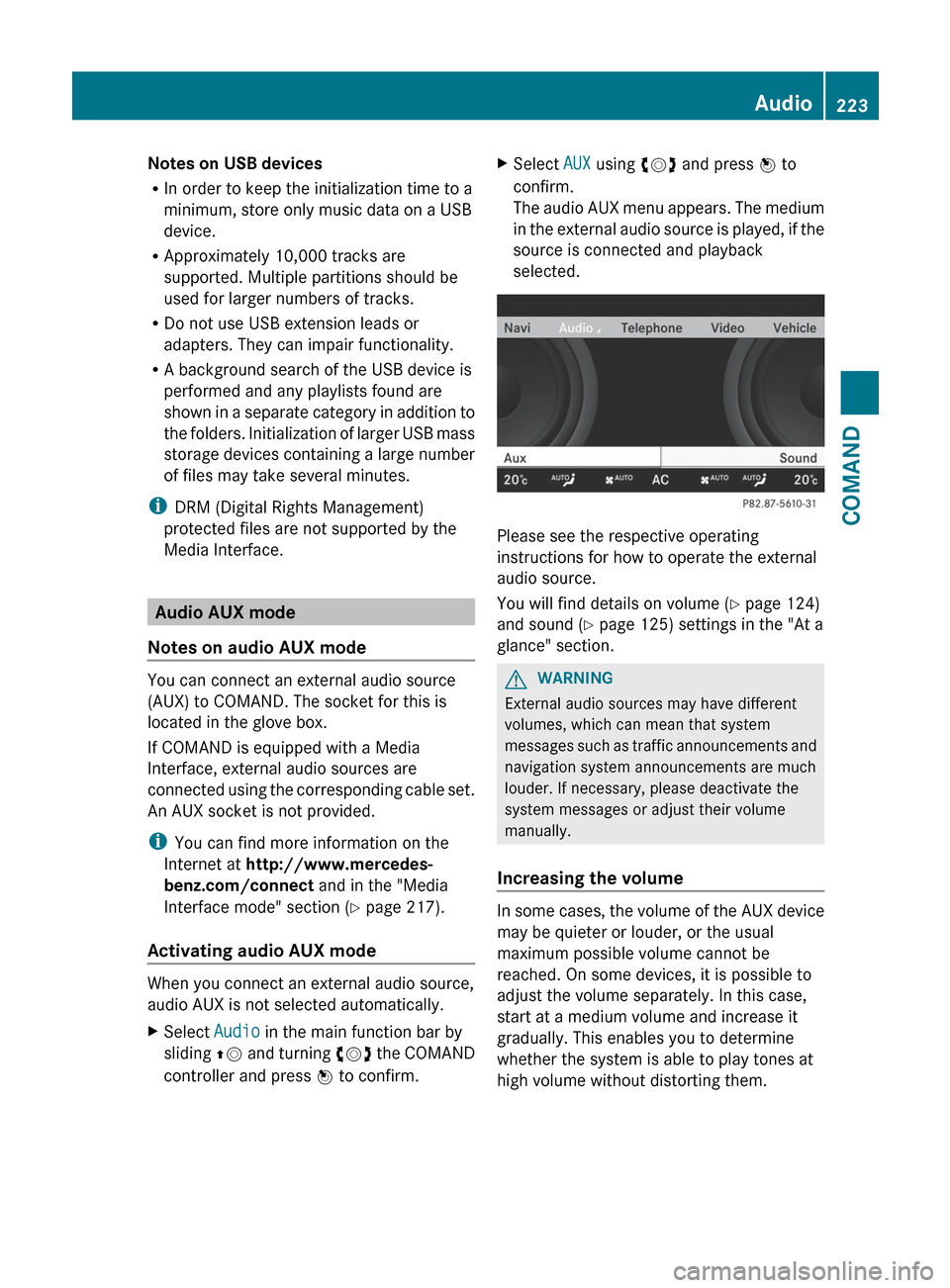
XSelect Audio in the main function bar by
sliding ZV and turning cVd the COMAND
controller and press W to confirm.XSelect AUX using cVd and press W to
confirm.
The audio AUX menu appears. The medium
in the external audio source is played, if the
source is connected and playback
selected.
Please see the respective operating
instructions for how to operate the external
audio source.
You will find details on volume ( Y page 124)
and sound ( Y page 125) settings in the "At a
glance" section.
GWARNING
External audio sources may have different
volumes, which can mean that system
messages such as traffic announcements and
navigation system announcements are much
louder. If necessary, please deactivate the
system messages or adjust their volume
manually.
Increasing the volume
In some cases, the volume of the AUX device
may be quieter or louder, or the usual
maximum possible volume cannot be
reached. On some devices, it is possible to
adjust the volume separately. In this case,
start at a medium volume and increase it
gradually. This enables you to determine
whether the system is able to play tones at
high volume without distorting them.
Audio223COMANDZ