language MERCEDES-BENZ CL-Class 2012 C216 Owner's Manual
[x] Cancel search | Manufacturer: MERCEDES-BENZ, Model Year: 2012, Model line: CL-Class, Model: MERCEDES-BENZ CL-Class 2012 C216Pages: 488, PDF Size: 21.88 MB
Page 22 of 488
On-board computer .......................343
Picture (COMAND) .........................224
Sound settings ............................... 125
System settings ............................. 127
Setting the language
COMAND ....................................... 134
Setting the night design ................... 127
Setting the text reader speed .......... 129
Setting the vehicle level ................... 305
Setting the volume Telephone calls .............................. 124
Video AUX ..................................... 230
Side impact air bag ............................. 45
Side marker lamp (display
message) ............................................ 361
Side windows Convenience closing feature ............87
Convenience opening feature ..........87
Important safety information ...........86
Opening/closing .............................. 86
Problem (malfunction) .....................88
Resetting ......................................... 88
Sliding sunroof
Important safety notes ....................89
Opening/closing .............................. 89
Problem (malfunction) .....................90
Resetting ......................................... 90
SmartKey
Changing the battery .......................76
Changing the programming .............75
Checking the battery .......................76
Convenience closing feature ............87
Convenience opening feature ..........87
Display message ............................ 376
Door central locking/unlocking .......72
Important safety notes ....................72
Loss ................................................. 78
Mechanical key ................................ 75
Positions (ignition lock) .................267
Problem (malfunction) .....................78
Starting the engine ........................268
SMS message
see Text message
Snow chains ...................................... 445
Socket Glove box ....................................... 395Sockets
Points to observe before use .........394
Trunk ............................................. 395
Sound menu ....................................... 125
Sounds see Sound settings
Sound settings
Balance and fader ..........................125
Calling up the sound menu ............125
Surround sound ............................. 126
Treble and bass ............................. 125
Spare wheel
Notes/data .................................... 468
Storage location ............................ 424
see Emergency spare wheel
Specialist workshop ............................ 29
Speech control see Voice Control System
Speed, controlling
see Cruise control
Speed Limit Assist
see Speed Limit Assist
Speedometer
Activating/deactivating the
additional speedometer .................344
Digital ............................................ 334
In the Instrument cluster .................33
Selecting the unit of
measurement ................................ 344
see Instrument cluster
SPLITVIEW ......................................... 112
Spotlight function ............................. 317
SRS (Supplemental Restraint
System) Display message ............................ 355
Introduction ..................................... 40
Warning lamp ................................. 383
Warning lamp (function) ................... 40
Standing lamps
Display message ............................ 360
Switching on/off ........................... 244
Starting (engine) ................................ 268
Station memory ................................. 197
Steering (display message) .............. 376
Steering wheel Adjusting (electrically) .....................98
Button overview ............................... 3520Index
Page 23 of 488

Buttons (on-board
computer) ...................................... 331
Important safety notes ....................98
Paddle shifters ............................... 277
Steering wheel heating ....................99
Storing settings (memory
function) ........................................ 102
Steering wheel (cleaning
instructions) ...................................... 420
Steering wheel heating Switching on/off .............................. 99
Steering wheel paddle shifters ........ 277
Stop function Audio DVD ..................................... 207
Video DVD ..................................... 227
Stopwatch (RACETIMER) ................... 338
Storing stations Manually ........................................ 197
Storing stations (radio)
Automatically ................................. 197
Stowage compartments
Armrest (under) ............................. 389
Cup holders ................................... 391
Eyeglasses compartment ...............389
Glove box ....................................... 388
Important safety information .........388
Parcel net ...................................... 390
Rear ............................................... 389
Rear seat backrest ......................... 390
Rear seats (between) .....................390
Stowage well beneath the trunk
floor .................................................... 391
Summer opening see Convenience opening feature
Summer tires ..................................... 444
Sun visor ............................................ 392
Supplemental Restraint System see SRS (Supplemental Restraint
System)
Surround sound
see 3D sound (Harman Kardon ®
surround sound system)
Surround sound (harman/
kardon ®
surround sound system)
Notes ............................................. 126
Switching on/off ........................... 126Suspension tuning
Active Body Control .......................305
AIRMATIC ...................................... 304
Switching air-recirculation mode
on/off ................................................. 260
Switching between picture
formats (TV, video) ............................ 224
Switching between summer time
and standard time ............................. 129
Switching off the alarm (ATA) ............ 68
Switching the hands-free
microphone on/off ............................ 185
Switching wavebands (radio) ........... 196
System settings
Bluetooth ®
..................................... 131
Date ............................................... 128
Language ....................................... 134
Programmable button (COMAND) ..109
Text reader speed ..........................129
Time ............................................... 128
Time zone ...................................... 129
Voice Control System ....................129
T
TA (Traffic Announcements) see Traffic announcements
Tachometer ........................................ 331
Tail lamps Display message ............................ 360
Tank
see Fuel tank
Tank content
Fuel gauge ....................................... 33
Technical data
Notes ............................................. 472
Tires/wheels ................................. 466
Vehicle data ................................... 480
TELEAID
Automatic retrieval of vehicle data
(service due date) ..........................401
Call priority .................................... 399
Display message ............................ 354
Downloading destinations
(COMAND) ..................................... 399
Emergency call .............................. 396
Important safety notes ..................395
Locating a stolen vehicle ...............402
Index21
Page 26 of 488
Locking separately ...........................85
Opening/closing (automatically
from inside) ...................................... 84
Opening/closing (automatically
from outside) ................................... 83
Trunk lid
Display message ............................ 375
Opening/closing .............................. 82
Power closing feature ......................81
Trunk lid opening height
restriction .......................................... 235
Turn signals Display message ............................ 359
Switching on/off ........................... 246
TV
Automatic picture shutoff ..............224
Picture settings .............................. 224
Type identification plate
see Vehicle identification plate
U
Unlocking Emergency unlocking .......................81
From inside the vehicle (central
unlocking button) ............................. 80
USB
see Media Interface
V
Vanity mirror (in sun visor) .............. 392
Vehicle Correct use ...................................... 29
Data acquisition ............................... 30
Display message ............................ 374
Equipment ....................................... 26
Individual settings ..........................343
Limited Warranty ............................. 30
Loading .......................................... 452
Locking (in an emergency) ...............82
Locking (SmartKey) .......................... 73
Lowering ........................................ 429
Maintenance .................................... 27
Parking for a long period ................ 285
Pulling away ................................... 269
Raising ........................................... 426
Reporting problems .........................29
Towing away .................................. 435
Transporting .................................. 437
Unlocking (in an emergency) ...........81
Unlocking (SmartKey) ......................73
Vehicle data ................................... 480
Vehicle battery
see Battery (vehicle)
Vehicle data ....................................... 480
see Technical data
Vehicle dimensions ........................... 480
Vehicle emergency locking ................ 82
Vehicle identification number see VIN
Vehicle identification plate .............. 473
Vehicle level Active Body Control (ABC) .............305
AIRMATIC ...................................... 303
Display message ............................ 368
Vehicle level (display message) ....... 367
Vehicle tool kit .................................. 424
Video see Video DVD
Video AUX
Setting the picture .........................224
Video DVD
Automatic picture shutoff ..............224
DVD menu ..................................... 228
Fast forward/rewind ...................... 226
Function restrictions ......................225
Interactive content ........................229
Notes on discs ............................... 224
Operation ....................................... 224
Operation using the on-board
computer ....................................... 337
Pause function ............................... 227
Playing conditions .......................... 225
Safety notes .................................. 224
Selecting ........................................ 226
Selecting a film/title ...................... 227
Selecting a scene/chapter ............227
Setting the audio format ................229
Setting the language ......................229
Setting the picture .........................224
Showing/hiding the control menu . 225
Showing/hiding the menu .............226
Stop function ................................. 227
Subtitles ........................................ 229
Switching to ................................... 22524Index
Page 124 of 488
iYou will find further information in the
"Destination entry" section ( Y page 137).
Entering characters in the address and
the phone book
Introduction
The following section describes how to enter
characters in the phone book/address book
when creating a new entry.
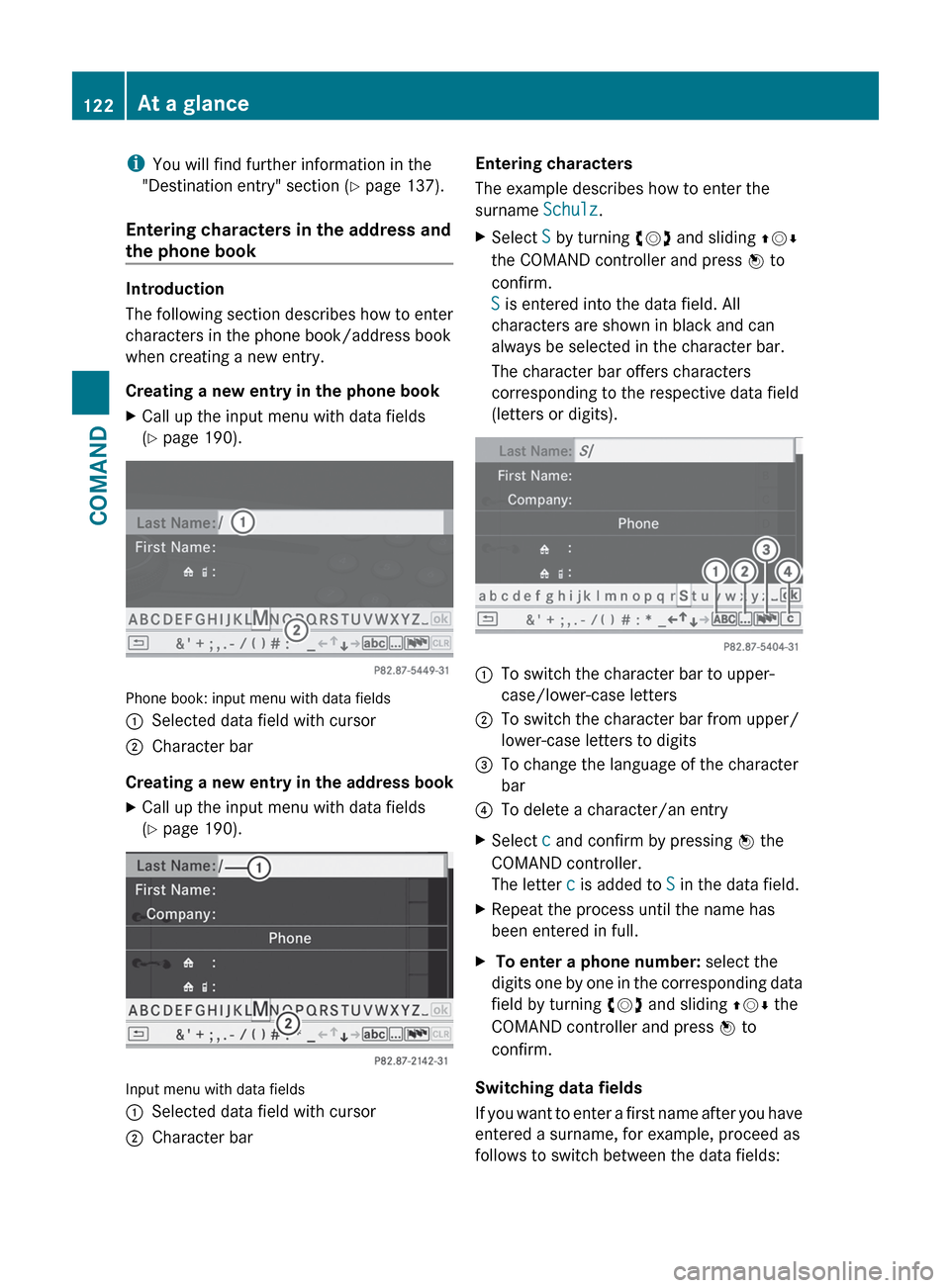
Creating a new entry in the phone book
XCall up the input menu with data fields
( Y page 190).
Phone book: input menu with data fields
:Selected data field with cursor;Character bar
Creating a new entry in the address book
XCall up the input menu with data fields
( Y page 190).
Input menu with data fields
:Selected data field with cursor;Character barEntering characters
The example describes how to enter the
surname Schulz.XSelect S by turning cVd and sliding ZVÆ
the COMAND controller and press W to
confirm.
S is entered into the data field. All
characters are shown in black and can
always be selected in the character bar.
The character bar offers characters
corresponding to the respective data field
(letters or digits).:To switch the character bar to upper-
case/lower-case letters;To switch the character bar from upper/
lower-case letters to digits=To change the language of the character
bar?To delete a character/an entryXSelect c and confirm by pressing W the
COMAND controller.
The letter c is added to S in the data field.XRepeat the process until the name has
been entered in full.X To enter a phone number: select the
digits one by one in the corresponding data
field by turning cVd and sliding ZVÆ the
COMAND controller and press W to
confirm.
Switching data fields
If you want to enter a first name after you have
entered a surname, for example, proceed as
follows to switch between the data fields:
122At a glanceCOMAND
Page 125 of 488
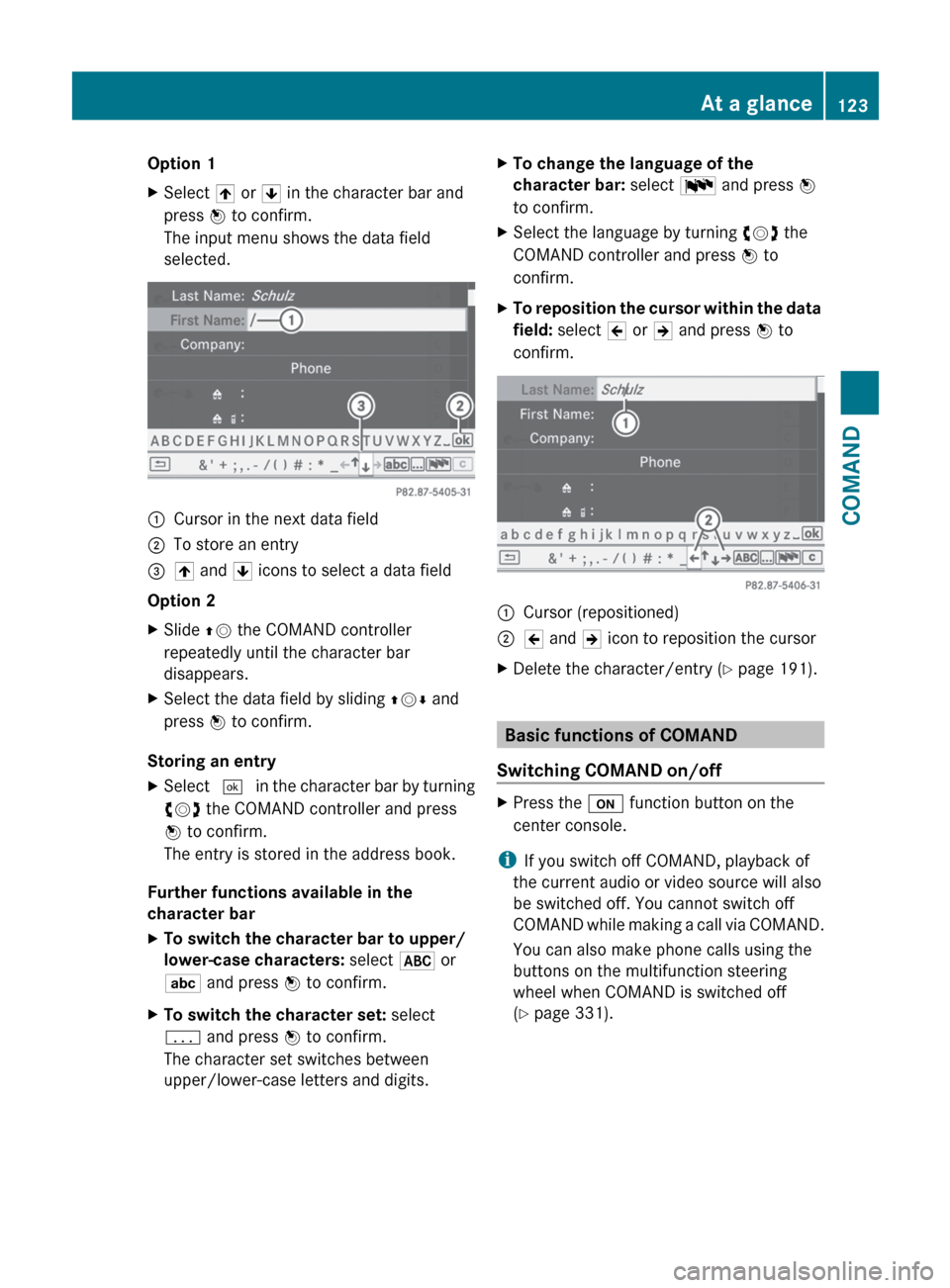
Option 1XSelect 4 or 5 in the character bar and
press W to confirm.
The input menu shows the data field
selected.:Cursor in the next data field;To store an entry=4 and 5 icons to select a data field
Option 2
XSlide ZV the COMAND controller
repeatedly until the character bar
disappears.XSelect the data field by sliding ZVÆ and
press W to confirm.
Storing an entry
XSelect ¬ in the character bar by turning
cVd the COMAND controller and press
W to confirm.
The entry is stored in the address book.
Further functions available in the
character bar
XTo switch the character bar to upper/
lower-case characters: select * or
E and press W to confirm.XTo switch the character set: select
p and press W to confirm.
The character set switches between
upper/lower-case letters and digits.XTo change the language of the
character bar: select B and press W
to confirm.XSelect the language by turning cVd the
COMAND controller and press W to
confirm.XTo reposition the cursor within the data
field: select 2 or 3 and press W to
confirm.:Cursor (repositioned);2 and 3 icon to reposition the cursorXDelete the character/entry ( Y page 191).
Basic functions of COMAND
Switching COMAND on/off
XPress the u function button on the
center console.
i If you switch off COMAND, playback of
the current audio or video source will also
be switched off. You cannot switch off
COMAND while making a call via COMAND.
You can also make phone calls using the
buttons on the multifunction steering
wheel when COMAND is switched off
( Y page 331).
At a glance123COMANDZ
Page 136 of 488
XSelect Details and press W to confirm.
The detailed display for this device
appears.XTo close the detailed view: turn cVd or
slide XVY the COMAND controller.
De-authorizing (de-registering) a
Bluetooth ®
device
Mercedes-Benz USA, LLC recommends de-
authorization in both COMAND and the
Bluetooth ®
device, e.g. the mobile phone.
Subsequent authorization may otherwise fail.
XIn the Bluetooth ®
device list, select the
authorized device by turning cVd the
COMAND controller.XSelect Options by sliding VY the
COMAND controller and press W to
confirm.XSelect De-authorize and press W to
confirm.
A prompt appears asking whether you
really wish to de-authorize this device.XSelect Yes or No and press W to confirm.
If you select Yes, the authorization for the
device will be revoked.
If you select No, the process will be aborted.
i
If a Bluetooth ®
device has been de-
authorized and is out of range, when a new
search is carried out it will not appear in the
Bluetooth ®
device list.
System language settings
This function allows you to determine the
language for the menu displays and the
navigation messages. The selected language
affects the characters available for entry.
When you set the system language, the
language of the Voice Control System will
change accordingly. If the selected language
is not supported by the Voice Control System,
"English" will be selected.
XSelect Vehicle by turning cVd the
COMAND controller and press W to
confirm.XSelect System and press W to confirm.XSelect Language and press W to confirm.
The list of languages appears. The # dot
indicates the current setting.XSelect the language by turning cVd the
COMAND controller and press W to
confirm.
COMAND loads the selected language and
sets it.
Reset function
You can reset COMAND to the factory
settings. Amongst other things, this will
delete all personal data (e.g. station presets,
address book entries, entries in the
destination memory and in the list of previous
destinations in the navigation system).
Resetting is recommended before selling or
transferring ownership of your vehicle, for
example.
XSelect Vehicle in the main function bar by
turning cVd the COMAND controller and
press W to confirm.XSelect System by turning cVd the
COMAND controller and press W to
confirm.XSelect Reset and press W to confirm.
A prompt appears asking whether you wish
to reset.XSelect Yes or No and press W to confirm.
If you select No, the process will be aborted.
If you select Yes, another prompt appears
asking whether you really wish to reset.XSelect Yes or No and press W to confirm.
If you select Yes, a message will be shown.
COMAND is reset and restarted.
If you select No, the process will be aborted.134System settingsCOMAND
Page 191 of 488
iIf you switch to another main function,
e.g. navigation, while receiving vCards, the
reception of vCards will be terminated.XSelect Data/Connections in the
telephone basic menu by sliding VÆ and
turning cVd the COMAND controller and
press W to confirm.XSelect Download Contacts and press W
to confirm.XSelect Via Bluetooth and press W to
confirm.
This interrupts the Bluetooth ®
connection
between COMAND and your active mobile
phone. In turn, COMAND is ready to receive
vCards from another Bluetooth ®
device.XStart data transfer on the external
Bluetooth device ( N operating instructions
of the device).
The data on the vCards is automatically
transferred to the address book. The
number of vCards received is displayed.XTo cancel reception: press W.
or
XPress the % back button on the center
console.
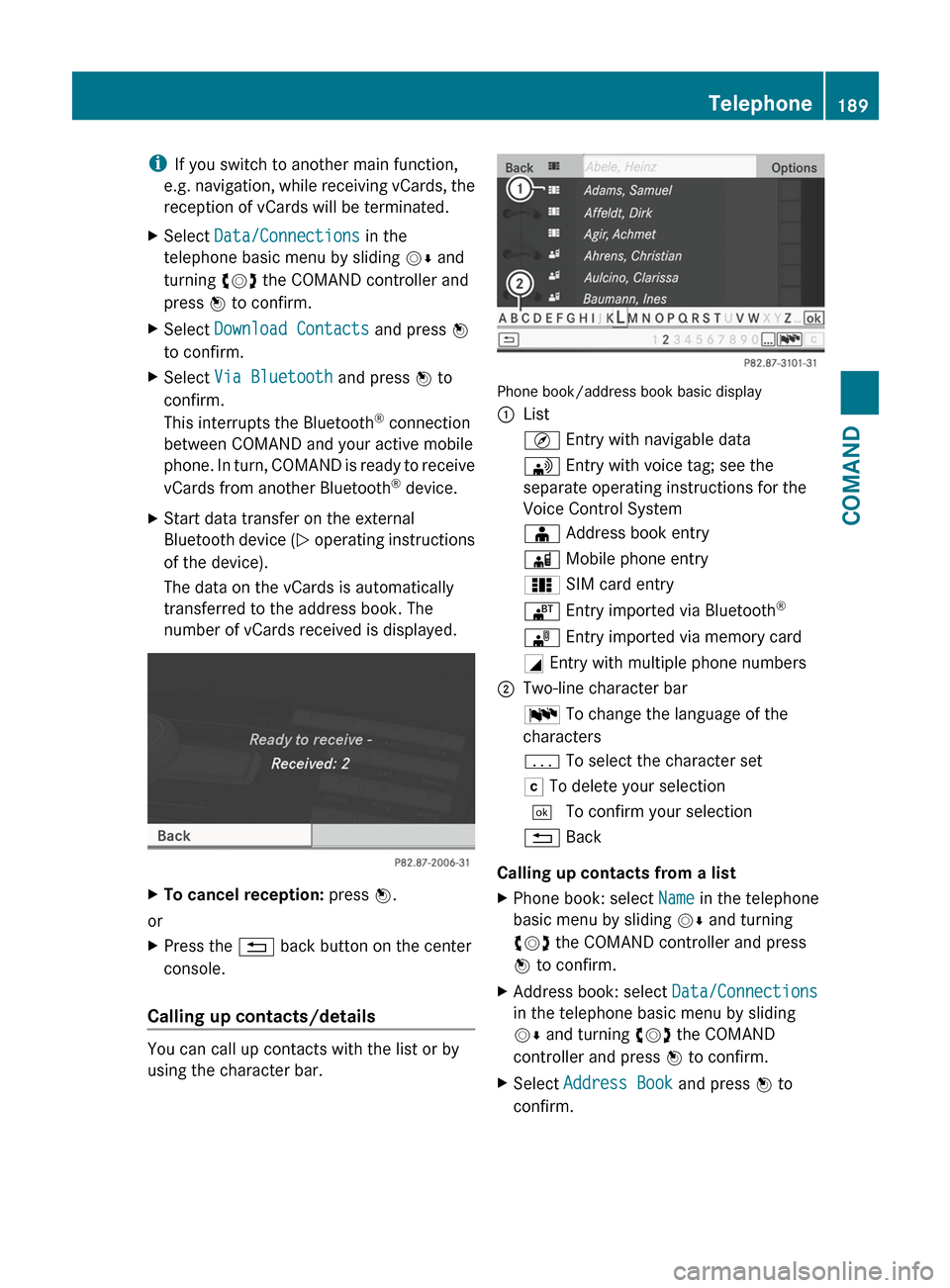
Calling up contacts/details
You can call up contacts with the list or by
using the character bar.
Phone book/address book basic display
:ListÇ Entry with navigable data\ Entry with voice tag; see the
separate operating instructions for the
Voice Control SystemÆ Address book entryà Mobile phone entry0 SIM card entry® Entry imported via Bluetooth ®¯
Entry imported via memory cardG Entry with multiple phone numbers;Two-line character barB To change the language of the
charactersp To select the character setF To delete your selection¬ To confirm your selection% Back
Calling up contacts from a list
XPhone book: select Name in the telephone
basic menu by sliding VÆ and turning
cVd the COMAND controller and press
W to confirm.XAddress book: select Data/Connections
in the telephone basic menu by sliding
V Æ and turning cVd the COMAND
controller and press W to confirm.XSelect Address Book and press W to
confirm.Telephone189COMANDZ
Page 192 of 488
XTo switch from the character bar to the
list: slide ZV the COMAND controller until
the character bar is hidden.
or
XSelect ¬.XTo call a contact: select by sliding ZVÆ
or turning cVd the COMAND controller
and press W to confirm.
i
The phone book is also available via the
on-board computer ( Y page 341).
Calling up contacts using the character
bar
XPhone book: select Name in the telephone
basic menu by sliding VÆ and turning
cVd the COMAND controller and press
W to confirm.XAddress book: select Data/Connections
in the telephone basic menu by sliding
V Æ and turning cVd the COMAND
controller and press W to confirm.XSelect Address Book and press W to
confirm.XTo select a character: select by sliding
ZV Æ or XVY the COMAND controller and
press W to confirm. Repeat this procedure
until COMAND automatically switches over
to the list.
You determine the first letter of the entry
you are looking for with the first character
you enter. If there are similar entries, the
next character which is different will be
displayed and offered for selection.
i You can also use the telephone number
keypad to enter characters.
Creating new contacts/changing
contacts
i In certain countries, this function stops
being available from a vehicle speed of
more than approximately 3 mph (5 km/h).
As soon as the speed falls below
approximately 2 mph (3 km/h), the
function becomes available again.
i You can enter address data directly into
the address book. If you store contacts in
the phone book, these are also saved in the
address book.
i Automatically imported contacts cannot
be edited. They have to be saved first
before being copied to the COMAND
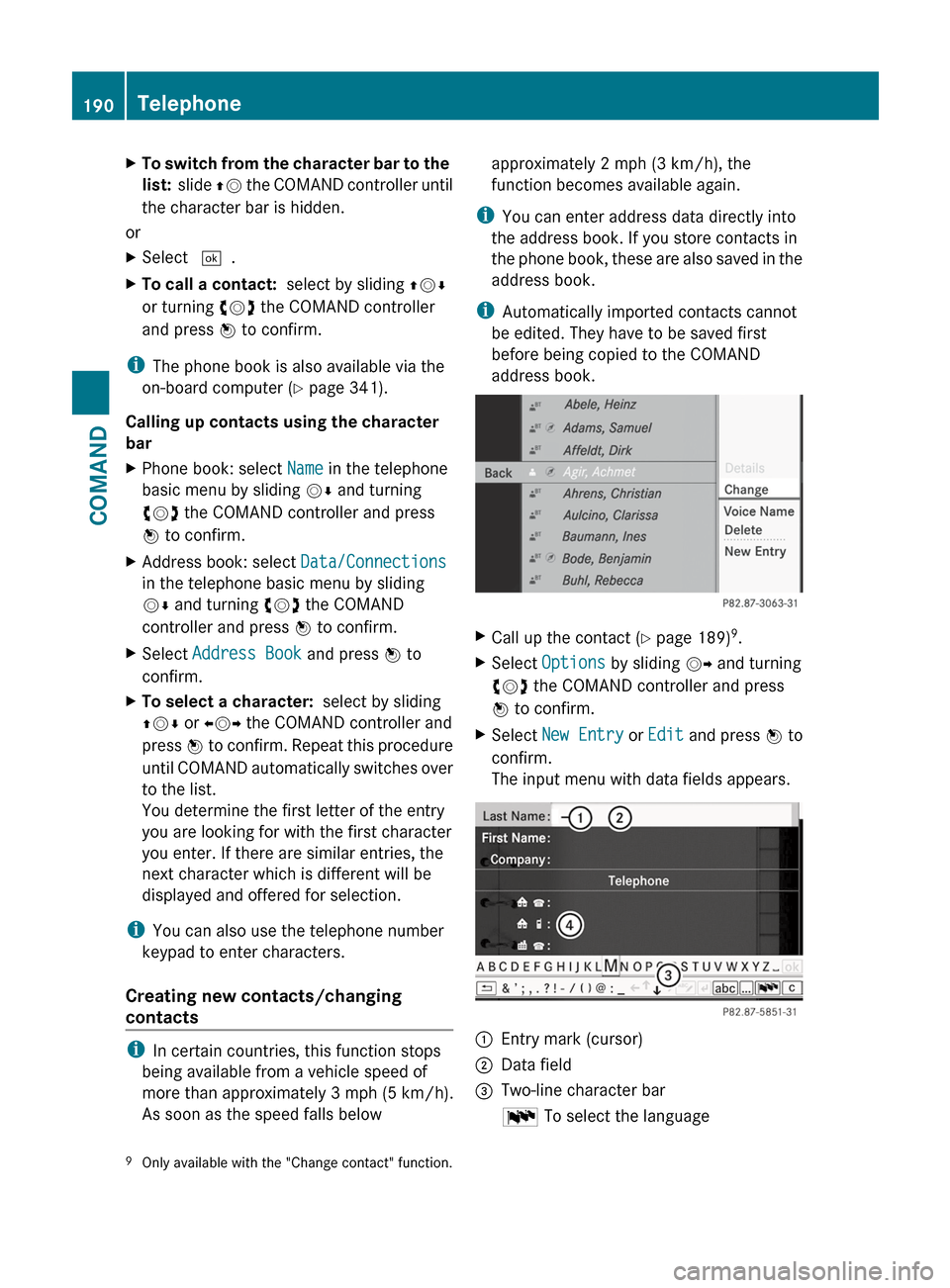
address book.XCall up the contact ( Y page 189) 9
.XSelect Options by sliding VY and turning
cVd the COMAND controller and press
W to confirm.XSelect New Entry or Edit and press W to
confirm.
The input menu with data fields appears.:Entry mark (cursor);Data field=Two-line character barB To select the language9
Only available with the "Change contact" function.190TelephoneCOMAND
Page 223 of 488
For USB mass storage devices, you can
choose to display the metadata contained in
the tags of the encoded music data, or to
display the file and directory names during
playback.XTo display the album and artist name:
select Media Interface in the basic
display by sliding VÆ and turning cVd the
COMAND controller and press W to
confirm.XSelect Display Metadata and press W to
confirm.
Selecting a category and opening a folder
XPress W the COMAND controller when the
display/selection window is active.XSelect Folder by sliding VÆ and turning
cVd the COMAND controller and press
W to confirm.
You will see the available categories or the
folder content (e.g. other folders). The
display's status bar shows the selected
category or the folder name.
i The Music menu item is not available until
the device has been activated.
XSelect the category/folder by turning
cVd the COMAND controller and press
W to confirm.
You will see the content of the selected
category or selected folder.
i If the data needs to be read from the
connected device, the Please wait...
message appears.
XIf necessary, repeat this step until the
tracks in the desired folder/album appear.XSelect the track by turning cVd the
COMAND controller and press W to
confirm.
The track is played.XTo select one folder higher: select the
U icon and confirm with W.
i
The U icon is always shown at the top
of the respective folder.
Playing back the contents of a category
or folderXSelect the category or folder by turning
cVd the COMAND controller.XPress W the COMAND controller for longer
than two seconds.
The content of the category or folder
selected is played in accordance with the
playback option ( Y page 222) selected.
Alphabetical track selection
iPod ®
and MP3 players
This function is available for alphabetically
sorted categories and folders. This function
is not available for albums or playlists, for
example.
XSelect a category, e.g. Artists, by turning
cVd the COMAND controller and press
W to confirm.
The available artists are displayed.XPress the corresponding number key once
or several times to select the first letter of
the artist's name (e.g. for an artist
beginning with the letter "C", press number
key l three times).
The available letters are listed at the lower
edge of the display.
After a message, the first entry in the list
which matches the letter entered is
highlighted.
i If no corresponding entry exists, the last
entry corresponding to a previous letter is
highlighted instead.
i For iPods ®
and MP3 players, the quality
of the search results is highly dependent on
the version and language variant of the
software (e.g. iTunes ®
version) used to
populate the device.
USB mass storage device
This function is available for alphabetically
sorted directories. This function is not
available for albums or playlists, for example.
Audio221COMANDZ
Page 230 of 488
XSelect Title Selection by turning cVd
the COMAND controller and press W to
confirm.XSelect a film/title and press W to confirm.
DVD menu
Calling up the DVD menu
The DVD menu is the menu stored on the DVD
itself. It is structured in various ways
according to the individual DVD and permits
certain actions and settings.
In the case of multi-language DVDs, for
example, you can set the language in the DVD
menu.
XPress W the COMAND controller to show
the menu.XSelect DVD-V in the menu by turning cVd
the COMAND controller and press W to
confirm.XSelect DVD Functions and press W to
confirm.XSelect Menu and press W to confirm.
The DVD menu appears.
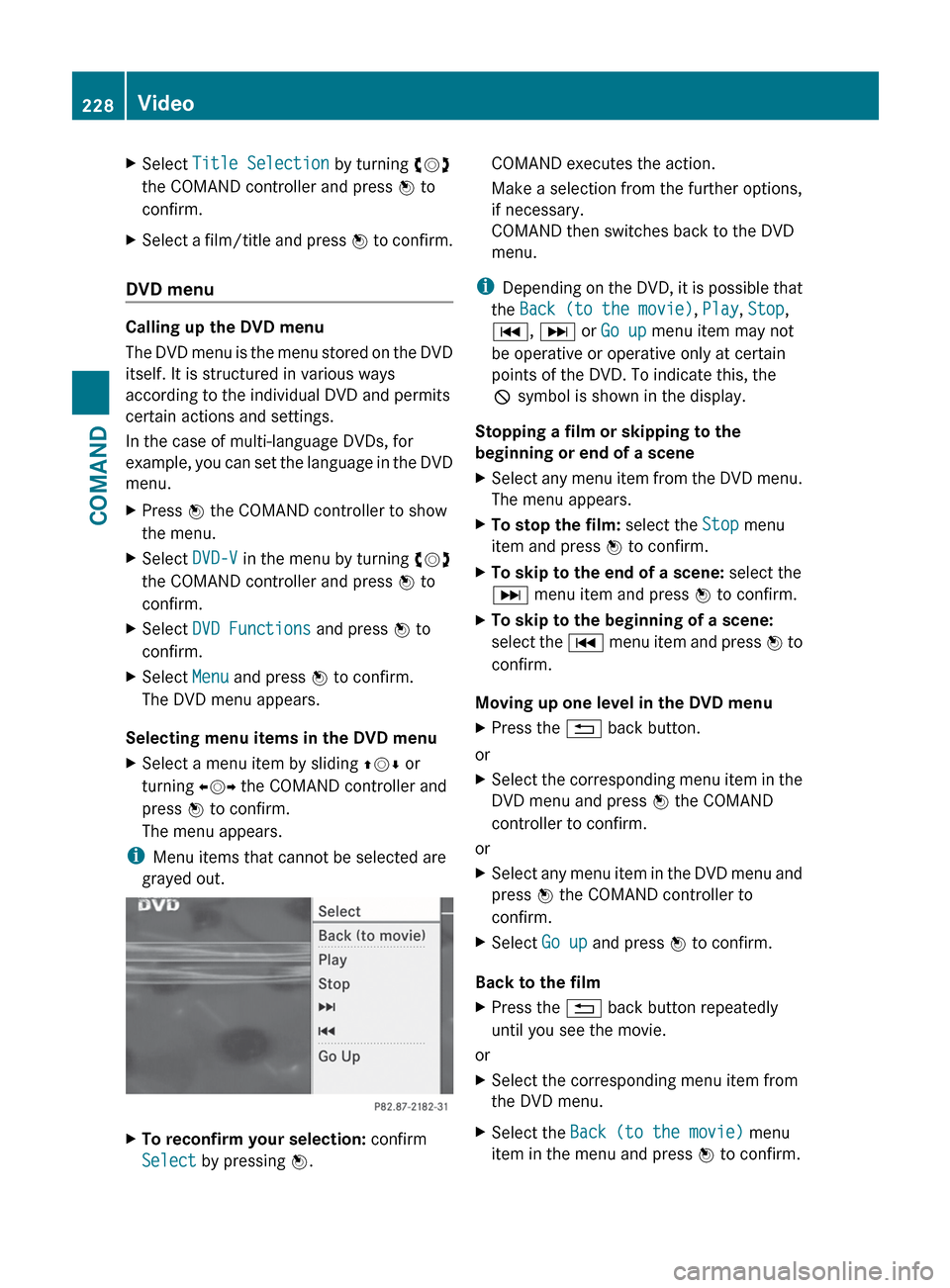
Selecting menu items in the DVD menu
XSelect a menu item by sliding ZVÆ or
turning XVY the COMAND controller and
press W to confirm.
The menu appears.
i Menu items that cannot be selected are
grayed out.
XTo reconfirm your selection: confirm
Select by pressing W.COMAND executes the action.
Make a selection from the further options,
if necessary.
COMAND then switches back to the DVD
menu.
i Depending on the DVD, it is possible that
the Back (to the movie) , Play , Stop ,
C , D or Go up menu item may not
be operative or operative only at certain
points of the DVD. To indicate this, the
K symbol is shown in the display.
Stopping a film or skipping to the
beginning or end of a scene
XSelect any menu item from the DVD menu.
The menu appears.XTo stop the film: select the Stop menu
item and press W to confirm.XTo skip to the end of a scene: select the
D menu item and press W to confirm.XTo skip to the beginning of a scene:
select the C menu item and press W to
confirm.
Moving up one level in the DVD menu
XPress the % back button.
or
XSelect the corresponding menu item in the
DVD menu and press W the COMAND
controller to confirm.
or
XSelect any menu item in the DVD menu and
press W the COMAND controller to
confirm.XSelect Go up and press W to confirm.
Back to the film
XPress the % back button repeatedly
until you see the movie.
or
XSelect the corresponding menu item from
the DVD menu.XSelect the Back (to the movie) menu
item in the menu and press W to confirm.228VideoCOMAND