display MERCEDES-BENZ CL CLASS 2013 Owners Manual
[x] Cancel search | Manufacturer: MERCEDES-BENZ, Model Year: 2013, Model line: CL CLASS, Model: MERCEDES-BENZ CL CLASS 2013Pages: 496, PDF Size: 7.5 MB
Page 192 of 496
You can be called by more than one person
(call waiting) while you are making a
telephone call. In the same way, you can call
another party while already on the phone with
someone.
You can either toggle between these two
conversations or interconnect them to create
a conference call.
You can simultaneously switch back and forth
between two parties or conduct a conference
call with up to five others.
Call Waiting 8
If you are on the telephone and you receive
another call, the call waiting display will
appear. You also hear a tone.XTo reject: select Reject and press W to
confirm.
or
XPress the ~ button on the telephone
keypad or on the multifunction steering
wheel.XTo accept: select Accept and press W to
confirm.
or
XPress the 6 button on the telephone
keypad or on the multifunction steering
wheel.
This will put the active call on hold. You now
have two calls. The accepted call is active
and the first call is on hold.
i If your mobile phone does not support
HFP 1.5 or above, then the call which was
active is canceled as soon as the second
call is accepted.
Calling additional parties
You can call a second person while on the
phone with someone else. This action puts
the previous call on hold.
XSelect NEW from the telephone basic menu
and press W to confirm.
or
XSelect SEND on the telephone keypad.XEnter the phone number manually
( Y page 188) or via the phone book
( Y page 196) or from the call lists
( Y page 197).
Switching between two parties (toggling)
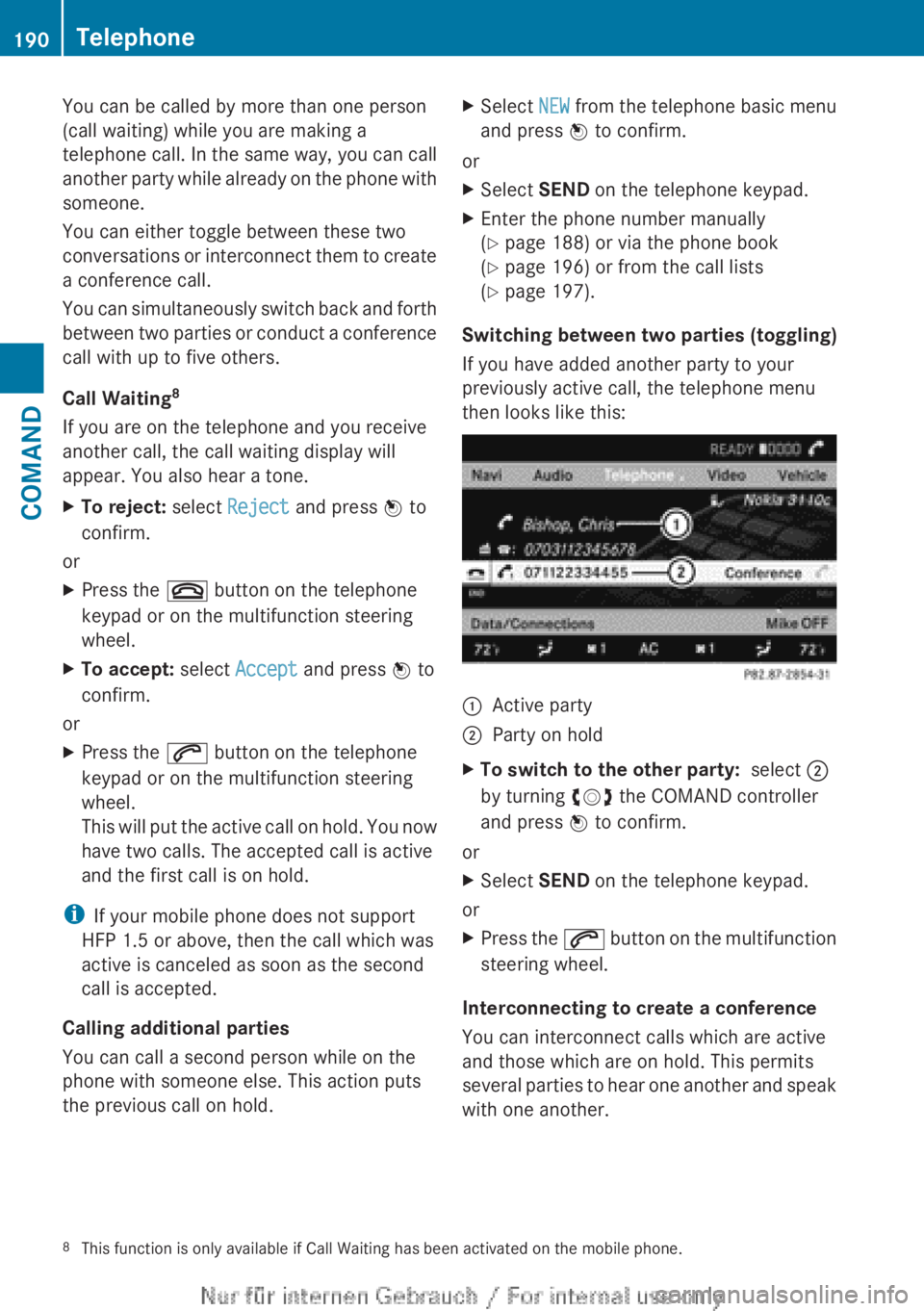
If you have added another party to your
previously active call, the telephone menu
then looks like this:
:Active party;Party on holdXTo switch to the other party: select ;
by turning cVd the COMAND controller
and press W to confirm.
or
XSelect SEND on the telephone keypad.
or
XPress the 6 button on the multifunction
steering wheel.
Interconnecting to create a conference
You can interconnect calls which are active
and those which are on hold. This permits
several parties to hear one another and speak
with one another.
8 This function is only available if Call Waiting has been activated on the mobile phone.190TelephoneCOMAND
Page 193 of 496
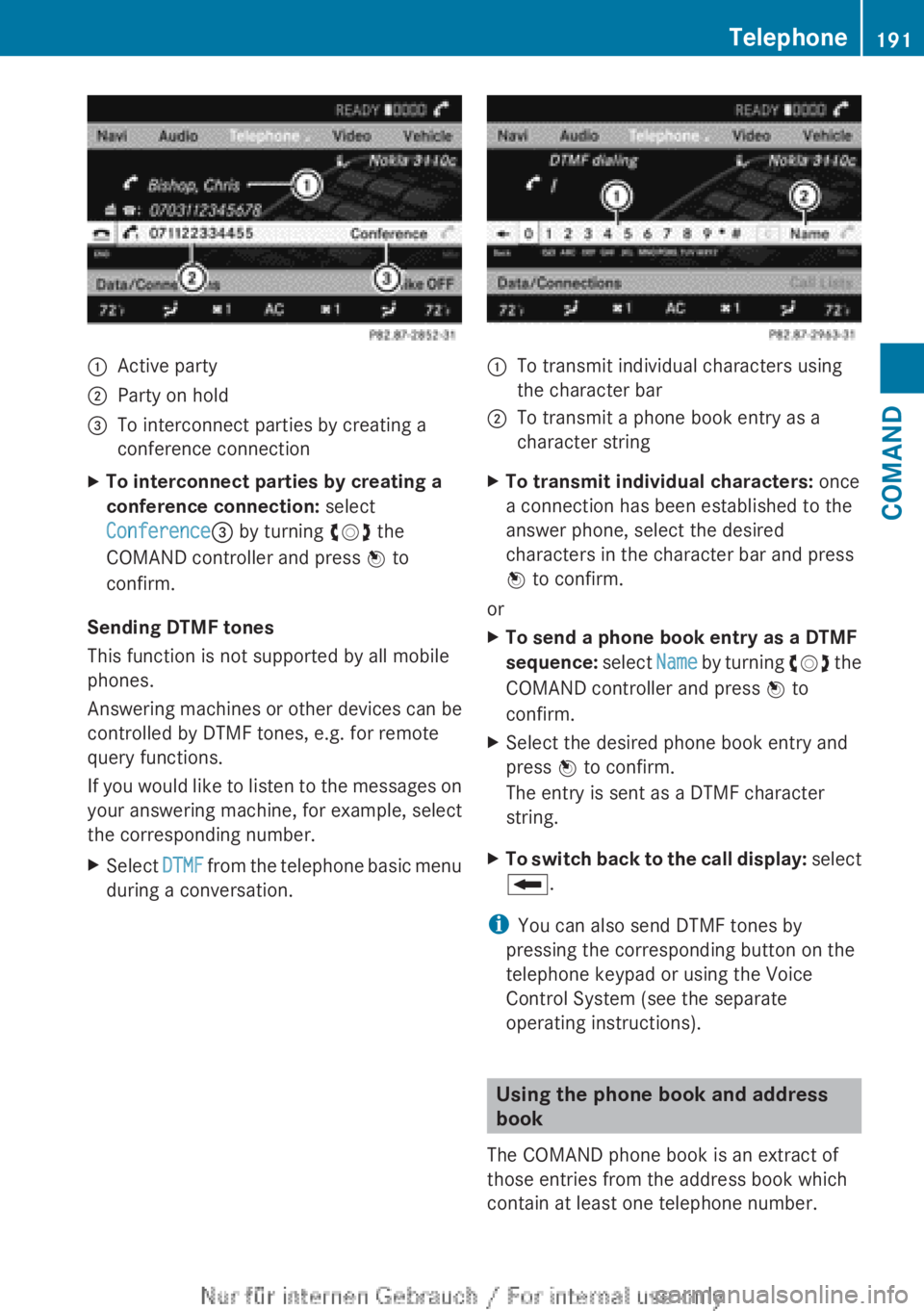
:Active party;Party on hold=To interconnect parties by creating a
conference connectionXTo interconnect parties by creating a
conference connection: select
Conference = by turning cVd the
COMAND controller and press W to
confirm.
Sending DTMF tones
This function is not supported by all mobile
phones.
Answering machines or other devices can be
controlled by DTMF tones, e.g. for remote
query functions.
If you would like to listen to the messages on
your answering machine, for example, select
the corresponding number.
XSelect DTMF from the telephone basic menu
during a conversation.:To transmit individual characters using
the character bar;To transmit a phone book entry as a
character stringXTo transmit individual characters: once
a connection has been established to the
answer phone, select the desired
characters in the character bar and press
W to confirm.
or
XTo send a phone book entry as a DTMF
sequence: select Name by turning cVd the
COMAND controller and press W to
confirm.XSelect the desired phone book entry and
press W to confirm.
The entry is sent as a DTMF character
string.XTo switch back to the call display: select
B .
i
You can also send DTMF tones by
pressing the corresponding button on the
telephone keypad or using the Voice
Control System (see the separate
operating instructions).
Using the phone book and address
book
The COMAND phone book is an extract of
those entries from the address book which
contain at least one telephone number.
Telephone191COMANDZ
Page 194 of 496
The address book organizes and stores
entries that are entered from different
sources (mobile phone, SD memory card,
Bluetooth ®
import, COMAND phone book,
navigation). You can use these entries to
make telephone calls and for navigation. You
can create a maximum of 3000 address book
entries.
Importing contacts automatically
COMAND automatically imports contacts
from a mobile phone to the phone book.
In this case, the mobile phone must be active
via the Bluetooth ®
interface.
Depending on the mobile phone, this process
may take some time. Depending on the
mobile phone used, only the phone book
entries in the mobile phone or these entries
and the phone book entries from the SIM card
are imported.
Automatically imported contacts in COMAND
can be identified by the Ã/0 symbol.
These are available to you in COMAND only
when the mobile phone is active via the
Bluetooth ®
interface.
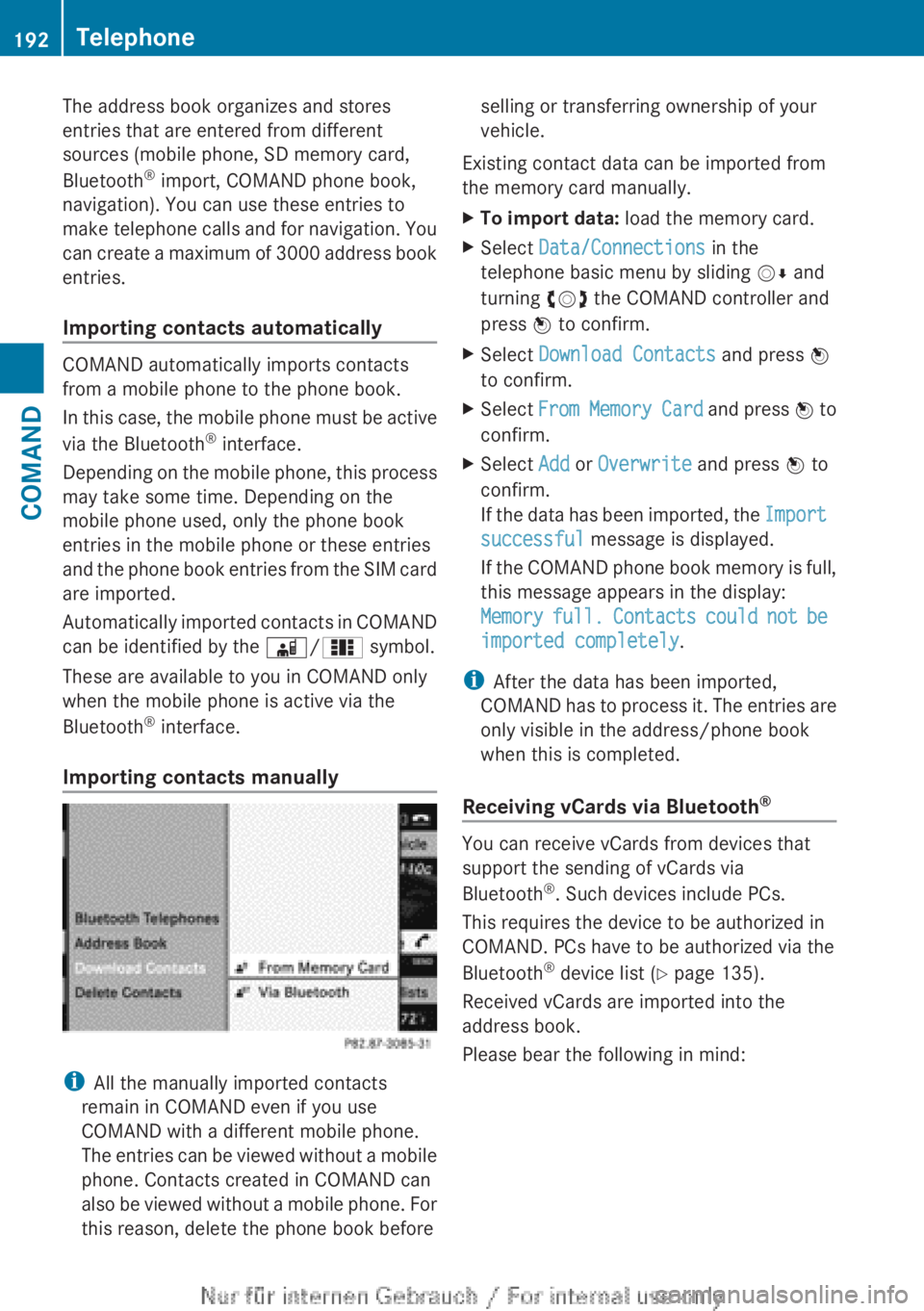
Importing contacts manually
i All the manually imported contacts
remain in COMAND even if you use
COMAND with a different mobile phone.
The entries can be viewed without a mobile
phone. Contacts created in COMAND can
also be viewed without a mobile phone. For
this reason, delete the phone book before
selling or transferring ownership of your
vehicle.
Existing contact data can be imported from
the memory card manually.XTo import data: load the memory card.XSelect Data/Connections in the
telephone basic menu by sliding VÆ and
turning cVd the COMAND controller and
press W to confirm.XSelect Download Contacts and press W
to confirm.XSelect From Memory Card and press W to
confirm.XSelect Add or Overwrite and press W to
confirm.
If the data has been imported, the Import
successful message is displayed.
If the COMAND phone book memory is full,
this message appears in the display:
Memory full. Contacts could not be
imported completely .
i
After the data has been imported,
COMAND has to process it. The entries are
only visible in the address/phone book
when this is completed.
Receiving vCards via Bluetooth ®
You can receive vCards from devices that
support the sending of vCards via
Bluetooth ®
. Such devices include PCs.
This requires the device to be authorized in
COMAND. PCs have to be authorized via the
Bluetooth ®
device list ( Y page 135).
Received vCards are imported into the
address book.
Please bear the following in mind:
192TelephoneCOMAND
Page 195 of 496
RBluetooth ®
must be activated in COMAND
and on the Bluetooth ®
device ( N operating
instructions of the device).
R the Bluetooth ®
device must be able to send
vCards via Bluetooth ®
(N operating
instructions of the device).
R the Bluetooth ®
device in the vehicle must
be switched on.
i If you switch to another main function,
e.g. navigation, while receiving vCards, the
reception of vCards will be terminated.XSelect Data/Connections in the
telephone basic menu by sliding VÆ and
turning cVd the COMAND controller and
press W to confirm.XSelect Download Contacts and press W
to confirm.XSelect Via Bluetooth and press W to
confirm.
This interrupts the Bluetooth ®
connection
between COMAND and your active mobile
phone. In turn, COMAND is ready to receive
vCards from another Bluetooth ®
device.XStart data transfer on the external
Bluetooth device ( N operating instructions
of the device).
The data on the vCards is automatically
transferred to the address book. The
number of vCards received is displayed.XTo cancel reception: press W.
or
XPress the % back button on the center
console.
Calling up contacts/details
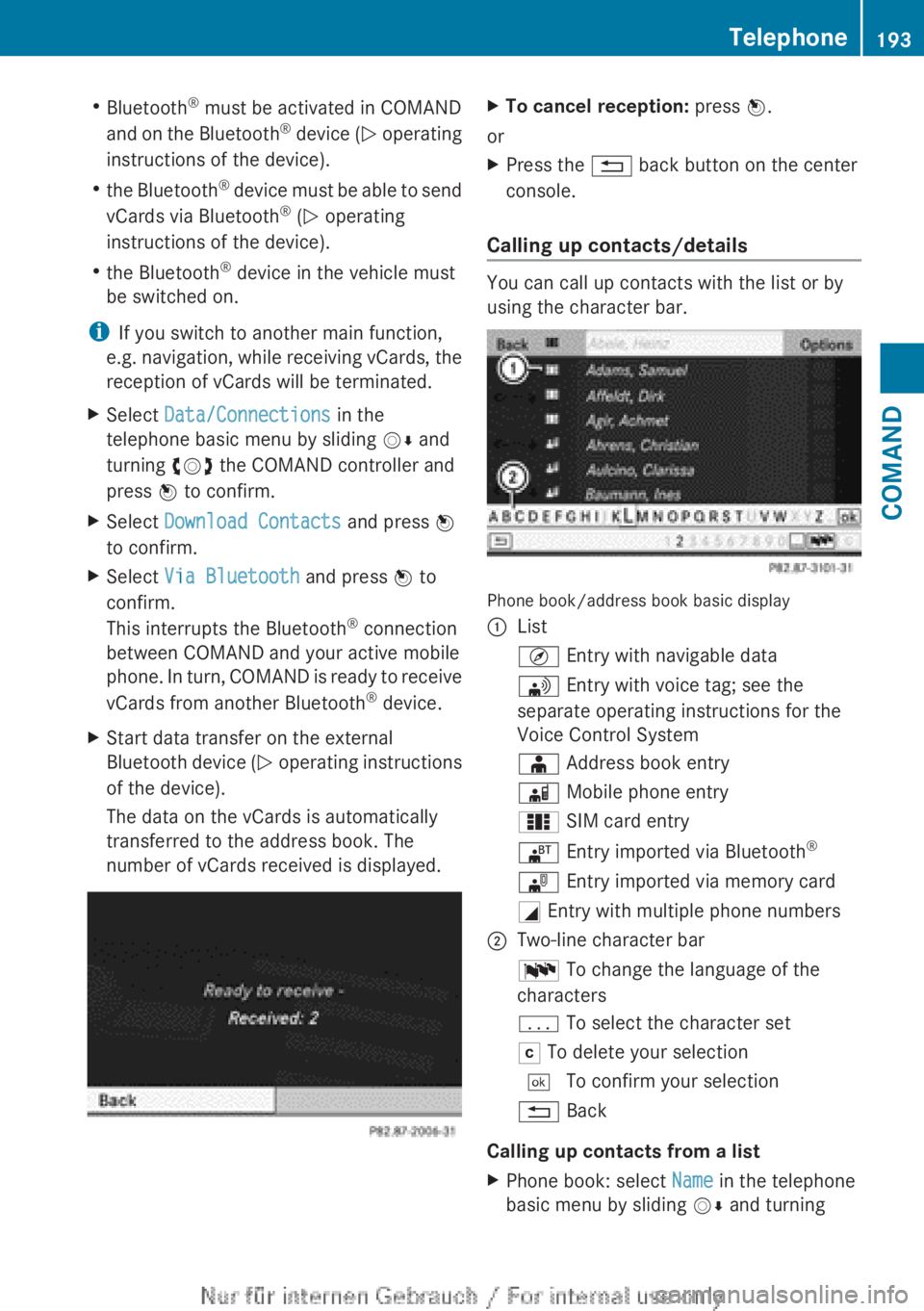
You can call up contacts with the list or by
using the character bar.
Phone book/address book basic display
:ListÇ Entry with navigable data\ Entry with voice tag; see the
separate operating instructions for the
Voice Control SystemÆ Address book entryà Mobile phone entry0 SIM card entry® Entry imported via Bluetooth ®¯
Entry imported via memory cardG Entry with multiple phone numbers;Two-line character barB To change the language of the
charactersp To select the character setF To delete your selection¬ To confirm your selection% Back
Calling up contacts from a list
XPhone book: select Name in the telephone
basic menu by sliding VÆ and turningTelephone193COMANDZ
Page 196 of 496
cVd the COMAND controller and press
W to confirm.XAddress book: select Data/Connections
in the telephone basic menu by sliding
V Æ and turning cVd the COMAND
controller and press W to confirm.XSelect Address Book and press W to
confirm.XTo switch from the character bar to the
list: slide ZV the COMAND controller until
the character bar is hidden.
or
XSelect ¬.XTo call a contact: select by sliding ZVÆ
or turning cVd the COMAND controller
and press W to confirm.
i
The phone book is also available via the
on-board computer ( Y page 346).
Calling up contacts using the character
bar
XPhone book: select Name in the telephone
basic menu by sliding VÆ and turning
cVd the COMAND controller and press
W to confirm.XAddress book: select Data/Connections
in the telephone basic menu by sliding
V Æ and turning cVd the COMAND
controller and press W to confirm.XSelect Address Book and press W to
confirm.XTo select a character: select by sliding
ZV Æ or XVY the COMAND controller and
press W to confirm. Repeat this procedure
until COMAND automatically switches over
to the list.
You determine the first letter of the entry
you are looking for with the first character
you enter. If there are similar entries, the
next character which is different will be
displayed and offered for selection.i You can also use the telephone number
keypad to enter characters.
Creating new contacts/changing
contacts
i In certain countries, this function stops
being available from a vehicle speed of
more than approximately 3 mph (5 km/h).
As soon as the speed falls below
approximately 2 mph (3 km/h), the
function becomes available again.
i You can enter address data directly into
the address book. If you store contacts in
the phone book, these are also saved in the
address book.
i Automatically imported contacts cannot
be edited. They have to be saved first
before being copied to the COMAND
address book.
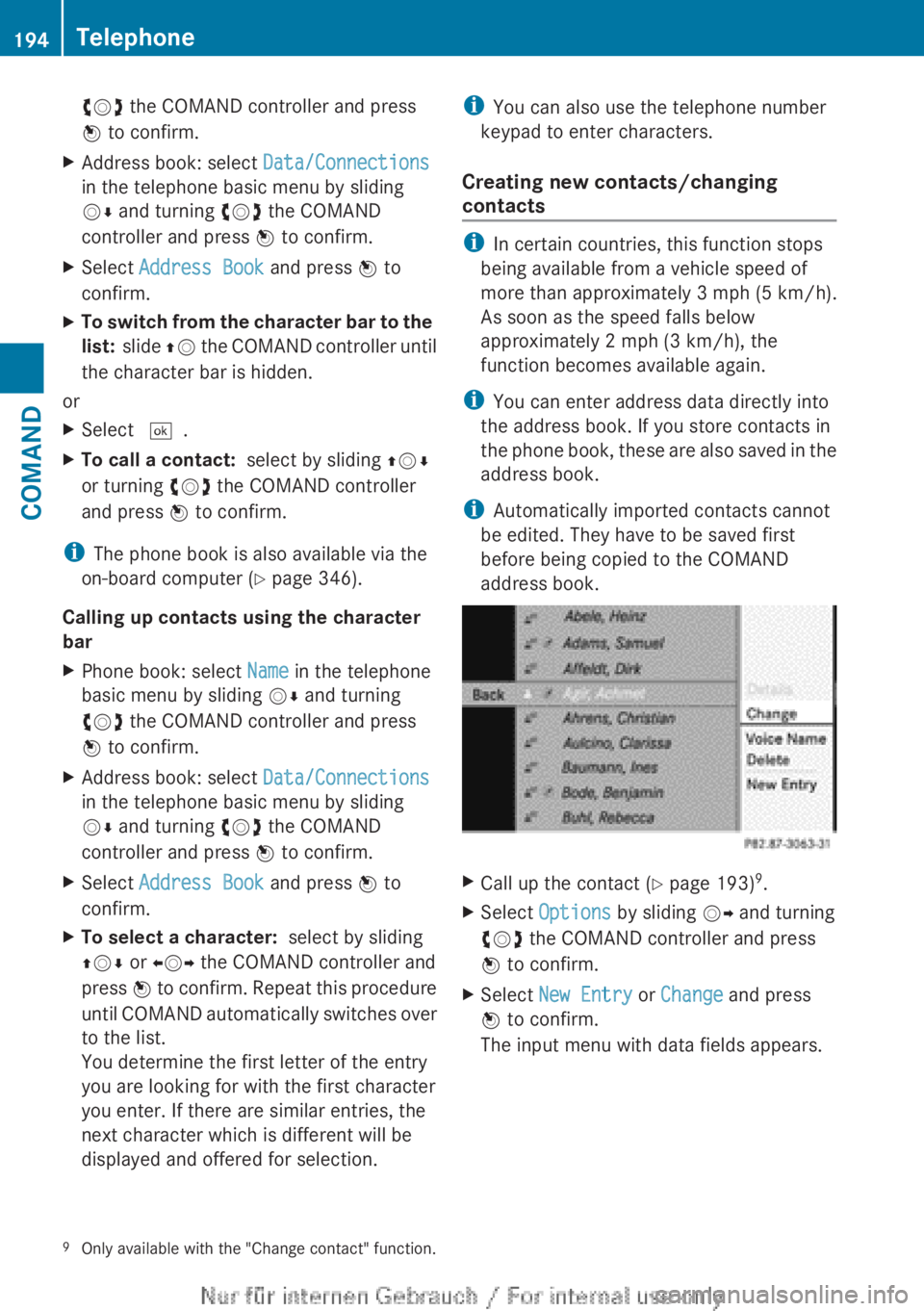
XCall up the contact ( Y page 193) 9
.XSelect Options by sliding VY and turning
cVd the COMAND controller and press
W to confirm.XSelect New Entry or Change and press
W to confirm.
The input menu with data fields appears.9 Only available with the "Change contact" function.194TelephoneCOMAND
Page 198 of 496
XTo delete an individual contact: select
the entry ( Y page 193).XSelect Options by sliding VY the
COMAND controller and press W to
confirm.XSelect Delete and press W to confirm.
A prompt appears asking whether the data
should be deleted.XSelect Yes and press W to confirm.
i
Automatically imported contacts cannot
be deleted ( Y page 192).
Calling a number stored in an entry
Using the phone book
XSelect Name in the telephone basic menu
by sliding VY and turning cVd the
COMAND controller and press W to
confirm.XCall up the contact ( Y page 193).XContact with multiple telephone
numbers (with the G symbol): press
W .
or
XPress SEND on the telephone keypad.
A list of all telephone numbers is opened.XSelect the desired number by turning
cVd the COMAND controller.XPress W.
or
XPress SEND on the telephone keypad.
The number is dialed.XContact with one telephone number
(without the G symbol): press W.
or
XPress SEND on the telephone keypad.
The number is dialed.
i You can also use the phone book in the
on-board computer to make a call
( Y page 346).
Using the address bookXSelect Data/Connections in the
telephone basic menu by sliding VÆ and
turning cVd the COMAND controller and
press W to confirm.XSelect Address Book and press W to
confirm.XCall contact ( Y page 193) and press W to
confirm.XSelect the telephone number by turning
cVd the COMAND controller and press
W to confirm.
Starting route guidance to an entry
i
This function is available as soon as you
have stored a destination in the destination
memory ( Y page 167). COMAND also
stores the destination in the address book
with the complete navigable address data.
In this case, navigation can be started
without any further data input.
If the contact entry contains a postal
address, e.g. as a result of importing a
vCard, the system can also navigate to this
address. If the data is incomplete or
unclear, COMAND asks the user to enter
the relevant address data. After the entry
has been completed and navigation has
been started, COMAND replaces the
existing address with the navigable
address if necessary.
XSearch for an address book entry using the
¤ symbol.XConfirm the entry by pressing W.
Telephone numbers and addresses are
displayed.XSelect the address data field.XPress the COMAND controller.
or
XSelect Options by sliding VY the
COMAND controller and press W to
confirm.196TelephoneCOMAND
Page 199 of 496
XSelect Navigate and press W to confirm.XSelect Start and press W to confirm.
Voice tags
i
Voice tags are entered via the Voice
Control System; see the separate operating
instructions for the Voice Control System.
Adding or changing a voice tag
i You can add one voice tag per address
book entry.
XSearch for an address book entry with or
without a voice tag ( ¦ symbol).XSelect Options by sliding VY and turning
cVd the COMAND controller and press
W to confirm.XSelect Voice Name and press W to
confirm.XSelect Add or Change and press W to
confirm.
Subsequent operation is voice-controlled.
The Voice Control System guides you
through the menus.
Deleting a voice tag
XSearch for an address book entry with a
voice tag.XSelect Options by sliding VY and turning
cVd the COMAND controller and press
W to confirm.XSelect Voice Name and press W to
confirm.XSelect Delete and press W to confirm.
A deletion prompt appears.
Listening to a voice tag
XSearch for an address book entry with a
voice tag.XSelect Options by sliding VY and turning
cVd the COMAND controller and press
W to confirm.XSelect Voice Name and press W to
confirm.XSelect Listen and press W to confirm.
You will hear the voice tag.
Using call lists
Introduction
COMAND displays lists of calls received
(including missed calls) and made during
phone operation.
The respective menu item can only be
selected if:
R calls have already been made or received
in COMAND.
R the call lists have been imported from the
telephone.
Opening the call list and selecting an
entry
XTo call up the telephone menu: press the
S function button.XSelect Call Lists in the telephone basic
menu by sliding VÆ and turning cVd the
COMAND controller and press W to
confirm.
A menu appears.XSelect Calls Received or Calls
Dialed and press W to confirm.
The corresponding list appears.
i The list of calls made can also be opened
by pressing the SEND button in the menu
or on the telephone keyboard. This is
possible as long as no phone numbers have
been entered in the basic menu. The list of
calls made can also be opened in the on-
board computer.
Telephone197COMANDZ
Page 200 of 496
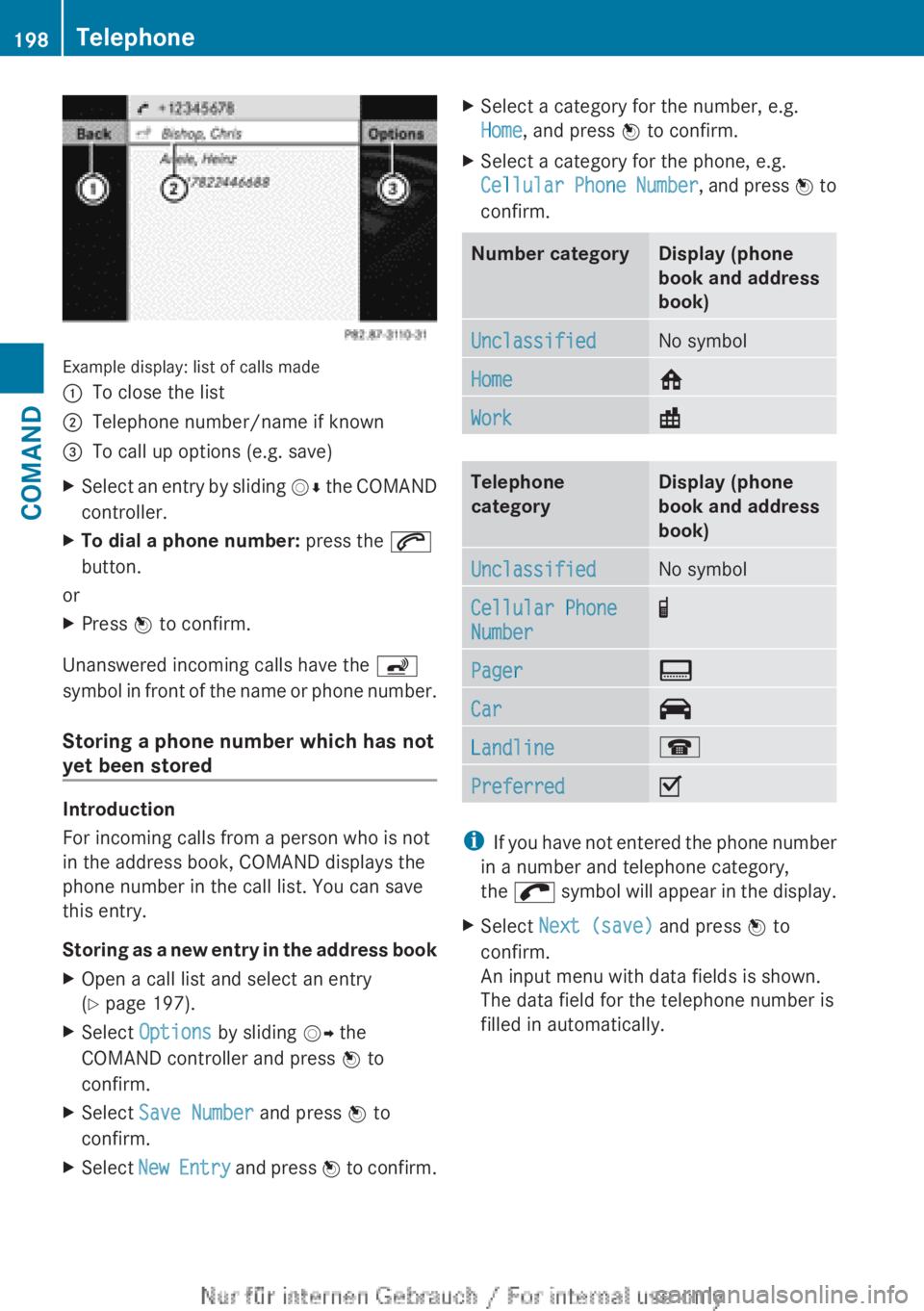
Example display: list of calls made
:To close the list;Telephone number/name if known=To call up options (e.g. save)XSelect an entry by sliding VÆ the COMAND
controller.XTo dial a phone number: press the 6
button.
or
XPress W to confirm.
Unanswered incoming calls have the á
symbol in front of the name or phone number.
Storing a phone number which has not
yet been stored
Introduction
For incoming calls from a person who is not
in the address book, COMAND displays the
phone number in the call list. You can save
this entry.
Storing as a new entry in the address book
XOpen a call list and select an entry
( Y page 197).XSelect Options by sliding VY the
COMAND controller and press W to
confirm.XSelect Save Number and press W to
confirm.XSelect New Entry and press W to confirm.XSelect a category for the number, e.g.
Home , and press W to confirm.XSelect a category for the phone, e.g.
Cellular Phone Number , and press W to
confirm.Number categoryDisplay (phone
book and address
book)UnclassifiedNo symbolHome6Work\Telephone
categoryDisplay (phone
book and address
book)UnclassifiedNo symbolCellular Phone
Number¢Pager¨Car^Landline¬PreferredO
i If you have not entered the phone number
in a number and telephone category,
the ; symbol will appear in the display.
XSelect Next (save) and press W to
confirm.
An input menu with data fields is shown.
The data field for the telephone number is
filled in automatically.198TelephoneCOMAND
Page 201 of 496
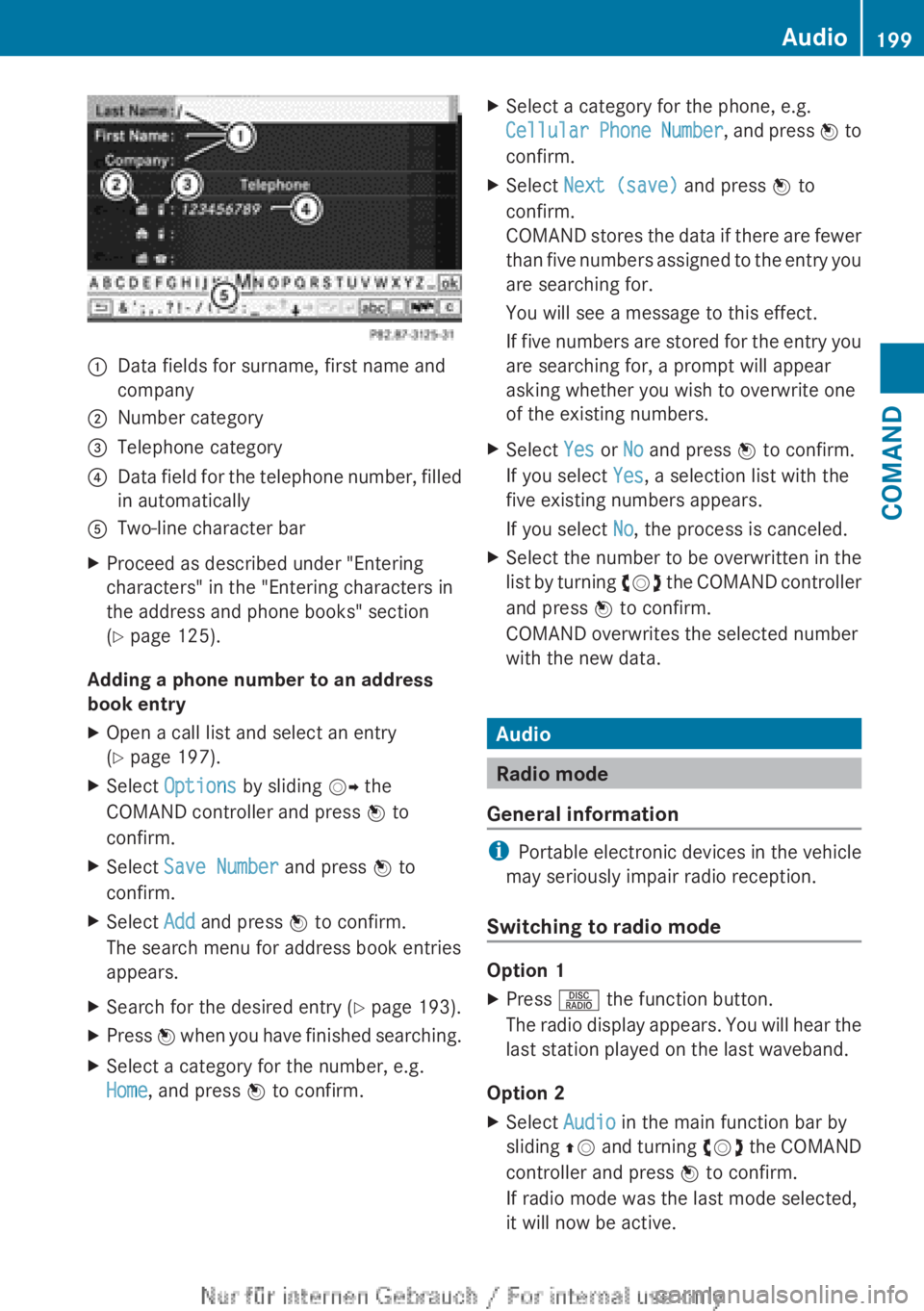
:Data fields for surname, first name and
company;Number category=Telephone category?Data field for the telephone number, filled
in automaticallyATwo-line character barXProceed as described under "Entering
characters" in the "Entering characters in
the address and phone books" section
( Y page 125).
Adding a phone number to an address
book entry
XOpen a call list and select an entry
( Y page 197).XSelect Options by sliding VY the
COMAND controller and press W to
confirm.XSelect Save Number and press W to
confirm.XSelect Add and press W to confirm.
The search menu for address book entries
appears.XSearch for the desired entry ( Y page 193).XPress W when you have finished searching.XSelect a category for the number, e.g.
Home , and press W to confirm.XSelect a category for the phone, e.g.
Cellular Phone Number , and press W to
confirm.XSelect Next (save) and press W to
confirm.
COMAND stores the data if there are fewer
than five numbers assigned to the entry you
are searching for.
You will see a message to this effect.
If five numbers are stored for the entry you
are searching for, a prompt will appear
asking whether you wish to overwrite one
of the existing numbers.XSelect Yes or No and press W to confirm.
If you select Yes, a selection list with the
five existing numbers appears.
If you select No, the process is canceled.XSelect the number to be overwritten in the
list by turning cVd the COMAND controller
and press W to confirm.
COMAND overwrites the selected number
with the new data.
Audio
Radio mode
General information
i Portable electronic devices in the vehicle
may seriously impair radio reception.
Switching to radio mode
Option 1
XPress R the function button.
The radio display appears. You will hear the
last station played on the last waveband.
Option 2
XSelect Audio in the main function bar by
sliding ZV and turning cVd the COMAND
controller and press W to confirm.
If radio mode was the last mode selected,
it will now be active.Audio199COMANDZ
Page 202 of 496
If another audio mode is switched on, you
can now switch to radio mode in the audio
menu.XSelect Audio by sliding ZV the COMAND
controller and pressing W to confirm.
The audio menu appears.
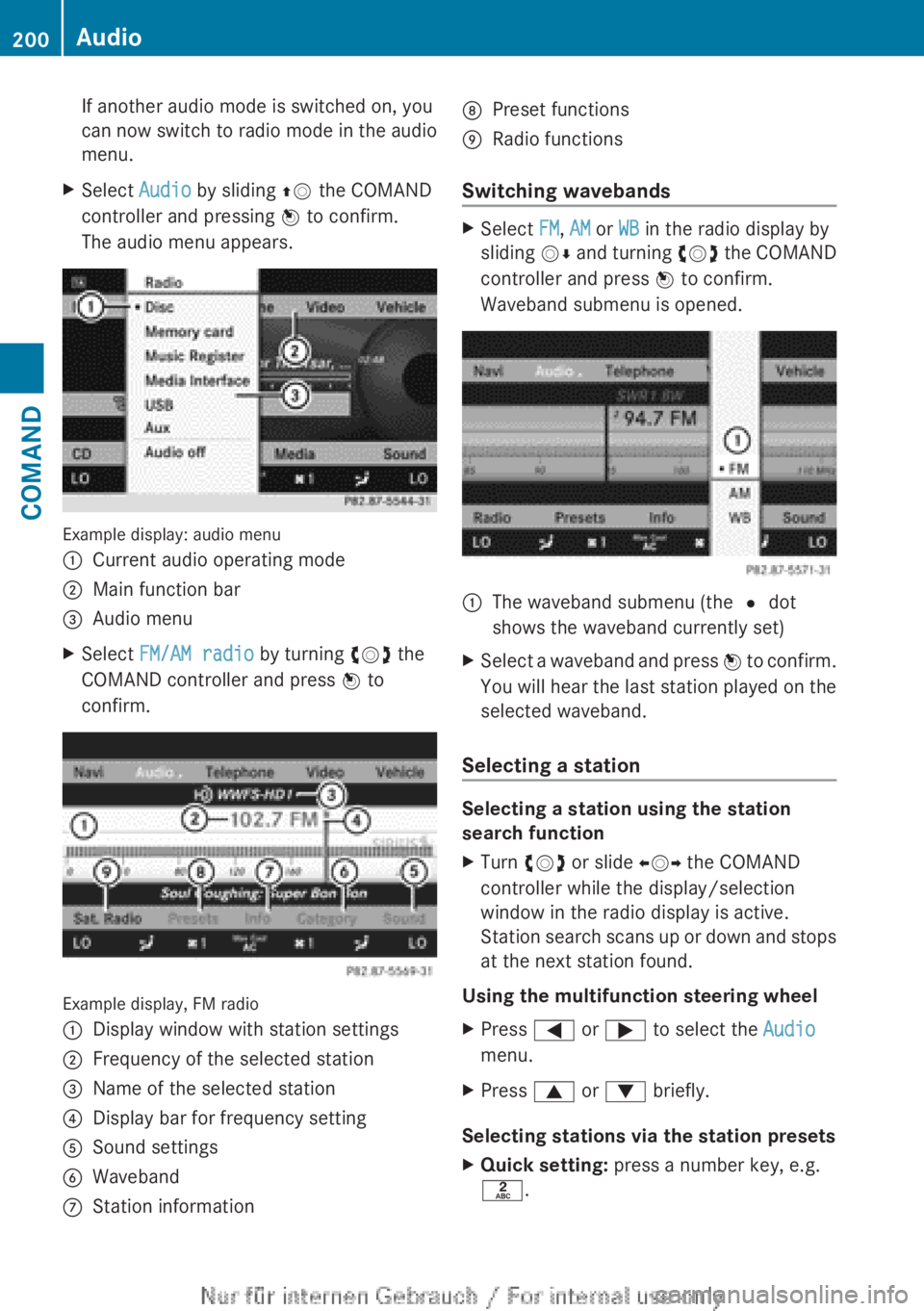
Example display: audio menu
:Current audio operating mode;Main function bar=Audio menuXSelect FM/AM radio by turning cVd the
COMAND controller and press W to
confirm.
Example display, FM radio
:Display window with station settings;Frequency of the selected station=Name of the selected station?Display bar for frequency settingASound settingsBWavebandCStation informationDPreset functionsERadio functions
Switching wavebands
XSelect FM, AM or WB in the radio display by
sliding VÆ and turning cVd the COMAND
controller and press W to confirm.
Waveband submenu is opened.1The waveband submenu (the # dot
shows the waveband currently set)XSelect a waveband and press W to confirm.
You will hear the last station played on the
selected waveband.
Selecting a station
Selecting a station using the station
search function
XTurn cVd or slide XVY the COMAND
controller while the display/selection
window in the radio display is active.
Station search scans up or down and stops
at the next station found.
Using the multifunction steering wheel
XPress = or ; to select the Audio
menu.XPress 9 or : briefly.
Selecting stations via the station presets
XQuick setting: press a number key, e.g.
l .200AudioCOMAND