low beam MERCEDES-BENZ CL CLASS 2013 User Guide
[x] Cancel search | Manufacturer: MERCEDES-BENZ, Model Year: 2013, Model line: CL CLASS, Model: MERCEDES-BENZ CL CLASS 2013Pages: 496, PDF Size: 7.5 MB
Page 259 of 496
Keep bulbs out of the reach of children.
Otherwise, they could, for example, damage
the bulbs and injure themselves.
Never use a bulb which has been dropped.
Such a bulb may explode and injure you.
Halogen bulbs are pressurized and could
explode when you change them, especially if
they are very hot. You should therefore wear
eye protection and gloves when you are
changing them.
Overview: changing bulbs/bulb types
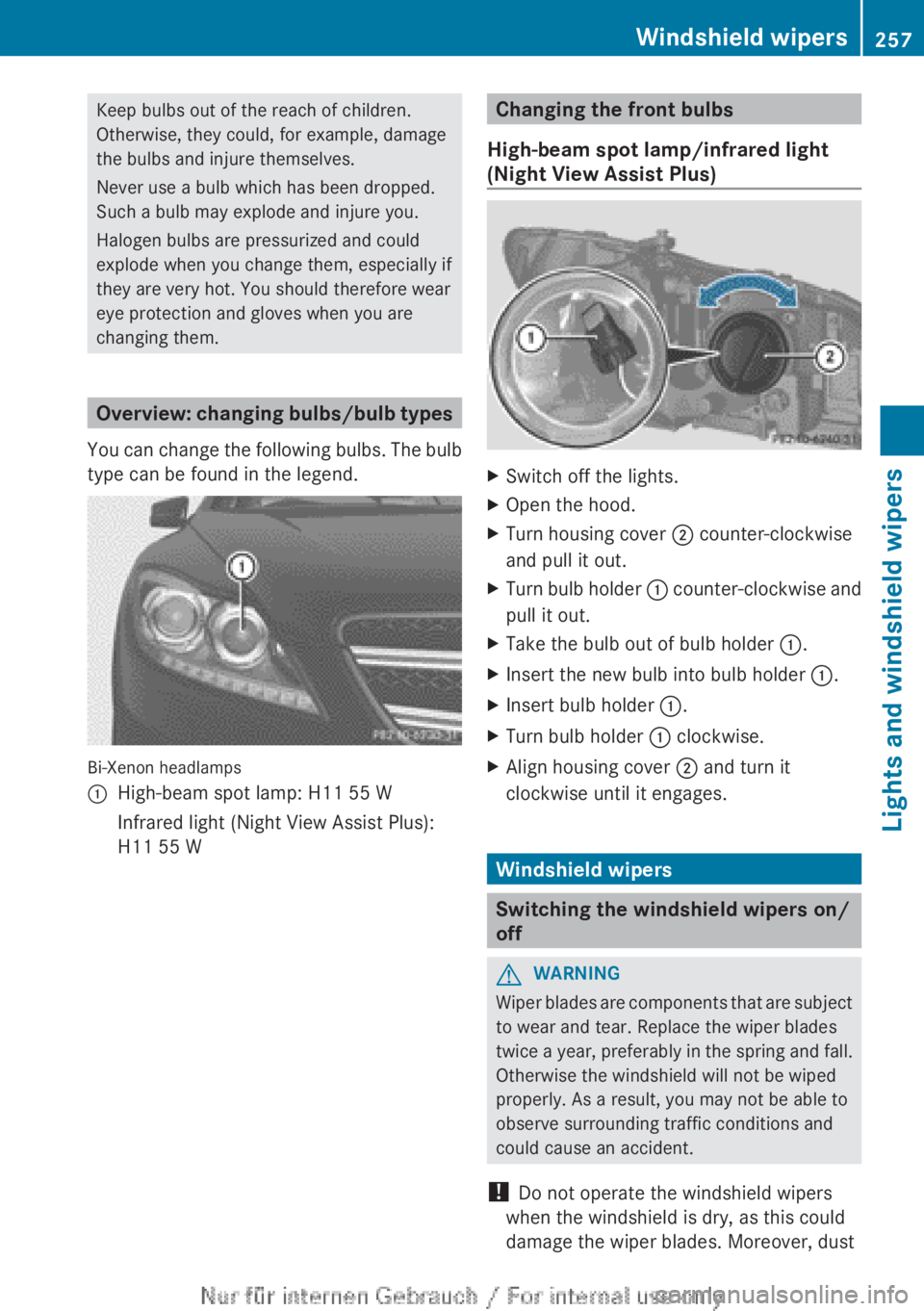
You can change the following bulbs. The bulb
type can be found in the legend.
Bi-Xenon headlamps
:High-beam spot lamp: H11 55 WInfrared light (Night View Assist Plus):
H11 55 WChanging the front bulbs
High-beam spot lamp/infrared light
(Night View Assist Plus)XSwitch off the lights.XOpen the hood.XTurn housing cover ; counter-clockwise
and pull it out.XTurn bulb holder : counter-clockwise and
pull it out.XTake the bulb out of bulb holder :.XInsert the new bulb into bulb holder :.XInsert bulb holder :.XTurn bulb holder : clockwise.XAlign housing cover ; and turn it
clockwise until it engages.
Windshield wipers
Switching the windshield wipers on/
off
GWARNING
Wiper blades are components that are subject
to wear and tear. Replace the wiper blades
twice a year, preferably in the spring and fall.
Otherwise the windshield will not be wiped
properly. As a result, you may not be able to
observe surrounding traffic conditions and
could cause an accident.
! Do not operate the windshield wipers
when the windshield is dry, as this could
damage the wiper blades. Moreover, dust
Windshield wipers257Lights and windshield wipersZ
Page 318 of 496
GWARNING
Objects located above the height range of
Parking Guidance will not be detected when
the parking space is measured. These objects
are not taken into account when the parking
procedure is calculated, e.g. overhanging
loads, tail sections or loading ramps of goods
vehicles. Under some circumstances, Parking
Guidance might therefore issue steering
instructions too soon. This may lead to a
collision. For this reason, you should avoid
using Parking Guidance in such situations.
GWARNING
Make sure that no persons or animals are in
the maneuvering range. Otherwise, they
could be injured.
! Pay particular attention to low objects or
objects with flat surfaces, such as trailer
drawbars, posts, cross beams and curbs.
These types of objects cannot be detected
by Parking Guidance and may damage the
vehicle.
When PARKTRONIC is deactivated, Parking
Guidance is also unavailable.
Use Parking Guidance for parking spaces:
R that are parallel to the direction of travel
R that are on straight roads, not bends
R that are on the same level as the road, i.e.
not on the pavement, for example. Parking
Guidance may not detect flat curbs
Parking tips:
R on narrow roads, drive past the parking
space as close as possible.
R parking spaces that are littered, overgrown
or partially occupied by trailer drawbars
might be identified incorrectly or not at all.
R snowfall or heavy rain may lead to a parking
space being measured inaccurately.
R pay attention to the PARKTRONIC
( Y page 313) warning messages during the
parking procedure.
R when transporting a load which protrudes
from your vehicle, you must not use Parking
Guidance.
R never use Parking Guidance with snow
chains or an emergency spare wheel
mounted.
R make sure that the tire pressures are
always correct. This has a direct effect on
the steering instructions.
R the way your vehicle is positioned in the
parking space after parking is dependent
on various factors. These include the
position and shape of the vehicles parked
in front and behind it and the conditions of
the location. In some cases, Parking
Guidance may guide you too far or not far
enough into a parking space. In some
cases, it may also lead you across or onto
the curb. If necessary, cancel the parking
procedure with Parking Guidance.
! If unavoidable, you should drive over
obstacles such as curbs slowly and not at
a sharp angle. Otherwise, you may damage
the wheels or tires.
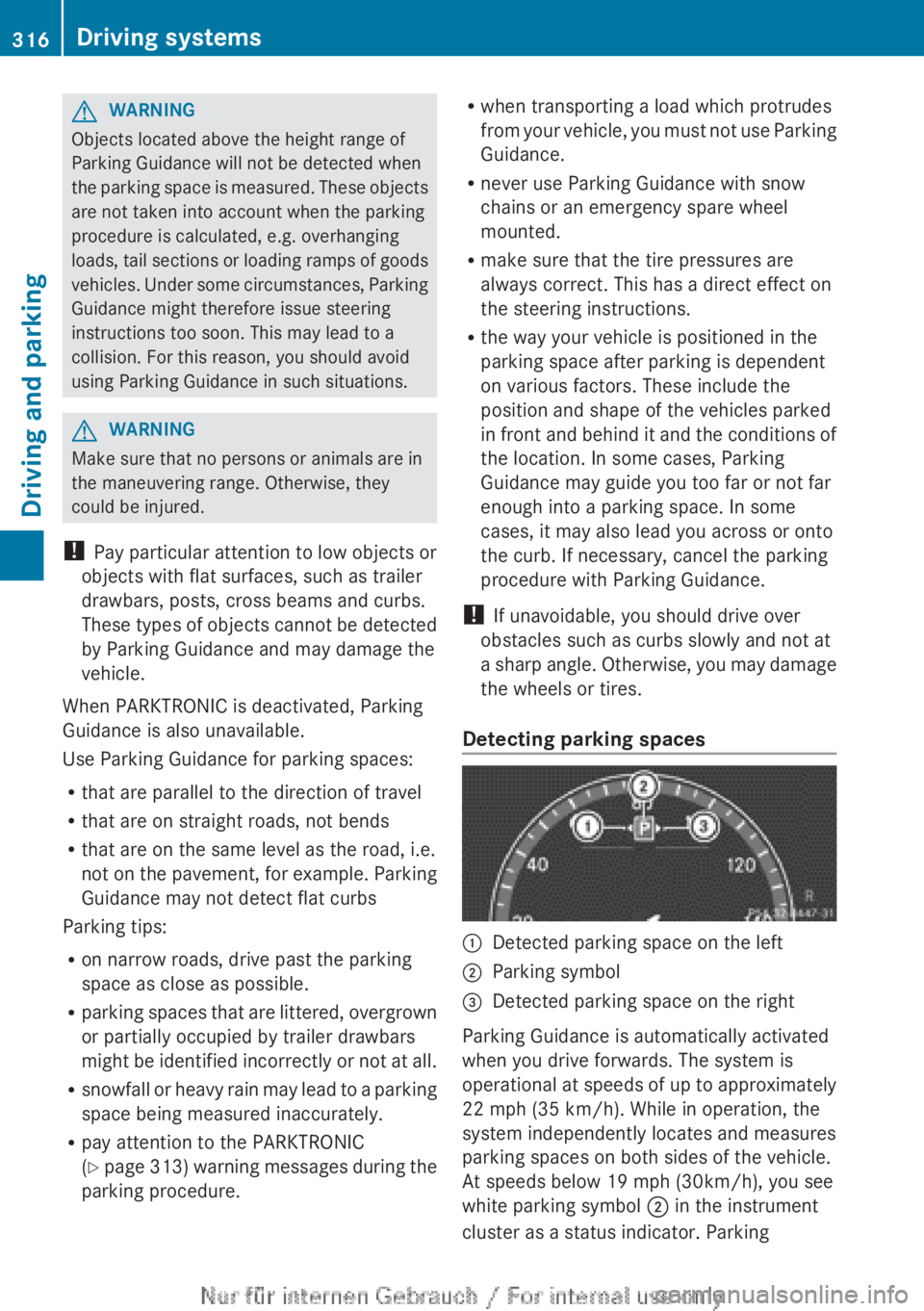
Detecting parking spaces:Detected parking space on the left;Parking symbol=Detected parking space on the right
Parking Guidance is automatically activated
when you drive forwards. The system is
operational at speeds of up to approximately
22 mph (35 km/h). While in operation, the
system independently locates and measures
parking spaces on both sides of the vehicle.
At speeds below 19 mph (30km/h), you see
white parking symbol ; in the instrument
cluster as a status indicator. Parking
316Driving systemsDriving and parking
Page 325 of 496
Pedestrian recognitionGWARNING
Pedestrian recognition may be impaired or
inoperative if:
R pedestrians are partially or entirely
obscured by objects, e.g. parked vehicles.
R the silhouette of the pedestrian in the Night
View Assist Plus display is incomplete or
interrupted, e.g. by powerful light
reflections.
R pedestrians do not contrast with the
surroundings.
R pedestrians are not standing upright, for
example, if they are sitting, crouching or
lying down.
i Animals are not recognized by pedestrian
recognition.
Night View Assist Plus is able to recognize
pedestrians by typical characteristics, e.g. a
silhouette in the shape of a person.
Pedestrian recognition is then switched on
automatically if:
R Night View Assist Plus is activated.
R you are driving faster than 6 mph
(10 km/h).
R the surroundings are dark, e.g. when
driving outside built-up areas without
street lighting.
If pedestrian recognition is active, the symbol
for active pedestrian recognition
( Y page 325) appears in the multifunction
display. If a pedestrian is now recognized,
they are framed and thereby highlighted. If
the pedestrian recognition system has
brought a pedestrian to your attention, look
through the windshield to evaluate the
situation. The actual distance to objects and
pedestrians cannot be gauged accurately by
looking at a screen.
It may be the case that objects are highlighted
as well as pedestrians.
Spotlight function
Pedestrian recognition with spotlight
function is activated automatically if:
R Night View Assist Plus with spotlight
function is activated.
R you are driving faster than 28 mph
(45 km/h).
R the surroundings are dark, e.g. when
driving outside built-up areas without
street lighting.
Only one person or object can be illuminated
by the spotlight at any one time.
The spotlight function will not function if:
R pedestrians or objects cannot be
recognized due to fast cornering.
R pedestrians or objects are on the driver's
side of the vehicle.
Conversely, if you switch to symmetrical
low beams ( Y page 250), pedestrians or
objects located on the passenger side of
the vehicle will not be detected.
It may be the case that pedestrians and other
objects are inadvertently illuminated.
Activating/deactivating Night View
Assist Plus with spotlight function
You can only activate Night View Assist Plus
with spotlight function if:
R the SmartKey is in position 2 in the ignition
lock.
R it is dark.
R the "Adaptive Highbeam Assist" function is
activated via the on-board computer
( Y page 350).
R the light switch is in position c.
R the combination switch is pushed forward
beyond the point of resistance.
R reverse gear has not been engaged.
Driving systems323Driving and parkingZ
Page 326 of 496
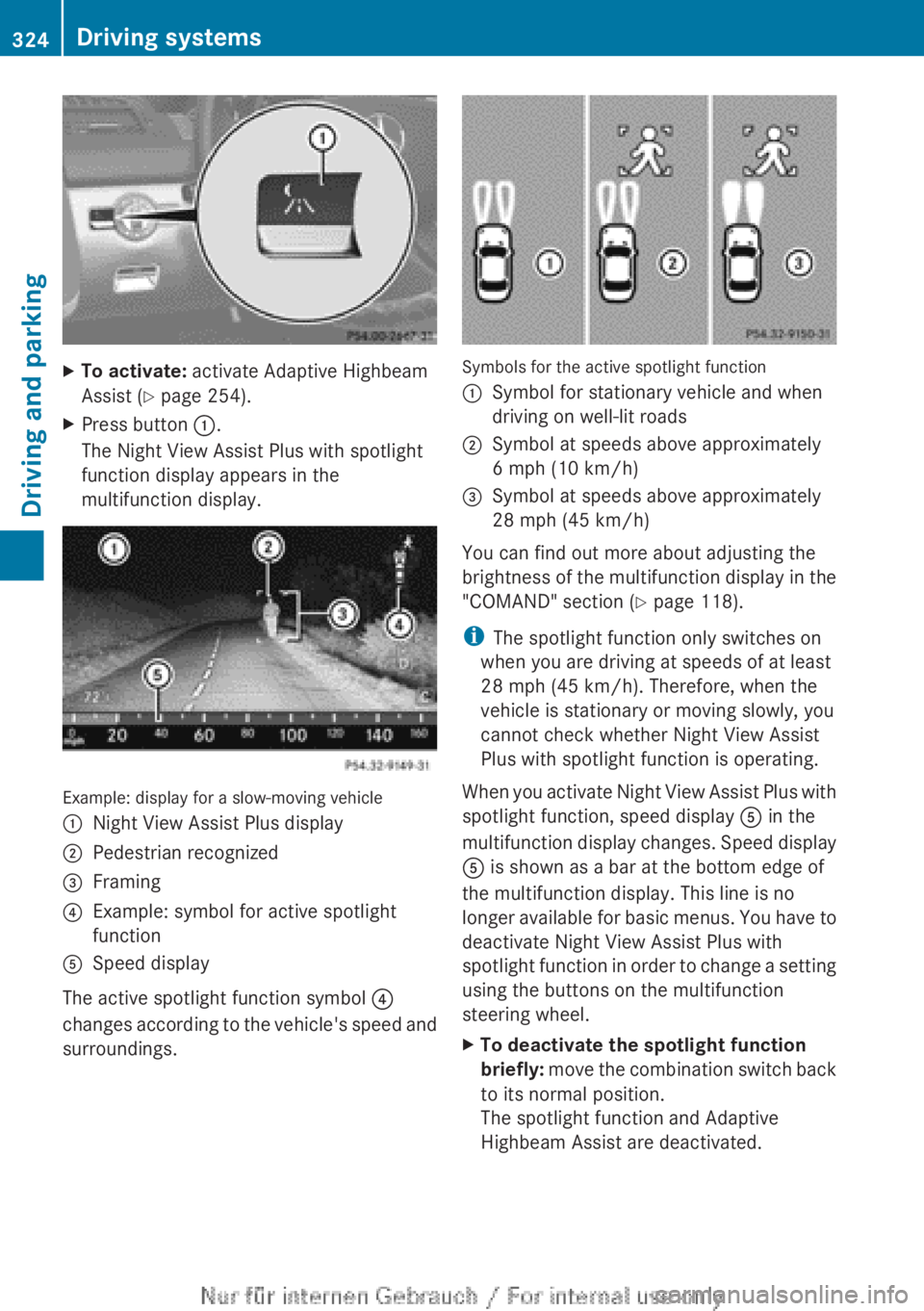
XTo activate: activate Adaptive Highbeam
Assist ( Y page 254).XPress button :.
The Night View Assist Plus with spotlight
function display appears in the
multifunction display.
Example: display for a slow-moving vehicle
:Night View Assist Plus display;Pedestrian recognized=Framing?Example: symbol for active spotlight
functionASpeed display
The active spotlight function symbol ?
changes according to the vehicle's speed and
surroundings.
Symbols for the active spotlight function
:Symbol for stationary vehicle and when
driving on well-lit roads;Symbol at speeds above approximately
6 mph (10 km/h)=Symbol at speeds above approximately
28 mph (45 km/h)
You can find out more about adjusting the
brightness of the multifunction display in the
"COMAND" section ( Y page 118).
i The spotlight function only switches on
when you are driving at speeds of at least
28 mph (45 km/h). Therefore, when the
vehicle is stationary or moving slowly, you
cannot check whether Night View Assist
Plus with spotlight function is operating.
When you activate Night View Assist Plus with
spotlight function, speed display A in the
multifunction display changes. Speed display
A is shown as a bar at the bottom edge of
the multifunction display. This line is no
longer available for basic menus. You have to
deactivate Night View Assist Plus with
spotlight function in order to change a setting
using the buttons on the multifunction
steering wheel.
XTo deactivate the spotlight function
briefly: move the combination switch back
to its normal position.
The spotlight function and Adaptive
Highbeam Assist are deactivated.324Driving systemsDriving and parking
Page 351 of 496
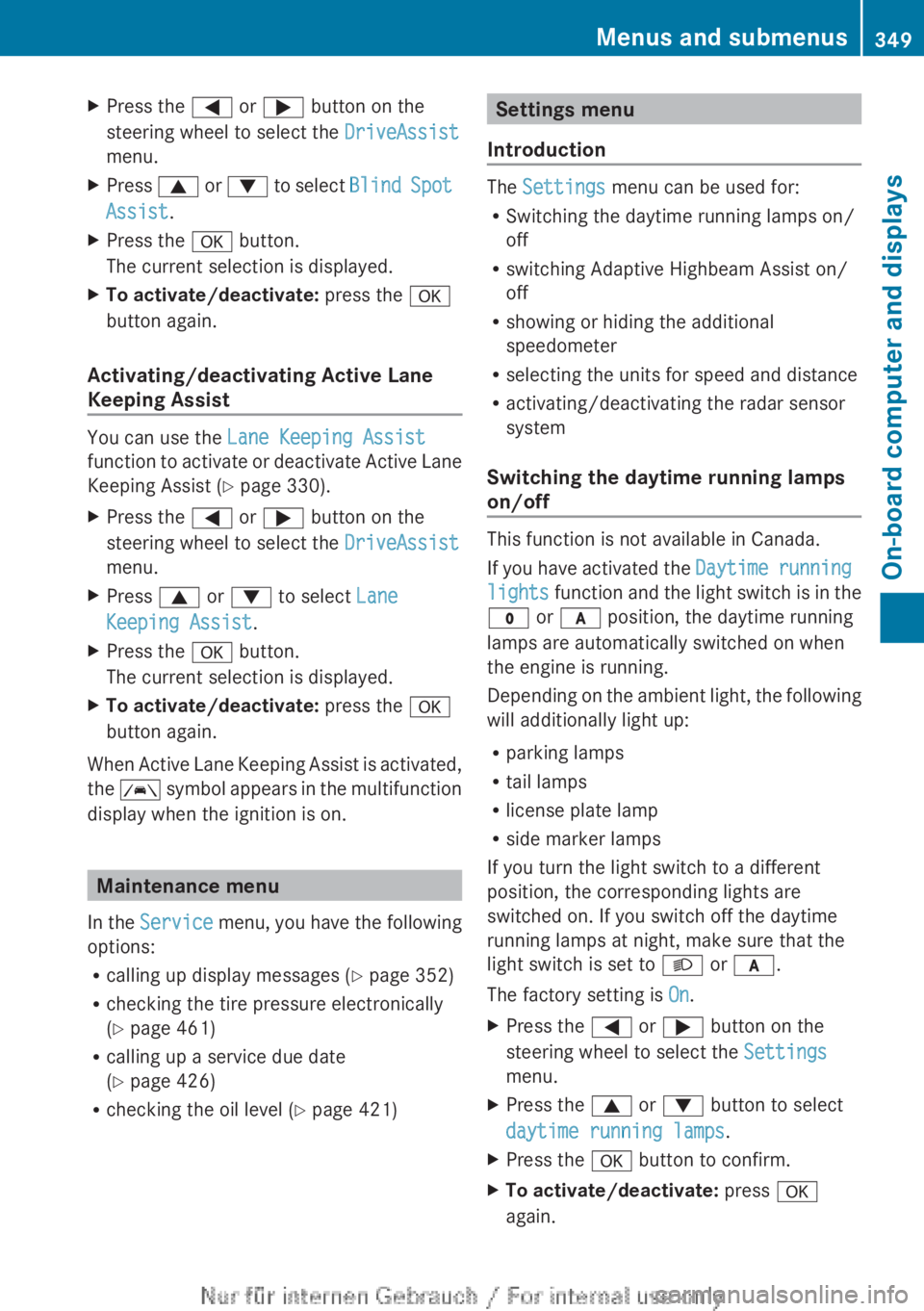
XPress the = or ; button on the
steering wheel to select the DriveAssist
menu.XPress 9 or : to select Blind Spot
Assist .XPress the a button.
The current selection is displayed.XTo activate/deactivate: press the a
button again.
Activating/deactivating Active Lane
Keeping Assist
You can use the Lane Keeping Assist
function to activate or deactivate Active Lane
Keeping Assist ( Y page 330).
XPress the = or ; button on the
steering wheel to select the DriveAssist
menu.XPress 9 or : to select Lane
Keeping Assist .XPress the a button.
The current selection is displayed.XTo activate/deactivate: press the a
button again.
When Active Lane Keeping Assist is activated,
the à symbol appears in the multifunction
display when the ignition is on.
Maintenance menu
In the Service menu, you have the following
options:
R calling up display messages ( Y page 352)
R checking the tire pressure electronically
( Y page 461)
R calling up a service due date
( Y page 426)
R checking the oil level ( Y page 421)
Settings menu
Introduction
The Settings menu can be used for:
R Switching the daytime running lamps on/
off
R switching Adaptive Highbeam Assist on/
off
R showing or hiding the additional
speedometer
R selecting the units for speed and distance
R activating/deactivating the radar sensor
system
Switching the daytime running lamps
on/off
This function is not available in Canada.
If you have activated the Daytime running
lights function and the light switch is in the
$ or c position, the daytime running
lamps are automatically switched on when
the engine is running.
Depending on the ambient light, the following
will additionally light up:
R parking lamps
R tail lamps
R license plate lamp
R side marker lamps
If you turn the light switch to a different
position, the corresponding lights are
switched on. If you switch off the daytime
running lamps at night, make sure that the
light switch is set to L or c .
The factory setting is On.
XPress the = or ; button on the
steering wheel to select the Settings
menu.XPress the 9 or : button to select
daytime running lamps .XPress the a button to confirm.XTo activate/deactivate: press a
again.Menus and submenus349On-board computer and displaysZ
Page 352 of 496
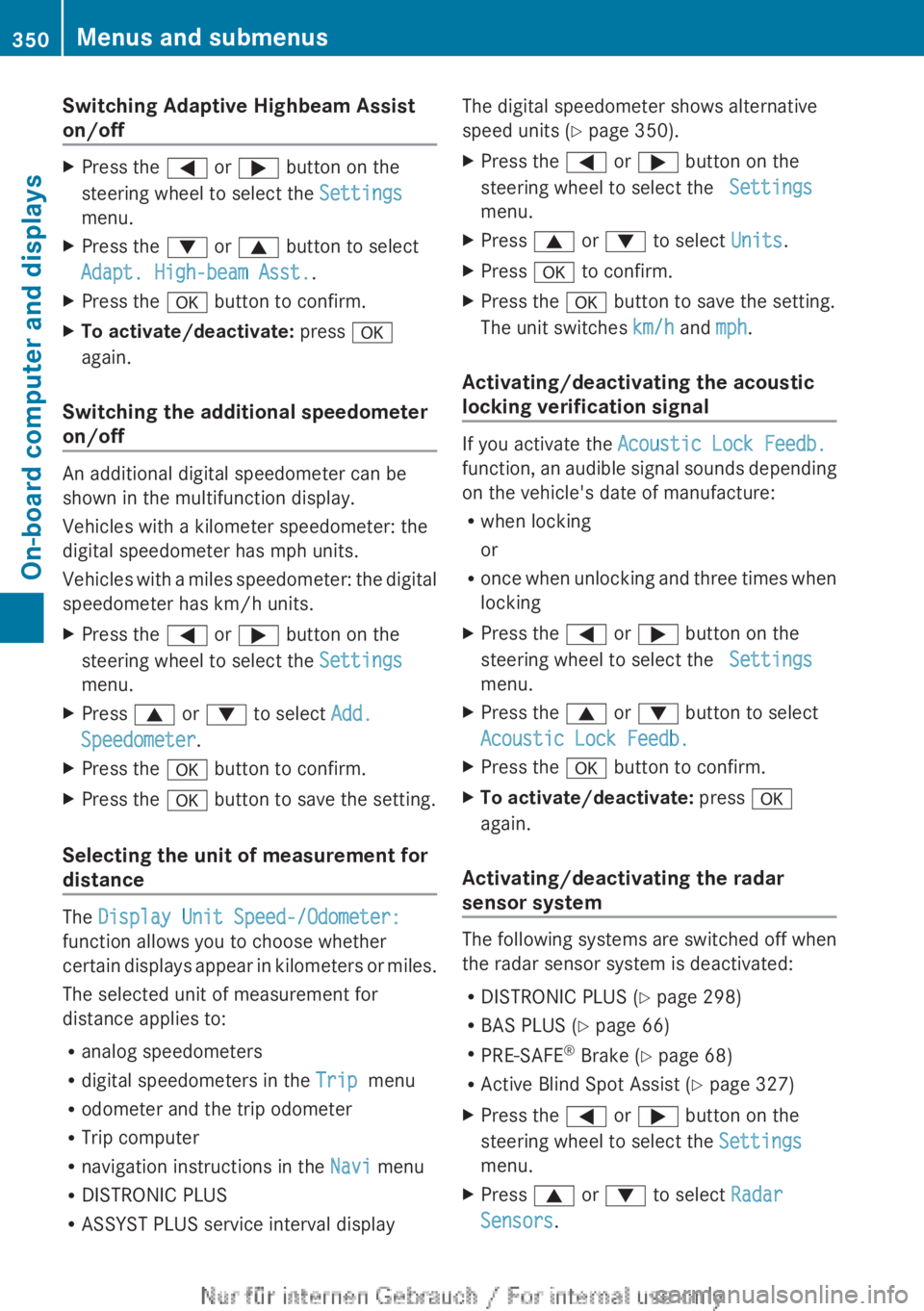
Switching Adaptive Highbeam Assist
on/offXPress the = or ; button on the
steering wheel to select the Settings
menu.XPress the : or 9 button to select
Adapt. High-beam Asst. .XPress the a button to confirm.XTo activate/deactivate: press a
again.
Switching the additional speedometer
on/off
An additional digital speedometer can be
shown in the multifunction display.
Vehicles with a kilometer speedometer: the
digital speedometer has mph units.
Vehicles with a miles speedometer: the digital
speedometer has km/h units.
XPress the = or ; button on the
steering wheel to select the Settings
menu.XPress 9 or : to select Add.
Speedometer .XPress the a button to confirm.XPress the a button to save the setting.
Selecting the unit of measurement for
distance
The Display Unit Speed-/Odometer:
function allows you to choose whether
certain displays appear in kilometers or miles.
The selected unit of measurement for
distance applies to:
R analog speedometers
R digital speedometers in the Trip menu
R odometer and the trip odometer
R Trip computer
R navigation instructions in the Navi menu
R DISTRONIC PLUS
R ASSYST PLUS service interval display
The digital speedometer shows alternative
speed units ( Y page 350).XPress the = or ; button on the
steering wheel to select the Settings
menu.XPress 9 or : to select Units.XPress a to confirm.XPress the a button to save the setting.
The unit switches km/h and mph.
Activating/deactivating the acoustic
locking verification signal
If you activate the Acoustic Lock Feedb.
function, an audible signal sounds depending
on the vehicle's date of manufacture:
R when locking
or
R once when unlocking and three times when
locking
XPress the = or ; button on the
steering wheel to select the Settings
menu.XPress the 9 or : button to select
Acoustic Lock Feedb.XPress the a button to confirm.XTo activate/deactivate: press a
again.
Activating/deactivating the radar
sensor system
The following systems are switched off when
the radar sensor system is deactivated:
R DISTRONIC PLUS ( Y page 298)
R BAS PLUS ( Y page 66)
R PRE-SAFE ®
Brake ( Y page 68)
R Active Blind Spot Assist ( Y page 327)
XPress the = or ; button on the
steering wheel to select the Settings
menu.XPress 9 or : to select Radar
Sensors .350Menus and submenusOn-board computer and displays
Page 369 of 496
Display messagesPossible causes/consequences and M Solutionslamp remains lit or goes out depends on how OCS classifies the
occupant.
If the conditions are not fulfilled, the system is not operating
correctly.XVisit a qualified specialist workshop immediately.GWARNING
If the 42 indicator lamp remains off even after performing the above corrective
steps, do not have any children twelve years old and under and other small individuals use the
front-passenger seat until the system has been repaired.
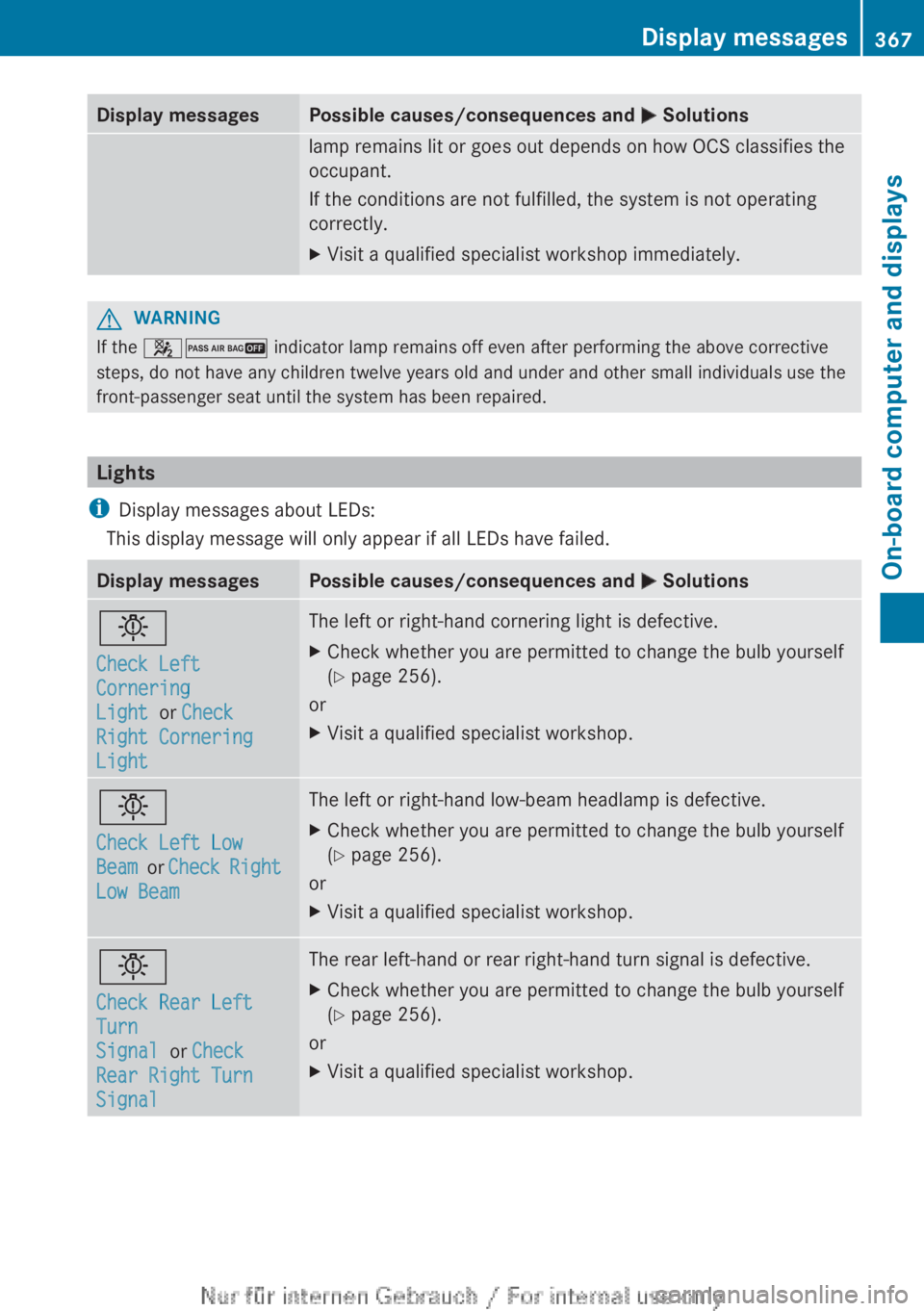
Lights
i Display messages about LEDs:
This display message will only appear if all LEDs have failed.
Display messagesPossible causes/consequences and M Solutionsb
Check Left
Cornering
Light or Check
Right Cornering
LightThe left or right-hand cornering light is defective.XCheck whether you are permitted to change the bulb yourself
( Y page 256).
or
XVisit a qualified specialist workshop.b
Check Left Low
Beam or Check Right
Low BeamThe left or right-hand low-beam headlamp is defective.XCheck whether you are permitted to change the bulb yourself
( Y page 256).
or
XVisit a qualified specialist workshop.b
Check Rear Left
Turn
Signal or Check
Rear Right Turn
SignalThe rear left-hand or rear right-hand turn signal is defective.XCheck whether you are permitted to change the bulb yourself
( Y page 256).
or
XVisit a qualified specialist workshop.Display messages367On-board computer and displaysZ