USB MERCEDES-BENZ CL CLASS 2013 Owners Manual
[x] Cancel search | Manufacturer: MERCEDES-BENZ, Model Year: 2013, Model line: CL CLASS, Model: MERCEDES-BENZ CL CLASS 2013Pages: 496, PDF Size: 7.5 MB
Page 15 of 496
Heatingsee Climate control
High-beam headlamps
Changing bulbs .............................. 257
Display message ............................ 368
Switching Adaptive Highbeam
Assist on/off ................................. 254
Switching on/off ........................... 253
Hill start assist .................................. 275
HOLD function Display message ............................ 377
Function/notes ............................. 308
Home
see Home address
Home address
Entering and saving .......................144
Selecting from the destination
memory ......................................... 146
Hood
Closing ........................................... 421
Display message ............................ 386
Opening ......................................... 420
Hydroplaning ..................................... 295
I
Ignition lock see Key positions
Immobilizer .......................................... 70
In-car hotspot see separate operating instructions
Incident (traffic report) ..................... 162
Indicator lamps see Warning and indicator lamps
Indicators
see Turn signals
Instrument cluster
Overview .......................................... 35
Warning and indicator lamps ...........36
Instrument lighting
see Instrument cluster lighting
Interface (USB, iPod ®
)
see Media Interface
Interior lighting ......................... 237, 255
Ambient light (COMAND) ...............238
Automatic control ..........................256
Manual control ............................... 256
Overview ........................................ 255
Reading lamp ................................. 255
Intermediate stop
Deleting ......................................... 149
Entering ......................................... 148
iPod ®
Alphabetical track selection ..........226
Connecting to the Media Interface 222
Selecting a category/playlist .........225
Supported variants ........................222
J
Jack Storage location ............................ 436
Using ............................................. 438
Jump starting (engine) ...................... 445
K
Key see SmartKey
KEYLESS-GO
Convenience closing feature ............90
Locking ............................................ 75
Start/Stop button .......................... 273
Starting the engine ........................275
Unlocking ......................................... 75
Key positions
KEYLESS-GO .................................. 273
SmartKey ....................................... 273
Kickdown
Driving tips .................................... 282
Manual drive program ....................285
Knee bag .............................................. 48
L
Lamps see Warning and indicator lamps
Lane detection (automatic)
see Lane Keeping Assist
Lap time (RACETIMER) ...................... 344
LATCH-type (ISOFIX) child seat
anchors ................................................ 62
Letter bar see Character bar
License plate lamp (display
message) ............................................ 368
Index13
Page 17 of 496
System .......................................... 407
Vehicle remote unlocking ..............413
Mechanical key
Function/notes ................................ 77
Media Interface
Active partition .............................. 226
Alphabetical track selection ..........226
Connecting an external audio
source ............................................ 222
Connection options .......................222
iPod ®
............................................. 222
Mode ............................................. 222
Notes on USB devices ...................227
Playback options ........................... 226
Selecting categories ......................225
Selecting folders ............................ 225
Selecting music files ......................224
Selecting playlists ..........................225
Switching to ................................... 222
USB mass storage device ..............222
Media list
Audio mode (CD, DVD, MP3) .........212
Video DVD ..................................... 231
Memory card (audio) ......................... 343
Memory function ............................... 106
Menu item Selecting ........................................ 119
Message memory (on-board
computer) .......................................... 352
Messages see Display messages
Microphone, switching on/off ......... 189
Mirrors see Exterior mirrors
see Rear-view mirror
see Vanity mirror
Mobile phone
Menu (on-board computer) ............346
see Phone
MOExtended run-flat system ........... 441
MP3 Bit/sampling rates ......................... 217
Copyright ....................................... 218
Data medium ................................. 217
Fast forward/fast rewind ...............214
File systems ................................... 217
Formats ......................................... 217Mode, switching to ........................210
Notes ............................................. 217
Operation ....................................... 343
Pause function ............................... 211
Playback options ........................... 216
Safety notes .................................. 209
Selecting a media type ..................212
Selecting a track ............................ 213
Sound settings (balance, bass,
fader, treble) .................................. 128
Multicontour seat
Front .............................................. 243
Multifunction display
Function/notes ............................. 338
Lane recommendations .................157
Multifunction steering wheel
Adjusting the volume .....................127
Operating the on-board computer . 337
Overview .......................................... 37
Using the telephone ....................... 187
Multisession CD ................................ 217
Music files Recording ...................................... 214
MUSIC REGISTER
Copying music data .......................219
Deleting all music files ...................220
Deleting individual music files .......221
Disk space information ..................220
Folder functions ............................. 221
General notes ................................ 218
Playback options ........................... 221
Switching to ................................... 218
Music search ..................................... 214
Music storage see MUSIC REGISTER
Mute ................................................... 127
N
Navigation Adjusting the volume of the
navigation announcements ............127
Alternative route ............................ 159
Basic settings ................................ 139
Blocking a route section affected
by a traffic jam ............................... 159
Compass function ..........................176
Destination memory ......................166
Index15
Page 26 of 496
Locking separately ...........................86
Opening automatically from inside ..86
Trunk lid
Display message ............................ 386
Power closing feature ......................83
Trunk lid opening height restriction 239
Turn signals Display message ............................ 367
Switching on/off ........................... 252
TV
Automatic picture shutoff ..............228
Picture settings .............................. 228
Type identification plate
see Vehicle identification plate
U
Unlocking Emergency unlocking .......................83
From inside the vehicle (central
unlocking button) ............................. 82
USB
see Media Interface
V
Vanity mirror (in the sun visor) ........ 404
Vehicle Correct use ...................................... 29
Data acquisition ............................... 30
Display message ............................ 385
Emergency locking ........................... 83
Emergency unlocking .......................83
Equipment ....................................... 26
Individual settings ..........................349
Limited Warranty ............................. 30
Loading .......................................... 464
Lowering ........................................ 441
Maintenance .................................... 27
Parking for a long period ................ 291
Pulling away ................................... 275
Raising ........................................... 438
Reporting problems .........................30
Towing away .................................. 446
Transporting .................................. 448
Vehicle data ................................... 490
Vehicle battery
see Battery (vehicle)
Vehicle data ....................................... 490
Vehicle dimensions ........................... 490
Vehicle identification number see VIN
Vehicle identification plate .............. 482
Vehicle level Active Body Control (ABC) .............310
AIRMATIC ...................................... 309
Display message ............................ 377
Vehicle level (display message) ....... 376
Vehicle tool kit .................................. 436
Video see Video DVD
Video AUX
Setting the picture .........................228
Video DVD
Automatic picture shutoff ..............228
DVD menu ..................................... 232
Fast forward/rewind ...................... 231
Function restrictions ......................230
Interactive content ........................234
Notes on discs ............................... 229
Operation ....................................... 229
Pause function ............................... 231
Playing conditions .......................... 229
Safety notes .................................. 229
Selecting ........................................ 231
Selecting a film/title ...................... 232
Selecting a scene/chapter ............231
Setting the audio format ................233
Setting the language ......................233
Setting the picture .........................228
Showing/hiding the control menu . 230
Showing/hiding the menu .............230
Stop function ................................. 231
Subtitles ........................................ 233
Switching to ................................... 230
VIN ...................................................... 482
Voice Control System Settings ......................................... 132
Volume, adjusting
COMAND ....................................... 127
Navigation messages .....................12724Index
Page 114 of 496
At a glance
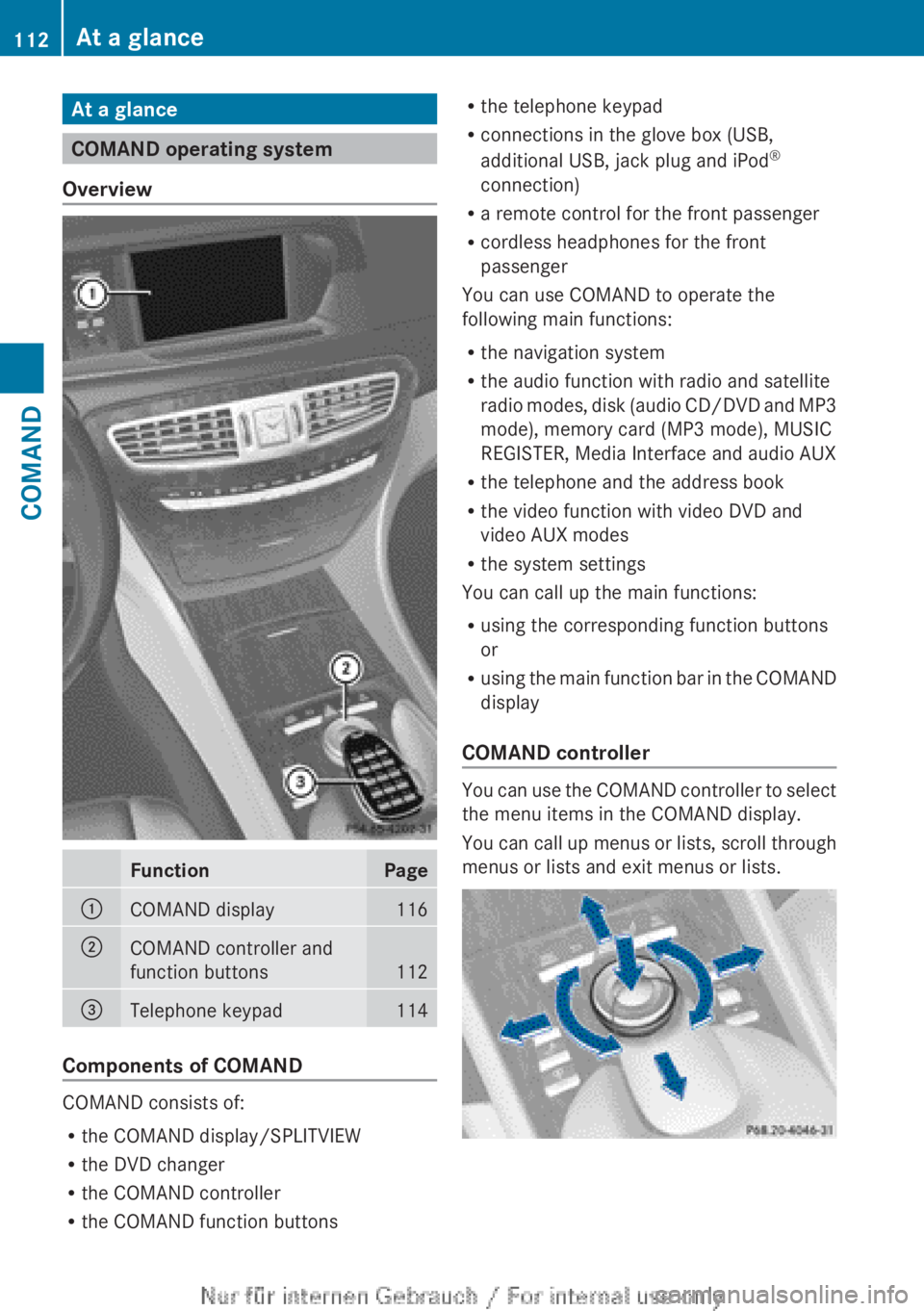
COMAND operating system
Overview
FunctionPage:COMAND display116;COMAND controller and
function buttons
112
=Telephone keypad114
Components of COMAND
COMAND consists of:
R the COMAND display/SPLITVIEW
R the DVD changer
R the COMAND controller
R the COMAND function buttons
R
the telephone keypad
R connections in the glove box (USB,
additional USB, jack plug and iPod ®
connection)
R a remote control for the front passenger
R cordless headphones for the front
passenger
You can use COMAND to operate the
following main functions:
R the navigation system
R the audio function with radio and satellite
radio modes, disk (audio CD/DVD and MP3
mode), memory card (MP3 mode), MUSIC
REGISTER, Media Interface and audio AUX
R the telephone and the address book
R the video function with video DVD and
video AUX modes
R the system settings
You can call up the main functions:
R using the corresponding function buttons
or
R using the main function bar in the COMAND
display
COMAND controller
You can use the COMAND controller to select
the menu items in the COMAND display.
You can call up menus or lists, scroll through
menus or lists and exit menus or lists.
112At a glanceCOMAND
Page 118 of 496
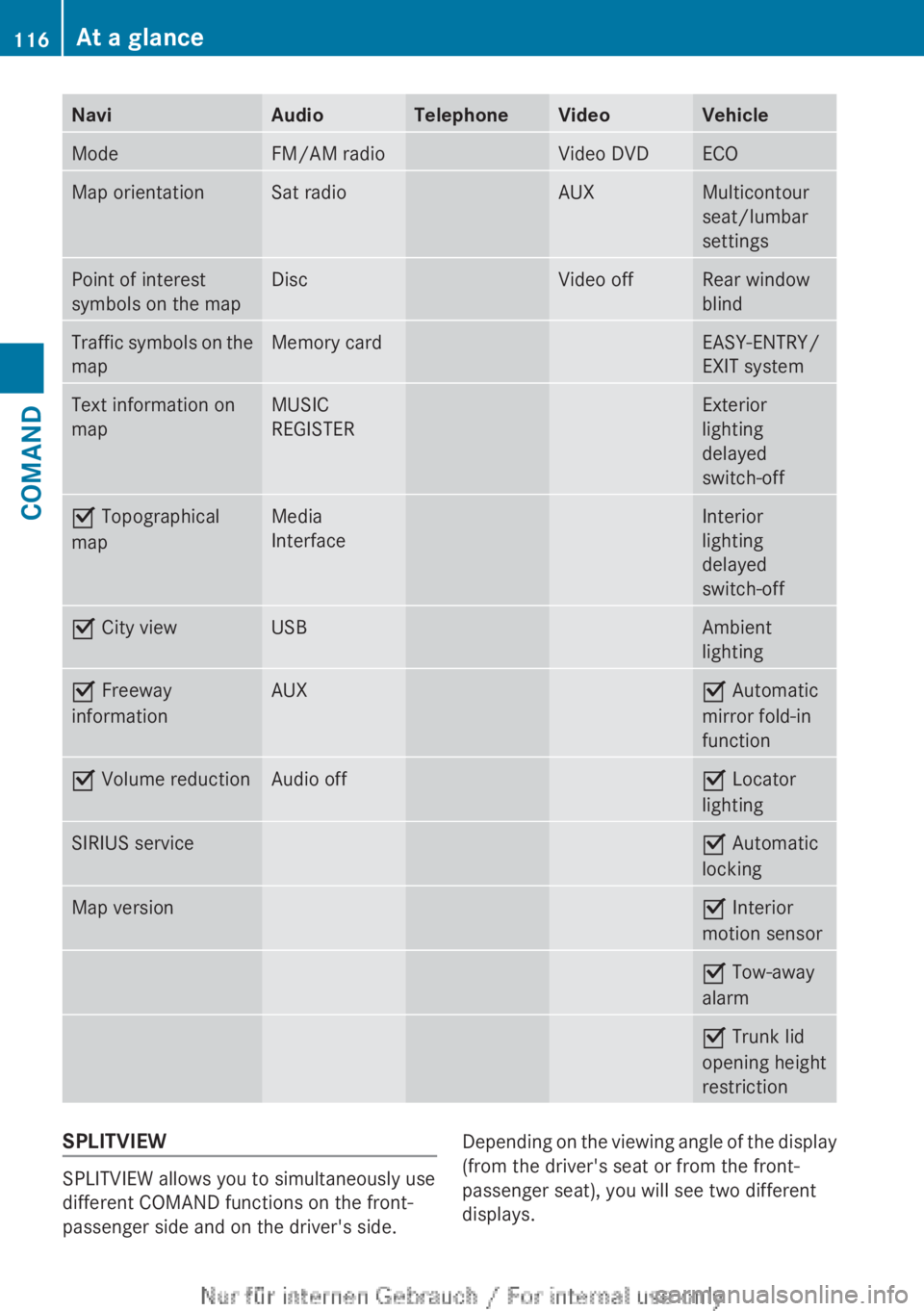
NaviAudioTelephoneVideoVehicleModeFM/AM radioVideo DVDECOMap orientationSat radioAUXMulticontour
seat/lumbar
settingsPoint of interest
symbols on the mapDiscVideo offRear window
blindTraffic symbols on the
mapMemory cardEASY-ENTRY/
EXIT systemText information on
mapMUSIC
REGISTERExterior
lighting
delayed
switch-offO Topographical
mapMedia
InterfaceInterior
lighting
delayed
switch-offO City viewUSBAmbient
lightingO Freeway
informationAUXO Automatic
mirror fold-in
functionO Volume reductionAudio offO Locator
lightingSIRIUS serviceO Automatic
lockingMap versionO Interior
motion sensorO Tow-away
alarmO Trunk lid
opening height
restrictionSPLITVIEW
SPLITVIEW allows you to simultaneously use
different COMAND functions on the front-
passenger side and on the driver's side.
Depending on the viewing angle of the display
(from the driver's seat or from the front-
passenger seat), you will see two different
displays.116At a glanceCOMAND
Page 119 of 496
For example, the "Navi" function can be used
from the driver's side while the "Video"
function is used on the front-passenger side.
Use the remote control to operate COMAND
from the front-passenger side with
SPLITVIEW.
Please bear the following in mind
R Your vehicle may be equipped with
SPLITVIEW, depending on its date of
production. The use of SPLITVIEW is
currently not permitted in the following
states: AL, AZ, CO, IL, LA, MA, MD, NH, PA,
VA, VT, WA, WI, and WV or in the Canadian
provinces of Manitoba, Newfoundland,
New Brunswick, and Prince Edward Island.
It is the driver's responsibility to observe
ALL regional legally prescribed regulations.
If your vehicle is registered in a state or
province in which SPLITVIEW is not
approved, this function must be
deactivated. Please contact an authorized
specialist dealer to check whether
SPLITVIEW is approved in your state or
province.
R Volume adjustment for the cordless
headphones can be carried out on the
headphones. Before putting on the
headphones, make sure that the volume
has not been set too high.
R The remote control can be used for the
volume adjustment of corded headphones.
R You can only use media from the driver's
and front-passenger sides separately if the
media are from different sources. Example:
on the driver's side, an audio CD is being
played by the DVD changer. This means
that on the front-passenger side, the DVD
changer cannot be used to play a different
disc type, for instance a video DVD.
However, other media can be used at the
same time on the front-passenger side,
including radio, memory card, MUSIC
REGISTER, Media Interface, USB or AUX.
R If you use the same medium on both sides,
settings for this medium can be carried out
from either side.R There must be intervisibility between the
headphones and the display so that
COMAND can optimally transmit music and
speech via the infrared signal on the front-
passenger's headphones. For this reason,
please also observe that the headphones
have left and right sides, and use them
correctly.
R Only entertainment functions, i.e. audio
and video, can be used separately via
SPLITVIEW.
R The multifunction steering wheel can only
be used for functions which relate to the
driver's side.
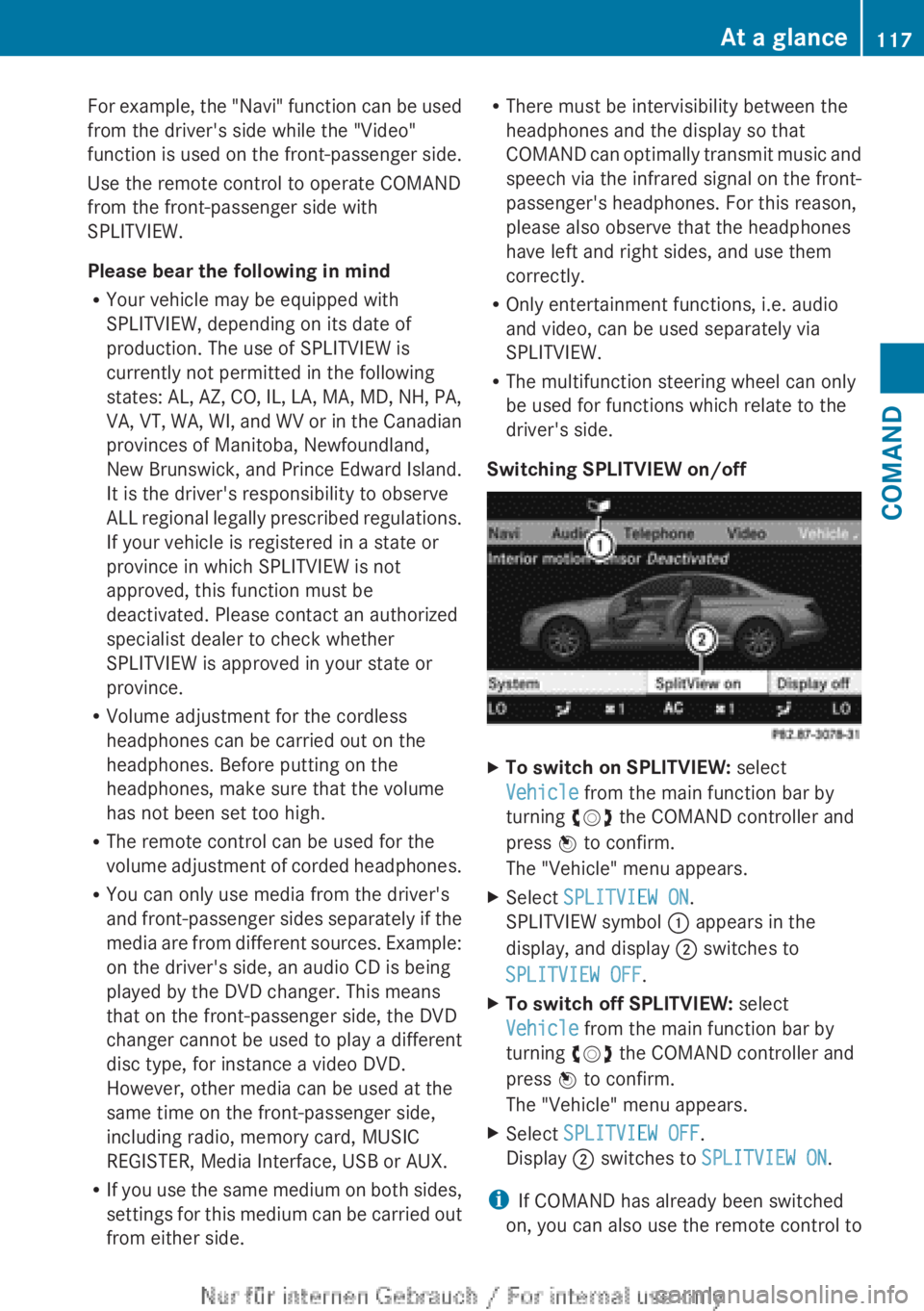
Switching SPLITVIEW on/offXTo switch on SPLITVIEW: select
Vehicle from the main function bar by
turning cVd the COMAND controller and
press W to confirm.
The "Vehicle" menu appears.XSelect SPLITVIEW ON .
SPLITVIEW symbol : appears in the
display, and display ; switches to
SPLITVIEW OFF .XTo switch off SPLITVIEW: select
Vehicle from the main function bar by
turning cVd the COMAND controller and
press W to confirm.
The "Vehicle" menu appears.XSelect SPLITVIEW OFF .
Display ; switches to SPLITVIEW ON .
i
If COMAND has already been switched
on, you can also use the remote control to
At a glance117COMANDZ
Page 212 of 496
XRemove the CD/DVD from slot :.
The DVD changer switches to the next
loaded magazine tray and ejects the CD/
DVD.XRepeat the last step until the magazine is
empty.
Loading and removing SD cards
i Not all SD memory cards are designed for
the temperatures which may be reached in
the vehicle.
Due to the wide range of SD cards available
on the market, Mercedes-Benz cannot
guarantee playback for all brands of SD
memory card.
XTo load an SD card: press the SD card into
slot :. The tapered side must point
towards the right.
If the SD card contains MP3 tracks,
COMAND will play them back.XTo remove the SD card: press the SD card
into slot : as far as it will go and then
release it again.XPull out the card.
Activating audio CD/DVD or MP3 mode
Option 1
XInsert a CD/DVD ( Y page 209) or an SD
card (Y page 210) or connect a USB device
( Y page 222).
COMAND loads the medium inserted and
starts to play it.Option 2XPress the R function button once or
twice.XSelect an audio medium from the media list
( Y page 212).
Option 3
XSelect Audio in the main function bar by
sliding ZV and turning cVd the COMAND
controller and press W to confirm.
The last active audio source is now
activated.
If another audio source is switched on, you
can now switch to disc mode in the audio
menu.XSelect Audio by sliding ZV and turning
cVd the COMAND controller and press
W to confirm.
The audio menu appears.XSelect Disc, Memory Card , MUSIC
REGISTER , Media Interface or USB and
press W to confirm.
This switches to the desired audio source.XSelect an audio medium from the media list
( Y page 212).
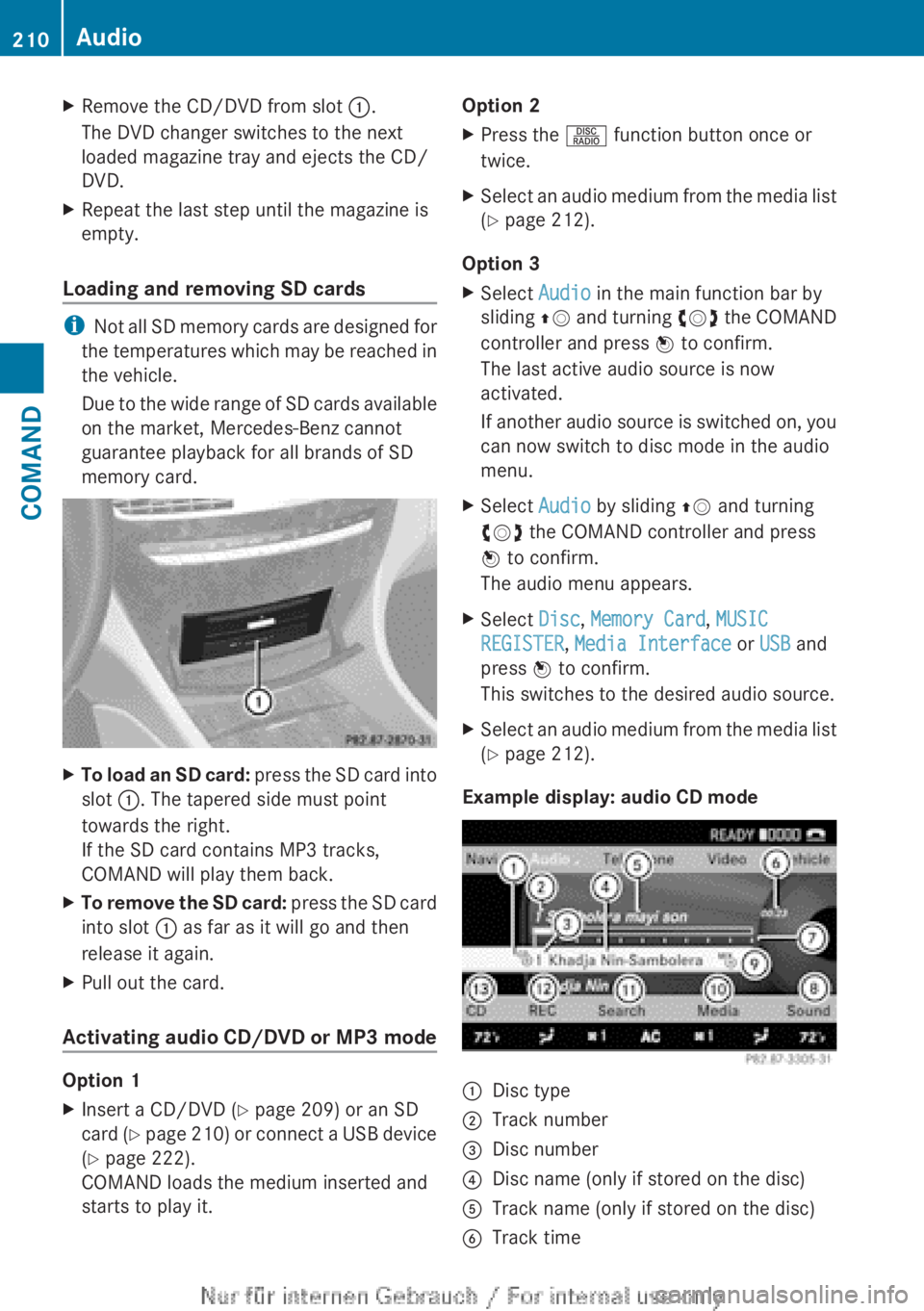
Example display: audio CD mode
:Disc type;Track number=Disc number?Disc name (only if stored on the disc)ATrack name (only if stored on the disc)BTrack time210AudioCOMAND
Page 214 of 496
Only in audio DVD modeXTo pause playback: switch on audio DVD
mode ( Y page 210).XSelect Ë by sliding VÆ and turning
cVd the COMAND controller and press
W to confirm.
The Ë display changes to Ì.XTo continue playback: select Ì and
press W to confirm.
Playback continues from the point where it
was interrupted. The Ì display changes
to Ë .
Stop function
This function is only available in audio DVD
mode.
XSwitch on audio DVD mode ( Y page 210).XTo interrupt playback: select É by
sliding VÆ and turning cVd the COMAND
controller and press W to confirm.
The Ë display changes to Ì. É
remains highlighted.XTo continue playback: select Ì and
press W to confirm.
Playback continues from the point where it
was interrupted.XTo stop playback: while playback is
interrupted, select É again and press
W to confirm.
or
XSelect É and confirm by pressing W
twice in rapid succession.
Ì is highlighted.XTo restart playback: select Ì and
press W to confirm.
Playback starts at the beginning of the
DVD.Selecting CD/audio DVD/MP3 discs
Selecting via the media list
XIn CD/audio DVD and MP3 mode: select
Media by sliding VÆ or turning cVd the
COMAND controller and press W to
confirm.
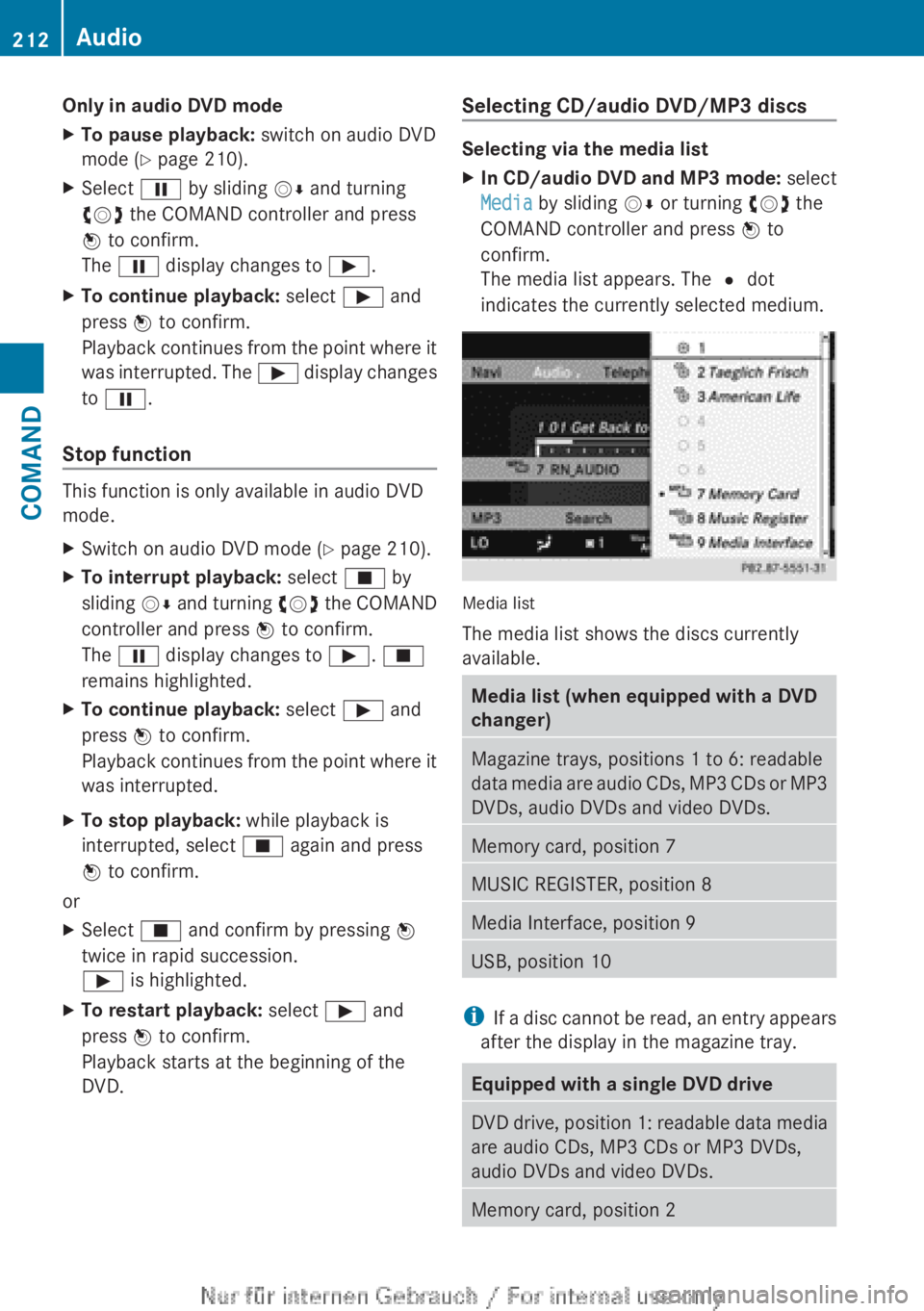
The media list appears. The # dot
indicates the currently selected medium.
Media list
The media list shows the discs currently
available.
Media list (when equipped with a DVD
changer)Magazine trays, positions 1 to 6: readable
data media are audio CDs, MP3 CDs or MP3
DVDs, audio DVDs and video DVDs.Memory card, position 7MUSIC REGISTER, position 8Media Interface, position 9USB, position 10
i If a disc cannot be read, an entry appears
after the display in the magazine tray.
Equipped with a single DVD driveDVD drive, position 1: readable data media
are audio CDs, MP3 CDs or MP3 DVDs,
audio DVDs and video DVDs.Memory card, position 2212AudioCOMAND
Page 215 of 496
MUSIC REGISTER, position 3Media Interface, position 4USB, position 5XSelect the data medium by turning cVd
the COMAND controller and press W to
confirm.
i If you select a video DVD, the system
switches to video DVD mode
( Y page 229).
Selecting a track using the number
keypad
XPress a number button, e.g. n, when the
display/selection window is active.
The medium at the corresponding position
in the media list is loaded and then played.
Selects a track
Selecting by skipping to a track
XTo skip forwards or back to a track: slide
XVY or turn cVd the COMAND controller
when the display/selection window is
active.
The skip forward function skips to the next
track.
Skipping backwards restarts the current
track (if it has been playing for more than
8 seconds) or starts the previous track (if
the current track has only been playing for
a shorter time).
If you activate the Medium Mix or Track
List Mix playback option (MP3 mode
only), the track order is random.XOn the multifunction steering wheel:
switch COMAND to audio CD, audio DVD or
MP3 mode ( Y page 210).XPress = or ; to select the Audio
menu.XPress the 9 or : button on the
multifunction steering wheel.Selecting by track listXIn audio mode, select Search by sliding
V Æ or turning cVd the COMAND
controller and press W to confirm.XSelect Current Track List .
or
XPress W the COMAND controller in audio
mode when the display/selection window
is active.XSelect Current Track List by turning
cVd the COMAND controller and press
W to confirm.XSelect the track by turning cVd and press
W to confirm.
i
In MP3 mode, the list shows all the tracks
in alphabetical order.
XOn the multifunction steering wheel:
switch COMAND to audio CD, audio DVD or
MP3 mode ( Y page 210).XPress = or ; to select the Audio
menu.XPress and hold the 9 or : button
until the desired track has been reached.
If you hold down 9 or : , the system
runs through the list more quickly. Not all
audio drives or data carriers support this
function.
If track information is stored on the audio
drive or data storage device, the
multifunction display shows the number and
name of the track.
Selecting a track using the number
keypad
XPress the Ä button on the number
keypad.
A numerical entry field appears. The
number of positions offered corresponds to
the number of tracks on the CD/DVD. Only
numbers that correspond to a track
number on the CD/DVD can be entered.XEnter the desired track number using the
number keys.Audio213COMANDZ
Page 219 of 496
or when you select a different medium. If
an option is selected, it remains selected
after COMAND is switched on or off.
Notes on MP3 mode
Permissible discs
R CD-R and CD-RW
R DVD+R and DVD+RW
R DVD-R and DVD-RW
R SD memory card:
R USB stick
R iPod ®
R MP3 player
Permissible file systems
R ISO 9660/Joliet standard for CDs
R UDF for audio and video DVDs
R FAT16 or FAT32 for storage media
Multisession CDs
For multisession CDs, the content of the first
session determines how COMAND will
process the CD. COMAND plays only one
session and gives priority to the audio CD
session.
If possible, use COMAND to play only CDs
which have been written in one session.
File structure of a data carrier
When you create a disc with compressed
music files, the tracks can be organized in
folders. A folder may also contain subfolders.
A disc can contain a maximum of 255 folders.
Each folder can contain a maximum of
255 tracks and 255 subfolders.
The disc may contain no more than eight
directory levels. Files beyond the eighth level
will not be recognized by the system.
Track and file names
When you create a disc with compressed
music files, you can assign names to the
tracks and folders.
COMAND uses these names accordingly for
the display. Folders which contain data other
than MP3 or WMA tracks are not displayed by
COMAND.
If MP3 or WMA files are stored in the root
directory itself, the root directory will also be
treated as a folder. COMAND will then show
the name of the root directory as the folder
name.
You must observe the following when
assigning track names:
R track names must have at least 1
character.
R track names must have the extension
"mp3" or "wma".
R there must be a full stop between the track
name and the extension.
Example of a correct track name:
"Track1.mp3".
i COMAND does not support ID3 tags.
Permissible formats
COMAND supports the following formats:
R Microsoft Windows Media Audio V2, V7, V8
and V9 (WMA)
Permissible bit and sampling rates
COMAND supports MP3 files of the following
types:
R fixed and variable bit rates from 32 kbit/s
to 320 kbit/s
R sampling rates of 8 kHz to 48 kHz
COMAND supports WMA files of the
following types:
R fixed bit rates from 5 kbit/s to 384 kbit/s
R sampling rates of 8 kHz to 48 kHz
COMAND does not support WMA files of the
following types:
R DRM (Digital Rights Management)
encrypted files
i Only use tracks with a bit rate of at least
128 kbit/s and a sampling rate of at least
44.1 kHz. Lower rates can cause a
noticeable deterioration in quality. This is
especially the case if you have activated a
surround sound function.Audio217COMANDZ