sunroof MERCEDES-BENZ CL CLASS 2013 Owners Manual
[x] Cancel search | Manufacturer: MERCEDES-BENZ, Model Year: 2013, Model line: CL CLASS, Model: MERCEDES-BENZ CL CLASS 2013Pages: 496, PDF Size: 7.5 MB
Page 22 of 496
Setting the volumeTelephone calls .............................. 127
Video AUX ..................................... 234
Side impact air bag ............................. 49
Side marker lamp (display
message) ............................................ 369
Side windows Cleaning ......................................... 430
Convenience closing feature ............89
Convenience opening feature ..........89
Important safety information ...........88
Opening/closing .............................. 89
Resetting ......................................... 90
Troubleshooting ............................... 91
Sliding sunroof
Important safety notes ....................91
Opening/closing .............................. 92
Resetting ......................................... 93
Troubleshooting ............................... 93
SmartKey
Changing the battery .......................78
Changing the programming .............77
Checking the battery .......................78
Convenience closing feature ............89
Convenience opening feature ..........89
Display message ............................ 387
Important safety notes ....................74
Malfunction ...................................... 80
Positions (ignition lock) .................273
Starting the engine ........................274
SMS message
see Text message
Snow chains ...................................... 457
Socket Glove box ....................................... 407
Sockets
Points to observe before use .........406
Trunk ............................................. 407
Sound menu ....................................... 128
Sounds see Sound settings
Sound settings
Balance and fader ..........................128
Calling up the sound menu ............128
Surround sound ............................. 129
Treble and bass ............................. 128Spare wheel
Notes/data .................................... 479
Storage location ............................ 436
see Emergency spare wheel
Specialist workshop ............................ 29
Speech control see Voice Control System
Speed, controlling
see Cruise control
Speedometer
Activating/deactivating the
additional speedometer .................350
Digital ............................................ 340
In the Instrument cluster .................35
Selecting the unit of measurement 350
see Instrument cluster
SPLITVIEW ......................................... 116
Spotlight function ............................. 322
SRS (Supplemental Restraint
System) Display message ............................ 362
Introduction ..................................... 44
Warning lamp ................................. 395
Warning lamp (function) ................... 44
Standing lamps
Display message ............................ 369
Switching on/off ........................... 250
Starting (engine) ................................ 274
Station memory ................................. 201
Steering (display message) .............. 387
Steering wheel Adjusting (electrically) ...................103
Button overview ............................... 37
Buttons (on-board computer) ......... 337
Cleaning ......................................... 433
Important safety notes ..................102
Paddle shifters ............................... 283
Steering wheel heating ..................103
Storing settings (memory function) 106
Steering wheel heating
Switching on/off ........................... 103
Steering wheel paddle shifters ........ 283
Stop function Audio DVD ..................................... 212
Video DVD ..................................... 231
Stopwatch (RACETIMER) ................... 34420Index
Page 24 of 496
Connecting a mobile phone
(general information) .....................183
De-authorizing a mobile phone ......186
Ending an active call ......................189
Entering a number .........................188
External authorization (Bluetooth ®
) 185
Function restrictions ......................182
General notes ................................ 181
Keypad ........................................... 114
Menu (on-board computer) ............346
Number from the phone book ........ 346
Operating options ..........................182
Overview of functions ....................189
Reception and transmission
volume ........................................... 187
Redialing ........................................ 347
Rejecting/ending a call .................346
Rejecting a call .............................. 187
Rejecting or accepting a waiting
call ................................................. 189
Safety notes .................................. 181
Sending DTMF tones ...................... 191
Switching hands-free microphone
on/off ............................................ 189
Toggling ......................................... 189
Using the telephone ....................... 187
see Bluetooth ®
see Call lists
Telephone mode
Redialing ........................................ 188
Telephone module with
Bluetooth ®
SIM Access Profile
see separate installation instructions
Temperature
Coolant .......................................... 336
Coolant (on-board computer) ......... 343
Engine oil (on-board computer) ...... 343
Outside temperature ...................... 337
Setting (climate control) ................265
Setting (COMAND) .........................240
Theft deterrent systems
ATA (Anti-Theft Alarm system) .........70
Immobilizer ...................................... 70
Tilt/sliding sunroof
see Sliding sunroof Time
Setting ........................................... 131
Setting summer/standard time .....132
Setting the format .........................131
Setting the time ............................. 131
Setting the time/date format ........131
Setting the time zone ..................... 132
Timing (RACETIMER) ......................... 344
Tiredness assistant see ATTENTION ASSIST
Tire pressure
Calling up (on-board computer) .....461
Checking manually ........................461
Display message ............................ 382
Important safety notes ..................461
Maximum ....................................... 461
Notes ............................................. 459
Recommended ............................... 458
Tire pressure monitoring system
Checking the tire pressure
electronically ................................. 463
Function/notes ............................. 461
General notes ................................ 461
Important safety notes ..................462
Restarting ...................................... 464
Warning lamp ................................. 398
Warning message .......................... 463
Tires
Aspect ratio (definition) .................476
Average weight of the vehicle
occupants (definition) ....................474
Bar (definition) ............................... 474
Characteristics .............................. 474
Checking ........................................ 455
Definition of terms .........................474
Direction of rotation ......................477
Display message ............................ 382
Distribution of the vehicle
occupants (definition) ....................476
DOT, Tire Identification Number
(TIN) ............................................... 473
DOT (Department of
Transportation) (definition) ............474
GAWR (Gross Axle Weight Rating)
(definition) ..................................... 475
GVW (Gross Vehicle Weight)
(definition) ..................................... 47522Index
Page 42 of 496
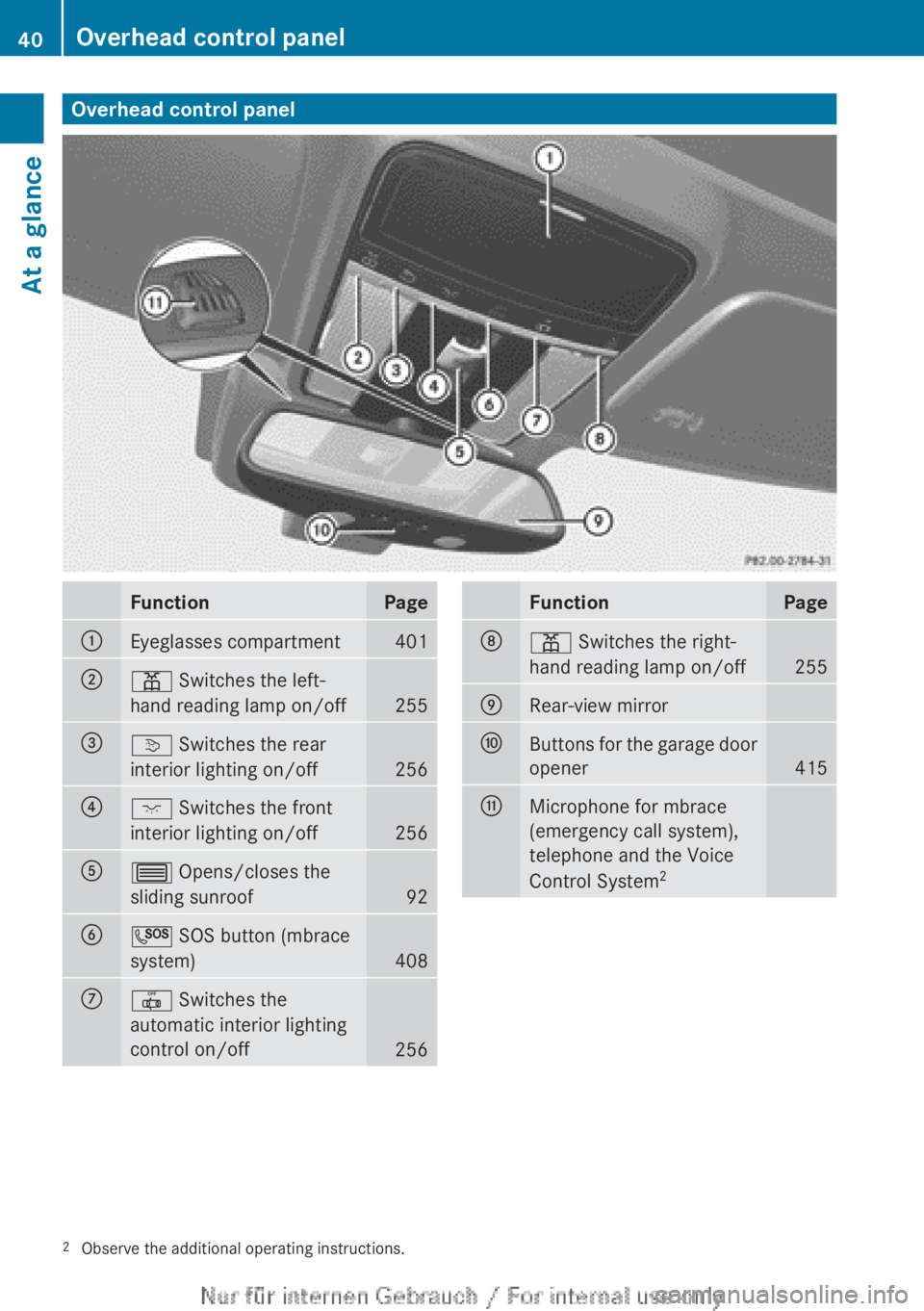
Overhead control panelFunctionPage:Eyeglasses compartment401;p Switches the left-
hand reading lamp on/off
255
=v Switches the rear
interior lighting on/off
256
?c Switches the front
interior lighting on/off
256
A3 Opens/closes the
sliding sunroof
92
BG SOS button (mbrace
system)
408
C| Switches the
automatic interior lighting
control on/off
256
FunctionPageDp Switches the right-
hand reading lamp on/off
255
ERear-view mirrorFButtons for the garage door
opener
415
GMicrophone for mbrace
(emergency call system),
telephone and the Voice
Control System 22
Observe the additional operating instructions.40Overhead control panelAt a glance
Page 57 of 496
PRE-SAFE®
(anticipatory occupant
protection system)GWARNING
The PRE-SAFE ®
system reduces the impact of
an accident on vehicle occupants, as long as
their seat belts have been fastened correctly.
Although your vehicle is equipped with a PRE-
SAFE ®
system, the possibility of injury in the
event of an accident cannot be ruled out. You
should therefore always drive carefully and
adapt your driving style to the prevailing road,
weather and traffic conditions.
PRE-SAFE ®
takes preemptive measures to
protect occupants in certain hazardous
situations.
PRE-SAFE ®
intervenes:
R if BAS PLUS intervenes powerfully on
vehicles with DISTRONIC PLUS
R in critical driving situations, e.g. when
physical limits are exceeded and the
vehicle understeers or oversteers severely
PRE-SAFE ®
takes the following measures
depending on the hazardous situation
detected:
R the front-passenger seat is adjusted if it is
in an unfavorable position.
R the air pressure in the side bolsters of the
seat cushion and seat backrest of the front
active multicontour seats is increased.
R if the vehicle skids, the side windows and
sliding sunroof are closed so that only a
small gap remains.
If the hazardous situation passes without
resulting in an accident:
R the air pressure in the side bolsters of the
active multicontour seat is reduced again.
R all settings made by PRE-SAFE ®
can then
be reversed.
If the seat belts are not released:XMove the backrest back slightly, but only
when the vehicle is stationary.
The belt pretensioning is reduced and the
locking mechanism is released.GWARNING
Make sure that nobody can become trapped
as you adjust the seat.
! Make sure that there are no objects in the
footwell or behind the seats when resetting
the seats. There is a risk that the seats
and/or the objects could be damaged.
Seat belts
Important safety notes
The use of seat belts and infant and child
restraint systems is required by law in all 50
states, the District of Columbia, the U.S.
territories and all Canadian provinces.
Even where this is not the case, all vehicle
occupants should have their seat belts
fastened when the vehicle is in motion.
i For further information on infants and
children traveling in the vehicle and on
infant and child restraint systems, see
"Children in the vehicle" ( Y page 59).
GWARNING
Always fasten your seat belt before driving off.
Always make sure all of your passengers are
properly restrained. You and your passengers
should always wear seat belts.
Failure to wear and properly fasten and
position your seat belt greatly increases your
risk of injuries and their likely severity in an
accident.
If you are ever in an accident, your injuries can
be considerably more severe without your
seat belt properly buckled. Without your seat
belt buckled, you are much more likely to hit
the interior of the vehicle or be ejected from
it. You can be seriously injured or killed.
Occupant safety55SafetyZ
Page 75 of 496

Vehicle equipment ..............................74
SmartKey ............................................. 74
Doors .................................................... 81
Trunk .................................................... 84
Side windows ...................................... 88
Sliding sunroof .................................... 9173Opening and closing
Page 91 of 496

Opening and closing the side
windows:Front left;Front right=Rear right?Rear left
The switches for all side windows are located
on the driver's door. There is also a switch on
the front-passenger door as well as on the
doors in the rear compartment on the left and
right-hand sides for the respective side
window.
i It is not possible to operate the door
windows from the rear compartment when
the override feature is activated for the
door windows.
XTurn the SmartKey to position 1 in the
ignition lock.XTo open: press the corresponding switch.XTo close: pull the corresponding switch.
i
You can start automatic operation when
opening and closing the front door windows
and when opening the rear door windows.
To do so, briefly press or pull the switch to
just beyond the point of resistance in the
relevant direction. You can stop automatic
operation by pressing or pulling again.
i You can continue to operate the side
windows after you switch off the engine.
This function remains active for five
minutes or until one of the doors is opened.
Convenience opening
You can ventilate the vehicle before you start
driving. To do this, you can use the SmartKey
to simultaneously:
R open the side windows
R open the sliding sunroof
R switch on the seat ventilation of the driver's
seat
i The convenience opening feature can
only be operated using the SmartKey. The
SmartKey must be close to the driver's
door handle.XPoint the tip of the SmartKey at the driver's
door handle.XUnlock the vehicle by pressing the %
button.XPress and hold the % button until the
side windows and the sliding sunroof are in
the desired position.XTo interrupt the convenience opening:
release the % button.
Convenience closing feature
General notes
When you lock the vehicle, you can
simultaneously:
R close the side windows
R close the sliding sunroof
GWARNING
When closing the door windows and the
sliding sunroof, make sure that there is no
danger of anyone being harmed by the closing
procedure.
If potential danger exists, proceed as follows:
R Release the & button to stop the closing
procedure. To open, press and hold the
% button. To continue the closing
procedure after making sure that there is
no danger of anyone being harmed by the
Side windows89Opening and closingZ
Page 92 of 496

closing procedure, press and hold the
& button.
Vehicles with KEYLESS-GO:
R Release the sensor surface on the outside
door handle to stop the closing procedure.
R Immediately pull on the same outside door
handle and hold firmly. The door windows
and the sliding sunroof will open for as long
as the door handle is held but the door is
not opened.
Using the SmartKey
i The SmartKey must be close to the
driver's door handle.
XPoint the tip of the SmartKey at the driver's
door handle.XLock the vehicle by pressing the &
button.XPress and hold the & button until the
side windows and the sliding sunroof are
fully closed.XMake sure that all the side windows and the
sliding sunroof are closed.XTo interrupt the convenience closing:
release the & button.
Using KEYLESS-GO
The KEYLESS-GO key must be outside the
vehicle but must not be further than 3 ft (1 m)
from a door.
XClose all the doors.XTouch sensor surface : on the door
handle until the side windows and the
sliding sunroof are fully closed.
i Make sure you only touch sensor
surface :.
XMake sure that all the side windows and the
sliding sunroof are closed.XTo interrupt convenience closing:
release sensor surface : on the door
handle.
Resetting the side windows
You must reset each side window if:
R the front side window does not close
automatically.
R the side window reopens slightly after
having been closed manually.
XClose all the doors.XTurn the SmartKey to position 1 in the
ignition lock.XPull the corresponding switch on the door
control panel until the side window is
completely closed ( Y page 89).XHold the switch for an additional second.
If the side window opens again slightly:
XImmediately pull the corresponding switch
on the door control panel until the side
window is completely closed ( Y page 89).XHold the switch for an additional second.XIf the respective side window remains
closed after the button is released, then it
has been set correctly. If this is not the
case, repeat the previously described
steps.90Side windowsOpening and closing
Page 93 of 496
Problems with the side windows
Problem: a side window cannot be closed
because an object is obstructing the side
window.XRemove the object(s).XClose the side window.
Problem: a side window cannot be closed,
and you cannot see the cause.
GWARNING
Closing the side windows with increased force
or without the anti-entrapment feature could
lead to serious or even fatal injury. Make sure
that nobody can become trapped when
closing the side windows.
If a side window is obstructed during closing
and reopens again slightly:
XImmediately after the window blocks, pull
the corresponding switch again until the
side window has closed.
The side window is closed with increased
force.
If a side window is obstructed again during
closing and reopens again slightly:
XImmediately after the window blocks, pull
the corresponding switch again until the
side window has closed.
The side window is closed without the anti-
entrapment feature.GWARNING
Pulling and holding the switch to close the
window immediately after it had been blocked
two times will cause the window to close
without the anti-entrapment feature for as
long as you hold the switch.
Sliding sunroof
Important safety notes
GWARNING
When leaving the vehicle, always remove the
SmartKey from the ignition lock. Always take
the SmartKey with you and lock the vehicle.
Do not leave children unsupervised in the
vehicle, even if they are secured in a child
restraint system, and do not give them access
to an unlocked vehicle. A child's unsupervised
access to a vehicle could result in an accident
and/or serious personal injury. They could:
R injure themselves on vehicle parts
R be seriously or fatally injured by extreme
heat or cold
R injure themselves or have an accident with
vehicle equipment that may still be in
operation even after the SmartKey has
been removed from the ignition, such as the
seat adjustment, steering wheel
adjustment or memory function.
If children open a door, they could cause
severe or even fatal injury to other persons; if
they get out of the vehicle, they could injure
themselves when doing so or be seriously or
even fatally injured by any passing traffic.
Do not expose the child restraint system to
direct sunlight. The child restraint system's
metal parts, for example, could become very
hot, and a child could be burned on these
parts.
GWARNING
Do not carry heavy or hard objects in the
passenger compartment unless they are
firmly secured in place.
Unsecured or improperly positioned cargo
increases a child's risk of injury in the event
of:
R strong braking maneuvers
R sudden changes of direction
R an accident
Sliding sunroof91Opening and closingZ
Page 94 of 496

GWARNING
When opening or closing the sliding sunroof,
make sure that there is no danger of anyone
being harmed by the opening/closing
procedure.
The sliding sunroof is equipped with
automatic operation and the anti-entrapment
feature. If the movement of the sliding sunroof
is blocked during the closing procedure, the
sliding sunroof will stop and open slightly.
The sliding sunroof operates differently when
the sliding sunroof switch is pressed and held.
See the "Problems with the sliding sunroof"
section for more details.
The opening/closing procedure of the sliding
sunroof can be immediately halted by
releasing the sliding sunroof switch or, if the
sliding sunroof switch was moved past the
resistance point and released, by moving the
sliding sunroof switch in any direction.
GWARNING
The sliding sunroof is made out of glass. In the
event of an accident, the glass may shatter.
This may result in an opening in the roof.
In a vehicle rollover, occupants not wearing
their seat belts or not wearing them properly
may be thrown out of the opening. Such an
opening also presents a potential for injury for
occupants wearing their seat belts properly,
as entire body parts or portions of them may
protrude from the passenger compartment.
! Only open the sliding sunroof if it is free
of snow and ice. Otherwise, malfunctions
may occur.
Do not allow anything to protrude from the
sliding sunroof. Otherwise, the seals could
be damaged.
! If the sliding sunroof cannot be opened or
closed due to a malfunction, contact a
qualified specialist workshop, e.g. an
authorized Mercedes-Benz Center.
! Do not forget that the weather can
change abruptly. Make certain that the
sliding sunroof is closed when you leave the
vehicle. The vehicle electronics can be
damaged if water enters the vehicle
interior.
i Resonance noises can occur in addition
to the usual airflow noises when the sliding
sunroof is open. They are caused by minor
pressure fluctuations in the vehicle interior.
Change the position of the sliding sunroof
or open a side window slightly to reduce or
eliminate these noises.
Operating the sliding sunroof
Opening and closing
i You can continue to operate the sliding
sunroof after switching off the engine or
removing the SmartKey from the ignition.
This function remains active for five
minutes or until one of the front doors is
opened.
Overhead control panel
:To raise;To open=To closeXTurn the SmartKey to position 2 in the
ignition lock.XPush or pull the 3 switch in the
corresponding direction.
i If you press the 3 switch beyond the
point of resistance, an automatic opening/
closing process is started in the
92Sliding sunroofOpening and closing
Page 95 of 496

corresponding direction. You can stop
automatic operation by pressing again.
Automatic raising is only available when the
sliding sunroof is closed.
Automatic opening is only available when
the sliding sunroof is not raised.
You can open or close the sun protection
cover by hand when the sliding sunroof is
raised or closed.
Resetting
Reset the sliding sunroof if it does not open
smoothly.
! If the sliding sunroof cannot be closed
fully or reset, consult a qualified specialist
workshop.
XTurn the SmartKey to position 2 in the
ignition lock.XRaise the sliding sunroof fully at the rear
( Y page 92).XKeep the 3 switch pressed for another
second.XMake sure that the sliding sunroof can be
opened or closed fully again when operated
automatically ( Y page 92).XIf the sliding sunroof can be raised fully at
the rear, it has been reset correctly. If this
is not the case, repeat the steps above
again.
Problems with the sliding sunroof
Problem: the sunroof cannot be closed
and you cannot see the cause.
GWARNING
You could be severely or even fatally injured
when closing the sliding sunroof with
increased closing force or if the anti-
entrapment feature is deactivated. Make sure
that nobody can become trapped when
closing the sliding sunroof.
If the sliding sunroof is obstructed during
closing and reopens again slightly:XImmediately after the sliding sunroof
blocks, pull the 3 switch in the
overhead control panel down to the point
of resistance and hold it until the sliding
sunroof is closed.
The sliding sunroof is closed with increased
force.
If the sliding sunroof is obstructed again
during closing and then reopens slightly:
XImmediately after the sliding sunroof
blocks, pull the 3 switch in the
overhead control panel down to the point
of resistance and hold it until the sliding
sunroof is closed.
The sliding sunroof is closed without the
anti-entrapment feature.GWARNING
Pressing and holding the sliding sunroof
switch to close the sliding sunroof
immediately after it had been blocked two
times will cause the sliding sunroof to close
without the anti-entrapment feature for as
long as you hold the switch.
Sliding sunroof93Opening and closingZ