bluetooth MERCEDES-BENZ CL COUPE 2009 User Guide
[x] Cancel search | Manufacturer: MERCEDES-BENZ, Model Year: 2009, Model line: CL COUPE, Model: MERCEDES-BENZ CL COUPE 2009Pages: 421, PDF Size: 10.78 MB
Page 112 of 421
The mobile phone is connected to COMAND
(authorised). You can now phone using the
COMAND hands-free system.
External authorisation
If COMAND does not detect your mobile
phone, this may be due to particular security
settings on your mobile phone. In this case,
you can test if your mobile phone can find
COMAND. COMAND's Bluetooth ®
device
name is MB Bluetooth.
X Select Data/connectionsQBlue‐
tooth telephones .
X Go to Update and select Options
QExternal authorisation.
X Start the Bluetooth ®
search on the mobile
phone – see mobile phone operating
instructions.
X Select MB Bluetooth on the mobile phone.
X Input the passcode in COMAND when
requested to and then enter it on the
mobile phone ( Ypage 108).
Displaying details
There is a display showing the details for each
mobile phone in the Bluetooth ®
telephones
list.
X Select Data/connectionsQBlue‐
tooth telephones .
X Select the mobile phone from the list and
select Options QDetails.
The following information concerning the
selected mobile phone is shown:
R Bluetooth ®
name
R Bluetooth ®
address
R availability
R authorisation
R Bluetooth ®
class (e.g. telephone, note-
book)
X To close the display showing the
details: slideXVY. De-registering (de-authorising) a mobile
phone
X
Select Data/connectionsQBlue‐
tooth telephones .
X Select the mobile phone from the list and
select Options QDe-authorise.
A prompt appears asking whether you
really wish to revoke authorisation for this
device.
X Select Yes.
i Before reauthorising the mobile phone,
also delete the MB Bluetooth device
names from the Bluetooth ®
list on the
mobile phone.
Connecting another mobile phone
If you have authorised several mobile phones,
you can switch between the individual
phones.
i You can only switch to another authorised
mobile phone if no phone call is active.
X Select Data/connectionsQBlue‐
tooth telephones .
X Select the mobile phone from the Blue-
tooth ®
telephones list.
X Confirm your selection.
If the selected mobile phone is within Blue-
tooth ®
range and Bluetooth ®
is activated,
a search is started and the phone is con-
nected.
Only one mobile phone can be connected
at any one time. The currently connected
mobile phone is indicated by the #dot in
the Bluetooth ®
telephones list
(Y page 108).
Telephone basic menu (Bluetooth ®
interface) If the mobile phone is ready for use, the fol-
lowing display appears: Telephone*
109COMAND
* optional
216_AKB; 2; 3, en-GB
bjanott,
Version: 2.11.7.7 2009-02-27T14:54:17+01:00 - Seite 109 Z
Dateiname: 6515230602_buchblock.pdf; erzeugt am 04. Mar 2009 11:15:06; WK
Page 113 of 421
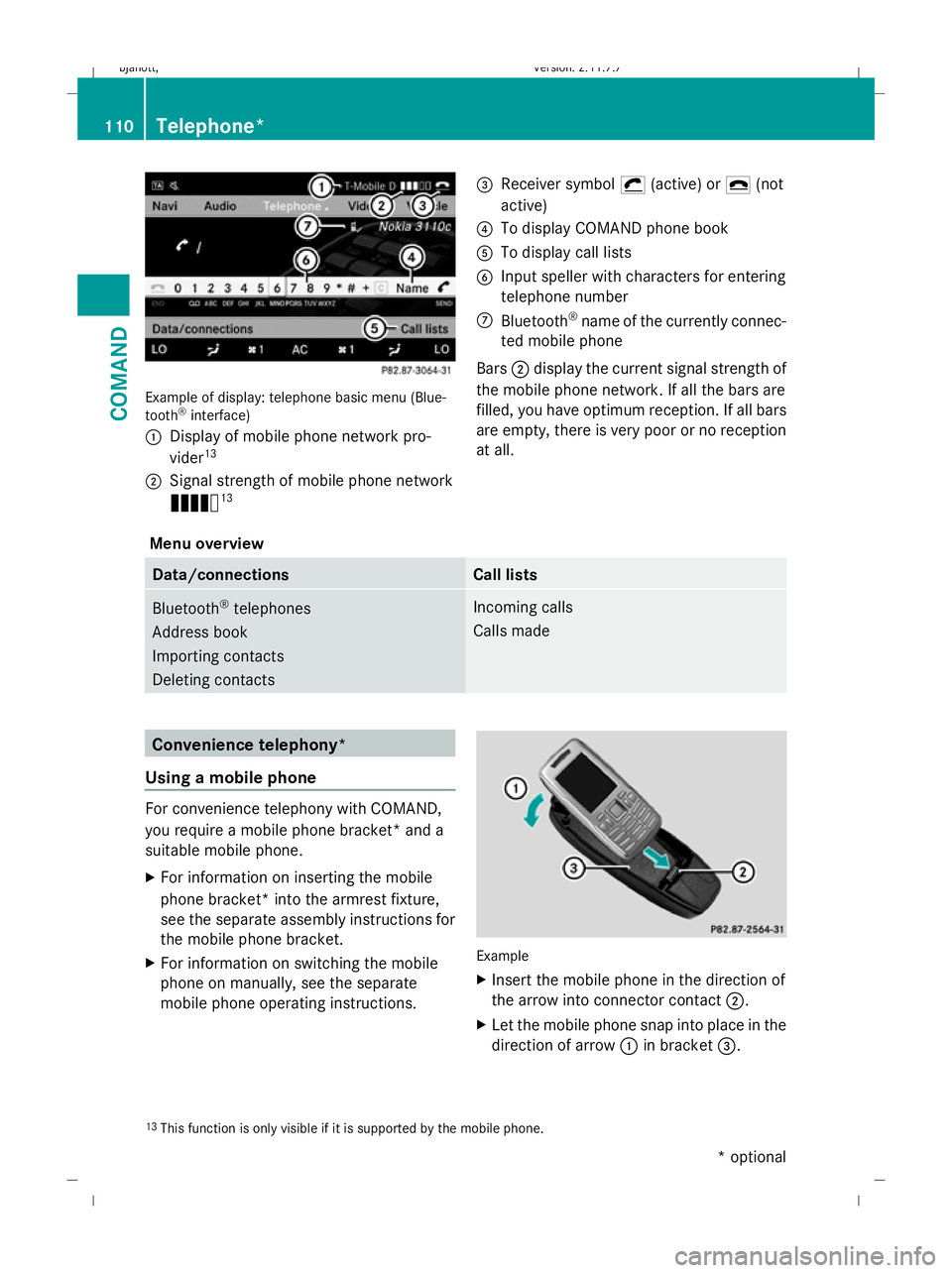
Example of display: telephone basic menu (Blue-
tooth ®
interface)
: Display of mobile phone network pro-
vider 13
; Signal strength of mobile phone network
Ä 13 =
Receiver symbol ¡(active) or ¢(not
active)
? To display COMAND phone book
A To display call lists
B Input speller with characters for entering
telephone number
C Bluetooth ®
name of the currently connec-
ted mobile phone
Bars ;display the current signal strength of
the mobile phone network. If all the bars are
filled, you have optimum reception. If all bars
are empty, there is very poor or no reception
at all.
Menu overview Data/connections Call lists
Bluetooth
®
telephones
Address book
Importing contacts
Deleting contacts Incoming calls
Calls made
Convenience telephony*
Using a mobile phone For convenience telephony with COMAND,
you require a mobile phone bracket* and a
suitable mobile phone.
X For information on inserting the mobile
phone bracket* into the armrest fixture,
see the separate assembly instructions for
the mobile phone bracket.
X For information on switching the mobile
phone on manually, see the separate
mobile phone operating instructions. Example
X
Insert the mobile phone in the direction of
the arrow into connector contact ;.
X Let the mobile phone snap into place in the
direction of arrow :in bracket =.
13 This function is only visible if it is supported by the mobile phone. 110
Telephone*COMAND
* optional
216_AKB; 2; 3, en-GB
bjanott,
Version: 2.11.7.7 2009-02-27T14:54:17+01:00 - Seite 110
Dateiname: 6515230602_buchblock.pdf; erzeugt am 04. Mar 2009 11:15:07; WK
Page 114 of 421
Connecting a mobile phone
X
If the Bluetooth ®
interface is being
used for telephony: switch to the "Tele-
phone" menu, e.g. by pressing S.
X Select TelephoneQData/connec‐
tionsQBluetooth tele‐
phonesQConvenience telephony.
Telephone basic menu for convenience
telephony When the mobile phone is in the mobile phone
bracket* and operational, the following dis-
play is shown: Example display: telephone basic menu, conveni-
ence telephony
:
Received text message (SMS) symbol
0
; Mobile phone network provider
= Signal strength of mobile phone network
Ä ?
Receiver symbol ¡(active) or ¢(not
active)
A To display COMAND phone book
B To display call lists
C SMS menu
D Input speller for entering telephone num-
ber
E Convenience telephony display
Bars =display the current signal strength of
the mobile phone network. If all the bars are
filled, you have optimum reception. If all bars
are empty, there is very poor or no reception
at all.
Receiver symbol ?shows whether or not a
call is in progress or is being currently con-
nected.
The 0 symbol is displayed if you have an
unread text message. The symbol disappears
once you have read the text message. The
ú mail symbol is displayed when the text
message memory is full. The symbol disap-
pears once you delete at least one text mes-
sage.
The text message menu is available if this
function is supported by the convenience
telephone and bracket*. The text message
inbox is not available until all text messages
have been downloaded from the convenience
telephone. The Text message menu is not dis-
played during telephone calls using the Blue-
tooth ®
interface.
Menu overview Data/connections Text message
(SMS) Call lists
Bluetooth telephones
Address book
Importing contacts
Deleting contacts Inbox
New
Drafts
Outbox Incoming calls
Dialled calls Telephone*
111COMAND
* optional
216_AKB; 2; 3, en-GB
bjanott
,V ersion: 2.11.7.7
2009-02-27T14:54:17+01:00 - Seite 111 Z
Dateiname: 6515230602_buchblock.pdf; erzeugt am 04. Mar 2009 11:15:07; WK
Page 115 of 421
Changing between Bluetooth
®
and
convenience telephony*
If your vehicle is equipped with convenience
telephony*, you can switch between teleph-
ony types. If you want to use another mobile
phone, you will first need to connect it
(Y page 107).
Switching telephony type during opera-
tion During operation, you can switch from one
telephony type to another by connecting
another mobile phone or by making a selec-
tion from the list.
Switching telephony type when switch-
ing on By default, COMAND performs the following
actions when it is switched on:
Mobile phone is inserted in mobile phone
bracket*
COMAND starts convenience telephony*.
If no mobile phone is inserted in the mobile
phone bracket*, the following message
appears: Telephone not inserted . This is
followed by a prompt asking you whether you
wish to switch to Bluetooth ®
telephony. If you
confirm by selecting Yes, theReady for
Bluetooth telephony... message will
appear. COMAND will search for the two
mobile phones last connected via the Blue-
tooth ®
interface. If one of the two mobile
phones is found, the telephone basic menu
for Bluetooth ®
telephony (Y page 109)
appears. If neither of the two mobile phones
is found, the Ready for Bluetooth tel‐
ephony... message remains on the display.
You now have to register your mobile phone
(Y page 107).
If there is a mobile phone in the bracket*, the
telephone basic menu for convenience tel-
ephony* (Y page 111) appears. No mobile phone is inserted in mobile
phone bracket*
COMAND starts telephony via the Blue-
tooth
®
interface and searches for the last two
mobile phones to have been connected via
the Bluetooth ®
interface. If one of the two
mobile phones is found, the telephone basic
menu for Bluetooth ®
telephony
(Y page 109) appears. If neither of the two
mobile phones is found, the Ready for
Bluetooth telephony... message
remains on the display. You now have to reg-
ister your mobile phone (Y page 107).
i The Bluetooth ®
connection to the mobile
phone remains active until the next time
COMAND is switched off if you do not con-
nect a different mobile phone via the phone
list. Reception and transmission volume
The following information is valid for Blue-
tooth ®
interface telephony and convenience
telephony*.
Incorrect reception and transmission volume
settings may result in serious impairment of
speech quality.
You can therefore optimise the settings. Find
out about the optimum setting for your mobile
phone from your Mercedes-Benz Service
Centre or on the Internet at
www.mercedes-benz.com.
X Select Data/connections QBlue‐
tooth telephones.
X Once the desired mobile phone has been
selected:
Select Options QReception volume or
Transmission volume.
i The Reception volume andTransmis‐
sion volume options only appear when
the selected mobile phone is authorised. 112
Telephone*COMAND
* optional
216_AKB; 2; 3, en-GB
bjanott
,V ersion: 2.11.7.7
2009-02-27T14:54:17+01:00 - Seite 112
Dateiname: 6515230602_buchblock.pdf; erzeugt am 04. Mar 2009 11:15:07; WK
Page 122 of 421
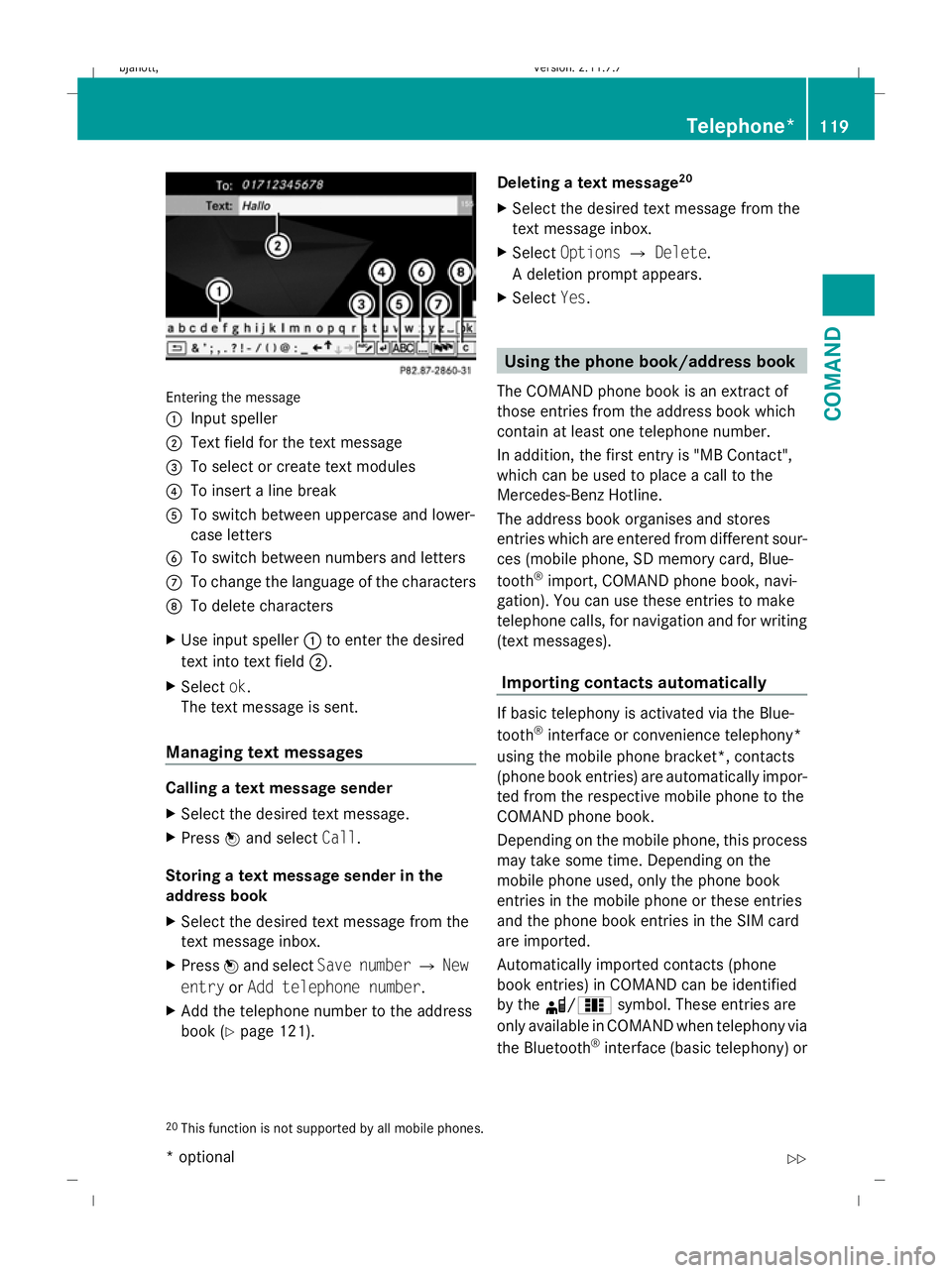
Entering the message
: Input speller
; Text field for the text message
= To select or create text modules
? To insert a line break
A To switch between uppercase and lower-
case letters
B To switch between numbers and letters
C To change the language of the characters
D To delete characters
X Use input speller :to enter the desired
text into text field ;.
X Select ok.
The text message is sent.
Managing text messages Calling a text message sender
X
Select the desired text message.
X Press Wand select Call.
Storing a text message sender in the
address book
X Select the desired text message from the
text message inbox.
X Press Wand select Save number QNew
entry orAdd telephone number .
X Add the telephone number to the address
book (Y page 121). Deleting a text message
20
X Select the desired text message from the
text message inbox.
X Select Options QDelete .
A deletion prompt appears.
X Select Yes. Using the phone book/address book
The COMAND phone book is an extract of
those entries from the address book which
contain at least one telephone number.
In addition, the first entry is "MB Contact",
which can be used to place a call to the
Mercedes-Benz Hotline.
The address book organises and stores
entries which are entered from different sour-
ces (mobile phone, SD memory card, Blue-
tooth ®
import, COMAND phone book, navi-
gation). You can use these entries to make
telephone calls, for navigation and for writing
(text messages).
Importing contacts automatically If basic telephony is activated via the Blue-
tooth
®
interface or convenience telephony*
using the mobile phone bracket*, contacts
(phone book entries) are automatically impor-
ted from the respective mobile phone to the
COMAND phone book.
Depending on the mobile phone, this process
may take some time. Depending on the
mobile phone used, only the phone book
entries in the mobile phone or these entries
and the phone book entries in the SIM card
are imported.
Automatically imported contacts (phone
book entries) in COMAND can be identified
by the d/0 symbol. These entries are
only available in COMAND when telephony via
the Bluetooth ®
interface (basic telephony) or
20 This function is not supported by all mobile phones. Telephone*
119COMAND
* optional
216_AKB; 2; 3, en-GB
bjanott,
Version: 2.11.7.7
2009-02-27T14:54:17+01:00 - Seite 119 Z
Dateiname: 6515230602_buchblock.pdf; erzeugt am 04. Mar 2009 11:15:09; WK
Page 123 of 421
using the mobile phone bracket* (conveni-
ence telephony*) is activated.
Importing contacts manually i
Manually imported contacts are always
available. Automatically imported contacts
are available only when basic telephony via
the Bluetooth ®
interface or convenience
telephony* using the mobile phone
bracket* is activated.
You can import existing data manually:
R from the memory card
R via the Bluetooth ®
interface (e.g. Blue-
tooth ®
telephone, Bluetooth ®
PC)
X To import data: load the memory card or
activate Bluetooth ®
in COMAND
(Y page 106) and on the Bluetooth ®
tele-
phone or PC (see operating instructions of
the respective mobile phone/PC).
X Select Data/connectionsQImport
contactsQ From Memory card.
X Select AddorOverwrite .
X To cancel data import: pressW.
or
X Press the %button.
If the data has been imported, the Import
procedure successful message is dis-
played.
If the COMAND phone book memory is full,
this message appears in the display: Mem‐
ory full. Contacts could not be
completely imported. i
If you switch over to another main func-
tion (e.g. navigation) while importing data,
the import will be cancelled. If you switch
to another function while importing vCards
from the memory card, the import will not
be cancelled.
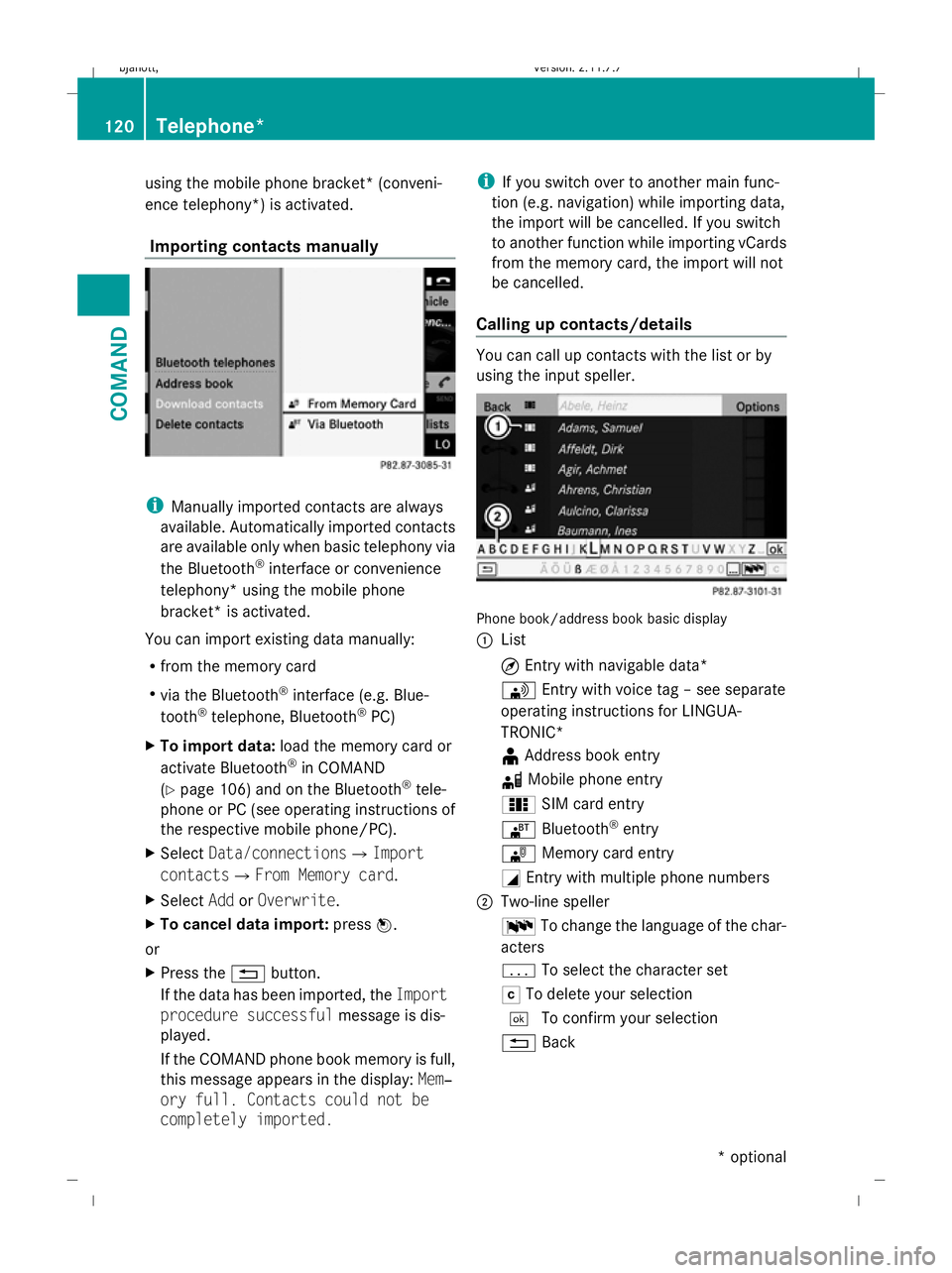
Calling up contacts/details You can call up contacts with the list or by
using the input speller.
Phone book/address book basic display
:
List
¤Entry with navigable data*
\ Entry with voice tag – see separate
operating instructions for LINGUA-
TRONIC*
¥ Address book entry
d Mobile phone entry
0 SIM card entry
® Bluetooth ®
entry
¯ Memory card entry
G Entry with multiple phone numbers
; Two-line speller
B To change the language of the char-
acters
p To select the character set
F To delete your selection
¬ To confirm your selection
% Back 120
Telephone*COMAND
* optional
216_AKB; 2; 3, en-GB
bjanott
,V ersion: 2.11.7.7
2009-02-27T14:54:17+01:00 - Seite 120
Dateiname: 6515230602_buchblock.pdf; erzeugt am 04. Mar 2009 11:15:10; WK
Page 125 of 421
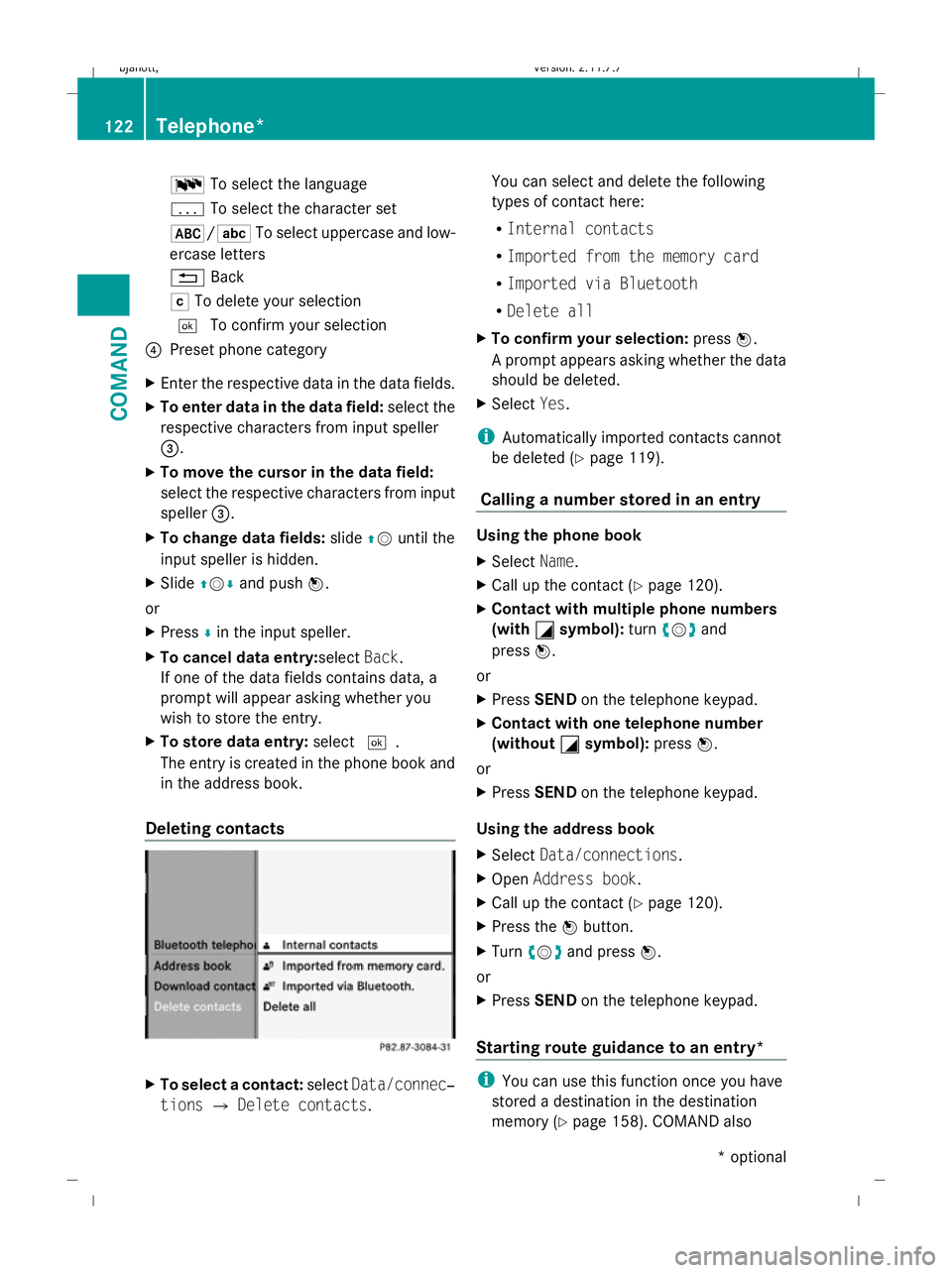
B
To select the language
p To select the character set
*/E To select uppercase and low-
ercase letters
% Back
F To delete your selection
¬ To confirm your selection
? Preset phone category
X Enter the respective data in the data fields.
X To enter data in the data field: select the
respective characters from input speller
=.
X To move the cursor in the data field:
select the respective characters from input
speller =.
X To change data fields: slideZVuntil the
input speller is hidden.
X Slide ZVÆ and push W.
or
X Press Æin the input speller.
X To cancel data entry:select Back.
If one of the data fields contains data, a
prompt will appear asking whether you
wish to store the entry.
X To store data entry: select¬.
The entry is created in the phone book and
in the address book.
Deleting contacts X
To select a contact: selectData/connec‐
tions QDelete contacts. You can select and delete the following
types of contact here:
R
Internal contacts
R Imported from the memory card
R Imported via Bluetooth
R Delete all
X To confirm your selection: pressW.
A prompt appears asking whether the data
should be deleted.
X Select Yes.
i Automatically imported contacts cannot
be deleted (Y page 119).
Calling a number stored in an entry Using the phone book
X
Select Name.
X Call up the contact (Y page 120).
X Contact with multiple phone numbers
(with G
G symbol): turncVd and
press W.
or
X Press SEND on the telephone keypad.
X Contact with one telephone number
(without G
G symbol): pressW.
or
X Press SEND on the telephone keypad.
Using the address book
X Select Data/connections.
X Open Address book.
X Call up the contact (Y page 120).
X Press the Wbutton.
X Turn cVd and press W.
or
X Press SEND on the telephone keypad.
Starting route guidance to an entry* i
You can use this function once you have
stored a destination in the destination
memory (Y page 158). COMAND also 122
Telephone*COMAND
* optional
216_AKB; 2; 3, en-GB
bjanott,
Version: 2.11.7.7 2009-02-27T14:54:17+01:00 - Seite 122
Dateiname: 6515230602_buchblock.pdf; erzeugt am 04. Mar 2009 11:15:10; WK
Page 163 of 421
i
If the navigable address data for the des-
tination being deleted is also assigned to
an address book entry, COMAND will also
delete this data from there. If the corre-
sponding address book entry does not con-
tain any further data, such as telephone
numbers, COMAND deletes the entire
address book entry. Navigation system* (previous desti-
nations) General notes
COMAND automatically stores the previous
destinations for which the route calculation
was launched. If the memory is full, COMAND
deletes the oldest destination.
You can also store one destination from the
list of previous destinations in the destination
memory. It will be stored there permanently. Storing a destination permanently in
the destination memory
X Proceed as described in the "From the list
of previous destinations" section
(Y page 159) Storing the vehicle position in the list
of previous destinations
X To set the map to the vehicle position:
select NaviQPosition QVehicle
position map.
X To save: selectNaviQPosition Q
Save crosshair position. Storing the crosshair position in the
list of previous destinations
i A crosshair appears on the map if you
have moved the map manually. You can
store the crosshair position as a destina-
tion in the list of previous destinations. X
If necessary, display the menu system:
press W.
X Select PositionQSave crosshair
position. Deleting a previous destination
X Select NaviQDestination QFrom
last destinations .
The list of previous destinations appears.
X Select the desired destination.
The address of the destination appears.
X Select Delete. System
Menu overview
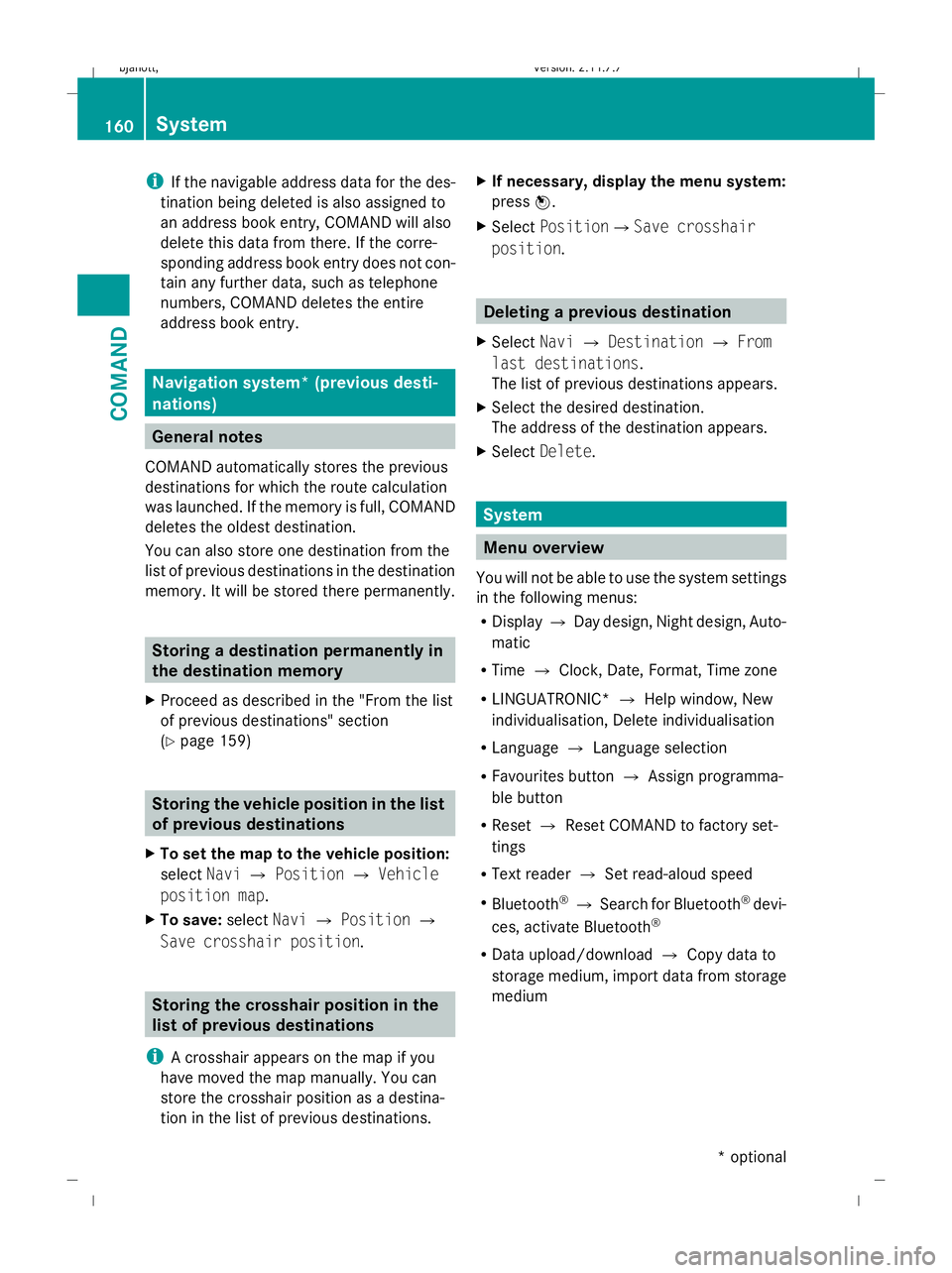
You will not be able to use the system settings
in the following menus:
R Display QDay design, Night design, Auto-
matic
R Time QClock, Date, Format, Time zone
R LINGUATRONIC* QHelp window, New
individualisation, Delete individualisation
R Language QLanguage selection
R Favourites button QAssign programma-
ble button
R Reset QReset COMAND to factory set-
tings
R Text reader QSet read-aloud speed
R Bluetooth ®
Q Search for Bluetooth ®
devi-
ces, activate Bluetooth ®
R Data upload/download QCopy data to
storage medium, import data from storage
medium 160
SystemCOMAND
* optional
216_AKB; 2; 3, en-GB
bjanott,
Version: 2.11.7.7 2009-02-27T14:54:17+01:00 - Seite 160
Dateiname: 6515230602_buchblock.pdf; erzeugt am 04. Mar 2009 11:15:25; WK
Page 225 of 421
=
Top speed during lap
? Lap length
A Average lap speed
X Press the 9or: button to select a
different lap evaluation. Telephone menu*
Functions and displays are dependent on the
optional equipment installed in your vehicle.
You can place your mobile phone in the
mobile phone bracket* (Y page 283) or set
up a Bluetooth connection to COMAND
(Y page 106). G
Risk of accident
Observe the legal requirements of the country
in which you are currently driving regarding
the use of mobile phones in the vehicle.
If it is permitted to use mobile phones while
the vehicle is in motion, you should only use
them when the road and traffic conditions
allow. Otherwise, you may be distracted from
the traffic conditions, cause an accident and
injure yourself and others.
Use the buttons on the multi-function steer-
ing wheel.
X Switch on the mobile phone and COMAND
(Y page 106).
X Press the =or; button to select the
Telephone menu.
Mobile phone on PIN code not yet entered
Once you have inserted the mobile phone into
the mobile phone bracket*, the multi-func-
tion display shows the Please enter PIN
display message.
X Enter the PIN via the mobile phone, Lingua-
tronic* or COMAND.
The mobile phone will search for a network. Mobile phone operational
The multi-function display shows the
Tele‐
phone ready message or the name of the
GSM network provider. If your vehicle is out-
side the transmission and receiver range, the
multi-function display shows the No
service message.
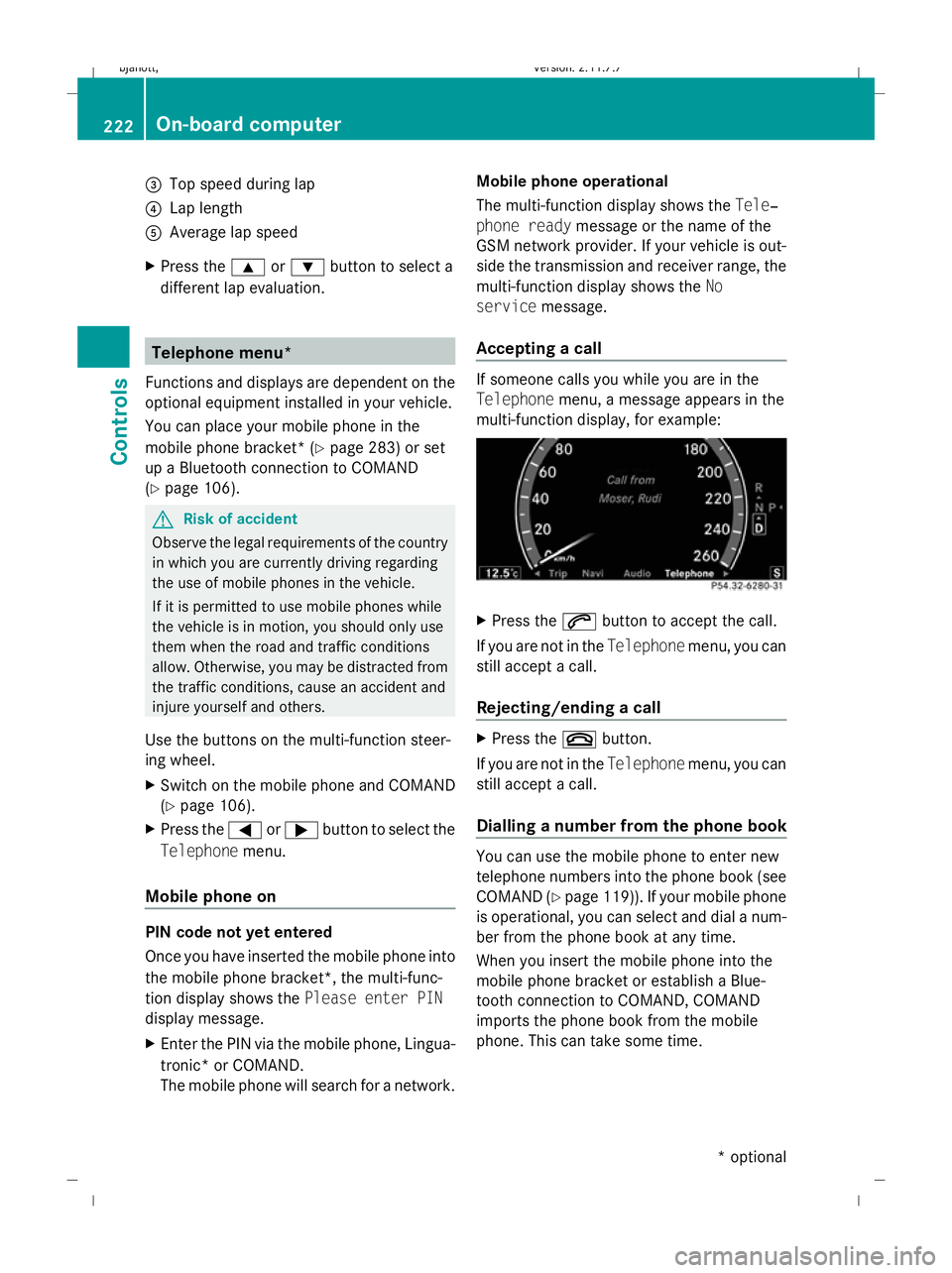
Accepting a call If someone calls you while you are in the
Telephone menu, a message appears in the
multi-function display, for example: X
Press the 6button to accept the call.
If you are not in the Telephonemenu, you can
still accept a call.
Rejecting/ending a call X
Press the ~button.
If you are not in the Telephonemenu, you can
still accept a call.
Dialling a number from the phone book You can use the mobile phone to enter new
telephone numbers into the phone book (see
COMAND (Y page 119)). If your mobile phone
is operational, you can select and dial a num-
ber from the phone book at any time.
When you insert the mobile phone into the
mobile phone bracket or establish a Blue-
tooth connection to COMAND, COMAND
imports the phone book from the mobile
phone. This can take some time. 222
On-board computerControls
* optional
216_AKB; 2; 3, en-GB
bjanott,
Version: 2.11.7.7 2009-02-27T14:54:17+01:00 - Seite 222
Dateiname: 6515230602_buchblock.pdf; erzeugt am 04. Mar 2009 11:15:54; WK