navigation system MERCEDES-BENZ CL COUPE 2009 User Guide
[x] Cancel search | Manufacturer: MERCEDES-BENZ, Model Year: 2009, Model line: CL COUPE, Model: MERCEDES-BENZ CL COUPE 2009Pages: 421, PDF Size: 10.78 MB
Page 66 of 421
i
When the audio output is switched off, the
status line will show the 8symbol. If
you switch the audio or video source, the
audio output is automatically activated.
You will still hear traffic announcements
and navigation system announcements*,
even if the sound is muted.
Muting traffic and navigation announce-
ments*
X RDS: press and hold the 8button on
the multi-function steering wheel until the
TA display switches off.
X Navigation announcements: during an
announcement, press the 8button on
the multi-function steering wheel.
i The announcements remain switched
off even if you start a new route guidance
or if COMAND is switched off and on with
the u button. They will be switched on
again under the following conditions: if you
switch COMAND off by removing the key
from the ignition lock and then switch the
ignition back on after more than 3 minutes.
Adjusting the volume X
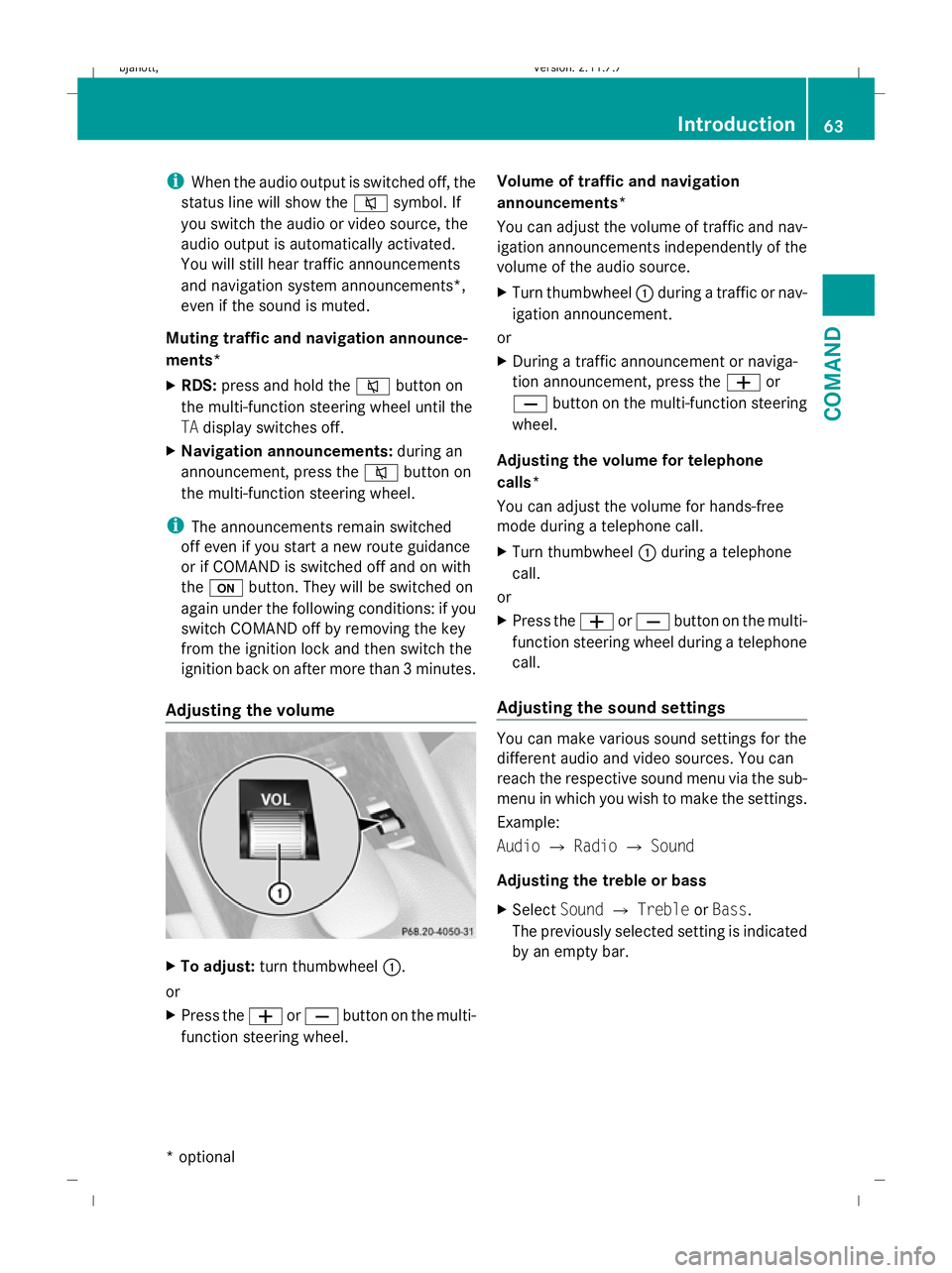
To adjust: turn thumbwheel :.
or
X Press the WorX button on the multi-
function steering wheel. Volume of traffic and navigation
announcements*
You can adjust the volume of traffic and nav-
igation announcements independently of the
volume of the audio source.
X
Turn thumbwheel :during a traffic or nav-
igation announcement.
or
X During a traffic announcement or naviga-
tion announcement, press the Wor
X button on the multi-function steering
wheel.
Adjusting the volume for telephone
calls*
You can adjust the volume for hands-free
mode during a telephone call.
X Turn thumbwheel :during a telephone
call.
or
X Press the WorX button on the multi-
function steering wheel during a telephone
call.
Adjusting the sound settings You can make various sound settings for the
different audio and video sources. You can
reach the respective sound menu via the sub-
menu in which you wish to make the settings.
Example:
Audio
QRadio QSound
Adjusting the treble or bass
X Select SoundQTreble orBass.
The previously selected setting is indicated
by an empty bar. Introduction
63COMAND
* optional
216_AKB; 2; 3, en-GB
bjanott,
Version: 2.11.7.7 2009-02-27T14:54:17+01:00 - Seite 63 Z
Dateiname: 6515230602_buchblock.pdf; erzeugt am 04. Mar 2009 11:14:54; WK
Page 93 of 421
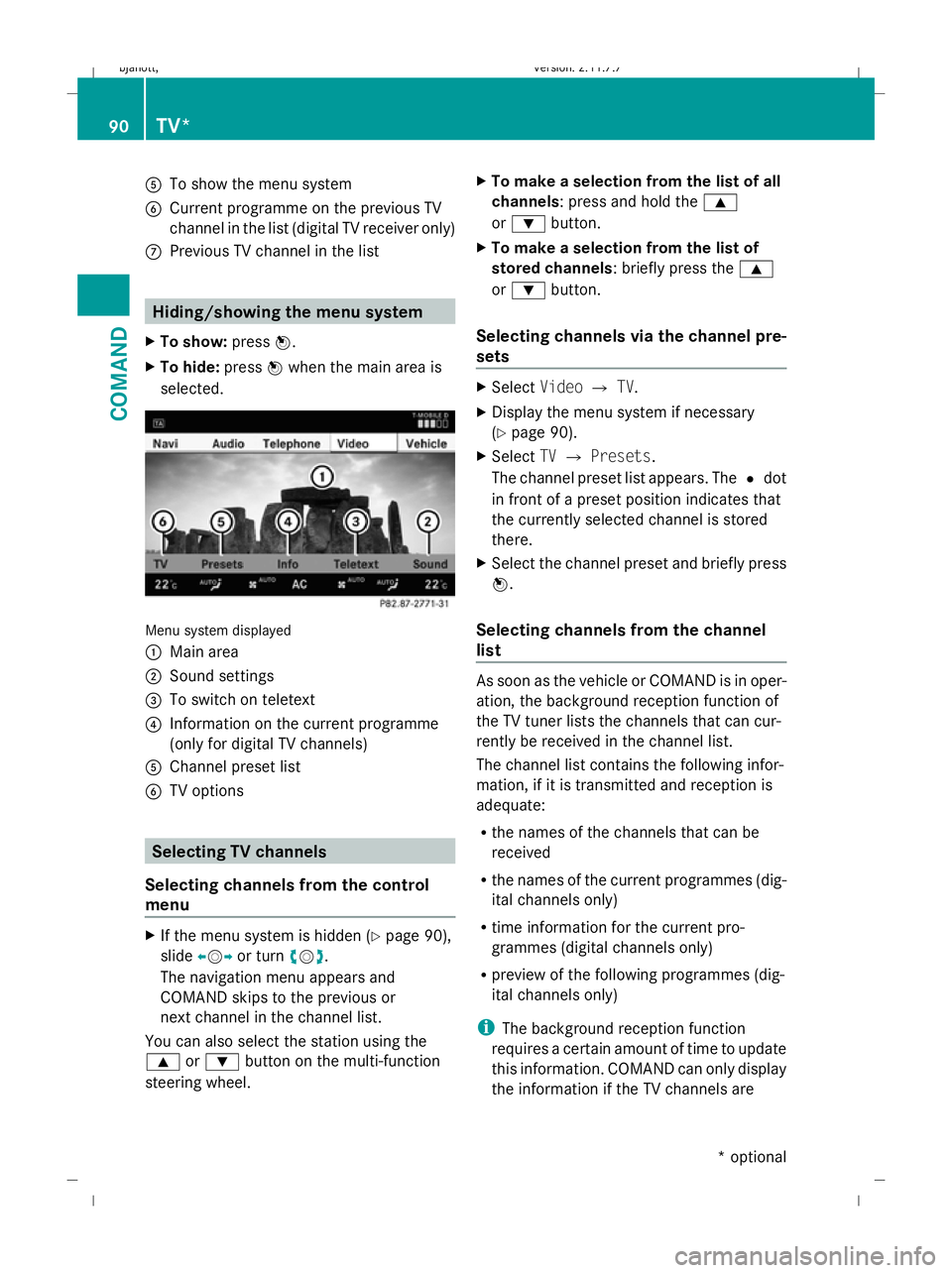
A
To show the menu system
B Current programme on the previous TV
channel in the list (digital TV receiver only)
C Previous TV channel in the list Hiding/showing the menu system
X To show: pressW.
X To hide: pressWwhen the main area is
selected. Menu system displayed
:
Main area
; Sound settings
= To switch on teletext
? Information on the current programme
(only for digital TV channels)
A Channel preset list
B TV options Selecting TV channels
Selecting channels from the control
menu X
If the menu system is hidden (Y page 90),
slide XVY or turn cVd.
The navigation menu appears and
COMAND skips to the previous or
next channel in the channel list.
You can also select the station using the
9 or: button on the multi-function
steering wheel. X
To make a selection from the list of all
channels: press and hold the 9
or : button.
X To make a selection from the list of
stored channels: briefly press the 9
or : button.
Selecting channels via the channel pre-
sets X
Select VideoQTV.
X Display the menu system if necessary
(Y page 90).
X Select TVQ Presets.
The channel preset list appears. The #dot
in front of a preset position indicates that
the currently selected channel is stored
there.
X Select the channel preset and briefly press
W.
Selecting channels from the channel
list As soon as the vehicle or COMAND is in oper-
ation, the background reception function of
the TV tuner lists the channels that can cur-
rently be received in the channel list.
The channel list contains the following infor-
mation, if it is transmitted and reception is
adequate:
R
the names of the channels that can be
received
R the names of the current programmes (dig-
ital channels only)
R time information for the current pro-
grammes (digital channels only)
R preview of the following programmes (dig-
ital channels only)
i The background reception function
requires a certain amount of time to update
this information. COMAND can only display
the information if the TV channels are 90
TV*COMAND
* optional
216_AKB; 2; 3, en-GB
bjanott,
Version: 2.11.7.7 2009-02-27T14:54:17+01:00 - Seite 90
Dateiname: 6515230602_buchblock.pdf; erzeugt am 04. Mar 2009 11:15:02; WK
Page 128 of 421
?
Data field for telephone number (filled in
automatically)
A Two-line speller
X For the following steps, follow the instruc-
tions as described in the "Add new contact"
section ( Ypage 121):
R switching the data field
R entering data
R deleting an entry
R cancelling an entry
R storing an entry
Adding to an existing entry in the address
book
X Open a call list.
X Select the list entry.
X Select OptionsQ Save number .
X Select Addto add an entry.
X Select a number category, e.g. Home.
X Select a telephone category, e.g. Mobile.
X Select Next (save) .
The search menu for address book entries
appears.
X Search for the desired entry (Y page 120).
X Once the search is completed, confirm the
selection.
COMAND stores the data if there are fewer
than five numbers assigned to the entry you
are searching for in the selected number
category.
You will see a message to this effect.
If five numbers are stored for the entry you
are searching for, a prompt will appear ask-
ing whether you wish to overwrite one of
the existing numbers.
X Select YesorNo. X
Confirm your selection.
If you select Yes, a selection list with the
five existing numbers is displayed.
X Select the number to be overwritten.
COMAND overwrites the selected number
with the new data. Navigation system* (introduction)
Safety notes
G
Risk of accident
For safety reasons, only enter a new destina-
tion when the vehicle is stationary.
COMAND calculates the route to the destina-
tion without taking account of the following,
for example:
R traffic lights
R stop and give way signs
R parking or stopping restrictions
R lane narrowing
R other road and traffic controls and regula-
tions
For this reason, you must always observe the
respective road and traffic rules and regula-
tions during your journey. Road and traffic
controls and regulations always have priority
over the navigation announcements gener-
ated by the system. General notes
Operational readiness of the navigation
system In vehicles for certain countries, the naviga-
tion system is not operational immediately
after delivery because the map software is
not pre-installed there.
If this is the case, you will see the following
message when you switch to navigation
mode:
The map software must be
installed. Please insert the DVD
containing the map software. Navigation system* (introduction)
125COMAND
* optional
216_AKB; 2; 3, en-GB
bjanott,
Version: 2.11.7.7 2009-02-27T14:54:17+01:00 - Seite 125 Z
Dateiname: 6515230602_buchblock.pdf; erzeugt am 04. Mar 2009 11:15:11; WK
Page 129 of 421
X
To install software: (Ypage 132).
i Do not cancel the installation process. If
you cancel the installation process, the
navigation system will not be operational.
GPS reception Amongst other things, correct functioning of
the navigation system depends on GPS recep-
tion. In certain situations, GPS reception may
be impaired, there may be interference or
there may be no reception at all, e.g. in tun-
nels, in multi-storey car parks or due to snow
on the GPS aerial. Remove any snow from the
GPS aerial. The GPS aerial is on the roof at
the rear.
Route guidance after vehicle transpor-
tation or exiting a multi-storey car park COMAND has to redetermine the position of
the vehicle if the vehicle has been transpor-
ted, e.g.:
R by ferry
R by motorail
R after towing
COMAND may also have to redetermine the
vehicle's position after exiting a multi-storey
car park.
Positioning takes place automatically even
when COMAND is switched off. The duration
will vary from one situation to another.
Route guidance may be restricted as follows
during vehicle positioning:
R navigation announcements, route guid-
ance displays and displayed street names
are not consistent with the actual location
of the vehicle.
R COMAND does not generate navigation
announcements.
R instead of the route guidance display, you
see the Street unknown. display and a
directional arrow. The directional arrow shows the compass heading to the desti-
nation.
When positioning is complete, route guidance
is resumed with navigation announcements
and route guidance displays.
Interrupting the journey during route
guidance i
Interrupting the journey means parking
the vehicle and switching off COMAND.
Continuing the journey means switching
COMAND on again and driving on.
The following applies if you interrupt the jour-
ney during route guidance and continue the
journey later on:
R COMAND resumes route guidance auto-
matically if you continue the journey within
2 hours.
R Route guidance is cancelled if you continue
the journey after more than 2 hours. It will
be necessary to resume the cancelled
route guidance manually.
Hard disk errors COMAND has an integrated hard disk on
which the map software is stored.
If an area of the hard disk has a fault,
COMAND can no longer access the map data
in this area, for example when calculating a
route.
The message: Navigation unavailable.
Please observe the Owner's Manual.
appears.
X To delete the message: switch COMAND
off and then on again.
If you switch the navigation system off/on, it
will be operational again until it has to access
the faulty area of the hard disk again.
The message will then appear again. Consult
a Mercedes-Benz Service Centre. 126
Navigation system* (introduction)COMAND
* optional
216_AKB; 2; 3, en-GB
bjanott,
Version: 2.11.7.7 2009-02-27T14:54:17+01:00 - Seite 126
Dateiname: 6515230602_buchblock.pdf; erzeugt am 04. Mar 2009 11:15:11; WK
Page 130 of 421
Units of measurement
The units of measurement in navigation mode
are identical to those displayed in the instru-
ment cluster. The units of measurement may
only be changed via the instrument cluster.
Input restrictions
On vehicles for certain countries, there is a
restriction on entering data.
The restriction is active above a vehicle speed
of about 5 km/h. The restriction is deactiva-
ted as soon as the vehicle speed drops below
about 3 km/h.
When the restriction is active it is not possible
to enter specific items, e.g. a town or street
name. You will recognise this because certain
menu items cannot be selected.
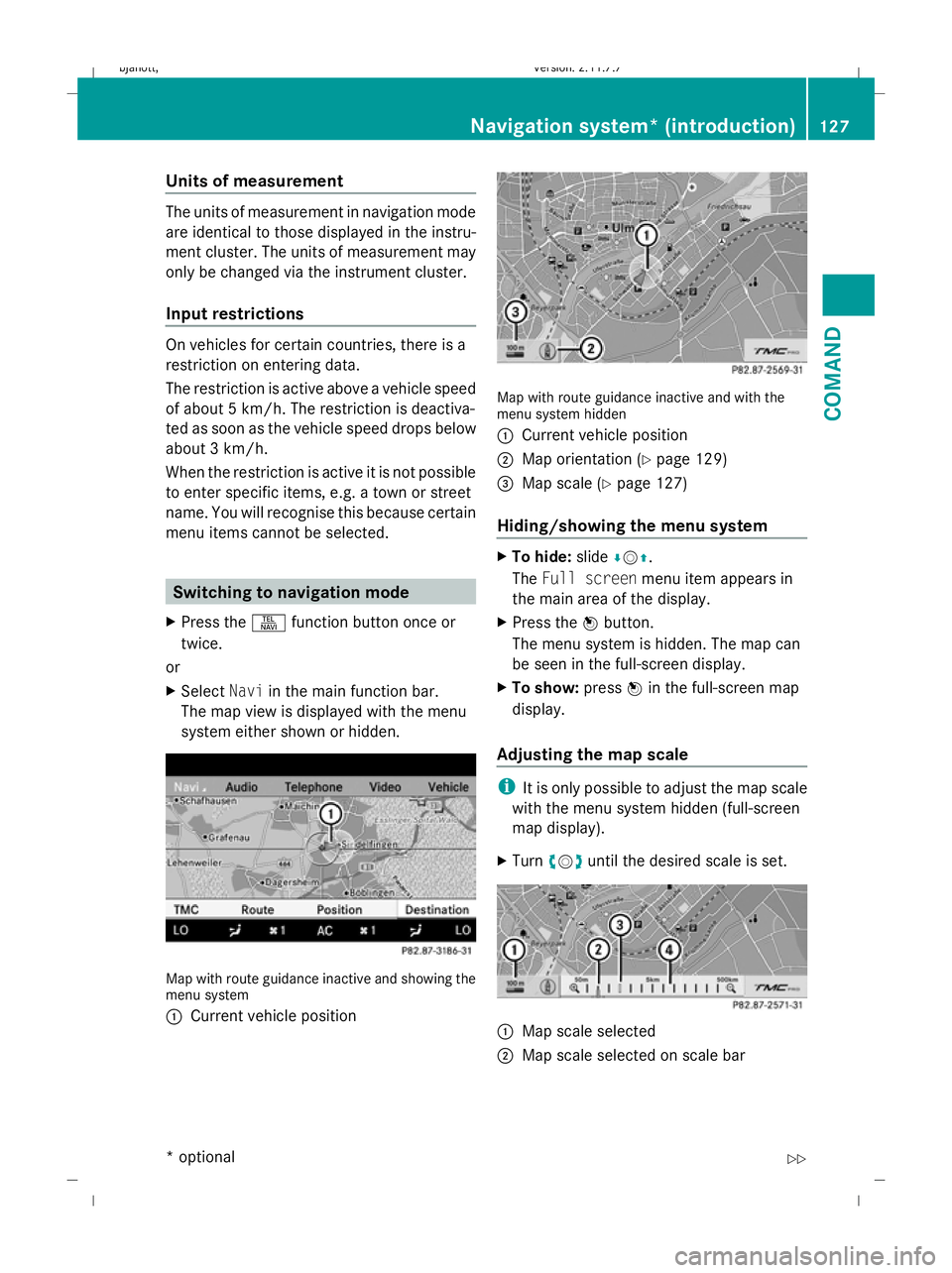
Switching to navigation mode
X Press the Sfunction button once or
twice.
or
X Select Naviin the main function bar.
The map view is displayed with the menu
system either shown or hidden. Map with route guidance inactive and showing the
menu system
:
Current vehicle position Map with route guidance inactive and with the
menu system hidden
:
Current vehicle position
; Map orientation (Y page 129)
= Map scale (Y page 127)
Hiding/showing the menu system X
To hide: slideÆVZ.
The Full screen menu item appears in
the main area of the display.
X Press the Wbutton.
The menu system is hidden. The map can
be seen in the full-screen display.
X To show: pressWin the full-screen map
display.
Adjusting the map scale i
It is only possible to adjust the map scale
with the menu system hidden (full-screen
map display).
X Turn cVd until the desired scale is set. :
Map scale selected
; Map scale selected on scale bar Navigation system* (introduction)
127COMAND
* optional
216_AKB; 2; 3, en-GB
bjanott
,V ersion: 2.11.7.7
2009-02-27T14:54:17+01:00 - Seite 127 Z
Dateiname: 6515230602_buchblock.pdf; erzeugt am 04. Mar 2009 11:15:12; WK
Page 131 of 421
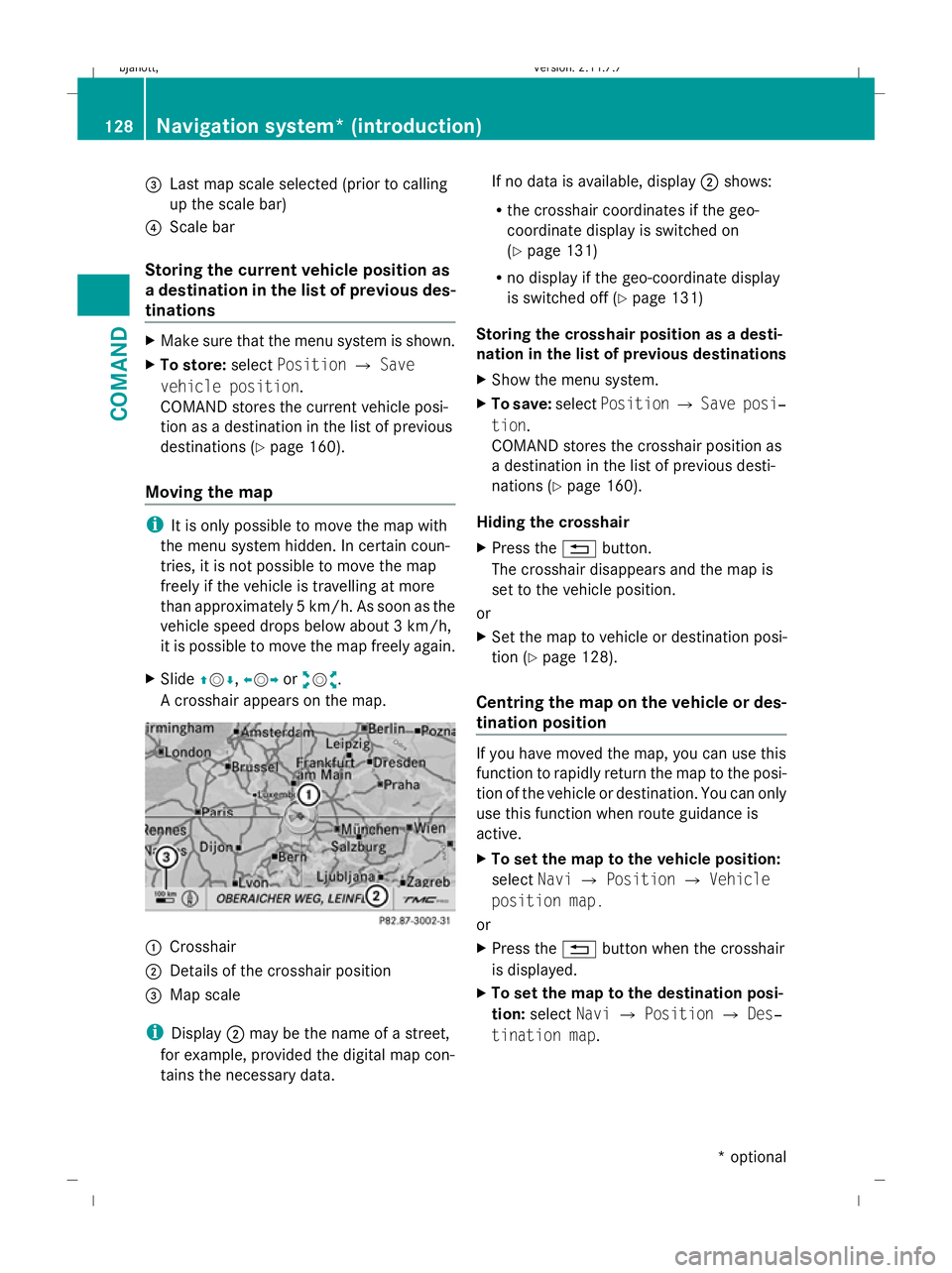
=
Last map scale selected (prior to calling
up the scale bar)
? Scale bar
Storing the current vehicle position as
a destination in the list of previous des-
tinations X
Make sure that the menu system is shown.
X To store: selectPosition QSave
vehicle position.
COMAND stores the current vehicle posi-
tion as a destination in the list of previous
destinations (Y page 160).
Moving the map i
It is only possible to move the map with
the menu system hidden. In certain coun-
tries, it is not possible to move the map
freely if the vehicle is travelling at more
than approximately 5 km/h. As soon as the
vehicle speed drops below about 3 km/h,
it is possible to move the map freely again.
X Slide ZVÆ, XVYoraVb.
A crosshair appears on the map. :
Crosshair
; Details of the crosshair position
= Map scale
i Display ;may be the name of a street,
for example, provided the digital map con-
tains the necessary data. If no data is available, display
;shows:
R the crosshair coordinates if the geo-
coordinate display is switched on
(Y page 131)
R no display if the geo-coordinate display
is switched off (Y page 131)
Storing the crosshair position as a desti-
nation in the list of previous destinations
X Show the menu system.
X To save: selectPosition QSave posi‐
tion.
COMAND stores the crosshair position as
a destination in the list of previous desti-
nations (Y page 160).
Hiding the crosshair
X Press the %button.
The crosshair disappears and the map is
set to the vehicle position.
or
X Set the map to vehicle or destination posi-
tion (Y page 128).
Centring the map on the vehicle or des-
tination position If you have moved the map, you can use this
function to rapidly return the map to the posi-
tion of the vehicle or destination. You can only
use this function when route guidance is
active.
X
To set the map to the vehicle position:
select NaviQPosition QVehicle
position map.
or
X Press the %button when the crosshair
is displayed.
X To set the map to the destination posi-
tion: select NaviQPosition QDes‐
tination map. 128
Navigation system* (introduction)COMAND
* optional
216_AKB; 2; 3, en-GB
bjanott,
Version: 2.11.7.7 2009-02-27T14:54:17+01:00 - Seite 128
Dateiname: 6515230602_buchblock.pdf; erzeugt am 04. Mar 2009 11:15:13; WK
Page 132 of 421
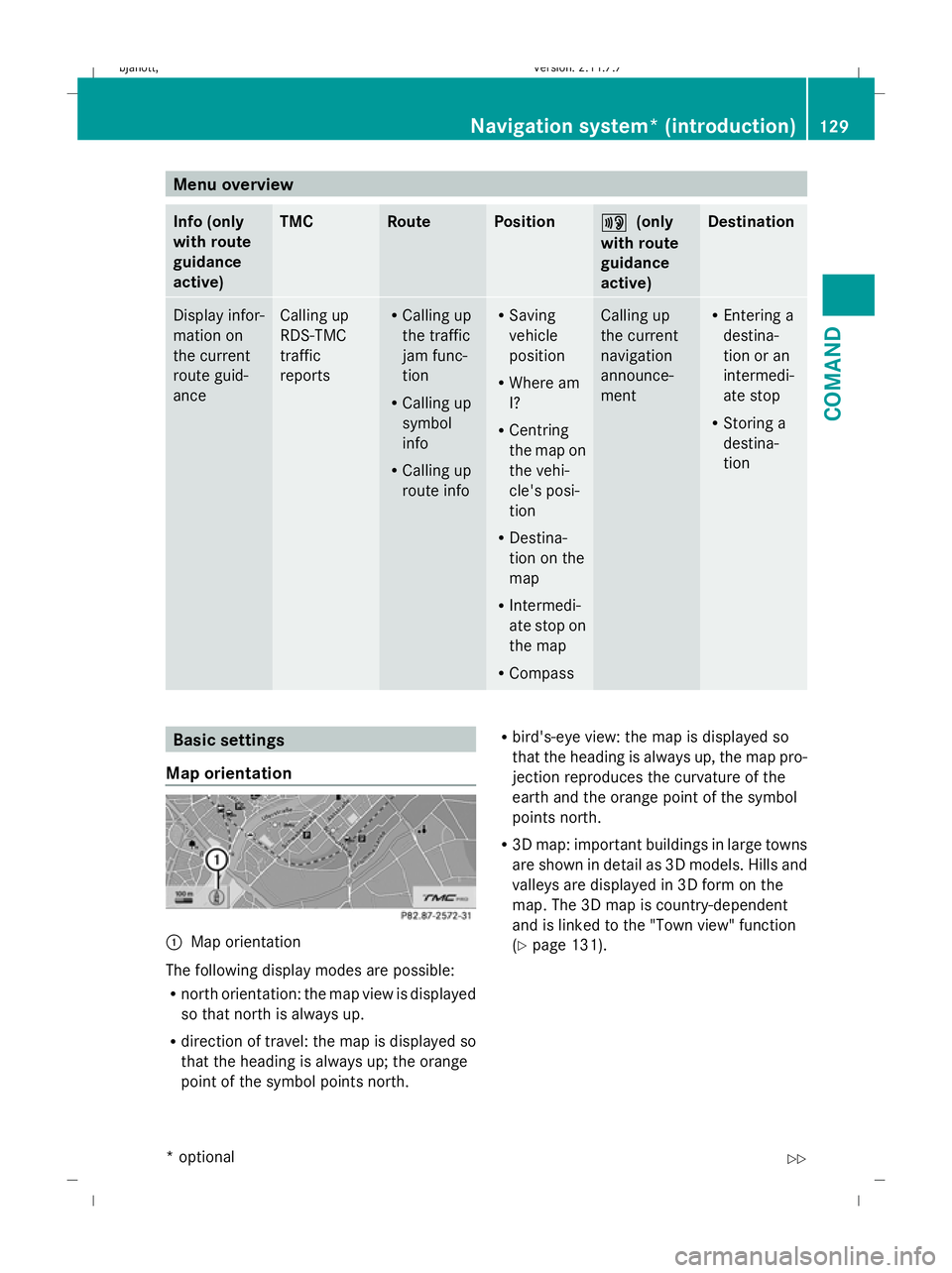
Menu overview
Info (only
with route
guidance
active) TMC Route Position +
+ (only
with route
guidance
active) Destination
Display infor-
mation on
the current
route guid-
ance Calling up
RDS-TMC
traffic
reports R
Calling up
the traffic
jam func-
tion
R Calling up
symbol
info
R Calling up
route info R
Saving
vehicle
position
R Where am
I?
R Centring
the map on
the vehi-
cle's posi-
tion
R Destina-
tion on the
map
R Intermedi-
ate stop on
the map
R Compass Calling up
the current
navigation
announce-
ment R
Entering a
destina-
tion or an
intermedi-
ate stop
R Storing a
destina-
tion Basic settings
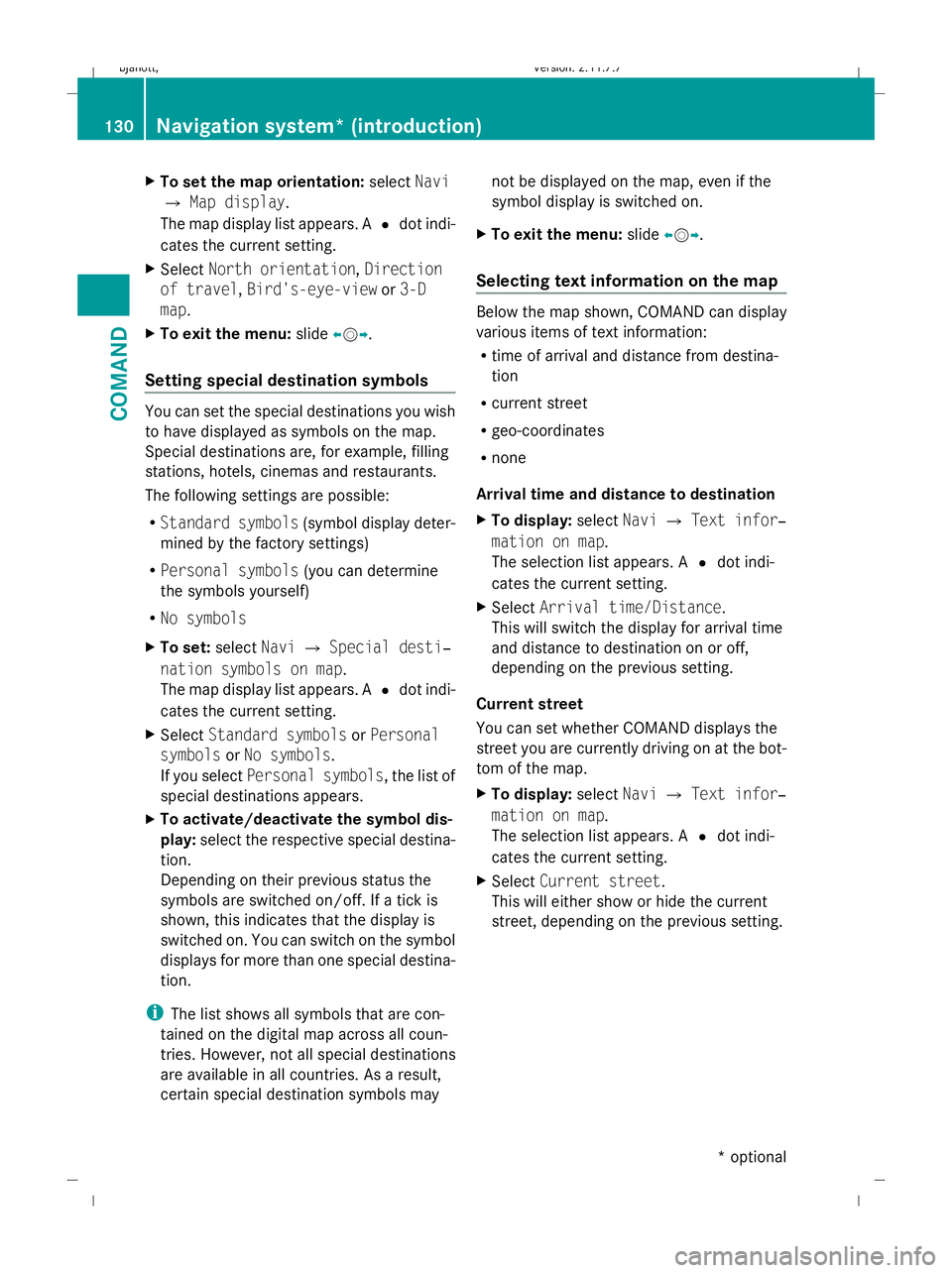
Map orientation :
Map orientation
The following display modes are possible:
R north orientation: the map view is displayed
so that north is always up.
R direction of travel: the map is displayed so
that the heading is always up; the orange
point of the symbol points north. R
bird's-eye view: the map is displayed so
that the heading is always up, the map pro-
jection reproduces the curvature of the
earth and the orange point of the symbol
points north.
R 3D map: important buildings in large towns
are shown in detail as 3D models. Hills and
valleys are displayed in 3D form on the
map. The 3D map is country-dependent
and is linked to the "Town view" function
(Y page 131). Navigation system* (introduction)
129COMAND
* optional
216_AKB; 2; 3, en-GB
bjanott,
Version: 2.11.7.7 2009-02-27T14:54:17+01:00 - Seite 129 Z
Dateiname: 6515230602_buchblock.pdf; erzeugt am 04. Mar 2009 11:15:13; WK
Page 133 of 421
X
To set the map orientation: selectNavi
Q Map display.
The map display list appears. A #dot indi-
cates the current setting.
X Select North orientation, Direction
of travel ,Bird's-eye-view or3-D
map .
X To exit the menu: slideXVY.
Setting special destination symbols You can set the special destinations you wish
to have displayed as symbols on the map.
Special destinations are, for example, filling
stations, hotels, cinemas and restaurants.
The following settings are possible:
R Standard symbols (symbol display deter-
mined by the factory settings)
R Personal symbols (you can determine
the symbols yourself)
R No symbols
X To set: selectNaviQSpecial desti‐
nation symbols on map .
The map display list appears. A #dot indi-
cates the current setting.
X Select Standard symbols orPersonal
symbols orNo symbols.
If you select Personal symbols, the list of
special destinations appears.
X To activate/deactivate the symbol dis-
play: select the respective special destina-
tion.
Depending on their previous status the
symbols are switched on/off. If a tick is
shown, this indicates that the display is
switched on. You can switch on the symbol
displays for more than one special destina-
tion.
i The list shows all symbols that are con-
tained on the digital map across all coun-
tries. However, not all special destinations
are available in all countries. As a result,
certain special destination symbols may not be displayed on the map, even if the
symbol display is switched on.
X To exit the menu: slideXVY.
Selecting text information on the map Below the map shown, COMAND can display
various items of text information:
R time of arrival and distance from destina-
tion
R current street
R geo-coordinates
R none
Arrival time and distance to destination
X To display: selectNaviQText infor‐
mation on map .
The selection list appears. A #dot indi-
cates the current setting.
X Select Arrival time/Distance.
This will switch the display for arrival time
and distance to destination on or off,
depending on the previous setting.
Current street
You can set whether COMAND displays the
street you are currently driving on at the bot-
tom of the map.
X To display: selectNaviQText infor‐
mation on map .
The selection list appears. A #dot indi-
cates the current setting.
X Select Current street .
This will either show or hide the current
street, depending on the previous setting. 130
Navigation system* (introduction)COMAND
* optional
216_AKB; 2; 3, en-GB
bjanott,
Version: 2.11.7.7 2009-02-27T14:54:17+01:00 - Seite 130
Dateiname: 6515230602_buchblock.pdf; erzeugt am 04. Mar 2009 11:15:13; WK
Page 134 of 421
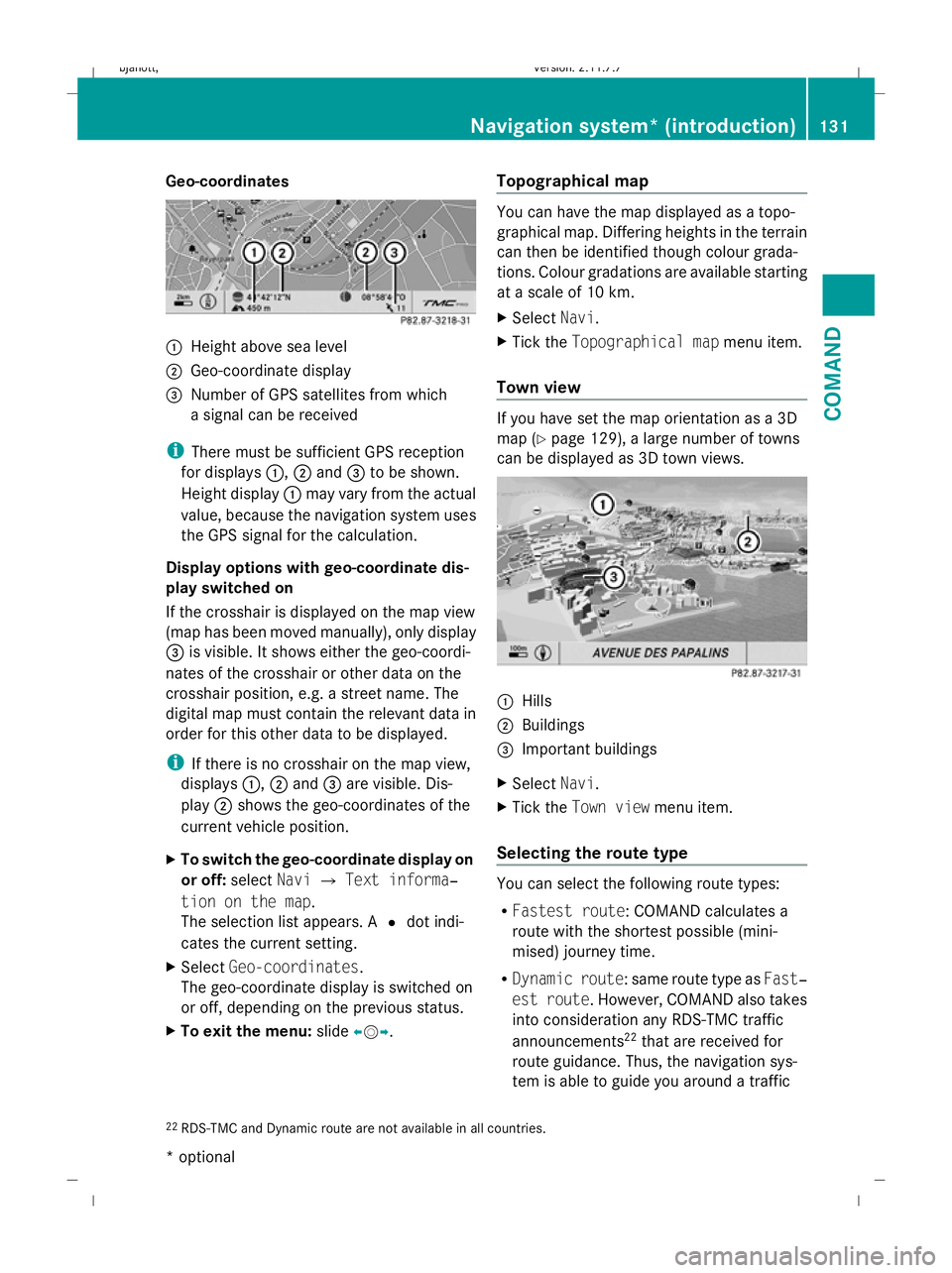
Geo-coordinates
:
Height above sea level
; Geo-coordinate display
= Number of GPS satellites from which
a signal can be received
i There must be sufficient GPS reception
for displays :,;and =to be shown.
Height display :may vary from the actual
value, because the navigation system uses
the GPS signal for the calculation.
Display options with geo-coordinate dis-
play switched on
If the crosshair is displayed on the map view
(map has been moved manually), only display
= is visible. It shows either the geo-coordi-
nates of the crosshair or other data on the
crosshair position, e.g. a street name. The
digital map must contain the relevant data in
order for this other data to be displayed.
i If there is no crosshair on the map view,
displays :,;and =are visible. Dis-
play ;shows the geo-coordinates of the
current vehicle position.
X To switch the geo-coordinate display on
or off: selectNaviQText informa‐
tion on the map.
The selection list appears. A #dot indi-
cates the current setting.
X Select Geo-coordinates.
The geo-coordinate display is switched on
or off, depending on the previous status.
X To exit the menu: slideXVY. Topographical map You can have the map displayed as a topo-
graphical map. Differing heights in the terrain
can then be identified though colour grada-
tions. Colour gradations are available starting
at a scale of 10 km.
X Select Navi.
X Tick the Topographical map menu item.
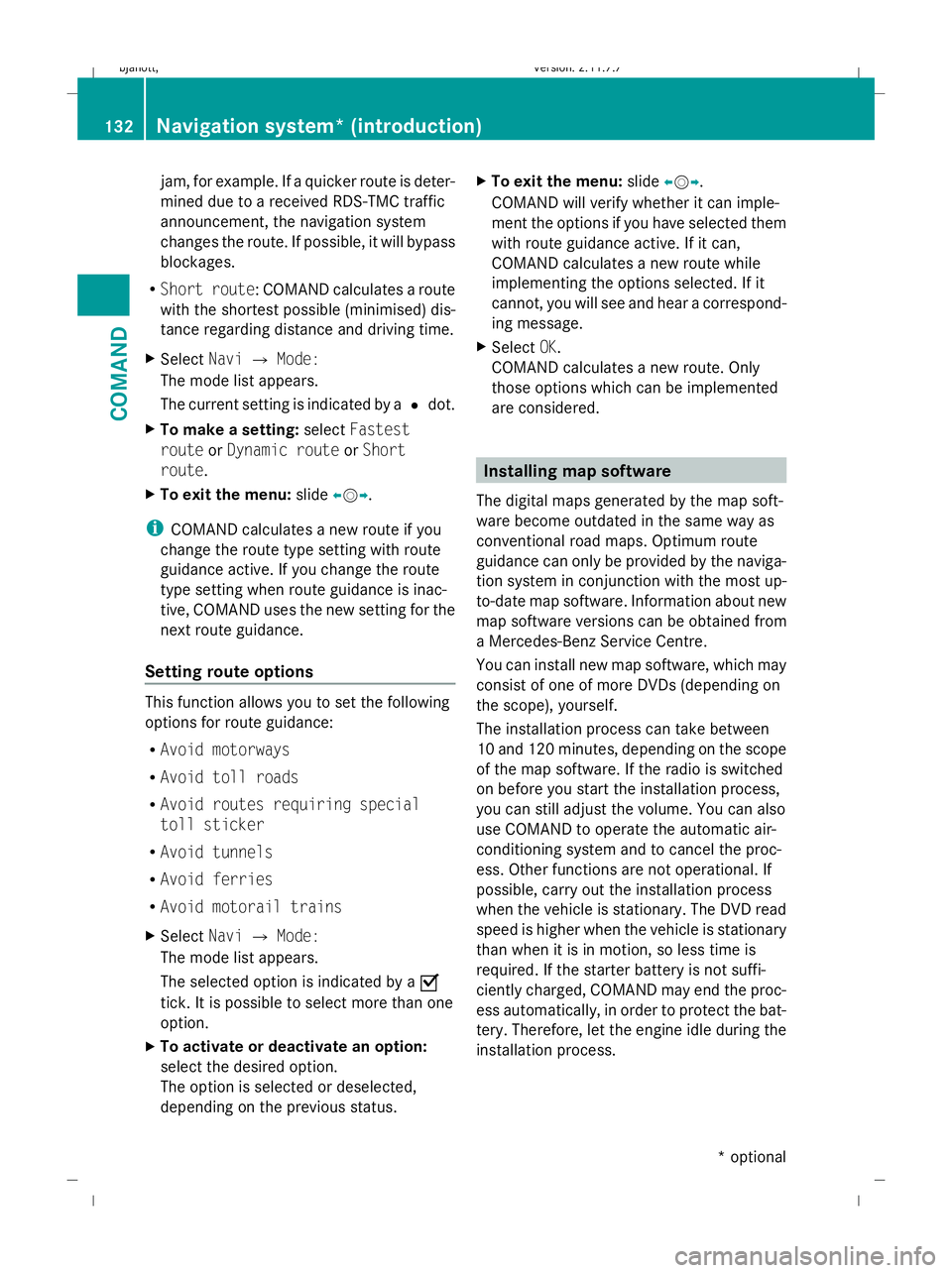
Town view If you have set the map orientation as a 3D
map (Y
page 129), a large number of towns
can be displayed as 3D town views. :
Hills
; Buildings
= Important buildings
X Select Navi.
X Tick the Town view menu item.
Selecting the route type You can select the following route types:
R
Fastest route: COMAND calculates a
route with the shortest possible (mini-
mised) journey time.
R Dynamic route: same route type as Fast‐
est route. However, COMAND also takes
into consideration any RDS-TMC traffic
announcements 22
that are received for
route guidance. Thus, the navigation sys-
tem is able to guide you around a traffic
22 RDS-TMC and Dynamic route are not available in all countries. Navigation system* (introduction)
131COMAND
* optional
216_AKB; 2; 3, en-GB
bjanott,
Version: 2.11.7.7 2009-02-27T14:54:17+01:00 - Seite 131 Z
Dateiname: 6515230602_buchblock.pdf; erzeugt am 04. Mar 2009 11:15:13; WK
Page 135 of 421
jam, for example. If a quicker route is deter-
mined due to a received RDS-TMC traffic
announcement, the navigation system
changes the route. If possible, it will bypass
blockages.
R Short route: COMAND calculates a route
with the shortest possible (minimised) dis-
tance regarding distance and driving time.
X Select NaviQMode:
The mode list appears.
The current setting is indicated by a #dot.
X To make a setting: selectFastest
route orDynamic route orShort
route.
X To exit the menu: slideXVY.
i COMAND calculates a new route if you
change the route type setting with route
guidance active. If you change the route
type setting when route guidance is inac-
tive, COMAND uses the new setting for the
next route guidance.
Setting route options This function allows you to set the following
options for route guidance:
R Avoid motorways
R Avoid toll roads
R Avoid routes requiring special
toll sticker
R Avoid tunnels
R Avoid ferries
R Avoid motorail trains
X Select NaviQMode:
The mode list appears.
The selected option is indicated by a O
tick. It is possible to select more than one
option.
X To activate or deactivate an option:
select the desired option.
The option is selected or deselected,
depending on the previous status. X
To exit the menu: slideXVY.
COMAND will verify whether it can imple-
ment the options if you have selected them
with route guidance active. If it can,
COMAND calculates a new route while
implementing the options selected. If it
cannot, you will see and hear a correspond-
ing message.
X Select OK.
COMAND calculates a new route. Only
those options which can be implemented
are considered. Installing map software
The digital maps generated by the map soft-
ware become outdated in the same way as
conventional road maps. Optimum route
guidance can only be provided by the naviga-
tion system in conjunction with the most up-
to-date map software. Information about new
map software versions can be obtained from
a Mercedes-Benz Service Centre.
You can install new map software, which may
consist of one of more DVDs (depending on
the scope), yourself.
The installation process can take between
10 and 120 minutes, depending on the scope
of the map software. If the radio is switched
on before you start the installation process,
you can still adjust the volume. You can also
use COMAND to operate the automatic air-
conditioning system and to cancel the proc-
ess. Other functions are not operational. If
possible, carry out the installation process
when the vehicle is stationary. The DVD read
speed is higher when the vehicle is stationary
than when it is in motion, so less time is
required. If the starter battery is not suffi-
ciently charged, COMAND may end the proc-
ess automatically, in order to protect the bat-
tery. Therefore, let the engine idle during the
installation process. 132
Navigation system* (introduction)COMAND
* optional
216_AKB; 2; 3, en-GB
bjanott,
Version: 2.11.7.7 2009-02-27T14:54:17+01:00 - Seite 132
Dateiname: 6515230602_buchblock.pdf; erzeugt am 04. Mar 2009 11:15:14; WK