ECU MERCEDES-BENZ CL COUPE 2009 Owners Manual
[x] Cancel search | Manufacturer: MERCEDES-BENZ, Model Year: 2009, Model line: CL COUPE, Model: MERCEDES-BENZ CL COUPE 2009Pages: 421, PDF Size: 10.78 MB
Page 13 of 421

Fuse box
Dashboard . . . . . . . . . . . . . . . . . . .389
Engine compartment . . . . . . . . . . .390
Rea r.. . . . . . . . . . . . . . . . . . . . . . .390
Fuses . . . . . . . . . . . . . . . . . . . . . . . . . .389 G
Garage door Opening/closing (with the remote
control) . . . . . . . . . . . . . . . . . . . . .286
Garage door opener . . . . . . . . . . . . ..285
Clearing the memory . . . . . . . . . . .286
Frequencies . . . . . . . . . . . . . . . . . .408
Programming the remote control . .285
Gear indicator . . . . . . . . . . . . . . . . . .208
Gear indicator (on-board computer) 220
Genuine Mercedes-Benz parts . . . ..394
Glove compartment . . . . . . . . . . . . ..276 H
Hands-free system Switching on/off . . . . . . . . . . . . . .114
Switching to the mobile phone . . .116
Headlamp cleaning system . . . . . ..295
Headlamps Cleaning . . . . . . . . . . . . . . . . . . . . .309
Cleaning system . . . . . . . . . . . . . . .197
Misting up . . . . . . . . . . . . . . . . . . .360
Head restraints
Rear compartment . . . . . . . . . . . . .186
Heating
see Air conditioning
High-pressure cleaners . . . . . . . . . ..308
Hill start assist . . . . . . . . . . . . . . . . .204
HOLD . . . . . . . . . . . . . . . . . . . . . . . . . .245
Display message . . . . . . . . . . . . . .322
HomeLink ®
see Garage door opener I
Immobiliser . . . . . . . . . . . . . . . . . . . . .54
Indicator and warning lamp Automatic child seat recognition
(malfunction ).. . . . . . . . . . . . . . . .350
Brakes (red ).. . . . . . . . . . . . .352, 354
Brakes (yellow) . . . . . . . . . . . . . . . .354 Engine diagnostics . . . . . . . . . . . .
.354
ESP ®
. . . . . . . . . . . . . . . . . . . . . . .352
PASSENGER AIRBAG OFF . . . .44, 350
Reserve fuel . . . . . . . . . . . . . . . . . .356
Seat belt . . . . . . . . . . . . . . . . . . . . .355
SRS . . . . . . . . . . . . . . . . . . . . .37, 353
Indicator lamp
Display message . . . . . . . . . . . . . .344
see Indicator and warning lamp . . .351
Instrument cluster . . . . . . . . . . . . ..212
Overview . . . . . . . . . . . . . . . . . . . . .27
Intelligent Light System . . . . . . . . ..197
Display message . . . . . . . . . .323, 346
Menu (on-board computer) . . . . . .225
Tourist mode . . . . . . . . . . . . . . . . .225
Interior lighting
Ambient light (COMAND) . . . . . . . .166
Automatic control system . . . . . . .199
Emergency lighting . . . . . . . . . . . .199
Interior lighting . . . . . . . . . . . . . . . .166
Manual control . . . . . . . . . . . . . . . .198
Reading lamp . . . . . . . . . . . . . . . . .198
Interior motion sensor . . . . . . ..55, 167
ISOFIX child seat securing system ..47 J
Jack Operation . . . . . . . . . . . . . . . . . . . .378
Storage location . . . . . . . . . . . . . . .315
Jump-starting . . . . . . . . . . . . . . . . . . .384
Jump leads . . . . . . . . . . . . . . . . . . .384 K
Key . . . . . . . . . . . . . . . . . . . . . . . . . . .178
Checking the battery . . . . . . . . . . .367
Convenience closing . . . . . . . . . . .201
Convenience opening . . . . . . . . . . .201
Display message . . . . . . . . . . . . . .340
Loss . . . . . . . . . . . . . . . . . . . . . . . .363
Malfunction . . . . . . . . . . . . . . . . . .362
Modifying the programming . . . . . .179
KEYLESS GO
Button . . . . . . . . . . . . . . . . . . . . . .182
Changing the battery . . . . . . . . . . .368
Checking the battery . . . . . . . . . . .367
Convenience closing . . . . . . . . . . .202 10
Index 216_AKB; 2; 3, en-GB
bjanott,
Version: 2.11.7.7 2009-02-27T14:54:17+01:00 - Seite 10Dateiname: 6515230602_buchblock.pdf; erzeugt am 04. Mar 2009 11:14:35; WK
Page 42 of 421
affect your hearing. The powder that escapes
does not generally constitute a health hazard.
The 6 SRS warning lamp lights up. G
Risk of injury
If the seat belt tensioners have been trig-
gered, they provide no additional protection
in the event of another accident. Therefore,
have belt tensioners which have been trig-
gered replaced at a qualified specialist work-
shop.
Comply with safety regulations when dispos-
ing of belt tensioners. Any Mercedes-Benz
Service Centre can provide details of these
regulations.
Airbags Airbag deployment slows down and restricts
the movement of the vehicle occupant.
If the airbags are deployed, you will hear a
bang and a small amount of powder may also
be released. Only in rare cases will the bang
affect your hearing. The powder that escapes
does not generally constitute a health hazard.
The 6 SRS warning lamp lights up.
The SRS/AIRBAG identification indicates the
location of the airbags. G
Risk of injury
Airbags provide additional protection; they
are not, however, a substitute for seat belts.
Observe the following notes to reduce the risk
of serious or even fatal injury if an airbag is
deployed:
R all vehicle occupants ― in particular preg-
nant women ― must wear their seat belt
correctly at all times and lean back against
the backrest, which should be positioned
as close to the vertical as possible. The
head restraint must support the back of the
head at about eye level.
R always secure children less than 1.50 m tall
or under 12 years of age in suitable child
restraint systems. R
all vehicle occupants must select a seat
position that is as far away from the airbag
as possible. The driver's seat position must
allow the vehicle to be driven safely. The
driver's chest should be as far away from
the middle of the driver's front airbag cover
as possible.
R move the front-passenger seat as far back
as possible, especially if a child is secured
in a child restraint system on the seat.
R vehicle occupants – in particular, children
– must not lean their head into the area of
the window in which the sidebag/window-
bag is deployed.
R rearward-facing child restraint systems
must not be fitted to the front-passenger
seat unless the front-passenger front air-
bag has been disabled. The front-passenger
front airbag of a vehicle fitted with auto-
matic child seat recognition* is only disa-
bled when a child restraint system with
automatic child seat recognition is fitted to
the front-passenger seat. The 4
PASSENGER AIRBAG OFF warning lamp
must be continuously lit.
If the front-passenger seat of your vehicle
does not have automatic child seat recog-
nition*, or your rearward-facing child
restraint system does not have automatic
child seat recognition, children must be
secured in a child restraint system on a
suitable seat in the rear. If you secure a
forward-facing child restraint system to the
front-passenger seat, you must move the
front-passenger seat as far back as possi-
ble.
R make sure there are no heavy or sharp-
edged objects in pockets of clothing.
R do not lean forwards, e.g. over the cover of
the driver's/front-passenger front airbag,
particularly when the vehicle is in motion.
R do not put your feet on the dashboard. Occupant safety
39Safety
* optional
216_AKB; 2; 3, en-GB
bjanott
,V ersion: 2.11.7.7
2009-02-27T14:54:17+01:00 - Seite 39 Z
Dateiname: 6515230602_buchblock.pdf; erzeugt am 04. Mar 2009 11:14:46; WK
Page 45 of 421
can offer additional protection to that pro-
vided by the seat belt
PRE-SAFE
®
system
PRE-SAFE ®
system takes pre-emptive meas-
ures to protect you in certain hazardous sit-
uations.
PRE-SAFE ®
intervenes in the event of:
R emergency braking situations, e.g. if Brake
Assist BAS is activated or Brake Assist BAS
PLUS* intervenes powerfully
R critical situations involving driving dynam-
ics, e.g. if the vehicle oversteers or under-
steers significantly due to physical limits
being exceeded
If you are driving faster than approximately
30 km/h, PRE-SAFE ®
may take the following
measures in these situations:
R it adjusts the front-passenger seat if this is
in an unfavourable position.
R on vehicles with multicontour seat* or
active multicontour seat*: it increases the
air pressure in the seat side cushions and
the backrest side cushions.
R if the vehicle skids, it closes the sliding/
tilting sunroof *and the front side windows
so that only a small gap remains.
Once the hazardous situation has passed, you
can reverse all settings made by PRE-SAFE ®
.
On vehicles with a multicontour seat* or an
active multicontour seat*, the air pressure in
the side bolsters is then reduced. G
Risk of injury
When adjusting the seat, make sure that
nobody can become trapped.
! When you move the seats, make sure that
there are no objects in the footwell or
behind the seats. Otherwise, you could
damage the seats and the objects. Children in the vehicle
If a child is travelling in your vehicle, secure
the child using a child restraint system which
is appropriate to the size and age of the child
and which is recommended for Mercedes-
Benz vehicles. You should fit the restraint sys-
tem to a suitable rear seat. Ensure that the
child is secured throughout the trip.
You can obtain information about the correct
child restraint system from any Mercedes-
Benz Service Centre.
i It is advisable to use Mercedes-Benz care
products to clean child restraint systems.
Information about this can be obtained
from any Mercedes-Benz Service Centre. G
Risk of injury
Do not leave children unsupervised in the
vehicle, even if they are secured in a child
restraint system. Children could injure them-
selves on parts of the vehicle. They could also
be seriously or even fatally injured by pro-
longed exposure to extreme heat or cold.
Do not expose the child restraint system to
direct sunlight. Parts of the child restraint sys-
tem could heat up and the child could burn
herself/himself on them.
If a child opens a door, the child or other per-
sons could be injured as a result. The child
could get out and be injured in the process or
be injured by a passing vehicle.
Please also observe the information on HOLD.
Relevant information can be found in the
index. G
Risk of injury
An unsecured or an incorrectly positioned
load increases the risk of injury for the child
and all other occupants during:
R an accident
R a braking manoeuvre
R a sudden change of direction 42
Occupant safetySafety
* optional
216_AKB; 2; 3, en-GB
bjanott,
Version: 2.11.7.7 2009-02-27T14:54:17+01:00 - Seite 42
Dateiname: 6515230602_buchblock.pdf; erzeugt am 04. Mar 2009 11:14:47; WK
Page 46 of 421
Do not carry heavy or hard objects inside the
vehicle unless they are secured. Further infor-
mation can be found in the index under "Load-
ing and unloading" and "Features".
Child restraint systems Mercedes-Benz recommends that you only
use the child restraint systems listed on
(Y
page 45). G
Risk of injury
To reduce the risk of serious or even fatal
injury to the child in the event of a sudden
change in direction, braking or an accident:
R children less than 1.50 m tall and under
twelve years of age must always be secured
in special child restraint systems on a suit-
able vehicle seat. This is necessary
because the seat belts are not designed for
children of this size.
R do not secure children less than 1.50 m tall
or under twelve years of age on the front-
passenger seat. Exception: the child is
secured in a vehicle with automatic child
seat recognition on the front-passenger
seat* and is secured in a child restraint
system with automatic child seat recogni-
tion.
R if you secure a forward-facing child
restraint system to the front-passenger
seat, you must move the front-passenger
seat as far back as possible.
R children must never travel sitting on the lap
of another occupant. Due to the forces
occurring in the event of a sudden change
of direction, heavy braking or an accident,
it would not be possible to restrain the
child. The child could be thrown against
parts of the vehicle interior and be seriously
or even fatally injured. G
Risk of injury
The child restraint system cannot perform its
protective function if it is not correctly fitted to a suitable vehicle seat. The child cannot be
restrained in the event of a sudden change of
direction, heavy braking or an accident. This
may lead to serious or even fatal injuries. For
this reason, when fitting a child restraint sys-
tem, observe the manufacturer's installation
instructions and the correct use of the child
restraint system.
Child restraint systems should be fitted to the
rear seats. Children are generally better pro-
tected there.
The entire base of the child restraint system
must always rest on the seat cushion. Never
place objects, e.g. a cushion, under the child
restraint system.
Only use child restraint systems with their
original covers. Only replace damaged covers
with genuine Mercedes-Benz covers.
For safety reasons, you should only use child
restraint systems which have been approved
for use in Mercedes-Benz vehicles.
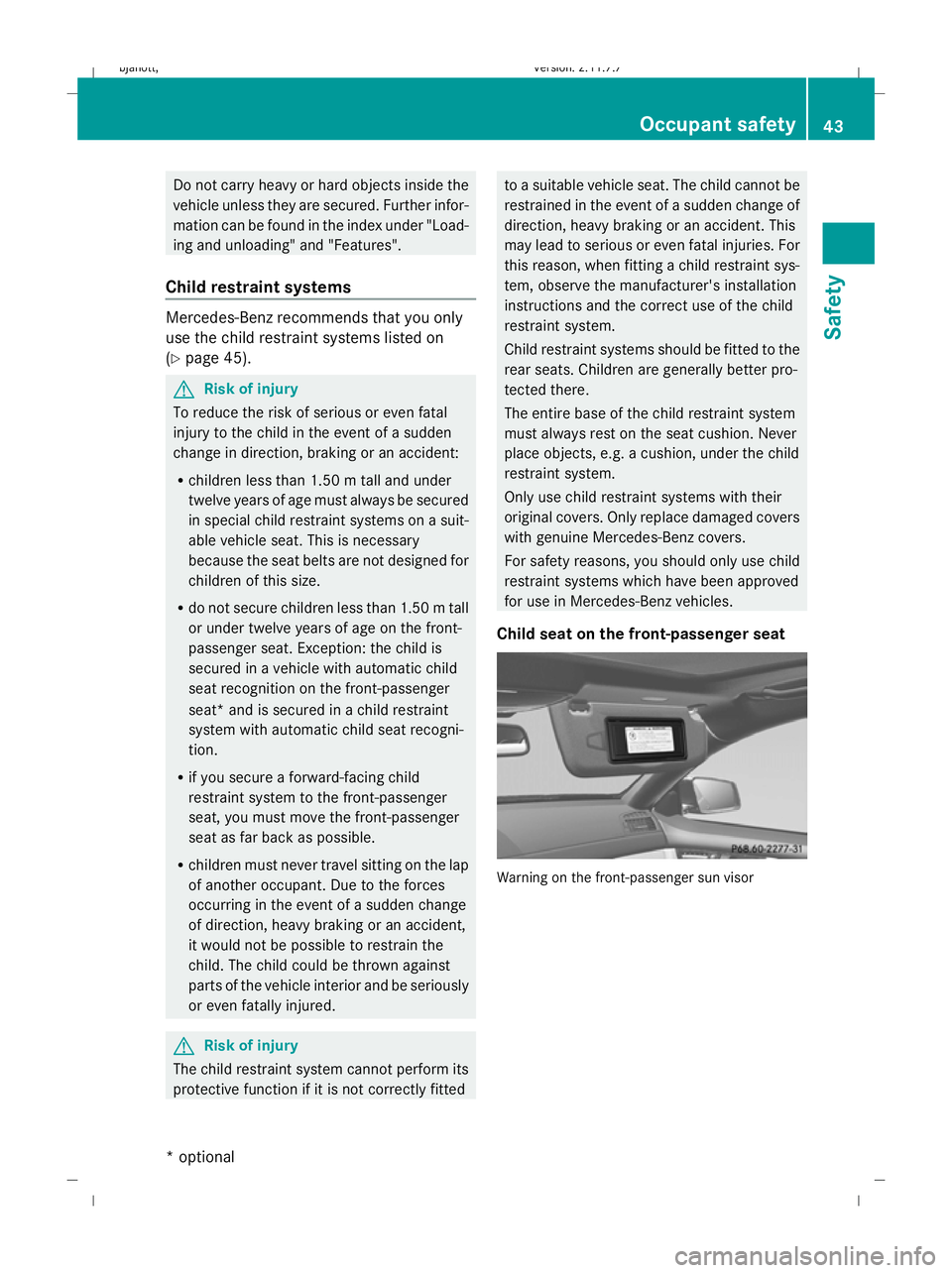
Child seat on the front-passenger seat Warning on the front-passenger sun visor Occupant safety
43Safety
* optional
216_AKB; 2; 3, en-GB
bjanott,
Version: 2.11.7.7 2009-02-27T14:54:17+01:00 - Seite 43 Z
Dateiname: 6515230602_buchblock.pdf; erzeugt am 04. Mar 2009 11:14:48; WK
Page 47 of 421
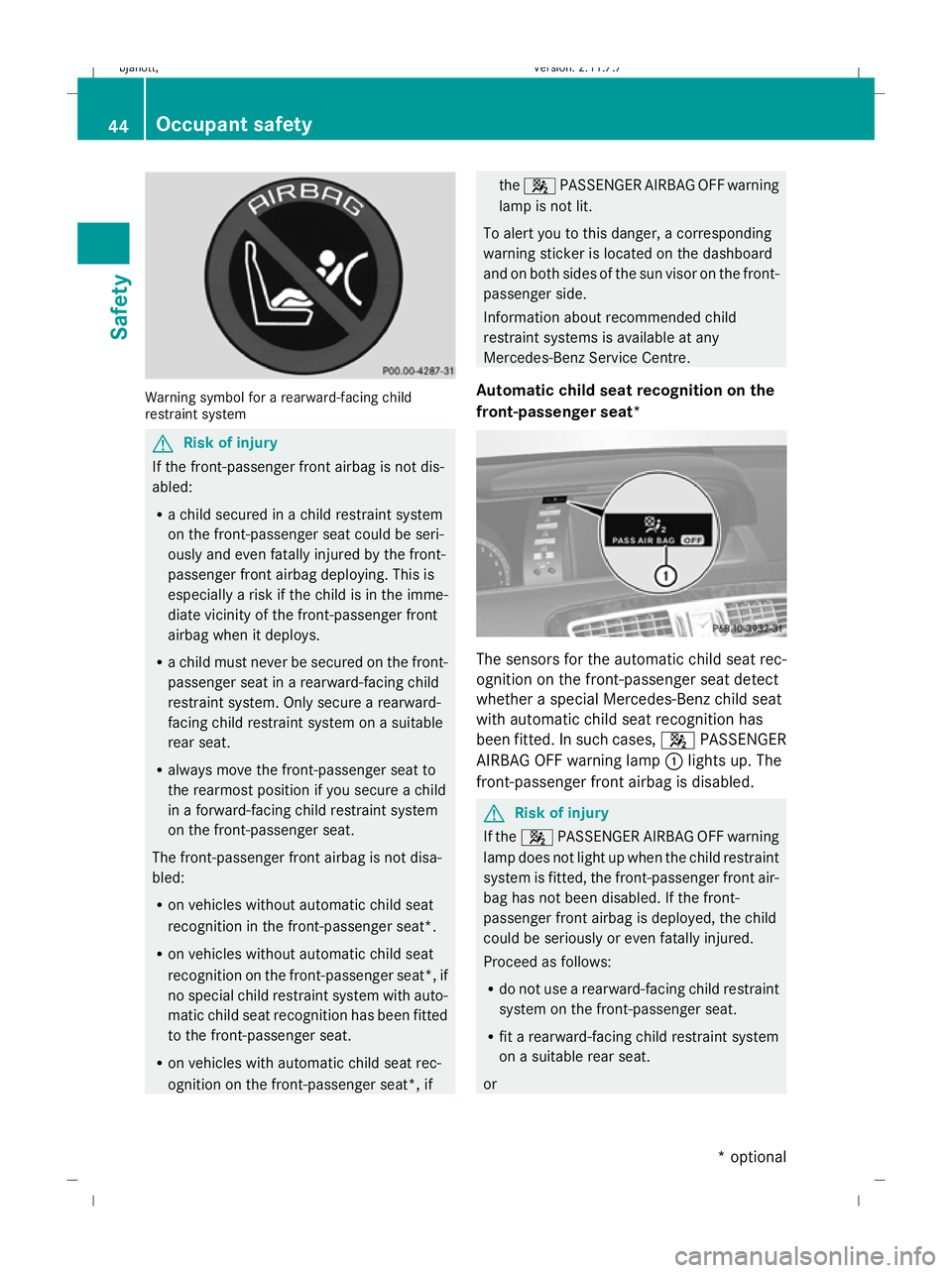
Warning symbol for a rearward-facing child
restraint system G
Risk of injury
If the front-passenger front airbag is not dis-
abled:
R a child secured in a child restraint system
on the front-passenger seat could be seri-
ously and even fatally injured by the front-
passenger front airbag deploying. This is
especially a risk if the child is in the imme-
diate vicinity of the front-passenger front
airbag when it deploys.
R a child must never be secured on the front-
passenger seat in a rearward-facing child
restraint system. Only secure a rearward-
facing child restraint system on a suitable
rear seat.
R always move the front-passenger seat to
the rearmost position if you secure a child
in a forward-facing child restraint system
on the front-passenger seat.
The front-passenger front airbag is not disa-
bled:
R on vehicles without automatic child seat
recognition in the front-passenger seat*.
R on vehicles without automatic child seat
recognition on the front-passenger seat*, if
no special child restraint system with auto-
matic child seat recognition has been fitted
to the front-passenger seat.
R on vehicles with automatic child seat rec-
ognition on the front-passenger seat*, if the
4 PASSENGER AIRBAG OFF warning
lamp is not lit.
To alert you to this danger, a corresponding
warning sticker is located on the dashboard
and on both sides of the sun visor on the front-
passenger side.
Information about recommended child
restraint systems is available at any
Mercedes-Benz Service Centre.
Automatic child seat recognition on the
front-passenger seat* The sensors for the automatic child seat rec-
ognition on the front-passenger seat detect
whether a special Mercedes-Benz child seat
with automatic child seat recognition has
been fitted. In such cases, 4PASSENGER
AIRBAG OFF warning lamp :lights up. The
front-passenger front airbag is disabled. G
Risk of injury
If the 4 PASSENGER AIRBAG OFF warning
lamp does not light up when the child restraint
system is fitted, the front-passenger front air-
bag has not been disabled. If the front-
passenger front airbag is deployed, the child
could be seriously or even fatally injured.
Proceed as follows:
R do not use a rearward-facing child restraint
system on the front-passenger seat.
R fit a rearward-facing child restraint system
on a suitable rear seat.
or 44
Occupant safetySafety
* optional
216_AKB; 2; 3, en-GB
bjanott,
Version: 2.11.7.7 2009-02-27T14:54:17+01:00 - Seite 44
Dateiname: 6515230602_buchblock.pdf; erzeugt am 04. Mar 2009 11:14:48; WK
Page 50 of 421
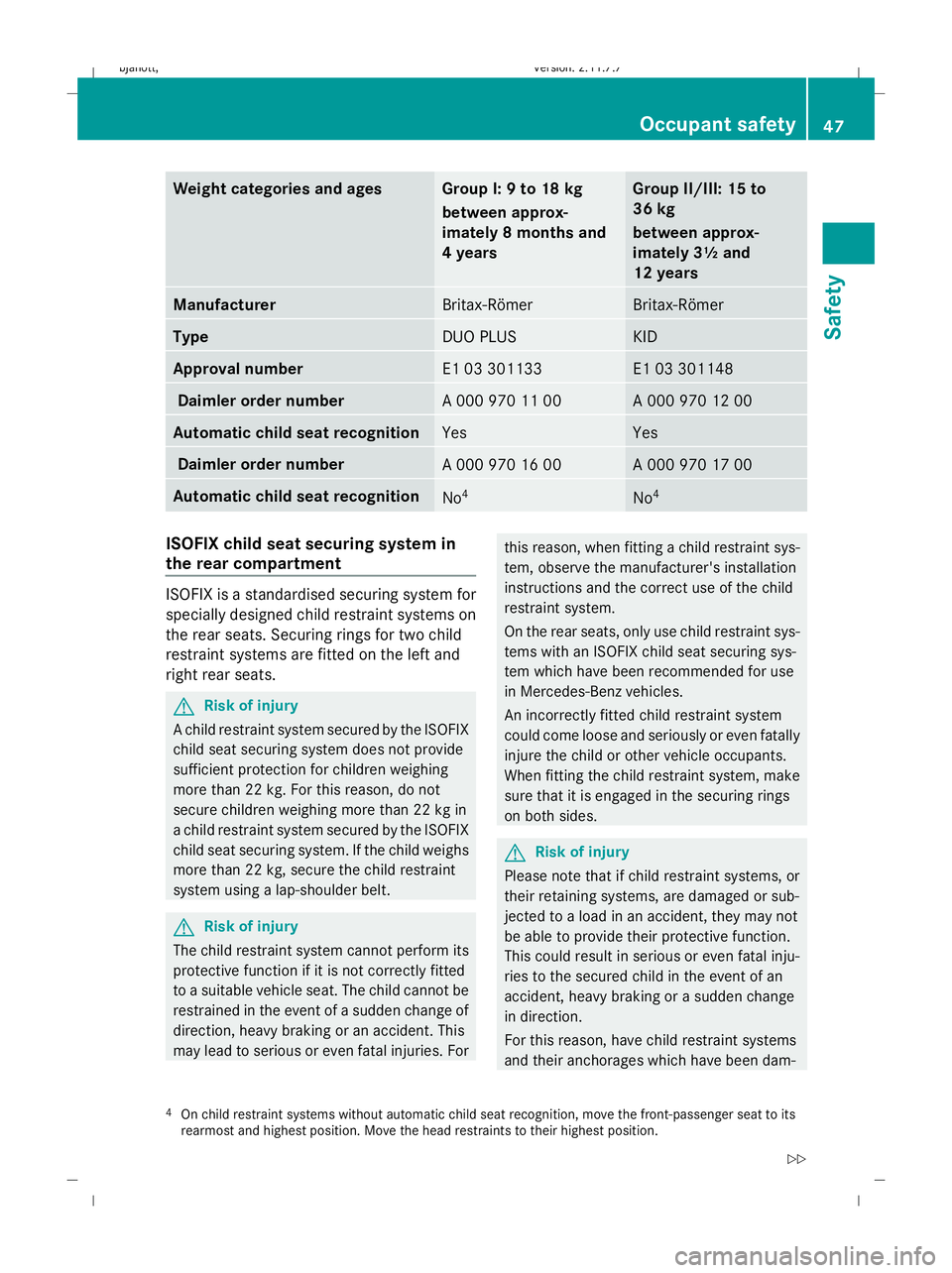
Weight categories and ages Group I: 9 to 18 kg
between approx-
imately 8 months and
4 years Group II/III: 15 to
36 kg
between approx-
imately 3½ and
12 years
Manufacturer
Britax-Römer Britax-Römer
Type
DUO PLUS KID
Approval number
E1 03 301133 E1 03 301148
Daimler order number
A 000 970 11 00 A 000 970 12 00
Automatic child seat recognition
Yes Yes
Daimler order number
A 000 970 16 00 A 000 970 17 00
Automatic child seat recognition
No
4 No
4 ISOFIX child seat securing system in
the rear compartment
ISOFIX is a standardised securing system for
specially designed child restraint systems on
the rear seats. Securing rings for two child
restraint systems are fitted on the left and
right rear seats. G
Risk of injury
A child restraint system secured by the ISOFIX
child seat securing system does not provide
sufficient protection for children weighing
more than 22 kg. For this reason, do not
secure children weighing more than 22 kg in
a child restraint system secured by the ISOFIX
child seat securing system. If the child weighs
more than 22 kg, secure the child restraint
system using a lap-shoulder belt. G
Risk of injury
The child restraint system cannot perform its
protective function if it is not correctly fitted
to a suitable vehicle seat. The child cannot be
restrained in the event of a sudden change of
direction, heavy braking or an accident. This
may lead to serious or even fatal injuries. For this reason, when fitting a child restraint sys-
tem, observe the manufacturer's installation
instructions and the correct use of the child
restraint system.
On the rear seats, only use child restraint sys-
tems with an ISOFIX child seat securing sys-
tem which have been recommended for use
in Mercedes-Benz vehicles.
An incorrectly fitted child restraint system
could come loose and seriously or even fatally
injure the child or other vehicle occupants.
When fitting the child restraint system, make
sure that it is engaged in the securing rings
on both sides.
G
Risk of injury
Please note that if child restraint systems, or
their retaining systems, are damaged or sub-
jected to a load in an accident, they may not
be able to provide their protective function.
This could result in serious or even fatal inju-
ries to the secured child in the event of an
accident, heavy braking or a sudden change
in direction.
For this reason, have child restraint systems
and their anchorages which have been dam-
4 On child restraint systems without automatic child seat recognition, move the front-passenger seat to its
rearmost and highest position. Move the head restraints to their highest position. Occupant safety
47Safety
216_AKB; 2; 3, en-GB
bjanott, Version: 2.11.7.7 2009-02-27T14:54:17+01:00 - Seite 47 Z
Dateiname: 6515230602_buchblock.pdf; erzeugt am 04. Mar 2009 11:14:48; WK
Page 51 of 421
aged or subjected to a load in an accident
checked immediately at a qualified specialist
workshop. X
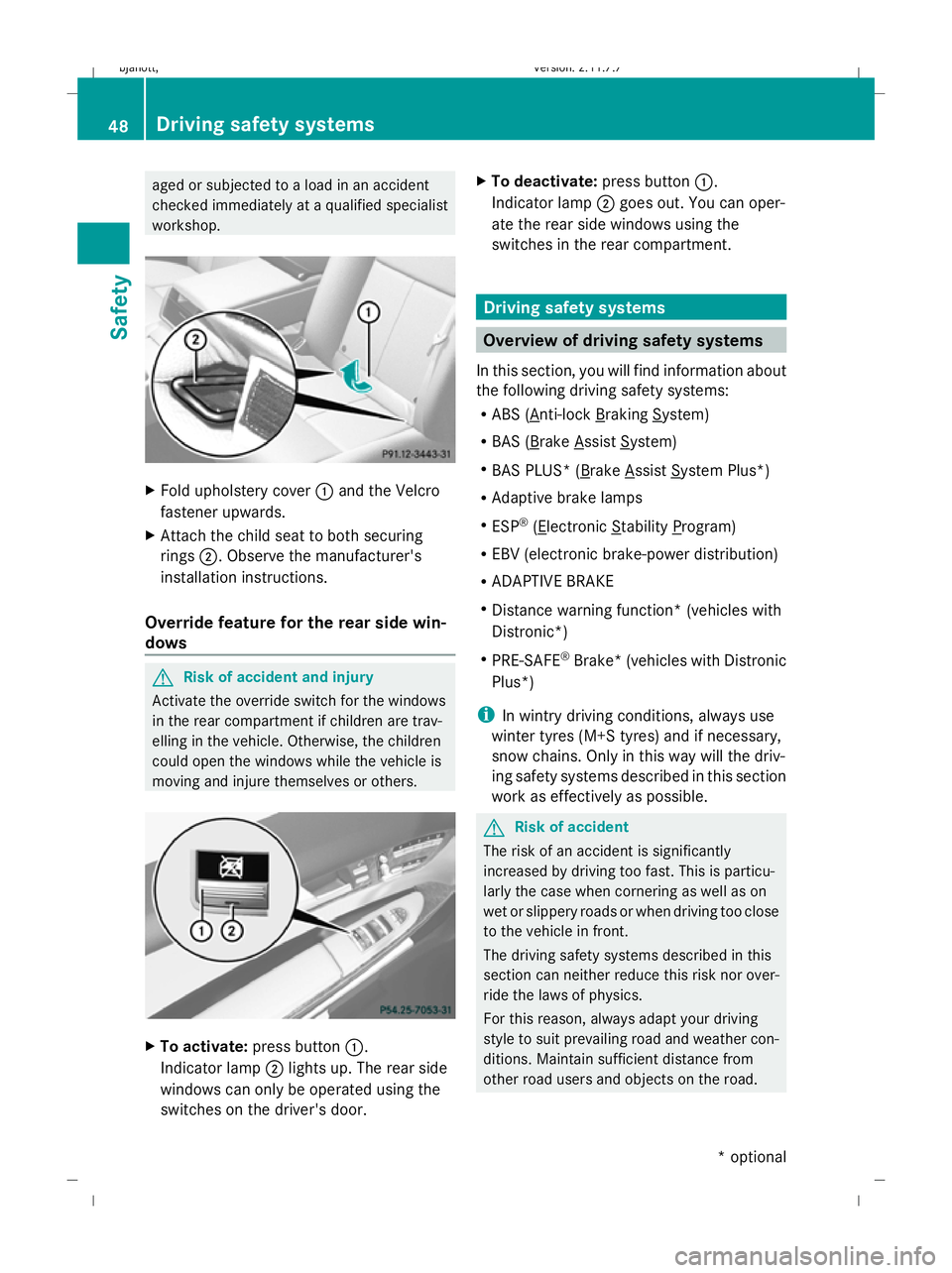
Fold upholstery cover :and the Velcro
fastener upwards.
X Attach the child seat to both securing
rings ;. Observe the manufacturer's
installation instructions.
Override feature for the rear side win-
dows G
Risk of accident and injury
Activate the override switch for the windows
in the rear compartment if children are trav-
elling in the vehicle. Otherwise, the children
could open the windows while the vehicle is
moving and injure themselves or others. X
To activate: press button :.
Indicator lamp ;lights up. The rear side
windows can only be operated using the
switches on the driver's door. X
To deactivate: press button:.
Indicator lamp ;goes out. You can oper-
ate the rear side windows using the
switches in the rear compartment. Driving safety systems
Overview of driving safety systems
In this section, you will find information about
the following driving safety systems:
R ABS ( Anti-lock Braking System)
R BAS ( Brake Assist System)
R BAS PLUS* ( Brake Assist System Plus*)
R Adaptive brake lamps
R ESP ®
( Electronic Stability Program)
R EBV (electronic brake-power distribution)
R ADAPTIVE BRAKE
R Distance warning function* (vehicles with
Distronic*)
R PRE-SAFE ®
Brake* (vehicles with Distronic
Plus*)
i In wintry driving conditions, always use
winter tyres (M+S tyres) and if necessary,
snow chains. Only in this way will the driv-
ing safety systems described in this section
work as effectively as possible. G
Risk of accident
The risk of an accident is significantly
increased by driving too fast. This is particu-
larly the case when cornering as well as on
wet or slippery roads or when driving too close
to the vehicle in front.
The driving safety systems described in this
section can neither reduce this risk nor over-
ride the laws of physics.
For this reason, always adapt your driving
style to suit prevailing road and weather con-
ditions. Maintain sufficient distance from
other road users and objects on the road. 48
Driving safety systemsSafety
* optional
216_AKB; 2; 3, en-GB
bjanott,
Version: 2.11.7.7 2009-02-27T14:54:17+01:00 - Seite 48
Dateiname: 6515230602_buchblock.pdf; erzeugt am 04. Mar 2009 11:14:49; WK
Page 97 of 421
X
Select VideoQTV.
X Display the menu system if necessary
(Y page 90).
X To switch on: selectTeletext.
X To switch off: press the%back button.
Selecting a teletext page X
To enter a page number directly: select
a number button.
X To select a higher or lower number: slide
ZVÆ or turn cVd.
Dynamic teletext page A dynamic teletext page consists of several
subpages. The display automatically changes
to the next page after a certain time. MUSIC REGISTER*
i This function is available if COMAND is
equipped with an integrated hard disk.
You can store music files in MP3 or WMA for-
mat in the MUSIC REGISTER. The memory has
a capacity of approximately 7 GB.
! Retain the original music files in a secure
location. An error in COMAND might result
in the loss of the music files stored in the
MUSIC REGISTER. Mercedes-Benz is not
liable for any loss of data. Menu overview
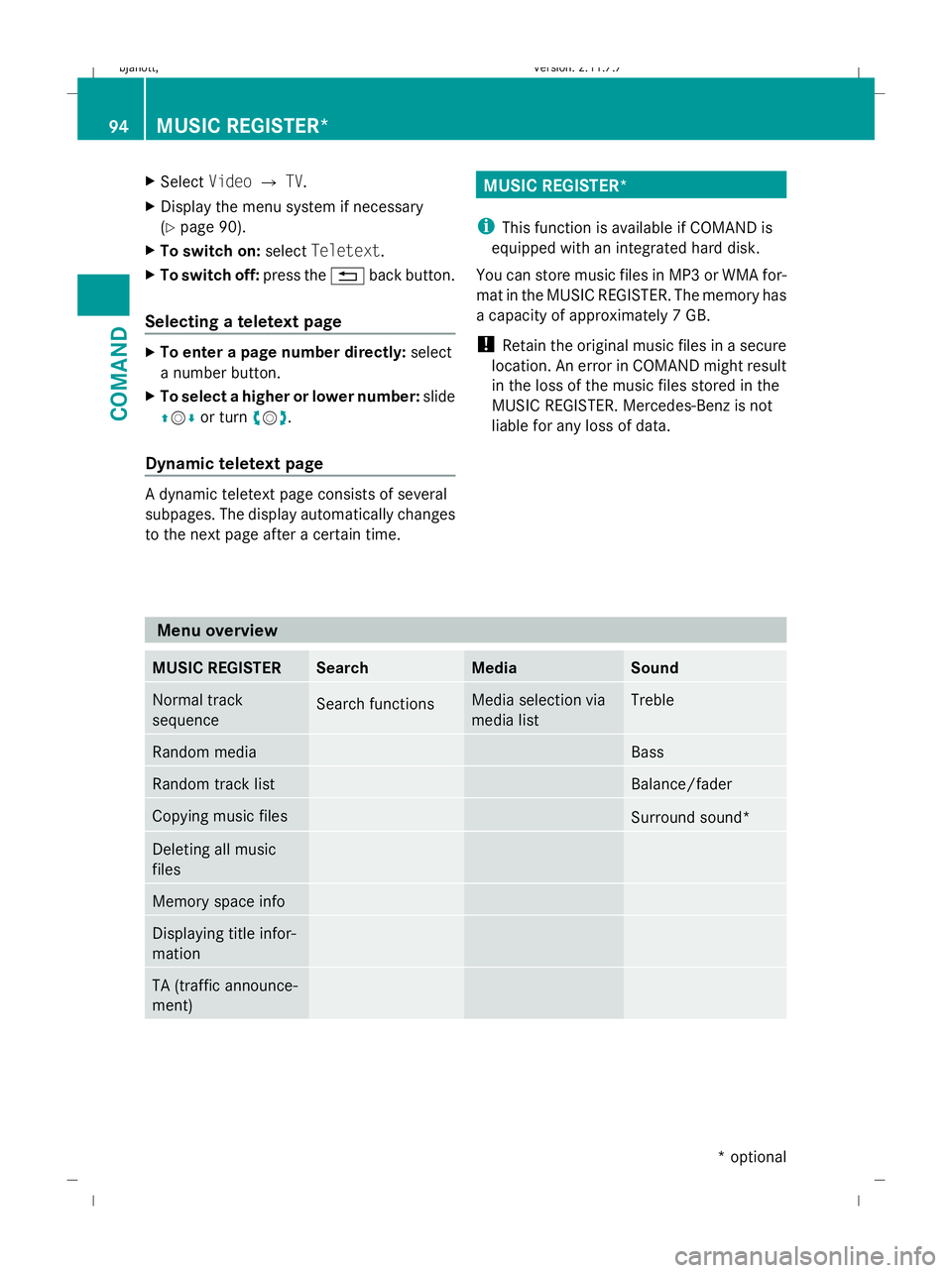
MUSIC REGISTER Search Media Sound
Normal track
sequence
Search functions Media selection via
media list Treble
Random media Bass
Random track list Balance/fader
Copying music files
Surround sound*
Deleting all music
files
Memory space info
Displaying title infor-
mation
TA (traffic announce-
ment)94
MUSIC REGISTER*COMAND
* optional
216_AKB; 2; 3, en-GB
bjanott,
Version: 2.11.7.7 2009-02-27T14:54:17+01:00 - Seite 94
Dateiname: 6515230602_buchblock.pdf; erzeugt am 04. Mar 2009 11:15:03; WK
Page 101 of 421
Media Interface* mode
Information on operating with Media
Interface
Connection options i
Stow the equipment in a secure location.
Use only genuine Mercedes-Benz connect-
ing cables.
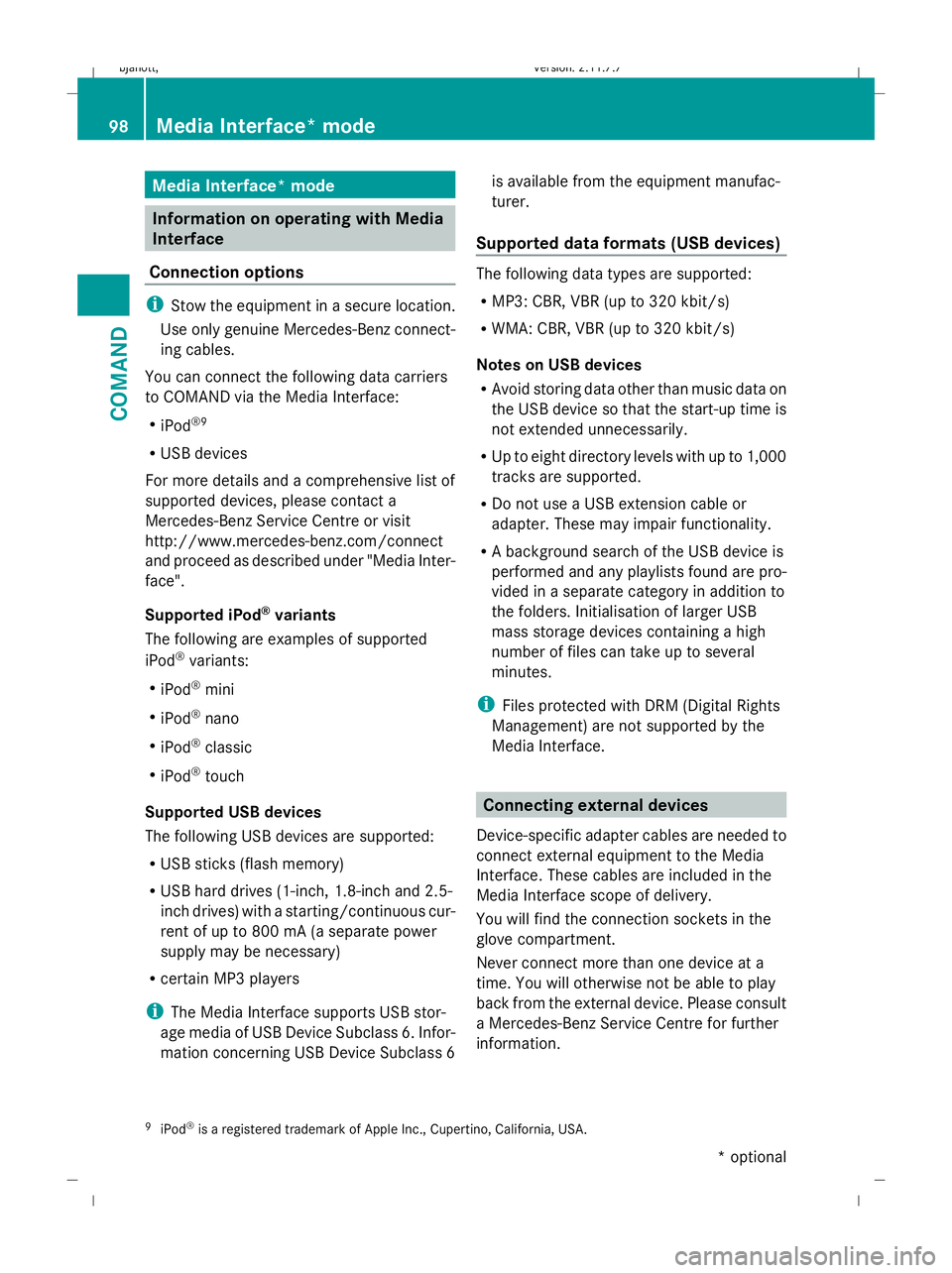
You can connect the following data carriers
to COMAND via the Media Interface:
R iPod ®9
R USB devices
For more details and a comprehensive list of
supported devices, please contact a
Mercedes-Benz Service Centre or visit
http://www.mercedes-benz.com/connect
and proceed as described under "Media Inter-
face".
Supported iPod ®
variants
The following are examples of supported
iPod ®
variants:
R iPod ®
mini
R iPod ®
nano
R iPod ®
classic
R iPod ®
touch
Supported USB devices
The following USB devices are supported:
R USB sticks (flash memory)
R USB hard drives (1-inch, 1.8-inch and 2.5-
inch drives) with a starting/continuous cur-
rent of up to 800 mA (a separate power
supply may be necessary)
R certain MP3 players
i The Media Interface supports USB stor-
age media of USB Device Subclass 6. Infor-
mation concerning USB Device Subclass 6 is available from the equipment manufac-
turer.
Supported data formats (USB devices) The following data types are supported:
R
MP3: CBR, VBR (up to 320 kbit/s)
R WMA: CBR, VBR (up to 320 kbit/s)
Notes on USB devices
R Avoid storing data other than music data on
the USB device so that the start-up time is
not extended unnecessarily.
R Up to eight directory levels with up to 1,000
tracks are supported.
R Do not use a USB extension cable or
adapter. These may impair functionality.
R A background search of the USB device is
performed and any playlists found are pro-
vided in a separate category in addition to
the folders. Initialisation of larger USB
mass storage devices containing a high
number of files can take up to several
minutes.
i Files protected with DRM (Digital Rights
Management) are not supported by the
Media Interface. Connecting external devices
Device-specific adapter cables are needed to
connect external equipment to the Media
Interface. These cables are included in the
Media Interface scope of delivery.
You will find the connection sockets in the
glove compartment.
Never connect more than one device at a
time. You will otherwise not be able to play
back from the external device. Please consult
a Mercedes-Benz Service Centre for further
information.
9 iPod ®
is a registered trademark of Apple Inc., Cupertino, California, USA. 98
Media Interface* modeCOMAND
* optional
216_AKB; 2; 3, en-GB
bjanott,
Version: 2.11.7.7 2009-02-27T14:54:17+01:00 - Seite 98
Dateiname: 6515230602_buchblock.pdf; erzeugt am 04. Mar 2009 11:15:04; WK
Page 111 of 421
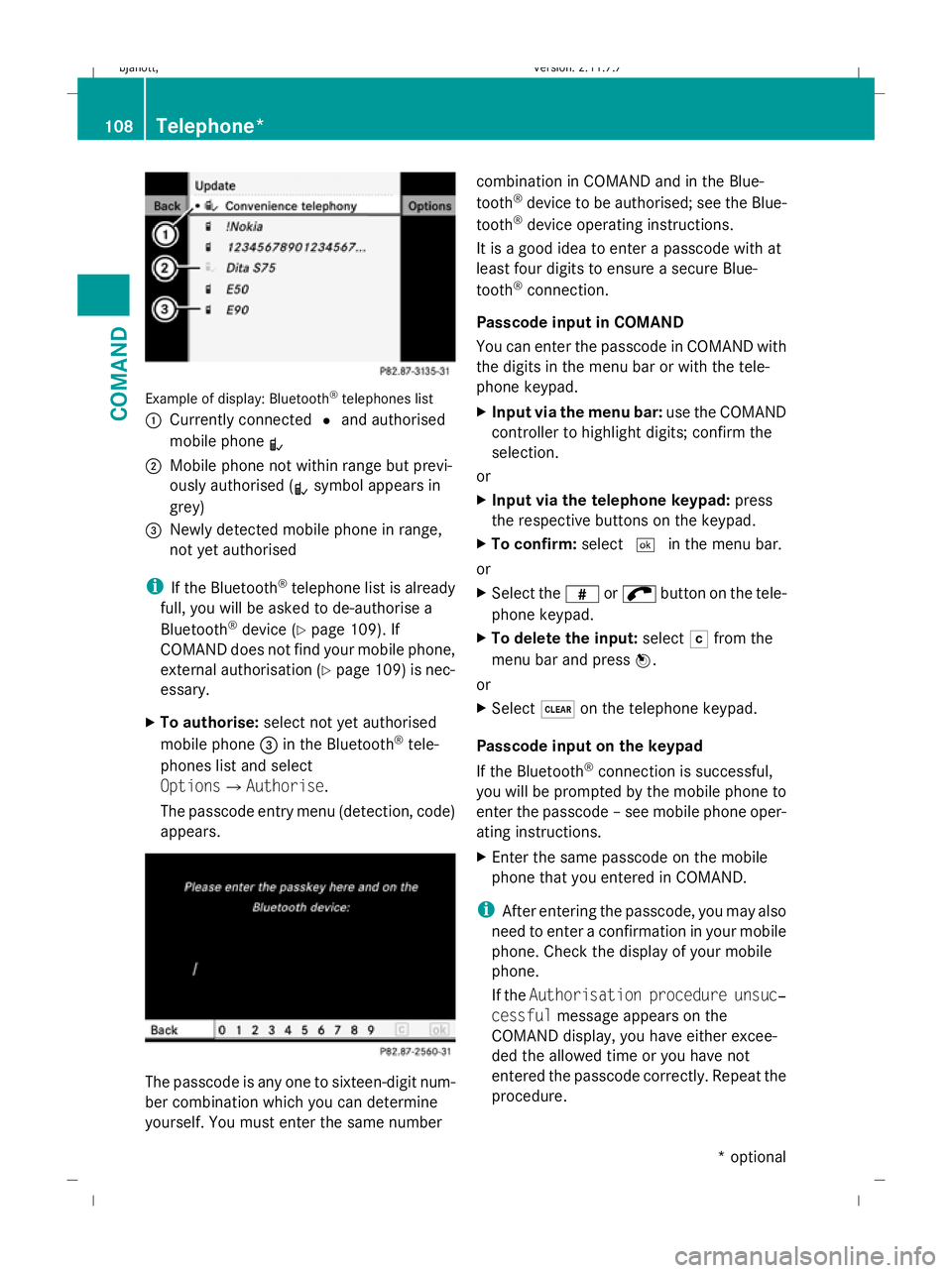
Example of display: Bluetooth
®
telephones list
: Currently connected #and authorised
mobile phone L
; Mobile phone not within range but previ-
ously authorised ( Lsymbol appears in
grey)
= Newly detected mobile phone in range,
not yet authorised
i If the Bluetooth ®
telephone list is already
full, you will be asked to de-authorise a
Bluetooth ®
device (Y page 109). If
COMAND does not find your mobile phone,
external authorisation (Y page 109) is nec-
essary.
X To authorise: select not yet authorised
mobile phone =in the Bluetooth ®
tele-
phones list and select
OptionsQAuthorise.
The passcode entry menu (detection, code)
appears. The passcode is any one to sixteen-digit num-
ber combination which you can determine
yourself. You must enter the same number combination in COMAND and in the Blue-
tooth
®
device to be authorised; see the Blue-
tooth ®
device operating instructions.
It is a good idea to enter a passcode with at
least four digits to ensure a secure Blue-
tooth ®
connection.
Passcode input in COMAND
You can enter the passcode in COMAND with
the digits in the menu bar or with the tele-
phone keypad.
X Input via the menu bar: use the COMAND
controller to highlight digits; confirm the
selection.
or
X Input via the telephone keypad: press
the respective buttons on the keypad.
X To confirm: select¬in the menu bar.
or
X Select the zor; button on the tele-
phone keypad.
X To delete the input: selectFfrom the
menu bar and press W.
or
X Select $on the telephone keypad.
Passcode input on the keypad
If the Bluetooth ®
connection is successful,
you will be prompted by the mobile phone to
enter the passcode – see mobile phone oper-
ating instructions.
X Enter the same passcode on the mobile
phone that you entered in COMAND.
i After entering the passcode, you may also
need to enter a confirmation in your mobile
phone. Check the display of your mobile
phone.
If the Authorisation procedure unsuc‐
cessful message appears on the
COMAND display, you have either excee-
ded the allowed time or you have not
entered the passcode correctly. Repeat the
procedure. 108
Telephone*COMAND
* optional
216_AKB; 2; 3, en-GB
bjanott,
Version: 2.11.7.7 2009-02-27T14:54:17+01:00 - Seite 108
Dateiname: 6515230602_buchblock.pdf; erzeugt am 04. Mar 2009 11:15:06; WK