clock MERCEDES-BENZ CL COUPE 2009 Owners Manual
[x] Cancel search | Manufacturer: MERCEDES-BENZ, Model Year: 2009, Model line: CL COUPE, Model: MERCEDES-BENZ CL COUPE 2009Pages: 421, PDF Size: 10.78 MB
Page 62 of 421
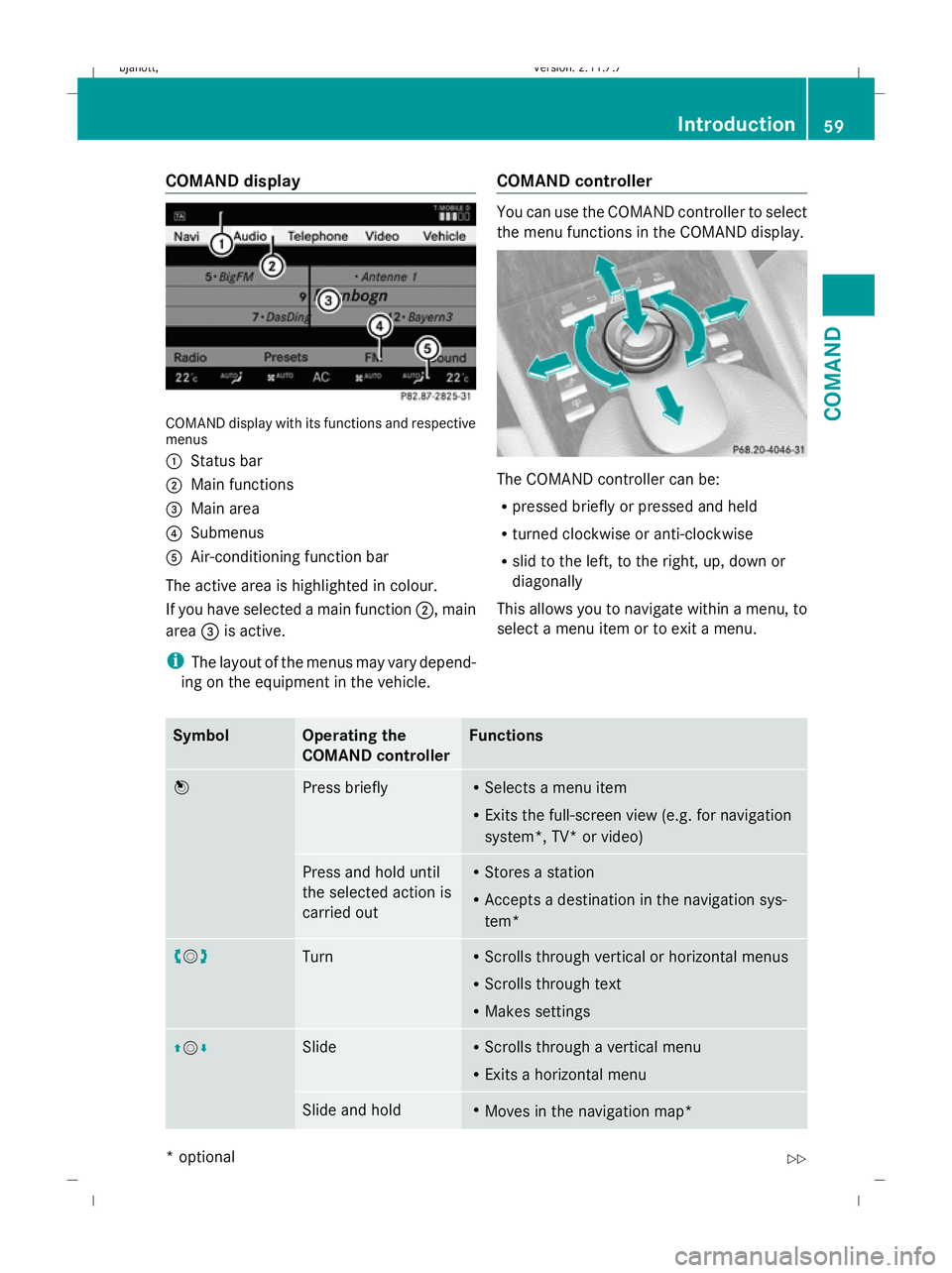
COMAND display
COMAND display with its functions and respective
menus
:
Status bar
; Main functions
= Main area
? Submenus
A Air-conditioning function bar
The active area is highlighted in colour.
If you have selected a main function ;, main
area =is active.
i The layout of the menus may vary depend-
ing on the equipment in the vehicle. COMAND controller You can use the COMAND controller to select
the menu functions in the COMAND display.
The COMAND controller can be:
R
pressed briefly or pressed and held
R turned clockwise or anti-clockwise
R slid to the left, to the right, up, down or
diagonally
This allows you to navigate within a menu, to
select a menu item or to exit a menu. Symbol Operating the
COMAND controller Functions
W
Press briefly R
Selects a menu item
R Exits the full-screen view (e.g. for navigation
system*, TV* or video) Press and hold until
the selected action is
carried out R
Stores a station
R Accepts a destination in the navigation sys-
tem* cVd
Turn R
Scrolls through vertical or horizontal menus
R Scrolls through text
R Makes settings ZVÆ Slide R
Scrolls through a vertical menu
R Exits a horizontal menu Slide and hold R
Moves in the navigation map* Introduction
59COMAND
* optional
216_AKB; 2; 3, en-GB
bjanott
,V ersion: 2.11.7.7
2009-02-27T14:54:17+01:00 - Seite 59 Z
Dateiname: 6515230602_buchblock.pdf; erzeugt am 04. Mar 2009 11:14:52; WK
Page 156 of 421
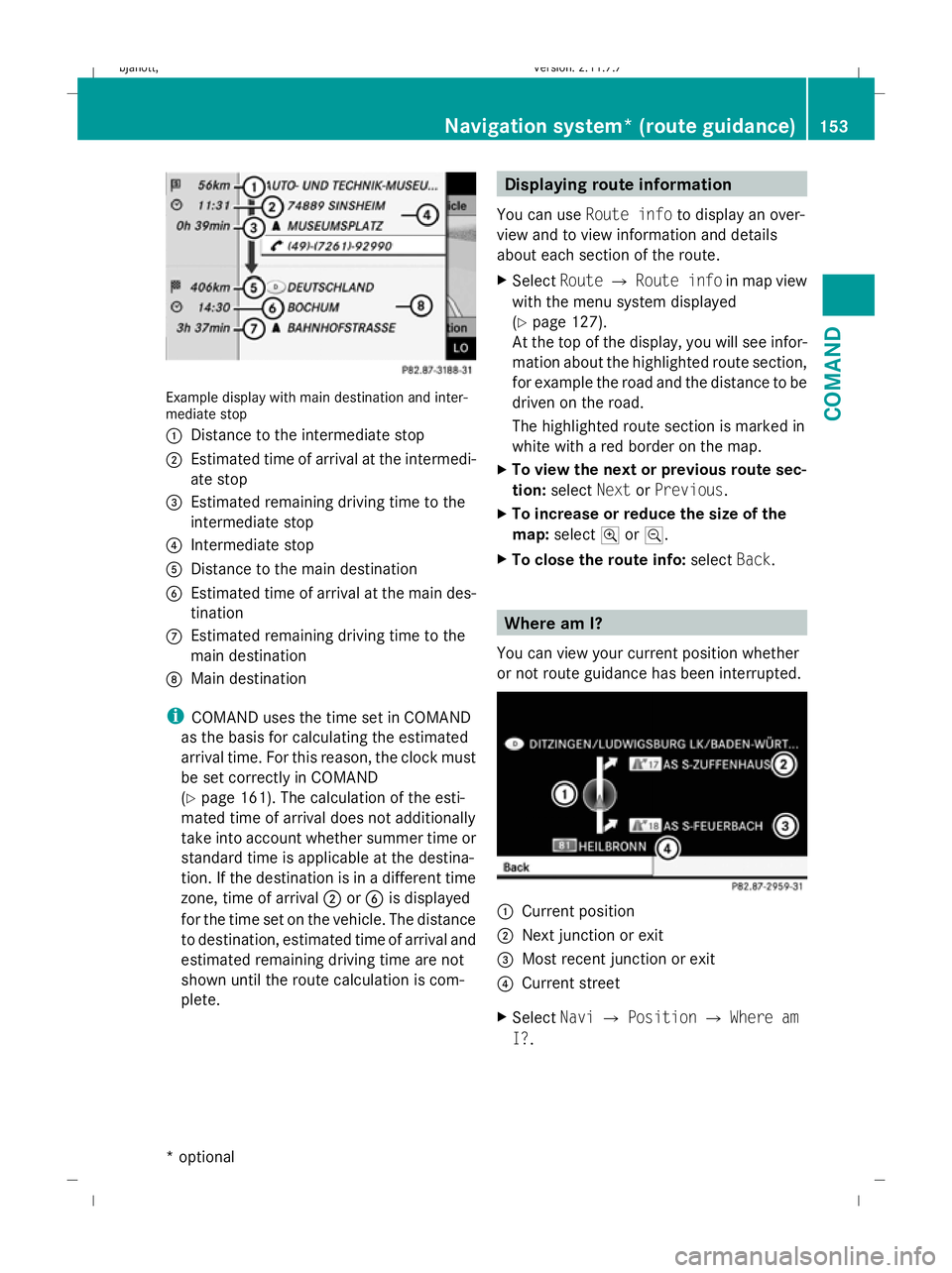
Example display with main destination and inter-
mediate stop
:
Distance to the intermediate stop
; Estimated time of arrival at the intermedi-
ate stop
= Estimated remaining driving time to the
intermediate stop
? Intermediate stop
A Distance to the main destination
B Estimated time of arrival at the main des-
tination
C Estimated remaining driving time to the
main destination
D Main destination
i COMAND uses the time set in COMAND
as the basis for calculating the estimated
arrival time. For this reason, the clock must
be set correctly in COMAND
(Y page 161). The calculation of the esti-
mated time of arrival does not additionally
take into account whether summer time or
standard time is applicable at the destina-
tion. If the destination is in a different time
zone, time of arrival ;orB is displayed
for the time set on the vehicle. The distance
to destination, estimated time of arrival and
estimated remaining driving time are not
shown until the route calculation is com-
plete. Displaying route information
You can use Route info to display an over-
view and to view information and details
about each section of the route.
X Select RouteQRoute info in map view
with the menu system displayed
(Y page 127).
At the top of the display, you will see infor-
mation about the highlighted route section,
for example the road and the distance to be
driven on the road.
The highlighted route section is marked in
white with a red border on the map.
X To view the next or previous route sec-
tion: select NextorPrevious.
X To increase or reduce the size of the
map: select NorM.
X To close the route info: selectBack. Where am I?
You can view your current position whether
or not route guidance has been interrupted. :
Current position
; Next junction or exit
= Most recent junction or exit
? Current street
X Select NaviQPosition QWhere am
I?. Navigation system* (route guidance)
153COMAND
* optional
216_AKB; 2; 3, en-GB
bjanott,
Version: 2.11.7.7 2009-02-27T14:54:17+01:00 - Seite 153 Z
Dateiname: 6515230602_buchblock.pdf; erzeugt am 04. Mar 2009 11:15:21; WK
Page 158 of 421
Navigation* (route guidance with
RDS-TMC) Introduction to RDS-TMC
An RDS-TMC radio station transmits free-of-
charge RDS-TMC traffic reports in addition to
the radio programme. COMAND can receive
the RDS-TMC traffic reports and take them
into consideration for dynamic route guid-
ance. Thus, for example, the navigation sys-
tem can guide you around a traffic jam.
In Germany, COMAND uses top-quality traffic
data provided by T-Systems Traffic for the
TMCpro traffic jam warning service. This
information is available nationwide and 24
hours a day. In contrast to the public TMC
service, TMCpro uses reports from public
sources. Moreover, TMCpro utilises exclusive
data from its own automated sensor network
for monitoring traffic conditions. The traffic
announcements which are read over public
radio stations (TA) may differ from TMCpro
traffic announcements. Dynamic route guidance
The Dynamic route is the same type of route
as the Fast route. In addition, COMAND
takes RDS-TMC traffic announcements that
have been received into consideration 23
when calculating the route for dynamic route
guidance. If a quicker route is determined due
to reception of an RDS-TMC traffic announce-
ment, the navigation system changes the
route. If possible, it will bypass blockages.
X To switch on: setDynamic route as the
route type 23
.
Proceed as described in the "Setting the
route type" section (Y page 131).
X To switch off: select a different route type.
i COMAND calculates a new route if you
change the route type setting with route
guidance active. If you change the route
type setting when route guidance is inac- tive, COMAND uses the new setting for the
next route guidance.
If TMCpro is received, this is indicated by the
TMCpro symbol at the lower right in the dis-
play.
If a public TMC service is received, the TMC
symbol appears at the lower right in the dis-
play.
If RDS-TMC reception is not possible, no sym-
bol will appear. RDS-TMC displays on the map
COMAND can show certain traffic incidents
on the map. These displays can be seen on
map scales 50 m (0.05 miles) to 50 km (50
miles).
X To set the map scale: turncVduntil the
desired map scale is set.
Turning clockwise enlarges the map, turn-
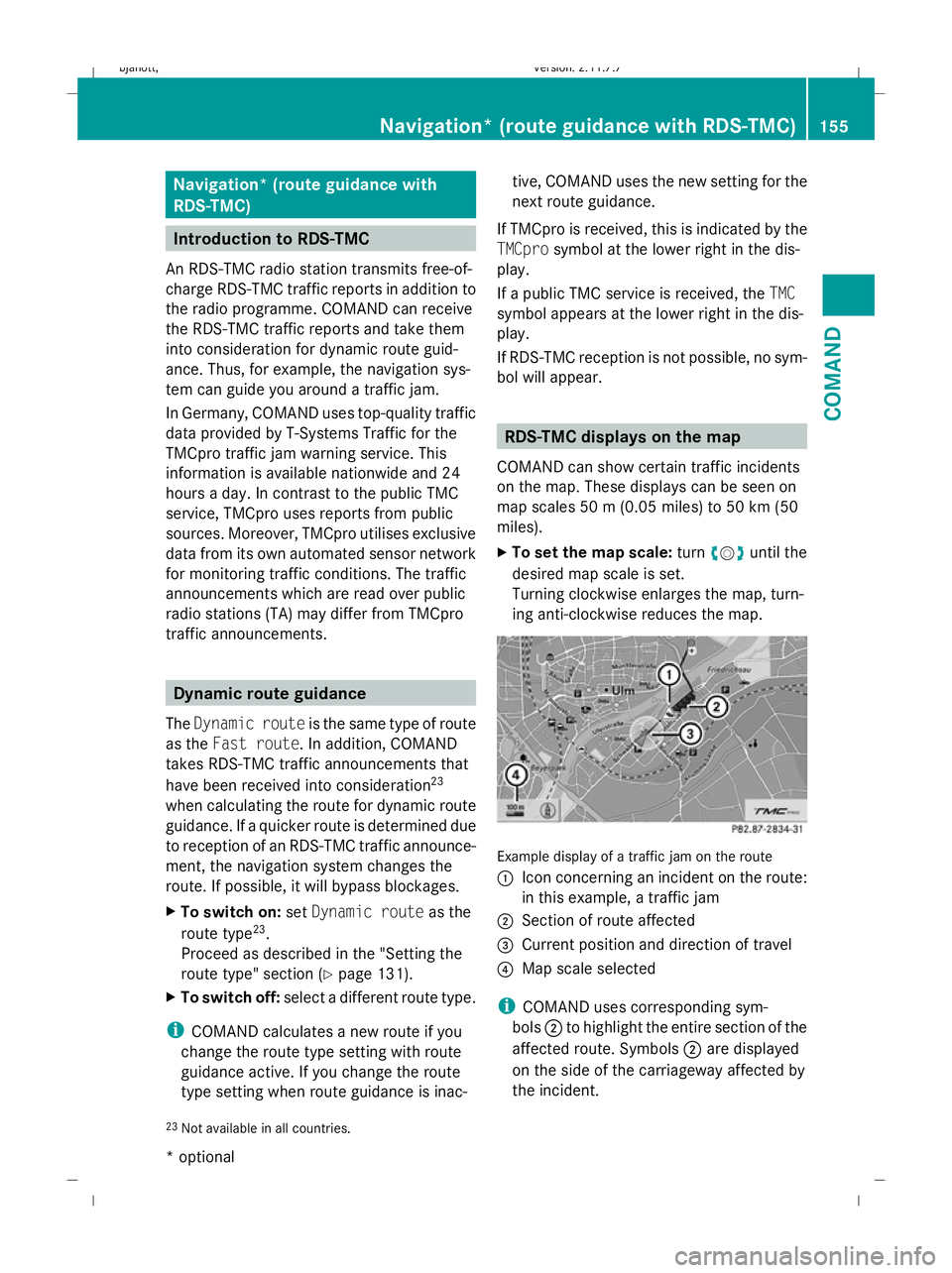
ing anti-clockwise reduces the map. Example display of a traffic jam on the route
:
Icon concerning an incident on the route:
in this example, a traffic jam
; Section of route affected
= Current position and direction of travel
? Map scale selected
i COMAND uses corresponding sym-
bols ;to highlight the entire section of the
affected route. Symbols ;are displayed
on the side of the carriageway affected by
the incident.
23 Not available in all countries. Navigation* (route guidance
with RDS-TMC)155COMAND
* optional
216_AKB; 2; 3, en-GB
bjanott,
Version: 2.11.7.7
2009-02-27T14:54:17+01:00 - Seite 155 Z
Dateiname: 6515230602_buchblock.pdf; erzeugt am 04. Mar 2009 11:15:23; WK
Page 163 of 421
i
If the navigable address data for the des-
tination being deleted is also assigned to
an address book entry, COMAND will also
delete this data from there. If the corre-
sponding address book entry does not con-
tain any further data, such as telephone
numbers, COMAND deletes the entire
address book entry. Navigation system* (previous desti-
nations) General notes
COMAND automatically stores the previous
destinations for which the route calculation
was launched. If the memory is full, COMAND
deletes the oldest destination.
You can also store one destination from the
list of previous destinations in the destination
memory. It will be stored there permanently. Storing a destination permanently in
the destination memory
X Proceed as described in the "From the list
of previous destinations" section
(Y page 159) Storing the vehicle position in the list
of previous destinations
X To set the map to the vehicle position:
select NaviQPosition QVehicle
position map.
X To save: selectNaviQPosition Q
Save crosshair position. Storing the crosshair position in the
list of previous destinations
i A crosshair appears on the map if you
have moved the map manually. You can
store the crosshair position as a destina-
tion in the list of previous destinations. X
If necessary, display the menu system:
press W.
X Select PositionQSave crosshair
position. Deleting a previous destination
X Select NaviQDestination QFrom
last destinations .
The list of previous destinations appears.
X Select the desired destination.
The address of the destination appears.
X Select Delete. System
Menu overview
You will not be able to use the system settings
in the following menus:
R Display QDay design, Night design, Auto-
matic
R Time QClock, Date, Format, Time zone
R LINGUATRONIC* QHelp window, New
individualisation, Delete individualisation
R Language QLanguage selection
R Favourites button QAssign programma-
ble button
R Reset QReset COMAND to factory set-
tings
R Text reader QSet read-aloud speed
R Bluetooth ®
Q Search for Bluetooth ®
devi-
ces, activate Bluetooth ®
R Data upload/download QCopy data to
storage medium, import data from storage
medium 160
SystemCOMAND
* optional
216_AKB; 2; 3, en-GB
bjanott,
Version: 2.11.7.7 2009-02-27T14:54:17+01:00 - Seite 160
Dateiname: 6515230602_buchblock.pdf; erzeugt am 04. Mar 2009 11:15:25; WK
Page 184 of 421
X
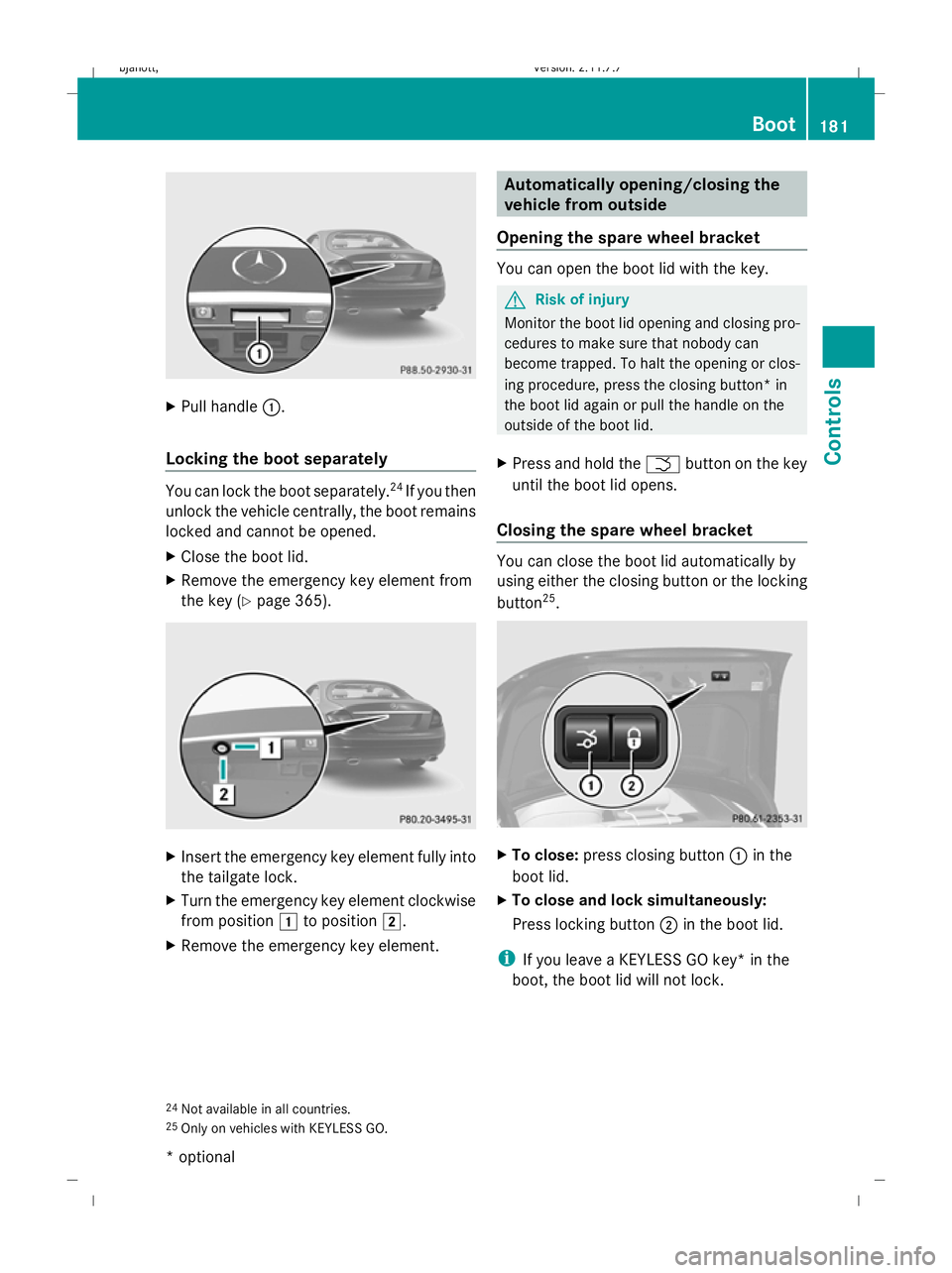
Pull handle :.
Locking the boot separately You can lock the boot separately.
24
If you then
unlock the vehicle centrally, the boot remains
locked and cannot be opened.
X Close the boot lid.
X Remove the emergency key element from
the key (Y page 365). X
Insert the emergency key element fully into
the tailgate lock.
X Turn the emergency key element clockwise
from position 1to position 2.
X Remove the emergency key element. Automatically opening/closing the
vehicle from outside
Opening the spare wheel bracket You can open the boot lid with the key.
G
Risk of injury
Monitor the boot lid opening and closing pro-
cedures to make sure that nobody can
become trapped. To halt the opening or clos-
ing procedure, press the closing button* in
the boot lid again or pull the handle on the
outside of the boot lid.
X Press and hold the Fbutton on the key
until the boot lid opens.
Closing the spare wheel bracket You can close the boot lid automatically by
using either the closing button or the locking
button
25
. X
To close: press closing button :in the
boot lid.
X To close and lock simultaneously:
Press locking button ;in the boot lid.
i If you leave a KEYLESS GO key* in the
boot, the boot lid will not lock.
24 Not available in all countries.
25 Only on vehicles with KEYLESS GO. Boot
181Controls
* optional
216_AKB; 2; 3, en-GB
bjanott,
Version: 2.11.7.7
2009-02-27T14:54:17+01:00 - Seite 181 Z
Dateiname: 6515230602_buchblock.pdf; erzeugt am 04. Mar 2009 11:15:37; WK
Page 269 of 421
Setting the side air vents
X
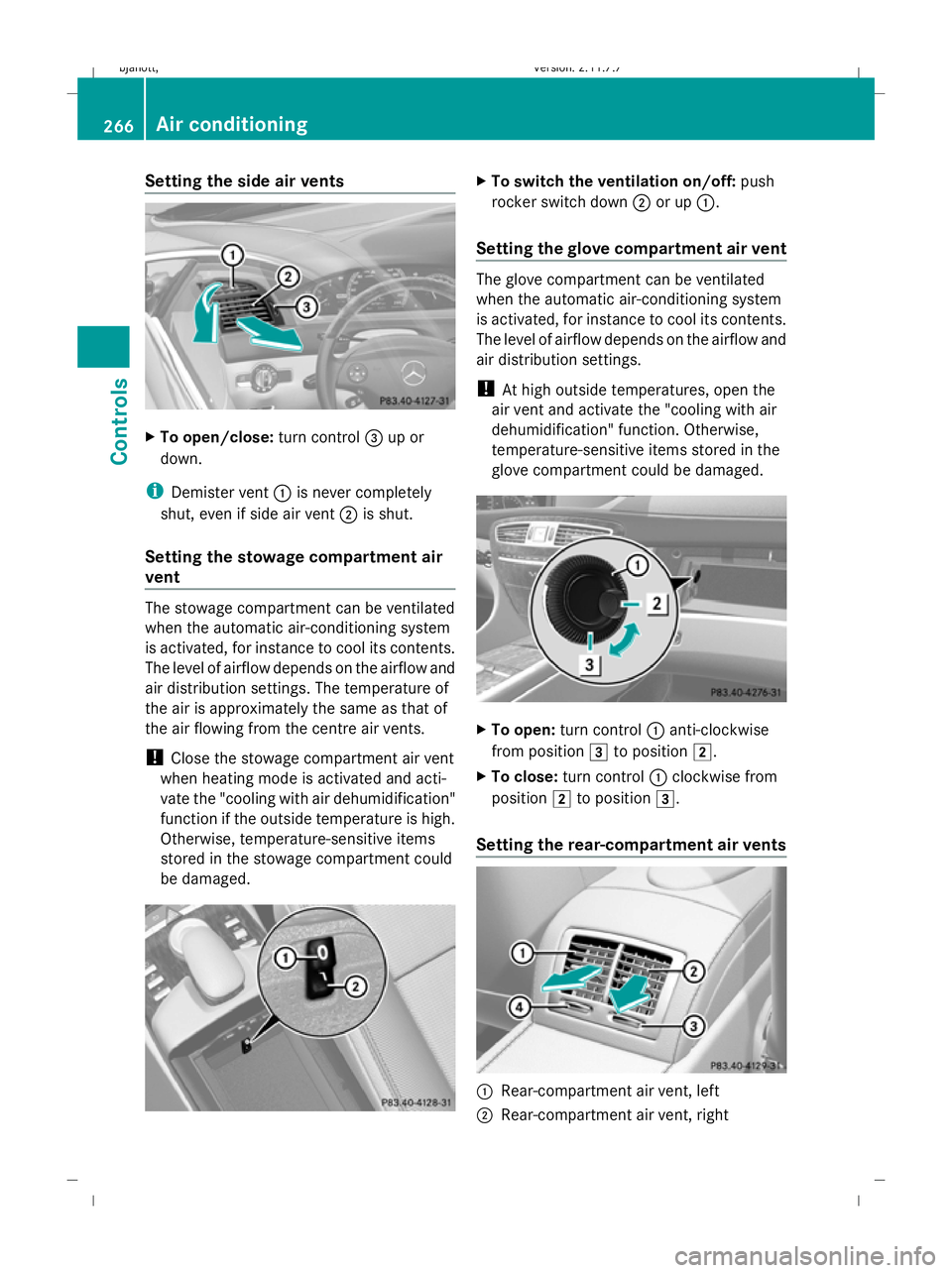
To open/close: turn control=up or
down.
i Demister vent :is never completely
shut, even if side air vent ;is shut.
Setting the stowage compartment air
vent The stowage compartment can be ventilated
when the automatic air-conditioning system
is activated, for instance to cool its contents.
The level of airflow depends on the airflow and
air distribution settings. The temperature of
the air is approximately the same as that of
the air flowing from the centre air vents.
! Close the stowage compartment air vent
when heating mode is activated and acti-
vate the "cooling with air dehumidification"
function if the outside temperature is high.
Otherwise, temperature-sensitive items
stored in the stowage compartment could
be damaged. X
To switch the ventilation on/off: push
rocker switch down ;or up :.
Setting the glove compartment air vent The glove compartment can be ventilated
when the automatic air-conditioning system
is activated, for instance to cool its contents.
The level of airflow depends on the airflow and
air distribution settings.
! At high outside temperatures, open the
air vent and activate the "cooling with air
dehumidification" function. Otherwise,
temperature-sensitive items stored in the
glove compartment could be damaged. X
To open: turn control :anti-clockwise
from position 3to position 2.
X To close: turn control :clockwise from
position 2to position 3.
Setting the rear-compartment air vents :
Rear-compartment air vent, left
; Rear-compartment air vent, right 266
Air conditioningControls
216_AKB; 2; 3, en-GB
bjanott
,V ersion: 2.11.7.7
2009-02-27T14:54:17+01:00 - Seite 266
Dateiname: 6515230602_buchblock.pdf; erzeugt am 04. Mar 2009 11:16:12; WK
Page 279 of 421
Sharp-edged and fragile objects must not be
carried in the luggage net.
Do not carry hard objects in the ruffled pock-
ets. Objects must not protrude over the top
of the ruffled pockets.
Glove compartment i
Depending on the vehicle's equipment,
you will find the following installed in the
glove compartment: an audio and video
AUX jack, a USB socket or Media Inter-
face*, a universal interface for mobile
audio equipment, e.g. for an iPod, USB devi-
ces, and a bracket for a remote control *.
The glove compartment can be cooled
(Y page 266). X
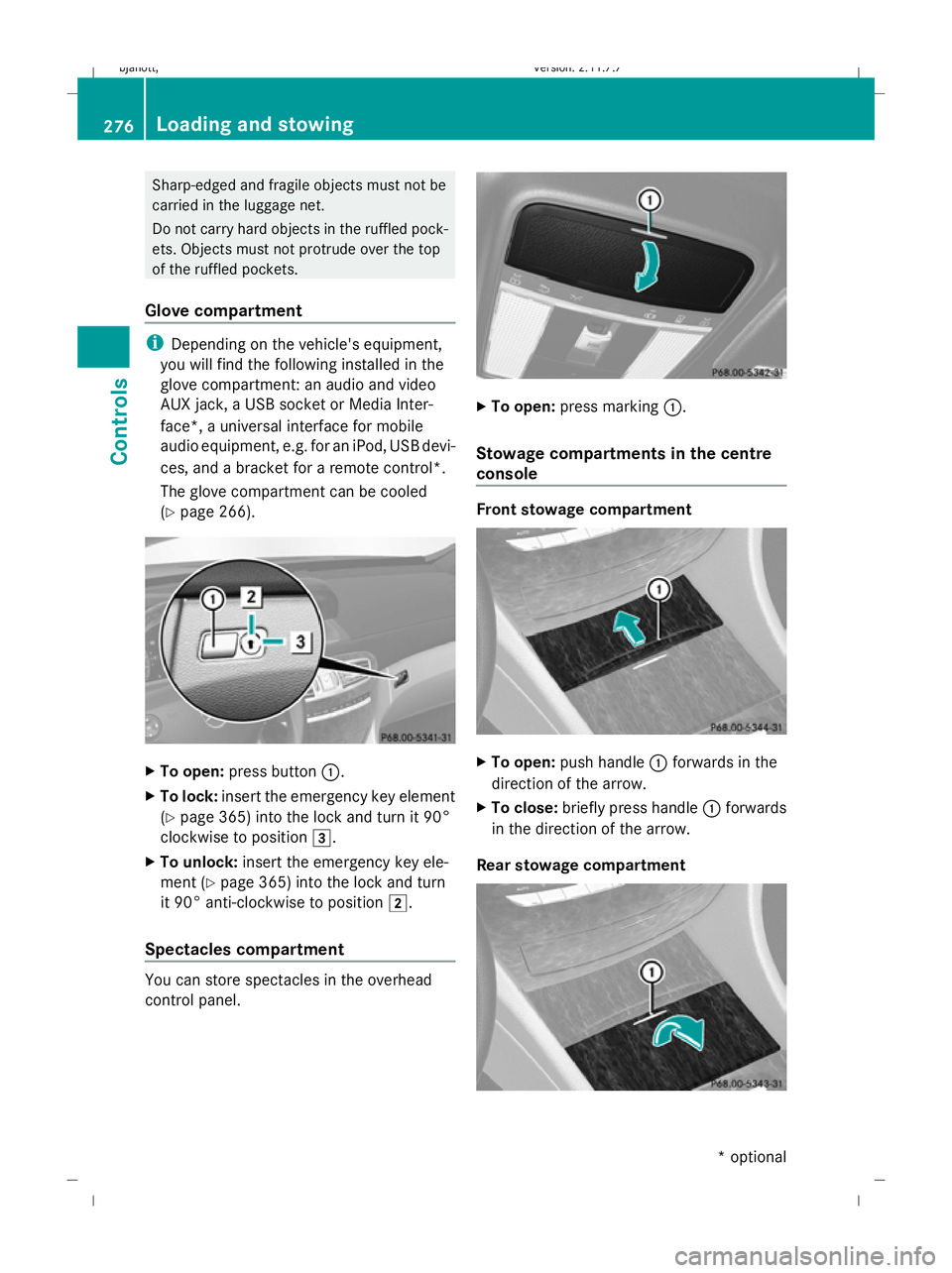
To open: press button :.
X To lock: insert the emergency key element
(Y page 365) into the lock and turn it 90°
clockwise to position 3.
X To unlock: insert the emergency key ele-
ment ( Ypage 365) into the lock and turn
it 90° anti-clockwise to position 2.
Spectacles compartment You can store spectacles in the overhead
control panel. X
To open: press marking :.
Stowage compartments in the centre
console Front stowage compartment
X
To open: push handle :forwards in the
direction of the arrow.
X To close: briefly press handle :forwards
in the direction of the arrow.
Rear stowage compartment 276
Loading and stowingControls
* optional
216_AKB; 2; 3, en-GB
bjanott,
Version: 2.11.7.7 2009-02-27T14:54:17+01:00 - Seite 276
Dateiname: 6515230602_buchblock.pdf; erzeugt am 04. Mar 2009 11:16:15; WK
Page 294 of 421
The arrow next to the filling pump indicates
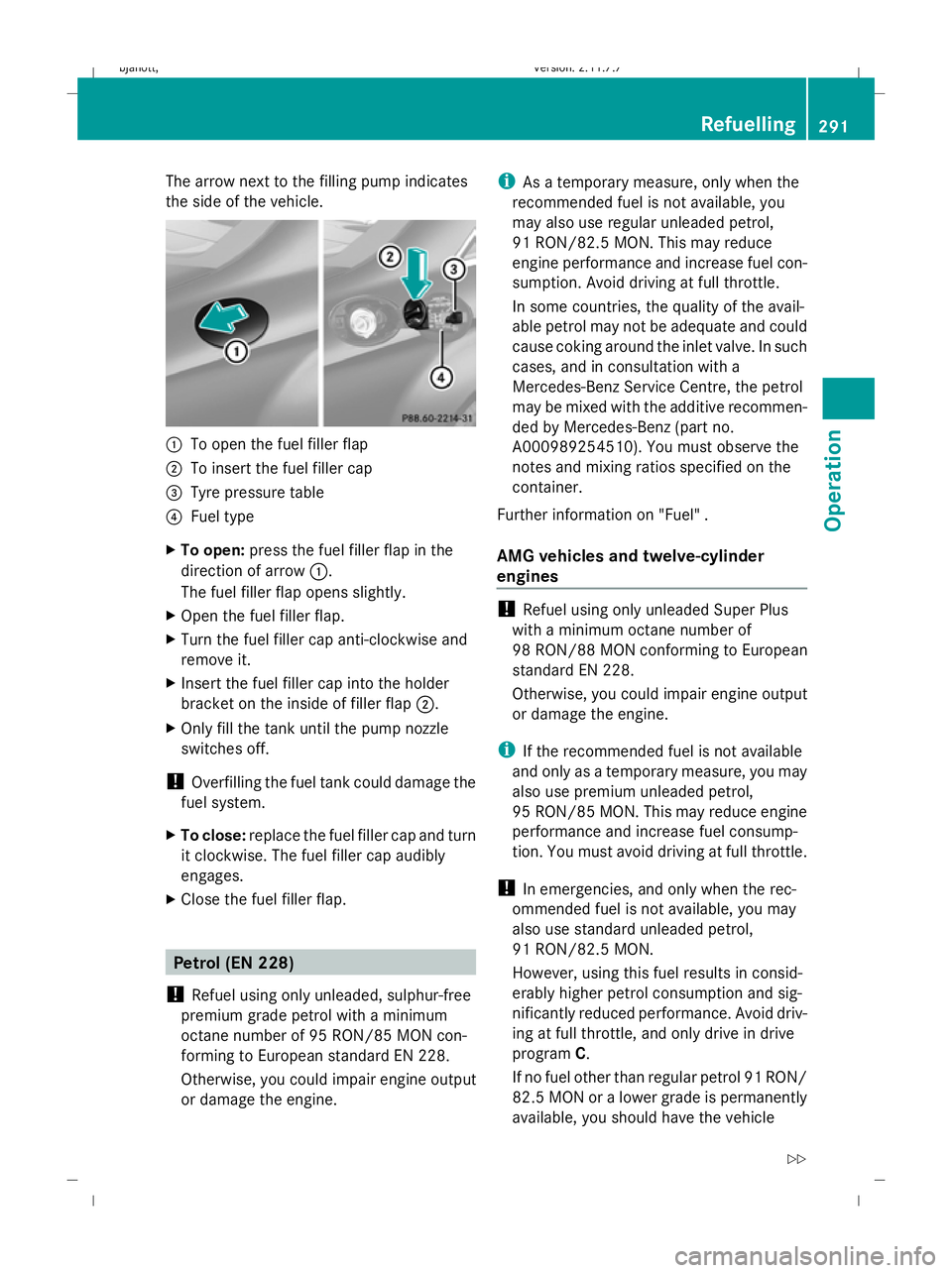
the side of the vehicle.
:
To open the fuel filler flap
; To insert the fuel filler cap
= Tyre pressure table
? Fuel type
X To open: press the fuel filler flap in the
direction of arrow :.
The fuel filler flap opens slightly.
X Open the fuel filler flap.
X Turn the fuel filler cap anti-clockwise and
remove it.
X Insert the fuel filler cap into the holder
bracket on the inside of filler flap ;.
X Only fill the tank until the pump nozzle
switches off.
! Overfilling the fuel tank could damage the
fuel system.
X To close: replace the fuel filler cap and turn
it clockwise. The fuel filler cap audibly
engages.
X Close the fuel filler flap. Petrol (EN 228)
! Refuel using only unleaded, sulphur-free
premium grade petrol with a minimum
octane number of 95 RON/85 MON con-
forming to European standard EN 228.
Otherwise, you could impair engine output
or damage the engine. i
As a temporary measure, only when the
recommended fuel is not available, you
may also use regular unleaded petrol,
91 RON/82.5 MON. This may reduce
engine performance and increase fuel con-
sumption. Avoid driving at full throttle.
In some countries, the quality of the avail-
able petrol may not be adequate and could
cause coking around the inlet valve. In such
cases, and in consultation with a
Mercedes-Benz Service Centre, the petrol
may be mixed with the additive recommen-
ded by Mercedes-Benz (part no.
A000989254510). You must observe the
notes and mixing ratios specified on the
container.
Further information on "Fuel" .
AMG vehicles and twelve-cylinder
engines !
Refuel using only unleaded Super Plus
with a minimum octane number of
98 RON/88 MON conforming to European
standard EN 228.
Otherwise, you could impair engine output
or damage the engine.
i If the recommended fuel is not available
and only as a temporary measure, you may
also use premium unleaded petrol,
95 RON/85 MON. This may reduce engine
performance and increase fuel consump-
tion. You must avoid driving at full throttle.
! In emergencies, and only when the rec-
ommended fuel is not available, you may
also use standard unleaded petrol,
91 RON/82.5 MON.
However, using this fuel results in consid-
erably higher petrol consumption and sig-
nificantly reduced performance. Avoid driv-
ing at full throttle, and only drive in drive
program C.
If no fuel other than regular petrol 91 RON/
82.5 MON or a lower grade is permanently
available, you should have the vehicle Refuelling
291Operation
216_AKB; 2; 3, en-GB
bjanott, Version: 2.11.7.7 2009-02-27T14:54:17+01:00 - Seite 291 Z
Dateiname: 6515230602_buchblock.pdf; erzeugt am 04. Mar 2009 11:16:25; WK
Page 297 of 421
X
Repeat the measurement after about five
minutes if the engine is at normal operating
temperature.
X Repeat the measurement after about
30 minutes if the engine is not at normal
operating temperature (if the engine was
only started briefly).
The following message appears if the engine
is running:
Engine oil level Not when engine on
X Switch off the engine and wait for five
minutes if the engine is at normal operating
temperature, or for about 30 minutes if the
engine is not at normal operating temper-
ature (if you had started the engine only
briefly), before measuring.
i If you wish to cancel the measurement,
press the %button on the multi-func-
tion steering wheel.
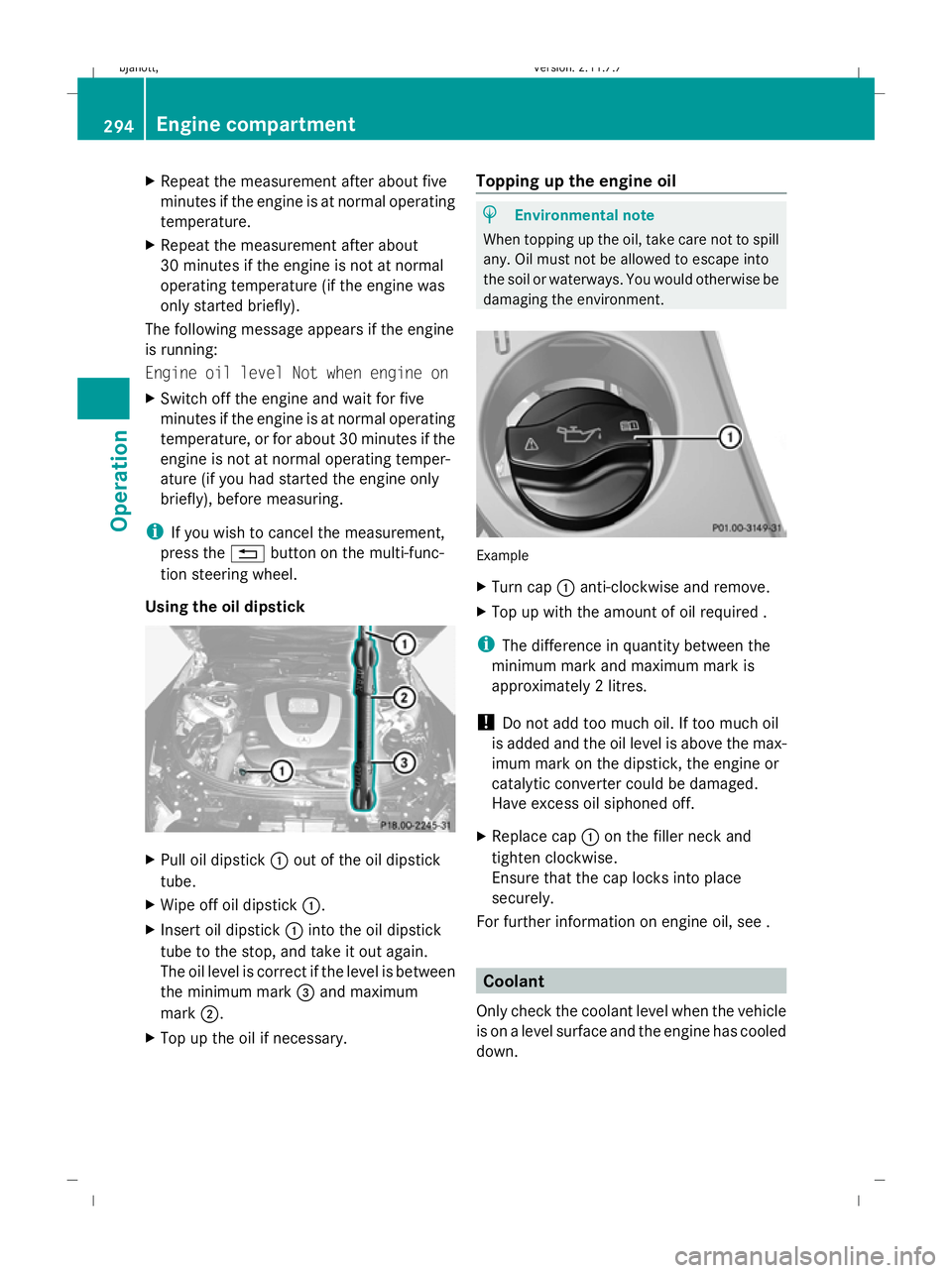
Using the oil dipstick X
Pull oil dipstick :out of the oil dipstick
tube.
X Wipe off oil dipstick :.
X Insert oil dipstick :into the oil dipstick
tube to the stop, and take it out again.
The oil level is correct if the level is between
the minimum mark =and maximum
mark ;.
X Top up the oil if necessary. Topping up the engine oil H
Environmental note
When topping up the oil, take care not to spill
any. Oil must not be allowed to escape into
the soil or waterways. You would otherwise be
damaging the environment. Example
X
Turn cap :anti-clockwise and remove.
X Top up with the amount of oil required .
i The difference in quantity between the
minimum mark and maximum mark is
approximately 2 litres.
! Do not add too much oil. If too much oil
is added and the oil level is above the max-
imum mark on the dipstick, the engine or
catalytic converter could be damaged.
Have excess oil siphoned off.
X Replace cap :on the filler neck and
tighten clockwise.
Ensure that the cap locks into place
securely.
For further information on engine oil, see . Coolant
Only check the coolant level when the vehicle
is on a level surface and the engine has cooled
down. 294
Engine compartmentOperation
216_AKB; 2; 3, en-GB
bjanott
,V ersion: 2.11.7.7
2009-02-27T14:54:17+01:00 - Seite 294
Dateiname: 6515230602_buchblock.pdf; erzeugt am 04. Mar 2009 11:16:26; WK
Page 298 of 421
X
Turn the key to position 2(Y page 182) in
the ignition lock.
X Check the coolant temperature gauge in
the instrument cluster. G
Risk of injury
The cooling system is pressurised. Therefore,
only unscrew the cap once the engine has
cooled down. The coolant temperature gauge
must display less than 70 †. Otherwise, you
could be scalded if hot coolant escapes.
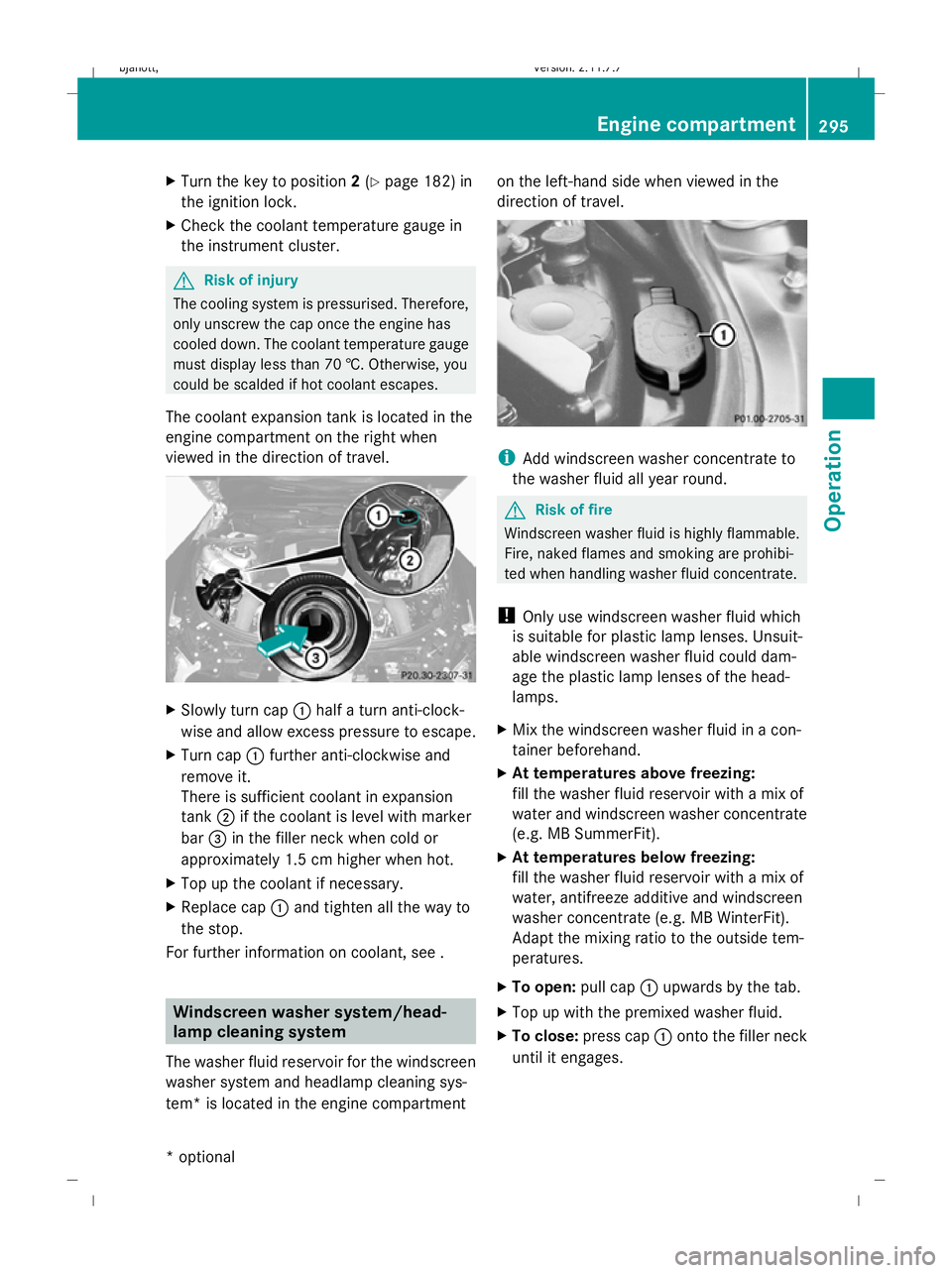
The coolant expansion tank is located in the
engine compartment on the right when
viewed in the direction of travel. X
Slowly turn cap :half a turn anti-clock-
wise and allow excess pressure to escape.
X Turn cap :further anti-clockwise and
remove it.
There is sufficient coolant in expansion
tank ;if the coolant is level with marker
bar =in the filler neck when cold or
approximately 1.5 cm higher when hot.
X Top up the coolant if necessary.
X Replace cap :and tighten all the way to
the stop.
For further information on coolant, see . Windscreen washer system/head-
lamp cleaning system
The washer fluid reservoir for the windscreen
washer system and headlamp cleaning sys-
tem* is located in the engine compartment on the left-hand side when viewed in the
direction of travel.
i
Add windscreen washer concentrate to
the washer fluid all year round. G
Risk of fire
Windscreen washer fluid is highly flammable.
Fire, naked flames and smoking are prohibi-
ted when handling washer fluid concentrate.
! Only use windscreen washer fluid which
is suitable for plastic lamp lenses. Unsuit-
able windscreen washer fluid could dam-
age the plastic lamp lenses of the head-
lamps.
X Mix the windscreen washer fluid in a con-
tainer beforehand.
X At temperatures above freezing:
fill the washer fluid reservoir with a mix of
water and windscreen washer concentrate
(e.g. MB SummerFit).
X At temperatures below freezing:
fill the washer fluid reservoir with a mix of
water, antifreeze additive and windscreen
washer concentrate (e.g. MB WinterFit).
Adapt the mixing ratio to the outside tem-
peratures.
X To open: pull cap:upwards by the tab.
X Top up with the premixed washer fluid.
X To close: press cap :onto the filler neck
until it engages. Engine compartment
295Operation
* optional
216_AKB; 2; 3, en-GB
bjanott,
Version: 2.11.7.7 2009-02-27T14:54:17+01:00 - Seite 295 Z
Dateiname: 6515230602_buchblock.pdf; erzeugt am 04. Mar 2009 11:16:27; WK