driver seat adjustment MERCEDES-BENZ CL COUPE 2009 Owners Manual
[x] Cancel search | Manufacturer: MERCEDES-BENZ, Model Year: 2009, Model line: CL COUPE, Model: MERCEDES-BENZ CL COUPE 2009Pages: 421, PDF Size: 10.78 MB
Page 72 of 421
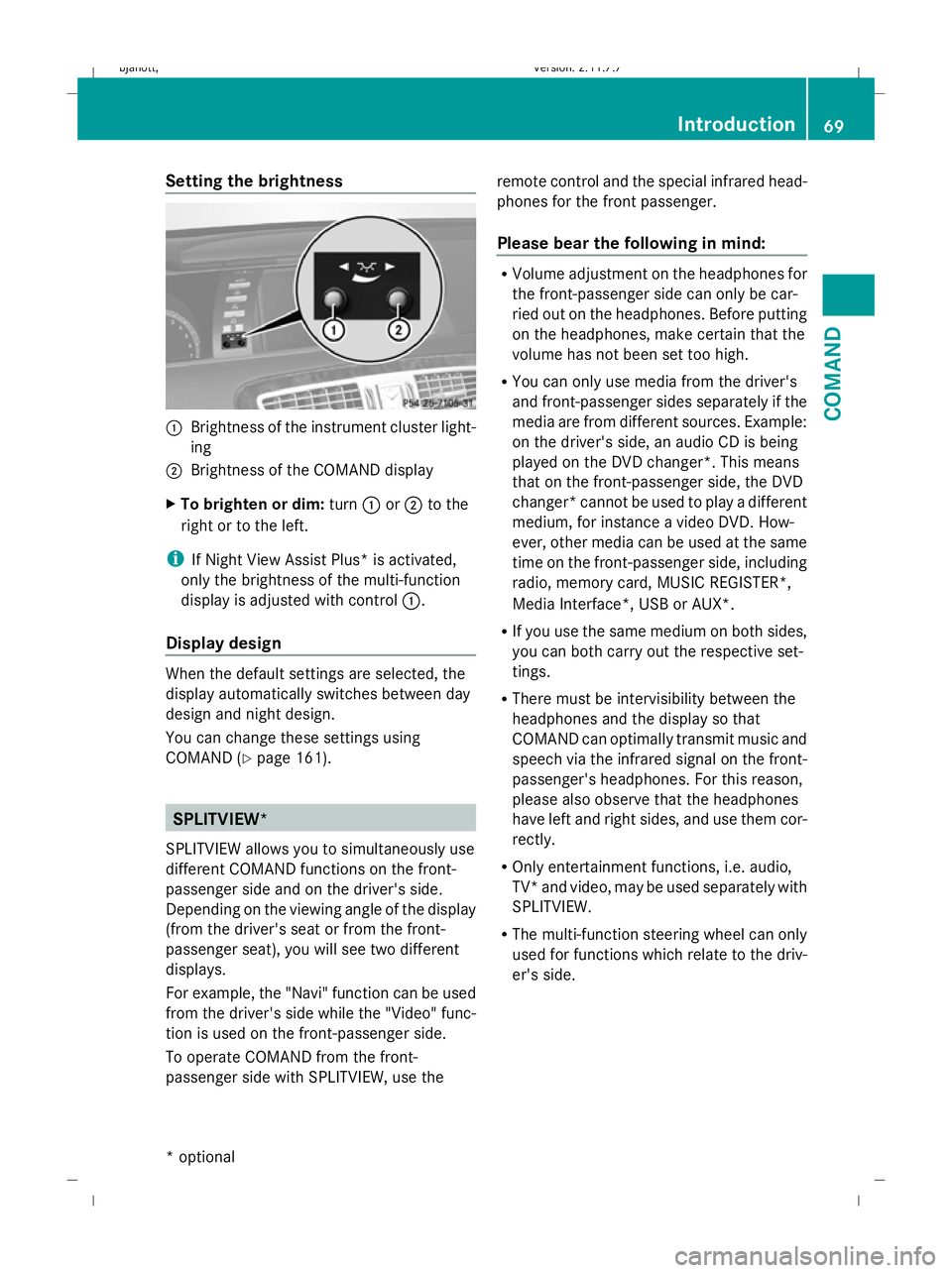
Setting the brightness
:
Brightness of the instrument cluster light-
ing
; Brightness of the COMAND display
X To brighten or dim: turn:or; to the
right or to the left.
i If Night View Assist Plus* is activated,
only the brightness of the multi-function
display is adjusted with control :.
Display design When the default settings are selected, the
display automatically switches between day
design and night design.
You can change these settings using
COMAND (Y
page 161). SPLITVIEW*
SPLITVIEW allows you to simultaneously use
different COMAND functions on the front-
passenger side and on the driver's side.
Depending on the viewing angle of the display
(from the driver's seat or from the front-
passenger seat), you will see two different
displays.
For example, the "Navi" function can be used
from the driver's side while the "Video" func-
tion is used on the front-passenger side.
To operate COMAND from the front-
passenger side with SPLITVIEW, use the remote control and the special infrared head-
phones for the front passenger.
Please bear the following in mind: R
Volume adjustment on the headphones for
the front-passenger side can only be car-
ried out on the headphones. Before putting
on the headphones, make certain that the
volume has not been set too high.
R You can only use media from the driver's
and front-passenger sides separately if the
media are from different sources. Example:
on the driver's side, an audio CD is being
played on the DVD changer*. This means
that on the front-passenger side, the DVD
changer* cannot be used to play a different
medium, for instance a video DVD. How-
ever, other media can be used at the same
time on the front-passenger side, including
radio, memory card, MUSIC REGISTER*,
Media Interface*, USB or AUX*.
R If you use the same medium on both sides,
you can both carry out the respective set-
tings.
R There must be intervisibility between the
headphones and the display so that
COMAND can optimally transmit music and
speech via the infrared signal on the front-
passenger's headphones. For this reason,
please also observe that the headphones
have left and right sides, and use them cor-
rectly.
R Only entertainment functions, i.e. audio,
TV* and video, may be used separately with
SPLITVIEW.
R The multi-function steering wheel can only
used for functions which relate to the driv-
er's side. Introduction
69COMAND
* optional
216_AKB; 2; 3, en-GB
bjanott,V
ersion: 2.11.7.7
2009-02-27T14:54:17+01:00 - Seite 69 Z
Dateiname: 6515230602_buchblock.pdf; erzeugt am 04. Mar 2009 11:14:56; WK
Page 168 of 421
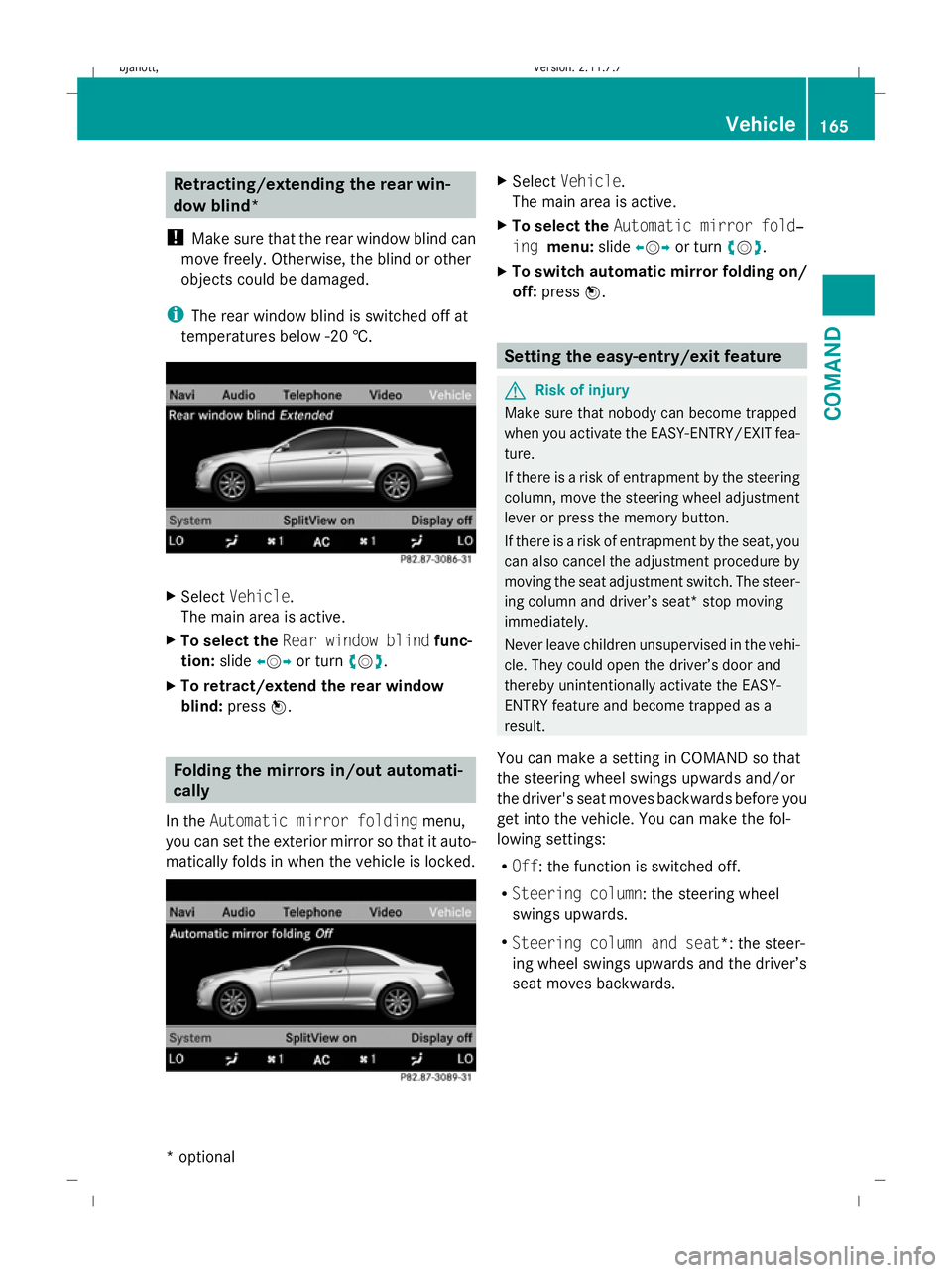
Retracting/extending the rear win-
dow blind*
! Make sure that the rear window blind can
move freely. Otherwise, the blind or other
objects could be damaged.
i The rear window blind is switched off at
temperatures below -20 †. X
Select Vehicle.
The main area is active.
X To select the Rear window blind func-
tion: slideXVY or turn cVd.
X To retract/extend the rear window
blind: pressW. Folding the mirrors in/out automati-
cally
In the Automatic mirror folding menu,
you can set the exterior mirror so that it auto-
matically folds in when the vehicle is locked. X
Select Vehicle.
The main area is active.
X To select the Automatic mirror fold‐
ing menu: slideXVY or turn cVd.
X To switch automatic mirror folding on/
off: press W. Setting the easy-entry/exit feature
G
Risk of injury
Make sure that nobody can become trapped
when you activate the EASY-ENTRY/EXIT fea-
ture.
If there is a risk of entrapment by the steering
column, move the steering wheel adjustment
lever or press the memory button.
If there is a risk of entrapment by the seat, you
can also cancel the adjustment procedure by
moving the seat adjustment switch. The steer-
ing column and driver’s seat* stop moving
immediately.
Never leave children unsupervised in the vehi-
cle. They could open the driver’s door and
thereby unintentionally activate the EASY-
ENTRY feature and become trapped as a
result.
You can make a setting in COMAND so that
the steering wheel swings upwards and/or
the driver's seat moves backwards before you
get into the vehicle. You can make the fol-
lowing settings:
R Off : the function is switched off.
R Steering column : the steering wheel
swings upwards.
R Steering column and seat*: the steer-
ing wheel swings upwards and the driver’s
seat moves backwards. Vehicle
165COMAND
* optional
216_AKB; 2; 3, en-GB
bjanott,
Version: 2.11.7.7 2009-02-27T14:54:17+01:00 - Seite 165 Z
Dateiname: 6515230602_buchblock.pdf; erzeugt am 04. Mar 2009 11:15:27; WK
Page 176 of 421
X
Select No pre-selection and pressW.
Entering a departure time
X In the air-conditioning main menu, select
Auxiliary heating, departure time
and press W.
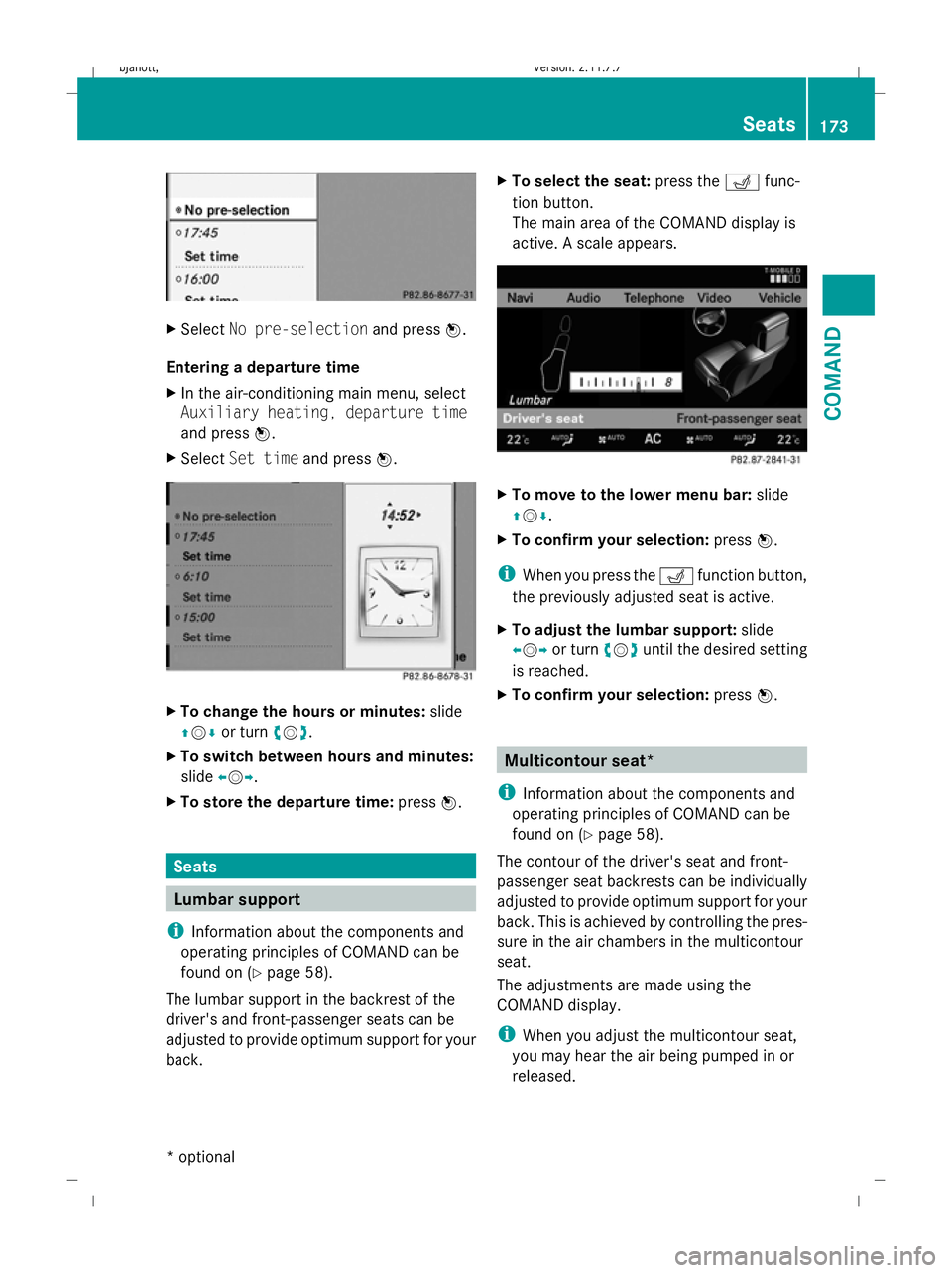
X Select Set time and pressW. X
To change the hours or minutes: slide
ZVÆ or turn cVd.
X To switch between hours and minutes:
slide XVY.
X To store the departure time: pressW. Seats
Lumbar support
i Information about the components and
operating principles of COMAND can be
found on (Y page 58).
The lumbar support in the backrest of the
driver's and front-passenger seats can be
adjusted to provide optimum support for your
back. X
To select the seat: press theTfunc-
tion button.
The main area of the COMAND display is
active. A scale appears. X
To move to the lower menu bar: slide
ZVÆ .
X To confirm your selection: pressW.
i When you press the Tfunction button,
the previously adjusted seat is active.
X To adjust the lumbar support: slide
XVY or turn cVduntil the desired setting
is reached.
X To confirm your selection: pressW. Multicontour seat*
i Information about the components and
operating principles of COMAND can be
found on (Y page 58).
The contour of the driver's seat and front-
passenger seat backrests can be individually
adjusted to provide optimum support for your
back. This is achieved by controlling the pres-
sure in the air chambers in the multicontour
seat.
The adjustments are made using the
COMAND display.
i When you adjust the multicontour seat,
you may hear the air being pumped in or
released. Seats
173COMAND
* optional
216_AKB; 2; 3, en-GB
bjanott,
Version: 2.11.7.7 2009-02-27T14:54:17+01:00 - Seite 173 Z
Dateiname: 6515230602_buchblock.pdf; erzeugt am 04. Mar 2009 11:15:33; WK
Page 187 of 421
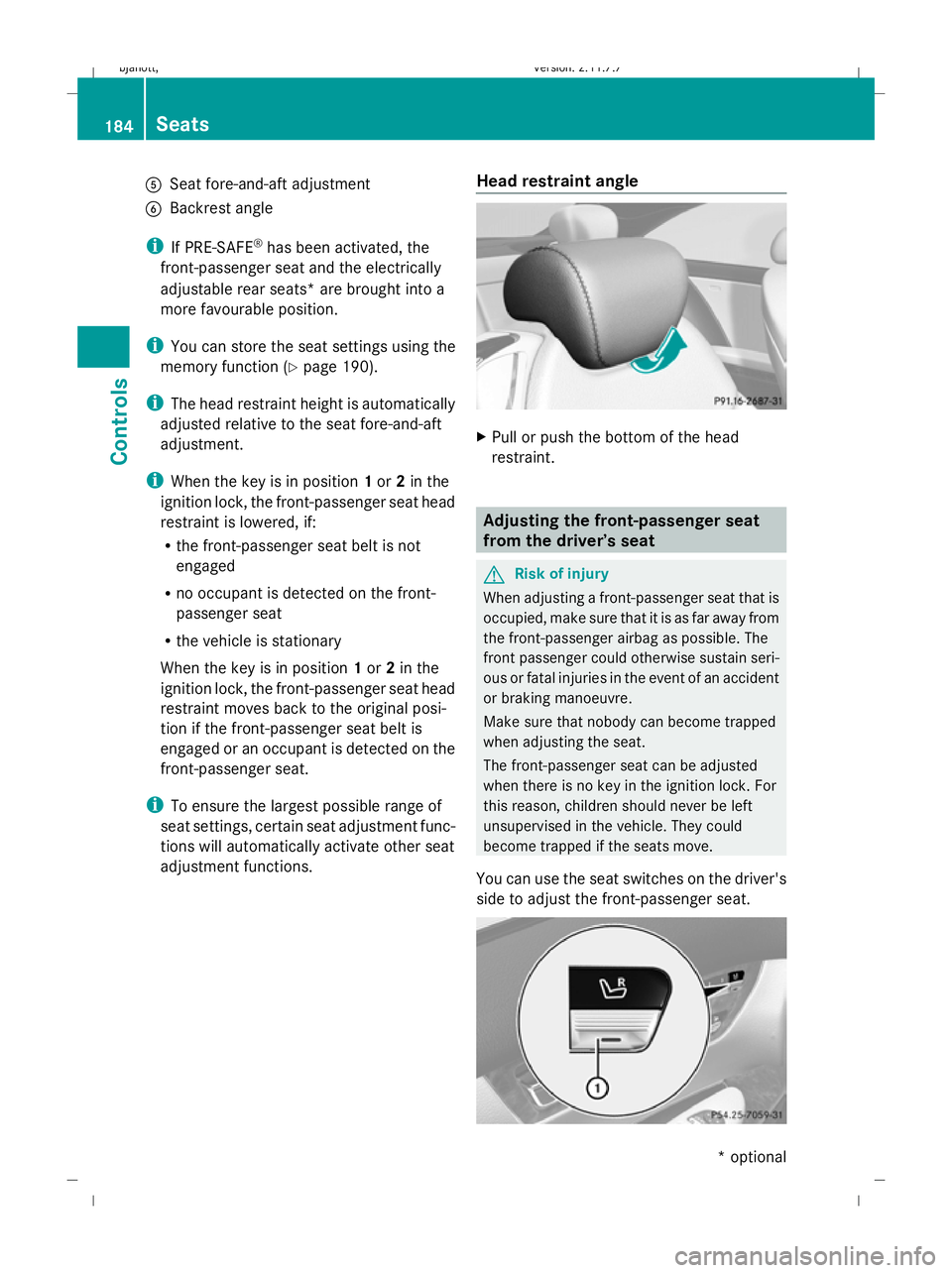
A
Seat fore-and-aft adjustment
B Backrest angle
i If PRE-SAFE ®
has been activated, the
front-passenger seat and the electrically
adjustable rear seats* are brought into a
more favourable position.
i You can store the seat settings using the
memory function (Y page 190).
i The head restraint height is automatically
adjusted relative to the seat fore-and-aft
adjustment.
i When the key is in position 1or 2in the
ignition lock, the front-passenger seat head
restraint is lowered, if:
R the front-passenger seat belt is not
engaged
R no occupant is detected on the front-
passenger seat
R the vehicle is stationary
When the key is in position 1or 2in the
ignition lock, the front-passenger seat head
restraint moves back to the original posi-
tion if the front-passenger seat belt is
engaged or an occupant is detected on the
front-passenger seat.
i To ensure the largest possible range of
seat settings, certain seat adjustment func-
tions will automatically activate other seat
adjustment functions. Head restraint angle X
Pull or push the bottom of the head
restraint. Adjusting the front-passenger seat
from the driver’s seat
G
Risk of injury
When adjusting a front-passenger seat that is
occupied, make sure that it is as far away from
the front-passenger airbag as possible. The
front passenger could otherwise sustain seri-
ous or fatal injuries in the event of an accident
or braking manoeuvre.
Make sure that nobody can become trapped
when adjusting the seat.
The front-passenger seat can be adjusted
when there is no key in the ignition lock. For
this reason, children should never be left
unsupervised in the vehicle. They could
become trapped if the seats move.
You can use the seat switches on the driver's
side to adjust the front-passenger seat. 184
SeatsControls
* optional
216_AKB; 2; 3, en-GB
bjanott,
Version: 2.11.7.7 2009-02-27T14:54:17+01:00 - Seite 184
Dateiname: 6515230602_buchblock.pdf; erzeugt am 04. Mar 2009 11:15:39; WK
Page 188 of 421
X
To activate/deactivate: press button1.
If the indicator lamp in button 1is lit, you
can access the following functions for the
front-passenger seat:
R seat adjustment
R seat heating/ventilation*
R memory function Folding forward the driver's seat and
front-passenger seat backrest
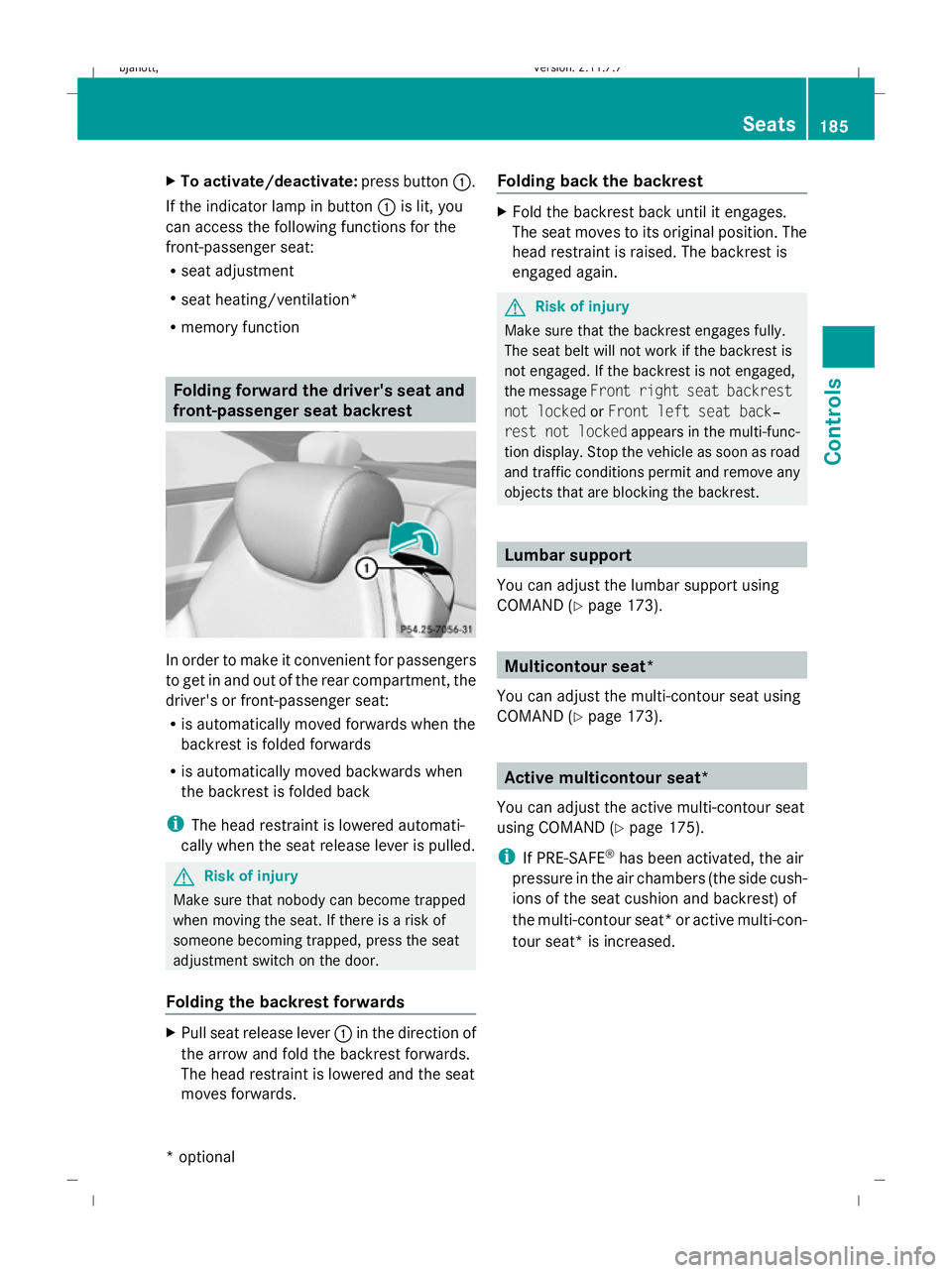
In order to make it convenient for passengers
to get in and out of the rear compartment, the
driver's or front-passenger seat:
R is automatically moved forwards when the
backrest is folded forwards
R is automatically moved backwards when
the backrest is folded back
i The head restraint is lowered automati-
cally when the seat release lever is pulled. G
Risk of injury
Make sure that nobody can become trapped
when moving the seat. If there is a risk of
someone becoming trapped, press the seat
adjustment switch on the door.
Folding the backrest forwards X
Pull seat release lever 1in the direction of
the arrow and fold the backrest forwards.
The head restraint is lowered and the seat
moves forwards. Folding back the backrest X
Fold the backrest back until it engages.
The seat moves to its original position. The
head restraint is raised. The backrest is
engaged again. G
Risk of injury
Make sure that the backrest engages fully.
The seat belt will not work if the backrest is
not engaged. If the backrest is not engaged,
the message Front right seat backrest
not locked orFront left seat back‐
rest not locked appears in the multi-func-
tion display. Stop the vehicle as soon as road
and traffic conditions permit and remove any
objects that are blocking the backrest. Lumbar support
You can adjust the lumbar support using
COMAND (Y page 173). Multicontour seat*
You can adjust the multi-contour seat using
COMAND (Y page 173). Active multicontour seat*
You can adjust the active multi-contour seat
using COMAND (Y page 175).
i If PRE-SAFE ®
has been activated, the air
pressure in the air chambers (the side cush-
ions of the seat cushion and backrest) of
the multi-contour seat* or active multi-con-
tour seat* is increased. Seats
185Controls
* optional
216_AKB; 2; 3, en-GB
bjanott,
Version: 2.11.7.7 2009-02-27T14:54:17+01:00 - Seite 185 Z
Dateiname: 6515230602_buchblock.pdf; erzeugt am 04. Mar 2009 11:15:39; WK
Page 190 of 421
driver's seat automatically switches to the
highest level.
X To switch off: press button:repeatedly
until all indicator lamps go out.
i If the battery voltage is too low, the seat
ventilation may switch off. Seat heating
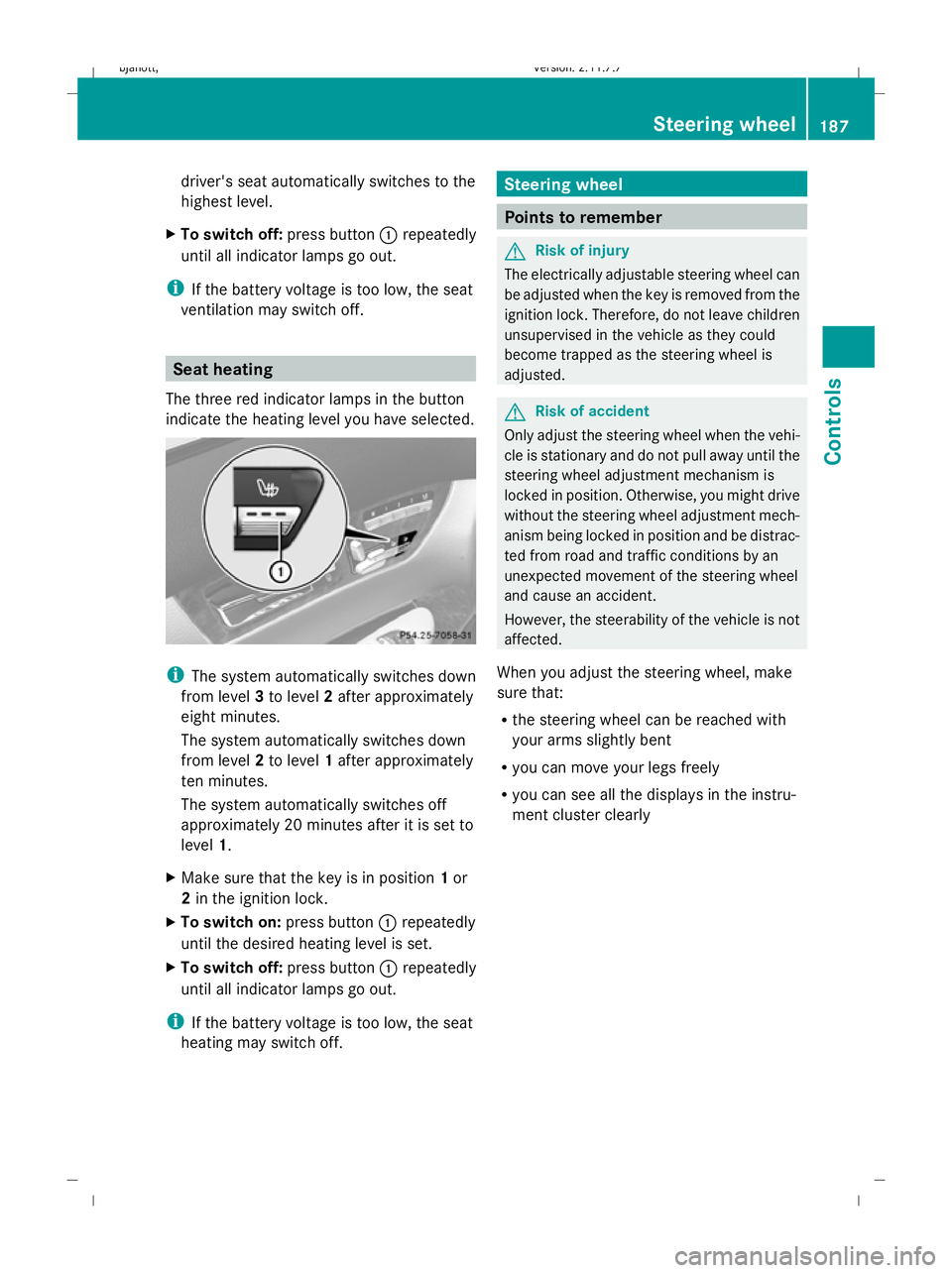
The three red indicator lamps in the button
indicate the heating level you have selected. i
The system automatically switches down
from level 3to level 2after approximately
eight minutes.
The system automatically switches down
from level 2to level 1after approximately
ten minutes.
The system automatically switches off
approximately 20 minutes after it is set to
level 1.
X Make sure that the key is in position 1or
2 in the ignition lock.
X To switch on: press button:repeatedly
until the desired heating level is set.
X To switch off: press button:repeatedly
until all indicator lamps go out.
i If the battery voltage is too low, the seat
heating may switch off. Steering wheel
Points to remember
G
Risk of injury
The electrically adjustable steering wheel can
be adjusted when the key is removed from the
ignition lock. Therefore, do not leave children
unsupervised in the vehicle as they could
become trapped as the steering wheel is
adjusted. G
Risk of accident
Only adjust the steering wheel when the vehi-
cle is stationary and do not pull away until the
steering wheel adjustment mechanism is
locked in position. Otherwise, you might drive
without the steering wheel adjustment mech-
anism being locked in position and be distrac-
ted from road and traffic conditions by an
unexpected movement of the steering wheel
and cause an accident.
However, the steerability of the vehicle is not
affected.
When you adjust the steering wheel, make
sure that:
R the steering wheel can be reached with
your arms slightly bent
R you can move your legs freely
R you can see all the displays in the instru-
ment cluster clearly Steering wheel
187Controls
216_AKB; 2; 3, en-GB
bjanott,V ersion: 2.11.7.7
2009-02-27T14:54:17+01:00 - Seite 187 Z
Dateiname: 6515230602_buchblock.pdf; erzeugt am 04. Mar 2009 11:15:40; WK
Page 191 of 421
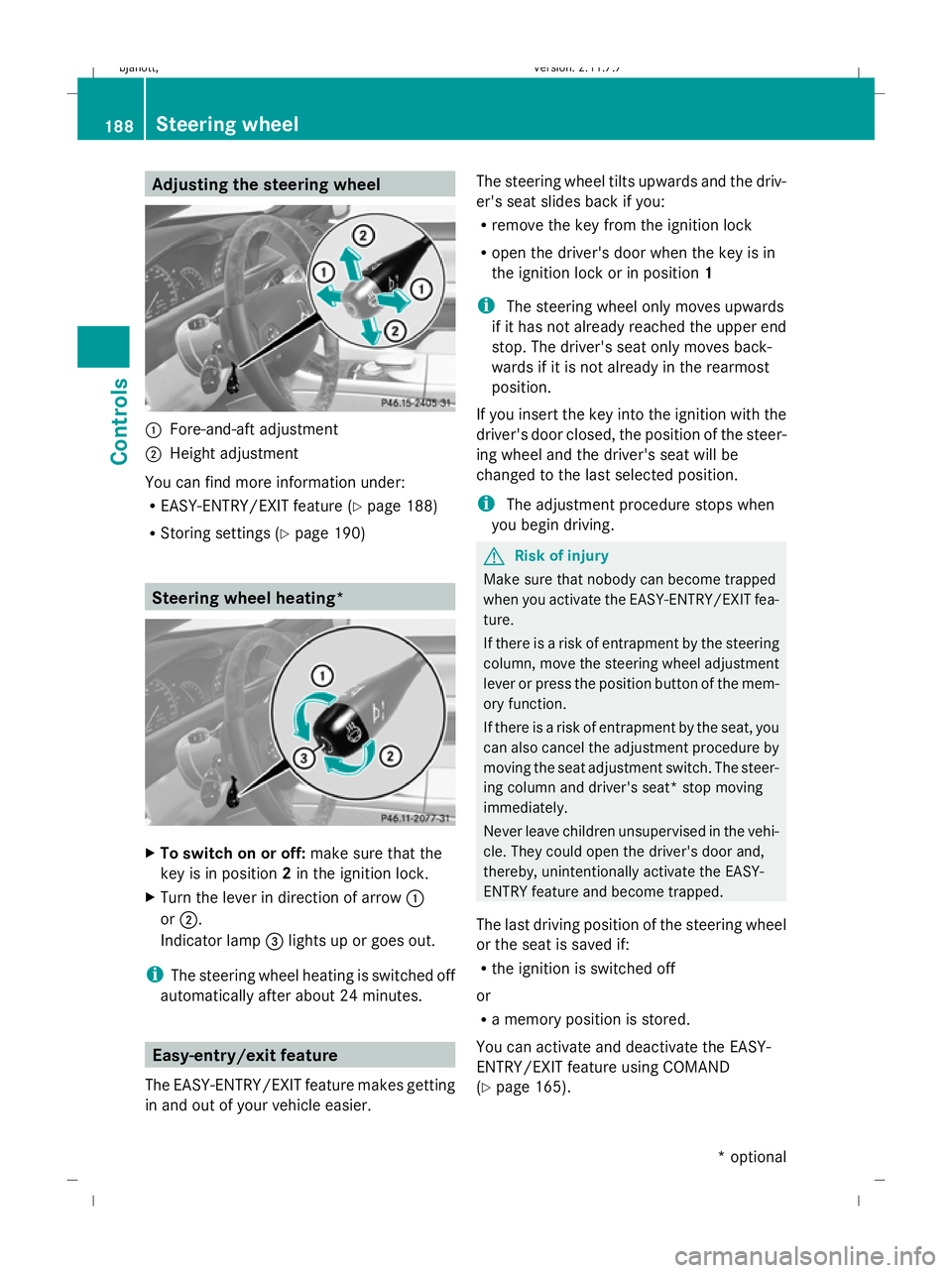
Adjusting the steering wheel
:
Fore-and-aft adjustment
; Height adjustment
You can find more information under:
R EASY-ENTRY/EXIT feature (Y page 188)
R Storing settings (Y page 190) Steering wheel heating*
X
To switch on or off: make sure that the
key is in position 2in the ignition lock.
X Turn the lever in direction of arrow :
or ;.
Indicator lamp =lights up or goes out.
i The steering wheel heating is switched off
automatically after about 24 minutes. Easy-entry/exit feature
The EASY-ENTRY/EXIT feature makes getting
in and out of your vehicle easier. The steering wheel tilts upwards and the driv-
er's seat slides back if you:
R remove the key from the ignition lock
R open the driver's door when the key is in
the ignition lock or in position 1
i The steering wheel only moves upwards
if it has not already reached the upper end
stop. The driver's seat only moves back-
wards if it is not already in the rearmost
position.
If you insert the key into the ignition with the
driver's door closed, the position of the steer-
ing wheel and the driver's seat will be
changed to the last selected position.
i The adjustment procedure stops when
you begin driving. G
Risk of injury
Make sure that nobody can become trapped
when you activate the EASY-ENTRY/EXIT fea-
ture.
If there is a risk of entrapment by the steering
column, move the steering wheel adjustment
lever or press the position button of the mem-
ory function.
If there is a risk of entrapment by the seat, you
can also cancel the adjustment procedure by
moving the seat adjustment switch. The steer-
ing column and driver's seat* stop moving
immediately.
Never leave children unsupervised in the vehi-
cle. They could open the driver's door and,
thereby, unintentionally activate the EASY-
ENTRY feature and become trapped.
The last driving position of the steering wheel
or the seat is saved if:
R the ignition is switched off
or
R a memory position is stored.
You can activate and deactivate the EASY-
ENTRY/EXIT feature using COMAND
(Y page 165). 188
Steering wheelCont
rols
* option al
216_AKB; 2; 3, en-GB
bjanott
,V ersion: 2.11.7.7
2009-02-27T14:54:17+01:00 - Seite 188
Dateiname: 6515230602_buchblock.pdf; erzeugt am 04. Mar 2009 11:15:41; WK
Page 193 of 421

The mirrors do not go into anti-dazzle mode if
reverse gear is engaged or the interior lighting
is switched on. G
Risk of accident
If the incident light from headlamps cannot
strike the sensor in the rear-view mirror, for
instance, when the rear window blind* is
extended, the mirror's automatic anti-dazzle
function will not operate.
Incident light could then dazzle you. This may
distract you from the traffic conditions, and
you may, thereby, cause an accident. In this
case, adjust the rear-view mirror manually. Memory function
Storing settings
Using the memory button you can store up to
three different settings, e. g. for three differ-
ent people.
The following settings are stored as a single
memory preset:
R seat, backrest, head restraint position and
contour of the backrest in the lumbar
region
R active multicontour seat*: activated/deac-
tivated
R multicontour seat*: the side bolsters of the
seat cushion and the backrest as well as
the contour of the backrest in the lumbar
and shoulder regions
R driver's side: steering wheel position
R driver's side: position of the exterior mir-
rors on the driver's and front-passenger
sides G
Risk of injury
The memory function can still be used when
the key has been removed. For this reason,
children should never be left unsupervised in
the vehicle. Otherwise, they could become
trapped when moving the seat or the steering
wheel. G
Risk of accident
Only use the memory function on the driver’s
side when the vehicle is stationary. Other-
wise, you could be distracted from the traffic
conditions by the steering wheel and seat
moving of their own accord, and as a result
cause an accident. X
Adjust the seat (Y page 183).
X On the driver's side, also adjust the steer-
ing wheel ( Ypage 187) and the mirrors
(Y page 189).
X Press memory button Mand press storage
position switch 1,2or 3within three sec-
onds until you hear an acknowledgement
tone.
The settings are stored in the selected stor-
age position. Calling up a stored setting
X Press and hold the relevant storage posi-
tion button 1,2or 3, until the seat, steering
wheel and exterior mirrors are in the stored
position.
i If you release the storage position switch,
the seat, steering wheel and mirror setting
functions stop immediately. The multicon-
tour seat* setting or the lumbar support
adjustment are still carried out. 190
Memory functionControls
* optional
216_AKB; 2; 3, en-GB
bjanott,
Version: 2.11.7.7 2009-02-27T14:54:17+01:00 - Seite 190
Dateiname: 6515230602_buchblock.pdf; erzeugt am 04. Mar 2009 11:15:41; WK
Page 194 of 421
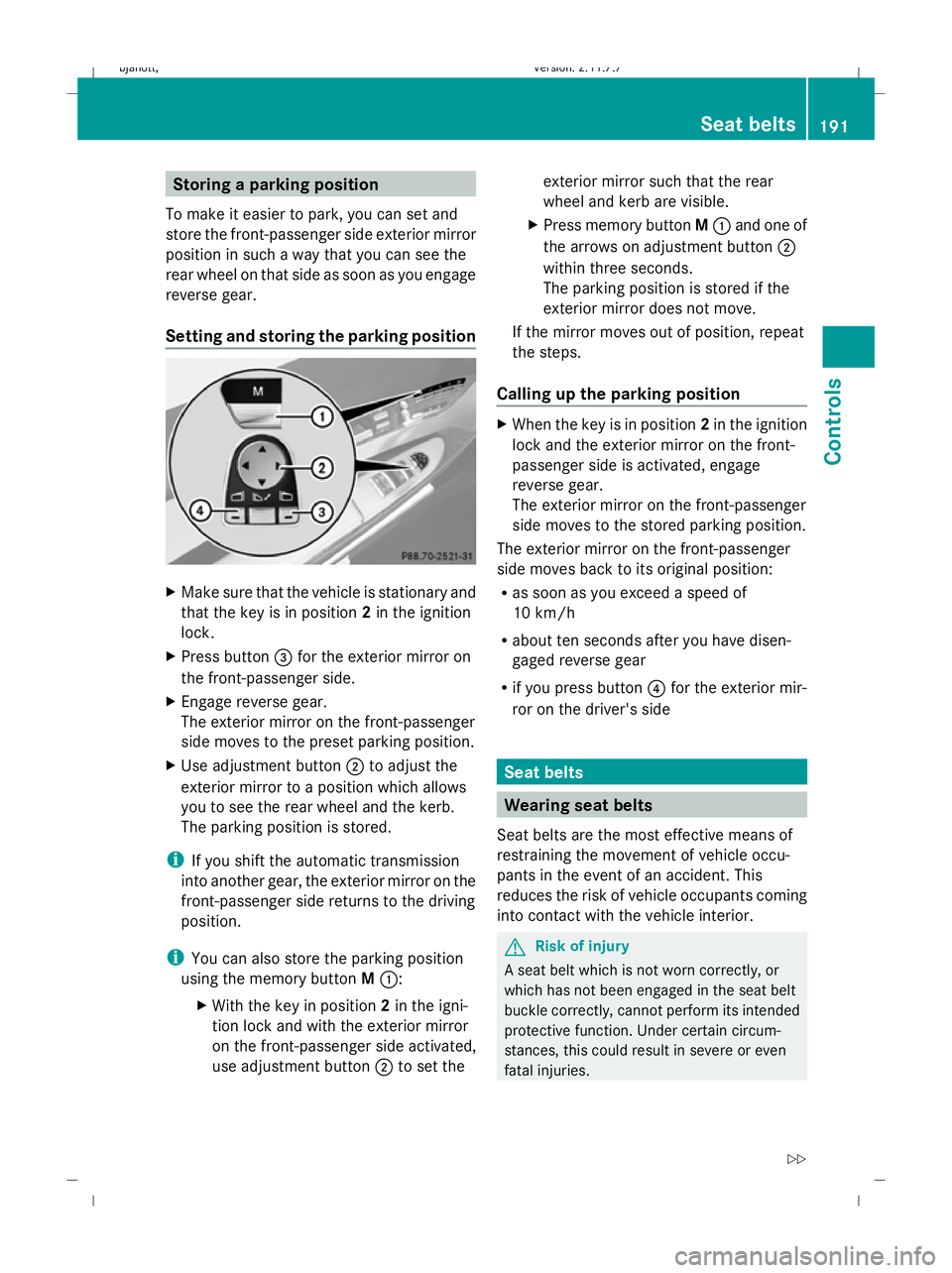
Storing a parking position
To make it easier to park, you can set and
store the front-passenger side exterior mirror
position in such a way that you can see the
rear wheel on that side as soon as you engage
reverse gear.
Setting and storing the parking position X
Make sure that the vehicle is stationary and
that the key is in position 2in the ignition
lock.
X Press button =for the exterior mirror on
the front-passenger side.
X Engage reverse gear.
The exterior mirror on the front-passenger
side moves to the preset parking position.
X Use adjustment button ;to adjust the
exterior mirror to a position which allows
you to see the rear wheel and the kerb.
The parking position is stored.
i If you shift the automatic transmission
into another gear, the exterior mirror on the
front-passenger side returns to the driving
position.
i You can also store the parking position
using the memory button M::
X With the key in position 2in the igni-
tion lock and with the exterior mirror
on the front-passenger side activated,
use adjustment button ;to set the exterior mirror such that the rear
wheel and kerb are visible.
X Press memory button M: and one of
the arrows on adjustment button ;
within three seconds.
The parking position is stored if the
exterior mirror does not move.
If the mirror moves out of position, repeat
the steps.
Calling up the parking position X
When the key is in position 2in the ignition
lock and the exterior mirror on the front-
passenger side is activated, engage
reverse gear.
The exterior mirror on the front-passenger
side moves to the stored parking position.
The exterior mirror on the front-passenger
side moves back to its original position:
R as soon as you exceed a speed of
10 km/h
R about ten seconds after you have disen-
gaged reverse gear
R if you press button ?for the exterior mir-
ror on the driver's side Seat belts
Wearing seat belts
Seat belts are the most effective means of
restraining the movement of vehicle occu-
pants in the event of an accident. This
reduces the risk of vehicle occupants coming
into contact with the vehicle interior. G
Risk of injury
A seat belt which is not worn correctly, or
which has not been engaged in the seat belt
buckle correctly, cannot perform its intended
protective function. Under certain circum-
stances, this could result in severe or even
fatal injuries. Seat belts
191Controls
216_AKB; 2; 3, en-GB
bjanott,V ersion: 2.11.7.7
2009-02-27T14:54:17+01:00 - Seite 191 Z
Dateiname: 6515230602_buchblock.pdf; erzeugt am 04. Mar 2009 11:15:42; WK
Page 197 of 421

G
Risk of accident
Only adjust the steering wheel when the vehi-
cle is stationary and do not pull away until the
steering wheel adjustment mechanism is
locked in position. Otherwise, you might drive
without the steering wheel adjustment mech-
anism being locked in position and be distrac-
ted from road and traffic conditions by an
unexpected movement of the steering wheel
and cause an accident.
However, the steerability of the vehicle is not
affected.
X Check whether seat =and the head
restraint are adjusted properly
(Y page 183).
Make sure that:
R you are as far away from the driver's front
airbag as possible.
R you are sitting in a normal upright posi-
tion.
R you can fasten the seat belt properly.
R you have moved the backrest to an
almost vertical position.
R you have set the seat angle so that your
thighs are gently supported.
R you can depress the pedals properly.
R you have adjusted the head restraint so
that the back of your head is supported
at eye level by the central area of the
head restraint.
X Check whether steering wheel :is adjus-
ted properly (Y page 187).
Make sure that:
R you can hold the steering wheel with your
arms slightly bent.
R you can move your legs freely.
R you can see all the displays in the instru-
ment cluster clearly.
X Check whether you have fastened seat
belt ;properly (Y page 191). It should:
R
fit snugly across your body.
R be routed across the middle of your
shoulder.
R be routed in your pelvic area across the
hip joints. Lights
Light switch
For safety reasons, Mercedes-Benz recom-
mends that you drive with the lights switched
on even during the daytime. In some coun-
tries, daytime operation of headlamps varies
due to legal and voluntary requirements. In
these countries, daytime driving lights are
automatically switched on when the engine is
started.
i If you drive in countries in which traffic
drives on the opposite side of the road to
the country where the vehicle is registered,
oncoming traffic may be dazzled by the
asymmetrical dipped-beam headlamps.
Have the headlamps changed to symmet-
rical dipped beam when driving in these
countries. You can obtain information
about this from any Mercedes-Benz Service
Centre. 1
W
Left-hand parking lamp
2 X
Right-hand parking lamp
3 $
Lights off/daytime driving lights 194
LightsControls
216_AKB; 2; 3, en-GB
bjanott,
Version: 2.11.7.7 2009-02-27T14:54:17+01:00 - Seite 194
Dateiname: 6515230602_buchblock.pdf; erzeugt am 04. Mar 2009 11:15:43; WK