park assist MERCEDES-BENZ CL COUPE 2009 Owners Manual
[x] Cancel search | Manufacturer: MERCEDES-BENZ, Model Year: 2009, Model line: CL COUPE, Model: MERCEDES-BENZ CL COUPE 2009Pages: 421, PDF Size: 10.78 MB
Page 11 of 421

Distronic
. . . . . . . . . . . . . . . . . . . . . . .229
Display message . . . . . . . . . .319, 320
Driving tips . . . . . . . . . . . . . . . . . . .234
Distronic Plus . . . . . . . . . . . . . . . . . . .235
Display messages . . . . . . . . .321, 322
Driving tips . . . . . . . . . . . . . . . . . . .241
Warning lamp . . . . . . . . . . . . . . . . .351
Door
Automatic locking . . . . . . . . . . . . .180
Display message . . . . . . . . . .330, 342
Emergency locking . . . . . . . . . . . . .366
Emergency unlocking . . . . . . . . . . .366
Opening (from the inside) . . . . . . .179
Power closing . . . . . . . . . . . . . . . . .180
Door control panel
Overview . . . . . . . . . . . . . . . . . . . . .33
Drinks holder
see Cup holder
Drive program
Manual . . . . . . . . . . . . . . . . . . . . . .211
Driver's airbag . . . . . . . . . . . . . . . . . . .40
Driver's door Unlocking (KEYLESS GO) . . . . . . . .178
Driver's seat position . . . . . . . . . . ..193
Driving abroad . . . . . . . . . . . . . . . . . .306
Driving safety systems . . . . . . . . . . ..48
ABS . . . . . . . . . . . . . . . . . . . . . . . . .49
ADAPTIVE BRAK E.. . . . . . . . . . . . . .52
Adaptive brake lamps . . . . . . . . . . .50
BAS . . . . . . . . . . . . . . . . . . . . . . . . .49
BAS PLUS . . . . . . . . . . . . . . . . . . . . .49
Distance warning system (vehi-
cles with Distronic) . . . . . . . . . . . . .52
EBV . . . . . . . . . . . . . . . . . . . . . . . . .52
ESP ®
. . . . . . . . . . . . . . . . . . . . . . . .50
PRE-SAFE ®
Brake . . . . . . . . . . . . . . .52
Driving system . . . . . . . . . . . . . . . . . .227
Park Assist . . . . . . . . . . . . . . . . . . .251
Driving systems
4MATIC . . . . . . . . . . . . . . . . . . . . .249
Active Body Control . . . . . . . . . . . .248
AIRMATIC . . . . . . . . . . . . . . . . . . . .246
Blind Spot Assist . . . . . . . . . . . . . .260
Cruise control . . . . . . . . . . . . . . . .227
Distronic . . . . . . . . . . . . . . . . . . . .229
Distronic Plu s.. . . . . . . . . . . . . . . .235
HOLD . . . . . . . . . . . . . . . . . . . . . . .245 Night View Assist . . . . . . . . . . . . .
.259
Parktroni c.. . . . . . . . . . . . . . . . . .249
Reversing camera . . . . . . . . . . . . .257
Speedtronic . . . . . . . . . . . . . . . . . .242
Driving tips
Braking . . . . . . . . . . . . . . . . . . . . . .304
Distronic . . . . . . . . . . . . . . . . . . . .234
Distronic Plu s.. . . . . . . . . . . . . . . .241
Driving abroad . . . . . . . . . . . . . . . .306
Driving on wet roads . . . . . . . . . . .305
Fording . . . . . . . . . . . . . . . . . . . . .305
Winter . . . . . . . . . . . . . . . . . . . . . .303
DTMF tone transmission . . . . . . . . ..114
DVD Inserting . . . . . . . . . . . . . . . . . . . . . .77
Menu . . . . . . . . . . . . . . . . . . . . . . . .87
Playback options . . . . . . . . . . . . . . .83
Selecting a mediu m.. . . . . . . . . . . .81
Selecting a titl e.. . . . . . . . . . . . . . .81
Video . . . . . . . . . . . . . . . . . . . . . . . .84
DVD audio
Operation (on-board computer) . . .219
DVD changer . . . . . . . . . . . . . . . . . . . .78
DVD video Operation (on-board computer) . . .219
Dynamic route guidance . . . . . . . . ..155 E
EASY-ENTRY feature . . . . . . . . . . . ..188
Activating (COMAND) . . . . . . . . . .165
EASY-EXIT feature . . . . . . . . . . . . . ..188
Activating (COMAND) . . . . . . . . . .165
Crash-responsive . . . . . . . . . . . . . .189
EBV (electronic brake force distri-
bution) . . . . . . . . . . . . . . . . . . . . . . . . .52
Display message . . . . . . . . . . . . . .334
Electronic brake force distribution
See EBV . . . . . . . . . . . . . . . . . . . . . .52
Electronic Stability Program
see ESP ®
Electronic Traction Support see ETS
Emergency key element
Lost.. . . . . . . . . . . . . . . . . . . . . . .363
Emergency locking
Vehicle . . . . . . . . . . . . . . . . . . . . . .366 8
Index 216_AKB; 2; 3, en-GB
bjanott,
Version: 2.11.7.7 2009-02-27T14:54:17+01:00 - Seite 8Dateiname: 6515230602_buchblock.pdf; erzeugt am 04. Mar 2009 11:14:34; WK
Page 16 of 421

Oil
Consumption . . . . . . . . . . . . . . . . .293
Topping up . . . . . . . . . . . . . . . . . . .294
Oil level
Checking (dipstick) . . . . . . . . . . . .294
Checking (on-board computer) . . .293
On-board computer . . . . . . . . . . . . ..213
AMG menu . . . . . . . . . . . . . . . . . . .220
Assistance menu . . . . . . . . . . . . . .223
Audio menu . . . . . . . . . . . . . . . . . .218
Display messages . . . . . . . . . . . . .316
Navi menu . . . . . . . . . . . . . . . . . . .217
Overview . . . . . . . . . . . . . . . . . . . .214
Service menu . . . . . . . . . . . . . . . . .225
Settings menu . . . . . . . . . . . . . . . .225
Telephone menu . . . . . . . . . . . . . .222
Trip menu . . . . . . . . . . . . . . . . . . . .215
Opening limiter for boot lid . . . . . ..168
Operating system see On-board computer . . . . . . . . .213
Outside lighting
Delayed switch-off (COMAND) . . . .166
Outside temperature display . . . ..212
Override feature Rear side windows . . . . . . . . . . . . . .48P
Paint code . . . . . . . . . . . . . . . . . . . . . .396
Paintwork Cleaning . . . . . . . . . . . . . . . . . . . . .308
Park Assist . . . . . . . . . . . . . . . . . . . . .251
Activating/deactivating . . . . . . . . .253
Display message . . . . . . . . . . . . . .324
Sensor range . . . . . . . . . . . . . . . . .252
Warning messages . . . . . . . . . . . . .253
Parking . . . . . . . . . . . . . . . . . . . . . . . .204
Parking aid Exterior mirror on the front-
passenger sid e.. . . . . . . . . . . . . . .191
Park Assist . . . . . . . . . . . . . . . . . . .251
PARKTRONI C.. . . . . . . . . . . . . . . .249
Reversing camera . . . . . . . . . . . . .257
Parking brake
Display message . . . . . . . . . . . . . .334
Electric parking brake . . . . . . . . . .205
Parking Guidance . . . . . . . . . . . . . ..254
Display message . . . . . . . . . . . . . .324 Parking lamps
Display message . . . . . . . . . . . . . .345
Parking position
Exterior mirror on the front-
passenger sid e.. . . . . . . . . . . . . . .191
Exterior mirrors (COMAND) . . . . . .165
PARKTRONIC . . . . . . . . . . . . . . . . . . .249
Activating/deactivating . . . . . . . . .251
Malfunction . . . . . . . . . . . . . . . . . .360
Range of the sensors . . . . . . . . . . .250
Warning display . . . . . . . . . . . . . . .251
PASSENGER AIRBAG OFF warning
lamp . . . . . . . . . . . . . . . . . . . . . . .44, 350
Pause function COMAND (Audio) . . . . . . . . . . . . . . .81
PCMCIA card
Operation (on-board computer) . . .219
Permanent four-wheel drive
see 4MATIC
Permanent Speedtronic . . . . . . . . ..245
Petrol Minimum grade . . . . . . . . . . . . . . .291
see Fuel
Phone book
Calling up . . . . . . . . . . . . . . . . . . . .120
Creating an entry . . . . . . . . . . . . . .121
Deleting an entry . . . . . . . . . . . . . .122
Plastic trim
Cleaning . . . . . . . . . . . . . . . . . . . . .312
Playback options . . . . . . . . . . . ..97, 103
Playback options (COMAND) . . . . . ..83
Power closing feature . . . . . . . . . . ..180
Power socket Boot . . . . . . . . . . . . . . . . . . . . . . . .282
Power window switch
see Side windows
Pre-emptive occupant safety system
see PRE-SAFE ®
PRE-SAFE ®
Brake (vehicles with
Distronic Plus) . . . . . . . . . . . . . . . . . . .52
Activating/deactivating (on-
board computer) . . . . . . . . . . . . . .224
PRE-SAFE ®
system . . . . . . . . . . . . . . . .42
Display message . . . . . . . . . . . . . .325
Programmable button . . . . . . . . . . ..163
Program selector button Automatic transmission . . . . . . . . .210 Index
13 216_AKB; 2; 3, en-GB
bjanott,
Version: 2.11.7.7 2009-02-27T14:54:17+01:00 - Seite 13Dateiname: 6515230602_buchblock.pdf; erzeugt am 04. Mar 2009 11:14:35; WK
Page 20 of 421
Type identification plate
see vehicle identification plate . . .396
Tyre grip . . . . . . . . . . . . . . . . . . . . . . .305
Tyre pressure . . . . . . . . . . . . . . . . . .298
Calling up (on-board computer) . .300
Display message . . . . . . . . . .327, 348
Tyre pressure loss warning system
. . . . . . . . . . . . . . . . . . . . . . . . . . . . . . .299
Tyre pressure monitor
Warning lamp . . . . . . . . . . . . . . . . .354
Tyres
Direction of rotatio n.. . . . . . . . . . .297
General notes . . . . . . . . . . . . . . . . .296
Technical data . . . . . . . .403, 404, 406
Tyre tread . . . . . . . . . . . . . . . . . . . . . .298 U
Unladen weight see Technical data
Unlocking
Emergency unlocking . . . . . . . . . . .366
From the inside (central unlocking
button) . . . . . . . . . . . . . . . . . . . . . .179
Up (display message) . . . . . . . . . . ..220 V
Variable Speedtronic . . . . . . . . . . . ..243
Vehicle Emergency unlocking . . . . . . . . . . .366
Individual settings (on-board com-
puter) . . . . . . . . . . . . . . . . . . . . . . .225
Leaving parked up . . . . . . . . . . . . .365
Towing . . . . . . . . . . . . . . . . . . . . . .388
Transporting . . . . . . . . . . . . . . . . . .388
Vehicle battery . . . . . . . . . . . . . . . . .382
Vehicle dimensions see Technical data
Vehicle electronics . . . . . . . . . . . . ..394
Vehicle identification number
(VIN) . . . . . . . . . . . . . . . . . . . . . . . . . .396
Vehicle identification plate . . . . . ..396
Vehicle level Adjusting (Active Body Control )...2 48
Display messages . . . . . . . . . . . . .338
Setting (AIRMATIC) . . . . . . . . . . . .246
Vehicle tool kit . . . . . . . . . . . . . . . . . .315 Vehicle weights
see Technical data
Video
AUX mode . . . . . . . . . . . . . . . . . . . .83
DVD mod e.. . . . . . . . . . . . . . . . . . .84
Video DVD . . . . . . . . . . . . . . . . . . . . . .84
Fast forward/rewind . . . . . . . . . . . .86
Menu overview . . . . . . . . . . . . . . . . .85
Operation . . . . . . . . . . . . . . . . . . . . .85
Operation (COMAND) . . . . . . . . . . . .84
Pause function . . . . . . . . . . . . . . . . .86
Picture settings . . . . . . . . . . . . . . . .87
Selecting a film/titl e.. . . . . . . . . ..86
Selecting a mediu m.. . . . . . . . . . . .86
Selecting a scene/chapter . . . . . . .86
Setting the languag e.. . . . . . . . . ..88
Stop function . . . . . . . . . . . . . . . . . .86
Video game . . . . . . . . . . . . . . . . . . .89
Volume
Adjusting . . . . . . . . . . . . . . . . . . . . .63 W
Warning and indicator lamps . . . . ..351
ABS (yellow) . . . . . . . . . . . . . . . . . .351
Blind Spot Assist . . . . . . . . . . . . . .350
Distronic Plus (red ).. . . . . . . . . ..351
ESP ®
. . . . . . . . . . . . . . . . . . . .50, 353
ESP ®
OFF . . . . . . . . . . . . . . . . . . . .353
LIM (cruise control) . . . . . . . . . . . .228
LIM (Distronic) . . . . . . . . . . . . . . . .231
LIM (Distronic Plus) . . . . . . . . . . . .236
LIM (variable Speedtronic) . . . . . . .243
Tyre pressure monitor . . . . . . . . . .354
Warning tone . . . . . . . . . . . . . . . . . . .356
Warning triangle . . . . . . . . . . . . . . . .314
Washer fluid Display message . . . . . . . . . . . . . .348
Washer fluid reservoir . . . . . . . . . ..295
Wearing seat belts . . . . . . . . . . . . ..191
Wheel bolts Tightening torqu e.. . . . . . . . . . . . .381
Wheel chock
Use . . . . . . . . . . . . . . . . . . . . . . . . .316
Wheels
General notes . . . . . . . . . . . . . . . . .296
Interchanging . . . . . . . . . . . . . . . . .302
Technical data . . . . . . . .403, 404, 406 Index
17 216_AKB; 2; 3, en-GB
bjanott,
Version: 2.11.7.7 2009-02-27T14:54:17+01:00 - Seite 17Dateiname: 6515230602_buchblock.pdf; erzeugt am 04. Mar 2009 11:14:36; WK
Page 28 of 421
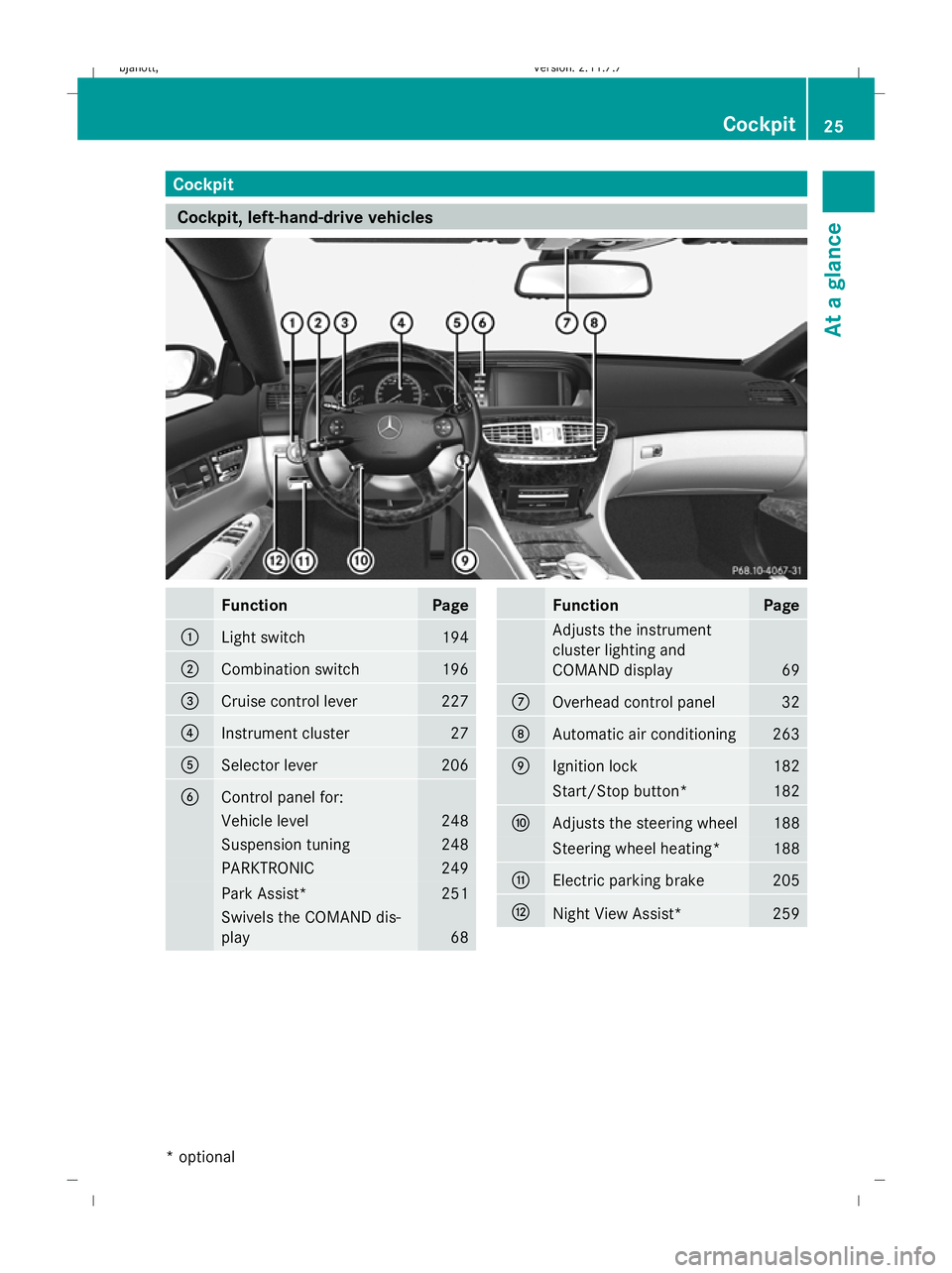
Cockpit
Cockpit, left-hand-drive vehicles
Function Page
:
Light switch 194
;
Combination switch 196
=
Cruise control lever 227
?
Instrument cluster 27
A
Selector lever 206
B
Control panel for:
Vehicle level 248
Suspension tuning 248
PARKTRONIC 249
Park Assist* 251
Swivels the COMAND dis-
play
68 Function Page
Adjusts the instrument
cluster lighting and
COMAND display
69
C
Overhead control panel 32
D
Automatic air conditioning 263
E
Ignition lock 182
Start/Stop button* 182
F
Adjusts the steering wheel 188
Steering wheel heating* 188
G
Electric parking brake 205
H
Night View Assist* 259Cockpit
25At a glance
* optional
216_AKB; 2; 3, en-GB
bjanott
,V ersion: 2.11.7.7
2009-02-27T14:54:17+01:00 - Seite 25
Dateiname: 6515230602_buchblock.pdf; erzeugt am 04. Mar 2009 11:14:39; WK
Page 29 of 421
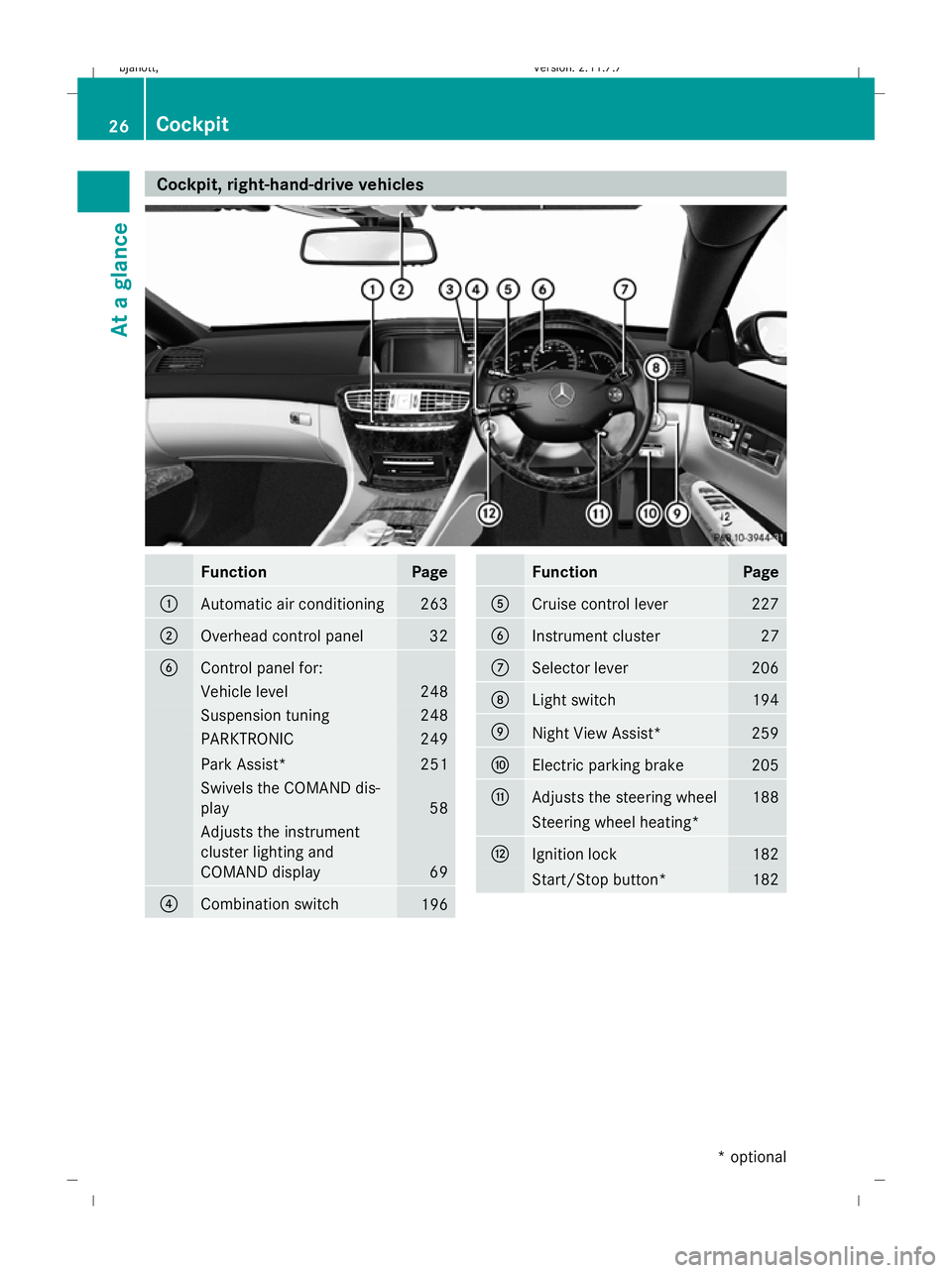
Cockpit, right-hand-drive vehicles
Function Page
:
Automatic air conditioning 263
;
Overhead control panel 32
B
Control panel for:
Vehicle level 248
Suspension tuning 248
PARKTRONIC 249
Park Assist* 251
Swivels the COMAND dis-
play
58
Adjusts the instrument
cluster lighting and
COMAND display
69
?
Combination switch
196 Function Page
A
Cruise control lever 227
B
Instrument cluster 27
C
Selector lever 206
D
Light switch 194
E
Night View Assist* 259
F
Electric parking brake 205
G
Adjusts the steering wheel 188
Steering wheel heating*
H
Ignition lock 182
Start/Stop button* 18226
CockpitAt a glance
* optional
216_AKB; 2; 3, en-GB
bjanott
,V ersion: 2.11.7.7
2009-02-27T14:54:17+01:00 - Seite 26
Dateiname: 6515230602_buchblock.pdf; erzeugt am 04. Mar 2009 11:14:40; WK
Page 30 of 421
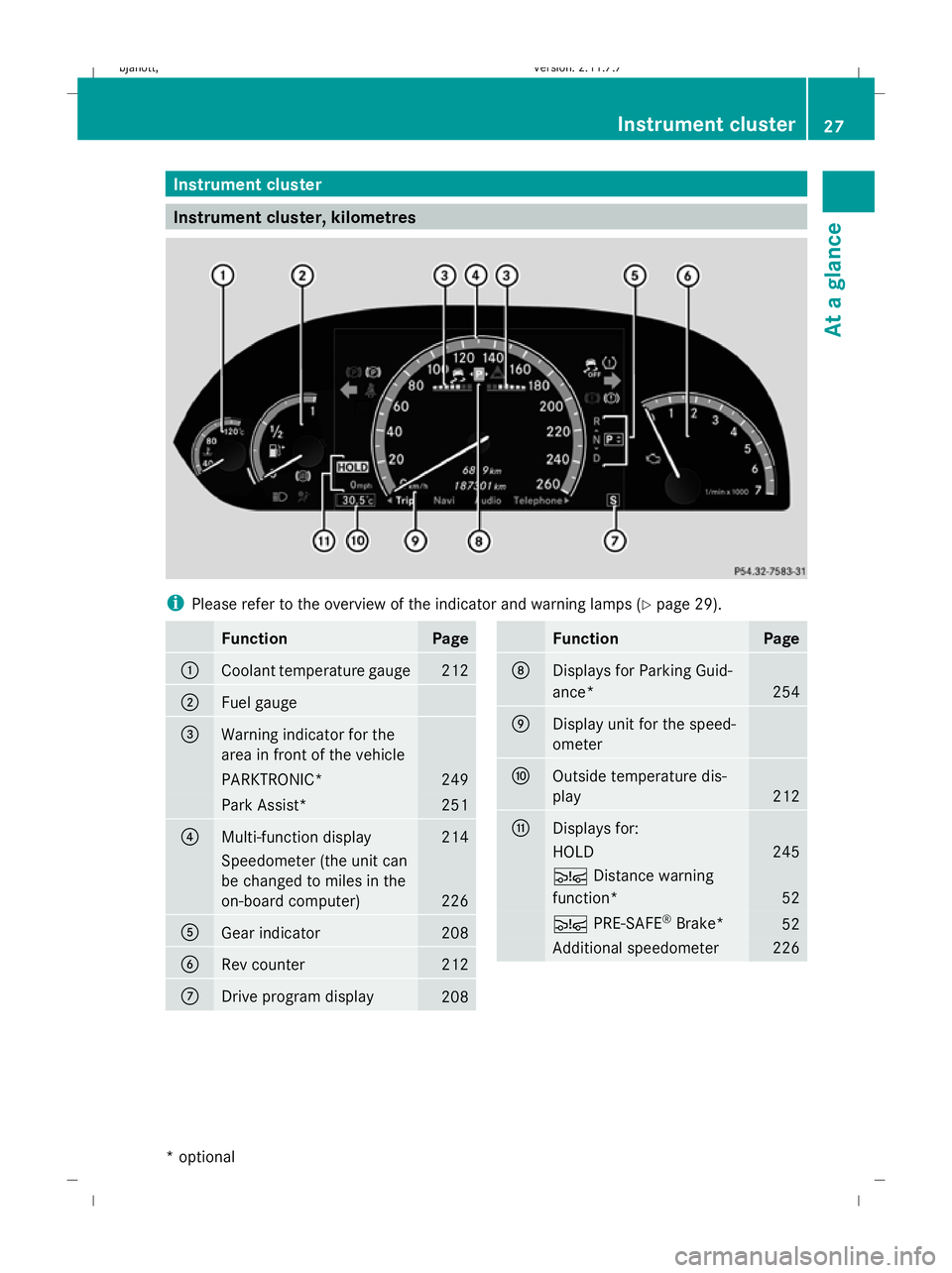
Instrument cluster
Instrument cluster, kilometres
i
Please refer to the overview of the indicator and warning lamps ( Ypage 29). Function Page
:
Coolant temperature gauge 212
;
Fuel gauge
=
Warning indicator for the
area in front of the vehicle
PARKTRONIC* 249
Park Assist* 251
?
Multi-function display 214
Speedometer (the unit can
be changed to miles in the
on-board computer)
226
A
Gear indicator 208
B
Rev counter 212
C
Drive program display
208 Function Page
D
Displays for Parking Guid-
ance*
254
E
Display unit for the speed-
ometer
F
Outside temperature dis-
play
212
G
Displays for:
HOLD 245
Ä
Distance warning
function* 52
Ä
PRE-SAFE ®
Brake* 52
Additional speedometer 226Instrument cluster
27At a glance
* optional
216_AKB; 2; 3, en-GB
bjanott
,V ersion: 2.11.7.7
2009-02-27T14:54:17+01:00 - Seite 27 Z
Dateiname: 6515230602_buchblock.pdf; erzeugt am 04. Mar 2009 11:14:40; WK
Page 31 of 421
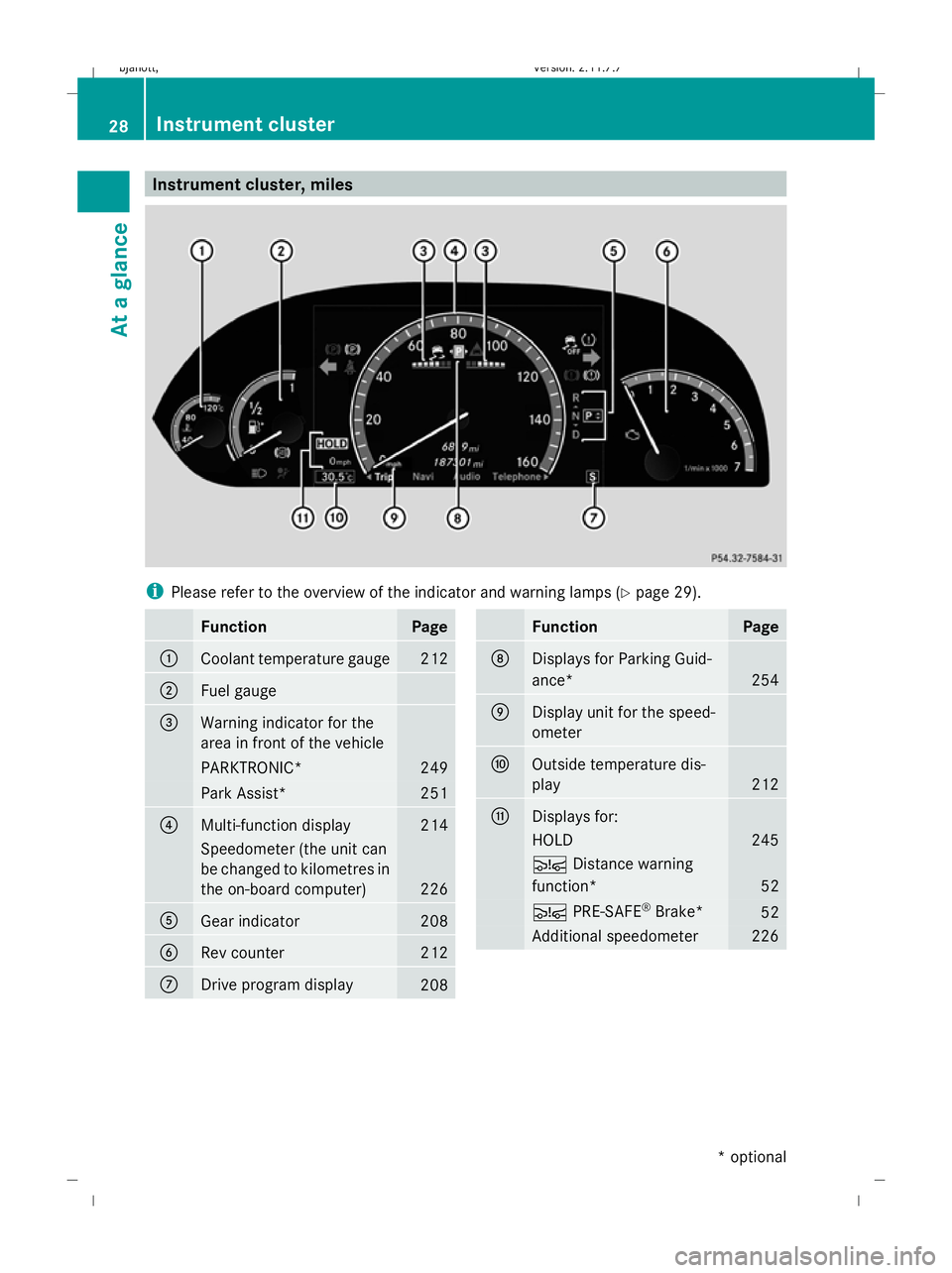
Instrument cluster, miles
i
Please refer to the overview of the indicator and warning lamps ( Ypage 29). Function Page
:
Coolant temperature gauge 212
;
Fuel gauge
=
Warning indicator for the
area in front of the vehicle
PARKTRONIC* 249
Park Assist* 251
?
Multi-function display 214
Speedometer (the unit can
be changed to kilometres in
the on-board computer)
226
A
Gear indicator 208
B
Rev counter 212
C
Drive program display
208 Function Page
D
Displays for Parking Guid-
ance*
254
E
Display unit for the speed-
ometer
F
Outside temperature dis-
play
212
G
Displays for:
HOLD 245
Ä
Distance warning
function* 52
Ä
PRE-SAFE ®
Brake* 52
Additional speedometer 22628
Instrument clusterAt a glance
* optional
216_AKB; 2; 3, en-GB
bjanott
,V ersion: 2.11.7.7
2009-02-27T14:54:17+01:00 - Seite 28
Dateiname: 6515230602_buchblock.pdf; erzeugt am 04. Mar 2009 11:14:41; WK
Page 53 of 421
The brakes will work normally again when:
R you release the brake pedal
R no obstacle is detected in front of your
vehicle
R there is no longer any danger of a rear-end
collision
BAS PLUS is then deactivated.
At speeds up to approximately 70 km/h, BAS
PLUS can also detect stationary obstacles,
for example, stopped or parked vehicles.
Vehicles with COMAND and a navigation sys-
tem*: the radar sensor system is switched off
automatically in the vicinity of radio telescope
facilities (Y page 411).
For BAS PLUS to assist you when driving, the
radar sensor system must be switched on and
operational. You can check this by activating
Distronic Plus* (Y page 235) or via the
"Radar sensor" menu in the on-board com-
puter (Y page 226). G
Risk of accident
Only clearly identified obstacles will initiate
braking assistance by BAS PLUS. In particular,
the detection of obstacles can be restricted if
there is:
R dirt on the sensors or the sensors are cov-
ered
R snow or heavy rain
R interference by other radar sources
R strong radar reflections, for example in
multi-storey garages
BAS PLUS does not react to people or ani-
mals, oncoming vehicles and crossing traffic.
BAS PLUS may not detect narrow vehicles
such as motorcycles and vehicles driving on
a different line.
Following a collision or crash-related damage
to the front end of the vehicle, have the con-
figuration and operation of the radar sensors
checked at a Mercedes-Benz Service Centre.
If BAS PLUS is not available due to a malfunc-
tion in the radar sensor system, the braking system remains available with full brake
boosting effect and BAS. Adaptive brake lamps
i Adaptive brake lamps are only available in
certain countries.
If you brake sharply from a speed of more
than 50 km/h or if braking is assisted by BAS
or BAS PLUS*, the brake lamps flash rapidly.
In this way, traffic travelling behind you is
warned in an even more noticeable manner.
If you brake sharply from a speed of more
than 70 km/h to a standstill, the hazard warn-
ing lamps are activated automatically. If the
brakes are applied again, the brake lamps
light up continuously. The hazard warning
lamps switch off automatically if you travel
faster than 10 km/h. You can also switch off
the hazard warning lamps using the hazard
warning switch button (Y page 196). ESP
®
(Electronic Stability Program)
ESP ®
monitors driving stability and traction,
i.e. power transmission between tyres and
the road surface.
If ESP ®
detects that the vehicle is deviating
from the direction desired by the driver, one
or more wheels are braked to stabilise the
vehicle. If necessary, the engine output is also
modified to keep the vehicle on the desired
course within physical limits. ESP ®
assists
the driver when pulling away on wet or slip-
pery roads. ESP ®
can also stabilise the vehi-
cle when braking.
When ESP ®
intervenes, the ÷warning
lamp flashes in the instrument cluster. G
Risk of accident
If the ÷ warning lamp in the instrument
cluster flashes, proceed as follows: 50
Driving safety systemsSafety
* optional
216_AKB; 2; 3, en-GB
bjanott,
Version: 2.11.7.7 2009-02-27T14:54:17+01:00 - Seite 50
Dateiname: 6515230602_buchblock.pdf; erzeugt am 04. Mar 2009 11:14:50; WK
Page 56 of 421
G
Risk of accident
Pay particular attention to the traffic condi-
tions if the distance warning lamp ·in the
instrument cluster lights up or an intermittent
warning tone sounds. If necessary, brake or
manoeuvre to avoid an obstacle.
In addition, at speeds of around 30 km/h or
more, PRE-SAFE ®
Brake can:
R brake the vehicle gently and automatically
within a speed range of up to around
180 km/h
R trigger preventative passenger protection
measures (PRE-SAFE ®
) G
Risk of accident
PRE-SAFE ®
Brake is only an aid to assist you
when driving. You are responsible for main-
taining a safe distance from other vehicles,
the vehicle's speed and for braking in good
time. Always pay attention to the traffic con-
ditions. Otherwise, you may recognise dan-
gers too late, cause an accident and injure
yourself and others.
With the help of the radar sensor system,
PRE-SAFE ®
Brake can detect obstacles that
are in front of your vehicle for an extended
period of time. If you approach an obstacle
and PRE-SAFE ®
Brake detects a risk of a col-
lision, the system will initially alert you both
visually and acoustically. If you do not brake
or steer, the vehicle will automatically brake
slightly. In the event of an increased risk of a
collision, PRE-SAFE ®
is activated
(Y page 42). G
Risk of accident
Only clearly detected obstacles will trigger a
warning and initiate braking assistance by
PRE-SAFE ®
Brake. In particular, the detection of obstacles may
be restricted if there is:
R
dirt on the sensors or the sensors are cov-
ered
R snow or heavy rain
R interference from other radar sources
R strong radar reflections, for example in
multi-storey car parks
PRE-SAFE ®
Brake does not react to persons,
animals, oncoming vehicles and crossing traf-
fic.
PRE-SAFE ®
Brake may not detect narrow
vehicles such as motorcycles or vehicles driv-
ing on a different line. G
Risk of accident
Depending on the vehicle's speed, PRE-
SAFE ®
Brake will brake your vehicle up to
maximum of 4 m/s 2
. This is equivalent to
approximately 40 % of the maximum braking
power of the vehicle. You must also apply the
brakes yourself to avoid a collision.
In order to maintain the appropriate distance
to the vehicle in front and thus prevent a
crash, you must apply the brakes yourself.
At speeds up to approximately 70 km/h,
PRE-SAFE ®
Brake can also detect stationary
obstacles, for example stopped or parked
vehicles. G
Risk of accident
If, in a critical driving situation, you do not
receive a visual and acoustic warning:
R PRE-SAFE ®
Brake did not detect the risk of
a collision
R PRE-SAFE ®
Brake is deactivated
R PRE-SAFE ®
Brake has failed
You must then brake to avoid a collision. Driving safety systems
53Safety
216_AKB; 2; 3, en-GB
bjanott, Version: 2.11.7.7 2009-02-27T14:54:17+01:00 - Seite 53 Z
Dateiname: 6515230602_buchblock.pdf; erzeugt am 04. Mar 2009 11:14:50; WK
Page 207 of 421
i
The vehicle locks centrally once you have
pulled away. The locking knobs in the doors
drop down.
You can open the doors from the inside at
any time.
You can also deactivate the automatic lock-
ing feature (Y page 167).
X Depress the brake pedal and keep it
depressed.
X Move the DIRECT SELECT lever to position
D or R.
X Release the brake pedal.
X Carefully depress the accelerator pedal.
The electric parking brake is automatically
released (Y page 205).
i Upshifts take place at higher engine
speeds after a cold start. This helps the
catalytic converter to reach its operating
temperature more quickly.
Hill start assist Hill start assist helps you when pulling away
on uphill gradients. It holds the vehicle for a
short time after you have removed your foot
from the brake pedal. This gives you time to
move your foot from the brake pedal to the
accelerator pedal and depress it before the
vehicle begins to roll. G
Risk of accident
Never leave the vehicle when it is held by hill
start assist. After approximately one second,
hill start assist will no longer brake your vehi-
cle and it could roll away.
X Take your foot off the brake pedal.
i Once you have taken your foot off the
brake pedal, the vehicle is held for around
one second.
X Pull away. Hill start assist will not function if:
R
you are pulling away on a level road or a
downhill gradient.
R the DIRECT SELECT lever is in position N.
R the vehicle is secured with the electric
parking brake.
R ESP ®
is malfunctioning. Parking
G
Risk of accident
Only remove the key from the ignition lock
when the vehicle is stationary, as you cannot
steer the vehicle with the key removed.
Never leave children unsupervised in the vehi-
cle. They might release the electric parking
brake. This could lead to a serious or fatal
accident. G
Risk of fire
Make sure that the exhaust system does not
under any circumstances come into contact
with flammable materials such as dry grass or
petrol. The material could otherwise ignite
and set the vehicle on fire.
To ensure that the vehicle is secured against
rolling away unintentionally:
R the parking brake must be applied
R move the DIRECT SELECT lever into posi-
tion Pand remove the ignition key
R for steep uphill or downhill gradients, turn
the front wheels towards kerb 204
Driving and parkingControls
216_AKB; 2; 3, en-GB
bjanott,
Version: 2.11.7.7 2009-02-27T14:54:17+01:00 - Seite 204
Dateiname: 6515230602_buchblock.pdf; erzeugt am 04. Mar 2009 11:15:47; WK