rear view mirror MERCEDES-BENZ CL COUPE 2009 Owners Manual
[x] Cancel search | Manufacturer: MERCEDES-BENZ, Model Year: 2009, Model line: CL COUPE, Model: MERCEDES-BENZ CL COUPE 2009Pages: 421, PDF Size: 10.78 MB
Page 15 of 421

Menu (on-board computer)
AMG . . . . . . . . . . . . . . . . . . . . . . . .220
Assistance . . . . . . . . . . . . . . . . . . .223
Audi o.. . . . . . . . . . . . . . . . . . . . . .218
Distronic . . . . . . . . . . . . . . . . . . . .233
Distronic Plu s.. . . . . . . . . . . . . . . .240
Navi . . . . . . . . . . . . . . . . . . . . . . . .217
Service . . . . . . . . . . . . . . . . . . . . . .225
Settings . . . . . . . . . . . . . . . . . . . . .225
Telephone . . . . . . . . . . . . . . . . . . .222
Trip . . . . . . . . . . . . . . . . . . . . . . . . .215
Menu overview
Bluetooth ®
telephony . . . . . . . . . . .110
Convenience telephony . . . . . . . . .111
Music Register . . . . . . . . . . . . . . . . .94
Mercedes-Benz Contact . . . . . . . . ..105
Message see Display message . . . . . . . . . . .316
see Indicator and warning lamp . . .351
Minispare emergency spare wheel
Technical data . . . . . . . . . . . . . . . .407
Mirrors
Sun viso r.. . . . . . . . . . . . . . . . . . .281
see Exterior mirrors or Rear-view mirror
Mobile phone . . . . . . . . . . . . . . . . . . .283
Connecting (convenience teleph-
ony) . . . . . . . . . . . . . . . . . . . . . . . .111
De-authorising . . . . . . . . . . . . . . . .109
External authorisation . . . . . . . . . .109
Installatio n.. . . . . . . . . . . . . . . . . .395
Operation (on-board computer) . . .222
Registering (authorising) . . . . . . . .107
Modifying the programming
Key . . . . . . . . . . . . . . . . . . . . . . . . .179
MOExtended run-flat system* .297, 381
MP3 Menu overview . . . . . . . . . . . . . . . . .79
Notes . . . . . . . . . . . . . . . . . . . . . . . .75
Operation . . . . . . . . . . . . . . . . . . . . .79
Operation (on-board computer) . . .219
Playback options . . . . . . . . . . . . . . .83
Selecting a mediu m.. . . . . . . . . . . .81
Selecting a titl e.. . . . . . . . . . . . . . .81
Multicontour seat . . . . . . . . . . . . . ..185
Front . . . . . . . . . . . . . . . . . . . . . . .173
Multi-function display . . . . . . . . . . ..214 Multi-function steering wheel
. . . ..213
Overview (on-board computer) . . . . .30
Music Register
Copying music data . . . . . . . . . . . . .95
Deleting all music files . . . . . . . . . . .96
Playback options . . . . . . . . . . . . . . .97 N
Navigation Adjusting the map scale . . . . . . . . .127
Announcements . . . . . . . . . . . . . . .152
Basic settings . . . . . . . . . . . . . . . . .129
Calling up the map displa y.. . . . . .127
Changing direction . . . . . . . . . . . . .148
Changing direction (on-board
computer) . . . . . . . . . . . . . . . . . . .217
Destination memory . . . . . . . . . . . .157
Entering a destination by address .135
Entering a destination by map . . . .144
Entering an intermediate stop . . . .145
Entering special destinations . . . . .147
Installing map software . . . . . . . . .132
Navigation mode . . . . . . . . . . . . . .127
Off-map . . . . . . . . . . . . . . . . . . . . .151
Off-road . . . . . . . . . . . . . . . . . . . . .151
On-board computer . . . . . . . . . . . .217
Route info . . . . . . . . . . . . . . . . . . .153
Route options . . . . . . . . . . . . . . . . .132
Traffic jam function . . . . . . . . . . . .154
Night View Assist . . . . . . . . . . . . . ..259
Activating/deactivating . . . . . . . . .259
Cleaning . . . . . . . . . . . . . . . . . . . . .311
Display in the multi-function dis-
pla y.. . . . . . . . . . . . . . . . . . . . . . .260
Display message . . . . . . . . . . . . . .346
Fault . . . . . . . . . . . . . . . . . . . . . . . .364
Notes on running in a new vehicle .290 O
Odometer see Total distance recorde r.. . . ..215
see Trip meter . . . . . . . . . . . .215, 216
Total distance recorde r.. . . . . . ..215
Trip meter . . . . . . . . . . . . . . . . . . .215
Off-map
Navigation . . . . . . . . . . . . . . . . . . .151 12
Index 216_AKB; 2; 3, en-GB
bjanott,
Version: 2.11.7.7 2009-02-27T14:54:17+01:00 - Seite 12Dateiname: 6515230602_buchblock.pdf; erzeugt am 04. Mar 2009 11:14:35; WK
Page 16 of 421

Oil
Consumption . . . . . . . . . . . . . . . . .293
Topping up . . . . . . . . . . . . . . . . . . .294
Oil level
Checking (dipstick) . . . . . . . . . . . .294
Checking (on-board computer) . . .293
On-board computer . . . . . . . . . . . . ..213
AMG menu . . . . . . . . . . . . . . . . . . .220
Assistance menu . . . . . . . . . . . . . .223
Audio menu . . . . . . . . . . . . . . . . . .218
Display messages . . . . . . . . . . . . .316
Navi menu . . . . . . . . . . . . . . . . . . .217
Overview . . . . . . . . . . . . . . . . . . . .214
Service menu . . . . . . . . . . . . . . . . .225
Settings menu . . . . . . . . . . . . . . . .225
Telephone menu . . . . . . . . . . . . . .222
Trip menu . . . . . . . . . . . . . . . . . . . .215
Opening limiter for boot lid . . . . . ..168
Operating system see On-board computer . . . . . . . . .213
Outside lighting
Delayed switch-off (COMAND) . . . .166
Outside temperature display . . . ..212
Override feature Rear side windows . . . . . . . . . . . . . .48P
Paint code . . . . . . . . . . . . . . . . . . . . . .396
Paintwork Cleaning . . . . . . . . . . . . . . . . . . . . .308
Park Assist . . . . . . . . . . . . . . . . . . . . .251
Activating/deactivating . . . . . . . . .253
Display message . . . . . . . . . . . . . .324
Sensor range . . . . . . . . . . . . . . . . .252
Warning messages . . . . . . . . . . . . .253
Parking . . . . . . . . . . . . . . . . . . . . . . . .204
Parking aid Exterior mirror on the front-
passenger sid e.. . . . . . . . . . . . . . .191
Park Assist . . . . . . . . . . . . . . . . . . .251
PARKTRONI C.. . . . . . . . . . . . . . . .249
Reversing camera . . . . . . . . . . . . .257
Parking brake
Display message . . . . . . . . . . . . . .334
Electric parking brake . . . . . . . . . .205
Parking Guidance . . . . . . . . . . . . . ..254
Display message . . . . . . . . . . . . . .324 Parking lamps
Display message . . . . . . . . . . . . . .345
Parking position
Exterior mirror on the front-
passenger sid e.. . . . . . . . . . . . . . .191
Exterior mirrors (COMAND) . . . . . .165
PARKTRONIC . . . . . . . . . . . . . . . . . . .249
Activating/deactivating . . . . . . . . .251
Malfunction . . . . . . . . . . . . . . . . . .360
Range of the sensors . . . . . . . . . . .250
Warning display . . . . . . . . . . . . . . .251
PASSENGER AIRBAG OFF warning
lamp . . . . . . . . . . . . . . . . . . . . . . .44, 350
Pause function COMAND (Audio) . . . . . . . . . . . . . . .81
PCMCIA card
Operation (on-board computer) . . .219
Permanent four-wheel drive
see 4MATIC
Permanent Speedtronic . . . . . . . . ..245
Petrol Minimum grade . . . . . . . . . . . . . . .291
see Fuel
Phone book
Calling up . . . . . . . . . . . . . . . . . . . .120
Creating an entry . . . . . . . . . . . . . .121
Deleting an entry . . . . . . . . . . . . . .122
Plastic trim
Cleaning . . . . . . . . . . . . . . . . . . . . .312
Playback options . . . . . . . . . . . ..97, 103
Playback options (COMAND) . . . . . ..83
Power closing feature . . . . . . . . . . ..180
Power socket Boot . . . . . . . . . . . . . . . . . . . . . . . .282
Power window switch
see Side windows
Pre-emptive occupant safety system
see PRE-SAFE ®
PRE-SAFE ®
Brake (vehicles with
Distronic Plus) . . . . . . . . . . . . . . . . . . .52
Activating/deactivating (on-
board computer) . . . . . . . . . . . . . .224
PRE-SAFE ®
system . . . . . . . . . . . . . . . .42
Display message . . . . . . . . . . . . . .325
Programmable button . . . . . . . . . . ..163
Program selector button Automatic transmission . . . . . . . . .210 Index
13 216_AKB; 2; 3, en-GB
bjanott,
Version: 2.11.7.7 2009-02-27T14:54:17+01:00 - Seite 13Dateiname: 6515230602_buchblock.pdf; erzeugt am 04. Mar 2009 11:14:35; WK
Page 17 of 421
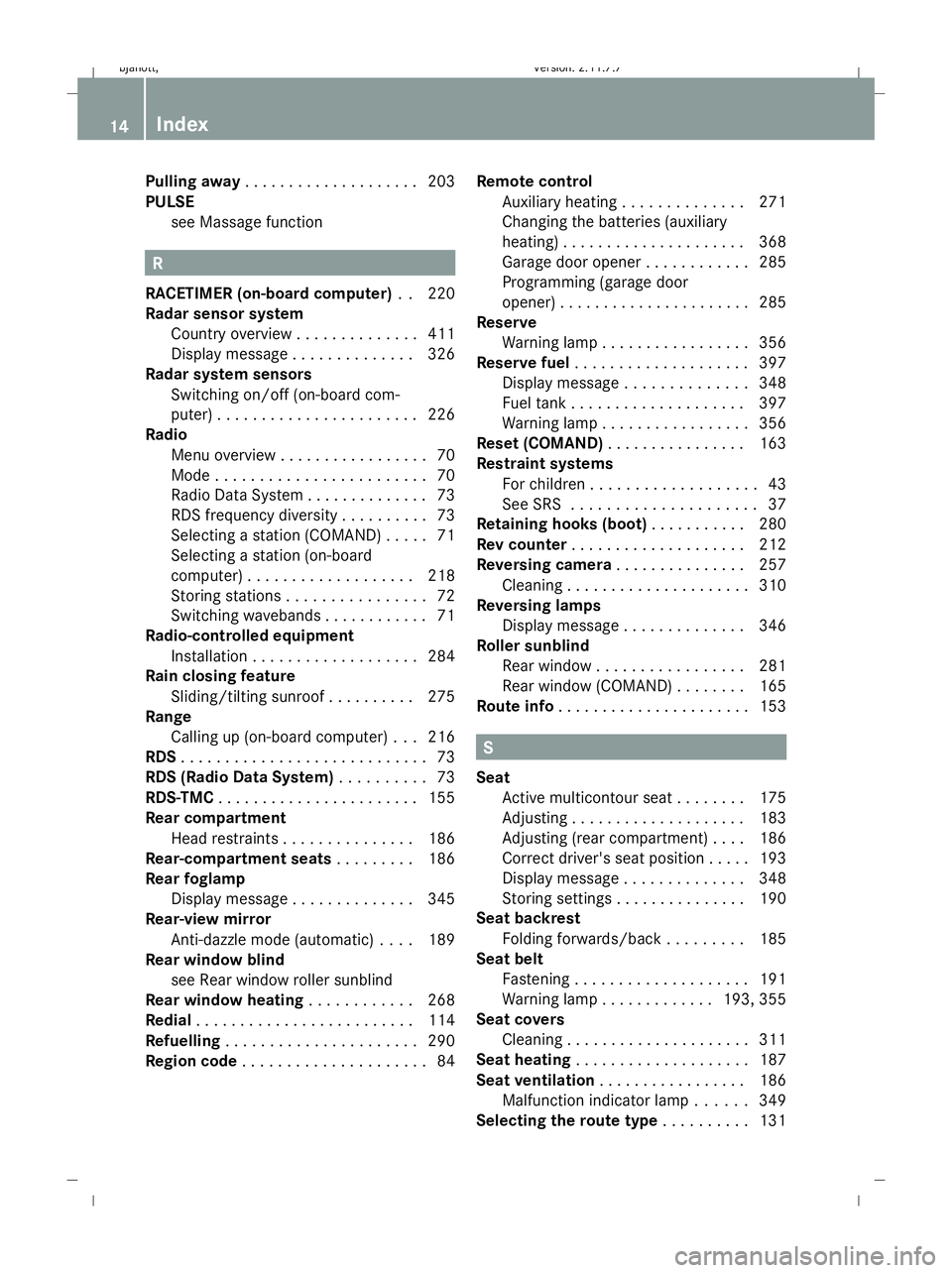
Pulling away
. . . . . . . . . . . . . . . . . . . .203
PULSE see Massage function R
RACETIMER (on-board computer) ..2 20
Radar sensor system Country overview . . . . . . . . . . . . . .411
Display message . . . . . . . . . . . . . .326
Radar system sensors
Switching on/off (on-board com-
puter) . . . . . . . . . . . . . . . . . . . . . . .226
Radio
Menu overview . . . . . . . . . . . . . . . . .70
Mode . . . . . . . . . . . . . . . . . . . . . . . .70
Radio Data Syste m . . . . . . . . . . . . . .73
RDS frequency diversit y.. . . . . . . ..73
Selecting a station (COMAND) . . . . .71
Selecting a station (on-board
computer) . . . . . . . . . . . . . . . . . . .218
Storing stations . . . . . . . . . . . . . . . .72
Switching wavebands . . . . . . . . . . . .71
Radio-controlled equipment
Installation . . . . . . . . . . . . . . . . . . .284
Rain closing feature
Sliding/tilting sunroo f.. . . . . . . ..275
Range
Calling up (on-board computer) . . .216
RDS . . . . . . . . . . . . . . . . . . . . . . . . . . . .73
RDS (Radio Data System) . . . . . . . . ..73
RDS-TMC . . . . . . . . . . . . . . . . . . . . . . .155
Rear compartment Head restraints . . . . . . . . . . . . . . .186
Rear-compartment seats . . . . . . . ..186
Rear foglamp Display message . . . . . . . . . . . . . .345
Rear-view mirror
Anti-dazzle mode (automatic) . . . .189
Rear window blind
see Rear window roller sunblind
Rear window heating . . . . . . . . . . ..268
Redial . . . . . . . . . . . . . . . . . . . . . . . . .114
Refuelling . . . . . . . . . . . . . . . . . . . . . .290
Region code . . . . . . . . . . . . . . . . . . . . .84Remote control
Auxiliary heating . . . . . . . . . . . . . .271
Changing the batteries (auxiliary
heating) . . . . . . . . . . . . . . . . . . . . .368
Garage door opene r.. . . . . . . . . . .285
Programming (garage door
opener) . . . . . . . . . . . . . . . . . . . . . .285
Reserve
Warning lamp . . . . . . . . . . . . . . . . .356
Reserve fuel . . . . . . . . . . . . . . . . . . . .397
Display message . . . . . . . . . . . . . .348
Fuel tank . . . . . . . . . . . . . . . . . . . .397
Warning lamp . . . . . . . . . . . . . . . . .356
Reset (COMAND) . . . . . . . . . . . . . . ..163
Restraint systems For children . . . . . . . . . . . . . . . . . . .43
See SRS . . . . . . . . . . . . . . . . . . . . .37
Retaining hooks (boot) . . . . . . . . . ..280
Rev counter . . . . . . . . . . . . . . . . . . . .212
Reversing camera . . . . . . . . . . . . . ..257
Cleaning . . . . . . . . . . . . . . . . . . . . .310
Reversing lamps
Display message . . . . . . . . . . . . . .346
Roller sunblind
Rear window . . . . . . . . . . . . . . . . .281
Rear window (COMAND) . . . . . . . .165
Route info . . . . . . . . . . . . . . . . . . . . . .153 S
Seat Active multicontour sea t.. . . . . ..175
Adjusting . . . . . . . . . . . . . . . . . . . .183
Adjusting (rear compartment) . . . .186
Correct driver's seat position . . . . .193
Display message . . . . . . . . . . . . . .348
Storing settings . . . . . . . . . . . . . . .190
Seat backrest
Folding forwards/back . . . . . . . . .185
Seat belt
Fastening . . . . . . . . . . . . . . . . . . . .191
Warning lamp . . . . . . . . . . . . .193, 355
Seat covers
Cleaning . . . . . . . . . . . . . . . . . . . . .311
Seat heating . . . . . . . . . . . . . . . . . . . .187
Seat ventilation . . . . . . . . . . . . . . . . .186
Malfunction indicator lamp . . . . . .349
Selecting the route type . . . . . . . . ..131 14
Index 216_AKB; 2; 3, en-GB
bjanott,
Version: 2.11.7.7 2009-02-27T14:54:17+01:00 - Seite 14Dateiname: 6515230602_buchblock.pdf; erzeugt am 04. Mar 2009 11:14:35; WK
Page 27 of 421
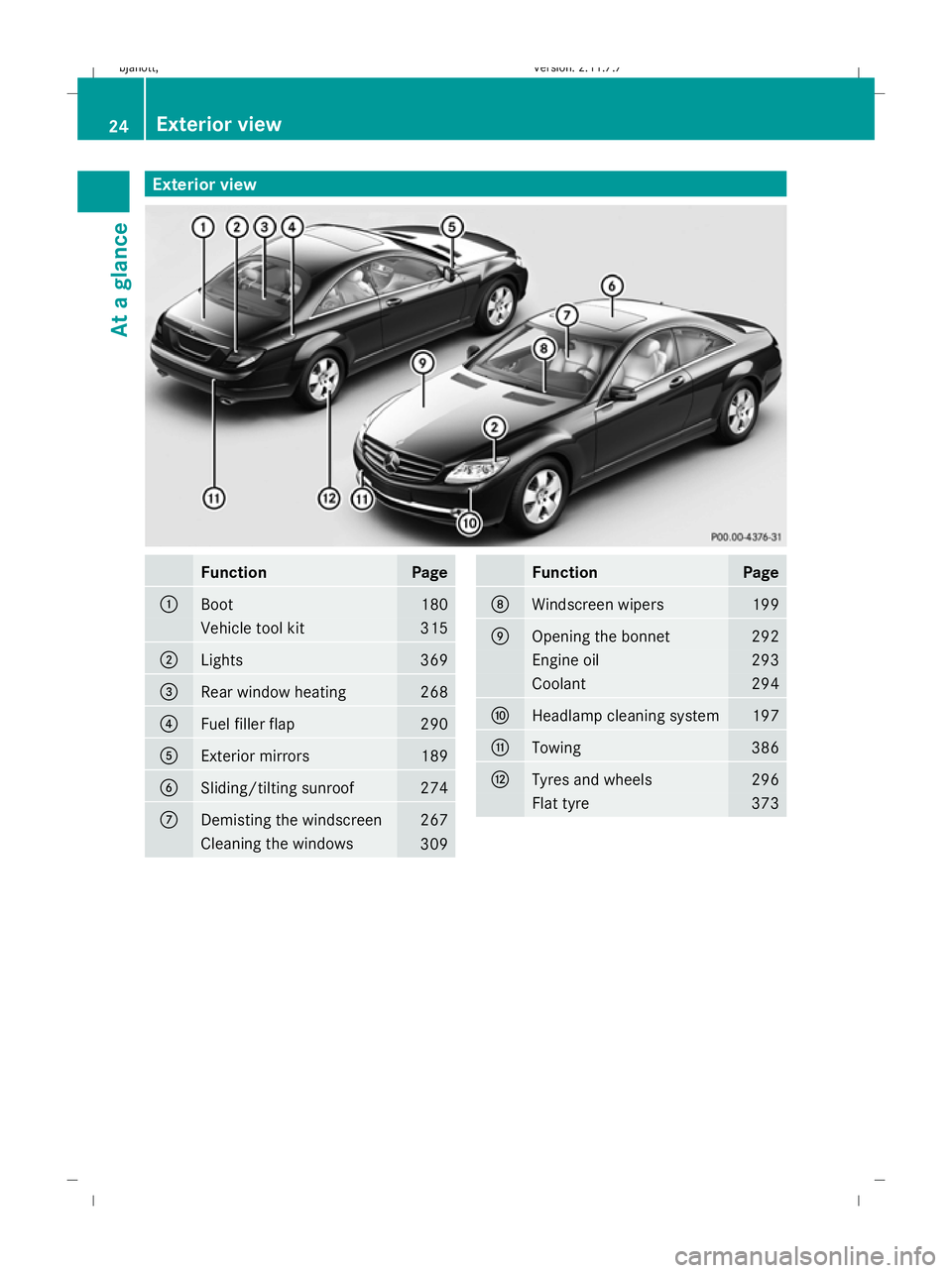
Exterior view
Function Page
:
Boot 180
Vehicle tool kit 315
;
Lights 369
=
Rear window heating 268
?
Fuel filler flap 290
A
Exterior mirrors 189
B
Sliding/tilting sunroof 274
C
Demisting the windscreen 267
Cleaning the windows
309 Function Page
D
Windscreen wipers 199
E
Opening the bonnet 292
Engine oil 293
Coolant 294
F
Headlamp cleaning system 197
G
Towing 386
H
Tyres and wheels 296
Flat tyre 37324
Exterior viewAt a glance
216_AKB; 2; 3, en-GB
bjanott
,V ersion: 2.11.7.7
2009-02-27T14:54:17+01:00 - Seite 24
Dateiname: 6515230602_buchblock.pdf; erzeugt am 04. Mar 2009 11:14:38; WK
Page 35 of 421
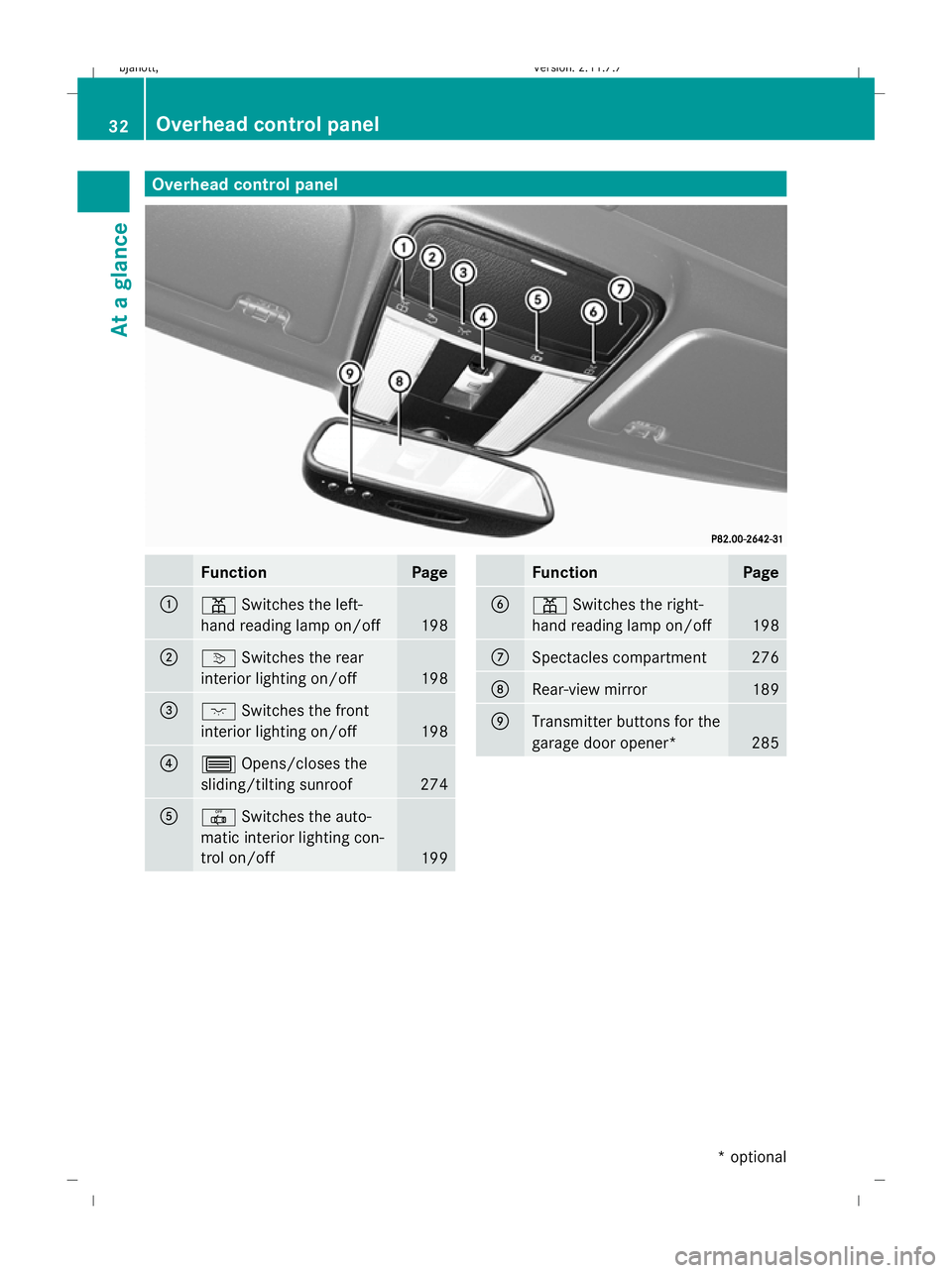
Overhead control panel
Function Page
:
p
Switches the left-
hand reading lamp on/off 198
;
v
Switches the rear
interior lighting on/off 198
=
c
Switches the front
interior lighting on/off 198
?
3
Opens/closes the
sliding/tilting sunroof 274
A
|
Switches the auto-
matic interior lighting con-
trol on/off 199 Function Page
B
p
Switches the right-
hand reading lamp on/off 198
C
Spectacles compartment 276
D
Rear-view mirror 189
E
Transmitter buttons for the
garage door opener*
28532
Overhead control panelAt a glance
* optional
216_AKB; 2; 3, en-GB
bjanott,
Version: 2.11.7.7 2009-02-27T14:54:17+01:00 - Seite 32
Dateiname: 6515230602_buchblock.pdf; erzeugt am 04. Mar 2009 11:14:44; WK
Page 59 of 421
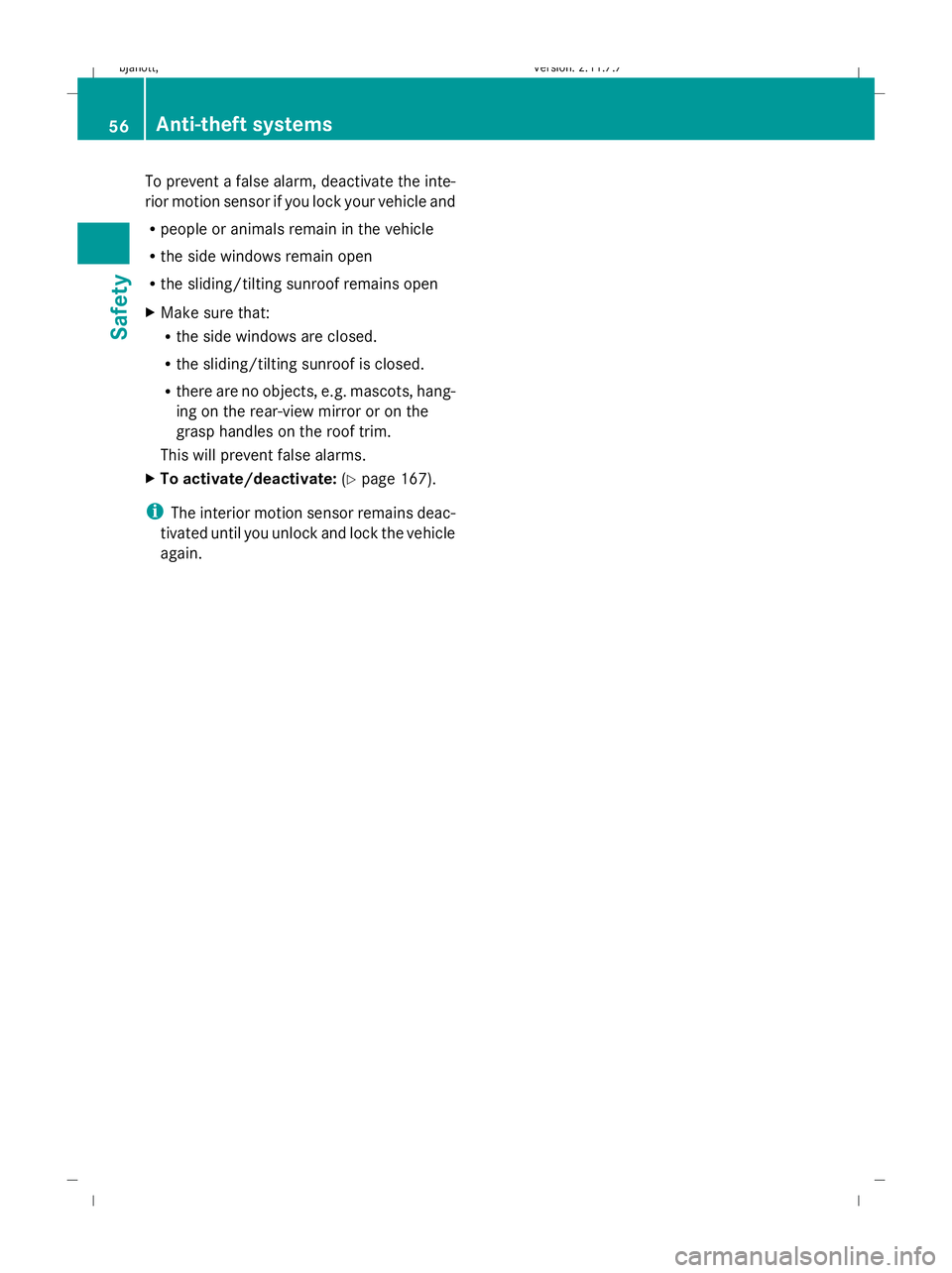
To prevent a false alarm, deactivate the inte-
rior motion sensor if you lock your vehicle and
R people or animals remain in the vehicle
R the side windows remain open
R the sliding/tilting sunroof remains open
X Make sure that:
R
the side windows are closed.
R the sliding/tilting sunroof is closed.
R there are no objects, e.g. mascots, hang-
ing on the rear-view mirror or on the
grasp handles on the roof trim.
This will prevent false alarms.
X To activate/deactivate: (Ypage 167).
i The interior motion sensor remains deac-
tivated until you unlock and lock the vehicle
again. 56
Anti-theft systemsSafety
216_AKB; 2; 3, en-GB
bjanott,
Version: 2.11.7.7 2009-02-27T14:54:17+01:00 - Seite 56
Dateiname: 6515230602_buchblock.pdf; erzeugt am 04. Mar 2009 11:14:51; WK
Page 69 of 421
Operation
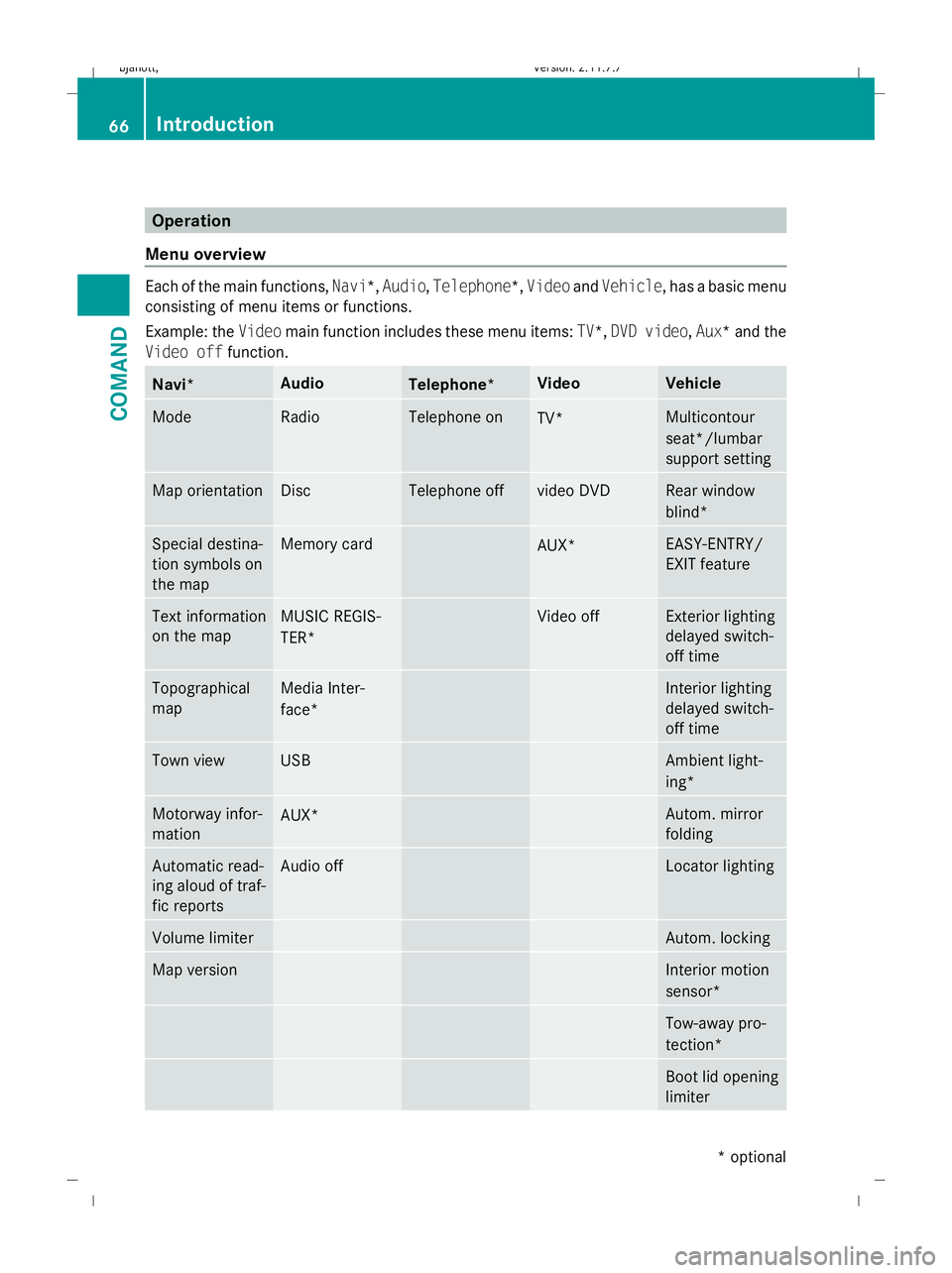
Menu overview Each of the main functions,
Navi*,Audio,Telephone*, VideoandVehicle, has a basic menu
consisting of menu items or functions.
Example: the Videomain function includes these menu items: TV*,DVD video ,Aux*a nd the
Video off function. Navi* Audio
Telephone* Video Vehicle
Mode Radio Telephone on
TV* Multicontour
seat*/lumbar
support setting Map orientation Disc Telephone off video DVD Rear window
blind*
Special destina-
tion symbols on
the map Memory card
AUX* EASY-ENTRY/
EXIT feature
Text information
on the map MUSIC REGIS-
TER* Video off Exterior lighting
delayed switch-
off time Topographical
map Media Inter-
face* Interior lighting
delayed switch-
off time Town view USB Ambient light-
ing*
Motorway infor-
mation
AUX* Autom. mirror
folding Automatic read-
ing aloud of traf-
fic reports Audio off Locator lighting
Volume limiter Autom. locking
Map version Interior motion
sensor*
Tow-away pro-
tection*
Boot lid opening
limiter66
IntroductionCOMAND
* optional
216_AKB; 2; 3, en-GB
bjanott,
Version: 2.11.7.7 2009-02-27T14:54:17+01:00 - Seite 66
Dateiname: 6515230602_buchblock.pdf; erzeugt am 04. Mar 2009 11:14:55; WK
Page 192 of 421

i
The crash-responsive EASY-EXIT fea-
ture* can only be activated after an acci-
dent if the EASY-ENTRY/EXIT feature is
activated in the on-board computer.
When the crash-responsive EASY-EXIT fea-
ture is triggered in an accident, the steering
wheel column will move upwards irrespec-
tive of the position of the key in the ignition
lock. This makes it easier to exit the vehicle
or rescue the occupants. Mirrors
Exterior mirrors
G
Risk of accident
The exterior mirrors reduce the size of the
image. Objects are actually closer than they
appear. You could misjudge the distance from
vehicles driving behind and cause an acci-
dent, e.g. when changing lane. For this rea-
son, make sure of the actual distance from the
vehicle driving behind by glancing over your
shoulder.
The convex exterior mirrors provide a larger
field of vision.
At low outside temperatures the exterior mir-
rors are heated automatically. Adjusting the exterior mirrors
X
Make sure that the key is in position 1or
2 in the ignition lock.
X Press button 2for the right-hand exterior
mirror or button 4for the left-hand exte-
rior mirror.
The indicator lamp lights up in the button
that has been pressed.
X Press adjustment button 1up, down, to
the right or to the left until the exterior mir-
ror is set in a way which provides you with
a good overview of traffic conditions.
See the "Storing settings" section for more
information (Y page 190).
Folding the exterior mirrors in or out
electrically X
Make sure that the key is in position 1or
2 in the ignition lock.
X Briefly press button 3.
Both exterior mirrors fold in or out.
Folding the exterior mirrors in or out
automatically If the corresponding function is activated in
COMAND (Y
page 165):
R the exterior mirrors fold in automatically as
soon as you lock the vehicle from the out-
side
R the exterior mirrors fold out again automat-
ically as soon as you unlock the vehicle and
then open the driver's or front-passenger
door
i The mirrors do not fold out if they were
folded in manually. Automatic anti-dazzle mirrors
The rear-view mirror and the exterior mirror
on the driver's side automatically go into anti-
dazzle mode if the ignition is switched on and
incident light from headlamps strikes the sen-
sor in the rear-view mirror. Mirrors
189Controls
* optional
216_AKB; 2; 3, en-GB
bjanott,
Version: 2.11.7.7 2009-02-27T14:54:17+01:00 - Seite 189 Z
Dateiname: 6515230602_buchblock.pdf; erzeugt am 04. Mar 2009 11:15:41; WK
Page 193 of 421

The mirrors do not go into anti-dazzle mode if
reverse gear is engaged or the interior lighting
is switched on. G
Risk of accident
If the incident light from headlamps cannot
strike the sensor in the rear-view mirror, for
instance, when the rear window blind* is
extended, the mirror's automatic anti-dazzle
function will not operate.
Incident light could then dazzle you. This may
distract you from the traffic conditions, and
you may, thereby, cause an accident. In this
case, adjust the rear-view mirror manually. Memory function
Storing settings
Using the memory button you can store up to
three different settings, e. g. for three differ-
ent people.
The following settings are stored as a single
memory preset:
R seat, backrest, head restraint position and
contour of the backrest in the lumbar
region
R active multicontour seat*: activated/deac-
tivated
R multicontour seat*: the side bolsters of the
seat cushion and the backrest as well as
the contour of the backrest in the lumbar
and shoulder regions
R driver's side: steering wheel position
R driver's side: position of the exterior mir-
rors on the driver's and front-passenger
sides G
Risk of injury
The memory function can still be used when
the key has been removed. For this reason,
children should never be left unsupervised in
the vehicle. Otherwise, they could become
trapped when moving the seat or the steering
wheel. G
Risk of accident
Only use the memory function on the driver’s
side when the vehicle is stationary. Other-
wise, you could be distracted from the traffic
conditions by the steering wheel and seat
moving of their own accord, and as a result
cause an accident. X
Adjust the seat (Y page 183).
X On the driver's side, also adjust the steer-
ing wheel ( Ypage 187) and the mirrors
(Y page 189).
X Press memory button Mand press storage
position switch 1,2or 3within three sec-
onds until you hear an acknowledgement
tone.
The settings are stored in the selected stor-
age position. Calling up a stored setting
X Press and hold the relevant storage posi-
tion button 1,2or 3, until the seat, steering
wheel and exterior mirrors are in the stored
position.
i If you release the storage position switch,
the seat, steering wheel and mirror setting
functions stop immediately. The multicon-
tour seat* setting or the lumbar support
adjustment are still carried out. 190
Memory functionControls
* optional
216_AKB; 2; 3, en-GB
bjanott,
Version: 2.11.7.7 2009-02-27T14:54:17+01:00 - Seite 190
Dateiname: 6515230602_buchblock.pdf; erzeugt am 04. Mar 2009 11:15:41; WK
Page 260 of 421
Driving to the final position
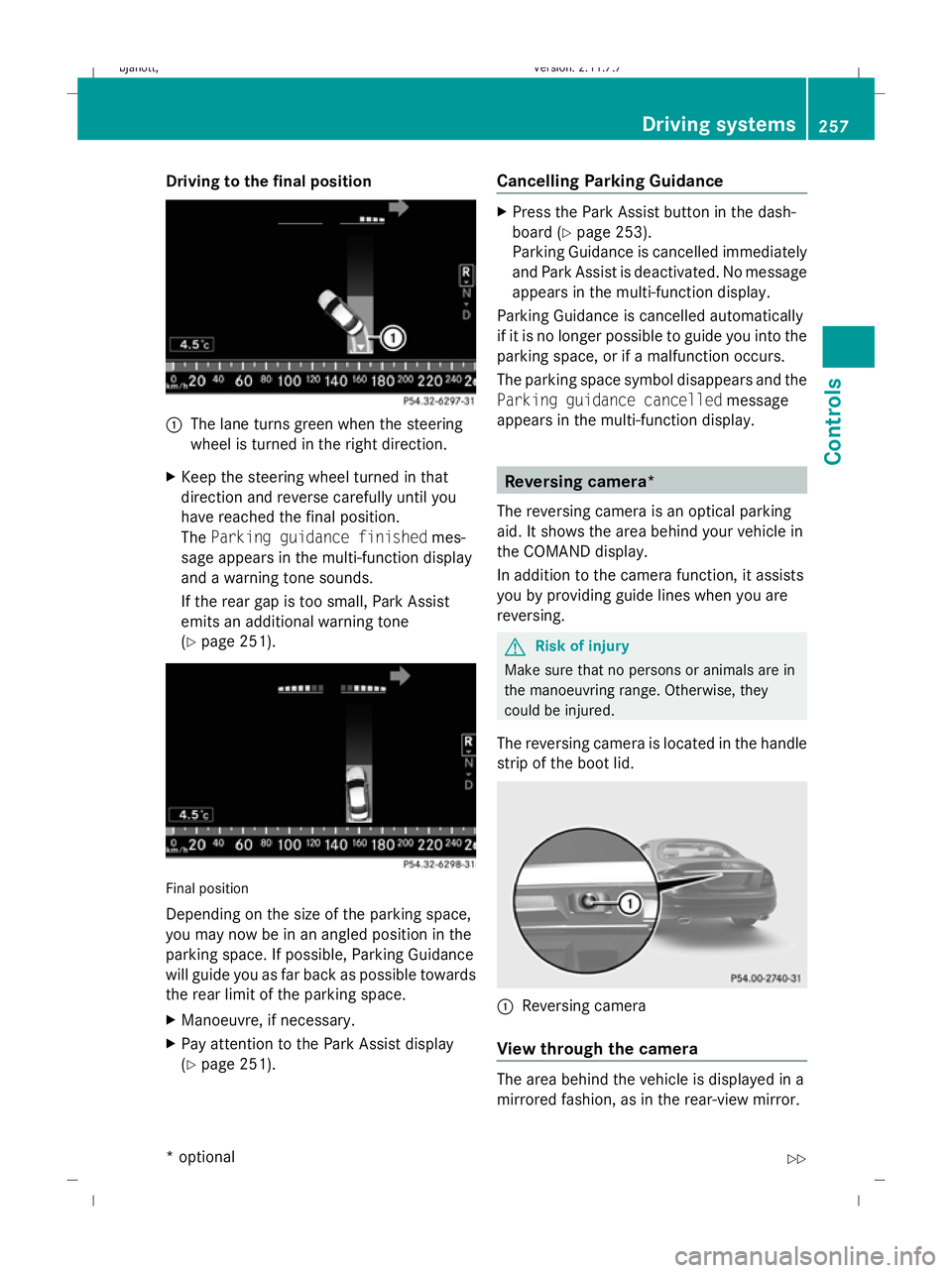
1
The lane turns green when the steering
wheel is turned in the right direction.
X Keep the steering wheel turned in that
direction and reverse carefully until you
have reached the final position.
The Parking guidance finished mes-
sage appears in the multi-function display
and a warning tone sounds.
If the rear gap is too small, Park Assist
emits an additional warning tone
(Y page 251). Final position
Depending on the size of the parking space,
you may now be in an angled position in the
parking space. If possible, Parking Guidance
will guide you as far back as possible towards
the rear limit of the parking space.
X
Manoeuvre, if necessary.
X Pay attention to the Park Assist display
(Y page 251). Cancelling Parking Guidance X
Press the Park Assist button in the dash-
board ( Ypage 253).
Parking Guidance is cancelled immediately
and Park Assist is deactivated. No message
appears in the multi-function display.
Parking Guidance is cancelled automatically
if it is no longer possible to guide you into the
parking space, or if a malfunction occurs.
The parking space symbol disappears and the
Parking guidance cancelled message
appears in the multi-function display. Reversing camera*
The reversing camera is an optical parking
aid. It shows the area behind your vehicle in
the COMAND display.
In addition to the camera function, it assists
you by providing guide lines when you are
reversing. G
Risk of injury
Make sure that no persons or animals are in
the manoeuvring range. Otherwise, they
could be injured.
The reversing camera is located in the handle
strip of the boot lid. :
Reversing camera
View through the camera The area behind the vehicle is displayed in a
mirrored fashion, as in the rear-view mirror. Driving syste
ms
257Controls
* option al
216_AKB; 2; 3, en-GB
bjanott
,V ersion: 2.11.7.7
2009-02-27T14:54:17+01:00 - Seite 257 Z
Dateiname: 6515230602_buchblock.pdf; erzeugt am 04. Mar 2009 11:16:06; WK