remote control MERCEDES-BENZ CL COUPE 2009 Owners Manual
[x] Cancel search | Manufacturer: MERCEDES-BENZ, Model Year: 2009, Model line: CL COUPE, Model: MERCEDES-BENZ CL COUPE 2009Pages: 421, PDF Size: 10.78 MB
Page 8 of 421
ATA (anti-theft alarm system)
. . . . ..54
Switching off the alarm . . . . . . . . . .55
Audio (COMAND)
AUX mode . . . . . . . . . . . . . . . . . . . .83
CD mod e.. . . . . . . . . . . . . . . . . . . .79
DVD mod e.. . . . . . . . . . . . . . . . . . .79
MP3 mode . . . . . . . . . . . . . . . . . . . .79
Audio DVD
Menu overview . . . . . . . . . . . . . . . . .79
Setting the audio format . . . . . . . . .82
Stop function . . . . . . . . . . . . . . . . . .81
AUTO lights
Display message . . . . . . . . . . . . . .344
Automatic car wash . . . . . . . . . . . ..307
Automatic transmission Display message . . . . . .318, 322, 330
Driving tips . . . . . . . . . . . . . . . . . . .208
Emergency running mode . . . . . . .359
Malfunction . . . . . . . . . . . . . . . . . .359
Program selector button . . . . . . . .210
Shift ranges . . . . . . . . . . . . . . . . . .209
AUX
Audi o.. . . . . . . . . . . . . . . . . . . . . . .83
Video . . . . . . . . . . . . . . . . . . . . . . . .83
Auxiliary heating . . . . . . . . . . . . . . ..270
Display message . . . . . . . . . . . . . .342
Notes . . . . . . . . . . . . . . . . . . . . . . .270
Remote control . . . . . . . . . . . . . . .271
Setting the departure time . . . . . . .172
Auxiliary ventilation . . . . . . . . . . . ..270 B
Back button COMAND . . . . . . . . . . . . . . . . . . . . .68
BAS (Brake Assist) . . . . . . . . . . . . . . ..49
BAS PLUS (Brake Assist System
Plus*) . . . . . . . . . . . . . . . . . . . . . . . . . .49
Batteries Changing (entertainment system
headphones) . . . . . . . . . . . . . . . . .369
Changing (entertainment system
remote control) . . . . . . . . . . . . . . .369
Battery
Changing (auxiliary heating
remote control) . . . . . . . . . . . . . . .368
Charging . . . . . . . . . . . . . . . . . . . . .384
Checking (key ).. . . . . . . . . . . . . . .367 Check lamp (key
).. . . . . . . . . . . . .367
Disconnecting . . . . . . . . . . . . . . . .385
Display message . . . . . . . . . .318, 331
Fitting the battery . . . . . . . . . . . . .386
Jump-starting . . . . . . . . . . . . . . . . .384
Maintenance (vehicle ).. . . . . . . ..382
Reconnecting . . . . . . . . . . . . . . . . .386
Removing the battery . . . . . . . . . . .385
Vehicle battery . . . . . . . . . . . . . . . .382
Voltage (on-board computer) . . . . .220
Belt force limiters
Activatio n.. . . . . . . . . . . . . . . . . . . .37
Belt tensioners
Activation . . . . . . . . . . . . . . . . . . . . .37
Belt warning . . . . . . . . . . . . . . . . . . . .193
Blind see Roller sunblind
Blind Spot Assist . . . . . . . . . . . . . . . .260
Activating/deactivating (on-
board computer) . . . . . . . . . . . . . .224
Display message . . . . . . . . . . . . . .329
Indicator lamp . . . . . . . . . . . . . . . .350
Warning lamp . . . . . . . . . . . . . . . . .350
Bluetooth ®
Authorising devices . . . . . . . . . . . .107
External authorisation . . . . . . . . . .109
Interface . . . . . . . . . . . .106, 109, 112
Telephony . . . . . . . . . . . . . . .106, 112
Bluetooth ®
telephony
Menu overview . . . . . . . . . . . . . . . .110
Bonnet
Bonnet catch . . . . . . . . . . . . . . . . .292
Display message . . . . . . . . . . . . . .330
Opening/closing . . . . . . . . . . . . . .292
Bonnet release lever
Release lever . . . . . . . . . . . . . . . . .292
Boot
Automatic opening . . . . . . . .181, 182
Emergency release . . . . . . . . . . . . .366
Limiting the opening angl e.. . . . ..168
Locking separatel y.. . . . . . . . . . ..181
Boot lid
Display message . . . . . . . . . . . . . .330
Opening/closing . . . . . . . . . . . . . .180
Boot lid opening limiter . . . . . . . . ..168 Index
5 216_AKB; 2; 3, en-GB
bjanott,
Version: 2.11.7.7 2009-02-27T14:54:17+01:00 - Seite 5Dateiname: 6515230602_buchblock.pdf; erzeugt am 04. Mar 2009 11:14:34; WK
Page 13 of 421

Fuse box
Dashboard . . . . . . . . . . . . . . . . . . .389
Engine compartment . . . . . . . . . . .390
Rea r.. . . . . . . . . . . . . . . . . . . . . . .390
Fuses . . . . . . . . . . . . . . . . . . . . . . . . . .389 G
Garage door Opening/closing (with the remote
control) . . . . . . . . . . . . . . . . . . . . .286
Garage door opener . . . . . . . . . . . . ..285
Clearing the memory . . . . . . . . . . .286
Frequencies . . . . . . . . . . . . . . . . . .408
Programming the remote control . .285
Gear indicator . . . . . . . . . . . . . . . . . .208
Gear indicator (on-board computer) 220
Genuine Mercedes-Benz parts . . . ..394
Glove compartment . . . . . . . . . . . . ..276 H
Hands-free system Switching on/off . . . . . . . . . . . . . .114
Switching to the mobile phone . . .116
Headlamp cleaning system . . . . . ..295
Headlamps Cleaning . . . . . . . . . . . . . . . . . . . . .309
Cleaning system . . . . . . . . . . . . . . .197
Misting up . . . . . . . . . . . . . . . . . . .360
Head restraints
Rear compartment . . . . . . . . . . . . .186
Heating
see Air conditioning
High-pressure cleaners . . . . . . . . . ..308
Hill start assist . . . . . . . . . . . . . . . . .204
HOLD . . . . . . . . . . . . . . . . . . . . . . . . . .245
Display message . . . . . . . . . . . . . .322
HomeLink ®
see Garage door opener I
Immobiliser . . . . . . . . . . . . . . . . . . . . .54
Indicator and warning lamp Automatic child seat recognition
(malfunction ).. . . . . . . . . . . . . . . .350
Brakes (red ).. . . . . . . . . . . . .352, 354
Brakes (yellow) . . . . . . . . . . . . . . . .354 Engine diagnostics . . . . . . . . . . . .
.354
ESP ®
. . . . . . . . . . . . . . . . . . . . . . .352
PASSENGER AIRBAG OFF . . . .44, 350
Reserve fuel . . . . . . . . . . . . . . . . . .356
Seat belt . . . . . . . . . . . . . . . . . . . . .355
SRS . . . . . . . . . . . . . . . . . . . . .37, 353
Indicator lamp
Display message . . . . . . . . . . . . . .344
see Indicator and warning lamp . . .351
Instrument cluster . . . . . . . . . . . . ..212
Overview . . . . . . . . . . . . . . . . . . . . .27
Intelligent Light System . . . . . . . . ..197
Display message . . . . . . . . . .323, 346
Menu (on-board computer) . . . . . .225
Tourist mode . . . . . . . . . . . . . . . . .225
Interior lighting
Ambient light (COMAND) . . . . . . . .166
Automatic control system . . . . . . .199
Emergency lighting . . . . . . . . . . . .199
Interior lighting . . . . . . . . . . . . . . . .166
Manual control . . . . . . . . . . . . . . . .198
Reading lamp . . . . . . . . . . . . . . . . .198
Interior motion sensor . . . . . . ..55, 167
ISOFIX child seat securing system ..47 J
Jack Operation . . . . . . . . . . . . . . . . . . . .378
Storage location . . . . . . . . . . . . . . .315
Jump-starting . . . . . . . . . . . . . . . . . . .384
Jump leads . . . . . . . . . . . . . . . . . . .384 K
Key . . . . . . . . . . . . . . . . . . . . . . . . . . .178
Checking the battery . . . . . . . . . . .367
Convenience closing . . . . . . . . . . .201
Convenience opening . . . . . . . . . . .201
Display message . . . . . . . . . . . . . .340
Loss . . . . . . . . . . . . . . . . . . . . . . . .363
Malfunction . . . . . . . . . . . . . . . . . .362
Modifying the programming . . . . . .179
KEYLESS GO
Button . . . . . . . . . . . . . . . . . . . . . .182
Changing the battery . . . . . . . . . . .368
Checking the battery . . . . . . . . . . .367
Convenience closing . . . . . . . . . . .202 10
Index 216_AKB; 2; 3, en-GB
bjanott,
Version: 2.11.7.7 2009-02-27T14:54:17+01:00 - Seite 10Dateiname: 6515230602_buchblock.pdf; erzeugt am 04. Mar 2009 11:14:35; WK
Page 17 of 421
Pulling away
. . . . . . . . . . . . . . . . . . . .203
PULSE see Massage function R
RACETIMER (on-board computer) ..2 20
Radar sensor system Country overview . . . . . . . . . . . . . .411
Display message . . . . . . . . . . . . . .326
Radar system sensors
Switching on/off (on-board com-
puter) . . . . . . . . . . . . . . . . . . . . . . .226
Radio
Menu overview . . . . . . . . . . . . . . . . .70
Mode . . . . . . . . . . . . . . . . . . . . . . . .70
Radio Data Syste m . . . . . . . . . . . . . .73
RDS frequency diversit y.. . . . . . . ..73
Selecting a station (COMAND) . . . . .71
Selecting a station (on-board
computer) . . . . . . . . . . . . . . . . . . .218
Storing stations . . . . . . . . . . . . . . . .72
Switching wavebands . . . . . . . . . . . .71
Radio-controlled equipment
Installation . . . . . . . . . . . . . . . . . . .284
Rain closing feature
Sliding/tilting sunroo f.. . . . . . . ..275
Range
Calling up (on-board computer) . . .216
RDS . . . . . . . . . . . . . . . . . . . . . . . . . . . .73
RDS (Radio Data System) . . . . . . . . ..73
RDS-TMC . . . . . . . . . . . . . . . . . . . . . . .155
Rear compartment Head restraints . . . . . . . . . . . . . . .186
Rear-compartment seats . . . . . . . ..186
Rear foglamp Display message . . . . . . . . . . . . . .345
Rear-view mirror
Anti-dazzle mode (automatic) . . . .189
Rear window blind
see Rear window roller sunblind
Rear window heating . . . . . . . . . . ..268
Redial . . . . . . . . . . . . . . . . . . . . . . . . .114
Refuelling . . . . . . . . . . . . . . . . . . . . . .290
Region code . . . . . . . . . . . . . . . . . . . . .84Remote control
Auxiliary heating . . . . . . . . . . . . . .271
Changing the batteries (auxiliary
heating) . . . . . . . . . . . . . . . . . . . . .368
Garage door opene r.. . . . . . . . . . .285
Programming (garage door
opener) . . . . . . . . . . . . . . . . . . . . . .285
Reserve
Warning lamp . . . . . . . . . . . . . . . . .356
Reserve fuel . . . . . . . . . . . . . . . . . . . .397
Display message . . . . . . . . . . . . . .348
Fuel tank . . . . . . . . . . . . . . . . . . . .397
Warning lamp . . . . . . . . . . . . . . . . .356
Reset (COMAND) . . . . . . . . . . . . . . ..163
Restraint systems For children . . . . . . . . . . . . . . . . . . .43
See SRS . . . . . . . . . . . . . . . . . . . . .37
Retaining hooks (boot) . . . . . . . . . ..280
Rev counter . . . . . . . . . . . . . . . . . . . .212
Reversing camera . . . . . . . . . . . . . ..257
Cleaning . . . . . . . . . . . . . . . . . . . . .310
Reversing lamps
Display message . . . . . . . . . . . . . .346
Roller sunblind
Rear window . . . . . . . . . . . . . . . . .281
Rear window (COMAND) . . . . . . . .165
Route info . . . . . . . . . . . . . . . . . . . . . .153 S
Seat Active multicontour sea t.. . . . . ..175
Adjusting . . . . . . . . . . . . . . . . . . . .183
Adjusting (rear compartment) . . . .186
Correct driver's seat position . . . . .193
Display message . . . . . . . . . . . . . .348
Storing settings . . . . . . . . . . . . . . .190
Seat backrest
Folding forwards/back . . . . . . . . .185
Seat belt
Fastening . . . . . . . . . . . . . . . . . . . .191
Warning lamp . . . . . . . . . . . . .193, 355
Seat covers
Cleaning . . . . . . . . . . . . . . . . . . . . .311
Seat heating . . . . . . . . . . . . . . . . . . . .187
Seat ventilation . . . . . . . . . . . . . . . . .186
Malfunction indicator lamp . . . . . .349
Selecting the route type . . . . . . . . ..131 14
Index 216_AKB; 2; 3, en-GB
bjanott,
Version: 2.11.7.7 2009-02-27T14:54:17+01:00 - Seite 14Dateiname: 6515230602_buchblock.pdf; erzeugt am 04. Mar 2009 11:14:35; WK
Page 61 of 421
Introduction
Operating safety
G
Risk of accident
Your attention must always be focused on the
traffic conditions.
Only use COMAND or the telephone* when
the road and traffic conditions permit.
Bear in mind that, at a speed of only
50 km/h, your vehicle covers a distance of
nearly 14 m per second. The navigation sys-
tem* will not provide you with information
about stop signs, give-way signs, traffic regu-
lations or road safety features. It is up to you
to pay attention to these while driving the
vehicle. Only enter a new destination when
the vehicle is stationary. G
Risk of accident and injury
Vehicles with BlueHYBRID *: make sure that
you read the "BlueHYBRID" supplement. You
may otherwise fail to detect dangers.
Dear radio user,
This radio can be operated by anyone in
accordance with the relevant EC directive.
The equipment corresponds to current Euro-
pean and harmonised national standards.
This guarantees that the equipment conforms
to the relevant specifications regarding elec-
tromagnetic compatibility.
As a result, interference caused by your
equipment to other electrical/electronic
equipment and interference to your equip-
ment caused by other electrical/electronic
equipment can be largely prevented.
The equipment is approved by the vehicle
manufacturer in accordance with European
Automotive EMC Directive 95/54/EC.
This means that the equipment in your vehicle
is authorised for use according to the given
regulations. The equipment does not require
certification and conforms to the relevant
equipment-specific EMC specifications in accordance with European standards
EN 55013 and EN 55020. Function restrictions when the vehi-
cle is being driven
For safety reasons, some COMAND functions
are restricted or unavailable while the vehicle
is in motion. This will be indicated by
COMAND displaying a message to this effect. Components
You can use COMAND to operate the follow-
ing in your vehicle:
R the audio functions
R the navigation system*
R the telephone* and communication func-
tions (text messages*)
R video DVD and TV*
R various vehicle settings
COMAND consists of:
R the COMAND display/SPLITVIEW*
R the COMAND controller
R the COMAND function buttons
R the telephone keypad
R connections in the glove compartment
(USB, additional USB*, jack plug* and
iPod ®
connection*)
The entertainment system* comprises:
R a remote control* for the front passenger
R wireless headphones* for the front
passenger 58
IntroductionCOMAND
* optional
216_AKB; 2; 3, en-GB
bjanott,
Version: 2.11.7.7 2009-02-27T14:54:17+01:00 - Seite 58
Dateiname: 6515230602_buchblock.pdf; erzeugt am 04. Mar 2009 11:14:52; WK
Page 63 of 421
Symbol Operating the
COMAND controller Functions
XVY
Slide R
Scrolls through a horizontal menu
R Exits a vertical menu Slide and hold R
Quicker fast-forward or rewind during CD or
DVD playback
R Moves in the navigation map* aVb
Slide and hold R
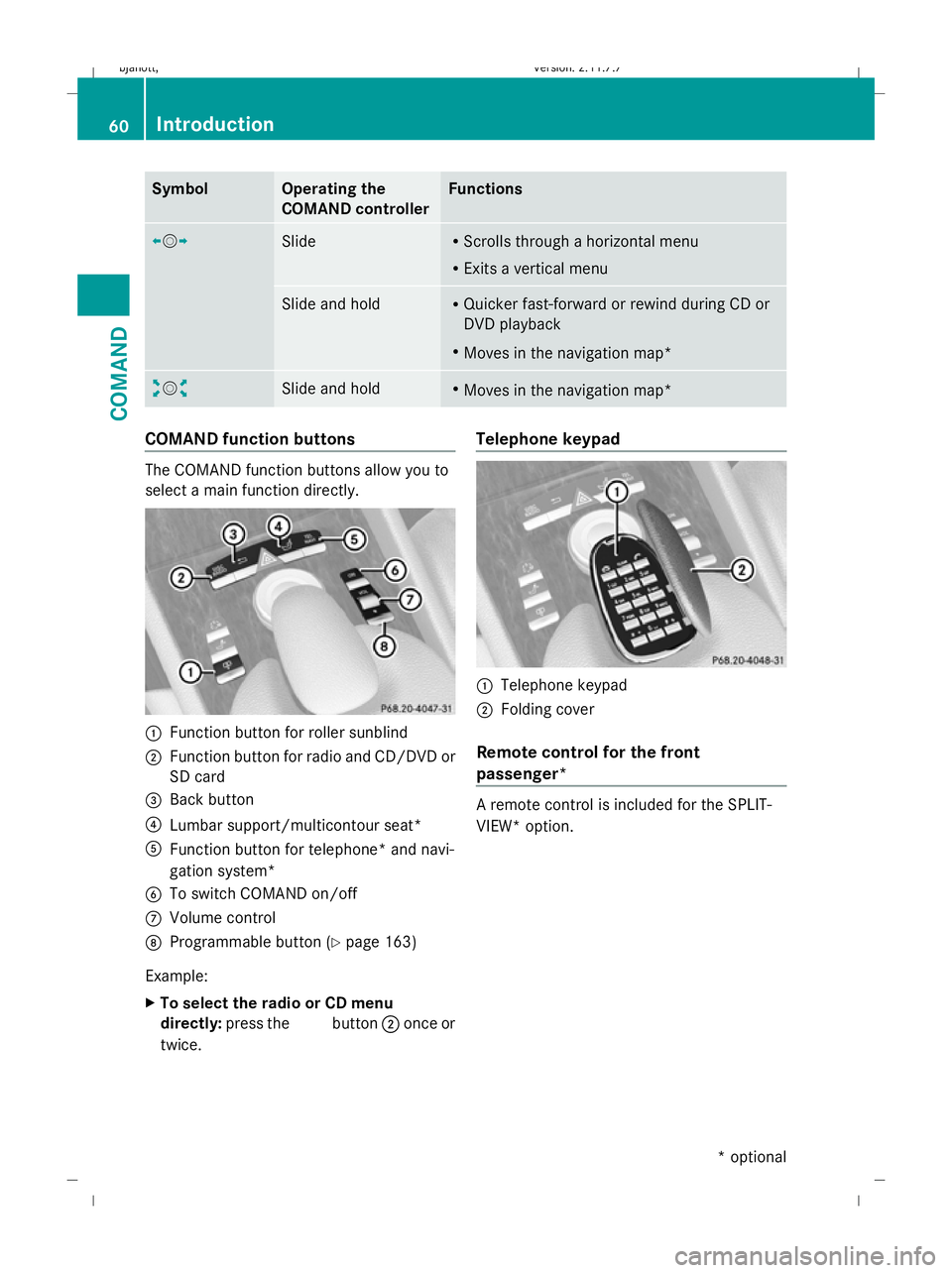
Moves in the navigation map* COMAND function buttons
The COMAND function buttons allow you to
select a main function directly. :
Function button for roller sunblind
; Function button for radio and CD/DVD or
SD card
= Back button
? Lumbar support/multicontour seat*
A Function button for telephone* and navi-
gation system*
B To switch COMAND on/off
C Volume control
D Programmable button (Y page 163)
Example:
X To select the radio or CD menu
directly: press the Rbutton ;once or
twice. Telephone keypad
:
Telephone keypad
; Folding cover
Remote control for the front
passenger* A remote control is included for the SPLIT-
VIEW* option. 60
IntroductionCOMAND
* optional
216_AKB; 2; 3, en-GB
bjanott,
Version: 2.11.7.7
2009-02-27T14:54:17+01:00 - Seite 60
Dateiname: 6515230602_buchblock.pdf; erzeugt am 04. Mar 2009 11:14:53; WK
Page 64 of 421
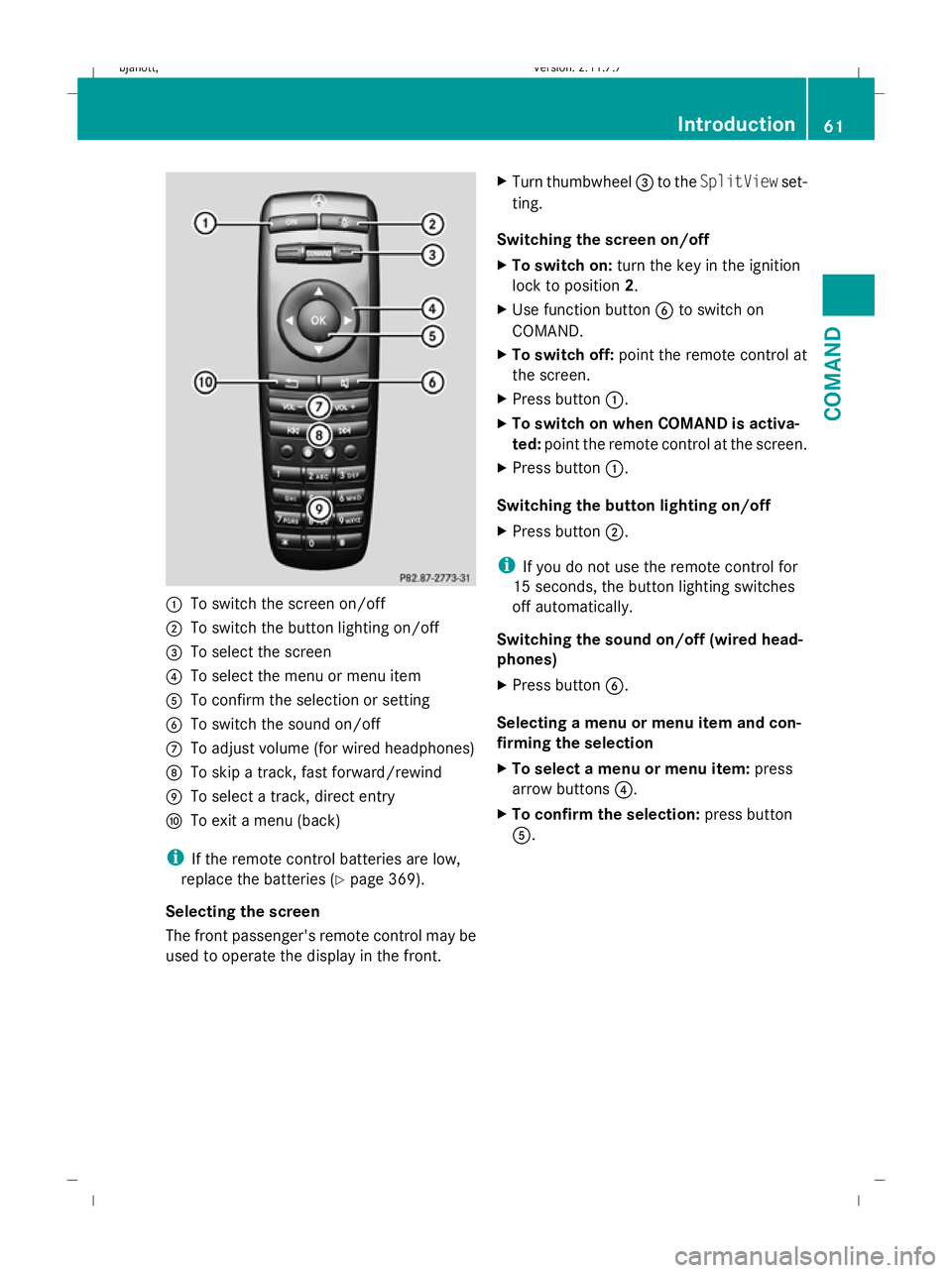
:
To switch the screen on/off
; To switch the button lighting on/off
= To select the screen
? To select the menu or menu item
A To confirm the selection or setting
B To switch the sound on/off
C To adjust volume (for wired headphones)
D To skip a track, fast forward/rewind
E To select a track, direct entry
F To exit a menu (back)
i If the remote control batteries are low,
replace the batteries (Y page 369).
Selecting the screen
The front passenger's remote control may be
used to operate the display in the front. X
Turn thumbwheel =to the SplitView set-
ting.
Switching the screen on/off
X To switch on: turn the key in the ignition
lock to position 2.
X Use function button Bto switch on
COMAND.
X To switch off: point the remote control at
the screen.
X Press button :.
X To switch on when COMAND is activa-
ted: point the remote control at the screen.
X Press button :.
Switching the button lighting on/off
X Press button ;.
i If you do not use the remote control for
15 seconds, the button lighting switches
off automatically.
Switching the sound on/off (wired head-
phones)
X Press button B.
Selecting a menu or menu item and con-
firming the selection
X To select a menu or menu item: press
arrow buttons ?.
X To confirm the selection: press button
A. Introduction
61COMAND
216_AKB; 2; 3, en-GB
bjanott, Version: 2.11.7.7 2009-02-27T14:54:17+01:00 - Seite 61 Z
Dateiname: 6515230602_buchblock.pdf; erzeugt am 04. Mar 2009 11:14:53; WK
Page 72 of 421
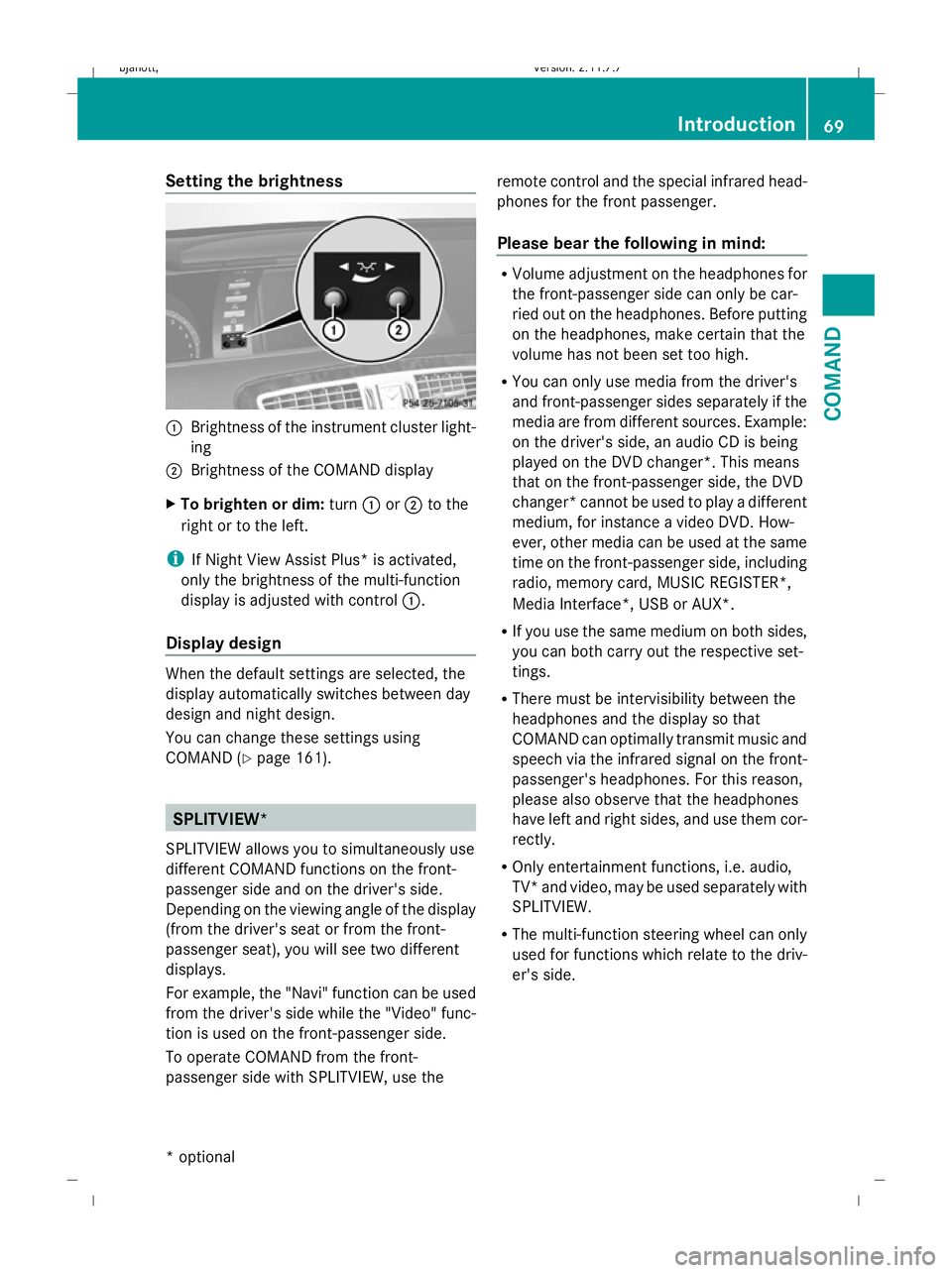
Setting the brightness
:
Brightness of the instrument cluster light-
ing
; Brightness of the COMAND display
X To brighten or dim: turn:or; to the
right or to the left.
i If Night View Assist Plus* is activated,
only the brightness of the multi-function
display is adjusted with control :.
Display design When the default settings are selected, the
display automatically switches between day
design and night design.
You can change these settings using
COMAND (Y
page 161). SPLITVIEW*
SPLITVIEW allows you to simultaneously use
different COMAND functions on the front-
passenger side and on the driver's side.
Depending on the viewing angle of the display
(from the driver's seat or from the front-
passenger seat), you will see two different
displays.
For example, the "Navi" function can be used
from the driver's side while the "Video" func-
tion is used on the front-passenger side.
To operate COMAND from the front-
passenger side with SPLITVIEW, use the remote control and the special infrared head-
phones for the front passenger.
Please bear the following in mind: R
Volume adjustment on the headphones for
the front-passenger side can only be car-
ried out on the headphones. Before putting
on the headphones, make certain that the
volume has not been set too high.
R You can only use media from the driver's
and front-passenger sides separately if the
media are from different sources. Example:
on the driver's side, an audio CD is being
played on the DVD changer*. This means
that on the front-passenger side, the DVD
changer* cannot be used to play a different
medium, for instance a video DVD. How-
ever, other media can be used at the same
time on the front-passenger side, including
radio, memory card, MUSIC REGISTER*,
Media Interface*, USB or AUX*.
R If you use the same medium on both sides,
you can both carry out the respective set-
tings.
R There must be intervisibility between the
headphones and the display so that
COMAND can optimally transmit music and
speech via the infrared signal on the front-
passenger's headphones. For this reason,
please also observe that the headphones
have left and right sides, and use them cor-
rectly.
R Only entertainment functions, i.e. audio,
TV* and video, may be used separately with
SPLITVIEW.
R The multi-function steering wheel can only
used for functions which relate to the driv-
er's side. Introduction
69COMAND
* optional
216_AKB; 2; 3, en-GB
bjanott,V
ersion: 2.11.7.7
2009-02-27T14:54:17+01:00 - Seite 69 Z
Dateiname: 6515230602_buchblock.pdf; erzeugt am 04. Mar 2009 11:14:56; WK
Page 73 of 421
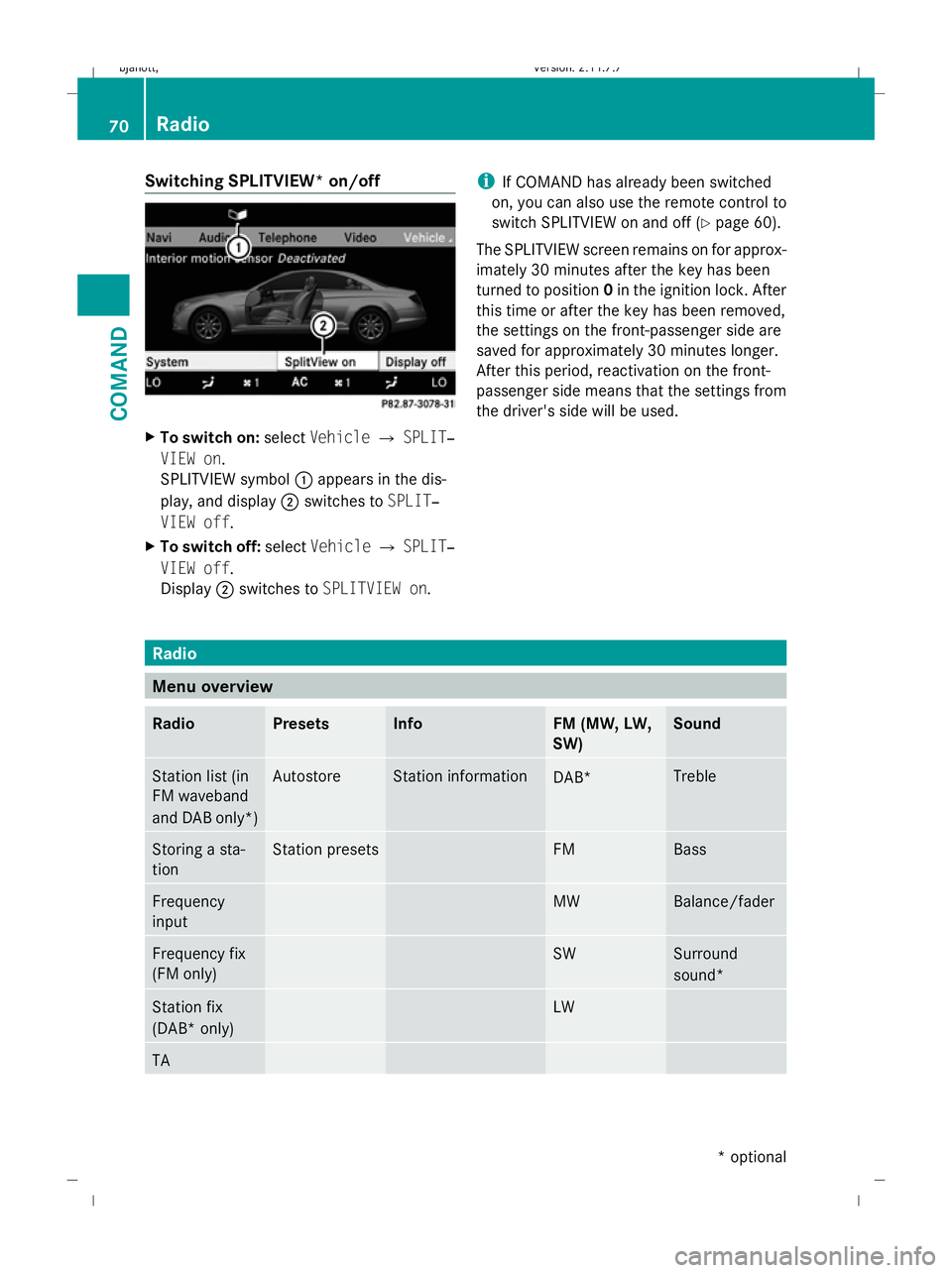
Switching SPLITVIEW* on/off
X
To switch on: selectVehicle QSPLIT‐
VIEW on.
SPLITVIEW symbol :appears in the dis-
play, and display ;switches to SPLIT‐
VIEW off.
X To switch off: selectVehicle QSPLIT‐
VIEW off.
Display ;switches to SPLITVIEW on. i
If COMAND has already been switched
on, you can also use the remote control to
switch SPLITVIEW on and off (Y page 60).
The SPLITVIEW screen remains on for approx-
imately 30 minutes after the key has been
turned to position 0in the ignition lock. After
this time or after the key has been removed,
the settings on the front-passenger side are
saved for approximately 30 minutes longer.
After this period, reactivation on the front-
passenger side means that the settings from
the driver's side will be used. Radio
Menu overview
Radio Presets Info FM (MW, LW,
SW) Sound
Station list (in
FM waveband
and DAB only*) Autostore Station information
DAB* Treble
Storing a sta-
tion Station presets FM Bass
Frequency
input MW Balance/fader
Frequency fix
(FM only) SW Surround
sound*
Station fix
(DAB* only) LW
TA70
RadioCOMAND
* optional
216_AKB; 2; 3, en-GB
bjanott,
Version: 2.11.7.7
2009-02-27T14:54:17+01:00 - Seite 70
Dateiname: 6515230602_buchblock.pdf; erzeugt am 04. Mar 2009 11:14:57; WK
Page 102 of 421
i
Never leave external devices in the vehi-
cle as extreme temperatures (e.g. if sub-
jected to direct sunlight or at extremely low
outside temperatures) may prevent them
from functioning correctly (see separate
operating instructions of the respective
device). Mercedes-Benz does not take
responsibility for any damage to external
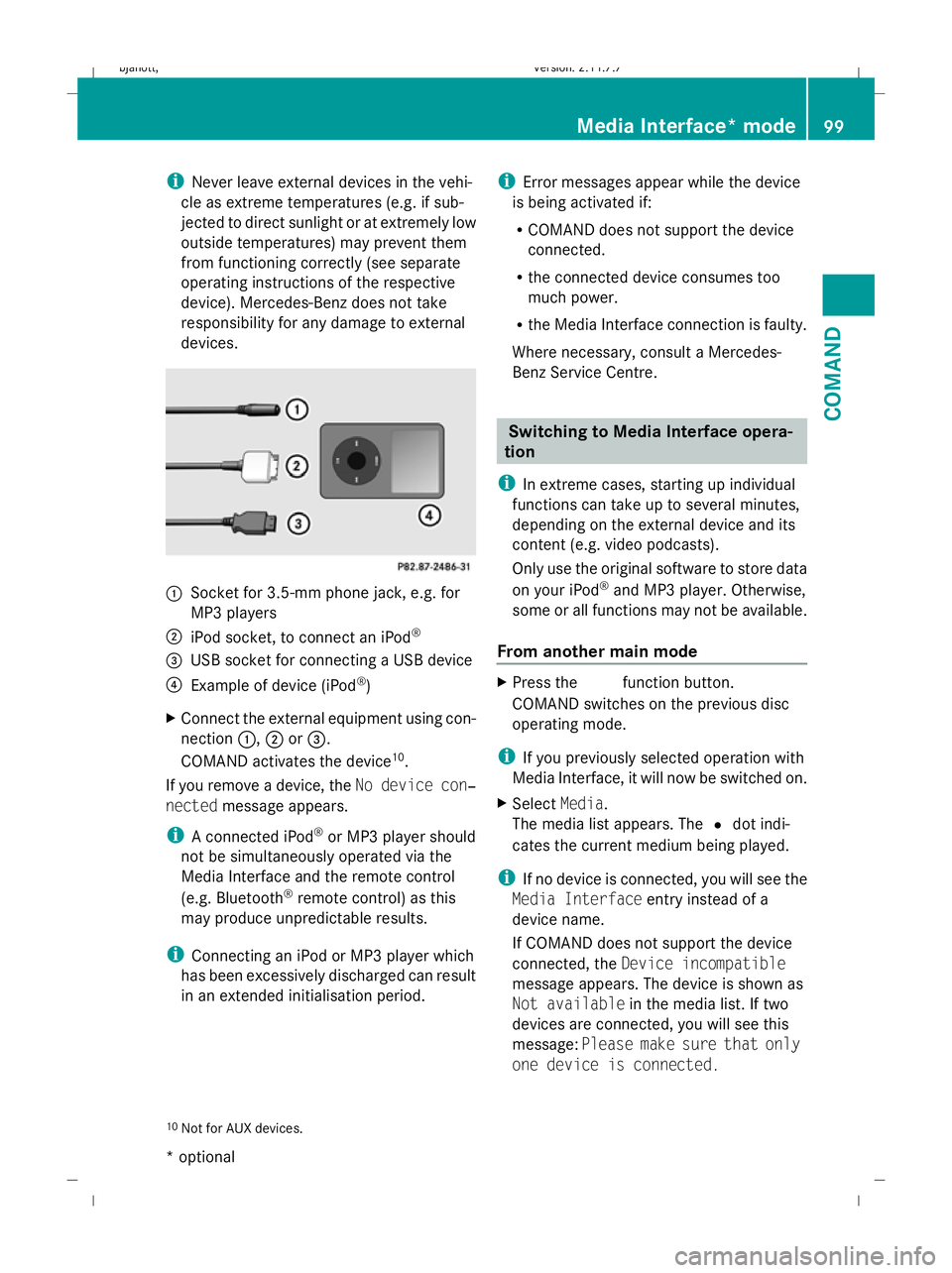
devices. :
Socket for 3.5-mm phone jack, e.g. for
MP3 players
; iPod socket, to connect an iPod ®
= USB socket for connecting a USB device
? Example of device (iPod ®
)
X Connect the external equipment using con-
nection :,;or=.
COMAND activates the device 10
.
If you remove a device, the No device con‐
nected message appears.
i A connected iPod ®
or MP3 player should
not be simultaneously operated via the
Media Interface and the remote control
(e.g. Bluetooth ®
remote control) as this
may produce unpredictable results.
i Connecting an iPod or MP3 player which
has been excessively discharged can result
in an extended initialisation period. i
Error messages appear while the device
is being activated if:
R COMAND does not support the device
connected.
R the connected device consumes too
much power.
R the Media Interface connection is faulty.
Where necessary, consult a Mercedes-
Benz Service Centre. Switching to Media Interface opera-
tion
i In extreme cases, starting up individual
functions can take up to several minutes,
depending on the external device and its
content (e.g. video podcasts).
Only use the original software to store data
on your iPod ®
and MP3 player. Otherwise,
some or all functions may not be available.
From another main mode X
Press the Rfunction button.
COMAND switches on the previous disc
operating mode.
i If you previously selected operation with
Media Interface, it will now be switched on.
X Select Media.
The media list appears. The #dot indi-
cates the current medium being played.
i If no device is connected, you will see the
Media Interface entry instead of a
device name.
If COMAND does not support the device
connected, the Device incompatible
message appears. The device is shown as
Not available in the media list. If two
devices are connected, you will see this
message: Please make sure that only
one device is connected.
10 Not for AUX devices. Media Interface* mode
99COMAND
* optional
216_AKB; 2; 3, en-GB
bjanott,
Version: 2.11.7.7 2009-02-27T14:54:17+01:00 - Seite 99 Z
Dateiname: 6515230602_buchblock.pdf; erzeugt am 04. Mar 2009 11:15:04; WK
Page 117 of 421
tion steering wheel or select the
6but-
ton from the telephone basic menu.
Redialling
X Change to the telephone basic menu.
X Press the 6button on the telephone
keypad.
or
X Select SENDfrom the telephone basic menu
and press W.
The list of dialled numbers appears. The
most recently dialled number is at the top.
X To select and place a call: slideZVÆand
use Wto select an entry, or press the
6 button on the COMAND control unit.
Calling voicemail 14
You can only call voicemail if the voicemail
number on the SIM card is stored under the
4 button on your mobile phone.
X Press and hold the 4button on the tele-
phone keypad.
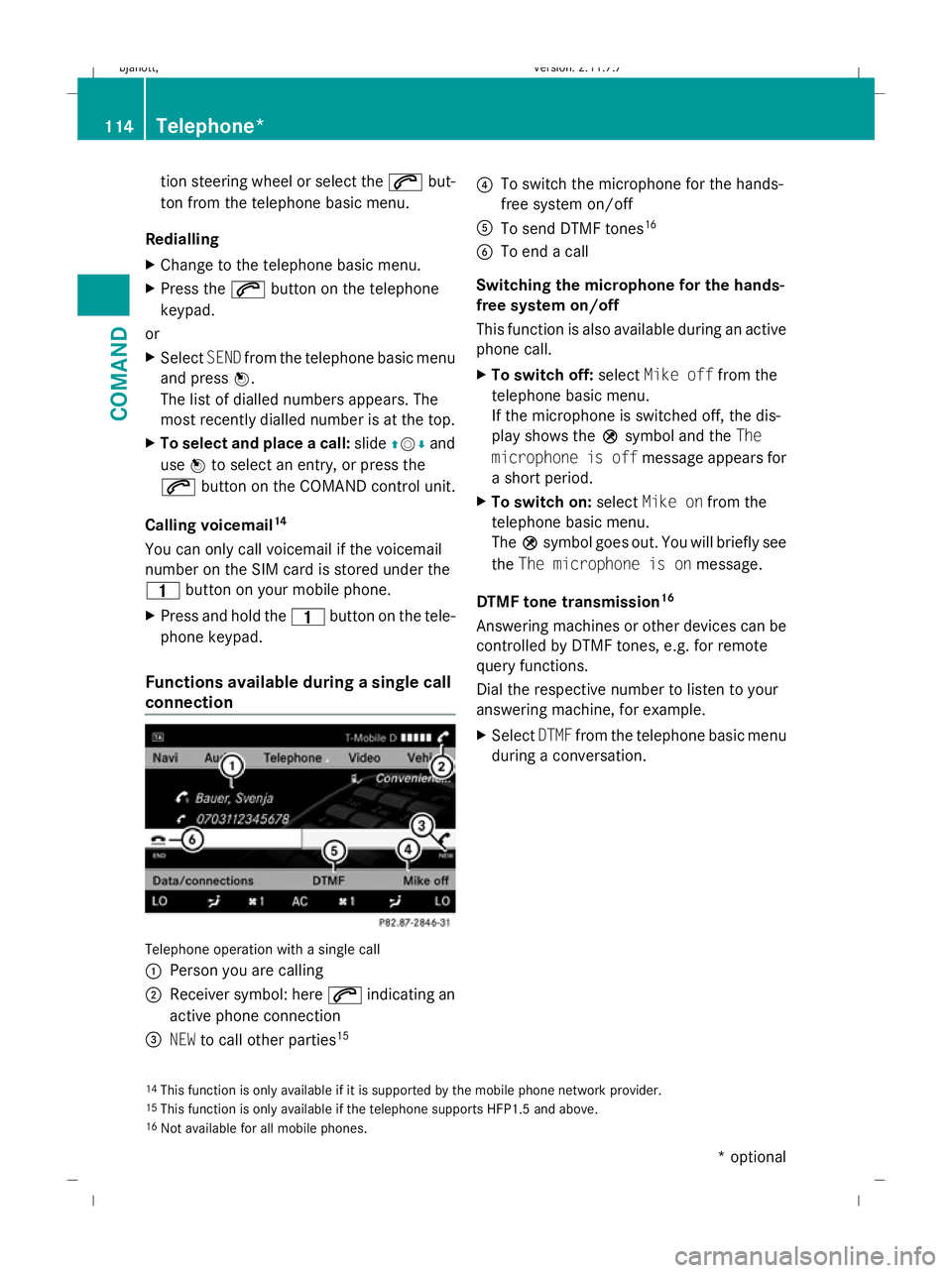
Functions available during a single call
connection Telephone operation with a single call
:
Person you are calling
; Receiver symbol: here 6indicating an
active phone connection
= NEW to call other parties 15 ?
To switch the microphone for the hands-
free system on/off
A To send DTMF tones 16
B To end a call
Switching the microphone for the hands-
free system on/off
This function is also available during an active
phone call.
X To switch off: selectMike off from the
telephone basic menu.
If the microphone is switched off, the dis-
play shows the Qsymbol and the The
microphone is off message appears for
a short period.
X To switch on: selectMike on from the
telephone basic menu.
The Qsymbol goes out. You will briefly see
the The microphone is on message.
DTMF tone transmission 16
Answering machines or other devices can be
controlled by DTMF tones, e.g. for remote
query functions.
Dial the respective number to listen to your
answering machine, for example.
X Select DTMFfrom the telephone basic menu
during a conversation.
14 This function is only available if it is supported by the mobile phone network provider.
15 This function is only available if the telephone supports HFP1.5 and above.
16 Not available for all mobile phones. 114
Telephone*COMAND
* optional
216_AKB; 2; 3, en-GB
bjanott,
Version: 2.11.7.7 2009-02-27T14:54:17+01:00 - Seite 114
Dateiname: 6515230602_buchblock.pdf; erzeugt am 04. Mar 2009 11:15:08; WK