roof MERCEDES-BENZ CL COUPE 2009 Owners Manual
[x] Cancel search | Manufacturer: MERCEDES-BENZ, Model Year: 2009, Model line: CL COUPE, Model: MERCEDES-BENZ CL COUPE 2009Pages: 421, PDF Size: 10.78 MB
Page 18 of 421
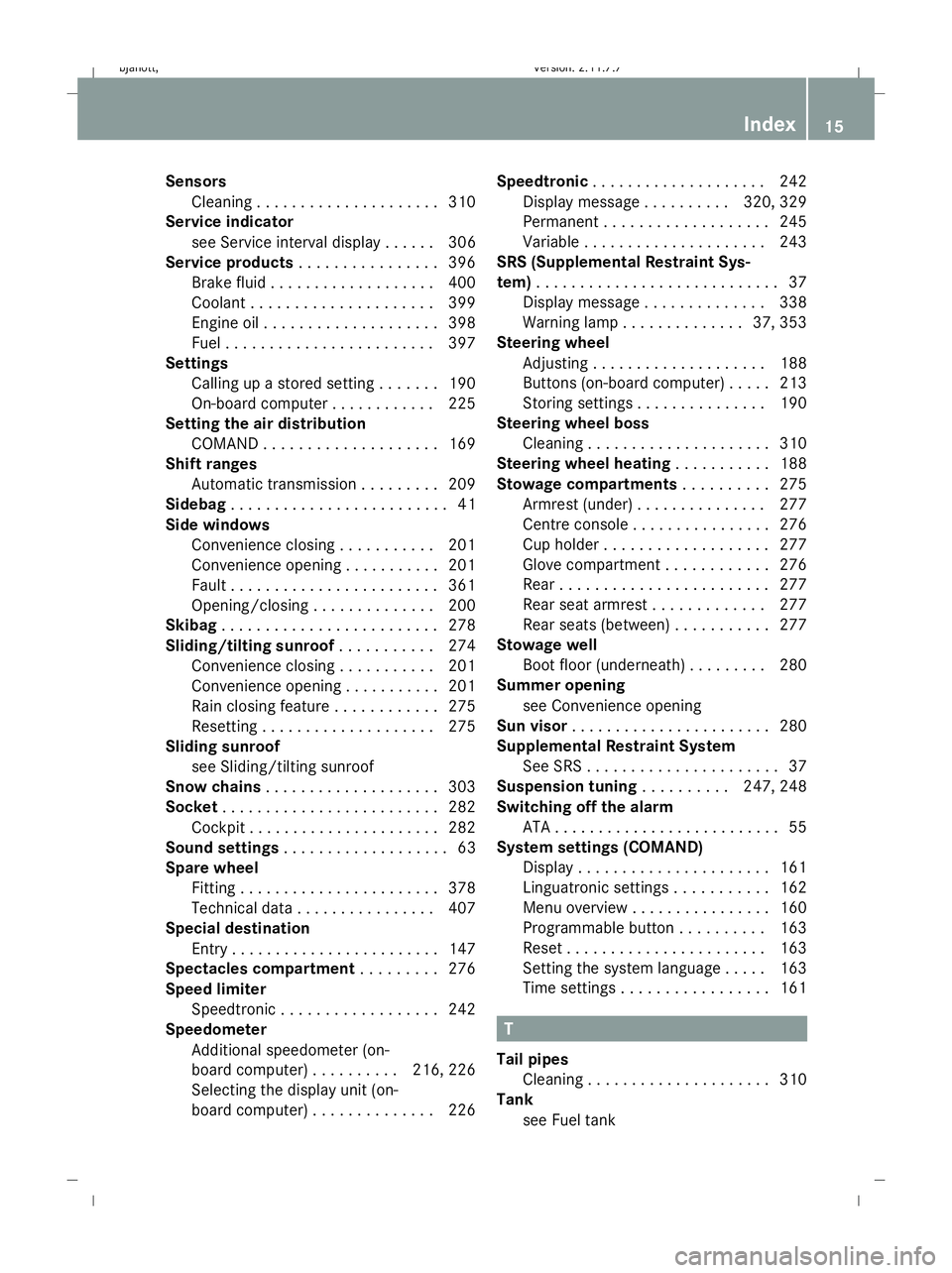
Sensors
Cleaning . . . . . . . . . . . . . . . . . . . . .310
Service indicator
see Service interval display . . . . . .306
Service products . . . . . . . . . . . . . . . .396
Brake fluid . . . . . . . . . . . . . . . . . . .400
Coolant . . . . . . . . . . . . . . . . . . . . .399
Engine oil . . . . . . . . . . . . . . . . . . . .398
Fuel . . . . . . . . . . . . . . . . . . . . . . . .397
Settings
Calling up a stored setting . . . . . . .190
On-board computer . . . . . . . . . . . .225
Setting the air distribution
COMAND . . . . . . . . . . . . . . . . . . . .169
Shift ranges
Automatic transmission . . . . . . . . .209
Sidebag . . . . . . . . . . . . . . . . . . . . . . . . .41
Side windows Convenience closing . . . . . . . . . . .201
Convenience opening . . . . . . . . . . .201
Fault . . . . . . . . . . . . . . . . . . . . . . . .361
Opening/closing . . . . . . . . . . . . . .200
Skibag . . . . . . . . . . . . . . . . . . . . . . . . .278
Sliding/tilting sunroof . . . . . . . . . ..274
Convenience closing . . . . . . . . . . .201
Convenience opening . . . . . . . . . . .201
Rain closing feature . . . . . . . . . . . .275
Resetting . . . . . . . . . . . . . . . . . . . .275
Sliding sunroof
see Sliding/tilting sunroof
Snow chains . . . . . . . . . . . . . . . . . . . .303
Socket . . . . . . . . . . . . . . . . . . . . . . . . .282
Cockpit . . . . . . . . . . . . . . . . . . . . . .282
Sound settings . . . . . . . . . . . . . . . . . . .63
Spare wheel Fitting. . . . . . . . . . . . . . . . . . . . . . .378
Technical data . . . . . . . . . . . . . . . .407
Special destination
Entry . . . . . . . . . . . . . . . . . . . . . . . .147
Spectacles compartment . . . . . . . ..276
Speed limiter Speedtronic . . . . . . . . . . . . . . . . . .242
Speedometer
Additional speedometer (on-
board computer) . . . . . . . . . .216, 226
Selecting the display unit (on-
board computer) . . . . . . . . . . . . . .226 Speedtronic
. . . . . . . . . . . . . . . . . . . .242
Display message . . . . . . . . . .320, 329
Permanent . . . . . . . . . . . . . . . . . . .245
Variabl e.. . . . . . . . . . . . . . . . . . . .243
SRS (Supplemental Restraint Sys-
tem) . . . . . . . . . . . . . . . . . . . . . . . . . . . .37
Display message . . . . . . . . . . . . . .338
Warning lamp . . . . . . . . . . . . . .37, 353
Steering wheel
Adjusting . . . . . . . . . . . . . . . . . . . .188
Buttons (on-board computer) . . . . .213
Storing settings . . . . . . . . . . . . . . .190
Steering wheel boss
Cleaning . . . . . . . . . . . . . . . . . . . . .310
Steering wheel heating . . . . . . . . . ..188
Stowage compartments . . . . . . . . ..275
Armrest (under) . . . . . . . . . . . . . . .277
Centre console . . . . . . . . . . . . . . . .276
Cup holder . . . . . . . . . . . . . . . . . . .277
Glove compartment . . . . . . . . . . . .276
Rea r.. . . . . . . . . . . . . . . . . . . . . . .277
Rear seat armrest . . . . . . . . . . . . .277
Rear seats (between) . . . . . . . . . . .277
Stowage well
Boot floor (underneath) . . . . . . . . .280
Summer opening
see Convenience opening
Sun visor . . . . . . . . . . . . . . . . . . . . . . .280
Supplemental Restraint System See SRS . . . . . . . . . . . . . . . . . . . . . .37
Suspension tuning . . . . . . . . ..247, 248
Switching off the alarm ATA . . . . . . . . . . . . . . . . . . . . . . . . . .55
System settings (COMAND)
Display . . . . . . . . . . . . . . . . . . . . . .161
Linguatronic settings . . . . . . . . . . .162
Menu overview . . . . . . . . . . . . . . . .160
Programmable button . . . . . . . . . .163
Reset . . . . . . . . . . . . . . . . . . . . . . .163
Setting the system language . . . . .163
Time settings . . . . . . . . . . . . . . . . .161 T
Tail pipes Cleaning . . . . . . . . . . . . . . . . . . . . .310
Tank
see Fuel tank Index
15 216_AKB; 2; 3, en-GB
bjanott,
Version: 2.11.7.7 2009-02-27T14:54:17+01:00 - Seite 15Dateiname: 6515230602_buchblock.pdf; erzeugt am 04. Mar 2009 11:14:35; WK
Page 27 of 421
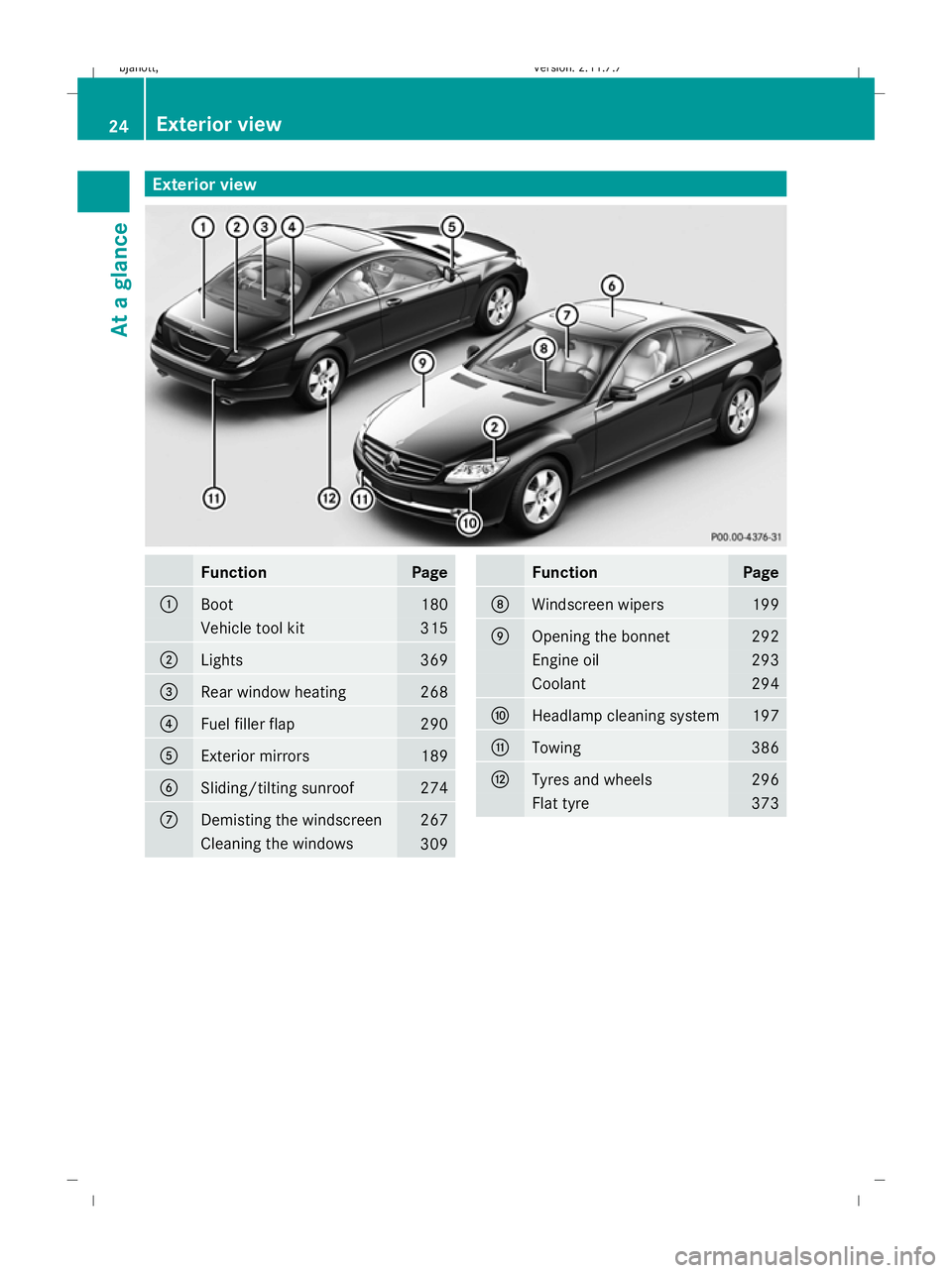
Exterior view
Function Page
:
Boot 180
Vehicle tool kit 315
;
Lights 369
=
Rear window heating 268
?
Fuel filler flap 290
A
Exterior mirrors 189
B
Sliding/tilting sunroof 274
C
Demisting the windscreen 267
Cleaning the windows
309 Function Page
D
Windscreen wipers 199
E
Opening the bonnet 292
Engine oil 293
Coolant 294
F
Headlamp cleaning system 197
G
Towing 386
H
Tyres and wheels 296
Flat tyre 37324
Exterior viewAt a glance
216_AKB; 2; 3, en-GB
bjanott
,V ersion: 2.11.7.7
2009-02-27T14:54:17+01:00 - Seite 24
Dateiname: 6515230602_buchblock.pdf; erzeugt am 04. Mar 2009 11:14:38; WK
Page 35 of 421
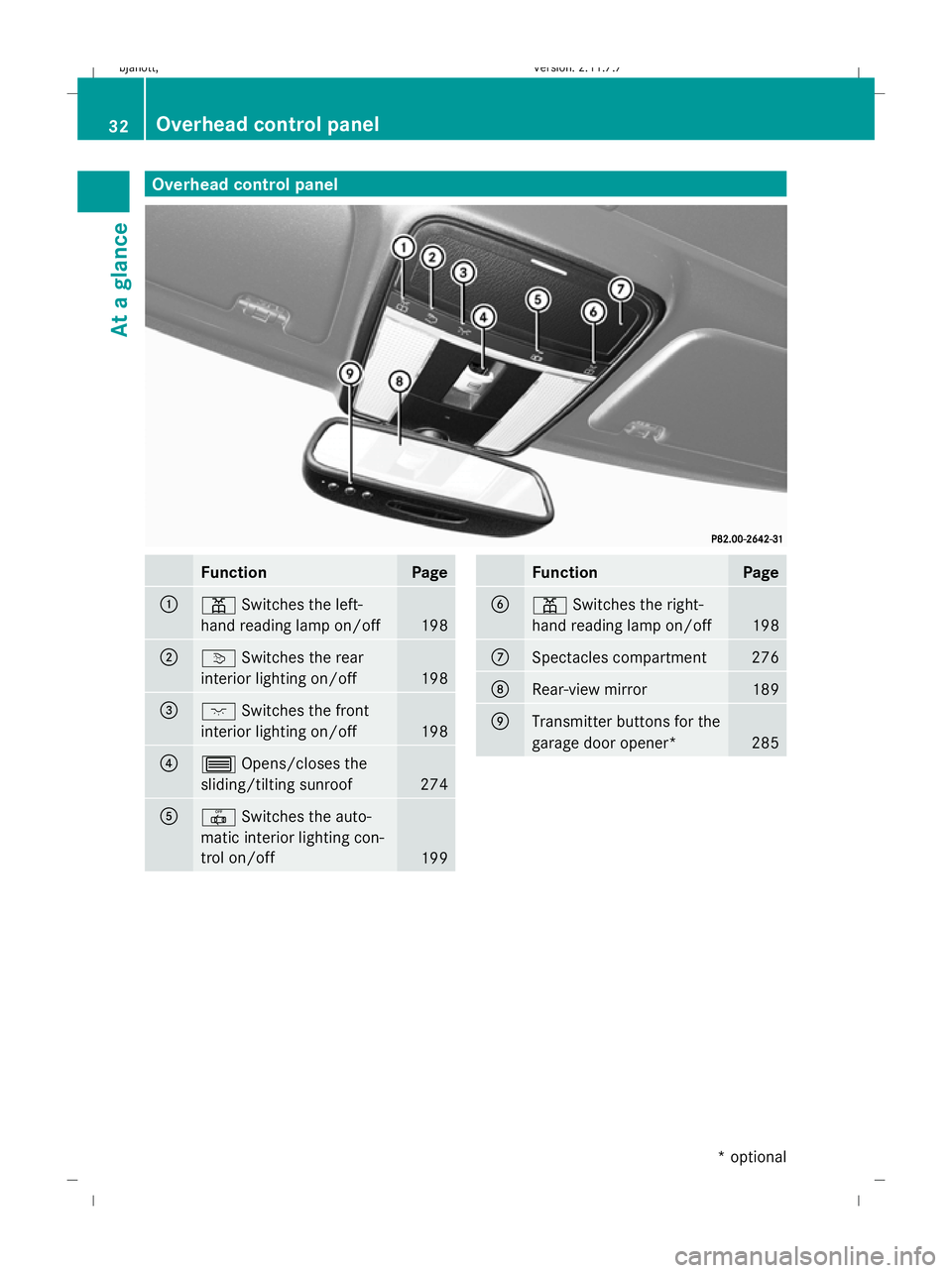
Overhead control panel
Function Page
:
p
Switches the left-
hand reading lamp on/off 198
;
v
Switches the rear
interior lighting on/off 198
=
c
Switches the front
interior lighting on/off 198
?
3
Opens/closes the
sliding/tilting sunroof 274
A
|
Switches the auto-
matic interior lighting con-
trol on/off 199 Function Page
B
p
Switches the right-
hand reading lamp on/off 198
C
Spectacles compartment 276
D
Rear-view mirror 189
E
Transmitter buttons for the
garage door opener*
28532
Overhead control panelAt a glance
* optional
216_AKB; 2; 3, en-GB
bjanott,
Version: 2.11.7.7 2009-02-27T14:54:17+01:00 - Seite 32
Dateiname: 6515230602_buchblock.pdf; erzeugt am 04. Mar 2009 11:14:44; WK
Page 44 of 421
is not lit (Y
page 44). This means that a child
restraint system with automatic child seat
recognition *has not been fitted to the front-
passenger seat or has been fitted incorrectly.
Sidebags G
Risk of injury
If you wish to use seat covers, Mercedes-Benz
recommends that, for safety reasons, you
only use seat covers that have been approved
for Mercedes-Benz vehicles.
The seat covers must have a special tear seam
for sidebags. Otherwise, a head/thorax air-
bag cannot deploy correctly and would fail to
provide the intended protection in the event
of an accident. Appropriate seat covers can
be obtained from a Mercedes-Benz Service
Centre. G
Risk of injury
Sensors to control the airbags are located in
the doors. Therefore, do not make any modi-
fications to the doors or door trims, e.g. ret-
rofitting loudspeakers. Damage to the doors
can affect operation of the sidebags.
The purpose of sidebag deployment is to
enhance the level of protection for the thorax
(but not the head, neck or arms) of the vehicle
occupants on the side of the vehicle on which
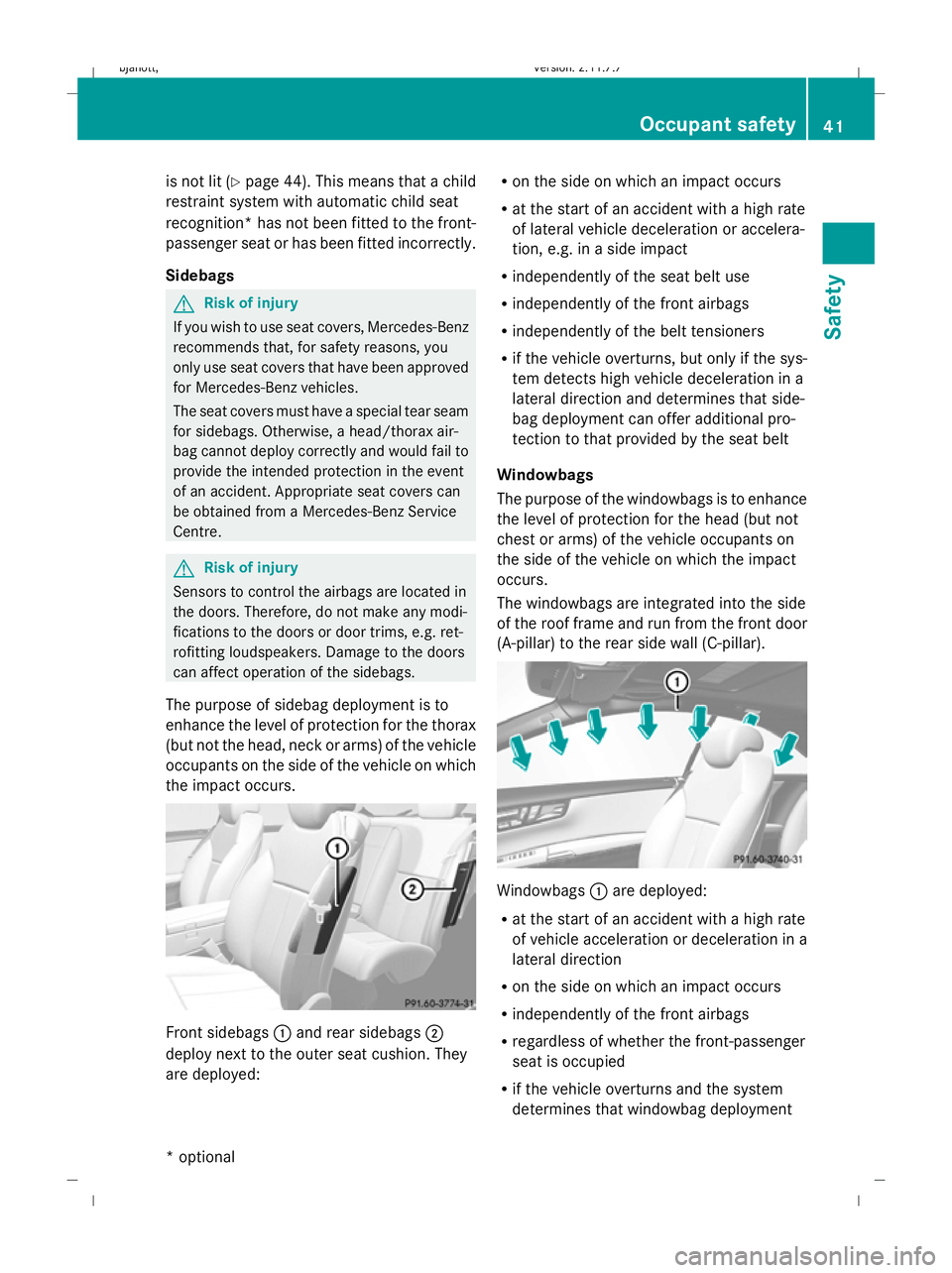
the impact occurs. Front sidebags
:and rear sidebags ;
deploy next to the outer seat cushion. They
are deployed: R
on the side on which an impact occurs
R at the start of an accident with a high rate
of lateral vehicle deceleration or accelera-
tion, e.g. in a side impact
R independently of the seat belt use
R independently of the front airbags
R independently of the belt tensioners
R if the vehicle overturns, but only if the sys-
tem detects high vehicle deceleration in a
lateral direction and determines that side-
bag deployment can offer additional pro-
tection to that provided by the seat belt
Windowbags
The purpose of the windowbags is to enhance
the level of protection for the head (but not
chest or arms) of the vehicle occupants on
the side of the vehicle on which the impact
occurs.
The windowbags are integrated into the side
of the roof frame and run from the front door
(A-pillar) to the rear side wall (C-pillar). Windowbags
:are deployed:
R at the start of an accident with a high rate
of vehicle acceleration or deceleration in a
lateral direction
R on the side on which an impact occurs
R independently of the front airbags
R regardless of whether the front-passenger
seat is occupied
R if the vehicle overturns and the system
determines that windowbag deployment Occupant safety
41Safety
* optional
216_AKB; 2; 3, en-GB
bjanott
,V ersion: 2.11.7.7
2009-02-27T14:54:17+01:00 - Seite 41 Z
Dateiname: 6515230602_buchblock.pdf; erzeugt am 04. Mar 2009 11:14:47; WK
Page 45 of 421
can offer additional protection to that pro-
vided by the seat belt
PRE-SAFE
®
system
PRE-SAFE ®
system takes pre-emptive meas-
ures to protect you in certain hazardous sit-
uations.
PRE-SAFE ®
intervenes in the event of:
R emergency braking situations, e.g. if Brake
Assist BAS is activated or Brake Assist BAS
PLUS* intervenes powerfully
R critical situations involving driving dynam-
ics, e.g. if the vehicle oversteers or under-
steers significantly due to physical limits
being exceeded
If you are driving faster than approximately
30 km/h, PRE-SAFE ®
may take the following
measures in these situations:
R it adjusts the front-passenger seat if this is
in an unfavourable position.
R on vehicles with multicontour seat* or
active multicontour seat*: it increases the
air pressure in the seat side cushions and
the backrest side cushions.
R if the vehicle skids, it closes the sliding/
tilting sunroof *and the front side windows
so that only a small gap remains.
Once the hazardous situation has passed, you
can reverse all settings made by PRE-SAFE ®
.
On vehicles with a multicontour seat* or an
active multicontour seat*, the air pressure in
the side bolsters is then reduced. G
Risk of injury
When adjusting the seat, make sure that
nobody can become trapped.
! When you move the seats, make sure that
there are no objects in the footwell or
behind the seats. Otherwise, you could
damage the seats and the objects. Children in the vehicle
If a child is travelling in your vehicle, secure
the child using a child restraint system which
is appropriate to the size and age of the child
and which is recommended for Mercedes-
Benz vehicles. You should fit the restraint sys-
tem to a suitable rear seat. Ensure that the
child is secured throughout the trip.
You can obtain information about the correct
child restraint system from any Mercedes-
Benz Service Centre.
i It is advisable to use Mercedes-Benz care
products to clean child restraint systems.
Information about this can be obtained
from any Mercedes-Benz Service Centre. G
Risk of injury
Do not leave children unsupervised in the
vehicle, even if they are secured in a child
restraint system. Children could injure them-
selves on parts of the vehicle. They could also
be seriously or even fatally injured by pro-
longed exposure to extreme heat or cold.
Do not expose the child restraint system to
direct sunlight. Parts of the child restraint sys-
tem could heat up and the child could burn
herself/himself on them.
If a child opens a door, the child or other per-
sons could be injured as a result. The child
could get out and be injured in the process or
be injured by a passing vehicle.
Please also observe the information on HOLD.
Relevant information can be found in the
index. G
Risk of injury
An unsecured or an incorrectly positioned
load increases the risk of injury for the child
and all other occupants during:
R an accident
R a braking manoeuvre
R a sudden change of direction 42
Occupant safetySafety
* optional
216_AKB; 2; 3, en-GB
bjanott,
Version: 2.11.7.7 2009-02-27T14:54:17+01:00 - Seite 42
Dateiname: 6515230602_buchblock.pdf; erzeugt am 04. Mar 2009 11:14:47; WK
Page 59 of 421
To prevent a false alarm, deactivate the inte-
rior motion sensor if you lock your vehicle and
R people or animals remain in the vehicle
R the side windows remain open
R the sliding/tilting sunroof remains open
X Make sure that:
R
the side windows are closed.
R the sliding/tilting sunroof is closed.
R there are no objects, e.g. mascots, hang-
ing on the rear-view mirror or on the
grasp handles on the roof trim.
This will prevent false alarms.
X To activate/deactivate: (Ypage 167).
i The interior motion sensor remains deac-
tivated until you unlock and lock the vehicle
again. 56
Anti-theft systemsSafety
216_AKB; 2; 3, en-GB
bjanott,
Version: 2.11.7.7 2009-02-27T14:54:17+01:00 - Seite 56
Dateiname: 6515230602_buchblock.pdf; erzeugt am 04. Mar 2009 11:14:51; WK
Page 129 of 421
X
To install software: (Ypage 132).
i Do not cancel the installation process. If
you cancel the installation process, the
navigation system will not be operational.
GPS reception Amongst other things, correct functioning of
the navigation system depends on GPS recep-
tion. In certain situations, GPS reception may
be impaired, there may be interference or
there may be no reception at all, e.g. in tun-
nels, in multi-storey car parks or due to snow
on the GPS aerial. Remove any snow from the
GPS aerial. The GPS aerial is on the roof at
the rear.
Route guidance after vehicle transpor-
tation or exiting a multi-storey car park COMAND has to redetermine the position of
the vehicle if the vehicle has been transpor-
ted, e.g.:
R by ferry
R by motorail
R after towing
COMAND may also have to redetermine the
vehicle's position after exiting a multi-storey
car park.
Positioning takes place automatically even
when COMAND is switched off. The duration
will vary from one situation to another.
Route guidance may be restricted as follows
during vehicle positioning:
R navigation announcements, route guid-
ance displays and displayed street names
are not consistent with the actual location
of the vehicle.
R COMAND does not generate navigation
announcements.
R instead of the route guidance display, you
see the Street unknown. display and a
directional arrow. The directional arrow shows the compass heading to the desti-
nation.
When positioning is complete, route guidance
is resumed with navigation announcements
and route guidance displays.
Interrupting the journey during route
guidance i
Interrupting the journey means parking
the vehicle and switching off COMAND.
Continuing the journey means switching
COMAND on again and driving on.
The following applies if you interrupt the jour-
ney during route guidance and continue the
journey later on:
R COMAND resumes route guidance auto-
matically if you continue the journey within
2 hours.
R Route guidance is cancelled if you continue
the journey after more than 2 hours. It will
be necessary to resume the cancelled
route guidance manually.
Hard disk errors COMAND has an integrated hard disk on
which the map software is stored.
If an area of the hard disk has a fault,
COMAND can no longer access the map data
in this area, for example when calculating a
route.
The message: Navigation unavailable.
Please observe the Owner's Manual.
appears.
X To delete the message: switch COMAND
off and then on again.
If you switch the navigation system off/on, it
will be operational again until it has to access
the faulty area of the hard disk again.
The message will then appear again. Consult
a Mercedes-Benz Service Centre. 126
Navigation system* (introduction)COMAND
* optional
216_AKB; 2; 3, en-GB
bjanott,
Version: 2.11.7.7 2009-02-27T14:54:17+01:00 - Seite 126
Dateiname: 6515230602_buchblock.pdf; erzeugt am 04. Mar 2009 11:15:11; WK
Page 180 of 421
Opening and closing
.........................178
Boot .................................................... 180
Key positions .................................... 182
Seats .................................................. 183
Steering wheel .................................. 187
Mirrors ............................................... 189
Memory function .............................. 190
Seat belts ........................................... 191
Lights ................................................. 194
Windscreen wipers ...........................199
Side windows .................................... 200
Driving and parking ..........................202
Automatic transmission ...................206
Instrument cluster ............................212
On-board computer ..........................213
Driving systems ................................ 227
Air conditioning ................................. 262
Sliding sunroof .................................. 274
Loading and stowing ........................275
Features ............................................. 280 177Controls
216_AKB; 2; 3, en-GB
bjanott,
Version: 2.11.7.7 2009-02-27T14:54:17+01:00 - Seite 177
Dateiname: 6515230602_buchblock.pdf; erzeugt am 04. Mar 2009 11:15:35; WK
Page 189 of 421
Rear seats
Head restraints in the rear compart-
ment G
Risk of injury
On a seat which is occupied, pull the head
restraint up into the upright position. This
reduces the risk of injury to the passenger in
the event of an accident. G
Risk of injury
Make sure that nobody can become trapped
when folding the head restraints up or back.
Folding back
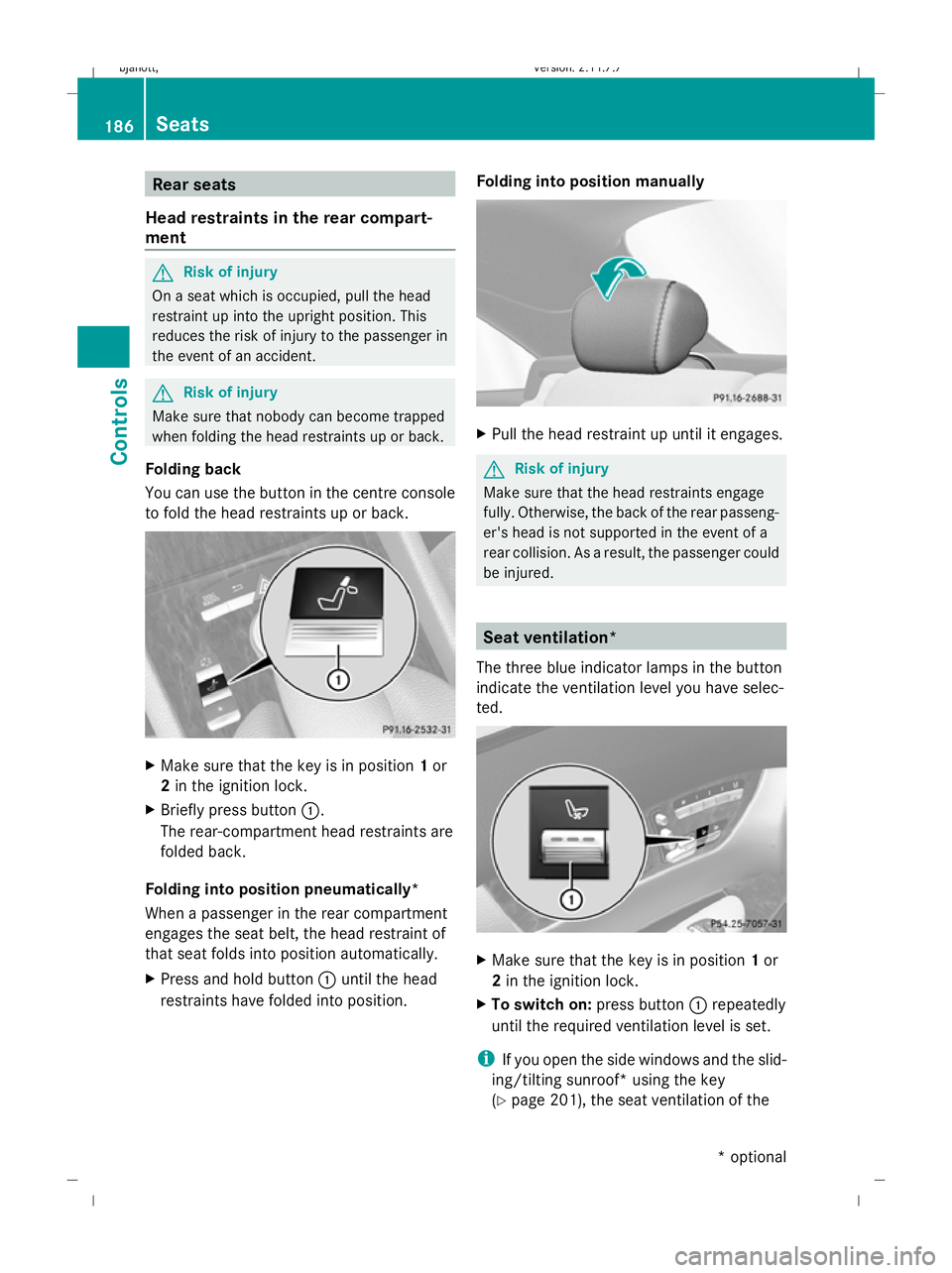
You can use the button in the centre console
to fold the head restraints up or back. X
Make sure that the key is in position 1or
2 in the ignition lock.
X Briefly press button :.
The rear-compartment head restraints are
folded back.
Folding into position pneumatically*
When a passenger in the rear compartment
engages the seat belt, the head restraint of
that seat folds into position automatically.
X Press and hold button :until the head
restraints have folded into position. Folding into position manually X
Pull the head restraint up until it engages. G
Risk of injury
Make sure that the head restraints engage
fully. Otherwise, the back of the rear passeng-
er's head is not supported in the event of a
rear collision. As a result, the passenger could
be injured. Seat ventilation*
The three blue indicator lamps in the button
indicate the ventilation level you have selec-
ted. X
Make sure that the key is in position 1or
2 in the ignition lock.
X To switch on: press button:repeatedly
until the required ventilation level is set.
i If you open the side windows and the slid-
ing/tilting sunroof* using the key
(Y page 201), the seat ventilation of the 186
SeatsControls
* optional
216_AKB; 2; 3, en-GB
bjanott,
Version: 2.11.7.7 2009-02-27T14:54:17+01:00 - Seite 186
Dateiname: 6515230602_buchblock.pdf; erzeugt am 04. Mar 2009 11:15:40; WK
Page 204 of 421
function remains active for five minutes or
until one of the front doors is opened.
X To open: press the corresponding switch.
X To close: pull the corresponding switch.
i When opening or closing the front side
windows you can start automatic opera-
tion. Briefly press the switch beyond the
point of resistance in the corresponding
direction. By pressing again, you can stop
automatic operation.
Closing with increased force and with-
out the anti-entrapment feature G
Risk of injury
Closing the side windows with increased force
or without the anti-entrapment feature could
lead to serious or even fatal injury. Make sure
that nobody can become trapped when clos-
ing the side windows.
If a side window is blocked during closing and
reopens slightly:
X Immediately after the window blocks, pull
on the corresponding switch again until the
side window has closed.
The side window is closed with increased
force.
If a side window blocks again during closing
and reopens slightly:
X Immediately after the window blocks, pull
on the corresponding switch again until the
side window has closed.
The side window is closed without the anti-
entrapment feature. Convenience opening
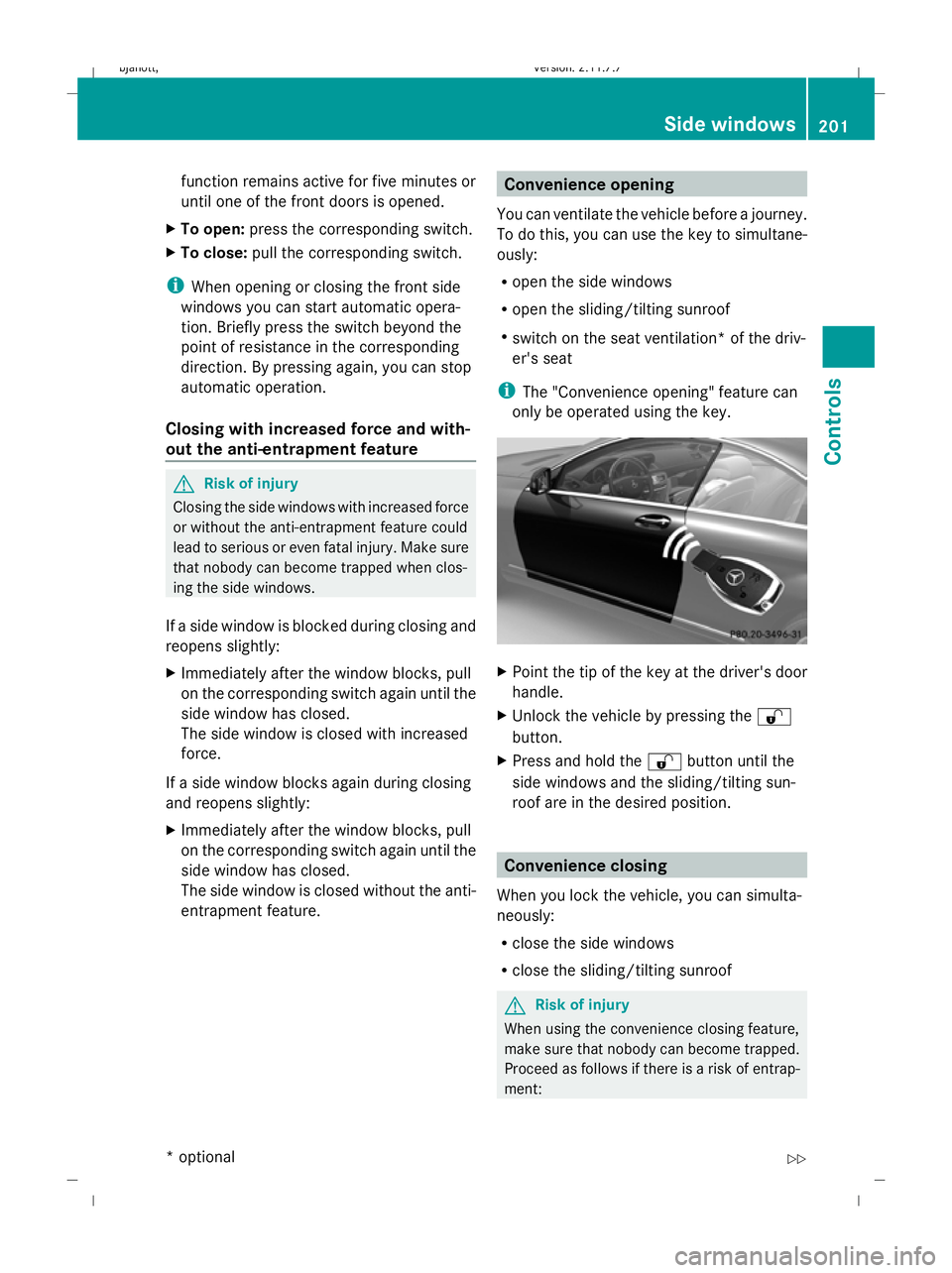
You can ventilate the vehicle before a journey.
To do this, you can use the key to simultane-
ously:
R open the side windows
R open the sliding/tilting sunroof
R switch on the seat ventilation* of the driv-
er's seat
i The "Convenience opening" feature can
only be operated using the key. X
Point the tip of the key at the driver's door
handle.
X Unlock the vehicle by pressing the %
button.
X Press and hold the %button until the
side windows and the sliding/tilting sun-
roof are in the desired position. Convenience closing
When you lock the vehicle, you can simulta-
neously:
R close the side windows
R close the sliding/tilting sunroof G
Risk of injury
When using the convenience closing feature,
make sure that nobody can become trapped.
Proceed as follows if there is a risk of entrap-
ment: Side windows
201Controls
* optional
216_AKB; 2; 3, en-GB
bjanott,
Version: 2.11.7.7 2009-02-27T14:54:17+01:00 - Seite 201 Z
Dateiname: 6515230602_buchblock.pdf; erzeugt am 04. Mar 2009 11:15:46; WK