air MERCEDES-BENZ CL550 2010 W216 Repair Manual
[x] Cancel search | Manufacturer: MERCEDES-BENZ, Model Year: 2010, Model line: CL550, Model: MERCEDES-BENZ CL550 2010 W216Pages: 500, PDF Size: 9.5 MB
Page 203 of 500
bolsters. This function improves driving
comfort and pleasure.
X
Select seat (Y page 198).
X Selecting Dynamic Seat: Slide XVY or
rotate cVd.
X Confirming selection: Press W.
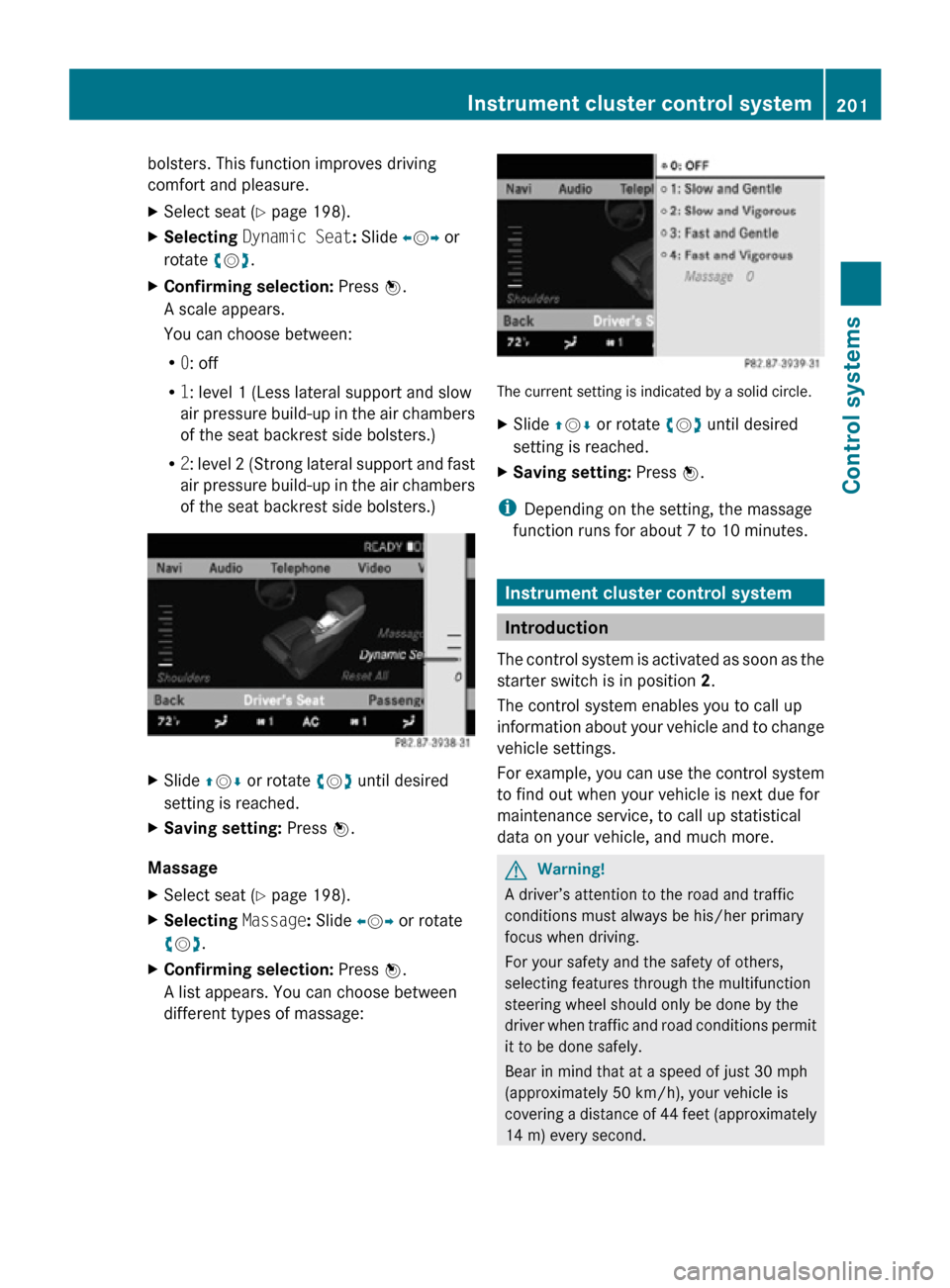
A scale appears.
You can choose between:
R 0: off
R 1: level 1 (Less lateral support and slow
air pressure build-up in the air chambers
of the seat backrest side bolsters.)
R 2: level 2 (Strong lateral support and fast
air pressure build-up in the air chambers
of the seat backrest side bolsters.) X
Slide ZVÆ or rotate cVd until desired
setting is reached.
X Saving setting: Press W.
Massage
X Select seat (Y page 198).
X Selecting Massage: Slide XVY or rotate
cVd.
X Confirming selection: Press W.
A list appears. You can choose between
different types of massage: The current setting is indicated by a solid circle.
X
Slide ZVÆ or rotate cVd until desired
setting is reached.
X Saving setting: Press W.
i Depending on the setting, the massage
function runs for about 7 to 10 minutes. Instrument cluster control system
Introduction
The control system is activated as soon as the
starter switch is in position 2.
The control system enables you to call up
information about your vehicle and to change
vehicle settings.
For example, you can use the control system
to find out when your vehicle is next due for
maintenance service, to call up statistical
data on your vehicle, and much more. G
Warning!
A driver’s attention to the road and traffic
conditions must always be his/her primary
focus when driving.
For your safety and the safety of others,
selecting features through the multifunction
steering wheel should only be done by the
driver when traffic and road conditions permit
it to be done safely.
Bear in mind that at a speed of just 30 mph
(approximately 50 km/h), your vehicle is
covering a distance of 44 feet (approximately
14 m) every second. Instrument cluster control system
201Control systems
216_AKB; 3; 90, en-US
d2ureepe, Version: 2.11.8.1 2009-05-15T11:47:50+02:00 - Seite 201 Z
Page 223 of 500

Sample dialog:
\
Enter state.
^ Please say the name of the state.
\ New York.
^ New York accepted.
“Enter destination” Use the command “Enter destination” to
enter a complete destination address.
The system guides you completely through
the dialog to route guidance. As soon as a
valid address is entered (at least the town),
you can use the “Start route guidance”
command to start the route guidance.
Sample dialog:
\
Enter destination.
^ Preselected state is New York. Do you
want to
enter town first or street first?
\ Town first.
^ Please say the name of the town.
\ Nanuet.
^ Nanuet accepted.
^ Please say the name of the street.
\ Main Street.
^ Main Street accepted.
^ Do you want to start route guidance?
\ Yes.
^ Start route guidance.
The system calculates the route and, upon
completing route calculation, starts route
guidance.
“Points of interest” Use the command “Points of interest” to
select a point of interest (POI) such as
airports, railroad stations, gas stations etc. Sample dialog:
\
Points of interest.
_ The system shows the following list on
the COMAND display:
1.Current position
2.
Other state
3. Other province
4. Other town
^ Please select a line number or say an
area name.
\ Number one.
^ Number one accepted.
^ Loading data.
_ The system displays a numbered list of
available POI categories.
^ Please select a line number or say a
category.
\ Number one (or e.g. Eat & Drink).
^ Number one accepted (or Eat & Drink)
accepted.
^ Loading data.
_ The system displays a numbered list of
available POIs of the selected
category.
^ Please select a line number or say a
category.
\ Number one.
^ Number one accepted.
^ Do you want to start route guidance?
\ Yes.
^ Starting route guidance.
i Depending on the number of categories
and POI’s available for a given area, the
system may
display several lists on each of
which you may have to make a selection by
speaking the desired line number or the
name of a POI. Voice Control System navigation
221
Control systems
216_AKB; 3; 90, en-US
d2ureepe, Version: 2.11.8.1 2009-05-15T11:47:50+02:00 - Seite 221 Z
Page 244 of 500
R
next/nearest/closest Mercedes-Benz
service
R next/nearest/closest workshop
R next/nearest/closest repair shop
R next/nearest/closest MB service
R next/nearest/closest MB service point
R next/nearest/closest MB
service center
R next/nearest/closest Mercedes service
R next/nearest/closest Mercedes service
point
R next/nearest/closest Mercedes service
center
R next/nearest/closest Mercedes-Benz
service point
R next/nearest/closest Mercedes-Benz
service center
R next/nearest/closest service point
R next/nearest/closest service center R
next hospital
R next medical center
R nearest hospital
R nearest medical center
R closest hospital
R closest medical center R
next/nearest/closest parking lot
R next/nearest/closest parking area R
next/nearest/closest restaurant R
current position R
destination area
R near destination Address book commands
R
all address book functions R
address book (on)
R address list (on)
R addresses (on)
R address directory (on) R
list/read out/read aloud/get/play
address book
R list/read out/read aloud/get/play
address list
R list/read out/read aloud/get/play
addresses
R list/read out/read aloud/get/play
address directory R
delete/clear/erase address book
R delete/clear/erase address list
R delete/clear/erase addresses
R delete/clear/erase address directory R
find/open/show/list/select/get/
search (for) name
R find/open/show/list/select/get/
search (for) entry
R find/open/show/list/select/get/
search (for)
R find/open/show/list/select/get/
search (for) page
R find/open/show/list/select/get/
search (for) item R
dial/phone/call name
R dial/phone/call
R search for number
R find number 242
Voice Control System command list
Control systems
216_AKB; 3; 90, en-US
d2ureepe,
Version: 2.11.8.1 2009-05-15T11:47:50+02:00 - Seite 242
Page 256 of 500
i
USA only:
This device complies with Part 15 of the
FCC Rules. Operation is subject to the
following two conditions:
1. This device may not cause harmful
interference, and
2.
this device must accept anyinterference received, including
interference that may cause undesired
operation.
Any unauthorized modification to this
device could void the user’s authority to
operate the equipment.
i Canada only:
This device complies with RSS-210 of
Industry Canada. Operation is subject to
the following two conditions:
1. This device may not cause interference, and
2. this device must accept any interference received, including
interference that may cause undesired
operation of the device.
Any unauthorized modification to this
device could void the user’s authority to
operate the equipment.
Important notes on using KEYLESS-GO R
You can also use the SmartKey with
KEYLESS-GO like a normal SmartKey
(Y page 252).
R You can combine KEYLESS-GO functions
with normal SmartKey functions (e.g.
unlocking with KEYLESS-GO and locking
with button &).
R Always carry the SmartKey with you.
R Never store the SmartKey together with
-electronic items
such as a mobile phone
or another SmartKey
- metallic objects such as coins or metal
foil Doing so could impair the function of the
KEYLESS-GO system.
R To lock
or unlock the vehicle, the SmartKey
must be located outside the vehicle within
approximately 3 ft (1 m) of a door or the
trunk.
R When the vehicle has been parked for more
than 72 hours, the KEYLESS-GO function is
deactivated. Pull an outside door handle
and switch on the ignition once to activate
the KEYLESS-GO function.
R If the SmartKey is positioned farther away
from the vehicle, the system may no longer
recognize the SmartKey. The vehicle
cannot be locked or the engine started via
the KEYLESS-GO system.
R If the SmartKey is removed from the vehicle
(e.g. if a passenger exits the vehicle with
the SmartKey)
-when pressing the KEYLESS-GO start/
stop button or trying to lock the vehicle
with the outside door handle the
message Key Not Detected appears in
the multifunction display
- with the engine running, the red message
Key Not Detected appears in the
multifunction display while driving off
Find the SmartKey or change its present
location immediately (e.g. place it on the
front passenger seat or insert it in shirt
pocket).
R If you have started the engine with the
KEYLESS-GO start/stop button, you can
turn it off again by
-pressing the KEYLESS-GO start/stop
button
- inserting the SmartKey into the starter
switch when the vehicle is at a standstill
and the automatic transmission is in park
position P 254
Locking and unlocking
Controls in detail
216_AKB; 3; 90, en-US
d2ureepe,
Version: 2.11.8.1 2009-05-15T11:47:50+02:00 - Seite 254
Page 267 of 500
or the child is not properly secured in the child
restraint.
G
Warning!
For your protection, drive only with properly
positioned head restraints.
Adjust the head restraint so that it is as close
to the head as possible and the center of the
head restraint supports the back of the head
at eye level. This will reduce the potential for
injury to the head and neck in the event of an
accident or similar situation.
Do not drive the vehicle without the seat head
restraints. Head restraints are intended to
help reduce injuries during an accident. Seat adjustment
You can adjust the lumbar support,
multicontour seats, as well as drive-dynamic
multicontour seats using COMAND
(Y page 198).
! When moving the seats, make sure there
are no items in the footwell or behind the
seats. Otherwise, you could damage the
seats and/or the items.
Power seats i
If PRE-SAFE ®
has been activated, the
front passenger’s seat will be moved to a
more favorable seat position. i
You can store the settings for the seat
position with the memory function
(Y page 273).
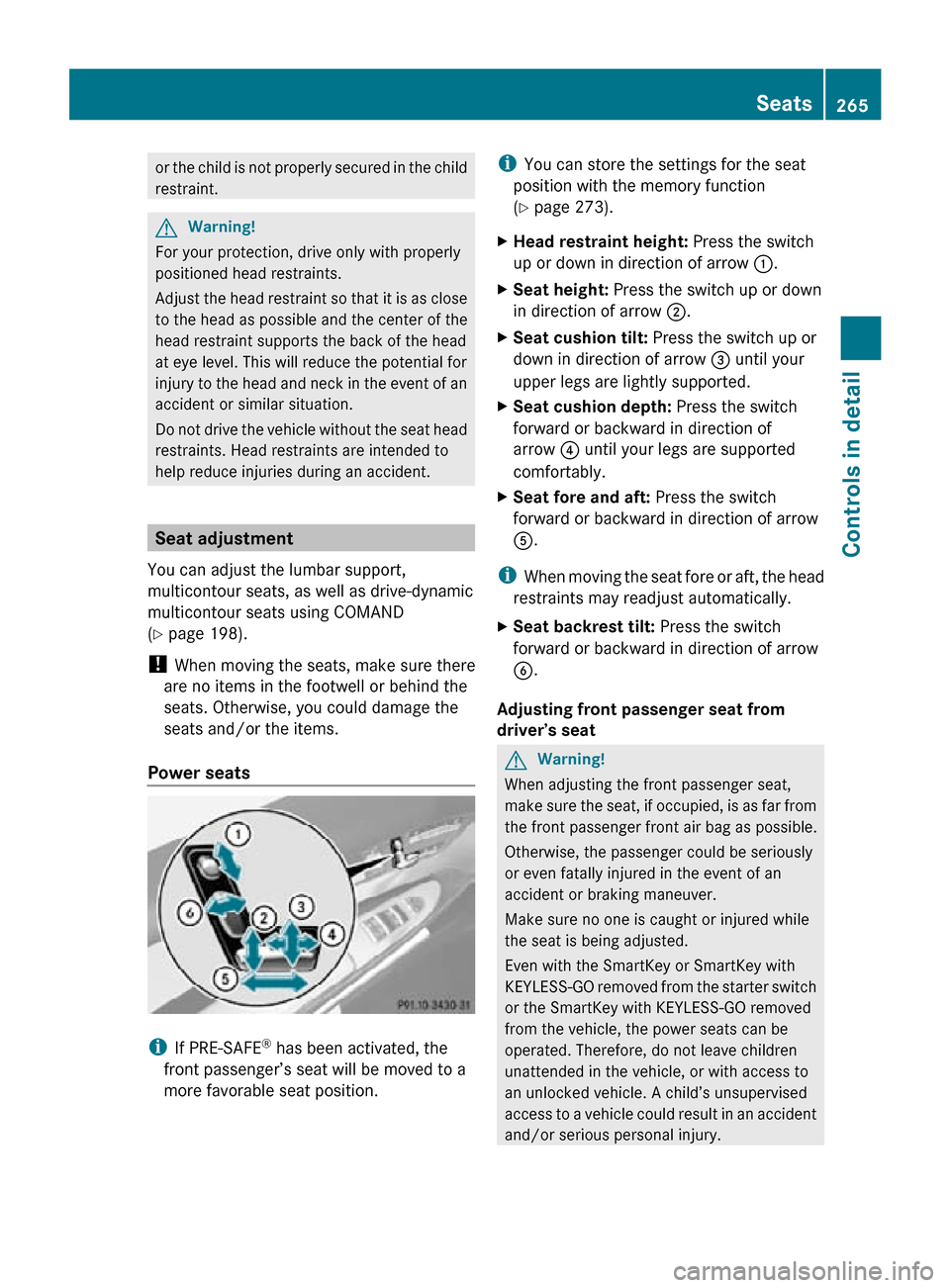
X Head restraint height: Press the switch
up or down in direction of arrow :.
X Seat height: Press the switch up or down
in direction of arrow ;.
X Seat cushion tilt: Press the switch up or
down in direction of arrow = until your
upper legs are lightly supported.
X Seat cushion depth: Press the switch
forward or backward in direction of
arrow ? until your legs are supported
comfortably.
X Seat fore and aft: Press the switch
forward or backward in direction of arrow
A.
i When moving the seat fore or aft, the head
restraints may readjust automatically.
X Seat backrest tilt: Press the switch
forward or backward in direction of arrow
B.
Adjusting front passenger seat from
driver’s seat G
Warning!
When adjusting the front passenger seat,
make sure the seat, if occupied, is as far from
the front passenger front air bag as possible.
Otherwise, the passenger could be seriously
or even fatally injured in the event of an
accident or braking maneuver.
Make sure no one is caught or injured while
the seat is being adjusted.
Even with the SmartKey or SmartKey with
KEYLESS-GO removed from the starter switch
or the SmartKey with KEYLESS-GO removed
from the vehicle, the power seats can be
operated. Therefore, do not leave children
unattended in the vehicle, or with access to
an unlocked vehicle. A child’s unsupervised
access to a vehicle could result in an accident
and/or serious personal injury. Seats
265Controls in detail
216_AKB; 3; 90, en-US
d2ureepe, Version: 2.11.8.1 2009-05-15T11:47:50+02:00 - Seite 265 Z
Page 280 of 500
High beam
X
Turn the exterior lamp switch to position
L (Y page 275).
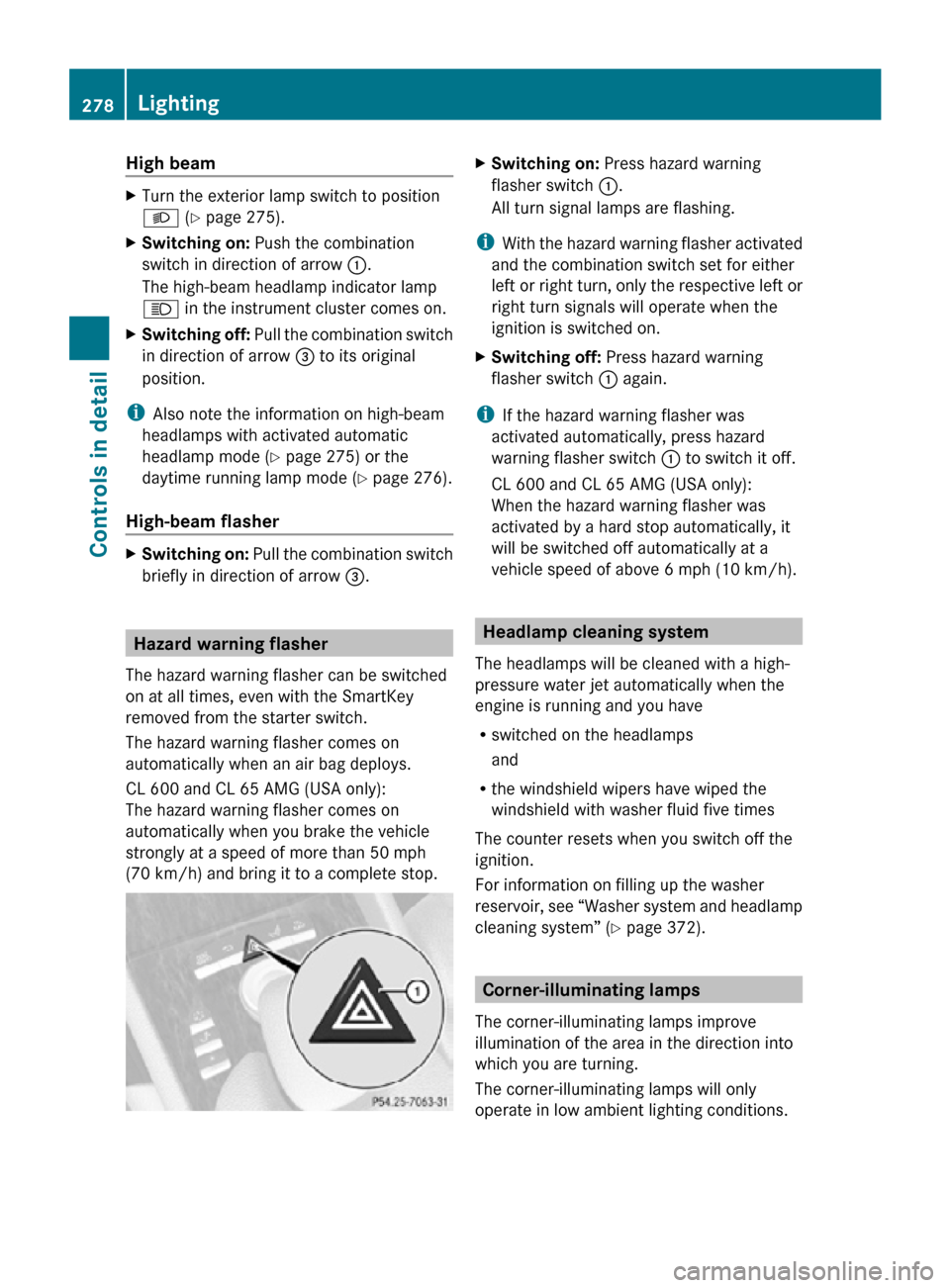
X Switching on: Push the combination
switch in direction of arrow :.
The high-beam headlamp indicator lamp
K in the instrument cluster comes on.
X Switching off: Pull the combination switch
in direction of arrow = to its original
position.
i Also note the information on high-beam
headlamps with activated automatic
headlamp mode ( Y page 275) or the
daytime running lamp mode ( Y page 276).
High-beam flasher X
Switching on: Pull the combination switch
briefly in direction of arrow =.Hazard warning flasher
The hazard warning flasher can be switched
on at all times, even with the SmartKey
removed from the starter switch.
The hazard warning flasher comes on
automatically when an air bag deploys.
CL 600 and CL 65 AMG (USA only):
The hazard warning flasher comes on
automatically when you brake the vehicle
strongly at a speed of more than 50 mph
(70 km/h) and bring it to a complete stop. X
Switching on: Press hazard warning
flasher switch :.
All turn signal lamps are flashing.
i With the hazard warning flasher activated
and the combination switch set for either
left or right turn, only the respective left or
right turn signals will operate when the
ignition is switched on.
X Switching off: Press hazard warning
flasher switch : again.
i If the hazard warning flasher was
activated automatically, press hazard
warning flasher switch : to switch it off.
CL 600 and CL 65 AMG (USA only):
When the hazard warning flasher was
activated by a hard stop automatically, it
will be switched off automatically at a
vehicle speed of above 6 mph (10 km/h). Headlamp cleaning system
The headlamps will be cleaned with a high-
pressure water jet automatically when the
engine is running and you have
R switched on the headlamps
and
R the windshield wipers have wiped the
windshield with washer fluid five times
The counter resets when you switch off the
ignition.
For information on filling up the washer
reservoir, see “Washer system and headlamp
cleaning system” ( Y page 372). Corner-illuminating lamps
The corner-illuminating lamps improve
illumination of the area in the direction into
which you are turning.
The corner-illuminating lamps will only
operate in low ambient lighting conditions. 278
LightingControls in detail
216_AKB; 3; 90, en-US
d2ureepe,
Version: 2.11.8.1 2009-05-15T11:47:50+02:00 - Seite 278
Page 298 of 500
Effect
=
With this selection you can use the
braking effect of the engine.
5
Allows the use of the engine’s
braking effect when driving
R
on steep downgrades
R in mountainous regions
R under extreme operating
conditions 4
For maximum use of the engine’s
braking effect on very steep or
lengthy downgrades.
Automatic shift program
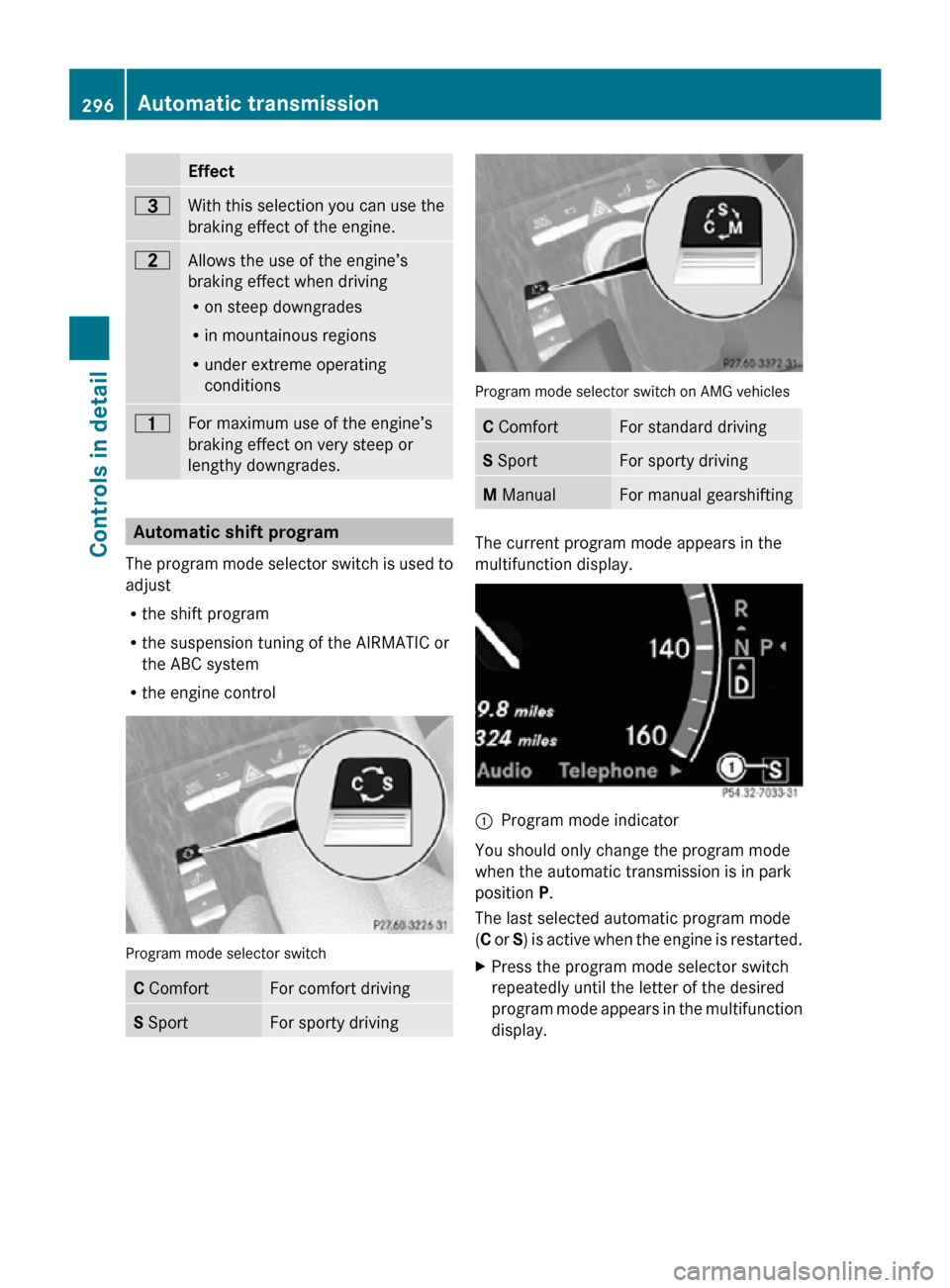
The program mode selector switch is used to
adjust
R the shift program
R the suspension tuning of the AIRMATIC or
the ABC system
R the engine control Program mode selector switch
C Comfort For comfort driving
S Sport For sporty driving Program mode selector switch on AMG vehicles
C Comfort For standard driving
S Sport For sporty driving
M Manual For manual gearshifting
The current program mode appears in the
multifunction display.
:
Program mode indicator
You should only change the program mode
when the automatic transmission is in park
position P.
The last selected automatic program mode
(C or S) is active when the engine is restarted.
X Press the program mode selector switch
repeatedly until the letter of the desired
program mode appears in the multifunction
display. 296
Automatic transmissionControls in detail
216_AKB; 3; 90, en-US
d2ureepe,
Version: 2.11.8.1 2009-05-15T11:47:50+02:00 - Seite 296
Page 302 of 500
otherwise seriously damage the brake
system or the transfer case which is not
covered by the Mercedes-Benz Limited
Warranty.
! Because the ESC operates automatically,
the engine and ignition must be shut off
(SmartKey in starter switch position 0 or
1 or KEYLESS-GO start/stop button in
position 0 or 1) when the electronic parking
brake is being tested on a brake test
dynamometer or when the vehicle is being
towed with one axle raised.
Active braking action through the ESC may
otherwise seriously damage the brake
system which is not covered by the
Mercedes-Benz Limited Warranty. Instrument cluster
Introduction
For a full view illustration of the instrument
cluster, see “Instrument cluster”
(Y page 29). G
Warning!
No messages will be displayed if either the
instrument cluster or the multifunction
display is inoperative.
As a result, you will not be able to see
information about your driving conditions,
such as
R speed
R outside temperature
R warning/indicator lamps
R malfunction/warning messages
R failure of any systems
Driving characteristics may be impaired.
If you must continue to drive, do so with added
caution. Contact an authorized Mercedes-
Benz Center as soon as possible.
The language setting for the multifunction
display can be changed via COMAND
(Y page 81). Activating the instrument cluster
The instrument cluster is activated when you
R open a door
R switch on the ignition
R switch on the exterior lamps Adjusting the instrument cluster
illumination
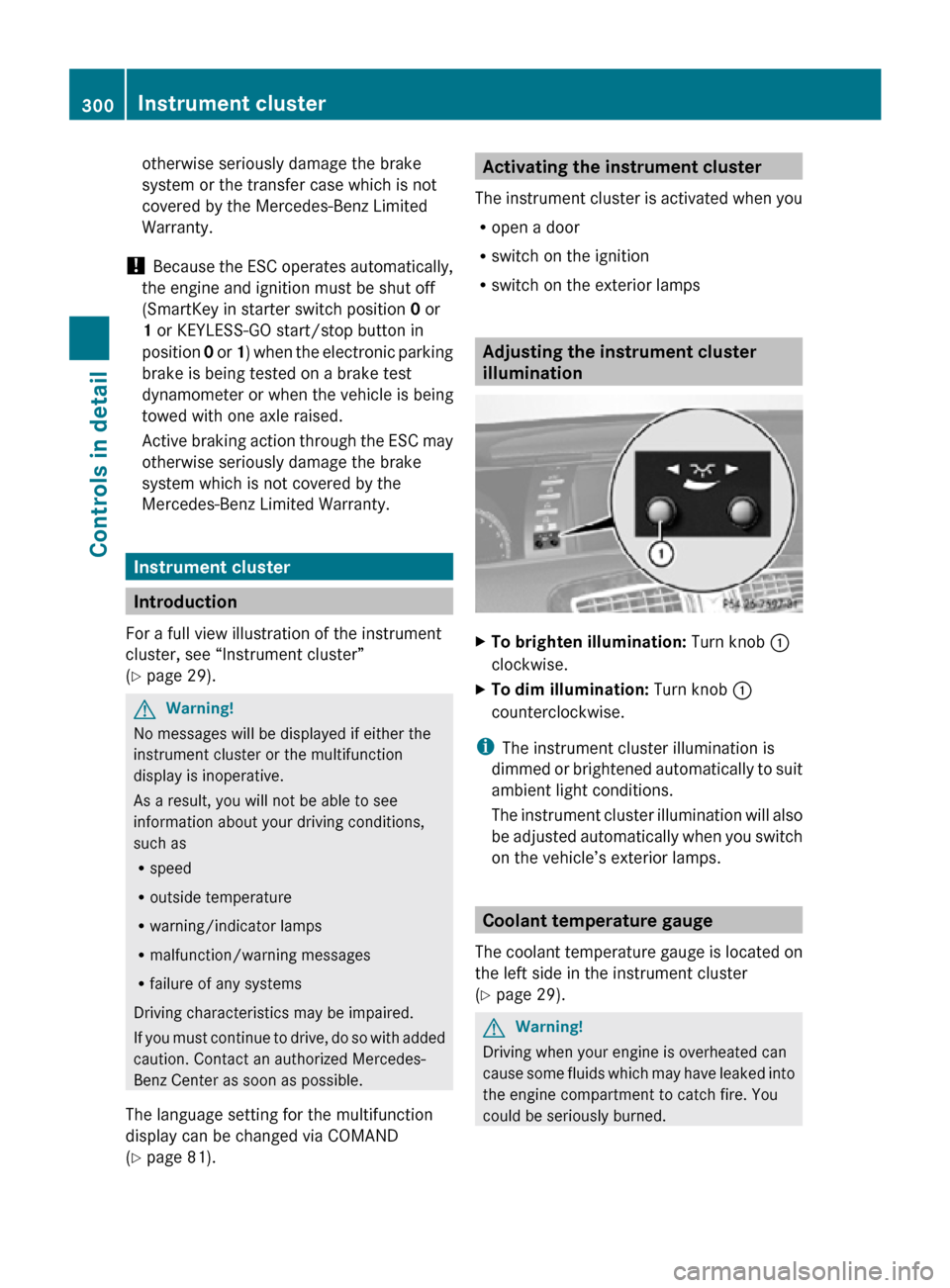
X
To brighten illumination: Turn knob :
clockwise.
X To dim illumination: Turn knob :
counterclockwise.
i The instrument cluster illumination is
dimmed or brightened automatically to suit
ambient light conditions.
The instrument cluster illumination will also
be adjusted automatically when you switch
on the vehicle’s exterior lamps. Coolant temperature gauge
The coolant temperature gauge is located on
the left side in the instrument cluster
(Y page 29). G
Warning!
Driving when your engine is overheated can
cause some fluids which may have leaked into
the engine compartment to catch fire. You
could be seriously burned. 300
Instrument clusterControls in detail
216_AKB; 3; 90, en-US
d2ureepe,
Version: 2.11.8.1 2009-05-15T11:47:50+02:00 - Seite 300
Page 303 of 500
Steam from an overheated engine can cause
serious
burns
which can occur just by opening
the engine hood. Stay away from the engine
if you see or hear steam coming from it.
Stop the vehicle in a safe location away from
other traffic. Turn off the engine, get out of the
vehicle and do not stand near the vehicle until
the engine has cooled down.
During severe operating conditions, e.g. stop-
and-go traffic, the coolant temperature may
rise close to 248‡ (120†), i.e close to the
red zone of the temperature gauge.
! Excessive coolant temperature triggers a
warning in the multifunction display.
The engine should not be operated with a
coolant temperature above 248‡ (120†),
i.e. in the red zone of the coolant
temperature gauge. Doing so may cause
serious engine damage which is not
covered by the Mercedes-Benz Limited
Warranty. Tachometer
The red marking on the tachometer
(Y page
29) denotes excessive engine speed.
! Avoid driving at excessive engine speeds,
as it may result in serious engine damage
that is not covered by the Mercedes-Benz
Limited Warranty.
To help protect the engine, the fuel supply is
interrupted if the engine is operated within
the red marking. Outside temperature indicator
The outside temperature indicator is on the
bottom left-hand side of the instrument
cluster (Y page 29). G
Warning!
The outside temperature indicator is not
designed to serve as an ice-warning device
and is therefore unsuitable for that purpose. Indicated temperatures just above the
freezing
point
do not guarantee that the road
surface is free of ice. The road may still be icy,
especially in wooded areas or on bridges. Fuel gauge
The fuel gauge is on the left-hand side of the
instrument cluster
(Y page 29). Once the fuel
level has fallen below the reserve mark, the
yellow segment indicator for the fuel reserve
comes on. Driving systems
Introduction
This section describes the following driving
systems of your vehicle:
R Cruise control
R DISTRONIC PLUS
R Hill-start assist system
R HOLD function
R AIRMATIC
R Active Body Control (ABC)
R All-wheel drive (4MATIC)
R Parktronic system
R Park Assist
R Advanced Parking Guidance
R Rear view camera
R Night View Assist
R Blind Spot Assist
The driving safety systems ABS, Adaptive
Brake, Adaptive Brake Lights, BAS, BAS
PLUS, EBP, ESC and PRE-SAFE ®
Brake are
described in
the “Safety and security” section
(Y page 56). Driving systems
301
Controls in detail
216_AKB; 3; 90, en-US
d2ureepe, Version: 2.11.8.1 2009-05-15T11:47:50+02:00 - Seite 301 Z
Page 307 of 500
G
Warning!
When the DISTRONIC PLUS is braking, the
brake pedal is retracted (i.e. depressed
automatically). The pedals’ range of motion
must not be impeded by any obstacles:
R Do not place any objects in the footwell.
R Make sure that the floormats and carpets
are securely in place.
R Do not
rest your foot underneath the brake
pedal, as it could otherwise be trapped.
You could otherwise cause an accident and
injure yourself and/or others. G
Warning!
The DISTRONIC PLUS is a convenience
system. Its speed adjustment reduction
capability is intended to make cruise control
more effective
and usable when traffic speeds
vary. It is not however, intended to, nor does
it, replace the need for extreme care.
The responsibility for the vehicle’s speed,
distance to the preceding vehicle and, most
importantly, brake operation to ensure a safe
stopping distance, always remains with the
driver.
The DISTRONIC PLUS cannot take street and
traffic conditions into account.
Complex driving situations are not always
fully recognized by the DISTRONIC PLUS. This
could result in wrong or missing distance
warnings. G
Warning!
The DISTRONIC PLUS adaptive cruise control
is not a substitute for active driving
involvement. It does not react to pedestrians
or on
stationary objects, nor does it recognize
or predict the curvature and lane layout or the
movement of preceding vehicles. The
DISTRONIC PLUS can only apply a maximum
of 40% of the vehicle’s braking power.
The DISTRONIC PLUS may not detect narrow
vehicles possibly driving in front of you, such as motorcycles and vehicles driving in an
offset formation.
It is the driver’s responsibility at all times to
be attentive to the road, weather and traffic
conditions. Additionally, the driver must
provide
the
steering, braking and other driving
inputs necessary to remain in control of the
vehicle.
High-frequency sources such as toll stations,
speed measuring systems etc. can cause the
DISTRONIC PLUS system to temporarily
cease functioning. G
Warning!
The DISTRONIC PLUS cannot take road and
traffic conditions into account. Only use the
DISTRONIC PLUS if the road, weather and
traffic conditions make it advisable to travel
at a constant speed. G
Warning!
Use of the DISTRONIC PLUS can be
dangerous on slippery roads. Rapid changes
in tire traction can result in wheel spin and
loss of control.
The DISTRONIC PLUS does not function in
adverse sight
and distance conditions. Do not
use the DISTRONIC PLUS during conditions of
fog, heavy rain, snow or sleet. G
Warning!
The DISTRONIC PLUS cannot take weather
conditions into account. Switch off the
DISTRONIC PLUS or do not switch it on if:
R roads are
slippery or covered with snow or
ice. The wheels could lose traction while
braking or accelerating, and the vehicle
could skid.
R the DISTRONIC PLUS system sensor covers
are dirty or visibility is diminished due to
snow, rain or fog, for example. The distance
control system functionality could be
impaired.
Always pay attention to surrounding traffic
conditions even while the DISTRONIC PLUS is Driving systems
305
Controls in detail
216_AKB; 3; 90, en-US
d2ureepe, Version: 2.11.8.1 2009-05-15T11:47:50+02:00 - Seite 305 Z