brake sensor MERCEDES-BENZ CL63AMG 2010 W216 Owner's Manual
[x] Cancel search | Manufacturer: MERCEDES-BENZ, Model Year: 2010, Model line: CL63AMG, Model: MERCEDES-BENZ CL63AMG 2010 W216Pages: 500, PDF Size: 9.5 MB
Page 13 of 500
Interior storage spaces
see Storage compartments
Intermittent wiping
...........................281
Rain sensor .................................... 281
iPod ®
(media interface) ....................183
ISOFIX (Child seat anchors –
LATCH-type)
see Children in the vehicle J
Jack ..................................................... 413
Jump starting ..................................... 471K
Key, Mechanical
Loss of ........................................... 256
Replacing
....................................... 256
Unlocking/locking manually .......... 460
Valet locking .................................. 261
Key, SmartKey
Battery check lamp ........................ 255
Checking batteries ......................... 255
Factory setting ...................... 253, 255
Global locking (KEYLESS-
GO) ................................................ 255
Global locking (SmartKey) .............253
Global unlocking (KEYLESS-
GO) ................................................ 255
Global unlocking
(SmartKey) ..................................... 253
Important notes on KEYLESS-GO ...254
Locking/unlocking ........................252
Loss of ........................................... 256
Messages in the multifunction
display ........................................... 440
Opening, trunk ............................... 258
Opening and closing the power
tilt/sliding sunroof ......................... 283
Opening and closing the windows . 283
Remote control .............................. 252
Replacing ....................................... 256
Replacing batteries ........................ 461
Restoring to factory setting ... 253, 255
Selective setting .................... 253, 255
Starter switch positions ................. 262KEYLESS-GO
Starter switch positions
.................262
Keypad (COMAND) .............................. 70
Kickdown ........................................... 295
Kickdown (manual shift program) ... 299
Kilopascal (air pressure unit) ...........394
Knee bag .............................................. 40 L
Labels
Certification ................................... 480
Emission control information ......... 481
Tire and Loading Information
placard
........................................... 381
Tire inflation pressure ....................376
Lamps, exterior
Exterior lamp switch ...................... 275
Messages in the multifunction
display ........................................... 446
Switching on/off ........................... 275
Lamps, indicator and warning
ABS .......................................... 29, 451
Brakes ........................................... 451
Distance warning lamp .......... 307, 457
Engine malfunction ........................ 457
ESC .......................................... 29, 456
ESC OFF ........................................ 456
Fog lamps ...................................... 277
Front passenger front air bag
off ............................................ 41, 459
Fuel tank reserve ........................... 457
High-beam headlamps .............29, 278
Instrument cluster .........................450
Low tire pressure/TPMS
malfunction telltale ........................ 458
Seat belt telltale ................29, 48, 454
SRS .......................................... 36, 455
Turn signals ..................................... 29
Language settings ............................... 81
LATCH-type child seat anchors (ISOFIX) see Children in the vehicle
License plate lamps
Messages in the multifunction
display ........................................... 447
Light alloy wheels, cleaning .............408
Lighter see Cigarette lighter Index
11 216_AKB; 3; 90, en-US
d2ureepe,
Version: 2.11.8.1 2009-05-15T11:47:50+02:00 - Seite 11
Page 16 of 500
P
Paintwork, cleaning ..........................404
Paintwork code ................................. 481
Panic alarm .......................................... 55
Parcel nets ......................................... 348
Park Assist ......................................... 324
Cleaning system sensors ...............406
Collision warning ........................... 327
Messages in the multifunction
display
........................................... 422
Range ............................................ 325
Switching on/off ........................... 327
System sensors ............................. 406
Warning indicators ......................... 326
Parking ............................................... 288
Advanced Parking Guidance ..........327
Park Assist ..................................... 324
Parktronic system ..........................321
Parking Guidance, Advanced ........... 327
Parking position
Exterior rear view mirrors .............. 272
Transmission position .................... 294
Parktronic system
Cleaning system sensors ...............406
Malfunction .................................... 324
Minimum distance ......................... 322
Sensor range ................................. 322
Switching on/off ........................... 323
System sensors ............................. 322
Warning indicators ......................... 323
Parts service ...................................... 480
PASS AIR BAG OFF indicator lamp see Front passenger front air bag
off indicator lamp
Passenger safety
see Occupant safety
Pedals ................................................. 397
Phone see Telephone
Phone book ........................................ 146
Plastic parts, cleaning ...................... 409
Power assistance .............................. 398
Power closing assist for doors and
trunk lid .............................................. 261
Power outlets .................................... 353
Power seats see Seats Power tilt/sliding sunroof
Operation ....................................... 345
Synchronizing
................................ 347
Power washer .................................... 404
Power windows ................................. 282
Cleaning ......................................... 408
Operation ....................................... 282
Rear side window, override switch ... 55
Synchronizing ................................ 283
Practical hints ................................... 412
PRE-SAFE ®
............................................ 49
Messages in the multifunction
display ........................................... 416
PRE-SAFE ®
Brake ................................. 62
Activating/deactivating ................. 213
Messages in the multifunction
display ........................................... 416
Problems
While driving .................................. 288
With vehicle ..................................... 23
With wipers .................................... 281
Product information ............................20
Production options weight ...............394
Program mode selector switch
Automatic shift program ................296
Manual shift program ..................... 298
Proximity key
see Key, SmartKey
PSI (air pressure unit) ....................... 394 R
RACETIMER ........................................ 209
Radar sensors
Messages in the multifunction
display ........................................... 424
Switching on or off
......................... 216
Radio .................................................. 152
HD Radio™ .................................... 154
Satellite radio ................................ 157
Selecting stations .......................... 207
Radio transmitters ............................401
Rain sensor see Intermittent wiping
Rear axle oil ....................................... 491
Rear fog lamp see Fog lamps 14
Index 216_AKB; 3; 90, en-US
d2ureepe,
Version: 2.11.8.1 2009-05-15T11:47:50+02:00 - Seite 14
Page 59 of 500
ABS
G
Observe Safety notes, see page 56. G
Warning!
Do not pump the brake pedal. Use firm, steady
brake pedal pressure instead. Pumping the
brake pedal defeats the purpose of the ABS
and significantly reduces braking
effectiveness.
The Antilock Brake System (ABS) regulates
the brake
pressure so that the wheels do not
lock during braking. This allows you to
maintain the ability to steer your vehicle.
The ABS is functional above a speed of
approximately 5 mph (8 km/h) independent
of road surface conditions.
On slippery road surfaces, the ABS will
respond even to light brake pressure.
The ABS indicator lamp ! in the
instrument cluster comes on when you switch
on the ignition. It goes out when the engine
is running.
Braking At the instant one of the wheels is about to
lock up, a slight pulsation can be felt in the
brake pedal. The pulsation indicates that the
ABS is in the regulating mode.
X
Keep firm and steady pressure on the brake
pedal while you feel the pulsation.
Continuous, steady brake pedal pressure
yields the advantages provided by the ABS,
namely braking
power and the ability to steer
the vehicle.
The pulsating brake pedal can be an
indication of hazardous road conditions and
functions as a reminder to take extra care
while driving.
Emergency brake maneuver X
Keep continuous full pressure on the brake
pedal. G
Warning!
If the ABS malfunctions, other driving safety
systems such
as the BAS or the ESC are also
switched off. Observe indicator and warning
lamps that may come on as well as messages
in the multifunction display that may appear.
If the ABS malfunctions, the wheels may lock
during hard braking, reducing steering
capability and extending the braking distance. BAS
G
Observe Safety notes, see page 56.
The Brake Assist System (BAS) operates in
emergency situations.
If you apply the brakes
very quickly, the BAS provides full brake
boost automatically, thereby potentially
reducing the braking distance.
X Apply continuous full braking pressure until
the emergency braking situation is over.
The ABS will prevent the wheels from
locking.
When you release the brake pedal, the brakes
function again as normal. The BAS is then
deactivated. G
Warning!
If the BAS malfunctions, the brake system still
functions, but without the additional brake
boost available that the BAS would normally
provide in an emergency braking maneuver.
Therefore, the
braking distance may increase. BAS PLUS
The Brake Assist System PLUS (BAS PLUS)
operates in
emergency braking situations and
uses radar sensors to assess the traffic
situation. BAS PLUS assists you in braking at
speeds above approximately 20 mph
(30 km/h).
When traveling in Canada in a vehicle not
registered in Canada, you must switch off the
radar sensor system ( Y page 216). Canadian
law does not permit the use of the radar Driving safety systems
57
Safety and security
216_AKB; 3; 90, en-US
d2ureepe, Version: 2.11.8.1 2009-05-15T11:47:50+02:00 - Seite 57 Z
Page 60 of 500
sensor system for vehicles from outside of
Canada.
When you switch off the radar system, the
following functions are deactivated:
R
BAS PLUS
R PRE-SAFE ®
Brake (Y page 62)
R DISTRONIC PLUS (Y page 304)
R Park Assist ( Y page 324)
R Blind Spot Assist (
Y page 335)
R Advanced Parking Guidance ( Y page 327)G
Warning!
BAS PLUS is a convenience system designed
to assist the driver during vehicle operation.
The responsibility for the vehicle speed and
the distance to the vehicle ahead, including
most importantly brake operation to assure
safe stopping distance, always remains with
the driver.
Always pay attention to traffic conditions
even while BAS PLUS is switched on.
Otherwise, you may not be able to recognize
dangerous situations until it is too late and
could cause an accident. Personal or fatal
injury to you or others may be the result.
i This device
has been approved by the FCC
as a “Vehicular Radar System”. The radar
sensor is intended for use in an automotive
radar system only. Removal, tampering, or
altering of the device will void any
warranties, and is not permitted by the
FCC. Do not tamper with, alter, or use in
any non-approved way.
Any unauthorized modification to this
device could void the user’s authority to
operate the equipment.
BAS PLUS detects obstacles that are in your
driving path for a sufficient period of time to
permit the system to recognize these
obstacles. If you approach the detected
obstacle quickly, BAS PLUS calculates the
level of brake power boost appropriate for the circumstance to supply when the driver
applies the brakes.
When you step quickly on the brake pedal in
an emergency braking situation, BAS PLUS
automatically regulates the brake power
boost to a level that is suitable for the traffic
situation.
If BAS
PLUS requires a particularly high brake
power boost, PRE-SAFE ®
is activated at the
same time.
X Keep constant pressure on the brake pedal
until the emergency braking situation is
over.
During this process, the ABS prevents the
wheels from locking up.
The brakes will resume normal operation
after
R the brake pedal is released
R no obstacles are detected in your path
R the system no longer senses a risk of a
collision
BAS PLUS is then deactivated.
BAS PLUS can react to stationary obstacles
such as standing or parked vehicles at road
speeds of up to approximately 40 mph
(70 km/h ).
BAS
PLUS can only assist you when the radar
sensors are switched on and functional. You
can check whether the sensors are active by
switching on DISTRONIC PLUS
(Y page 304) or using the Radar sensors
function ( Y page 216) in the instrument
cluster control system. G
Warning!
BAS PLUS will only respond with brake
assistance if
it has clearly detected an object.
Detection can be impeded by
R dirty or covered sensors
R snowfall or heavy rain
R disturbance from other radar sources
R strong radar reflection such as in parking
garages 58
Driving safety systems
Safety and security
216_AKB; 3; 90, en-US
d2ureepe,
Version: 2.11.8.1 2009-05-15T11:47:50+02:00 - Seite 58
Page 61 of 500
BAS PLUS uses radar signals that are not
reflected well by narrow objects and
absorptive materials. For this reason BAS
PLUS will not react to persons, animals, and
approaching traffic or cross-traffic.
BAS PLUS may not detect narrow vehicles
driving in front of you, such as motorcycles
and vehicles driving offset from your vehicle
center.
After a hard collision or damage to the front
of the vehicle from an accident, have the
adjustment and operation of the radar
sensors checked
by an authorized Mercedes-
Benz Center.
If BAS PLUS is not available due to a radar
sensor malfunction, the braking system will
continue to function normally with full brake
boost and full standard BAS function. Adaptive Brake
Adaptive Brake provides a high level of
braking safety as well as increased braking
comfort. Adaptive Brake takes driver and
vehicle characteristics into consideration,
thus achieving an optimal braking effect.
In addiditon, Adaptive Brake provides the
HOLD function
(Y page 316) and the hill-start
assist system ( Y page 315).
For more information on the brake system,
see ( Y page 398). Adaptive Brake Lights
i This function is only available for the
CL 600 (USA only).
The brake lamps flash in quick intervals
R while you are braking hard at a speed of
more than 30 mph (50 km/h)
R when you are braking with the aid of BAS
R when you are braking with the aid of BAS
PLUS.
This helps to alert drivers behind you. If you bring the car to a complete stop by hard
braking at a speed of more than 40 mph
(70
km/h),
the hazard warning flasher comes
on automatically as soon as the vehicle is at
a standstill. While the vehicle is stationary,
the brake lamps are continuously lit up. Once
you drive faster than 6 mph (10 km/h)
afterward, the hazard warning flasher goes
out. EBP
G
Observe Safety notes, see page 56.
The Electronic Brake Proportioning (EBP)
enhances braking effectiveness by allowing
the rear
brakes to supply a greater proportion
of the braking effort in straight-line braking
without a loss of vehicle stability. G
Warning!
If the EBP malfunctions, the brake system will
still function with full brake boost. However,
the rear wheels could lock up during
emergency braking situations, for example.
You could lose control of the vehicle and
cause an accident.
Adapt your driving style to the changed
driving characteristics. ESC
G
Observe Safety notes, see page 56.
The Electronic Stability Control (ESC) is
operational as
soon as the engine is running.
It monitors the vehicle’s traction (force of
adhesive friction between the tires and the
road surface) and handling.
The ESC recognizes that the vehicle deviates
from the direction of travel as intended by the
driver. By applying brakes to individual
wheels and by limiting the engine output, the
ESC works to stabilize the vehicle. The ESC is
especially useful while driving off and on wet
or slippery road surfaces. The ESC also
stabilizes the vehicle during braking and
steering maneuvers. Driving safety systems
59
Safety and security
216_AKB; 3; 90, en-US
d2ureepe, Version: 2.11.8.1 2009-05-15T11:47:50+02:00 - Seite 59 Z
Page 65 of 500
Always pay attention to traffic conditions
even while the PRE-SAFE
®
Brake is switched
on. Otherwise, you may not be able to
recognize dangerous situations until it is too
late and could cause an accident resulting in
personal or fatal injury to you or others.
i USA only:
This device
has been approved by the FCC
as a “Vehicular Radar System”. The radar
sensor is intended for use in an automotive
radar system only. Removal, tampering, or
altering of the device will void any
warranties, and is not permitted by the
FCC. Do not tamper with, alter, or use in
any non-approved way.
Any unauthorized modification to this
device could void the user’s authority to
operate the equipment.
i Canada only:
This device complies with RSS-210 of
Industry Canada. Operation is subject to
the following two conditions:
1. This device may not cause interference, and
2. this device must accept any interference received, including
interference that may cause undesired
operation of the device.
Removal, tampering, or altering of the
device will void any warranties, and is not
permitted. Do not tamper with, alter, or use
in any non-approved way.
Any unauthorized modification to this
device could void the user’s authority to
operate the equipment.
Using the radar sensors, the PRE-SAFE ®
Brake detects obstacles that are in your
driving path for a sufficient period of time for
the system to recognize it. If you approach a
vehicle and the PRE-SAFE ®
Brake has
established that the distance to the vehicle
ahead at your current speed is so close that
the PRE-SAFE ®
Brake will not be capable of slowing the vehicle sufficiently, the system
will
initially
warn you visually and acoustically.
If you do not apply the brakes yourself or
maneuver around a sensed obstacle, the
vehicle will brake lightly automatically. The
PRE-SAFE ®
system (Y page 49) is activated
when the distance to the vehicle ahead at
your current speed is so close that the PRE-
SAFE ®
Brake will not be capable of slowing
the vehicle sufficiently. G
Warning!
The PRE-SAFE ®
Brake will only respond with
brake assistance if it has clearly detected an
object. Detection can be impeded by
R dirty or covered sensors
R snowfall or heavy rain
R disturbance from other radar sources
R strong radar reflection such as in parking
garages
The PRE-SAFE ®
Brake
uses radar signals that
are not reflected well by narrow objects and
absorptive materials. For this reason the PRE-
SAFE ®
Brake will not react to persons,
animals, and approaching traffic or cross-
traffic.
The PRE-SAFE ®
Brake may not detect narrow
vehicles driving in front of you, such as
motorcycles and vehicles driving offset from
your vehicle center. G
Warning!
The PRE-SAFE ®
Brake brakes your vehicle
with a maximum of 13 ft/s 2
(4 m/s 2
). This
corresponds to about 40% of the maximum
deceleration ability of your vehicle. This
automatic braking is intended only to initiate
the braking
if the driver has not already done
so. The driver must apply the brakes in order
to prevent a collision.
The PRE-SAFE ®
Brake applies the brake pedal
automatically which results in the brake pedal
moving. Therefore keep driver’s foot area
clear at all times, including the area under the Driving safety systems
63
Safety and security
216_AKB; 3; 90, en-US
d2ureepe, Version: 2.11.8.1 2009-05-15T11:47:50+02:00 - Seite 63 Z
Page 66 of 500
brake pedal. Objects stored in this area may
impair
pedal
movement which could interfere
with the braking ability of the PRE-SAFE ®
Brake.
Do not place your foot under the brake pedal
– your foot could become caught.
To maintain the proper distance to the vehicle
in front of you and thus prevent a rear-end
collision, you must apply the brakes yourself.
X Brake the vehicle immediately to avoid a
collision.
Under no circumstances should the driver
await the intermittent warning sound
before braking. Observe the following
warning note.
The intermittent
warning sound ceases and
the distance warning lamp · goes out
when the necessary distance to the vehicle
ahead is again established.
The PRE-SAFE ®
Brake
can react to stationary
obstacles such as standing or parked vehicles
at road speeds of up to approximately 40 mph
(70 km/h). G
Warning!
If you do not receive visual or acoustic
warning signals, the PRE-SAFE ®
Brake may
R not have recognized the collision risk
R have been deactivated
R be malfunctioning
Apply the
brakes yourself to avoid a collision.
The PRE-SAFE ®
Brake does not always clearly
interpret complex traffic situations. If a visual
and/or acoustic warning is issued in an
uncritical driving situation, or if the vehicle
brakes lightly, you can interrupt the PRE-
SAFE ®
Brake maneuver by pressing down all
the way on the accelerator pedal, using
kickdown, or releasing the brake pedal. The PRE-SAFE
®
Brake maneuver is
terminated immediately when
R you avoid the obstacle by evasive steering
R you drive less than 9 mph (15 km/h
)
R an obstacle can no longer be identified
ahead of you
R the system no longer senses the risk of a
collision
i The PRE-SAFE ®
Brake will remain passive
while DISTRONIC PLUS is switched on
(Y page 304).
After a hard collision or damage to the front
of the vehicle from an accident, have the
settings and operation of the radar sensors
checked by an authorized Mercedes-Benz
Center.
When traveling in Canada in a vehicle not
registered in Canada, you must switch off the
radar sensor system ( Y page 216). Canadian
law does not permit the use of the radar
sensor system for vehicles from outside of
Canada.
When you switch off the radar system, the
following functions are deactivated:
R PRE-SAFE ®
Brake
R BAS PLUS (Y page 57)
R DISTRONIC PLUS (Y page 304)
R Park Assist ( Y page 324)
R Blind Spot Assist (Y page 335)
R Advanced Parking Guidance ( Y page 327)
X Activating and deactivating: Activate or
deactivate the PRE-SAFE ®
Brake using the
instrument cluster control system
(Y page 213).
After the function has been activated, the
PRE-SAFE ®
Brake indicator Ä appears
in the instrument cluster. When the HOLD
function is switched on, the PRE-SAFE ®
Brake indicator Ä will not appear. 64
Driving safety systems
Safety and security
216_AKB; 3; 90, en-US
d2ureepe,
Version: 2.11.8.1 2009-05-15T11:47:50+02:00 - Seite 64
Page 218 of 500
The additional speedometer (
Y page 215)
will be shown in the other unit.
Switching the radar sensors on or off If your vehicle is equipped with DISTRONIC
PLUS, BAS PLUS, or Park Assist it is equipped
with a radar sensor system which you can
switch on and off.
When traveling in Canada in a vehicle not
registered in Canada, you must switch off the
radar sensor system. Canadian law does not
permit the use of the radar sensor system for
vehicles from outside of Canada. When you
switch off the radar sensor system, the
following functions are deactivated:
R
BAS PLUS (Y page 57)
R PRE-SAFE ®
Brake (Y page 62)
R DISTRONIC PLUS (Y page 304)
R Park Assist ( Y page 324)
R Advanced Parking Guidance ( Y page 327)
R Blind Spot Assist (Y page 335)
i USA only:
This device has been approved by the FCC
as a “Vehicular Radar System”. The radar
sensor is intended for use in an automotive
radar system only. Removal, tampering, or
altering of the device will void any
warranties, and is not permitted by the
FCC. Do not tamper with, alter, or use in
any non-approved way.
Any unauthorized modification to this
device could void the user’s authority to
operate the equipment.
i Canada only:
This device complies with RSS-210 of
Industry Canada. Operation is subject to
the following two conditions:
1. This device may not cause interference, and
2. this device must accept any interference received, including interference that may cause undesired
operation of the device.
Removal, tampering, or altering of the
device will void any warranties, and is not
permitted. Do not tamper with, alter, or use
in any non-approved way.
Any unauthorized modification to this
device could void the user’s authority to
operate the equipment.
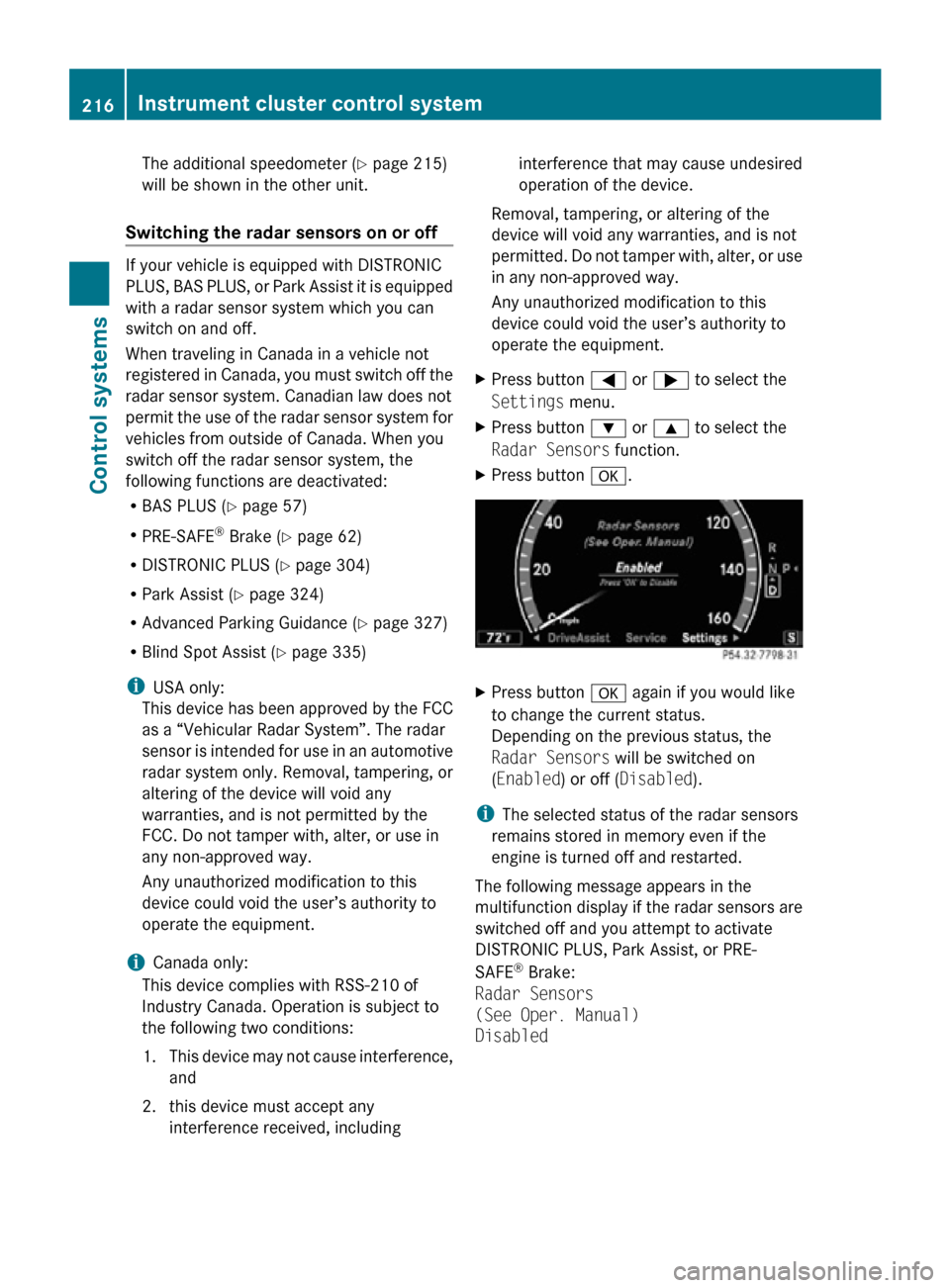
X Press button = or ; to select the
Settings menu.
X Press button : or 9 to select the
Radar Sensors function.
X Press button a. X
Press button a again if you would like
to change the current status.
Depending on the previous status, the
Radar Sensors will be switched on
(Enabled) or off (Disabled).
i The selected status of the radar sensors
remains stored in memory even if the
engine is turned off and restarted.
The following message appears in the
multifunction display if the radar sensors are
switched off and you attempt to activate
DISTRONIC PLUS, Park Assist, or PRE-
SAFE ®
Brake:
Radar Sensors
(See Oper. Manual)
Disabled 216
Instrument cluster control systemControl systems
216_AKB; 3; 90, en-US
d2ureepe,
Version: 2.11.8.1 2009-05-15T11:47:50+02:00 - Seite 216
Page 307 of 500
G
Warning!
When the DISTRONIC PLUS is braking, the
brake pedal is retracted (i.e. depressed
automatically). The pedals’ range of motion
must not be impeded by any obstacles:
R Do not place any objects in the footwell.
R Make sure that the floormats and carpets
are securely in place.
R Do not
rest your foot underneath the brake
pedal, as it could otherwise be trapped.
You could otherwise cause an accident and
injure yourself and/or others. G
Warning!
The DISTRONIC PLUS is a convenience
system. Its speed adjustment reduction
capability is intended to make cruise control
more effective
and usable when traffic speeds
vary. It is not however, intended to, nor does
it, replace the need for extreme care.
The responsibility for the vehicle’s speed,
distance to the preceding vehicle and, most
importantly, brake operation to ensure a safe
stopping distance, always remains with the
driver.
The DISTRONIC PLUS cannot take street and
traffic conditions into account.
Complex driving situations are not always
fully recognized by the DISTRONIC PLUS. This
could result in wrong or missing distance
warnings. G
Warning!
The DISTRONIC PLUS adaptive cruise control
is not a substitute for active driving
involvement. It does not react to pedestrians
or on
stationary objects, nor does it recognize
or predict the curvature and lane layout or the
movement of preceding vehicles. The
DISTRONIC PLUS can only apply a maximum
of 40% of the vehicle’s braking power.
The DISTRONIC PLUS may not detect narrow
vehicles possibly driving in front of you, such as motorcycles and vehicles driving in an
offset formation.
It is the driver’s responsibility at all times to
be attentive to the road, weather and traffic
conditions. Additionally, the driver must
provide
the
steering, braking and other driving
inputs necessary to remain in control of the
vehicle.
High-frequency sources such as toll stations,
speed measuring systems etc. can cause the
DISTRONIC PLUS system to temporarily
cease functioning. G
Warning!
The DISTRONIC PLUS cannot take road and
traffic conditions into account. Only use the
DISTRONIC PLUS if the road, weather and
traffic conditions make it advisable to travel
at a constant speed. G
Warning!
Use of the DISTRONIC PLUS can be
dangerous on slippery roads. Rapid changes
in tire traction can result in wheel spin and
loss of control.
The DISTRONIC PLUS does not function in
adverse sight
and distance conditions. Do not
use the DISTRONIC PLUS during conditions of
fog, heavy rain, snow or sleet. G
Warning!
The DISTRONIC PLUS cannot take weather
conditions into account. Switch off the
DISTRONIC PLUS or do not switch it on if:
R roads are
slippery or covered with snow or
ice. The wheels could lose traction while
braking or accelerating, and the vehicle
could skid.
R the DISTRONIC PLUS system sensor covers
are dirty or visibility is diminished due to
snow, rain or fog, for example. The distance
control system functionality could be
impaired.
Always pay attention to surrounding traffic
conditions even while the DISTRONIC PLUS is Driving systems
305
Controls in detail
216_AKB; 3; 90, en-US
d2ureepe, Version: 2.11.8.1 2009-05-15T11:47:50+02:00 - Seite 305 Z
Page 308 of 500
switched on. Otherwise, you may not be able
to recognize dangerous situations until it is
too
late.
This could cause an accident in which
you and/or others could be injured. G
Warning!
The “Resume” function should only be
operated if the driver is fully aware of the
previously set speed and wishes to resume
this particular preset speed. G
Warning!
Close attention to road and traffic conditions
is imperative at all times, regardless of
whether or not the DISTRONIC PLUS is
activated.
Use of the DISTRONIC PLUS can be
dangerous on
winding roads or in heavy traffic
because conditions do not allow safe driving
at a constant speed.
The DISTRONIC PLUS will not react to
stationary objects in the roadway (e.g. a
stopped vehicle in a traffic jam or a disabled
vehicle). The DISTRONIC PLUS will also not
respond to oncoming vehicles.
Switch off the DISTRONIC PLUS:
R when changing from the left to the right
lane if vehicles are moving more slowly in
the left lane
R when entering a turn lane or highway off
ramp
R in complex driving situations, such as in
highway construction zones
In these situations, the DISTRONIC PLUS will
continue to maintain the set speed unless
deactivated.
The DISTRONIC PLUS is designed and
intended only to maintain a set speed and
keep a set distance from moving objects in
front of it.
The DISTRONIC PLUS functions in a speed
range of 0 to 120 mph
(Canada: 0 to 200 km/h) if a preceding
vehicle is detected. If no preceding vehicle is
detected the DISTRONIC PLUS functions in a speed range of 20 to 120 mph
(Canada: 30 to 200 km/h).
Always obey applicable speed limits.
Do not use the DISTRONIC PLUS if you are
driving
on
a road with steep uphill or downhill
slopes.
When traveling in Canada in a vehicle not
registered in Canada, you must switch off the
radar sensor system ( Y page 216). Canadian
law does not permit the use of the radar
sensor system for vehicles from outside of
Canada. When you switch off the radar sensor
system, the following functions are
deactivated:
R DISTRONIC PLUS
R BAS PLUS (Y page 57)
R PRE-SAFE ®
Brake (Y page 62)
R Park Assist ( Y page 324)
R Advanced Parking Guidance ( Y page 327)
R Blind Spot Assist (Y page 335)
i Due to its radar-emitting nature
DISTRONIC PLUS may have an appearance
similar to a radar detector to law
enforcement officials. You may want to
refer to this section of your Operator’s
Manual when asked.
i USA only:
This device has been approved by the FCC
as a “Vehicular Radar System”. The radar
sensor is intended for use in an automotive
radar system only. Removal, tampering, or
altering of the device will void any
warranties, and is not permitted by the
FCC. Do not tamper with, alter, or use in
any non-approved way.
Any unauthorized modification to this
device could void the user’s authority to
operate the equipment. 306
Driving systems
Controls in detail
216_AKB; 3; 90, en-US
d2ureepe,
Version: 2.11.8.1 2009-05-15T11:47:50+02:00 - Seite 306