light MERCEDES-BENZ CLA 2013 User Guide
[x] Cancel search | Manufacturer: MERCEDES-BENZ, Model Year: 2013, Model line: CLA, Model: MERCEDES-BENZ CLA 2013Pages: 352, PDF Size: 5.37 MB
Page 17 of 352
R
Radar sensor system Activating/deactivating .................223
Display message ............................ 243
Radio
Selecting a station .........................214
see separate operating instructions
Radio-based vehicle components
Declaration of conformity ................23
Rain closing feature (panorama
sliding sunroof) ................................... 91
Reading lamp ..................................... 113
Rear bench seat Folding the backrest forwards/
back ............................................... 271
Rear compartment
Setting the air vents ......................142
Rear-compartment seat belt sta-
tus indicator ........................................ 49
Rear foglamp Changing bulbs .............................. 118
Display message ............................ 238
Switching on/off ........................... 108
Rear lamps
see Lights
Rear-view mirror
Anti-dazzle mode (automatic) ........102
Dipping (manual) ........................... 101
Rear window heating
Problem (fault) ............................... 134
Switching on/off ........................... 133
Refuelling
Fuel gauge ....................................... 30
Important safety notes ..................159
Refuelling process .........................160
see Fuel
Remote control
Auxiliary heating/ventilation .......... 137
Changing the batteries (auxiliary
heating) ......................................... 138
Replacing the battery (auxiliary
heating remote control) .................... 138
Reserve (fuel tank) see Fuel
Reserve fuel
Display message ............................ 242
Warning lamp ................................. 262Residual heat (climate control) ........ 135
Restraint system see SRS (Supplemental Restraint
System)
Rev counter ........................................ 209
Reverse gear Engaging (manual transmission) ....152
Reversing camera
Cleaning instructions .....................291
Function/notes ............................. 191
Switching on/off ........................... 191
Reversing feature
Panorama sliding sunroof ................90
Roller sunblinds ............................... 91
Side windows ................................... 87
Reversing lamp
Changing bulbs .............................. 118
Reversing lamps
Display message ............................ 239
Roller sunblind
Opening/closing .............................. 92
Panorama sliding sunroof ................91
Roof carrier ........................................ 273
Roof lining and carpets (cleaning
instructions) ...................................... 294
Roof load (maximum) ........................ 343
Route (navigation) see Route guidance (navigation)
Route guidance (navigation) ............ 213
S
Safety Children in the vehicle .....................50
Child restraint systems ....................50
Safety system
see Driving safety system
Seat
Folding the backrest (rear com-
partment) forwards/back ..............271
Seat belt
Adjusting the driver's and front-
passenger seat belt .........................48
Adjusting the height ......................... 48
Belt force limiter .............................. 50
Belt tensioner .................................. 50
Cleaning ......................................... 294
Display message ............................ 234
Index15
Page 19 of 352
Steering (display message) .............. 253
Steering wheel Adjusting (manually) ......................100
Button overview ............................... 33
Buttons (on-board computer) ......... 209
Cleaning ......................................... 293
Gearshift paddles ........................... 156
Important safety notes ..................100
Steering wheel gearshift paddles .... 156
Stowage areas ................................... 268
Stowage compartment Spectacles compartment ...............269
Stowage compartments
Armrest (front) ............................... 269
Armrest (under) ............................. 270
Centre console .............................. 269
Centre console (rear) .....................270
Cup holder ..................................... 274
Glove compartment .......................269
Important safety information .........268
Luggage net ................................... 271
Under driver's seat/front-
passenger seat .............................. 270
Stowage well beneath the boot
floor .................................................... 273
Summer tyres .................................... 318
Sun visor ............................................ 275
Supplemental Restraint System see SRS (Supplemental Restraint
System)
Surround lighting (on-board com-
puter) .................................................. 222
Switching off the alarm (ATA) ............ 71
T
Tail lamps Display message ............................ 238
see Lights
Tank
see Fuel tank
Technical data
Capacities ...................................... 336
Emergency spare wheel .................332
Information .................................... 334
Trailer loads ................................... 345
Tyres/wheels ................................. 329
Vehicle data ................................... 343
Telephone
Accepting a call ............................. 216
Display message ............................ 254
Menu (on-board computer) ............215
Number from the phone book ........ 216
Redialling ....................................... 217
Rejecting/ending a call .................216
Telephone compartment ................270
Temperature
Coolant .......................................... 208
Outside temperature ...................... 209
Setting (climate control) ................130
TEMPOMAT
Function/notes ............................. 168
Theft-deterrent system
ATA (Anti-Theft Alarm system) .........71
Immobiliser ...................................... 71
Through-loading ................................ 271
Through-loading feature ................... 271
Time see Separate Owner's manual
TIREFIT kit .......................................... 299
Top Tether ............................................ 55
Tow-away protection .......................... 71
Towing Important safety notes ..................308
Towing a trailer
Active Parking Assist .....................191
Axle load, permissible ....................345
Bulb failure indicator for LED lamps 206
ESP ®
(Electronic Stability Program) . 70
Pulling away with a trailer ..............147
Trailer tow hitch display message ..253
Towing away
Fitting the towing eye ....................310
Removing the towing eye ...............310
With both axles on the ground .......310
With front axle raised ..................... 310
Tow-starting
Emergency engine starting ............311
Fitting the towing eye ....................310
Important safety notes ..................308
Removing the towing eye ...............310
Traction control ................................... 68
Trailer coupling see Towing a trailer Index17
Page 20 of 352
Trailer towing7-pin connector ............................. 206
Blind Spot Assist ............................ 199
Cleaning the trailer tow hitch ......... 292
Coupling up a trailer ......................204
Decoupling a trailer .......................204
Driving tips .................................... 201
Folding in the ball coupling ............205
Folding out the ball coupling ..........203
Important safety notes ..................201
Lights display message ..................237
Mounting dimensions ....................344
Parktronic ...................................... 185
Power supply ................................. 206
Shift range ..................................... 155
Trailer loads ................................... 345
Transmission
see Automatic transmission
see Manual transmission
Transmission position display
(DIRECT SELECT lever) ...................... 153
Transporting the vehicle .................. 311
Trim pieces (cleaning instructions) . 293
Trip computer (on-board computer) 211
Trip meter Calling up ....................................... 211
Resetting (on-board computer) ......212
see Trip meter
Turn signals
Changing bulbs (front) ...................117
Changing bulbs (rear) ....................118
Switching on/off ........................... 109
Two-way radio
Frequencies ................................... 334
Installation ..................................... 334
Transmission output (maximum) .... 334
Type identification plate
see Vehicle identification plate
Tyre pressure
Calling up (on-board computer) .....322
Display message ............................ 248
Not reached (TIREFIT) ....................301
Reached (TIREFIT) ..........................301
Recommended ............................... 319
Tyre pressure loss warning
Important safety notes ..................321
Restarting ...................................... 321Tyre pressure monitor
Checking the tyre pressure elec-
tronically ........................................ 323
Function/notes ............................. 322
Restarting ...................................... 324
Warning lamp ................................. 265
Warning message .......................... 323
Tyres
Changing a wheel .......................... 324
Checking ........................................ 317
Direction of rotation ......................325
Display message ............................ 248
Important safety notes ..................316
M+S tyres ...................................... 318
MOExtended tyres .........................318
Replacing ....................................... 324
Service life ..................................... 317
Storing ........................................... 325
Summer tyres ........................ 168, 318
Tyre size (data) .............................. 329
Tyre tread ...................................... 317
see Flat tyre
U
Unlocking Emergency unlocking .......................83
From inside the vehicle (central
unlocking button) ............................. 82
V
Vanity mirror (in sun visor) .............. 275
Variable SPEEDTRONIC see SPEEDTRONIC
Vehicle
Correct use ...................................... 24
Data acquisition ............................... 25
Electronics ..................................... 334
Equipment ....................................... 22
Implied warranty .............................. 24
Individual settings ..........................219
Leaving parked up .........................164
Locking (in an emergency) ...............84
Locking (key) ................................... 77
Lowering ........................................ 328
Pulling away ................................... 146
Raising ........................................... 326
Registration ..................................... 24
18Index
Page 27 of 352
Data stored in the vehicle
A wide range of electronic components in
your vehicle contain data memories.
These data memories temporarily or perma-
nently store technical information about:
R the vehicle's operating state
R events
R faults
In general, this technical information docu-
ments the state of a component, a module, a
system or the surroundings.
These include, for example:
R operating conditions of system compo-
nents, e.g. fluid levels
R the vehicle's status messages and those of
its individual components, e.g. number of
wheel revolutions/speed, deceleration in
movement, lateral acceleration, accelera-
tor pedal position
R malfunctions and defects in important sys-
tem components, e.g. lights, brakes
R vehicle reactions and operating conditions
in special driving situations, e.g. airbag
deployment, intervention of stability con-
trol systems
R ambient conditions, e.g. outside tempera-
ture
This data is of an exclusively technical nature
and can be used to:
R assist in recognising and rectifying faults
and defects
R analyse vehicle functions, e.g. after an acci-
dent
R optimise vehicle functions
The data cannot be used to trace the vehicle's
movements.
When your vehicle is serviced, technical infor-
mation can be read from the event data mem-
ory and fault data memory.
Services include, for example:
R repair services
R service processesRwarranties
R quality assurance
It is read by employees of the service network
(including manufacturers) using special diag-
nostic testers. More detailed information is
obtained from it, if required.
After a fault has been rectified, the informa-
tion is deleted from the fault memory or is
continually overwritten.
When operating the vehicle, situations are
conceivable in which this technical data, in
connection with other information (if neces-
sary, under consultation with an authorised
expert), could be traced to a person.
Examples include:
R accident reports
R damage to the vehicle
R witness statements
Further additional functions that have been
contractually agreed upon with the customer
allow certain vehicle data to be conveyed by
the vehicle as well. The additional functions
include, for example, vehicle location in case
of an emergency.
Copyright information
General notes
Information on licences for free and open-
source software used in your vehicle and its
electronic components is available on the fol-
lowing website:
http://www.mercedes-benz.com/
opensource
Introduction25Z
Page 30 of 352
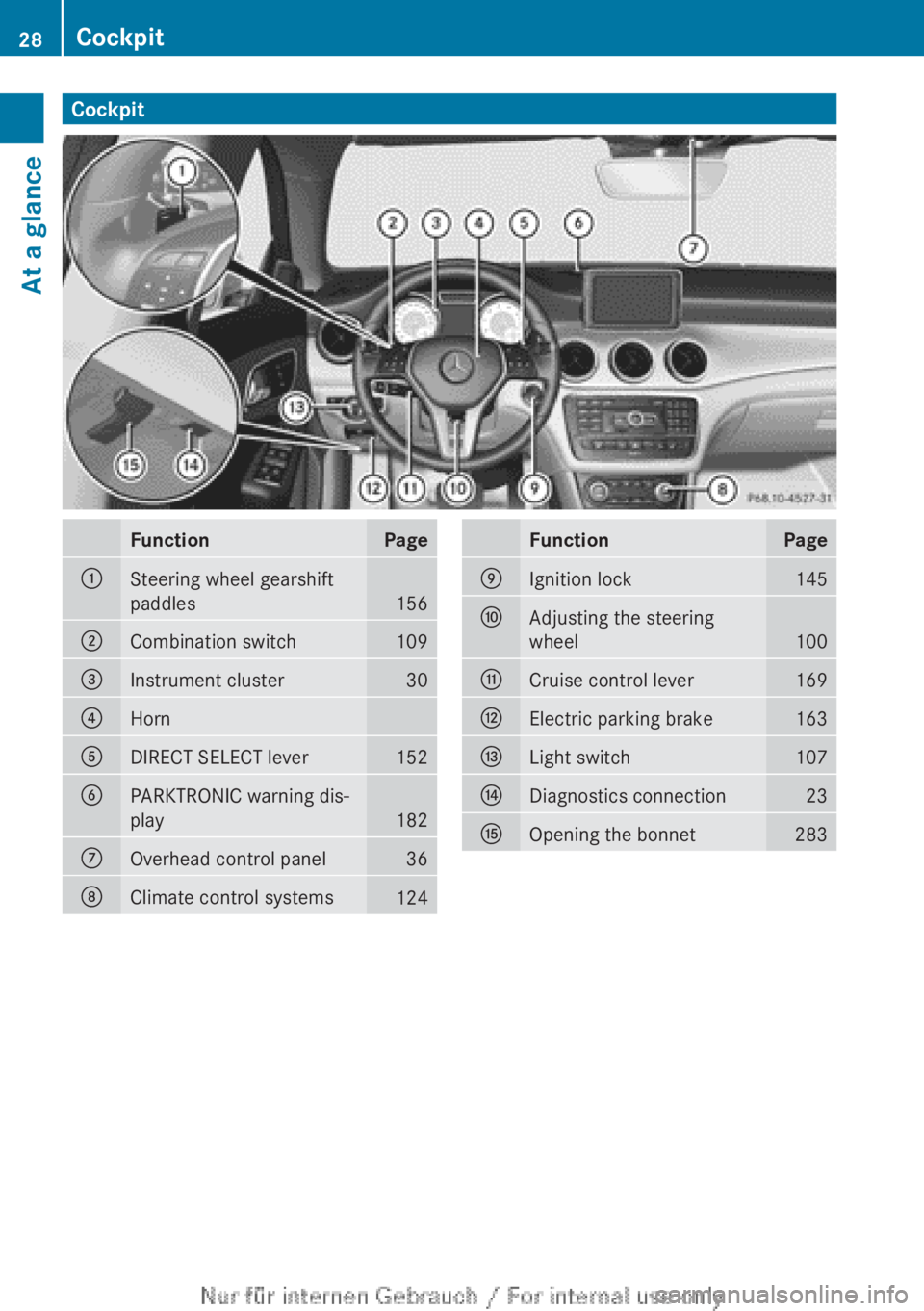
CockpitFunctionPage:Steering wheel gearshift
paddles
156
;Combination switch109=Instrument cluster30?HornADIRECT SELECT lever152BPARKTRONIC warning dis-
play
182
COverhead control panel36DClimate control systems124FunctionPageEIgnition lock145FAdjusting the steering
wheel
100
GCruise control lever169HElectric parking brake163ILight switch107JDiagnostics connection23KOpening the bonnet28328CockpitAt a glance
Page 31 of 352
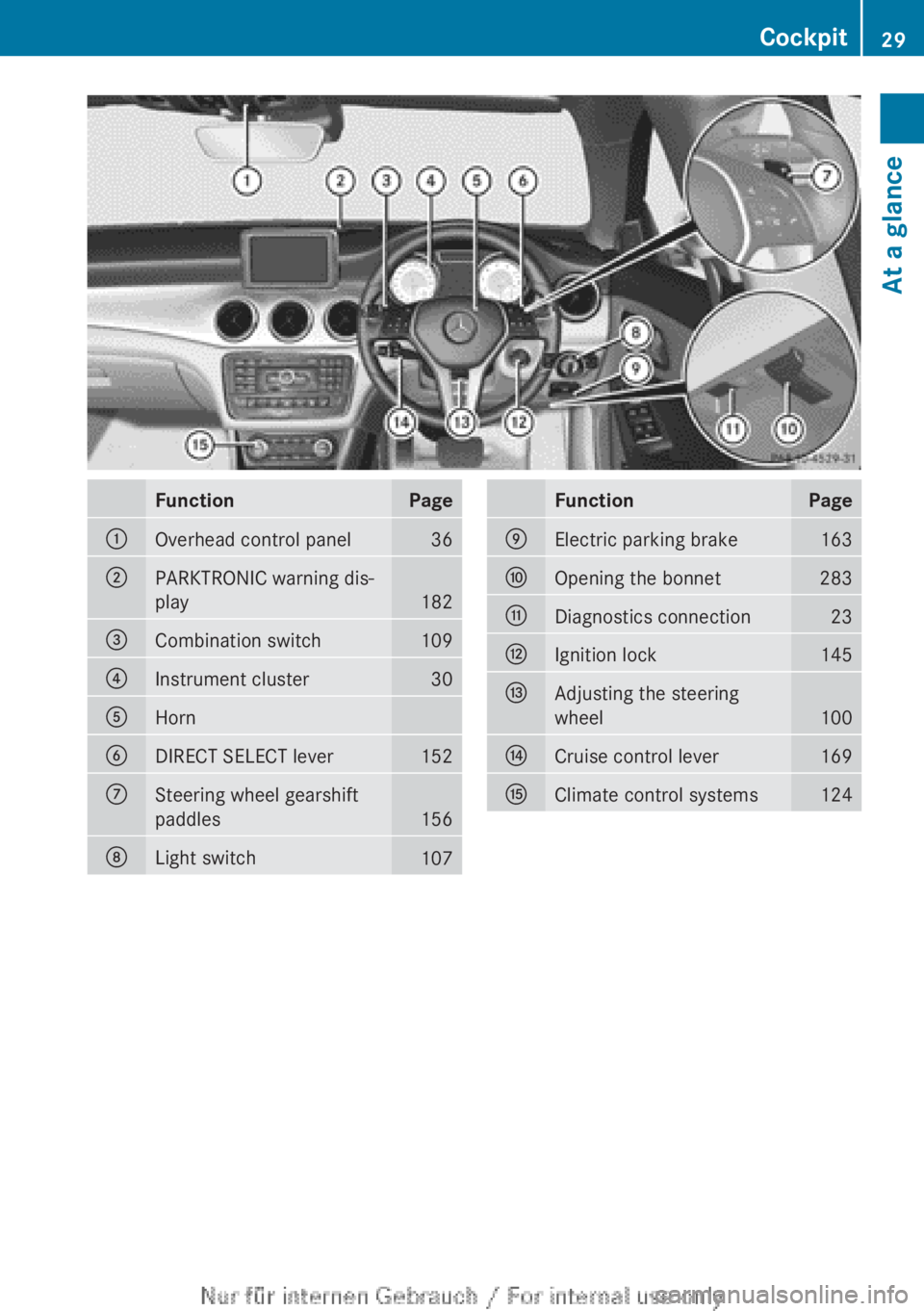
FunctionPage:Overhead control panel36;PARKTRONIC warning dis-
play
182
=Combination switch109?Instrument cluster30AHornBDIRECT SELECT lever152CSteering wheel gearshift
paddles
156
DLight switch107FunctionPageEElectric parking brake163FOpening the bonnet283GDiagnostics connection23HIgnition lock145IAdjusting the steering
wheel
100
JCruise control lever169KClimate control systems124Cockpit29At a glance
Page 32 of 352
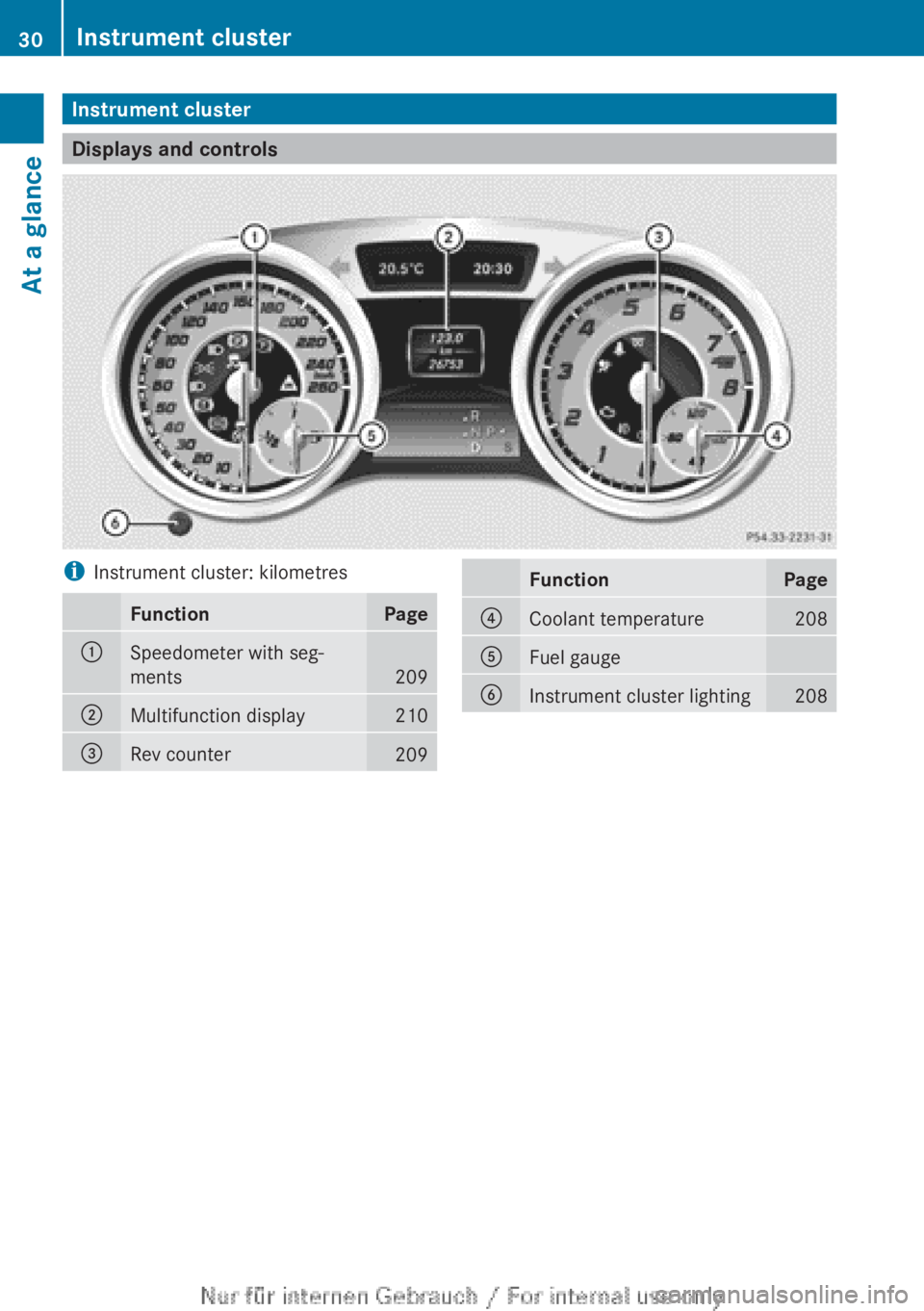
Instrument cluster
Displays and controls
iInstrument cluster: kilometresFunctionPage:Speedometer with seg-
ments
209
;Multifunction display210=Rev counter209FunctionPage?Coolant temperature208AFuel gaugeBInstrument cluster lighting20830Instrument clusterAt a glance
Page 33 of 352
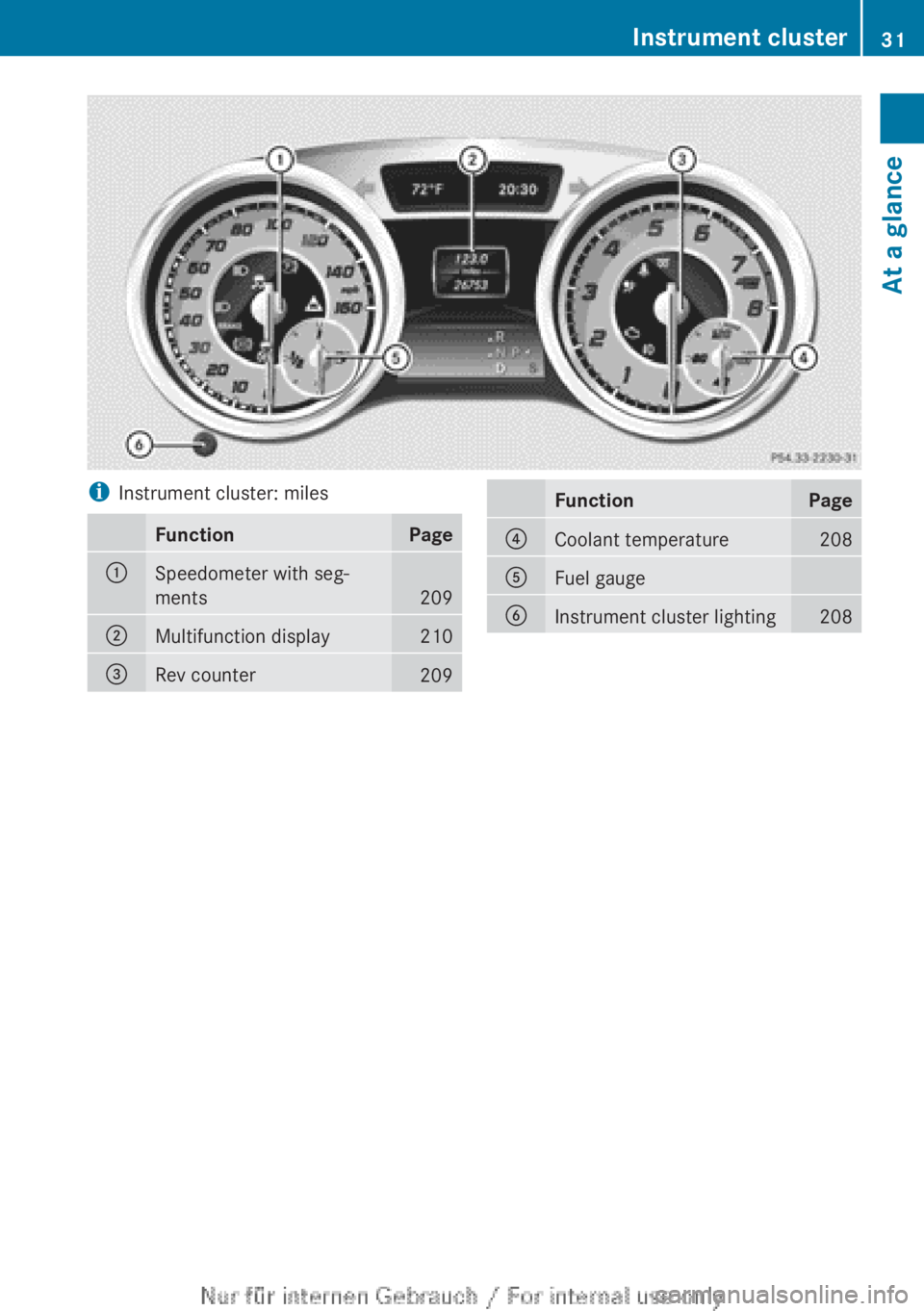
iInstrument cluster: milesFunctionPage:Speedometer with seg-
ments
209
;Multifunction display210=Rev counter209FunctionPage?Coolant temperature208AFuel gaugeBInstrument cluster lighting208Instrument cluster31At a glance
Page 37 of 352
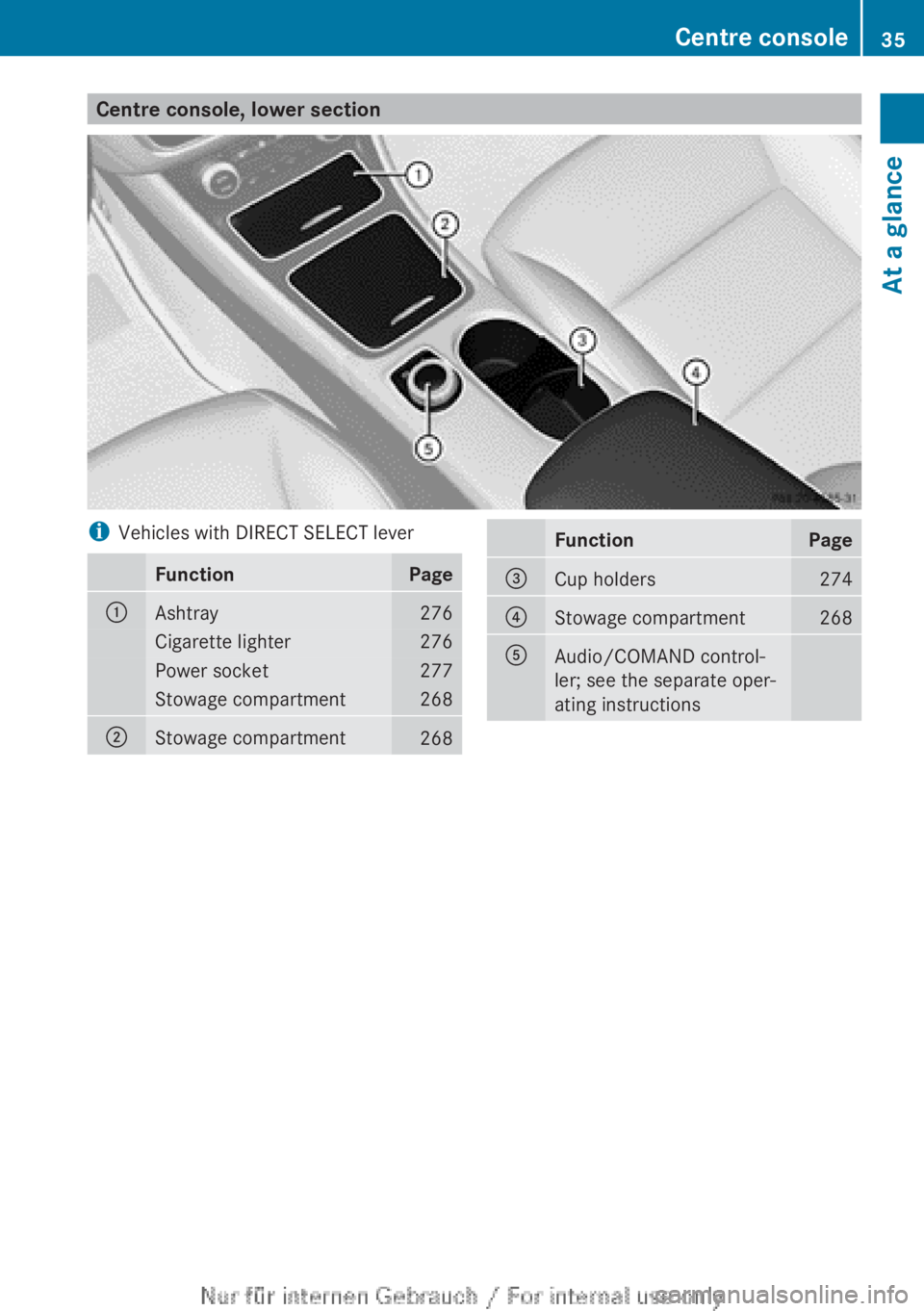
Centre console, lower sectioniVehicles with DIRECT SELECT leverFunctionPage:Ashtray276Cigarette lighter276Power socket277Stowage compartment268;Stowage compartment268FunctionPage=Cup holders274?Stowage compartment268AAudio/COMAND control-
ler; see the separate oper-
ating instructionsCentre console35At a glance
Page 38 of 352
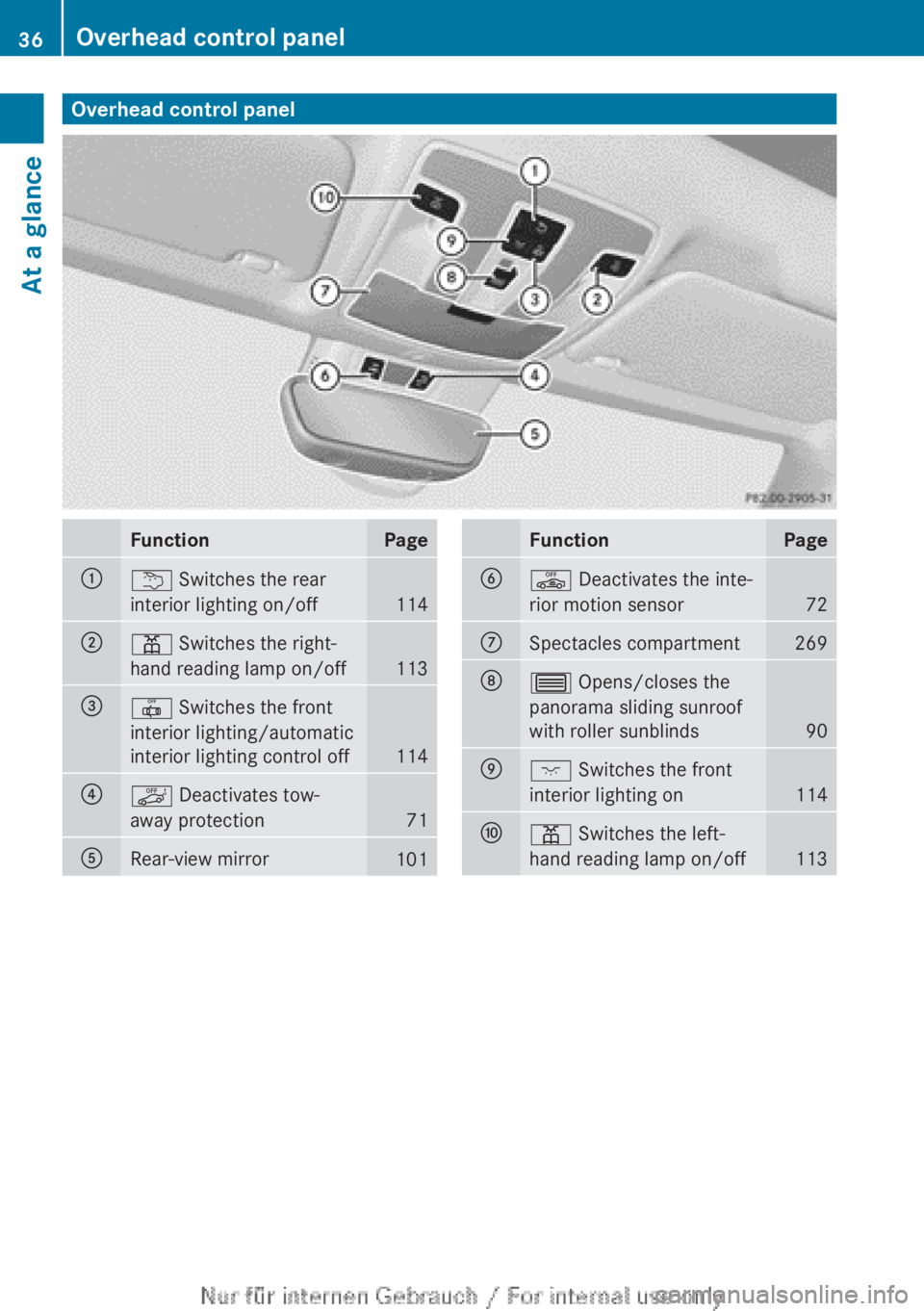
Overhead control panelFunctionPage:u Switches the rear
interior lighting on/off
114
;p Switches the right-
hand reading lamp on/off
113
=| Switches the front
interior lighting/automatic
interior lighting control off
114
?ë Deactivates tow-
away protection
71
ARear-view mirror101FunctionPageBê Deactivates the inte-
rior motion sensor
72
CSpectacles compartment269D3 Opens/closes the
panorama sliding sunroof
with roller sunblinds
90
Ec Switches the front
interior lighting on
114
Fp Switches the left-
hand reading lamp on/off
113
36Overhead control panelAt a glance