warning MERCEDES-BENZ CLA 2013 User Guide
[x] Cancel search | Manufacturer: MERCEDES-BENZ, Model Year: 2013, Model line: CLA, Model: MERCEDES-BENZ CLA 2013Pages: 352, PDF Size: 5.37 MB
Page 17 of 352
R
Radar sensor system Activating/deactivating .................223
Display message ............................ 243
Radio
Selecting a station .........................214
see separate operating instructions
Radio-based vehicle components
Declaration of conformity ................23
Rain closing feature (panorama
sliding sunroof) ................................... 91
Reading lamp ..................................... 113
Rear bench seat Folding the backrest forwards/
back ............................................... 271
Rear compartment
Setting the air vents ......................142
Rear-compartment seat belt sta-
tus indicator ........................................ 49
Rear foglamp Changing bulbs .............................. 118
Display message ............................ 238
Switching on/off ........................... 108
Rear lamps
see Lights
Rear-view mirror
Anti-dazzle mode (automatic) ........102
Dipping (manual) ........................... 101
Rear window heating
Problem (fault) ............................... 134
Switching on/off ........................... 133
Refuelling
Fuel gauge ....................................... 30
Important safety notes ..................159
Refuelling process .........................160
see Fuel
Remote control
Auxiliary heating/ventilation .......... 137
Changing the batteries (auxiliary
heating) ......................................... 138
Replacing the battery (auxiliary
heating remote control) .................... 138
Reserve (fuel tank) see Fuel
Reserve fuel
Display message ............................ 242
Warning lamp ................................. 262Residual heat (climate control) ........ 135
Restraint system see SRS (Supplemental Restraint
System)
Rev counter ........................................ 209
Reverse gear Engaging (manual transmission) ....152
Reversing camera
Cleaning instructions .....................291
Function/notes ............................. 191
Switching on/off ........................... 191
Reversing feature
Panorama sliding sunroof ................90
Roller sunblinds ............................... 91
Side windows ................................... 87
Reversing lamp
Changing bulbs .............................. 118
Reversing lamps
Display message ............................ 239
Roller sunblind
Opening/closing .............................. 92
Panorama sliding sunroof ................91
Roof carrier ........................................ 273
Roof lining and carpets (cleaning
instructions) ...................................... 294
Roof load (maximum) ........................ 343
Route (navigation) see Route guidance (navigation)
Route guidance (navigation) ............ 213
S
Safety Children in the vehicle .....................50
Child restraint systems ....................50
Safety system
see Driving safety system
Seat
Folding the backrest (rear com-
partment) forwards/back ..............271
Seat belt
Adjusting the driver's and front-
passenger seat belt .........................48
Adjusting the height ......................... 48
Belt force limiter .............................. 50
Belt tensioner .................................. 50
Cleaning ......................................... 294
Display message ............................ 234
Index15
Page 18 of 352
Fastening ......................................... 48
Important safety guidelines .............46
Rear seat belt status indicator .........49
Releasing ......................................... 49
Switching belt adjustment on/off
(on-board computer) ......................225
Warning lamp ................................. 255
Warning lamp (function) ................... 49
Seats
Adjusting (electrically) .....................96
Adjusting (manually) ........................96
Adjusting the 4-way lumbar sup-
port .................................................. 98
Adjusting the head restraint ............97
Cleaning the cover .........................293
Correct driver's seat position ........... 94
Important safety notes ....................95
Seat heating problem ....................100
Storing settings (memory function) 103
Switching seat heating on/off .........99
Sensors (cleaning instructions) ....... 291
Service see ASSYST PLUS
Service menu (on-board computer) . 219
Service products Brake fluid ..................................... 341
Coolant (engine) ............................ 341
Engine oil ....................................... 340
Fuel ................................................ 337
Important safety notes ..................336
Washer fluid ................................... 342
Settings
Factory (on-board computer) .........225
On-board computer .......................219
Setting the air distribution ............... 131
Setting the airflow ............................ 131
Shifting to neutral (manual trans-
mission) ............................................. 152
Sidebag ................................................ 44
Side lamps Switching on/off ........................... 108
Side windows
Convenience closing ........................88
Convenience opening ......................88
Important safety notes ....................86
Opening/closing .............................. 87
Problem (malfunction) .....................89
resetting .......................................... 88Sliding sunroof
see Panorama sliding sunroof
Snow chains ...................................... 319
Socket Centre console .............................. 277
Points to observe before use .........277
Rear compartment .........................277
Specialist workshop ............................ 24
Spectacles compartment ................. 269
Speed, controlling see Cruise control
Speed Limit Assist
Activating/deactivating the warn-
ing function .................................... 218
Displaying ...................................... 217
Display message ............................ 243
Display message in the multifunc-
tion display .................................... 197
Function/notes ............................. 196
Important safety notes ..................196
Speedometer
Activating/deactivating the addi-
tional speedometer ........................220
Digital ............................................ 212
In the Instrument cluster .................30
Segments ...................................... 209
Selecting the unit of measurement 220
see Instrument cluster
SPEEDTRONIC
Deactivating variable .....................172
Display message ............................ 247
Function/notes ............................. 171
Important safety notes ..................171
LIM indicator lamp .........................171
Permanent ..................................... 173
Selecting ........................................ 171
Storing the current speed ..............172
Variable ......................................... 171
SRS (Supplemental Restraint Sys-
tem) Display message ............................ 235
Introduction ..................................... 41
Warning lamp ................................. 261
Warning lamp (function) ................... 41
Start/stop function
see ECO start/stop function
Starting (engine) ................................ 145
STEER CONTROL .................................. 7016Index
Page 20 of 352
Trailer towing7-pin connector ............................. 206
Blind Spot Assist ............................ 199
Cleaning the trailer tow hitch ......... 292
Coupling up a trailer ......................204
Decoupling a trailer .......................204
Driving tips .................................... 201
Folding in the ball coupling ............205
Folding out the ball coupling ..........203
Important safety notes ..................201
Lights display message ..................237
Mounting dimensions ....................344
Parktronic ...................................... 185
Power supply ................................. 206
Shift range ..................................... 155
Trailer loads ................................... 345
Transmission
see Automatic transmission
see Manual transmission
Transmission position display
(DIRECT SELECT lever) ...................... 153
Transporting the vehicle .................. 311
Trim pieces (cleaning instructions) . 293
Trip computer (on-board computer) 211
Trip meter Calling up ....................................... 211
Resetting (on-board computer) ......212
see Trip meter
Turn signals
Changing bulbs (front) ...................117
Changing bulbs (rear) ....................118
Switching on/off ........................... 109
Two-way radio
Frequencies ................................... 334
Installation ..................................... 334
Transmission output (maximum) .... 334
Type identification plate
see Vehicle identification plate
Tyre pressure
Calling up (on-board computer) .....322
Display message ............................ 248
Not reached (TIREFIT) ....................301
Reached (TIREFIT) ..........................301
Recommended ............................... 319
Tyre pressure loss warning
Important safety notes ..................321
Restarting ...................................... 321Tyre pressure monitor
Checking the tyre pressure elec-
tronically ........................................ 323
Function/notes ............................. 322
Restarting ...................................... 324
Warning lamp ................................. 265
Warning message .......................... 323
Tyres
Changing a wheel .......................... 324
Checking ........................................ 317
Direction of rotation ......................325
Display message ............................ 248
Important safety notes ..................316
M+S tyres ...................................... 318
MOExtended tyres .........................318
Replacing ....................................... 324
Service life ..................................... 317
Storing ........................................... 325
Summer tyres ........................ 168, 318
Tyre size (data) .............................. 329
Tyre tread ...................................... 317
see Flat tyre
U
Unlocking Emergency unlocking .......................83
From inside the vehicle (central
unlocking button) ............................. 82
V
Vanity mirror (in sun visor) .............. 275
Variable SPEEDTRONIC see SPEEDTRONIC
Vehicle
Correct use ...................................... 24
Data acquisition ............................... 25
Electronics ..................................... 334
Equipment ....................................... 22
Implied warranty .............................. 24
Individual settings ..........................219
Leaving parked up .........................164
Locking (in an emergency) ...............84
Locking (key) ................................... 77
Lowering ........................................ 328
Pulling away ................................... 146
Raising ........................................... 326
Registration ..................................... 24
18Index
Page 21 of 352
Securing from rolling away ............326
Towing away .................................. 308
Tow-starting ................................... 308
Transporting .................................. 311
Unlocking (in an emergency) ...........83
Unlocking (key) ................................ 77
Vehicle data ................................... 343
Vehicle data ....................................... 343
Vehicle dimensions ........................... 343
Vehicle emergency locking ................ 84
Vehicle identification number see VIN
Vehicle identification plate .............. 336
Vehicle maintenance see ASSYST PLUS
Vehicle tool kit .................................. 297
Vehicle weights ................................. 343
Video (DVD) ........................................ 215
Video DVD (on-board computer) ...... 215
VIN ...................................................... 336
W
Warning and indicator lamps ABS ................................................ 256
Brakes ........................................... 256
Distance warning signal .................264
ESP ®
.............................................. 258
ESP ®
OFF ....................................... 259
Fuel tank ........................................ 262
LIM (cruise control) ........................ 169
LIM (DISTRONIC PLUS) ..................174
LIM (variable SPEEDTRONIC) .........171
Overview .......................................... 32
PASSENGER AIRBAG OFF ................53
Reserve fuel ................................... 262
Seat belt ........................................ 255
SRS ................................................ 261
Tyre pressure monitor ...................265
Warning triangle ................................ 296
Washer fluid Display message ............................ 254
Wheel bolt tightening torque ........... 328
Wheel chock ...................................... 326
Wheels Changing/replacing .......................324
Changing a wheel .......................... 324
Checking ........................................ 317
Cleaning ......................................... 289
Cleaning (warning) .........................325
Emergency spare wheel .................331
Fitting a new wheel ........................328
Fitting a wheel ............................... 325
Important safety notes ..................316
Removing a wheel ..........................328
Storing ........................................... 325
Tightening torque ........................... 328
Wheel size/tyre size ......................329
Windowbag
Display message ............................ 236
Operation ......................................... 45
Windows
Cleaning ......................................... 290
see Side windows
Windscreen
Demisting ...................................... 132
see Windscreen
Windscreen washer fluid
see Windscreen washer system
Windscreen washer system
Notes ............................................. 342
Topping up ..................................... 286
Windscreen wipers
Display message ............................ 254
Problem (malfunction) ...................121
Replacing the wiper blades ............119
Switching on/off ........................... 118
Winter driving
General notes ................................ 318
Winter operation
Slippery road surfaces ...................168
Snow chains .................................. 319
Winter tyres
Limiting the speed (on-board com-
puter) ............................................. 223
M+S tyres ...................................... 318
Wiper blades
Cleaning ......................................... 291
Important safety notes ..................119
Replacing (windscreen) ..................119
Wooden trim (cleaning instructions) 293
Workshop see Qualified specialist workshop Index19
Page 24 of 352
Do not install accessories such as audio
systems in these areas. Do not carry out
repairs or welding. You could impair the
operating efficiency of the restraint sys-
tems.
Have accessories retrofitted at a qualified
specialist workshop.
If you use parts, tyres and wheels as well as
accessories relevant to safety which have not
been approved by Mercedes, the operating
safety of the vehicle could be jeopardised.
This could lead to malfunctions in safety-rel-
evant systems, e.g. the brake system. Only
use genuine Mercedes-Benz parts or parts of
equal quality. Only use tyres, wheels and
accessories that have been specifically
approved for your vehicle.
Mercedes-Benz tests genuine parts and con-
version parts and accessories that have been
specifically approved for your vehicle for their
reliability, safety and suitability. Despite
ongoing market research, Mercedes-Benz is
unable to assess other parts. Mercedes-Benz
accepts no responsibility for the use of such
parts in Mercedes-Benz vehicles, even if they
have been independently or officially
approved.
In Germany, certain parts are only officially
approved for installation or modification if
they comply with legal requirements. This
also applies to some other countries. All gen-
uine Mercedes-Benz parts meet the approval
requirements. The use of non-approved parts
may invalidate the vehicle's general operating
permit.
This is the case:
R if they cause a change of the vehicle type
from that for which the vehicle's general
operating permit was granted
R if other road users could be endangered
R if the emission or noise levels are adversely
affected
Always specify the vehicle identification num-
ber (VIN) ( Y page 336) and the engine num-
ber ( Y page 336) when ordering genuine
Mercedes-Benz parts.Owner's Manual
General notes
Before you first drive off, read this Owner's
Manual carefully and familiarise yourself with
your vehicle.
For your own safety and a longer vehicle life,
follow the instructions and warning notices in
this manual. Disregarding them may lead to
damage to the vehicle or personal injury.
Vehicle equipment
This Owner's Manual describes all models
and all standard and optional equipment
available for your vehicle at the time of pub-
lication of the Owner's Manual. Country-spe-
cific differences are possible. Note that your
vehicle may not be fitted with all features
described. This is also the case for systems
and functions relevant to safety. Therefore,
the equipment on your vehicle may differ from
that in the descriptions and illustrations.
The original purchase contract documenta-
tion for your vehicle contains a list of all of the
systems in your vehicle.
Should you have any questions concerning
equipment and operation, please consult a
Mercedes-Benz Service Centre.
The Owner's Manual and Service Booklet are
important documents and should kept in the
vehicle.
Operating safety
Important safety notes
GWARNING
If you do not have the prescribed service/
maintenance work or necessary repairs car-
ried out, this could result in malfunctions or
system failures. There is a risk of an accident.
Always have the prescribed service/mainte-
nance work as well as necessary repairs car-
ried out at a qualified specialist workshop.
22Introduction
Page 25 of 352
GWARNING
If you switch off the ignition while driving,
safety-relevant functions are only available
with limitations, or not at all. This could affect,
for example, the power steering and the brake
boosting effect. You will require considerably
more effort to steer and brake. There is a risk
of an accident.
Do not switch off the ignition while driving.
GWARNING
Modifications to electronic components, their
software as well as wiring could effect their
function and/or the operation of other net-
worked components. This could in particular
also be the case for systems relevant to
safety. They might not function properly any
more and/or jeopardise the operational
safety of the vehicle. There is an increased
risk of an accident and injury.
Do not attempt to modify the wiring as well as
electronic components or their software.
Always have work on electrical and electronic
components carried out at a qualified special-
ist workshop.
! There is a risk of damage to the vehicle if:
R the vehicle makes contact with the
ground, e.g. on a high kerb or a loose
road surface
R you drive too quickly over an obstacle,
e.g. a kerb or a pothole
R a heavy object hits the underbody or
chassis component
In these or similar situations, the vehicle
body, the underbody, chassis components,
wheels or tyres could be damaged even if
this is not visible. Components that have
been damaged in this way can unexpect-
edly fail or no longer be able to assimilate
the loads occurring in the event of an acci-
dent.
If the underbody panelling is damaged,
flammable material, such as leaves, grass
or twigs, could collect between the under-
body and underbody panelling. These
materials could ignite if they remain in con-
tact with hot components of the exhaust
system for an extended period.
Have the vehicle checked and repaired
immediately at a qualified specialist work-
shop. If you become aware when continu-
ing the journey that driving safety has been
effected, stop as soon as possible in
accordance with the traffic conditions. In
such cases, consult a qualified specialist
workshop.
Declarations of conformity
Wireless vehicle components
The following information applies to all com-
ponents of the vehicle and the information
systems and communication devices integra-
ted into the vehicle which receive and/or
transmit radio waves:
The components of this vehicle that receive
and/or transmit radio waves are compliant
with the basic requirements and all other rel-
evant conditions of Directive 1999/5/EC.
You can obtain further information from any
Mercedes-Benz Service Centre.
Electromagnetic compatibility
The electromagnetic compatibility of the vehi-
cle components has been checked and certi-
fied according to the currently valid version
of Regulation ECE-R 10.
Diagnostics connection
The diagnostics connection is only intended
for the connection of diagnostic equipment at
a qualified specialist workshop.
GWARNING
If you connect equipment to a diagnostics
connection in the vehicle, it can affect the
operation of the vehicle systems. This may
affect the operating safety of the vehicle.
There is a risk of an accident.
Introduction23Z
Page 26 of 352
Do not connect any equipment to a diagnos-
tics connection in the vehicle.GWARNING
Objects in the driver's footwell can restrict the
pedal travel or obstruct a depressed pedal.
The operating and road safety of the vehicle
is jeopardised. There is a risk of an accident.
Make sure that all objects in the vehicle are
stowed correctly, and that they cannot enter
the driver's footwell. Fit the floormats
securely and as specified in order to ensure
sufficient clearance for the pedals. Do not use
loose floormats.
! If the engine is switched off and equip-
ment on the diagnostics connection is
used, the starter battery may discharge.
Connecting equipment to the diagnostics
connection can lead to emissions monitoring
information being reset, for example. This
may lead to the vehicle failing to meet the
requirements of the next emissions test dur-
ing the main inspection.
Qualified specialist workshop
A qualified specialist workshop has the nec-
essary special skills, tools and qualifications
to correctly carry out any necessary work on
your vehicle. This particularly applies to work
relevant to safety.
Observe the notes in the Service Booklet.
Always have the following work carried out at
a qualified specialist workshop:
R work relevant to safety
R service and maintenance work
R repair work
R modifications, installations and conver-
sions
R work on electronic components
Mercedes-Benz recommends that you use a
Mercedes-Benz Service Centre.
Vehicle registration
Mercedes-Benz may ask its Service Centres
to carry out technical inspections on certain
vehicles. The quality or safety of the vehicle
is improved as a result of the inspection.
Mercedes-Benz can only inform you about
vehicle checks if it has your registration data.
It is possible that your vehicle has not yet
been registered in your name in the following
cases:
R if your vehicle was not purchased at an
authorised specialist dealer.
R if your vehicle has not yet been examined
at a Mercedes-Benz Service Centre.
It is advisable to register your vehicle with a
Mercedes-Benz Service Centre.
Inform Mercedes-Benz as soon as possible
about any change in address or vehicle own-
ership.
Correct use
If you remove any warning stickers, you or
others could fail to recognise certain dangers.
Leave warning stickers in position.
Observe the following information when driv-
ing your vehicle:
R the safety notes in this manual
R the technical data in this manual
R traffic rules and regulations
R laws and safety standards pertaining to
motor vehicles
Implied warranty
! Follow the instructions in this manual
about the proper operation of your vehicle
as well as about possible vehicle damage.
Damage to your vehicle that arises from
culpable contraventions against these
instructions are not covered either by
Mercedes-Benz implied warranty or by the
New or Used-Vehicle Warranty.
24Introduction
Page 30 of 352
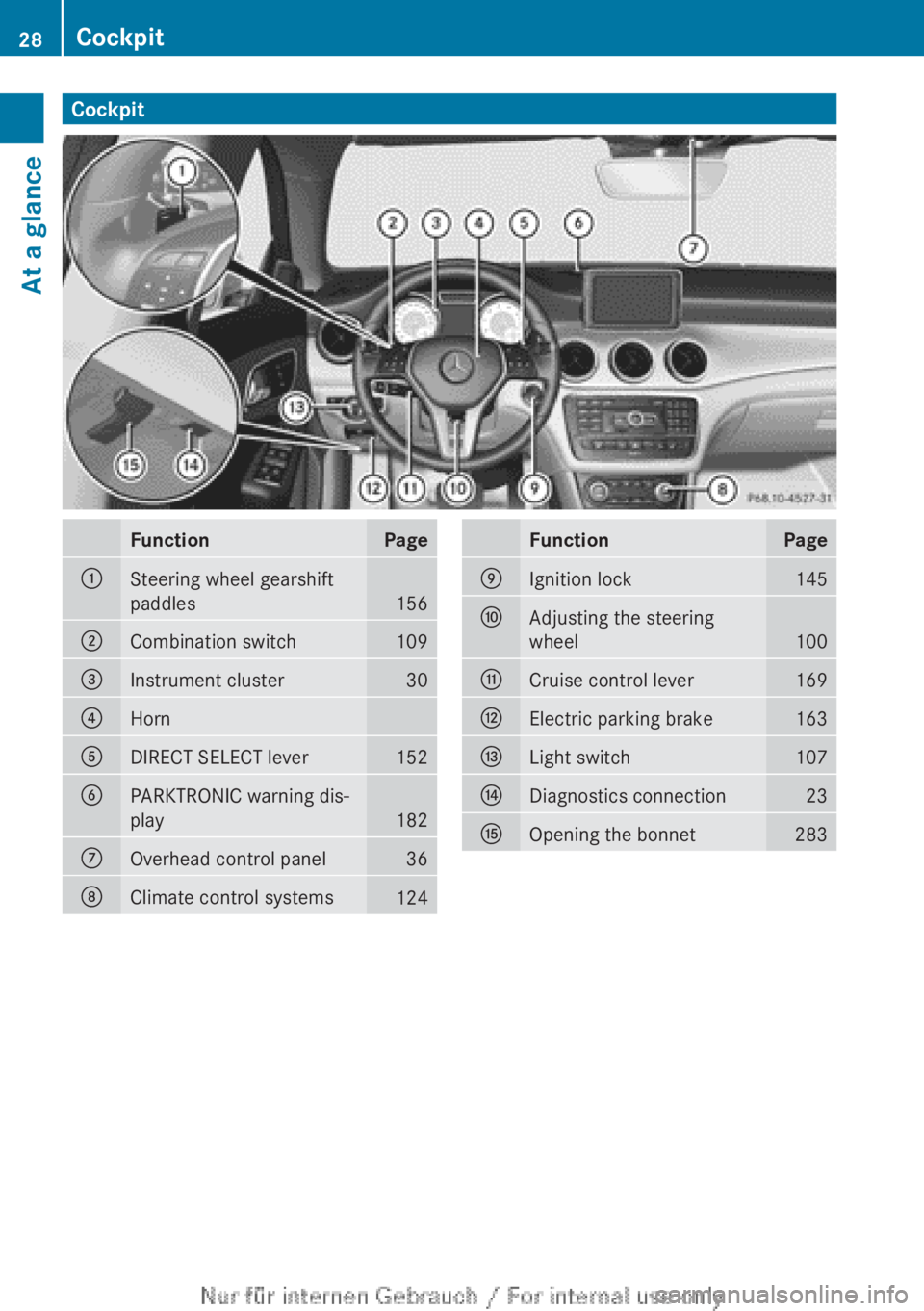
CockpitFunctionPage:Steering wheel gearshift
paddles
156
;Combination switch109=Instrument cluster30?HornADIRECT SELECT lever152BPARKTRONIC warning dis-
play
182
COverhead control panel36DClimate control systems124FunctionPageEIgnition lock145FAdjusting the steering
wheel
100
GCruise control lever169HElectric parking brake163ILight switch107JDiagnostics connection23KOpening the bonnet28328CockpitAt a glance
Page 31 of 352
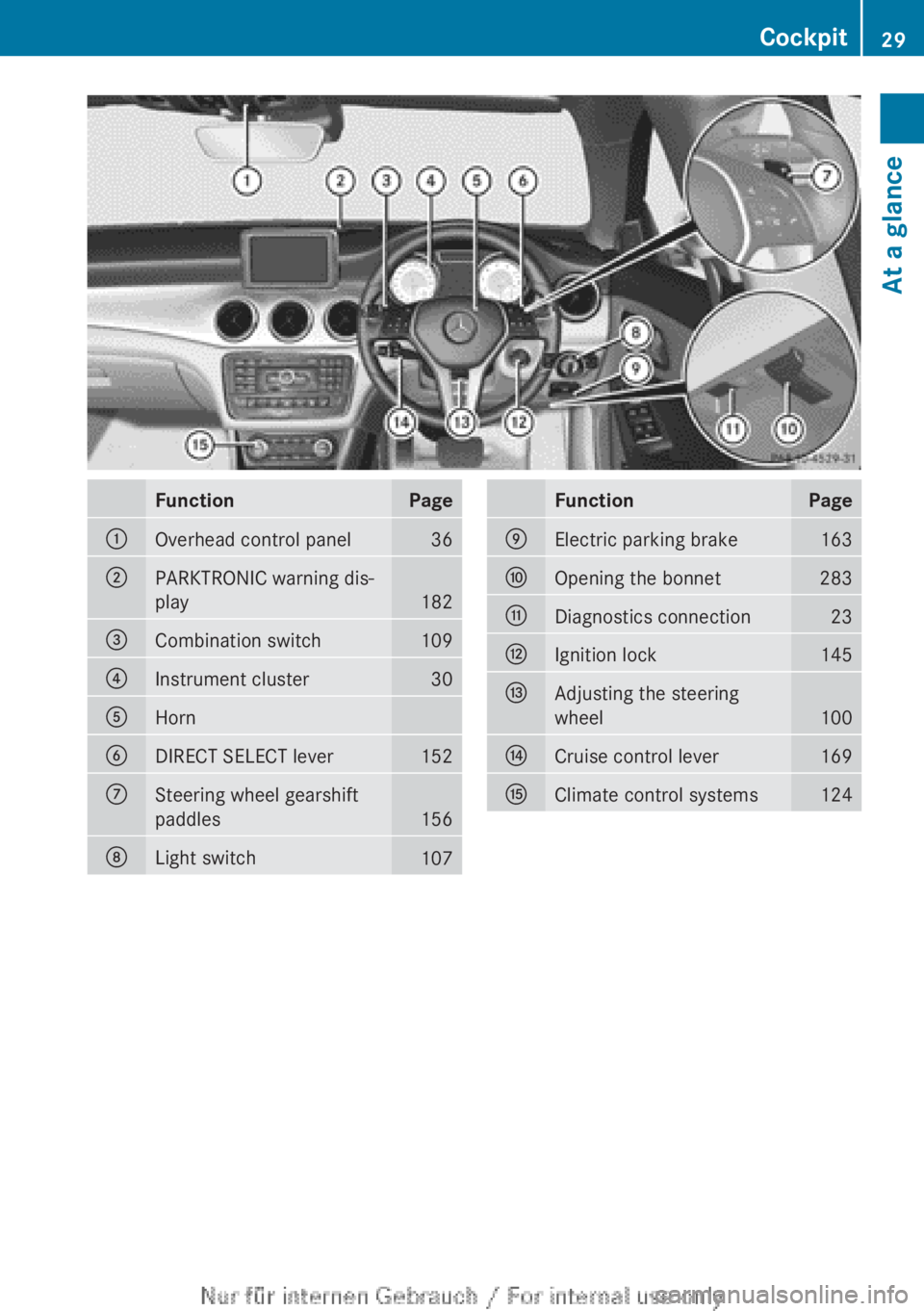
FunctionPage:Overhead control panel36;PARKTRONIC warning dis-
play
182
=Combination switch109?Instrument cluster30AHornBDIRECT SELECT lever152CSteering wheel gearshift
paddles
156
DLight switch107FunctionPageEElectric parking brake163FOpening the bonnet283GDiagnostics connection23HIgnition lock145IAdjusting the steering
wheel
100
JCruise control lever169KClimate control systems124Cockpit29At a glance
Page 34 of 352
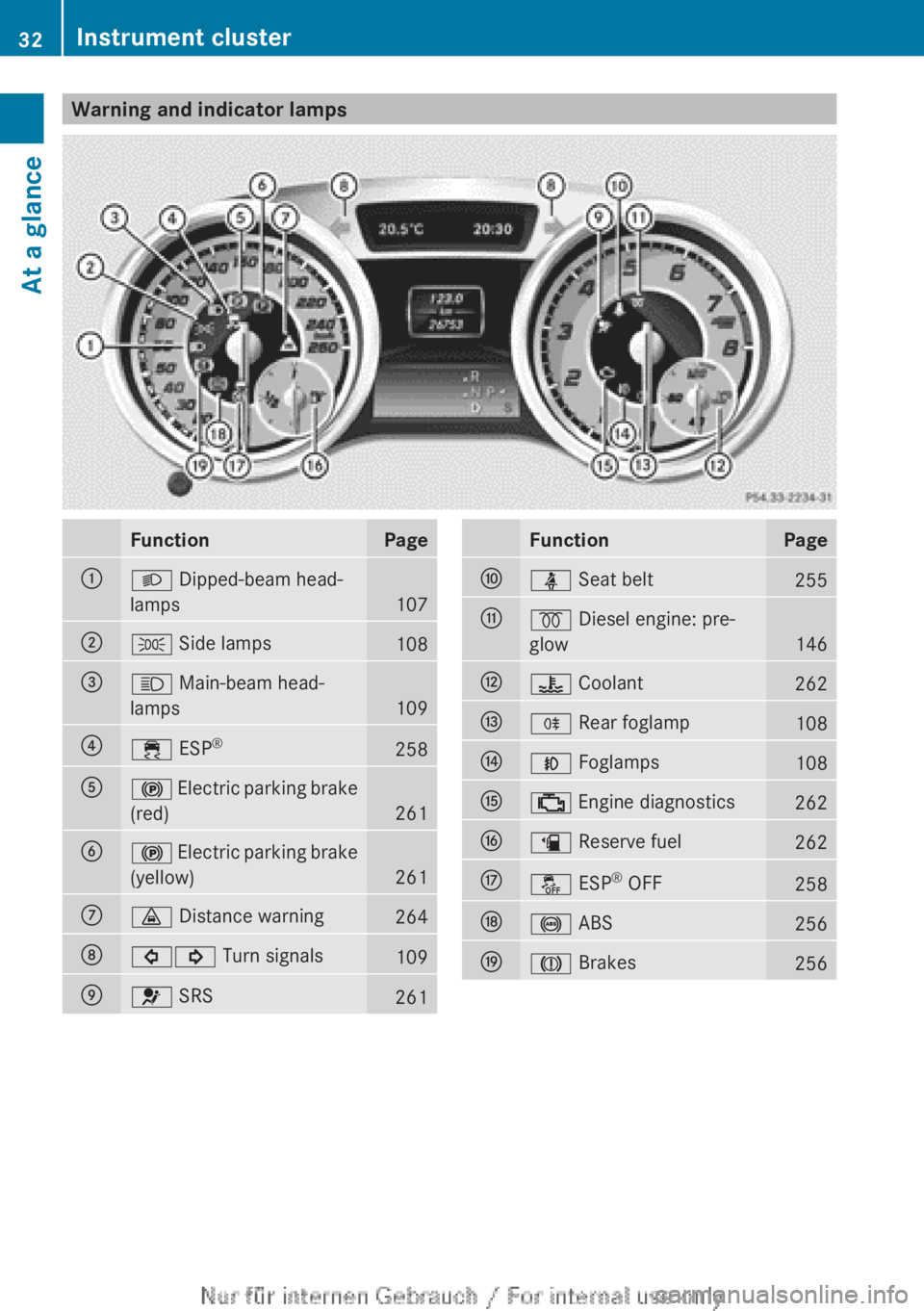
Warning and indicator lampsFunctionPage:L Dipped-beam head-
lamps
107
;T Side lamps108=K Main-beam head-
lamps
109
?÷ ESP®258A!
Electric parking brake
(red)
261
B! Electric parking brake
(yellow)
261
C· Distance warning264D#! Turn signals109E6 SRS261FunctionPageFü Seat belt255G% Diesel engine: pre-
glow
146
H? Coolant262IR Rear foglamp108JN Foglamps108K; Engine diagnostics262Læ Reserve fuel262Må ESP®
OFF258N! ABS256OJ Brakes25632Instrument clusterAt a glance