warning lights MERCEDES-BENZ CLA 2013 User Guide
[x] Cancel search | Manufacturer: MERCEDES-BENZ, Model Year: 2013, Model line: CLA, Model: MERCEDES-BENZ CLA 2013Pages: 352, PDF Size: 5.37 MB
Page 64 of 352
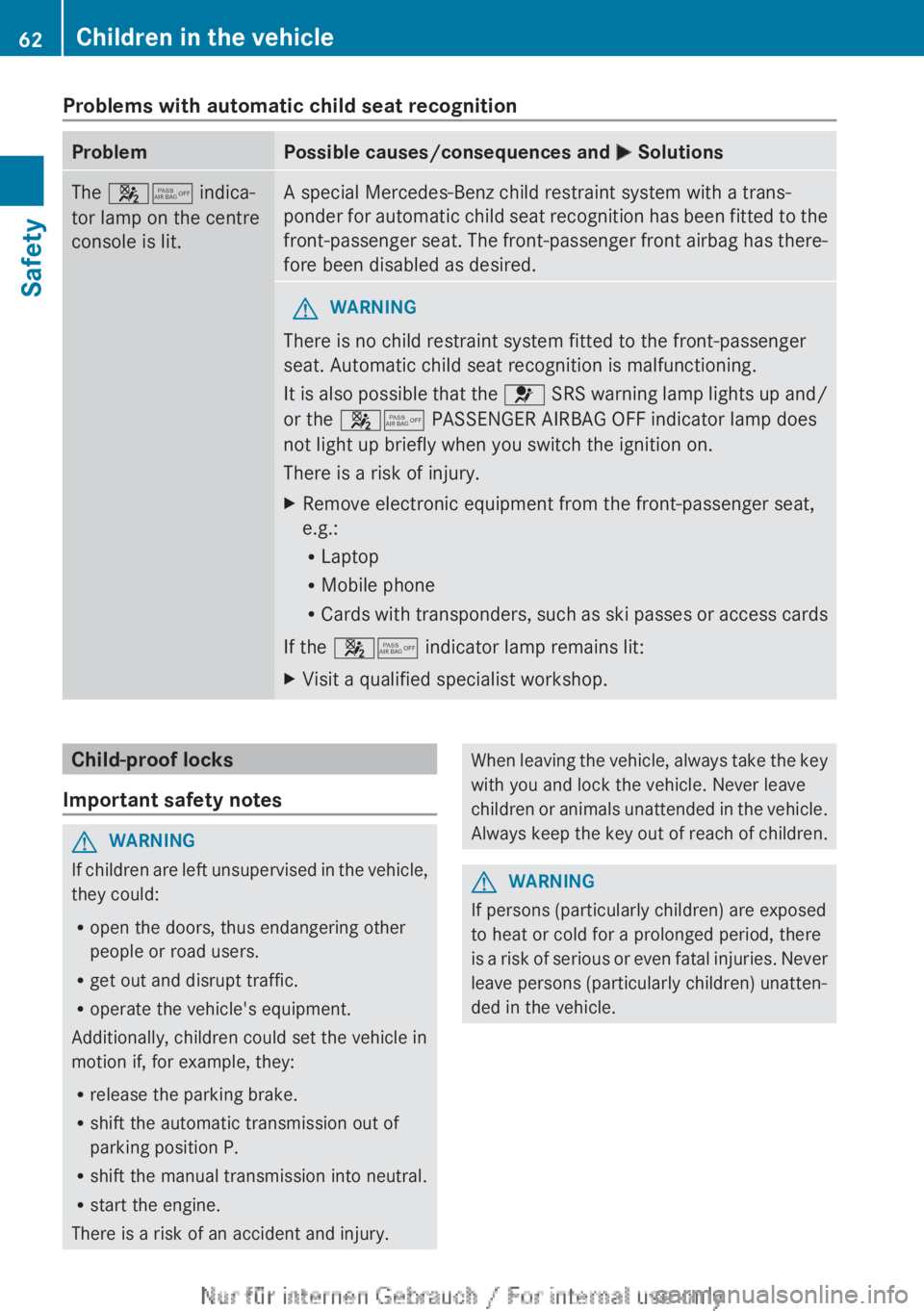
Problems with automatic child seat recognitionProblemPossible causes/consequences and M SolutionsThe 45 indica-
tor lamp on the centre
console is lit.A special Mercedes-Benz child restraint system with a trans-
ponder for automatic child seat recognition has been fitted to the
front-passenger seat. The front-passenger front airbag has there-
fore been disabled as desired.GWARNING
There is no child restraint system fitted to the front-passenger
seat. Automatic child seat recognition is malfunctioning.
It is also possible that the 6 SRS warning lamp lights up and/
or the 45 PASSENGER AIRBAG OFF indicator lamp does
not light up briefly when you switch the ignition on.
There is a risk of injury.
XRemove electronic equipment from the front-passenger seat,
e.g.:
R Laptop
R Mobile phone
R Cards with transponders, such as ski passes or access cards
If the 45 indicator lamp remains lit:
XVisit a qualified specialist workshop.Child-proof locks
Important safety notesGWARNING
If children are left unsupervised in the vehicle,
they could:
R open the doors, thus endangering other
people or road users.
R get out and disrupt traffic.
R operate the vehicle's equipment.
Additionally, children could set the vehicle in
motion if, for example, they:
R release the parking brake.
R shift the automatic transmission out of
parking position P.
R shift the manual transmission into neutral.
R start the engine.
There is a risk of an accident and injury.
When leaving the vehicle, always take the key
with you and lock the vehicle. Never leave
children or animals unattended in the vehicle.
Always keep the key out of reach of children.GWARNING
If persons (particularly children) are exposed
to heat or cold for a prolonged period, there
is a risk of serious or even fatal injuries. Never
leave persons (particularly children) unatten-
ded in the vehicle.
62Children in the vehicleSafety
Page 66 of 352
Important safety notes
If you fail to adapt your driving style or if you
are inattentive, the driving safety systems can
neither reduce the risk of accident nor over-
ride the laws of physics. Driving safety sys-
tems are merely aids designed to assist driv-
ing. You are responsible for the distance to
the vehicle in front, for vehicle speed and for
braking in good time. Always adapt your driv-
ing style to suit the prevailing road, weather
and traffic conditions and maintain a safe dis-
tance from the vehicle in front. Drive care-
fully.
i The driving safety systems described only
work as effectively as possible when there
is adequate contact between the tyres and
the road surface. Pay particular attention
to the information regarding tyres, recom-
mended minimum tyre tread depths etc. in
the "Wheels and tyres" section
( Y page 316).
In wintry driving conditions, always use
winter tyres (M+S tyres) and, if necessary,
snow chains. Only in this way will the driv-
ing safety systems described in this section
work as effectively as possible.
ABS (Anti-lock Braking System)
General notes
ABS regulates brake pressure in such a way
that the wheels do not lock when you brake.
This allows you to continue steering the vehi-
cle when braking.
The ! ABS warning lamp in the instrument
cluster lights up when the ignition is switched
on. It goes out when the engine is running.
Important safety notes
i Observe the "Important safety notes" sec-
tion for driving safety systems
( Y page 64).
GWARNING
If ABS is faulty, the wheels could lock when
braking. The steerability and braking charac-
teristics may be severely impaired. Addition-
ally, further driving safety systems are deac-
tivated. There is an increased danger of skid-
ding and accidents.
Drive on carefully. Have ABS checked imme-
diately at a qualified specialist workshop.
If ABS is malfunctioning, other systems,
including driving safety systems, will also
become inoperative. Observe the information
on the ABS warning lamp ( Y page 256) and
display messages which may be shown in the
instrument cluster ( Y page 227).
ABS works from a speed of about
8 km/hupwards, regardless of road-surface
conditions. ABS works on slippery surfaces,
even when you only brake gently.
Braking
XIf ABS intervenes: continue to depress the
brake pedal with force until the braking sit-
uation is over.XTo make a full brake application:
depress the brake pedal with full force.
If ABS intervenes when braking, you will feel
a pulsing in the brake pedal.
The pulsating brake pedal can be an indica-
tion of hazardous road conditions, and func-
tions as a reminder to take extra care while
driving.
BAS (Brake Assist)
General notes
BAS operates in emergency braking situa-
tions. If you depress the brake pedal quickly,
BAS automatically boosts the braking force,
thus shortening the stopping distance.
64Driving safety systemsSafety
Page 67 of 352
Important safety notes
iObserve the "Important safety notes" sec-
tion ( Y page 64).
GWARNING
If BAS is malfunctioning, the braking distance
in an emergency braking situation is
increased. There is a risk of accident.
In an emergency braking situation, depress
the brake pedal with full force. ABS prevents
the wheels from locking.
Braking
XKeep the brake pedal depressed firmly until
the emergency braking situation is over.
ABS prevents the wheels from locking.
The brakes will function as usual once you
release the brake pedal. BAS is deactivated.
COLLISION PREVENTION ASSIST
General notes
COLLISION PREVENTION ASSIST consists of
the adaptive Brake Assist and the distance
warning signal, which are described in the
following.
Distance warning function
Important safety notes
i Observe the "Important safety notes" sec-
tion for driving safety systems
( Y page 64).
GWARNING
The distance warning function does not react:
R to people or animals
R to oncoming vehicles
R to crossing traffic
R when cornering
Thus, the distance warning function cannot
provide a warning in all critical situations.
There is a risk of an accident.
Always pay careful attention to the traffic sit-
uation and be ready to brake.
The distance warning function cannot always
clearly identify objects and complex traffic
situations.
In such cases, the distance warning function
may:
R give an unnecessary warning
R not give a warning
Always pay careful attention to the traffic sit-
uation; do not rely on the distance warning
function alone.
FunctionXTo activate/deactivate: activate or deac-
tivate the distance warning function in the
on-board computer ( Y page 218).
If the distance warning function is not activa-
ted, the æ symbol appears in the assis-
tance graphics display.
The distance warning function can help you
to minimise the risk of a front-end collision
with a vehicle ahead or reduce the effects of
such a collision. If the distance warning func-
tion detects that there is a risk of a collision,
you will be warned visually and acoustically.
Without your intervention, the distance warn-
ing function cannot prevent a collision.
The distance warning function issues a warn-
ing at speeds:
R of around 30 km/h or more, if, over several
seconds, the distance maintained to the
vehicle travelling in front is insufficient. The
· distance warning lamp then lights up
in the instrument cluster.
R of around 7 km/h or higher, if you very
quickly approach a vehicle in front. An
intermittent warning tone will then sound,
and the · distance warning lamp will
light up in the instrument cluster.
Driving safety systems65SafetyZ
Page 70 of 352
Rstrong radar reflections, for example, in
multi-storey car parks
R a narrow vehicle travelling in front, e.g. a
motorcycle
R a vehicle travelling in front on a different
line
Following damage to the front end of the vehi-
cle, have the configuration and operation of
the radar sensor checked at a qualified spe-
cialist workshop. This also applies to colli-
sions at slow speeds where there is no visible
damage to the front of the vehicle.
Adaptive brake lamps
Adaptive Brake Assist warns following traffic
in an emergency braking situation:
R by means of flashing brake lamps
R the hazard warning lamps are activated
If you brake sharply from a speed of more
than 50 km/h or if braking is assisted by BAS
or BAS PLUS, the brake lamps flash rapidly.
In this way, traffic travelling behind you is
warned in an even more noticeable manner.
If you brake sharply from a speed of more
than 70 km/h to a standstill, the hazard warn-
ing lamps are activated automatically. If the
brakes are applied again, the brake lamps
light up continuously. The hazard warning
lamps switch off automatically if you travel
faster than 10 km/h . You can also switch off
the hazard warning lamps using the hazard
warning button ( Y page 110).
ESP ®
(Electronic Stability Program)
General notes
i Observe the "Important safety notes" sec-
tion ( Y page 64).
ESP ®
monitors driving stability and traction,
i.e. power transmission between the tyres
and the road surface.
If ESP ®
detects that the vehicle is deviating
from the direction desired by the driver, one
or more wheels are braked to stabilise the
vehicle. The engine output is also modified to
keep the vehicle on the desired course within
physical limits. ESP ®
assists the driver when
pulling away on wet or slippery roads. ESP ®
can also stabilise the vehicle during braking.
ETS (Electronic Traction System)
i Observe the "Important safety notes" sec-
tion ( Y page 64).
ETS traction control is part of ESP ®
.
ETS brakes the drive wheels individually if
they spin. This enables you to pull away and
accelerate on slippery surfaces, for example
if the road surface is slippery on one side. In
addition, more drive torque is transferred to
the wheel or wheels with traction.
ETS remains active when you deactivate
ESP ®
.
Important safety notes
GWARNING
If ESP ®
is malfunctioning, ESP ®
is unable to
stabilise the vehicle. In addition, other driving
safety systems are switched off. This increa-
ses the risk of skidding and an accident.
Drive on carefully. Have ESP ®
checked at a
qualified specialist workshop.
! When testing the electric parking brake
on a braking dynamometer, switch off the
ignition. Application of the brakes by
ESP ®
may otherwise destroy the brake sys-
tem.
When towing your vehicle with the front axle
raised, observe the notes on
ESP ®
(Y page 310).
ESP ®
is deactivated if the å ESP®
OFF
warning lamp in the instrument cluster lights
up continuously when the engine is running.
If the ÷ ESP®
warning lamp and the
å ESP®
OFF warning lamp are lit contin-
uously, ESP ®
is not available due to a mal-
function.
68Driving safety systemsSafety
Page 71 of 352
Observe the information on warning lamps
( Y page 258) and display messages which
may be shown in the instrument cluster
( Y page 227).
i Only use wheels with the recommended
tyre sizes. Only then will ESP ®
function
properly.
Characteristics of ESP ®
General notes
If the ÷ ESP warning lamp goes out before
beginning the journey, ESP ®
is automatically
active.
If ESP ®
intervenes, the ÷ ESP®
warning
lamp flashes in the instrument cluster.
If ESP ®
intervenes:
XDo not deactivate ESP ®
under any circum-
stances.XWhen pulling away, only depress the accel-
erator pedal as far as is necessary.XAdapt your driving style to suit the prevail-
ing road and weather conditions.
ECO start/stop function
The ECO start/stop function switches the
engine off automatically if the vehicle stops
moving. When pulling away again, the engine
starts automatically. ESP ®
remains in its pre-
viously selected status. Example: if ESP®
was deactivated before the engine was
switched off, ESP ®
remains deactivated when
the engine is switched on again.
Deactivating/activating ESP ®
Important safety notes
i Observe the "Important safety notes" sec-
tion ( Y page 64).
You can select between the following states
of ESP ®
:
R ESP ®
is activated.
R ESP ®
is deactivated.
GWARNING
If you deactivate ESP ®
, ESP ®
no longer sta-
bilises the vehicle. There is an increased risk
of skidding and an accident.
Only deactivate ESP ®
in the situations descri-
bed in the following.
It may be best to deactivate ESP ®
in the fol-
lowing situations:
R when using snow chains
R in deep snow
R on sand or gravel
i Activate ESP ®
as soon as the situations
described above no longer apply. ESP ®
will
otherwise not be able to stabilise the vehi-
cle if the vehicle starts to skid or a wheel
starts to spin.
Deactivating/activating ESP ®
You can deactivate or activate ESP ®
via the
on-board computer.
XTo deactivate: (Y page 218).
The å ESP®
OFF warning lamp in the
instrument cluster lights up.XTo activate: (Y page 218).
The å ESP®
OFF warning lamp in the
instrument cluster goes out.
Characteristics when ESP ®
is deactivated
If ESP ®
is deactivated and one or more wheels
start to spin, the ÷ ESP®
warning lamp in
the instrument cluster flashes. In such situa-
tions, ESP ®
will not stabilise the vehicle.
If you deactivate ESP ®
:
R ESP ®
no longer improves driving stability.
R engine torque is no longer limited and the
drive wheels are able to spin.
The spinning of the wheels results in a cut-
ting action for better traction on loose sur-
faces.
R ETS is still active.
R ESP ®
still provides support when you
brake.
Driving safety systems69SafetyZ
Page 80 of 352
If you unlock the vehicle using the emergency
key element, the fuel filler flap will not be
unlocked automatically.XTo unlock the fuel filler flap: insert the
key into the ignition lock.
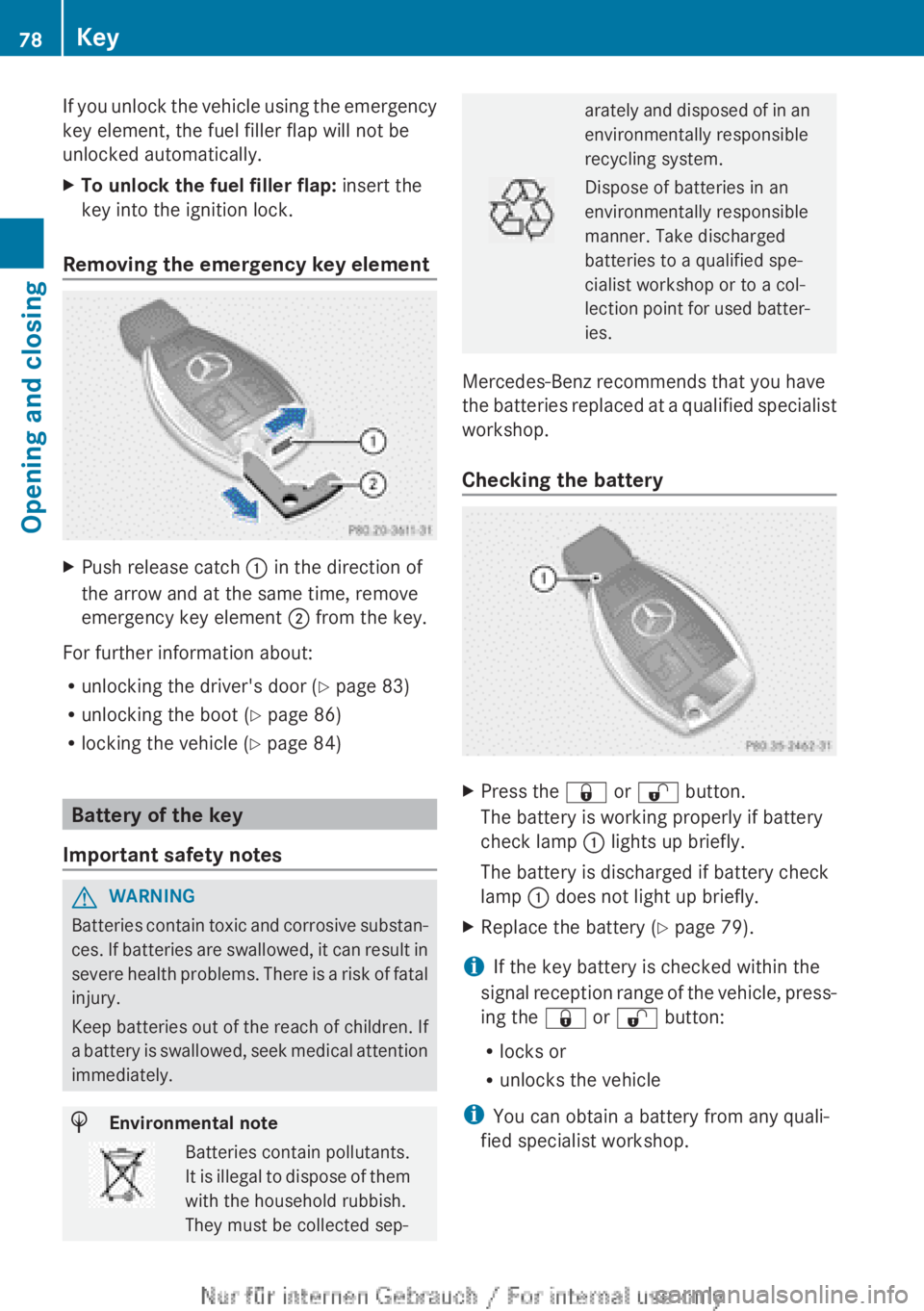
Removing the emergency key element
XPush release catch : in the direction of
the arrow and at the same time, remove
emergency key element ; from the key.
For further information about:
R unlocking the driver's door ( Y page 83)
R unlocking the boot ( Y page 86)
R locking the vehicle ( Y page 84)
Battery of the key
Important safety notes
GWARNING
Batteries contain toxic and corrosive substan-
ces. If batteries are swallowed, it can result in
severe health problems. There is a risk of fatal
injury.
Keep batteries out of the reach of children. If
a battery is swallowed, seek medical attention
immediately.
HEnvironmental noteBatteries contain pollutants.
It is illegal to dispose of them
with the household rubbish.
They must be collected sep-arately and disposed of in an
environmentally responsible
recycling system.Dispose of batteries in an
environmentally responsible
manner. Take discharged
batteries to a qualified spe-
cialist workshop or to a col-
lection point for used batter-
ies.
Mercedes-Benz recommends that you have
the batteries replaced at a qualified specialist
workshop.
Checking the battery
XPress the & or % button.
The battery is working properly if battery
check lamp : lights up briefly.
The battery is discharged if battery check
lamp : does not light up briefly.XReplace the battery ( Y page 79).
i If the key battery is checked within the
signal reception range of the vehicle, press-
ing the & or % button:
R locks or
R unlocks the vehicle
i You can obtain a battery from any quali-
fied specialist workshop.
78KeyOpening and closing
Page 103 of 352
Mirrors
Rear-view mirror
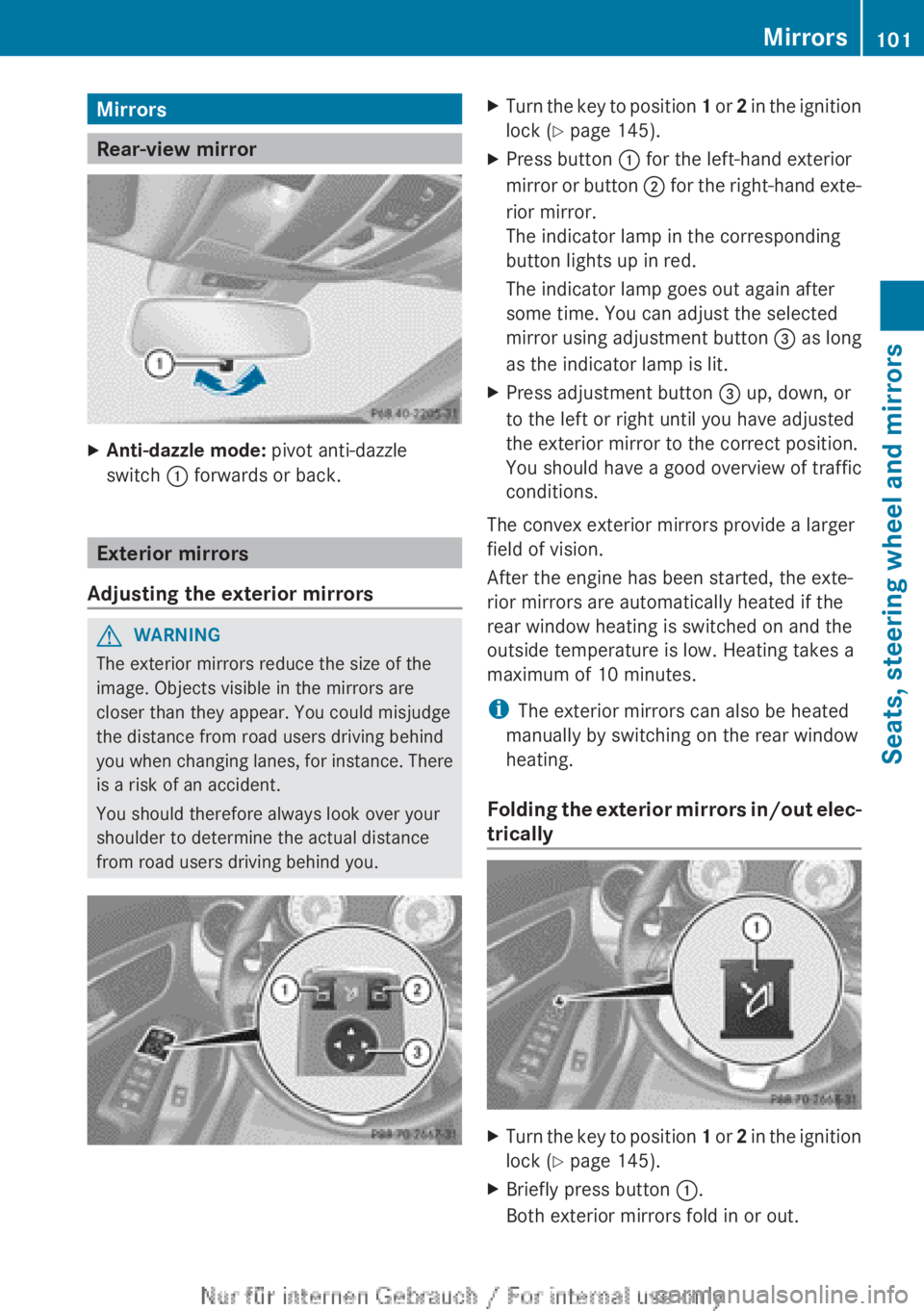
XAnti-dazzle mode: pivot anti-dazzle
switch : forwards or back.
Exterior mirrors
Adjusting the exterior mirrors
GWARNING
The exterior mirrors reduce the size of the
image. Objects visible in the mirrors are
closer than they appear. You could misjudge
the distance from road users driving behind
you when changing lanes, for instance. There
is a risk of an accident.
You should therefore always look over your
shoulder to determine the actual distance
from road users driving behind you.
XTurn the key to position 1 or 2 in the ignition
lock ( Y page 145).XPress button : for the left-hand exterior
mirror or button ; for the right-hand exte-
rior mirror.
The indicator lamp in the corresponding
button lights up in red.
The indicator lamp goes out again after
some time. You can adjust the selected
mirror using adjustment button = as long
as the indicator lamp is lit.XPress adjustment button = up, down, or
to the left or right until you have adjusted
the exterior mirror to the correct position.
You should have a good overview of traffic
conditions.
The convex exterior mirrors provide a larger
field of vision.
After the engine has been started, the exte-
rior mirrors are automatically heated if the
rear window heating is switched on and the
outside temperature is low. Heating takes a
maximum of 10 minutes.
i The exterior mirrors can also be heated
manually by switching on the rear window
heating.
Folding the exterior mirrors in/out elec-
trically
XTurn the key to position 1 or 2 in the ignition
lock ( Y page 145).XBriefly press button :.
Both exterior mirrors fold in or out.Mirrors101Seats, steering wheel and mirrorsZ
Page 109 of 352
Rcombination switch ( Y page 109)
R on-board computer ( Y page 220)
Light switch
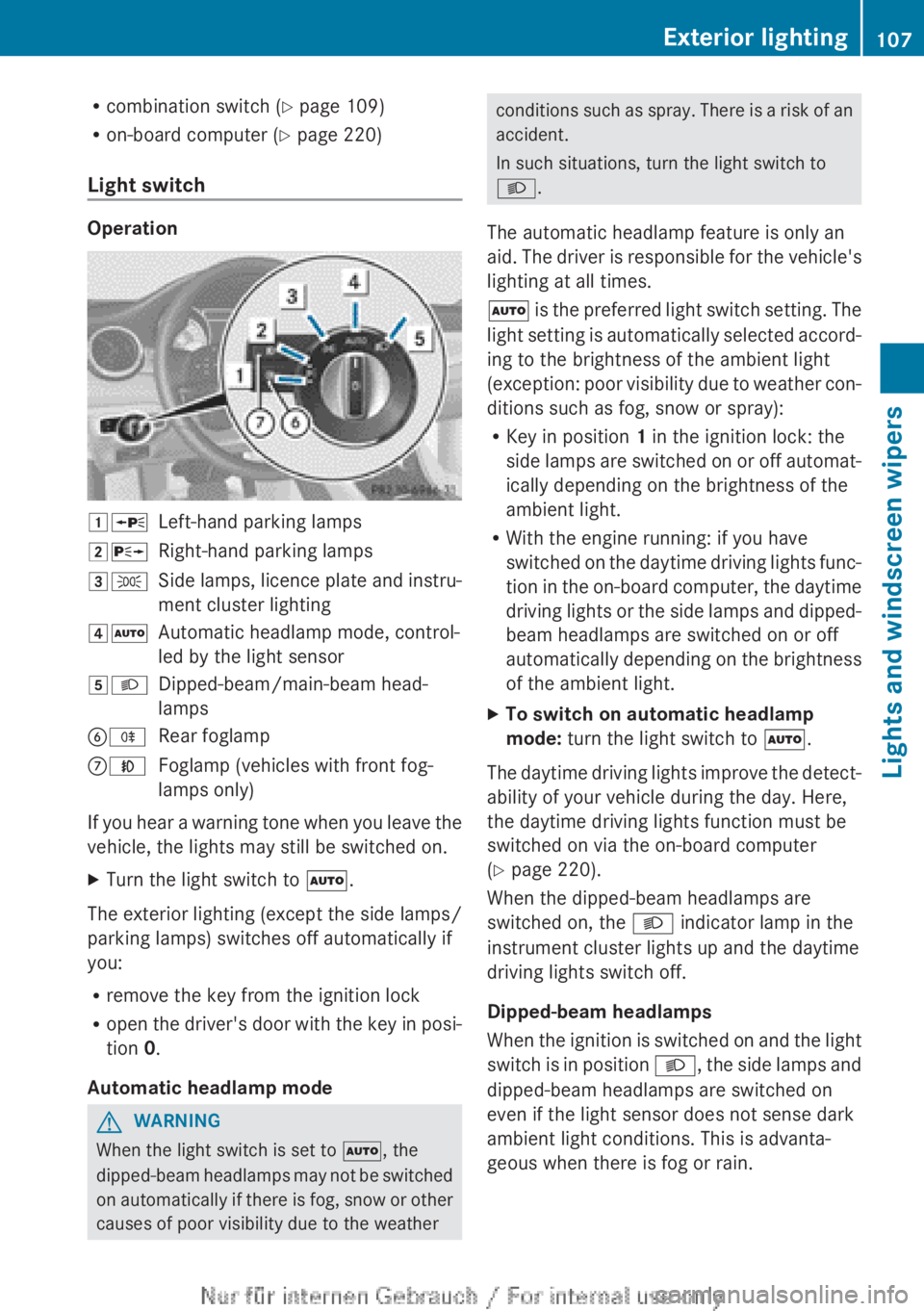
Operation
1 WLeft-hand parking lamps2XRight-hand parking lamps3TSide lamps, licence plate and instru-
ment cluster lighting4 ÃAutomatic headlamp mode, control-
led by the light sensor5 LDipped-beam/main-beam head-
lampsB RRear foglampCNFoglamp (vehicles with front fog-
lamps only)
If you hear a warning tone when you leave the
vehicle, the lights may still be switched on.
XTurn the light switch to Ã.
The exterior lighting (except the side lamps/
parking lamps) switches off automatically if
you:
R remove the key from the ignition lock
R open the driver's door with the key in posi-
tion 0.
Automatic headlamp mode
GWARNING
When the light switch is set to Ã, the
dipped-beam headlamps may not be switched
on automatically if there is fog, snow or other
causes of poor visibility due to the weather
conditions such as spray. There is a risk of an
accident.
In such situations, turn the light switch to
L .
The automatic headlamp feature is only an
aid. The driver is responsible for the vehicle's
lighting at all times.
à is the preferred light switch setting. The
light setting is automatically selected accord-
ing to the brightness of the ambient light
(exception: poor visibility due to weather con-
ditions such as fog, snow or spray):
R Key in position 1 in the ignition lock: the
side lamps are switched on or off automat-
ically depending on the brightness of the
ambient light.
R With the engine running: if you have
switched on the daytime driving lights func-
tion in the on-board computer, the daytime
driving lights or the side lamps and dipped-
beam headlamps are switched on or off
automatically depending on the brightness
of the ambient light.XTo switch on automatic headlamp
mode: turn the light switch to Ã.
The daytime driving lights improve the detect-
ability of your vehicle during the day. Here,
the daytime driving lights function must be
switched on via the on-board computer
( Y page 220).
When the dipped-beam headlamps are
switched on, the L indicator lamp in the
instrument cluster lights up and the daytime
driving lights switch off.
Dipped-beam headlamps
When the ignition is switched on and the light
switch is in position L, the side lamps and
dipped-beam headlamps are switched on
even if the light sensor does not sense dark
ambient light conditions. This is advanta-
geous when there is fog or rain.
Exterior lighting107Lights and windscreen wipersZ
Page 112 of 352
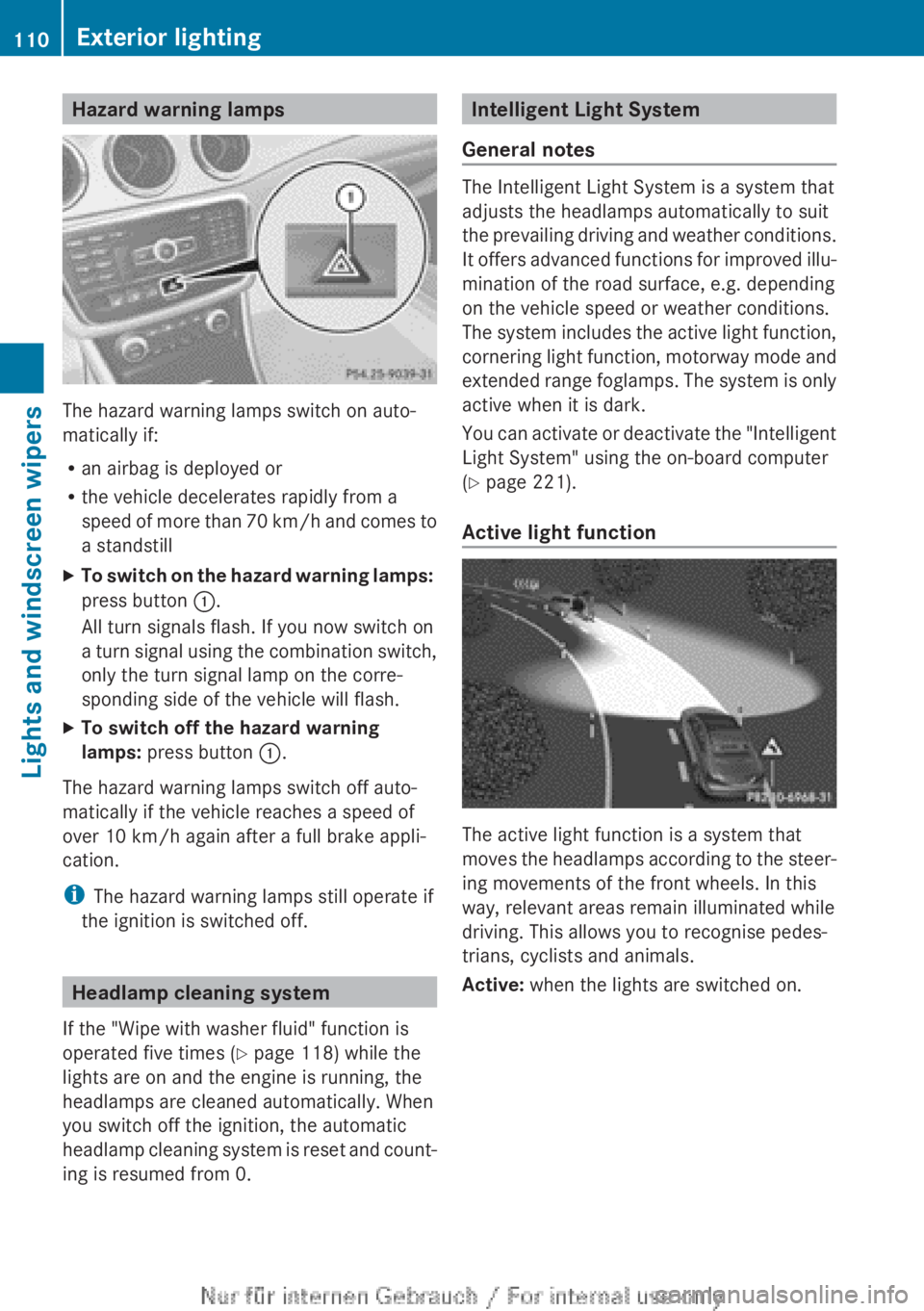
Hazard warning lamps
The hazard warning lamps switch on auto-
matically if:
R an airbag is deployed or
R the vehicle decelerates rapidly from a
speed of more than 70 km/h and comes to
a standstill
XTo switch on the hazard warning lamps:
press button :.
All turn signals flash. If you now switch on
a turn signal using the combination switch,
only the turn signal lamp on the corre-
sponding side of the vehicle will flash.XTo switch off the hazard warning
lamps: press button :.
The hazard warning lamps switch off auto-
matically if the vehicle reaches a speed of
over 10 km/h again after a full brake appli-
cation.
i The hazard warning lamps still operate if
the ignition is switched off.
Headlamp cleaning system
If the "Wipe with washer fluid" function is
operated five times ( Y page 118) while the
lights are on and the engine is running, the
headlamps are cleaned automatically. When
you switch off the ignition, the automatic
headlamp cleaning system is reset and count-
ing is resumed from 0.
Intelligent Light System
General notes
The Intelligent Light System is a system that
adjusts the headlamps automatically to suit
the prevailing driving and weather conditions.
It offers advanced functions for improved illu-
mination of the road surface, e.g. depending
on the vehicle speed or weather conditions.
The system includes the active light function,
cornering light function, motorway mode and
extended range foglamps. The system is only
active when it is dark.
You can activate or deactivate the "Intelligent
Light System" using the on-board computer
( Y page 221).
Active light function
The active light function is a system that
moves the headlamps according to the steer-
ing movements of the front wheels. In this
way, relevant areas remain illuminated while
driving. This allows you to recognise pedes-
trians, cyclists and animals.
Active: when the lights are switched on.
110Exterior lightingLights and windscreen wipers
Page 113 of 352
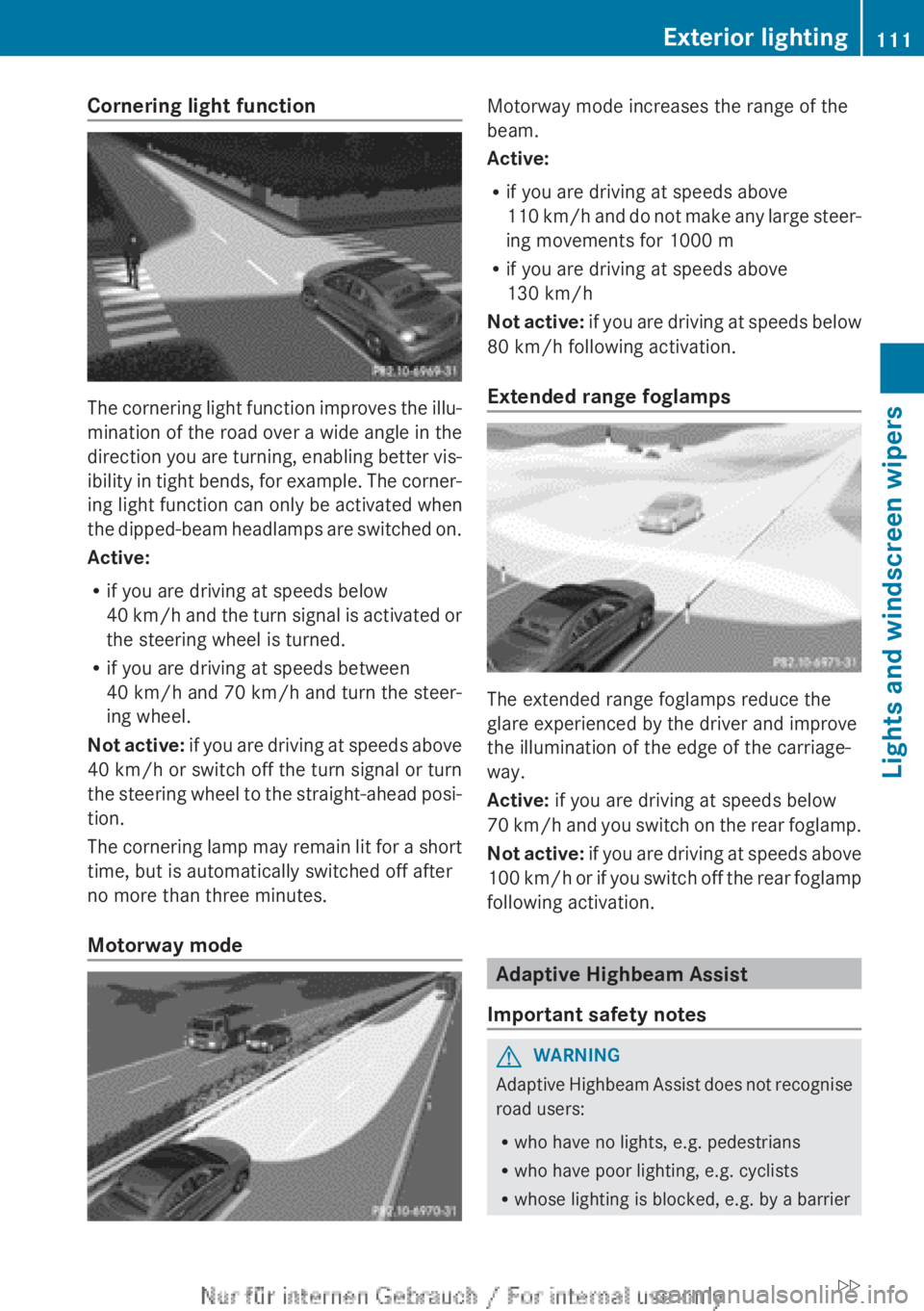
Cornering light function
The cornering light function improves the illu-
mination of the road over a wide angle in the
direction you are turning, enabling better vis-
ibility in tight bends, for example. The corner-
ing light function can only be activated when
the dipped-beam headlamps are switched on.
Active:
R if you are driving at speeds below
40 km/h and the turn signal is activated or
the steering wheel is turned.
R if you are driving at speeds between
40 km/h and 70 km/h and turn the steer-
ing wheel.
Not active: if you are driving at speeds above
40 km/h or switch off the turn signal or turn
the steering wheel to the straight-ahead posi-
tion.
The cornering lamp may remain lit for a short
time, but is automatically switched off after
no more than three minutes.
Motorway mode
Motorway mode increases the range of the
beam.
Active:
R if you are driving at speeds above
110 km/h and do not make any large steer-
ing movements for 1000 m
R if you are driving at speeds above
130 km/h
Not active: if you are driving at speeds below
80 km/h following activation.
Extended range foglamps
The extended range foglamps reduce the
glare experienced by the driver and improve
the illumination of the edge of the carriage-
way.
Active: if you are driving at speeds below
70 km/h and you switch on the rear foglamp.
Not active: if you are driving at speeds above
100 km/h or if you switch off the rear foglamp
following activation.
Adaptive Highbeam Assist
Important safety notes
GWARNING
Adaptive Highbeam Assist does not recognise
road users:
R who have no lights, e.g. pedestrians
R who have poor lighting, e.g. cyclists
R whose lighting is blocked, e.g. by a barrier
Exterior lighting111Lights and windscreen wipersZ