door lock MERCEDES-BENZ CLA 2013 Owner's Manual
[x] Cancel search | Manufacturer: MERCEDES-BENZ, Model Year: 2013, Model line: CLA, Model: MERCEDES-BENZ CLA 2013Pages: 352, PDF Size: 5.37 MB
Page 89 of 352
Side window reversing feature
The side windows are equipped with an auto-
matic reversing feature. If a solid object
blocks or restricts a side window during the
closing process, the side window opens again
automatically. The automatic reversing fea-
ture is however only an aid and is no substi-
tute for your attention when closing a side
window.GWARNING
The reversing function does not react:
R to soft, light and thin objects, e.g. small fin-
gers
R over the last 4 mm of the closing movement
R during resetting
R when closing the side window again man-
ually immediately after automatic reversing
This means that the reversing function cannot
prevent someone being trapped in these sit-
uations. There is a risk of injury.
When closing make sure that no parts of the
body are in the closing area. If someone
becomes trapped, press the switch to open
the side window again.
Opening and closing the side win-
dows
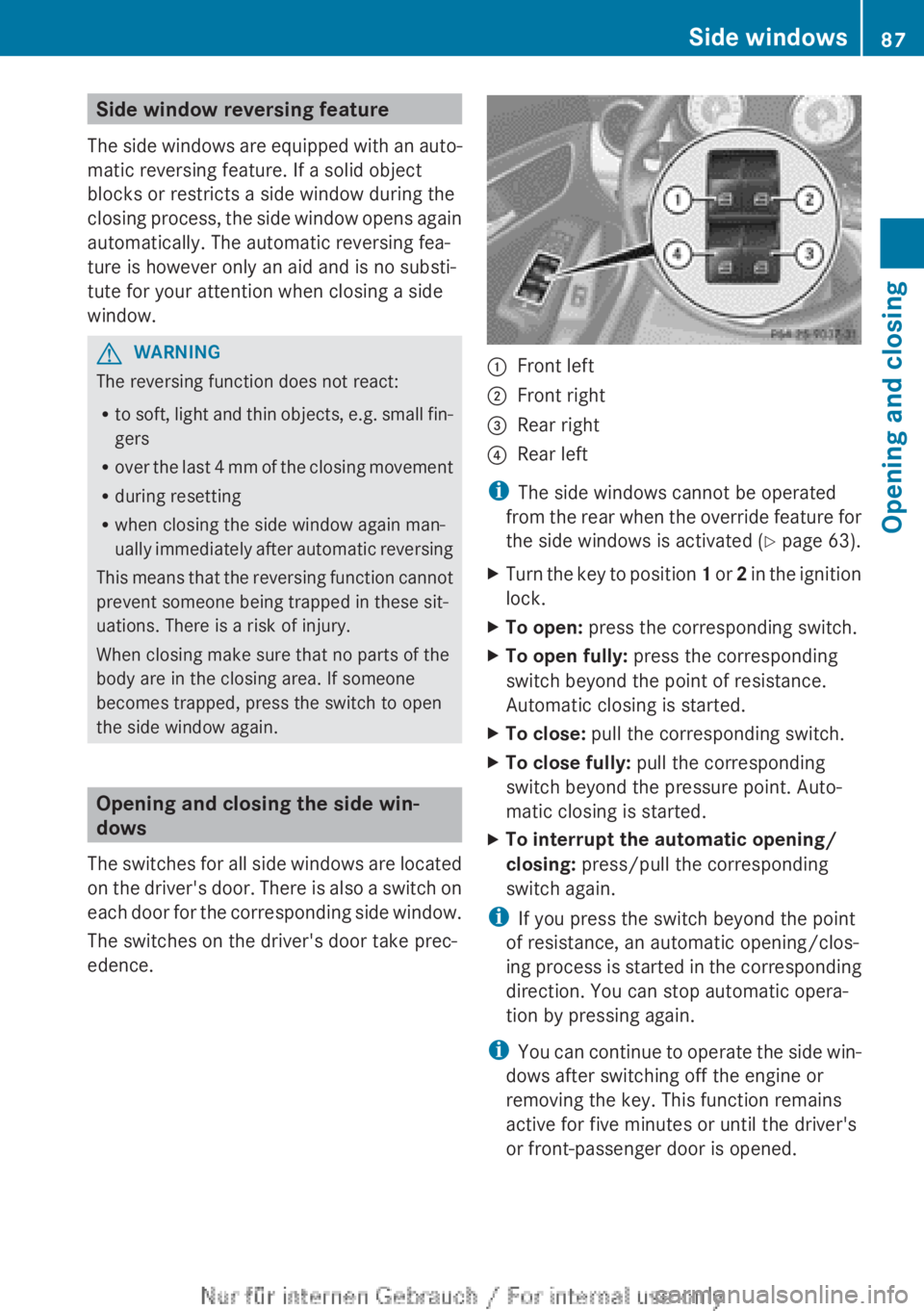
The switches for all side windows are located
on the driver's door. There is also a switch on
each door for the corresponding side window.
The switches on the driver's door take prec-
edence.
:Front left;Front right=Rear right?Rear left
i The side windows cannot be operated
from the rear when the override feature for
the side windows is activated ( Y page 63).
XTurn the key to position 1 or 2 in the ignition
lock.XTo open: press the corresponding switch.XTo open fully: press the corresponding
switch beyond the point of resistance.
Automatic closing is started.XTo close: pull the corresponding switch.XTo close fully: pull the corresponding
switch beyond the pressure point. Auto-
matic closing is started.XTo interrupt the automatic opening/
closing: press/pull the corresponding
switch again.
i If you press the switch beyond the point
of resistance, an automatic opening/clos-
ing process is started in the corresponding
direction. You can stop automatic opera-
tion by pressing again.
i You can continue to operate the side win-
dows after switching off the engine or
removing the key. This function remains
active for five minutes or until the driver's
or front-passenger door is opened.
Side windows87Opening and closingZ
Page 90 of 352
Convenience opening feature
You can ventilate the vehicle before you start
driving. To do this, the key is used to carry out
the following functions simultaneously:
R unlock the vehicle
R open the side windows
R open the panorama sliding sunroof and the
roller sunblinds
i The convenience opening feature can
only be operated using the key. The key
must be close to the driver's door handle.XPoint the tip of the key at the driver's door
handle.XPress and hold the % button until the
side windows and the panorama sunroof
are in the desired position.
If the roller sunblinds of the panorama slid-
ing sunroof are closed, the roller sunblinds
are opened first.XPress and hold the % button again until
the panorama sliding sunroof is in the
desired position.XTo interrupt convenience opening:
release the % button.
Convenience closing feature
GWARNING
When the convenience closing feature is oper-
ating, parts of the body could become trapped
in the closing area of the side window and the
sliding sunroof. There is a risk of injury.
Observe the complete closing procedure
when the convenience closing feature is oper-
ating. When closing make sure that no parts
of the body are in the closing area.
When you lock the vehicle, you can simulta-
neously:
R close the side windows
R close the panorama sliding sunroof
On vehicles with a panorama sliding sunroof,
you can then close the roller sunblinds.
i The key must be close to the driver's door
handle.XPoint the tip of the key at the driver's door
handle.XPress and hold the & button until the
side windows and the panorama sliding
sunroof are fully closed.XMake sure that all the side windows and the
panorama sliding sunroof are closed.
On vehicles with a panorama sliding sunroof:
XPress and hold the & button again until
the roller sunblinds of the panorama sliding
sunroof close.XTo interrupt convenience closing:
release the & button.
Resetting the side windows
You must reset each side window if:
R the side window opens again slightly after
being closed fully.
R the side window can no longer be fully
opened or closed.
XClose all doors.XTurn the key to position 1 or 2 in the ignition
lock.XPull the corresponding switch on the door
control panel until the side window is com-
pletely closed ( Y page 87).XHold the switch for an additional second.
If the side window opens again slightly:
XImmediately pull the corresponding switch
on the door control panel until the side win-
dow is completely closed ( Y page 87).XHold the switch for an additional second.XIf the corresponding side window remains
closed after the button has been released,
the side window has been reset correctly.
If this is not the case, repeat the steps
above again.88Side windowsOpening and closing
Page 92 of 352
pressure fluctuations in the vehicle interior.
Change the position of the sliding sunroof
or open a side window slightly to reduce or
eliminate these noises.
Sliding sunroof reversing feature
The sliding sunroof is equipped with an auto-
matic reversing feature. If an object blocks or
restricts the sliding sunroof during the closing
process, the sliding sunroof opens again
automatically. The automatic reversing fea-
ture is however only an aid and is no substi-
tute for your attention when closing the slid-
ing roof.
GWARNING
The reversing function does not react:
R to soft, light and thin objects, e.g. small fin-
gers
R over the last 4 mm of the closing movement
R during resetting
R when closing the sliding sunroof again man-
ually immediately after automatic reversing
This means that the reversing function cannot
prevent someone being trapped in these sit-
uations. There is a risk of injury.
When closing make sure that no parts of the
body are in the closing area.
If someone is trapped:
R release the switch immediately or
R press the switch in any direction during the
automatic closing process
The closing process is stopped.
Operating the sliding sunroof
Opening and closing
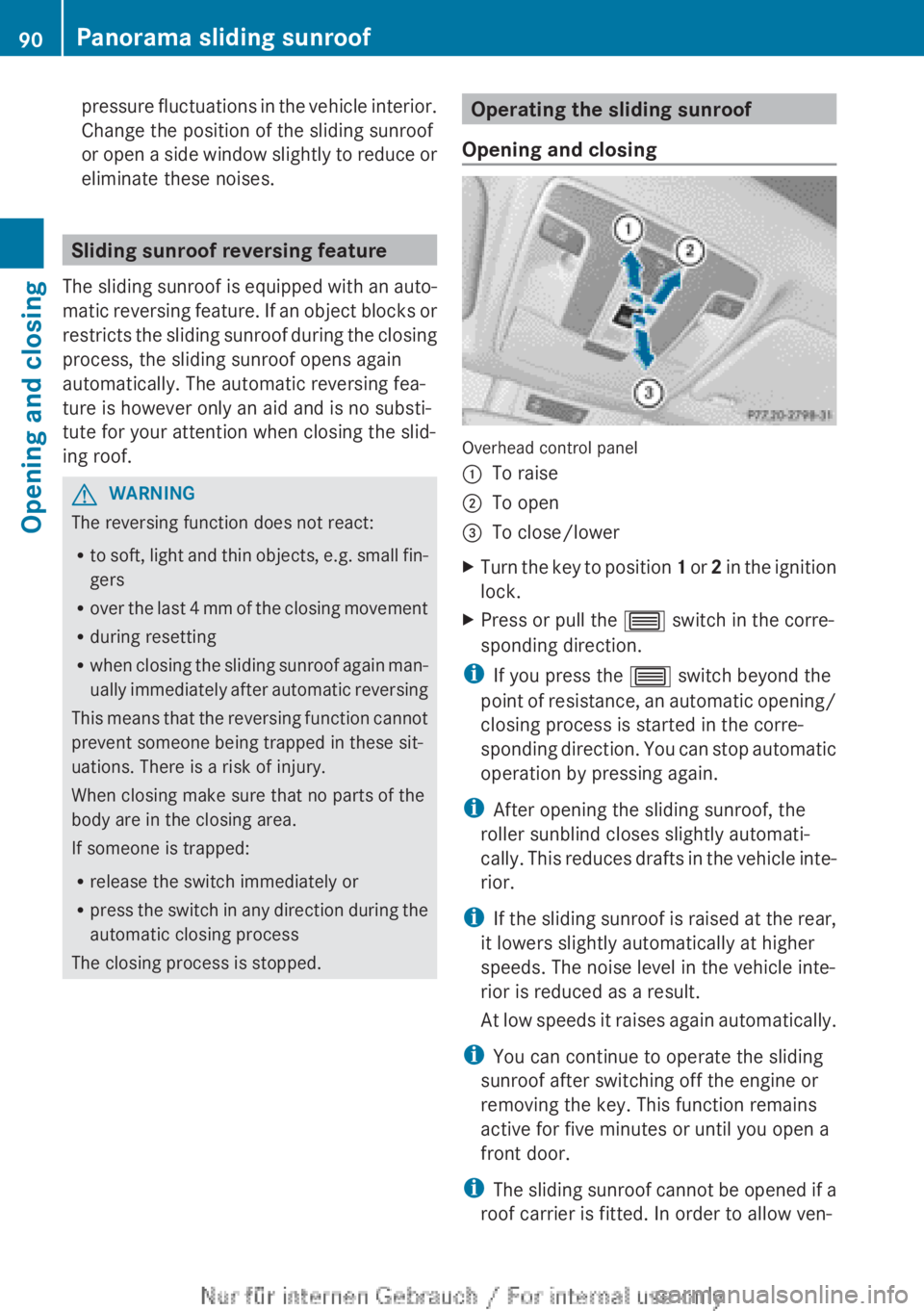
Overhead control panel
:To raise;To open=To close/lowerXTurn the key to position 1 or 2 in the ignition
lock.XPress or pull the 3 switch in the corre-
sponding direction.
i If you press the 3 switch beyond the
point of resistance, an automatic opening/
closing process is started in the corre-
sponding direction. You can stop automatic
operation by pressing again.
i After opening the sliding sunroof, the
roller sunblind closes slightly automati-
cally. This reduces drafts in the vehicle inte-
rior.
i If the sliding sunroof is raised at the rear,
it lowers slightly automatically at higher
speeds. The noise level in the vehicle inte-
rior is reduced as a result.
At low speeds it raises again automatically.
i You can continue to operate the sliding
sunroof after switching off the engine or
removing the key. This function remains
active for five minutes or until you open a
front door.
i The sliding sunroof cannot be opened if a
roof carrier is fitted. In order to allow ven-
90Panorama sliding sunroofOpening and closing
Page 104 of 352
iMake sure that the exterior mirrors are
always folded out fully while driving. They
could otherwise vibrate.
i If you are driving faster than 47 km/h, you
can no longer fold in the exterior mirrors.
Setting the exterior mirrors
If the battery has been disconnected or com-
pletely discharged, the exterior mirrors must
be reset. The exterior mirrors will otherwise
not fold in when you select the "Fold in mir-
rors when locking" function in the on-board
computer ( Y page 225).
XTurn the key to position 1 in the ignition
lock ( Y page 145).XBriefly press button :.
Folding the exterior mirrors in/out
automatically
If the "Fold in mirrors when locking" function
is activated in the on-board computer
( Y page 225):
R the exterior mirrors fold in automatically as
soon as you lock the vehicle from the out-
side.
R the exterior mirrors fold out again automat-
ically as soon as you unlock the vehicle and
then open the driver's or front-passenger
door.
i If the exterior mirrors have been folded in
manually, they do not fold out.
Exterior mirror pushed out of position
If an exterior mirror has been pushed out of
position, proceed as follows.
XVehicles without electrically folding
exterior mirrors: move the exterior mirror
into the correct position manually.XVehicles with electrically folding exte-
rior mirrors: press and hold mirror-foldingbutton (Y page 101) until you hear a click
and then the mirror engage in position.
The mirror housing is engaged again and
you can adjust the exterior mirrors as usual
( Y page 101).
Automatic anti-dazzle mirrors
The "Automatic anti-dazzle mirrors" function
is only available if the vehicle is equipped with
the "Mirror package".
The rear-view mirror and the exterior mirror
on the driver's side automatically go into anti-
dazzle mode if:
R the ignition is switched on and
R incident light from headlamps strikes the
sensor in the rear-view mirror
The mirrors do not go into anti-dazzle mode if
reverse gear is engaged or if the interior light-
ing is switched on.
Parking position of the exterior mirror
on the front-passenger side
General notes
The "Parking position for the exterior mirror
on the front-passenger side" function is only
available if the vehicle is equipped with the
"Memory package".
Setting and storing the parking position
Using reverse gear
You can set the front-passenger side exterior
mirror so that you can see the rear wheel on
that side as soon as you engage reverse gear.
You can store this position.
102MirrorsSeats, steering wheel and mirrors
Page 109 of 352
Rcombination switch ( Y page 109)
R on-board computer ( Y page 220)
Light switch
Operation
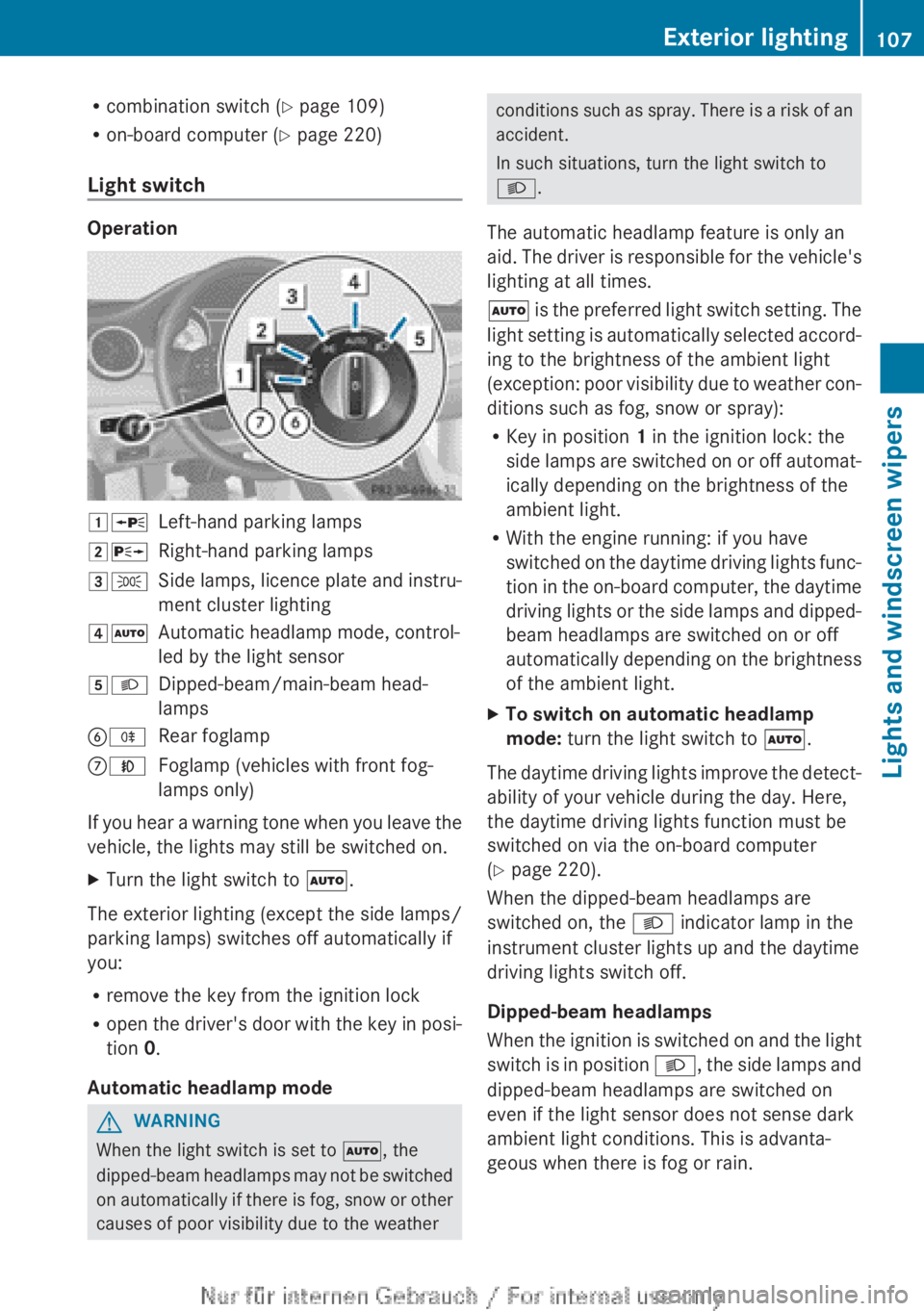
1 WLeft-hand parking lamps2XRight-hand parking lamps3TSide lamps, licence plate and instru-
ment cluster lighting4 ÃAutomatic headlamp mode, control-
led by the light sensor5 LDipped-beam/main-beam head-
lampsB RRear foglampCNFoglamp (vehicles with front fog-
lamps only)
If you hear a warning tone when you leave the
vehicle, the lights may still be switched on.
XTurn the light switch to Ã.
The exterior lighting (except the side lamps/
parking lamps) switches off automatically if
you:
R remove the key from the ignition lock
R open the driver's door with the key in posi-
tion 0.
Automatic headlamp mode
GWARNING
When the light switch is set to Ã, the
dipped-beam headlamps may not be switched
on automatically if there is fog, snow or other
causes of poor visibility due to the weather
conditions such as spray. There is a risk of an
accident.
In such situations, turn the light switch to
L .
The automatic headlamp feature is only an
aid. The driver is responsible for the vehicle's
lighting at all times.
à is the preferred light switch setting. The
light setting is automatically selected accord-
ing to the brightness of the ambient light
(exception: poor visibility due to weather con-
ditions such as fog, snow or spray):
R Key in position 1 in the ignition lock: the
side lamps are switched on or off automat-
ically depending on the brightness of the
ambient light.
R With the engine running: if you have
switched on the daytime driving lights func-
tion in the on-board computer, the daytime
driving lights or the side lamps and dipped-
beam headlamps are switched on or off
automatically depending on the brightness
of the ambient light.XTo switch on automatic headlamp
mode: turn the light switch to Ã.
The daytime driving lights improve the detect-
ability of your vehicle during the day. Here,
the daytime driving lights function must be
switched on via the on-board computer
( Y page 220).
When the dipped-beam headlamps are
switched on, the L indicator lamp in the
instrument cluster lights up and the daytime
driving lights switch off.
Dipped-beam headlamps
When the ignition is switched on and the light
switch is in position L, the side lamps and
dipped-beam headlamps are switched on
even if the light sensor does not sense dark
ambient light conditions. This is advanta-
geous when there is fog or rain.
Exterior lighting107Lights and windscreen wipersZ
Page 116 of 352
Interior lighting control
Important notes
In order to prevent the vehicle's battery from
discharging, the interior lighting functions are
automatically deactivated after some time
except for when the key is in position 2 in the
ignition lock.
The brightness of the ambient lighting may be
set using the on-board computer
( Y page 222).
Automatic interior lighting control
XTo switch on: set the switch to centre
position B.XTo switch off: set the switch to the |
position.
The interior lighting automatically switches
on if you:
R unlock the vehicle
R open a door
R remove the key from the ignition lock
The interior lighting is activated for a short
time when the key is removed from the igni-
tion lock. You can activate this delayed
switch-off using the on-board computer
( Y page 222).
Manual interior lighting control
XTo switch the front interior lighting on:
set the switch to the c position.XTo switch off the interior lighting: set the
switch to the | position or (if the door
is closed) to the centre position.XTo switch the rear interior lighting on/
off: press the u button.XTo switch the reading lamps on/off:
press the p button.
Crash-responsive emergency lighting
The interior lighting is activated automatically
if the vehicle is involved in an accident.
XTo switch off the crash-responsive
emergency lighting: press the hazard
warning lamp button.
or
XLock and then unlock the vehicle using the
key.
Replacing bulbs
Important safety notes
Xenon bulbs
GDANGER
Xenon bulbs are under high voltage. You can
get an electric shock if you remove the cover
of the xenon bulb and touch the electrical
contacts. There is a risk of fatal injury.
Never touch the parts or the electrical con-
tacts of the xenon bulb. Always have work on
the xenon bulbs carried out at a qualified spe-
cialist workshop.
If your vehicle is equipped with xenon bulbs,
you can recognise this by the following: the
cone of light from the xenon bulbs moves
from the top to the bottom and back again
when you start the engine. For this to be
observed, the lights must be switched on
before starting the engine.
Bulbs and lamps are an important aspect of
vehicle safety. You must therefore make sure
that these function correctly at all times.
Have the headlamp setting checked regularly.
Other bulbs
GWARNING
Bulbs, lamps and plug connectors can
become very hot during use. When replacing
a bulb, you could burn yourself on these com-
ponents. There is a risk of injury.
Allow these components to cool down before
replacing the bulb.
Do not use a bulb that has been dropped or if
its glass tube has been scratched.
114Replacing bulbsLights and windscreen wipers
Page 137 of 352
in the door. The side window stops. To con-
tinue closing the side window, pull on the
W switch.XConvenience closing feature: press and
hold the e button until the side win-
dows and the panorama sliding sunroof are
closed.
The indicator lamp in the e button lights
up. Air-recirculation mode is activated.
If parts of the body are in the closing area
during convenience closing, proceed as fol-
lows:
XTo open/close the side window, press the
W button.
The side window stops.XTo then open the side window, press the
W button again.
or
XPress and hold the e button again for
at least two seconds.
The side windows move in the opposite
direction.XPress the 3 button for opening/closing
the panorama sliding sunroof.
The panorama sliding sunroof stops.XTo then open the panorama sliding sunroof,
press the 3 button again.
iNotes on the automatic reversing func-
tion for:
R the side window ( Y page 87)
R the panorama sliding sunroof
( Y page 90)
XConvenience opening feature: press and
hold the e button until the side win-
dows and the panorama sliding sunroof
have opened. The side windows and the
panorama sliding sunroof move back to
their original position.
The indicator lamp in the e button goes
out. Air-recirculation mode is deactivated.
i If you open the side windows or the pan-
orama sliding sunroof manually after clos-
ing with the convenience closing feature,
they will remain in this position when
opened using the convenience opening fea-
ture.
Activating/deactivating the residual
heat function
The residual heat function is only available
with THERMOTRONIC automatic climate con-
trol.
It is possible to make use of the residual heat
of the engine to continue heating the vehicle
for approximately 30 minutes after the engine
has been switched off. The heating time
depends on the temperature that has been
set for the vehicle interior.
i The blower will run at a low speed regard-
less of the airflow setting.
i If you activate the residual heat function
at high temperatures, only the ventilation
will be activated. The blower runs at
medium speed.
XTurn the key to position 0 in the ignition
lock or remove it ( Y page 145).XTo activate: press the Ì button.
The indicator lamp in the Ì button lights
up.XTo deactivate: press the Ì button.
The indicator lamp in the Ì button goes
out.
i Residual heat is deactivated automati-
cally:
R after approximately 30 minutes
R when the ignition is switched on
R if the battery voltage drops
R when the auxiliary heating is switched on
Operating the climate control system135Climate controlZ
Page 148 of 352
iWhen the transmission is in position N,
you can also start the engine with the brake
pedal depressed.
Starting procedureXTo start a petrol engine: turn the key to
position 3 in the ignition lock
( Y page 145) and release it as soon as the
engine is running.XTo start a diesel engine: turn the key to
position 2 in the ignition lock
( Y page 145).
The % preglow indicator lamp in the
instrument cluster lights up.XWhen the % preglow indicator lamp
goes out, turn the key to position
3 (Y page 145) and release it as soon as the
engine is running.
i You can start the engine without preglow
if the engine is warm.
Pulling away
Manual transmission
! Change gear in good time and avoid spin-
ning the wheels. Otherwise, you could dam-
age the vehicle.
XDepress the brake pedal and keep it
depressed.XDepress the clutch pedal fully.XShift to either first gear or reverse gear R.XRelease the electric parking brake
( Y page 163).XRelease the brake pedal.XSlowly release the clutch pedal and gently
depress the accelerator pedal.
i Follow the shift recommendations in the
multifunction display for an economical
driving style ( Y page 152).
i The vehicle locks centrally once you have
pulled away. The locking knobs in the doors
drop down.
You can open the doors from the inside at
any time.
You can also deactivate the automatic lock-
ing feature ( Y page 223).
Automatic transmission
i It is only possible to shift the transmission
from position P to the desired position if
you depress the brake pedal. Only then can
the parking lock be deactivated. If you do
not depress the brake pedal, the DIRECT
SELECT lever can still be moved but the
parking lock remains engaged.
i At transmission fluid temperatures below
Ò 20 †, you can only shift out of position P
into another transmission position when
the engine is running.
XDepress the brake pedal and keep it
depressed.XShift the transmission to position D or R.XRelease the brake pedal.XCarefully depress the accelerator pedal.
The electric parking brake ( Y page 163) is
automatically released.
The red ! indicator lamp in the instru-
ment cluster goes out.
i The vehicle locks centrally once you have
pulled away. The locking knobs in the doors
drop down.
You can open the doors from the inside at
any time.
You can also deactivate the automatic lock-
ing feature ( Y page 223).
i Upshifts take place at higher engine
speeds after a cold start. This helps the
catalytic converter to reach its operating
temperature more quickly.
146DrivingDriving and parking
Page 155 of 352
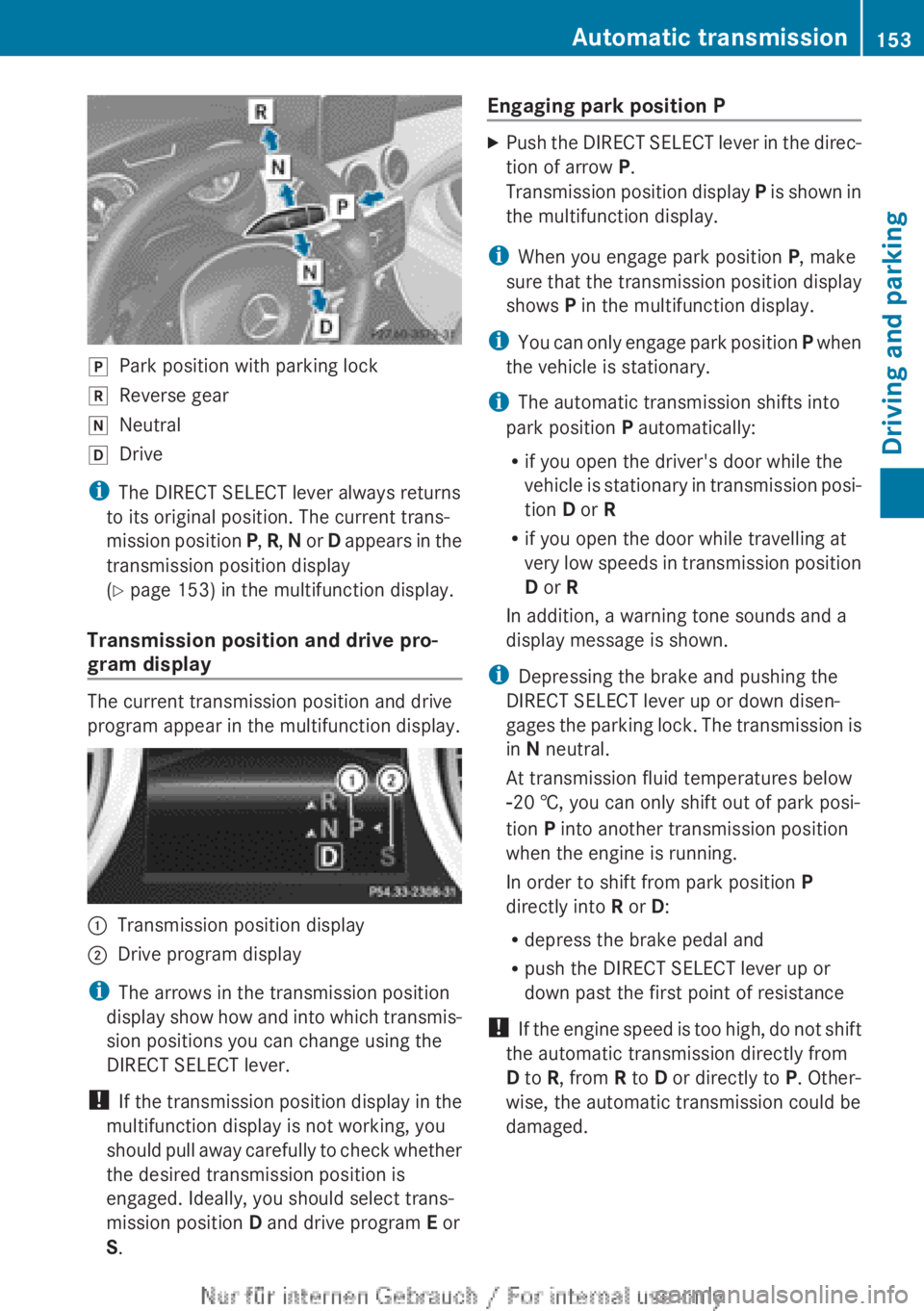
jPark position with parking lockkReverse geariNeutralhDrive
iThe DIRECT SELECT lever always returns
to its original position. The current trans-
mission position P, R , N or D appears in the
transmission position display
( Y page 153) in the multifunction display.
Transmission position and drive pro-
gram display
The current transmission position and drive
program appear in the multifunction display.
:Transmission position display;Drive program display
i The arrows in the transmission position
display show how and into which transmis-
sion positions you can change using the
DIRECT SELECT lever.
! If the transmission position display in the
multifunction display is not working, you
should pull away carefully to check whether
the desired transmission position is
engaged. Ideally, you should select trans-
mission position D and drive program E or
S .
Engaging park position PXPush the DIRECT SELECT lever in the direc-
tion of arrow P.
Transmission position display P is shown in
the multifunction display.
i When you engage park position P, make
sure that the transmission position display
shows P in the multifunction display.
i You can only engage park position P when
the vehicle is stationary.
i The automatic transmission shifts into
park position P automatically:
R if you open the driver's door while the
vehicle is stationary in transmission posi-
tion D or R
R if you open the door while travelling at
very low speeds in transmission position
D or R
In addition, a warning tone sounds and a
display message is shown.
i Depressing the brake and pushing the
DIRECT SELECT lever up or down disen-
gages the parking lock. The transmission is
in N neutral.
At transmission fluid temperatures below
Ò 20 †, you can only shift out of park posi-
tion P into another transmission position
when the engine is running.
In order to shift from park position P
directly into R or D:
R depress the brake pedal and
R push the DIRECT SELECT lever up or
down past the first point of resistance
! If the engine speed is too high, do not shift
the automatic transmission directly from
D to R, from R to D or directly to P. Other-
wise, the automatic transmission could be
damaged.
Automatic transmission153Driving and parkingZ
Page 165 of 352
cle from rolling away by applying the parking
brake.
Vehicles with manual transmissionXShift to either first gear or reverse gear R.XTurn the key to position 0 in the ignition
lock and remove it.
The immobiliser is activated.XApply the electric parking brake.
Vehicles with automatic transmission
XApply the electric parking brake.XShift the transmission to position P.XTurn the key to position 0 in the ignition
lock and remove it.
The immobiliser is activated.
i If you switch the engine off with the trans-
mission in position R or D, the automatic
transmission shifts to N automatically.
If you then open one of the front doors or
remove the key from the ignition, the auto-
matic transmission shifts to P.
If you shift the automatic transmission to
N before switching off the engine, the auto-
matic transmission remains in N even if a
door is opened.
Electric parking brake
General notes
GWARNING
If you leave children unattended in the vehi-
cle, they could set the vehicle in motion by,
for example:
R releasing the parking brake
R shifting an automatic transmission out of
parking position P
R shifting a manual transmission into neutral
R starting the engine
They could also operate vehicle equipment.
There is a risk of an accident and injury.
When leaving the vehicle, always take the key
with you and lock the vehicle. Never leave
children unattended in the vehicle.
i The electric parking brake carries out a
function check at regular intervals when
the engine is switched off. Noises that
occur are normal.
Engaging/releasing manually
Engaging
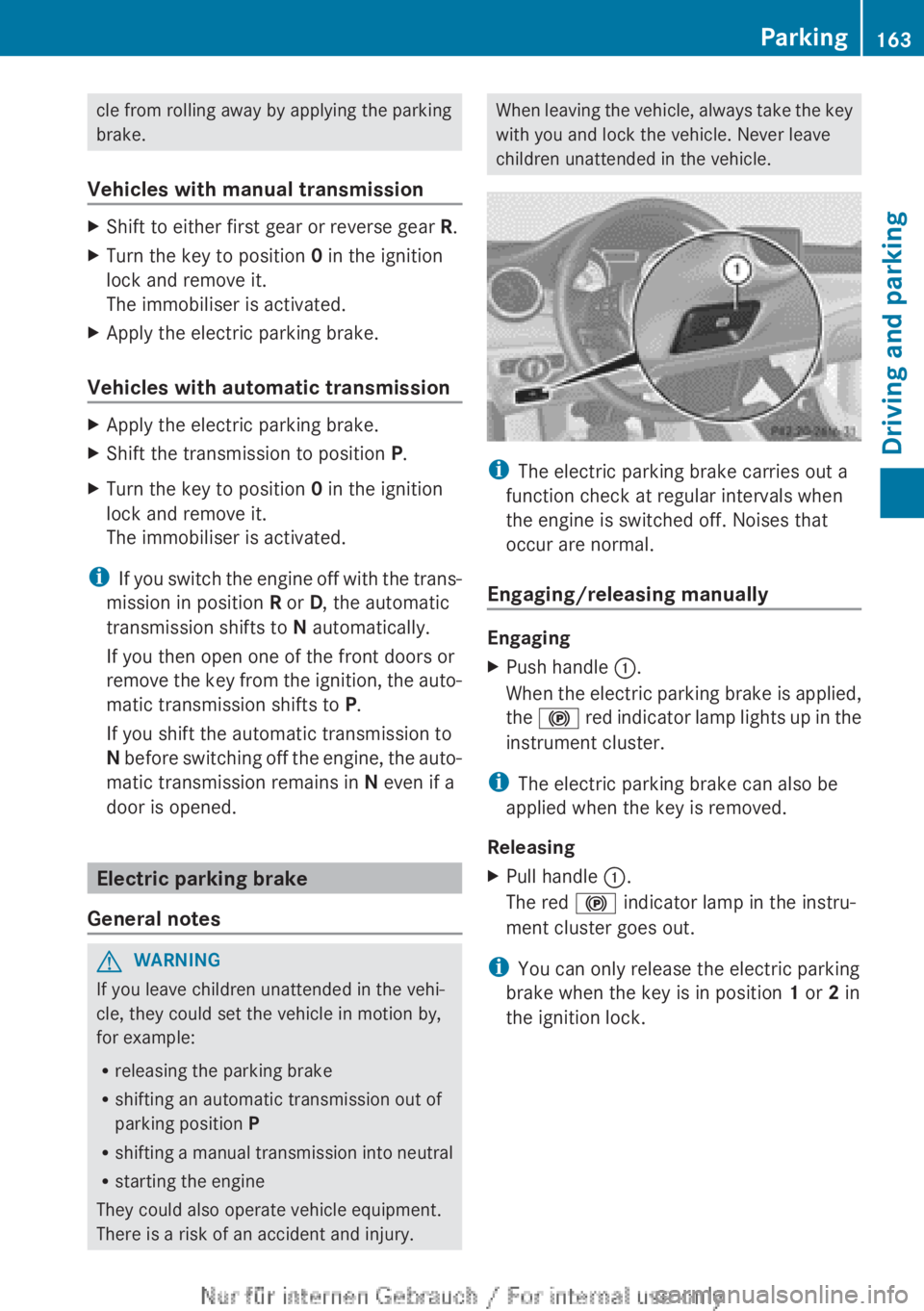
XPush handle :.
When the electric parking brake is applied,
the ! red indicator lamp lights up in the
instrument cluster.
i The electric parking brake can also be
applied when the key is removed.
Releasing
XPull handle :.
The red ! indicator lamp in the instru-
ment cluster goes out.
i You can only release the electric parking
brake when the key is in position 1 or 2 in
the ignition lock.
Parking163Driving and parkingZ