steering MERCEDES-BENZ CLA 2013 Workshop Manual
[x] Cancel search | Manufacturer: MERCEDES-BENZ, Model Year: 2013, Model line: CLA, Model: MERCEDES-BENZ CLA 2013Pages: 352, PDF Size: 5.37 MB
Page 218 of 352
XSwitch on your mobile phone and audio
system or COMAND Online, see the sepa-
rate operating instructions.XPlace a mobile phone in the mobile phone
bracket ( Y page 278), or establish a Blue-
tooth ®
connection with the audio system
or COMAND Online (see the separate oper-
ating instructions).XPress the = or ; button on the steer-
ing wheel to select the Tel menu.
You will see one of the following display mes-
sages in the multifunction display:
R Please enter PIN: the mobile phone has
been placed in the mobile phone bracket
and the PIN has not been entered.
When you enter your PIN via the mobile
phone, LINGUATRONIC, the audio system
or COMAND Online, the mobile phone
searches for a network.
R Telephone ready or the name of the net-
work provider: the mobile phone has found
a network and is ready to receive.
R Telephone No service : there is no net-
work available or the mobile phone is
searching for a network.
i You can obtain further information about
suitable mobile phones and connecting
mobile phones via Bluetooth ®
:
R from any Mercedes Benz Service Centre
R on the Internet at: http://
www.mercedes-benz.com/connect
Accepting a call
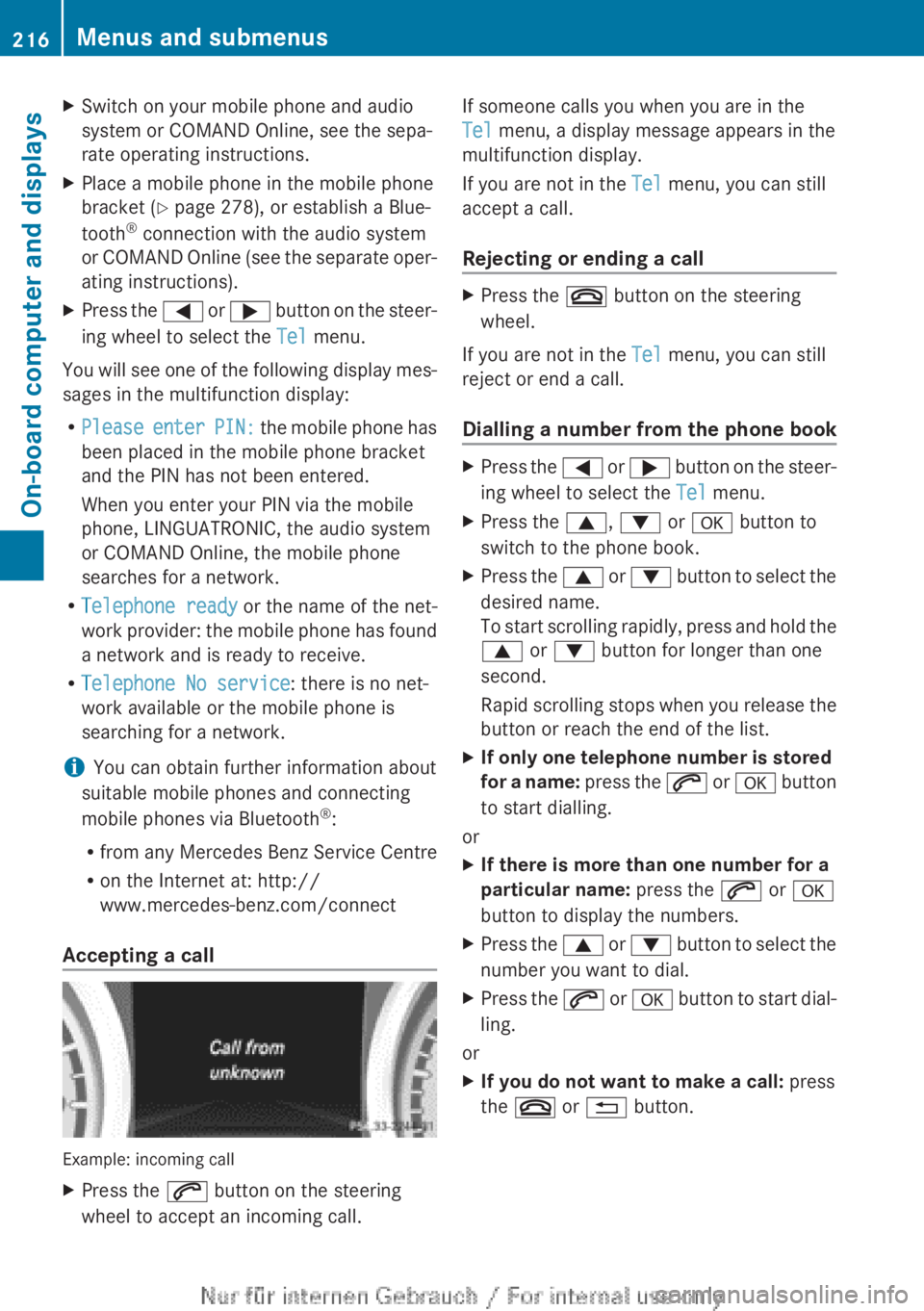
Example: incoming call
XPress the 6 button on the steering
wheel to accept an incoming call.If someone calls you when you are in the
Tel menu, a display message appears in the
multifunction display.
If you are not in the Tel menu, you can still
accept a call.
Rejecting or ending a callXPress the ~ button on the steering
wheel.
If you are not in the Tel menu, you can still
reject or end a call.
Dialling a number from the phone book
XPress the = or ; button on the steer-
ing wheel to select the Tel menu.XPress the 9, : or a button to
switch to the phone book.XPress the 9 or : button to select the
desired name.
To start scrolling rapidly, press and hold the
9 or : button for longer than one
second.
Rapid scrolling stops when you release the
button or reach the end of the list.XIf only one telephone number is stored
for a name: press the 6 or a button
to start dialling.
or
XIf there is more than one number for a
particular name: press the 6 or a
button to display the numbers.XPress the 9 or : button to select the
number you want to dial.XPress the 6 or a button to start dial-
ling.
or
XIf you do not want to make a call: press
the ~ or % button.216Menus and submenusOn-board computer and displays
Page 221 of 352
XPress the a button.
The current selection is displayed.XTo activate/deactivate: press the a
button again.
When ATTENTION ASSIST ( Y page 195) is
deactivated, the é symbol appears in
the multifunction display in the assistance
graphics display.
Activating/deactivating Blind Spot
Assist
XPress the = or ; button on the steer-
ing wheel to select the Assist menu.XPress 9 or : to select Blind Spot
Asst. .XPress the a button.
The current selection is displayed.XTo activate/deactivate: press the a
button again.
For further information about Blind Spot
Assist, see ( Y page 197).
When the Blind Spot Assist: Sensors
deactivated message is shown, the radar
sensors are deactivated.
XSwitch on the radar sensor system
( Y page 223).
Activating/deactivating Lane Keeping
Assist
XPress the = or ; button on the steer-
ing wheel to select the Assist menu.XPress 9 or : on the steering wheel
to select Lane Keeping Assist .XPress the a button.
The current selection is displayed.XPress a to confirm.XPress the : or 9 button to set Off,
Standard or Adaptive .XPress the a button to save the setting.
When Lane Keeping Assist ( Y page 199) is
activated, the multifunction display in theassistance graphic shows the lane mark-
ings in green.
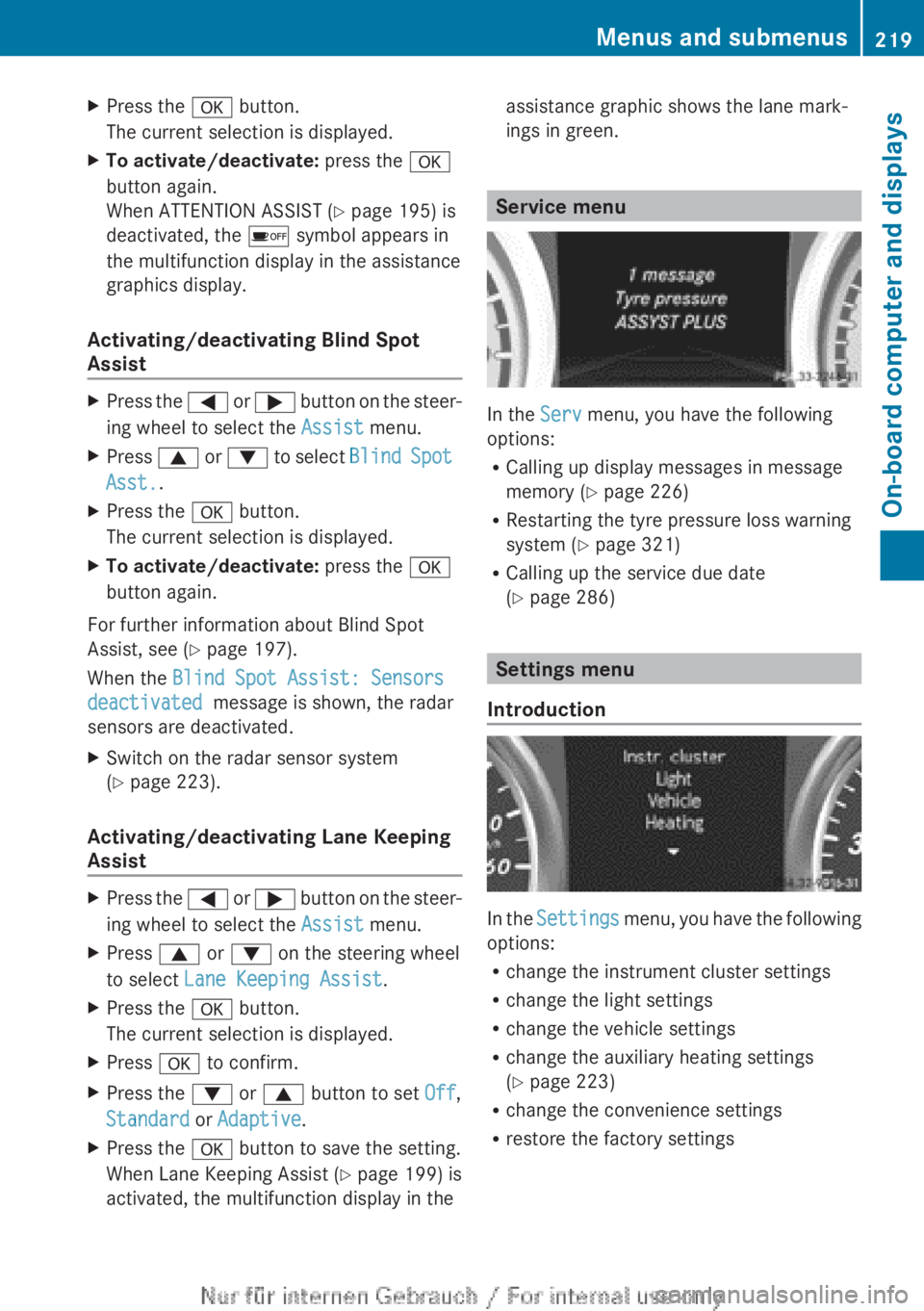
Service menu
In the Serv menu, you have the following
options:
R Calling up display messages in message
memory ( Y page 226)
R Restarting the tyre pressure loss warning
system ( Y page 321)
R Calling up the service due date
( Y page 286)
Settings menu
Introduction
In the Settings menu, you have the following
options:
R change the instrument cluster settings
R change the light settings
R change the vehicle settings
R change the auxiliary heating settings
( Y page 223)
R change the convenience settings
R restore the factory settings
Menus and submenus219On-board computer and displaysZ
Page 228 of 352
Display messages
General notes
Display messages appear in the multifunction display.
Display messages with graphic symbols are simplified in the Owner's Manual and may differ
from the symbols in the multifunction display.
Please respond in accordance with the display messages and follow the additional notes in
this Owner's Manual.
Certain display messages are accompanied by an audible warning tone or a continuous tone.
When the ignition is switched off, all display messages are deleted apart from some high-
priority display messages. Once the causes of the high-priority display messages have been
rectified, the corresponding display messages are also deleted.
When you stop and park the vehicle, please observe the notes on the HOLD function
( Y page 181) and parking ( Y page 162).
Hiding display messages
XPress the a or % button on the steering wheel to hide the display message.
The display message is cleared.
The multifunction display shows high-priority display messages in red. Some high-priority dis-
play messages cannot be hidden.
The multifunction display shows these messages continuously until the causes for the mes-
sages have been remedied.
Message memory
The on-board computer saves certain display messages in the message memory. You can
call up the display messages:
XPress = or ; on the steering wheel to select the Service menu.
If there are display messages, the multifunction display shows, for example, 2 messages.XPress the 9 or : button to select the entry, e.g. 2 messages.XPress a to confirm.XPress the 9 or : button to scroll through the display messages.226Display messagesOn-board computer and displays
Page 246 of 352
Display messagesPossible causes/consequences and M SolutionsLane Keeping
Assist currently
unavailable See
Owner's ManualLane Keeping Assist is deactivated and temporarily inoperative.
Possible causes:
R the windscreen is dirty in the camera's field of vision.
R visibility is impaired due to heavy rain, snow or fog.
R there are no lane markings for a longer period.
R the lane markings are worn, dark or covered, e.g. by dirt or snow.
Once the causes listed above no longer apply, the display message
goes out.
Lane Keeping Assist is operational again.
If the display message does not disappear:XPull over and stop the vehicle safely as soon as possible, paying
attention to road and traffic conditions.XSecure the vehicle against rolling away ( Y page 162).XClean the windscreen.Lane Keeping
Assist inoperativeLane Keeping Assist is faulty.XVisit a qualified specialist workshop.Blind Spot Assist
currently unavail‐
able See Owner's
ManualBlind Spot Assist is temporarily inoperative.
You have established the electrical connection between the trailer
and your vehicle.XPress a on the steering wheel to confirm the display mes-
sage.
Blind Spot Assist is deactivated while towing a trailer.
244Display messagesOn-board computer and displays
Page 247 of 352
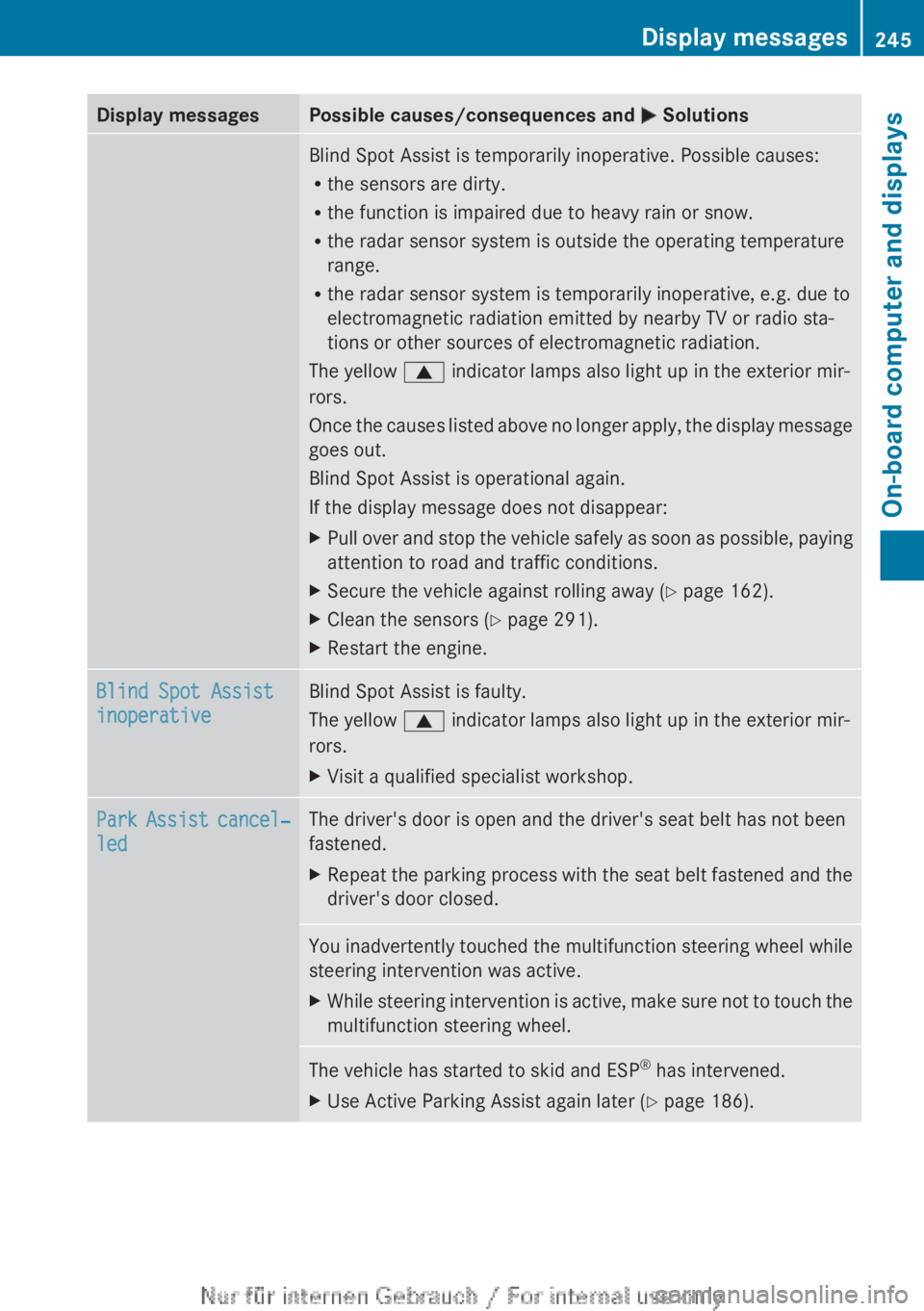
Display messagesPossible causes/consequences and M SolutionsBlind Spot Assist is temporarily inoperative. Possible causes:
R the sensors are dirty.
R the function is impaired due to heavy rain or snow.
R the radar sensor system is outside the operating temperature
range.
R the radar sensor system is temporarily inoperative, e.g. due to
electromagnetic radiation emitted by nearby TV or radio sta-
tions or other sources of electromagnetic radiation.
The yellow 9 indicator lamps also light up in the exterior mir-
rors.
Once the causes listed above no longer apply, the display message
goes out.
Blind Spot Assist is operational again.
If the display message does not disappear:XPull over and stop the vehicle safely as soon as possible, paying
attention to road and traffic conditions.XSecure the vehicle against rolling away ( Y page 162).XClean the sensors ( Y page 291).XRestart the engine.Blind Spot Assist
inoperativeBlind Spot Assist is faulty.
The yellow 9 indicator lamps also light up in the exterior mir-
rors.XVisit a qualified specialist workshop.Park Assist cancel‐
ledThe driver's door is open and the driver's seat belt has not been
fastened.XRepeat the parking process with the seat belt fastened and the
driver's door closed.You inadvertently touched the multifunction steering wheel while
steering intervention was active.XWhile steering intervention is active, make sure not to touch the
multifunction steering wheel.The vehicle has started to skid and ESP ®
has intervened.XUse Active Parking Assist again later ( Y page 186).Display messages245On-board computer and displaysZ
Page 250 of 352
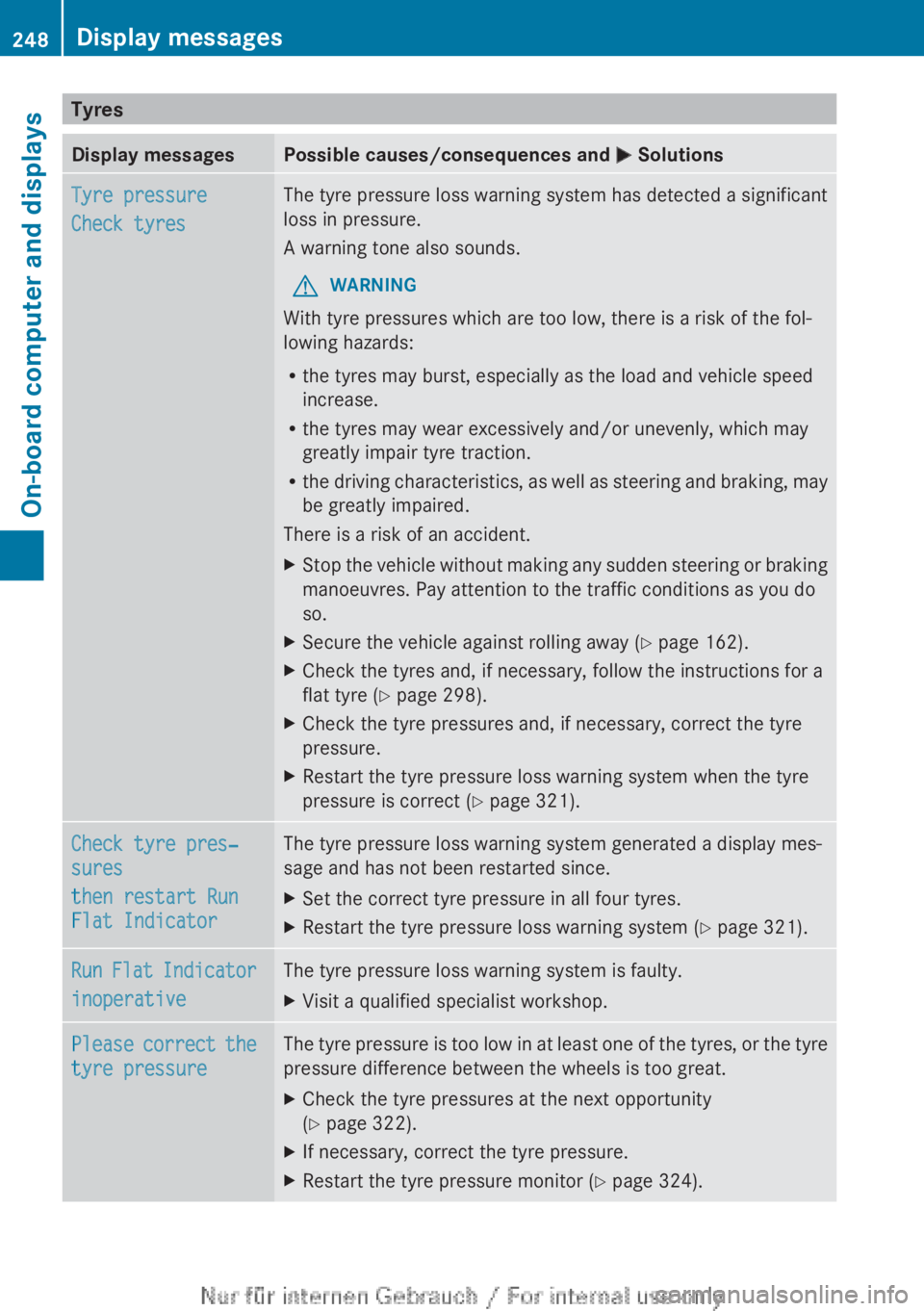
TyresDisplay messagesPossible causes/consequences and M SolutionsTyre pressure
Check tyresThe tyre pressure loss warning system has detected a significant
loss in pressure.
A warning tone also sounds.GWARNING
With tyre pressures which are too low, there is a risk of the fol-
lowing hazards:
R the tyres may burst, especially as the load and vehicle speed
increase.
R the tyres may wear excessively and/or unevenly, which may
greatly impair tyre traction.
R the driving characteristics, as well as steering and braking, may
be greatly impaired.
There is a risk of an accident.
XStop the vehicle without making any sudden steering or braking
manoeuvres. Pay attention to the traffic conditions as you do
so.XSecure the vehicle against rolling away ( Y page 162).XCheck the tyres and, if necessary, follow the instructions for a
flat tyre ( Y page 298).XCheck the tyre pressures and, if necessary, correct the tyre
pressure.XRestart the tyre pressure loss warning system when the tyre
pressure is correct ( Y page 321).Check tyre pres‐
sures
then restart Run
Flat IndicatorThe tyre pressure loss warning system generated a display mes-
sage and has not been restarted since.XSet the correct tyre pressure in all four tyres.XRestart the tyre pressure loss warning system ( Y page 321).Run Flat Indicator
inoperativeThe tyre pressure loss warning system is faulty.XVisit a qualified specialist workshop.Please correct the
tyre pressureThe tyre pressure is too low in at least one of the tyres, or the tyre
pressure difference between the wheels is too great.XCheck the tyre pressures at the next opportunity
( Y page 322).XIf necessary, correct the tyre pressure.XRestart the tyre pressure monitor ( Y page 324).248Display messagesOn-board computer and displays
Page 251 of 352
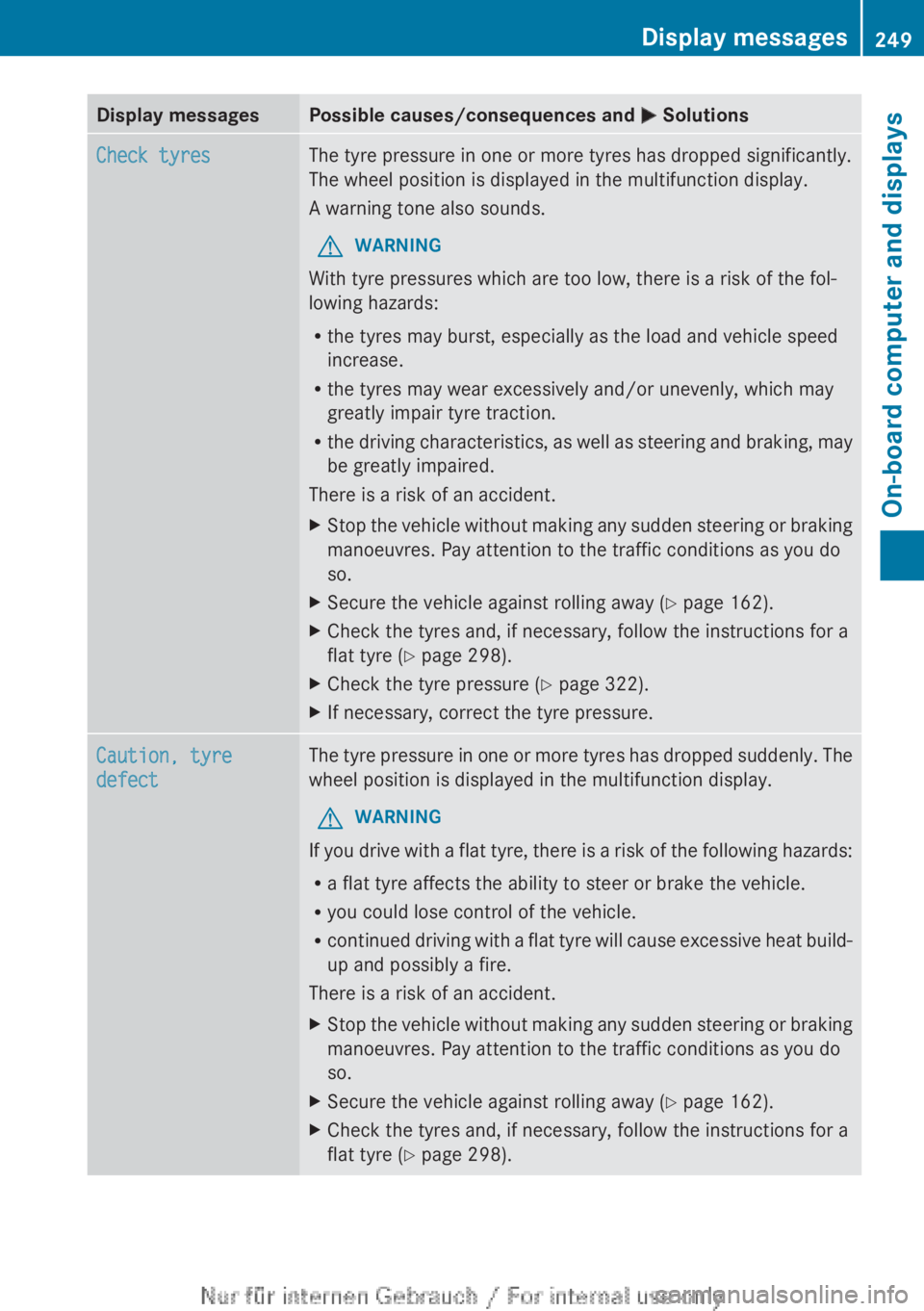
Display messagesPossible causes/consequences and M SolutionsCheck tyresThe tyre pressure in one or more tyres has dropped significantly.
The wheel position is displayed in the multifunction display.
A warning tone also sounds.GWARNING
With tyre pressures which are too low, there is a risk of the fol-
lowing hazards:
R the tyres may burst, especially as the load and vehicle speed
increase.
R the tyres may wear excessively and/or unevenly, which may
greatly impair tyre traction.
R the driving characteristics, as well as steering and braking, may
be greatly impaired.
There is a risk of an accident.
XStop the vehicle without making any sudden steering or braking
manoeuvres. Pay attention to the traffic conditions as you do
so.XSecure the vehicle against rolling away ( Y page 162).XCheck the tyres and, if necessary, follow the instructions for a
flat tyre ( Y page 298).XCheck the tyre pressure ( Y page 322).XIf necessary, correct the tyre pressure.Caution, tyre
defectThe tyre pressure in one or more tyres has dropped suddenly. The
wheel position is displayed in the multifunction display.GWARNING
If you drive with a flat tyre, there is a risk of the following hazards:
R a flat tyre affects the ability to steer or brake the vehicle.
R you could lose control of the vehicle.
R continued driving with a flat tyre will cause excessive heat build-
up and possibly a fire.
There is a risk of an accident.
XStop the vehicle without making any sudden steering or braking
manoeuvres. Pay attention to the traffic conditions as you do
so.XSecure the vehicle against rolling away ( Y page 162).XCheck the tyres and, if necessary, follow the instructions for a
flat tyre ( Y page 298).Display messages249On-board computer and displaysZ
Page 255 of 352
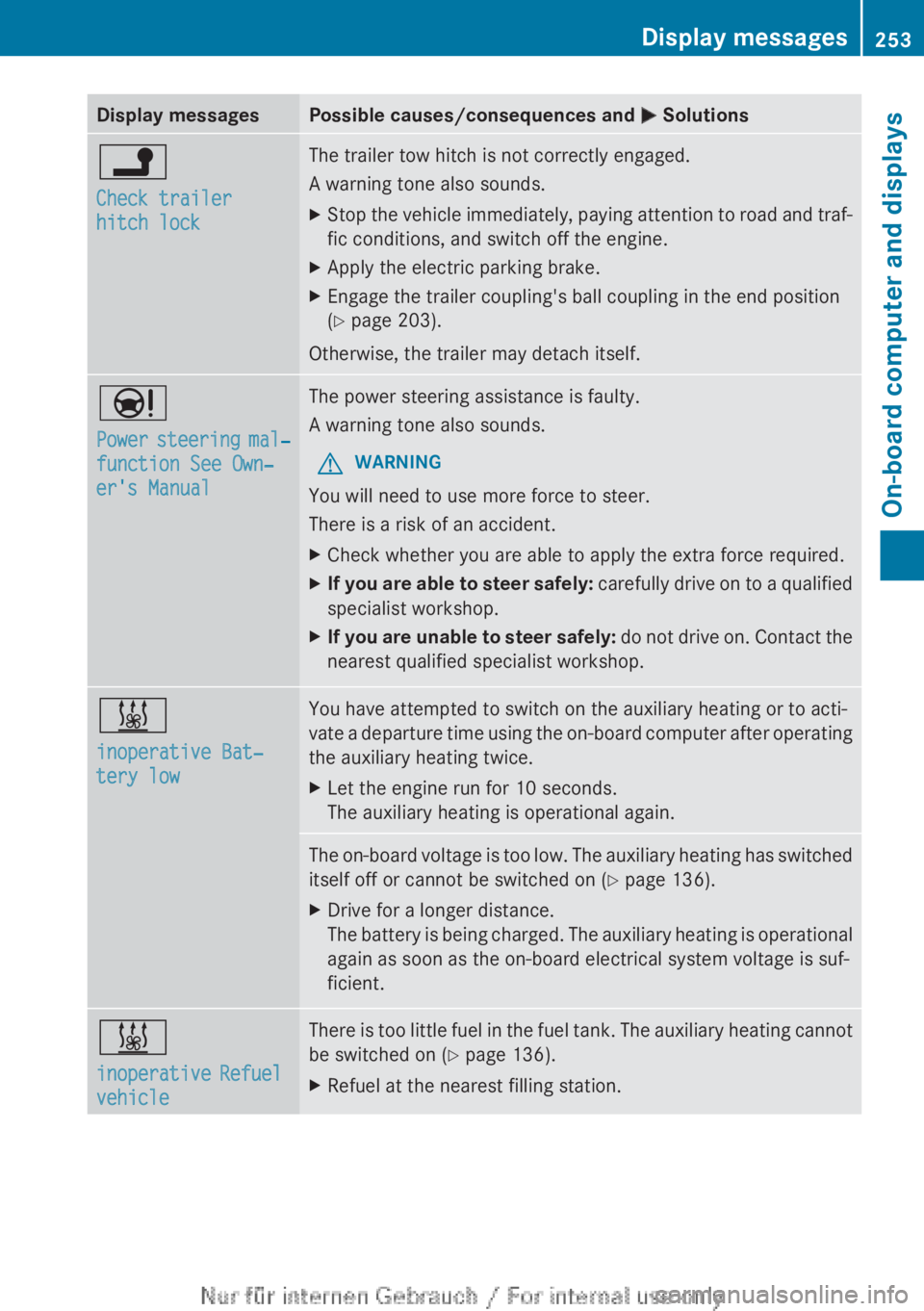
Display messagesPossible causes/consequences and M Solutionsj
Check trailer
hitch lockThe trailer tow hitch is not correctly engaged.
A warning tone also sounds.XStop the vehicle immediately, paying attention to road and traf-
fic conditions, and switch off the engine.XApply the electric parking brake.XEngage the trailer coupling's ball coupling in the end position
( Y page 203).
Otherwise, the trailer may detach itself.
Ð
Power steering mal‐
function See Own‐
er's ManualThe power steering assistance is faulty.
A warning tone also sounds.GWARNING
You will need to use more force to steer.
There is a risk of an accident.
XCheck whether you are able to apply the extra force required.XIf you are able to steer safely: carefully drive on to a qualified
specialist workshop.XIf you are unable to steer safely: do not drive on. Contact the
nearest qualified specialist workshop.&
inoperative Bat‐
tery lowYou have attempted to switch on the auxiliary heating or to acti-
vate a departure time using the on-board computer after operating
the auxiliary heating twice.XLet the engine run for 10 seconds.
The auxiliary heating is operational again.The on-board voltage is too low. The auxiliary heating has switched
itself off or cannot be switched on ( Y page 136).XDrive for a longer distance.
The battery is being charged. The auxiliary heating is operational
again as soon as the on-board electrical system voltage is suf-
ficient.&
inoperative Refuel
vehicleThere is too little fuel in the fuel tank. The auxiliary heating cannot
be switched on ( Y page 136).XRefuel at the nearest filling station.Display messages253On-board computer and displaysZ
Page 267 of 352
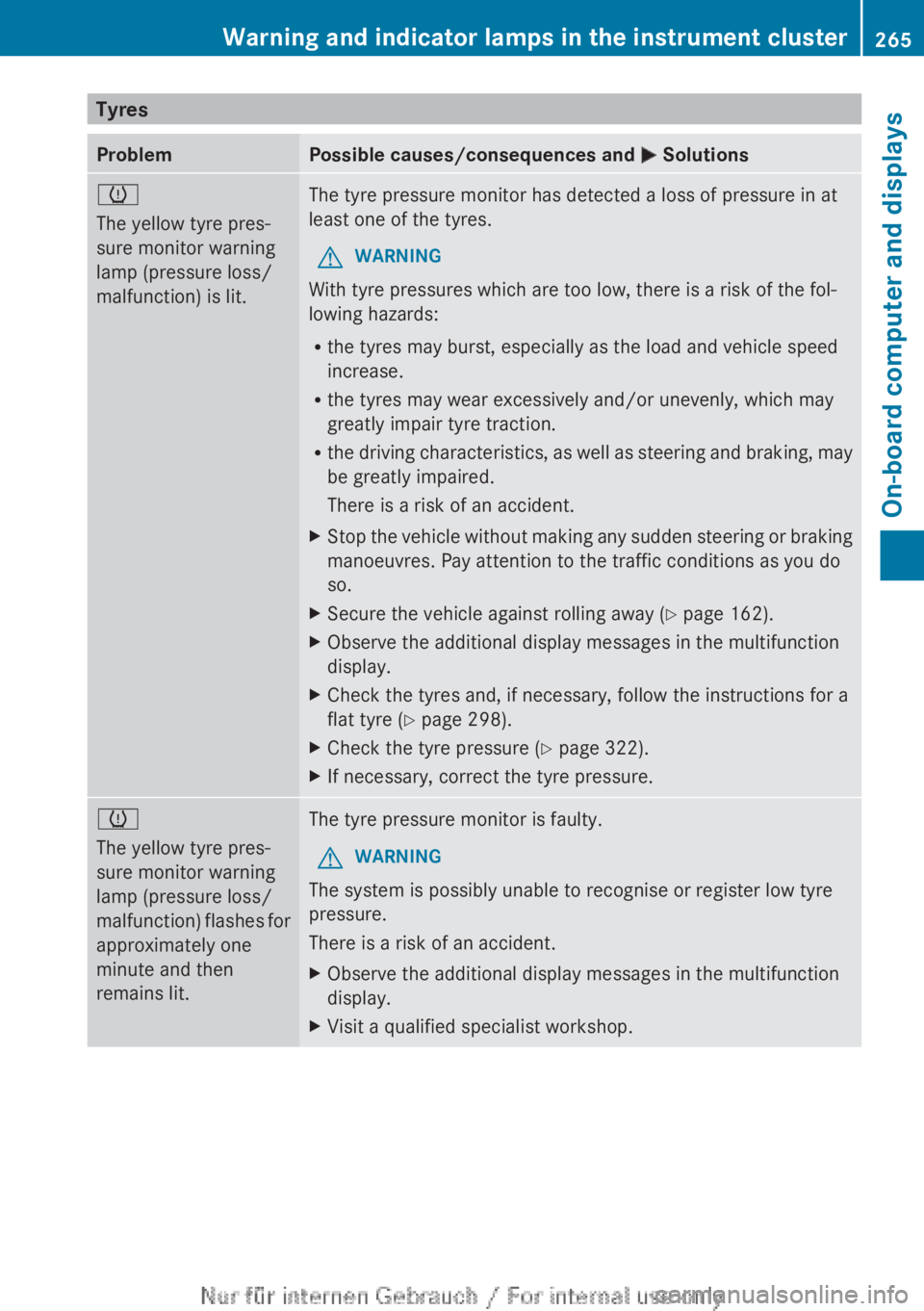
TyresProblemPossible causes/consequences and M Solutionsh
The yellow tyre pres-
sure monitor warning
lamp (pressure loss/
malfunction) is lit.The tyre pressure monitor has detected a loss of pressure in at
least one of the tyres.GWARNING
With tyre pressures which are too low, there is a risk of the fol-
lowing hazards:
R the tyres may burst, especially as the load and vehicle speed
increase.
R the tyres may wear excessively and/or unevenly, which may
greatly impair tyre traction.
R the driving characteristics, as well as steering and braking, may
be greatly impaired.
There is a risk of an accident.
XStop the vehicle without making any sudden steering or braking
manoeuvres. Pay attention to the traffic conditions as you do
so.XSecure the vehicle against rolling away ( Y page 162).XObserve the additional display messages in the multifunction
display.XCheck the tyres and, if necessary, follow the instructions for a
flat tyre ( Y page 298).XCheck the tyre pressure ( Y page 322).XIf necessary, correct the tyre pressure.h
The yellow tyre pres-
sure monitor warning
lamp (pressure loss/
malfunction) flashes for
approximately one
minute and then
remains lit.The tyre pressure monitor is faulty.GWARNING
The system is possibly unable to recognise or register low tyre
pressure.
There is a risk of an accident.
XObserve the additional display messages in the multifunction
display.XVisit a qualified specialist workshop.Warning and indicator lamps in the instrument cluster265On-board computer and displaysZ
Page 275 of 352
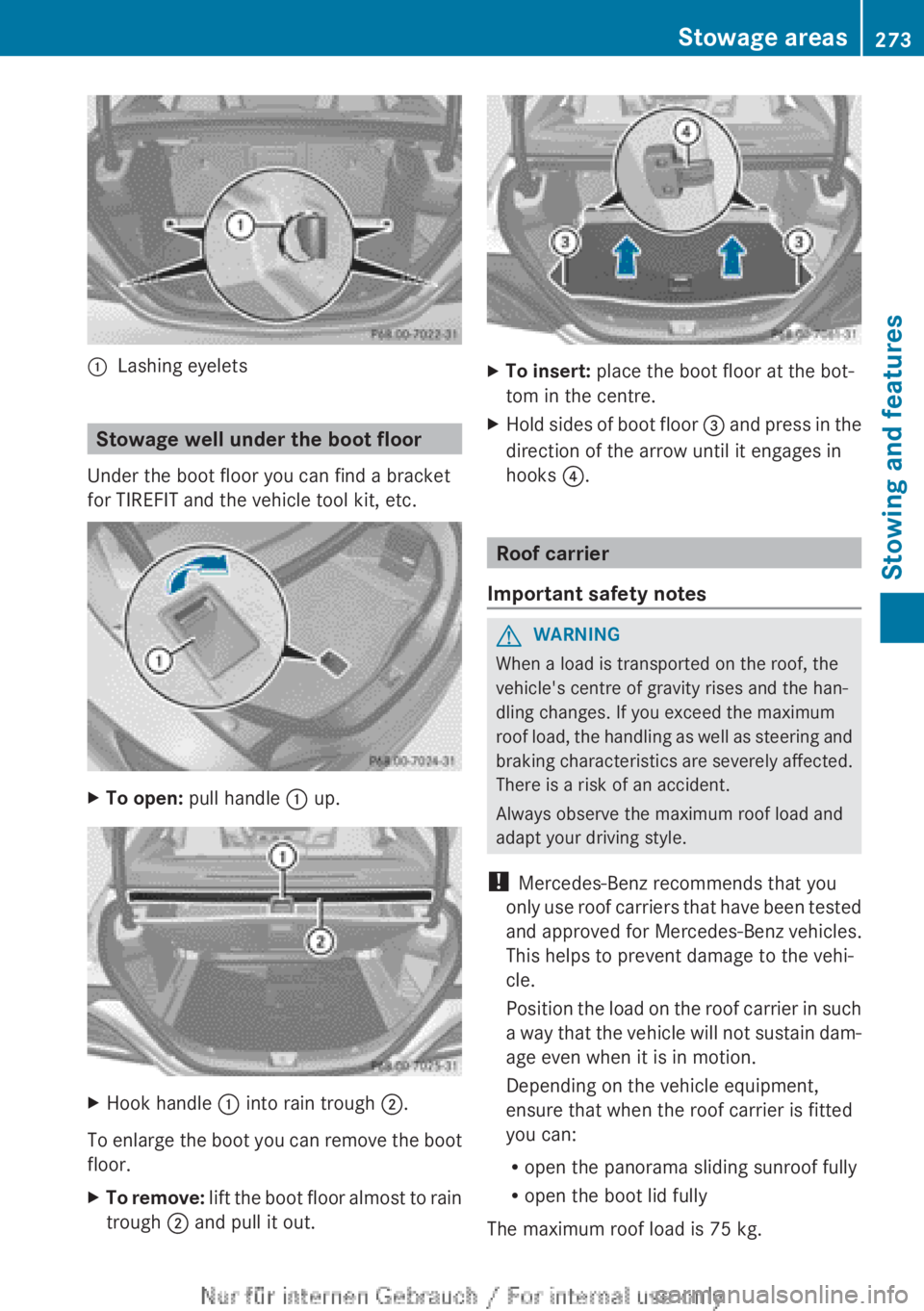
:Lashing eyelets
Stowage well under the boot floor
Under the boot floor you can find a bracket
for TIREFIT and the vehicle tool kit, etc.
XTo open: pull handle : up.XHook handle : into rain trough ;.
To enlarge the boot you can remove the boot
floor.
XTo remove: lift the boot floor almost to rain
trough ; and pull it out.XTo insert: place the boot floor at the bot-
tom in the centre.XHold sides of boot floor = and press in the
direction of the arrow until it engages in
hooks ?.
Roof carrier
Important safety notes
GWARNING
When a load is transported on the roof, the
vehicle's centre of gravity rises and the han-
dling changes. If you exceed the maximum
roof load, the handling as well as steering and
braking characteristics are severely affected.
There is a risk of an accident.
Always observe the maximum roof load and
adapt your driving style.
! Mercedes-Benz recommends that you
only use roof carriers that have been tested
and approved for Mercedes-Benz vehicles.
This helps to prevent damage to the vehi-
cle.
Position the load on the roof carrier in such
a way that the vehicle will not sustain dam-
age even when it is in motion.
Depending on the vehicle equipment,
ensure that when the roof carrier is fitted
you can:
R open the panorama sliding sunroof fully
R open the boot lid fully
The maximum roof load is 75 kg.
Stowage areas273Stowing and featuresZ