audio MERCEDES-BENZ CLA 2016 User Guide
[x] Cancel search | Manufacturer: MERCEDES-BENZ, Model Year: 2016, Model line: CLA, Model: MERCEDES-BENZ CLA 2016Pages: 374, PDF Size: 9.97 MB
Page 165 of 374
driven at lower engine speeds and the
wheels being less likely to spin. R
gliding mode is activated automatically
when engine-internal conditions are fulfil-
led and the accelerator is not depressed. At
the same time the transmission’s clutch
opens and the vehicle rolls freely using its
kinetic energy. As a result great distances
can be completed without the engine brake
and fuel consumption reduced.
Mercedes-AMG vehicles Drive program I (Individual)
In drive program I the following properties of
the drive program can be selected: R
the drive (engine management) R
the transmission management R
the suspension (vehicles with AMG RIDE
CONTROL) R
ESP ®
Information about the configuration of drive
program I with COMAND or Audio 20 can be
found in the Digital Operator's Manual.
Drive program C (Comfort)
Drive program C is characterized by the fol-
lowing: R
the vehicle delivers comfortable, economi-
cal handling characteristics. R
the vehicle pulling away more gently in
forward and reverse gears, unless the
accelerator pedal is depressed fully. R
the vehicle having improved driving stabil-
ity, for example on slippery road surfaces. R
optimal fuel consumption resulting from
the automatic transmission shifting up
sooner. The vehicle is driven in the low
engine speed range and the wheels are less
likely to spin. R
gliding mode is available. R
the ECO start/stop function is available. Drive program S (Sport)
Drive program S is characterized by the fol-
lowing: R
the vehicle exhibits sporty driving charac-
teristics. R
the automatic transmission shifting up
later. the fuel consumption possibly being
higher as a result of the later automatic
transmission shift points. R
the suspension exhibits stiff springing and
damping settings (vehicles with AIR RIDE
CONTROL). R
gliding mode is not available. R
the ECO start/stop function is not availa-
ble.
Drive program S+ (Sport Plus)
Drive program S+ is characterized by the fol-
lowing: R
the vehicle exhibits particularly sporty driv-
ing characteristics. R
the automatic transmission shifting up
later. R
the fuel consumption possibly being higher
as a result of the later automatic transmis-
sion shift points. R
the suspension exhibits particularly stiff
springing and damping settings (vehicles
with AMG adaptive sport suspension sys-
tem). R
gliding mode is not available. R
the ECO start/stop function is not availa-
ble.
Drive program RACE (vehicles with AMG
RIDE CONTROL)
The RACE drive program is characteriz ed by
the following: R
the vehicle exhibits driving characteristics
suitable for the racetrack. R
all vehicle systems are set for maximum
sportiness. R
the automatic transmission shifting up
later.Automatic transmission 163
Driving and parking Z
Page 202 of 374
Rear view camera
General notes
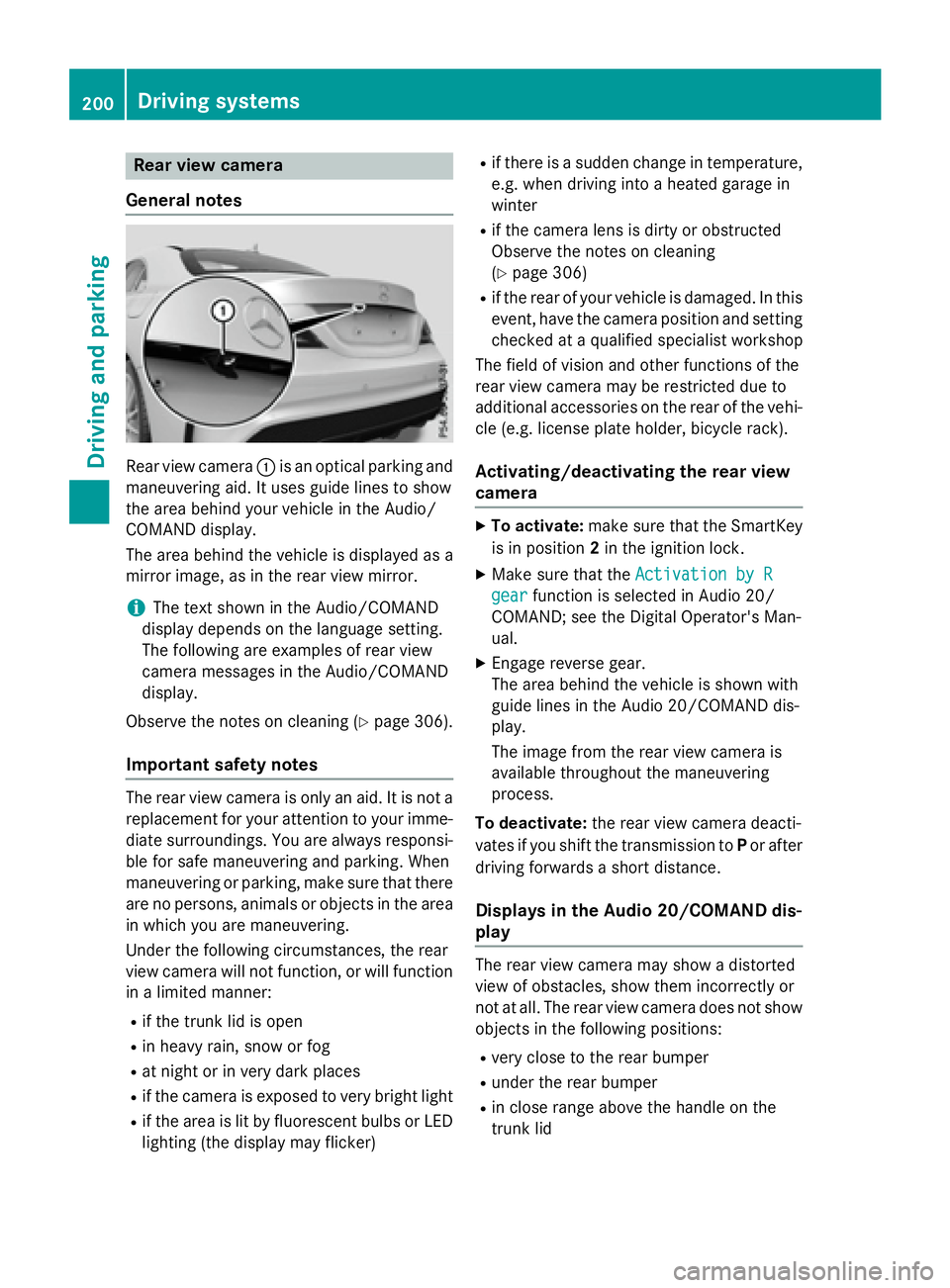
Rear view camera C is an optical parking and
maneuvering aid. It uses guide lines to show
the area behind your vehicle in the Audio/
COMAND display.
The area behind the vehicle is displayed as a
mirror image, as in the rear view mirror.
i The text shown in the Audio/COMAND
display depends on the language setting.
The following are examples of rear view
camera messages in the Audio/COMAND
display.
Observe the notes on cleaning ( Y
page 306).
Important safety notes
The rear view camera is only an aid. It is not a
replacement for your attention to your imme-
diate surroundings. You are always responsi-
ble for safe maneuvering and parking. When
maneuvering or parking, make sure that there
are no persons, animals or objects in the area
in which you are maneuvering.
Under the following circumstances, the rear
view camera will not function, or will function
in a limited manner: R
if the trunk lid is open R
in heavy rain, snow or fog R
at night or in very dark places R
if the camera is exposed to very bright light R
if the area is lit by fluorescent bulbs or LED
lighting (the display may flicker) R
if there is a sudden change in temperature,
e.g. when driving into a heated garage in
winter R
if the camera lens is dirty or obstructed
Observe the notes on cleaning
( Y
page 306) R
if the rear of your vehicle is damaged. In this
event, have the camera position and setting
checked at a qualified specialist workshop
The field of vision and other functions of the
rear view camera may be restricted due to
additional accessories on the rear of the vehi-
cle (e.g. license plate holder, bicycle rack).
Activating/deactivating the rear view
camera X
To activate: make sure that the SmartKey
is in position 2 in the ignition lock. X
Make sure that the Activation by R
gear function is selected in Audio 20/
COMAND; see the Digital Operator's Man-
ual. X
Engage reverse gear.
The area behind the vehicle is shown with
guide lines in the Audio 20/COMAND dis-
play.
The image from the rear view camera is
available throughout the maneuvering
process.
To deactivate: the rear view camera deacti-
vates if you shift the transmission to P or after
driving forwards a short distance.
Displays in the Audio 20/COMAND dis-
play
The rear view camera may show a distorted
view of obstacles, show them incorrectly or
not at all. The rear view camera does not show
objects in the following positions: R
very close to the rear bumper R
under the rear bumper R
in close range above the handle on the
trunk lid200
Driving systems
Driving and parking
Page 214 of 374
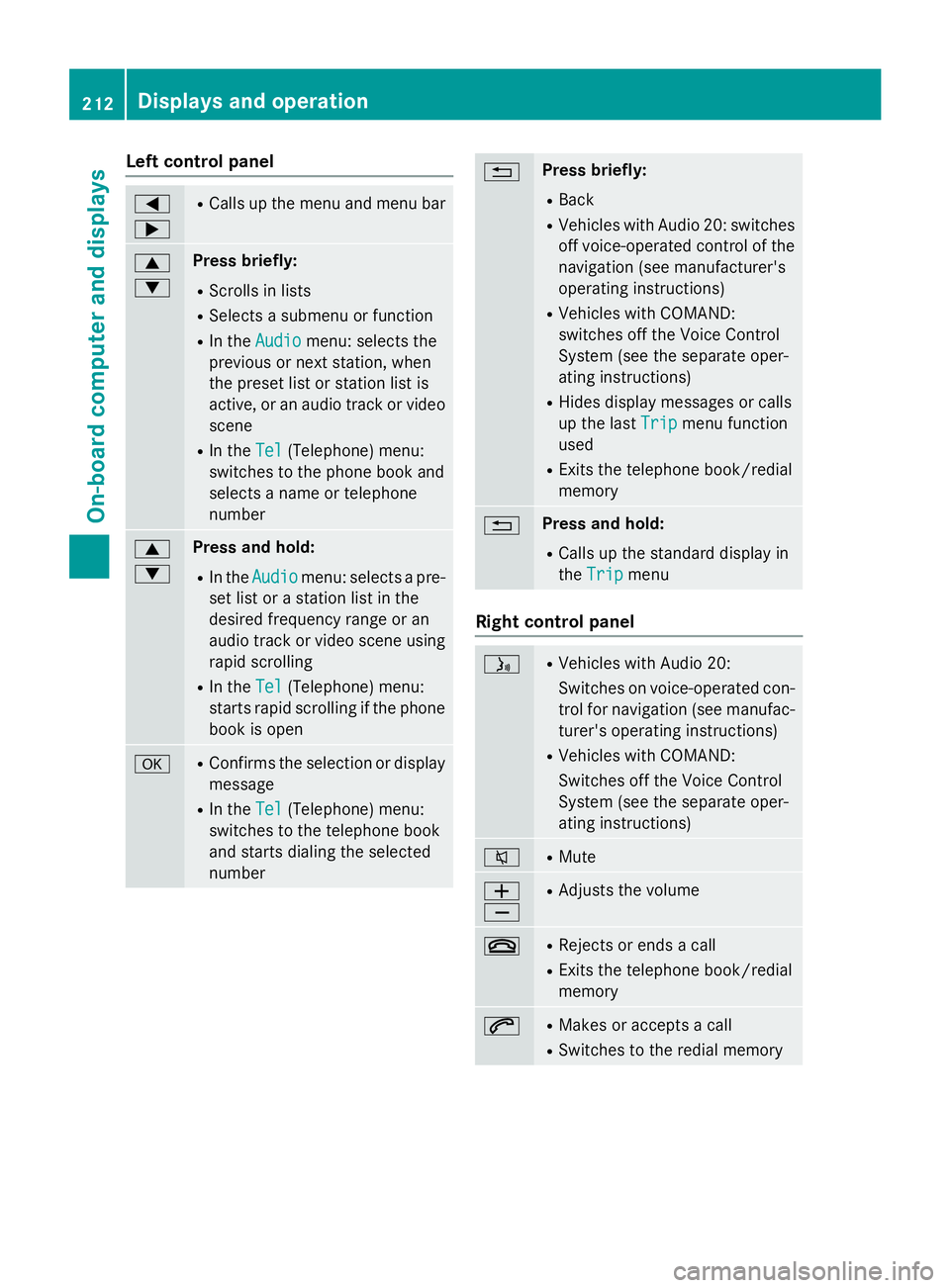
Left control panel Y
e R
Calls up the menu and menu bar
c
d Press briefly: R
Scrolls in lists R
Selects a submenu or function R
In the Audio menu: selects the
previous or next station, when
the preset list or station list is
active, or an audio track or video
scene R
In the Tel (Telephone) menu:
switches to the phone book and
selects a name or telephone
number
c
d Press and hold: R
In the Audio menu: selects a pre-
set list or a station list in the
desired frequency range or an
audio track or video scene using
rapid scrolling R
In the Tel (Telephone) menu:
starts rapid scrolling if the phone
book is open
v R
Confirms the selection or display
message R
In the Tel (Telephone) menu:
switches to the telephone book
and starts dialing the selected
number 8 Press briefly: R
Back R
Vehicles with Audio 20: switches
off voice-operated control of the
navigation (see manufacturer's
operating instructions) R
Vehicles with COMAND:
switches off the Voice Control
System (see the separate oper-
ating instructions) R
Hides display messages or calls
up the last Trip
menu function
used R
Exits the telephone book/redial
memory
8 Press and hold: R
Calls up the standard display in
the Trip
menu
Right control panel
Page 219 of 374
Audio menu
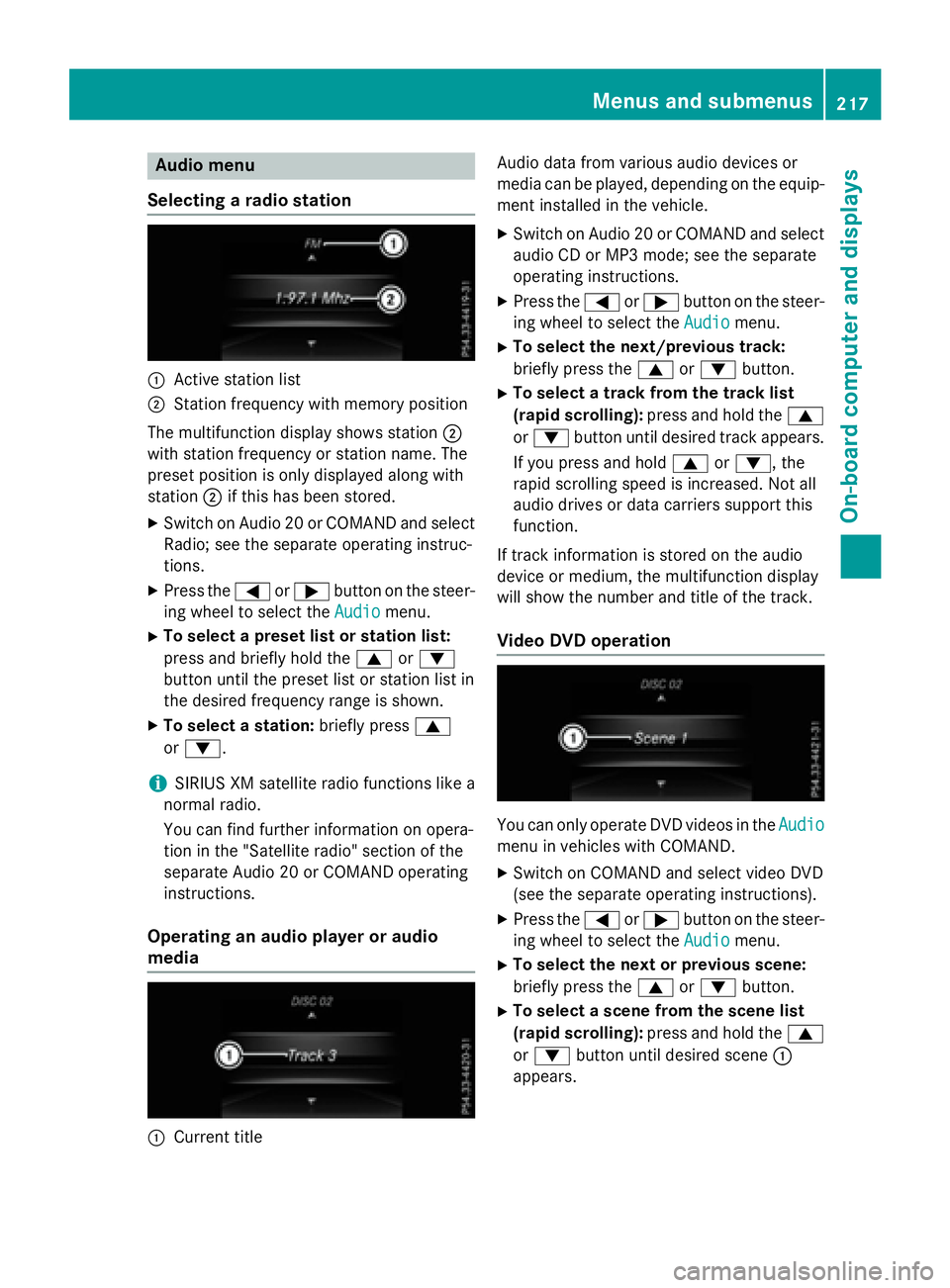
Selecting a ra dio station
C
Active station listD
Station frequency wit h memory position
The multifunction display shows station D
wit h station frequency or station name. The
preset position is only displayed alon g wit h
station D if this has been stored.X
Switc h on Audio 20 or COMAND and select
Radio; see th e separat e operating instruc-
tions. X
Press th e Y or e butto n on th e steer -
ing whee l to select th e Audio
menu.X
To select a preset list or station list :
press and briefly hold th e c or d
butto n until th e preset list or station list in
th e desired frequency range is shown. X
To select a station: briefly press c
or d .
i SIRIUS XM satellit e radi o function s lik e a
normal radio.
You can fin d further information on opera-
tion in th e "Satellit e radio" section of th e
separat e Audio 20 or COMAND operating
instructions.
Operating an audio player or audio
media
C
Curren t titl e Audio dat a from various audio device s or
media can be played, depending on th e equip-
men t installed in th e vehicle. X
Switc h on Audio 20 or COMAND and select
audio CD or MP3 mode; see th e separat e
operating instructions. X
Pre ss th e Y or e butto n on th e st eer -
ing whee l to select th e Audio
menu.X
To select th e next/previou s track :
briefly pre ss th e c or d button.X
To select a track fr om th e track list
(rapid scrolling): pre ss and hold th e c
or d butto n until desired track appears.
If you pre ss and hold c or d , th e
rapi d sc rollin g spee d is increased. Not all
audio drives or dat a carriers support this
function .
If track information is st ore d on th e audio
device or medium, th e multifunction display
will show th e number and titl e of th e track .
Video DVD operation
You can only operate DV D videos in th e Audio
men u in vehicles wit h COMAND .X
Switc h on COMAND and select vide o DV D
(see th e separat e operating instructions). X
Pre ss th e Y or e butto n on th e st eer -
ing whee l to select th e Audio
menu.X
To select th e next or previou s scene:
briefly press th e c or d button.X
To select a scene fr om th e scene list
(rapid scrolling): press and hold th e c
or d butto n until desired sc en e C
appear s.Menus and submenus 21 7
On-board computer and displays Z
Page 220 of 374
Telephone menu
Introduction
G WARNING
If you operate information systems and com-
munication equipment integrated in the vehi-
cle while driving, you will be distracted from
traffic conditions. You could also lose control
of the vehicle. There is a risk of an accident.
Only operate the equipment when the traffic
situation permits. If you are not sure that this
is possible, park the vehicle paying attention
to traffic conditions and operate the equip-
ment when the vehicle is stationary.
When telephoning, you must observe the
legal requirements for the country in which
you are currently driving. X
Switch on the mobile phone (see the man-
ufacturer’s operating instructions). X
Switch on Audio 20 or COMAND, see the
separate operating instructions. X
Establish a Bluetooth ®
connection to Audio
20 or COMAND, see the separate operating
instructions. X
Press the Y or e button on the steer-
ing wheel to select the Tel
menu.
You will see one of the following display mes-
sages in the multifunction display: R
Phone READY or the name of the network
provider: the mobile phone has found a
network and is ready to receive. R
Phone No Service : there is no network
available or the mobile phone is searching
for a network.
Accepting a call If someone calls you when you are in the Tel
menu, a display message appears in the mul-
tifunction display.
You can accept a call at any time, even if you
are not in the Tel
menu. X
Press the a button on the steering
wheel to accept an incoming call.
Rejecting or ending a call You can end or reject a call anytime, even if
you are not in the Tel
menu. X
Press the v button on the steering
wheel to reject or end a call.
Selecting an entry in the phone book X
Press the Y or e button on the steer-
ing wheel to select the Tel
menu.X
Press the c , d or v button to
switch to the phone book. X
Authorize access to the phone book on the
phone. X
Press the c or d button to select the
desired name.
or X
To begin rapid scrolling: press and hold
the c or d button for longer than
one second.
Rapid scrolling stops when you release the
button or reach the end of the list. X
If only one telephone number is stored
for a name: press the a or v button
to start dialing.
or X
If there is more than one number for a
particular name: press the a or v
button to display the numbers. X
Press the c or d button to select the
number you want to dial. X
Press the a or v button to start dial-
ing.
or X
If you do not want to make a call: press
the v or 8 button.218
Menus and submenus
On-board computer and displays
Page 285 of 374
Have the system checked at the nearest
authorized Mercedes-Benz Center or contact
the following service hotlines:
Mercedes-Benz Customer Assistance Center
at 1-800-FOR-MERCedes (1-800-367-6372)
or 1-866-990-9007
Emergency call Important safety notes
G WARNING
It can be dangerous to remain in the vehicle,
even if you have pressed the SOS button in an
emergency if: R
you see smoke inside or outside of the vehi-
cle, e.g. if there is a fire after an accident R
the vehicle is on a dangerous section of
road R
the vehicle is not visible or cannot easily be
seen by other road users, particularly when
dark or in poor visibility conditions
There is a risk of an accident and injury.
Leave the vehicle immediately in this or simi-
lar situations as soon as it is safe to do so.
Move to a safe location along with other vehi-
cle occupants. In such situations, secure the
vehicle in accordance with national regula-
tions, e. g. with a warning triangle.
General notes
Observe the notes on system activation
( Y
page 282).
An emergency call is dialed automatically if an
air bag or Emergency Tensioning Device is
triggered. You cannot end an automatically
triggered emergency call yourself.
An emergency call can also be initiated man-
ually.
As soon as the emergency call has been ini-
tiated, the indicator lamp in the SOS button
flashes. The Connecting Call
message
appears in the multifunction display.
The audio output is muted. Once the connection has been made, the
Call Connected
message appears in the
multifunction display.
All important information on the emergency is
transmitted, for example: R
current location of the vehicle (as deter-
mined by the GPS system) R
vehicle identification number R
information on the severity of the accident
Shortly after the emergency call has been ini-
tiated, a voice connection is automatically
established between the Customer Assis-
tance Center and the vehicle occupants. R
If the vehicle occupants respond, the
Mercedes-Benz Customer Assistance Cen-
ter attempts to get more information on the
emergency. R
If there is no response from the vehicle
occupants, an ambulance is immediately
sent to the vehicle.
If no voice connection can be established to
the Mercedes-Benz Customer Assistance
Center, the system has been unable to initiate
an emergency call.
This can occur, for example, if the relevant
mobile phone network is not available. The
indicator lamp in the SOS button flashes con-
tinuously.
The Call Failed message appears in the
multifunction display and must be confirmed.
In this case, summon assistance by other
means.
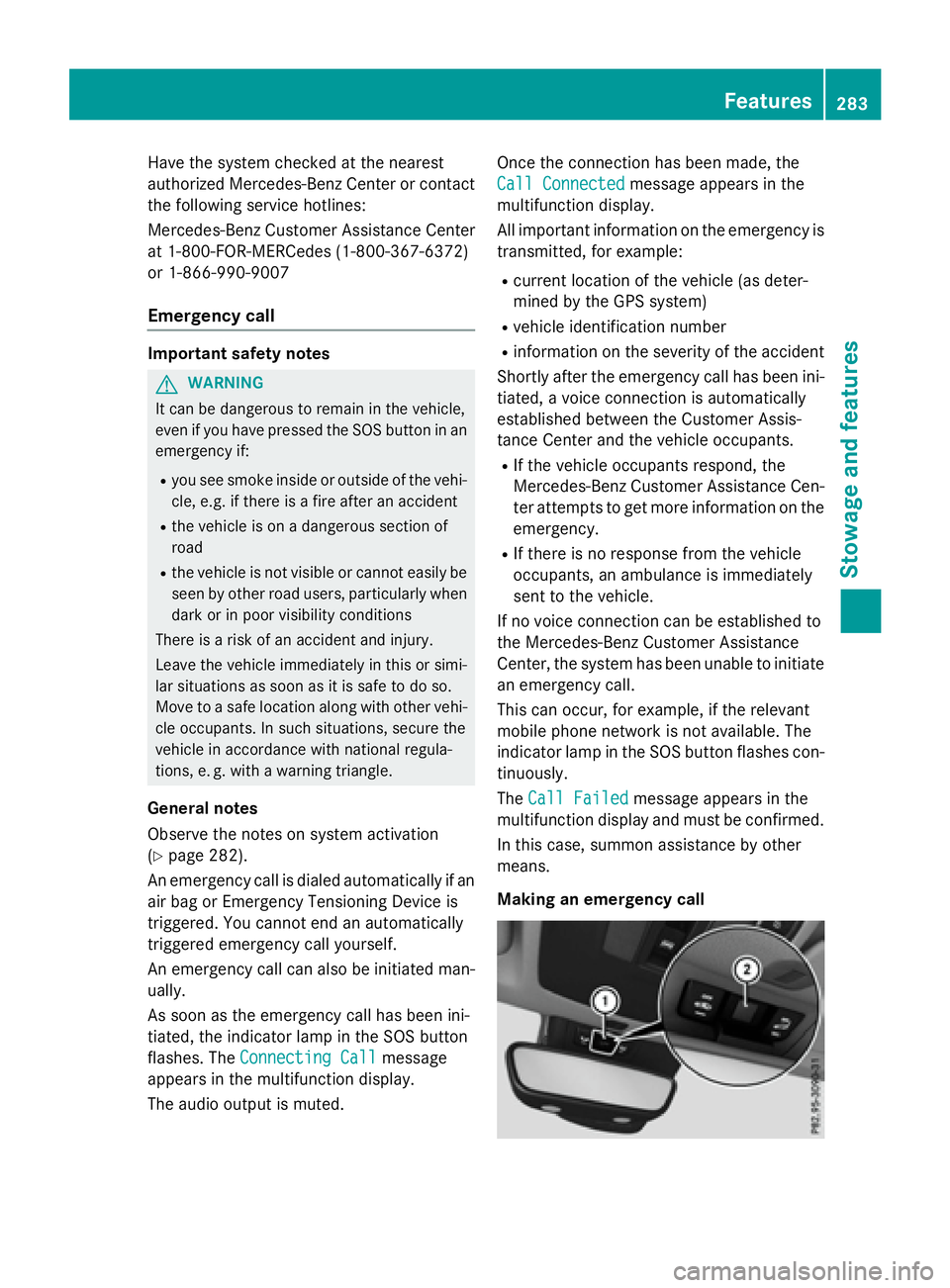
Making an emergency call Features 283
Stowage and features Z
Page 286 of 374
X
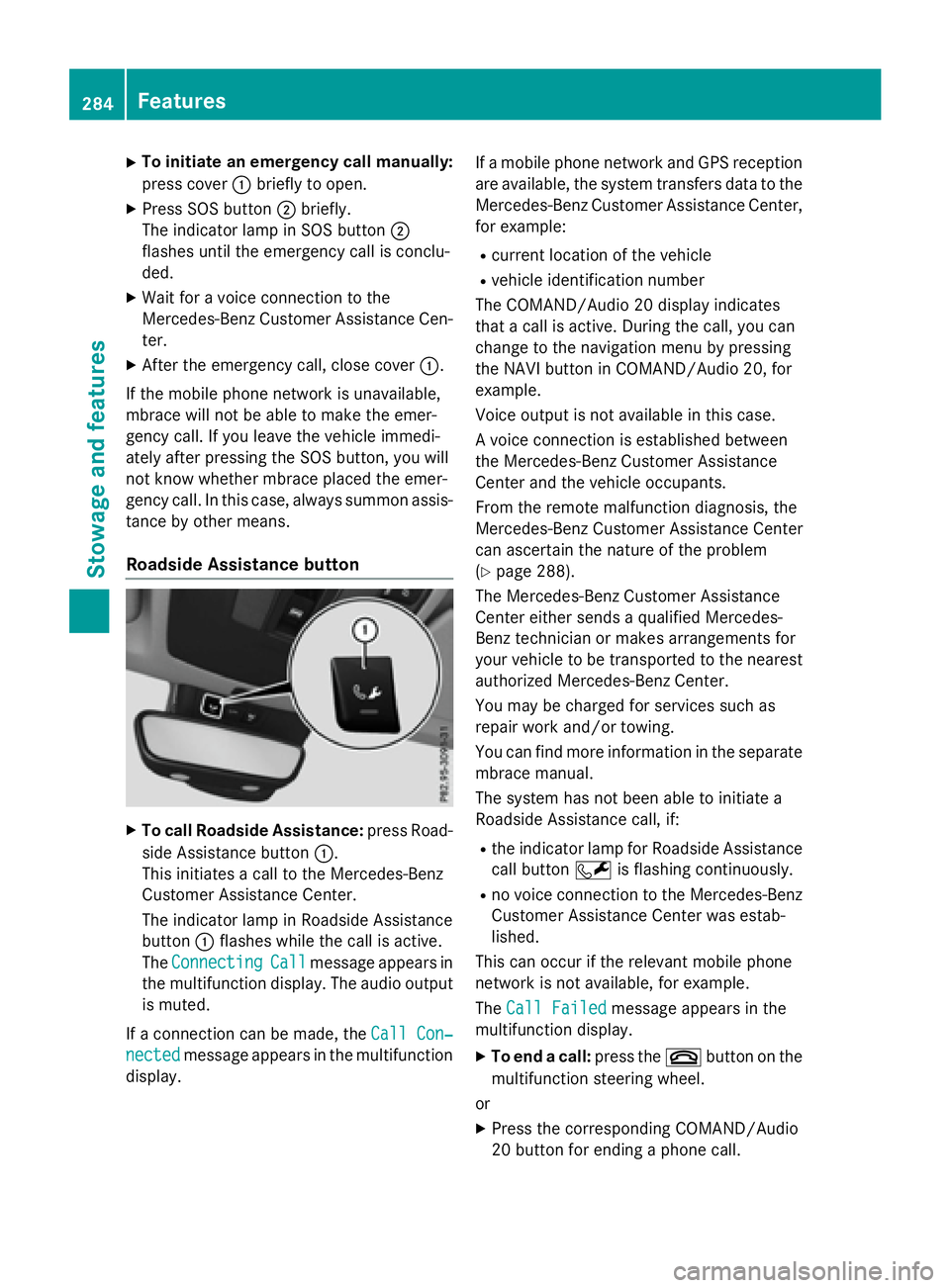
To initiate an emergency call manually:
press cover C briefly to open.X
Press SOS button D briefly.
The indicator lamp in SOS button D
flashes until the emergency call is conclu-
ded. X
Wait for a voice connection to the
Mercedes-Benz Customer Assistance Cen-
ter. X
After the emergency call, close cover C .
If the mobile phone network is unavailable,
mbrace will not be able to make the emer-
gency call. If you leave the vehicle immedi-
ately after pressing the SOS button, you will
not know whether mbrace placed the emer-
gency call. In this case, always summon assis-
tance by other means.
Roadside Assistance button
X
To call Roadside Assistance: press Road-
side Assistance button C .
This initiates a call to the Mercedes-Benz
Customer Assistance Center.
The indicator lamp in Roadside Assistance
button C flashes while the call is active.
The Connecting Call message appears in
the multifunction display. The audio output
is muted.
If a connection can be made, the Call Con‐
nected message appears in the multifunction
display. If a mobile phone network and GPS reception
are available, the system transfers data to the
Mercedes-Benz Customer Assistance Center,
for example: R
current location of the vehicle R
vehicle identification number
The COMAND/Audio 20 display indicates
that a call is active. During the call, you can
change to the navigation menu by pressing
the NAVI button in COMAND/Audio 20, for
example.
Voice output is not available in this case.
A voice connection is established between
the Mercedes-Benz Customer Assistance
Center and the vehicle occupants.
From the remote malfunction diagnosis, the
Mercedes-Benz Customer Assistance Center
can ascertain the nature of the problem
( Y
page 288).
The Mercedes-Benz Customer Assistance
Center either sends a qualified Mercedes-
Benz technician or makes arrangements for
your vehicle to be transported to the nearest
authorized Mercedes-Benz Center.
You may be charged for services such as
repair work and/or towing.
You can find more information in the separate
mbrace manual.
The system has not been able to initiate a
Roadside Assistance call, if: R
the indicator lamp for Roadside Assistance
call button R is flashing continuously. R
no voice connection to the Mercedes-Benz
Customer Assistance Center was estab-
lished.
This can occur if the relevant mobile phone
network is not available, for example.
The Call Failed message appears in the
multifunction display. X
To end a call: press the v button on the
multifunction steering wheel.
or X
Press the corresponding COMAND/Audio
20 button for ending a phone call.284
Features
Sto wag e an d features
Page 287 of 374
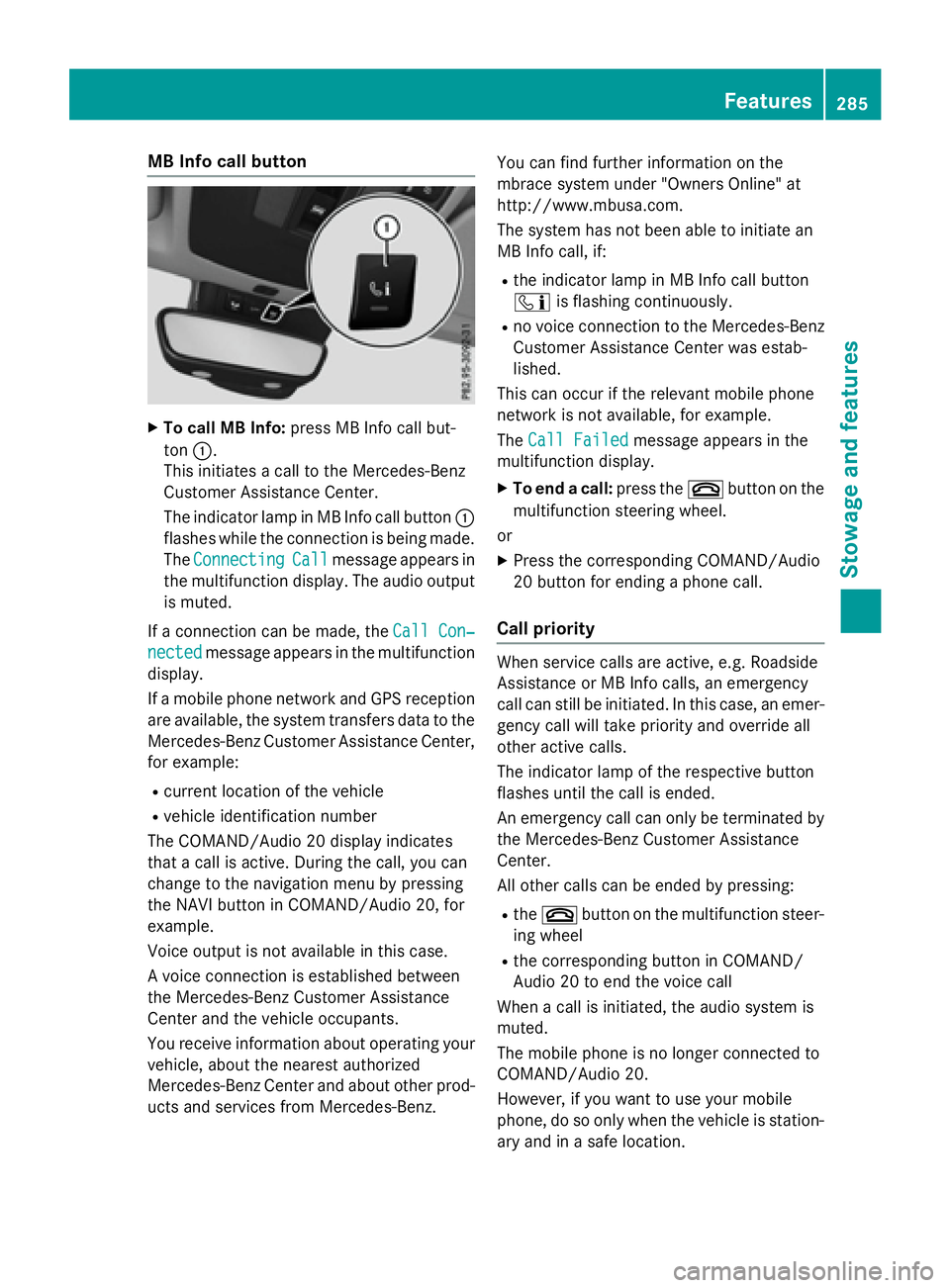
MB Info call button X
To call MB Info: press MB Info call but-
ton C .
This initiates a call to the Mercedes-Benz
Customer Assistance Center.
The indicator lamp in MB Info call button C
flashes while the connection is being made.
The Connecting Call message appears in
the multifunction display. The audio output
is muted.
If a connection can be made, the Call Con‐
nected message appears in the multifunction
display.
If a mobile phone network and GPS reception
are available, the system transfers data to the
Mercedes-Benz Customer Assistance Center,
for example: R
current location of the vehicle R
vehicle identification number
The COMAND/Audio 20 display indicates
that a call is active. During the call, you can
change to the navigation menu by pressing
the NAVI button in COMAND/Audio 20, for
example.
Voice output is not available in this case.
A voice connection is established between
the Mercedes-Benz Customer Assistance
Center and the vehicle occupants.
You receive information about operating your
vehicle, about the nearest authorized
Mercedes-Benz Center and about other prod-
ucts and services from Mercedes-Benz. You can find further information on the
mbrace system under "Owners Online" at
http://www.mbusa.com.
The system has not been able to initiate an
MB Info call, if: R
the indicator lamp in MB Info call button
Page 291 of 374
Information on the data stored in the vehicle
( Y
page 27).
Information on Roadside Assistance
( Y
page 23).
Downloading routes Downloading routes allows you to transfer
and save predefined routes in the navigation
system.
A route can be prepared and sent by either a
customer service representative or under
"Owners Online" at http://www.mbusa.com.
Each route can include up to four way points.
Once a route has been received by the navi-
gation system, you will see the External
route ICON_POI_Category Name_1 has
been saved to "Previous destina‐
tions". Would you like to start nav‐
igation? message on the Audio 20 display.
The route is saved. X
To start route guidance: select Yes .
An overview of the route is shown in the
display.
If you select No , the saved route can be
called up later in the navigation menu. X
Select Start .
Starting route guidance.
Downloaded and saved routes can be called
up again.
You can find further information in the sepa-
rate COMAND/Audio 20 operating instruc-
tions.
Speed alert
You can define the upper speed limit, which
must not be exceeded by the vehicle.
If this selected speed is exceeded by the vehi-
cle, a message will be sent to the Customer
Assistance Center. The Customer Assistance
Center then forwards this information to you.
You can select the way in which you receive
this information beforehand. Possible options
include text message, e-mail or an automated
call. The data you receive contains the following
information: R
the location where the speed limit was
exceeded R
the time at which the speed limit was
exceeded R
the selected speed limit which was excee-
ded
Geo fencing Geo fencing allows you to select areas which
the vehicle should not enter or leave. You will
be informed if the vehicle crosses the boun-
daries of the selected areas. You can select
the way in which you receive this information
beforehand. Possible options include text
message, e-mail or an automated call.
The area can be determined as either a circle
or a polygon with a maximum of ten corners.
You can specify up to ten areas simultane-
ously. Different settings are possible for each
area.
These settings can be called up under "Own-
ers Online" at http://www.mbusa.com.
Alternatively, you can trigger an MB Info call
and inform the customer service representa-
tive that you wish to activate geo fencing.
Currently inactive areas can be activated by
text message.
Triggering the vehicle alarm
With this function, you can trigger the vehi-
cle's panic alarm via text message. An alarm
sounds and the exterior lighting flashes.
Depending on the setting, the panic alarm
lasts five or ten seconds. Afterwards, the
alarm switches off.
Garage door opener
General notes
The HomeLink ®
garage door opener integra-
ted in the rear-view mirror allows you to oper- Features 289
Stowage and features Z
Page 308 of 374
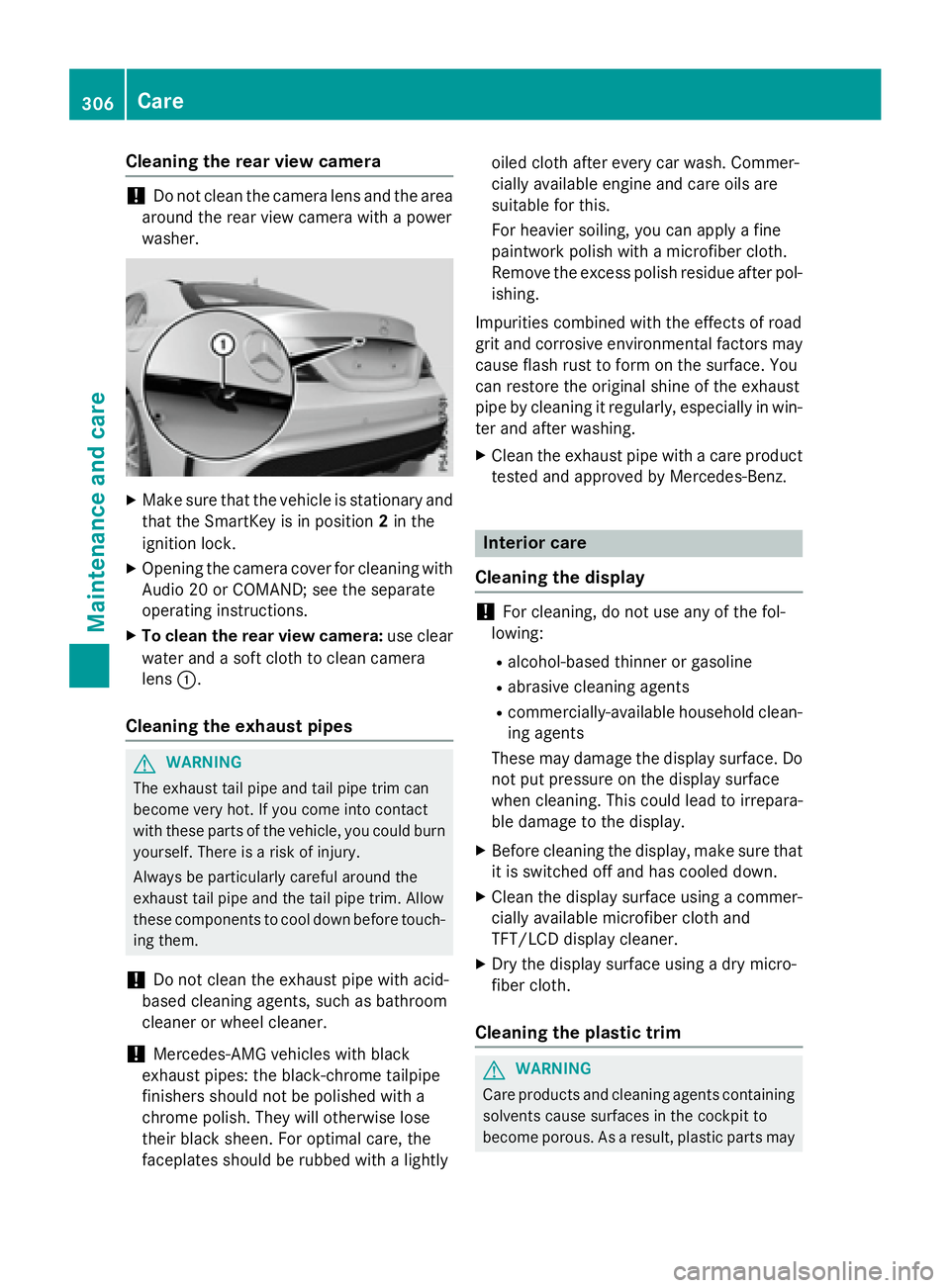
Cleaning the rear view camera
! Do not clean the camera lens and the area
around the rear view camera with a power
washer. X
Make sure that the vehicle is stationary and
that the SmartKey is in position 2 in the
ignition lock. X
Opening the camera cover for cleaning with
Audio 20 or COMAND; see the separate
operating instructions. X
To clean the rear view camera: use clear
water and a soft cloth to clean camera
lens C .
Cleaning the exhaust pipes
G WARNING
The exhaust tail pipe and tail pipe trim can
become very hot. If you come into contact
with these parts of the vehicle, you could burn
yourself. There is a risk of injury.
Always be particularly careful around the
exhaust tail pipe and the tail pipe trim. Allow
these components to cool down before touch-
ing them.
! Do not clean the exhaust pipe with acid-
based cleaning agents, such as bathroom
cleaner or wheel cleaner.
! Mercedes-AMG vehicles with black
exhaust pipes: the black-chrome tailpipe
finishers should not be polished with a
chrome polish. They will otherwise lose
their black sheen. For optimal care, the
faceplates should be rubbed with a lightly oiled cloth after every car wash. Commer-
cially available engine and care oils are
suitable for this.
For heavier soiling, you can apply a fine
paintwork polish with a microfiber cloth.
Remove the excess polish residue after pol-
ishing.
Impurities combined with the effects of road
grit and corrosive environmental factors may
cause flash rust to form on the surface. You
can restore the original shine of the exhaust
pipe by cleaning it regularly, especially in win-
ter and after washing. X
Clean the exhaust pipe with a care product
tested and approved by Mercedes-Benz.
Interior care
Cleaning the display
! For cleaning, do not use any of the fol-
lowing: R
alcohol-based thinner or gasoline R
abrasive cleaning agents R
commercially-available household clean-
ing agents
These may damage the display surface. Do
not put pressure on the display surface
when cleaning. This could lead to irrepara-
ble damage to the display. X
Before cleaning the display, make sure that
it is switched off and has cooled down. X
Clean the display surface using a commer-
cially available microfiber cloth and
TFT/LCD display cleaner. X
Dry the display surface using a dry micro-
fiber cloth.
Cleaning the plastic trim
G WARNING
Care products and cleaning agents containing
solvents cause surfaces in the cockpit to
become porous. As a result, plastic parts may306
Care
Maintenance and care