light MERCEDES-BENZ CLA 2017 User Guide
[x] Cancel search | Manufacturer: MERCEDES-BENZ, Model Year: 2017, Model line: CLA, Model: MERCEDES-BENZ CLA 2017Pages: 318, PDF Size: 9.9 MB
Page 20 of 318
Button overview ............................... 33
Buttons (on-board computer) ......... 175
Cleaning ........................................ .2 64
Important safety notes .................... 94
Paddle shifters ............................... 135
Steering wheel paddle shifters ....... .1 35
Stopwatch (RACETIMER) ................... 186
Stowage compartments
Armrest (front) ............................... 234
Armrest (under) ............................ .2 35
Center console .............................. 234
Center console (rear) ..................... 235
Cup holders ................................... 238
Eyeglasses compartment .............. .2 34
Glove box ....................................... 234
Important safety information ......... 233
Map pockets .................................. 235
Stowage net ................................... 235
Under driver's seat/front-
passenger seat .............................. 235
Stowage net ....................................... 235
Stowage well beneath the trunk
floor .................................................... 237
Summer tires ..................................... 284
Sun visor ............................................ 240
Suspension
Adaptive Damping System ............. 159
Suspension setting
AMG adaptive sport suspension
system ........................................... 158
Switching air-recirculation mode
on/off ................................................. 118
Switching on media mode
Via the device list .......................... 232
T
Tachometer ........................................ 174
Tail lamps
Display message ............................ 200
see Lights
Tank
see Fuel tank
Tank content
Fuel gauge ....................................... 32
Technical data
Capacities ...................................... 309
Information .................................... 307 Tires/wheels ................................. 306
Vehicle data ................................... 314
Telephone
Accepting a call (multifunction
steering wheel) .............................. 181
Authorizing a mobile phone (con-
necting) ......................................... 231
Connecting a mobile phone (gen-
eral information) ............................ 230
Display message ............................ 214
Introduction ................................... 180
Menu (on-board computer) ............ 180
Number from the phone book ........ 181
Redialing ........................................ 181
Rejecting/ending a call ................. 181
see also Digital Operator's Man-
ual .................................................. 227
Switching between mobile
phones ........................................... 232
Temperature
Coolant .......................................... 175
Coolant (on-board computer,
Mercedes-AMG vehicles) ............... 185
Engine oil (on-board computer,
Mercedes-AMG vehicles) ............... 185
Outside temperature ...................... 174
Setting (climate control) ................ 115
Transmission oil (on-board com-
puter, Mercedes-AMG vehicles) ..... 185
Through-loading feature ................... 236
Timing (RACETIMER) ......................... 186
Tire pressure
Calling up (on-board computer) ..... 289
Checking manually ........................ 288
Display message ............................ 209
Maximum ....................................... 288
Not reached (TIREFIT) .................... 269
Notes ............................................. 287
Reached (TIREFIT) .......................... 270
Recommended ............................... 285
Tire pressure loss warning system
General notes ................................ 288
Important safety notes .................. 288
Restarting ...................................... 289
Tire pressure monitor
Checking the tire pressure elec-
tronically ........................................ 291
Function/notes ............................. 28918
Index
Page 30 of 318
The following text is reproduced as required of
all manufacturers under Title 49, Code of U.S.
Federal Regulations, Part 575 pursuant to the
National Traffic and Motor Vehicle Safety Act of
1966.
If you believe that your vehicle has a defect
which could cause a crash or could cause injury
or death, you should immediately inform the
National Highway Traffic Safety Administration
(NHTSA) in addition to notifying Mercedes-Benz
USA, LLC.
If NHTSA receives similar complaints, it may
open an investigation, and if it finds that a safety
defect exists in a group of vehicles, it may order
a recall and remedy campaign. However, NHTSA
cannot become involved in individual problems
between you, your dealer, or Mercedes-Benz
USA, LLC.
To contact NHTSA, you may call the Vehicle
Safety Hotline toll-free at 1-888-327-4236
(TTY: 1-800-424-9153 ); go to http://
www.safercar.gov ; or write to: Administrator,
NHTSA, 400 Seventh Street, SW., Washington,
DC 20590.
You can also obtain other information about
motor vehicle safety from
http://www.safercar.gov
Limited Warranty
! Follow the instructions in this manual about
the proper operation of your vehicle as well as
about possible vehicle damage. Damage to
your vehicle that arises from culpable contra-
ventions against these instructions is not cov-
ered either by the Mercedes-Benz Limited
Warranty or by the New or Used-Vehicle War-
ranty.
QR codes for the rescue card
The QR codes are secured in the fuel filler flap
and on the opposite side on the B-pillar. In the
event of an accident, rescue services can use
the QR code to quickly find the appropriate res-
cue card for your vehicle. The current rescue
card contains the most important information
about your vehicle in a compact form, e.g. the
routing of the electric cables.
You can find more information under
www.mercedes-benz.de/qr-code. Data stored in the vehicle
Data storage A wide range of electronic components in your
vehicle contain data memories.
These data memories temporarily or perma-
nently store technical information about: R
the vehicle's operating state R
incidents R
malfunctions
In general, this technical information docu-
ments the state of a component, a module, a
system or the surroundings.
These include, for example: R
operating conditions of system components,
e.g. fluid levels R
the vehicle's status messages and those of its
individual components, e.g. number of wheel
revolutions/speed, deceleration in move-
ment, lateral acceleration, accelerator pedal
position R
malfunctions and defects in important system
components, e.g. lights, brakes R
vehicle reactions and operating conditions in
special driving situations, e.g. air bag deploy-
ment, intervention of stability control sys-
tems R
ambient conditions, e.g. outside temperature
This data is of an exclusively technical nature
and can be used to: R
assist in recognizing and rectifying malfunc-
tions and defects R
analyze vehicle functions, e.g. after an acci-
dent R
optimize vehicle functions
The data cannot be used to trace the vehicle's
movements.
When your vehicle is serviced, technical infor-
mation can be read from the event data memory
and malfunction data memory.
Services include, for example: R
repair services R
service processes R
warranties R
quality assurance
The vehicle is read out by employees of the ser-
vice network (including the manufacturer) using
special diagnostic testers. More detailed infor-
mation is obtained from it, if required.28
Data stored in the vehicle
Introduction
Page 37 of 318
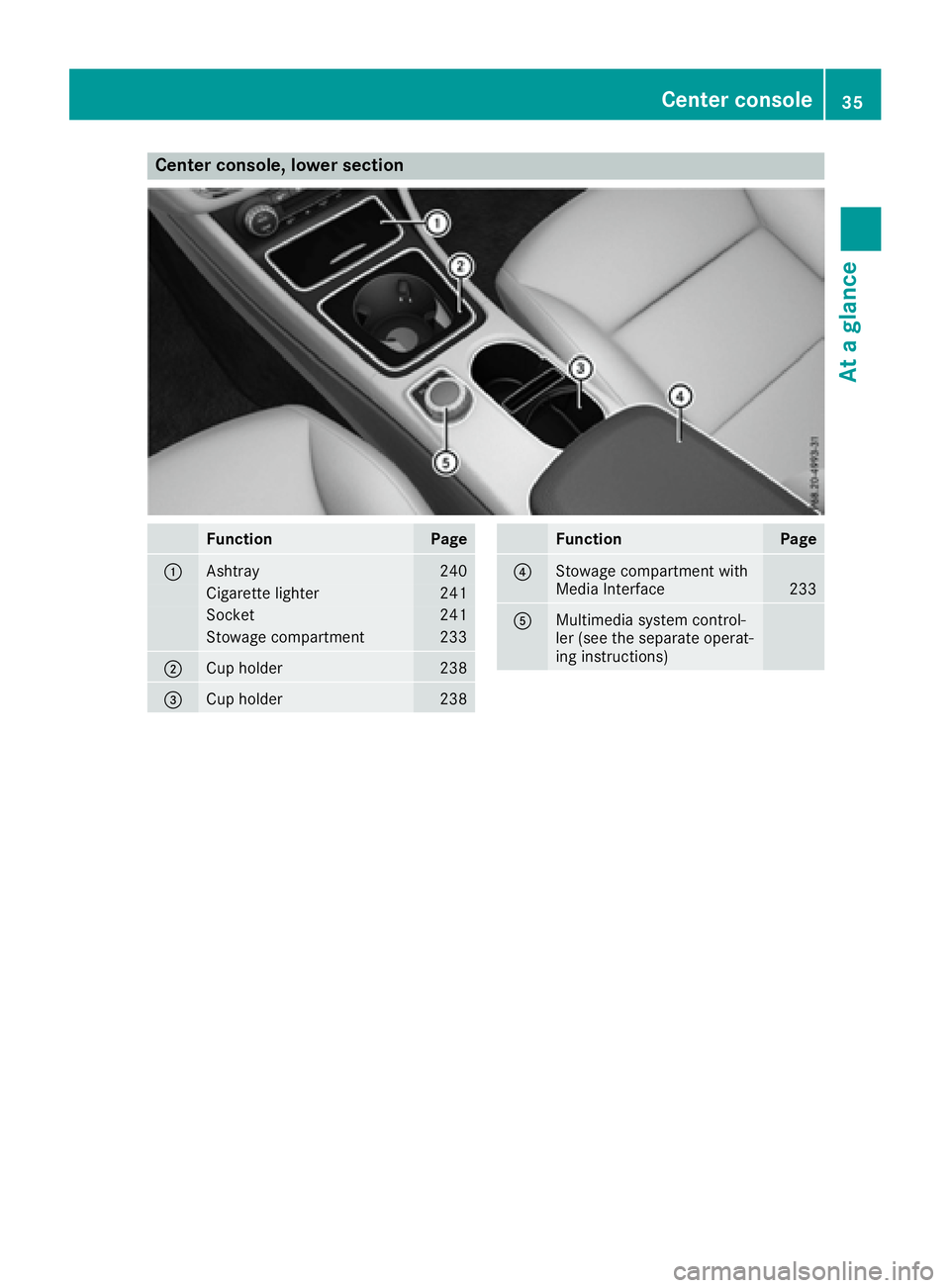
Center console, lower section
Function Page
C
Ashtray 240
Cigarette lighter 241
Socket 241
Stowage compartment 233
D
Cup holder 238
Page 38 of 318
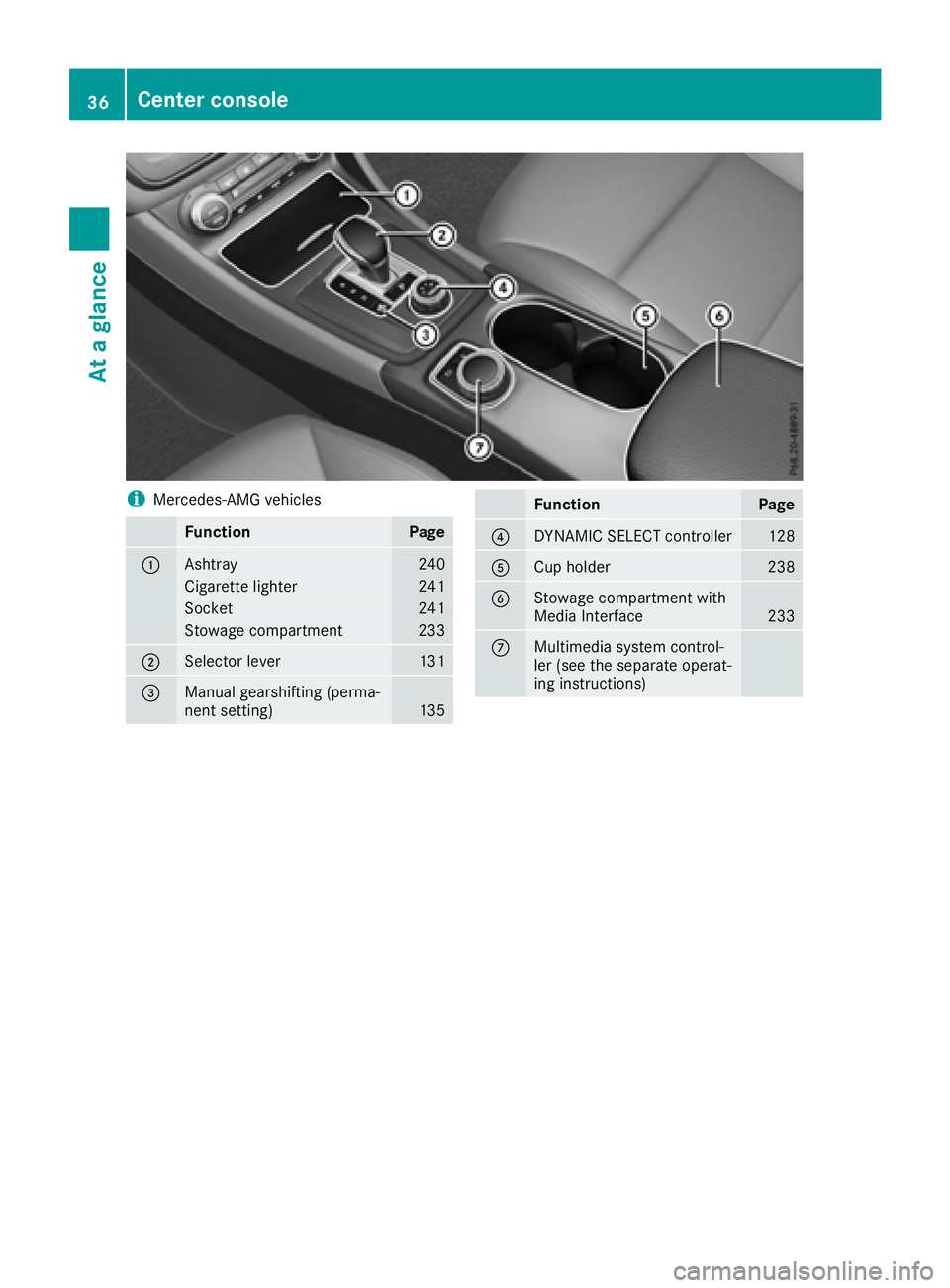
i Mercedes-AMG vehicles
Function Page
C
Ashtray 240
Cigarette lighter 241
Socket 241
Stowage compartment 233
D
Selector lever 131
Page 40 of 318
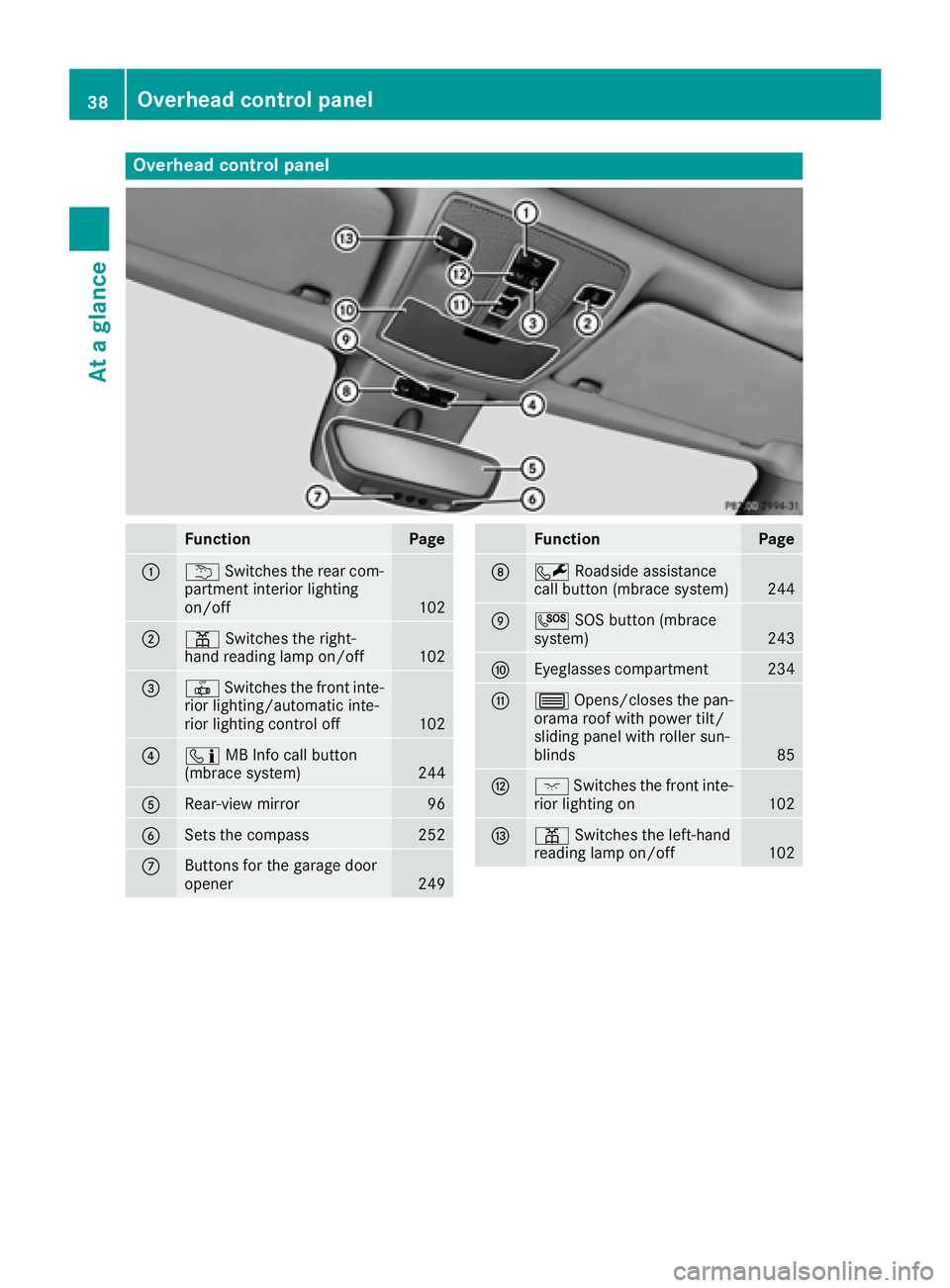
Overhead control panel
Function Page
C
B Switches the rear com-
partment interior lighting
on/off 102
D
= Switches the right-
hand reading lamp on/off
102
Page 42 of 318
Restraint system warning lamp The functions of the restraint system are
checked after the ignition is switched on and at
regular intervals while the engine is running.
Therefore, malfunctions can be detected in
good time.
The u restraint system warning lamp in the
instrument cluster lights up when the ignition is
switched on. It goes out no later than a few sec-
onds after the vehicle is started. The compo-
nents of the restraint system are in operational
readiness.
A malfunction has occurred if the u restraint
system warning lamp: R
does not light up after the ignition is switched
on R
does not go out after a few seconds with the
engine running R
lights up again while the engine is running
G WARNING
If the restraint system is malfunctioning,
restraint system components may be trig-
gered unintentionally or may not deploy as
intended during an accident. This can affect
for example the Emergency Tensioning
Device or the air bag. This poses an increased
risk of injury or even fatal injury.
Have the restraint system checked and
repaired in a qualified specialist workshop as
soon as possible.
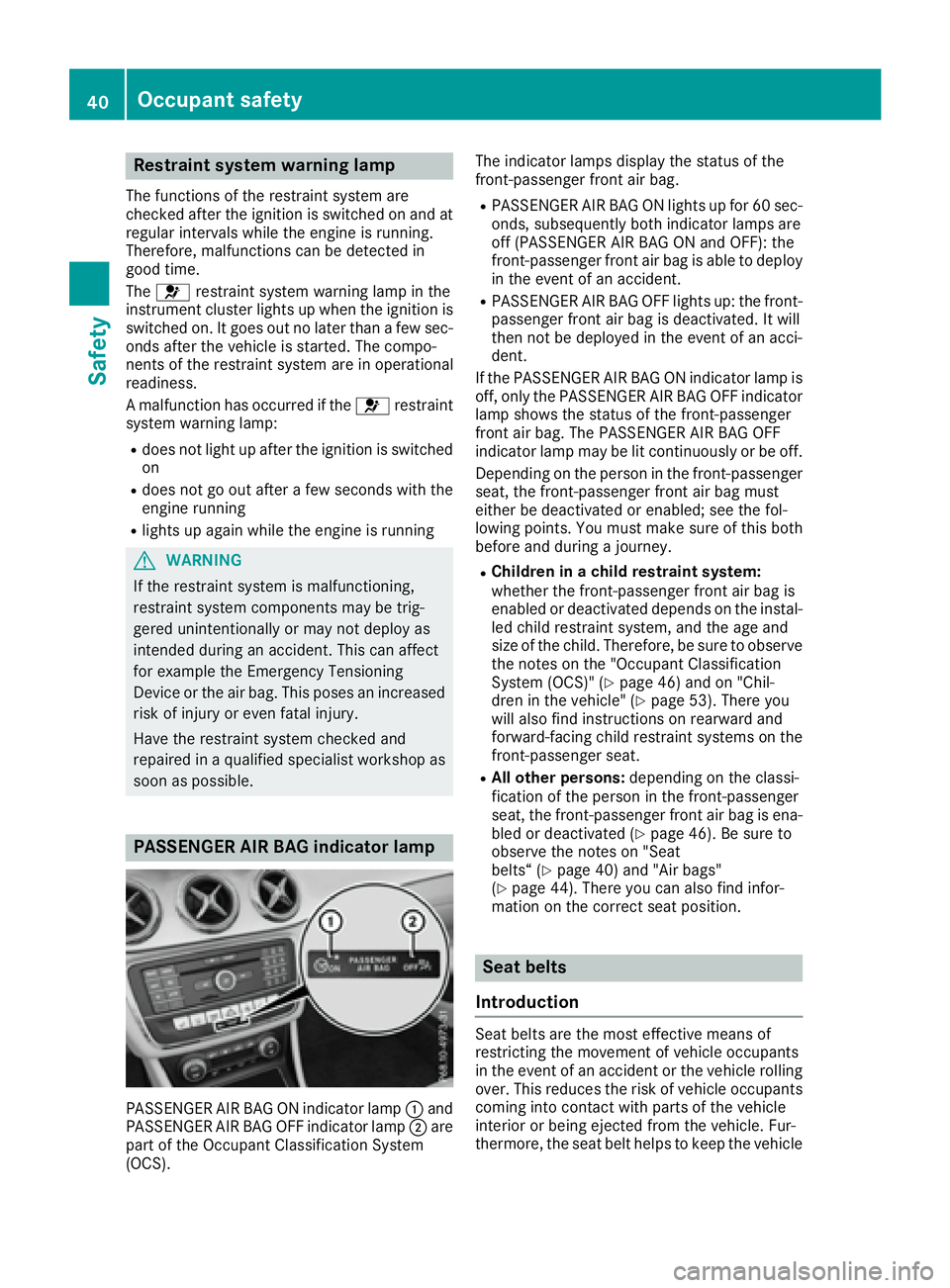
PASSENGER AIR BAG indicator lamp
PASSENGER AIR BAG ON indicator lamp C and
PASSENGER AIR BAG OFF indicator lamp D are
part of the Occupant Classification System
(OCS). The indicator lamps display the status of the
front-passenger front air bag. R
PASSENGER AIR BAG ON lights up for 60 sec-
onds, subsequently both indicator lamps are
off (PASSENGER AIR BAG ON and OFF): the
front-passenger front air bag is able to deploy
in the event of an accident. R
PASSENGER AIR BAG OFF lights up: the front-
passenger front air bag is deactivated. It will
then not be deployed in the event of an acci-
dent.
If the PASSENGER AIR BAG ON indicator lamp is
off, only the PASSENGER AIR BAG OFF indicator
lamp shows the status of the front-passenger
front air bag. The PASSENGER AIR BAG OFF
indicator lamp may be lit continuously or be off.
Depending on the person in the front-passenger
seat, the front-passenger front air bag must
either be deactivated or enabled; see the fol-
lowing points. You must make sure of this both
before and during a journey. R
Children in a child restraint system:
whether the front-passenger front air bag is
enabled or deactivated depends on the instal-
led child restraint system, and the age and
size of the child. Therefore, be sure to observe
the notes on the "Occupant Classification
System (OCS)" ( Y
page 46) and on "Chil-
dren in the vehicle" ( Y
page 53). There you
w ill also find instructions on rearward and
forward-facing child restraint systems on the
front-passenger seat. R
All other persons: depending on the classi-
fication of the person in the front-passenger
seat, the front-passenger front air bag is ena-
bled or deactivated ( Y
page 46). Be sure to
observe the notes on "Seat
belts“ ( Y
page 40) and "Air bags"
( Y
page 44). There you can also find infor-
mation on the correct seat position.
Seat belts
Introduction
Seat belts are the most effective means of
restricting the movement of vehicle occupants
in the event of an accident or the vehicle rolling
over. This reduces the risk of vehicle occupants
coming into contact with parts of the vehicle
interior or being ejected from the vehicle. Fur-
thermore, the seat belt helps to keep the vehicle40
Occupant safety
Safety
Page 49 of 318
Requirements To be classified correctly, the front passenger
must sit: R
with the seat belt fastened correctly R
in an almost upright position with their back
against the seat backrest R
with their feet resting on the floor, if possible
If the front passenger does not observe these
conditions, OCS may produce a false classifica-
tion, e.g. because the front passenger: R
transfers their weight by supporting them-
selves on a vehicle armrest R
sits in such a way that their weight is raised
from the seat cushion
If it is absolutely necessary to install a child
restraint system on the front-passenger seat, be
sure to observe the correct positioning of the
child restraint system. Never place objects
under or behind the child restraint system, e.g. a
cushion. The entire base of the child restraint
system must always rest on the seat cushion of
the front-passenger seat. The backrest of the
forward-facing child restraint system must lie as
flat as possible against the backrest of the front-
passenger seat.
The child restraint system must not touch the
roof or be subjected to a load by the head
restraint. Adjust the angle of the seat backrest
and the head restraint position accordingly.
Only then can OCS be guaranteed to function
correctly. Always observe the child restraint sys-
tem manufacturer's instal lation and operating
i
nstructions.
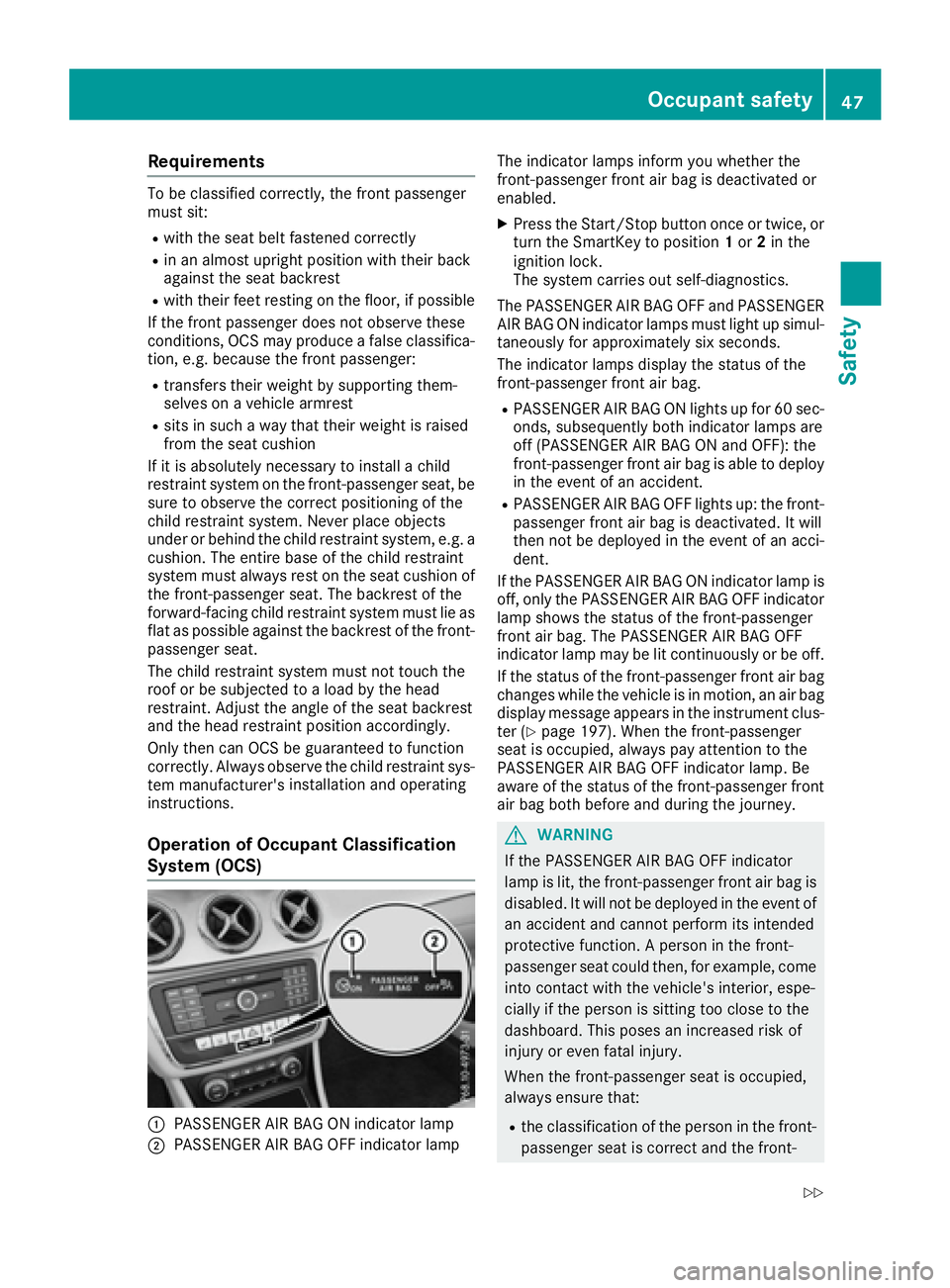
Operation of Occupant Classification
System (OCS)
C
PASSENGER AIR BAG ON indicator lamp
D
PASSENGER AIR BAG OFF indicator lamp The indicator lamps inform you whether the
front-passenger front air bag is deactivated or
enabled. X
Press the Start/Stop button once or twice, or
turn the SmartKey to position 1 or 2 in the
ignition lock.
The system carries out self-diagnostics.
The PASSENGER AIR BAG OFF and PASSENGER
AIR BAG ON indicator lamps must light up simul-
taneously for approximately six seconds.
The indicator lamps display the status of the
front-passenger front air bag. R
PASSENGER AIR BAG ON lights up for 60 sec-
onds, subsequently both indicator lamps are
off (PASSENGER AIR BAG ON and OFF): the
front-passenger front air bag is able to deploy
in the event of an accident. R
PASSENGER AIR BAG OFF lights up: the front-
passenger front air bag is deactivated. It will
then not be deployed in the event of an acci-
dent.
If the PASSENGER AIR BAG ON indicator lamp is
off, only the PASSENGER AIR BAG OFF indicator
lamp shows the status of the front-passenger
front air bag. The PASSENGER AIR BAG OFF
indicator lamp may be lit continuously or be off.
If the status of the front-passenger front air bag
changes while the vehicle is in motion, an air bag
display message appears in the instrument clus-
ter ( Y
page 197). When the front-passenger
seat is occupied, always pay attention to the
PASSENGER AIR BAG OFF i nd
icator lamp. Be
aware of the status of the front-passenger front
air bag both before and during the journey.
G WARNING
If the PASSENGER AIR BAG OFF indicator
lamp is lit, the front-passenger front air bag is
disabled. It will not be deployed in the event of
an accident and cannot perform its intended
protective function. A person in the front-
passenger seat could then, for example, come
into contact with the vehicle's interior, espe-
cially if the person is sitting too close to the
dashboard. This poses an increased risk of
injury or even fatal injury.
When the front-passenger seat is occupied,
always ensure that: R
the classification of the person in the front-
passenger seat is correct and the front-Occupant safety 47
Safety Z
Page 50 of 318
passenger front air bag is enabled or disa-
bled in accordance with the person in the
front-passenger seat R
the front-passenger seat has been moved
back as far back as possible. R
the person is seated correctly.
Make sure, both before and during the jour-
ney, that the status of the front-passenger
front air bag is correct.
G WARNING
If you secure a child in a rearward-facing child
restraint system on the front-passenger seat
and the PASSENGER AIR BAG OFF indicator
lamp is off, the front-passenger front air bag
may deploy in the event of an accident. The
child could be struck by the air bag. This poses
an increased risk of injury or even fatal injury.
Make sure that the front-passenger front air
bag has been disabled. The PASSENGER AIR
BAG OFF indicator lamp must be lit.
If the PASSENGER AIR BAG OFF indicator lamp
stays off, do not install a rearward-facing child
restraint system on the front-passenger seat.
You can find more information on OCS under
"Problems with the Occupant Classification Sys-
tem" ( Y
page 50).
G WARNING
If you secure a child in a forward-facing child
restraint system on the front-passenger seat
and you position the front-passenger seat too
close to the dashboard, in the event of an
accident, the child could: R
come into contact with the vehicle's inte-
rior if the PASSENGER AIR BAG OFF indi-
cator lamp is lit, for example R
be struck by the air bag if the PASSENGER
AIR BAG OFF indicator lamp is off
This poses an increased risk of injury or even
fatal injury.
Always move the front-passenger seat as far
back as possible and fully retract the seat
cushion length. Always make sure that the
shoulder belt strap is correctly routed from
the vehicle belt sash guide to the shoulder belt guide on the child restraint system. The
shoulder belt strap must be routed forwards
and downwards from the vehicle belt sash
guide. If necessary, adjust the vehicle belt
sash guide and the front-passenger seat
accordingly. Always observe the child
restraint system manufacturer's installation
instructions.
If OCS determines that: R
the front-passenger seat is unoccupied, the
PASSENGER AIR BAG OFF indicator lamp
lights up after the system self-test and
remains lit. This indicates that the front-
passenger front air bag is deactivated. R
the front-passenger seat is occupied by a
child of up to twelve months old, in a standard
child restraint system, the PASSENGER AIR
BAG OFF indicator lamp lights up after the
system self-test and remains lit. This indi-
cates that the front-passenger front air bag is
deactivated.
But even in the case of a twelve-month-old
child, in a standard child restraint system, the
PASSENGER AIR BAG OFF indicator lamp can
go out after the system self-test. This indi-
cates that the front-passenger front air bag is
activated. The result of the classification is
dependent on, among other factors, the child
restraint system and the child's stature. It is
recommended that you install the child
restraint system on a suitable rear seat. R
the front-passenger seat is occupied by a per-
son of smaller stature (e.g. a teenager or
small adult), the PASSENGER AIR BAG OFF
indicator lamp lights up and remains lit after
the system self-test depending on the result
of the classification or, alternatively, goes out. -
If the PASSENGER AIR BAG OFF indicator
lamp is off, move the front-passenger seat
as far back as possible. Alternatively, a per-
son of smaller stature can sit on a rear seat. -
If the PASSENGER AIR BAG OFF indicator
lamp is lit, a person of smaller stature
should not use the front-passenger seat. R
the front-passenger seat is occupied by an
adult or a person of adult stat ure, the
PASSENGER AIR BAG OFF indicator lamp
goes out after the system self-test. This indi-
cates that the front-passenger front air bag is
activated.48
Occupant safety
Safety
Page 51 of 318
If children are traveling in the vehicle, be sure to
observe the notes on "Children in the vehicle"
( Y
page 53).
When the occupant classification system (OCS)
is malfunctioning, the red u restraint system
warning lamp in the instrument cluster and the
PASSENGER AIR BAG OFF indicator lamp light
up simultaneously. The front-passenger front air
bag is deactivated in this case and does not
deploy during an accident. Have the Occupant
Classification System (OCS) checked and
repaired immediately at a qualified specialist
workshop. Mercedes-Benz recommends that
you use an authorized Mercedes-Benz Center
for this purpose.
If the front-passenger seat, the seat cover or the
seat cushion are damaged, have the necessary
repair work carried out at a qualified specialist
workshop. Mercedes-Benz recommends that
you use an authorized Mercedes-Benz Center
for this purpose.
For safety reasons, Mercedes-Benz recom-
mends that you only use seat accessories that
have been approved by Mercedes-Benz.
If the driver's air bag deploys, this does not
mean that the front-passenger front air bag will
also deploy. The Occupant Classification Sys-
tem (OCS) categorizes the occupant in the front-
passenger seat. Depending on that result, the
front-passenger front air bag is either enabled or
deactivated.
System self-test
G DANGER
If both the PASSENGER AIR BAG OFF and
PASSENGER AIR BAG ON indicator lamps do
not light up during the system self-test, the
system is malfunctioning. The front-
passenger front air bag might be triggered
unintentionally or might not be triggered at all
in the event of an accident with high deceler-
ation. This poses an increased risk of injury or
even fatal injury.
In this case the front-passenger seat may not
be used. Do not install a child restraint system
on the front-passenger seat. Have the Occu-
pant Classification System (OCS) checked
and repaired immediately at a qualified spe-
cialist workshop. G WARNING
If the PASSENGER AIR BAG OFF indicator
lamp remains lit after the system self-test, the
front-passenger front air bag is disabled. It will
not be deployed in the event of an accident. In
this case, the front-passenger front air bag
cannot perform its intended protective func-
tion, e.g. when a person is seated in the front-
passenger seat.
That person could, for example, come into
contact with the vehicle's interior, especially
if the person is sitting too close to the dash-
board. This poses an increased risk of injury or
even fatal injury.
When the front-passenger seat is occupied,
always ensure that: R
the classification of the person in the front-
passenger seat is correct and the front-
passenger front air bag is enabled or disa-
bled in accordance with the person in the
front-passenger seat R
the person is seated properly with a cor-
rectly fastened seatbelt R
the front-passenger seat has been moved
as far back as possible
If the PASSENGER AIR BAG OFF indicator
lamp remains lit when it should not, the front-
passenger seat may not be used. Do not
install a child restraint system on the front-
passenger seat. Have the Occupant Classifi-
cation System (OCS) checked and repaired
immediately at a qualified specialist work-
shop.
G WARNING
Objects between the seat surface and the
child restraint system could affect OCS oper-
ation. This could result in the front-passenger
air bag not functioning as intended during an
accident. This poses an increased risk of
injury or even fatal injury.
Do not place any objects between the seat
surface and the child restraint system. The
entire base of the child restraint system must
always rest on the seat cushion of the front-
passenger seat. The backrest of the forward-Occupant safety 49
Safety Z
Page 52 of 318
facing child restraint system must, as far as
possible, be resting on the backrest of the
front-passenger seat. Always comply with the
child restraint system manufacturer's instal-
lation instructions.
After the system self-test, the PASSENGER AIR
BAG OFF or PASSENGER AIR BAG ON indicator
lamp displays the status of the front-passenger
front air bag ( Y
page 47). If the front-passenger
front air bag is enabled, the PASSENGER AIR BAG ON indicator lamp lights up for 60 seconds
and then goes out.
If the PASSENGER AIR BAG ON indicator lamp is
off, only the PASSENGER AIR BAG OFF indicator
lamp shows the status of the front-passenger
front air bag. The PASSENGER AIR BAG OFF
indicator lamp may be lit continuously or be off.
For more information about the OCS, see "Prob-
lems with the Occupant Classification System"
( Y
page 50).
Problems with the Occupant Classification System (OCS) Be sure to observe the notes on "System self-test" ( Y
page 49).50
Occupant safety
Safety