mirror MERCEDES-BENZ CLA 2017 Owner's Manual
[x] Cancel search | Manufacturer: MERCEDES-BENZ, Model Year: 2017, Model line: CLA, Model: MERCEDES-BENZ CLA 2017Pages: 318, PDF Size: 9.9 MB
Page 187 of 318
For further information on the automatic locking
feature, see ( Y
page 76).
Activating/deactivating the acoustic
locking verification signal If you switch on the Acoustic Lock function, an
acoustic signal sounds when you lock the vehi-
cle. X
Press the Y or e button on the steering
wheel to select the Sett. menu.X
Press the d or c button to select the
Vehicle submenu.X
Press v to confirm.X
Press the d or c button to select the
Acoustic Lock function.
If the Acoustic Lock function is activated,
the multifunction display shows the 7
symbol in orange. X
Press the v button to save the setting.
Convenience
Switching the fold-in mirrors when lock-
ing feature on/off This function is only available in Canada.
This function is only available when the vehicle is
equipped with the electrical fold-in function.
When you activate the Auto. Mirror Folding
function, the exterior mirrors are folded in when
the vehicle is locked. If you unlock the vehicle
and then open the driver's or front-passenger
door, the exterior mirrors fold out again.
If you have switched on the Auto. Mirror
Folding function and you fold in the exterior
mirrors using the button on the door
( Y
page 96), they will not fold out automatically.
The exterior mirrors can then only be folded out
using the button on the door. X
Press the Y or e button on the steering
wheel to select the Sett. menu.X
Press the d or c button to select the
Convenience submenu.X
Press v to confirm.X
Press the d or c button to select the
Auto. Mirror Folding function.
If the Auto. Mirror Folding function is
switched on, the multifunction display shows
the exterior mirror in orange. X
Press the v button to save the setting. Restoring the factory settings X
Press the Y or e button on the steering
wheel to select the Sett. menu.X
Press the d or c button to select the
Factory Setting submenu.X
Press v to confirm.
The Reset All Settings? function
appears. X
Press the d or c button to select No or
Yes . X
Press the v button to confirm the selec-
tion.
If you have selected Yes
, the multifunction
display shows a confirmation message.
For safety reasons, the Daytime Running
Lights function in the Light submenu is only
reset if the vehicle is stationary.
AMG menu (Mercedes-AMG vehicles)
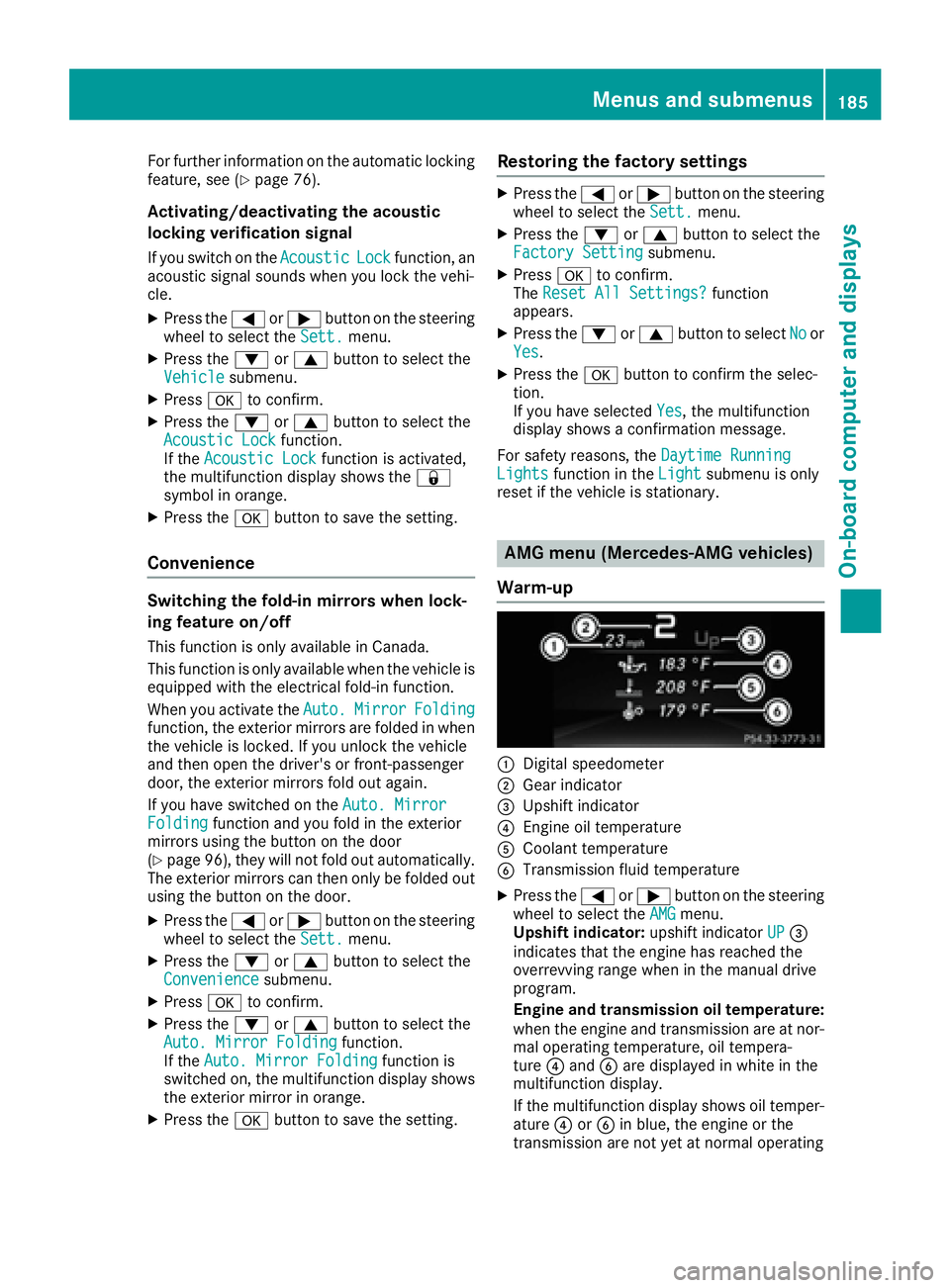
Warm-up
C
Digital speedometer D
Gear indicator
Page 201 of 318
Display messages
Possible causes/consequences and P Solutions
If th e condition s are no t fulfilled , th e system is no t operating correctly.X
Visit a qualified specialist workshop immediately.
Fo r further information about th e Occupant Classification System, see
( Y
page 47).
Lights
i Vehicles wit h LE D bulbs in th e ligh t clusters :
The display message for th e correspondin g lamp only appear s when all of th e LEDs in th e lamp
hav e failed.
Display messages
Possible causes/consequences and P Solutions
I Check Lef t Corner ‐
ing Light or Check
Right Cornering
Light The lef t or right-hand cornering ligh t is defective.X
Chec k whether you are permitte d to replace th e bulb yourself
( Y
page 103).
or X
Visit a qualified specialist workshop .
I Check Lef t Low Bea m
or Check Right Low
Bea m The lef t or right-hand low-beam headlamp is defective. X
Chec k whether you are permitte d to replace th e bulb yourself
( Y
page 103).
or X
Visit a qualified specialist workshop .
I Check Rea r Lef t
Tur n Signal or
Check Rea r Right
Tur n Signal The rear left-han d or rear right-hand tur n signal is defective.X
Chec k whether you are permitte d to replace th e bulb yourself
( Y
page 103).
or X
Visit a qualified specialist workshop .
I Check Front Lef t
Tur n Signal or
Check Front Right
Tur n Signal The fron t left-han d or fron t right-hand tur n signal is defective.X
Chec k whether you are permitte d to replace th e bulb yourself
( Y
page 103).
or X
Visit a qualified specialist workshop .
I Check Lef t Mirror
Tur n Signal or
Check Right Mirror
Tur n Signal The tur n signal in th e left-han d or right-hand exterio r mirror is defec -
tive. X
Visit a qualified specialist workshop .
I Check Center Brake
Lam p The high-mounte d brak e lamp is faulty.X
Visit a qualified specialist workshop .Display messages 19 9
On-board computer and displays Z
Page 208 of 318
Display messages
Possible causes/consequences and P Solutions
Blind Spo t Assist
Currently Unavaila‐
ble See Operator' s
Manual Blind Spot Assis t is temporarily inoperative.
Possibl e causes are: R
th e radar sensor system is temporarily inoperative, e.g. due to elec -
tromagneti c radiation emitted by nearby TV or radi o station s or
other source s of electromagneti c radiationR
th e radar sensor system is outside th e operating temperature range
The yellow c indicator lamp s also ligh t up in th e exterio r mirrors.
Whe n th e causes state d abov e no longer apply, th e display message
disappears.
Blind Spot Assis t is operational again .
If th e display message does no t disappear :X
Pull ove r and stop th e vehicl e safely as soo n as possible, payin g
attention to roa d and traffic conditions.X
Secur e th e vehicl e against rollin g away ( Y
page 140).X
Restart th e engine.
Blind Spo t Assist
Inoperative Blind Spot Assis t is faulty.
The yellow c indicator lamp s also ligh t up in th e exterio r mirrors.X
Visit a qualified specialist workshop .
Parkin g Pilot Can ‐
celed The driver's door is open and th e driver's seat belt has no t been fas -
tened. X
Repeat th e parking process wit h th e seat belt fastene d and th e
driver's door closed .
You hav e inadvertentl y touched th e multifunction steering whee l while
steering intervention was active .X
Whil e steering intervention is active , mak e sur e that th e multifunc-
tion steering whee l is no t touched unintentionally.
The vehicl e has started to skid and ES P ®
has intervened.X
Use Parking Pilo t again later ( Y
page 162).
Parkin g Pilot Inop‐
erativ e You hav e jus t carrie d out a larg e number of turnin g or parking maneu-
vers.
Parking Pilo t will become available again after approximately te n
minute s ( Y
page 162). X
Pull ove r and stop th e vehicl e safely as soo n as possible, payin g
attention to roa d and traffic conditions.X
Switc h off and restar t th e engine.
If th e multifunction display still shows th e display message :X
Visit a qualified specialist workshop .
Parking Assis t PARKTRONI C is malfunctioning .X
Visit a qualified specialist workshop .206
Display messages
On-board computer and displays
Page 242 of 318
X
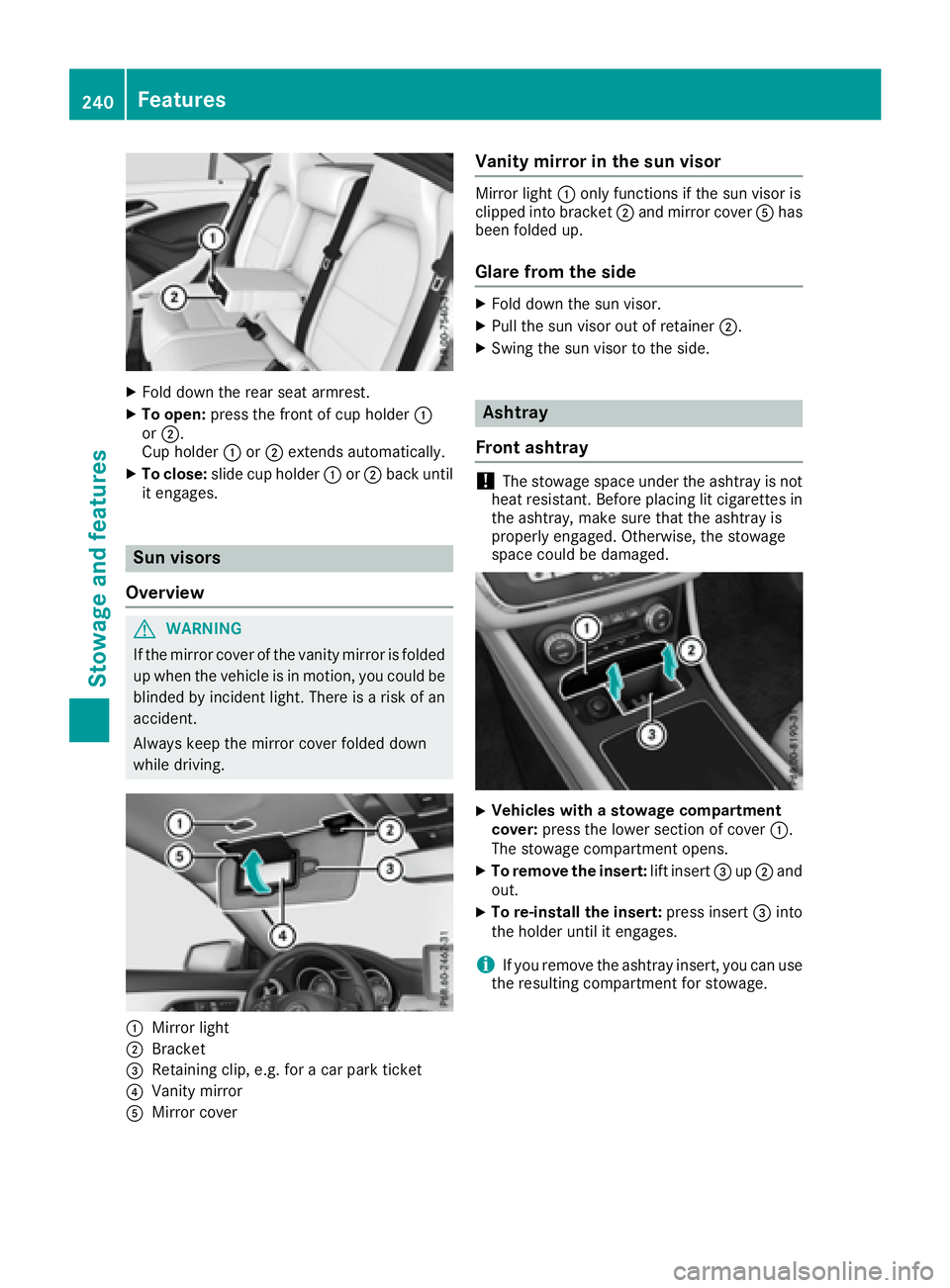
Fold down the rear seat armrest. X
To open: press the front of cup holder C
or D .
Cup holder C or D extends automatically.X
To close: slide cup holder C or D back until
it engages.
Sun visors
Overview
G WARNING
If the mirror cover of the vanity mirror is folded
up when the vehicle is in motion, you could be
blinded by incident light. There is a risk of an
accident.
Always keep the mirror cover folded down
while driving.
C
Mirror light
D
Bracket
Page 251 of 318
Currently inactive areas can be activated by text
message.
Triggering the vehicle alarm With th is function, you can trigger the veh icle 's
pan ic alarm via text message. An alarm soun ds
and the exterior lighting flashes. Depen din g on
the setting, the pan ic alarm lasts five or ten sec-
onds. Afterwards, the alarm swit ches off.
Garage door opener
General notes The HomeLink ®
garage door opener integrated
in the rear-view mirror allows you to operate up
to three diff erent door and gate systems.
Use the integrated garage door opener on ly on
garage doors that: R
have safety stop and reverse features and R
meet current U. S. federal safety standards
Once programed, the integrated garage door
opener in the rear-view mirror will assume the
function of the garage door system's remote
control. Please also read the operating instruc-
tions for the garage door system.
When programming a garage door opener, park
the veh icle out side the garage. Do not leave the
engine running while programming.
Certain garage door driv es are incompatib le
wit h the integrated garage door opener. If you
have diff iculty programing the integrated garage
door opener, contact a Mercedes-Benz Service
Center.
Alternatively, you can call the foll owin g tele-
phone assistance services: R
USA: Mercedes-Benz Customer Assistance
Center at 1-800-FOR-M ERCe desR
Canada: Customer Service at
1-800-387-0100 R
HomeLink ®
hot lin e 1-800-355-3515 (free of
charge)
More information on HomeLink ®
and/or com-
pat ible products is also availab le on lin e at
http:/ /www. hom elin k.co m.
Notes on the declaration of conformity
( Y
page 26).
USA: FCC ID: CB2HMIHL4
Canada: IC: 279B-HMIHL4 Important safety notes
G WARNING
When you operate or program the garage door
with the integrated garage door opener, per-
sons in the range of movement of the garage
door can become trapped or struck by the
garage door. There is a risk of injury.
When using the integrated garage door
opener, always make sure that nobody is
within the range of movement of the garage
door.
G WARNING
Combustion engines emit poisonous exhaust
gases such as carbon monoxide. Inhaling
these exhaust gases leads to poisoning. There
is a risk of fatal injury. Therefore never leave
the engine running in enclosed spaces with-
out sufficient ventilation.
Programming
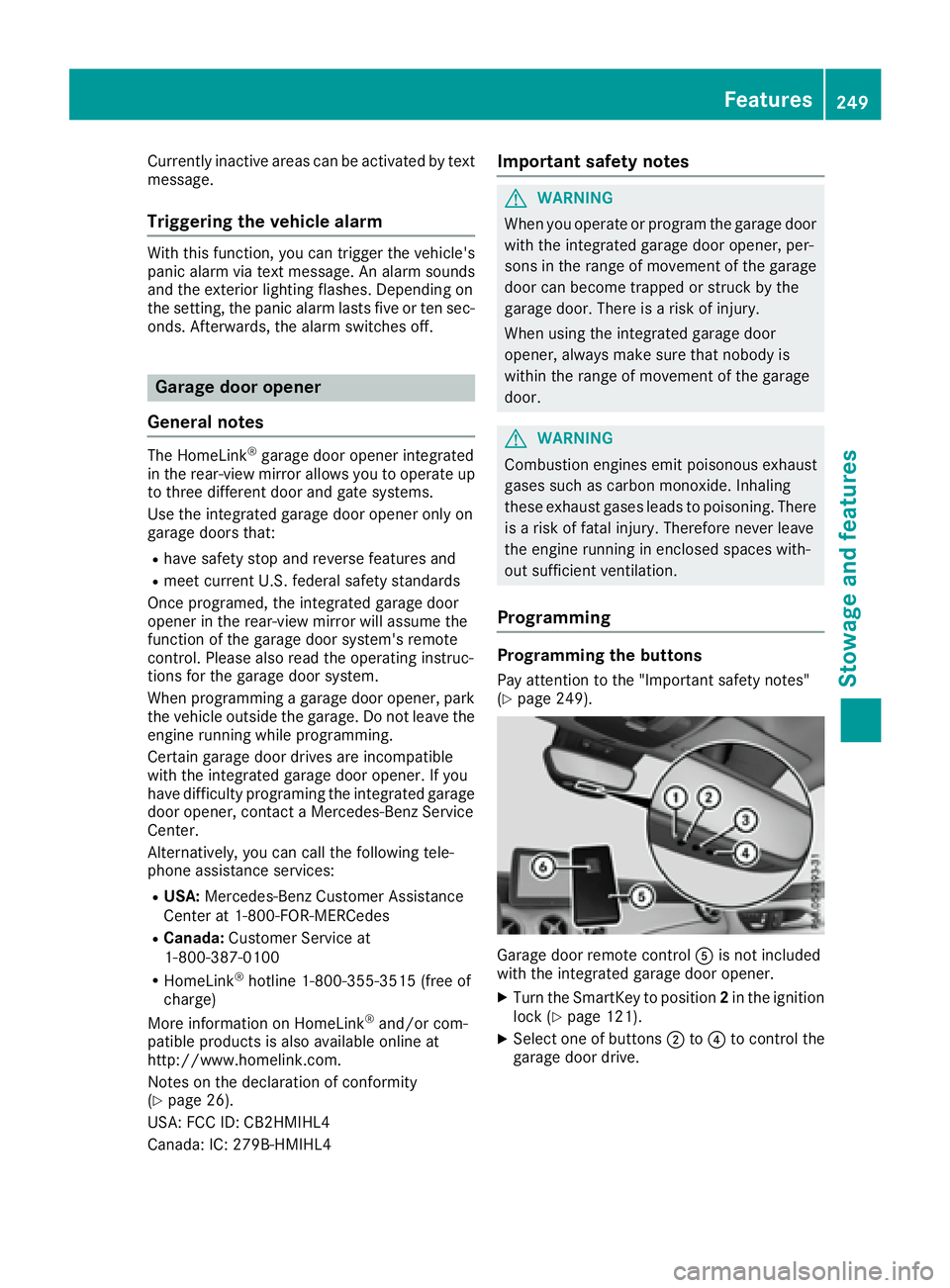
Programming the buttons Pay attention to the "Important safety notes"
( Y
page 249).
Garage door remote control
Page 254 of 318
Compass
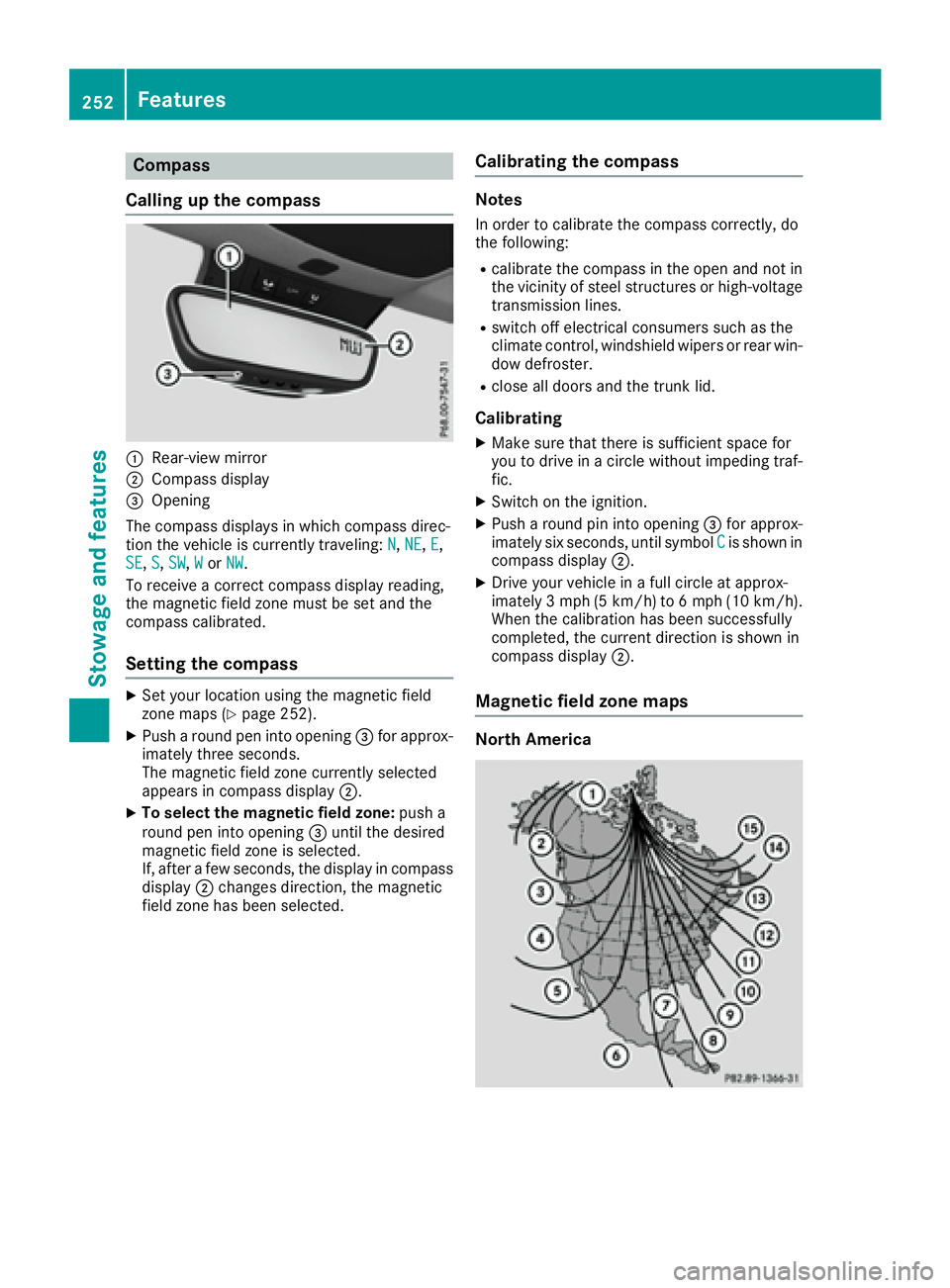
Calling up the compass
C
Rear-view mirrorD
Compass display
Page 264 of 318
! Clean the water drainage channels of the
windshield and the rear window at regular
intervals. Deposits such as leaves, petals and
pollen may under certain circumstances pre-
vent water from draining away. This can lead
to corrosion damage and damage to elec-
tronic components. X
Clean the inside and outside of the windows
with a damp cloth and a cleaning product that
is recommended and approved by Mercedes-
Benz.
Cleaning wiper blades
G WARNING
You could become trapped by the windshield
wipers if they start moving while cleaning the
windshield or wiper blades. There is a risk of
injury.
Always switch off the windshield wipers and
the ignition before cleaning the windshield or
wiper blades.
! Only fold the windshield wipers away from
the windshield when vertical. Otherwise, you
will damage the hood.
! Do not pull the wiper blade. Otherwise, the
wiper blade could be damaged.
! Do not clean wiper blades too often and do
not rub them too hard. Otherwise, the graph-
ite coating could be damaged. This could
cause wiper noise.
! Hold the wiper arm securely when folding
back. The windshield could be damaged if the
wiper arm smacks against it suddenly. X
Fold the windshield wiper arms away from the
windshield. X
Carefully clean the wiper blades with a damp
cloth. X
Fold the windshield wiper arms back again
before switching on the ignition.
Cleaning the exterior lighting
! Only use cleaning agents or cleaning cloths
which are suitable for plastic light lenses.
Unsuitable cleaning agents or cleaning cloths
could scratch or damage the plastic light len-
ses. X
Clean the plastic lenses of the exterior lights
with a wet sponge and a mild cleaning agent,
e.g. Mercedes-Benz car shampoo or cleaning
cloths.
Cleaning the mirror turn signals
! Only use cleaning agents or cleaning cloths
that are suitable for plastic lenses. Unsuitable
cleaning agents or cleaning cloths could
scratch or damage the plastic lenses of the
mirror turn signals. X
Clean the plastic lenses of the mirror turn sig-
nals in the exterior mirror housing using a wet
sponge and mild cleaning agent, e.g.
Mercedes-Benz car shampoo or cleaning
cloths.
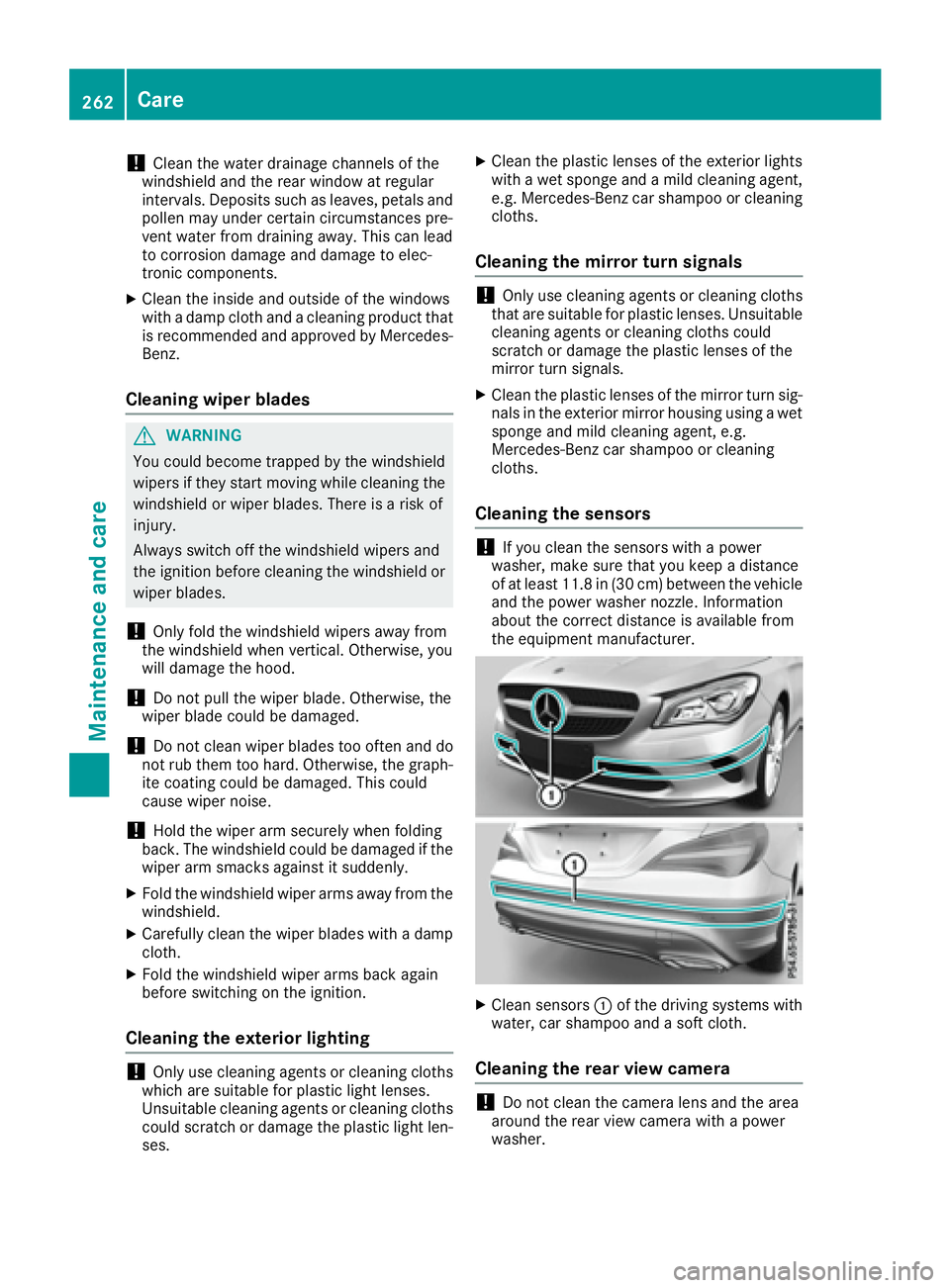
Cleaning the sensors
! If you clean the sensors with a power
washer, make sure that you keep a distance
of at least 11.8 in (30 cm) between the vehicle
and the power washer nozzle. Information
about the correct distance is available from
the equipment manufacturer.
X
Clean sensors C of the driving systems with
water, car shampoo and a soft cloth.
Cleaning the rear view camera
! Do not clean the camera lens and the area
around the rear view camera with a power
washer.262
Care
Maintenance and care