ECU MERCEDES-BENZ CLA 2017 Owners Manual
[x] Cancel search | Manufacturer: MERCEDES-BENZ, Model Year: 2017, Model line: CLA, Model: MERCEDES-BENZ CLA 2017Pages: 318, PDF Size: 9.9 MB
Page 15 of 318
Locating a stolen vehicle ............... 247
MB info call button ........................ 244
Remote fault diagnosis .................. 247
Remote vehicle locking .................. 247
Roadside assistance button ........... 244
Search & Send ............................... 246
Self-test ........................................ .2 42
Speed alert ................................... .2 48
System .......................................... 242
Triggering the vehicle alarm ........... 249
Vehicle remote unlocking .............. 246
Mechanical key
Function/notes ................................ 71
Inserting .......................................... 71
Locking vehicle ................................ 76
Removing ......................................... 71
Unlocking the driver's door .............. 76
Memory card (audio) ......................... 180
Memory function ................................. 97
Message memory (on-board com-
puter) ................................................. .1 88
Messages
see Display messages
Mirror turn signal
Cleaning ......................................... 262
Mirrors
see Exterior mirrors
see Rear-view mirror
see Vanity mirror (in the sun visor)
Mobile phone
Connecting (Bluetooth ®
inter-
face) .............................................. 230
Connecting another mobile
phone ............................................ 232
Frequencies ................................... 307
Installation ..................................... 307
Menu (on-board computer) ............ 180
Transmission output (maximum) .... 307
Modifying the programming
(SmartKey) .......................................... .7 1
MOExtended tires .............................. 267
Mounting wheels
Lowering the vehicle ...................... 305
Mounting a new wheel ................... 304
Preparing the vehicle .................... .3 02
Raising the vehicle ......................... 303
Removing a wheel .......................... 304 Securing the vehicle against roll-
ing away ........................................ 302
MP3
Operation ....................................... 180
see a l so Digital Operator's Man-
ual ................................................. .2 27
Multifunction display
Function/notes ............................ .1 76
Permanent display ......................... 184
Multifunction steering wheel
Operating the on-board computer .. 175
Overview .......................................... 33
Music files
see also Digital Operator's Man-
ual ................................................. .2 27
N Navigation
Entering a destination .................... 229
Menu (on-board computer) ............ 178
see also Digital Operator's Man-
ual ................................................. .2 27
Notes on breaking-in a new vehi-
cle ....................................................... 120
O
Occupant Classification System
(OCS)
Conditions ....................................... 47
Faults ............................................... 50
Operation ......................................... 47
System self-test ............................... 49
Occupant safety
Air bags .......................................... .4 4
Automatic measures after an acci-
dent ................................................. 53
Children in the vehicle ..................... 53
Important safety notes .................... 39
Introduction to the restraint sys-
tem .................................................. 39
Occupant Classification System
(OCS) ............................................... 46
PASSENGER AIR BAG indicator
lamps ............................................... 40
Pets in the vehicle ........................... 59
Restraint system warning lamp ........ 40
Seat belt .......................................... 40 Index 13
Page 18 of 318
Turn signals (front) ........................ .1 05
Turn signals (rear) .......................... 105
Reporting safety defects .................... 27
Rescue card ......................................... 28
Reserve (fuel tank)
see Fuel
Reserve fuel
Display message ............................ 204
Warning lamp ................................. 222
see Fuel
Residual heat (climate control) ....... .1 18
Restraint system
Display message ............................ 195
Introduction ..................................... 39
Warning lamp ................................. 222
Warning lamp (function) ................... 40
Reverse gear (selector lever) ........... 131
Reversing feature
Panorama sliding sunroof ................ 85
Roller sunblind ................................. 86
Side windows ................................... 81
Roadside Assistance (breakdown) .... 25
Roller sunblind
Panorama roof with power tilt/
sliding panel ..................................... 86
Roof carrier ........................................ 238
Roof lining and carpets (cleaning
guidelines) ......................................... 265
Roof load (maximum) ........................ 314
Route guidance
see also Digital Operator's Man-
ual ................................................. .2 27
S
Safety
Children in the vehicle ..................... 53
see Occupant safety
Safety system
see Driving safety systems
SD card
Inserting ........................................ 232
Inserting/removing ........................ 232
Removing ....................................... 232
SD memory card
see also Digital Operator's Man-
ual ................................................. .2 27 Search & Send
see also Digital Operator's Man-
ual ................................................. .2 27
Seat belts
Adjusting the height ......................... 43
Cleaning ......................................... 264
Correct usage .................................. 42
Fastening ......................................... 43
Important safety guidelines ............. 41
Introduction ..................................... 40
Releasing ......................................... 43
Warning lamp ................................. 216
Warning lamp (function) ................... 43
Seats
Adjusting (electrically) ..................... 91
Adjusting (manually) ........................ 90
Adjusting (Performance Seat) .......... 93
Adjusting the 4-way lumbar sup-
port ................................................. .9 2
Adjusting the head restraint ............ 91
Cleaning the cover ......................... 264
Correct driver's seat position ........... 89
Folding the backrest (rear com-
partment) forwards/back .............. 236
Important safety notes .................... 89
Seat heating problem ...................... 94
Storing settings (memory func-
tion) ................................................. 98
Switching seat heating on/off ......... 93
Securing cargo .................................. 237
Selector lever
Cleaning ......................................... 264
Sensors (cleaning instructions) ....... 262
Service menu (on-board com-
puter) .................................................. 183
Service message
see ASSYST PLUS
Service products
Brake fluid ..................................... 312
Coolant (engine) ............................ 312
Eng i
ne oil ....................................... 311
Fuel ................................................ 309
Important safety notes .................. 309
Refrigerant (air-conditioning sys-
tem) ............................................... 313
Washer fluid ................................... 313
Setting the air distribution ............... 11516
Index
Page 22 of 318
Removin g th e towin g eye .............. .2 77
Towing a trailer
ESP ®
(Electronic Stability Pro-
gram) ............................................... 66
Towing away
Important safety guidelines ........... 276
Installing the towing eye ................ 277
Notes for 4MATIC vehicles ............ 279
Removing the towing eye .............. .2 77
Transporting the vehicle ................ 278
With both axles on the ground ....... 278
With front axle raised ..................... 277
Towing eye ......................................... 266
Traffic reports
see also Digital Operator's Man-
ual ................................................. .2 27
Transmission
see Automatic transmission
Transmission position display
(DIRECT SELECT lever) ..................... .1 29
Transporting the vehicle .................. 278
Trim pieces (cleaning instruc-
tions) ................................................. .2 64
Trip computer (on-board com-
puter) ................................................. .1 77
Trip odometer
Calling up ....................................... 177
Resetting (on-board computer) ...... 178
Trunk
Emergency release .......................... 80
Emergency release button .............. .8 0
Important safety notes .................... 77
Opening (automatically from out-
side) ................................................ .7 8
Opening (from outside the vehi-
cle, HANDS-FREE ACCESS) .............. 78
Opening automatically from
inside ............................................... 79
Opening/closing (manually from
outside) ............................................ 77
Trunk emergency release button ...... .8 0
Trunk lid
Display message ............................ 213
Opening dimensions ...................... 314
Trunk load (maximum) ...................... 314
Turn signals
Display message ............................ 199 Replacing bulbs (front) ................... 105
Swi tching o n/off ........................... 100
Tw o-way radio
Frequencies ................................... 307
Installation ..................................... 307
Transmission output (maximum) .... 307
Type identification plate
see Vehicle identification plate
U Unlocking
Emergency unlocking ....................... 76
From inside the vehicle (central
unlocking button) ............................. 75
Upshift indicator (on-board com-
puter, Mercedes-AMG vehicles) ....... 185
USB devices
Connecting to the Media Inter-
face ............................................... 232
V Vanity mirror (in the sun visor) ........ 240
Vehicle
Correct use ...................................... 27
Data acquisition ............................... 28
Display message ............................ 211
Equipment ....................................... 24
Individual settings .......................... 183
Limited Warranty ............................. 28
Loading .......................................... 292
Locking (in an emergency) ............... 76
Locking (SmartKey) .......................... 69
Lowering ........................................ 305
Maintenance .................................... 25
Parking for a long period ................ 142
Pulling away ................................... 124
Raising ........................................... 303
Reporting problems ........................ .2 7
Securing from rolling away ............ 302
Transporting .................................. 278
Unlocking (in an emergency) ........... 76
Unlocking (SmartKey) ...................... 69
Vehicle data ................................... 314
Vehicle data
Roof load (maximum) ..................... 314
Trunk load (maximum) ................... 31420
Index
Page 29 of 318
Diagnostics connection The diagnostic s connection is only intended fo r
th e connection of diagnostic equipmen t at a
qualified specialis t workshop .
G WARNING
If you connec t equipmen t to a diagnostic s
connection in th e vehicle, it may affec t th e
operation of vehicle systems . As a result , th e
operatin g safet y of th e vehicle could be affec -
ted. There is a ris k of an accident.
Only connec t equipmen t to a diagnostic s con-
nection in th e vehicle, whic h is approved fo r
your vehicle by Mercedes-Benz.
G WARNING
Objects in th e driver's footwell can restric t th e
peda l trave l or obstruct a depressed pedal.
The operatin g and road safet y of th e vehicle is
jeopardized. There is a ris k of an accident.
Mak e sur e that all objects in th e vehicle are
stowed correctly, and that they canno t ente r
th e driver's footwell. Install th e floormat s
securely and as specifie d in order to ensur e
sufficien t clearanc e fo r th e pedals. Do no t use
loose floormat s and do no t plac e floormat s on
to p of on e another.
! If th e engin e is switched of f and equipmen t
on th e diagnostic s connection is used , th e
starter battery may discharge.
Connectin g equipmen t to th e diagnostic s con-
nection can lead to emission s monitorin g infor-
mation bein g reset , fo r example. Thi s may lead
to th e vehicle failin g to mee t th e requirements of
th e next emission s test durin g th e main inspec-
tion .
Qualified specialist workshop An authorized Mercedes-Ben z Cente r is a quali-
fie d specialis t workshop . It has th e necessary
specialis t knowledge , tools and qualification s to
correctl y carry out th e wor k require d on your
vehicle. Thi s is especially th e cas e fo r wor k rel -
evant to safety.
Observ e th e note s in th e Maintenance Booklet . Always hav e th e followin g wor k carrie d out at an
authorized Mercedes-Ben z Center:R
wor k relevant to safet yR
servic e and maintenance wor kR
repair wor k R
alterations, installation wor k and modifica-
tion s R
wor k on electronic component s
Correct us eIf you remov e any warnin g stickers , you or oth-
ers could fail to recogniz e certain dangers.
Leave warnin g stickers in position .
Observ e th e followin g information when drivin g
your vehicle: R
th e safet y note s in this manual R
technical dat a fo r th e vehicleR
traffic rule s and regulation sR
laws and safet y standard s pertainin g to moto r
vehicles
Problem s wit h you r vehicleIf you should experience a problem wit h your
vehicle, particularly on e that you believe may
affec t it s saf e operation , we urg e you to contact
an authorized Mercedes-Ben z Cente r immedi-
ately to hav e th e problem diagnosed and recti -
fied. If th e problem is no t resolved to your sat -
isfaction , please discus s th e problem again wit h
an authorized Mercedes-Ben z Cente r or , if nec-
essary, contact us at on e of th e followin g
addresses.
In th e USA
Customer Assistanc e Cente r
Mercedes-Ben z USA, LL C
3 Mercedes Drive
Montvale, NJ 07645-0350
In Canad a
Customer Relation s Departmen t
Mercedes-Ben z Canada, Inc.
98 Vanderhoo f Avenue
Toronto , Ontario M4 G 4C9
Reporting safet y defect s
US A only:Operating safety 27
Introduction Z
Page 30 of 318
The following text is reproduced as required of
all manufacturers under Title 49, Code of U.S.
Federal Regulations, Part 575 pursuant to the
National Traffic and Motor Vehicle Safety Act of
1966.
If you believe that your vehicle has a defect
which could cause a crash or could cause injury
or death, you should immediately inform the
National Highway Traffic Safety Administration
(NHTSA) in addition to notifying Mercedes-Benz
USA, LLC.
If NHTSA receives similar complaints, it may
open an investigation, and if it finds that a safety
defect exists in a group of vehicles, it may order
a recall and remedy campaign. However, NHTSA
cannot become involved in individual problems
between you, your dealer, or Mercedes-Benz
USA, LLC.
To contact NHTSA, you may call the Vehicle
Safety Hotline toll-free at 1-888-327-4236
(TTY: 1-800-424-9153 ); go to http://
www.safercar.gov ; or write to: Administrator,
NHTSA, 400 Seventh Street, SW., Washington,
DC 20590.
You can also obtain other information about
motor vehicle safety from
http://www.safercar.gov
Limited Warranty
! Follow the instructions in this manual about
the proper operation of your vehicle as well as
about possible vehicle damage. Damage to
your vehicle that arises from culpable contra-
ventions against these instructions is not cov-
ered either by the Mercedes-Benz Limited
Warranty or by the New or Used-Vehicle War-
ranty.
QR codes for the rescue card
The QR codes are secured in the fuel filler flap
and on the opposite side on the B-pillar. In the
event of an accident, rescue services can use
the QR code to quickly find the appropriate res-
cue card for your vehicle. The current rescue
card contains the most important information
about your vehicle in a compact form, e.g. the
routing of the electric cables.
You can find more information under
www.mercedes-benz.de/qr-code. Data stored in the vehicle
Data storage A wide range of electronic components in your
vehicle contain data memories.
These data memories temporarily or perma-
nently store technical information about: R
the vehicle's operating state R
incidents R
malfunctions
In general, this technical information docu-
ments the state of a component, a module, a
system or the surroundings.
These include, for example: R
operating conditions of system components,
e.g. fluid levels R
the vehicle's status messages and those of its
individual components, e.g. number of wheel
revolutions/speed, deceleration in move-
ment, lateral acceleration, accelerator pedal
position R
malfunctions and defects in important system
components, e.g. lights, brakes R
vehicle reactions and operating conditions in
special driving situations, e.g. air bag deploy-
ment, intervention of stability control sys-
tems R
ambient conditions, e.g. outside temperature
This data is of an exclusively technical nature
and can be used to: R
assist in recognizing and rectifying malfunc-
tions and defects R
analyze vehicle functions, e.g. after an acci-
dent R
optimize vehicle functions
The data cannot be used to trace the vehicle's
movements.
When your vehicle is serviced, technical infor-
mation can be read from the event data memory
and malfunction data memory.
Services include, for example: R
repair services R
service processes R
warranties R
quality assurance
The vehicle is read out by employees of the ser-
vice network (including the manufacturer) using
special diagnostic testers. More detailed infor-
mation is obtained from it, if required.28
Data stored in the vehicle
Introduction
Page 41 of 318
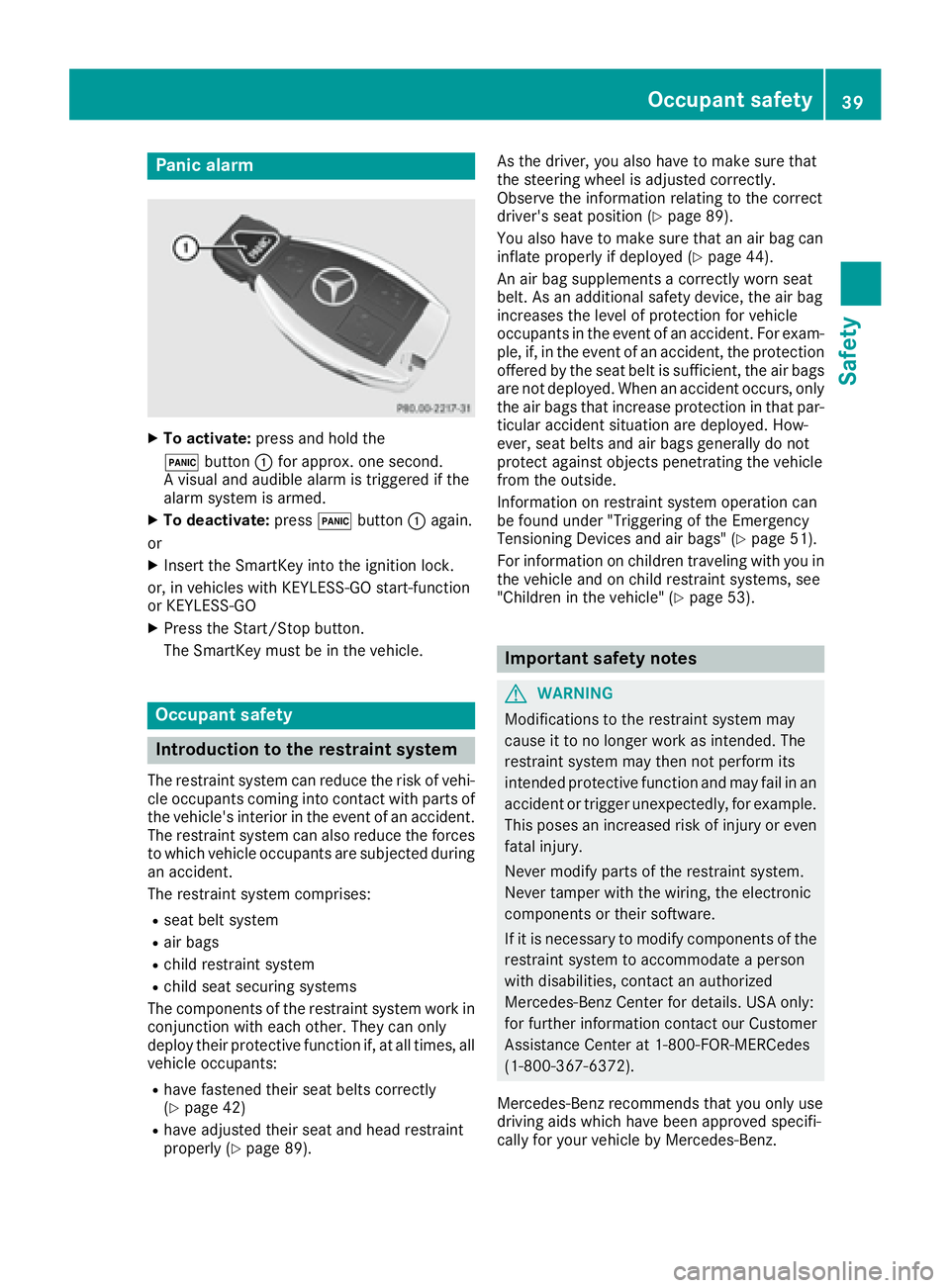
Panic alarm X
To activate: press and hold the
3 button C for approx. one second.
A visual and audible alarm is triggered if the
alarm system is armed. X
To deactivate: press 3 button C again.
or X
Insert the SmartKey into the ignition lock.
or, in vehicles with KEYLESS-GO start-function
or KEYLESS ‑ GOX
Press the Start/Stop button.
The SmartKey must be in the vehicle.
Occupant safety
Introduction to the restraint system The restraint system can reduce the risk of vehi-
cle occupants coming into contact with parts of
the vehicle's interior in the event of an accident.
The restraint system can also reduce the forces
to which vehicle occupants are subjected during
an accident.
The restraint system comprises: R
seat belt system R
air bags R
child restraint system R
child seat securing systems
The components of the restraint system work in
conjunction with each other. They can only
deploy their protective function if, at all times, all
vehicle occupants: R
have fastened their seat belts correctly
( Y
page 42) R
have adjusted their seat and head restraint
properly ( Y
page 89). As the driver, you also have to make sure that
the steering wheel is adjusted correctly.
Observe the information relating to the correct
driver's seat position ( Y
page 89).
You also have to make sure that an air bag can
inflate properly if deployed ( Y
page 44).
An air bag supplements a correctly worn seat
belt. As an additional safety device, the air bag
increases the level of protection for vehicle
occupants in the event of an accident. For exam-
ple, if, in the event of an accident, the protection
offered by the seat belt is sufficient, the air bags
are not deployed. When an accident occurs, only
the air bags that increase protection in that par-
ticular accident situation are deployed. How-
ever, seat belts and air bags generally do not
protect against objects penetrating the vehicle
from the outside.
Information on restraint system operation can
be found under "Triggering of the Emergency
Tensioning Devices and air bags" ( Y
page 51).
For information on children traveling with you in
the vehicle and on child restraint systems, see
"Children in the vehicle" ( Y
page 53).
Important safety notes
G WARNING
Modifications to the restraint system may
cause it to no longer work as intended. The
restraint system may then not perform its
intended protective function and may fail in an
accident or trigger unexpectedly, for example.
This poses an increased risk of injury or even
fatal injury.
Never modify parts of the restraint system.
Never tamper with the wiring, the electronic
components or their software.
If it is necessary to modify components of the
restraint system to accommodate a person
with disabilities, contact an authorized
Mercedes-Benz Center for details. USA only:
for further information contact our Customer
Assistance Center at 1-800-FOR-MERCedes
(1 ‑ 800 ‑ 367 ‑ 6372).
Mercedes-Benz recommends that you only use
driving aids which have been approved specifi-
cally for your vehicle by Mercedes-Benz.Occupant safety 39
Safety Z
Page 43 of 318
occupant in the best position in relation to the
air bag.
The seat belt system comprises: R
Seat belts R
Emergency Tensioning Devices for the front
seat belts and the outer seat belts in the rear R
Seat belt force limiters for the front seat belts
and the outer seat belts in the rear
If the seat belt is pulled out of the belt outlet
quickly or with a jerky movement, the belt
retractor locks. The belt strap cannot be extrac-
ted any further.
The Emergency Tensioning Device tightens the
seat belt in an accident, pulling the belt close
against the body. However it does not pull the
vehicle occupant back in the direction of the
backrest.
The Emergency Tensioning Device does not cor-
rect an incorrect seat position or the routing of
an incorrectly fastened seat belt.
When triggered, a seat belt force limiter helps to
reduce the force exerted by the seat belt on the
vehicle occupant.
The seat belt force limiters for the front seats are
synchronized with the front air bags, which
absorb part of the deceleration force. This can
reduce the force exerted on the vehicle occu-
pants during an accident.
! If the front-passenger seat is unoccupied,
do not insert the belt tongue into the buckle of
the front-passenger seat. This may otherwise
lead to the triggering of the Emergency Ten-
sioning Device in the event of an accident,
which will then need to be replaced.
Important safety notes The use of seat belts and child restraint systems
is required by law in: R
all 50 states R
the U.S. territories R
the District of Columbia R
all Canadian provinces
Even where this is not required by law, all vehicle
occupants should correctly fasten their seat
belts before starting the journey.
G WARNING
If the seat belt is not worn correctly, it cannot
perform its intended protective function. An
incorrectly fastened seat belt can also cause injuries, for example, in the event of an acci-
dent or when braking or changing direction
abruptly. This poses an increased risk of injury
or even fatal injury.
Always ensure that all vehicle occupants have
their seat belts fastened correctly and are sit-
ting properly.
G WARNING
The seat belt does not offer the intended level
of protection if you have not moved the back-
rest to an almost vertical position. When brak-
ing or in the event of an accident, you could
slide underneath the seat belt and sustain
abdomen or neck injuries, for example. This
poses an increased risk of injury or even fatal
injury.
Adjust the seat properly before beginning
your journey. Always ensure that the backrest
is in an almost vertical position and that the
shoulder section of your seat belt is routed
across the center of your shoulder.
G WARNING
Persons less than 5 ft (1.50 m) tall cannot
wear the seat belt correctly without an addi-
tional and suitable restraint system. If the
seat belt is not worn correctly, it cannot per-
form its intended protective function. An
incorrectly fastened seat belt can also cause
injuries, for example, in the event of an acci-
dent or when braking or changing direction
abruptly. This poses an increased risk of injury
or even fatal injury.
For this reason, always secure persons under
5 ft (1.50 m) tall in suitable additional restraint
systems.
If a child younger than twelve years old and
under 5 ft (1.50 m) in height is traveling in the
vehicle: R
always secure the child in a child restraint
system suitable for this Mercedes-Benz vehi-
cle. The child restraint system must be appro-
priate to the age, weight and size of the child R
always observe the instructions and safety
notes on "Children in the vehicle"
( Y
page 53) in addition to the child restraintOccupant safety 41
Safety Z
Page 44 of 318
system manufacturer's installation and oper-
ating instructions R
always observe the instructions and safety
notes on the "Occupant classification system
(OCS)" ( Y
page 46)
G WARNING
The seat belts may not perform their intended
protective function if: R
they are damaged, modified, extremely
dirty, bleached or dyed R
the seat belt buckle is damaged or
extremely dirty R
the Emergency Tensioning Devices, belt
anchorages or inertia reels have been modi-
fied.
Seat belts may be damaged in an accident,
although the damage may not be visible, e.g.
due to splinters of glass. Modified or damaged
seat belts may tear or fail, e.g. in an accident.
Modified Emergency Tensioning Devices
could accidentally trigger or fail to deploy
when necessary. This poses an increased risk
of injury or even fatal injury.
Never modify the seat belts, Emergency Ten-
sioning Devices, belt anchorages and inertia
reels. Make sure that the seat belts are
undamaged, not worn out and clean. Follow-
ing an accident, have the seat belts checked
immediately at a qualified specialist work-
shop.
Only use seat belts that have been approved for
your vehicle by Mercedes-Benz.
Sports seat or AMG Performance seat: this
seat is designed for the standard three-point
seat belt. If you install another multi-point seat
belt, e.g. sport or racing seat belts, the restraint
system cannot provide the best level of protec-
tion.
G WARNING
If you feed seat belts through the opening in
the seat backrest, the seat backrest may be
damaged or may even break in the event of an
accident. This poses an increased risk of
injury or even fatal injury. Only use the standard three-point seat belt.
Never modify the seat belt system.
Proper use of the seat belts Observe the safety notes on the seat belt
( Y
page 41).
All vehicle occupants must be wearing the seat
belt correctly before beginning the journey. Also
make sure that all vehicle occupants are always
wearing the seat belt correctly while the vehicle
is in motion.
When fastening the seat belt, always make sure
that: R
the seat belt tongue is only inserted to the belt
buckle belonging to that seat. R
the seat belt is tight across your body.
Avoid wearing bulky clothing, e.g. a winter
coat. R
the seat belt is not twisted.
Only then can the forces which occur be dis-
tributed over the area of the belt. R
the shoulder section of the belt is always
routed across the center of your shoulder.
The shoulder section of the belt must not
come into contact with your neck or be routed
under your arm. Where possible, adjust the
seat belt to the appropriate height. R
the lap belt passes tightly and as low down as
possible across your lap.
The lap belt must always be routed across
your hip joints and not across your abdomen.
This applies particularly to pregnant women.
If necessary, push the lap belt down to your
hip joint and pull it tight using the shoulder
section of the belt. R
the seat belt is not routed across sharp, poin-
ted or fragile objects.
If you have such items located on or in your
clothing, e.g. pens, keys or eyeglasses, store
these in a suitable place. R
only one person is using a seat belt at a time.
Infants and children must never travel sitting
on the lap of a vehicle occupant. In the event
of an accident, they could be crushed
between the vehicle occupant and seat belt. R
objects are never secured with a seat belt if
the seat belt is also being used by one of the
vehicle's occupants.
Also ensure that there are never objects
between a person and the seat, e.g. cushions.42
Occupant safety
Safety
Page 45 of 318
Seat belts are only intended to secure and
restrain vehicle occupants. Always observe the
"Loading guidelines" for securing objects, lug-
gage or loads ( Y
page 233).
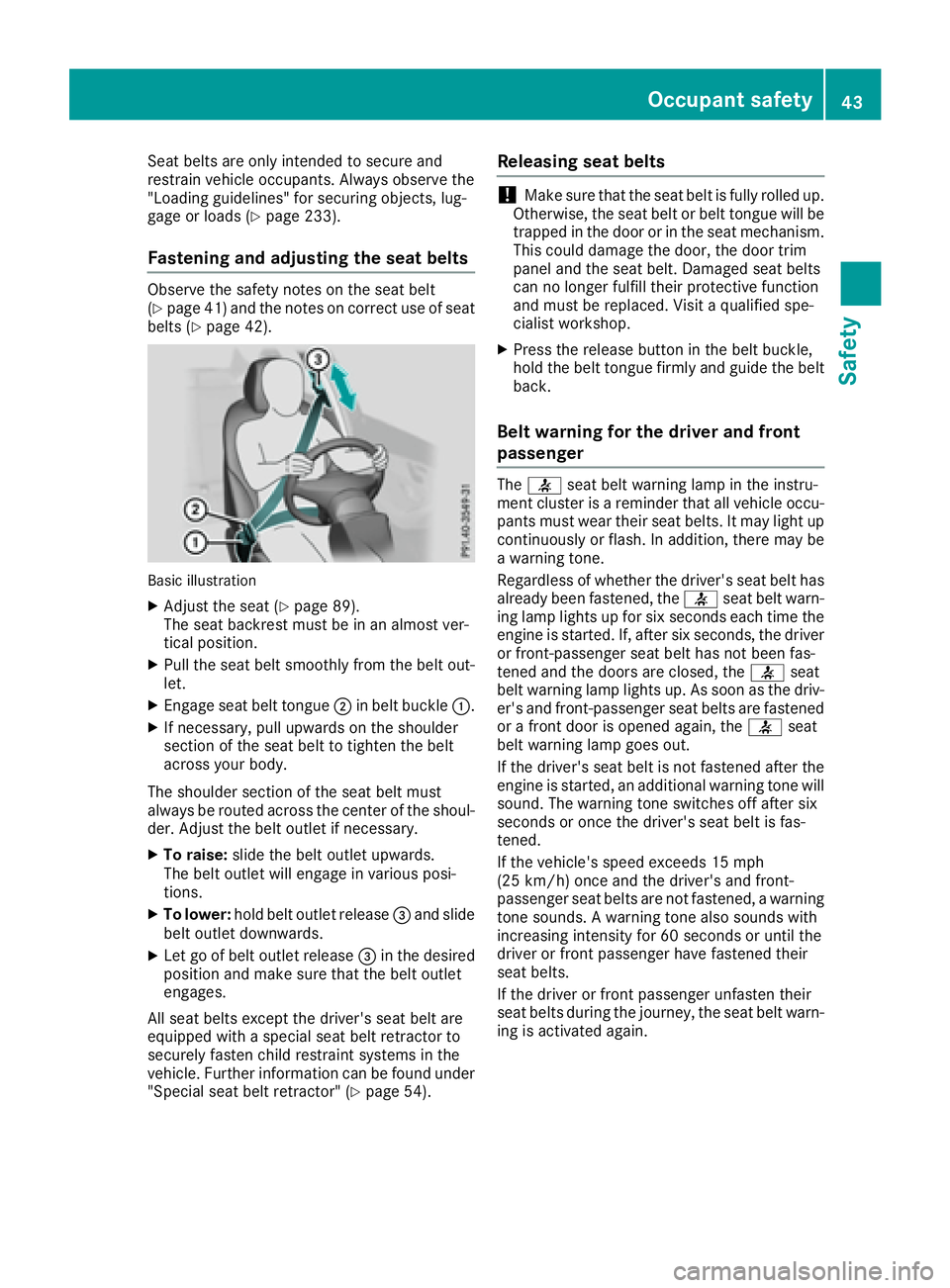
Fastening and adjusting the seat belts Observe the safety notes on the seat belt
( Y
page 41 )a nd the notes on correct use of seat
belts ( Y
page 42).
Basic illustration X
Adjust the seat ( Y
page 89).
The seat backrest must be in an almost ver-
tical position. X
Pull the seat belt smoothly from the belt out-
let. X
Engage seat belt tongue D in belt buckle C .X
If necessary, pull upwards on the shoulder
section of the seat belt to tighten the belt
across your body.
The shoulder section of the seat belt must
always be routed across the center of the shoul-
der. Adjust the belt outlet if necessary. X
To raise: slide the belt outlet upwards.
The belt outlet will engage in various posi-
tions. X
To lower: hold belt outlet release
Page 46 of 318
Air bags
Int rod uctionThe installation poin t of an air bag can be rec -
ognized by th e AI R BA G symbol.
An air bag complements th e correctl y fastene d
seat belt . It is no substitut e for th e seat belt . The
air bag provides additional protection in appli-
cable acciden t situations.
Not all air bags are deployed in an accident. The
differen t air bag systems function independ-
entl y from on e another ( Y
page 51).
However, no system available today can com-
pletely eliminate injurie s and fatalities.
It is also no t possibl e to rule out a ris k of injury
caused by an air bag due to th e high spee d at
whic h th e air bag mus t be deployed.
Import ant safety notes
G WARNIN G
If you do no t sit in th e correc t seat position ,
th e air bag canno t protect as intended and
could eve n caus e additional injury when
deployed. This poses an increased ris k of
injury or eve n fatal injury.
To avoi d hazardous situations, always mak e
sur e that all of th e vehicle's occupants:R
hav e fastene d their seat belt s correctly,
includin g pregnant womenR
are sitting correctl y and maintai n th e great-
est possibl e distanc e to th e air bagsR
follow th e followin g instruction s
Always mak e sur e that there are no objects
between th e air bag and th e vehicle's occu-
pants .R
Adjus t th e seat s properly before beginning
your journey. Always mak e sur e that th e seat
is in an almost upright position . The center of
th e head restrain t mus t support th e head at
about eye level. R
Mov e th e driver's and front-passenger seat s
as far bac k as possible. The driver's seat posi-
tion mus t allow th e vehicl e to be driven safely.R
Only hold th e steering whee l on th e outside .
This allows th e air bag to be fully deployed.R
Always lean against th e backrest while driv-
ing . Do no t lean forward s or lean against th e door or side window. You may otherwise be in
th e deploymen t area of th e air bags .R
Always keep your fee t in th e fo otwell in fron t
of th e seat . Do no t put your fee t on th e dash -
board, for example. Your fee t may otherwise
be in th e deployment area of th e air bag.R
Fo r this reason , always secure person s less
than 5 ft (1.5 0 m) tall in suitable restraint sys-
tems. Up to this height, the seat belt cannot
be worn correctly.
If a child is traveling in your vehicle, also
observe the following notes: R
Always secure children under twelve years of
age and less than 5 ft (1.50 m) tall in suitable
child restraint systems. R
Child restraint systems should be installed on
the rear seats. R
Only secure a child in a rearward-facing child
restraint system on the front-passenger seat
when the front-passenger front air bag is
deactivated. If the PASSENGER AIR BAG OFF
indicator lamp is permanently lit, the front-
passenger front air bag is deactivated
( Y
page 40). R
Always observe the instructions and safety
notes on the "Occupant Classification System
(OCS)" ( Y
page 46) and on "Children in the
vehicle" ( Y
page 53 )i n addition to the child
restraint system manufacturer's installation
and operating instructions.
Objects in the ve hicl e interior may prevent
an
air bag from functioning correctly. Before
starting your journey and to avoid risks resulting
from the speed of the air bag as it deploys, make
sure that: R
there are no people, animals or objects
between the vehicle occupants and an air
bag. R
there are no objects between the seat, door
and B-pillar. R
no hard objects, e.g. coat hangers, hang on
the grab handles or coat hooks. R
no accessories, such as cup holders, are
attached to the vehicle within the deployment
area of an air bag, e.g. to doors, side windows,
rear side trim or side walls. R
no heavy, sharp-edged or fragile objects are in
the pockets of your clothing. Store such
objects in a suitable place.44
Occupant safety
Safety