warning MERCEDES-BENZ CLA 2018 Owners Manual
[x] Cancel search | Manufacturer: MERCEDES-BENZ, Model Year: 2018, Model line: CLA, Model: MERCEDES-BENZ CLA 2018Pages: 326, PDF Size: 7.97 MB
Page 231 of 326
General notes The multimedia system section in this Opera-
tor's Manua ld escribes the basi cp rinciples for
operation. More information can be found in the
Digital Operator's Manual.
Important safety notes
G WARNING
If you operate information systems and com-
municatio ne quipment integrated in the vehi-
cle when driving, you may be distracted from
the traffic situation. You could also lose con-
trol of the vehicle .T here is ar isk of an acci-
dent.
Only operate this equipment when the traffic
situation permits. If you are not sure that this
is possible, park the vehicle paying attention
to traffic conditions and operate the equip-
ment when the vehicle is stationary.
You must observe the lega lr equirements for the
country in which you are currently driving when
operating the multimedia system.
The multimedia system calculates the route to
the destination withou tt aking the following into
account, for example: R
traffic lights R
stop and yield signs R
parking or stopping restrictions R
road narrowing R
other road and traffic rule sa nd regulations
The multimedia system may give incorrect nav-
igation recommendations if the actual street/
traffic situation does not correspond with the
digital map's data.
For example: R
ad iverted route R
the road layout or the direction of ao ne-way
street has been changed
For this reason, you must alway so bserve road
and traffic rule sa nd regulations during your
journey. Roa da nd traffic rule sa nd regulations
alway sh ave priority over multimedia system
driving recommendations. Navigation announcements are intended to
direct you whil ed riving withou td iverting your
attention from the road and driving.
Please alway su se this feature instead of con-
sulting the map display for directions. Looking
at the icons or map display can distract you from
traffic conditions and driving, and increase the
risk of an accident.
This equipment complies with FCC radiation
exposure limits set forth for uncontrolled equip-
ment and meets the FCC radi of requency (RF)
Exposure Guidelines in Supplement CtoO ET65.
This equipment has very low level sofRFe nergy
that is deeme dtoc omply withou tm aximum
permissive exposure evaluation (MPE). How-
ever, it is recommended to insta l l it at ad istance
of at least 8i nches (approx. 20 cm) betwee nt he
radiation source and ap erson's body (not
including limb ss uch as hands, wrists, feet and
legs).
G WARNING
Modifications to electronic components, their
software as wel lasw iring can impair their
function and/or the function of other net-
worked components. In particular, systems
relevant to safety could also be affected. As a
result, these may no longer function as inten-
ded and/or jeopardize the operating safety of
the vehicle .T here is an increase dr isk of an
accident and injury.
Never tamper with the wiring as wel lase lec-
tronic components or their software .Y ou
shoul dh ave all work to electrica la nd elec-
tronic equipment carried out at aq ualified
specialist workshop.
Function restrictions
For safety reasons, some functions are restric-
ted or unavailable whil et he vehicle is in motion.
You wil ln otice this, for example, because either
you wil ln ot be abl etos elect certain menu items
or am essag ew il la ppear to this effect.Function restrictions 229
Multimedia system Z
Page 237 of 326
X
Authorizatio nu sin gS ecur eS imple Pai r-
ing:
Ac od eisd ispl ayed in th em ultimed ia system
and on th em ob ile phone.X
Confir mc od eont he mob ile phone. Depen d-
ing on th em ob ile phon eu sed, confirm the
connection to th em ultimed ia system and for
th eP BA Pa nd MA PB luetooth ®
pro file s. The
prompt to confirm may tak euptot wo
minute stobed ispl ayed (see th em anufactur-
er' so peratin gi nstructions).X
If th ec od es are diff erent :s elect No on the
multimed ia system.
The proces sisc anceled.
Repeat authorization.
or X
Authorizatio nbye ntering ap as skey
(passcode): ente ra ny one- to sixteen-digit
number sequenc ew hic hy ou have chosen
yourself int ot he passke yi nput menu.X
Press T to confirm.X
Ente ra nd confirm th ep asske yo nt he mob ile
phone. Depen din gont he mob ile phon eu sed,
confirm th ec onnectio ntot he multimed ia sys-
te ma nd for th eP BA Pa nd MA PB luetooth ®
pro file s. The prompt to confirm may tak eu p
to two minute stobed ispl ayed (see th em an-
ufacturer' so peratin gi nstructions).
Symbols in th ed evice managerThe symbols are sho wn in color depen din go n
their use.
Symbol Explanation
Mobi le phon ec onnected to the
multimed ia system
Main telephone wit hf ull range of
functions
Ad dit ional telephone for incoming
calls in two telephone mode
Media mode
General notes
If you wish to play external medi as ources ,t he
appropriat em edi am od em ust alread ybet urned on .F urther informatio nonm edi am od e( see the
Digital Operator's Manual).
The followin ge xterna lm edi as ources can be
used: R
Apple ®
device s( e.g. iPhone ®
)R
US Bd evice s( e.g. US Bs ti ck ,M P3 player)
( Y
page 236) R
CD R
DV D( COMAND) R
SD car ds R
via device sc onnected by Bluetooth ®
i Information on single CD/DV Dd riv eorD VD
changer (see th eD igital Operator's Manual).
Selecting usin gt he device listMultimed ia system: X
Select Media { Devices .
The available medi as ources will be shown.
The ; dot indicates th ec urren ts etting.X
Select th em edi as ource.
Playable file sa re played.
Inserting/removing an SD card
Important safety notes
G WARNING
SD car ds are smal lp arts. They can be swal-
lowed and caus ec hoking. This pose sa n
increased ris kofi njury or eve nf atal injury.
Keep th eS Dc ar do ut of th er eac hofc hi ldren.
If aS Dc ar diss wallo wed, seek medical atten-
tio ni mmediately.
! If you are no longer usin gt he SD car d, you
should remove it and store it out side th ev eh i-
cle .H ig ht em peratures can damag et he card.
Insertin ganSDc ard
The SD car ds lot is locate dont he control panel.X
In ser tt he SD car di nt ot he SD car ds lot until
th eS Dc ar de ng ages .T he side wit ht he con-
tacts must fac ed own.
Removing an SD card X
Press th eS Dc ard.
The SD car dise je cted.X
Remo ve th eS Dc ar d.Operatin gs ystem 235
Multimedia system Z
Page 239 of 326
Loading guidelines
G WARNING
If objects, luggage or loads are not secured or
not secured sufficiently, they could slip, tip
over or be flun ga roun da nd thereb yh it vehicle
occupants. Ther eisar isk of injury, particu-
larly in th ee ven tofs udden braking or as ud-
den change in direction.
Always store object ssot ha tt he yc annot be
flun ga round. Secure objects, luggage or
loads against slippin gort ipping before the
journey.
G WARNING
Combustio ne ngine se mit poisonous exhaust
gases such as carbon monoxide. Exhaust
gases can enter th ev ehicle interio rift he
trunk lid is open when th ee ngine is running,
especially if th ev ehicle is in motion .T her eisa
risk of poisoning.
Always switch off th ee ngine before opening
th et ru nk lid. Never driv ew ith th et ru nk lid
open.
G WARNING
The exhaust tail pipe and tail pipe trim can
become ver yh ot .Ify ou com ei nt oc ontact
with these part soft he vehicle ,y ou could burn
yourself. Ther eisar isk of injury.
Always be particularly careful aroun dt he
exhaust tail pipe and th et ail pipe trim. Allow
these component stoc oo ld own before touch-
ing them.
The handlin gc haracteristic sofal aden vehicle
are dependen tont he distribution of th el oad
within th ev ehicle.
Observe th ef ollowing notes when loadin ga nd
transporting al oad:R
Never exceed th em aximum permissible
gross vehicle mass or th eg ross axle weight
rating for th ev ehicle (includin go ccupants).
The values are specified on th ev ehicle iden- tification plat eont he B-pillar of th ed river's
door. R
The trunk is th ep referred place to carry
objects. R
Position heavy loads as far forwards as pos-
sible and as low down in th et ru nk as possible.R
The load must not protrude above th eu pper
edge of th es eat backrests. R
Always place th el oad against th er ear or front
seat backrests .M ak es ure that th es eat
backrests are securely locked int op lace.R
Always place th el oad behin du noccupied
seat sifp ossible. R
Use th ec argo tie-down rings and th ep arcel
net stot ra nsport loads and luggage. R
Use cargo tie-down rings and fastening mate-
rials appropriat ef or th ew eight and siz eoft he
load. R
Secure th el oad with sufficiently stron ga nd
wear-resistant tie-down s .P ad shar pe dges for
protection.
Stowage areas
Stowage spaces
Important safety notes
G WARNING
If object sint he passenge rc ompartmen ta re
stowed incorrectly, they can slide or be
thrown aroun da nd hit vehicle occupants. In
addition ,c upholders, open stowage spaces
and mobile phon eb racket sc annot always
retain all object st he yc ontain .T her eisar isk
of injury, particularly in th ee ven tofs udden
braking or as udden change in direction. R
Always stow object ssot ha tt he yc annot be
thrown aroun dins uch situations.R
Always mak es ure that object sdon ot pro-
trude fro ms to wage spaces, parcel net so r
stowage nets. R
Close th el ockable stowage spaces before
starting aj ou rney. R
Always stow and secure heavy, hard, poin-
ted ,s harp-edged, fragile or bulky object si n
th et ru nk.
Observe th el oadin gg uidelines ( Y
page 237).Stowage areas 237
Stowage and features Z
Page 242 of 326
Cargo compartment enlargement
Important safety notes
G WARNING
If th er ear bench seat/rear seat and seat
backres ta re no te ng aged they coul df old for-
wards ,e .g .w hen braking suddenly or in the
event of an accident. R
The vehicle occupant would thereby be
pushe di nt ot he seat belt by th er ear bench
seat/rear seat or by th es eat backrest. The
seat belt can no longer offer th ei ntended
leve lofp rotection and coul de ve nc ause
injuries. R
Object sorl oads in th et ru nk canno tb e
restraine dbyt he seat backrest.
Ther eisani ncreased ris kofi njury.
Before every trip, mak es ure that th es eat
backrests and th er ear bench seat/rear seat
are engaged.
! Before folding th eb ackres tint he rear com-
partmen tf orwards ,m ak es ure that th er ear
compartmen ta rmres ta nd th ec upholder are
folded in. They may otherwise be damaged.
Observ et he loadin gg uideline s( Y
page 237).
The left-hand and right-han dr ear seat backrests
can be folded forwards separately to increase
th et ru nk capacity.
Folding th er ea rs eat backres tf orwards
and back
Folding th er ea rs eat backrests forward X
Fully insert th eb ackres th ead restraint si f
necessary ( Y
page 93). X
Mov et he driver' sorf ront-pa ssenger seat
forward if necessary. X
Pull left-hand or right-han dr elease handle D
of th es eat backres tf orward.
Corresponding seat backrest C is released.X
Fol db ackrest C forward.X
Mov et he driver' sorf ront-pa ssenger seat
back if necessary.
X
Inser tt he seat belt int os eat-belt holder C .
Folding th er ea rs eat backres tb ack
! Mak es ure that th es eat belt does not
become trapped when folding th er ear seat
backres tb ack .O th erwise, it coul dbed am-
aged.
X
Mov et he driver' sorf ront-pa ssenger seat
forward if necessary. X
Fol ds eat backrest C back until it engages.
Red loc ks ta tus indicator D is no longer visi-
ble. X
Adjust th eh ead restraint sifn ec essary
( Y
page 93). X
Mov et he driver' sorf ront-pa ssenger seat
back if necessary.240
Stowage areas
Stowage and features
Page 244 of 326
! Mercedes-Benz recommends that you only
use roof carriers that have been tested and
approved for Mercedes-Benz vehicles. This
helps to prevent damage to the vehicle.
Position the load on the roof rack in such a
way that the vehicle will not sustain damage
even when it is in motion.
Depending on the vehicle equipment, ensure
that when the roof carrier is installed you can: R
open the panorama roof with power tilt/
sliding panel fully R
open the trunk lid fully
You will find information on the maximum roof
load in the "Technical data" section
( Y
page 320).
An incorrectly secured roof carrier or roof load
may become detached from the vehicle. You
must therefore ensure that you observe the roof
carrier manufacturer's installation instructions.
Attaching the roof carrier
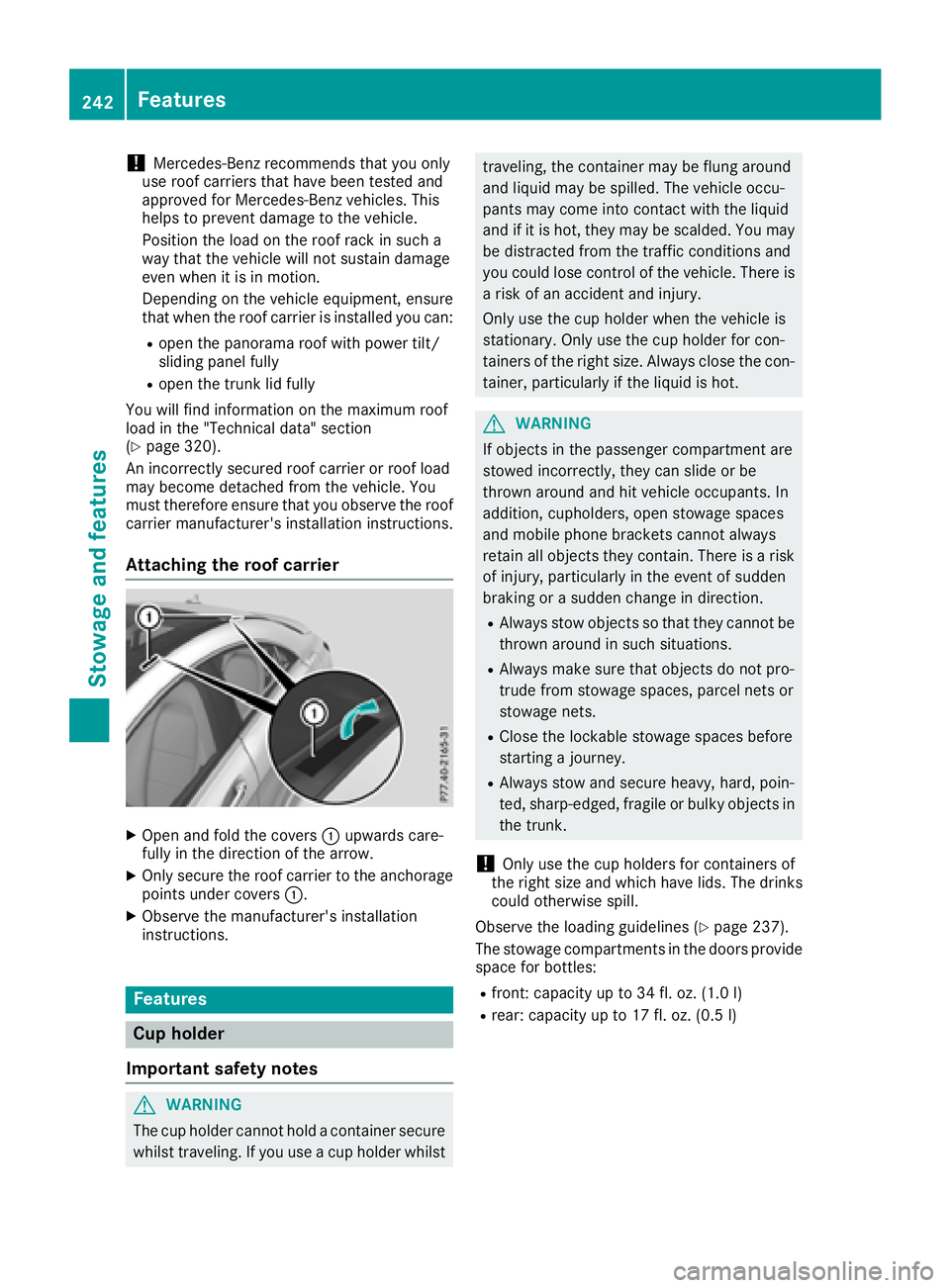
X
Open and fold the covers C upwards care-
fully in the direction of the arrow. X
Only secure the roof carrier to the anchorage
points under covers C .X
Observe the manufacturer's installation
instructions.
Features
Cup holder
Important safety notes
G WARNING
The cup holder cannot hold ac ontainer secure
whilst traveling. If you use ac up holder whilst traveling, the container may be flung around
and liquid may be spilled. The vehicle occu-
pants may come into contact with the liquid
and if it is hot, they may be scalded. You may
be distracted from the traffic conditions and
you could lose control of the vehicle. There is
ar isk of an accident and injury.
Only use the cup holder when the vehicle is
stationary. Only use the cup holder for con-
tainers of the right size. Alway sc lose the con-
tainer, particularl yift he liquid is hot.
G WARNING
If objects in the passenger compartment are
stowed incorrectly, they can slide or be
thrown around and hit vehicle occupants. In
addition, cupholders, open stowage spaces
and mobile phone brackets cannot always
retain all objects they contain. There is ar isk
of injury, particularl yint he event of sudden
braking or as udden change in direction. R
Alway ss tow objects so that they cannot be
thrown around in such situations. R
Alway sm ake sure that objects do not pro-
trude from stowage spaces, parcel nets or
stowage nets. R
Close the lockable stowage spaces before
starting aj ourney. R
Alway ss tow and secure heavy, hard, poin-
ted, sharp-edged, fragile or bulky objects in
the trunk.
! Only use the cup holders for containers of
the right size and which have lids. The drinks
could otherwise spill.
Observe the loading guidelines ( Y
page 237).
The stowage compartment sint he doors provide
space for bottles: R
front :c apacity up to 34 fl. oz. (1.0 l)R
rear: capacity up to 17 fl. oz. (0.5 l)242
Features
Stowage and features
Page 245 of 326
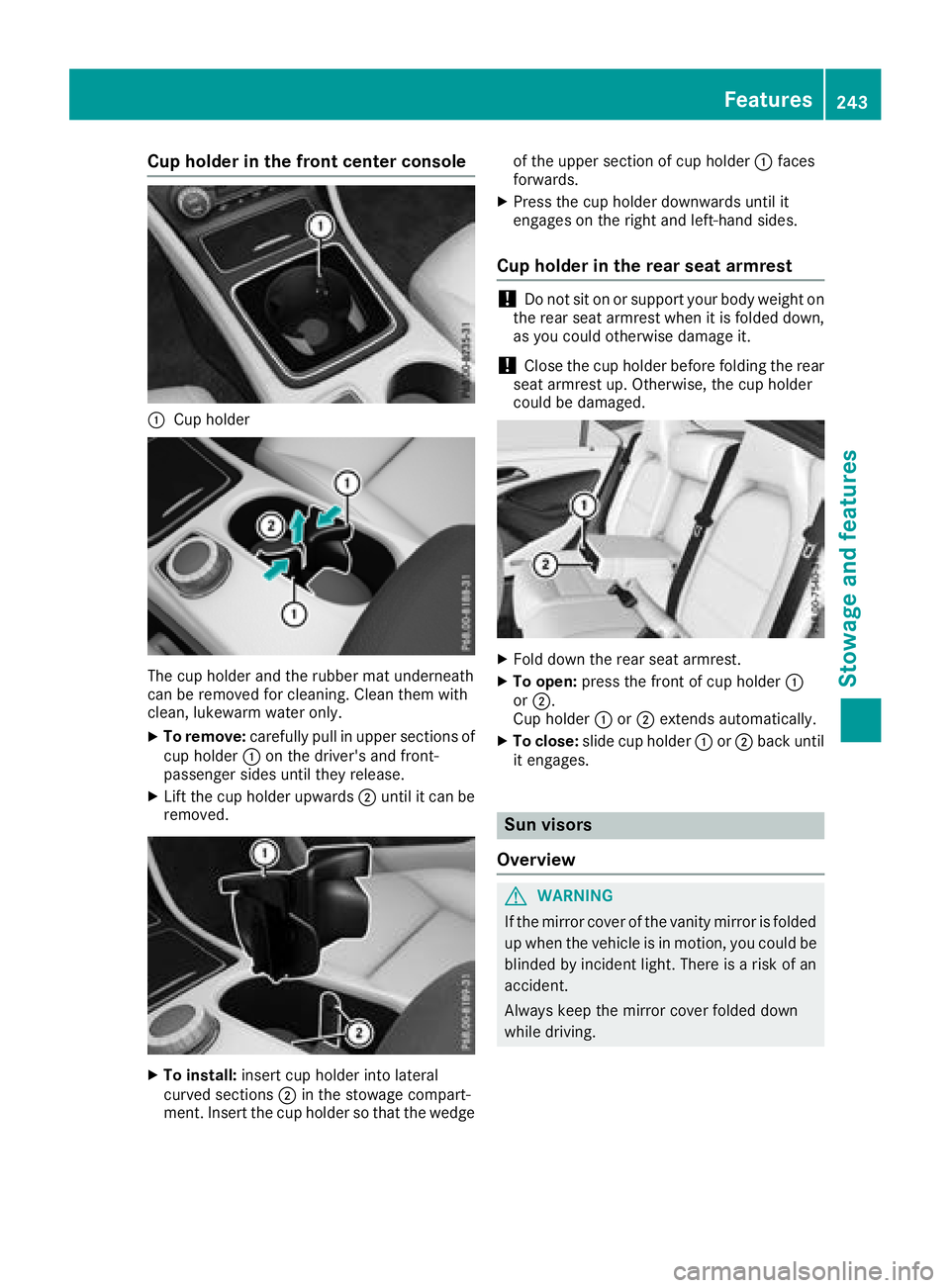
Cup holder in th ef ro nt center console
C
Cup holder
The cup holder and th er ubbe rm at underneath
can be remove df or cleaning. Clean them with
clean, lukewarm wate ro nl y.X
To remove: carefull yp ull in upper sections of
cup holder C on th ed river' sa nd front-
passenger sides until they release. X
Lif tt he cup holde ru pwards D until it can be
removed.
X
To install: insert cup holder int ol ateral
curved sections D in th es to wage compart-
ment. Inser tt he cup holde rsot ha tt he wedge of th eu pper sectio nofc up holder C faces
forwards. X
Press th ec up holder downwards until it
engages on th er igh ta nd left-hand sides.
Cup holder in th er ea rs eat armrest
! Do no ts it on or support your body weigh to n
th er ear seat armres tw hen it is folded down,
as you coul do th erwise damag ei t.
! Close th ec up holde rb efore folding th er ear
seat armres tu p. Otherwise, th ec up holder
coul dbed amaged.
X
Fol dd own th er ear seat armrest. X
To open: pres st he fron tofc up holder C
or D .
Cup holder C or D extends automatically.X
To close: slide cup holder C or D back until
it engages.
Sun visors
Overview
G WARNING
If th em irror cover of th ev anity mirror is folded
up when th ev ehicle is in motion ,y ou coul db e
blinded by inciden tl ight .T her eisar is kofa n
accident.
Always keep th em irror cover folded down
while driving. Features 243
Stowage and features Z
Page 248 of 326
Have the system checked at the nearest
Mercedes-Benz Service Center or contact the
following service hotlines:
Mercedes-Benz Customer Assistance Center at
1-800-FOR-MERCede s( 1-800-367-6372) or
1-866-990-9007
Em er genc yc allImportant safety notes
G WARNING
It can be dangerou stor emai nint he vehicle,
eve nify ou have presse dt he SOS button in an
emergency if: R
yo us ee smoke insid eoro ut sid eoft he vehi-
cle ,e .g .ift her eisaf ir ea fte rana ccidentR
the vehicl eisonad an gerou ss ection of
road R
the vehicl eisn ot visible or canno te asil yb e
see nb yo the rr oa du se rs ,p ar ticularly when
dark or in poo rv isibility conditions
There is ar is kofana ccident and injury.
Leave the vehicl ei mmediatel yint his or simi-
la rs it uations as soo na sitiss af etodos o.
Mov etoas af el oc ation along with othe rv ehi-
cle occupants. In such situations, secure the
vehicl eina ccordance with nationa lr egula-
tions, e. g. with aw ar ning triangle.
General notes Observe the notes on system activation
( Y
page 245).
An emergency cal lisd ialed automaticall yifa n
ai rb ag or Emergency Tensioning Device is trig-
gered .Y ou canno te nd an automaticall yt rig-
gered emergency cal ly ours elf.
An emergency cal lc an also be initiated man-
ually.
As soo na st he emergency cal lh as been initi-
ated, the indicator lamp in the SOS button
flashes. The Connectin gC all message
appears in the multifunctio nd is play.
The audi oo ut pu ti sm ut ed.
Once the connectio nh as been made, the Call
Connected message appears in the multifunc-
tio nd is play. All important informatio nont he emergency is
transmitted, for example: R
current location of the vehicl e( as determined
by the GP Ss ys tem) R
vehicl ei de ntificatio nn umberR
informatio nont he severity of the accident
Shortly afte rt he emergency cal lh as been initi-
ated, av oice connectio ni sa ut omaticall ye stab-
lishe db et ween the Customer Assistance Center
and the vehicl eo ccupants. R
If the vehicl eo ccupants respond ,t he
Mercedes-Benz Customer Assistance Center
attempts to get more informatio nont he
emergency. R
If ther eisnor espons ef rom the vehicl eo ccu-
pants, an ambulance is immediatel ys ent to
the vehicle.
If no voice connectio nc an be established to the
Mercedes-Benz Customer Assistance Center,
the system ha sb ee nu nabl etoi nitiate an emer-
genc yc all.
Thi sc an occur, for example, if the relevant
mobil ep hone network is not available .T he indi-
cato rl am pint he SOS button flashe sc ontinu-
ously.
The Cal lF ailed message appears in the mul-
tifunctio nd is play and must be confirmed.
In this case, summon assistance by other
means.
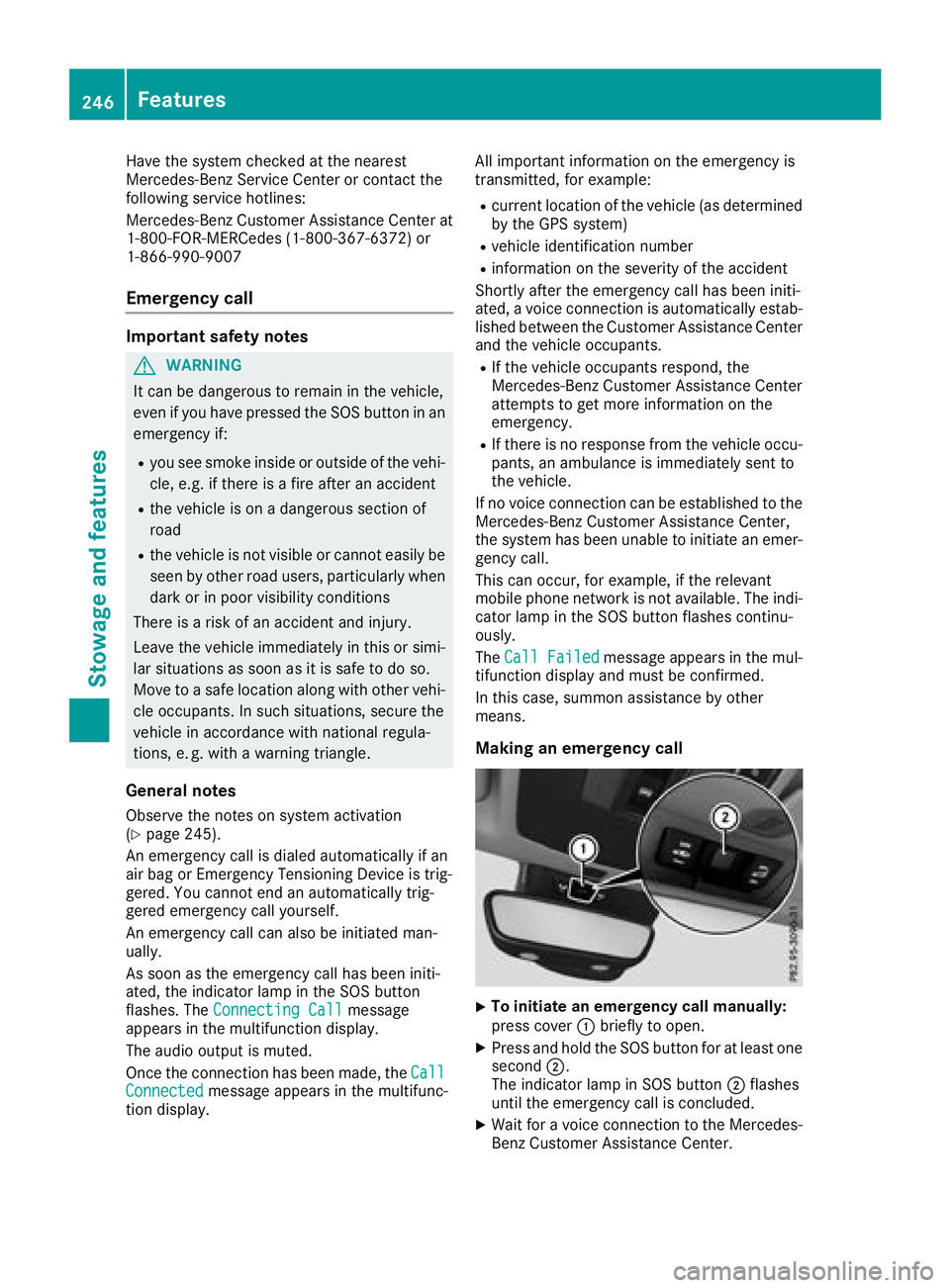
Making an emergenc yc all
X
To initiate an emergenc yc al lm anually:
press cover C briefl ytoo pen.X
Press and hol dt he SOS button for at leas to ne
second D .
The indicator lamp in SOS button D flashes
unti lt he emergency cal lisc oncluded.X
Wait for av oice connectio ntot he Mercedes-
Benz Customer Assistance Center.246
Features
Sto wag ea nd featur es
Page 254 of 326
Currently inactiv ea reas can be activated by text
message.
Triggering th ev ehicle alarmWit ht hi sf unction ,y ou can trigge rt he veh icle 's
pan ic alarm via text message. An alarm soun ds
and th ee xteri or lighting flashes. Depen din go n
th es etting, th ep an ic alarm last sf iv eort en sec-
onds. Afterwards, th ea larm swit ches off.
Garage door opener
General notes The HomeLink ®
garag ed oor opener integrated
in th er ear-view mirror allows you to operate up
to three diff erent door and gat es ystems.
Use th ei ntegrate dg arag ed oor opener on ly on
garag ed oor st ha t:R
have safety stop and revers ef eatures andR
mee tc urren tU .S .f ederal safety standards
Once programed, th ei ntegrate dg arag ed oor
opener in th er ear-view mirror will assum et he
function of th eg arag ed oor system' sr emote
control. Pleas ea lso read th eo peratin gi nstruc-
tions for th eg arag ed oor system.
When programmin gag arag ed oor opener, park
th ev eh icle out side th eg arage. Do no tl eave the
engin er unnin gw hile programming.
Certain garag ed oor driv es are incompatib le
wit ht he integrate dg arag ed oor opener. If you
have diff icult yp rograming th ei ntegrate dg arage
door opener, contact aM ercedes-Ben zS ervice
Center.
Alternatively, you can call th ef oll owin gt el e-
phon ea ssistance services:R
USA: Mercedes-Ben zC ustome rA ss istance
Cente rat1 -800-FOR -M ERCe desR
Canada: Custome rS ervic ea t
1-800-387-0100 R
HomeLink ®
hot lin e1 -800-355-351 5( free of
charge)
Mor ei nformatio nonH omeLink ®
and/or com-
pat ible product sisa lso availab le on lin ea t
http:/ /www. hom elin k.co m.
Notes on the declaration of conformity
( Y
page 27).
USA: FCC ID: CB2HMIHL4
Canada: IC: 279B-HMIHL4 Important safety notes
G WARNING
When you operate or program the garag ed oor
with the integrated garag ed oor opener, per-
sons in the range of movement of the garage
door can become trapped or struck by the
garag ed oor. There is ar isk of injury.
When using the integrated garag ed oor
opener, always make sure that nobody is
within the range of movement of the garage
door.
G WARNING
Combustion engines emit poisonou se xhaust
gases such as carbon monoxide. Inhaling
these exhaust gases lead stop oisoning. There
is ar isk of fatal injury. Therefore never leave
the engine running in enclosed spaces with-
out sufficient ventilation.
Programming
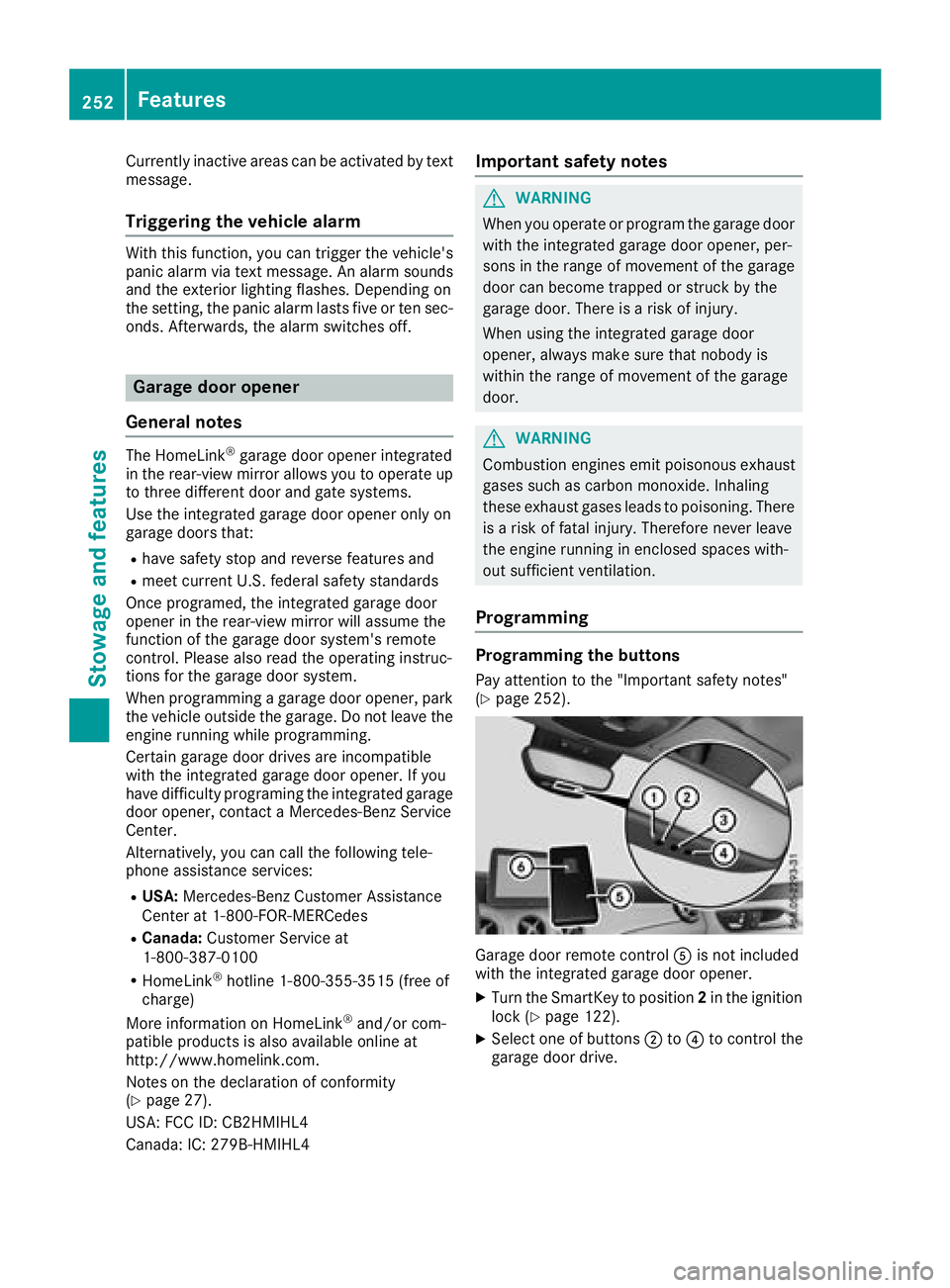
Programming the buttons Pay attention to the "Important safety notes"
( Y
page 252).
Garage door remote control
Page 258 of 326
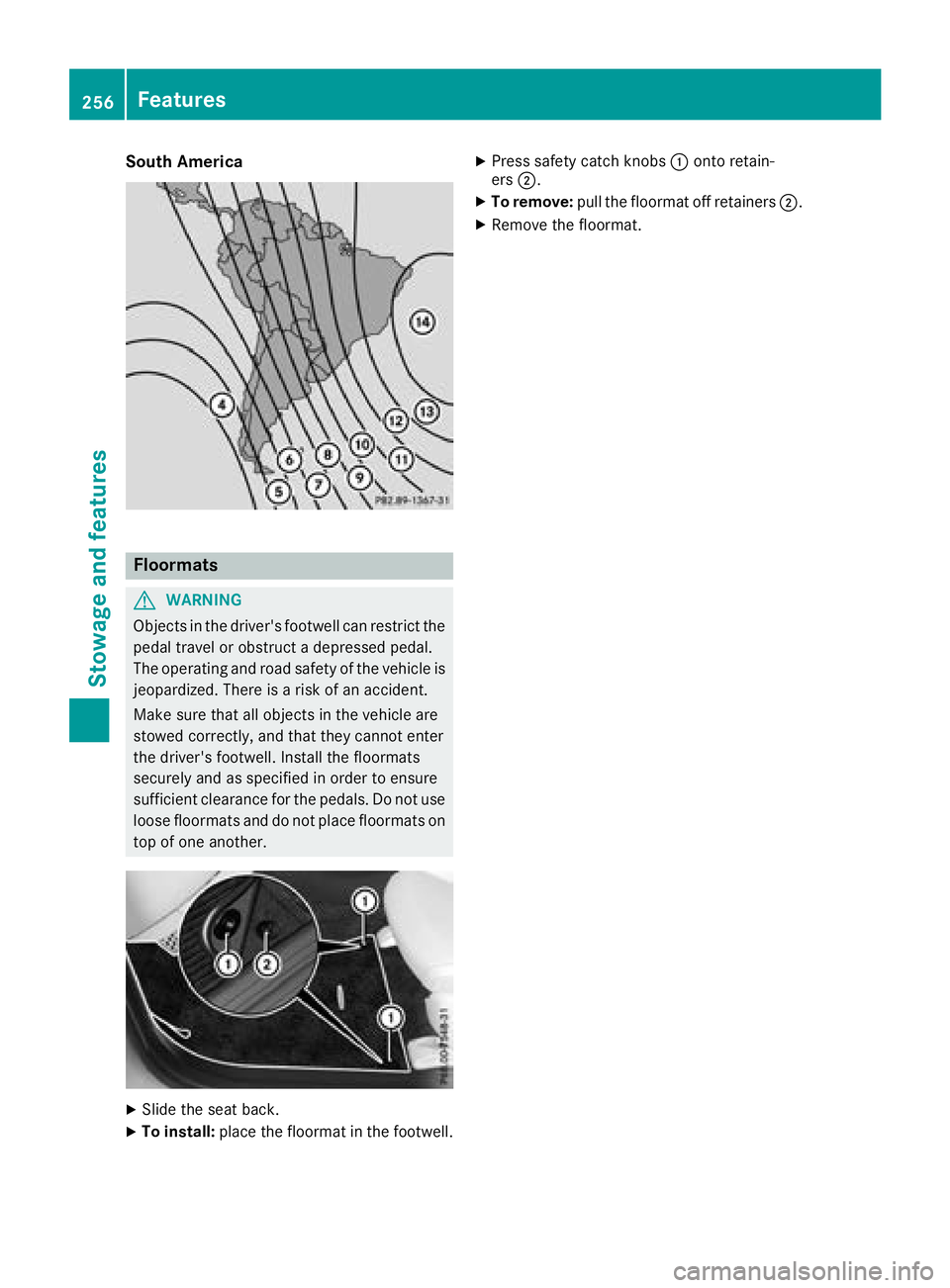
South America
Floormats
G WARNING
Object sint he driver's footwell can restrict the
pedal travel or obstruct ad epressed pedal.
The operating and road safety of the vehicle is
jeopardized. There is ar isk of an accident.
Make sure that all object sint he vehicle are
stowed correctly, and that they cannot enter
the driver's footwell. Install the floormats
securely and as specified in order to ensure
sufficient clearance for the pedals. Do not use
loose floormats and do not place floormats on
top of one another.
X
Slide the seat back. X
To install: place the floormat in the footwell. X
Press safety catch knobs C onto retain-
ers D . X
To remove: pull the floormat off retainers D .X
Remove the floormat.256
Features
Stowage and features
Page 259 of 326
Engine compartment
Hood
Important safety notes
G WARNING
If th eh ood is unlatched, it may open up when
th ev ehicle is in motion and bloc ky our view.
Ther eisar isk of an accident.
Never unlatch th eh ood while driving .B efore
ever yt ri p, ensure that th eh ood is locked.
G WARNING
When opening and closin gt he hood ,itm ay
suddenly fall int ot he closed position .T her ei s
ar isk of injury to person sw ithin range of
movemen toft he hood.
Open and close th eh ood only when no on ei s
within its range of movement.
G WARNING
Opening th eh ood when th ee ngine is over-
heated or when there is af ir eint he engine
compartmen tc oul de xpose you to hot gases
or other servic ep roducts. Ther eisar isk of
injury.
Let an overheate de ngine coo ld own before
opening th eh ood .Ift he re is af ir eint he
engine compartment, keep th eh ood closed
and contac tt he fir ed epartment.
G WARNING
The engine compartmen tc ontain sm oving
components. Certain components, suc ha s
th er adiator fan ,m ay continue to run or start
again suddenly when th ei gnition is off .T here
is ar isk of injury.
If you nee dtodoa ny work inside th ee ngine
compartment: R
switch off th ei gnitionR
never reac hi nt ot he area wher et he re is a
risk of danger from moving components,
suc hast he fan rotatio na rea R
remove jewelry and watches R
keep items of clothing and hair, for exam-
ple, away from moving parts
G WARNING
The ignition system and th ef uel injection sys-
te mw ork unde rh igh voltage. If you touch
component sw hic ha re unde rv oltage, you
coul dg et an electric shock. Ther eisar isk of
injury.
Never touch component soft he ignition sys-
te morf uel injection system when th ei gnition
is switched on.
Opening th eh ood
G WARNING
Certain component sint he engine compart-
ment, suc hast he engine ,r adiator and parts
of th ee xhaust system, can become ver yh ot.
Workin gint he engine compartmen tp ose sa
risk of injury.
Wher ep ossible, let th ee ngine coo ld own and
touch only th ec omponent sd escribe dint he
following.
G WARNING
When th eh ood is open and th ew indshield
wiper sa re set in motion ,y ou can be injured by
th ew iper linkage. Ther eisar isk of injury.
Always switch off th ew indshield wiper sa nd
th ei gnition before opening th eh ood.
! Mak es ure that th ew indshield wiper sa re
no tf olded away from th ew indshield. You
coul do th erwise damag et he windshield wip-
ers or th eh ood.Engine compartment 257
Maintenance and care Z