Alarm MERCEDES-BENZ CLA 2018 User Guide
[x] Cancel search | Manufacturer: MERCEDES-BENZ, Model Year: 2018, Model line: CLA, Model: MERCEDES-BENZ CLA 2018Pages: 326, PDF Size: 7.97 MB
Page 80 of 326
X
Press the lockin gb utton on the driver’s door
( Y
page 76).X
Check whether the lockin gk nobs on the
front-passenger door and the rear doors are
still visible. Press down the lockin gk nobs by
hand, if necessary. X
Close the driver's door. X
Take the mechanical key out of the SmartKey
( Y
page 72).X
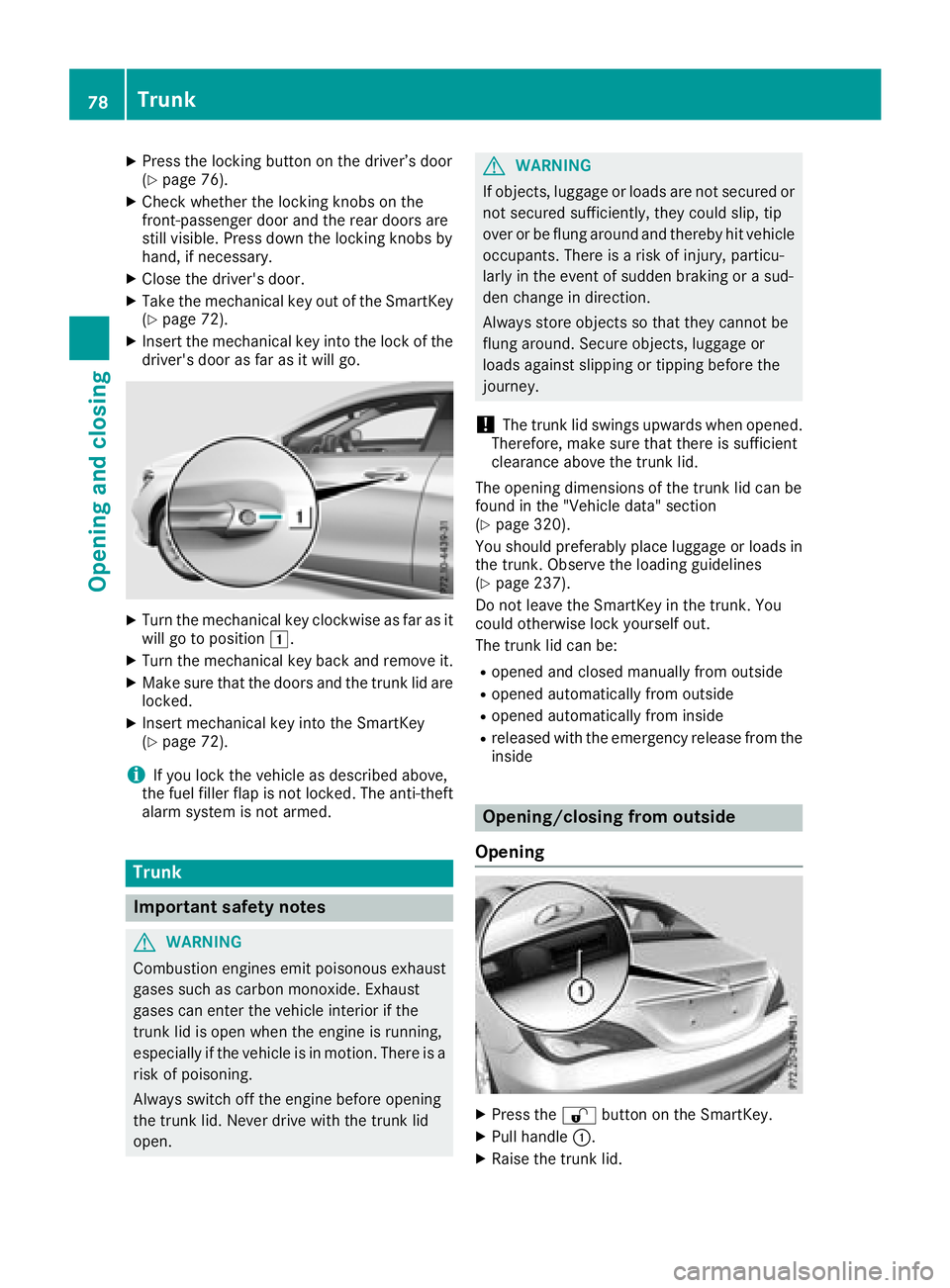
Insert the mechanical key into the lock of the
driver's door as far as it will go.
X
Turn the mechanical key clockwise as far as it
will go to position G .X
Turn the mechanical key back and remove it. X
Make sure that the doors and the trunk lid are
locked. X
Insert mechanical key into the SmartKey
( Y
page 72).
i If you lock the vehicle as described above,
the fuel filler flap is not locked. The anti-theft
alarm system is not armed.
Trunk
Important safety notes
G WARNING
Combustion engines emit poisonous exhaust
gases such as carbon monoxide. Exhaust
gases can enter the vehicle interior if the
trunk lid is open when the engine is running,
especially if the vehicle is in motion .T here is a
risk of poisoning.
Always switch off the engine before opening
the trunk lid. Never drive with the trunk lid
open. G WARNING
If objects, luggage or loads are not secured or
not secured sufficiently, they could slip, tip
over or be flung around and thereby hit vehicle
occupants. There is ar isk of injury, particu-
larly in the event of sudden braking or as ud-
den change in direction.
Always store object ssot hat they cannot be
flung around. Secure objects, luggage or
loads against slipping or tipping before the
journey.
! The trunk lid swings upwards when opened.
Therefore, make sure that there is sufficient
clearance above the trunk lid.
The opening dimensions of the trunk lid can be
found in the "Vehicle data" section
( Y
page 320).
You should preferably place luggage or loads in
the trunk .O bserve the loading guidelines
( Y
page 237).
Do not leave the SmartKey in the trunk .Y ou
could otherwise lock yourself out.
The trunk lid can be: R
opened and closed manually from outside R
opened automatically from outside R
opened automatically from inside R
released with the emergenc yr elease from the
inside
Opening/closing from outside
Opening
X
Press the 6 button on the SmartKey. X
Pull handle C . X
Raise the trunk lid.78
Trunk
Opening and closing
Page 126 of 326
G WARNING
Flammable materials introduced through
environmental influence or by animals can
ignite if in contact with the exhaust system or
parts of the engine that hea tu p. There is ar isk
of fire.
Carry out regular checks to make sure that
there are no flammable foreig nm aterials in
the engine compartment or in the exhaust
system.
General notes During ac old start, the engine runs at higher
speeds to enabl et he catalytic converter to
reach its operating temperature. The sound of
the engine may change during this time.
Automatic transmission X
Shift the transmission to position ]
( Y
pag e1 30).
The transmission position display in the mul-
tifunction display shows P ( Y
pag e1 30).
i You can start the engine in transmission
position ] and \\ .
Starting procedure with the SmartKey To start the engine using the SmartKey instead
of the Start/Stop button, pul lt he Start/Stop
button out of the ignitio nl ock.X
Turn the SmartKey to position I in the igni-
tion lock ( Y
pag e1 22) and release it as soon
as the engine is running.
Starting procedure with the Start/Stop
button The Start/Stop button can be used to start the
vehicl em anually without inserting the SmartKey
into the ignitio nl ock. The Start/Stop button
must be inserted in the ignitio nl ock and the
SmartKey must be in the vehicle. This mode for
starting the engine operates independently of
the ECO start/stop automatic engine start func-
tion.
You can start the engine if av ali dS martKey is in
the vehicle. Switch off the engine and always
take the SmartKey with you when leaving the vehicle, even if you only leave it for as hort time.
Pay attention to the important safety notes. X
Depress the brake peda la nd keep it
depressed. X
Press the Start/Stop button once
( Y
pag e1 22).
The engine starts.
Starting procedure via smartphone Observe the important safety notes on starting
the engine ( Y
pag e1 23).
You can als os tart you re ngine via you rs mart-
phone from outside the vehicle. In this case, the
previousl ys elected climate control setting is
activated. In this way you can cool or heat the
interior of the vehicl eb efore starting the jour-
ney.
Only start the engine via you rs martphone if it is
safe to start and run the engine where you rv ehi-
cle is parked.
Observe the lega ls tipulations in the area where
you rv ehicl eisp arked .E ngine start via smart-
phone may be limited to certain countries or
regions.
You can execute am aximu moft wo consecutive
starting attempts via you rs martphone. If you
insert the SmartKey into the ignitio nl ock, you
can carry out two more starting attempts.
Once you have started the engine, you can
switch the engine off via you rs martphone at any
time.
You can only start the engine via you rs mart-
phone if: R
the SmartKey is in the ignitio nl ockR
park position ] is selectedR
the accelerator peda lisn ot depressedR
the anti-theft alarm system is not activated R
the pani ca larm is not activated R
the hazard warning lamp sa re switched offR
the hood is closed R
the doors are closed and locked R
the windows and sliding sunroof are closed
Also make sure that: R
the fuel tank is sufficiently filled R
the starter battery is sufficiently charged
G WARNING
Limbs coul dbec rushe dort rappe dift he
engine is started unintentionally during ser-124
Driving
Driving and parking
Page 252 of 326
Mercedes-Ben zC ustomer Assistanc eC enter
at 1-800-FOR-MERCedes (1-800-367-6372)
or 1-866-990-9007
You will be asked for your password. X
Return to your vehicle at the time agreed upon
with the Mercedes-Ben zC ustomer Assis-
tance Center.
Alternatively, the vehicle can be opened via: R
the Internet, under the "Owners Online" sec-
tion R
telephone applications (e.g. for iPhone ®
,
Android™)
To do this, you will need your identification num-
ber and password.
Vehicle remote closing The vehicle remote-closing feature can be used
when you have forgotten to lock the vehicle and
you are no longer nearby.
The vehicle can then be locked by the Mercedes-
Benz Customer Assistanc eC enter.
The vehicle can be immediately remotely locked
within four days of the ignition being turned off.
After this time, remote closing may be delayed
by 15 to 60 minutes. After 30 days the vehicle
can no longer be valet locked remotely.
The vehicle remote closing feature is available if
the relevant mobile phone network is available
and ad ata connection is possible.X
Contact the following service hotlines:
Mercedes-Ben zC ustomer Assistanc eC enter
at 1-800-FOR-MERCedes (1-800-367-6372)
or 1-866-990-9007
You will be asked for your password.
The next time you are inside the vehicle and you
switch on the ignition, the Doors Locked
Remotely message appears in the multifunction
display.
Alternatively, the vehicle can be locked via: R
the Internet, under the "Owners Online" sec-
tion R
telephone applications (e.g. for iPhone ®
,
Android™)
To do this, you will need your identification num-
ber and password. Stolen vehicle recovery service If your vehicle has been stolen: X
Notify the police.
The police will issue an umbered incident
report. X
This number will be forwarded to the
Mercedes-Ben zC ustomer Assistanc eC enter
together with your PIN.
The Mercedes-Ben zC ustomer Assistance
Center then tries to locate the system. The
Mercedes-Ben zC ustomer Assistanc eC enter
contacts you and the local law enforcement
agency if the vehicle is located.
However, only the law enforcement agency is
informed of the location of the vehicle.
If the anti-theft alarm system is activated for
longer than 30 seconds, the Mercedes-Benz
Customer Assistanc eC enter is automatically
notified.
Vehicle Health Check With the Vehicle Health Check, the Customer
Assistanc eC enter can provide improved sup-
port for problems with your vehicle. During an
existing call, vehicle data is transferred to the
Customer Assistanc eC enter.
The customer service representative can use
the received data to decide what kind of assis-
tance is required. You are then, for example,
guided to the nearest Mercedes-Ben zS ervice
Center or ar ecovery vehicle is called.
If vehicle data needs to be transferred during an
MB Info call or aR oadside Assistanc ec all, this is
initiated by the Customer Assistanc eC enter.
The Roadside Assistance Connected mes-
sage appears in the display .Ift he Vehicle Health
Check can be started, the Request for Vehi‐
cle Diagnostics Received Start vehi‐
cle diagnostics? message appears in the
display. X
Press the Yes button to confirm the message. X
When the Vehicle Diagnostics Please
Start Ignition message appears: turn the
SmartKey to position 2 in the ignition lock
( Y
page 122). X
If the Please follow the instructions
received by phone and move your vehi‐
cle to as afe position. message
appears: please follow the instructions250
Features
Stowage and features
Page 254 of 326
Currently inactiv ea reas can be activated by text
message.
Triggering th ev ehicle alarmWit ht hi sf unction ,y ou can trigge rt he veh icle 's
pan ic alarm via text message. An alarm soun ds
and th ee xteri or lighting flashes. Depen din go n
th es etting, th ep an ic alarm last sf iv eort en sec-
onds. Afterwards, th ea larm swit ches off.
Garage door opener
General notes The HomeLink ®
garag ed oor opener integrated
in th er ear-view mirror allows you to operate up
to three diff erent door and gat es ystems.
Use th ei ntegrate dg arag ed oor opener on ly on
garag ed oor st ha t:R
have safety stop and revers ef eatures andR
mee tc urren tU .S .f ederal safety standards
Once programed, th ei ntegrate dg arag ed oor
opener in th er ear-view mirror will assum et he
function of th eg arag ed oor system' sr emote
control. Pleas ea lso read th eo peratin gi nstruc-
tions for th eg arag ed oor system.
When programmin gag arag ed oor opener, park
th ev eh icle out side th eg arage. Do no tl eave the
engin er unnin gw hile programming.
Certain garag ed oor driv es are incompatib le
wit ht he integrate dg arag ed oor opener. If you
have diff icult yp rograming th ei ntegrate dg arage
door opener, contact aM ercedes-Ben zS ervice
Center.
Alternatively, you can call th ef oll owin gt el e-
phon ea ssistance services:R
USA: Mercedes-Ben zC ustome rA ss istance
Cente rat1 -800-FOR -M ERCe desR
Canada: Custome rS ervic ea t
1-800-387-0100 R
HomeLink ®
hot lin e1 -800-355-351 5( free of
charge)
Mor ei nformatio nonH omeLink ®
and/or com-
pat ible product sisa lso availab le on lin ea t
http:/ /www. hom elin k.co m.
Notes on the declaration of conformity
( Y
page 27).
USA: FCC ID: CB2HMIHL4
Canada: IC: 279B-HMIHL4 Important safety notes
G WARNING
When you operate or program the garag ed oor
with the integrated garag ed oor opener, per-
sons in the range of movement of the garage
door can become trapped or struck by the
garag ed oor. There is ar isk of injury.
When using the integrated garag ed oor
opener, always make sure that nobody is
within the range of movement of the garage
door.
G WARNING
Combustion engines emit poisonou se xhaust
gases such as carbon monoxide. Inhaling
these exhaust gases lead stop oisoning. There
is ar isk of fatal injury. Therefore never leave
the engine running in enclosed spaces with-
out sufficient ventilation.
Programming
Programming the buttons Pay attention to the "Important safety notes"
( Y
page 252).
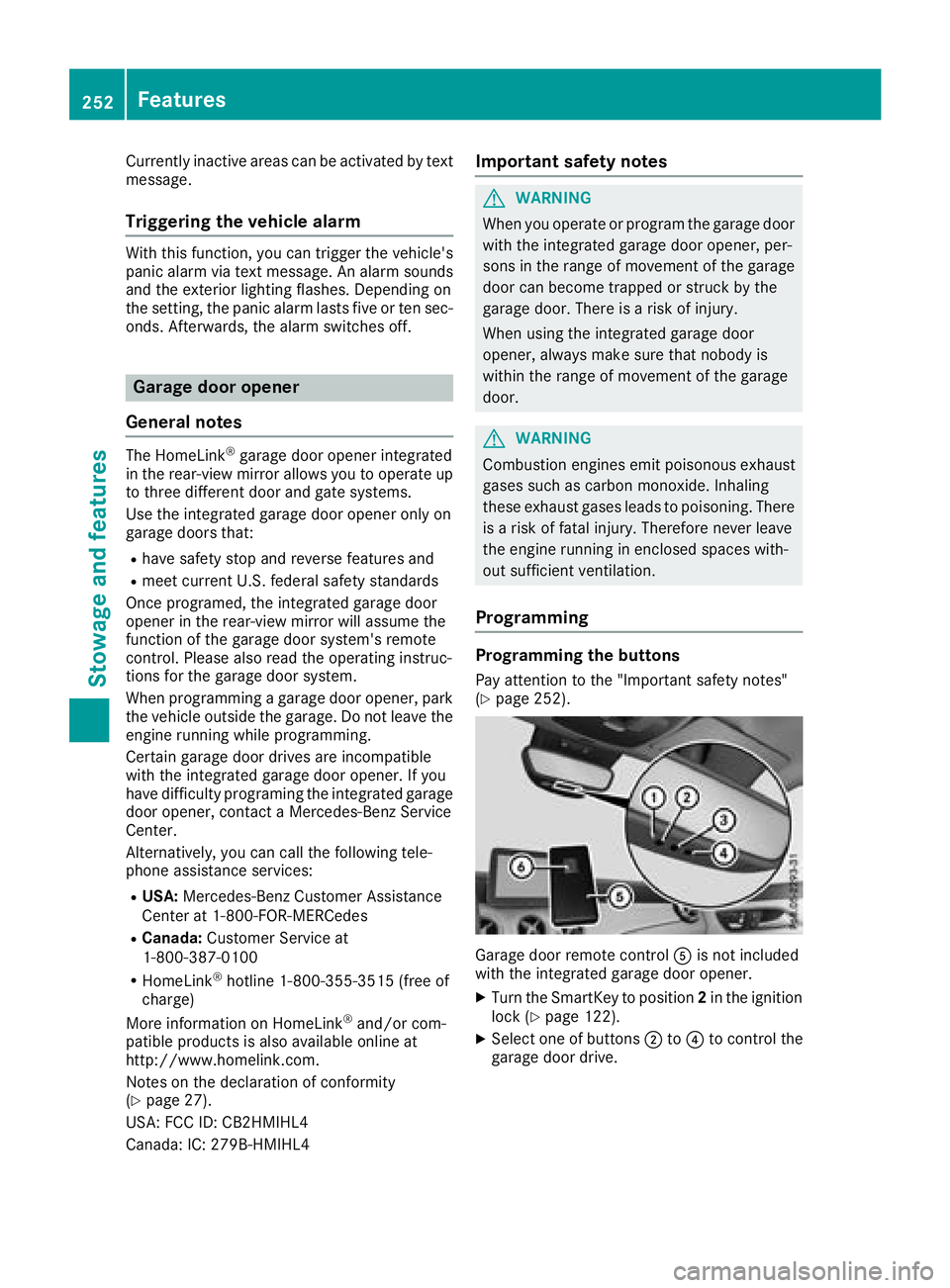
Garage door remote control